Informix Dynamic Server V10:
Superior Data Replication for
Availability and Distribution
Chuck Ballard
Carlton Doe
Ajay Gupta
Michael Lee
Dick Snoke
High availability to reduce or eliminate
costly downtime
Enterprise replication for fast
data distribution
Reduced deployment and
management costs
Informix Dynamic Server V10: Superior Data
Replication for High Availability and Distribution
April 2007
© Copyright International Business Machines Corporation 2007. All rights reserved.
First Edition (April 2007)
This edition applies to Version 10 of the IBM Informix Dynamic Server (IDS), and IDS 10.0.UC5.
Note: Before using this information and the product it supports, read the information in
Contents
Notices . . . vii
Trademarks . . . viii
Preface . . . ix
The team that wrote this book . . . ix
Become a published author . . . xi
Comments welcome . . . xii
Chapter 1. Introduction . . . 1
1.1 Getting started . . . 2
1.2 HA features in IDS. . . 3
1.3 Choosing a replication strategy . . . 5
Chapter 2. Preparing the technical infrastructure . . . 7
2.1 Hardware setup and considerations . . . 8
2.2 Database server setup . . . 9
2.3 Database server configuration . . . 11
2.4 Database setup and considerations . . . 14
2.5 HDR up and running . . . 16
Chapter 3. Understanding and using High Availability Data Replication. 19 3.1 What HDR is and how it works . . . 20
3.1.1 Now or later? (asynchronous or synchronous mode) . . . 21
3.2 Preparing for and instantiating an HDR pair . . . 23
3.3 HDR failure recovery . . . 27
3.3.1 The DRAUTO parameter and its impact . . . 28
3.3.2 Step-wise approaches to recovering from an HDR failure . . . 29
3.4 HDR and applications . . . 33
Chapter 4. HDR: Advanced use scenarios . . . 37
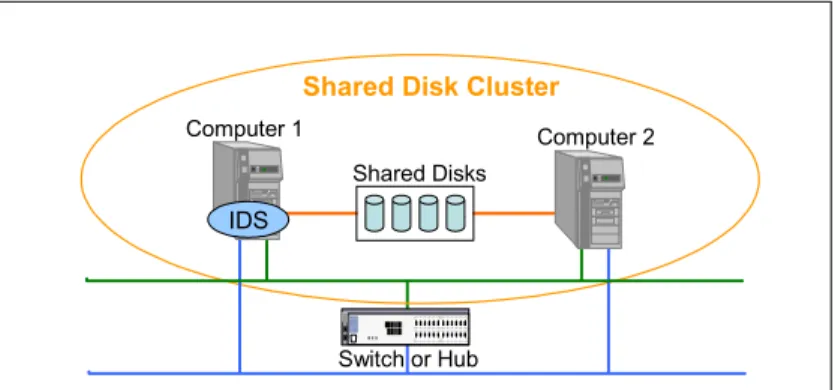
4.1 Hardware cluster for high availability. . . 38
4.2 Combining HDR and other technology . . . 40
4.2.1 Continuous log restore . . . 40
4.2.2 Combining HDR with continuous log restore . . . 42
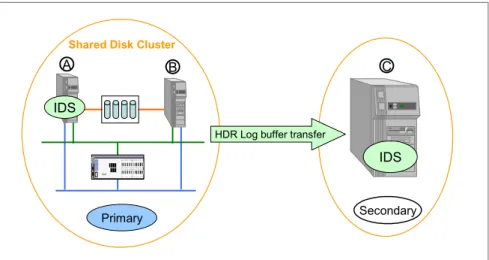
4.2.3 Combining HDR with a hardware cluster . . . 43
4.3 Managing multiple instances with HDR . . . 43
4.3.1 Multiple independent instances of IDS . . . 44
4.3.2 Star connection for multiple HDR . . . 44
4.4 Data partitioning with multiple HDR. . . 46
4.4.1 Simple table-level partitioning . . . 47
4.4.2 Complex data partitioning with triggers and views . . . 50
4.5 High availability solutions . . . 53
Chapter 5. Defining the enterprise replication topology . . . 55
5.1 Basic concepts and terms . . . 56
5.1.1 Database servers . . . 56
5.1.2 Replicates and replicate sets . . . 57
5.1.3 Purposes of replication . . . 57
5.1.4 Types of replication . . . 58
5.1.5 Topologies for replication . . . 59
5.1.6 Timing of replication . . . 61
5.1.7 Including HDR in an ER scheme. . . 62
5.2 Choosing an appropriate topology . . . 62
5.2.1 Communications network considerations . . . 62
5.2.2 Workload considerations . . . 63
5.2.3 Updating and conflict resolution . . . 63
5.3 Building a replication network . . . 64
Chapter 6. Instantiating enterprise replication . . . 65
6.1 The examples . . . 66
6.2 Preparing the databases . . . 67
6.2.1 The data and database . . . 68
6.2.2 The IDS instances . . . 69
6.3 Defining the ER elements . . . 71
6.3.1 Defining servers . . . 71
6.3.2 Defining replicates using the cdr command . . . 75
6.3.3 Defining replicates with the Informix Server Administrator . . . 78
6.3.4 Defining replicate sets . . . 81
6.4 Starting enterprise replication . . . 82
6.5 Templates . . . 83
6.5.1 Terms and conditions . . . 83
6.5.2 Defining a template . . . 84
6.5.3 Realizing templates . . . 85
6.6 Other replication considerations . . . 89
6.6.1 Blocking replication in a transaction . . . 89
6.6.2 Replicating user-defined types and routines . . . 89
Chapter 7. Making changes in enterprise replication . . . 91
7.1 Scenarios for making changes to existing ER . . . 92
7.2 Changing a replication server . . . 92
7.3 Changing replicates. . . 97
7.5 Template changes . . . 106
Chapter 8. Monitoring and troubleshooting ER . . . 109
8.1 How enterprise replication works . . . 110
8.2 Handling asynchronous communication of ER . . . 112
8.3 Using onstat for ER statistics collection . . . 113
8.3.1 Global Catalog statistics (onstat -g cat) . . . 114
8.3.2 Log snooping statistics . . . 116
8.3.3 Grouper statistics . . . 119
8.3.4 Reliable Queue Manager (RQM) statistics . . . 121
8.3.5 Network Interface (NIF) statistics . . . 128
8.3.6 Receive Manager statistics . . . 130
8.3.7 Data Sync statistics . . . 133
8.3.8 A few more troubleshooting tips . . . 134
Glossary . . . 137
Abbreviations and acronyms . . . 141
Related publications . . . 145
IBM Redbooks . . . 145
Other publications . . . 145
How to get Redbooks . . . 145
Help from IBM . . . 145
Notices
This information was developed for products and services offered in the U.S.A.
IBM may not offer the products, services, or features discussed in this document in other countries. Consult your local IBM representative for information on the products and services currently available in your area. Any reference to an IBM product, program, or service is not intended to state or imply that only that IBM product, program, or service may be used. Any functionally equivalent product, program, or service that does not infringe any IBM intellectual property right may be used instead. However, it is the user's responsibility to evaluate and verify the operation of any non-IBM product, program, or service.
IBM may have patents or pending patent applications covering subject matter described in this document. The furnishing of this document does not give you any license to these patents. You can send license inquiries, in writing, to:
IBM Director of Licensing, IBM Corporation, North Castle Drive, Armonk, NY 10504-1785 U.S.A. The following paragraph does not apply to the United Kingdom or any other country where such provisions are inconsistent with local law: INTERNATIONAL BUSINESS MACHINES CORPORATION
PROVIDES THIS PUBLICATION "AS IS" WITHOUT WARRANTY OF ANY KIND, EITHER EXPRESS OR IMPLIED, INCLUDING, BUT NOT LIMITED TO, THE IMPLIED WARRANTIES OF NON-INFRINGEMENT, MERCHANTABILITY OR FITNESS FOR A PARTICULAR PURPOSE. Some states do not allow disclaimer of express or implied warranties in certain transactions, therefore, this statement may not apply to you. This information could include technical inaccuracies or typographical errors. Changes are periodically made to the information herein; these changes will be incorporated in new editions of the publication. IBM may make improvements and/or changes in the product(s) and/or the program(s) described in this publication at any time without notice.
Any references in this information to non-IBM Web sites are provided for convenience only and do not in any manner serve as an endorsement of those Web sites. The materials at those Web sites are not part of the materials for this IBM product and use of those Web sites is at your own risk.
IBM may use or distribute any of the information you supply in any way it believes appropriate without incurring any obligation to you.
Information concerning non-IBM products was obtained from the suppliers of those products, their published announcements or other publicly available sources. IBM has not tested those products and cannot confirm the accuracy of performance, compatibility or any other claims related to non-IBM products. Questions on the capabilities of non-IBM products should be addressed to the suppliers of those products.
This information contains examples of data and reports used in daily business operations. To illustrate them as completely as possible, the examples include the names of individuals, companies, brands, and products. All of these names are fictitious and any similarity to the names and addresses used by an actual business enterprise is entirely coincidental.
COPYRIGHT LICENSE:
This information contains sample application programs in source language, which illustrate programming techniques on various operating platforms. You may copy, modify, and distribute these sample programs in any form without payment to IBM, for the purposes of developing, using, marketing or distributing application programs conforming to the application programming interface for the operating platform for which the sample programs are written. These examples have not been thoroughly tested under all conditions. IBM, therefore, cannot guarantee or imply reliability, serviceability, or function of these programs.
Trademarks
The following terms are trademarks of the International Business Machines Corporation in the United States, other countries, or both:
Redbooks (logo) ® developerWorks® AIX®
DataBlade™
Distributed Relational Database Architecture™ DB2 Universal Database™ DB2® DRDA® Informix® IBM® IMS™ Redbooks® RETAIN® System p™ System x™
The following terms are trademarks of other companies:
SAP, and SAP logos are trademarks or registered trademarks of SAP AG in Germany and in several other countries.
EJB, Java, JDBC, JDK, JRE, JVM, J2EE, Solaris, and all Java-based trademarks are trademarks of Sun Microsystems, Inc. in the United States, other countries, or both.
Intel, Itanium, Pentium, Xeon, Intel logo, Intel Inside logo, and Intel Centrino logo are trademarks or registered trademarks of Intel Corporation or its subsidiaries in the United States, other countries, or both. Linux is a trademark of Linus Torvalds in the United States, other countries, or both.
Preface
In this IBM® Redbooks® publication we provide an overview of the high
availability and enterprise replication features of Informix® Dynamic Server (IDS) Version 10. These capabilities can simplify and automate enterprise database deployment. Version 10 offers patent-pending technology that virtually eliminates downtime and automates many of the tasks associated with deploying
mission-critical enterprise systems.
The high availability capability can reduce or eliminate costly downtime through, as examples, the introduction of online index rebuild, the capability to create and drop indexes online without locking tables, and point-in-time table-level restore. Enhanced enterprise replication provides solutions for those customers requiring reliable and quick dissemination of data across a global organization.
The replicated data can also participate in the high availability environment with capabilities such as seamless online resynchronization of enterprise replication nodes at startup, for example. There is also enhanced capability for
high-availability disaster recovery customers in the form of the ability to resend primary server indexes to secondary servers without requiring a rebuild of the index on the primary server.
These capabilities enable fast, easy, and reliable distribution and high availability of data, enabling improved access and use throughout the enterprise.
The team that wrote this book
This book was produced by a team of specialists from around the world working at the International Technical Support Organization, San Jose Center. The team members are depicted below, along with a short biographical sketch of each:
Chuck Ballard is a Project Manager at the International
Technical Support Organization, in San Jose, California. He has over 35 years of IT experience, holding positions in the areas of product engineering, sales, marketing, technical support, and management. His expertise is in the areas of database technologies, data management, data
warehousing, business intelligence, and process re-engineering. He has written extensively on these
seminars worldwide. Chuck has both a Bachelors degree and a Masters degree in Industrial Engineering from Purdue University.
Carlton Doe has over 10 years of Informix experience as a
DBA, Database Server Administrator and 4GL Developer before joining Informix in 2000. During this time, he was actively involved in the local Informix user group and was one of the five founders of the International Informix Users Group (IIUG). Carlton has served as IIUG President, Advocacy Director, and sat on the IIUG Board of Directors for several years. He is best known for having written two Informix Press books on administering the IDS database server as well as several IBM whitepapers and technical articles. Carlton currently works for IBM as a Senior Certified Consulting IT Specialist in the Global Technical Partner Organization. He lives in Dallas, Texas.
Ajay Gupta is the Software Architect for Backup/Restore,
High Availability and Data Replication Technology. He has held several technical leadership positions in the
Development and QA organizations working on all major components of the IBM Informix Dynamic Server. Before joining IBM, he worked in the Operating Systems Group of the National Center for Software Technology (NCST), a premier R&D organization in India. Ajay holds a Master of Technology (M.Tech) Degree in Computer Science from the Indian Institute of Technology (IIT), Bombay, India
Michael Lee is based out of the San Francisco Bay Area.
He started his career at IBM, but could not pass up an offer in 1987 to work at the company about which he had written his senior paper: Informix Software. Mike has held a number of positions, all focused around the database industry. He has experience serving as an IT applications programmer, Value Added Reseller, Instructor, Manager, Systems Engineer, and, currently, as a Certified Consulting IT Specialist architecting solutions for customers using Informix, DB2®, and Information Integration products. He holds a BS degree in Business Administration, Information Systems Management from California State University, Hayward.
Dick Snoke is a Senior Certified IT Specialist in the
ChannelWorks group in the Unites States. Dick has 33 years of experience in the software industry. That experience includes activities such as managing, developing, and selling operating systems and DBMS software for mainframes, minicomputers, and personal computers. His current focus is on the IBM DBMS products and, in particular, the Informix database products. Dick also supports related areas, such as information integration and high availability solutions.
A special thanks to:
Nagaraju Inturi for his contributions to this book. He has been
working on Informix Dynamic Server Enterprise Replication for the past 8 years. Nagaraju is an IBM Certified Solutions Expert and an Informix Dynamic Server Systems Administrator.
Thanks also to the following people for their contributions to this project:
From IBM locations worldwide
Cindy Fung - Software Engineer, IDS Product Management, Menlo Park, CA. Pat Moffatt - Program Manager, Education Planning and Development,
Markham, ON Canada.
Madison Pruet - Software Engineer, R&D Informix Dynamic Server, Dallas, TX.
From the International Technical Support Organization
Mary Comianos - Operations and Communications Deanna Polm - Residency Administration
Emma Jacobs - Graphics Alison Chandler - Editor
Become a published author
Join us for a two- to six-week residency program! Help write an IBM Redbooks document dealing with specific products or solutions, while getting hands-on experience with leading-edge technologies. You will have the opportunity to team with IBM technical professionals, Business Partners, and Clients.
Your efforts will help increase product acceptance and customer satisfaction. As a bonus, you will develop a network of contacts in IBM development labs, and increase your productivity and marketability.
Find out more about the residency program, browse the residency index, and apply online at:
ibm.com/redbooks/residencies.html
Comments welcome
Your comments are important to us!
We want our Redbooks to be as helpful as possible. Send us your comments about this or other Redbooks in one of the following ways:
Use the online Contact us review form found at:
ibm.com/redbooks
Send your comments in an e-mail to:
[email protected] Mail your comments to:
IBM Corporation, International Technical Support Organization Dept. HYTD Mail Station P099
2455 South Road
Chapter 1.
Introduction
Over the past ten years or so, it can be argued that society in general has adopted more of an “I want it now” type of mentality. While sociologists, psychologists, psychiatrists, anthropologists, and even moralists and ethicists discuss and debate the scope, merits, impacts, advantages, and disadvantages of this shift, from a computing perspective there is no ambiguity; all components of systems managed are to be up and available constantly with little, if any, downtime for maintenance and repair.
From a database server perspective, Informix Dynamic Server (IDS) has always led the market in features and functionality that provided high availability (HA) and enabled businesses to provide the “constantly on” computing resources that many now consider to be a requirement. Of the two major components of functionality most commonly cited, High Availability Data Replication (HDR) and Enterprise Replication (ER), only one was designed for an HA role. The design and implementation goals of the other were and are quite different, being automated data distribution within the computing environment.
This chapter briefly introduces the concepts of high availability and data replication, discusses the similarities and differences between the two and touches on some of the HA-oriented features that are provided by IDS. The remainder of the book provides hands-on guidance and direction on how to use HDR and ER technologies.
1.1 Getting started
To put the features and technologies of HA and ER into the proper context, we begin with some definitions and terminology.
For our purposes in this book, the term or concept of computing High Availability (HA) refers to the online capability or availability of components in a computer system. This availability covers both hardware (such as CPU, memory, disk, and backplane) and software (for example, operating system, utilities, and
applications such as database servers) components. HA is
not
the same as Continuous Availability (CA), which is defined for the purposes here as a system that is always on or rarely ever is unavailable due to maintenance or other reasons. It is also not the same as a Fault Tolerant system, which uses near-line or online duplicate hardware and, to a degree, software to survive a component failure, resulting in a very highly available, and possibly a continuously available system.HA technology can be used to build a CA system. But to do so means you must identify and militate each Single Point of Failure (SPoF) in the system. However, the costs of doing so escalate almost exponentially as more single points of failure are identified and failure tolerances decrease. For example, it is easy and relatively inexpensive to militate against disk failure through the use of RAID technology. Costs begin to increase when a SPoF such as disk-to-server connections, backplane, and even electrical power are considered. For example, while many disk enclosure manufacturers provide duplicate or failover power supplies, these only address a failure of that power supply and do not protect against a general power outage. There are many other things to consider in that situation. As examples, even if an uninterruptible power supply (UPS) is
purchased there must be redundant circuits to provide power in and out of the UPS. Then if a breaker fails, another is already online and can carry the load. Is there service to the building from different locations so if a truck knocks over a power pole the building does not lose service? Is there a generator system to provide backup power in case of an extended outage? How much extra fuel is there and how would it be loaded into the generator? What procedures are in place to secure and deliver additional fuel if the on-hand supply runs out? All these questions and costs are just to provide HA for disks! Each component of a computing system adds another layer of complexity and cost as its SPoFs are identified.
Another brief example concerns network access. Are there redundant Internet connections that use different providers and technologies? The network
connections would hardly be considered robust if both providers used the same Fibre Optic conduit to reach the building. Nor would it be wise to use providers that in turn draw from the same router one level above them. Ideally the
connections would use different physical transport layers (copper and fiber?), arrive at the building from different paths, use different upstream connections to the backbone providers, and so on. Building this level of reliability requires a great deal of time and money, but illustrates what is involved when trying to create HA components to build an FT system that can become more CA. HA components utilize Failover (FO) technology, or the (usually automated and automatic) transfer of service and processing support from a failed component to a similar, available component. For some components, such as disks, this might involve mirroring, where disk operations are duplicated on two separate sets of disks.
Replication
is also used to provide FO from a transaction perspective. In this case, logical data operations are transferred with a guarantee of delivery and application from the originating server to one or more servers so the transaction results can be used from those servers as well. This is not the same ascopying
data or transactions because with a simple copy, transaction state as well as conflict resolution inherent with replication is not involved. It is possible to copy an older transaction over a newer one, but not with replication.As mentioned in the chapter introduction, most administrators would also include High Availability Data Replication (HDR) as well as Enterprise Replication (ER) in the IDS HA portfolio. They would only be half right in that they both replicate data. There are significant differences in design goals and implementation of the technologies which makes HDR another part of the IDS HA portfolio, but not ER.
1.2 HA features in IDS
Informix Dynamic Server has a number of HA components that help it survive and continue operations even though there might be hardware or software failures. With its innovative and unmatched light-weight threaded Dynamic Scalable Architecture (DSA), most database server operations are isolated from all others so if one fails, it does not affect the rest of the server1. This is leveraged to a significant degree with DataBlade™ and User-Defined Routines (UDRs). The functions and access methods can, and usually are, executed by a specific Virtual Processor (VP), so restricted access rights can be enforced as well as isolating their actions from core database server functionality.
Long before RAID became the ubiquitous technology it is today, IDS provided the ability to mirror chunks from within the database server. Not only did this provide protection against disk-related failures, it also enabled a large
performance boost. Since the database server is aware of both the primary and
1 For more information about the IDS Dynamic Scalable Architecture, see Informix Dynamic Server
V10... Extended Functionality for Modern Businesses, Ballard et al,
mirror disk devices, the SQL optimizer uses both for satisfying I/O operations, directing writes to the primary side while non-conflicting read operations are directed to the mirror copy. With this, I/O throughput could be maximized depending on the ratio of read versus write operations. This technology still exists in the server today, though it is used less and less frequently.
Another significant HA component is the ability to tune and modify almost all the instance parameters or database objects while it is on line and processing end-user requests. In some cases, thanks to DSA, the database server will automatically adjust instance resources such as memory pools for an unexpected heavier than normal workload. For the others, the administrative commands can be executed and either take effect immediately or gradually as older sessions disconnect from the instance and newer sessions connect. With each new release of the database server, more and more administrative functionality is either automatically managed based on administrator-defined priorities and policies, or can be changed without interrupting user operations. Another not insignificant HA component is the IDS ability to create, and in some cases restore from, a system backup while user operations are occurring. While this is discussed in much greater detail in the previously referenced book, IDS can create a hot backup either in serial or parallel modes depending on the backup utility used, the number and types of backup devices available, and the needs of the business. This backup does
not
require splitting off a copy of the data, which could potentially impact the failover capacity of the system. From a restore perspective, the value of the HA component is that almost all storage spaces can be restored while the database instance is on line processing transactions. Naturally, user operations within the spaces being restored are blocked. But once the restore is complete, access is restored. IDS also provides several ways to back up from one system and restore to another. In some cases, these can be concurrent operations with the restore processing as the backup is being created. If this is not necessary, other options include restoring selected data sets to one or more servers running other operating systems, or full as well as partial restores to servers running the same operating systems.As mentioned in the chapter introduction, most users would also include two other technologies in the IDS arsenal of HA components: High Availability Data Replication (HDR) and Enterprise Replication (ER). In this, they would only be half right; while both replicate data to at least one other server, the design goals and practical implementations of the two technologies are vastly different. HDR was designed and is used to provide transaction processing failover capabilities between two physical servers. HDR leverages transparent data replication technology to replicate the results of transactions from the original, or primary, instance to the mirror, or secondary, copy without any application changes and very little if any application impact. This technology has been
available for over 15 years and is well tested and reliable. Some of the most critical public service applications in the United States are built using IDS and rely on HDR to provide uninterrupted service. It has performed nearly flawlessly even in some of the worst natural and man-made disasters of the past several years. Thousands of other customers use it as part of their business continuity plan to protect against everything from component failure to power or network outages as well as natural or man-made events.
ER, while it also replicates data, was designed and is implemented to share data objects throughout the entire database server environment. Unlike HDR, ER replicates transactions after they have completed rather than as a part of the commit/rollback. ER was designed and is implemented to provide two major benefits:
1. Improve client application performance through localized database server connections.
2. Improve availability of data for all applications. If the local server is
unavailable, a replicated copy of the data can be accessed through a remote server.
The benefits HDR and ER provide do not come without a cost. Both replication technologies require additional hardware resources including servers, disk storage, network infrastructure, and so on. Additional monitoring and alarming is also required in the rare case some sort of a replication event occurs requiring administrative interaction.
1.3 Choosing a replication strategy
So which technology should a business use? The answer is this often heard, and favorite of the authors –
it depends!
Much like choosing the correct database server for the task, the correct replication technology must be used to satisfy the business need.If an exact duplicate of the database environment, maintained in real time is required, then HDR is the only choice. If the real time requirement is lifted so that near real time is acceptable, or the need to militate against transaction waits exists, ER can be used as well as HDR in an asynchronous mode, as explained in more detail in Chapter 3, “Understanding and using High Availability Data Replication” on page 19. In deciding between the two, asynchronous HDR is easier to set up and maintain. However, it (as well as sync HDR) is limited to one copy.
If more than one server must be replicated to, only ER provides this functionality in the current version of IDS.
Perhaps the need is to replicate a subset of database tables, or maybe just a small number of columns or even columns whose values are between a certain range; ER replicate definitions allow for a very precise definition of what gets replicated. In addition, within the ER replicate definition, specific target instances can be specified rather than all available instances. It is possible then to define some replicates to send data to one set of targets while other replicates within the same instance send data to other target instances.
What is wonderful about IDS is that these technologies are not mutually
exclusive. For any given instance, IDS can support HDR for HA concerns as well as ER to distribute or receive data as needed.
Chapter 2.
Preparing the technical
infrastructure
In this chapter we describe the setup of a High Availability Data Replication (HDR) environment using Informix Dynamic Server V10. HDR is very simple to configure once the requirements are satisfied. To assist you in making sure all the requirements are met, refer to the Informix Dynamic Server Administrator's Guide: Using High Availability Data Replication, G251-2267-02. It is located at:
http://publib.boulder.ibm.com/epubs/pdf/25122672.pdf
Here we detail how the setup requirements of HDR were met, and how we configured the book test systems to implement HDR.
2.1 Hardware setup and considerations
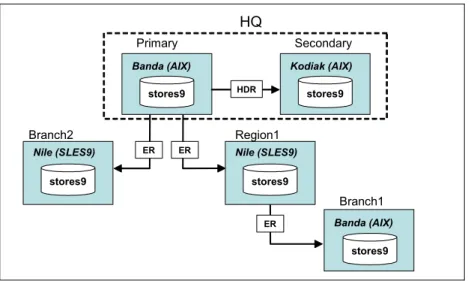
There were three computers available for the HDR/ER setup. The three
computers, called Banda, Kodiak, and Nile, enabled us to configure an HDR pair as well as to configure enterprise replication (ER) to multiple leaf nodes. For more information about setting up ER, refer to Chapter 6, “Instantiating enterprise replication” on page 65.
According to the IDS Administrator's Guide the HDR requirements must include the following:
1. The computers must be from the same vendor, and have the identical architecture and operating system.
2. The hardware must support networking.
3. The dbspace disk naming and allocation must be identical.
The Banda computer was implemented with AIX® 5.3, and is the primary database server. The Kodiak computer operating system was AIX 5.2, and it was the secondary database server. As you can see, based on the requirements previously listed, the operating systems for Banda and Kodiak are not truly identical. However, the configuration does work properly. Future releases of the documentation in the Administrator’s Guide will be revised to better clarify the requirement. That is, the O/S versions must be identical but the release levels can be different. This will work properly, and was validated in the our test environment.
HDR cannot be implemented across different architectures (32-bit and 64-bit). And so, since AIX 5.2 supports both 32-bit and 64-bit architectures, we had to confirm that both Banda and Kodiak were the same architectures. On AIX, confirmation of whether the architecture is 32- or 64-bit can be attained with the command:
bootinfo -K
On Linux®, the uname -m command can be used to determine 32- or 64-bit mode.
Other operating system architecture information can be found in other operating environments as follows:
SUN Solaris™:
Command: % isainfo -kv
One possible reply: 64-bit sparcv9 kernel modules HP-UX 11.00 and later:
Command: $ getconf KERNEL_BITS One possible reply: 64
Linux:
The CPU make and model will determine whether there is 32- or 64-bit support. At the time of this writing, the AMD Opteron and Athlon 64 and the Intel® Itanium®, Xeon®, and Pentium® 4 chips support 64-bit.
Linux was the first operating system to support 64-bit processing. Check Linux vendor Web sites for 64-bit compatibility.
The Nile computer was configured using Linux (SLES 9) and functioned as a leaf node for ER. The requirements for ER are more flexible than for HDR. For example, ER supports replication from AIX to Linux. However, to create an HDR pair to replicate Nile, another Linux (SLES 9) computer would have to be configured. Our test environment is depicted in Figure 2-1.
Figure 2-1 HDR/ER environment
2.2 Database server setup
For our lab configuration, the latest available release, IDS 10.0.UC5, was used. The IDS V10 installer is now Java™-based and uses a simple character-based interface. The defaults were used to get the database software installed and to quickly get the database instance installed and running.
stores9 Branch2 stores9 HQ stores9 Secondary ER ER stores9 Region1 stores9 Branch1 HDR ER Primary
Banda (AIX) Kodiak (AIX)
Nile (SLES9) Nile (SLES9)
During the install, there is the option to create a demo instance called demo_on. The default for the option is no, but we chose yes to quickly ensure that the software installed correctly and worked properly.
The install of the software on Banda and Nile was straightforward, and no problems or errors were encountered. The onconfig file, which contains all the INFORMIXDIR, INFORMIXSERVER, INFORMIXSQLHOSTS, and ONCONFIG parameters, was installed next. Once this was complete, the server was started and an onstat - command was executed and confirmed that the software was installed and working properly.
The install of Kodiak appeared to go as smoothly, but an error occurred during the creation of the demo_on instance. The installer did not provide any details on what error occurred, nor did the online.log file. An onstat command was again executed; it returned an error as shown in Example 2-1.
Example 2-1 onstat command execution Kodiak: > onstat
-exec(): 0509-036 Cannot load program onstat because of the following errors: 0509-130 Symbol resolution failed for /usr/lib/libc_r.a[aio_64.o] because:
0509-136 Symbol kaio_rdwr64 (number 0) is not exported from dependent module /unix.
0509-136 Symbol listio64 (number 1) is not exported from dependent module /unix.
0509-136 Symbol acancel64 (number 2) is not exported from dependent module /unix.
0509-136 Symbol iosuspend64 (number 3) is not exported from dependent module /unix.
0509-136 Symbol aio_nwait (number 4) is not exported from dependent module /unix.
0509-150 Dependent module libc_r.a(aio_64.o) could not be loaded. 0509-026 System error: Cannot run a file that does not have a valid format.
0509-192 Examine .loader section symbols with the 'dump -Tv' command.
The release notes ($INFORMIXDIR/release/<language>/<lang code>) for IDS V10 were checked to make sure that all necessary OS patches were
downloaded and installed. But even after applying a known patch the same error was still received. Checking again, this time in the file
The problem was that AIX utilizes kernel asynchronous I/O (kaio), which requires a device to be created. To do that, turn on asynchronous I/O and perform the following commands:
su root
/usr/sbin/chdev -l aio0 -a autoconfig=available /usr/sbin/mkdev -l aio0
After executing these commands, we again tried to initialize a database instance on Kodiak, using the command oninit -ivy. This time it worked perfectly.
2.3 Database server configuration
HDR has some requirements at the database configuration level, and they are documented in the Administrator's Guide. In our lab system configuration, all the defaults were selected that come with the onconfig.std file. By using the defaults, we expected no problems in getting HDR started for the first time.
As examples, the following ONCONFIG parameters need to be identical on both database servers in the HDR pair:
ROOTNAME ROOTOFFSET ROOTPATH ROOTSIZE PHYSDBS PHYSFILE LOGFILES LOGSIZE DYNAMIC_LOGS DRAUTO DRINTERVAL DRTIMEOUT
Next, dbspaces and chunks need to be exactly the same down to the number of dbspaces and chunks, the pathnames, the size, and offsets.
Tip: This problem could also have been quickly resolved by calling IBM
Informix support.
Note: We discovered that even using all the defaults, a few parameters need
Many users appreciate the fact that the HDR secondary is not only a hot failover, but is also a read-only database for reporting purposes. Therefore, the
secondary can be configured slightly different to handle report type queries. For example, altering some of the database configuration parameters, such as BUFFERS and CPUVP, can aid reporting performance.
For even more improvement in performance, the logical and physical logs were moved out to their own dbspaces. Moving the logical and physical logs to their own dbspaces is a common performance tuning practice and is highly
recommended. If at all possible, put the logical and physical logs on separate controllers from the database data.
Determining the correct size of the logical log not only can affect the overall performance of the database, but it also affects HDR.
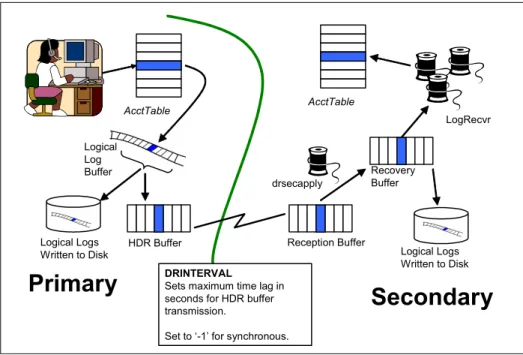
As seen in Figure 2-2, when the logical log buffer is flushed from memory to disk an entry is put into an HDR buffer, which is part of the virtual shared memory. It is important to note that the HDR buffer is allocated based on the size of the logical log. Therefore, it is important to give close attention to the size of the logical log buffer and how many logical logs are configured. Creating a logical log buffer that is too large could affect the checkpoint duration on both the primary and
secondary. Coupling the large logical log with buffered database logging could also impact performance. Tips on estimating the size of the logical log buffer can be found in the IBM Informix Dynamic Server Administrator’s Guide.
Figure 2-2 How HDR works
The only database configuration parameters that affect HDR are DRTIMEOUT, DRINTERVAL, and OFF_RECVRY_THREADS. Here is a brief description of each:
DRINTERVAL configuration parameter: Indicates whether the data replication buffer is flushed synchronously or asynchronously to the secondary database server. In years past, slower networks experienced some network bandwidth problem when the DRINTERVAL was set to zero. However, with the high network bandwidths available today, and the small (2K) HDR TCP packets, network traffic is not an issue.
DRTIMEOUT configuration parameter: Determines how long to wait for a transfer acknowledgement from the secondary server. This parameter usually does not require much change from the default of 30 seconds. However, problems can occur if the primary does not receive an acknowledgement from the secondary and then starts putting transaction information to the file identified in the DRLOSTFOUND database parameter. The secondary will switch to the mode specified in the DRAUTO data configuration parameter (RETAIN®, OFF, or REVERSE_TYPE). See the Informix Administrator’s Guide for more details on DRAUTO.
OFF_RECVRY_THREADS database parameter: A key parameter for the secondary server that controls the number of recovery threads that are run in
AcctTable Logical Log Buffer Logical Logs Written to Disk
Primary
Secondary
Reception Buffer Recovery Buffer Logical Logs Written to Disk AcctTable LogRecvr drsecapply HDR Buffer DRINTERVALSets maximum time lag in seconds for HDR buffer transmission.
parallel to apply the changes that are coming to the secondary server to be applied.
For additional information about this topic, refer to sections 3.1.1, “Now or later? (asynchronous or synchronous mode)” on page 21 and 3.3.1, “The DRAUTO parameter and its impact” on page 28.
2.4 Database setup and considerations
Now that all the hardware and database server requirements have been met, it is time to focus on the database requirements at both database servers.
Transaction logging (buffered or unbuffered) must be turned on at both
databases to allow the changes from the primary to be applied to the secondary. One way to check whether or not logging has been turned on is by using the onmonitor command. While logged in as Informix, issue the command onmonitor then choose L (for Logical Logs), and then D (for Databases). The resulting screen will list the databases within the instance of the INFORMIXSERVER for which the environment variable is set, and show the logging status. The following is the legend for terms used:
– N - No logging – U - Unbuffered – B - Buffered
Logging can be changed by using the following three utilities: ontape, ondblog and onbar. Ontape and ondblog examples are provided in Example 2-2.
Example 2-2 Database logging 1) ontape:
ontape -s -L 0 [ -B <database name> ] [ -U <database name> ] where :
-L 0 = level zero backup -B = buffer logging -U = unbuffered logging 2) ondblog:
ondblog <new mode> [-f <filename>] [<database list>] new mode:
buf - Change database to buffered mode. unbuf - Change database to unbuffered mode.
nolog - Change database to no logging. (not in EDS) ansi - Change database to be ANSI-compliant cancel - Cancel logging request.
<database list> List of databases for logging change. 3) onmonitor (Unix only):
Choose menu: Logical-Logs Choose menu: Databases
Look for the Log Status column for the following values: U - unbuffered
B - buffered N - No logging A - ANSI
Move cursor using arrow keys to the database to be changed logging and press Ctrl-B. Then choose desired logging type.
Assuming that both the primary and secondary databases were setup using logging, we used an already open window to the secondary server to test the database using dbaccess. We unexpectedly encountered a -329 error. Using onmonitor, we found that database logging was enabled on the secondary, but that database logging had not been turned on at the primary.
To resolve this problem, we simply changed the logging on the primary database using the ontape utility. This utility changed the logging, but also allowed us to take a backup of the primary. There are various ways to take a backup using ontape. Refer to the IBM Informix Backup and Restore Guide, G251-2269, for additional details.
For our exercise, we backed up the primary using the path of least resistance, which was backing up to disk using the ontape utility. We then transferred the backup file to the secondary and restored the secondary. To do this, first create a file on the file system:
touch /backup/stores_level0 Next, execute the command
ontape -s -L 0 > /backup/stores_level0
The backup file was then copied to the Kodiak server and restored to the database using ontape -p and declining the backup of logical logs and archive level 1.
A new option for ontape in IDS V10 is to change the TAPEDEV variable to STDIO. One benefit of using STDIO is that a named pipe can be created and
Note: These commands tell the database server that the logging has
changed, but the change will not be permanently set until a level 0 backup, using ontape or onbar, has been executed.
used. Named pipes provide a buffer mechanism to save on storage space and execution time. Therefore, instead of writing to disk, using FTP to transfer the file to the secondary and then using the transferred file to restore the secondary, we could have used ontape to write to the named pipe and had the secondary run a restore and receive the data through the pipe – thus never having to stage the data anywhere.
Using TAPEDEV = STDIO also allows for a faster method of restoring a level-0 to the secondary for the initial HDR setup. Then ontape and onbar can use an external backup and restore (EBR) method. Using an EBR can dramatically reduce the time needed to create a secondary machine in an HDR pair if the database is very large. Refer to the IBM Informix Backup and Restore Guide, G251-2269, for more information about External Backup and Restore.
2.5 HDR up and running
Once logging has been turned on and HDR has been started, check to see if HDR is indeed running between the two servers. To quickly check to see if HDR is up and running, use onstat - and look for the following output:
– Primary: IBM Informix Dynamic Server Version 10.00.UC5 -- On-Line (Prim) - Up 30.00.41 - 168072 Kbytes
– Secondary: IBM Informix Dynamic Server Version 10.00.UC5 -- Read-Only (Sec) - Up 30.00.41 - 177072 Kbytes
You can also check for HDR specific threads using the onstat -g ath command as shown in Example 2-3.
Example 2-3 HDR specific threads Banda: > onstat -g ath
Primary
15 4094e920 4021b954 2 cond wait drcb_bqf 1cpu dr_prsend 16 40982bf0 4021be60 2 sleeping secs: 13 1cpu dr_prping 17 40982eb8 4021c36c 2 sleeping secs: 3 1cpu dr_idx_send Kodiak: > onstat -g ath
Secondary
17 4099b418 4021c36c 3 cond wait netnorm 1cpu dr_secrcv 18 409a0018 4021c878 3 cond wait drcb_bqf 1cpu dr_secapply 19 409a0640 4021cd84 3 sleeping secs: 25 1cpu dr_secping 20 409a0908 4021d290 3 sleeping secs: 4 1cpu dr_idx_recv
Another method of checking the status of HDR is to look in the online.log file (onstat -m).
Summary of steps preparing for HDR
The objective of this chapter was to provide a brief overview of how to prepare database servers for HDR. As mentioned many times, the IBM Informix
Administrator’s Guide is very thorough, giving step by step instructions on getting HDR up and running.
The following is a summarization of those steps: 1. Check that all hardware requirements are met. 2. Check that all database server requirements are met. 3. Check that all database requirements are met. 4. Take a level-0 archive of the primary.
5. Execute the command on the primary:
onmode -d primary <secondary- instance name> 6. Restore the level-0 backup to the secondary. 7. Execute the command on the secondary:
onmode -d secondary <primary instance-name> 8. Execute the command on the secondary:
ontape -l
9. Check the message logs on both machines (onstat -m) to verify that the machines are connected and communicating.
Chapter 3.
Understanding and using
High Availability Data
Replication
Informix Dynamic Server, since its earliest versions, has always tried to provide as much uninterrupted access time as possible. For example, most
administration tasks can be executed while the instance is handling end-user operations and backup, and some restore operations can occur under a full user load. IDS contains a number of technologies to help the instance withstand logical and most physical errors. These technologies include the logical and physical logs, consistency checks, and disk mirroring. As good as these features are, if the physical server fails the instance and data access is interrupted, which will have an impact on business operations.
This is where the IDS High Availability Data Replication (HDR) functionality comes into play. Through HDR, an exact copy of logged databases within an instance are created and maintained in real time on another physical server. If the first (or primary) server fails, applications just need to reconnect to the copy (or secondary instance) to continue operations.
In this chapter we discuss and describe HDR, how to configure and instantiate an HDR pair, failure recovery and application design and connectivity issues.
3.1 What HDR is and how it works
It might be best to first describe what HDR is
not.
For example, HDR is not a variation of disk mirroring. In a mirrored environment, one system controls two sets of storage containers and manages the I/O operations to both sets. While HDR requires two sets of storage, each is managed independently by a separate physical server. When data definition language (DDL) and data manipulation language (DML) statements are executed on the primary server, thoseoperations are replicated on the secondary server at a predefined interval. Since most people use HDR for disaster tolerance, the interval is usually set to
immediate
. But it can be set to any reasonable positive number of seconds. In setting up HDR, an almost-true mirror of the primary system is created. It is not a full mirror because data stored in BLOB spaces is not replicated. This data is written directly to storage without passing through the logical logs and, as a result, is not captured for transfer to the secondary. With this one caveat, in this chapter we refer to an HDR pair as an exact mirror.Since HDR operates as a mirror, it has a series of prerequisites, some stringently enforced, which must be met. A second set of storage devices has already been mentioned. These devices managed by the secondary server must be identical to those configured within the primary instance in terms of number, size, and path. If the primary uses a RAID LUN, for example, it is not required that the secondary also use RAID; it just needs to present to the instance the same number and sized storage devices. The devices must be created and available at the same PATH on the secondary as on the primary. This is most easily
accomplished using symbolic links as the PATH parameters in the
onspaces
creation statements.Two other stringently enforced requirements are that both servers must be using the same O/S and IDS version. While there can be a little variation in the O/S level (for example, having different release levels of the same O/S version such as AIX 5.2 and AIX 5.3), it is not possible to set up HDR between two different operating systems or between two different versions of the same operating system. The IDS version match check is rigidly enforced. The version must be identical all the way to the sub-version identifier, such as UC2.
It is helpful, though not necessarily required, that the computing hardware be identical as well. This is particularly important if the secondary is intended to provide full user support while the primary is unavailable. While HDR will fail over to the secondary instance even if it has only 25% as much configured shared memory and CPU VPs as the primary, in the event that an HDR failure condition and a switch to the secondary occurs, users will notice response and
performance differences due to the reduced configuration of the secondary. If the intention for the secondary is just to bridge the gap while the primary is
unavailable and only the most critical user processes will be redirected to the secondary, there might not be a noticeable difference.
Another argument for server hardware parity is that the secondary server can be used for read-only operations while in a functional HDR pair. As such, read-only applications (reports and so forth) can be executed against the secondary instance, thus reducing the load on the primary server/instance. The benefit is that read/write
and
report applications should see a decrease in execution time with the processing load distributed across two instances instead of just one. If the secondary only has a minimal hardware configuration, it could take just as long, if not longer, for reporting/read-only applications to execute than if they were executed against the more fully configured primary instance.3.1.1 Now or later? (asynchronous or synchronous mode)
As mentioned previously, HDR can be configured to work in synchronous or asynchronous mode. This does not affect
how
HDR works, justwhen
a certain operation occurs.Conceptually, HDR is simple, elegant, and easy to understand. When database changes occur in a logged database, the changes are recorded in the instance logical logs. HDR takes these logical log records as they are created on the primary and transfers them to a replication buffer on the secondary instance for application there. When properly instantiated, the secondary instance is in a type of permanent roll forward mode as though it was in fast recovery and applying its own logical log records. With HDR, however, it is the primary instance log records being applied.
The transfer and application of logical log records to the secondary can occur either synchronously or asynchronously, thus the
when
component of HDR.Synchronous mode
This is the most secure mode from a disaster tolerance perspective and is controlled by the DRINTERVAL $ONCONFIG parameter. When set to -1, whenever a logical log record is written to the HDR and logical log buffers, the log entry is sent to the secondary instance and entered into its replication buffer. The transaction is not considered completed (or rolled back) until the primary receives an acknowledgement from the secondary that the records have been received into its replication buffers. This does not mean the changes have been applied or been written to disk by the secondary, just that they have been received and are in stable, protected storage for later application on the
secondary. The net result is that there are no transactions that are uncommitted or partially committed on the secondary when compared to the primary; it is a
logically consistent copy and fully capable of seamlessly replacing the primary instance in the event of failure.
This mode can have a minor impact on application performance depending on the network interconnect and distance between the primary and secondary servers. As just mentioned, from an application perspective, it will not receive a commit or rollback message from the database instance until the transaction change records are received by the secondary. This means transaction speeds can be constrained by network conditions such as speed and distance between the servers. The delay can be measured by the amount of time it takes for a network round trip or how long it takes a packet to get from the primary server to the secondary and back.
Do not think that because network speed will have an impact on HDR the servers have to be placed next to each other. Consider the amount of replication traffic that will occur as well as the speed of the network itself. One of the authors has successfully instantiated an HDR environment over a very slow partial leased line from London to Central Scotland. While network speed was
substantially
less than 1-baseT, the HDR environment worked well because there was not a tremendous amount of data to replicate once the secondary instance was created. With higher transaction volumes, network speed and distance become more critical. Generally speaking, though, with better network speeds the two HDR servers can be almost anywhere in the world and function adequately in synchronous mode.A commonly asked question with this mode is what happens if the secondary goes away, either due to a network outage or server failure: will the primary’s transaction halt until secondary acknowledgement is received? The answer to this is a qualified
yes
andno
. The DRTIMEOUT $ONCONFIG parameterspecifies how long either server will wait to hear from the other before declaring a replication failure has occurred. From the primary’s perspective, this time could start based on the transfer of a transaction when busy or just the HDR heartbeat when idle. From the secondary’s perspective, it is measured by the heartbeat. What actually happens is that the servers will attempt to contact each other four times (in case there is a temporary network or server interruption) before declaring a failure. As a result, the number of seconds entered for DRTIMEOUT should be 25% of the total time an administrator feels is appropriate before declaring a failure.
Getting back to the earlier question of what happens to the primary if the secondary is not available, “yes” the transaction will hold until either an acknowledgement is received or DRTIMEOUT x 4 seconds has elapsed, at which point an HDR failure will be declared. Once a failure has been declared, the primary will not wait for the secondary but will process transactions as though
it is not part of an HDR replication pair. What happens when the secondary reconnects is discussed in 3.3, “HDR failure recovery” on page 27.
Asynchronous mode
When DRINTERVAL is set from 0 to any positive integer value, HDR operates in asynchronous mode, transferring transaction information from the primary to the secondary when either of two triggering events occur:
The number of seconds specified by DRINTERVAL has passed. The HDR replication buffer becomes full.
Setting DRINTERVAL to 0 is
not
the same as synchronous mode, however. In synchronous mode, each transaction results in a send to the secondary, ensuring transaction-level logical consistency. When DRINTERVAL is set to 0, if more than one transaction completes at the same time, they will be sent as a batch. In addition, the primary does not wait for an acknowledgement from the secondary before committing the transactions back to the application.The most significant side effect of asynchronous HDR mode is the loss of logical consistency between the instances. A transaction could be marked complete on the primary but not exist on the secondary. The larger the value of
DRINTERVAL, the greater the chances of losing transactional integrity. This could have business implications if a sudden need arises to convert the secondary to standard mode in which it can process transactions. Failure condition determination in asynchronous mode is much like in
synchronous mode. The primary will attempt to communicate with the secondary four times, either through a replication buffer flush or a heartbeat, before
declaring a failure. Likewise, the secondary will use its heartbeat monitor to decide if the primary is still available.
As mentioned earlier, HDR provides the greatest business value when executing in synchronous mode since a complete duplicate is being maintained. For some businesses, though, a very close approximation may be sufficient; a value of 0 or a very low number of seconds may be adequate, particularly since there is no transaction wait impact on the application.
3.2 Preparing for and instantiating an HDR pair
Instantiating an HDR pair is not difficult, but there are a couple of steps that must be rigidly adhered to in order for the process to work. The need for similar, if not identical hardware resources, particularly with respect to storage resources, has already been discussed. Likewise for the software; the IDS binaries must be identical, though there can be some minor variation with the O/S version.
From the database server perspective, the two instances involved in replication should be configured as similarly as possible, particularly if the secondary will be expected to fully replace a down primary instance. The best way to configure the secondary instance is to copy the $ONCONFIG file from the primary to the secondary and change the DBSERVERNAME and DBSERVERALIASES fields. This ensures that, among other things, the replication configuration parameters such as DRAUTO (discussed in 3.3, “HDR failure recovery”) and DRINTERVAL are set identically so each instance will take the appropriate action in the event of a failure.
Once all the prerequisites have been met, the HDR initialization process can begin. It is not hard provided each step is executed in its correct order as identified in Table 3-1.
For more information, refer to the sqlhosts information in the Informix Dynamic Server Administrator's Guide, G251-2267.
Note: The secondary server in a high availability disaster recovery (HADR)
pair will
not
properly connect or initialize unless all communication with it, including HADR initialization configuration commands, occurs through itsnetwork-based
instance alias. If tried through the instance shared memory connection, the secondary server will hang after the physical restore. After the hang an error indicating a checkpoint is required will occur, yet one cannot be forced.If the logical restore described in Table 3-1 is attempted, it will fail even if triggered by executing the onmode -d secondary primary_instance command. The MSGPATH will log a message that recovery is beginning but logical log information will not be applied within the secondary instance.
Provided that all the other prerequisites have been met, and the procedures outlined in Table 3-1 are followed, using the network-based connection on the secondary server will enable a successfully initialization of an HADR pair. This step is explicitly called out in Table 3-1, but is implied in all the failure recovery mechanisms discussed in 3.3, “HDR failure recovery” on page 27.
Table 3-1 Steps to instantiate HDR
Primary server Secondary server
Edit the HADR configuration parameters (DRAUTO, DRTIMEOUT, DRINTERVAL, DRLOSTFOUND) in the $ONCONFIG file.
Add entries to the $INFORMIXSQLHOSTS and /etc/services files for network connections to primary and secondary instances.
Modify the /etc/hosts.equiv or the .rhosts file for the informix userid to enable trusted communication with the other server.
Make sure the databases to be replicated are in logged mode.
Send a copy of the primary instance’s $ONCONFIG file to the secondary server.
Create at least one (1) temporary dbspace if one does not exist.
Add entries to the $INFORMIXSQLHOSTS and /etc/services files for network connections to primary and secondary instances.
Modify the /etc/hosts.equiv or the .rhosts file for the Informix userid to enable trusted communication.
Create physical disk chunks sized identically to those on the primary server. Mirror chunks are optional. At least one (1) temporary dbspace will be required.
Create symbolic links to tape devices and disk chunks pathed identically to those on the primary server.
Modify the $ONCONFIG file received from the primary server. Change DBSERVERNAME, DBSERVERALIASES, and possibly MIRROR.
Install the file.
Set up general Informix environment.
Change the $INFORMIXSERVER environment variable to point to the network-based instance.
Initialize the secondary instance (oninit -ivy) and bring it all the way online to test access to all base physical devices.
Using the onspaces utility, add all the dbspaces to make sure the devices are accessible.
Monitor the MSGPATH file to make sure all the “sys” databases are built.
Notes on the initialization process
In this section we describe the process for backing up and restoring the instances.
Either the
ontape
orOnBar
utility can be used to create the instance backup image required for HDR initialization. In the past most people have chosen to useontape
because of its simplicity. WhileOnBar
can be used, it requires moving and configuring the bootstrap and other files to the secondary instance. In addition, only the serialOnBar
option (onbar -bw) can be used, rendering the Create a level 0 backup of the instance.See “Notes on the initialization process” for some important information about this step.
Perform a physical restore using the archive generated from the primary instance. Do not archive the logical logs when prompted by the command. There are no other archive levels to restore. When the physical restore completes, the instance will be in recovery mode, with all dbspaces created, but in an inconsistent state. This is normal.
See “Notes on the initialization process” for some important information about this step.
With the instance in online mode, initialize the HADR mechanism in this instance and set it to primary mode by executing the onmode -d primary secondary_instance command, where
secondary_instance is replaced by the network-protocol-based instance name of the secondary instance.
The MSGPATH file should reflect this change and contain the following messages:
DR: new type = primary, secondary server name = secondary_instance
DR: Trying to connect to secondary server ... DR: Cannot connect to secondary server DR: Turned off on primary
After the initialization command has been executed on the primary, initialize the HADR mechanism in this instance and set it to secondary mode by executing the onmode -d secondary
primary_instance command, where
primary_instance is replaced by the network-protocol-based instance name of the primary instance.
The MSGPATH file should reflect this change and contain the following messages:
DR: new type = secondary, primary server name = primary_instance
DR: Trying to connect to primary server ...
The primary server should show the connection completed. The MSGPATH file should contain the following message:
DR: Primary server operational
This can be verified by executing an onstat
-command. The status line should now indicate the instance is a primary.
The secondary instance should be fully connected and operational. This can be verified by executing an onstat - command. The status line should reflect that the instance is acting as a secondary. MSGPATH files on both instances should indicate the beginning of logical log transfers.
OnBar
operation identical toontape
. It is better to use the easier utility to begin with. With IDS V10 there is new functionality that makes usingontape
the de facto standard for initializing HDR.With IDS V10 a new configuration parameter has been added to
ontape,
allowing it to output to standard I/O (STDIO). With this functionality, anontape
backup can be piped through file handling routines such as cpio, tar or gzip. Theontape
output can also be directed through a shell script that can incorporate some intelligent file handling with respect to file naming so the previous backup is not overwritten.This flexibility also allows an administrator to do one other thing that is
specifically beneficial to HDR initialization – the
ontape
backup can be redirected through a remote shell directly to the secondary instance, which can beexecuting a restore operation in real time with the backup! The syntax for this might look similar to:
ontape -s -L 0 -F | rsh secondary_server "ontape –p"
By executing the backup and restore in this manner, several big problems are eliminated. First, if the backup is created to tape, then shipped to the secondary’s location, too much time may elapse between the backup and restore operations. The logical logs may have rolled on the primary, preventing the logical roll forward portion of the initialization. Second, depending on the size of the
instance, it could take quite a while to output to tape, or require quite a few tapes to back up the primary instance. Third, having to process a backup then a restore can require quite a bit of time. With this option, the restore completes right after the backup is finished, cutting initialization time at least in half.
3.3 HDR failure recovery
Either the secondary or the primary instance can declare that an HDR failure has occurred. The process by which each decides whether or not a failure has occurred was discussed in “Synchronous mode” on page 21. Recovering from an HDR failure will vary depending on the following:
The value of the DRAUTO configuration parameter and the amount of work (if any) performed on the former secondary instance
If the failure was logical (or network-related)
The amount of work processed on the primary after the failure condition was declared
If a physical failure occurred, which server failed, and the nature and extent of the failure