GE Consumer & Industrial
MultiLink Managed Switch Series
Revision 1.7.4 Release Notes
GE Publication Number: GER-4105
Copyright © 2007 GE MultilinOverview
Summary
GE Multilin releases the 1.7.4 version of firmware for the MultiLink Platform of Ethernet switches that:
• Provides several new ease of use Web Management software enhancements
• Modified some of the default settings to allow for easier integration of power system protection
and control applications
• Enhanced both the Web Management Software and the Command Line Interface (CLI)
configuration tools
Description
This document contains the release notes for the 1.7.4 release of the MultiLink firmware.
• Affected products: ML2400, ML1600 Ethernet Switches
• Date of release: May 17th, 2007
Release details
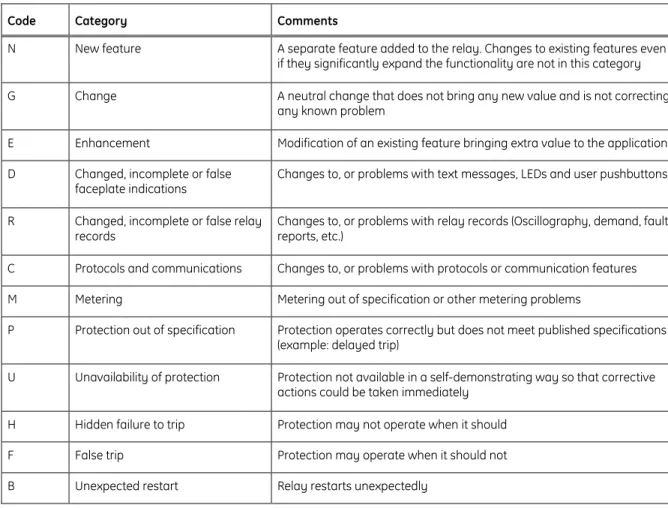
In the following change descriptions, a revision category letter is placed to the left of the description. Refer to the Appendix at the end of this document for additional details.
N
Introduction of Passive FTP
Applicable: ML2400, ML1600
The Ethernet switches now support Passive FTP which provides a more secure method of transferring data by ensuring all data flow is initiated from inside the network rather than from a source outside the network. An FTP Client must initiate data being transferred through Passive FTP rather than by an FTP Server program.
N
Tag VLAN Filtering Ease of Use Enhancement
Applicable: ML2400, ML1600
The Tag VLAN configuration through the Web Management Software was enhanced to allow users to use check boxes for configuring the exclusive parameters.
N
FTP Mode Ease of Use Enhancement
Applicable: ML2400, ML1600
The configuration of the FTP Mode has been added to the Web Management Software that allows users to configure this feature in the Web Management Software without having to use the command line interface.
E
10Mbps Fiber Port Default setting change
Applicable: ML2400, ML1600
The default settings for the 10Mbps Ethernet ports were changed to provide Full-Duplex communications as the default as the majority of the 10Mps devices used in substation environments support Full-Duplex communications.
G
Link Loss Learn (LLL) Removed
Applicable: ML2400, ML1600
The Link Loss Learn functionality was removed from the product since the recently available SMART RSTP feature provides faster recovery of faults in a ring network architecture thus making this feature
UR revision 5.21 release notes Overview
E
Tag VLAN configuration made available through Web Management Software
Applicable: ML2400, ML1600
The Web Management software was updated to allow configuration of the Tag VLAN settings. In the previous version of the firmware, the Tag VLAN settings were not updated when the Save button was pressed.
E
Port Configuration through Web Management Software enhanced to ensure configuration of the correct port
Applicable: ML2400, ML1600
The Web Management software was updated to ensure that setting changes are sent to the correct port when they are configured through the Web Management Software. The previous version of the firmware would occasionally send the settings to the wrong port.
E
Display of Port RSTP settings in the Web Management software corrected to show proper configuration
Applicable: ML2400, ML1600
The Web Management software was updated to ensure that the Port RSTP settings as configured in the device are displayed properly in the web management software. In the previous version of the software, when viewing the Port RSTP settings in the edit screen, a port that was configured as an edge port and had the RSTP Status set to “Disabled”, would show the RSTP Status to be set to “Enabled”.
E
Command Line Interface Improvement
Applicable: ML2400, ML1600
The Command Line interface was enhanced to prevent the interface from freezing. In the previous version of the firmware, the CLI would occasionally hang if the TAB button on the keyboard were pressed.
E
Prevent Freezing of Web Interface after clearing Event Log (traps)
Applicable: ML2400, ML1600
The Web Management Software was enhanced to prevent it from freezing after the Event Log has been cleared. In the previous version of the firmware, the web management software would hang after several Event Log clear attempts, which would require rebooting of the switch to recover the operation of the web management software.
MultiLink Firmware Upgrade
It is our recommendation that all customers upgrade to the latest version of the MultiLink firmware to take advantage of the latest developments and feature enhancements. Firmware upgrades can be performed by following the procedure found on the following GE Multilin website:
UR revision 5.21 release notes Overview
Appendix
Change categories
This document uses the following categories to classify the changes. Table 1: Revision categories
Code Category Comments
N New feature A separate feature added to the relay. Changes to existing features even if they significantly expand the functionality are not in this category G Change A neutral change that does not bring any new value and is not correcting
any known problem
E Enhancement Modification of an existing feature bringing extra value to the application D Changed, incomplete or false
faceplate indications
Changes to, or problems with text messages, LEDs and user pushbuttons
R Changed, incomplete or false relay records
Changes to, or problems with relay records (Oscillography, demand, fault reports, etc.)
C Protocols and communications Changes to, or problems with protocols or communication features M Metering Metering out of specification or other metering problems
P Protection out of specification Protection operates correctly but does not meet published specifications (example: delayed trip)
U Unavailability of protection Protection not available in a self-demonstrating way so that corrective actions could be taken immediately
H Hidden failure to trip Protection may not operate when it should
F False trip Protection may operate when it should not
B Unexpected restart Relay restarts unexpectedly
The revision category letter is placed to the left of the change description.
GE Multilin technical support
GE Multilin contact information and call center for product support is shown below: GE Multilin
215 Anderson Avenue Markham, Ontario Canada L6E 1B3
Telephone: 905-294-6222 or 1-800-547-8629 (North America), +34 94 485 88 00 (Europe) Fax: 905-201-2098 (North America), +34 94 485 88 45 (Europe)
E-mail: [email protected]