Certificate Management in Environments with Multiple
HP Software Products
Version 1.3 November 6, 2007
Abstract... 2 Introduction... 2 SSL in HP Software ... 3 Certificate Deployment ... 5Merge and Share Approaches for Establishing Trust ... 6
Lack of Trust between Separate SSL Environments ... 8
Establishing Trust by Merging Certificate Authorities... 9
Establishing Trust by Sharing a Single Certificate Authority ... 10
Current Issues with HP Software Certificate Management ... 11
QXCR1000289820... 11 Problem Summary: ... 11 Problem Cause... 11 Problem Repair: ... 11 Problem Scope:... 13 Problem Prevention ... 13 QXCR1000353406... 13 Problem Summary: ... 13 Problem Cause... 13 Problem Repair: ... 14 Problem Scope:... 15 Problem Prevention: ... 15
Future Considerations for Certificate Installation in HP Software ... 15
QXCR1000373248... 15
Abstract
A number of HP Software products have implemented Secure Sockets Layer (SSL) for purposes of authentication and HTTPS communication. SSL requires that a trust relationship be established between two communicating systems. A trust relationship between systems requires appropriate SSL certificate installation and configuration.
Some HP Software products install their own certificate authority. Other products do not install a certificate authority, but require a certificate to enable SSL functionality. During software installation, HP Software products follow default behaviors regarding certificates. Sometimes it is necessary to apply additional certificate management techniques when the default is not adequate. This is especially true in environments with multiple HP Software products installed on a common set of networked systems.
This paper provides information about SSL certificate issues in environments with multiple HP Software products. Current software CRs are also discussed, including problem symptoms and workarounds, and a longer term proposal to eliminate some current problems.
Introduction
The source of trust within an SSL environment is the certificate authority. HP Software provides its own software components for certificate authority, certificate server, and certificate client
functionality.
These software components enable the following: • Creation of industry-standard X.509 certificates. • Installation of certificates.
• Validation of certificates.
• Management of new certificate requests.
Several HP Software products currently install and establish their own certificate authority for an SSL environment. Other products do not establish a certificate authority, but can be configured to use SSL. Table 1 below provides a summary of how SSL is used across HP Software products, which products establish a certificate authority, and which products do not. Across HP Software products, certificate authority is established by installation of the common HP Software certificate server component. Refer to product documentation for complete details regarding installation and configuration requirements for enabling SSL and HTTPS.
Table1. SSL Usage by HP Software Products
Product Version SSL Usage Establishes Certificate Authority?
HPOM for
UNIX >=8.00 1. HTTPS agent communication with HPOM server. 2. HTTPS agent communication with the HPOM embedded performance component (CODA).
3. Optional HPOM server to server HTTPS.
4. Optional Java GUI to HPOM server HTTPS.
Yes, the certificate server component is installed on the HPOM for UNIX server system.
HPOM for
Windows 7.50 None. No.
HPOM for Windows >=8.00 (version 8.00 currently in Beta test) 1. HTTPS agent communication with HPOM server.
2. HTTPS agent communication with CODA.
3. Optional HPOM server to server HTTPS.
Yes, the certificate server component is installed on the HPOM for Windows server system.
OVIS >= 6.00 Optional HTTPS
communication between TIPs server and TIPs runner.
Optionally, the certificate server component is installed on the TIPs serve system. TIPs server runs on the OVIS measurement server system. TIPs runner may run on the OVIS measurement server or may be deployed for execution on remote systems. TIPs runner system is sometimes referred to as the OVIS probe system. Service
Desk >= 5.00 User authentication at logon, but no HTTPS. Yes, the certificate server component is installed on the primary Service Desk server system, but not on secondary Service Desk servers.
OVPA >= 4.50 When OVPA is installed in an HPOM 8.x HTTPS environment, it can optionally use HTTPS communication with OVPM and Reporter.
No.
OVPM >= 5.00 1. Optional HTTPS
communication with CODA in an HPOM 8.x environment. 2. Optional HTTPS
communication with OVPA in an HPOM 8.x environment.
No.
Reporter >= 3.70 1. Optional HTTPS
communication with CODA in an HPOM 8.x environment. 2. Optional HTTPS
communication with OVPA in an HPOM 8.x environment.
No.
SSL in HP Software
Every node within an HP Software SSL environment contains a private key. SSL uses the private key to initiate data transfer from one node to another. The integrity of the SSL environment requires that each private key in the SSL environment is secure. Each private key must reside only on the node to which it belongs and must be protected from inappropriate access. Every node in the SSL
environment also contains a public key. Unlike private keys, public keys are shared with SSL communicating partners during initiation of communication.
Data encrypted by a node’s private key can be decrypted only by using the node’s public key. This feature of SSL provides the digital signature functionality of SSL. When a node digitally signs a message to be sent to a communicating partner, an algorithm is applied to the data that includes encryption of a portion of the message. The private key owned by the sending node is used for the encryption. The receiving node applies an algorithm that includes decryption using the public key of the sending node. If the decrypted data “makes sense,” the receiving node has confirmation that the message is valid. In the nomenclature of SSL, “signed by a root certificate” means that data has been encrypted using the private key of a certificate authority, and thus can be decrypted by the public key of the same authority.
Note that the private key and public key interactions described above occur during the SSL handshake phase – initiation of communication between two SSL nodes. During the handshake phase, a secret key is negotiated between the two SSL partners. The secret key is used for data encryption for the remainder of the communication session between the SSL pair. Using the negotiated secret key for the remainder of the session provides superior data transfer speed. Note that in addition to SSL communcation, the public and private key also interact when policies are deployed to a node, or when operator or automatic actions are carried out on the node.
There are two kinds of certificates in the HP Software implementation of SSL: root certificates and node certificates. A root certificate is controlled by the certificate authority of the SSL environment, and must be made available to each node that trusts the certificate authority. The certificate server system that provides certificate authority within the SSL environment is also responsible for creating node certificates for all nodes in the SSL environment.
Associated with the root certificate is the private key of the certificate authority. The root certificate does not contain the private key of the certificate authority, but is digitally signed with the private key of the certificate authority. The root certificate does contain the public key of the certificate authority. Every node certificate granted to nodes within the SSL environment by the certificate authority is digitally signed with the private key of the root certificate.
Every node in the SSL environment has a node certificate. Associated with each node certificate is the node’s OVCoreID. The OVCoreID is a unique identifier assigned to each node in the SSL environment. The OVCoreID value remains fixed, even though other network attributes, such as the IP address or hostname, may change. Each node can be authenticated using the root certificate to verify a node certificate’s signature. Node certificates are used to enable HTTPS communication between communicating pairs. For example, in order for node n1 to establish HTTPS
communication with node n2, n1 must present its node certificate to n2. Because all node certificates have been signed with the root certificate, node n2 can verify that n1 is a valid communicating partner (and vica versa) by using the public key of the certificate authority. A list of trusted certificate authorities, or trusted root certificates, resides on each SSL node. In a simple SSL environment – one certificate server providing authority for all nodes – each node’s trusted list contains one entry. However, in more complex SSL environments with multiple certificate authorities, trusted lists can contain more than one entry. When the trusted list contains more than one entry, a certificate presented from another node must be validated by one of the root certificates in the list. As in the above example, for node n1 to establish HTTPS communication with node n2, n1 must present its node certificate to n2. If node n2 has multiple entries in its trusted list, then one of the entries in the list must be capable of validating the certificate presented by n1. If not, the communication attempt from n1 is refused.
Currently, HP Software does not support integration with external certificate authorities. HP Software implements its own software components to provide for creation and management of certificates. These components are:
• Certificate server
Includes certificate authority functionality and is responsible for the creation of certificates for all nodes in the SSL environment. The certificate server software resides only on the certificate server system. The certificate server system provides certificate authority within the SSL environment. The terms “certificate server” and “certificate authority” are often used synonymously.
• Key store
Provides management of local storage on each node necessary for SSL implementation, including protection of data that must be secured to maintain integrity of the SSL environment. The key store component resides on every node in the SSL environment, including the certificate authority system.
• Certificate client
Resides on every node in the SSL environment (including the certificate authority system). The client component verifies that every node contains a valid certificate and provides an interface to the certificate server for tasks such as certificate installation.
The following list briefly summarizes HP Software command line interfaces that provide for implementation of certificate management techniques discussed in this paper. For complete information on these commands, refer to product documentation.
• ovcoreid
Displays the OVCoreID value for a node. • ovcert
Provides an interface to the certificate client for a number of certificate-related functions. The –list
option provides a formatted dump of key store data. The –exporttrusted option, run on a certificate authority system, creates a root certificate that can be used to update the trusted list of other nodes using the –importtrusted option.
• ovc
Provides control and status reporting of HP Software services. • ovcreg
Controls registration of HP Software services. • ovcm
Provides an interface to the certificate server component. This command is available only on the certificate server system. ovcm provides visibility of pending certificate requests from other nodes, and provides the ability to take action on these requests.
• ovconfchg
Allows configuration settings to be changed for HP Software services.
Certificate Deployment
The process of certificate deployment between the HPOM for UNIX server and the HTTPS HPOM agent illustrates the use of some of these software components and their command line interfaces. Certificates can be created and deployed automatically from the HPOM for UNIX server to the HPOM HTTPS agent, or the process of creation and deployment can be done manually. The most common deployment method is to let the HPOM for UNIX server create and deploy certificates automatically during installation of the HTTPS agent on a managed node. A summary of automated certificate deployment follows.
• The newly installed HTTPS agent starts, and through the certificate client determines that no valid certificate exists on the managed node.
• The certificate client creates a new public / private key pair and generates a certificate request to the HPOM for UNIX server based on the unique OVCoreID value of the managed node.
Additional node properties, such as DNS name and IP address are included in the certificate request.
• The certificate server on the HPOM for UNIX server receives the certificate request, and determines from the information included whether or not the request should be automatically granted.
• After the certificate server automatically grants the request, the new certificate is received on the managed node and installed by the certificate client.
Certificates may also be deployed manually. Manual certificate deployment may be the method of choice in highly secured environments, because it avoids sending any certificate-related information
over the network prior to establishing SSL communication. A summary of manual certificate deployment follows:
• On the HPOM for UNIX server system, ovcm (or the opccsacm wrapper) is used with the –issue option to generate a new certificate to a file. On the HPOM for UNIX server system, ovowcsacm –issue is used.
• The file is placed on storage medium and moved to the HTTPS agent node, thus avoiding network transfer of security-related information.
• On the HTTPS agent node, the certificate is installed from the file using the ovcert command with the –importcert option.
A variation of manual deployment permits manual deployment of an installation key. A summary of this approach follows:
• On the HPOM for UNIX server system, ovcm (or the opccsacm wrapper) is used with the – geninstkey option to generate an installation key to a file. On the HPOM for UNIX server system, ovowcsacm – geninstkey is used.
• The file is placed on storage medium and moved to the HTTPS agent node, again avoiding network transfer.
• On the HTTPS agent node, a certificate request is generated using the ovcert command with the –certreq and –instkey options. The certificate request is sent to the HPOM for UNIX server. • The certificate server on the HPOM for UNIX server identifies the installation key; if the certificate
request is valid a signed certificate is sent to the managed node, and installed on the managed node by the certificate client.
Refer the HTTPS Agent Concepts and Configuration Guide for further details on certificate deployment. For access to this document, see the References for Further Reading section.
Merge and Share Approaches for Establishing Trust
The trust relationship between two HP Software nodes enables SSL authentication and HTTPS communication. To establish trust, each node must present a certificate signed by a trusted certificate authority.
The following diagrams depict simplified SSL environments for the purpose of illustrating three situations:
• SSL failure due to lack of a trust.
• Establishing trust by merging two certificate authorities. • Establishing trust by sharing a single certificate authority.
In addition to trust relationships, the diagrams contain the following key elements of HP Software’s SSL implementation:
• Certificate authority
In HP Software’s implementation of SSL, certificate authority is provided by the certificate server system. Each certificate authority holds a root certificate. A private key is associated with the root certificate. This key is restricted to the certificate authority.
• Node certificates
All nodes (including certificate servers) within the SSL environment possess a node certificate. A private key is associated with each node certificate. Each private key is restricted to and secured on its node.
• Trust lists
All nodes (including certificate servers) possess a trust list. This is a list of trusted root certificates. The trust list always contains at least one entry but may contain more. To enable SSL, a node must present a certificate signed by a trusted root certificate. Trust lists are often referred to as trusted certificates.
Lack of Trust between Separate SSL Environments
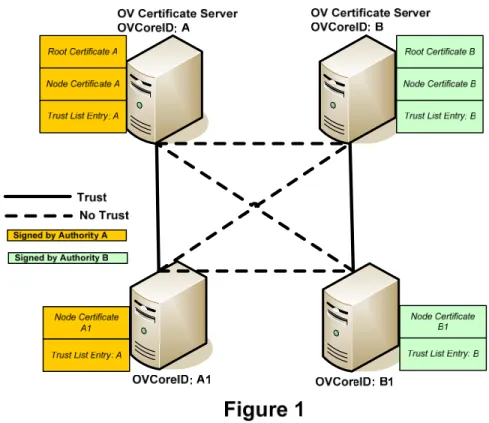
Figure 1 below shows a very simple case of two separate SSL environments, one consisting of nodes A and A1, the second consisting of nodes B and B1. Nodes A and B provide the certificate authority for their respective environments. Nodes A1 and B1 are nodes only.
When node A1 establishes HTTPS communication with node A:
1. Node A1 initiates the process by presenting its node certificate to node A.
2. Node A is able to validate A1’s node certificate because it was signed by root certificate A.
3. Node A responds by presenting its node certificate to node A1.
4. Node A1 is able to validate A’s node certificate because it was signed by root certificate A.
5. With trust established between nodes A and A1, HTTPS communication is enabled.
However, if node A1 attempts HTTPS communication with node B or node B1, the attempt will fail. Neither B nor B1 are able to trust A1’s certificate.
Establishing Trust by Merging Certificate Authorities
In Figure 2 below, trust has been established by merging of certificate authorities A and B. This consists of updating the trust list on all nodes to contain entries for root certificates of both
authorities A and B. This is usually implemented by first establishing a trust relationship between the certificate authorities. Then, nodes can download the updated trust list using the ovcert command with the –updatetrusted option.
Following successful merge of the two certificate authorities, when node A1 establishes HTTPS communication with node B1:
1. Node A1 initiates the process by presenting its node certificate to node B1.
2. Node B1 is able to validate A1’s node certificate because it was signed by root certificate A, and there is an entry for root certificate A in the trust list on node B1.
3. Node B1 responds by presenting its node certificate to node A1.
4. Node A1 is able to validate B1’s node certificate because it was signed by root certificate B, and there is an entry for root certificate B in the trust list on node A1.
Establishing Trust by Sharing a Single Certificate Authority
In Figure 3 below, trust has been established by placing all nodes under one certificate authority, A. Under this approach, B relinquishes the role of certificate authority. The only trusted root certificate is that of certificate authority A. Node A1 retains its original node certificate, signed by A. The original node certificates on B and B1 have been removed because they were signed by B, which no longer exists as a certificate authority. New node certificates for nodes B and B1 have been issued from certificate authority A.
Current Issues with HP Software Certificate Management
This section covers some current issues with HP Software’s implementation of certificate management and certificate installation. QXCR1000289820 and QXCR1000353406 describe problems that can occur due to certificate conflict at install time. Symptoms and solutions are discussed.QXCR1000289820
Problem Summary:
The problem described by this CR occurs on an HPOM for UNIX or Windows server system. An HTTPS OVIS probe (TIPs runner) is also installed on the same system. The HPOM server is removed and re-installed using ovoremove and ovoinstall. Removal and re-installation of HPOM for appears to be successful, but subsequent attempts to restart all process (ovstop; ovc –kill; ovc – start; ovstart) do not succeed. The certificate server process, ovcs, aborts.
Problem Cause:
Normally during ovoremove, the certificate server and certificate client components are both removed, and during the subsequent ovoinstall the certificate server and certificate client
components would both be installed. However, in the case described by this CR, the existence of the OVIS probe on the system causes a dependency on the certificate client component. Thus, the certificate client is never removed and re-installed. The residual node certificate is now unknown to ovcs, causing ovcs to abort.
Problem Repair:
Per the HP OpenView Operations HTTPS Agent Concepts and Configuration Guide, periodic backups of certificate information on the HPOM server are recommended. Assuming such backups exist, following re-installation of the HPOM server environment, the
/opt/OV/bin/OpC/opcsvcertbackup utility should be run with the –restore option on UNIX or
ovcert on Windows to recover the original certificate state on the HPOM server system. Refer the
HTTPS Agent Concepts and Configuration Guide for details.
If certificate backups do not exist, repair may be performed as follows. Note that the following steps will require a significant amount of effort if there are a large number of HTTPS managed nodes, such as a typical production environment. In a production environment (if certificate backups exist), it is highly recommended that you use the opcsvcertback utility as described above. Use the following steps in a production environment only if there are no certificate backups available. The following steps may be used in a small test environment, or possibly a new production environment with a small number of HTTPS managed nodes.
The ovcoreid command displays the OVCoreID value specific to this node. The ovcert –list command displays the certificate key store content for the agent and server. Sample output from these commands on an HPOM for UNIX server system follows. In the example below, there are multiple trusted certificate authorities. However, the steps necessary to implement the repair will involve only entries associated with this node’s ovcoreid value.
ovcoreid 816bc882-624c-750e-1324-e5ea979e818b ovcert -list +---+ | Keystore Content | +---+ | Certificates: | | 816bc882-624c-750e-1324-e5ea979e818b (*) | +---+ | Trusted Certificates: | | CA_260a0712-d533-7507-1c68-e5d0d06b2196 | | CA_75f77906-f6c4-750b-0d1b-f91259ba7bfb | | CA_816bc882-624c-750e-1324-e5ea979e818b | | CA_d5610164-cd9b-7508-1d34-9c38a4ecbd5d | +---+ +---+ | Keystore Content (OVRG: server) | +---+ | Certificates: | | 816bc882-624c-750e-1324-e5ea979e818b (*) | +---+ | Trusted Certificates: | | CA_260a0712-d533-7507-1c68-e5d0d06b2196 | | CA_75f77906-f6c4-750b-0d1b-f91259ba7bfb | | CA_816bc882-624c-750e-1324-e5ea979e818b (*) | | CA_d5610164-cd9b-7508-1d34-9c38a4ecbd5d | +---+
After this problem occurs, the situation can be corrected by applying the following steps.
1. Remove the old certificates associated with this node and ovcoreid using the following commands: ovcert –remove $(ovcoreid)
ovcert –remove $(ovcoreid) –ovrg server 2. Remove the CA certificate from the agent section:
ovcert –remove CA_$(ovcoreid)
3. Export and import the trusted CA certificate. This CA certificate was created during the ovoinstall installation.
ovcert –exporttrusted –file /tmp/trustedcertif –ovrg server
ovcert –importtrusted –file /tmp/trustedcertif
4. Issue a new certificate, where mypwd is an arbitrary password you assign on the command line.
ovcm –issue –file /tmp/certif –name $(hostname) –pass mypwd –coreid $(ovcoreid)
5. Import the new certificate for the local agent, where mypwd is the password assigned in step 4.
ovcert –importcert –file /tmp/certif –pass mypwd
6. Import the new certificate for the server. If in a cluster environment:
rm –f /tmp/certif
ovcm –issue –file /tmp/certif –name <virtual node> –pass mypwd –coreid $(ovcoreid –ovrg server)
ovcert –importcert –file /tmp/certif –pass mypwd –ovrg server If in a non-clustered environment:
ovcert –importcert –file /tmp/certif –pass mypwd –ovrg server
7. Cleanup – remove temporary files and templates in the HPOM template cache that were signed with the old certificate.
rm –f /tmp/trustedcertif /tmp/certif
find /etc/opt/OV/share/conf/OpC/mgmt_sv/templates –type f –exec rm –f {} \;
At this point, the certificates on the HPOM for UNIX server system have been recovered to a consistent state, and the ovcs process should run. However, in a production environment, there may be many HTTPS agents that are no longer able to communicate with the HPOM server. Old node certificates on these agents, signed by the original root certificate of the HPOM server, are useless and should be deleted. New certificates must be created and deployed to these agents to
restore HTTPS communication between the HPOM server and HTTPS agents. Refer to the HP OpenView Operations HTTPS Agent Concepts and Configuration Guide for details.
Problem Scope:
This problem can potentially occur upon de-installing and re-installing an SSL HP Software product in the following situation:
• HP Software products A and B co-exist on the same system.
• Product A has a dependency on both the certificate server and certificate client components. • Product B has no dependency on the certificate server, but does have a dependency on the
certificate client.
• If product A is de-installed and re-installed, product B’s dependency on the certificate client can cause the problem.
Problem Prevention
Prior to de-installation, make sure that certificates on the certificate server system are backed up using the /opt/OV/bin/OpC/opcsvcertbackup utility on UNIX or ovcert on Windows. ALWAYS MAINTAIN CURRENT BACKUPS OF CERTIFICATES FOR A CERTIFICATE SERVER SYSTEM!
Following re-installation, use the same utility to recover the original certificates.
QXCR1000353406
Problem Summary:
Installation of the HPOM HTTPS agent can cause problems with other SSL HP Software products already existing on the same node. The example cited in this CR describes the HPOM HTTPS agent and a Service Desk primary server co-existing on the same node. The following steps produce the problem.
• Add a node to the HPOM for UNIX node bank and install the HPOM HTTPS agent on the remote system. The remote system sets its OVCoreID and requests and receives a node certificate from the HPOM for UNIX server.
• Re-image the managed node. The agent, as well as the OVCoreID entry, is no longer on the system. However the HPOM for UNIX server maintains the original OVCoreID entry associated with the node definition.
• Install a Service Desk primary server on the remote system. This installs a certificate server and certificate client, assigns a new OVCoreID to the remote system, and installs a node certificate signed by the Service Desk certificate authority.
• Re-install the HPOM agent on the remote system.
Following re-installation of the HPOM agent, the Service Desk SSL environment has become corrupted because the HPOM agent install incorrectly over-writes several configuration entries.
Problem Cause:
The HPOM HTTPS agent installation over-writes the following configuration entries, ignoring the co-existence of the Service Desk primary server installation on the same system. This results in corruption of the Service Desk SSL environment.
• The CERTIFICATE_SERVER setting is changed to point to the HPOM for UNIX server instead of the local Service Desk server system.
• The OVCoreID value assigned during Service Desk installation is over-written by the OVCoreID value from the HPOM for UNIX node bank for the remote system. There are also now problems with communication between the HPOM for UNIX server and the managed node, because there is no node certificate for the OVCoreID.
Problem Repair:
The starting point for problem repair should be to return the system to the state of a clean Service Desk install without the HPOM agent. This can be done by restoration from system backups, or by de-installation of the HPOM agent and Service Desk, followed by re-installation of Service Desk. The following information closely follows information covered in the white paper HP OpenView Internet Services 6.10 and HP OpenView Operations Agent 8.x: Co-existence and Certificate Management. Note that the paper mentions CRs QXCR1000222525 and QXCR1000214514. Both of these problems are fixed in current software versions and patch levels; therefore these CRs are not mentioned in the steps below. For access to the white paper, see the References and Further Reading section at the end of this document.
The following steps describe both a merge process and a shared process for establishing trust within the SSL environment. Use the merge process if you want certificate authority provided by both the HPOM server and Service Desk primary server. Use the shared process if you want all certificate authority provided from the HPOM server.
To implement the merge process:
1. On the Service Desk primary server system, determine the OVCoreID value with the ovcoreid command.
2. On the HPOM for UNIX server system, update the node definition for the Service Desk system with the command:
/opt/OV/bin/OpC/utils/opcnode –chg_id id=xxx node_name=fdqn
where xxx is the OVCoreID value and fdqn is the fully qualified domain name of the Service Desk system. (Note, the OVCoreID value is the value obtained from the ovcoreid command when run on the Service Desk system.)
3. On the Service Desk system, run:
ovcert –exporttrusted –file <filename1> -ovrg server
Transfer filename1 to the HPOM for UNIX server system.
4. On the HPOM for UNIX server system, run:
ovcert –exporttrusted –file <filename2> –ovrg server Transfer filename2 to the Service Desk server system.
5. On the Service Desk system, run:
ovcert –importtrusted –file <filename2> -ovrg server 6. On the HPOM for UNIX server system, run:
ovcert –importtrusted –file <filename1> -ovrg server 7. On the Service Desk system, run:
ovcert –updatetrusted
8. On the HPOM for UNIX server system, run: ovcert –updatetrusted
9. Install the HPOM agent on the Service Desk system following standard installation procedures.
To implement the shared process:
1. On the HPOM for UNIX server system, add a node entry for the Service Desk system if a node entry does not already exist.
2. On the HPOM for UNIX server system, update the node definition for the Service Desk system with the command:
/opt/OV/bin/OpC/utils/opcnode –chg_id id=xxx node_name=fdqn
where xxx is the OVCoreID value and fdqn is the fully qualified domain name of the Service Desk system. (Note, the OVCoreID value is the value obtained from the ovcoreid command when run on the Service Desk system.)
3. On the Service Desk system, list all certificates by running ovcert –list
4. On the Service Desk system, for each certificate id listed, run the following commands: ovcert –remove <cert_id>
ovcert –remove <cert_id> -ovrg server ovcert –remove CA_<cert_id>
ovcert –remove CA_<cert_id> -ovrg server
5. On the Service Desk system, run ovcert –list again to verify that all certificate ids have been removed.
6. On the Service Desk system, unregister the certificate server component (ovcs): ovcreg –del ovcs
7. Install the HPOM agent on the Service Desk system following standard installation procedures.
8. Because certificates were removed from the Service Desk system, the HPOM agent installation will automatically request a certificate from the HPOM for UNIX server. If this was a manual agent installation, remember to grant the certificate request from the HPOM for UNIX server either using the GUI or the following command line commands:
ovcm –listpending –l ovcm –grant <request_id>
Or, use manual certificate deployment to the managed node / Service Desk system.
9. Service Desk remote clients that use SSL authentication to log on to the Service Desk primary server require a node certificate signed by the shared certificate authority. HPOM HTTPS agents should be installed on these clients.
Problem Scope:
Co-existence of the HPOM HTTPS agent and another HP Software product that establishes its own certificate authority can result in SSL problems.
Problem Prevention:
Plan ahead for implementation of either a merged or shared certificate authority in either of the following situations:
• The HPOM HTTPS agent is to be installed on a system that already contains an HP Software product with its own certificate authority.
• An HP Software product that establishes its own certificate authority is to be installed on a system that already contains the HPOM HTTPS agent.
Future Considerations for Certificate Installation in HP
Software
QXCR1000373248
This CR is a proposal for changing the way the certificate server component installs on a system that already has a node certificate, but no certificate server is currently installed on the system. Examples of this situation are:
• The HPOM HTTPS agent is already installed on the system, and the HPOM for UNIX server will be installed on the same system.
• The HPOM HTTPS agent is already installed on the system, and the Service Desk primary server will be installed on the same system.
• The HPOM HTTPS agent is already installed on the system, and the OVIS measurement server, including the TIPs server, will be installed on the same system.
It is proposed that installation of the certificate server component be modified to support either a shared or merged certificate environment by providing the following options, selectable at installation time.
• Options supporting a shared certificate authority – a single certificate authority for the SSL environment:
– If a CERTIFICATE_SERVER setting is configured then there is already another system providing certificate authority for this system, and the certificate server installation process does not need to set up its own authority. Possibly the certificate server installation is not required and can be bypassed. This option provides for installation into a pre-existing shared certificate authority environment, with authority provided from another system.
– Install the certificate server, but instead of installing a new certificate, simply copy the existing certificate to ovrg “server”. This option provides for the possibility that this system should become the shared certificate authority for the SSL environment, using the existing certificate.
• Options supporting a merged certificate authority – multiple certificate authorities for the SSL environment.:
– Allow installation of the certificate server to replace the existing certificate. This is proposed for implementation of QXCR1000289820. This would prevent the problem described above including the inconsistent state that causes ovcs to abort.
– Following installation, the system would not be accessible by other SSL systems because it has just received a new certificate. Warning messages should be provided explaining that it is now necessary to exchange root certificates with the original certificate authority, thereby establishing trust through a merging of certificate authorities.
References and Further Reading
The following references were used in developing the content of this paper and are recommended for further reading:
The following documents are available at: http://ovweb.external.hp.com/lpe/doc_serv/
• HP OpenView Operations HTTPS Agent Concepts and Configuration Guide
• White Paper: HP OpenView Internet Services 6.10 and HP OpenView Operations Agent 8.x:
Co-existence and Certificate Management
• HP OpenView Performance Manager Installation, Upgrade, and Migration Guide
• HP OpenView Performance Agent Installation and Configuration Guide
The following document is available at: http://devresource.hp.com/drc/resources/ssl_ovou/index.jsp
• Certificates and SSL usage in HP OpenView Operations for UNIX
Other references:
• Public Key Infrastructure and Design, by Choudhury, Bhatnagar, Haque, NIIT. John Wiley & Sons c. 2002.