{} {} {} {} || || || || __||__||___||__||__ {~ ~ ~ ~ ~ ~ ~ ~ ~ ~} { ~ ~ C A K E ~ ~ } __{___________________}__ {\/\/\/\/\/\/\/\/\/\/\/\/\} { C a f e t e r i a } {\/\/\/\/\/\/\/\/\/\/\/\/\} __{_________________________}__ {\/\/\/\/\/\/\/\/\/\/\/\/\/\/\/\} { A n d } {/\/\/\/\/\/\/\/\/\/\/\/\/\/\/\/} __{_______________________________}__ {\/\/\/\/\/\/\/\/\/\/\/\/\/\/\/\/\/\/\} { K i t c h e n } {/\/\/\/\/\/\/\/\/\/\/\/\/\/\/\/\/\/\/} __{_____________________________________}__ {\/\/\/\/\/\/\/\/\/\/\/\/\/\/\/\/\/\/\/\/\/\} { E f f i c i e n i z e r } {/\/\/\/\/\/\/\/\/\/\/\/\/\/\/\/\/\/\/\/\/\/} {___________________________________________} Is it a buzzword or is it useful? - Linas Bukauskas
TITLE:
CAKE
Cafeteria Management System.
PROJECT PERIOD: DAT1 2. September - 21. december, 2004 GROUP: E3-111 MEMBERS: Anders Jensen Ole Toft Jensen Rune Zimmer Jensen Simon Kongshøj Jesper Brix Rosenkilde Henrik Otte Sørensen
SUPERVISOR: Stardas Pakalnis COPIES: 8 PAGES: 115 APPENDIX: 1 CD-ROM SUMMARY:
This report describes the pro-cess of analysis, design, imple-mentation and test of the CAKE system. The CAKE system is a cafeteria management system, which allows the cafeteria to keep track of orders and stock. Furthermore the system is able to predict orders based on the ac-tual sale.
Anders Jensen Ole Toft Jensen
Rune Zimmer Jensen Simon Kongshøj
I
Analysis Document
6
1 Introduction 7 2 Pre-analysis 8 2.1 Project Outline . . . 8 2.2 Problem Analysis . . . 9 2.3 System definition . . . 12 2.3.1 Problem demarcation . . . 13 3 Problem domain 15 3.1 Clusters . . . 15 3.2 Structure . . . 16 3.3 Classes . . . 16 3.3.1 Item class . . . 16 3.3.2 Storage class . . . 183.3.3 Order, Expected Order and Placed Order classes . . . 19
3.3.4 Statistics class . . . 20 3.3.5 Recipe class . . . 20 3.3.6 Events . . . 21 4 Application domain 23 4.1 Usage . . . 23 4.1.1 Overview . . . 23 4.1.2 Actors . . . 23 4.1.3 Use Cases . . . 24 4.2 Functions . . . 31 4.2.1 Statistics . . . 31 4.2.2 Predict orders . . . 31
5 Interfaces 35 5.1 User interface . . . 35 5.1.1 Examples . . . 37 6 Summary 40
II
Design Document
41
7 Introduction 42 7.1 Analysis vs. Design . . . 42 8 Quality Goals 43 8.1 The criteria one by one . . . 439 Technical Platform 46 9.1 Peripherals . . . 46 9.2 Software . . . 46 9.3 System Interfaces . . . 46 9.4 Languages . . . 47 10 Architecture 48 10.1 Basic Architecture . . . 48 10.2 Component Architecture . . . 49 11 Components 51 11.1 GUI Component . . . 51 11.1.1 Structure . . . 51 11.1.2 Classes . . . 51 11.1.2.1 WindowInterface . . . 51 11.1.2.2 MainWindow . . . 53 11.1.2.3 StockWindow . . . 53 11.1.2.4 RecipeWindow . . . 53 11.1.2.5 OrderWindow . . . 54 11.1.2.6 StatisticsWindow . . . 54 11.2 Function Component . . . 55 11.2.1 Structure . . . 55 11.2.2 Classes . . . 55 11.2.2.1 Stockhandler . . . 55 11.2.2.2 Recipehandler . . . 55 11.2.2.3 Orderhandler . . . 57
11.2.2.5 Predictionshandler . . . 58 11.3 Communication Component . . . 58 11.3.1 Classes . . . 58 11.3.1.1 Authenticator (Client) . . . 58 11.3.1.2 Queue (Client) . . . 59 11.3.1.3 Request (Client) . . . 59 11.3.1.4 Connection (Client) . . . 59 11.3.1.5 Authenticator (Server) . . . 60 11.3.1.6 Connection (Server) . . . 60 11.3.1.7 Listener (Server) . . . 60 11.3.1.8 Connection . . . 61 11.4 Model . . . 61 11.4.1 Classes . . . 61 11.4.1.1 Item . . . 61 11.4.1.2 Order . . . 63 11.4.1.3 Ingredient . . . 63 11.4.1.4 Recipe . . . 64 11.4.1.5 Logger . . . 64 11.4.1.6 Storage . . . 64 11.4.1.7 ModelHandler . . . 65 11.5 Persistence Component . . . 65 11.5.1 Structure . . . 66 11.5.2 Classes . . . 66 11.5.2.1 Persistence interface . . . 66 11.5.2.2 Persistence . . . 67 12 Database 68 12.1 Recipe . . . 68 12.2 Order . . . 68 12.3 Item . . . 69 12.4 Storage . . . 69 12.5 Recipe_Ingredient . . . 69 12.6 Order_Recipe . . . 69 12.7 Ingredient . . . 70 13 Use case 71 13.1 Interaction model . . . 71
13.3 Navigation chart . . . 73
14 Summary 74
III
Implementation Document
75
15 Introduction 76 15.1 Design vs. implementation . . . 7615.1.1 What was left out? . . . 76
15.1.2 What differs? . . . 76 15.1.3 GUI . . . 77 15.1.4 Function layer . . . 77 15.1.5 Model layer . . . 77 15.1.6 Persistence layer . . . 77 15.1.7 Communication layer . . . 78 16 GUI 79 17 Model 86 18 Function 91 18.1 Function layer . . . 91 18.1.1 StockHandler . . . 91
18.1.2 IngredientHandler, RecipeHandler, OrderHandler . . . 91
18.1.3 PredictionHandler . . . 92 19 Persistence 93 20 Summary 96
IV
Test Document
97
21 Introduction 98 21.1 Black-box tests . . . 98 21.1.1 testStoragePersistence . . . 99V
Study Report
100
22 Introduction 10123.1 JDBC . . . 102
23.2 PostgreSQL . . . 102
23.3 GUI . . . 103
23.4 JUnit . . . 103
23.4.1 Why to test code . . . 103
23.4.2 Writing tests . . . 104
23.5 Prediction . . . 104
23.5.1 Least-squares method . . . 104
24 Persistence 105 24.1 Database Management Systems . . . 105
24.1.1 Relational Database Management Systems . . . 106
24.1.2 Object Oriented Database Management System . . . 106
24.1.3 RDBMS vs. OODBMS . . . 107
24.2 Querying in RDBMSs . . . 108
24.3 Database design . . . 109
25 Process 110 25.1 Analysis document . . . 110
25.1.1 The pre-analysis phase . . . 110
25.1.2 Moving on . . . 111 25.1.3 Summary . . . 111 25.2 Design document . . . 111 25.3 Implementation document . . . 112 25.4 Test document . . . 112 26 Conclusion 113 26.1 The status of the CAKE system . . . 113
26.2 How to complete it . . . 113
Introduction
The main purpose of this document is to present our results from the analysis of problem and application domain. It is important to understand the problem domain in order to specify a system definition and be able to identify classes. These classes are described in chapter 3. In the application domain, chapter 4, we focus on the users, and where they interact with our system. Furthermore, we present state dia-grams for the use cases we have identified.
Pre-analysis
In this chapter we will describe the formation of our ideas and the process of build-ing an understandbuild-ing of the situation. We will analyse the problems involved to form an opinion about possible solutions for the problem. This process should lead to the formulation of a system definition which satisfies the FACTOR1 principle.
2.1
Project Outline
The project proposal, as originally described by our supervisor, is as follows (abridged version):
Even small restaurants are concerned about having the right amount of products in storage. Restaurants which produce food for people com-ing in to eat as well as takcom-ing larger external food orders (e.g. for other restaurants, conferences, special events etc.) might have very varying number of orders, making repository management even more impor-tant.
The aim of the project is to develop a software system which will help to plan product resources in a restaurant.[7]
However, we wish to develop a more generalized, scalable system, not constraining ourselves to a specific type of food-processing organisation. Such a system should fit the following description:
In a food-processing organisation, such as a cafeteria, a restaurant or even a large private kitchen, there are a number of management issues 1The English translation of the BATOFF, Functionality, Application domain, Conditions, Tech-nology, Objects, Responsibility
age, running out of food versus throwing away excess food, compiling menus to reflect food in storage or taking special diets into considera-tion, are all concerns of a food-processing organisation.
The goal of the project is to develop a software system to support the management of food in a food-processing organisation.
2.2
Problem Analysis
It was decided early in the project that the model organization for our analysis should be a cafeteria. We believe that the system that we intend to develop would find better use in a cafeteria than in a restaurant, because all the problems we wish to address are present in this particular kind of food-processing organisation. Since cafeterias often make large amounts of food every day (and have to keep the costs affordably low) they need better planning than a restaurant, which is characterized by smaller food productions and higher profit margins.
We drew a rich picture depicting our impression of how the work flow in a cafe-teria would function (see figure 2.2). The main functions of a cafecafe-teria are food serving and food preparation, both of which are handled by the cafeteria employ-ees. Serving to customers happens at a point of sale, which would typically simply be a cafeteria employee working a cash register, although other methods of sales handling would certainly be possible. Food items are kept in some kind of storage, which can either be central or decentral. Food preparation (e.g. the conversion of raw materials into food to be sold) can likewise be handled in a central or decentral
manner. This problem is a variation on the general problem of storage
manage-ment, for example moving food items between storage and the point of sale, and the preparation of food from raw materials (see figure 2.1). Figure 2.1 illustrates our perception of two major factors in a cafeteria, Food movement and Human
re-sources. Raw goodsandProcessed goods are stored in theStorageand later moved to either theKitchen(for processing), to the garbage (in the event that the expiration date is exceeded), or to theSales point for sale. From theSales point the goods are either moved back into storage, thrown away or sold to the customers. Employees
are located at the Storage, the Kitchen or the Sales point. It would be convenient for customers to know in advance about things like price changes, the dish of the day, whether some item is currently out of stock, and similar things.
One obvious way for a cafeteria to reduce costs is simply by reducing waste. By keeping track of which quantities of different food items the customers demand,
expiration dates, to avoid having to throw food in the garbage. Another kind of waste is excess work: If kitchen staff waste time preparing lots of food items for which the demand is very small, this represents another factor of inefficiency.
Kitchen
Storage
Processed goods
Raw goods
Customer
Food movement Human resourcesEmployees
Sales point
Garbage
Figure 2.1: CafeteriaC H A P T E R 2 . P R E -A Food delivery Raw goods delivery Employees Storage Food movement F ig u re 2 .2 : R ic h p ic tu re , ca fe te ri a
2.3
System definition
After an initial group discussion about the system, we arrived at a temporary system definition. We originally intended to run it by the manager of the Aalborg University cafeteria, but unfortunately he didn’t show up for our appointment. We thus decided to stick with our original system definition.
An electronic system for cafeteria management, which minimizes waste, keeps track of sales, and is capable of relaying information to the cus-tomers. The system should be able to assist with the menu and purchase planning. By keeping track of the cafeteria’s current stock and prioritiz-ing it by expiration date, the system should minimize wasted work ef-fort and wasted food. Furthermore, the system should be able to register when the chef has finished converting unprocessed food items to pro-cessed food items. The system must integrate well with the cafeteria’s current sales system (like cash registers) and be easy to adapt for future sales systems (for example, biometric sales systems2). Apart from that,
it must automatically generate relevant information about menus from the planning, and present it to the customers. All this makes a partially automated storage system, where the employees update the stock as they use it. The employees are divided in two groups: Administrators and cafeteria staff. The administrators handle purchase and planning, and the cafeteria staff handles cooking, sales and keeping the stock up to date. The system should be written in Java due to the high portabil-ity of the language, and the finished system should be able to run on inexpensive x86 PC hardware.
One method for checking the completeness and usefulness of a systems definition for an object-oriented software system is the FACTOR criterion, checking whether the definition describes the Functionality, Application Domain, Conditions, Tech-nology, Objects and Responsibilities of the system. For the above definition, this criterion is fulfilled like this:
Functionality: Inventory management, menu and purchasing planning and
presentation.
Application Domain: The cafeteria employees, administrators and cafeteria
staff.
system of the cafeteria.
Technology: Java Virtual Machines on inexpensive x86 PC hardware.
Objects: Orders, recipes, food items, storage.
Responsibilities: A system which assists in purchase planning for a cafeteria.
2.3.1
Problem demarcation
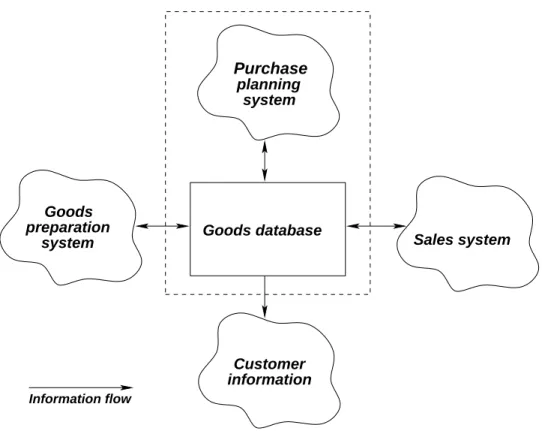
Goods database information Customer Purchase planning system Goods preparationsystem Sales system
Information flow
Figure 2.3: Problem domain subdivision
This figure depicts the different areas of our system. All the parts interact with a central database that administrates shared information between the different subsys-tems.
• Purchase planning system is the part of our system that ensures that enough
ingre-orders and food in stock, which is supplied by the central database. This sys-tem compiles a list of isys-tems needed with a given interval, so that restocking can be limited to e.g. once per week or twice per month
• Sales system keeps track of sales and income. This subsystem receives its
information from points of sale, such as cash registers. The information gath-ered is relayed to the central database, so that stock information is always up to date.
• Customer information handles menus and price changes, so that customers
always have access to the latest information about the cafeteria and its prod-ucts
• Goods preparation system is responsible for all changes made to the goods
in stock, for example when raw goods are combined to become a finished food item for sale. The goods preparation system can be fed a recipe, which if followed results in the used raw good being removed from stock and the finished product added to stock.
Due to time constraints and staying true to the general idea of the system, we de-cided to narrow down our system definition. Thus, we only intend to develop the two parts of the system (See figure 2.3) marked with a dashed line. However, we chose to include the “Goods preparation system” and the “Sales system” as black boxes. This allows us to change the “Goods database” as the system would do in normal operation. The “Goods preparation system” black-box will deal with the orders and the “Sales system” black box will simulate sales. This makes our system more general in terms of usage, in the sense that a wider variety of organisations such as restaurants, cafeterias etc. can benefit from the system.
Problem domain
In this section, we will describe the classes and structures that make up our problem domain. We will gradually refine the definitions of the elements as we move from a general overview of the problem to a more detailed, closer look.
3.1
Clusters
From our system definition we derive two basic clusters (see figure 3.1 that con-tain the classes necessary for achieving an understanding of the problem, using the Object-Oriented Analysis method.
• The Order cluster contain the classes Order, Placed order, Expected order
andRecipe. TheOrderclass is a generalisation of the two types of orders the
cafeteria can receive from customers, which we refer to as “Expected Orders” and “Placed Orders”. The cafeteria will have a steady daily sale of certain items. Whether it is sandwiches, apples or cups of coffee, the cafeteria will have the products in stock and prepared, if the item needs to be before sale, in order to meet the daily demand. Thus the manager will have to estimate beforehand what heexpectsto sell on a given day. This is what the “Expected Order” class represents, the usual day-to-day sales in the cafeteria.
The other order type (Placed Orders) represents any extraordinary sales surges known in advance. Examples could be an order to cater at a party of 150 people, an incoming convention near the cafeteria, basically any atypical sales situation.
Theorder classes are logically connected to the task of planning what goods
ordered a number of food items for a specific date, whereas an expected order is what the cafeteria staff expects to sell some given date.
• The Storage cluster consists of the classesStorageandItemsince items need
to be placed in some kind of storage. Items not in storage cannot be tracked, so they are of no interest to our system.
3.2
Structure
We can further tighten the relationship between our classes. The classStorage con-sists of a number of objects of the class Item. Since our system does not need to concern itself with items that are not in storage, we define our basic structure with all items in storage. We can therefore unite the item and storage classes in an aggregation structure; a Storage object can contain any number of Item objects.
An Order consists of references to the Items ordered, as well as references to the
Recipes needed to make the orderedItems. We have two classes of orders (joined
in the Order class using a generalisation structure), namelyPlaced Orders and
Ex-pected Orders. A Placed Order is an actual order that a customer has placed to the
cafeteria, whereas an Expected Order is what the cafeteria staff has anticipated the cafeteria will sell in a given timeframe. It stands to reason that a cafeteria should keep statistics of its expected orders as well as how many of the items in an expected order were actually sold. A facility for keeping statistics (the class for which we imaginatively titleStatistics) is not a part of any of the clusters we have defined, but is associated with our Order and Item classes since information from those classes are used to compute the statistics.
3.3
Classes
In this section we further describe the characteristics of the four classes from our structure description before introducing the corresponding state charts.
3.3.1
Item class
The item class represents exhaustible objects that the cafeteria needs in its day-to-day operation, such as ingredients, processed goods, prepared meals, disposable utensils, etc. The item object contains properties of the particular item, such as name, physical location, purchase date, expiration date and supplier. These proper-ties are used to determine when to buy new items, and to prioritise in which order to use them in order not to waste food by allowing it to exceed the expiration date. An
Ord e r Or d e r Re cip e Exp e ct e d or d e r Pla ce d or d e r 1 ..* 1 ..* St o ra g e St or a g e It e m 1 1 ..* St a t ist ics 1 1 ..* 1 1 ..*
item can be an ingredient (e.g. a bag of flour) or a finished product (eg. a piece of bread). Since we don’t differentiate between ingredient items and processed items, it is possible to make food items of arbitrary complexity, creating a processed item from some ingredients and then using that processed item as an ingredient in a dish. One should not casually dismiss the use of recursion in cooking!
The item class has been the basis of some discussion as to whether or not to put it in plural form. Because it was deemed to be practical to have single items, the class was decided to be in the singular form. Furthermore the exact definition of the class was under additional dispute here mainly due to some disagreements as to how it should handle prepared items and the items used to prepare it. It was however decided to take out the items used in the preparation and let the item just appear in the system as a new item when prepared. This means that we disallow compounds. During our discussion of this class we also considered how to represent the amount each physical item contains and whether to make one item with milk with the same expiration date or to make a separate item for each physical item so that a carton of milk and still contain an amount to make it possible to have less than a full carton if maybe half of it has been used.
Attributes: Item name, remaining amount of the item, amount unit, expiration date,
price, supplier.
Figure 3.2: State chart for the Item Class
3.3.2
Storage class
The storage class is a container class to hold item objects. It represents various
sorts of storage area in the cafeteria, such as refrigerators, deep freezers, shelves, storages areas, depots etc. It contains a property which states the physical location of the storage.
Figure 3.3: State chart for the Storage Class
3.3.3
Order, Expected Order and Placed Order classes
TheExpected Order class is used to represent expected sales in the system. It can
be used to represent an actual order (e.g. when a customer has placed an order on some food item one week in advance), or to represent the anticipated sales as calculated by the cafeteria management. The order class is a generalisation of the
Expected order and Placed order classes, because the basic actions needed to be
taken are similar, no matter whether an order represents a party that has ordered fifty batches of Swedish meatballs, or if the order was placed by the cafeteria manager because he/she believes that the cafeteria will sell fifty batches of Swedish meatballs that day. An order object consists of references to the items ordered, as well as references to any recipes required to meet the order.
Having two separate classes for expected and actually placed orders allows the cafe-teria staff to both make sure that they can cater to the needs of "normal" customers (through the pre-planned expected orders), while also allowing for special situations (in which a customer places an order in advance).
The order class represents orders placed by customers to the cafeteria, not orders placed by the cafeteria to its suppliers.
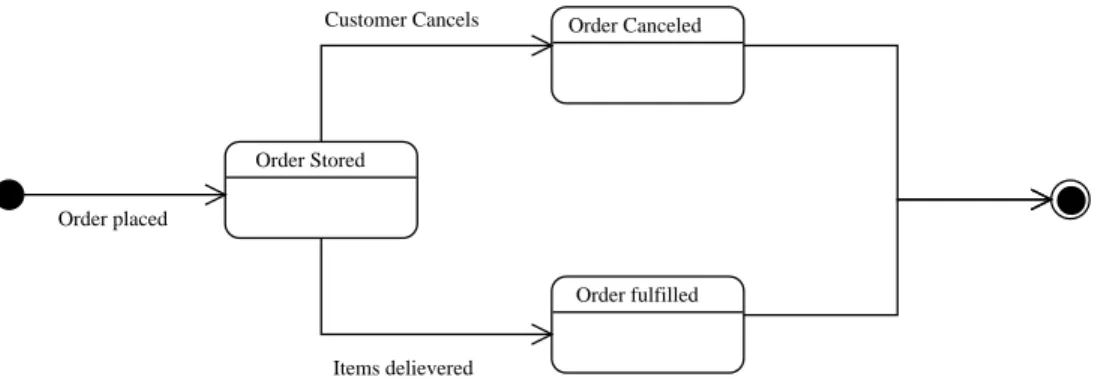
Order Stored Order placed Order fulfilled Items delievered Order Canceled Customer Cancels
Figure 3.4: State chart for the Order Class
3.3.4
Statistics class
Thestatistics class represents the cafeteria’s system for keeping track of which
or-ders have been placed, and which items have been sold. Since the cafeteria prepares its daily stock according to what the staff expects to sell, it is important that it can keep track of which items are actually sold – if the cafeteria has expected orders of fifty vegetarian meals per day and only ten are actually sold, they will be wasting money and ingredients. An object of this class consists of references to expected orders and references to items that have been sold and items that have been thrown away. By doing so, its functions include those that a receipt covers in the real world and statistics about waste that the cafeteria manager would probably keep. This class should be called “Receipt” or “Invoice”, had it only covered sale.
3.3.5
Recipe class
The recipe class represents recipes, which in our terminology means methods to
transform a number of raw goods in storage into a finished, sell-able product. The interesting property of this process isn’t as much the procedure itself (we can as-sume that a chef knows how to cook, although a recipe object could also contain cooking documentation) as it is a specification of the items needed to perform it. As such, a recipe object contains a number of references to item objects, the number of each item required, and, if added by the cafeteria manager, a comment, e.g. a description of the procedure required to turn the items into the finished product. It also contains the price of one finished product created using the recipe.
Recipe Available Recipe added
Modify recipe
Recipe removed
Figure 3.5: State chart for the Recipe Class
3.3.6
Events
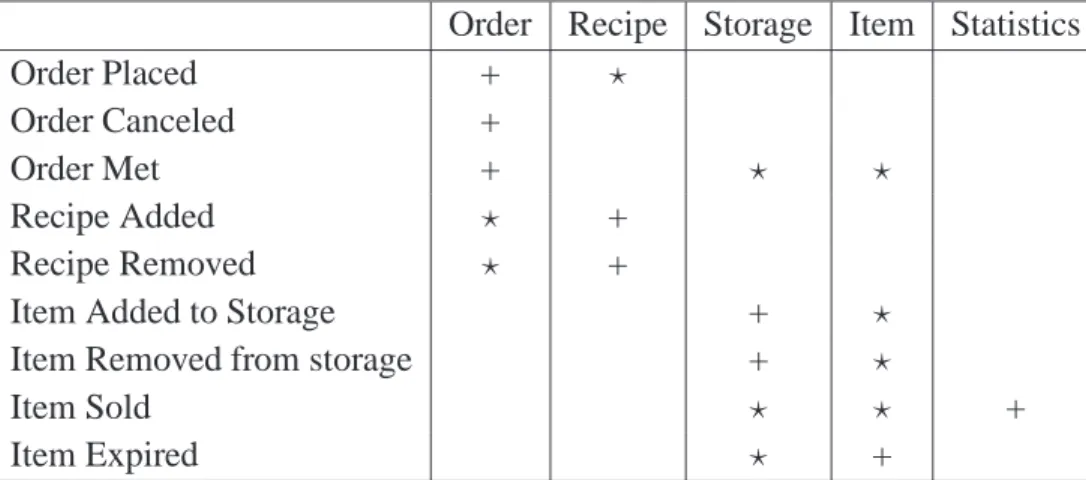
In this section the events believed to have significant impact on the model are de-scribed. The events are also presented in an event table (Table 3.1).
Order Placed
When the manager of the cafeteria receives an extraordinary order or plans what to produce to cover expected daily sales, he will place an order in the system.
Order Canceled
Should a customer cancel their order or should the manager want to cancel an ex-pected order for some reason, he would cancel it in the system.
Order Met
When a cafeteria worker has prepared all the items required in an order, the order will have been met.
Recipe Added
When the manager decides to add a new dish to the cafeteria’s menu, he must add a recipe to the system.
Recipe Deleted
Likewise, should he want to remove a dish from the menu, he can remove the recipe.
Item Added to Storage
Items will be delivered from suppliers and items will be prepared, which all will need to be added to storage.
Order Recipe Storage Item Statistics Order Placed + ⋆ Order Canceled + Order Met + ⋆ ⋆ Recipe Added ⋆ + Recipe Removed ⋆ +
Item Added to Storage + ⋆
Item Removed from storage + ⋆
Item Sold ⋆ ⋆ +
Item Expired ⋆ +
Table 3.1: Event table
’+’ denotes that the event can occur 0 or 1 times on the class ’⋆’ denoted that the event can occur 0 or more times in the class
Item Removed from Storage
When items are sold, expired or use in preparation of meals they will be removed from storage.
Item Sold
The system will have to be notified that an item has been sold in order to track sales.
Item Expired
Practically all items in the inventory has a use before or expiration date, once that date is passed the item should not be used in a meal.
Application domain
The application domain consists of the cafeteria workers and the cafeteria manager. They need two different functionalities. The functionality for the manager should present a wider overview than that used by the cafeteria assistants. The manager would, for instance, require information about ordered raw materials, whereas the cafeteria assistants only need to know whether they have what they need for prepar-ing the food for the day.
4.1
Usage
In this section, we will describe how the actors interact with the system.
4.1.1
Overview
The system has two actors, the planner and the executer. The planner will take an order and add it to the system, and then the executer(s) will fill the order. The planner is involved in four use cases, taking and cancelling orders, and adding and deleting recipes from the system. The executer(s) then check the stock, get what they need there, and buy new stock, if needed. When the executors use some raw material, they will remove it from the storage database.
4.1.2
Actors
Cafeteria worker
Goals: A person, who works for the cafeteria. The responsibilities of this person is
primarily to fulfill orders.
Characteristics: The cafeteria workers are the ones maintaining the information in the
storage.
Table 4.1: Actor specifications for cafeteria worker
Cafeteria manager
Goals: A person who works for the cafeteria. The responsibilities of this person is
primarily behind the scenes, taking orders and handling recipes.
Characteristics: The cafeteria manager is the one buying new supplies for the storage.
Table 4.2: Actor specifications for cafeteria manager
4.1.3
Use Cases
Take Order
When the manager needs to register a placed order, he will go through the “Take Order” procedure. The manager must input delivery date of the order, quantity of the items orders, and the recipe for the ordered items. Finally the manager can either save the order, or add more items to it. See figure 4.1
Cancel Order
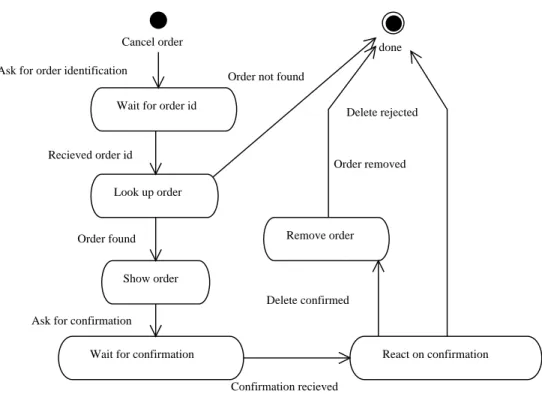
To cancel an order, a manager must first select which order to cancel, and then confirm that he really wants to cancel it. The order will then be removed from the system. See figure 4.2.
Meet Order
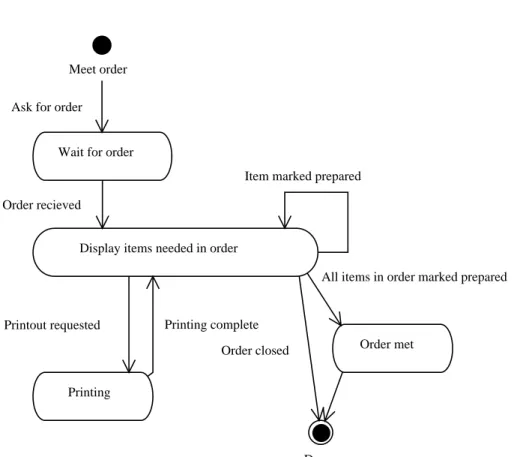
Figure 4.3 shows the state diagram for the "meet order" function. When the cafeteria worker must fulfill an order, the worker must first select the wanted order. Then the worker can either print out the order, mark an item prepared o r close the order. Once all items in the order are marked as prepared them order will changed state to met.
Add Recipe
This use case will occur when the cafeteria manager wants to add a new recipe to the system. The manager will be asked for the name of the recipe. Then he must add the one or more items needed for recipe from the list of known items, as well
Use Case Cafeteria Manager Cafeteria Worker Take Order √ Cancel Order √ Meet Order √ Add Recipe √ Delete Recipe √ Prepare Item √ Add to Stock √ Check Stock √ Check Condition √ Show Statistics √
Table 4.3: Actor table
Take order
Give userspace unique ID
Wait for deliverydate Ask for deliverydate
Save deliverydate deliverydate recieved
Wait for number of dishes Ask for number of dishes
Save number of dishes number of dishes recieved
Wait for recipe Ask for recipe
Save recipe
Recipe recieved Save order
Order complete Order taken
Ask for recipe
Cancel order
Wait for order id Ask for order identification
Look up order Recieved order id
done Order not found
Show order Order found
Wait for confirmation Ask for confirmation
React on confirmation Confirmation recieved Delete rejected Remove order Delete confirmed Order removed
Figure 4.2: State diagram for canceling orders.
as the amounts needed of said items. He also has the option of creating new items in the system, which could be needed for the recipe. finally The total cost to make the recipe will be shown and a sales price must be entered. See figure 4.4
Delete Recipe
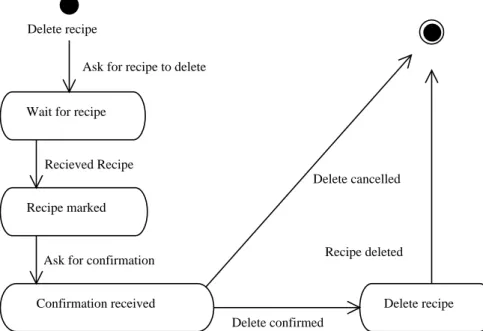
The manager can delete a recipe from the system with the “Delete Recipe” function. He must choose one or more recipes to be marked for deletion. After the manager requests that the marked recipes be deleted, he will be asked to confirm that these recipes should be deleted, before they actually are deleted. See figure 4.5
Add to Stock
When new items are delivered the user will register them in the system, by going through the “Add to stock” use case. First he will enter or scan the bar code of the item, then enter how many of that particular item needs to be added, choose where the item or items should be stored by selecting a storage area, and finally the purchase price paid per item. He can then either add another item or end the procedure. See figure 4.6
Meet order
Wait for order Ask for order
Display items needed in order Order recieved
Item marked prepared
Printing
Printout requested Printing complete
Order met
All items in order marked prepared
Done Order closed
Add recipe
Wait for name Ask for name
Save name Name recieved
Done
Name already exists
Wait for item
Ask for items in recipe
Add item to storage Create Item
Add item to recipe Item recieved
Item recieved
Ask for another item in recipe
Wait for price
Ask for sales price Save price
Price recieved Wait for comment
Ask for comment to recipe Save comment
Comment recieved Save recipe
Delete recipe
Wait for recipe
Ask for recipe to delete
Recipe marked Recieved Recipe
Confirmation received Ask for confirmation
Delete recipe Delete confirmed
Recipe deleted Delete cancelled
Figure 4.5: State diagram for deleting recipes.
Add item to stock
Wait for barcode Ask for barcode
Barcode lookup Barcode received
Create item Barcode is unknown
Wait for number of items Barcode is known
Barcode is now known
Wait for storage area Ask for storage area
Assign storage area Storage received
Wait for price
Store item Add another item Add to stock closed
Ask for price
Price received
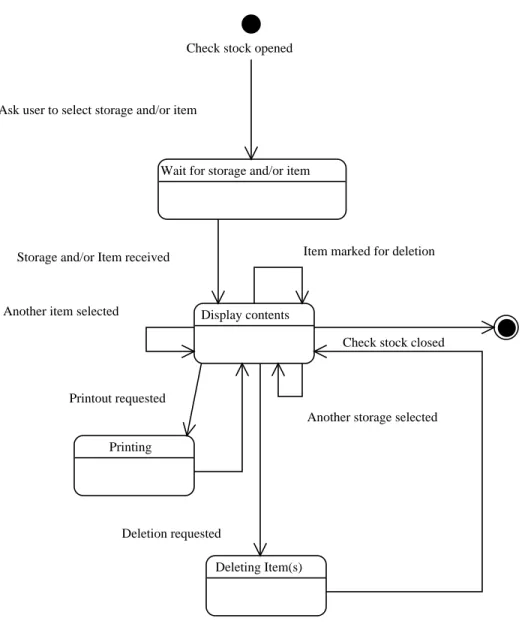
Check Stock
Check stock opened
Wait for storage and/or item Ask user to select storage and/or item
Display contents Storage and/or Item received
Check stock closed
Another storage selected Another item selected
Printing Printout requested
Deleting Item(s) Deletion requested
Item marked for deletion
Figure 4.7: State diagram for checking which items are in stock.
A user can inspect the contents of a storage or all storage area for all items or a particular item with the “Check Stock” function. First the user will be given the option of limiting the inventory display by inputing a specific storage and/or item. Then the current inventory with the specified parameters will be shown. The user can then either specify new parameters, request a printout of the shown inventory, mark an item for deletion, delete marked items, or end the inventory display. See figure 4.7
The user can check the storage for items that are expired by using the “Check Con-dition” function. First all stored expired items will be shown. The user can then either request a print out the currently shown expired items, mark an item for dele-tion, select which storage areas expired items should be displayed from, delete the marked expired items, or end the function. See figure 4.8
Show Statistics
The manager can look at statistics generated by the system. To do so, he must first input the time range from which to show statistics from. Then he can narrow down the displayed statistics by selecting a specific item or order, request a printout of what’s currently shown or close statistics. See figure: 4.9
4.2
Functions
In this section we will present a list of functions, describe their complexity and define which type of functions they are. Table 4.4 contains a list of functions that our system will implement. The table also lists the complexity and type of functions. We have chosen only to describe the two most complex functions (Predict Order and Statistics) algorithmically.
4.2.1
Statistics
The Statistics function is invoked every time an order is met. It increases the number of items sold in the active period.
Statistics: given an item
add 1 to number of items sold over time period given period
return number of items sold in period
4.2.2
Predict orders
The Predict order function is invoked in the beginning of each period. It returns the number of items sold in a given period, plus a given deviation, to avoid a production
A P T E R 4 . A P P L IC A T IO N D O M A IN
Expired Items in storage are shown All storage selected
Printing
Print out of expired items is ordered Printing is completed
Item is marked for deletion
Wait for confirmation
Delete marked items requested
Deleting items
Deletetion confirmed Items deleted Deletion canceled
Close dialog selected Storage selection changed
F ig u re 4 .8 : S ta te d ia g ra m fo r ch ec k in g th e co n d it io n o f it em s in st o ck . e 3 2
Wait for date range
Ask for date range
Sales statistics shown
Date range received
Item parameters changed
Order parameters changed Date range change requested
Printing
Printout requested Printing complete
Statistics closed
Functions
Function Complexity Type
Take order Simple Update
Cancel order Simple Update
Get order Simple Read
Get today’s orders Medium Compute
Add recipe Simple Update
Delete recipe Simple Update
Get recipe Simple Read
Buy item Simple Update
Sell item Simple Update
Check item condition Simple Read Add item to storage Simple Update Remove item from storage Simple Update
Check stock Simple Read
Statistics Medium Compute
Predict orders Medium Compute
Table 4.4: Function List
Predict orders:
given a period and an item
query Statistics for number of items sold in period return number of items plus a given deviation
4.2.3
Get today’s orders
The View today’s orders is invoked when a cafeteria worker requests information on the day’s task. It returns the day’s orders.
Get today’s orders: given the day
Interfaces
5.1
User interface
We intend to develop a simple user interface which can be operated by anyone with only a little experience. The system should be fast to use, to ensure that the users are not inhibited in their daily routines. This user interface illustrates our solution to this. The system has a single window for each major task, roughly corresponding to the classes described earlier. The system uses buttons and input fields for all actions, minimizing the need for any prior knowledge to be able to use the system. The user interface we intend to develop should be composed as follows.
Todays tasks Main screen Return to main View todays orderss View order
Select a specific order and press view order Order meet
P T E R 5 . IN T E R F A C E S
select specific order press cancel yes/no dialog return after Check item condition Main screen View orders Cancel order Change order Take order View recipes Add recipe Delete recipe
Statistics Predict orders
Check stock take order done change move statistics return predict orders done done done done return return return Remove item Add item recipes add orders stock delete add check remove done done F ig u re 5 .2 : N av ig at io n ch ar t fo r th e m an ag er 3 6
of overview is the managing of items. In the working system there will be a lot of items with different attributes, so an extended list is needed to create overview. This list should be able to sort items according to their expiration dates, content levels etc. This situation is depicted below.
5.1.1
Examples
The following examples should illustrate how the system should be presented to the user. These examples are temporary, and only used to describe the general idea of the user interface.
Figure 5.4: View Orders window
Figure 5.6: View Statistics window
Summary
In this document we have started the Object Oriented Analysis & Design process. This process includes the pre-analysis with the system definition, the problem do-main, where the structure of the system and its functions was designed. In the application domain, we isolated the users of the system, and mapped their usage of the system. Based on this, we made some drafts of the graphical user interface.
Introduction
This part of the report will describe in detail how we intend to implement our sys-tem. We will work with the material in our analysis and come up with a solution we find satisfying. We will furthermore describe how our design differs from our anal-ysis. Our system will be designed corresponding to the UML notation introduced in Object Oriented Analysis & Design[6].
7.1
Analysis vs. Design
One of the major changes from the analysis to the design is the inclusion of an In-gredient class. This was done from a programming perspective, since it is overly complicated to implement the compound structure of the Order, Recipe, Item re-lationship. The Statistics class has been renamed to the more descriptive name Logger, which will log every database transaction. The Placed Orders class will be replaced with with an attribute in the Orders class called OrderType, this is done because for easier data storing and programming.
Quality Goals
In this chapter, we will create a checklist of our prioritized design criteria. Table 8.1 shows these priorities.
8.1
The criteria one by one
- Usable: The system’s adaptability to the organizational, work-related and technical contexts.
We rate the system’s usability asless important. Although the system has to be easy enough for users to use, usability and interfaces will not be our main focus in this project.
- Secure:The precautions against unauthorized access to data and facilities.
This criterion isimportant. If the database is to be trusted, it is important that nobody can add or remove anything without being granted permission to do so. On the other hand, the database is storing recipes for food and not nuclear launch codes, so it would be overkill to implement paranoia-grade security. - Efficient: The economical utilization of the technical platform’s facilities.
We have marked this criterion as less important to our system. The system should be able to run on reasonably modest hardware, but on the other hand, there shouldn’t be any need for any particularly CPU-hungry operations any-way. The Java Virtual Machine takes care of the utilization of hardware and OS resources, although in a Java project, efficiency becomes a question of ef-ficient utilization of Java as a platform rather than utilization of the hardware itself.
Criterion Very important Important Less important Irrelevant Trivial Usable ⋆ Secure ⋆ Efficient ⋆ Correct ⋆ Reliable ⋆ Maintainable ⋆ Testable ⋆ Flexible ⋆ Comprehensible ⋆ Reusable ⋆ Portable ⋆ Interoperable ⋆
Table 8.1: Design criteria
incorrect results from its calculations. On the other hand, this shouldn’t be too difficult to achieve, given that our system won’t be used for any complex scientific calculations.
- Reliable:The fulfillment of the required precision in function execution.
The reliability of the system is very important, as it is a base for continuous usage. If a cafeteria relies on our system for management, and the system suffers frequent failures, it would increase costs rather than decrease them. - Maintainable: The cost of locating and fixing system defects.
We rate the maintainability of our system asimportant. A maintainable sys-tem is characterized by clear, understandable code organized in logical mod-ules. In virtually all real-life software systems, much more time is spent main-taining code than initially writing it, and as such it should be a goal for any reasonable software system to be as maintainable as possible.
- Testable:The cost of ensuring that the deployed system performs its intended function.
We have rated this criterion important. Since we have rated the system’s correctness important, it follows that there must be a good way to reliably test whether this quality goal has been met.
- Flexible:The cost of modifying the deployed system.
- Comprehensible: The effort needed to obtain a coherent understanding of the system.
This criterion is ratedimportant, since the system will be used mainly by non-IT personnel. As such it should be easy for users to understand how to use the system.
- Reusable:The potential for using system parts in other related systems.
Code reuse is a good thing. We’ve considered this criterionimportantbecause code reuse is nearly universally regarded as good software development prac-tice. This is for good reason: No programmer should waste time reinventing the wheel – except for innovative new wheel designs, of course.
- Portable:The cost of moving the system to another technical platform.
As the system will be written in Java, it will run on any platform that has a Java virtual machine implementation. This criterion is therefor trivially
fulfilled.
- Interoperable:The cost of coupling the system to other systems.
This criterion is less important to us. The system should be interoperable with the existing sales and storage infrastructure of a cafeteria, although due to time constraints we have chosen not to focus on this in the project.
Technical Platform
The purpose of this chapter is to get an overview of the environment and the system peripherals. This overview dictates the conditions after which we design the system.
9.1
Peripherals
The only equipment needed is what the cafeteria already have at their disposal. A computer connected to the Internet and hooked up to the cash register(s). This setup should be found at all the locations where the system is meant to run. The only re-quirements for any auxiliary equipment such as a computer set up for administrative use, is connection to the Internet.
9.2
Software
All computers interacting with the system must be able to run the JRE 1.51. We
have chosen Java 5 over Java 2 because of some significant features included in Java 5, which we might as well benefit from. Specifically, the enum type and Java 5 generics proved very useful for the implementation. Ultimately the system needs a central database, for testing purposes we choose PostgreSQL, which is an relational database server (RDBMS).
9.3
System Interfaces
The system will require an interface to the point of sale which is usually a cash register or a POS system2. This interface is necessary to tell the system when an
1Java Runtime Environment 1.5 (Java 5) 2Point Of Sale system
Initialization Prepare the information exchange Activate registration of sales Let the system know of sales
Table 9.1: Protocol for cash register interface
item is sold and update the storage and take care of the statistics. The protocol for this interface is described in table 9.1. The actual implementation of an interface to POS hardware is outside the scope of this project, however.
The system also needs to interface with the database. All the functionality needed is built into Java, through JDBC, so everything should run pretty smoothly. Both the cash register and the database will be included as black-boxes. The database will be implemented only as an example for testing reasons, and so will only support PostgreSQL.
9.4
Languages
We have chosen to implement our system in Java with Java Swing as a graphi-cal front-end, as opposed to Java Server Pages (JSP) which is viewed with a web browser. See chapter 23.
Architecture
10.1
Basic Architecture
We choose to structure our system after the client-server architectural model. The
server component is responsible for providing a model of the stock of the cafeteria,
and a number of clients can connect to that server to query or modify that model. One example of such a client could be a manager’s interface, which allows a cafe-teria manager to add orders or change the stock. Another example is a customer information terminal, which would allow a customer to see what today’s special is, and whether some item is currently out of stock.
For the server itself (and the managers’ client we will implement to demonstrate the system), the layered architecture (originally conceived by Edsger W. Dijkstra) appears to be the most useful. As such, our system architecture becomes a het-erogenous architecture, including aspects of both client-server and layered system design.
The defining characteristic of the layered architecture style is that the application is structured in logical layers, each of which is only allowed to invoke a layer one level below or one level above itself. The benefit of this organization is clarity: It is possible to achieve a logical, clear model of the application, in which individual layers have clearly defined areas of responsibility. The "strict" form of this orga-nization means that each layer provides a service to the layer above it, and acts as a client for the layer below it – that is, layers may request services from the layer below themselves, but never from the ones above. This model lends itself well to our particular application, because we can provide an outer layer which implements the user interface, and keep the function and model components in separate layers.
Persistence Preperation Sales Communication Communication Function GUI
Figure 10.1: The architecture of our system. Notice that “Sales” and “Preparation” are black-boxes.
10.2
Component Architecture
The system has four parts which are connected to each other through the persis-tence layer, using a communications protocol. This makes the system extensible, by allowing its administrator to change to another database if necessary. This is modelled informally on figure 10.1. We decided that the optimal architecture would be the client-server model, in which the persistence layer represents the server. This model also adds to the extensibility of the system, as it allows new components to be added into the system easily (since a component programmer only needs to know about the communication interface). Each client should be able to have some form of local persistence, which is especially important in the “black box” sales system, to allow points of sale to still be able to sell even if the connection to the server is lost. The management part of the system will have a local queue in case the connection gets lost to the central database. There are two “black boxes” in our system: The preparation and the sales system. These two “black boxes” are there to give the system we will implement information concerning the real activities in the cafeteria. These “black boxes” are not necessarily written in Java.
For the “Purchase and planning system” and the “Goods database” we have chosen a strict, closed layered architecture, see fig. 10.2. We made this choice in order to make the system as extensible as possible, by allowing to change a layer without changing the other layers. This is possible because the layers must work with
well-Clie n t < < c o m p o n e n t > > GUI < < c o m p o n e n t > > Fu n c t io n < < c o m p o n e n t > > Co m m u n ic a t io n Se rv e r < < c o m p o n e n t > > Co m m u n ic a t io n < < c o m p o n e n t > > Mo d e l < < c o m p o n e n t > > Pe rs it e n c e
Figure 10.2: Deployment diagram of our system
If we see system as a whole it is also a strict closed architecture, since there is no need for the “Goods database” to call anything in the “Purchase and planning system”. This allows for an entire component to be rewritten without affecting the other components. The communication layer represents a protocol for calling the model from the function layer, in a real-life system this would be implemented using a network protocol. This, however, is beyond the scope of our project, so we have chosen just to make it a transport layer that could be extended to run over a network. The server will handle most of the computation such as constructing new objects, turning objects into data and storing them. The persistence wrapper is another layer made to make the system as extensible as possible, it makes it possible to store the data in any form, with small alterations to the layer. The actual persistence can theoretically be implemented by anything from an Oracle database, to a collection of XML files or, in theory, a deck of punch cards.
Components
11.1
GUI Component
In this section, we will describe our GUI component. The purpose of this compo-nent is to draw and handle the windows which are used for user interaction.
11.1.1
Structure
The structure of this component is described in figure 11.1.
11.1.2
Classes
11.1.2.1 WindowInterface
Purpose: The purpose of the WindowInterface is to create a common structure for the GUI, so it will be easy to extend and rewrite.
Attributes This class has no attributes.
Operations
- Draw: This operation adds all the components of the window. - Show: This operation shows the window.
Purpose: The purpose of the MainWindow is to create and handle the first win-dow the user is presented to.
Attributes This class has no attributes.
Operations
- Draw: This operation adds all the components of the window. - Show: This operation shows the window.
- Hide: This operation hides the window.
- Destroy: This operation removes the window completely.
- Exit: This operation makes sure the program exits cleanly and updates all data worked on.
11.1.2.3 StockWindow
Purpose: The purpose of the StockWindow is to create and handle all aspects of inventory handling the user will be presented to.
Attributes This class has no attributes.
Operations
- Draw: This operation adds all the components of the window. - Show: This operation shows the window.
- Hide: This operation hides the window.
- Destroy: This operation removes the window completely.
11.1.2.4 RecipeWindow
Purpose: The purpose of the RecipeWindow is to create and handle all aspects of recipe handling the user will be presented to.
Operations
- Draw: This operation adds all the components of the window. - Show: This operation shows the window.
- Hide: This operation hides the window.
- Destroy: This operation removes the window completely.
11.1.2.5 OrderWindow
Purpose: The purpose of the OrderWindow is to create and handle all aspects of order handling the user will be presented with.
Attributes This class has no attributes.
Operations
- Draw: This operation adds all the components of the window. - Show: This operation shows the window.
- Hide: This operation hides the window.
- Destroy: This operation removes the window completely.
11.1.2.6 StatisticsWindow
Purpose: The purpose of the StatisticsWindow is to create and handle all aspects of viewing the statistics the user will be presented with.
Attributes This class has no attributes.
Operations
- Draw: This operation adds all the components of the window. - Show: This operation shows the window.
- Hide: This operation hides the window.
In this section we will describe our function component. The purpose of this com-ponent is to provide functionality to the system.
11.2.1
Structure
The classes contained in the functions layer are shown on figure 11.2
11.2.2
Classes
11.2.2.1 Stockhandler
Purpose: The purpose of this class is to get and send user interface requested stock data from the the model layer through the communication layer.
Attributes This class has no attributes.
Operations
- View: View the current stock. - Add: Add new item to stock.
- Remove: Remove an item from stock. - Update: Update an item already in stock. - Sort: Sort items in stock from given criteria. - Search: Search the current stock for a given item.
11.2.2.2 Recipehandler
Purpose: The purpose of this class is to get and send user interface requested recipe data from the the model layer through the communication layer.
P T E R 1 1 . C O M P O N E N T S Fu n c t io n Co m p o n e n t St ock H a n d le r + lis t ():St o ra g e [] + lis t (s t o ra g e:St o ra g e):It e m []
+ a d d(n a m e:St rin g,lo c a t io n:St rin g):St o ra g e
+ a d d(a m o u n t:d o u b le ,s t o ra g e:St o ra g e,e x p ira t io n s d a t e:Da t e,p u rc h a s e p ric e:Big De c im a l):It e m + re m o v e(s t o ra g e:St o ra g e):v o id
+ re m o v e(it e m :It e m):v o id + c h a n g e(s t o ra g e:s t o ra g e):v o id + c h a n g e(it e m :It e m):v o id + o p e ra t io n _6():v o id
Pr e d ict ion H a n d le r
+ lis t s t a t is t ic s(d a t a:St rin g []):St rin g []
+ m a ke p re d ic t io n(s t rin g:St rin g [],s c a le:d o u b le ):Ord e r
Re cip e H a n d le r
+ lis t ():Re c ip e []
+ a d d(n a m e:St rin g,c o m m e n t:St rin g,In g rid ie n t:In g rid ie n t,d o u b le :d o u b le ,s a le p ric e:Big De c im a l):Re c ip e + re m o v e(re c ip e:Re c ip e):v o id
+ c h a n g e(re c ip e:Re c ip e):v o id
Or d e r H a n d le r
+ lis t ():Ord e r[]
+ a d d(n a m e:St rin g,c u s t o m m e r:St rin g [],d e liv e ry d a t e:Da t e,Re c ip e:Re c ip e,in t :in t ,[]:[]):Ord e r + re m o v e(o rd e r:Ord e r):v o id
+ c h a n g e(o rd e r:Ord e r):v o id
In g r e d ie n t H a n d le r
+ ls it ():In g re d ie n t []
+ a d d(n a m e:St rin g,u n it:St rin g):In g re d ie n t + re m o v e(in g re d ie n t:In g re d ie n t):v o id + c h a n g e(in g re d ie n t:In g re d ie n t):v o id F ig u re 1 1 .2 : F u n ct io n s L ay er 5 6
- View: View the current recipes. - Add: Add a new recipe.
- Remove: Remove a recipe.
- Update: Update an already known recipe. - Sort: Sort recipes from given criteria. - Search: Search for an already known recipe.
11.2.2.3 Orderhandler
Purpose: The purpose of this class is to get and send user interface requested order data from the the model layer through the communication layer.
Attributes This class has no attributes.
Operations
- View: View the current orders. - Add: Add a new order.
- Remove: Remove a recipe.
- Change: Change an already taken order.
- CheckStatus: Check the status of a gives order. - Update: Update an already present order. - Search: Search for an already present order. - Sort: Sort orders from given criteria.
11.2.2.4 Statisticshandler
Purpose: The purpose of this class is to get and send user interface requested statistics data from the the model layer through the communication layer.
Operations
- View: View statistics about a given item type.
11.2.2.5 Predictionshandler
Purpose: The purpose of this class is to predict future sales from sales and orders data, given a well defined time interval.
Attributes This class has no attributes.
Operations
- Predict: Predict future sales.
11.3
Communication Component
In this section, we will describe our communication component. The purpose of this component is to serve as the link between the central persistence layer and the remote clients. We will not implement this component.
11.3.1
Classes
11.3.1.1 Authenticator (Client)
Purpose: The purpose of this class is to encapsulate the authentication of the server. To avoid connecting to the wrong server, it is important to make sure that the server is exactly who it claims to be.
Attributes
- pubkey: The public key used to encrypt a message.
- privkey: The private (secret) key used to decrypt a message encrypted with the corresponding public key.
Operations
- auth: This operation validates the key supplied by the server, and recognises the server if the key is correct.
Purpose The purpose of this class is to queue data before they are sent through the connection. This will enable some operations in the function layer, even though a connection to the server is not established.
Attributes
- queue: The queue containing the requests not yet sent.
Operations
- push: This operation enqueues data to be send through the connection. - pop: This operation dequeues data, when it has been send to the server.
11.3.1.3 Request (Client)
Purpose The purpose of this class is to
Attributes
- objecttype: Model-layer class reference.
- callmethod: The method that should be called on the object object type.
Operations This class does not have any operations.
11.3.1.4 Connection (Client)
Purpose: The purpose of this class is to take care of the connections, which the authenticator class has allowed to connect.
Attributes
- queue:
11.3.1.5 Authenticator (Server)
Purpose: The purpose of this class is to encapsulate the authentication of the clients. To avoid a third-party to change the data in the persistence layer, it is im-portant to make sure that the client has the necessary permissions to access the connection.
Attributes
- pubkey: The public key used to encrypt a message.
- privkey: The private (secret) key used to decrypt a message encrypted with the corresponding public key.
Operations
- auth: This operation validates the key supplied by the client, and grants ac-cess if there is a match.
11.3.1.6 Connection (Server)
Purpose: The purpose of this class is to take care of the connections, which the authenticator class has allowed to connect.
Attributes This class does not have any attributes.
Operations
- accept: This operation establish the connection between client and server. - handlerequest: This operation handles the request received from the client.
11.3.1.7 Listener (Server)
Purpose: The purpose of this class is to spawn a new thread, which a distinct client connects to.
Attributes:
- listen: This operation activates the connection on the given port.
- createconnection: This operation activates the connection on the given port.
11.3.1.8 Connection
Purpose:
Attributes
- remotehost: A string value containing the name that the remote host is known by.
- remoteport: An integer value containing the port to connect to on the remote host.
Operations
- close: This operation closes the connection to the remote host. - send: This operation sends data to the remote host.
- receive: This operation receives data from the remote host. - serialise: This operation prepares objects to be sent over network. - unserialise: This operation prepares objects to received over network.
11.4
Model
This layer will represent the model of the cafeteria. These classes will be similar to the ones described in the problem domain of the analysis document.
11.4.1
Classes
Co m m u n ic a t io n Co m p o n e n t (Se rv e r) List e n e r - lis t e n p o rt:in t + lis t e n():v o id - c re a t e c o n n e c t io n():Co n n e c t io n Au t h e n t ica t or - p u b ke y:St rin g - p riv ke y:St rin g
+ a u t h(p u b ke y:St rin g):Bo o le a n
Con n e ct ion
+ a c c e p t():v o id
+ h a n d le re q u e s t(re q u e s t:Re q u e s t :):Ob je c t [] * * Co m m u n ic a t io n Co m p o n e n t (Clie n t ) Qu e u e - q u e u e:Re q u e s t + p u s h(o b j:Ob je c t):v o id + p o p ():Ob je c t Au t h e n t ica t or - p u b ke y:St rin g - p riv ke y:St rin g
+ a u t h(p u b ke y:St rin g):Bo o le a n
Con n e ct ion - q u e u e:Qu e u e + c o n n e c t():v o id 0 ..1 * * Re q u e st - o b je c t t y p e:St rin g - c a llm e t o d:St rin g * * * Co n n e ct io n - re m o t e h o s t:St rin g - re m o t e p o rt:in t + c lo s e():v o id + s e n d(o b j:Ob je c t []):v o id + re c ie v e():Ob je c t [] - s e ria lis e(o b j:Ob e jc t []):b y t e [] - u n s e ria lis e(d a t a:b y t e []):Ob je c t
- id: Unique id that identifies the object.
- amount: The amount of the Item, given in the unit. - storage: The storage, the Item is in.
- expirationdate: When the Item expires.
- purchasingprice: Containing the price paid for the item.
Operations This class does not have any operations
11.4.1.2 Order
Purpose: Represents orders received by the cafeteria to the system.
Attributes
- id: Unique identity of the order. - name: The name of the order. - Customer: Customer identification.
- deliverydate: Date when the order should be filled. - recipes: Recipe and number of them to be delivered.
Operations This class does not have any operations.
11.4.1.3 Ingredient
Purpose: A helper class for the Recipe class.
Attributes
- id: Identification id..
- name: Name of the ingredient.
11.4.1.4 Recipe
Purpose: Contains the needed information on how many ingredient items are needed to prepare a dish.
Attributes
- id: Id identifying the recipe. - name: Name of the recipe.
- comment: Comment on the recipe.
- ingredients: Set of Ingredients and amounts used in the recipe. - salesprice: Price of the prepared dish.
Operations This class does not have any operations.
11.4.1.5 Logger
Purpose: This class logs the activity between the connection and the persistence layer, for use in the statistics system.
Attributes
- obj: Object that has been sold. - date: Date of sale.
- requesttype: Type of log-request.
Operations
- log: Adds a set of object, date and requesttype to the log. - savelog: Saves log.
- getstatistics: Returns a set of objects and number of them sold within a given time.
11.4.1.6 Storage
- id: Unique identifier for storage. - Name: Name of the storage area.
- Location: Physical location the storage area.
Operations This class does not have any operations.
11.4.1.7 ModelHandler
Purpose: This class works as an interface for the classes Recipe, Order, Item, Ingredient and Storage in the model-layer.
Attributes This class does not have any attributes.
Operations
- createobjects: Creates an empty object.
- createspecificobjecttype: Creates items of a specific type. - createdepobj: Creates dependency objects.
- saveobjects: Saves object.
- savedepobj: Saves dependent objects.
11.5
Persistence Component
In this section, we will describe our persistence component. To provide database or file-system accessibility for our system we need an persistence component. Once data is introduced into our system, we need to be sure that it stays there, unless we state otherwise; we need the data to be persistent, which is ensured by the
persistence component. The persistence component will take commands from the
communication layer and handle it appropriately. For example we will need to
be able to tell the system to store a piece of data, a functionality provided by the