Sitronix
ST7920
Chinese Fonts built in LCD controller/driver
Main Features
l Operation Voltage Range:
Ø 2.7V to 5.5V
l Support 8-bit, 4-bit and serial bus MPU interface
l 64 x 16-bit display RAM (DDRAM)
Ø Supports 16 words x 4 lines (Max)
Ø LCD display range 16 words x 2 lines
l 64 x 256-bit Graphic Display RAM (GDRAM)
l 2M-bits Character Generation ROM (CGROM): Support 8192 Chinese words (16x16 dot matrix)
l 16K-bit half-width Character Generation ROM (HCGROM):
Supports 126 characters (16x8 dot matrix)
l 32-common x 64-segment (2 lines of character) LCD drivers
l Automatic power on reset (POR)
l External reset pin (XRESET)
l With the extension segment drivers, the display area can up to 16x2 lines
l Built-in RC oscillator:
Frequency is adjusted by an external resistor
l Low power consumption design
Ø Normal mode (450uA Typ VDD=5V)
Ø Standby mode (30uA Max VDD=5V)
l VLCD (V0 to VSS): max 7V
l Graphic and character mixed display mode
l Multiple instructions:
Ø Display Clear
Ø Return Home
Ø Display ON/OFF
Ø Cursor ON/OFF
Ø Display Character Blink
Ø Cursor Shift
Ø Display Shift
Ø Vertical Line Scroll
Ø Reverse Display (by line)
Ø Standby Mode
l Built-in voltage booster (2 times) VOUT: max 7V
l 1/33 Duty (with ICON)
Function Description
ST7920 LCD controller/driver IC can display alphabets, numbers, Chinese fonts and self-defined characters. It supports 3 kinds of bus interface, namely 8-bit, 4-bit and serial. All functions, including display RAM, Character Generation ROM, LCD display drivers and control circuits are all in a one-chip solution. With a minimum system configuration, a Chinese character display system can be easily achieved.
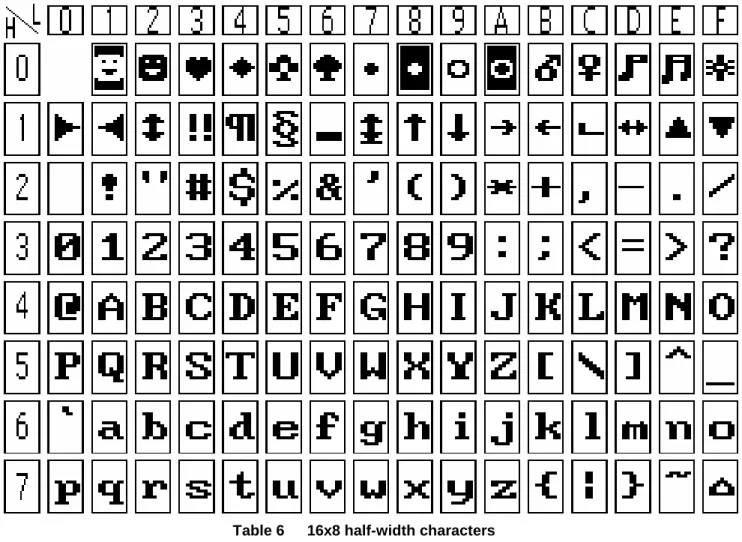
ST7920 includes character ROM with 8192 16x16 dots Chinese fonts and 126 16x8 dots half-width alphanumerical fonts. Besides, it supports 64x256 dots graphic display area for graphic display (GDRAM). Mix-mode display with both character and graphic data is possible. ST7920 has built-in CGRAM and provide 4 sets software programmable 16x16 fonts.
ST7920 has wide operating voltage range (2.7V to 5.5V). It also has low power consumption. So ST7920 is suitable for battery-powered portable device.
ST7920 LCD driver consists of 32-common and 64-segment. Company with the extension segment driver (ST7921) ST7920 can support up to 32-common x 256-segment display.
ST7920 Specification Reversion History
Version
Date
Description
C1.7 2000/12/15
1. VCC changed to VDD.
2. VLCD changed from VCC-V5 to V0-VSS.
3. DC characteristics input High voltage (Vih) changed to 0.7VDD. 4. DC characteristics output High voltage (Voh) changed to 0.8VDD.
C1.8 2001/03/01
1. Chip Size changed.
2. ICON 256 dots changed to 240 dots.
3. XOFF normal high sleep Low changed to normal low sleep High. 4. Added XOFF application.
5. Modified application of ST7920: PIN 4~6 are floating. (PIN 4~6 are test pin) 6. Modified voltage doubler CAP1P, CAP1M, CAP2M capacitors polarity
C1.9 2001/05/28
1. Icon RAM TABLE changed. (TABLE-6) 2. Booster description modified. (PAGE-29) 3. AC Characteristics modified.
4. Added 2Line 16 Chinese Word (32Com X 256Seg) application circuit. 5. Added oscillation resistor’s relation to power consumption and frequency. C2.0 2001/07/03 1. Added Register initial values.
2. Voltage booster CAP1M CAP1P polarity changed (PAGE-30). V2.0 2001/08/17 1. Modified Table 7 (PAGE-14).
2. Change to English version.
V2.0c 2001/10/18 1. Modified page-38 Serial interface timing diagram. V2.0d 2002/05/09 1. Add the standard code (Japan, GB code, BIG-5 code).
V3.0 2002/10/11 1. Delete sleep mode function.
V3.1 2003/04/11 1. Modified GDRAM Address (AC5…AC0, 00h…3Fh). V3.2 2003/09/09 1. Add the CGROM and HCGROM test application circuit. V3.3 2004/03/29 1. Updat the using method for ICON.
V3.4 2005/5/24 1. ICON no used.
V3.5 2005/5/24 1. Add VOUT voltage limitation. 2. Remove IRAM related descriptions.
V3.6 2005/6/6
1. Fix the check sum count number on Page 28~30. 655360->655362, 10240->10242.
2. Modify the description about serial interface. V3.7 2007/7/24 1. Add CGROM/HCGROM checksum operation time. V3.8 2007/12/20 1. Add “Clear DDRAM” step before check sum process.
System Block Diagram
Timing Generator 33/49-bit shift register Common Signal Driver Display Data RAM (DDRAM) 64 x 16 bits 64-bit latch circuit Segment Signal Driver 64-bit shift register LCD Drive Voltage Selector CLK Instruction Register (IR) Instruction Decoder Reset Circuit MPU Interface Input/ Output Buffer Address Counter Character Generator ROM (CGROM) 2M bits Character Generator RAM (CGRAM) 1024 bits Cursor Blink Scroll Controller Data Register (DR) Busy Flag Parallel/Serial converter and Attribute Circuit VDD V0 V1 V2 V3 V4 RESI RESO CL1 CL2 M DOUT COM1 to COM32 SEG1 to SEG64 RS RW E DB4 to DB7 DB0 to DB3 Half size Character ROM (HCGROM) 1024x16 bits XRESET Graphic RAM (GDRAM) 1024 x 16 bits XOFF Vss PSBPad Diagram
136 30 31 1 S T 7 9 2 0 “ S T 7 9 2 0 ( 0 , 0 )No. Name X Y 1 V0 -2548 1812 2 V1 -2548 1688 3 V2 -2548 1562 4 CLK -2548 1438 5 TT1 -2548 1312 6 TT2 -2548 1188 7 V3 -2548 1062 8 V4 -2548 938 9 VSS -2548 812 10 VDD -2548 688 11 XRESET -2548 562 12 CL1 -2548 438 13 CL2 -2548 312 14 VDD -2548 188 15 M -2548 62 16 DOUT -2548 -62 17 RS -2548 -188 18 RW -2548 -312 19 E -2548 -438 20 VSS -2548 -562 21 OSC1 -2548 -688 22 OSC2 -2548 -812 23 PSB -2548 -938 24 D0 -2548 -1062 25 D1 -2548 -1188 26 D2 -2548 -1312 27 D3 -2548 -1438 28 D4 -2548 -1562 29 D5 -2548 -1688 30 D6 -2548 -1812 31 D7 -2306 -1933 32 XOFF -2181 -1933 33 VOUT -2056 -1933 34 CAP3M -1931 -1933 35 CAP1P -1806 -1933 No. Name X Y 39 VD2 -1306 -1933 40 C[1] -1181 -1933 41 C[2] -1056 -1933 42 C[3] -931 -1933 43 C[4] -806 -1933 44 C[5] -681 -1933 45 C[6] -556 -1933 46 C[7] -431 -1933 47 C[8] -306 -1933 48 C[9] -181 -1933 49 C[10] -56 -1933 50 C[11] 69 -1933 51 C[12] 194 -1933 52 C[13] 319 -1933 53 C[14] 444 -1933 54 C[15] 569 -1933 55 C[16] 694 -1933 56 C[17] 819 -1933 57 C[18] 944 -1933 58 C[19] 1069 -1933 59 C[20] 1194 -1933 60 C[21] 1319 -1933 61 C[22] 1444 -1933 62 C[23] 1569 -1933 63 C[24] 1694 -1933 64 C[25] 1819 -1933 65 C[26] 1944 -1933 66 C[27] 2069 -1933 67 C[28] 2194 -1933 68 C[29] 2319 -1933 69 C[30] 2548 -1812 70 C[31] 2548 -1688 71 C[32] 2548 -1562 72 C[33] Not use 2548 -1438
No. Name X Y 77 S[60] 2548 -812 78 S[59] 2548 -688 79 S[58] 2548 -562 80 S[57] 2548 -438 81 S[56] 2548 -312 82 S[55] 2548 -188 83 S[54] 2548 -62 84 S[53] 2548 62 85 S[52] 2548 188 86 S[51] 2548 312 87 S[50] 2548 438 88 S[49] 2548 562 89 S[48] 2548 688 90 S[47] 2548 812 91 S[46] 2548 938 92 S[45] 2548 1062 93 S[44] 2548 1188 94 S[43] 2548 1312 95 S[42] 2548 1438 96 S[41] 2548 1562 97 S[40] 2548 1688 98 S[39] 2548 1812 99 S[38] 2319 1933 100 S[37] 2194 1933 101 S[36] 2069 1933 102 S[35] 1944 1933 103 S[34] 1819 1933 104 S[33] 1694 1933 105 S[32] 1569 1933 106 S[31] 1444 1933 No. Name X Y 116 S[21] 194 1933 117 S[20] 69 1933 118 S[19] -56 1933 119 S[18] -181 1933 120 S[17] -306 1933 121 S[16] -431 1933 122 S[15] -556 1933 123 S[14] -681 1933 124 S[13] -806 1933 125 S[12] -931 1933 126 S[11] -1056 1933 127 S[10] -1181 1933 128 S[9] -1306 1933 129 S[8] -1431 1933 130 S[7] -1556 1933 131 S[6] -1681 1933 132 S[5] -1806 1933 133 S[4] -1931 1933 134 S[3] -2056 1933 135 S[2] -2181 1933 136 S[1] -2306 1933
Pin Description
Name
No.
I/O
Connects to
Function
XRESET 11 I ― System reset input (low active).
PSB 23 I ―
Interface selection: 0: serial mode;
1: 8/4-bit parallel bus mode.
RS(CS*) 17 I MPU
Parallel Mode: Register select. 0: Select instruction register (write) or busy flag, address counter (read); 1: Select data register (write/read). Serial mode: Chip select.
1: chip enabled; 0: chip disabled.
When chip is disabled, SID and SCLK should be set as “H” or “L”. Transcient of SID and SCLK is not allowed.
RW(SID*) 18 I MPU
Parallel Mode: Read/Write control. 0: Write;
1: Read.
Serial Mode: Sserial data input.
E(SCLK*) 19 I MPU Parallel Mode: 1: Enable trigger.
Serial Mode: Serial clock.
D4 to D7 28~31 I/O MPU Higher nibble data bus of 8-bit interface and data bus for 4-bit interface
D0 to D3 24~27 I/O MPU Lower nibble data bus of 8-bit interface. CL1 12 O Extension segment drv. Latch signal for extension segment
drivers.
CL2 13 O Extension segment drv. Shift clock for extension segment drivers.
M 15 O Extension segment drv. AC signal for extension segment drivers voltage inversion.
DOUT 16 O Extension segment drv. Data output for extension segment drivers.
COM1 to
COM32 40~71 O LCD Common signals.
SEG1 to
SEG64 136~73 O LCD Segment signals.
V0 to V4 1~3,7,8 ― ― LCD bias voltage. V0 ~ V4 ≦ 7V. VDD 10,14 I Power VDD : 2.7V to 5.5V. Vss 9,20 I Power VSS: 0V. OSC1, OSC2 21,22 I, O Resistors
Using internal oscillator: 5.0V R=33K;
2.7V R=18K.
Using external clock:
Pin Description (continued)
Name
No.
I/O
Connects to
Description
CAP3M CAP1P CAP1M CAP2M 34 35 36 38
I/O Capacitors Capacitor pins for voltage doubler Voltage ≦ 7V.
XOFF 32 O ― Reserved (no connection).
CAP2P 37 ― ― Reserved (no connection).
C[33] 72 O ― Reserved (no connection).
VD2 39 I Reference voltage
Voltage doubler reference voltage. If use internal voltage doubler, please make sure that:
l VD2 ≦ 3.5V or
l VOUT ≦ 7V and CAP3M ≦ 7V. CLK TT1 TT2 4 5 6 I ― ― ―
For CGROM/HCGROM checksum. Refer to checksum application.
Note:
1. 7V>=VOUT>=V0>=V1>=V2>=V3>=V4 must be maintained
2. Two clock options: As shown below.
External Resistor vs. Current (VDD=5V) 500 600 700 800 u A )
External Resistor vs. Frequency (VDD=5V) 500 600 700 800 900 (K H z ) R=33K (VDD=5.0V) R=18K (VDD=2.7V) R
OSC1 OSC2 OSC1 OSC2
Voltage Doubler
Vss CAP1M Voltage Doubler Reference Voltage CAP1P CAP2M CAP2P CAP3M VOUT VD2 VOUTVOUT vs. VD2
0 1 2 3 4 5 6 7 8 9 10 5 4.8 4.6 4.4 4.2 4 3.8 3.6 3.4 3.2 3 2.8 2.6 2.4 2.2 2 1.8VD2 (V)
V
O
U
T
(
V
)
Voltage Doubler mode: VD2 & Vout output characteristic
Notes:
l Total resistance of the Follower deviding resistors should larger than 20K Ohm.
l Booster Capacitor uses 4.7uF
l Panel size: 80mm x 28mm (check display)
Function Description
System interface
ST7920 supports 3 kinds of bus interface to communicate with MPU: 8-bit parallel, 4-bit parallel and clock synchronized serial interface. Parallel interface is selected by PSB=”1” and serial interface is by PSB=”0”. 8-bit / 4-bit interface is selected by function set instruction DL bit.
Two 8-bit registers (Data Register DR and Instruction Register IR) are used in ST7920 to access DRAM or Register. Data Register (DR) can access DDRAM, CGRAM and GDRAM through the address pointer implemented by Address Counter (AC). Instruction Register (IR) stores the instruction sent by MPU to ST7920.
4 kinds of parallel interface access mode can be selected through RS and RW:
RS RW Description
L L MPU write instruction to instruction register (IR) L H MPU read busy flag (BF) and address counter (AC) H L MPU write data to data register (DR)
H H MPU read data from data register (DR) * The serial interface access modes do not have Read operation.
Busy Flag (BF)
ST7920 needs a process time for any received instruction. Before finishing the received instruction, any further instruction is not accepted. The process time of each instruction is not equal and the internal process is finished or not can be determined by the BF. Internal operation is in progress while BF=”1”, that means ST7920 is in busy state. No further instructions will be accepted until BF=”0”. MPU must check BF to determine whether the internal operation is finished or not before issuing instruction.
Address Counter (AC)
Address Counter (AC) is used as the address pointer of DDRAM, CGRAM and GDRAM. (AC) can be set by instruction. After that, accesses (Read/Write operations) to the memories, such as DDRAM, CGRAM or GDRAM, (AC) will be increased or decreased by 1 (according to the setting in “Entry Mode Set” Register). When RS=”0”, RW=”1” and E=”1” the value of (AC) will be output to DB6~DB0.
Character Generation ROM (CGROM) and Half-width Character Generation ROM (HCGROM)
ST7920 is built in a Character Generation ROM (CGROM) to provide 8192 16x16 character fonts and a Half-width Character Generation ROM to provide 126 8x16 alphanumeric characters. It is easy to support multi-language
Display Data RAM (DDRAM)
There are 64x2 bytes RAM spaces for the Display Data RAM. It can store display data such as 16 characters (16x16) by 4 lines or 32 characters (8x16) by 4 lines. However, only 2 character-lines (maximum 32 common outputs) can be displayed at one time. Character codes stored in DDRAM will refer to the fonts specified by CGROM, HCGROM and CGRAM.
ST7920 can display half-width HCGROM fonts, user-defined CGRAM fonts and full 16x16 CGROM fonts. The character codes in 0000H~0006H will use user-defined fonts in CGRAM. The character codes in 02H~7FH will use half-width alpha numeric fonts. The character code larger than A1H will be treated as 16x16 fonts and will be combined with the next byte automatically. The 16x16 BIG5 fonts are stored in A140H~D75FH while the 16x16 GB fonts are stored in A1A0H~F7FFH. In short:
1. To display HCGROM fonts:
Write 2 bytes of data into DDRAM to display two 8x16 fonts. Each byte represents 1 character. The data is among 02H~7FH.
2. To display CGRAM fonts:
Write 2 bytes of data into DDRAM to display one 16x16 font. Only 0000H, 0002H, 0004H and 0006H are acceptable. 3. To display CGROM fonts:
Write 2 bytes of data into DDRAM to display one 16x16 font. A140H~D75FH are BIG5 code, A1A0H~F7FFH are GB code.
The higher byte (D15~D8) is written first and the lower byte (D7~D0) is the next.
Please refer to Table 5 for the relationship between DDRAM and the address/data of CGRAM.
CGRAM fonts and CGROM fonts can only be displayed in the start position of each address. (Refer toTable 4)
80 81 82 83 84 85 86 87 88 89 8A 8B 8C 8D 8E 8F H L H L H L H L H L H L H L H L H L H L H L H L H L H L H L H L S i t r o n i x S T 7 9 2 0 矽 創 電 子 . . 中 文 編 碼 ( 正 確 ) 矽 創 電 子 . . . 中 文 編 碼 Table 4 Incorrect start position
Graphic RAM (GDRAM)
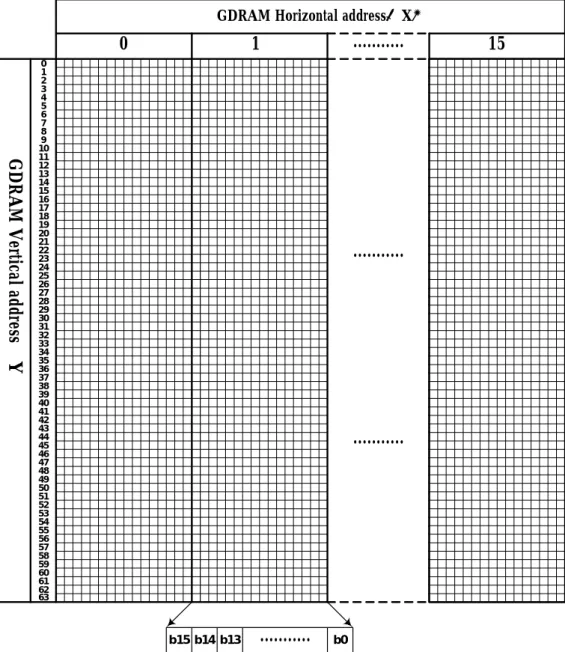
Graphic Display RAM has 64x256 bits bit-mapped memory space. GDRAM address is set by writing 2 consecutive bytes of vertical address and horizontal address. Two-byte data (16 bits) configures one GDRAM horizontal address. The Address Counter (AC) will be increased by one automatically after receiving the 16-bit data for the next operation. After the horizontal address reaching 0FH, the horizontal address will be set to 00H and the vertical address will not change. The procedure is summarized below:
1. Set vertical address (Y) for GDRAM 2. Set horizontal address (X) for GDRAM 3. Write D15~D8 to GDRAM (first byte) 4. Write D7~D0 to GDRAM (second byte)
Please refer to Table 7 for Graphic Display RAM mapping.
LCD driver
ST7920 embedded LCD driver has 33 commons and 64 segments to drive the LCD panel. Segment data from CGRAM, CGROM and HCGROM are shifted into the 64 bits segment latche to display. Extended segment driver (ST7921) can be used to extend the segment outputs upto 256 segments.
DDRAM data (char. code) CGRAM Addr. CGRAM data (higher byte) CGRAM data (lower byte) B15~ B4 B 3 B 2 B 1 B 0 B 5 B 4 B 3 B 2 B 1 B 0 D 1 5 D 1 4 D 1 3 D 1 2 D 1 1 D 1 0 D 9 D 8 D 7 D 6 D 5 D 4 D 3 D 2 D 1 D 0 0 0 0 0 0 0 0 0 0 1 0 0 0 1 1 0 0 0 0 0 0 0 0 1 1 1 1 1 1 1 1 0 0 1 0 0 0 0 0 0 0 0 1 0 0 0 0 1 0 0 0 0 0 1 0 0 0 1 0 0 0 0 1 1 0 0 0 1 0 0 0 0 0 1 1 1 1 1 1 0 0 1 0 0 0 0 1 0 0 1 0 0 1 0 0 0 0 1 0 0 0 1 0 1 0 0 1 1 1 1 0 0 1 0 0 0 0 1 0 0 0 1 1 0 0 1 1 0 0 1 0 1 0 1 0 0 1 0 0 0 0 1 1 1 1 0 1 0 0 1 1 0 0 1 0 0 1 0 0 0 1 0 0 0 0 0 1 0 0 1 0 0 0 1 0 1 0 0 0 0 1 0 0 1 0 0 1 0 0 1 0 0 0 0 0 1 0 0 0 0 1 0 1 0 0 0 1 0 0 1 0 0 0 0 1 0 0 0 0 0 1 0 1 1 0 0 1 1 1 1 0 0 0 0 1 0 0 0 0 0 1 1 0 0 0 0 1 0 0 1 0 0 0 1 0 0 0 0 0 0 1 1 0 1 0 0 0 0 0 0 0 0 1 0 0 0 0 0 0 0 1 1 1 0 0 0 0 0 0 0 0 1 0 0 0 0 0 0 0 0 0 X 00 X 00 1 1 1 1 0 0 0 0 0 0 0 0 0 0 0 0 0 0 0 0 0 0 0 0 0 0 0 0 1 1 0 0 0 0 0 0 0 1 1 0 0 0 0 1 0 0 0 1 1 0 1 0 0 0 0 0 0 1 0 0 0 0 1 0 0 0 1 0 0 0 0 1 0 0 1 1 0 1 0 0 0 0 1 1 0 1 0 1 1 1 0 1 1 0 1 0 0 1 0 0 0 1 0 0 1 0 0 0 0 0 0 0 1 0 1 0 0 1 0 0 0 1 0 1 0 1 1 1 1 1 1 1 0 0 1 0 0 1 0 0 0 1 1 0 0 1 0 0 0 0 0 1 0 0 1 0 0 1 0 0 0 1 1 1 0 1 1 1 1 1 1 1 0 0 1 0 0 1 0 0 1 0 0 0 0 1 0 0 0 0 0 1 0 0 1 0 0 1 0 0 1 0 0 1 0 1 1 1 1 1 1 1 0 0 1 0 0 1 0 0 1 0 1 0 0 1 0 0 0 0 0 0 0 0 1 0 0 1 0 0 1 0 1 1 0 1 1 1 1 1 1 1 1 0 0 0 1 0 0 1 1 0 0 1 0 1 0 0 0 0 0 1 0 1 0 0 1 0 0 1 1 0 1 1 0 1 1 1 1 1 1 1 0 0 1 1 1 0 0 1 1 1 0 1 0 1 0 0 0 0 0 1 0 0 0 1 0 0 0 0 X 01 X 01 1 1 1 1 0 0 0 0 0 0 0 0 0 0 0 0 0 0 0 0 Table 5: DDRAM data (character code) vs. CGRAM data/address map
Note:
1. DDRAM data (character code) bit1 and bit2 are identical with CGRAM address bit4 and bit5.
2. CGRAM address bit0 to bit3 specify total 16 rows. Row-16 is for cursor display. The data in Row-16 will be logically OR to the cursor.
3. CGRAM data for each address is 16 bits.
( )
GDRAM Horizontal address X
︵
︶
G
D
R
A
M
V
er
tic
al
a
dd
re
ss
Y
0
1
...
15
0 1 2 3 4 5 6 7 8 9 10 11 12 13 14 15 16 17 18 19 20 21 22 23 24 25 26 27 28 29 30 31 32 33 34 35 36 37 38 39 40 41 42 43 44 45 46 47 48 49 50 51 52 53 54 55 56 57 58 59 60 61 62 63...
...
...
b14 b15 b13 b0Instructions
ST7920 offers basic instruction set and extended instruction set:
Instruction Set 1: (RE=0: Basic Instruction) Code
Inst.
RS RW DB7 DB6 DB5 DB4 DB3 DB2 DB1 DB0
Description Exec time
(540KHZ)
Display
Clear 0 0 0 0 0 0 0 0 0 1
Fill DDRAM with "20H" and set DDRAM address counter (AC)
to "00H". 1.6 ms
Return
Home 0 0 0 0 0 0 0 0 1 X
Set DDRAM address counter (AC) to "00H", and put cursor
to origin ;the content of DDRAM are not changed 72 us
Entry Mode
Set 0 0 0 0 0 0 0 1 I/D S
Set cursor position and display shift when doing write or read
operation 72 us Display Control 0 0 0 0 0 0 1 D C B D=1: Display ON C=1: Cursor ON B=1: Character Blink ON 72 us Cursor Display Control
0 0 0 0 0 1 S/C R/L X X Cursor position and display shift control; the content of
DDRAM are not changed 72 us
Function Set 0 0 0 0 1 DL X 0 RE X X DL=1 8-bit interface DL=0 4-bit interface
RE=1: extended instruction RE=0: basic instruction
72 us
Set CGRAM Address.
0 0 0 1 AC5 AC4 AC3 AC2 AC1 AC0
Set CGRAM address to address counter (AC)
Make sure that in extended instruction SR=0 (scroll or RAM address select)
72 us
Set DDRAM Address.
0 0 1 0
AC6 AC5 AC4 AC3 AC2 AC1 AC0
Set DDRAM address to address counter (AC)
AC6 is fixed to 0 72 us
Read Busy Flag (BF) & AC.
0 1 BF AC6 AC5 AC4 AC3 AC2 AC1 AC0 Read busy flag (BF) for completion of internal operation, also
Read out the value of address counter (AC) 0 us
Write RAM 1 0 D7 D6 D5 D4 D3 D2 D1 D0 Write data to internal RAM
(DDRAM/CGRAM/GDRAM) 72 us
Read RAM 1 1 D7 D6 D5 D4 D3 D2 D1 D0 Read data from internal RAM
Instruction set 2: (RE=1: extended instruction) Code
Inst.
RS RW DB7 DB6 DB5 DB4 DB3 DB2 DB1 DB0
Description Exec time
(540KHZ)
Standby 0 0 0 0 0 0 0 0 0 1 Enter standby mode, any other instruction can terminate.
COM1…32 are halted. 72 us
Scroll or RAM Address.
Select
0 0 0 0 0 0 0 0 1 SR SR=1: enable vertical scroll position
SR=0: enable CGRAM address (basic instruction) 72 us
Reverse
(by line) 0 0 0 0 0 0 0 1 R1 R0
Select 1 out of 4 line (in DDRAM) and decide whether to reverse the display by toggling this instruction
R1,R0 initial value is 0,0 72 us Extended Function Set 0 0 0 0 1 DL X 1 RE G 0 DL=1 :8-bit interface DL=0 :4-bit interface
RE=1: extended instruction set RE=0: basic instruction set
G=1 :graphic display ON G=0 :graphic display OFF
72 us
Set Scroll
Address 0 0 0 1 AC5 AC4 AC3 AC2 AC1 AC0 SR=1: AC5~AC0 the address of vertical scroll 72 us
Set Graphic Display RAM Address 0 0 1 0 0 0 AC5 0 AC4 AC3 AC3 AC2 AC2 AC1 AC1 AC0 AC0
Set GDRAM address to address counter (AC)
Set the vertical address first and followed the horizontal address by consecutive writings
Vertical address range: AC5…AC0
Horizontal address range: AC3…AC0
72 us
Note:
1. Make sure that ST7920 is not in busy state by reading the busy flag before sending instruction or data. If using delay loop instead, please
make sure the delay time is enough. Please refer to the instruction execution time.
2. “RE” is the selection bit of basic and extended instruction set. After setting the RE bit, the value will be kept. So that the software doesn’t
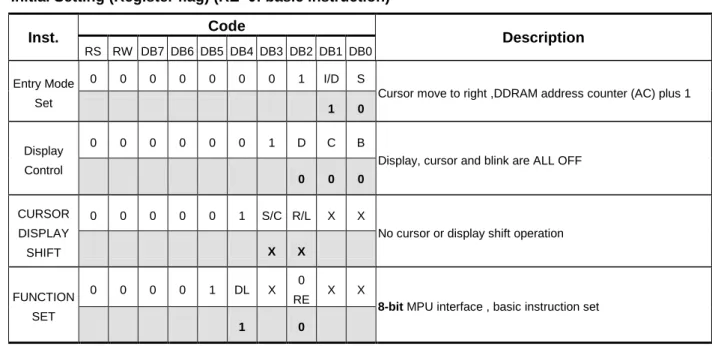
Initial Setting (Register flag) (RE=0: basic instruction) Code Inst. RS RW DB7 DB6 DB5 DB4 DB3 DB2 DB1 DB0 Description 0 0 0 0 0 0 0 1 I/D S Entry Mode
Set 1 0 Cursor move to right ,DDRAM address counter (AC) plus 1
0 0 0 0 0 0 1 D C B
Display Control
0 0 0
Display, cursor and blink are ALL OFF
0 0 0 0 0 1 S/C R/L X X
CURSOR DISPLAY
SHIFT X X
No cursor or display shift operation
0 0 0 0 1 DL X 0
RE X X
FUNCTION SET
1 0
8-bit MPU interface , basic instruction set
Initial Setting (Register flag) (RE=1: extended instruction set) Code Inst. RS RW DB7 DB6 DB5 DB4 DB3 DB2 DB1 DB0 Description 0 0 0 0 0 0 0 0 1 SR SCROLL OR RAM ADDR. SELECT 0
Allow vertical scroll or set CGRAM address
0 0 0 0 0 0 0 1 R1 R0
REVERSE
0 0
Begin with normal and toggle to reverse
0 0 0 0 1 DL X 1
RE G 0
EXTENDED FUNCTION
SET 0
Description of basic instruction set
l Display Clear
This instruction will change the following items: 1. Fill DDRAM with "20H"(space code). 2. Set DDRAM address counter (AC) to"00H".
3. Set Entry Mode I/D bit to be "1". Cursor moves right and AC adds 1 after write or read operation.
l Return Home
Set address counter (AC) to "00H". Cursor moves to origin. Then content of DDRAM is not changed.
l Enry Mode Set
Set the cursor movement and display shift direction when doing write or read operation. I/D: Address Counter Control: (Increase/Decrease)
When I/D = "1", cursor moves right, address counter (AC) is increased by 1. When I/D = "0", cursor moves left, address counter (AC) is decreased by 1. S: Display Shift Control: (Shift Left/Right)
S I/D DESCRIPTION
H H Entire display shift left by 1 H L Entire display shift right by 1
0 0 0 0 0 0 0 0 0 0 0 0 0 0 0 0 0 0 0 0 0 0 0 1 Code Code Code RS RS RS RW RW RW DB7 DB7 DB7 DB6 DB6 DB6 DB5 DB5 DB5 DB4 DB4 DB4 DB1 DB1 DB1 DB2 DB2 DB2 DB3 DB3 DB3 0 1 I/D 1 X S DB0 DB0 DB0
l Display Control
Controls display, cursor and blink ON/OFF. D: Display ON/OFF control bit
When D = "1", display ON
When D = "0", display OFF, the content of DDRAM is not changed C: Cursor ON/OFF control bit
When C = "1", cursor ON. When C = "0", cursor OFF.
B: Character Blink ON/OFF control bit
When B = "1", cursor position blink ON. Then display data (character) in cursor position will blink. When B = "0", cursor position blink OFF
l Cursor/Display Shift Control
This instruction configures the cursor moving direction or the display shifting direction. The content of DDRAM is not changed.
S/C R/L Description AC Value
L L Cursor moves left by 1 position AC=AC-1
L H Cursor moves right by 1 position AC=AC+1
H L Display shift left by 1, cursor also follows to shift. AC=AC H H Display shift right by 1, cursor also follows to shift. AC=AC
0 0 0 0 0 0 0 0 0 0 0 1 1 S/C D R/L Code Code RS RS RW RW DB7 DB7 DB6 DB6 DB5 DB5 DB4 DB4 DB1 DB1 DB2 DB2 DB3 DB3 C X B X DB0 DB0
l Function Set
DL: 4/8-bit interface control bit When DL = "1", 8-bit MPU bus interface When DL = "0", 4-bit MPU bus interface RE: extended instruction set control bit When RE = "1", extended instruction set When RE = "0", basic instruction set
In same instruction cannot alter DL and RE at once. Make sure that change DL first then RE.
l Set CGRAM Address
Set CGRAM address into address counter (AC) AC range is 00H…3FH
Make sure that in extended instruction SR=0 (scroll address or RAM address select)
l Set DDRAM Address
Set DDRAM address into address counter (AC). First line AC range is 80H…8FH
Second line AC range is 90H…9FH Third line AC range is A0H…AFH Fourth line AC range is B0H…BFH
Please note that only 2 lines can be display with one ST7920.
l Read Busy Flag (BF) and Address
Read busy flag (BF) can check whether the internal operation is finished or not. At the same time, the value of address counter (AC) is also read. When BF = “1”, further instruction(s) will not be accepted until BF = “0”.
0 0 0 0 1 DL X RE
Code
RS RW DB7 DB6 DB5 DB4 DB3 DB2 DB1
X X
DB0
0 1 BF AC6 AC5 AC4 AC3 AC2
Code
RS RW DB7 DB6 DB5 DB4 DB3 DB2 DB1
AC1 AC0
DB0
0 0 0 1 AC5 AC4 AC3 AC2
Code
RS RW DB7 DB6 DB5 DB4 DB3 DB2 DB1
AC1 AC0
DB0
0 0 1 AC6 AC5 AC4 AC3 AC2
Code
RS RW DB7 DB6 DB5 DB4 DB3 DB2 DB1
AC1 AC0
l Write Data to RAM
Write data to the internal RAM and increase/decrease the (AC) by 1
Each RAM address (CGRAM, DDRAM and GDRAM…) must write 2 consecutive bytes for 16-bit data. After receiving the second byte, the address counter will increase or decrease by 1 according to the entry mode set control bit.
l Read RAM Data
Read data from the internal RAM and increase/decrease the (AC) by 1
After the operation mode changed to Read (CGRAM, DDRAM and GDRAM…), a “Dummy Read” is required. There is no need to add a “Dummy Read” for the following bytes unless a new address set instruction is issued.
1 1 0 1 D7 D7 D6 D6 D5 D5 D4 D4 D3 D3 D2 D2 Code Code RS RS RW RW DB7 DB7 DB6 DB6 DB5 DB5 DB4 DB4 DB1 DB1 DB2 DB2 DB3 DB3 D1 D1 D0 D0 DB0 DB0
Description of extended instruction set
l Standby
This Instruction will set ST7920 entering the standby mode. Any other instruction follows this instruction will terminate the standby mode.
The content of DDRAM remains the same.
l Vertical Scroll or RAM Address Select
When SR = "1", the Vertical Scroll mode is enabled.
When SR = "0", “Set CGRAM Address” instruction (basic instruction) is enabled.
l Reverse
Select 1 out of 4 lines to reverse the display and to toggle the reverse condition by repeating this instruction. R1, R0 initial vale is 00. The first time issuing this instruction, the display will be reversed while the second time will return the display become normal.
R1 R0 Description
L L First line normal or reverse L H Second line normal or reverse H L Third line normal or reverse H H Fourth line normal or reverse
Please note that only 2 lines out of 4 lines of display data can be displayed with one ST7920.
0 0 0 0 0 0 0 0 0 0 0 0 0 0 0 0 0 0 0 0 0 0 0 1 Code Code Code RS RS RS RW RW RW DB7 DB7 DB7 DB6 DB6 DB6 DB5 DB5 DB5 DB4 DB4 DB4 DB1 DB1 DB1 DB2 DB2 DB2 DB3 DB3 DB3 0 1 R1 1 SR R0 DB0 DB0 DB0
l Extended Function Set
DL: 4/8-bit interface control bit When DL = "1", 8-bit MPU interface. When DL = "0", 4-bit MPU interface. RE: extended instruction set control bit When RE = "1", extended instruction set When RE = "0", basic instruction set G: Graphic display control bit When G = "1", Graphic Display ON When G = "0", Graphic Display OFF
In same instruction cannot alter DL, RE and G at once. Make sure that change DL or G first and then RE.
l Set Scroll Address
SR=1: AC5~AC0 is vertical scroll displacement address
l Set Graphic RAM Address
Set GDRAM address into address counter (AC). This is a 2-byte instruction.
The first instruction sets the vertical address while the second one sets the horizontal address (write 2 consecutive bytes to complete the vertical and horizontal address setting).
Vertical address range is AC5...AC0
0 0 0 0 1 DL X RE
Code
RS RW DB7 DB6 DB5 DB4 DB3 DB2 DB1
G X
DB0
0 0 0 1 AC5 AC4 AC3 AC2
Code RS RW DB7 DB6 DB5 DB4 DB3 DB2 DB1 AC1 AC0 DB0 0 0 1 0 0 0 AC3 AC2 Code RS RW DB7 DB6 DB5 DB4 DB3 DB2 DB1 AC1 AC0 DB0
0 0 1 0 AC5 AC4 AC3 AC2
Code
RS RW DB7 DB6 DB5 DB4 DB3 DB2 DB1
AC1 AC0
Parallel interface:
ST7920 is in parallel mode by pulling up PSB pin. ST7920 can select 8-bit or 4-bit bus interface by setting the DL control bit in “Function Set” instruction. MPU can control RS, RW, E and DB0…DB7 pins to complete the data transmission.
In 4-bit transfer mode, every 8-bit data or instruction is separated into 2 parts. The higher 4 bits (bit-7~bit-4) data will be transfered first through data pins (DB7~DB4). The lower 4 bits (bit-3~bit-0) data will be transfered second through data pins (DB7~DB4). The (DB3~DB0) data pins are not used during 4-bit transfer mode.
Timing Diagram of 8-bit Parallel Bus Mode Data Transfer
RS
RW
E
DB0-DB7
Dummy read
Instruction write RAM read
Timing Diagram of 4-bit Parallel Bus Mode Data Transfer
RS
RW
E
Upper Lower Upper Lower Upper Lower
DB0-DB7
Dummy read
Instruction write RAM read
Serial interface:
ST7920 is in serial interface mode when pulling down PSB pin. Two pins (SCLK and SID) are used to complete the data transfer. Only write data is available in the serial interface mode.
When chip select (CS) is low, ST7920 serial clock counter and serial data will be reset. Serial transfer counter is set to the first bit and data register is cleared. After CS is “L”, any further change on SID or SCLK is not allowed. It is recommended to keep SCLK at “L” and SID at the last status before set CS to “L”. For a minimal system with only one ST7920 and one MPU, only SCLK and SID pins are necessary. CS pin should pull to high.
ST7920’s serial clock (SCLK) is asynchronous to the internal clock and is generated by MPU. When multiple instruction/data is transferred, the instruction execution time must be considered. MPU must wait till the previous instruction is finished and then send the next instruction. ST7920 has no internal instruction buffer area.
When starting a transmission, a start byte is required. It consists of 5 consecutive “1” (sync character). Serial transfer counter will be reset and synchronized. Followed by 2-bit flag that indicates: read/write (RW) and register/data selected (RS) operation. Last 4 bits are filled by “0”.
After receiving the sync character, RW and RS bits, every 8 bits instruction/data will be separated into 2 groups. Higher 4 bits (DB7~DB4) will be placed in the first section followed by 4 “0”s. And lower 4 bits (DB3~DB0) will be placed in the second section followed by 4 “0”s.
1 2 4 5 6 7 8 9 10 11 12 13 14 15 16 17 18 19 20 21 22 23 24 1 1 1 1 1 RW RS 0 D7 D6 D5 D4 0 0 0 0 D3 D2 D1 D0 0 0 0 0
CS
SCLK
SID
Synchronizing Bit string Higher data Lower data 3 1st byte 2nd byte8051 demo program for serial interface
;---; Write data from A into INSTRUCTION Register ;--- WRINS:
SETB CS
SETB SID ; SID = 1 CLR SCLK
SETB SCLK ; READ DATA FROM SID CLR SCLK
SETB SCLK ; READ DATA FROM SID CLR SCLK
SETB SCLK ; READ DATA FROM SID CLR SCLK
SETB SCLK ; READ DATA FROM SID CLR SCLK
SETB SCLK ; READ DATA FROM SID CLR SCLK
CLR SID ; SID = 0
SETB SCLK ; READ DATA FROM SID CLR SCLK
SETB SCLK ; READ DATA FROM SID CLR SCLK
SETB SCLK ; READ DATA FROM SID CLR SCLK
MOVBIT SID, A.7 ; SID = A.7
SETB SCLK ; READ DATA FROM SID CLR SCLK
MOVBIT SID, A.6 ; SID = A.6
SETB SCLK ; READ DATA FROM SID CLR SCLK
MOVBIT SID, A.5 ; SID = A.5
SETB SCLK ; READ DATA FROM SID CLR SCLK
MOVBIT SID, A.4 ; SID = A.4
SETB SCLK ; READ DATA FROM SID CLR SCLK
CLR SID ; SID = 0
SETB SCLK ; READ DATA FROM SID CLR SCLK
SETB SCLK ; READ DATA FROM SID CLR SCLK
SETB SCLK ; READ DATA FROM SID CLR SCLK
SETB SCLK ; READ DATA FROM SID CLR SCLK
MOVBIT SID, A.3 ; SID = A.3
SETB SCLK ; READ DATA FROM SID CLR SCLK
MOVBIT SID, A.2 ; SID = A.2
SETB SCLK ; READ DATA FROM SID CLR SCLK
MOVBIT SID, A.1 ; SID = A.1
SETB SCLK ; READ DATA FROM SID CLR SCLK
MOVBIT SID, A.0 ; SID = A.0
SETB SCLK ; READ DATA FROM SID CLR SCLK
CLR SID ; SID = 0
SETB SCLK ; READ DATA FROM SID CLR SCLK
SETB SCLK ; READ DATA FROM SID CLR SCLK
SETB SCLK ; READ DATA FROM SID CLR SCLK
SETB SCLK ; READ DATA FROM SID CLR SCLK
CLR CS CALL DLY8 RET
;--- ; Write data from A into DATA Register ;--- WRDATA:
SETB CS
SETB SID ; SID = 1 CLR SCLK
SETB SCLK ; READ DATA FROM SID CLR SCLK
SETB SCLK ; READ DATA FROM SID CLR SCLK
SETB SCLK ; READ DATA FROM SID CLR SCLK
SETB SCLK ; READ DATA FROM SID CLR SCLK
SETB SCLK ; READ DATA FROM SID CLR SCLK
CLR SID ; SID = 0
SETB SCLK ; READ DATA FROM SID CLR SCLK
SETB SID ; SID = 1
SETB SCLK ; READ DATA FROM SID CLR SCLK
CLR SID ; SID = 0
SETB SCLK ; READ DATA FROM SID CLR SCLK
MOVBIT SID, A.7 ; SID = A.7
SETB SCLK ; READ DATA FROM SID CLR SCLK
MOVBIT SID, A.6 ; SID = A.6
SETB SCLK ; READ DATA FROM SID CLR SCLK
MOVBIT SID, A.5 ; SID = A.5
SETB SCLK ; READ DATA FROM SID CLR SCLK
MOVBIT SID, A.4 ; SID = A.4
SETB SCLK ; READ DATA FROM SID CLR SCLK
CLR SID ; SID = 0
SETB SCLK ; READ DATA FROM SID CLR SCLK
SETB SCLK ; READ DATA FROM SID CLR SCLK
SETB SCLK ; READ DATA FROM SID CLR SCLK
SETB SCLK ; READ DATA FROM SID CLR SCLK
MOVBIT SID, A.3 ; SID = A.3
SETB SCLK ; READ DATA FROM SID CLR SCLK
MOVBIT SID, A.2 ; SID = A.2
SETB SCLK ; READ DATA FROM SID CLR SCLK
MOVBIT SID, A.1 ; SID = A.1
SETB SCLK ; READ DATA FROM SID CLR SCLK
MOVBIT SID, A.0 ; SID = A.0
SETB SCLK ; READ DATA FROM SID CLR SCLK
CLR SID ; SID = 0
SETB SCLK ; READ DATA FROM SID CLR SCLK
SETB SCLK ; READ DATA FROM SID CLR SCLK
SETB SCLK ; READ DATA FROM SID CLR SCLK
SETB SCLK ; READ DATA FROM SID CLR SCLK
CLR CS CALL DLY8 RET
Application circuit for testing CGROM and HCGROM:
We can use the function of “CHECK SUM” to check the CGROM is right or error.
See the following notes: Useing IC Pad (Pin4àCLK, Pin5àTT1, Pin6àTT2) to do the “CHECK SUM” function. The application circuit is at Page49.
Timing Diagram for checking CGROM (TT1=0, TT2=1)
The ST7920 check sum process: (DDRAM must be cleared by 0x00 before this process) In the first place: Resetting the internal counter (set TT1 and TT2 to Height)
In the second place: Setting CGROM mode (set TT1 to Low, TT2 to Height). In the third place: CLK starts to count 655362 times.
In the final place: Finishing the counting, read the last four bytes to CHECK SUM (reading only when the CLK is Height).
ST7920 check sum circuit: Data is available when CLK is height; if CLK is low then the data is always FFH. The last four bytes are Y0, Y1, Y2, and Y3.
The fatest execution time is: tCYC=1us (1MHz at 5V).
The table below is a comparing table of CGROM for different versions.
CGROM Last four bytes Version
(Font) Y0 Y1 Y2 Y3
1 Big5 (0A) 38 88 CC F1
Timing Diagram for checking HCGROM (TT1=1, TT2=0)
The ST7920 check sum process: (DDRAM must be cleared by 0x00 before this process) In the first place: Resetting the internal counter (set TT1 and TT2 to Height)
In the second place: Setting CGROM mode (set TT1 to Height, TT2 to Low). In the third place: CLK starts to count 10242 times.
In the final place: Finishing the counting, read the last four bytes to CHECK SUM (reading only when the CLK is Height).
ST7920 check sum circuit: Data is available when CLK is height; if CLK is low then the data is always FFH. The last four bytes are Y0, Y1, Y2, and Y3.
The fatest execution time is: tCYC=2us (0.5MHz at 5V).
The table below is a comparing table of HCGROM for different versions.
HCGROM last four bytes Version
(Font) Y0 Y1 Y2 Y3
1 Big5 (0A) B5 11 B5 11
2 GB (0B) B5 11 B5 11
1. Clear whole DDRAM area by writing data 0x00.
2. Composing TT1 and TT2 to make the ‘Reset’ action, and clear the internal counter. 3. Selecting the test mode by setting TT1 and TT2 (CGROM or HCGROM).
4. After setp1 and setp2, entering some impulse signals through Pin4 (CLK). 5. Reading the CHECK SUM data through D0 to D7.
6. Comparing CHECK SUM with the Code Table (upper table) to check if the data is correct or not.
TT1 TT2 No. of counts Status
1 1 -- RESET
0 1 655362 CGROM
1 0 10242 HGROM
8051 CGROM、HCGROM illustrative test program
;*******************************; ;* CHECK_ROM *; ;*******************************; ;*******************************; ;* Definition of outside Pin *; ;*******************************; CLK REG P3.5 ; TT1 REG P3.0 ; TT2 REG P3.1 ;
TT3 REG P3.2 ;CHECK CGROM FLAG TT4 REG P3.3 ;CHECK HCGROM FLAG TT5 REG P3.4 ;ERROR FLAG ;*******************************;
;* Definition of internal RAM *; ;*******************************; STACK EQU 6FH ; FUNC EQU 20H ; ;*******************************; ; Interrupt set *; ;*******************************; ORG 00H ; AJMP RESET ; ;*******************************; ;* PROGRAM START *; ;*******************************; RESET: MOV SP,#STACK ; MOV P1,#FFH ; MOV P3,#FFH ; ;*******************************; ;* CHECK_CGROM *; ;*******************************; ;*******************************; ;* Initial DDRAM *; ;*******************************;
CALL WR0x00 ;Write 0x00 to whole DDRAM ;*******************************;
;* Initial setting *; ;*******************************; CGROM: SETB TT1 ;
SETB TT2 ;TT1,TT2 SET HIGH (RESET) CALL DELAY_100US ;Wait Reset 100us
CLR TT1 ;TT1=LOW TT2=HIGH ( CHECK CGROM) SETB CLK ; CALL DELAY_100US ; ;*******************************; ;* start counter *; ;*******************************; MOV R3,#9 ; CN4: MOV R2,#0 ;<---- CN3: MOV R1,#0 ; | CN2: CLR CLK ; | SETB CLK ; | DJNZ R1,CN2 ; | DJNZ R2,CN3 ; | DJNZ R3,CN4 ; | ; |
CN8: MOV R1,#2 ; | CN9: CLR CLK ; | SETB CLK ; | DJNZ R1,CN9 ; | DJNZ R2,CN8 ; | DJNZ R3,CN7 ; | CLR CLK ; | SETB CLK ; | CLR CLK ; | SETB CLK ;<---- Counter 655356 ;---; CLR CLK ;Counter 655357 SETB CLK ;
MOV A,P1 ;A=Y0
CJNE A,#FDH,ERRORC ;COMPARE Y0 DATA CLR CLK ;Counter 655358 SETB CLK ;
MOV A,P1 ;A=Y1
CJNE A,#6FH,ERRORC ;COMPARE Y1 DATA CLR CLK ;Counter 655359 SETB CLK ;
MOV A,P1 ;A=Y2
CJNE A,#B5H,ERRORC ;COMPARE Y2 DATA CLR CLK ;Counter 655360 SETB CLK ;
MOV A,P1 ;A=Y3
CJNE A,#85H,ERRORC ;COMPARE Y3 DATA CLR CLK ;
CLR TT3 ;IF OK CLR TT3 CALL HCGROM ;
ERRORC: ;
CLR TT5 ;IF CGROM CHECK ERROR CLR TT5 ;---; ;*******************************; ;* CHECK_HCGROM *; ;*******************************; ;*******************************; ;* Initial setting *; ;*******************************; HCGROM: SETB TT1 ;
SETB TT2 ;TT1,TT2 SET HIGH (RESET) CALL DELAY_100US ;Wait Reset 100us
CLR TT2 ;TT2=LOW TT1=HIGH ( CHECK HCGROM) SETB CLK ;
CALL DELAY_100US ; ;*******************************; ;* start counter *; ;*******************************;
DJNZ R2,N7 ; |
;---;<---- Counter 10236 CLR CLK ;Counter 10237 SETB CLK ;
MOV A,P1 ;A=Y0
CJNE A,#B5H,ERROR ;COMPARE Y0 DATA CLR CLK ;Counter 10238 SETB CLK ;
MOV A,P1 ;A=Y1
CJNE A,#11H,ERROR ;COMPARE Y1 DATA CLR CLK ;Counter 10239 SETB CLK ;
MOV A,P1 ;A=Y2
CJNE A,#B5H,ERROR ;COMPARE Y2 DATA CLR CLK ;Counter 10240 SETB CLK ;
MOV A,P1 ;A=Y3
CJNE A,#11H,ERROR ;COMPARE Y3 DATA CLR CLK ;
CLR TT4 ;IF HCGROM CHECK OK THEN CLR TT4 AJMP $ ;
ERROR: ;
CLR TT5 ;IF HCGROM CHECK ERROR THEN CLR TT5 AJMP $ ;
;*******************************; ;* DELAY TIME 100US *; ;*******************************; DELAY_100US ; DEL_10 MOV R6,#5 ; DEL_9 MOV R7,#3 ; DJNZ R7,$ ; DJNZ R6,DEL_9 ; RET ; END ;
8-bit interface:
POWER ON Wait time >40ms XRESET LOW HIGH
Function set
RS RW DB7 DB6 DB5 DB4 DB3 DB2 DB1 DB0
0 0 0 0 1 1 X 0 X X
Wait time >100uS
Function set
RS RW DB7 DB6 DB5 DB4 DB3 DB2 DB1 DB0
0 0 0 0 1 1 X 0 X X
Wait time >37uS
Display ON/OFF control
RS RW DB7 DB6 DB5 DB4 DB3 DB2 DB1 DB0
0 0 0 0 0 0 1 D C B
Wait time >100uS
Display clear
RS RW DB7 DB6 DB5 DB4 DB3 DB2 DB1 DB0
0 0 0 0 0 0 0 0 0 1
Wait time >10mS
4-bit interface:
POWER ON
Wait time > 40mS (for VDD stable)
XRESET: LOW HIGH
Wait time > 100μS
Wait time > 100μS
Display ON/OFF Control
RS R/W DB7 DB6 DB5 DB4 DB3 DB2 DB1 DB0 Wait time > 100μS INITIALIZATION END Function set RS R/W DB7 DB6 DB5 DB4 DB3 DB2 DB1 DB0 Function set RS R/W DB7 DB6 DB5 DB4 DB3 DB2 DB1 DB0 0 0 0 0 1 0 X X X X 0 0 X 0 X X X X X X 0 0 0 0 1 0 X X X X 0 0 X 0 X X X X X X X X X X X X X X 0 0 0 0 0 0 0 0 1 D C B Display Clear RS R/W DB7 DB6 DB5 DB4 DB3 DB2 DB1 DB0 Wait time > 10mS X X X X X X X X 0 0 0 0 0 0 0 0 0 0 0 1
Entry Mode Set
RS R/W DB7 DB6 DB5 DB4 DB3 DB2 DB1 DB0
X X X X
X X X X
0 0 0 0 0 0
Built in voltage booster
VSS VD2 Voltage Doubler Reference Voltage VOUT Vss CAP1M Voltage Doubler Reference Voltage CAP1P CAP2M CAP2P CAP3M VOUT VD2 VOUTExternal reset timing
XRESET pulse width Trw 10us
RESET start time Tres 50ns
Tres
Trw VDD
LCD driving wave form (1/33 duty, 1/5 bias )
When oscillation frequency is 540KHZ, 1 clock cycle time = 1.85us 1 frame = 1.85us x 300 x 33 = 18315us=18.3ms
1 2 3 4 33 1 2 3 4 33 1 2 3 4 33 V0 V1 V2 V3 V4 VSS COM1 V0 V1 V2 V3 V4 VSS COM2 V0 V1 V2 V3 V4 VSS COM33 V0 V1 V2 V3 V4 VSS SEGx off V0 V1 V2 V3 V4 SEGx on 300 clocks
Absolute Maximum Ratings
Characteristics Symbol Value
Power Supply Voltage VDD -0.3V to +6.0V
LCD Driver Voltage VLCD or V0 -0.3V to +7.0V
Voltage Doubler Output VOUT -0.3V to +7.0V
Input Voltage VIN -0.3V to VDD+0.3V
Operating Temperature TA -30℃ to + 85℃
Storage Temperature TSTO -65℃ to + 150℃
DC Characteristics (TA = -30℃ ~ 85℃, VDD = 2.7 V - 4.5 V)
Symbol Characteristics Test Condition Min. Typ. Max. Unit
VDD Operating Voltage - 2.7 - 5.5 V
VLCD LCD Voltage V0-VSS 3.0 - 7 V
ICC Power Supply Current
fOSC = 530KHz, VDD=3.0V
Rf=18KΩ - 0.20 0.45 mA
VIH1
Input High Voltage
(Except OSC1) - 0.7VDD - VDD V
VIL1
Input Low Voltage
(Except OSC1) - - 0.3 - 0.6 V
VIH2
Input High Voltage
(OSC1) - VDD– 1 - VDD V
VIL2
Input Low Voltage
(OSC1) - - - 1.0 V
VOH1
Output High Voltage
(DB0 - DB7) IOH = -0.1mA 0.8VDD - VDD V
VOL1
Output Low Voltage
(DB0 - DB7) IOL = 0.1mA - - 0.1 V
VOH2
Output High Voltage
(Except DB0 - DB7) IOH = -0.04mA 0.8VDD - VDD V VOL2
Output Low Voltage
(Except DB0 - DB7) IOL = 0.04mA - - 0.1VDD V
ILEAK
Input Leakage
Current VIN = 0V to VDD -1 - 1 µA
DC Characteristics (TA = -30℃ ~ 85℃, VDD = 4.5 V - 5.5 V)
Symbol Characteristics Test Condition Min. Typ. Max. Unit
VDD Operating Voltage - 4.5 - 5.5 V
VLCD LCD Voltage V0-VSS 3.0 - 7 V
ICC Power Supply Current
fOSC = 540KHz, VDD=5V
Rf=33KΩ - 0.45 0.75 mA
VIH1
Input High Voltage
(Except OSC1) - 0.7VDD - VDD V
VIL1
Input Low Voltage
(Except OSC1) - -0.3 - 0.6 V
VIH2
Input High Voltage
(OSC1) - VDD-1 - VDD V
VIL2
Input Low Voltage
(OSC1) - - - 1.0 V
VOH1
Output High Voltage
(DB0 - DB7) IOH = -0.1mA 0.8VDD - VDD V
VOL1
Output Low Voltage
(DB0 - DB7) IOL = 0.1mA - - 0.4 V
VOH2
Output High Voltage
(Except DB0 - DB7) IOH = -0.04mA 0.8VDD - VDD V VOL2
Output Low Voltage
(Except DB0 - DB7) IOL = 0.04mA - - 0.1VDD V
ILEAK
Input Leakage
Current VIN = 0V to VDD -1 - 1 µA
AC Characteristics (TA = -30℃ ~ 85℃, VDD = 4.5V) Parallel Mode Interface
Symbol Characteristics Test Condition Min. Typ. Max. Unit
Internal Clock Operation
fOSC OSC Frequency R = 33KΩ 480 540 600 KHz
External Clock Operation
fEX External Frequency - 480 540 600 KHz
Duty Cycle - 45 50 55 %
TR,TF Rise/Fall Time - - - 0.2 µs
Write Mode (Writing data from MPU to ST7920)
TC Enable Cycle Time Pin E 1200 - - ns
TPW Enable Pulse Width Pin E 140 - - ns
TR,TF Enable Rise/Fall Time Pin E - - 25 ns
TAS Address Setup Time Pins: RS,RW,E 10 - - ns
TAH Address Hold Time Pins: RS,RW,E 20 - - ns
TDSW Data Setup Time Pins: DB0 - DB7 40 - - ns
TH Data Hold Time Pins: DB0 - DB7 20 - - ns
Read Mode (Reading Data from ST7920 to MPU)
TC Enable Cycle Time Pin E 1200 - - ns
TPW Enable Pulse Width Pin E 140 - - ns
TR,TF Enable Rise/Fall Time Pin E - - 25 ns
TAS Address Setup Time Pins: RS,RW,E 10 - - ns
TAH Address Hold Time Pins: RS,RW,E 20 - - ns
TDDR Data Delay Time Pins: DB0 - DB7 - - 100 ns
TH Data Hold Time Pins: DB0 - DB7 20 - - ns
Interface Mode with LCD Driver(ST7921)
TCWH Clock Pulse with High Pins: CL1, CL2 800 - - ns
TCWL Clock Pulse with Low Pins: CL1, CL2 800 - - ns
TCST Clock Setup Time Pins: CL1, CL2 500 - - ns
TSU Data Setup Time Pin: D 300 - - ns
TDH Data Hold Time Pin: D 300 - - ns
AC Characteristics (TA = -30℃ ~ 85℃, VDD = 2.7V) Parallel Mode Interface
Symbol Characteristics Test Condition Min. Typ. Max. Unit
Internal Clock Operation
fOSC OSC Frequency R = 18KΩ 470 530 590 KHz
External Clock Operation
fEX External Frequency - 470 530 590 KHz
Duty Cycle - 45 50 55 %
TR,TF Rise/Fall Time - - - 0.2 µs
Write Mode (Writing data from MPU to ST7920)
TC Enable Cycle Time Pin E 1800 - - ns
TPW Enable Pulse Width Pin E 160 - - ns
TR,TF Enable Rise/Fall Time Pin E - - 25 ns
TAS Address Setup Time Pins: RS,RW,E 10 - - ns
TAH Address Hold Time Pins: RS,RW,E 20 - - ns
TDSW Data Setup Time Pins: DB0 - DB7 40 - - ns
TH Data Hold Time Pins: DB0 - DB7 20 - - ns
Read Mode (Reading Data from ST7920 to MPU)
TC Enable Cycle Time Pin E 1800 - - ns
TPW Enable Pulse Width Pin E 320 - - ns
TR,TF Enable Rise/Fall Time Pin E - - 25 ns
TAS Address Setup Time Pins: RS,RW,E 10 - - ns
TAH Address Hold Time Pins: RS,RW,E 20 - - ns
TDDR Data Delay Time Pins: DB0 - DB7 - - 260 ns
TH Data Hold Time Pins: DB0 - DB7 20 - - ns
Interface Mode with LCD Driver(ST7921)
TCWH Clock Pulse with High Pins: CL1, CL2 800 - - ns
TCWL Clock Pulse with Low Pins: CL1, CL2 800 - - ns
TCST Clock Setup Time Pins: CL1, CL2 500 - - ns
TSU Data Setup Time Pin: D 300 - - ns
TDH Data Hold Time Pin: D 300 - - ns
8-bit interface timing diagram
l MPU write data to ST7920
l MPU read data from ST7920
Valid data
RS R/W E DB0-DB7 VIH1 VIL1 TAS TAH TAH TPW TR TDDR TH TC TCValid data
RS R/W E DB0-DB7 VIH1 VIL1 TAS TAH TAH TPW TH TC TC TDSW TRAC Characteristics (TA = -30℃ ~ 85℃, VDD = 4.5V) Serial Mode Interface
Symbol Characteristics Test Condition Min. Typ. Max. Unit
Internal Clock Operation
fOSC OSC Frequency R = 33KΩ 470 530 590 KHz
External Clock Operation
fEX External Frequency - 470 530 590 KHz
Duty Cycle - 45 50 55 %
TR,TF Rise/Fall Time - - - 0.2 µs
TSCYC Serial clock cycle Pin E 400 - - ns
TSHW
SCLK high pulse
width Pin E 200 - - ns
TSLW SCLK low pulse width Pin E 200 - - ns
TSDS SID data setup time Pins RW 40 - - ns
TSDH SID data hold time Pins RW 40 - - ns
TCSS CS setup time Pins RS 60 - - ns
TCSH CS hold time Pins RS 60 - - ns
AC Characteristics (TA = -30℃ ~ 85℃, VDD = 2.7V) Serial Mode Interface
Symbol Characteristics Test Condition Min. Typ. Max. Unit
Internal Clock Operation
fOSC OSC Frequency R = 18KΩ 470 530 590 KHz
External Clock Operation
fEX External Frequency - 470 530 590 KHz
Duty Cycle - 45 50 55 %
TR,TF Rise/Fall Time - - - 0.2 µs
TSCYC Serial clock cycle Pin E 600 - - ns
TSHW
SCLK high pulse
width Pin E 300 - - ns
TSLW SCLK low pulse width Pin E 300 - - ns
TSDS SID data setup time Pins RW 40 - - ns
TSDH SID data hold time Pins RW 40 - - ns
TCSS CS setup time Pins RS 60 - - ns
Serial interface timing diagram
l MPU write data to ST7920
Valid data
CS SID SCLK TCSS TCSH TSCYC TSLW TSHW TSDS Tr TSDH TfI/O pin diagram
Input PAD: E (No Pull-up) Input PAD: RS, RW (with Pull-up)
Output PAD: CL1, CL2, M, D
I/O PAD: DB0 – DB7
DATA Enable
Application circuit 1:
LCD : 32-COM x 160-SEG LCD Voltage : VCC 1 2 3 4 5 6 A B C D 6 5 4 3 2 1 D C B A Title Number Revision Size BDate: 1-Mar-2001 Sheet of File: D:\Buffer-2\7920V1.DDB Drawn By: V0 1 V1 2 V2 3 VXA 4 VXB 5 VXC 6 V3 7 V4 8 VSS 9 VDD 10 XRESET 11 CL1 12 CL2 13 VDD 14 M 15 DOUT 16 RS 17 RW 18 E 19 VSS 20 OSC1 21 OSC2 22 PSB 23 D0 24 D1 25 D2 26 D3 27 D4 28 D5 29 D6 30 D 7 31 X O FF 32 V O U T 33 C A P3 M 34 C A P1 P 35 C A P1 M 36 C A P2 P 37 C A P2 M 38 V D 2 39 C 1 40 C 2 41 C 3 42 C 4 43 C 5 44 C 6 45 C 7 46 C 8 47 C 9 48 C 10 49 C 11 50 C 12 51 C 13 52 C 14 53 C 15 54 C 16 55 C 17 56 C 18 57 C 19 58 C 20 59 C 21 60 C 22 61 C 23 62 C 24 63 C 25 64 C 26 65 C 27 66 C 28 67 C 29 68 C30 69 C31 70 C32 71 C33S64 7273 S63 74 S62 75 S61 76 S60 77 S59 78 S58 79 S57 80 S56 81 S55 82 S54 83 S53 84 S52 85 S51 86 S50 87 S49 88 S48 89 S47 90 S46 91 S45 92 S44 93 S43 94 S42 95 S41 96 S40 97 S39 98 S3 8 99 S3 7 10 0 S3 6 10 1 S3 5 10 2 S3 4 10 3 S3 3 10 4 S3 2 10 5 S3 1 10 6 S3 0 10 7 S2 9 10 8 S2 8 10 9 S2 7 11 0 S2 6 11 1 S2 5 11 2 S2 4 11 3 S2 3 11 4 S2 2 11 5 S2 1 11 6 S2 0 11 7 S1 9 11 8 S1 8 11 9 S1 7 12 0 S1 6 12 1 S1 5 12 2 S1 4 12 3 S1 3 12 4 S1 2 12 5 S1 1 12 6 S1 0 12 7 S9 12 8 S8 12 9 S7 13 0 S6 13 1 S5 13 2 S4 13 3 S3 13 4 S2 13 5 S1 13 6 U1 ST7920 S5 0 1 S5 1 2 S5 2 3 S5 3 4 S5 4 5 S5 5 6 S5 6 7 S5 7 8 S5 8 9 S5 9 10 S6 0 11 S6 1 12 S6 2 13 S6 3 14 S6 4 15 S6 5 16 S6 6 17 S6 7 18 S6 8 19 S6 9 20 S7 0 21 S7 1 22 S7 2 23 S7 3 24 S7 4 25 S7 5 26 S7 6 27 S7 7 28 S7 8 29 S7 9 30 S8 0 31 S8 1 32 S8 2 33 S8 3 34 S8 4 35 S8 5 36 S8 6 37 S8 7 38 S88 39 S89 40 S90 41 S91 42 S92 43 S93 44 S94 45 S95 46 S96 47 S48 48 S47 49 S46 50 S45 51 S44 52 S43 53 S42 54 S41 55 S40 56 S3 9 57 S3 8 58 S3 7 59 S3 6 60 S3 5 61 S3 4 62 S3 3 63 S3 2 64 S3 1 65 S3 0 66 S2 9 67 S2 8 68 S2 7 69 S2 6 70 S2 5 71 S2 4 72 S2 3 73 S2 2 74 S2 1 75 S2 0 76 S1 9 77 S1 8 78 S1 7 79 S1 6 80 S1 5 81 S1 4 82 S1 3 83 S1 2 84 S1 1 85 S1 0 86 S9 87 S8 88 S7 89 S6 90 S5 91 S4 92 S3 93 S2 94 S1 95 V0 96 V2 97 V3 98 VSS 99 VDD 100 CL1 101 SHL1 102 SHL2 103 CL2 104 DL1 105 DR1 106 DL2 107 DR2 108 M 109 S49 110 U2 ST7921 C 8 1 C 7 2 C 6 3 C 5 4 C 4 5 C 3 6 C 2 7 C 1 8 S1 9 S2 10 S3 11 S4 12 S5 13 S6 14 S7 15 S8 16 S9 17 S1 0 18 S1 1 19 S1 2 20 S1 3 21 S1 4 22 S1 5 23 S1 6 24 S1 7 25 S1 8 26 S1 9 27 S2 0 28 S4 1 29 S4 2 30 S4 3 31 S4 4 32 S4 5 33 S4 6 34 S4 7 35 S4 8 36 S4 9 37 S5 0 38 S5 1 39 S5 2 40 S5 3 41 S5 4 42 S5 5 43 S5 6 44 S5 7 45 S5 8 46 S5 9 47 S6 0 48 S8 1 49 S8 2 50 S8 3 51 S8 4 52 S8 5 53 S8 6 54 S8 7 55 S8 8 56 S8 9 57 S9 0 58 S9 1 59 S9 2 60 S9 3 61 S9 4 62 S9 5 63 S9 6 64 S9 7 65 S9 8 66 S9 9 67 S1 00 68 S1 21 69 S1 22 70 S1 23 71 S1 24 72 S1 25 73 S1 26 74 S1 27 75 S1 28 76 S1 29 77 S1 30 78 S1 31 79 S1 32 80 S1 33 81 S1 34 82 S1 35 83 S1 36 84 S1 37 85 S1 38 86 S1 39 87 S1 40 88 C 17 89 C 18 90 C 19 91 C 20 92 C 21 93 C 22 94 C 23 95 C 24 96 C 9 97 C 10 98 C 11 99 C 12 10 0 C 13 10 1 C 14 10 2 C 15 10 3 C 16 10 4 S2 1 10 5 S2 2 10 6 S2 3 10 7 S2 4 10 8 S2 5 10 9 S2 6 11 0 S2 7 11 1 S2 8 11 2 S2 9 11 3 S3 0 11 4 S3 1 11 5 S3 2 11 6 S3 3 11 7 S3 4 11 8 S3 5 11 9 S3 6 12 0 S3 7 12 1 S3 8 12 2 S3 9 12 3 S4 0 12 4 S6 1 12 5 S6 2 12 6 S6 3 12 7 S6 4 12 8 S6 5 12 9 S6 6 13 0 S6 7 13 1 S6 8 13 2 S6 9 13 3 S7 0 13 4 S7 1 13 5 S7 2 13 6 S7 3 13 7 S7 4 13 8 S7 5 13 9 S7 6 14 0 S7 7 14 1 S7 8 14 2 S7 9 14 3 S8 0 14 4 S1 01 14 5 S1 02 14 6 S1 03 14 7 S1 04 14 8 S1 05 14 9 S1 06 15 0 S1 07 15 1 S1 08 15 2 S1 09 15 3 S1 10 15 4 S1 11 15 5 S1 12 15 6 S1 13 15 7 S1 14 15 8 S1 15 15 9 S1 16 16 0 S1 17 16 1 S1 18 16 2 S1 19 16 3 S1 20 16 4 S1 41 16 5 S1 42 16 6 S1 43 16 7 S1 44 16 8 S1 45 16 9 S1 46 17 0 S1 47 17 1 S1 48 17 2 S1 49 17 3 S1 50 17 4 S1 51 17 5 S1 52 17 6 S1 53 17 7 S1 54 17 8 S1 55 17 9 S1 56 18 0 S1 57 18 1 S1 58 18 2 S1 59 18 3 S1 60 18 4 C 32 18 5 C 31 18 6 C 30 18 7 C 29 18 8 C 28 18 9 C 27 19 0 C 26 19 1 C 25 19 2 L1 WDG1603P C1 104 1 234 5 67 8910 11 12 131415 16 JP1 HEADER 16 1 2 JA CON2 1 2 JK CON2 1 2 3 J1 CON3 R1 4.7K R2 4.7K R3 2.2K R4 4.7K R5 4.7K R6 33K R7 2K R9 33 R8 33 VCC VCC VCC VCC 1 2 JP2 HEADER 2 VCC VCC C 1 C2C3C4C5C6C7C8 C9C10C11C12C13C14 15CC16C17C18C19C20 C2122CC23C24C25C26 C27C28C29 C30 C31 C32 S39 S40 S41 S42 S43 S44 S45 S46 S47 S48 S49 S50 S51 S52 S53 S54 S55 S56 S57 S58 S59 S60 S61 S62 S63 S64 S1S2 S3 S4S5 S6S7 S8S9S10 S11S12S13S14S15S16S17 S18S19S20S21S22S23 S24S25S26S27S28S29 S30S31S32S33S34S35 S36S37S38 S65 S6 6 S6 7 S6 8 S6 9 S7 0 S7 1 S7 2 S7 3 S7 4 S7 5 S7 6 S7 7 S7 8 S7 9 S8 0 S8 1 S8 2 S8 3 S8 4 S8 5 S8 6 S8 7 S8 8 S8 9 S9 0 S9 1 S9 2 S9 3 S9 4 S9 5 S9 6 S9 7 S9 8 S9 9 S1 00 S1 01 S1 02 S1 03 S104 S105 S106 S107 S108 S109 S110 S111 S112 S1 13 S1 14 S1 15 S1 16 S1 17 S1 18 S1 19 S1 20 S1 21 S1 22 S1 23 S1 24 S1 25 S1 26 S1 27 S1 28 S1 29 S1 30 S1 31 S1 32 S1 33 S1 34 S1 35 S1 36 S1 37 S1 38 S1 39 S1 40 S1 41 S1 42 S1 43 S1 44 S1 45 S1 46 S1 47 S1 48 S1 49 S1 50 S1 51 S152 S153 S154 S155 S156 S157 S158 S159 S160 C 25C26 C27C28C29C30C31C32 C 1C2C3C4C5 C6C7C8 C 9 C 10 C 11 C 12 C 13 C 14 C 15 C 16 C 17 C 18 C 19 C 20 C 21 C 22 C 23 C 24 S10S9S8 S7S6S5S4S3S2 S1 S1 1 S1 2 S1 3 S1 4 S1 5 S1 6 S1 7 S1 8 S1 9 S2 0 S2 1 S2 2 S2 3 S2 4 S2 5 S2 6 S2 7 S2 8 S2 9 S3 0 S3 1 S3 2 S3 3 S3 4 S3 5 S3 6 S3 7 S3 8 S3 9 S4 0 S4 1 S4 2 S4 3 S4 4 S4 5 S4 6 S4 7 S4 8 S4 9 S5 0 S5 1 S5 2 S5 3 S5 4 S5 5 S5 6 S5 7 S5 8 S5 9 S6 0 S6 1 S6 2 S6 3 S6 4 S6 5 S6 6 S6 7 S6 8 S6 9 S7 0 S7 1 S7 2 S7 3 S7 4 S7 5 S7 6 S7 7 S7 8 S7 9 S8 0 S8 1 S8 2 S8 3 S8 4 S8 5 S8 6 S8 7 S8 8 S8 9 S9 0 S9 1 S9 2 S9 3 S9 4 S9 5 S9 6 S9 7 S9 8 S9 9 S1 00 S1 01 S1 02 S1 03 S1 04 S1 05 S1 06 S1 07 S1 08 S1 09 S1 10 S1 11 S1 12 S1 13 S1 14 S1 15 S1 16 S1 17 S1 18 S1 19 S1 20 S1 21 S1 22 S1 23 S1 24 S1 25 S1 26 S1 27 S1 28 S1 29 S1 30 S1 31 S1 32 S1 33 S1 34 S1 35 S1 36 S1 37 S1 38 S1 39 S1 40 S1 41 S1 42 S1 43 S1 44 S1 45 S1 46 S1 47 S1 48 S1 49 S1 50 S1 51 S1 52 S1 53 S1 54 S1 55 S1 56 S1 57 S1 58 S1 59 S1 60 Paul Yung 1 1 1.2 Sitronix ST7920 LCM R10 10K CLK TT1 TT2
Application circuit 2:
LCD : 32-COM x 160-SEG
LCD Voltage : VCC x 2 (Voltage doubler is used). *VLCD (V0), VOUT and VCAP3M should not over 7V.
1 2 3 4 5 6 A B C D 6 5 4 3 2 1 D C B A Title Number Revision Size B
Date: 17-Aug-2001 Sheet of File: D:\adom\Documents\sch\7920_B~13.DDB Drawn By: V0 1 V1 2 V2 3 VXA 4 VXB 5 VXC 6 V3 7 V4 8 VSS 9 VDD 10 XRESET 11 CL1 12 CL2 13 VDD 14 M 15 DOUT 16 RS 17 RW 18 E 19 VSS 20 OSC1 21 OSC2 22 PSB 23 D0 24 D1 25 D2 26 D3 27 D4 28 D5 29 D6 30 D 7 31 X O FF 32 V O U T 33 C A P3 M 34 C A P1 P 35 C A P1 M 36 C A P2 P 37 C A P2 M 38 V D 2 39 C 1 40 C 2 41 C 3 42 C 4 43 C 5 44 C 6 45 C 7 46 C 8 47 C 9 48 C 10 49 C 11 50 C 12 51 C 13 52 C 14 53 C 15 54 C 16 55 C 17 56 C 18 57 C 19 58 C 20 59 C 21 60 C 22 61 C 23 62 C 24 63 C 25 64 C 26 65 C 27 66 C 28 67 C 29 68 C30 69 C31 70 C32 71 C33S64 72 73 S63 74 S62 75 S61 76 S60 77 S59 78 S58 79 S57 80 S56 81 S55 82 S54 83 S53 84 S52 85 S51 86 S50 87 S49 88 S48 89 S47 90 S46 91 S45 92 S44 93 S43 94 S42 95 S41 96 S40 97 S39 98 S3 8 99 S3 7 10 0 S3 6 10 1 S3 5 10 2 S3 4 10 3 S3 3 10 4 S3 2 10 5 S3 1 10 6 S3 0 10 7 S2 9 10 8 S2 8 10 9 S2 7 11 0 S2 6 11 1 S2 5 11 2 S2 4 11 3 S2 3 11 4 S2 2 11 5 S2 1 11 6 S2 0 11 7 S1 9 11 8 S1 8 11 9 S1 7 12 0 S1 6 12 1 S1 5 12 2 S1 4 12 3 S1 3 12 4 S1 2 12 5 S1 1 12 6 S1 0 12 7 S9 12 8 S8 12 9 S7 13 0 S6 13 1 S5 13 2 S4 13 3 S3 13 4 S2 13 5 S1 13 6 U1 ST7920 S5 0 1 S5 1 2 S5 2 3 S5 3 4 S5 4 5 S5 5 6 S5 6 7 S5 7 8 S5 8 9 S5 9 10 S6 0 11 S6 1 12 S6 2 13 S6 3 14 S6 4 15 S6 5 16 S6 6 17 S6 7 18 S6 8 19 S6 9 20 S7 0 21 S7 1 22 S7 2 23 S7 3 24 S7 4 25 S7 5 26 S7 6 27 S7 7 28 S7 8 29 S7 9 30 S8 0 31 S8 1 32 S8 2 33 S8 3 34 S8 4 35 S8 5 36 S8 6 37 S8 7 38 S88 39 S89 40 S90 41 S91 42 S92 43 S93 44 S94 45 S95 46 S96 47 S48 48 S47 49 S46 50 S45 51 S44 52 S43 53 S42 54 S41 55 S40 56 S3 9 57 S3 8 58 S3 7 59 S3 6 60 S3 5 61 S3 4 62 S3 3 63 S3 2 64 S3 1 65 S3 0 66 S2 9 67 S2 8 68 S2 7 69 S2 6 70 S2 5 71 S2 4 72 S2 3 73 S2 2 74 S2 1 75 S2 0 76 S1 9 77 S1 8 78 S1 7 79 S1 6 80 S1 5 81 S1 4 82 S1 3 83 S1 2 84 S1 1 85 S1 0 86 S9 87 S8 88 S7 89 S6 90 S5 91 S4 92 S3 93 S2 94 S1 95 V0 96 V2 97 V3 98 VSS 99 VDD 100 CL1 101 SHL1 102 SHL2 103 CL2 104 DL1 105 DR1 106 DL2 107 DR2 108 M 109 S49 110 U2 ST7921 C 8 1 C 7 2 C 6 3 C 5 4 C 4 5 C 3 6 C 2 7 C 1 8 S1 9 S2 10 S3 11 S4 12 S5 13 S6 14 S7 15 S8 16 S9 17 S1 0 18 S1 1 19 S1 2 20 S1 3 21 S1 4 22 S1 5 23 S1 6 24 S1 7 25 S1 8 26 S1 9 27 S2 0 28 S4 1 29 S4 2 30 S4 3 31 S4 4 32 S4 5 33 S4 6 34 S4 7 35 S4 8 36 S4 9 37 S5 0 38 S5 1 39 S5 2 40 S5 3 41 S5 4 42 S5 5 43 S5 6 44 S5 7 45 S5 8 46 S5 9 47 S6 0 48 S8 1 49 S8 2 50 S8 3 51 S8 4 52 S8 5 53 S8 6 54 S8 7 55 S8 8 56 S8 9 57 S9 0 58 S9 1 59 S9 2 60 S9 3 61 S9 4 62 S9 5 63 S9 6 64 S9 7 65 S9 8 66 S9 9 67 S1 00 68 S1 21 69 S1 22 70 S1 23 71 S1 24 72 S1 25 73 S1 26 74 S1 27 75 S1 28 76 S1 29 77 S1 30 78 S1 31 79 S1 32 80 S1 33 81 S1 34 82 S1 35 83 S1 36 84 S1 37 85 S1 38 86 S1 39 87 S1 40 88 C 17 89 C 18 90 C 19 91 C 20 92 C 21 93 C 22 94 C 23 95 C 24 96 C 9 97 C 10 98 C 11 99 C 12 10 0 C 13 10 1 C 14 10 2 C 15 10 3 C 16 10 4 S2 1 10 5 S2 2 10 6 S2 3 10 7 S2 4 10 8 S2 5 10 9 S2 6 11 0 S2 7 11 1 S2 8 11 2 S2 9 11 3 S3 0 11 4 S3 1 11 5 S3 2 11 6 S3 3 11 7 S3 4 11 8 S3 5 11 9 S3 6 12 0 S3 7 12 1 S3 8 12 2 S3 9 12 3 S4 0 12 4 S6 1 12 5 S6 2 12 6 S6 3 12 7 S6 4 12 8 S6 5 12 9 S6 6 13 0 S6 7 13 1 S6 8 13 2 S6 9 13 3 S7 0 13 4 S7 1 13 5 S7 2 13 6 S7 3 13 7 S7 4 13 8 S7 5 13 9 S7 6 14 0 S7 7 14 1 S7 8 14 2 S7 9 14 3 S8 0 14 4 S1 01 14 5 S1 02 14 6 S1 03 14 7 S1 04 14 8 S1 05 14 9 S1 06 15 0 S1 07 15 1 S1 08 15 2 S1 09 15 3 S1 10 15 4 S1 11 15 5 S1 12 15 6 S1 13 15 7 S1 14 15 8 S1 15 15 9 S1 16 16 0 S1 17 16 1 S1 18 16 2 S1 19 16 3 S1 20 16 4 S1 41 16 5 S1 42 16 6 S1 43 16 7 S1 44 16 8 S1 45 16 9 S1 46 17 0 S1 47 17 1 S1 48 17 2 S1 49 17 3 S1 50 17 4 S1 51 17 5 S1 52 17 6 S1 53 17 7 S1 54 17 8 S1 55 17 9 S1 56 18 0 S1 57 18 1 S1 58 18 2 S1 59 18 3 S1 60 18 4 C 32 18 5 C 31 18 6 C 30 18 7 C 29 18 8 C 28 18 9 C 27 19 0 C 26 19 1 C 25 19 2 L1 WDG1603P + C3 4.7u + C2 4.7u C1 104 1 234 5 67 8910 11 12 131415 16 JP1 HEADER 16 1 2 JA CON2 1 2 JK CON2 1 2 3 J1 CON3 R1 4.7K R2 4.7K R3 2.2K R4 4.7K R5 4.7K R6 33K R7 2K R9 33 R8 33 VCC VCC VCC 1 2 JP2 HEADER 2 VCC VCC C 1 C2C3C4C5C6C7C8 C9C10C11C12C13C14 15CC16C17C18C19C20 C2122CC23C24C25C26 C27C28C29 C30 C31 C32 S39 S40 S41 S42 S43 S44 S45 S46 S47 S48 S49 S50 S51 S52 S53 S54 S55 S56 S57 S58 S59 S60 S61 S62 S63 S64 S1S2 S3 S4S5 S6S7 S8S9S10 S11S12S13S14S15S16S17 S18S19S20S21S22S23 S24S25S26S27S28S29 S30S31S32S33S34S35 S36S37S38 S65 S6 6 S6 7 S6 8 S6 9 S7 0 S7 1 S7 2 S7 3 S7 4 S7 5 S7 6 S7 7 S7 8 S7 9 S8 0 S8 1 S8 2 S8 3 S8 4 S8 5 S8 6 S8 7 S8 8 S8 9 S9 0 S9 1 S9 2 S9 3 S9 4 S9 5 S9 6 S9 7 S9 8 S9 9 S1 00 S1 01 S1 02 S1 03 S104 S105 S106 S107 S108 S109 S110 S111 S112 S1 13 S1 14 S1 15 S1 16 S1 17 S1 18 S1 19 S1 20 S1 21 S1 22 S1 23 S1 24 S1 25 S1 26 S1 27 S1 28 S1 29 S1 30 S1 31 S1 32 S1 33 S1 34 S1 35 S1 36 S1 37 S1 38 S1 39 S1 40 S1 41 S1 42 S1 43 S1 44 S1 45 S1 46 S1 47 S1 48 S1 49 S1 50 S1 51 S152 S153 S154 S155 S156 S157 S158 S159 S160 C 25C26 C27C28C29C30C31C32 C 1C2C3C4C5 C6C7C8 C 9 C 10 C 11 C 12 C 13 C 14 C 15 C 16 C 17 C 18 C 19 C 20 C 21 C 22 C 23 C 24 S10S9S8 S7S6S5S4S3S2 S1 S1 1 S1 2 S1 3 S1 4 S1 5 S1 6 S1 7 S1 8 S1 9 S2 0 S2 1 S2 2 S2 3 S2 4 S2 5 S2 6 S2 7 S2 8 S