Can We Work Together?
Dorian Miller
A dissertation submitted to the faculty of the University of North Carolina at Chapel Hill in partial fulfillment of the requirements for the degree of Doctor of
Philosophy in the Department of Computer Science.
Chapel Hill 2009
Approved by:
Advisor: P. David Stotts Reader: Mary C. Whitton Reader: Stephen F. Weiss Gary Bishop
©2009 Dorian Miller
Abstract
Dorian Miller Can We Work Together?
(Under the direction of P. David Stotts)
People have a versatility to adapt to various situations in order to communicate with each other regardless of a person's disability. We research separate computer interfaces to support remote synchronous collaboration in two situations. First, a deaf person collaborating with a hearing person uses a shared workspace with video conferencing, such as the Facetop system. Second, a blind person collaborating with a sighted person uses our loosely coupled custom shared workspace called Deep View. The design features of the respective interfaces accommodate the disability of a deaf person or a blind person and enable communication with a person without a disability. The interfaces expand the ways in which people with disabilities participate in a collaborative task to a level of detail not possible without our interfaces. The design features of our user interfaces provide alternative channels for the collaborators with disabilities to communicate ideas or coordinate actions that collaborators without disabilities would otherwise do verbally or visually.
To those
– with or without disabilities –
Acknowledgements
This dissertation is made possible through the teamwork of many people who helped me with resources or contacts that I did not have myself. The staff, students, and faculty of the Computer Science department provided an encouraging and stimulating environment for pursing graduate school and research. My contacts in the Deaf communities and blind communities were so generous to openly include me in their communities.
Some of the individuals I would like to thank who helped with the technical aspects of the dissertation:
• My dissertation committee – David Stotts, Mary Whitton, Stephen Weiss, Gary Bishop, and Prasun Dewn – who gave me the freedom to explore my interest in assistive technology and supported me in the process. Their expertise and experience were tremendously helpful, especially in group meetings.
• Rakesh Babu, Sina Bahram, Veli-Pekka Tätilä, Jay Macarty, Suzanne Balik, Larry Weiss, Philip Arnette, and Gary Bishop for helping to create the Deep View user interface by discussing or evaluating early versions of the interface.
• Karl Gyllstrom for completing the full usable experience of Facetop so user study participants could use seamlessly to focus on the collaborative task.
• Alex McLin and Covey Denton for an initial review of using Facetop for members of the Deaf Community. Alex also had the idea for the Facetop Tablet project.
• James Culp for implementing the Facetop Tablet application.
• Sasa Junuzovic, Gopeel Chung, and Prasun Dewan for assistance with the user study with deaf participants by sharing their collaborative applications from their research.
• Chen Wang for implementing the prototype of the Deep View Eclipse plugin. • Peter Parente for exchanging ideas on assistive technology and conducting user
studies.
• Mary Whitton and members of the UNC Internal Review Board for thoughtfully reviewing all user studies.
• Chris Weisen and Theresa Edwards of the Odum Institute for Research in Social Science constructing the user study questionnaires and analyzing results from the user studies.
• Chris Fredrick for being a signing interpreter for the instructional ASL video used in the user study involving deaf participants.
• The MSL and technical services groups at the UNC-Chapel Hill Computer Science Department , including Leandra Vicci, John Thomas, David Harrison, Mike Stone, Bil Hays, David Musick, Linda Houseman, Fred Jordan, Alan Forest, John Sopko, Chester Stephen, Mike Carter, Charlie Bauserman, Tammy Pike, Missy Wood, and Brian White for providing resources and computer services for me to carry out this dissertation.
Some of my contacts I would like to thank for helping me reach members of the Deaf communities and blind communities:
• Judith Labath at the UNC Greensboro Office of Disability Services for helping recruit deaf participants and hearing participants for user studies.
• Stephanie Johnson and Shelley Tabakman at NC Division of Services for the Deaf and the Hard of Hearing for helping to recruit deaf participants for a user study. Stepahnie and Shelly were so kind to involve me in professional and social gatherings of the Deaf community.
• Jim Kessler and Alvaro Gomez at UNC Chapel Hill Office for Disability Services for helping to recruit participants for user studies.
• All volunteers with and without disabilities who agreed to take time to participate in the user studies.
I would like to thank my family and friends for supporting me throughout graduate school:
• My wife, Swaha for reminding me of life’s joys regardless of the situation. Swaha’s skills as an editor gave me the confidence to complete the most difficult part of the dissertation for me: writing the dissertation.
• Neil and Anita for being there from the beginning to the completion of this dissertation.
• My parents for encouraging me to pursue opportunities I had not considered before and allowed me the freedom to be who I am.
• My brother for sharing his curiosity for engineering, which is inspirational. • Theresa Maitland, Shade Little, Billie Shambley, Kristen Rademacher, Alison
Guest, Beth Lyons, Jane Benson, and Becky Bagget at the UNC Chapel Hill Academic Success Program for students with LD/ADHD for the inspiring teamwork, encouragement for the dissertation, and opportunity to share assistive technology with students who have LD/ADHD.
I appreciate the support and funding from:
• Royster dissertation completion fellowship • IBM PhD fellowship
Table of Contents
Chapter 1 Introduction ... 1
1.1 Introduction to technology... 2
1.2 Thesis statement... 4
1.3 Scope of research ... 5
1.3.1 Assistive technology ... 5
1.3.2 Computer Supported Cooperative Work ... 6
1.4 Benefiting communities with disabilities... 8
1.5 Overview of dissertation ... 10
Chapter 2 Collaborative technology for deaf-hearing pairs... 11
2.1 Basic video conferencing: “I can see you” ... 12
2.2 Video conferencing for the Deaf community ... 13
2.3 Research improving integration of video and workspace... 15
2.3.1 TeamWorkStation and VideoDraw... 16
2.3.2 VideoArms... 17
2.3.3 Clearboard... 18
2.3.4 Hyper Mirror... 19
2.3.5 Large screen video conferencing displays ... 20
2.3.6 SharedView and its evaluation... 21
2.3.7 Office of the Future... 22
2.3.8 Facetop... 23
2.4 Mutual eye gaze ... 25
2.5 Balance of attention between workspace and collaborator... 27
2.6 Historical aside... 27
2.7 Summary of video conferencing technology ... 28
3.1 Research on blind-sighted collaborators ... 30
3.1.1 Previous research ... 30
3.1.2 Our contributions ... 32
3.2 Diagram interfaces ... 33
3.2.1 Comparison of existing accessible diagram interfaces ... 34
3.2.2 2D tactile display ... 36
3.2.3 IC2D... 36
3.2.4 AudioGraf ... 37
3.2.5 TeDUB... 37
3.2.6 DocExplorer... 38
3.2.7 BATS ... 38
3.2.8 Plumb ... 39
3.2.9 Kekule ... 39
3.2.10 Proof Checker ... 39
3.2.11 GraphViz and SugiBib... 39
3.3 Types of displays ... 40
3.3.1 One-to-One Mapping ... 40
3.3.2 Scripting... 40
3.4 Pointing ... 41
3.5 Accessibility implementation... 42
3.6 Summary ... 43
Chapter 4 Fundamentals of communication for collaboration ... 44
4.1 Language use in computer science ... 45
4.2 Using language overview... 46
4.2.1 Joint actions ... 47
4.2.2 Common ground ... 51
4.2.3 Signaling ... 57
4.3 Summary ... 61
Chapter 5 Collaboration between a deaf person and a hearing person ... 62
5.1 User study design... 63
5.1.2 Measurements ... 66
5.1.3 Participants... 66
5.1.4 Computer setup ... 67
5.2 Results... 68
5.2.1 Sessions quality of tasks and interactive communication... 68
5.2.2 Conversing and workspace usage ... 73
5.2.3 Gestures... 76
5.2.4 Other video observations ... 84
5.3 Discussion ... 90
Chapter 6 Design of Deep View, an accessible diagram interface ... 93
6.1 Diagram representation... 94
6.2 Deep View interface ... 99
6.2.1 Language of textual description... 100
6.3 Editing... 104
6.4 Navigation... 106
6.4.1 Miscellaneous navigation... 106
6.4.2 Navigate individual diagram elements... 107
6.4.3 High-level queries... 108
6.4.4 Displaying high-level queries ... 114
6.5 Graph algorithms ... 115
6.5.1 Order of nodes... 116
6.5.2 Paths... 117
6.5.3 Cycles... 117
6.5.4 Parallel paths... 118
6.6 Diagram visualization ... 119
6.7 Implementation ... 121
6.7.1 Deep View plugin ... 121
Chapter 7 Single User Deep View user study... 124
7.1 User study design... 124
7.1.1 Independent variables ... 125
7.1.3 Participants... 126
7.1.4 Computer setup ... 127
7.2 Results... 127
7.2.1 Time to complete diagram tasks ... 127
7.2.2 Diagram understanding... 130
7.2.3 Editing diagrams ... 132
7.2.4 Spatial layout ... 134
7.2.5 Deep View usability comments ... 136
7.3 Discussion ... 137
Chapter 8 Deep View collaboration interface... 139
8.1 Shared workspace ... 139
8.2 Basis of collaboration ... 140
8.3 User interfaces ... 141
8.3.1 Sighted person’s interface... 142
8.3.2 Blind person’s interface ... 143
8.4 Editing the shared workspace ... 145
8.5 Connecting applications for collaboration ... 146
8.6 Semantic pointing in interfaces... 147
8.6.1 Semantic pointing in visual diagram interface... 148
8.6.2 Semantic pointing in Deep View ... 150
8.6.3 Follow-me pointing... 152
8.7 Pointing in other accessible diagram interfaces... 154
8.8 Deep View implementation for collaboration... 155
8.8.1 Background to Sync infrastructure ... 158
8.8.2 Overview of Deep View shared data model ... 160
8.8.3 Shared model and semantic pointing ... 161
Chapter 9 Deep View collaboration user study ... 164
9.1 User study design... 164
9.1.1 Independent variables ... 165
9.1.2 Measurements ... 165
9.1.4 Computer setup ... 166
9.2 Results... 166
9.2.1 Collaborators' interaction ... 169
9.2.2 Pointing ... 171
9.3 Discussion ... 173
Chapter 10 Conclusion... 175
10.1 Interface design features to support communication ... 175
10.1.1 Using a shared workspace... 176
10.1.2 Coordinating actions ... 177
10.1.3 Referencing and pointing at workspace elements... 178
10.2 Collaborating with communities with disabilities ... 179
10.3 Future work... 181
10.3.1 Designing future video conference systems ... 181
10.3.2 Improving collaboration between a DH pair and a BS pair... 182
List of Tables
Table 1-1. Demographic statistics of deaf and blind communities... 9 Table 2-1. Chronological order of reviewed video conferencing systems ... 29 Table 3-1. Chronological order of reviewed systems for blind users ... 43 Table 9-1. User preferences comparing the three editing situations
List of Figures
Figure 2-1. The collaborators are playing checkers against the computer
using the Facetop video conferencing system... 24
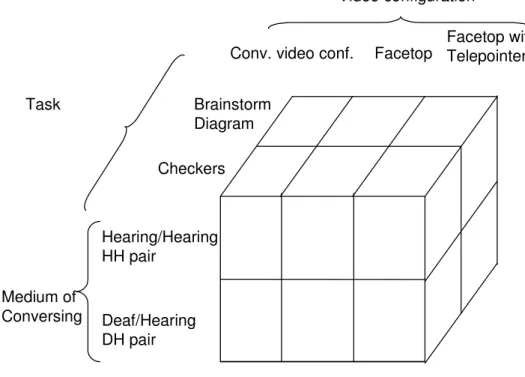
Figure 5-1. Independent variables of user study... 63
Figure 5-2. a) Conventional video conferencing configuration b) Facetop video configuration ... 64
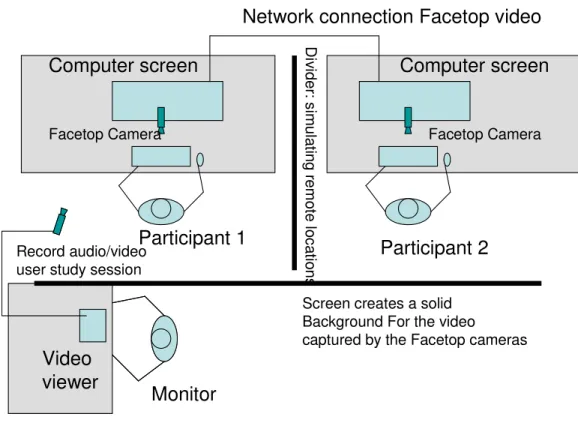
Figure 5-3. Facetop user study setup of workspace with two participants and user study experimenter. ... 67
Figure 5-4. Kings crowned in checkers games (N= 9 DH games, 9 HH games) ... 69
Figure 5-5. Number of checkers moves per game (N= 9 DH games, 9 HH games) ... 70
Figure 5-6. Brainstorm diagram with the main topic hobbies. ... 71
Figure 5-7. Time to complete brainstorming diagrams (N= 9 HH diagrams, 12 DH diagrams) ... 73
Figure 5-8. Seconds per checkers move by DH and HH pairs (N= 9 DH games, 9 HH games)... 74
Figure 5-9. DH pairs' acknowledgement gestures per checkers move (N= 9 games)... 77
Figure 5-10. Portion of positive acknowledgments by each person in the pair (N = 9 games) (T= telepointer, F= facetop, FT= facetop and telepointer) ... 79
Figure 5-11. Positive acknowledgement used by one DH pair in diagram task ... 80
Figure 5-12. Chat messages in diagram session by one DH pair (N= 3 diagrams) ... 81
Figure 5-13. Non-positive acknowledgement gestures used by DH pairs in checkers task (N = 9 games) (T= telepointer, F= facetop, FT= facetop and telepointer) ... 83
Figure 5-15. Mouse activity grouped by DH/HH pair and ordered by
interface (t= telepointer, f= facetop, ft= facetop and telepointer)... 87
Figure 6-1. State-chart demonstrates a diagram with nodes and links. This diagram has three categories of nodes: start state, end state, regular state. ... 95
Figure 6-2. Example of ERD ... 96
Figure 6-3. State-chart with a sub-diagram... 96
Figure 6-4. Deep View dialogs to edit a state-chart diagram ... 105
Figure 6-5. State-chart that demonstrates a cycle ... 110
Figure 6-6. State-chart diagram with parallel path to demonstrate queries for high-level diagram characteristics. ... 111
Figure 7-1. Average time to read existing diagrams by the sighted (N=15 samples) and blind groups (N=13 samples) ... 128
Figure 7-2. Average time to complete editing diagrams by by the sighted (N=15 samples) and blind groups (N=13 samples) ... 129
Figure 7-3. Time to look up answer in Deep View interface by blind participants (N= 77 questions)... 131
Figure 7-4. Diagram shows recycle process of paper. a) Expected result, b) One blind participant's unique interpretation... 133
Figure 7-5. Brainstorm diagram with main category North Carolina; a) Shown in Deep View b) Visually represented as a tree structure... 134
Figure 7-6. Alternative representation of a brainstorm diagram using Deep View's subdiagrams. ... 135
Figure 7-7. Alternative visual representation of a brainstorm diagram when the diagram is constructed with Deep View's subdiagrams. ... 136
Figure 8-1. Rational Rose state-chart diagram for a sighted user. Two users are pointing at different items as indicated by green and purple colored states. .... 143
Figure 8-2. Blind user interface to access a state-chart diagram. ... 144
Figure 8-3. Deep View event log of edits for blind user to monitor... 146
Figure 8-5. Multiple diagram nodes pointed at in the Deep View interface... 151
Figure 8-6 Diagram in Rational Rose indicating that the "end study" node is where the blind user is currently focused. ... 153
Figure 8-7: Deep View model-adapter-view paradigm ... 158
Figure 8-8: UML Class diagram of Deep View shared model. ... 161
Figure 9-1. Time to complete brainstorm diagram (N = 12 diagrams)... 169
Figure 10-1. Time to complete the brainstorm diagram task (N= 9 diagrams for group without disabilities, N=12 diagrams for deaf-hearing group, N= 9 diagrams for blind-sighted group) ... 183
Chapter 1
Introduction
Coming together is a beginning. Keeping together is progress. Working together is success. -- Henry Ford
The most important part of Henry Ford's quote above is that "…working together is success." A team effort benefits from each member’s bringing a unique set of skills and knowledge to the table. Furthermore, a team member's personal background gives the person a unique perspective; for example, a person with a disability has learned strategies to accommodate for the disability. Helen Keller is an example of a person who despite deafness and blindness was, through teamwork, a successful author, mentor, and activist. She reflected on the value of working together by saying, "Alone we can do so little; together we can do so much." Keller enriched society with her insights on her situation, but also relied on others to learn, communicate, and, in general, accommodate her disabilities.
Through novel computer interfaces we design and evaluate we expand the
collaborators with different interfaces to accommodate the collaborators' disabilities, in both cases we research how the interfaces support the fundamentals of the collaborators' communication. The interfaces we research are a form of assistive technology, defined as:
"Any item, piece of equipment, or system, whether acquired commercially, modified, or customized, that is commonly used to increase, maintain, or improve functional capabilities of individuals with disabilities."
[Section 508 of the Rehabilitation Act, (Section508)]
Henry Ford's quote reflects on collaboration beyond individuals or teams working together. Ford's quote reflects society's efforts to cooperate with communities of
disabilities to accommodate their needs, specifically related to making assistive
technology available where needed. Society has made a "beginning" in "coming together" by passing laws and regulations, such as Section 508 of the Rehabilitation Act, to give companies and other organizations requirements to act on. These organizations are making "progress" by developing and implementing initiatives, such as the W3C Web Accessibility Initiative (WAI). Although the accessibility of web resources has greatly improved, inaccessible portions of resources prevent users from obtaining complete information. Researchers in assistive technology find that guidelines, such as WAI, provide basic access, but do not enable members of communities with disabilities to access the information as completely as users without disabilities. In our research we hope to reach the pinnacle of success by "working together" with communities with disabilities to enhance the available assistive technology, in particular, to facilitate the collaboration between people with and without disabilities. I refer to myself and my dissertation committee as "we" to reflect the collaborative effort.
1.1 Introduction to technology
(remote) and collaborators use a shared workspace supported by a computer system. Collaborators use the shared workspace to play games or create content, specifically node-link diagrams. Although the interfaces are different for a deaf person working with a hearing person and a blind person working with a sighted person, aspects of the
interfaces support the fundamental concepts of communication that enable collaborators to communicate.
We engineered the computer interfaces we evaluate by integrating existing
technologies. The collaborative interface for a deaf person working with a hearing person is adopted from existing technologies. The main part of the interface is the Facetop video conferencing system implemented in prior research at UNC Chapel Hill. Our contribution is to evaluate video conferencing technology with an unexplored combination of
collaborators. Previous research assumes two hearing collaborators communicating verbally or two deaf collaborators communicating through sign language.
To research the collaboration of a blind person working with a sighted person, we engineered a custom shared workspace, called Deep View, to specifically access and edit node-link diagrams. With Deep View a sighted person uses a visual diagram application while the blind user examines and edits an audio representation of the same diagram. A collaborative interface with different representations of the interface is known as a loosely-coupled shared workspace. Our main contribution with Deep View is to expand the limited research on supporting collaboration between a blind person and a sighted person. A secondary contribution is to add a new accessible diagram interface to a list of existing research projects.
We evaluated the two interfaces in three user studies: one to evaluate the
1.2 Thesis statement
The collaborative interfaces we design and evaluate accommodate the disability of a deaf person or blind person to communicate in a remote synchronous collaboration with a person without a disability, thereby expanding the ways in which people with disabilities participate to a level of detail not possible without the design features. The design features of the user interfaces provide alternative channels for collaborators with disabilities to communicate ideas or coordinate actions that collaborators without disabilities would otherwise do verbally or visually.
We support the thesis through evidence gathered in three user studies where collaborators complete full-fledged tasks involving a shared workspace. The evidence includes evaluating the quality of the collaborators’ produced artifact, analysis of the observations of the participants' interaction, low level artifacts of the task interaction, and responses to questionnaires and discussion with participants.
A deaf person working with a hearing person used a tightly coupled workspace:
• Deaf-hearing pairs rely on video to communicate by gesture compared to hearing-hearing pairs who do not use video.
• Deaf-hearing pairs rely on the telepointer to gesture at the workspace instead of gesturing through video as we originally hypothesized.
A blind person working with a sighted person used a loosely coupled workspace:
• A blind participant using the Deep View interface understands a simple node-link diagram almost as well as a sighted person using a visual diagram application. • Although blind participants are slower reading or editing a diagram than a sighted
participant, the blind participant's strategy of memorizing a simple node-link diagram enables the participants to discuss the diagram at a similar pace. • Blind participants and sighted participants prefer to use the Deep View
collaborative system to complete a diagram task rather than the currently
available technique, where a sighted person edits the diagram and a blind person participates in the discussion.
1.3 Scope of research
Our research incorporates three fields of Computer Science: Human Computer Interaction (HCI), Computer Supported Cooperative Work (CSCW), and Assistive Technology. At the most general level our research contributes to the HCI objectives of developing and evaluating user interfaces so that the design features of the interfaces present information most appropriately for the user to perceive and process. The specific interfaces we research are in the area of CSCW and we research how our design features support the communication of collaborators. Considering collaborators with disabilities and assistive technology broadens the HCI and CSCW research fields' perspective because conventional assumptions of communicating verbally or having visual content are not taken for granted. Following we describe our research relevance to the areas of assistive technology and CSCW.
1.3.1 Assistive technology
The technology used in our research and interfaces is classified as assistive technology because its purpose is to accommodate users' disabilities. A single
technology, for example text-to-speech, can have a wide range of assistive applications. A screen reader for blind computer users makes the information in a visual GUI
accessible to the user. On the other hand, text-to-speech can also help students with learning disabilities circumvent the difficulties of processing or focusing on printed text. Our research demonstrates how a range of interface design features are used to facilitate the communication of collaborators with and without disabilities.
An important design aspect of assistive technology is universal design. Ron Mace, an architect using a wheelchair, is the originator of the term and describes it as (Mace):
"Universal design is the design of products and environments to be usable by all people, to the greatest extent possible, without the need for adaptation or specialized design."
strollers or persons temporarily unable to use their hands to open a door. In computer technology, universal design improves, for example, the availability of assistive
technology by taking advantage of economies of scale. The technology we apply in our research ranges in the degree of its universal applicability to users.
The video conferencing technology we use to facilitate communication between a deaf person and a hearing person has the most universal design. The video conferencing technology is the same as that used by collaborators without disabilities. In our study we investigate the impact of various configurations to the video conferencing setup. We learn about how the collaborators have a unique strategy of using the technology to communicate ideas about the collaborative task. The video conferencing technology is general and unmodified, and therefore collaborators can complete a wide range of tasks using existing collaborative applications.
The technology we use to facilitate a blind person collaborating with a sighted person has a less universal design. In our research we developed the Deep View application, an interface customized for the requirements of blind users to access diagrams. Although the interface is intended for blind users, the Deep View system is flexible enough to enable blind users and sighted users to transparently exchange diagrams. Deep View generates visual diagrams for sighted colleagues to use.
Furthermore, we integrated Deep View into existing visual diagram applications so that blind users can access existing diagrams that sighted colleagues are using. When
collaborating, the blind collaborator uses Deep View and the sighted collaborator uses the visual diagram application. Nevertheless, using a custom interface for the blind user limits the collaboration to diagram related tasks as opposed to the other group of
collaborators who can complete a wide range of tasks with their video conferencing tools.
1.3.2 Computer Supported Cooperative Work
is the focus of the following discussion. In this scenario there are several arrangements of the computer system to support the collaboration.
The collaborative tasks we research are based on the collaborators using a shared workspace; that is, remote collaborators working on different computers view a common application (shared workspace) and changes to the application state are reflected in each person's interface of the application. Shared workspaces are specific to a task and range from online multiplayer card games to collaborative word processors or spreadsheets, such as those provided by Google Docs™. The shared workspace also has a form of telepointer enabling collaborators to point at parts of the application.
The collaborators use a shared workspace with other video conferencing
components to facilitate communication. Video conferencing enables the collaborators to see each other and converse verbally, if they are hearing. Furthermore, collaborators have chat messaging for communicating through written messages.
As for the synchronous collaboration we consider in our research, the
collaborators work together more or less closely. Tightly coupled collaboration refers to collaborators working on the same portion of the task at the same time. The collaborators might also work loosely coupled, where they work on different portions of the task, for example, dividing the task between them.
The collaborators' interface design depends on the degree to which the
1.4 Benefiting communities with disabilities
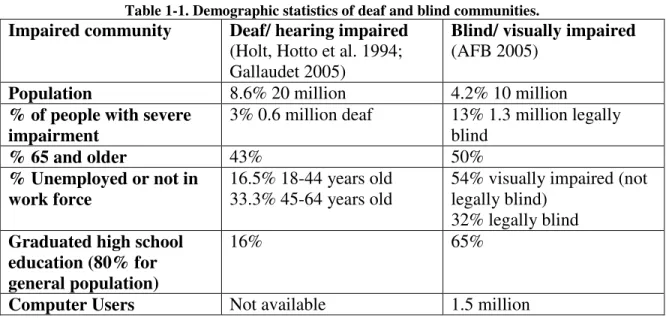
Our research contributes to the education and employment of people from the deaf and blind communities. We describe the US demographics of the deaf and blind communities and how our research can benefit people with disabilities. In our research we intend to design solutions for people with any degree of hearing or visual impairment. For simplicity of terminology, however, we will refer to blind persons and deaf persons.
Table 1-1. Demographic statistics of deaf and blind communities.
Impaired community Deaf/ hearing impaired
(Holt, Hotto et al. 1994; Gallaudet 2005)
Blind/ visually impaired
(AFB 2005)
Population 8.6% 20 million 4.2% 10 million
% of people with severe impairment
3% 0.6 million deaf 13% 1.3 million legally blind
% 65 and older 43% 50%
% Unemployed or not in work force
16.5% 18-44 years old 33.3% 45-64 years old
54% visually impaired (not legally blind)
32% legally blind
Graduated high school education (80% for general population)
16% 65%
Computer Users Not available 1.5 million
First, the percentage of the overall US population with a severe impairment is small (less than 15%) compared to the population with a milder form of the same impairment. The implication for designing computer interfaces is that the people with mild impairments can still benefit from information delivered to their impaired senses, such as hearing a tone or perceiving if a light is on or off.
The second trend is that many people in the communities are not employed (33.3% deaf, 54% blind). Assistive technology, such as developed and evaluated in this dissertation, can provide tools to help them become active in the workforce and help those already employed. The tools assist people with disabilities in their work with colleagues without disabilities. In education, often a prerequisite for employment, these tools will enrich the learning environment by expanding accessible resources.
1.5 Overview of dissertation
Our research is described in the following eight chapters. Chapters 2 and 3
Chapter 2
Collaborative technology for deaf-hearing pairs
In our research of a deaf person collaborating with a hearing person we use existing collaborative computer interfaces. We focus on the collaborators using a shared workspace, which displays the task the collaborators are discussing and completing. Furthermore, collaborators use video conferencing to see each other and communicate through gestures, such as head nods and hand gestures. Our research contribution is to evaluate existing technologies in the unique situation where collaborators cannot communicate fluently verbally or through sign language.
In this Chapter we review previous research that assumes collaborators have a fluent means of communication. Specifically, we focus on video conferencing systems that overlay video of collaborators on a shared workspace. The main advantage is enabling a collaborator to point and gesture with his hand at the shared workspace as if the participants are face-to-face. Furthermore, the previous research investigates the behavior of the collaborators’ eye gaze and how they observe each other. From a technical perspective, the previous research projects present a variety of techniques for integrating the image of the shared workspace and video of the collaborators.
First, we briefly describe how videoconferencing systems work. In
microwave radar systems or satellite networks. Nowadays, most video is transmitted through the Internet. Throughout, the engineering challenge has been the same – to transmit and display the video image with minimal latency. Video delay of even a second can interrupt the natural flow of face-to-face communication.
2.1 Basic video conferencing: “I can see you”
Videoconferencing technology has been implemented in many systems since the 1970s and research has evaluated the effectiveness of collaborators using the technology. In (Egido 1988) viewed videoconferencing systems as a failure because the significant broad impact promised by videoconferencing had not been realized. Instead, there were only niche applications, and only a few companies with the technology had been able to successfully apply it. Egido found that videoconferencing could not replace the face-to-face communication as vendors were claiming in their marketing of the technology. Today his suggestions for research to reduce the high costs and to find new and creative ways for videoconferencing to complement face-to-face communication have been somewhat realized.
Today it is common for people to use videoconferencing for business or pleasure. Video conferencing complements face-to-face communication because two individuals can have an impromptu meeting even when it is inconvenient to meet in person. A typical setup is readily available with a range of inexpensive software, such as Micorsoft’s Net Meeting™ or Live Meeting™, and inexpensive webcams to capture the video.
Affordable broadband speeds over cable, ISDN, or DSL are fast enough to stream good video.
Companies like WebEx.com use videoconferencing technology to provide innovative services, such as technical support for their products. In a typical scenario a WebEx customer service representative can access the customer’s computer through a computer sharing application. The representative and customer can discuss the issue on the phone, or if desired start a video conference to see each other while talking.
In Olson’s study, 222 individuals were broken into 74 groups of three and given the task of drafting the requirements for a system. The task was considered realistic because it involves planning, creativity, decision-making and cognitive conflict. The groups completed the task in one of four situations.
1. Face-to-face on a whiteboard with pens 2. Face-to-face with shared editor
3. Remotely with a shared editor and with only a high quality audio connection 4. Remotely with a shared editor and a high quality audio and video connection
The empirical results related to the impact of the video are that remote groups using the video performed similarly to the face-to-face group that used the shared editor. The quality of the task products was similar. Also the satisfaction of the participants was comparable.
The subjective feedback of the participants clearly indicated the value of the video. Working remotely without video and with only an audio connection, participants had more difficultly communicating. Participants were less certain about how someone else reacted to their ideas and participants found it more difficult to resolve
disagreements.
An artifact of collaborating using video is that the discussion involved more overhead of processing the information being conveyed compared to the face-to-face discussions. This suggests that the video did not convey necessary information that would be conveyed face-to-face. This would be an area for future research.
2.2 Video conferencing for the Deaf community
telephone lines. Later with video conferencing two deaf persons could converse by signing using the mentioned typical setup.
Video conferencing has impacted sign language. A signer is influenced by his/her body, the camera, and the computer environment. A signer will sign at the camera so the remote person can more easily recognize the signs in the 2D camera video image. The sign language is adapted so that the sign gestures are within the camera’s field of view; for example, the sign for “baby”, usually signed around the waist, is signed under the chin. The equivalent of screaming in text messaging (bold text) is conveyed by signing close to the camera, filling the video image. The vibrant deaf culture around video conferencing demonstrates how well the technology has been adopted and that it will continue to be very important to the Deaf community.
Telephone companies are using video conferencing technology to enable a hearing person to have a telephone conversation with a deaf person through an interpreter. In 1996 Sprint started the first video replay service (VRS). For, say, a hearing person to start the call, he/she dials a toll-free number to reach a signing
interpreter. In turn, the signing interpreter establishes the videoconferencing session with the deaf person. Then the interpreter translates between the verbal and signing to enable a fluid conversation. This service is free to the public and funded by the National Exchange Carrier Association, which in turn collects funds from telecommunication companies.
Research into improving videoconferencing for the Deaf community focuses on video compression algorithms that maintain details of sign language. The principle is to have higher resolution for a signer’s head and arms and trade it off for lower resolution of the background surrounding the person. Muir’s (Muir and Richardson 2002) work is an example of this.
2.3 Research improving integration of video and workspace
By 1990 videoconferencing systems and collaborative applications such as a shared whiteboard were extensively researched. At the time, the systems were typically used separately; people would look at the video to converse or talk while working on the shared application. Research in the 1990s developed systems and interfaces to provide a more natural working environment with video and a collaborative application. This is accomplished by integrating the workspace and the collaborators’ interpersonal space . The research focused on how people work together, rather than previous research evaluating the final product of the collaboration (Tang and Minneman 1991).In this section we review 11 research projects, mostly in chronological order, to show how the 11 systems are built on top of each other. In the earlier work, the computer systems to support the collaborative interfaces were so complex that the majority of the research was in building the systems rather than evaluating them. With advancements in technology, the same interfaces can be implemented much more simply. This makes it easier for more researchers to explore the technology. Also, researchers can spend more time innovating and evaluating the interfaces rather than designing and building the systems.
2.3.1 TeamWorkStation and VideoDraw
Developed around the same time, TeamWorkStation (Ishii 1990; Ishii, Kobayashi et al. 1993) and VideoDraw (Tang and Minneman 1991) are interfaces that let remote collaborators interact with each other and with the collaborative application similarly to being face-to-face and drawing on a piece of paper. A collaborator looking at the paper can see her hands and the hands of her collaborator. Through hand gestures two
collaborators have an effective mechanism to coordinate actions and communicate. The TeamWorkStation and VideoDraw accomplish a similar working environment for remote collaborators. Video of the collaborators’ arms and hands is transparently overlaid on the collaborative workspace. When a user gestures, the camera above the hands captures the live video that the collaborator watches on her monitor.
For the VideoDraw research team, the VideoDraw interface was the final result. The starting point for the interdisciplinary research team (computer scientists,
anthropologists and designers) was to identify what the important communication cues are for people working together, for example, on a diagram. In brief, they found that hand gestures and their timing were important for the collaborators to coordinate actions. Also gestures added meaning to the drawings; the final diagram was not completely
understandable without knowing certain hand gestures made while drawing the diagram. Communication through gestures will be explained in more detail in Chapter 4. Through these insights into gesturing, the research team created VideoDraw to provide gesturing to remote collaborators. The final evaluation of the system was low key with several short informal trials and a few longer trials.
The research team evaluated TeamWorkStation for one year by using it in their office for everyday work. The researchers found that the flexibility to switch between workspaces suited the dynamics of their working style. Also working through the
collaborative environment reduced the number of documents they copied and distributed. The system implementation of VideoDraw and TeamWorkStation are complex. Several computers and hardware components are necessary to transmit the video images of each collaborator’s hands and arms. The video image also has to be mixed with the image of the shared workspace to create an overlay effect. For TeamWorkStation, the users would view the interface on a monitor separate from their computer.
VideoDraw has an additional complication. In the setup, the user naturally gestures over the screen showing the collaborative application. The video camera, in capturing the hands, would also capture the computer screen. So the computer screen is masked from the camera by placing it orthogonally polarized slides over the screen and camera; this prevents feedback in the camera from the computer screen.
2.3.2 VideoArms
VideoArms (Tang and Minneman 1991) is a more recent project that revisits the concepts of the VideoDraw and TeamWorkStation interfaces. The implementation demonstrates how technical advances have simplified implementation. The hardware required is networked computers each connected to a camera. Any display can be used, even touch sensitive whiteboard-size displays on which one can draw directly into the collaborative application. In place of masking the screen image through polarization, the same functionality is accomplished with readily available image processing software packages.
2.3.3 Clearboard
The Clearboard (Ishii, Kobayashi et al. 1993) system is Ishii’s next iteration of TeamWorkStation. ClearBoard’s unique contribution is to enable collaborators to have mutual eye gaze while naturally interacting with a collaborator as if she were on the opposite side of a piece of glass. That is, looking at the computer screen, a person can see the shared drawing application, and the other person appears behind it. With ClearBoard, pointing and gesturing is very natural.
Achieving mutual eye gaze was the main objective of the project. The research team observed that users effectively used eye gaze. When two collaborators speak to each other they look each other in the eye. Also, when one person points a finger and moves it across the screen, the other collaborator would follow the motion with his/her eye gaze.
The main engineering achievement of ClearBoard is to provide users with mutual eye gaze. Eye gaze is perfectly preserved as would be when two people look at each other in a mirror. In fact, the video image of the collaborator is a mirror image of that person. The computer screen a user looks at is covered with a half mirror. The camera capturing the video image for the other collaborator captures the image of the user observing themselves in the mirror. The computer screen is at an angle so that the reflection returns to the camera and not the user. As the mirror is only half a mirror the user can still see the computer screen because light from the screen passes through the half-mirror. Orthogonal polarized slides are used on the screen and camera to mask the screen image. The same technique was used in VideoDraw.
Pointing and gesturing at the computer screen is a special case. The collaborator does not see a mirror image, but rather the same view as in VideoDraw and
TeamWorkStation. When the user reaches over the screen, the user’s arm occludes the half-mirror and the camera captures the same view of the arm as in VideoDraw and TeamWorkStation. Although the view of the collaborator is different than the mirror view, the interface is still very comprehensible.
The ClearBoard interface was evaluated with two tasks. In the first task a teacher instructs a student on how to play backgammon. The pair had frequent eye gaze
exchanges, while the teacher was explaining the rules. While speaking to each other, they look each other in the eye. Also when the teacher pointed at something, he would
occasionally glance at the students to check that he, too, was looking at the same thing. Eye exchanges were less frequent during playing a game, because the pair was engrossed in playing.
There were three situations for the participants in the backgammon study. The situations compared people working face-to-face, people with a glass plane vertically between them (a mockup of clearBoard), and finally people with the ClearBoard prototype. The researchers recorded that more eye gazes were exchanged with
ClearBoard than face-to-face. ClearBoard made it easier to switch between looking at the other person and at the backgammon board.
In the second task, a pair of collaborators uses ClearBoard to effectively solve a river crossing puzzle. The river crossing puzzle is significant, because Huthcin and Herb found that usual eye gaze was importance for two people to solve the puzzle.
2.3.4 Hyper Mirror
Hyper Mirror (Morikawa and Maesako 1998) was developed independently from ClearBoard, but it was built with similar objectives. Similar to ClearBoard, collaborators can share eye gaze and naturally gesture as in face-to-face communication. With Hyper Mirror, however, the collaborative workspace is extended beyond the small area of the computer screen to the area and objects surround the collaborators. For example, one collaborator could show and maneuver an object that the other person could see and point at. Of course, the remote person could not touch the local object because they were remote. Also it was possible to imitate shaking hands through the interface.
added to the first person’s video through a process called chroma key. In chroma key a person’s background is blue, and in video editing, the blue background is subtracted.
Each collaborator sits at least 2 meters away from the screen so that the camera next to the projected screen can capture his image. Watching the video, the collaborators can coordinate the gestures in the same frame of reference. In each collaborator’s real space, however, they are waving in thin air. The setup enables eye gaze to be preserved because the offset between the screen and camera position is minimized by the user’s distance from both. Although the video makes it natural to collaborate, the users’ posture is not natural. The person gestures in front of themselves, however, he has to look over his shoulder to see the video of the other person.
The researchers of the Hyper Mirror system conducted the user study to
determine the best video image of the participants. The two parameters of the video were: normal video image vs. mirrored video image; and showing only the remote collaborator vs. showing both collaborators. 25 participants completed the study. The task was to either observe the different situations or interact with the other person such as acting out to shake hands. The main metric of the user study was for the participants to evaluate their “reality of presence” of the remote person. As expected, the video used in Hyper Mirror (mirrored image showing both participants) gave participants the highest sense of presence.
Informally, the researchers gathered feedback from public demonstrations of Hyper Mirror. Passersby intuitively understood how Hyper Mirror works and started interacting with people at the remote location for fun, such as acting out patting a passerby at the remote site on the head.
2.3.5 Large screen video conferencing displays
One of these systems is VideoWindow (Fish, Kraut et al. 1990). The interface works as if a glass window were placed through the middle of the room. The people on one side of the glass are in one location, and the people on the other side of the glass are at another location. VideoWindow shows the users the same view as when a user looks at the glass window. In VideoWindow, a glass window is really a projected video image of the remote site. VideoWindow and similar systems (Bly, Harrison et al. 1993; Benford, Greenhalgh et al. 1998; Jancke, Venolia et al. 2001) have been used to research how people interact informally. Similar to the public demonstrations of Hyper Mirror, it is easy for people to become engaged with people at the remote site through the projected video.
2.3.6 SharedView and its evaluation
So far in the reviewed systems the captured video of participants and/or workspaces was from a fixed perspective. In the next series of projects the video is a first-person view of one of the collaborators. A possible scenario is an operator working on, say machinery, in the field collaborating with a coworker at the office. The coworker sees a video image similar to the operator’s view through the camera mounted on the operator’s head. As the operator moves his head, the view changes accordingly.
An example of such a system is SharedView (Kuzuoka 1992). SharedView is a novel edition, however, in that the operator sees video of the coworker's gestures captured in the office on his see-through head mounted display. Although the system provided the coworker with a mechanism to point, it was difficult to use in practice. To point successfully, the operator would have to hold still until the coworker finished motioning, i.e., pointed at the desired object. This would enable the collaborators to have a common frame of reference. Instead, as the coworker motioned, the operator moved his head to follow the motion. During the operator's head motion, the coworker has to
continuously adjust his pointing motion to reach the desired point.
(Fussell, Kraut et al. 2000) the argument is that a shared visual workspace is beneficial to an operator and a coworker situation as described. The accompanying user study falls short of demonstrating this. In the study pairs of collaborators complete the task of assembling a bicycle under three conditions: face-to-face, through an audio connection, and through an audio/video connection. The video is from the operator’s head mounted camera. Pairs working with the audio/video connection were not able to complete the task as well as the face-to-face pairs. The shortcomings are explained by three limitations in the video. First, the operator cannot see the boundaries of the camera’s field of view and is uncertain if the coworker can see what he is referring to. Second the field of view is limited and does not provide the same cues as if the entire workspace were shown. Third, the collaborators can not see each other's gestures and the coworker cannot see the
operator’s face.
The second user study builds on the first by adding a scene camera, i.e., a fixed camera at a distance that captures the entire workspace. Participants in the user study this time assemble a complex robot in one of four situations: face-to-face, through an audio connection, with audio and a scene camera, and with audio, first person video and a scene camera. As before face-to-face pairs complete the task better and with smoother
communication. Pairs working with only a scene camera did better than pairs working with a scene camera and a head mounted camera. This suggests that the scene camera adds valuable information. The researchers suggest that adding head mounted camera worsened the collaborators’ performance, because the coworker paid more attention to the first-person video rather than the scene video. The implication for future system video systems is to give coworkers better instructions on how to utilize the video.
2.3.7 Office of the Future
The focus of the “Office of the Future” (Chen, Towles et al. 2000) project is to develop the next generation of videoconferencing systems. Sitting at a desk a
projector. The viewer wears a head tracker and as the viewer moves his head, the perspective is adjusted accordingly. The prototype demonstrates the concepts, although the latency must be reduced and the quality of the 3-D reconstruction has to be improved.
A secondary objective of the projects is to integrate the workspace into the interpersonal space. A novel innovation is to make a virtual shared workspace using 3-D computer graphics. This way, the collaborators can equally access the shared workspace; unlike physical objects, where only the local collaborator can manipulate them. In a Office of the future demonstration, the task was to arrange furniture in a room; the collaborators used a wand (controlled by a tracker in the hand) to manipulate the furniture.
History might repeat itself and like the systems developed in the early 1990’s, today’s complex system implementations might become simpler to replicate because of advances in technology; then researchers could study these systems in more detail.
2.3.8 Facetop
Facetop is the main video conferencing system we use to evaluate collaboration between a deaf-hearing pair. Facetop was originally created to support pair programming (Stotts, Smith et al. 2004). Since then it is being adopted for use by deaf persons as part of this dissertation and other applications described in (Miller, Gyllstrom et al. 2007).
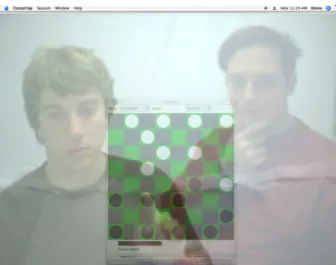
Facetop lets collaborators use the video to visually gesture, such as pointing a finger, at the shared workspace similar to as if the collaborators were face-to-face. To use Facetop, each person points the camera connected to their computer at himself; for example, by placing the camera on top of the computer monitor. Figure 2-1 is a
Figure 2-1. The collaborators are playing checkers against the computer using the Facetop video conferencing system.
The main reason a user sees a video of himself on the computer screen is to be able to make gestures relative to the shared application, such as pointing an index finger at an item in the shared application. The person making the gesture has to verify that his intended gesture is properly reproduced in the video image that the observer of the gesture sees. For the person making the pointing gesture, it is as natural as pointing an index finger at part of a physical mirror. The mirrored image of the index finger appears to point at the same location. Likewise, pointing at the computer monitor, the video image on the screen is the same as if the screen were a mirror. Like in a mirror, it appears as if the person is on the other side of the screen. Unlike a mirror where a person can touch it and see the mirror image, the person gesturing at the screen may not touch the screen. The person gesturing at the screen has to gesture some distance from the screen so that the gesture is present in the camera’s field of view. The observer of the pointing gesture will see the pointing person’s index finger overlap the item pointed at. As in Figure 2-1, one person is pointing to a checkers piece.
There are three additional advantages to a person seeing himself in the video. The first advantage is that registration of the camera user and computer are arbitrary.
Regardless of the positioning, the user can adapt his gestures so that the gesture appears correctly in the video image. The second advantage is that participants of related
The third advantage is most applicable to the deaf users. Overlapping the images of the video and shared application, the user can observe both images at the same time, unlike typical videoconferencing systems, where the user has to look at different parts of the screen. Also as the video image is larger, it is easier to see smaller details such as when one person waves to get the other person's attention. Although this feature could be useful to hearing users, they do not rely on it as much because the information conveyed in the video can be conveyed verbally.
The drawback of the semi-transparent video is the same as in our group meeting application. Visual details in the semi-transparent video can be washed out and make it difficult to recognize sign language. We will try to mitigate this issue in future work. The interface as is, however, could still be useful for collaboration between a deaf person and a hearing person. These collaborators would use more rough gestures, such as pointing, “thumbs up” or hand waving, which do not require as much detail to be understood.
There are a few requirements of the shared application and the collaborators’ monitors. The application has to have the same relative position and size on both
monitors so that when one person makes a pointing gesture, the elements pointed at is the same on both persons’ monitors.
2.4 Mutual eye gaze
Mutual eye gaze is an important communication cue, however, designing systems to provide mutual gaze is difficult. For communication, mutual gaze is important for indicating where a person's attention is or for indicating when a listener is attending to a speaker (Vertegaal, Slagter et al. 2001). Implementing mutual eye gaze, for example in ClearBoard, required a half mirror and polarized filters. The following discussion is on two research projects that evaluate the necessity for mutual eye gaze and possible workarounds.
the camera captures the necessary image for the pair to have mutual eye gaze. Other participants will see that the user's face is pointed away from them.
The Hydra system was evaluated in a user study, where a group of four
participants discussed news topics. Topics were discussed in three situations: face to face, with Hydra, and with a conventional videoconferencing system called Picture-in-picture (PIP)(i.e. video image of all participants is displayed on a computer monitor).
Comparing face-to-face to the video mediated discussions, the characteristics were very similar; for example, on the metric in which participants took turns. With simultaneous speech however, there was more in the face-to-face condition.
The Hydra and PIP systems each had its advantages. Overall, the participants preferred Hydra. The spatial audio from the speakers made it easier to follow a speaker when several spoke simultaneously. Also, it was easier to attend to side discussions. One third of the user study participants liked that in PIP they could see themselves; they felt it was important to see themselves so that they know how other people see them. Also, one participant felt that the PIP video made her feel part of the group. The researchers came to the conclusion that video mediated discussion systems need not simulate face-to-face conditions entirely in order to be successful.
The second research project by Grayson (Grayson and Monk 2003) is an experiment to see how well an estimator can judge where a gazer is looking. Instead of being face-to-face, however, the estimator saw the gazer like in a typical
videoconferencing system, where eye gaze is distorted. The camera capturing the gazer was on a 17 inch monitor that the gazers sat in front of. In the experiment the estimator had to guess where the gazer was looking on a horizontal line displayed on the screen. In one case, the camera was directly in front of the gazer; and in another case, the camera was horizontally offset. Despite the eye gaze distortion, the estimator accurately
2.5 Balance of attention between workspace and collaborator
The computer interfaces reviewed in this section have provided collaborators views of their collaborators and the shared workspace. Olson's user study reports that video of the participants was useful. However, how do users divide their attentionbetween looking at the shared workspace or at the collaborator’s face? Observations from at least two studies show that the majority of the time is spent looking at the workspace. First, in ClearBoard, the backgammon teacher and student used eye gaze during
instruction, but while playing they were so engaged that they did not exchange glances. Second Graver’s research (Gaver, Sellen et al. 1993) also shows that remote collaborators use the workspace view more than the view of the collaborator. In his experiment, too, people collaborate in order to lay out the furniture in a dollhouse. The remote person (away from the dollhouse) had one monitor on which he could switch between the view of the collaborator or three views of the shared workspace. On average, the remote person used a view of the collaborator for as little as 11% of the time. The view was used for lengthy negotiation and occasional glances to judge the collaborator’s mood and level of engagement.
Although the observations show users’ attention to be disproportionate between the collaborator and workspace, it demonstrates the value of viewing each. Most of the collaboration can be completed viewing the workspace and communicating verbally on how to interact and manipulate the shared workspace. Occasionally, however, the
collaborators need to negotiate more abstract ideas, which they can communicate verbally and use cues from facial gestures.
2.6 Historical aside
In 1968 Douglas Englebart (Engelbart and English 1968) already tinkered with video conferencing concepts mentioned in the research after 1990. It was coincidence, however, that he overlaid the video of a collaborator on the workspace like ClearBoard, VideoDraw and other research projects mentioned here. It was an artifact of the
prototype worked to demonstrate the idea but building a more comprehensive video conferencing system would have been much more difficult than with the technology of the research systems from the 1990s. Engelbart only briefly explored the idea mentioning in a paper that a video of the collaborator would be a useful feature.
2.7 Summary of video conferencing technology
Facetop innovates on research projects on integration of interpersonal space and workspace. The Facetop interface is most closely related to ClearBoard. Similar to ClearBoard, in Facetop people can see their collaborator as well as the shared workspace. Technical advances have made the Facetop implementation much simpler; it only
requires a computer and video camera (webcam). The camera can not be positioned in such a way as to provide mutual eye gaze, but research into mutual eye gaze might provide a workaround. Also Video rendered in Facetop is similar to techniques used in the VideoArms project.
A novel contribution of the Facetop project is to apply the interface to support a deaf/hearing or deaf/deaf pair of collaborators. All other collaborative systems assume hearing collaborators and provide an audio connection for communication.
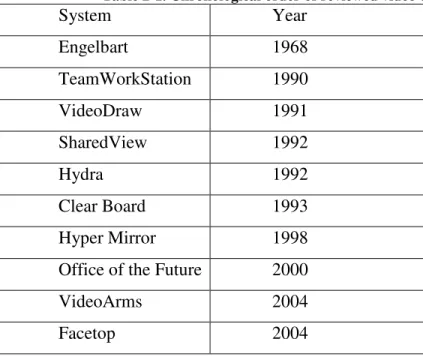
Table 2-1. Chronological order of reviewed video conferencing systems
System Year
Engelbart 1968
TeamWorkStation 1990
VideoDraw 1991
SharedView 1992
Hydra 1992
Clear Board 1993
Hyper Mirror 1998
Office of the Future 2000
VideoArms 2004
Chapter 3
Collaborative technology for blind-sighted pairs
Our research of a blind person collaborating with a sighted person contributes to two existing areas of assistive technology research. The first and main area is the actual collaboration between such pairs. We expand the research in this area by investigating a diagram editing task, which is more complex and general than a simple game investigated in previous research.
The secondary research area we investigate is accessible diagram interfaces. We require a custom accessible diagram interface so that a blind collaborator can access the node-link diagram in the shared workspace. Our contribution is to tailor our accessible diagram interface to accommodate the blind person accessing the diagram while discussing it with a sighted collaborator.
In this Chapter we review previous research related to our two research areas. Section 3.1 reviews an interface to support a blind person collaborating with a sighted person. Section 3.2 reviews accessible diagram interfaces.
3.1 Research on blind-sighted collaborators
We are aware of only one research project that explores computer interfaces to support collaboration of a blind-sighted pair. We review the project, which demonstrates the feasibly of such a collaboration. We also describe how our research expands
knowledge in this area.
3.1.1 Previous research
Winberg's research (Winberg and Bowers 2004) introduced the CSCW
He demonstrates that it is possible for the pair to share a workspace and constructively complete a task. The user study task is to complete the Tower of Hanoi game (discs of different sizes are moved between three poles, according to constraints). The shared workspace is the game board. Each collaborator uses the most appropriate display: the sighted person uses a visual display and the blind person uses an audio display.
Winberg also developed the audio display for this project. The audio display is based on direct manipulation, which is how most common graphical user interfaces (GUI) work. In direct manipulation users can manipulate objects – represented visually in a GUI; for example, in the Tower of Hanoi game a user can click and drag the disc from one pole to another. Winberg's audio interface functions similarly. Instead of a visual representation, objects appear to emit sounds; for example, in Tower of Hanoi each disk and each pole has a unique sound. The disks and poles have the same spatial layout, as in the visual display. A blind person uses a mouse to explore the shared workspace
displayed auditorily. As the mouse moves the person hears the objects close to the mouse position. Objects are manipulated like in the visual display; for instance, by listening for the objects, a user can select a disc and can drag a disc from one pole to another.
In the evaluation, a blind/sighted pair collaborated to solve the Tower of Hanoi game. Three pairs participated in the study. Each pair used one computer with a visual display (monitor) and an auditory display (headphones). The collaborators shared a telepointer that they had to coordinate in controlling. In theory, when the sighted person controlled the telepointer, the blind person could hear the objects it was passing over.
Overall, the collaborating pairs were able to successfully communicate and
complete the task. The pairs’ work was balanced, such that, after discussing the move, the blind person and the sighted person would take turns to interact with the interface and complete the move. Although the participants took turns to control the interface, sometimes the blind person would start to control the telepointer before the sighted person was done. The problem was quickly rectified: listening to the audio display, the blind person understood the problem and let the sighted person finish.
observation is that the blind person integrates many sources of information, including listening/interacting with the audio display, talking with the sighted collaborator, and memory. Also, there is a delicate balance with a blind person listening to both the audio interface and the sighted collaborator. The researchers’ suggestion for future work is to design interfaces such that they provide the functionality to assist the collaborators in the observed situations.
3.1.2 Our contributions
Our research in collaborative interfaces for a blind/sighted collaborating pair builds on the experience from the Tower of Hanoi interface. Like in the Tower of Hanoi interface, a sighted person uses a visual interface and a blind person uses an audio interface. The interfaces, however, are loosely coupled so that each person can navigate the application independently. Also, the interfaces are laid out differently to most appropriately accommodate how a user accesses the interface. The semantic pointing mechanism in our interface lets the collaborators shift focus to the same object. With this interface, the confusion observed in the Tower of Hanoi game should be minimized. Also our collaborative task of viewing and editing diagrams further demonstrates the range of collaborative applications a blind/sighted pair can participate in. Diagrams demonstrate a more complex, shared workspace, including detailed textual information that the
collaborators will be able to work with.
The loosely coupled collaborative interface used in this research is based on CSCW research in flexibly coupled interfaces. Suite (Dewan and Choudhard 1991) and Rendezvous (Patterson, Hill et al. 1990) are two research projects that demonstrate this research. The original purpose was to accommodate flexibility in which collaborators work. Before flexibly coupled interfaces, collaborators’ interfaces were identical, and they had to work on the same task. However, collaborators, such as coders or prose editors, would sometimes prefer to divide the task and work on separate parts. Furthermore, instead of sharing every edit, a person may want to make several edits before sharing with the collaborator.