TEACHING NETWORK GAME
PROGRAMMING WITH THE DRAGONFLY
GAME ENGINE
Mark Claypool, Worcester Polytechnic Institute
INTRODUCTORY ESSAY
The growth in connectivity and capacity of computer networks has made network programming an essential skill for game programmers. Traditionally, learning network programming in
college courses involves making toy network programs, possibly built from scratch. These programs help in learning but typically do not allot sufficient time to use the programs for a computer game (nor, often, any other real application). An alternative that does allow game development is to use a game engine with built-‐in networking, but this does not provide the in-‐ depth understanding obtained from writing networking code from scratch. What is needed is a toolkit that allows the aspiring network game programmer to design and implement network programs from scratch, which would: 1) afford the deep knowledge such coding entails; 2) provide the framework for using the code in a computer game; and 3) give the context-‐specific experience of network programming for games.
This paper presents Dragonfly Wings, a project that extends the Dragonfly game engine with network code from scratch, then leverages the full functionality of the Dragonfly game engine to make games. Dragonfly1 is an ongoing project to teach aspiring students about game engine
development wherein students build a fully functional game engine from scratch and then use their own engines to make games. With Dragonfly Wings, students continue the from-‐scratch development with network code implementing a custom network manager for sending and receiving network data, as well as providing robust error handling. Implementation requires learning fundamental socket programming and client-‐server communication, including flow control and marshalling and unmarshalling of data. Student code directly extends Dragonfly, allowing students to use the enhanced engine for developing network computer games. Game-‐ specific techniques learned that also apply to most distributed systems include latency
compensation and game object synchronization across computers.
Dragonfly Wings can be used stand-‐alone as part of a networking course, with students adding code to a pre-‐compiled Dragonfly engine, or as part of a course sequence, where students extend their own Dragonfly engines they made from scratch with the required networking code. Student assessments demonstrate the efficacy of the approach: by extending the Dragonfly game engine with networking code, students show an in-‐depth understanding of networking and distributed systems, while the games built with Dragonfly Wings show an in-‐ depth understanding of network game programming.
The rest of this paper is organized as follows: Section 2 details the Dragonfly Wings
programming project; Section 3 provides an assessment of Dragonfly Wings in a distributed systems course; and Section 4 summarizes conclusions and possible future work.
DRAGONFLY WINGS – EXTENDING THE DRAGONFLY GAME ENGINE
WITH NETWORKING
2.1 SYNOPSIS
Students extend the Dragonfly game engine with network support and create a two-‐player, 2d shoot ’em up game using the new Dragonfly.
2.1.1 GOALS
• Gain experience using fundamental networking code. • Acquire familiarity with networking for a game engine.
• Understand the issues in distributing a shared, virtual world on multiple computers. • Realize the implementation of a distributed system.
2.1.2 OBJECTIVES
• Implement networking (TCP/IP) socket code from scratch. • Design and implement network functionality for a game engine. • Implement the distribution of state in a virtual world.
• Extend a single player game to be a two player, networked game with a traditional client-‐ server architecture.
2.2 OVERVIEW
Dragonfly is a text-‐based game engine, primarily designed to teach about game engine development. While it is a full-‐featured game engine for stand-‐alone computer game
that by designing and implementing network support (“wings”) for Dragonfly. Once networking is implemented and integrated into the engine, students extend a single-‐player game using a traditional client-‐server game architecture to become a fully-‐distributed, two-‐player,
networked game.
2.3 DETAILS
Students work through the Dragonfly tutorial available online through the Dragonfly Web page at http://dragonfly.wpi.edu/. Doing so helps set up the development environment, as well as provides necessary background on game programming with Dragonfly. Furthermore, the
tutorial game, Saucer Shoot, serves as the basis for the required two-‐player game, called Saucer Shoot 2.
2.3.1 DESIGN OF DRAGONFLY NETWORKING
Students must create two classes in support of Dragonfly networking – a network manager and a network event. While these classes are not technically part of the Dragonfly engine (the engine is an immutable library, libdragonfly.a), the new network classes can easily be accessed through an additional library (e.g., libnetwork.a) and, hence, behave largely as if they are part of the engine.
Network Manager
The Network Manager handles the internals of a game’s network connection. As such, both a game client and a game server have a Network Manager. Like other Dragonfly managers, the NetworkManager inherits from the Manager2 base class and is a singleton. Its main private
attribute is a connected socket. Since the requirements for this project are only for a two-‐player game, one socket is sufficient. The class header file is provided in Listing 1.
Upon startup(), the NetworkManager initializes the socket to -‐1 (indicating the
NetworkManager is not yet connected). Upon shutdown(), if the socket is connected (greater than 0), it is closed via the system close() call. The isConnected() method checks if the socket is greater than 0, returning true if so, otherwise returning false.
The accept() method undertakes setting up and then waiting for a TCP/IP socket connection from a client somewhere else on the Internet.3 Typical of most Internet servers, the
NetworkManager listens on a “well-‐known” port (for most network games, this is defined by the game developers) that the client uses when connecting. It also assumes an external naming
2 http://dragonfly.wpi.edu/include/classManager.html
service provides the IP address and/or hostname where the server (the game host) is running. Inside accept(), the following steps are done:
1. Create an unconnected socket to which a remote client can connect. A relevant system call is socket().
2. Bind to the server’s local address and port so a client can connect. A relevant system call is bind().
3. Put the socket in a state to accept the other “half” of an Internet connection. A relevant system call is listen().
4. Wait (block) until the socket is connected. A relevant system call is accept().
The complimentary method, connect(), is invoked by the client to connect to the server. As such, it takes in the server’s hostname and port as strings. When invoked, connect() does the following steps:
1. Lookup the host name, translating it into the necessary system structure for connections. A relevant system call is getaddrinfo().
2. Create a socket used by the client to connect to the server. A relevant system call is socket().
LISTING 1: NETWORKMANAGER.H
The method isConnected() can be used by either the client or the server to tell if the
NetworkManager has a connected socket. It returns true if the socket (sock) is greater than 0. The method getSocket() actually returns the socket.
The method receive() receives data from the connected socket (using the recv() system call). Receive is non-‐blocking, so if there is no data pending, the method does not block but returns. The receive() method has a “peek” option to read the data but leave the data in the socket.
The method isData() checks if there is network data available on the socket using the ioctl() system call. The amount of data available is returned (0 indicates there is no data) without actually removing or otherwise returning the data.
Network Event
The network event is a “message” that is communicated by the NetworkManager to all Objects that have registered for interest in a network event. Implementation of the EventNetwork class is fairly straightforward as the network event class is mostly a container. The proposed design does not include the actual network data (although it could) since the assumption is that the network data is pulled from the NetworkManager by any interested game objects.
LISTING 2: EVENTNETWORK.H
2.3.2 NETWORK INTERACTIONS
If the NetworkManager was actually implemented in the engine, it would be providing notification of all network events – i.e., when network data arrived, it would generate an EventNetwork for all Objects that had registered. However, for this project, since the
NetworkManager is implemented in game code, there needs to be a game object running on both the client and the host that generates network events. This can be most easily done by a “sentry” object (call it Sentry) that inherits from Object4 and registers for step events. Every step, Sentry polls the network manager, and when network data has arrived since the last step, it generates network events by calling the NetworkManager onEvent() method. Since the Host/Client had registered interest in network events, it is then notified network data has arrived.
2.4 DESIGN OF SAUCER SHOOT 2
Saucer Shoot 2, the two-‐player, networked version of Saucer Shoot,5 can, and should, make extensive use of the existing Saucer Shoot game. This means using all the game sprites and game objects provided. The base requirement must include the core gameplay (i.e., ships shooting saucers with a starfield and points). The GameStart screen and the GameOver
animation are not required. Nukes are also optional. The game can start right into the gameplay and end right when a Hero is destroyed. Note, including these optional elements can count towards the Miscellaneous points in the grading section (see Section 2.7).
For functionality, what Saucer Shoot 2 requires is for two players to play Saucer Shoot
simultaneously from different computers (both computers connected to the Internet). Students can use some creativity in providing new gameplay (e.g., competitive or cooperative) with a suggested change to have both players on the same side shooting at the same Saucers but competing for points.
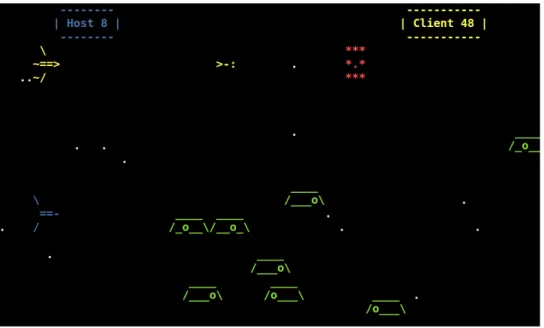
Figure 1 depicts a screen shot of a possible Saucer Shoot 2 implementation. The players each control one of the two space ships on the left, firing missiles at the saucers traveling right to left. The top boxes show the points for the Host that controls the blue ship and the Client that controls the yellow ship.
4 http://dragonfly.wpi.edu/include/classObject.html
FIGURE 1: SCREENSHOT OF POSSIBLE SAUCER SHOOT 2 IMPLEMENTATION
There are many decisions that must be made in implementing an architecture for a multiplayer game such as Saucer Shoot 2, including: 1) what Objects are synchronized and how often; 2) how player actions on the client are transmitted to the server; and 3) how inconsistencies between client and server game states are resolved.
A significant task in synchronizing states in a network game (and in other distributed systems) is transferring data that needs to be synchronized between nodes. For a network game, and many other object-‐oriented systems, this means synchronizing the attributes of objects across
computer systems. This is often done through serializing (also known as marshalling), wherein an object’s state is translated into a format that can be transmitted across a network
connection and reconstructed once received on another computer. Dragonfly provides several built-‐in methods for the Object class to make this easier, shown in Listing 3.
The method serialize() produces a string of Object attributes in key:value pairs separated by commas. For example, the attribute and value for an Object with id 110 would be
represented as “id:110,”. By default, the serialization string returned contains only the
attributes that have been modified since the last call to serialize(), unless invoked with the boolean all as true.
The counterpart method, deserialize(), takes in a string produced by serialize()
(presumably, on a separate computer) and parses it into the resulting key:value pairs, setting all Object attributes as appropriate.
The method isModified() queries individual methods to see if they have been modified or not (e.g., isModified(ID), returning true if the Object ID has changed). When an Object is first created, all attributes indicate as having been modified.
Any derived classes (e.g., game programmer objects, such as Saucers) need to implement their own versions of serialize() and deserialize() in order to serialize and deserialize any game-‐specific data. The utility functions in Listing 4, provided by Dragonfly, may be useful when making a derived Object in a network game.
LISTING 4: OBJECT CLASS METHODS TO SUPPORT SERIALIZATION
There are many choices as to how and when to serialize, send, receive, and then deserialize game objects. However, some suggestions that are relevant for many network games (certainly relevant for this project) are as follows:
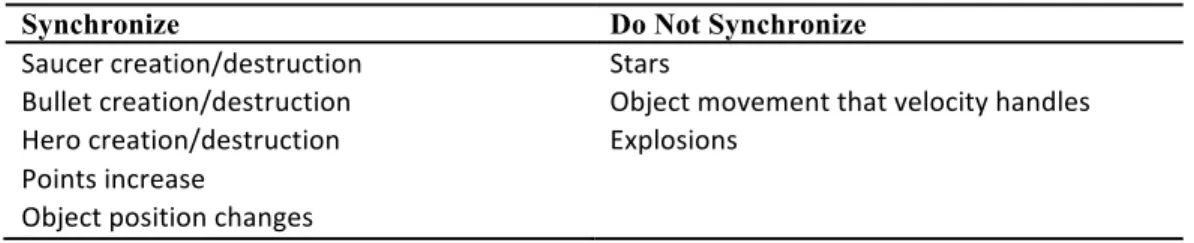
• Only synchronize “important” Objects and associated events. For example, a player’s Hero ship being destroyed is an important (perhaps, the most important) event and should be serialized across computers. Stars, on the other hand, only provide decoration and as such do not need to be synchronized at all. Some guidelines are shown in the Table 1 below:
Table 1: Synchronization for Objects in Saucer Shoot 2
Synchronize Do Not Synchronize Saucer creation/destruction
Bullet creation/destruction Hero creation/destruction Points increase
Object position changes
Stars
Object movement that velocity handles Explosions
Some of the guidelines above are subtle, such as the creation of Explosions. These could be handled by creating an Explosion on the host then synchronizing with the client. However, it can also be handled by synchronizing the destruction of the Saucer (which must be done, anyway) where the destructor in each Saucer (e.g., Saucer()) creates an Explosion object. Both client and host would then automatically destroy the Explosion when its animation finished, obviating the need for synchronization.
Note, in theory, having the same random seeds on client and host could mean that even random events (controlled by random()) do not have to be synchronized, but in
practice, this requires event actions to take place at specific game clock times. Such timed delivery of events is not currently supported by Dragonfly.
• There are at least two options for incorporating player input on the client. The first option is to update the player’s ship on the client and then synchronize this Object with the host. However, this requires the host, having the authoritative representation of the game world, to have a way “roll back” an action that is not allowed (say, because the player’s ship was blocked by an opponent). Instead, the second, recommended option is to capture keystrokes normally at the client but then send the keystrokes (integers) to the host. The host then receives the keystrokes and generates network events that are handled as appropriate by game objects using the host’s authoritative game world.
client. Both register for interest in step events and network events. A Sentry object (also derived from Object) runs on both the client and host and registers for interest in step events.
o The host game is started first, whereupon the Host (using the NetworkManager) readies the computer for a connection while the Client (also using the
NetworkManager) starts afterward and connects to the Host.
o Once connected, the host creates the initial game Objects. These can either be synchronized with the client (sent automatically), or the client can create the same initial game Objects.
o Each game step, the Sentry polls the network manager and if network data has arrived since the last step, it generates network events by calling
NetworkManager onEvent(). Since the Host/Client had registered interest in network events, they then are notified network data had arrived.
o In general, each game step, the host checks all game objects to see which ones are new (their Object IDs are modified) and need to be synchronized via the NetworkManager.
o When there is a network event, the client receives any serialization data over the network, updating Objects as appropriate.
o The Client registers for interest in the keyboard (with the InputManager6) and sends keystrokes to the host.
o The Host receives keystrokes sent by the Client, generating network events for game objects (e.g., the client Hero) to handle as appropriate.
• The client may only be communicating player input (e.g., keystrokes) to the host, but the host needs to communicate at least several types of messages (e.g., add object, update object, destroy object) to the client. A message format (a core component of any client-‐server protocol) should be designed ahead of time, particularly for host-‐to-‐client communication (client-‐to-‐host may just be sending keystrokes, each an integer). Message types can be setup as an enum. A suggested format for using them is:
Header:
o size: the entire message size, in bytes, as an integer.
o message type: the enum message type (effectively an integer).
o if add object, then next is: the object type, as a string (e.g., “Saucer”)—else for delete or update, then next is: the object_id, as an integer.
Body:
o for add and update, the serialized string.
By having the size first, the Client can peek at the network data, not pulling it from the socket until there are at least size bytes available. At that time, at least one message is complete and can be processed.
After pulling the message from the socket (via the NetworkManager receive()), the message type can be checked subsequently and appropriate actions taken.
2.5 HINTS
Since Dragonfly uses Curses, error messages written to standard output (the screen) will not be displayed properly. Instead, messages should be written to the Dragonfly logfile, done via LogManager writeLog(). The writeLog() method supports printf()-‐style variable
argument formatting. The LogManager is a singleton, so getInstance() needs to be called prior to use.
Compilation errors such as “Redeclaration of class ClassName...” (with the actual class name instead of ClassName) typically occur if the header file, say ClassName.h, has been included from multiple source files. This error occurs most often for utility-‐type classes (and functions) that are used by multiple other classes (e.g., the NetworkManager). The fix is typically to use conditional compilation directives for the compiler pre-‐processor. If conditional compilation directives are in use, they should be checked that the names used in the #ifndef and #define statements are identical.
All system calls (e.g., send()) should be error checked. Where appropriate, messages should be written to the Dragonfly logfile (using the LogManager writeLog()).
TCP is a stream-‐based protocol. As such, while a host may intend to transmit a serialized Object as a single message, it may be “chunked” such that the client only gets part of the message at a time. TCP provides the entire message eventually, in order, but it does not guarantee providing the data in the same chunk size in which it was transmitted.
Sockets are by default blocking, meaning if a process reads from a socket but there is no data available, the process blocks until there is data. Non-‐blocking behavior can be achieved with the MSG_DONTWAIT flag for a recv() call.
By default, a recv() call that retrieves data from a socket removes it from the OS buffer such that subsequent reads do not get the same data. The MSG_PEEK flag can be used to retrieve the data but leave it in the buffer for subsequent reads.
For namespace reasons, the syntax :: may be needed in front of system calls (e.g., ::send(...)).
To smooth out unexplained “glitches” in game state synchronization, it may be effective to occasionally synchronize all Objects on the client with those on the host.
For convenience in development, testing connections via localhost can be used before actually testing with separate computers.
2.6 SUBMISSION
Assignments are to be submitted electronically on the day due. All submissions must include the following:
• A source code package:
o All code necessary to build the game engine modification (e.g., the
NetworkManager). Note! Make sure all code is well-‐structured and commented. Failure to do so will result in a loss of points.
o Any other support files, including .h files.
o A Makefile for building the game engine modification. • Game code for Saucer Shoot 2.
o All code necessary to build the game. Note! Make sure all code is well-‐structured and commented. Failure to do so will result in a loss of points.
o A Makefile for building the game.
• A README file explaining: platform, files, code structure, and how to compile the programs. The README must also explain how to run the game. Be sure to provide anything else needed to understand (and grade) the project.
2.7 GRADING
An approximate breakdown of grades is as follows in Table 2:
Table 2: Grade breakdown for Dragonfly Wings
Component Weight
Network Support Saucer Shoot 2 Miscellaneous
The “Networking Support” category primarily includes socket-‐based code that integrates with Dragonfly as a Manager.
The “Saucer Shoot 2” category includes integrating the networking aspects, including distributed synchronization of Objects, into Saucer Shoot 2. It also includes enhancing the gameplay of
Saucer Shoot to incorporate a second player.
The “Miscellaneous” category is for flexibility in assigning points across the networking support and the game. Extra networking features (e.g., multiple sockets, TCP and UDP, multicast) or game enhancements (e.g., GameOver, GameStart and Nukes, UI for Host/Client) will earn points here. If everything is done to a basic, minimal level, there will be no points earned in this category.
Below is a general grading rubric:
• [100-‐90] The submission clearly exceeds requirements. The functionality is fully
implemented and is provided in a robust, bug-‐free fashion. Full client-‐host synchronization is evident in the game. Gameplay is effective and fun for two players. All code is well-‐ structured and clearly commented.
• [89-‐80] The submission meets requirements. The basic functionality is implemented and
runs as expected without any critical bugs. Client-‐host synchronization is effective, but there may be occasional visual glitches that are not critical to gameplay. Gameplay is effective for two players. Code is well-‐structured and clearly commented.
• [79-‐70] The submission minimally meets requirements. Functionality is mostly in place but
may not be fully implemented and/or may not run as expected. Client-‐host synchronization provides occasional visual glitches and some may be critical to gameplay. Gameplay
supports two players but to a limited extent. Code is only somewhat well-‐structured and commented.
• [69-‐60] The project fails to meet requirements in some places. Networking support is
missing critical functionality or robustness. The game and/or engine may crash occasionally. The game does not support complete or robust gameplay for two players. Code is lacking structure or comments.
• [59-‐0] The project does not meet core requirements. The networking extensions cannot
compile, crashes consistently, or is lacking many functional features. The game does not compile or does not support two-‐player interaction. Code is lacking structure and comments.
3 ASSESSMENT
Science majors. Demographics followed those of the university as a whole, predominantly male (about 70%) and white (also about 70%).
3.1 GRADES
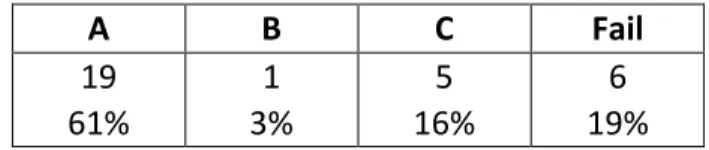
Table 3 lists the grades students earned for their Dragonfly Wings projects, broken down by the number of each letter grade in the columns with an overall percentage in the bottom row.
Table 3: Grades earned for Dragonfly Wings projects
A B C Fail
19 61%
1 3%
5 16%
6 19%
All passing grades (C or better, about 80% of the students) met the project objectives listed in Section 2.1.2. Most students did very well (A grade), able to get a functional network layer added to the Dragonfly engine and successfully complete a robust, two-‐player game. About 20% completed the project (B or C grade), having some networking and game elements working but with shortcomings. About 20% did not complete the project to a significant degree.
3.2 STUDENT RESPONSES
Subjective responses from the students themselves were obtained by anonymous surveys, distributed and filled out during class time at the end of the course. For questions 1-‐4,
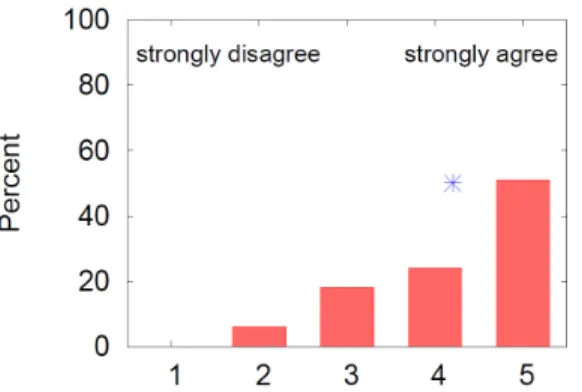
responses are provided on a 5-‐point scale, labeled “Strongly Disagree”, “Disagree”, “Neutral”, “Agree” and “Strongly Agree”.
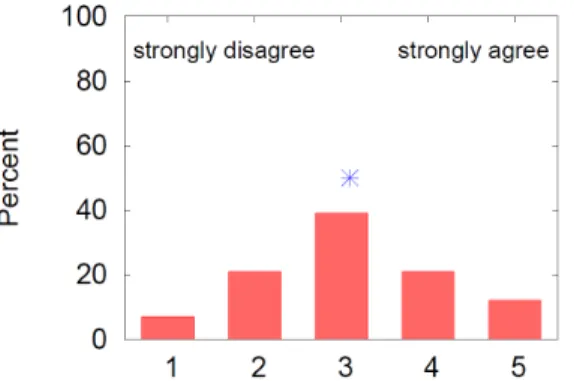
Question 1: “The project helped me better understand networking”. Figure 2 depicts the distribution of responses to question 1. The x-‐axis in the numeric response and the y-‐axis is the percentage of the total responses. Each bar represents the percentage of respondents that gave the indicated numeric score. The blue asterisk (*) shows the mean numeric response. The
FIGURE 2: QUESTION 1
Question 2: “The project helped me better understand distributed systems.” Figure 3 depicts the distribution of responses to question 2, with axes and trendlines as for Figure 2. Here, the responses are even more positive, with the mode being “agree” and the mean of 3.9 suggesting the project work significantly helps in understanding distributed systems.
FIGURE 3: QUESTION 2
Question 3: “The project helped me better understand game engines.” Figure 4 depicts the
FIGURE 4: QUESTION 3
Question 4: “I improved my C++ skills in doing the project.” Figure 5 depicts the distribution of
responses to question 4, with axes and trendlines as for the previous figures. The distribution of responses is heavily skewed to the right (the mean is 4.3), with nearly all students believing the project improves their C++ programming. While this is a subjective opinion, the results are encouraging since strong programming skills are important for all programming-‐related disciplines.
FIGURE 5: QUESTION 4
FIGURE 6: QUESTION 5
Question 6: “In doing the project, one topic I learned clearly is” and provided for an open response.
Students provided a variety of answers, but “object synchronization” and “C++” appeared the most (13 times and 6 times, respectively).
Question 7: “In doing the project, one topic that is still unclear to me is” and provided for an open response. Again, students provided a variety of answers, but there was no answer that appeared more than once.
Final Comments:The final question asked for students to pass along any comments or
suggestions regarding the project. General groupings of comments/suggestions indicated students found: 1) the project was “helpful”, “fun”, and “exhausting” but a “great project”; 2) debugging took a lot of time, 3) there should be intermediate due dates for parts of the project (e.g., after the tutorial), 4) there is a “steep learning curve” to understanding the game engine, and 5) working with pre-‐existing code is a “valuable experience”.
3.3 DISCUSSION
The assessment of Dragonfly Wings was for an upper-‐level, Computer Science course in
distributed systems that already had Computer Networks as a pre-‐requisite course, so students had already done some network programming. Introducing Dragonfly Wings in an introductory networking class as one of the first socket assignments may benefit understanding of
networking more than reported in this paper. The notable benefit observed to students in understanding the role of a game engine suggests Dragonfly Wings may be particularly suitable as part of a game development curriculum.
Dragonfly Wings fits well as a two week, 25-‐hour project, but the single due date can be
problematic for some students, particularly those that do not manage time well. Such students may have a tendency to put off starting the project until too late, and the amount of time required and the learning curve for using the game engine may be too much to overcome. Intermediate due dates (e.g., after the Dragonfly tutorial) as a milestone may help students start early and then complete the project on time. These milestones could be combined with grade ceilings clearly defined within each milestone (i.e., an ‘A’ for a milestone requires X features, a ‘B’ requires only Y features, and so on). To reduce grading workloads, students could demonstrate the milestones themselves to the class and would be required to attend all
demonstrations. The net result could help identify “at-‐risk” students much earlier, providing them with a clear idea of what is required to achieve the highest grade (or even just a passing grade).
4 CONCLUSION
Aspiring computer programmers, in general, need a solid foundation in networking in order to meet the demands of modern computer programs where most software is connected over the Internet. Aspiring game programmers, in particular, need the same grounding in network code but also need opportunities to apply networking knowledge to network game programming.
This toolbox paper presented Dragonfly Wings, a networking project that extends the Dragonfly game engine with networking code built from scratch, providing an in-‐depth learning of
networking materials while retaining a platform students can use for game development. Students implement socket code and network management code to synchronize software in a distributed system, applying appropriate techniques to building a multiplayer game.
Assessment of Dragonfly Wings in an upper-‐level, distributed systems Computer Science course shows the project helps with understanding of networking and distributed systems and greatly helps students understand game engines and C++ programming. Time requirements of about 25 hours make the project suitable for a several-‐week assignment for a typical semester-‐long course.
Future work could include applying the project as part of a two-‐course sequence in which students implement the Dragonfly engine in the first course [2] then extend their
implementations with networking in Dragonfly Wings in the second. Extensions to the project could include implementations of latency compensation techniques [1] and scaling network (and server) support to many players.
REFERENCES
and Optimization. In Proceedings of the Game Developers Conference, February 2001. [Online] https://developer.valvesoftware.com/wiki/Latency_Compensating_Methods_in_Client/Server_ In-‐game_Protocol_Design_and_Optimization.
[2] Mark Claypool. Dragonfly – Strengthening Programming Skills by Building a Game Engine from Scratch. Computer Science Education -‐ Special issue on Games in Computer Science Education, 23(2): 112–137, June 2013. [Online]