Department of Energy Inforum '99 Oak Ridge, TN May 5-6, 1999
Lawrence
Livermore
National
Laboratory
UCRL-JC-133710Web-based Document and Content Management with
Off-the-Shelf Software
J. Schuster
March 18, 1999
This is a preprint of a paper intended for publication in a journal or proceedings. Since changes may be made before publication, this preprint is made available with the understanding that it will not be cited or reproduced without the permission of the author.
PREPRINT
DISCLAIMER
This document was prepared as an account of work sponsored by an agency of the United States Government. Neither the United States Government nor the University of California nor any of their employees, makes any warranty, express or implied, or assumes any legal liability or responsibility for the accuracy, completeness, or usefulness of any information, apparatus, product, or process disclosed, or represents that its use would not infringe privately owned rights. Reference herein to any specific commercial product, process, or service by trade name, trademark, manufacturer, or otherwise, does not necessarily constitute or imply its endorsement, recommendation, or favoring by the United States Government or the University of California. The views and opinions of authors expressed herein do not necessarily state or reflect those of the United States Government or the University of California, and shall not be used for advertising or product endorsement purposes.
Web-based Document and Content Management With Off-the-Shelf Software John Schuster
Lawrence Livermore National Laboratory
Oct Õ96. FileMaker/Tango/WebSTAR: One of the major programs at LLNL,
the Earth and Environmental Sciences (EES) directorate, had a need for a
non-proprietary, platform-independent, Web-based image database. We knew of no
commercial product that met these criteria, so we decided to build our own. We
were just beginning to use Tango, a database access CGI that worked in conjunction
with our Macintosh WebSTAR Web-server software. Therefore, we chose to create
an image database using FileMaker Pro and then provide Web access using Tango
and WebSTAR. We had to make our thumbnails and screen shots by hand using an
applicaton called PhotoMaster. We were placing originals into the archive
manually. Fortunately, Tango automatically created the URL to the FTP link to
original file. This gave us a proof-of-concept product that we could present to our
client. They liked what they saw and funded us for $50,000 to finalize the project.
$15,000 of this was used to purchase extra disk storage for our fileserver. It also paid
for one month of labor for an Information Specialist from the TID Library to
compile a list of controlled keywords by interviewing people throughout the EES
directorate. One month of labor for HTML customization by TID's Internet
Publishing Team was also covered by this funding. Although they liked the
prototype, the customer's main concern at this point was that the FileMaker
Dec Õ96. Butler SQL/Tango: In an attempt to improve access speed, I converted
the FileMaker Pro database to Butler SQL, the only SQL database available for the
Macintosh. This provided access speeds that were an order of magnitude fasterÑ1.4
seconds versus 14. The next hurdle was what to do with viewgraphs. Viewgraphs
seemed to be an insoluble problemÑ the customer wanted access to individual
slides, but with our existing technology, only the whole presentation could be
downloaded and we had no way to automate the creation of thumbnail imagoes.
Also, we were limited to searching on the metadata associated with the viewgraph.
We knew that viewgraphs were going to make up a substantial part of any image
database, so we had to find a way to surmount this problem.
In this same time period, another major client, the Director's Office,
approached us with a need for a Web-based image database. We used the work we
had produced for the E&ES prototype to demonstrate our capabilities. Once again,
the customer was pleased and were funded for another $50,000.
Nov Õ97.Imation Media Manager (based on Butler etc.) Customer demands for
new features such as a shopping cart capability, automatic placement of the original
in an archive and creation of a link for download, were becoming overwhelming.
At this time we came across a commercial image database product called Media
Manager by the Imation Corporation. This product appealed to us because it used
the same tools we were already using: Butler SQL, Tango, and WebSTAR. This
meant that we knew we could easily customize it. What was even more appealing
application to handle individual slides from PowerPoint. We promptly purchased
the product, but even with ImationÕs help, we could not get the Macintosh version
of MediaManager to work. We were forced to use NT version which worked with
one very important exceptionÑthe download feature did not work. Our system
configuration stored the original file of each image on a Sun fileserver which we
were accessing from our NT Web server via NFS. Imation could not get the
download function to work in this environment.
Meanwhile, independent of our image database project, TIDÕs photo lab had
converted an ACTI graphics art camera from conventional film to digital. They were
now able to scan images maps at 10000 X 8000 lines of resolution. This resulted in
files that were in the range of 100-250 Mb. It was clear that if these were to be added
to the database and accessed over the Web, image compression was needed. We
began looking at the image compression tools on the market and chose MrSID
(Multi-resolution seamless image database), a technology developed at LANL and
later spun off as the foundation of a new companyÑLizardtech. We found this the
most appealing compression technology because of its zooming capabilities and its
near lossless compression. I set up a meeting with representatives from Imation and
Lizardtech to present the idea of incorporating MrSID compression into Media
ManagerÕs screen shots. The people from Lizardtech were wildly enthusiastic, but
the ones from Imation werenÕt interested.
June Õ98: Our image database project came to the attention of the Nuclear
Weapons Information Project (NWIP) at LLNL. They were in the process of
made by Intranet Solutions, Inc. The Intradoc system performs several functions
when a file is submitted. First. It launches the application in which the file was
created. It then creates a Postsript version of the file. The postscript file is then sent
to Adobe Acrobat Distiller. The PDF version of the file and the original are then sent
to the Intradoc vault. Next, the built-in Verity search engine does a full-text
indexing of the file. Finally, an HTTP link to the PDF is created.
But Intradoc had a shortcomingÑit did provide the database user with a
graphic representation of the files returned by their search. However, the fact that it
provided full-text indexing of PowerPoint presentations, a capability that, given our
difficulties with presentations, was very attractive. We decided that we could take
advantage of the best features offered by both systems by providing a common Web
portal (see fig1). At this time, I wrote a CRADA proposal that sought to add
thumbnail representation to Intradoc similar to that of Media Manager. We werenÕt
sure how we would create the thumbnails but knew we wanted to incorporate an
off-the-shelf solution. The CRADA proposal was approved and funded for $105,000.
Shortly thereafter I suggested to Intranet Solutions that they incorporate MrSID
image compression into Intradoc. They were very receptive to this idea and began to
TID Document Management System Search Images Search PowerPoint Presentations Search Documents TID Photo Search TID PowerPoint Search TID Document Search Imation Media Manager Intranet Solutions Intra.Doc Client Results HTML Level 1 HTML Level 2 Behind the scenes HTML Level 3 SQL Database Web Server
Figure 1: Conceptual view of Media Manager and Intradoc as a Web portal
In November of 1998, after spending a year unsuccessfully trying to get it to
could not get Media Manager to download files from the Sun server on which they
were stored. I made the decision to abandon Media Manager and work with Intranet
Solutions to expand the capabilities of Intradoc so that it would be a Document and
Image management. The original files that have been submitted to Intradoc reside
in what is referred to as a vault. The vault can be on any storage system that can be
mapped as a drive either locally within the NT operating system, or remotely using
NFS. Since we planned to store our original images on a Sun fileserver, this met
our needs quite nicely.
The idea of incorporating image compression into a database product still
seemed to hold a great deal of promise, so I proposed it to the VP of product
development at Intranet SolutionsÑhe was very receptive to the idea. It became
clear that a dialog needed to be established between Intranet Solutions and
Lizardtech. Pursuant to this, I brought the two together for a meeting to discuss
strategy. At this meeting we soon realized that MrSID could be used to create the
thumbnails as well a provide image compression. This meant that we not need to
use one product to create the thumbnails and another to do the compression.
Shortly after this meeting the two companies issued a joint press release at Seybold
Boston announcing they were forming a strategic alliance to incorporate MrSID
technology into Intradoc.
With the decision to go with MrSID came the need to make a slight
compromise. At present, MrSID accepts only a limited number of file formats:
8-bitgrayscale, 24-bit RGB, TIFF, and Sun Raster. After discussions with Lizardtech we
on, most notably to include CMYK. We realize the limitations on image file formats
imposed by our choice of MrSID as our compression tool but feel that this is only a
temporary situation. MrSID is an evolving product and we are confident that
Lizardtech will be adding to its image format repertoire. For the sake of expediency, I
decided that we could live with this limitation. Related to this was the decision to
only offer the MrSID compressed file as a downloadable file rather than the original
file format. The rationale was that because of the extraordinarily large size of our
photo files, we felt the majority of users would find the MrSID file acceptable. Also.
Lizardtech offers a free plugin for Photoshop that allows MrSID files to be printed.
Because of MrSIDÕs virtually lossless technology, these prints are indistinguishable
from the original. We plan to make the original file available but have not, at the
time of this writing, decided how this will be accomplished.
This, then, is the current status of the project: Since we made the switch to
Intradoc, we are now treating the project as a document and image management
system. I reality, it could be considered a document and content management system
since we can manage almost any file input to the system such as video or audio. At
present, however, we are concentrating on images. As mentioned above, my
CRADA funding was only targeted at including thumbnails of images in Intradoc.
We still had to modify Intradoc so that it would compress images submitted to the
system. All processing of files submitted to Intradoc is handled in what is called the
Document Refinery. Even though MrSID created thumbnails in the process of
compressing an image, work needed to be done to somehow build this capability
Intradoc Engineering Team to perform this custom development work. To make
Intradoc even more capable of handling images, we have also contracted for
customization of the Document Refinery to accept Adobe PhotoShop and Illustrator
file in their native format. (Previously, we had to convert these files to Postscript
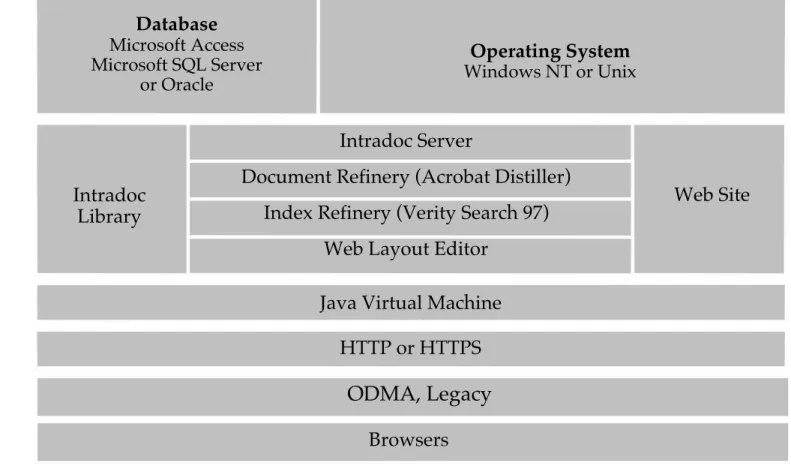
before submission to the system.) The architecture for this document and image
document management system is shown in figure 2.
This work was performed under the auspices of the US Department of Energy
Figure 2: Architecture for TID Document Image Management System
Operating System Windows NT or Unix
Intradoc Server
Document Refinery (Acrobat Distiller) Index Refinery (Verity Search 97)
Web Layout Editor
Web Site Intradoc
Library
Java Virtual Machine HTTP or HTTPS Browsers Database Microsoft Access Microsoft SQL Server or Oracle