Remote Data Center
Management:
Planning and Implementing a Secure
Remote Data Center Management
Solution
CORPORATE HEADQUARTERS EUROPEAN HEADQUARTERS ASIA / PACIFIC HEADQUARTERS JAPAN HEADQUARTERS 167 Technology Drive Tel: +31 (0) 76.52.36.74.4 Tel: +852 3428.2338 Tel: +81 3.6277.8802 Irvine, CA 92618 [email protected] [email protected] [email protected] Tel: 800.422.7055
2
Contents
Introduction ... 3
Servers, Switches, and More ... 4
Security ... 4
More to Manage with Fewer Personnel ... 5
The Case for Remote Management ... 5
Remote Management Concepts ... 7
In-band Management ... 7
Out-of-Band Management ... 7
Management Access Points ... 7
Elements for Secure Remote Management ... 7
Scalability ... 7
Flexibility ... 8
Multiplatform Support and Client OS Independence ... 8
Security ... 8
Fault Management ... 9
Consideration Points ... 9
Remote Management Software Solution ... 9
Card Based Solutions ... 9
Secure Console Servers ... 9
KVM Switches ...10
Remote Power Managers ...10
Remote Management Pre-purchase Checklist ...11
Remote Management Solutions from Lantronix ...12
Secure Console Servers ...13
Remote Power Management ...14
Remote Management Appliance ...16
Conclusion ...18
IT Failures Hit Bottom Line: Infonetics Research reported in a study of Fortune 100 and Fortune 500 companies that network downtime totaling only 5.5 hours for the average company can result in a loss of nearly $4 million in revenue and productivity. Proof of this happened recently when a major on-line auction portal lost more than $5 million in revenue and suffered a 10% drop in market cap when its site went down for several hours.
Introduction
The reality of today‟s global economy requires companies to face the challenges of worldwide operations, 24x7x365 business models and e-commerce transactions. The always-on, always-ready business climate demands continuous, uninterrupted information access and can mean the difference between success and failure. Network availability and data access are now essential parts of the corporate value chain, so data centers are the center of a company‟s daily operations. For many companies, the data center has quickly become their most critical asset.
Data center dependence has evolved into a complicated environment with a mixture of new and legacy equipment and a myriad of devices and strategies. It is not uncommon for modern data centers to have a varied mix of entry-level to enterprise-class servers running various operating systems, firewalls, gateways, switches, routers, environmental monitoring solutions, building automation systems, and uninterruptible power supplies (UPS) to name just a few. This list continues to grow in today‟s managed-systems environment. But, all the efforts to deliver faster and constant access to corporate information assets, improve uptime, and shorten windows of recovery for disasters have driven complexities up and utilization rates down.
Given these complexities, proactive network and systems management is required to maintain the network and prevent, or at least minimize, the duration and frequency of outages. It is critical, therefore, for IT managers to have rapid and secure access to the infrastructure they are managing from wherever they are… at any time. To accomplish this, IT managers require the ability to manage their equipment, no matter where it is located.
Fortunately, there are a number of solutions available for remote management and control of today‟s modern data center. When implementing remote access and management, a comprehensive solution must be integrated, without
compromising day-to-day access, operation and maintenance. With the mix of new and legacy equipment from a variety of vendors, a remote management solution should be platform, operating system, and vendor independent. IT managers and staff have little or no time to learn new, complex, and often proprietary remote
management tools. For this reason, any remote management implementation should provide familiar interfaces, with intuitive interaction and discovery methods.
To produce an effective remote management plan, organizations that have substantial investments in a serial or KVM (keyboard, video, mouse) console manager
infrastructure must determine the following:
which devices to manage
when to manage them
how to manage them
the tools to use
the required supporting hardware components and configurations
network and security considerations
4
This paper examines the elements associated with implementing an effective solution for remotely accessing and managing a modern data center. It describes the factors that should be considered and the various remote management solutions that can be integrated into an overall plan, without compromising data center security,
availability, maintenance and access. This paper concludes with a discussion about Lantronix management solutions and the advantages these products provide to effectively manage network infrastructure equipment remotely and advanced technologies available to quickly and easily network enable virtually any type of device.
Servers, Switches, and More
Today‟s companies have learned that to stay competitive means providing instant data access anytime. However, this access has given rise to the complexities associated with managing a modern data center, which encompasses a growing number of managed devices in heterogeneous environments dispersed over multiple locations.
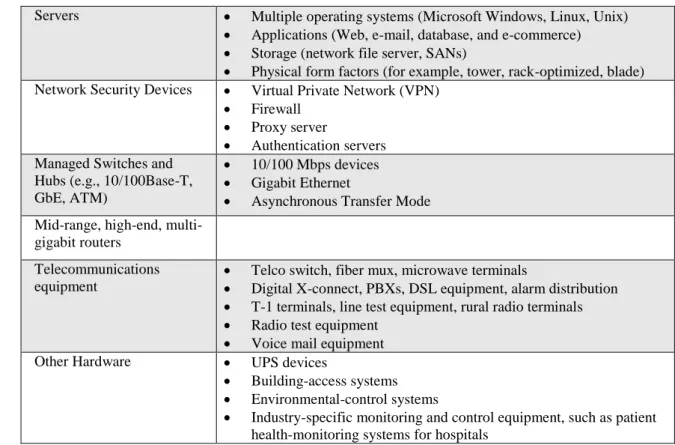
Table 1 identifies a sample mix of devices typically found in today‟s data centers. If any one of these devices goes down, it can take the entire business down with it.
Table 1. Common Devices Found in the Data Center
Servers Multiple operating systems (Microsoft Windows, Linux, Unix)
Applications (Web, e-mail, database, and e-commerce)
Storage (network file server, SANs)
Physical form factors (for example, tower, rack-optimized, blade) Network Security Devices Virtual Private Network (VPN)
Firewall
Proxy server
Authentication servers Managed Switches and
Hubs (e.g., 10/100Base-T, GbE, ATM)
10/100 Mbps devices
Gigabit Ethernet
Asynchronous Transfer Mode Mid-range, high-end,
multi-gigabit routers
Telecommunications equipment
Telco switch, fiber mux, microwave terminals
Digital X-connect, PBXs, DSL equipment, alarm distribution
T-1 terminals, line test equipment, rural radio terminals
Radio test equipment
Voice mail equipment Other Hardware UPS devices
Building-access systems
Environmental-control systems
Industry-specific monitoring and control equipment, such as patient health-monitoring systems for hospitals
Security
A complete data center security solution includes authentication, authorization, data privacy, and perimeter security. However, there are significant challenges in offering encryption, certification, directory, network, and other security components that enable what many consider to be a totally secure data center infrastructure. While the industry struggles with developing the technology to provide these protective
components, IT managers must still cope on a daily basis to reduce their network‟s imminent risk.
When considering remote management solutions, connectivity paths to external networks and each function inside the data center (gateway or Wide Area Network (WAN) edge, core, distribution, and access) it must be designed with no single point of entry for unauthorized users.
More to Manage with Fewer Personnel
IT managers are under increasing pressure to accomplish their tasks while their staffing and budgets are being constantly scrutinized and tightened. As IT
departments are downsizing and in this new era of having to do more with less, data center managers must evaluate tools that enable them to centrally manage their data centers. The good news is that there are various solutions available for remote and real-time data center management allowing greater productivity with less staff needed.
The Case for Remote Management
Networks continue to grow in size and scope and the need for greater integration of applications and services complicates the picture. Increasing demands are being placed on network performance and availability. A greater emphasis is being placed on Return on Investment (ROI) for applications and networks, while the pressure to extend the life of IT capital investments has grown substantially.
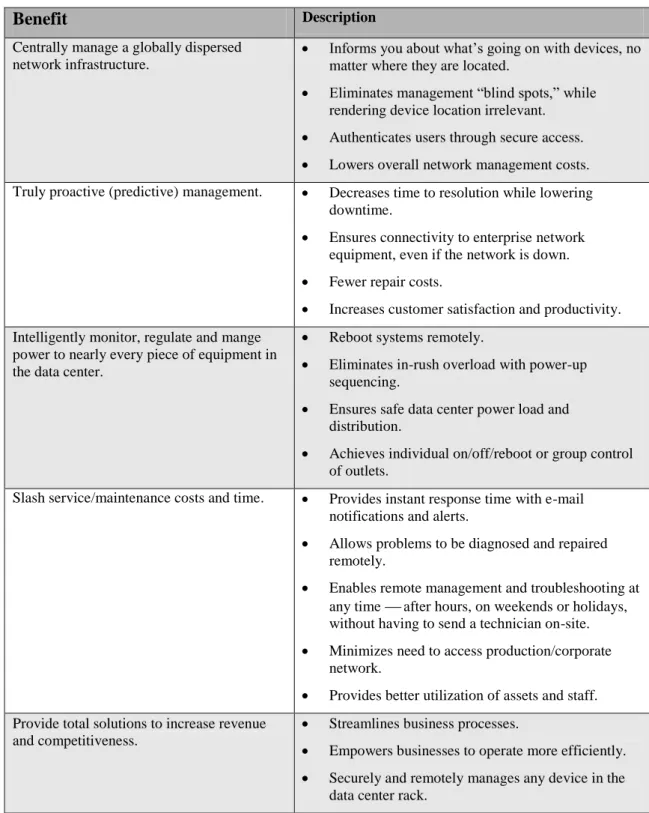
One of the obvious places to economize is infrastructure consolidation and one obvious solution is remote management. Remote management allows centrally located personnel and applications to monitor, manage, and respond to globally distributed networks and systems from a single location. With these tools, IT managers can respond to problems quickly and perform corrective actions from anywhere in the world at anytime. This addresses staffing issues and ensures effective systems management.
6
Table 2. Benefits of Remote ManagementBenefit
DescriptionCentrally manage a globally dispersed network infrastructure.
Informs you about what‟s going on with devices, no matter where they are located.
Eliminates management “blind spots,” while rendering device location irrelevant.
Authenticates users through secure access.
Lowers overall network management costs. Truly proactive (predictive) management. Decreases time to resolution while lowering
downtime.
Ensures connectivity to enterprise network equipment, even if the network is down.
Fewer repair costs.
Increases customer satisfaction and productivity.
Intelligently monitor, regulate and mange power to nearly every piece of equipment in the data center.
Reboot systems remotely.
Eliminates in-rush overload with power-up sequencing.
Ensures safe data center power load and distribution.
Achieves individual on/off/reboot or group control of outlets.
Slash service/maintenance costs and time. Provides instant response time with e-mail notifications and alerts.
Allows problems to be diagnosed and repaired remotely.
Enables remote management and troubleshooting at any time after hours, on weekends or holidays, without having to send a technician on-site.
Minimizes need to access production/corporate network.
Provides better utilization of assets and staff.
Provide total solutions to increase revenue and competitiveness.
Streamlines business processes.
Empowers businesses to operate more efficiently.
Securely and remotely manages any device in the data center rack.
Remote Management Concepts
Remote management can be conducted in-band or out-of-band depending on the capabilities of the remote management device and the devices being managed.
In-band Management
In-band management relies on the data network for the transport of Simple Network Management Protocol (SNMP) and other management information. It is possible only when the network is available and functioning properly. If a network node fails or protocol stack instability occurs, in-band management tools are rendered
ineffective.
Out-of-Band Management
The mission-critical nature of today‟s business demands an alternate management path when assets lose network connectivity or when the network or server goes down. Out-of-band management is the optimal alternative solution.
Unlike in-band management, out-of-band management does not rely on their network or server availability to manage servers or the network infrastructure. For this reason, many infrastructure downtime situations can only be addressed by out-of-band management systems.
The following list identifies some of the situations in which using out-of band management may be required:
The server is powered down
Operating system instability and lock ups
The Basic Input/Output System (BIOS) is conducting its Power On Self Test
The server hangs or is not working properly
The server is very low on resources, which causes the network driver to be very slow or makes it unable to respond to requests
The network adapter malfunctions or fails
The switch or router port fails
An operating system component is running (such as the loader or Recovery Console) that does not support in-band communication
The server is not fully initialized
Management Access Points
When identifying which devices are to be managed remotely, IT managers must coordinate which access points to utilize. Management points include serial ports for console servers, dedicated Ethernet management ports, KVM ports and switches, and power ports for intelligent UPS devices and power switches that provide remote functionality, such as powering up or down or resetting a computer.
Elements for Secure Remote Management
After identifying all the potential access points to be managed, the next step is to consider specific elements that are important in planning a secure remote management solution that meets your needs.
Scalability
The ideal remote management solution is one that is designed to grow with an organization. As the data center grows, so to should the management system.
8
However, it is also important to be aware of the overall costs of client licenses, etc. when remote users are added.
Flexibility
Because your data center will continue to evolve and grow, the remote management solution must be designed to protect your investment from the start. While
reconfiguration may come with the territory, choosing remote management products designed with maximum flexibility will pay off in the long run. To maximize IT resources, avoid proprietary systems that tie you to one vendor or add hidden deployment and maintenance costs to your data center.
Multi-platform Support and Client OS Independence
If your data center uses only one type of computer and operating system (for example, a PC running Microsoft Windows XP Server), it is possible your network may eventually include multiple platforms, servers, devices, and operating systems. Therefore, your remote management solution should provide multiplatform control and be OS independent. They should also provide a local-management interface to the remote user, as opposed to requiring another management interface layer for the IT staff to learn.
Security
Because of the sprawling nature of today‟s data centers, patches and updates to operating systems and security of managed systems have become a considerable burden, especially with the frequency of these changes. Moreover, these patches and updates typically require secure connections and interactions with remote systems. Some solution providers claim that their remote management solutions are “secure” when they actually, support only a few security related features. Some console servers, for example, are called “secure” just because they support SecureShell (SSH) connections.
Support for SSH or Secure Sockets Layer (SSL) connections alone does not define a secure solution. A truly secure, remote management solution should support one or more of the following capabilities:
Remote Authentication Dial-In User Service (RADIUS)
Lightweight Directory Access Protocol (LDAP)
Breach-prevention modes (programmable response to port scans, pings)
Internet Protocol (IP) and Firewall packet filtering
Dual-factor authentication
IP Security (IPSEC) tunneling
Comprehensive data logging and event notification features
Other features necessary to support your security policy
While a device may claim to support these features, it is equally important to understand how these features are implemented. Simply being able to connect to a device using an SSH client, for example, does not mean the data is encrypted appropriately and securely. Therefore, it is important to check which encryption algorithms the device supports.
While software fixes for publicized attacks (or “patch management”) are important for protecting servers, selecting management devices with robust features such as authentication and encryption protocols is paramount.
Fault Management
Remote management devices that support fault management allow IT managers to discover problems in attached equipment, the network and network operation. From this information, IT managers can determine their cause and take corrective action.
Fault management enables devices to:
Report the occurrence of faults remotely via e-mail and/or SNMP (automatically)
Log reports and event/port buffering
Perform diagnostic tests
Correct faults (possibly automatically)
Consideration Points
When it comes to identifying how devices are managed, IT managers have a variety of points to consider. In the past, a simple software solution was adequate to monitor a server or a system. Today‟s threats, however, require a whole new level of
protection. Software solutions, for example, assume that the server is running and is accessible to IT personnel. A software crash or attack that changes the IP address of the server renders software solutions impotent. Even simple tasks like changing the BIOS system settings are impossible when using software monitors, because these monitors do not run until long after the opportunity to change such settings has passed.
Fortunately, IT managers have a number of options for secure and remote management of these systems, as well as a variety of management access points.
Remote Management Software Solutions
Remote management software solutions are a popular and cost-effective choice to manage servers remotely, but the limitations of these solutions must be also be considered. These solutions are difficult to scale, only work when the server is functional, do not provide low-level access to server functions (BIOS, openboot), and typically support only a single operating system. In addition, they do not provide management of non-server assets in the data center.
Card Based Solutions
Add-on server hardware such as Peripheral Connect Interconnect (PCI) and LAN on Motherboard (LOM) is another popular method of remote server management. Like remote management software, these methods are usually highly intrusive, requiring both the server and the network to be fully operational for management access. Further, card-based solutions require the server to be taken down and opened for installation, replacement and servicing.
Secure Console Servers
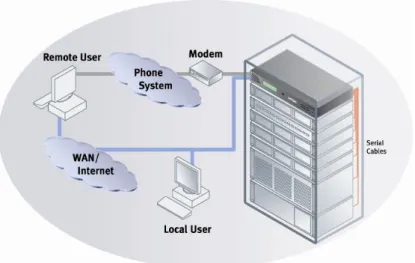
A console server is a network-independent hardware device that provides low-level redundant management access to multiple servers simultaneously by connecting to the out-of-band serial ports. It provides continuous access to remote devices, even when the network is down. Secure local or remote access is achieved from any location to any device with a serial port either over the network or via a modem.
10
Console servers deliver the following key benefits:
Provide immediate access to any device, including those without a network port
Ability to ascertain problems before dispatching a technician
Offer single-site management for multiple locations
Ability to manage devices at unmanned locations
Minimize downtime
Ability to resolve problems remotely
Typically support security features such as encryption, authentication, SSH, and intrusion detection
Add security as they are less visible to external networks and hackers
Prevent the need for VPN connections
KVM Switches
A KVM switch enables a single keyboard, video monitor, and mouse to control multiple computer servers, eliminating the wasted space and clutter created by multiple, redundant input/output (I/O) devices. From a single console, the KVM switch lets IT managers access an entire rack or room full of servers.
KVM switches provide many advantages for consolidating control of multiple servers and other devices. These include powerful pre-boot functions, such as editing Complementary Metal Oxide Semiconductor (CMOS) settings and power cycling your servers, BIOS-level access and control of multiple racks of servers from a single console.
Many KVM switches allow remote access over IP. Using this type of KVM switch allows you to leverage your network infrastructure, which makes adding users as easy as adding an IP address. IP KVM switches also eliminate distance limitations imposed on analog equipment. Tapping into the power and widespread availability of IP networks, users can control data center devices regardless of location.
Remote Power Managers
Remote power managers provide the ability to power cycle or reboot the network without interrupting all the equipment attached to the UPS. Remote Power Managers can also be used in conjunction with a console server or Remote KVM switch to initiate a graceful shutdown for a wide variety of servers, and provide remote equipment monitoring to ensure that software is running correctly.
Another important function that remote power managers can provide is power sequencing. During power-up, each of the power outlets can power on sequentially, which distributes the load and eliminates the risk of a blown fuse or tripped circuit breaker. Highly useful in a networked data center, power sequencing gives system administrators the option to turn on certain devices before others.
A further way remote power managers help to maximize data center utilization is through environmental monitoring. Remote monitoring of temperature and humidity sensors on devices makes sure that critical environmental conditions are maintained for maximum uptime.
Remote Management Appliances
Remote management appliances seamlessly integrate equipment connected by console servers, KVMs and remote power managers. Acting as a centralized control
center, a remote management appliance can consolidate the management of any number of device ports in an IT infrastructure allowing for a reduction in equipment maintenance, diagnosis and repair time.
Key benefits include:
Consolidates IT infrastructure management with a simple browser interface
Maximizes network uptime, reduces time to repair and troubleshoot
Enhanced network security with SSL/SSH 128-bit encryption
Provides central point of access to all network resources/equipment
Eliminates time consuming manual configuration
Automates firmware deployment with SLC update tool
Dual Ethernet adapters provide greater security for out-of-band infrastructure (OOBI) managed devices and remote users
Remote Management Pre-purchase Checklist
The following checklist should be carefully reviewed before considering any remote management solution:
Does the remote management system support remote management of all types of equipment (servers, KVM, SNMP)?
Will the remote management system require learning a new management interface or tool (or does it let me remotely run my „local management‟ interface)?
What is the impact if the remote management system fails? (Will it bring down my servers or other equipment?)
Can the remote management system be upgraded, maintained, replaced, or serviced without impacting the operation of the servers and equipment it is intended to manage?
How will a failure of the remote management system or one if its components affect your ability to control your servers and equipment?
What is the operating system independence of the remote management client? (Will I be able to run remote client on any operating system?)
Are there proprietary software requirements that the remote client requires? (Will I need to buy and/or install special client software?)
Will the remote management solution provide reliable access if servers go down, crash, or are unresponsive?
Does the remote management system provide a consistent interface and functionality, regardless of server type and operating system?
Does the remote management system provide monitoring and notification by e-mail in the event of a server crash (“blue screen”) or unauthorized login attempt?
How scalable is the remote management system?
(Will it support the ability to manage more devices in more locations, without significant complexity or costs?)
How many simultaneous users will my remote management system allow?
Is it important for the remote management system to provide both in-band and out-of-band access?
(Will I need to access systems when networks and/or servers are down?)
Does the remote management solution allow for remote servicing? (Does the solution support remote firmware updates and so on?)
12
(Will I need to shut down my current servers or networks to install?)
How compatible is the remote management system with existing management tools? (Is the system SNMP compatible with existing KVM switches?)
Does the remote management system provide low-level access to servers and equipment? (Does the system provide BIOS-level access, openboot access, and so on?)
What are the hidden costs associated with the remote management solution under consideration?
(Does the solution require client software licenses for more than 5 users?)
What expansion options for users, administrators and servers does the KVM switching solution offer?
Is local access at the rack enough, or do you also need to control servers and equipment located 100 feet or hundreds of miles from your data center?
What are the cable length limitations?
How much cabling is required?
Does your remote management system have special certification (NEBS) or special power requirements (AC, DC, dual/redundant power AC or DC)?
What type of cable media does is required (Category 5, special dongles, coax)?
Is the remote management solution easy to deploy?
What are the multi-platform capabilities of the remote management solution, both locally and remotely?
For non-PC environments, does the remote KVM solution provide keyboard mapping or allow you to use your native keyboard?
Does the remote management solution offer redundancy if one of its components goes down?
Does your remote KVM solution allow existing local KVM switches to be used?
Does your remote management solution offer in-band management options?
What are your power cycling requirements and options?
Would you prefer to access your data center equipment using TCP/IP connections, direct analog connections or both?
Remote Management Solutions from Lantronix
The growing scope and size of data centers, coupled with increasing dependency on the network infrastructure for information flow, are placing increasing demands on IT professionals to maintain network performance and availability often with the added challenge of limited or a less-experienced staff. To meet these demands, IT managers need a way to remotely monitor and manage network and telecom equipment throughout the enterprise.
What‟s needed is a complete set of tools to:
Remotely configure, monitor, and manage equipment
Access equipment over the network (in-band), through a single modem connection (out-of-band), or via the Internet (IP-based management)
Connect equipment that lacks a network interface
Secure access to mission-critical equipment
Lantronix SecureLinx™ line of Secure Console Servers™, Remote KVM™ Remote Power Manager and Management Appliance solutions provide a comprehensive solution. These data center management products give companies the ability to securely and remotely access and troubleshoot equipment 24/7/365, all from a single location without the need to access a corporate network.
Secure Console Servers
SecureLinx SLC leverages the console or serial port built into most network and telecom equipment to provide remote management using familiar tools like Telnet, SSH, or a Web browser. When the network is not available, you can even access attached equipment over a modem.
SecureLinx SLC:
Provide serial management consolidation and control via IP
Allow management of switches, routers, hubs, and UPS devices
Support a broad range of equipment, from servers to PBXs
Come in 8-, 16-, 32-, and 48-port models
Use Telnet/SSH from anywhere
SecureLinx SLC ensures the integrity of your equipment and data in several ways. Authentication limits access to authorized users with usernames and passwords, modem dial-back, PAP/CHAP, RADIUS, TACACS+, NIS, Kerberos, LDAP, SSH v2 and TLS. Authorization restricts access to equipment and services based on stored user profiles. SSH safeguards login passwords and in-transit data through strong encryption.
Event management features help IT managers locate the source of equipment problems and diagnose them quickly. Each serial port can be independently configured to store console messages from attached equipment and to alert an IT manager about a potential problem by e-mail over the network or through an alternate modem connection. Upon receiving notification, IT managers can review the stored console messages to ascertain the cause of the problem.
Figure 1. Example of a Secure Console Server Configuration
SecureLinx SLC are available with 8, 16, 32, or 48 high-speed serial ports and dual 10/100 Mbps (10Base-T, 100Base-TX) Ethernet interfaces, suitable for mounting in
14
1U and 2U configurations. Setup is accomplished through a serial port by using Telnet or the supplied cross-platform configuration utility.
Key benefits of SecureLinx SLC Console Servers include:
Saves money: enables remote management and troubleshooting without having to send a technician on site, reducing travel and downtime costs .
Saves time: Provides instant access and reduces response time while improving efficiency.
Simplified access: Equipment can be accessed securely and remotely from anywhere at anytime, without having to schedule visits or arrange for off-hour access, even if the network is down.
Protects assets: Security features provide encryption, authentication, authorization, and firewall features to protect your IT infrastructure while providing flexible remote access.
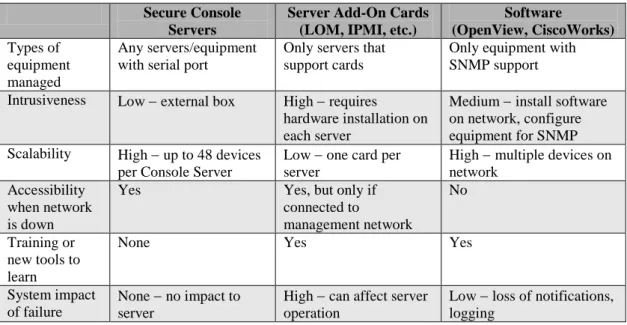
Table 3. Comparing Lantronix SecureLinx SLC to Competitive Solutions
Secure Console Servers
Server Add-On Cards (LOM, IPMI, etc.)
Software (OpenView, CiscoWorks) Types of equipment managed Any servers/equipment with serial port
Only servers that support cards
Only equipment with SNMP support
Intrusiveness Low external box High requires hardware installation on each server
Medium install software on network, configure equipment for SNMP Scalability High up to 48 devices
per Console Server
Low one card per server
High multiple devices on network
Accessibility when network is down
Yes Yes, but only if connected to management network No Training or new tools to learn
None Yes Yes
System impact of failure
None no impact to server
High can affect server operation
Low loss of notifications, logging
Remote Power Management
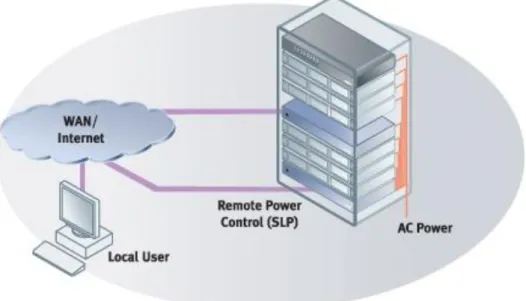
SecureLinx SLP Remote Power Management products from Lantronix allow for the fast and easy recovery of locked-up devices. With an advanced feature set, a network operations center can immediately establish a communications session with a SecureLinx SLP to reboot attached equipment and quickly return it to operational status. The individual on/off/reboot outlet control of the SLP provides the ability to re-boot attached servers and data center equipment or cycle power to institute configuration changes. It is a comprehensive solution for service providers, hosting companies and businesses with distributed networks that need to maximize network operations.
Figure 2. Example of a SecureLinx Remote Power Management configuration
SecureLinx SLP Remote Power Managers give system administrators multiple options for hardware and software management. Support for SNMP traps help to extend network management capabilities and protect a company‟s investment in their inter-networking devices. Plus, SecureLinx SLP‟s “power-up” outlet sequencing prevents in-rush current overload of the main circuit. Allowing a more steady power draw, power sequencing also provides the option to turn on certain devices before others, which can be a great benefit in networked data center equipment.
Providing the ability to remotely perform power measurement verification,
SecureLinx SLP allows safe loading of existing power circuits and provides capacity management to know when additional power circuits are needed. This real-time line current measurement feature also helps service providers and business determine when more equipment can be added to existing power circuits resulting in the optimization of equipment resources.
Lantronix also offers an unparalleled level of security. Utilizing both SSH for the command line interface (CLI) and Secure Sockets Layer (SSL) for web access, these security protocols provide the strongest encryption available. Lantronix also includes support for Active Directory to remotely secure user authentication.
Additional features include environmental monitoring and remote firmware upgrades. Optional temperature and humidity sensors allow remote monitoring of key environmental conditions. Plus, new firmware improvements and releases can easily be uploaded via FTP with a standard web browser interface.
Lantronix Advanced Feature Set
Individual on/off/reboot and group control of receptacles
Local access via RS-232 serial port
16
Access control list for user authorization Active Directory (LDAP) remote user authentication
SNMP MIBs and traps supported for integration with enterprise systems
Line current monitoring, with built-in LED display
Receptacle status retained after power loss
LED receptacle and port status indicators
1U 19” rack mount or Zero-U form factors
100-120 VAC 30 Amp, and 208-240 VAC 20 Amp capacity
Remote Management Appliance
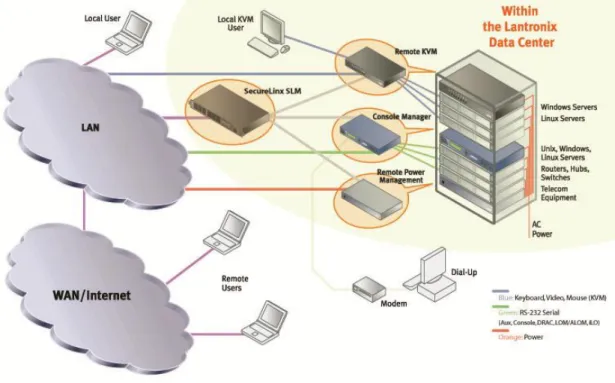
The SecureLinx Management Appliance (SLM) simplifies management of IT equipment and the entire network infrastructure regardless of the number of ports being managed. Through a simple browser interface, this „master control center‟ seamlessly integrates equipment connected by console servers, KVMs and remote power managers. Utilizing a multiplatform centralized point of access, authentication and common interface, administrators can quickly and easily remotely manage vast network resources.
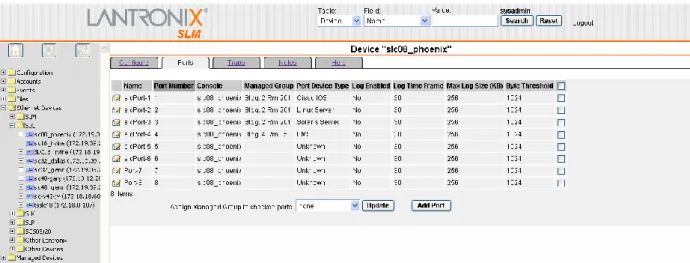
Figure 3: Sample screenshot of the SLM interface, showing a number of devices being managed from an SLC. The number of ports managed by the SLM could actually vary from a handful to thousands depending on the application environment.
The SLM provides secure connections and strong authentication with 128-bit encryption (SSL/SSH) whether connecting via a web browser or a command line (CLI). It acts as a proxy between administrators and OOBI management devices enabling well defined and easily controlled access. Particularly useful for security outside a firewall or NAT-based router, the SLM can grant specific rights for read-only or read/write access and provisions for remote authentication. For maximum accountability, user access audit logs maintain a record of login success/failure, user login/logout, and port open/close activity.
Figure 4 . Example of a SecureLinx SLM Configuration
In addition, the SLM reduces operating costs by minimizing repair time and equipment diagnosis. Reduced total cost of ownership for data center equipment is achieved with maximum system uptime and improved employee productivity.
18
Conclusion
In today‟s highly competitive global marketplace, companies of all sizes cannot afford lost productivity or lack of access to information when mission-critical business applications or the network infrastructure fails. Companies need to operate in real-time, and that expectation drives the need to pursue 100 percent uptime for all business applications and networks.
While 100 percent uptime might be an elusive goal, getting as close to it as possible is the mandate from corporate executives to their IT managers. With potential loss of millions of dollars and the consequential effect on customer satisfaction at stake, applications and/or networks that go down can jeopardize a company‟s success. Lantronix SecureLinx SLC Secure Console Servers, , SecureLinx SLM and SLP Remote Power Managers address the need to maximize uptime. These advanced data center products enable IT managers to centrally manage a globally dispersed network infrastructure, ensure connectivity to enterprise network equipment even if the network is down, protect assets through secure access, and lower overall network management costs.
The SecureLinx family of products provide a comprehensive solution that empowers IT managers and staff to securely and remotely access and troubleshoot equipment 24/7/365, from anywhere. For more information about these and other Lantronix solutions, please visit the company website at www.lantronix.com.
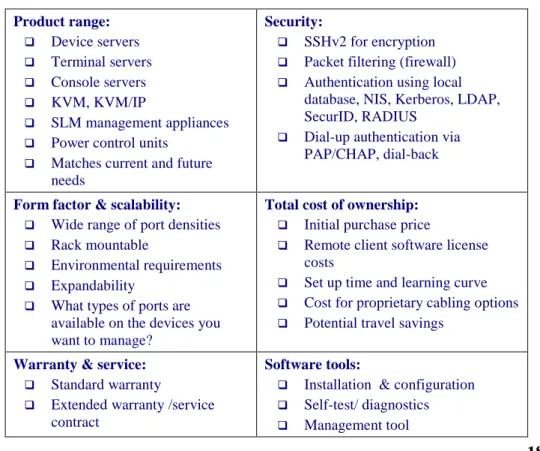
Features Checklist
The following checklist identifies features you should consider when choosing a remote management solution.
Table 4. Remote Management Solution Features Checklist Product range: Device servers Terminal servers Console servers KVM, KVM/IP SLM management appliances
Power control units
Matches current and future needs
Security:
SSHv2 for encryption
Packet filtering (firewall)
Authentication using local database, NIS, Kerberos, LDAP, SecurID, RADIUS
Dial-up authentication via PAP/CHAP, dial-back
Form factor & scalability: Wide range of port densities
Rack mountable
Environmental requirements
Expandability
What types of ports are available on the devices you want to manage?
Total cost of ownership: Initial purchase price
Remote client software license costs
Set up time and learning curve
Cost for proprietary cabling options
Potential travel savings
Warranty & service: Standard warranty
Extended warranty /service contract
Software tools:
Installation & configuration
Self-test/ diagnostics
Standard support hours
After-hours support
Field repairable/ upgradeable
RMA policies After-hours support Firmware upgradeable Compatibility: OS platform support RS-232, USB support
Cabling, connectors & converters
SNMP management support
Vendor specific issues
Usability:
Easy to install (wizards)
Easy to configure
Intuitive user interface & command set
Accessible controls & displays