ABSTRACT
LEE, SEUNG YONG. A Framework for Real-time Synchronization in Intelligent Media Generators. (Under the direction of James C. Lester.)
Recent advances in computer graphics and multimedia technologies have contributed to the development of interactive media-rich systems that generate media elements dynamically in multiple modalities to present information in an effective and appealing manner to users. Utilizing media elements in an application that requires them to be temporally coordinated in real-time presents synchronization issues because the wrong timing or duration of media elements will be easily detected by the user. Most media-rich systems have solved various aspects of the media element synchronization problem. However, they have done so in an
ad hoc manner without providing a generic reusable framework. This thesis proposes a
A Framework for Real-time Synchronization
in Intelligent Media Generators
by
Seung Yong Lee
A thesis submitted to the Graduate Faculty of North Carolina State University
in partial fulfillment of the requirements for the Degree of
Master of Science
COMPUTER SCIENCE
Raleigh
2004
APPROVED BY:
________________________________ ________________________________
BIOGRAPHY
ACKNOWLEDGMENTS
My appreciation goes out to everyone who helped make this research possible. I would like to express my sincere gratitude to my advisor, James Lester, for his countless hours of guidance and support. I would also like to thank my committee members, Pat Fitzgerald and Michael Young, for their direction and collaboration.
My thanks also go to the IntelliMedia team members for their contribution to the project. Thanks to Charles Callaway, Randy Casstevens, and Wei Zhang for their helpful suggestions on the PHYSVIZ project. Infinite thanks to Mike Cuales, Pat Fitzgerald and Phil
Motley who helped me build models and characters for the PHYSVIZ project. I especially
thank Bradford Mott for his endless support.
Finally, I thank my family for their patience, support, and encouragement.
Table of Contents
List of Figures ……… v
1 Introduction... 1
1.1 Overview of Research... 3
1.2 Thesis Organization ... 5
2 Issues in Multimedia Synchronization... 7
2.1 Importance of Synchronization in Media-Rich Systems ... 7
2.2 Approaches to Synchronization Specification... 9
2.3 Criteria for Building a Generic Framework... 10
3 A Generic Framework for Real-Time Synchronization ... 14
3.1 Specification Parser ... 15
3.2 Specification Interpreter ... 16
3.3 Synchronizer ... 18
3.4 An Animated Agent Based Framework... 20
3.4.1 Specification Interpreter ... 20
3.4.2 Synchronizer ... 24
3.5 An IMMPS Based Framework ... 29
4 An Implemented Animated Agent Based System ... 31
4.1 Specification Language ... 31
4.2 Gesture Element Selection... 35
4.3 Media Scheduler ... 38
4.4 Animation ... 40
4.5 Examples... 42
4.5.1 “Hello! I am an animated agent.” ... 43
4.5.2 “I want to introduce you to a very interesting piece of equipment.”... 45
4.5.3 “This is a battery operated motor and …” ... 47
5 Related Work ... 49
6 Conclusions and Future Work ... 54
6.1 Future Work... 55
6.2 Concluding Remarks ... 57
List of Figures
Figure 1-1: PhysViz – A 3D Learning Environment... 5
Figure 2-1: Separation of High-Level and Lower-Level Coordination... 11
Figure 3-1: A Generic Framework for Multimedia Synchronization... 15
Figure 3-2: A Parsed Media Element Specification ... 16
Figure 3-3: An Interpreted Media Element Specification ... 18
Figure 3-4: Synchronized Media Elements ... 19
Figure 3-5: A Framework for Animated Agent Based Systems... 21
Figure 3-6: An Animated Agent Based Specification Interpreter ... 23
Figure 3-7: An Animated Agent Based Synchronizer... 24
Figure 3-8: Media Scheduler ... 25
Figure 3-9: Sample Media Element Scheduling... 28
Figure 3-10: A Framework for IMMPS Based Systems ... 29
Figure 4-1: Example Gestures ... 32
Figure 4-2: Document Type Definition for PHYSVIZ Specification... 33
Figure 4-3: Document Type Definition Tree Structure ... 33
Figure 4-4: Pointing Gestures in PHYSVIZ... 37
Figure 4-5: UML Diagram of the Media Scheduler ... 39
Figure 4-6: Sample BVH Animation File... 41
Figure 4-7: “Hello! I am an animated agent.” ... 44
Figure 4-8: “I want to introduce you to a…”... 46
1 Introduction
For the past decade, intelligent media generation has been the subject of increasing attention. Researchers have investigated systems that can dynamically create and sequence media elements in multiple modalities to present information in an effective and appealing way to the user. Two primary areas of research that have received much attention are the study of embodied animated agents and intelligent multimedia presentations. Systems within both of these areas of inquiry convey information using multiple media elements from multiple modalities, such as speech, text, sound, and animations. A common problem that exists for each of these systems is the need to properly synchronize and schedule dynamically generated media elements. Any irregularities in the synchronization of these elements are likely to be noticed by the user, which could significantly degrade the overall effectiveness of the system. However, little attention has been placed on developing a generic framework for properly handling the synchronization and scheduling of dynamically generating media elements.
An embodied animated agent is a life-like character embedded in a user interface with the capacity to interact with users both verbally and nonverbally (Cassell, 2000; Lester
et al., 1999). STEVE is an animated pedagogical agent, inhabiting a virtual learning
animated advice to learners (Rickel and Johnson, 1997). If the media elements associated with the agent’s behaviors are inappropriately synchronized, the wrong information might be conveyed to the user, which would result in an ineffective learning experience. For example, during a training exercise, if the learner is uncertain about the next step and asks STEVE for advice, he might respond with, “I suggest you press the function test button,” while also using a pointing gesture to clearly disambiguate the function test button among other buttons. If the pointing gestures were not properly synchronized with the utterance, the learner might become confused.
Intelligent multimedia presentation systems (André et al., 1993; Daniel et al., 1999; Feiner and Mckeown, 1993; McKeown et al., 2001; Towns et al., 1998) dynamically assemble complex multimedia presentation from various media elements. Systems like these must provide proper media synchronization to ensure that the generated multimedia presentations are understandable to the listener. Personalized Plan-Based Presenter (PPP)
generates multimedia explanations for a wide range of applications, including computer-based instruction, guides for information spaces, and Web-computer-based product advertisement (André and Rist, 1996). For example, in the travel domain, PPP was used to prepare
multimedia presentations regarding destinations such as cities and hotels. Using photos, animations, and speech the system prepared a customized presentation to help users learn more about their destinations. If the photos, animations, and speech were not properly synchronized, the resulting presentation would be very ineffective.
without providing a generic reusable framework. Since all intelligent media generators require a synchronization and scheduling component to convey information effectively and appropriately to the user in a real-time environment, a generic framework for multimedia synchronization with well-defined interfaces would significantly benefit media-rich generation applications. This type of component can be utilized in a wide variety of interactive systems, including virtual reality training, education, simulation, and entertainment applications.
1.1 Overview of Research
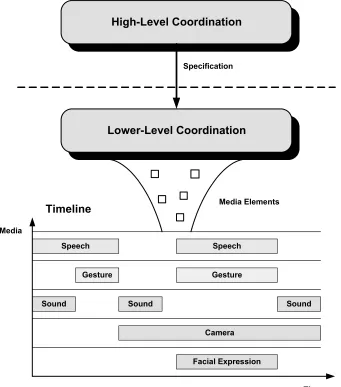
For interactive systems that utilize dynamically generated media elements to be easily created and properly maintained, it is useful to partition the synchronization and scheduling into high-level and lower-level processing components operating as separate entities with well-defined interfaces. Properly decoupled components do not need to know how their requests are created or where they are executed. In particular, the high-level processes should communicate with lower-level processes through media element specifications. These media element specifications provide abstract information regarding which elements should be executed and when they should be executed relative to other elements. This is similar to the approach taken by Pelachaud for the Affective Presentation Markup Langauge (APML) to decouple the specification of facial expressions and facial
the specifications. In this thesis, we propose a generic framework for handling these lower-level responsibilities. Specifically, the proposed framework has the following goals:
• Synchronization: Because timing is essential in conveying information during
communication, the framework should provide tight synchrony among the various communicative modalities.
• Decoupling: The communication between high-level and lower-level coordination
processes should occur via well-defined interfaces using media element specifications and event notifications.
• Extensibility: The entire framework should be modular and extensible enabling new
modalities to be added to the framework with ease without affecting other media element components.
• Media Element Sequencing: Because the high-level media element specifications
provide only abstract information for selecting elements, the framework should be able to select appropriate sequences of elements based on the current state of the environment.
• Real-time Performance: To provide the responsive interaction required by
interactive environments, the framework should operate in real-time.
• Domain Independence: The framework should be adaptable to diverse domains. As
long as knowledge of the current domain is available, the process of handling media elements should be the same.
The proposed framework has been implemented in the PHYSVIZ test-bed
application. PHYSVIZ is a 3D learning environment for the domain of physics focusing on
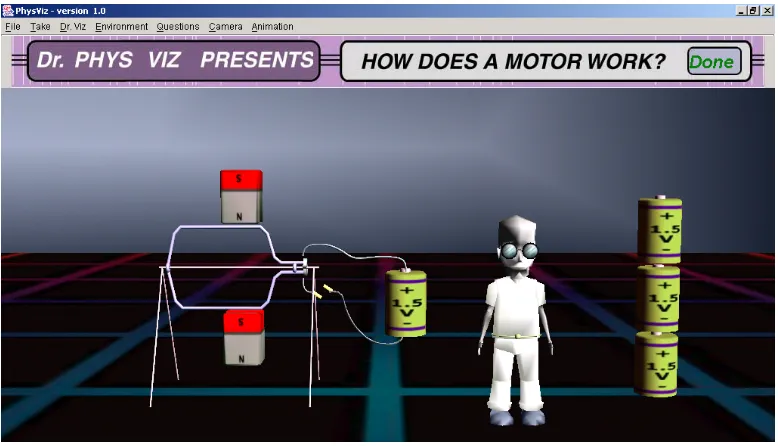
pedagogical agent. The job of the agent is to answer questions from the user by describing how battery-operated motors work. The agent is a life-like character with a fully articulated body that communicates with the user using verbal and nonverbal behaviors. In the process of describing how battery-operated motors operate, the agent uses coordinated speech utterances and gestures. Figure 1-1 shows the PHYSVIZ system.
Figure 1-1: PhysViz – A 3D Learning Environment
1.2 Thesis Organization
Chapter 1 provides an introduction to the problem and an overview of the research goals. In Chapter 2, the detailed research problem and motivation is discussed. Chapter 3 presents a description of the framework’s architecture for the synchronization of media elements in a real-time environment. Chapter 4 provides details associated with the PHYSVIZ test-bed system. This chapter discusses the low-level details of the implemented
2 Issues in Multimedia Synchronization
Due to the advancements in computer graphics and multimedia technologies, the life-likeness of embodied animated agents and the richness of intelligent multimedia presentation systems have greatly improved over the last few years. A growing number of character animation tools and systems are capable of creating very realistic gestures, facial expressions, and body language. Also, some systems use these realistic life-like characters along with virtual cameras, speech, and text. However, the synchronization of media elements in these multimodal environments presents a significant problem. Utilizing media elements in an application that requires them to be temporally coordinated in real-time presents synchronization issues because users will easily detect the wrong timing or duration of media elements. Most of the existing media-rich systems have solved various aspects of the media element synchronization problem. However, they have done so in an
ad hoc manner without providing a generic reusable framework.
2.1 Importance of Synchronization in Media-Rich Systems
part of a conversation, and it is difficult to imagine separating them from their corresponding verbal behaviors and retaining the same level of communicative effectiveness. Furthermore, people instinctively synchronize the gestures and facial expressions with speech easily and naturally in their daily conversational activities. However, if these verbal and nonverbal behaviors are inappropriately synchronized or the wrong behaviors are selected then the participants in the conversation might receive incorrect information and become confused. Because humans are accustomed to communicating in this manner, any irregularities with the behavior synchronization and selection will be very noticeable and distracting. These same issues are present when humans interact with embodied animated agents as they become increasingly believable and life-like.
Believability is a key feature of all animated agents. A believable character is one who seems life-like, who is able to express emotion, and whose actions make sense, thus allowing users to suspend disbelief (Bates 1994; Mateas 1997). Humans naturally synchronize and select gestures with speech during communication and change facial expressions as emotion changes. If media elements for an animated agent are not properly synchronized and scheduled, believability will be greatly reduced.
makes a gesture for no apparent reason then the user might get the wrong idea and become confused which would result in an ineffective learning experience.
Synchronization also serves an important role in intelligent multimedia presentation systems (IMMPS). An IMMPS has a library of accessible media elements and presentation methods. By using a combination of these alternative media and presentation techniques, IMMPSs provide a rich means of communicating information to users through their presentations (Roth and Hefley, 1993). To attain correct communicating information, the system must provide proper media synchronization. If the media elements associated with the multimedia presentation are inappropriately synchronized, the effectiveness of the presentation will be greatly reduced.
2.2 Approaches to Synchronization Specification
To facilitate modularity and extensibility, a media element specification language can be used. For example, VHML (Virtual Human Markup Language) is used to allow
interactions between users and a virtual human by providing several sub-languages for each virtual human modality (Beard and Reid, 2002). FAML is for facial expression, SML is for
speech, EML is for emotion, and GML is for gesture. The MPML (Multi-modal Presentation
Markup Language) is an XML-based language used to control characters for multimedia presentations on the World Wide Web (Ishizuka et al., 2000). The BEAT (Behavior
conversational agent who can give directions to the MIT Media Lab research groups and people. LEA (Busine et al., 2002) is a 2D embodied agent project that uses specifications to
annotate human multimodal behaviors. The specification is based on the Tycoon typology (Martin et al., 2001) for natural agent behavior. These systems have tried to decouple the high-level and lower-level coordination processing components. However, their work has focused on the specification language and not the lower-level synchronization issues.
2.3 Criteria for Building a Generic Framework
Various aspects of the media element synchronization and scheduling problem have been solved by existing media-rich systems. However, they have done so in an ad hoc
manner without providing a generic reusable framework. In order for media-rich systems to have such a framework, six fundamental issues must be addressed:
1. Synchronization of media elements: Since interactive media-rich environments have
multiple modalities, it is crucial that media elements are synchronized to deliver the correct information at the proper time. For example, COSMO (Lester et al., 1999),
an animated pedagogical agent, inhabits a learning environment for the domain of Internet packet routing and provides real-time spoken and animated advice to learners. If the agent would like to point out two computers and indicate that one has low traffic and the other one has high traffic then he might say, “This one has low traffic and that one has high traffic,” while also using pointing gestures to clearly disambiguate the two computers. In this case, if the pointing gestures did not properly synchronize with the utterance of “this one” and “that one” the learner might become confused. PLANT WORLD (Daniel et al., 1999) generates multimodal
Suppose the system is beginning to explain the role of chloroplasts. The generated verbal explanation might be “The chloroplasts produce food sugars for the plant. Food sugars are used throughout the plant for energy,” while the visual explanation might have the virtual camera show the chloroplasts and an animation of food sugars. Once again it is important for these different media elements to properly synchronize.
High-Level Coordination
Lower-Level Coordination
Speech Speech
Gesture Gesture
Sound Sound Sound
Camera
Timeline Media Elements
Facial Expression
Time Media
Specification
Figure 2-1: Separation of High-Level and Lower-Level Coordination
2. Decoupling: Decoupling components within a complex system is an important
lower-level processing components and clearly defining their operation, media elements can be easily created and properly maintained as shown in Figure 2-1. The components operate as separate entities and communicate thru well-defined media element specifications. Low-level components generate appropriate media elements and display them in a synchronized manner. Since the only communicative activity is through media element specifications and event notifications, the low-level processing components can be used in any media-rich system as long as the high-level processing components provide the proper specifications.
3. Extensibility: The framework should be modular and extensible, enabling new
modalities to be added to the framework with ease without affecting other media element components. For example, consider a system that is capable of generating speech and gesture media elements for an embedded animated agent. If the system needs to incorporate facial expressions along with speech and gestures for an animated agent to express emotions, the speech and gesture components should not be affected by the additional facial expression modality. Also, the specification language only needs to be extended to include the appropriate tags (assuming it is an XML-like language).
4. Media Element Sequencing: The media element specifications should contain
magnets and batteries. The low-level processing component selects the most appropriate deictic gestures and locomotion to properly point at the objects with the utterance of “magnets” and “batteries.”
5. Real-time Performance: One approach to properly synchronizing the media
elements in a media-rich environment is to have a group of expert animators pre-script all of the possible combinations of media elements. However, this method is very expensive, time-consuming, and in many cases impractical since it requires a large number of expert animators to cope with the combinatorics of producing context-sensitive media elements. In general it is impossible to anticipate all possible combinations of media elements to be displayed. A more practical approach is to dynamically generate appropriate media elements during runtime in a context-sensitive manner and synchronize them in real-time. The system should automate the process of determining media elements and their synchronization.
6. Domain Independence: By creating a domain-independent framework, the
framework should enable the processing components to be reused for different applications with few modifications. As long as knowledge of the current domain is available, the process of handling the media elements should be the same.
3 A Generic Framework for Real-Time
Synchronization
Specification
Interpreter Context Model Media Element
Type1 Library
Specification Parser Engines Synchronizer Specification User Synchronized Media Media Element Type1 Engine
Media Element Typen Engine Media Element
Type2 Engine
. . . . . .
Media Element Type2 Library
Media Element Typen Library
. . .
Media Element Type1 Manager
Media Element Type2 Manager
Media Element Typen Manager
Figure 3-1: A Generic Framework for Multimedia Synchronization
3.1 Specification Parser
media element specification language with the appropriate tags. Also, XML is a good choice for application developers since there are many tools available for parsing and generating XML text.
Welcoming Gesture
Gesture
Speech
Self Point Gesture Deictic Gesture
Hello, Pause I am yourinstructor Pause and this is a batteryoperated motor.
Figure 3-2: A Parsed Media Element Specification
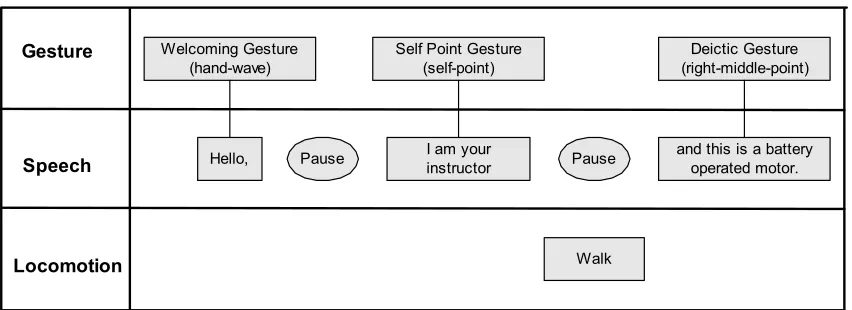
The Specification Parser parses the abstract media element specification to
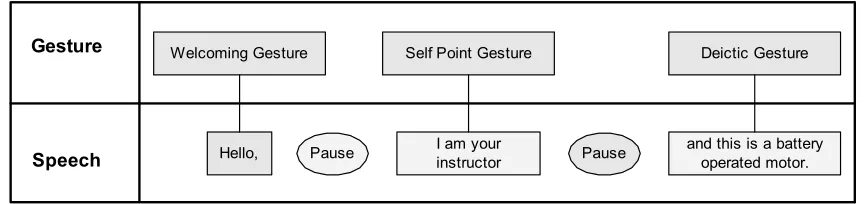
determine what media elements need to be presented to the user. For example, a media
element specification containing three speech clauses is shown in Figure 3-2. Each speech
clause has an associated gesture specification, welcoming gesture for “Hello,” self point
gesture for “I am your instructor”, and deictic gesture for “and this is a battery operated
motor.” In addition, there are speech pauses between each of the clauses. As shown in the
figure, the specification contains abstract gesture information for each of the speech
clauses. The specification encodes the focus object information along with other media
elements to help with selecting the appropriate gestures. The parsed information is then
sent to the Specification Interpreter to select and generate the appropriate media elements.
3.2 Specification Interpreter
Once the Specification Interpreter receives the parsed specification information, the
current context. The input may contain abstract media element information along with their type, focus object, and dependents. In order to choose the appropriate media elements, the interpreter utilizes the available knowledge resources containing the necessary information to make appropriate selection decisions. In the previous example, the specification gave information about speech elements and the associated abstract gestures along with a corresponding focus object. With this information, the interpreter instantiates media elements for each of the media types by consulting the knowledge resources.
Welcoming Gesture (hand-wave)
Gesture
Speech
Self Point Gesture (self-point)
Deictic Gesture (right-middle-point)
Hello, Pause I am yourinstructor Pause and this is a batteryoperated motor.
Locomotion Walk
Figure 3-3: An Interpreted Media Element Specification
3.3 Synchronizer
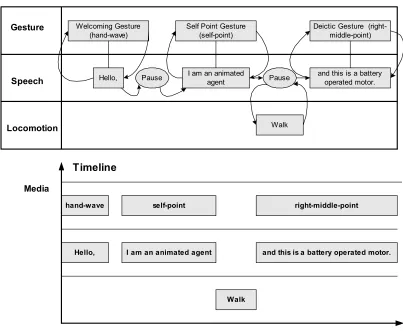
As the media element managers generate the wrapper objects for their corresponding media elements, the Synchronizer inserts these wrapper objects into the media scheduler based on the media element dependency information given in the specification. The media scheduler handles time-based scheduling, event-based scheduling, or a combination of these scheduling methods. For example, the media scheduler provides a mechanism to add a media element after an associated media element starts or stops. A mechanism is also provided which adds a media element after a specified time delay.
Welcoming Gesture (hand-wave) Gesture
Speech
Self Point Gesture (self-point)
Deictic Gesture (right-middle-point)
Hello, I am an animated
agent
and this is a battery operated motor.
Pause Pause
Locomotion Walk
Hello, I am an animated agent hand-wave self-point
Walk
Timeline
Time Media
and this is a battery operated motor. right-middle-point
Finally, the media scheduler also provides a mechanism to add media elements after a specified time delay relative to the start or end of an associated media element. Figure 3-4 shows the results of placing media elements from the previous example on a multimedia timeline for their execution.
3.4 An Animated Agent Based Framework
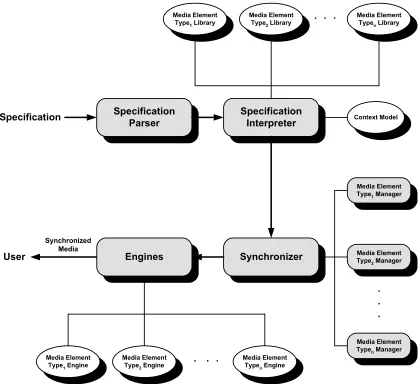
A generic framework for multimedia synchronization could help application developers make animated agents convey information more effectively and appropriately to the user in a real-time environment Since a generic framework facilitates modularity and extensibility, application developers can easily develop additional modules without affecting others. Figure 3-5 shows a framework design for an animated agent based system.
3.4.1 Specification Interpreter
The Specification Interpreter selects the most appropriate media elements, which ensure an animated agent’s actions are seamless for the current context. In order to select the proper media elements, the interpreter uses five static knowledge resources that contain the necessary information to make selection decisions. Each knowledge resource includes instructions on how to execute the corresponding media elements.
• Locomotion Library: Provides the agent with movements that allow it to move from
Specification
Interpreter Context Model Locomotion
Library
Specification Parser
Engines Synchronizer
Specification
User
Synchronized Media
Speech Engine Sound Engine Gesture Engine
Gesture Library
Sound Effect
Library Media ElementSequence Map Idle-Time
Gesture Library
Speech Manager
Gesture Manager
Sound Effect Manager Route Planner
Locomotion Manager Locomotion
Engine Idle-Time Gesture History
Gesture History
Figure 3-5: A Framework for Animated Agent Based Systems
• Gesture Library: Maintains agent gesture information. Some examples are hand
waving, head turning, thinking, beat, and deictic behaviors.
• Idle-Time Gesture Library: Contains information about gestures, which are
• Media Element Sequence Map: At times the abstract specification represents more than one lower-level media element. This resource provides the mappings between such abstract media element specifications and the corresponding sequences of media elements.
• Sound Effect Library: Stores information about sound effects.
The framework also contains dynamic resources in addition to the above static resources. These resources are continuously updated as time passes. They constitute a comprehensive representation of the state of the world model and agent at any point in time.
• Context Model: Provides the current state of world geometries and properties of
world objects. It also provides information about the agent’s position and orientation.
•
Gesture History: To prevent repeated occurrences of the same gesture, the gesturehistory keeps track of how many times a gesture has been selected.
•
Idle-Time Gesture History: Provides randomness of idle-time gesture, the idle-timegesture history keeps track of how often each idle-time gesture has been selected.
sequence of media element directives. Determining the sequence of media element directives is necessary since the high-level processing components provide abstract media element specifications. These abstract media element specifications might result in a combination of multiple media element directives.
I. Retrieve current location and orientation of agent and world model state.
II. For each remaining abstract media element specifications in set, in order,
A. Given abstract information, interpret a specification into representation of media element sequences using the media element sequence map. If there is no corresponding mapping, use the given specification as a sequence containing one media element. Place the sequence of media elements in the given order of the media element sequence map.
B. For each remaining media element directives in sequence, in order,
a. If the directive is a sound, retrieve corresponding media element from sound library and add it to the media element list.
b. If the directive is an idle-time behavior, retrieve all possible corresponding media elements where the agent can act appropriately for its current location and orientation from the time gesture library. Using the retrieved idle-time gesture media elements, consult the idle-idle-time gesture history to get a single idle-time gesture media element that has a least occurrence. Add it to the media element list.
c. If the directive is a locomotion behavior, consult the locomotion library using the current agent location, orientation, and state of the world model to get the appropriate media element. Add it to the media element list.
d. If the directive is an agent gesture, retrieve all possible corresponding media elements where the agent can act appropriately for its current location, orientation, and focus object from the gesture library. Using the retrieved gesture media element, consult the gesture history to get a single gesture media element that has a least occurrence. Add it to the media element list.
e. If the behavior is speech behavior, generate the speech media element. Add it to the media element list.
f. Determine execution duration of the media element.
C. If all of the media element specifications in the sequence have been processed, add the list of created media elements into a result set.
D. Send the resulting set of media elements to the Synchronizer
Given the sequence of media element directives, the interpreter consults the corresponding knowledge resources to generate the most appropriate media elements. The interpreter also determines how long the media element should execute to meet the execution end time requirements.
3.4.2 Synchronizer
The media synchronizer plays an important role in the system. To make an agent life-like, media elements for an animated agent must be properly synchronized. Upon receiving media elements from the Specification Interpreter, the Synchronizer sends media elements to the corresponding media element managers. The media element managers create corresponding media engine triggers. These triggers are used as a communication mechanism between the media engines and media elements. The triggers allow for the communication of information such as when to start, pause, and stop media execution. Each of the resulting media elements is sent to the media scheduler to schedule their execution. The mechanisms for the basic process are given in Figure 3-7.
For each remaining set of media elements, in order,
A. For each remaining list of media elements in set, in order
a. Separate media elements based on their media type.
b. Send the separated media elements to the corresponding media managers to create triggering mechanisms for each of the media elements.
B. Once all of the trigger objects for the media elements have been determined, send them to the media scheduler to schedule their execution.
3.4.2.1 Media Scheduler
The resulting media elements produced by the Specification Interpreter are (need a different verb here but not sure what is meant) sent to the media managers where they determine the media engine triggering effects. Start and end media execution triggers are included in the media element. The Media Scheduler utilizes the presentation of each media element to schedule their execution. The basic scheduling mechanism is shown in Figure 3-8.
I. While new media elements exist in the scheduler, in order
A. For each media element add it to the trigger dependent collection.
B. If any of media element in the trigger dependent collection meets their activation criteria, add satisfied media elements into the corresponding resource-waiting queue.
C. If any of the currently running media finish, send the corresponding media end notification trigger.
D. If media resources became available, retrieve media element from resource waiting queue and invoke engine to start the new element. Send the corresponding media start notification trigger.
Figure 3-8: Media Scheduler
resource-waiting queue directly. After a media resource becomes available, a media element from the corresponding resource waiting queue is added to the resource and executed. As soon as the media element starts and completes execution, a notification is sent to the scheduler.
There are a few ways media elements can be added to the scheduler by a component. If a media element is dependent upon the start or completion time of another media element, a component can add the element to the scheduler by specifying its dependent media element. A component may also give an execution delay time along with the element’s dependence. A delay time is a time period where execution of the element is delayed when the scheduler receives a start or end notification of the depended element. If a media element needs to be executed immediately, it can be added to the scheduler with no dependency and a delay time of zero.
system uses a frame-skipping technique to ensure that the gesture and speech end at the same time.
The second batch of media elements consists of one gesture and two speech elements. The gesture element contains a ‘self-point’ behavior and the two speech elements contain ‘I am an animated’ and ‘agent’ utterances, respectively. All three media elements are currently in the trigger dependent collection. After receiving the end media notification of the ‘hello’ speech element, the scheduler adds ‘I am an animated’ speech element into the resource waiting queue. If the speech resource is available, the speech element moves into the resource and starts its execution. Upon receiving the media start notification, the scheduler also adds the ‘self-point’ gesture element into the gesture resource-waiting queue. The gesture starts execution immediately since the gesture resource is available. The gesture resource ensures the gesture element ends with the currently running speech element. The speech element ‘agent’ is added to the resource waiting queue and moves into the resource to start execution as soon as the ‘I am an animated’ speech element finishes its execution as shown in Figure 3-9(c).
hello
self-point I am an animated
Time
double-right-point This is a battery operated motor agent
Media
Gesture Speech
I II III
(a)
hand-wave
hello
self-point I am an animated
Time
double-right-point This is a battery operated motor agent
Media
Gesture Speech
I II III
(b)
hand-wave
hello
self-point I am an animated
Time
double-right-point This is a battery operated motor agent
Media
Gesture Speech
I II III
(c)
hand-wave
hello
self-point I am an animated
Time
double-right-point This is a battery operated motor agent
Media
Gesture Speech
I II III
(d)
hand-wave
3.5 An IMMPS Based Framework
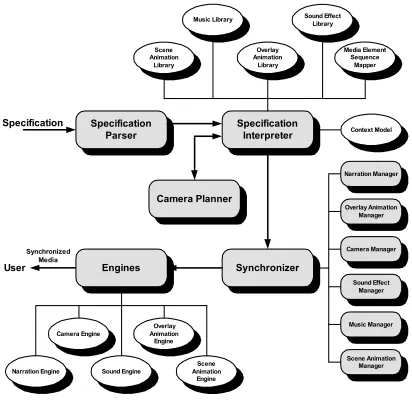
In order to deliver an effective multimedia presentation, application developers could utilize a generic multimedia synchronization framework to properly synchronize the media elements. Figure 3-10 shows a designed framework for an intelligent multimedia presentation based system.
Specification
Interpreter Context Model Music Library Specification Parser Engines Synchronizer Specification User Synchronized Media
Narration Engine Sound Engine
Sound Effect Library Media Element Sequence Mapper Overlay Animation Library
Camera Engine Animation Overlay Engine Camera Planner Scene Animation Library Narration Manager Overlay Animation Manager Camera Manager Sound Effect Manager Music Manager Scene Animation Engine Scene Animation Manager
The IMMPS based framework operates in a similar manner as the animated agent based framework. The primary difference between the frameworks is the type of knowledge resources and their corresponding media element managers and engines. The following resources are used primarily in IMMPS synchronization frameworks to make better media elements selection decisions:
• Scene Animation Library: Provides animation instructions for each of the world
model objects. Each of the animations is pre-scripted and is not created dynamically.
• Music Library: Stores information regarding music.
• Camera Planner: Plans user viewing goals, based on the current context model,
camera position, and the media element’s focus object.
4 An Implemented Animated Agent Based
System
The framework for real-time media synchronization has been implemented in PHYSVIZ, a 3D learning environment for the domain of high school physics. An animated
agent was incorporated into PHYSVIZ to study the media synchronization framework. The
agent utilizes gesture and speech behaviors and presents them in a synchronized manner to provide a real-time interaction with the user. Figure 4-1 shows some examples of gesture media elements for the animated agent in PHYSVIZ.
The framework was implemented in Java and developed as a multithread application. It uses the Java3D, JavaSound, and JavaSpeech APIs to control media elements. The speech synthesis employs the IBM ViaVoice text-to-speech system. The gestures for the agent where created using a motion capture system. FilmBOX, 3D Studio Max, and Character Studio were used for character modeling and blending of motion capture data.
4.1 Specification Language
combination of Java and XML provides interoperability on different platforms. To define a grammar for the specification language, a DTD (Document Type Definition) was created. The DTD defines the syntax rules for the specification language. Figure 4-2 shows the DTD used in PHYSVIZ and a representation of it as a tree structure is shown in Figure 4-3.
The ‘#PCDATA’ entries in the tree structure denotes text data.
(a) beat (b) self-point
(c) upper-left point
(d) stretch (e) hand-wave
<?xml version="1.0" encoding="utf-8"> <!DOCTYPE spec [
<!ELEMENT spec (focus)+>
<!ELEMENT focus (text | gesture | pause | effect)*> <!ELEMENT text (#PCDATA | em | pause | effect)*> <!ELEMENT gesture (#PCDATA | em | effect)*> <!ELEMENT effect EMPTY>
<!ELEMENT pause EMPTY> <!ELEMENT em (#PCDATA)>
<!ATTLIST focus name CDATA #REQUIRED> <!ATTLIST gesture name CDATA #REQUIRED> <!ATTLIST pause size (large | medium | small) "large"> <!ATTLIST effect
type (sound) "sound" name CDATA #REQUIRED >
]>
Figure 4-2: Document Type Definition for PHYSVIZ Specification
effect
em
focus
effect pause
text
spec
em gesture
#PCDATA
#PCDATA
#PCDATA
#PCDATA
+
*
* *
Using tag elements specified in the DTD, the specification can specify types of media elements and build relationships between media elements. The specification can provide the following information by using tag elements:
• Focus Object: The tag element <focus> is used to provide the focus object for its
associated media elements by giving the focus name attribute.
• Agent Speech: The content of tag element <text> represents spoken text of an agent.
To make more realistic speech, sub element <em> and <pause> is used. The tag element <em> is used as emphasizing spoken texts during the agent speech. The tag element <pause> is used to give some interval time of speech pause between spoken texts. The spoken text for the agent can be also represented in a <gesture> tag element.
• Agent Gesture: The specification uses tag element <gesture> for the agent gestures.
The <gesture> tag element can provide the spoken text data along with the name of the gesture. This action indicates that the presented gesture should start and end with the given text.
• Special Effect: The tag element <effect> is used to represent sound effects. If a
sound element needs to play by itself without having relations with other media elements, the sound effect tag can be used under a <focus> tag element. The sound effect tag elements can also be used under the <text> and <gesture> tag elements. Each tag element decides when the sound effects can be applied in their context.
attributes to provide additional information about the elements. The attributes of each tag elements are list below.
Tag Element Attributes Roles
focus name Indicates the name of the focus object.
gesture name Indicates name of the agent gesture.
pause size Indicates time interval of speech pause. Can specify “large”, “medium”, and “small” for time interval. Default size is “large”.
effect type
name
Indicates special effect types. At this point only sound effect is used.
Indicates name of sound effect that needs to play.
4.2 Gesture Element Selection
In general, gesture specification is defined at an abstract level. If the agent needs to point to an object, the specification would define its gesture tag element as ‘deictic’. The Specification Interpreter module would select the appropriate pointing gesture for the current context. This way the high-level processing component does not need to figure out the position of the agent and the location of the focus object.
also remembers the agent orientation. This information is used to decide whether or not the agent needs to turn his body to point to the object.
Currently, PHYSVIZ has eight different pointing gestures: double-left-point, up-left-point, middle-left-point, down-left-point, double-right-point, up-right-point,
middle-right-point, and down-right-point. Figure 4-4 illustrates these gestures. If the focus object is on
the right side of the agent’s current position, the interpreter module retrieves the list of pointing gestures from the Gesture Library and narrows down to the four pointing gestures:
double-right-point, up-right-point, middle-right-point, and down-right-point. The list is
future culled based on the angle between the agent and focus object. If there are multiple choices for selecting a gesture, the interpreter selects the least used gesture by consulting with the Gesture History resource. The following steps show the overall algorithm for selecting the proper gesture:
1. Determine the current agent and focus object position 2. Determine orientation of the agent
3. Calculate the vector between the agent position and the focus object 4. Retrieve the list of pointing gestures
5. Find the appropriate gesture using the calculated vector
6. Choose the least used gesture if more than one is available for selection. 7. Turn the agent body towards to the user if necessary.
(a) up-left-point (b) up-right-point
(c) middle-left-point (d) middle-right-point
(e) down-left-point (f) down-right-point
(g) double-left-point (h) double-right-point
4.3 Media Scheduler
The Media Scheduler handles the temporal relations between events specified by the media elements. The media events are notified when each media element starts or completes its execution. The media elements listening to these events can start their execution conditional upon such receiving these notifications. The Media Scheduler in PHYSVIZ can handle event-based and time-based scheduling. It can also handle a
combination of these scheduling mechanisms. In time-based scheduling, media elements specify when they want to be executed by providing time interval information to the scheduler. The Media Scheduler schedules these media element’s execution after the given time intervals are passed. Also, the schedulable media elements could ask for both event and time-based scheduling. In event-based scheduling, media elements can be scheduled for their execution conditioned upon the start or end event of a media element, optionally specifying a delay time interval after receiving such an event notification.
The following is short description of the classes used in the media scheduler:
• SchedulableMedia: The Interface that media elements must implement. It provides
methods that are necessary for the media scheduler to schedule the implemented media elements. An advantage of having this interface is that the media scheduler can treat all the media elements the same way without knowing the type of media.
• MediaStartsTrigger: This class listens for a media element’s start event notification.
Once a start notification is received it allows dependent media elements to be added to the media scheduler providing delay time interval and its resource type.
• MediaEndsTrigger: This class listens for a media element’s end event notification.
Once an end notification is received, it allows the dependent media element to be added to the media scheduler providing delay time interval and its resource type.
• ResourceWaitingQueue: Collection of the media elements that are ready for their
media execution. Waiting place until the resource gets free.
• MediaExecution: The class that controls the execution of the media elements. It
runs as a separate thread.
• MediaScheduler: Only accessible class from outside components. The class
provides methods to schedule media elements.
4.4 Animation
information generated from the motion capture system. It contains information about the character’s joint hierarchy, such as translation, rotation, and scale that are relative to the parent joint. It also contains information about motion-captured data, which is presented as numeric values in a series of frames. A sample BVH file showing the first 5 frame of motion capture data is shown in Figure 4-6.
HIERARCHY ROOT Hips {
OFFSET 0.0 0.0 0.0
CHANNELS 6 Xposition Yposition Zposition Zrotation Xrotation Yrotation
JOINT LeftHip {
OFFSET 3.43 0.0 0.0
CHANNELS 3 Zrotation Xrotation Yrotation JOINT LeftKnee
{
OFFSET 0.0 -18.47 0.0
CHANNELS 3 Zrotation Xrotation Yrotation JOINT LeftAnkle
{
OFFSET 0.0 -17.95 0.0
CHANNELS 3 Zrotation Xrotation Yrotation End Site
{
OFFSET 0.0 -3.12 0.0 } } } } JOINT RightHip {
OFFSET -3.43 0.0 0.0
CHANNELS 3 Zrotation Xrotation Yrotation JOINT RightKnee
{
OFFSET 0.0 -18.47 0.0
CHANNELS 3 Zrotation Xrotation Yrotation JOINT RightAnkle
{
OFFSET 0.0 -17.95 0.0
CHANNELS 3 Zrotation Xrotation Yrotation End Site
{
OFFSET 0.0 -3.12 0.0 } } } } JOINT Chest {
OFFSET 0.0 4.57 0.0
CHANNELS 3 Zrotation Xrotation Yrotation JOINT LeftCollar
{
OFFSET 1.06 15.33 1.76
CHANNELS 3 Zrotation Xrotation Yrotation JOINT LeftShoulder
{
OFFSET 5.81 0.0 0.0
CHANNELS 3 Zrotation Xrotation Yrotation JOINT LeftElbow
{
OFFSET 0.0 -12.08 0.0
CHANNELS 3 Zrotation Xrotation Yrotation JOINT LeftWrist
{
OFFSET 0.0 -9.82 0.0
CHANNELS 3 Zrotation Xrotation Yrotation End Site
{
OFFSET 0.0 -7.37 0.0 } } } } } JOINT RightCollar {
OFFSET -1.06 15.33 1.76
CHANNELS 3 Zrotation Xrotation Yrotation JOINT RightShoulder
{
OFFSET -5.81 0.0 0.0
CHANNELS 3 Zrotation Xrotation Yrotation JOINT RightElbow
{
OFFSET 0.0 -12.08 0.0
CHANNELS 3 Zrotation Xrotation Yrotation JOINT RightWrist
{
OFFSET 0.0 -9.82 0.0
CHANNELS 3 Zrotation Xrotation Yrotation End Site
{
OFFSET 0.0 -7.37 0.0 } } } } } JOINT Neck {
OFFSET 0.0 17.62 0.0
CHANNELS 3 Zrotation Xrotation Yrotation JOINT Head
{
OFFSET 0.0 5.19 0.0
CHANNELS 3 Zrotation Xrotation Yrotation End Site
{
OFFSET 0.0 4.14 0.0 } } } } } MOTION Frames: 129 Frame Time: 0.033333
0.00 0.00 0.00 0.00 0.00 -0.00 -2.31 11.24 0.80 0.13 -2.52 -0.07 2.06 -8.32 -0.39 2.23 10.70 -0.76 -0.13 -2.52 0.07 -1.99 -7.78 0.38 -0.00 -5.58 -0.00 -21.23 2.53 -4.09 26.17 0.15 -39.68 0.21 -11.18 0.29 -0.90 11.97 20.78 21.65 2.02 2.92 -29.85 0.97 38.95 -0.21 -11.19 -0.29 0.88 11.97 -20.70 -0.00 -0.17 -0.00 -1.20 4.86 0.37
0.00 0.00 0.00 0.00 0.00 -0.00 -2.31 11.24 0.80 0.13 -2.52 -0.07 2.06 -8.32 -0.39 2.23 10.70 -0.76 -0.13 -2.52 0.07 -1.99 -7.78 0.38 -0.00 -5.58 -0.00 -21.23 2.53 -4.09 26.17 0.15 -39.68 0.21 -11.18 0.29 -0.90 11.97 20.78 21.65 2.02 2.92 -29.85 0.97 38.95 -0.21 -11.19 -0.29 0.88 11.97 -20.70 -0.00 -0.17 -0.00 -1.23 4.85 0.40
0.00 0.00 0.00 0.00 0.00 -0.00 -2.31 11.24 0.80 0.13 -2.52 -0.07 2.06 -8.32 -0.39 2.23 10.70 -0.76 -0.13 -2.52 0.07 -1.99 -7.78 0.38 -0.00 -5.58 -0.00 -21.23 2.53 -4.09 26.17 0.15 -39.68 0.21 -11.18 0.29 -0.90 11.97 20.78 21.65 2.02 2.92 -29.85 0.97 38.95 -0.21 -11.19 -0.29 0.88 11.97 -20.70 -0.00 -0.17 -0.00 -1.32 4.84 0.50
0.00 0.00 0.00 0.00 0.00 -0.00 -2.31 11.24 0.80 0.13 -2.52 -0.07 2.06 -8.32 -0.39 2.23 10.70 -0.76 -0.13 -2.52 0.07 -1.99 -7.78 0.38 -0.00 -5.58 -0.00 -21.23 2.53 -4.09 26.17 0.15 -39.68 0.21 -11.18 0.29 -0.90 11.97 20.78 21.65 2.02 2.92 -29.85 0.97 38.95 -0.21 -11.19 -0.29 0.88 11.97 -20.70 -0.00 -0.17 -0.00 -1.45 4.83 0.65
0.00 0.00 0.00 0.00 0.00 -0.00 -2.31 11.24 0.80 0.13 -2.52 -0.07 2.06 -8.32 -0.39 2.23 10.70 -0.76 -0.13 -2.52 0.07 -1.99 -7.78 0.38 -0.00 -5.58 -0.00 -21.23 2.53 -4.09 26.17 0.15 -39.68 0.21 -11.18 0.29 -0.90 11.97 20.78 21.65 2.02 2.92 -29.85 0.97 38.95 -0.21 -11.19 -0.29 0.88 11.97 -20.70 -0.00 -0.17 -0.00 -1.63 4.81 0.85
To incorporate the BVH file data into the PHYSVIZ environment, a BVH interpreter
was developed to apply the motion captured character movements to the animated agent. The BVH interpreter provides character movement information used by the Java3D API control the articulated character motion in real-time.
The system attempts to keep the frame rate running at 30 fps at all times. It continuously monitors the frame rates and if it falls below the given rate, it uses skipping techniques to keep the animations running at the correct speed. The frame-skipping technique is also used to achieve synchronization. If a gesture element’s duration is longer than the associated speech element and they need to start and finish together, the graphic engine skips frame to reduce the execution duration.
A simple word-level lip-synching animation technique is also implemented in the system. The animated agent moves his jaw with every word of spoken text. The speed of jaw movement is determined by the speech rate: if the speech rate is fast, the movement of the agent’s jaw is quicker.
4.5 Examples
To illustrate how the framework operates for the animated agent in PHYSVIZ, three
4.5.1 “Hello! I am an animated agent.”
There are two separate speech elements in this example. Each of them has an associated gesture element. The text elements are “Hello!” and “I am an animated agent”. The corresponding gestures are “hand-wave” and “self-point”, respectively. The specification for this example is shown below:
<spec>
<focus name=””>
<gesture name=”hand-wave”>”Hello!”</gesture> <pause size=”small”/>
<gesture name=”self-point”> “I am an animated agent” </gesture>
</focus> </spec>
second speech element sends a start event notification and the gesture element starts its animation. The graphical version of the example is given in Figure 4-7.
Welcoming Gesture
Gesture
Speech
Self Point Gesture
Hello, I am an animated
agent Pause
Gesture
Speech Hello, I am an animated agent Pause
Welcoming Gesture (hand-wave)
Self Point Gesture (self-point)
Welcoming Gesture (hand-wave)
Gesture
Speech
Self Point Gesture (self-point)
Hello, Pause I am an animatedagent
Hello, I am an animated agent
hand-wave self-point
Timeline
Time Media
(a) parsed
(b) interpreted
(c) sychronized
4.5.2
“I want to introduce you to a very interesting piece of equipment.”
In this example, there is an abstract gesture element is specified. The gesture element “beat” is specified along with a speech element. The specification is shown below:
<spec>
<focus name=””>
<gesture name=”beat”>
“I want to introduce you to a very interesting piece of equipment.”
</gesture> </focus>
</spec>
Beat Gesture
Gesture
Speech I want to introduce you to a very interesting piece of equipment.
Gesture
Speech
Gesture
Speech
one-hand-beat
Timeline
Time Media
(a) parsed
(b) interpreted
(c) sychronized
I want to introduce you to a very interesting piece of equipment.
Beat Gesture (one-hand-beat)
I want to introduce you to a very interesting piece of equipment.
I want to introduce you to a very interesting piece of equipment. Beat Gesture
(one-hand-beat)
4.5.3 “This is a battery operated motor and …”
As shown below, the specification defines two focus objects in a single specification. Each focus object is used to determine the appropriate gestures for the current context.
<spec>
<focus name=”motor”>
<gesture name=”deictic”>
“This is a battery operated motor.” </gesture>
<pause size=”large”/> <text>and</text> </focus>
<focus name=”extra-battery”> <gesture name=”deictic”>
“These are <em>extra</em> batteries” </gesture>
</focus> </spec>
Deictic Gesture
Gesture
Speech
Deictic Gesture This is a battey
operated motor Pause these are
This is a battery operated motor these are extra batteries back-right-point middle-left-point
Timeline
Time Media
(a) parsed
(b) interpreted
(c) sychronized
and em extra batteries.
Deictic Gesture (back-right-point)
Gesture
Speech
Deictic Gesture (middle-left-point) This is a battey
operated motor Pause and these are em extra batteries.
Deictic Gesture (back-right-point)
Gesture
Speech
Deictic Gesture (middle-left-point) This is a battey
operated motor Pause and these are em extra batteries.
and
5 Related
Work
A large literature has emerged on animated agents and intelligent multimedia presentation systems. This chapter reviews key work in these areas and discusses how the framework relates to it.
REA is an embodied conversational agent, which interacts with the user as a real
estate agent (Cassell et al., 1999). She generates nonverbal behaviors along with verbal behaviors to provide richness in face-to-face conversation with users such as raising eyebrow for emphasis, eye gaze and head nods for turn taking behaviors, and gestures. The system formulates behavior sequences to carry out the desired communicative goals based on the input from a microphone and camera. The Action Scheduler module is responsible for synchronizing these behaviors and attempts to carry them out. This module could be replaced with the proposed framework or implemented based on the framework.
KARE is a conversational animated agent integrated with a bilingual-capable
talking-head system (King et al., 2003). TE KAITITO, the dialog system for KARE, supports two
different languages to converse with users, English and Māori. KARE can also support
culture-specific dialog and nonverbal behaviors. The Id module generates nonverbal behaviors and provides personality to KARE such as eye gazing, blinking, and furrowing the
verbal and nonverbal behaviors are sent to the TalkingHead module to synchronize these behaviors. In this module, the proposed framework could be effectively utilized.
FLURMAX is a virtual animated agent, which inhabits a wide-screen panel with a
camera attached to get a visual perception of the environment (Jung et al., 2003). FLURMAX interacts with a person who passing by or standing in front of the panel by using
speech, gesture, and facial expressions. The visual perception component processes the video data and sends events to the central component to create and schedule behavior routines. The execution component receives these behavior routines and executes them. The central component generates MURML (Multimodal Utterance Representation Markup
Language) as behavior specification, which is an XML-based language to specify prosodic speech, gestures, emotional expression, and locomotion. The proposed framework could be used in the behavior execution component without affecting the overall system architecture and the specification language used in FLURMAX.
The framework can also be utilized in other applications that utilize embedded animated agent. For example, a conversational animated agent is used as a sales assistant in the virtual market place (Guerin et al., 2001). An agent communicates with users by using speech and gestures to enhance believability as a sales assistant. The Action Planner module in the system plans and generates behavioral actions. The actions are formalized in CML (Character Markup Language) to describe body movements, speech output, and
emotional parameters. CML is an XML-based scripting language. These character actions
The system could implement the low-level processes using the proposed framework without changing CML.
Another example is the STORYTELLER (Silva et al., 2001). The STORYTELLER is an
animated agent, which inhibits a 3D virtual world and narrates a story with proper emotional expressions as the story progresses. The system uses tags within a text to control the emotional state of the character and its gestures. The proposed framework can be applied to their lower-level process to provide the proper synchronization between the verbal and nonverbal behaviors based on the annotated specification text produced by the system.
Also, the framework can be applied in Intelligent Multimedia Presentation Systems as well. PPP system (André and Rist, 1996) generates intelligible presentations that instruct
the user. To achieve complex presentation goals, the system generates the presentation strategy scripts dynamically and assembles the multimedia sets to be presented to the user in real-time. PPP also exploits Allen’s temporal relations to satisfy the temporal constraints
between the presentation acts. The proposed framework could provide a solution to the lower-level processes for carrying out the generated complex multimedia presentation plans.
ROBOCUP simulation league commentator systems (André et al., 2000) are systems
and facial expressions based on the state of the game. Byrne creates SEEML (the Speech,
Expression and Emotion Mark-up Language) to tag emotional state within a text. As a result, Byrne provides emotional and expressive talking-head commentary. Mike, the Multi-agent Interactions Knowledgeably Explained, (Tanaka et al., 1998) is a system that produces simultaneous spoken commentary. Output is generated in real-time either in English, Japanese, or French.
IMPROVISE, the Illustrative Metaphor PROduction in VISual Environement, (Zhou
and Feiner, 1998) is a knowledge-based system that can automatically generate coherent visual presentations. To properly design visual illustrations, the IMPROVISE employs the
PAL (Presentation Authoring Language). PAL can represent visual objects and visual
techniques as the nodes. The specifications of temporal constraints between visual objects and techniques are encapsulated in the nodes. The proposed framework can be used as their lower-level process to properly perform the medias specified in specifications.
PMO is a multimodal presentation planner in the EMBASSI project (Elting and
Michelitsch, 2001). EMBASSI is an intelligent user interface trying to simplify the use of
everyday life technology thru proper management of intelligent multimodal interaction. The system supports speech, an animated life-like character, and a GUI as output modalities. PMO plans which modalities are used as output and how these modalities
The current framework supports only temporal based presentations systems. It would not be appropriate for a spatial presentation system such as AUTOBRIEF (Kerpedijiev
et al., 1997) and PERSIVAL (McKeown, 2001).
Properly handling multimedia synchronization issues are also important in the areas of transmitting multimedia information over a network. SMIL, Synchronized Multimedia
6 Conclusions and Future Work
The management of real-time multimedia synchronization is a critical issue in multimodal environments because the overall effectiveness of the system is significantly reduced if it is mismanaged. Most media-rich systems have solved some aspects of the media element synchronization and scheduling problem. However, they have done so in an
ad hoc manner without providing a generic reusable framework. One approach for
achievingproper media element synchronization in real-time is to partition the synchronization and scheduling into high-level and lower-level processing components communicating via a well-defined media element specification. Prior research efforts have produced specification languages such as VHML (Beard and Reid, 2002),MPML (Ishizuka
et al., 2000), CML (Guerin et al., 2001), and SEEML (Binsted, 1998). However, their work
has focused on the languages and not the details of the synchronization issues.
To this end, we have designed and implemented a generic framework that can support low-level media synchronization. In the course of designing and implementing the framework, several benefits emerged. They can be summarized as follows:
• Intuitiveness: By using a specification language and properly defining its syntax, the
• Extensibility: Because the framework supports the addition of new modalities without affecting existing media element components, new knowledge resources and components can be created with ease. Furthermore, modules in the framework can be easily modified without affecting others. For example, the Specification Interpreter can be modified easily when new media element selection strategies are needed.
• Applicability: The implemented framework can be easily combined with high-level
processing components without any modifications because it clearly defines its operations and operates as a separate entity from the high-level processing component.
• Ease of development: Because the high-level and low-level processing components
are properly decoupled, application developers can focus on their own task without concern for how their changes might affect each other tasks.
To demonstrate the practicality of the framework, it was implemented in PHYSVIZ,
an interactive 3D learning environment for the domain of high school physics. This system illustrates how using the framework can support the separation of high-level and low-level media element processing components. In the implementation, these high-level and low-level components communicated via a media element specification language and achieved the proper media element synchronization in real-time.