Voice-based Remote Desktop Control System
using Android Devices
Ketan R. Shahapure1, Stuti Khurana2
B.E Students, Dept. of Information Technology, Smt. Kashibai Navale College of Engineering, Pune, India1,2
ABSTRACT: The Remote Desktop Control System allows the users to control the computers remotely from another
device. The concept of Virtual Network Computing is used in this system. Many such software applications are available that allow us to control our computers remotely, but they lack the facility of controlling the computers using our voice. Voice-based Remote Desktop Control System provides the users with an option to control their computers using their own voice. This system also has the advantage of hands-free operation and it is convenient to use for handicapped and disabled people.The system consists of an Android device, aPC with installed server and a network for connecting the Android device and PC.The Android device and PC should be on the same local network or connected through the internet. A user will be able to access and control the remote computer through the Android application that will be provided on a user’s Android device in which a user sees the real-time screen of the computer system. In thissystem, the Google API for STT(speech-to-text) conversion is used.
KEYWORDS: Virtual Network Computing, Android, Speech recognition, Google Speech API, Robot Class.
I. INTRODUCTION
The mobile phones having Android Operating System have become common in the recent years. These Android mobile phones are an integral part of our day-to-day lives. The need arises to access and control the desktops remotely from our android mobile phones and it is very convenient using speech recognition. We cannot access and control the desktops remotely from the mobiles. Also, the facility of controlling the desktops through Speech Recognition is not available. Speech recognition facilitates hands-free computing which is advantageous in many real-life situations. We cannot perform computing in a more convenient way than conventional input-output methods. The disabled and handicapped people do not have the facility to access and control the desktop. Also, we should have everything in our mobile phones. The applications and files in our desktops cannot be accessed as and when needed.
The helpdesk support technicians have to travel to the client’s desktop site and provide assistance. A lot of time is wasted in traveling to the client’s desktop site. Also, the clients don’t have thefacility to view the problems being fixed in front of them remotely. This increases the total downtime. Time and money are wasted by the need to have an IT support team to enable the clients to solve their IT problems.The available VNC software is costly. They do not work with minimal system requirements and they are not easy to use.
The primary objective of the proposed system is basically to access and control the remote computer which could be a laptop or a desktop. Another primary objective is to control the computer using speech recognition. For speech recognition, Google’s Speech API is used.
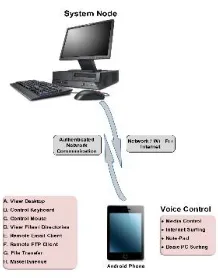
Fig 1. Working of the proposed system
The Fig 1 shows the working of the proposed system. It shows the communication between an Android phone and a PC (System Node) which are connected through Wi-Fi. The figure also displays the functions that can be performed through the Android phone.
Also, the server must be deployed on a third-party platform for global access. Google’s Speech API is used for speech recognition in the system. The Speech API needs a constantly working data connection or Wi-Fi to connect to the Google’s speech database. The remote computer’s screen is captured and transmitted over the network to the client application one frame at a time. No specialized algorithm is used for screen capturing and transmission. The FTP (File Transfer Protocol) is used for transferring files between the Android device and the remote computer.
II. RELATED WORK
The so-called network computer (NC) aims to give users access to centralized resources from simple, inexpensive devices. These devices act as clients to more powerful server machines that are connected to the network and provide applications, data, and storage for a user’s preferences and personal customizations. The idea has been taken a stage further. In the virtual network computing (VNC) system, server machines supply not only applications and data but
also an entire desktop environment that can be accessed from any Internet-connected machine using a simple software
NC. Whenever and wherever a VNC desktop is accessed, its state and configuration (right down to the position of the cursor) are exactly the same as when it was last accessed. [3]
Virtual Network Computing (VNC) is a popular tool for graphical desktop sharing system which is used to control another computer remotely. Multiple clients may connect to a VNC server at the same time. Popular uses for this technology include remote technical support and accessing files on one's work computer from one's home computer, or vice versa. It makes use of Remote Frame Buffer protocol (RFB). RFB is a simple protocol for remote access to Graphical User Interface. VNC is an ultra-thin client system which is based on a simple display protocol. It is platform-independent. [4]
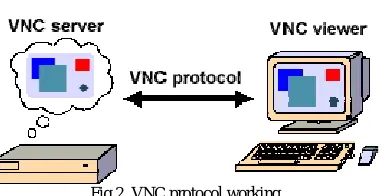
Fig 2. VNC protocol working
Fig 2 shows the working of the VNC protocol. The VNC protocol is used for communication between the VNC server and the VNC viewer. The VNC server can be a hardware server or a software program running on the PC to be accessed and controlled.
In mobile VNC systems, it has been challenging to increase screen update rate by fast screen image encoding. At first, a number of video encoders are integrated into a prototype system.The existing RFB protocol is extended straightforwardly to integrate video codecs. Next, the overall system architecture is modified from serial operation to parallel. Finally, a modified region coding to further reduce the encoding time of screen images is proposed. [2]
III. EXISTING METHODOLOGY
There are many existing systems that help to access the computer remotely with the help of mobile phone device. The accessibility to the remote system is performed manually. The client is facilitated with the manual commands. These manual commandsplay a major role in the access of the remote system. It doesn’t allow for any voice control commands and only allows the user to perform various operations on the desktop manually. The manual access control limits the scope of users and does not prove to be a great help for handicapped users.
The existing system has a number of security problems as the accessing of remote desktop becomes less secure. Security is one of the important issues in terms of accessibility. Many of the existing system at a part lacks in terms of security.
Many existing applications are present that provides the access to the remote desktop through the android mobile devices using virtual network computing. These applications are made available to the client for a period of time. These applications have to be installed first and are made available for free to the user for a particular duration depending on the date of installation, version, premium selected by the user and many other factors.
IV. IMPLEMENTATION AND RESULTS
Fig 3. Architecture Diagram
The above figure shows the architecture of the proposed system. It consists of the Android device and Remote Desktop which are connected through a wireless connection such as Wi-Fi. The user can interact with the Android device through voice commands or manual commands. The server consists of a temporary database which is used for the authentication purpose.
A VNC server must be installed on the person's computer which has to be accessed and it must be connected to a Wi-Fi network. The user can access and manipulate the desktop or remote system within the Wi-Fi range. The image of the computerscreen is compressed andadjusted according to the size of the screen of mobile phone using Affine transformationbefore it is transmitted to the mobile phone. Since the screen size of the android mobile phone may vary depending on the end user’s device this linear mapping method preserves points, planes and straight line avoiding geometric distortions and deformations.
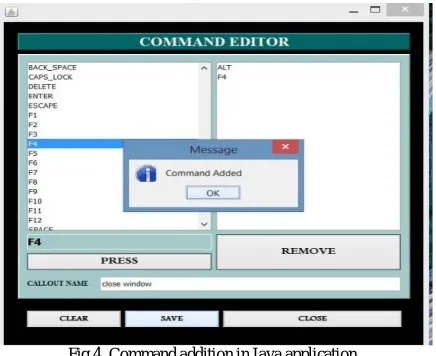
The Java application can be used to add/manage commands and application paths which are invoked using voice.
Fig 4. Command addition in Java application
Fig 5. Application path selection in Java application
The above figure shows the process for selection of application path in Java application.For adding application path, the user has to browse for the application path and type the callout name. This data is also serialized and saved in a file.
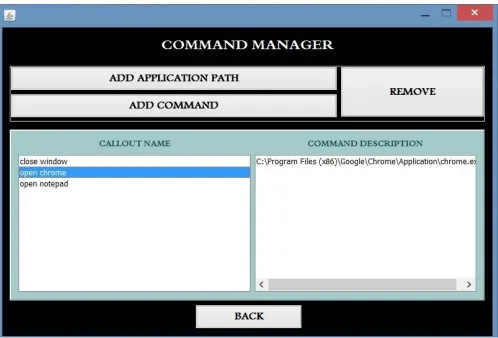
Fig 6. Command manager showing the list of commands and application paths in Java application
Fig 6 shows the Command Manager frame in Java application. The command manager displays all the commands which have been added in the system through the Java application. It displays the callout name and also the path and keyboard shortcuts for the particular command.
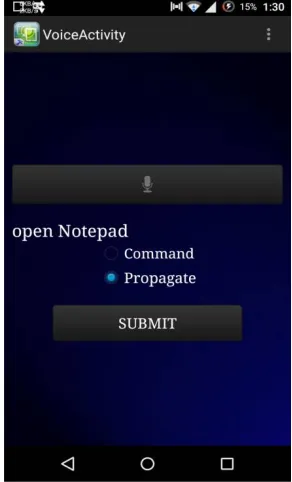
For controlling any functionality of the remote desktop, the android application uses voice commands. For implementing this we are basically making use of Google API for of Speech-to-Textconversion.
The working of the application is described using following steps:
Step 1: End user gives the voice commands to the android application.
Step 2: These voice commands are recognized by the recognizerintent through
RecognizerIntent.ACTION_RECOGNIZE_SPEECH
Step 3: This Recognizer intent basically prompts the Google API to start the functionality. Google API
converts the recorded command to a text string.
Step 4: This text string is stored into an array list over the android device and is sent to the server.
Step 5: The text string received by the server is then given to the robot class in JAVA. This class is used to generate native system input events for the purposes of test automation, self-running demos, and
other applications where control of themouse and keyboard is needed
.
Step 6: Thescreen of the computer is captured and transferred in bitmap format. The system uses the scaling
Fig 7. Google Speech API
Fig 7 shows the working of Google Speech API. It is used to convert voice commands into text string which can be used to propagate or command. The speech API can recognize commands given in various languages.
Fig 8. Speech-to-Text conversion
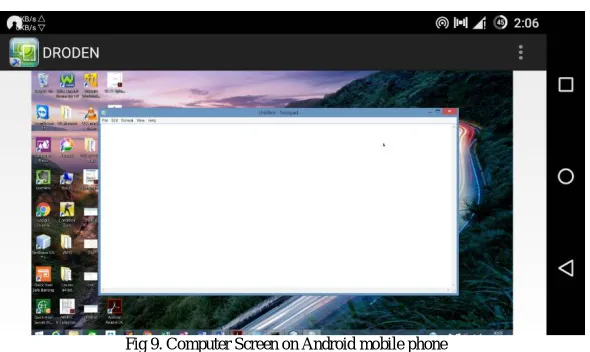
Fig 9. Computer Screen on Android mobile phone
The above figure shows the output of executing the voice command on the remote desktop sent through the Android application. The figure shows the screen of the remote desktop which appears on the Android device.
V. CONCLUSION
The proposed system will provide mobility to the users for controlling their computer remotely through Android devices by giving voice commands. This application will provide assistance to the system user for monitoring the task of file transfer, accessing various files, browsing the internet and playing media files. Currently, the scope of this system is within the local area network such as Wi-Fi.This application does not require any additional equipment or software.
Since the identity of the client has to be assured before having the complete access of the remote desktop, security method is implemented using OTP (One Time Password).
REFERENCES
1. Nguyen, Tien-Dung, Seungun Choe, and Eui-Nam Huh,’An efficient mobile thin client technology supporting multi-sessions remote control over VNC’, 2012 IEEE International Conference on Computer Science and Automation Engineering (CSAE), Vol.3,pp. 155-159, 2012. 2. Ko, Ha-Young, Jae-Hyeok Lee, and Jong-Ok Kim,’Implementation and evaluation of fast mobile VNC systems’, IEEE Transactions on
Consumer Electronics, Vol.58, Issue 4,pp. 1211-1218,2012.
3. T. Richardson, Q. Stafford-Fraser, K. R. Wood and A. Hopper,’Virtual network computing’,IEEEInternet Computing,Vol.2, Issue 1,pp. 33-38, 1998.
4. Priyadarshani Raskar, Sejal Patel, Pragati Badhe, and Prof. Archana Lomte,’Virtual Network Computing- A Technique to Control Android Phones Remotely’, IJECS, Vol.3, Issue 2,pp. 3991-3995,2014.
5. Pendyala, Vishnu S., and Simon SY Shim,’The Web as the ubiquitous computer’,IEEE Computer, Vol.42,Issue 9,pp. 90-92, 2009.
6. Archana Jadhav, Vipul Oswal, Sagar Madane, Harshal Zope, and Vishal Hatmode,’Vnc architecture based remote desktop access through android mobile phones’,International Journal of Advanced Research in Computer and Communication Engineering, Vol.1, Issue 2,pp. 98-103, 2012.