Chapter 12
Basics of A/D Conversion
(1 of 2)
• Many embedded systems need to deal with nonelectric
quantities: weight, humidity, pressure, weight, mass or
airflow, temperature, light intensity, and speed.
• These nonelectric quantities are analog in nature.
• Analog quantities must be converted into digital format
so that they can be processed by the computer.
Transducer temperature
pressure light weight airflow humidity . . .
Such as a sensor, load cell, photocall, or thermocouple .
.
signal conditioning
circuit (optional)
voltage voltage A/D
converter Computer Digital
value
Figure 12.1 The A/D conversion process
Basics of A/D Conversion
(2 of 2)
• Any nonelectric quantity must be converted into an electric quantity
using a certain type of transducer.
• A transducer converts a nonelectric quantity into an electric quantity.
• The output of a transducer may not be in a suitable range for A/D
conversion.
Voltage
D
ig
it
al
C
od
e
Figure 12.2 An ideal A/ D converter output characteristic
Analog Voltage and
Digital Code Characteristic (1 of 2)
• An ideal A/D converter
should have a characteristic
as shown.
• An A/D converter with
characteristic as shown
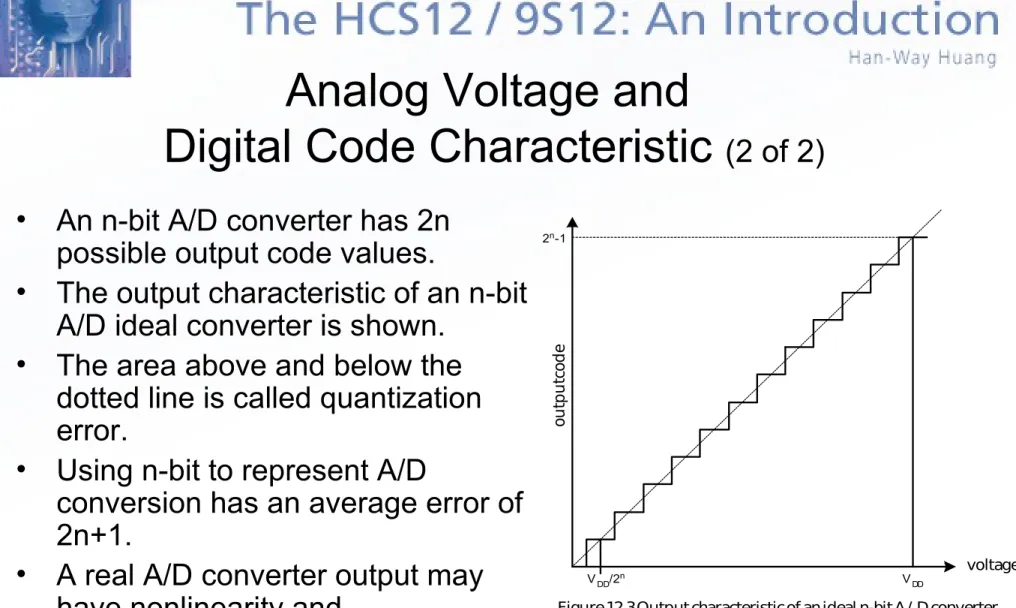
Figure 12.3 Output characteristic of an ideal n-bit A/ D converter
VDD/2n V DD
2n-1
ou
tp
u
t c
od
e
voltage
Analog Voltage and
Digital Code Characteristic
(2 of 2)
• An n-bit A/D converter has 2n
possible output code values.
• The output characteristic of an n-bit
A/D ideal converter is shown.
• The area above and below the
dotted line is called quantization
error.
• Using n-bit to represent A/D
conversion has an average error of
2n+1.
• A real A/D converter output may
have nonlinearity and
A/D Conversion Algorithms
• Parallel (Flash) A/D conversion
– 2n comparators are used
– One input to each comparator is the voltage to be converted.
– The second input to each comparator is the voltage that represents one
of the 2n combinations.
– The comparator output will be high if the analog input is higher than the
voltage that represents one of the 2n combinations.
– The largest n-bit value that causes the comparator output to become
true is selected as the A/D conversion value.
– The conversion speed is very fast.
– The drawback is cost.
Slope and Double-Slope A/D Converters
• Use capacitors’ charging and discharging
behavior to perform A/D conversion
• Require only simple hardware and is popular in
low-speed applications
Sigma-Delta A/D Converters
• Use over-sampling technique to perform A/D
conversion
• Has good noise immunity and can achieve high
resolution
• Popular in high-resolution applications
Successive Approximation Method
(1 of 3)
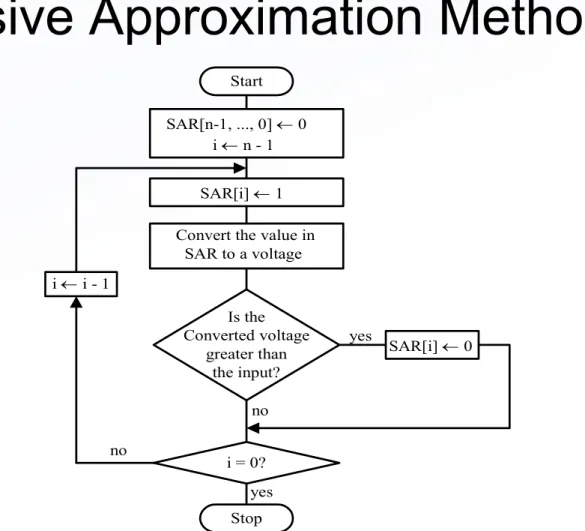
• Approximates the analog signal in n steps.
• The first step initializes the SAR register to 0.
• Perform a series of guessing steps that starts from the
most significant bit and proceeding toward the least
significant bit.
• For every bit in SAR register guess it to be 1.
• Converts the value of the SAR register to analog voltage.
• Compares the D/A output with the analog input and
Vin (analog input)
Digital-to-analog converter
Output Latch
Digital code Successive
approximation register (SAR) Control
Logic Clock
Figure 12.4 Block diagram of a successive approximation A/D converter +
-analog comparator
VRH VRL
Start SAR[n-1, ..., 0] 0
i n - 1 SAR[i] 1 Convert the value in SAR to a voltage
Is the Converted voltage
greater than the input?
SAR[i] 0 yes
no i = 0? i i - 1
Stop yes no
Figure 12.5 Successive approximation A/D conversion method
VK = VRL + (range k) (2n – 1)
Optimal Voltage Range for A/D Conversion
• Needs a low reference voltage (V
RL) and a high reference voltage
(V
RH) in performing A/D conversion.
• V
RLis often set to ground level.
• V
RHis often set to VDD.
• Most A/D converter are ratiometric
– A 0 V (or V
RL) analog input is converted to the digital code of 0.
– A V
DD(or V
RH) analog input is converted to the digital code of 2
n– 1.
– A k-V input will be converted to the digital code of k
(2
n– 1)
V
DD.
• The A/D conversion result will be most accurate if the value of analog
signal covers the whole voltage range from V
RLto V
RH.
•
Example 12.1 Suppose that there is a 10-bit A/D converter
with V
RL= 1 V and V
RH= 4V. Find the corresponding voltage
values for the A/D conversion results of 25, 80, 240, 500,
720, 800, and 900.
• Solution: range = V
RH– V
RL= 4V – 1V = 3V
V(25) = 1 V + (3 25) (210 – 1) = 1.07 V
V(80) = 1 V + (3 80) (210 – 1) = 1.23 V
V(240) = 1 V + (3 240) (210 – 1) = 1.70 V
V(500) = 1 V + (3 500) (210 – 1) = 2.47 V
V(720) = 1 V + (3 720) (210 – 1) = 3.11 V
V(800) = 1 V + (3 800) (210 – 1) = 3.35 V
VOUT +
VIN
R1 R2 OP AMP
Figure 12.6 A voltage scaler
AV = VOUT VIN = (R1 + R2) R1
= 1 + R2/R1
• Example 12.2 Choose appropriate values of R1 and R2 in Figure 12.6 to scale a voltage in the range of 0~200mV to 0~5V.
• Solution: AV = 1 + R2/R1 = 5V / 200mV = 25 R2/R1 = 24
Choose R1 = 10 K and R2 = 240 K to achieve the desired ratio.
Scaling Circuit
•
Some transducer has the an output voltage in the range of 0 ~ V
Z, where V
Z<
V
DD.
•
V
Zcan be much smaller than V
DD.
•
When VZ is much smaller than V
DD, the A/D conversion result cannot be
accurate.
VIN
V1 R1
R2
Rf
-+
+12 V
- 12 V 741
-+
+12 V
- 12 V 741
R0
R0
VOUT
VOUT Rf - (12-5) R1 R2
Rf = VIN V1
Figure 12.7 Level shifting and scaling circuit VM
VM= - VIN
Voltage Translation Circuit
• Some transducer has output voltage in the range from V
1to V
2(V
2> V
1).
• The accuracy of the A/D conversion will be more accurate
if this voltage can be scaled and shifted to 0 ~ V
DD.
• The circuit shown can shift and scale the voltage from V
1• Example 12.3 Choose appropriate resistor values and the
adjusting voltage so that the circuit shown in Figure 12.7c can
shift the voltage from the range of –1.2 V ~ 3.0 V to the range of
0V ~ 5V.
• Solution: Applying Equation 12.5:
0 = -1.2 (Rf/R1) – (Rf/R2) V1 5 = 3.0 (Rf/R1) – (Rf/R2) V1
The HCS12 A/D Converter
• A HCS12 member may have one or two 8-channel 10-bit
A/D converters.
• The highest conversion clock is 2 MHz.
• At 2 MHz conversion clock, a sample may take 6 ms or 7
ms to complete a conversion for 8-bit and 10-bit
resolution.
• An A/D conversion can be started by writing into a
control register or by an external trigger input.
• The successive approximation method is used to
perform the conversion.
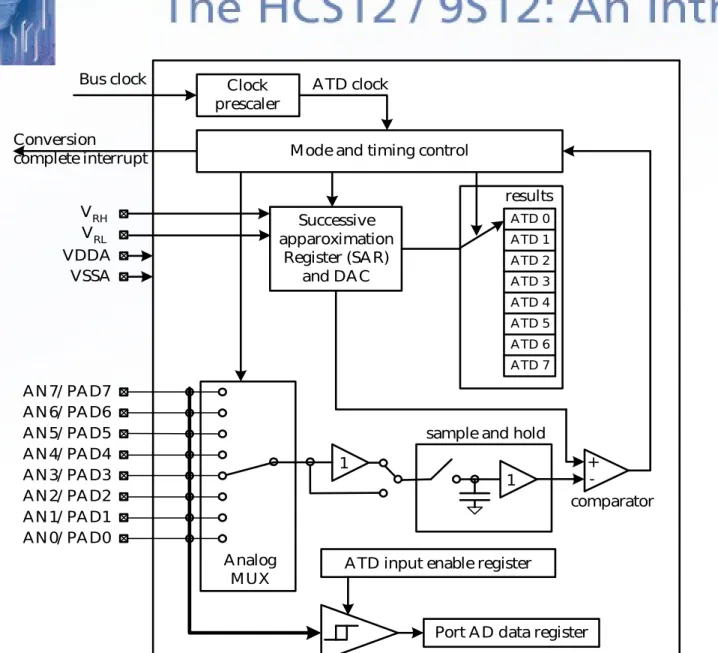
Clock prescaler Bus clock
Mode and timing control Conversion complete interrupt Successive apparoximation Register (SAR) and DAC ATD 0 ATD 1 ATD 2 ATD 3 ATD 4 ATD 5 ATD 6 ATD 7 1 1 sample and hold
+
-comparator
ATD input enable register
Port AD data register Analog MUX results ATD clock VRH VRL VDDA VSSA AN7/ PAD7 AN6/ PAD6 AN5/ PAD5 AN4/ PAD4 AN3/ PAD3 AN2/ PAD2 AN1/ PAD1 AN0/ PAD0
Signal Pins Related to A/D Converter
• The AD0 module has analog input pins AN0 ~ AN7.
• The AD1 module has analog input pins AN8 ~ AN15.
• The AN7 pin can be optionally used as the trigger input
pin for AD0 module.
• The AN15 pin can be optionally used as the trigger input
pin for AD1 module.
• V
RHand V
RLare the high and low reference voltage input.
• V
DDAand V
SSAare power supply and ground inputs for the
Registers Related to A/D Converters
• Each A/D module has the following registers:
– Six control registers: ATDxCTL0 ~ ATDxCTL5.
(ATDxCTL0 and ATDxCTL1 are used for factory
testing only).
– Two status registers: ATDxSTAT0 and ATDxSTAT1
– Two testing registers: ATDxTEST0 and ATDxTEST1
– One input enable register: ATDxDIEN
– One port data register: PTADx
7 6 5 4 3 2 1 0 ADPU AFFC AWAI ETRIGLE ETRIGP ETRIGE ASCIE ASCIF
0 0 0 0 0 0 0 0
reset:
ADPU: ATD power down bit 0 = power down ATD 1 = normal ATD operation AFFC: ATD fast flag clear all bit
0 = ATD flag is cleared normally, i.e., read the status register before reading the result register
1 = any access to a result register will cause the associated CCF flag to clear automatically if it is set at the time
AWAI: ATD power down in wait mode bit
0 = ATD continues to run when the HCS12 is in wait mode 1 = halt conversion and power down ATD during wait mode ETRIGLE: External trigger level/edge control
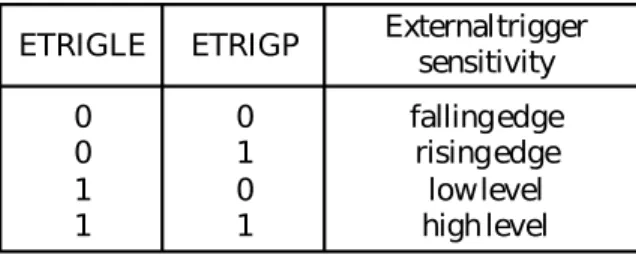
This bit controls the sensitivity of the external trigger signal. Details are shown in Table 12.1.
ETRIGP: External trigger polarity
This bit controls the polarity of the external trigger signal. See Table 12.1 for details. ETRIGE: External trigger mode enable
0 = disable external trigger on ATD channel 7 1 = enable external trigger on ATD channel 7 ASCIE: ATD sequence complete interrupt enable bit 0 = disables ATD interrupt
1 = enables ATD interrupt on sequence complete (ASCIF = 1) ASCIF: ATD sequence complete interrupt flag
0 = no ATD interrupt occurred
1 = ATD sequence complete interrupt pending
Figure 10.9 ATD control register 2 (ATDxCTL2, x = 0 or 1)
Table 12.1 External trigger configurations ETRIGLE ETRIGP External triggersensitivity
0 0 1 1
0 1 0 1
falling edge rising edge low level high level
A/D External Triggering
• A/D external triggering can be edge-triggering or
level-triggering.
ATD Control Register 3
(ATD0CTL3 and ATD1CTL3)
(1 of 2)
• This register sets the conversion sequence length,
enables/disables the FIFO mode for result registers, and
controls the ATD behavior in freeze mode (BDM mode).
• If the FIFO bit is 0, the result of the first conversion
appears in the first result register, the second conversion
appears in the second result register, and so on.
7 6 5 4 3 2 1 0 0 S8C S4C S2C S1C FIFO FRZ1 FRZ0 0 0 0 0 0 0 0 0 reset:
S8C,S4C,S2C,S1C: Conversion sequence limit 0000 = 8 conversions
0001 = 1 conversion 0010 = 2 conversions 0011 = 3 conversions 0100 = 4 conversions 0101 = 5 conversions 0110 = 6 conversions 0111 = 7 conversions 1xxx = 8 conversions
FIFO: Result register FIFO mode
0 = conversion results are placed in the corresponding result register up to the selected sequence length
1 = conversion results are placed in consecutive result registers (wrap around at end)
FRZ1 and FRZ0: background debug (freeze) enable bit 00: continue conversions in active background mode 01: reserved
10: finish current conversion, then freeze
11: freeze immediately when background mode is active Figure 10.10 ATD control register 3 (ATDxCTL3, x = 0 or 1)
ATD Control Register 3
7 6 5 4 3 2 1 0 SRES8 SMP1 SMP0 PRS4 PRS3 PRS2 PRS1 PRS0
0 0 0 0 0 1 0 1
reset:
SRES8: ATD resolution select bit 0 = 10-bit operation
1 = 8-bit operation
SMP1 and SMP0: select sample time bits
These bits are used to select the length of the second phase of the sample time in units of ATD conversion clock cycles. See Table 12.2.
PRS4--PRS0: ATD clock prescaler bits
These five bits are the binary value prescaler value PRS. The ATD conversion clock frequency is calculated as follows:
The ATD conversion frequency must be between 500KHz and 2 MHz. The clock prescaler values are shown in Table 12.3.
Figure 12.11 ATD control register 4 (ATDxCTL4, x = 0 or 1)
ATDclock = [bus clock]
PRS + 1 0.5
ATD Control Register 4
(ATD0CTL4 and ATD1CTL4)
(1 of 2)
• This register sets the
conversion clock frequency,
the length of the second
phase of the sample time,
and the resolution of the A/D
conversion.
• Writes to this register will
abort the current conversion.
• There are two stages in the
Table 12.2 Sample time select
SMP1 SMP0 Length of 2nd phase of sample time
0 0 1 1
0 1 0 1
2 A/ D conversion clock periods 4 A/ D conversion clock periods 8 A/ D conversion clock periods 16 A/ D conversion clock periods
ATD Control Register 4
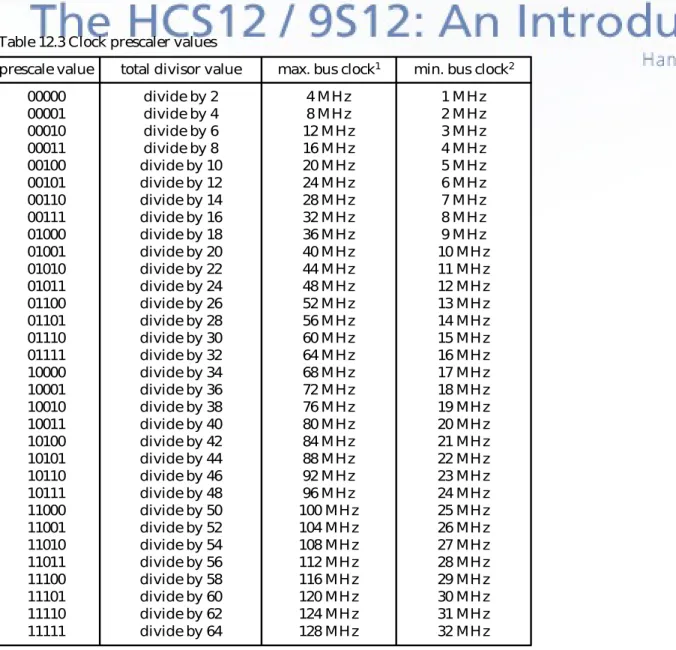
Table 12.3 Clock prescaler values
prescale value total divisor value max. bus clock1 min. bus clock2
00000 00001 00010 00011 00100 00101 00110 00111 01000 01001 01010 01011 01100 01101 01110 01111 10000 10001 10010 10011 10100 10101 10110 10111 11000 11001 11010 11011 11100 11101 11110 11111
divide by 2 divide by 4 divide by 6 divide by 8 divide by 10 divide by 12 divide by 14 divide by 16 divide by 18 divide by 20 divide by 22 divide by 24 divide by 26 divide by 28 divide by 30 divide by 32 divide by 34 divide by 36 divide by 38 divide by 40 divide by 42 divide by 44 divide by 46 divide by 48 divide by 50 divide by 52 divide by 54 divide by 56 divide by 58 divide by 60 divide by 62 divide by 64
4 MHz 8 MHz 12 MHz 16 MHz 20 MHz 24 MHz 28 MHz 32 MHz 36 MHz 40 MHz 44 MHz 48 MHz 52 MHz 56 MHz 60 MHz 64 MHz 68 MHz 72 MHz 76 MHz 80 MHz 84 MHz 88 MHz 92 MHz 96 MHz 100 MHz 104 MHz 108 MHz 112 MHz 116 MHz 120 MHz 124 MHz 128 MHz 1 MHz 2 MHz 3 MHz 4 MHz 5 MHz 6 MHz 7 MHz 8 MHz 9 MHz 10 MHz 11 MHz 12 MHz 13 MHz 14 MHz 15 MHz 16 MHz 17 MHz 18 MHz 19 MHz 20 MHz 21 MHz 22 MHz 23 MHz 24 MHz 25 MHz 26 MHz 27 MHz 28 MHz 29 MHz 30 MHz 31 MHz 32 MHz Note:
1. Maximum ATD conversion clock frequency is 2 MHz. The maximum allowed bus clock frequency is shown in this column.
7 6 5 4 3 2 1 0 DJM DSGN SCAN MULT 0 CC CB CA
0 0 0 0 0 0 0 0
reset:
DJM: Result register data justification 0 = left justified data in the result registers 1 = right justified data in the result registers
DSGN: Result register data signed or unsigned representation 0 = unsigned data representation in the result registers
1 = signed data representation in the result registers (not available in right justification)
SCAN: Enable continuous channel scan bit 0 = single conversion sequence
1 = continuous conversion sequences (scan mode) MULT: Enable multichannel conversion bit
0 = sample only one channel 1 = sample across several channels CC, CB, and CA: Channel select code
The channel selection is shown in Table 12.4.
Figure 12.12 ATD control register 5 (ATDxCTL5, x = 0 or 1)
ATD Control Register 5
(1 of 3)
•
Selects the type of conversion
sequence and the analog
input channels to be sampled.
•
Writes to this register will
abort the current conversion.
•
Table 12.4 selects the channel
to be converted.
•
Table 12.5 summarizes the
result data formats available
and how they are set up using
the control bits.
•
Table 12.6 illustrates the
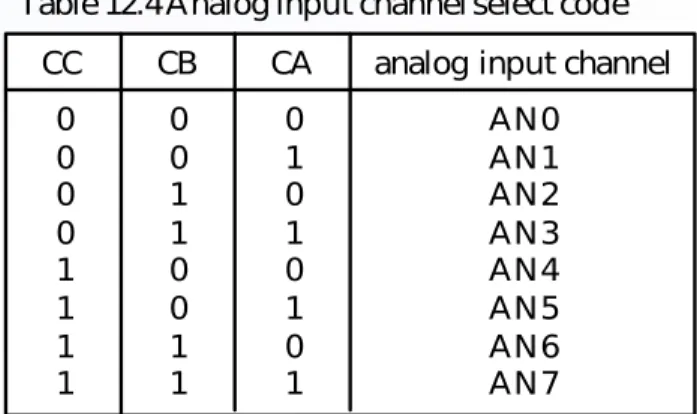
Table 12.4 Analog input channel select code
CC CB CA
0 0 0 0 1 1 1 1 0 0 1 1 0 0 1 1 0 1 0 1 0 1 0 1
analog input channel AN0 AN1 AN2 AN3 AN4 AN5 AN6 AN7
Table 11.5 Available result data formats
SRES8 DJM DSGN description and bus bit mappingResult data formats
1 1 1 0 0 0 0 0 1 0 0 1 0 1 x 0 1 x
8-bit / left justified / unsigned -- bits 8-15 8-bit / left justified / signed -- bits 8 - 15 8-bit / right justified / unsigned -- bits 0 - 7 10-bit / left justified / unsigned -- bits 6 - 15 10-bit / left justified / signed -- bits 6 - 15 10-bit / right justified / unsigned -- bits 0 -9
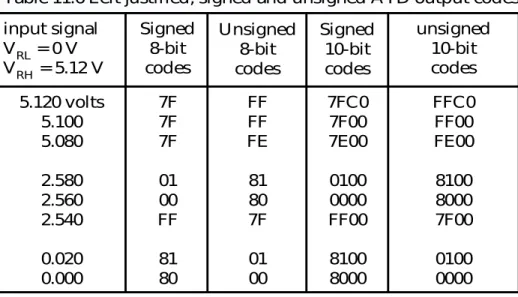
Table 11.6 Left justified, signed and unsigned ATD output codes input signal
VRL = 0 V
VRH = 5.12 V
Signed 8-bit codes Unsigned 8-bit codes unsigned 10-bit codes Signed 10-bit codes 5.120 volts 5.100 5.080 2.580 2.560 2.540 0.020 0.000 7F 7F 7F 01 00 FF 81 80 FF FF FE 81 80 7F 01 00 7FC0 7F00 7E00 0100 0000 FF00 8100 8000 FFC0 FF00 FE00 8100 8000 7F00 0100 0000
7 6 5 4 3 2 1 0 SCF 0 ETORF FIFOR 0 CC2 CC1 CC0
0 0 0 0 0 0 0 0 reset:
SCF: Sequence complete flag
0 = conversion sequence not completed 1 = conversion sequence has completed ETORF: External trigger overrun flag
0 = no external trigger overrun has occurred 1 = external trigger overrun has occurred FIFOR: FIFO overrun flag
0 = no overrun has occurred 1 = an overrun has occurred CC2, CC1, CC0: conversion counter
The conversion counter points to the result register that will receive the result of the current conversion.
In non-FIFO mode, this counter is reset to 0 at the begin and end of the conversion.
In FIFO mode, this counter is not reset and will wrap around when its maximum value is reached.
Figure 12.13 ATD status register 1 (ATDxSTAT0, x = 0 or 1)
ATD Status Register
(ATD0STAT0 and ATD1STAT0)
7 6 5 4 3 2 1 0
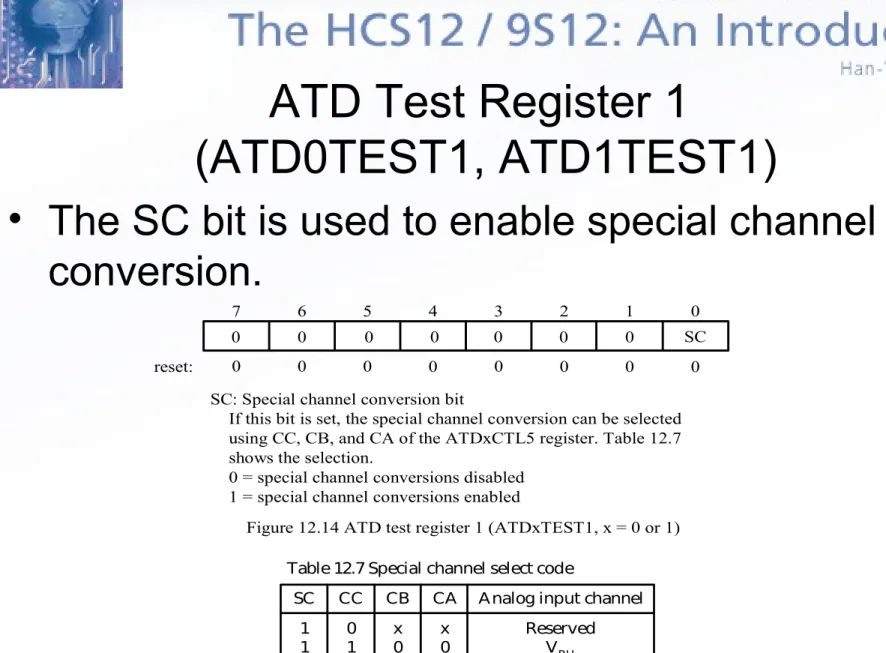
0 0 0 0 0 0 0 SC
0 0 0 0 0 0 0 0
reset:
SC: Special channel conversion bit
If this bit is set, the special channel conversion can be selected using CC, CB, and CA of the ATDxCTL5 register. Table 12.7 shows the selection.
0 = special channel conversions disabled 1 = special channel conversions enabled
Figure 12.14 ATD test register 1 (ATDxTEST1, x = 0 or 1)
SC CC CB CA Analog input channel 1 1 1 1 1 0 1 1 1 1 x 0 0 1 1 x 0 1 0 1 Reserved VRH VRL (VRH + VRL)/ 2
Reserved Table 12.7 Special channel select code
ATD Test Register 1
(ATD0TEST1, ATD1TEST1)
CCF7 CCF6 CCF5 CCF4 CCF3 CCF2 CCF1 CCF0
7 6 5 4 3 2 1 0
0 0
0 0
0 0
0 0
reset:
CCFx: conversion complete flag x (x = 7~0) 0 = conversion number x not completed
1 = conversion number x has completed, result in ATDyDRx Figure 12.15 ATD status register 1 (ATDxSTAT1, x = 0 or 1)
ATD Status Register 1
(ATD0STAT1, ATD1STAT1)
• A flag can be cleared by one of the following:
– Write to ATDxCTL5 register.
– If AFFC = 0 and read of ATDxSTAT1 followed by read
of result register ATDxDRy.
7 6 5 4 3 2 1 0
IEN7 IEN6 IEN5 IEN4 IEN3 IEN2 IEN1 IEN0
IENx: ATD digital input enable on channel x (x = 0~7) 0 = disable digital input buffer to PTADx
1 = enable digital input buffer to PTADx
reset: 0 0 0 0 0 0 0 0
Figure 12.16 ATD input enable register (ATDxDIEN, x = 0 or 1)
ATD Input Enable Register
(ATD0DIEN, ATD1DIEN)
Port Data Register (PTAD0, PTAD1)
ATD Conversion Result Registers
(ATDxDRy, x = 0~1, y= 0~7)
• Each result register is 16-bit and can be further
divided into two 8-bit registers ATDxDRHy and
ATDxDRLy.
ATD Module Clock
• The frequency range of the A/D converter clock
is from 500 KHz to 2 MHz.
conversion time = (no. of bits in resolution + no. of programmed sample clocks + 2) ATD clock frequency
Sample and Hold Stage
• As shown in Figure 12.8, a sample and hold stage
accepts analog signals from the input multiplexer and
stores them as charge on the sample capacitor.
• The sampling process has two stages.
• The first stage of the sampling process takes two A/D
clock cycles to charge the sample capacitor.
• The second stage of the sampling process stores the
charge in the storage node for a programmable 2, 4, 8,
or 16 cycles.
ATD clock frequency resolution converter time 2+2 sample clocks 2+4 sample clocks 2+8 sample clocks 2+16 sample clocks 2 MHz 2 MHz 500 KHz 500 KHz 8-bit(1) 10-bit(2) 8-bit 10-bit
4 s 5 s 16 s 20 s
2 s
8 s 12 s 3 s
20 s 36 s 5 s 9 s Table 12.8 ATD conversion timings
Note. 1. The fastest 8-bit resolution conversion time is 4 s + 2 s = 6 s. 2. The fastest 10-bit resolution conversion time is 5 s + 2 s = 7 s.
The A/D Conversion Time
• The A/D conversion time is the sum of the
converter time and the sample time.
Input Channel Wrap Around
• In the case of a multiple channel conversion
sequence, when input selector goes past
• Example 12.4 Assuming that S8C~S1C
(ATD0CTL3) are set to 0101 and CC~CA
(ATD0CTL5) are set to 110, what is the
conversion sequence for this setting?
• Solution:
– The first channel to be converted is AN6.
– There are five channels to be converted.
FIFO Mode
• All eight 16-bit result registers are organized into
a circular ring.
• The conversion counter in the ATDxSTAT0
register specifies the result register to hold the
current conversion result.
• In the FIFO mode, the conversion is not reset to
0 when a new conversion sequence is started.
• In the FIFO mode, the first conversion result
analog channel result stored in(FIFO mode) (non FIFO mode)result stored in AN6
AN7 AN0 AN1 AN2
ATD0DR5 ATD0DR6 ATD0DR7 ATD0DR0 ATD0DR1
ATD0DR0 ATD0DR1 ATD0DR2 ATD0DR3 ATD0DR4 Table 12.9 Conversion results storage
• Example 12.5 Assume that the following setting was programmed
before a new conversion is started:
– The conversion counter value in the ATD0STAT0 register is 5.
– The channel select code of the ATD0CTL5 register is 6.
– The conversion sequence limit of the ATD0CTL3 register is set to 5.
– The MULT bit of the ATD0CTL5 register is set to 1.
• How would the conversion results be stored when the FIFO mode is
selected or not selected?
• Solution:
– The conversion counter specifies the result register to hold the first
conversion result.
– The channel select code specifies the first channel to be converted.
– The conversion sequence limit specifies the number of channels to be
Procedure for Performing A/D Conversion
•
Step 1
– Connect the hardware properly: – VDDA: connect to VDD (5 V).
– VSSA: connect to GND – VRH: connect to VDD (5 V) – VRL: connect to GND
•
Step 2
– If the transducer is not in the appropriate range, use a signal conditioning circuit to shift and scale it to between VRL and VRH.
•
Step 3
– Select the appropriate channel (s) and operation modes by programming the ATD control register 5. Writing to the ATDxCTL5 register starts an A/D
conversion sequence.
•
Step 4
•
Example 12.6 Write a subroutine to initialize the AD0 converter for the
MC9S12DP256 and start the conversion with the following setting:
– Nonscan mode
– Select channel 7 (single channel mode) – Fast ATD flag clear all
– Stop AD0 in wait mode – Disable interrupt
– Perform four conversions in a sequence – Disable FIFO mode
– Finish current conversion then freeze when BDM becomes active
– 10-bit operation and 2 A/D clock periods of the second stage sample time – Choose 2 MHz as the conversion frequency for the 24 MHz bus clock – Result is unsigned and right justified
•
Solution:
– The setting of ATD0CTL2 • Enable AD0
• Select fast flag clear all (set bit 6 to 1)
• Stop AD0 when in wait mode (set bit 5 to 1)
• Disable external trigger on channel 7 (set bits 4, 3, and 2 to 0) • Disable AD0 interrupt (set bit 1 to 0)
– The setting of ATD0CTL3:
• Perform four conversions
• Disable FIFO mode
• When BDM becomes active, complete the current conversion then
freeze
• Write the value of 0x22 into this control register.
– The setting of ATD0CTL4:
• Select 10-bit operation (set bit 7 to 0)
• Two A/D clock periods for sample time (set bits 6 and 5 to 00)
• Set the value of PRS4~PRS0 to 00101
• Write the value 0x05 to this control register.
– The setting of ATD0CTL5:
• Result register right justified (set bit 7 to 1)
• Result is unsigned (set bit 6 to 0)
• Nonscan mode (set bit 5 to 0)
• Single channel mode (set bit 4 to 0)
• Select channel 7 (set bits 2..0 to 111)
#include "c:\miniide\hcs12.inc"
openATD0 movb #$E0,ATD0CTL2
ldy #2
jsr delayby10us ; wait for 20 us movb #$22,ATD0CTL3
movb #$05,ATD0CTL4 rts
#include “c:\miniide\delay.asm”
The Assembly Subroutine
#include “c:\egnu091\include\delay.c”
void openAD0 (void) {
ATD0CTL2 = 0xE0; delayby10us(2);
ATD0CTL3 = 0x22; ATD0CTL4 = 0x05; }
• Example 10.7 Write a program to perform A/D conversion on the analog signal
connected to the AN7 pin. Collect 20 A/D conversion results and store them at memory locations starting from $1000. Use the same configuration as in Example 10.6.
• Solution:
- Example 10.6 configures AD0 to perform 4 conversions in a sequence on channel AN7. - Need to write into the ATD0CTL5 five times to collect twenty samples.
#include "c:\miniide\hc12.inc"
org $1500
lds #$1500
ldx #$1000 ; use index register X as a pointer to the buffer jsr openAD0 ; initialize the ATD0 converter
ldy #5
loop5 movb #$87,ATD0CTL5 ; start an A/D conversion sequence brclr ATD0STAT0,SCF,*
movw ATD0DR0,2,x+ ; collect and save the conversion results movw ATD0DR1,2,x+ ; post-increment the pointer by 2
movw ATD0DR2,2,x+ ; “
movw ATD0DR3,2,x+ ; “
dbne y,loop5 swi
#include “c:\egnu091\include\hcs12.h” void openAD0 (void);
int buf[20];
void main (void) {
int i;
openAD0();
for (i = 0; i < 5; i++) {
ATD0CTL5 = 0x87; /* start an A/D conversion */
while (!(ATD0STAT0 & SCF)); /* Has A/D conversion completed? */ buf[4*i + 0] = ATD0DR0; /* save results right justified */
buf[4*i + 1] = ATD0DR1; buf[4*i + 2] = ATD0DR2; buf[4*i + 3] = ATD0DR3; }
asm ("swi"); }
• Example 12.8 Write a C program to be run on the Dragon12 (or SSE256) demo board to display the voltage (output of a potentiometer) connected to the AN7 pin. Configure the AD0 properly and perform 5 conversions per second and display the voltage on the LCD. • Solution:
- The conversion result 1023 corresponds to 5 V.
- Divide 204.6 into the conversion result to convert the result back to voltage.
- Multiply the conversion result by 10 and then divide the product by 2046 to get the voltage. #include “c:\egnu091\include\hcs12.h”
#include “c:\egnu091\include\delay.c”
#include “c:\egnu091\include\lcd_util_dragon12.c” void openAD0(void);
void wait20us (void); main(void)
{
char buffer[6]; /* used to hold the voltage value */ int temp;
char *msg1 = "Voltage = "; openlcd();
openAD0(); while(1) {
ATD0CTL5 = 0x87; /* convert AN7, result right justified */ while(!(ATD0STAT0 & SCF)); /* wait for conversion to complete */ buffer[0] = 0x30 + (ATD0DR0 * 10 )/2046;
temp = (ATD0DR0 * 10)%2046;/* find the remainder */
buffer[2] = 0x30 + (temp * 10)/2044; /* compute the fractional digit */ cmd2lcd(0x80); /* set LCD cursor to upper left corner*/ puts2lcd(msg1); /* output the message "voltage =" */ puts2lcd(&buffer[0]); /* output voltage string */
delayby100ms(2); /* wait for 200 ms */ }
return 0; }
void openAD0 (void) {
int i;
ATD0CTL2 = 0xE0; /* enable AD0, fast ATD flag clear, disable AD0 in wait mode */ delayby10us(2);
ATD0CTL3 = 0x0A; /* perform one conversion */
VSS
VDD VOUT
TC1047A
1 2
3
1.75
0.1
-40 0
0.5 0.9
40 90 125
1.4
Temperature VOUT
Figure 12.17 TC1047A VOUT vs. temperature characteristic
Temperature Sensor TC1047A
• It has three pins with voltage output directly proportional
to the ambient temperature.
• It can measure temperature in the range of -40ºC to
125ºC with a supply from 2.7~5.5V.
R1 R2
Rf
-+
+12 V
- 12 V 741
-+
+12 V
- 12 V 741
Figure 12.18 Circuit connection between the TC1047A and the HCS12 VM
5V
VOUT
TC1047A HCS12
AN0 9K
3K
150K 10K
10K
- 5V
• Example 12.9 Convert the temperature and display it in three integral and one fractional digits using the LCD. Display the temperature in the whole range of the TC1047A.
Update the display five times a second. E clock is 24 MHz. • Solution:
- The whole temperature range is 165oC.
- To translate from the A/D conversion result back to temperature, divide the result by 6.2, which can be done by multiplying the result by 10 and then divide the product by 62.
#include "c:\miniIDE\hcs12.inc"
period equ $2E ; ASCII code of period character
degree equ 223 ; ASCII code of degree character
org $1000
quo ds.b 1
rem ds.b 1
sign ds.b 1
fract ds.b 1
buf ds.b 8 ; to hold string to be output to LCD
org $1500
lds #$1500 ; set up stack pointer
ldy #2 ; wait for LCD to complete
jsr delayby100ms ; internal configuration
jsr openlcd ; configure LCD
ldaa #$80 ; set LCD cursor to upper
jsr cmd2lcd ; left corner
ldx #msg1 ; output "Temperature = "
jsr puts2lcd ; "
jsr openAD0 ; configure ATD0 module
forever movb #$20,buf ; initialize the buffer contents to 0.0oC
movb #$20,buf+1 ; "
movb #period,buf+3 ; "
movb #$30,buf+4 ; "
movb #degree,buf+5 ; degree character
movb #$43,buf+6 ; letter 'C'
movb #0,buf+7 ; null character
movb #$87,ATD0CTL5 ; start an ATD conversion sequence movb #0,sign ; initialize sign to positive
movb #$30,fract ; initialize fractional digit to 0
brclr ATD0STAT0,SCF,* ; wait for the conversion to complete
ldd ATD0DR0 ; read a conversion result
ldy #10 ; compute result x 10 / 62
emul ; "
ldx #62 ; "
ediv ; "
stab rem ; save the remainder
tfr y,d ; transfer quotient to B
subb #40 ; subtract temperature offset
bhs save_quo ; if non-negative, don't touch remainder
negb ; compute 2's complement of quotient
stab quo
ldab rem ; if remainder is 0, skip a few instruction
beq convert ;
ldab #62 ; compute 62 - rem
subb rem ; "
stab rem ; "
bra cal_fract
save_quo stab quo ; save updated quotient cal_fract ldab rem
beq convert ; come here when positive ldaa #10 ; compute fractional digit
mul ; "
ldx #62 ; "
idiv ; "
cmpb #31 ; round off fractional digit
blt no_round ; "
inx ; "
cpx #10 ; "
bne no_round ; "
inc quo ; "
bra convert ; prepare to separate integer digits no_round tfr x,d ; convert fractional digit to ASCII code
addb #$30 ; "
convert ldab quo
clra ; "
ldx #10 ; use repeated divide by 10 to separate
idiv ; integral digits
addb #$30 ; "
stab buf+2 ; save the one's digit
tfr x,d ; transfer quotient to D
tstb ; is quo zero?
beq add_fra ; if integral part is 0, then add fraction digit
ldx #10 ; separate the ten's digit
idiv
addb #$30 ; convert and store the ten's digit
stab buf+1 ; "
tfr x,d ; test hundred's digit
tstb ; is quotient 0?
beq add_fra
movb #$31,buf ; hundreds digit, if any, is 1 only add_fra movb fract,buf+4 ; insert fraction digit
ldaa sign ; check the sign
beq out_it
out_it ldaa #$C0 ; set cursor to 2nd row
jsr cmd2lcd ; "
ldx #spaces ; clear the 2nd row of the LCD
jsr puts2lcd ; "
ldaa #$C5 ; set LCD cursor position
jsr cmd2lcd ; "
ldx #buf ; output the temperature string
jsr puts2lcd ; "
ldy #2 ; wait for 200 ms
jsr delayby100ms ; "
jmp forever ; continue
; ******************************************************************************************** ; The following function perform the AD0 configuration.
; ********************************************************************************************
openAD0 movb #$E0,ATD0CTL2 ; enable AD0, fast ATD flag clear, stop in wait mode
ldy #2
jsr delayby10us ; wait until AD0 is stabilized movb #$0A,ATD0CTL3 ; perform one A/D conversion
#include "C:\miniIDE\lcd_util_dragon12.asm" #include "c:\miniIDE\delay.asm"
msg1 fcc "Temperature = "
dc.b 0
spaces fcc " "
dc.b 0
#include “c:\egnu091\include\hcs12.h” #include “c:\egnu091\include\delay.c” #include “c:\egnu091\include\convert.c”
#include “c:\egnu091\include\lcd_util_dragon12.c” void openAD0(void);
char buf[8];
char *msg1 = "temperature = "; char *blanks = " "; void main (void)
{
int temp1,temp2; char sign,fdigit,frem; char *ptr;
delayby100ms(2); /* wait for LCD kit to initialize */ openlcd(); /* configure LCD kit */
openAD0(); /* configure AD0 module */
cmd2lcd(0x80); /* set cursor to upper left corner */
while(1) {
sign = 0; /* initialize sign to be positive */
ATD0CTL5 = 0x87; /* start a conversion with result right justified */ while(!(ATD0STAT0 & SCF)); /* wait until conversion is done */
temp1 = (ATD0DR0 * 10) / 62; /* integer part of temperature */ temp2 = (ATD0DR0 * 10) % 62; /* remainder part */
temp1 -= 40; /* subtract the offset from the actual temperature */ if (temp1 < 0){ /* temperature is negative */
sign = 1;
temp1 = ~temp1 + 1; /* find the magnitude of temperature */ if (temp2) { /* remainder not zero */
temp1 --;
temp2 = 62 - temp2; }
}
fdigit = (temp2 * 10) / 62; /* compute the fractional digit */ frem = (temp2 * 10)%62;
if (frem > 31) { fdigit ++;
if (fdigit == 10) { /* round off the fraction digit */ fdigit = 0;
}
if (sign) {
ptr = &buf[1]; /* point to the first space to hold ASCII string */ buf[0] = 0x2D; /* store minus sign as the first character */ }
else
ptr = &buf[0];
int2alpha(temp1,ptr); /* convert the integer part to ASCII string */ ptr = &buf[0];
while(*ptr) /* find the end of the integer string */ ptr++;
*ptr++ = '.';
*ptr++ = fdigit + 0x30;
*ptr++ = 223; /* add a degree character */ *ptr++ = 'C'; /* temperature in Celsius */
*ptr = 0; /* terminate the temperature string */ cmd2lcd(0xC0); /* move cursor to 2nd row */
puts2lcd(blanks); /* clear the 2nd row */
cmd2lcd(0xC5); /* set cursor to column 5 row 2 */ puts2lcd(&buf[0]); /* output the temperature */
delayby100ms(2); /* wait for 0.2 seconds */ }
Specification Description total accuracy Interchangeability Operating temperature Storage temperature Linearity Repeatability Humidity Stability
Temp. effect on 0% RH voltage Temp. effect on 100% RH voltage Output voltage
VS Supply requirement Current requirement
± 2% RH, 0-100% TH @25oC
± 5% RH up to 60% RH, ±8% RH at 90% RH -40 to 85oC (-40 to 185oF)
-51 to 110oC (-60 to 223oF)
±0.5% RH typical ±0.5% RH
±1% RH typical at 50% RH in 5 years ±0.007% RH/oC (negligible)
-0.22% RH/oC
VOUT = (VS)(0.16 to 0.78) nominal relative to supply voltage for 0-100% RH; i.e., 1-4.9V for 6.3V supply; 0.8 - 3.9V for 5V supply;
Sink capability 50 microamp; drive capability 5 microamps typical; low pass 1KHz filter required. Turn on time < 0.1 sec to full output. 4 to 9V, regulated or use output/supply ratio; calibrated at 5V
200 microamps typical @5V, increased to 2mA at 9V
Table 12.10 Specifications of IH-3605
The Humidity Sensor IH-3606
• Provides a linear voltage output from 0.8 to 3.9 V in the full range of relative humidity 0% to 100% with 5 V power supply
• Is light sensitive and should be shielded from light for best result
VS (= 5V)
VOUT IH-3605
1K
0.16F
GND
V1 R1
R2
Rf
-+
+12 V
- 12 V 741
-+
+12 V
- 12 V 741
R0
R0
VOUT
HCS12
Figure 12.20 Relative humidity measurement circuit AN7 R0 = R1 = 10K
R
Rf
V1 = 5V
Circuit Connection Between
the IH-3605 and the HCS12
• Example 12.10 Construct a humidity measurement system that consists of the HCS12, an IH-3605 humidity sensor, and an LCD. The bus clock frequency of the HCS12 is 24 MHz. • Solution:
- To translate from the A/D conversion result back to humidity, divide the conversion result by 10.23.
- The same operation can be implemented by multiplying the conversion result by 100 and dividing by 1023.
#include “c:\egnu091\include\hcs12.h” #include “c:\egnu091\include\delay.c” #include “c:\egnu091\include\convert.c”
#include “c:\egnu091\include\lcd_util_dragon12.c” void openAD0(void);
char buf[10];
char *msg1 = "humidity = "; char *blanks = " "; void main (void)
{
unsigned int quo,rem,frem; long temp;
delayby100ms(2); /* wait for LCD kit to self initialize */ openlcd(); /* configure LCD kit */
openAD0(); /* configure AD0 module */
cmd2lcd(0x80); /* set cursor to upper left corner */ puts2lcd(msg1); /* output the message "humidity = " */ while(1) {
ATD0CTL5 = 0x87; /* start a conversion with result right justified */ while(!(ATD0STAT0&SCF)); /* wait until conversion is done */
temp = (long)ATD0DR0 * 100; /* force compiler to use 32-bit to represent the product */
quo = temp / 1023; /* integer part of temperature */ rem = temp % 1023; /* remainder part */
if (quo == 100)
rem = 0; /* force highest humidity to 100% only */ fdigit = (rem * 10) / 1023; /* compute the fractional digit */ frem = (rem * 10) % 1023;
if (frem > 511) fdigit ++;
if (fdigit == 10) { /* round off the fraction digit */ fdigit = 0;
ptr = &buf[0];
int2alpha(quo,ptr); /* convert the integer part to ASCII string */ ptr = &buf[0];
while(*ptr) /* find the end of the integer string */ ptr++;
*ptr++ = '.'; /* decimal point */ *ptr++ = fdigit + 0x30; /* fractional digit */ *ptr++ = '%';
*ptr = 0; /* terminate the humidity string */ cmd2lcd(0xC0); /* move cursor to 2nd row */
puts2lcd(blanks); /* clear the 2nd row */
cmd2lcd(0xC5); /* set cursor to column 5 row 2 */ puts2lcd(&buf[0]); /* output the humidity */
delayby100ms(2); /* wait for 0.2 seconds */ }
}
void openAD0(void) {
ATD0CTL2 = 0xE0; /* enable AD0, fast ATD flag clear, power-down on wait */ ATD0CTL3 = 0x0A; /* perform one ATD conversion */
ATD0CTL4 = 0x25; /* prescaler set to 12, select 4 cycles sample time */ delayby10us(2);
Table 12.11 Altitude versus pressure data
Altitude (ft) Pressure (in-Hg) Pressure (mbar) Pressure (kPa) 0 500 1000 6000 10000 15000 29.92 29.38 28.85 23.97 20.57 16.86 1013.4 995.1 977.2 811.9 696.7 571.1 Pressure (psi) 14.70 14.43 14.17 11.78 10.11 8.28 101.4 99.5 97.7 81.2 69.7 57.1
Measuring the Barometric Pressure
•
Barometric pressure is the air pressure existing at any point within earth’s
atmosphere.
•
This pressure can be measured as an absolute pressure (with reference to
absolute vacuum) or can be referenced to some other value or scale.
•
Absolute pressure is used in meteorology and aviation.
•
Atmosphere pressure is exponentially related to altitude. Once the pressure
at a certain point is measured, the pressure at any other point can be
computed.
ASCX30AN
1 2 3 4 5 6
Pin 1: External offset adjust
Pin 2: VS
Pin 3: VOUT
Pin 4: GND Pin 5: N/ C Pin 6: N/ C
Figure 12.21 ASCX30AN pin assignment
The SenSym ASCX30AN Pressure Sensor
• It is a 0 to 30 psia (psi absolute) pressure transducer.
• The range of barometric pressure is between 28 to 32
inches mercury (in-Hg) or 13.75 to 15.72 psia or 948 to
1083.8 mbar.
Characteristic
Table 12.12 ASCX30AN performance characteristics (1)
Pressure range Zero pressure offset Full-scale span (2)
Output at FS pressure
Combined pressure non-linearity and pressure hysteresis (3)
Temperature effect on span (4)
Temperature effect on offset (4)
Response time (10% - 90%) (5)
Repeatability
min typ max
0 psia 0.205 4.455 4.660 --0.250 4.500 4.750 ±0.1 ±0.2 ±0.2 0.1 ±0.05 30 psia 0.295 4.545 4.840 ±0.5 ±1.0 ±1.0 --Note 1. Reference conditions: TA = 25oC, supply voltage V
S = 5 V
2. Full scale span is the algebraic difference between the output voltage at full-scale pressure and the output at zero pressure. Full-scale span is ratiometric to the supply voltage.
3. Pressure non-linearity is based on the best-fit straight line. Pressure hysteresis is the maximum output difference at any point within the operating pressure range for increasing and decreasing pressure.
4. Maximum error band of the offset voltage or span over the compensated temperature range, relative to the 25oC reading.
R1 R2 Rf -+ +12 V
- 12 V 741
-+
+12 V
- 12 V 741
Figure 12.22 Barometric pressure sensor output scaling and shifting circuit. VM 5V VOUT ASCX30AN HCS12 AN7 27K 1.6K 3.9 10K 10K 5V offset adjust 5V
• Example 12.11 Write a program to measure and display the barometric pressure in units of mbar using the ASCX30AN pressure transducer.
• Solution:
- The offset adjustment can be achieved by using a potentiometer.
- The whole barometric pressure range is 135.8 mbar (= 1083.8 – 948).
- To translate back to barometric pressure, divide 7.53 into the A/D conversion result or multiply the conversion result by 100 and then divide the product by 753 and then add 948 to the quotient.
#include “c:\egnu091\include\hcs12.h” #include “c:\egnu091\include\delay.c” #include “c:\egnu091\include\convert.c”
#include “c:\egnu091\include\lcd_util_dragon12.c” void openAD0(void);
char buf[12];
char *msg1 = "pressure = "; char *blanks = " "; void main (void)
{
unsigned int quo,rem,frem; long temp;
char *ptr,fdigit;
delayby100ms(2); /* wait for LCD kit to self initialize */ openlcd(); /* configure LCD kit */
openAD0(); /* configure AD0 module */
cmd2lcd(0x80); /* set cursor to upper left corner */ puts2lcd(msg1); /* output the message "pressure = " */ while(1) {
temp = (long)ATD0DR0 * 100;
quo = temp/753; /* integer part of pressure */ rem = temp%753; /* remainder part */
fdigit = (rem * 10)/753; /* compute the fractional digit */ frem = (rem * 10) % 753;
if (frem > 377) fdigit ++;
if (fdigit == 10) { /* round off the fractional digit */ fdigit = 0;
quo ++; }
ptr = &buf[0]; quo = quo + 948;
int2alpha(quo,ptr); /* convert the integer part to ASCII string */ ptr = &buf[0];
while(*ptr) /* find the end of the integer string */ ptr++;
*ptr++ = '.';
*ptr++ = fdigit + 0x30; *ptr++ = 0x20;
*ptr++ = 'b'; *ptr++ = 'a'; *ptr++ = 'r';
*ptr = 0; /* terminate the barometric pressure string */ cmd2lcd(0xC0); /* move cursor to 2nd row */
puts2lcd(blanks); /* clear the 2nd row */
cmd2lcd(0xC5); /* set cursor to column 5 row 2 */ puts2lcd(&buf[0]); /* output the pressure */
delayby100ms(2); /* wait for 0.2 seconds */ }
}
void openAD0(void) {
ATD0CTL2 = 0xE0; /* enable AD0, fast ATD flag clear, power-down on wait */ ATD0CTL3 = 0x0A; /* perform one ATD conversion */
ATD0CTL4 = 0x25; /* prescaler set to 12, select 4 cycles sample time */ delayby10us(2);