16 INTERNATIONAL JOURNAL OF ADVANCES IN ENGINEERING RESEARCH
DESIGNING A CUSTOM OS FOR IOT USING YOCTO
PROJECT AND CREATING IOT APPS USING IBM
BLUEMIX
Subravelu.T1 Ruhan Bevi.A2
1PG-Student, Department of Electronics and Communication Engineering, SRM University Chennai, India
2Assistant Professor,Department of Electronics and Communication Engineering, SRM University, Chennai, India
ABSTRACT
INTRODUCTION
IOTis an evolution of mobile, home, embedded application better be connected to internet integrating greater computable capabilities. Billions of devices will be connected to internet. The connected devices become an intelligent system of systems. But Internet of Things too needs an OS to run the software on it.So we are designing a custom OS for IOT using yocto project. The Yocto Project is an open source collaboration project that provides templates, tools and methods to help you create custom Linux-based systems for embedded products regardless of the hardware architecture. It's a complete embedded Linux development environment with tools, metadata, and documentation - everything you need. The free tools are easy to get started with, powerful to work with (including emulation environments, debuggers, an Application Toolkit Generator, etc.) and they allow projects to be carried forward over time without causing you to lose optimizations and investments made during the project’s prototype phase.[1]
YOCTO PROJECT
The Yocto Project is an open-source collaboration project focused on embedded Linux developers. Among other things, the Yocto Project uses a build system based on the
Developers spend lot of time porting or making build systems which leaves less time and resources to develop value adding software features this can resolved by the Yocto Project. The Yocto Project combines the convenience of a ready-to-run Linux Distribution with the flexibility of a custom Linux operating system. The Yocto Project is not an Embedded Linux Distribution. It creates a custom one for us, it is an Ecosystem. The Yocto Project used to establish a custom Linux baseline across multiple hardware configurations. This allows software developers to write software for an embedded Internet of Things (IoT) device. The IoT is expected to offer an unprecedented connectivity of all the things including but not limited to devices, systems and services. This interconnection can creates a platform to automate and connect for almost all the fields and industry. However, Low cost computing platforms could be used which specialize in doing only one thing and also consume less power. Yocto project used to build a free custom OS which will support Internet of Things in Beaglebone black as low cost computing platform.
17 INTERNATIONAL JOURNAL OF ADVANCES IN ENGINEERING RESEARCH
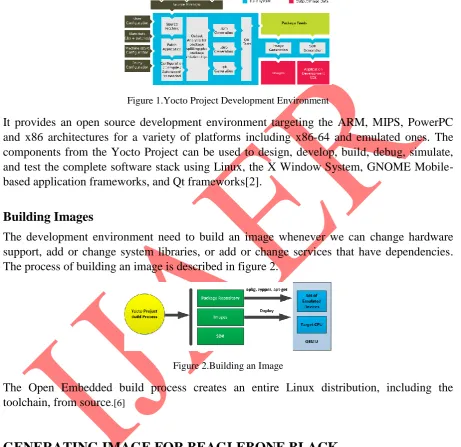
OpenEmbedded (OE) project, which uses the BitBake tool, to construct complete Linux images. The BitBake and OE components are combined together to form Poky, a reference build system. The Yocto Project Development Environment is shown in figure 1.
Figure 1.Yocto Project Development Environment
It provides an open source development environment targeting the ARM, MIPS, PowerPC and x86 architectures for a variety of platforms including x86-64 and emulated ones. The components from the Yocto Project can be used to design, develop, build, debug, simulate, and test the complete software stack using Linux, the X Window System, GNOME Mobile-based application frameworks, and Qt frameworks[2].
Building Images
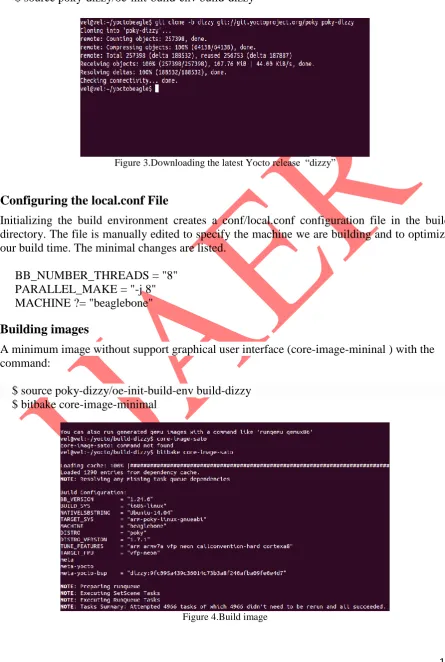
The development environment need to build an image whenever we can change hardware support, add or change system libraries, or add or change services that have dependencies. The process of building an image is described in figure 2.
Figure 2.Building an Image
The Open Embedded build process creates an entire Linux distribution, including the toolchain, from source.[6]
GENERATING IMAGE FOR BEAGLEBONE BLACK
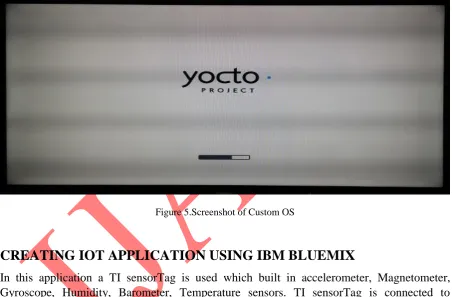
A source directory is set up by using git to clone the poky repository and then check out the release branch using the following commands
$ cd ~
$ git clone git://git.yoctoproject.org/poky $ cd poky
$ git checkout -b dizzy origin/dizzy
18 INTERNATIONAL JOURNAL OF ADVANCES IN ENGINEERING RESEARCH $ cd ~/yocto
$ source poky-dizzy/oe-init-build-env build-dizzy
Figure 3.Downloading the latest Yocto release “dizzy”
Configuring the local.conf File
Initializing the build environment creates a conf/local.conf configuration file in the build directory. The file is manually edited to specify the machine we are building and to optimize our build time. The minimal changes are listed.
BB_NUMBER_THREADS = "8" PARALLEL_MAKE = "-j 8" MACHINE ?= "beaglebone"
Building images
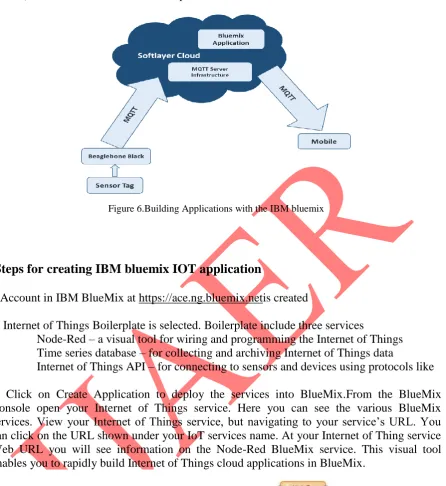
A minimum image without support graphical user interface (core-image-mininal ) with the command:
$ source poky-dizzy/oe-init-build-env build-dizzy $ bitbake core-image-minimal
19 INTERNATIONAL JOURNAL OF ADVANCES IN ENGINEERING RESEARCH List of files generated
MLO-beaglebone(The second stage bootloader), u-boot-beaglebone.img(The third stage u-boot u-bootloader), uImage(The Linux kernel image),core-image-base-begalebone.tar.bz2(This compressedfile contains the root file system)
Setup sdcard
To deploy the system on beaglebone we need to prepare an SD-card. The SD-card partitioned into two partition first one use FAT32 file system around 50mb and label it as BOOT and rest of SD-carduse ext4 file system label it as ROOT. Then copy files MLO,uImage into BOOT partition and u-boot.img,core-image-base-begalebone.tar.bz2 into ROOT partition.Now we can boot from sdcard by pressing boot button in beaglebone.Screenshot of custom os is shown in figure 5.
Figure 5.Screenshot of Custom OS
CREATING IOT APPLICATION USING IBM BLUEMIX
20 INTERNATIONAL JOURNAL OF ADVANCES IN ENGINEERING RESEARCH
Figure 6.Building Applications with the IBM bluemix
Steps for creating IBM bluemix IOT application
1 Account in IBM BlueMix at https://ace.ng.bluemix.netis created
2. Internet of Things Boilerplate is selected. Boilerplate include three services
Node-Red – a visual tool for wiring and programming the Internet of Things Time series database – for collecting and archiving Internet of Things data
Internet of Things API – for connecting to sensors and devices using protocols like MQTT
3. Click on Create Application to deploy the services into BlueMix.From the BlueMix Console open your Internet of Things service. Here you can see the various BlueMix services. View your Internet of Things service, but navigating to your service’s URL. You can click on the URL shown under your IoT services name. At your Internet of Thing service Web URL you will see information on the Node-Red BlueMix service. This visual tool enables you to rapidly build Internet of Things cloud applications in BlueMix.
Figure 7.node-red circuit
The figure 7 shows basic node-RED flow which sends an alert to our twitter account if the temperature exceeds threshold value.
21 INTERNATIONAL JOURNAL OF ADVANCES IN ENGINEERING RESEARCH
Figure 8.Entering Sensortag mac address
5.Double click on the twitter node and add your twitter credentials. It will open a new window where you will need to authorize this application to access our account.
6. Finally, click on deploy.Now the flow is deployed and this flow will tweet if the temperature of sensorTag goes above 55 deg C, it tweets every 4 seconds is shown in figure 9.
Figure 9. Getting alert on mobile
CONCLUSION
22 INTERNATIONAL JOURNAL OF ADVANCES IN ENGINEERING RESEARCH
REFERENCES
[1] Baccelli, Hahm, Günes, Wählisch, T.C. “RIOT OS: Towards an OS for the Internet of
Things”, IEEE Conference on 2013,doi:10.1109/INFCOMW.2013.6970748
[2] Lu, Jian ; Rosenblum, David S. ; Bultan, Tevfik ; Issarny, Valerie ; Dustdar,
Schahram; Storey, Margaret-Anne ; Zhang, Dongmei Software “Roundtable: The
Future of Software Engineering for Internet Computing”, IEEE press,2015, pp. 91 -
97doi:10.1109/MS.2015.15
[3] Derek Molloy, “Exploring BeagleBone: Tools and Techniques for Building with Embedded Linux”, 2014
[4] Naghshineh, Ratnaparkhi, Dillenberger,“IBM Research Division cloud computing
Initiative”, 2013
[5] Daiane Angolini , Otavio Salvador, “Embedded Linux Development with Yocto
Project: Develop fascinating Linux-based projects using the groundbreaking Yocto
Projects tools”, 2014
[6] IBM Bluemix [online] http://www-01.ibm.com/software/bluemix/
[7] Yocto project [online] https://www.yoctoproject.org/
[8] Beaglebone [online] http://beagleboard.org/bone