Find Usability Problems: A Healthcare
Case Study
Shadi Ghajar-Khosravi PhD Candidate
University of Toronto Mech. & Ind. Eng. Dept. Interactive Media Laboratory 5 King’s College Road Toronto, Ontario Canada
[email protected] Flora Wan
Assistive Technology Consultant
Holland Bloorview Kids Rehabilitation Hospital 150 Kilgour Road Toronto, Ontario Canada
[email protected] Samir Gupta
Assistant Professor Department of Medicine University of Toronto St. Michael's Hospital, 6-045 Bond Wing
30 Bond Street Toronto, Ontario Canada
[email protected] Mark Chignell Professor
University of Toronto Mech. & Ind. Eng. Dept. Interactive Media Laboratory 5 King’s College Road Toronto, Ontario Canada
Abstract
For tools that involve the creation of an artifact or document, reverse engineering potentially provides an interesting alternative to task-based usability testing. In this case study, participants were shown an artifact and asked to recreate it using a software tool. Would the reverse engineering testing method be as successful as traditional task-based methods in uncovering usability problems? Would test participants be comfortable using the method? Participants used both reverse engineering and task-based approaches to usability testing in counterbalanced order. Using an online tool for developing asthma action plans, the reverse engineering method uncovered more usability problems than the traditional task-based usability testing method. The 12 test participants had a positive attitude towards the reverse engineering method although it took them longer to perform their tasks and they faced a greater number of issues. Both the longer task time and the greater number of problems uncovered were likely caused by the greater attention to detail that reverse engineering requires of participants. This case study demonstrates that reverse engineering may be a useful alternative to pre-defining the tasks for the participant when carrying out a usability test.
Keywords
Introduction
The purpose of this paper is to present a case study of the use of reverse engineering as a usability testing tool instead of the traditional task-based scenario method. We have heard anecdotally of
usability specialists using reverse engineering in their practice, but there seems to be a lack of published discussions of the use of the technique. Thus, in this paper we present a case study in the use of reverse engineering for usability testing in the hope that it will promote increased use of the reverse engineering technique.
Healthcare is the area of application context for this case study, and more specifically the creation of asthma action plans. These plans are important artifacts that provide guidance on how to manage asthma as a chronic condition. We chose this context to explore the value of reverse engineering.
Background
Many methods for general purpose usability evaluation have been described (e.g., Sharp, Rogers, & Preece, 2011), both quantitative (e.g., measuring task completion time and number of errors) and qualitative (e.g., collecting feedback on user preferences through questionnaires and focus groups; Rubin, Chisnell, & Spool, 2008). However, one method that has received little attention is the case where a software tool produces a specific artifact, and participants are asked to recreate the artifact (using the tool) through a process of reverse engineering.
The term reverse engineering as it applies to software engineering is defined by Chikofsky and Cross (1990) as the following:
The process of analyzing a subject system to (i) identify the system’s components and their interrelationships and (ii) create representations of the system in another form or at a higher level of abstraction.
From a usability testing perspective, the four phases of a typical reverse engineering process(Storey, Sim, & Wong, 2002) can be adapted as the following sequential steps:
Step 1–Parse: The test participant is given the final product of a system (e.g., a document or graphic) and identifies the elements comprising the product.
Step 2–Analyze: Participant analyzes the elements of the product in order to understand how they are related to the features of the tool.
Step 3–Document/Visualize: Participant looks at each element in more detail and maps them to the functionality of the tool. The participant may go back to Step 2 for further analysis of the elements.
Step 4–Reengineer: Participant recreates the product using the tool while the observer notes any difficulties encountered during the reengineering process due to the design flaws in the system. Once the product is reengineered, the participant may go back to Step 1 and parse the product again until satisfied with the recreated product.
In the case study reported in this paper, we compared the reverse engineering approach to usability testing with a traditional task-based scenario technique. The research involved an evaluative case study using an online tool for creating asthma action plans. The tool was developed to let three different groups of stakeholders (respirologists, patients, and asthma educators/primary care physicians) create asthma action plans collaboratively. Further information on the development of the tool was provided by Wan (2009) and by Gupta, Wan, Newton, Chignell, and Straus (2011).
An asthma action plan consists of a set of written instructions on how to treat asthma when the condition is stable, as well as when the symptoms are active (Plottel & Feldman, 2008). Asthma action plans usually use the “zone” system, patterned after the red-yellow-green lights of a traffic signal, to describe the severity of asthma symptoms and to determine the appropriate response (Sloane, Slatt, Ebell, & Jacques, 2008). Studies have shown that the use of asthma action plans for self-management of asthma symptoms greatly improves the health of adult patients (Gibson et al., 2003), and in the case of asthmatic children, significantly reduces the number of acute care visits per child (Zemek, Bhogal, & Ducharme, 2008).
determine the preferences of different stakeholders for the design and content of an asthma action plan and to use an online tool to collaboratively author a consensus asthma action plan.
Methods
A set of available asthma actions plans were surveyed to create an exhaustive list of features to be included in the Wikibreathe tool. Based on those features, an initial prototype was created. Then, a series of focus groups were conducted to gather initial feedback on the design of the Wikibreathe tool prototype. Based on the feedback collected, the revised prototype was developed and then evaluated using two usability testing methods: task-based and reverse engineering testing methods.
Prototyping
The following sections discuss the initial requirements for gathering data and the focus group that helped develop our prototype.
Initial requirements gathering
Before starting to design the Wikibreathe tool, available asthma action plans written in English were surveyed in order to create an exhaustive list of features that could potentially be included in the tool. Sixty-nine unique asthma action plans from around the world were analyzed for both content and format differences. Based on the requirements collected as a result of this survey, expert opinion, and best evidence, it was decided that the Wikibreathe tool should be able to generate an asthma action plan with the following sections:
Header: This section contains the basic administrative information, such as a line to write the date and patient name, as well as other pertinent information such as the severity of a patient’s overall condition.
Zone Description: This section contains the description of asthma symptoms divided into different sections based on the severity of each symptom. For example, a description of “breathing” in the Green zone might be “Breathing is easy” whereas in the Red zone the description would be “Very short of breath.”
Zone Instruction: This section describes the actions an asthma patient should take when their symptoms match one of the zone descriptions. An example of an instruction would be “Take reliever inhaler, ____ puffs every 4 to 6 hours.”
Footer: This section is at the bottom of the plan and may include a space for patient or physician signatures or important reminder statements about asthma.
Focus group
An initial prototype was developed based on the format and content features identified during the initial requirements gathering phase. The overall concept for the envisioned tool was that the user would choose from a list of options on the left side of the screen to build up the asthma action plan that would then be displayed on the right side of the screen. A series of moderated focus groups and interviews were then conducted to gather feedback on the initial design of the Wikibreathe tool. In order to clearly evaluate the preferences of the stakeholders and to avoid bias, each stakeholder group was evaluated separately.
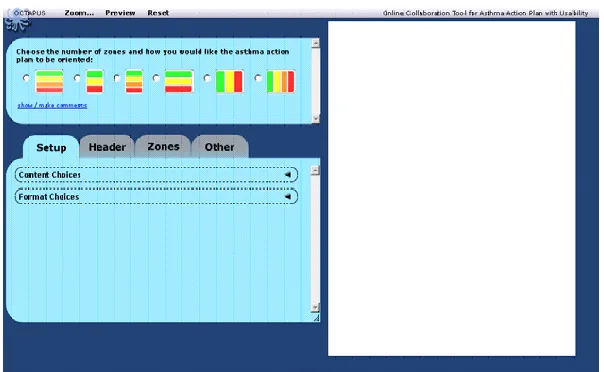
The results of all three stakeholder groups showed that participants had a positive attitude towards the Wikibreathe tool. A major difficulty across all groups of participants was lack of proper organization in the navigation system. Based on the feedback collected during these focus groups, the initial prototype was modified, and a revised prototype was developed for testing using the two contrasting methods (i.e., the traditional task-based method and the novel reverse-engineering method). See Figure 1 for the revised prototype.
Figure 1. Revised prototype of the Wikibreathe tool
Usability Testing Methodology
This section discusses the process used to evaluate the revised version of the Wikibreathe tool using the two usability evaluation methods.
Participant selection
A convenience sample of 12 participants (4 Male, 8 Female; these participants were not the participants used in the focus group) between the ages of 20-40 were recruited from friends and family of the researchers. Their occupations ranged from a high school teacher and music therapists to a programmer and an engineer. They spent an average of 9 hours each week on the Internet at work and 10.4 hours each week on the Internet at home. All participants had a generally positive attitude towards computers. Thus, our participants tended to be well educated and computer savvy, as would be the respirologists who were the target users of the Wikibreathe system. If we were testing the effectiveness of the tool itself, a sample of respirologists would be needed. We were interested, however, in the testing method so we decided that for a case study, the sample we used would be appropriate.
User study process
Participants used the Wikibreathe tool with both a traditional task-based scenario approach and a reverse-engineering method. Participants were asked to use the tool to perform the same task of creating an asthma action plan twice (i.e., in a within-subjects design): once using the traditional task-based method and once using the reverse engineering technique.
During the user study sessions, participants were first introduced to the goal of the project and were told that the purpose of the study was to examine the usability of the Wikibreathe tool for designing asthma action plans. They were then given a brief introduction and training on the Wikibreathe tool. Each participant received the same amount and type of training. Lastly, they were shown three asthma action plan examples that we had created previously using the Wikibreathe tool.
Participants then used the Wikibreathe tool with one of the usability testing methods, then the other. The order of methods was counterbalanced such that six participants did the task-based method first and six did the reverse engineering method first. The following describes the methods used in this case study:
Task-based testing method (TM): This method is based on the traditional task-based usability testing approach using invented scenarios. Participants were told to imagine that they were a respirologist who was designing an asthma action plan. They were given a set of tasks to perform using the Wikibreathe tool.
Wikibreathe tool which was already developed by our team as part of an earlier project) and asked to recreate it as closely as possible, using the tool.
The process of preparing for the reverse engineering portion of the case study consisted of creating an asthma action plan, using the Wikibreathe tool, that participants could then attempt to duplicate. Thus, once we created an asthma action plan instance to use as the target in the reverse engineering method, the only remaining step was preparing a few straightforward instructions on how to do the reverse engineering task using the Wikibreathe tool (see Appendix A). In contrast, a detailed set of instructions and a moderator script were required as preparation for the task-based test method. A more important challenge in task-based usability testing is that the test administrator not only has to select which tasks to include and in what order but also to carefully word them so that they are clear and unambiguous. Besides, with task scenarios, it is almost impossible to probe all aspects of a product. Therefore, test administrators have to choose what to probe and that may limit their ability to uncover all of the important problems. These challenges are sidestepped in the “make what you see” approach of the reverse engineering method (Appendix A).
Because participants were to use the same tool with each evaluation method, we decided to use two different asthma action plans so as to reduce the learning effect of having to create the same plan twice. We constructed the two plans in such a way that they were different overall, but had similar tasks, so that the results were comparable.
During each user study session, the task completion time and percentage of errors made during each of the testing methods were recorded. Examples of errors included deselecting an option while the option had to be selected or not recognizing the different page layouts (Table 1). Participants were encouraged to verbalize their thoughts while using each method.
After each method, a short questionnaire was administered to the participant. The questionnaire consisted of the System Usability Scale (SUS) questions and a number of open-ended questions inquiring about the participant’s attitude towards the tool (for example, if they felt confident or
frustrated while using the tool). The SUS questionnaire used a 5-point Likert scale where 1 was Strongly Disagree and 5 was Strongly Agree (Brooke, 1996).
After both of the methods were completed by the participant, a semi-structured interview was conducted. The interview inquired about the issues raised during the participant’s interaction with the tool. Participants were also asked about their overall impression of the tool.
Results
The following sections discuss the time each participant took to complete each method, the usability problems encountered with the tool, the usability questionnaire, and a summary of the results. Overall, participants found the reverse engineering approach an enjoyable testing process although they spent more time to perform the tasks and encountered more usability problems during the tasks.
Time
Usability Problems
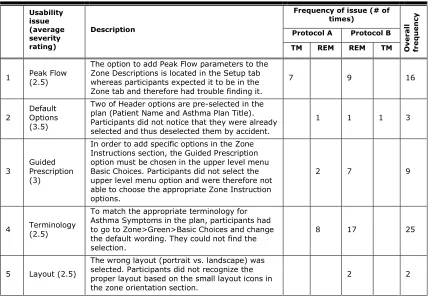
The detailed results concerning usability problems are shown in Table 1. A total of 110 usability problems were encountered, representing varying repetitions of 11 unique problems. The usability problems were identified by one of the authors (Flora Wan) acting as the tester. Problems were identified based on observation notes written during the sessions, verbal feedback from participants, and problems with the asthma action plans that were produced. In protocol B (where the reverse engineering testing method was performed first) a greater number of unique usability problems (11 unique problems compared to 9 in protocol A) were found throughout the two methods. All of the 11 unique problems were discovered during the reverse engineering testing method when it was performed first (in protocol B).
Usability problems can vary greatly in severity and uncovering more severe problems is generally more beneficial than finding minor problems (e.g., Molich & Dumas, 2008). We asked one respirologist and one human factors specialist to independently rate the 11 unique problems on a severity scale (0= not a problem, 1= cosmetic, 2 = minor, 3 = major, 4 = catastrophic). The average severity rating (across the two experts) for each usability problem is shown in the second column of Table 1 (in parentheses, following the column title). The problems ranged from an average severity rating of 1, for trying to carry out a search that was not a supported feature, to a problem with a rating of 3.5 (midway between major and catastrophic on the severity rating scale) that involved pre-selection of options.
In protocol B, participants had more difficulties using the Wikibreathe tool relative to the participants in protocol A. The six participants who were tested with protocol A encountered a total of 29 (16+13) usability problems throughout both testing methods. However, the six participants who were tested based on protocol B encountered a total of 81 (79+2) usability problems throughout both testing methods, 79 of which were encountered during the first (reverse engineering) testing method. Table 1. Usability Problems (TM=Task-based testing method, REM=Reverse engineering testing method, Total # of participants =12, Total # of participants in each protocol = 6)
Usability issue (average severity rating) Description
Frequency of issue (# of times) O v e ra ll fre q u e n cy
Protocol A Protocol B
TM REM REM TM
1 Peak Flow (2.5)
The option to add Peak Flow parameters to the Zone Descriptions is located in the Setup tab whereas participants expected it to be in the Zone tab and therefore had trouble finding it.
7 9 16
2 Default Options (3.5)
Two of Header options are pre-selected in the plan (Patient Name and Asthma Plan Title). Participants did not notice that they were already selected and thus deselected them by accident.
1 1 1 3
3 Guided Prescription (3)
In order to add specific options in the Zone Instructions section, the Guided Prescription option must be chosen in the upper level menu Basic Choices. Participants did not select the upper level menu option and were therefore not able to choose the appropriate Zone Instruction options.
2 7 9
4 Terminology (2.5)
To match the appropriate terminology for Asthma Symptoms in the plan, participants had to go to Zone>Green>Basic Choices and change the default wording. They could not find the selection.
8 17 25
5 Layout (2.5)
The wrong layout (portrait vs. landscape) was selected. Participants did not recognize the proper layout based on the small layout icons in the zone orientation section.
Usability issue (average severity rating)
Description
Frequency of issue (# of times)
O
v
e
ra
ll
fre
q
u
e
n
cy
Protocol A Protocol B
TM REM REM TM
6 Submenus (3)
In order to add puffer colors or checkboxes to the Zone Instructions, participants must select the option in a submenu in the upper level Basic Choices. They were not able to find this option.
2 12 14
7 Search (1) Participants tried to use Ctrl-F to perform a search on the menu options in the application.
This feature was not supported. 2 1 3
8
Basic Choices vs. Content Options (1.5)
Both Zone Description and Zone Instruction sections were divided into the Basic Choices and Content Options menus. Participants were confused as to the purpose and distinction between the content in the two menus.
3 8 1 12
9 Hidden Triggers (3)
In order to select specific asthma triggers, participants had to first choose the location of the asthma triggers box and whether it should be displayed as text, figures, or text and figures. They did not realize that the asthma triggers were by default hidden until the previous options were selected.
2 11 13
10 Font Size (2.5) Participants mentioned that the font size used in the application was too small. 5 5
11 Additional Statements (1.5)
Due to the large number of options in Other> Additional Statements menu, participants were not able to easily find the option needed to match the plan.
2 6 8
Total # of times participants encountered problems 16 13 79 2 Total # of unique problems found 5 4 11 2 Total # of unique problems found for the first time during the second
testing method 4 0
Total # of unique problems found in each protocol 9 11
Reverse engineering demands more attention to details
As noted above, participants who were tested with the reverse engineering method first (protocol B) found two additional problems that were not found by the group of participants who were tested with the task-based scenario method first (protocol A). The two problems that were missed in protocol A were the following:
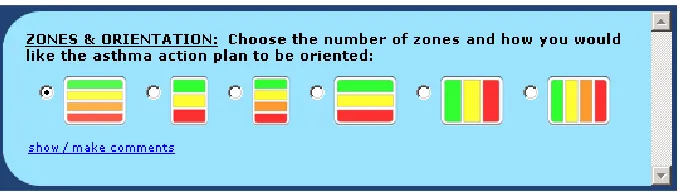
Layout (Problem #5): This usability problem relates to participants not being able to distinguish the layout of the asthma action plan using the small icons on the top of the screen (Figure 2). A possible reason would be that participants never paid attention to the icons representing different layouts and just moved forward to the next steps without making any change to the default layout.
Figure 2. Selecting the layout of the asthma action plan
Both of these problems had an average severity of 2.5 placing them between minor and major on the severity scale.
One possible conclusion from this is that the reverse engineering testing method (when done first) demands more attention to detail (concerning layout and fonts in this case study) from participants as they need to compare the artifacts provided to them, as a model, with the one they are trying to create. Why were some problems not encountered during those reverse engineering tests that were conducted after the task-based method (in Protocol A)? One possible explanation would be that when moving on to the reverse engineering testing method (second method) after performing in a task-based test method, participants were influenced by their experience with the previous method. Thus, they did not pay as much attention to the details when interacting with the product for the second time as they were already accustomed to the design of the tool and had already made some assumptions about how the system worked. This behavior would not occur in a usability test in which only reverse engineering was used. It is possible that some of the specific deficiencies found with task-based usability testing in our case (e.g., failure to uncover the layout problem) may have resulted from the specific tasks that we chose to test. However, even if this were the case, it highlights the difficulty in choosing an appropriate set of tasks in the task-based approach when doing usability testing on a reasonably complex piece of software.
Usability Questionnaire
Immediately after each method, participants were asked to complete a questionnaire about the usability of the tool and their attitude towards the particular usability testing method that was used. The first part of the questionnaire was based on the SUS. The mean overall SUS scores shown below range from 0 to 100. The closer the score to 100, the more satisfied the participant would be with the product and probably the more usable the product is perceived.
System Usability Scale (SUS)
We found a potentially interesting relationship between number of usability problems found and overall usability scores calculated based on SUS ratings. Seventy-nine of the 81 problems that the six
Table 2. Mean Overall SUS Scores (out of 100) Across the Study Conditions (TM=Task-based testing method, REM=Reverse engineering testing method)
Mean overall SUS scores Protocol A (TM -> REM) Protocol B (REM -> TM) Mean SUS for method
Task-based method 67.5 67.5 67.5 Reverse engineering method 67.92 77.92 72.92 Mean SUS for protocol 67.71 72.71
Attitude toward the usability method
After completing the SUS questionnaire, participants were asked to answer a number of open-ended questions inquiring about their attitude towards the tool (for example, if they felt confident or frustrated while using the tool) and the usability evaluation method. Although our sample size was small, the tool attitudes did not appear to differ between the task-based and reverse engineering methods even though results showed that participants spent more time on the reverse engineering method and encountered more issues. Overall, participants had a positive attitude toward both methods.
During the post-experiment interview, several participants commented that it was more difficult to create the plan using the reverse engineering method, but it also encouraged them to explore the tool in more depth. Those comments suggest that participants were not less satisfied with the reverse
engineering method in spite of the longer time it took to perform the tasks. By exploring the tool, these participants encountered errors that the other group did not. On the other hand, participants who followed the written instructions first commented that it helped them “learn” how to use the tool. Summary of Results
The results of comparing the reverse engineering and task-based methods for usability testing can be summarized in the following major points.
Reverse engineering has the potential to discover more issues
The results of the case study showed that the reverse engineering testing method took longer to complete and participants encountered more issues compared to the task-based method, i.e., 79 vs. 16 issues when each method performed first and 13 vs. 2 issues when performed second. Thus, reverse engineering has the potential to uncover more usability problems than the traditional task-based testing approach. It is noteworthy that 79 of the 110 (72%) usability problems encountered were found in the situation where the reverse engineering method was being used, and it was being done first. Thus over 70% of the usability problem instances were found in just one of the four contexts (reverse engineering done first) that were examined.
Reverse engineering is an enjoyable task
Future case studies
While the case study that we carried out has some important implications for the use of reverse engineering in usability testing, it would be useful to extend the results with a consideration of other products and better matched participants. One of the limitations of this study was that the participants were not real asthmatics, respirologists, or asthma educators. It would be useful in a future case study to focus on a different product where the test participants are the intended users of that product. Also, in a future study, it would be interesting to compare the task-based and reverse-engineering method against a “self-directed” method where participants are asked to accomplish their own goal with a tool.
Conclusion
This study examined whether reverse engineering is a viable usability evaluation method in comparison to traditional task-based techniques. While the concept of reverse engineering stems from software engineering, in the context of usability testing, it can be used to identify tool design flaws that cause usability problems.
The results of this study suggest that the technique of reverse engineering has good potential for uncovering usability problems. Although the task using the reverse engineering method took a longer time for participants to complete, and with more problems uncovered, the participants’ attitudes toward the test process remained positive. An advantage of using the reverse engineering method was the simplicity in setting up the test—one simply needed to create a product using the tool that was to be tested and then ask a participant to recreate it using the same tool. One point to keep in mind is that reverse engineering usability methods require longer session times because it takes participants longer to perform the tasks.
Limitations
First, due to technical limitations, only one version of the Wikibreathe tool was used in the experiment. Because of this, each participant performed the task twice using the same tool and therefore the learning effect could not be measured properly. The task itself was also quite simple, and the study involved only 12 participants. Those participants were not respirologists, but were asked to imagine themselves in the role of a respirologist when performing the assigned tasks. For the purposes of this case study, the sample used was likely adequate to meet our goal of demonstrating the properties of the reverse engineering method of usability testing.
Further research is needed both with more participants and with different tools being tested in order to demonstrate the scientific validity of the reverse engineering method across a broad range of content and for different artifact generation tools. We had the opportunity to work with an important but some-what atypical context (asthma action plans) and it would be good to replicate the case study with a more mainstream user interface design context such as word processing or graphic design.
One final limitation was that one of the researchers acted as usability engineer in the usability testing, and thus the reporting of problems might have been biased in some way as a result. However, given that the set of problems identified were clearly defined and easy to characterize it seems unlikely that tester bias could explain the large increase in problems found when the reverse engineering method was done first. It also seems unlikely that possible tester bias could account for the SUS score that was obtained when the reverse engineering method was done first.
Tips for Usability Practitioners
We were interested in finding out if reverse engineering could be a useful alternative to task-based usability testing in this and perhaps other contexts. For a practitioner, would usability testing with reverse engineering be as easy to set up, administer, and analyze as a traditional test, and would it uncover a representative set of usability problems? Why should practitioners use the reverse engineering method when there are a number of methods already available that have a much more extensive track record?
participants than methods where they are told to carry out a series of tasks that have been defined for them.
We found that the reverse engineering method required more attention to detail by the participants, because of the requirement to make a copy of the target artifact. In some cases, this attention to detail might be beneficial in finding more problems, but in other cases it may find problems that are too detailed to concern most participants. Thus, they might put too much time and pay too much attention to some of the details that would not necessarily be confronted when using a task-based testing method. This is where practitioners have to exercise judgment in deciding whether or not reverse engineering may work for a particular tool and associated set of users. While it is possible that instructions to focus on the right level of detail might be beneficial in this regard, it was not an issue that we examined in our case study.
Our bottom line message for practitioners based on our experience with the case study is that the reverse-engineering approach is useful if you want to
Find problems with the formatting/layout aspects of a tool.
Avoid bias from the language used in task scenarios, for example, if an instruction says to “create a report” and the UI has a Create menu with a Report command.
Encourage the participants to work more slowly and explore the tool more thoroughly at first. On the other hand, the reverse-engineering method is not recommended if
You want participants to use their own data or in other circumstances where participant’s motivation (or lack thereof) can have a significant effect.
The goal/outcome has ambiguity; it’s not clear to people when they are done.
Session time must be kept short. It will take longer for participants to complete tasks with reverse engineering.
Note that in any given study, the preferred approach might be to use a combination of usability testing methods. Reverse engineering could be used with other methods to allow participants to more fully explore products. However, based on our experience with the case study, we suggest that when reverse engineering is used along with other methods, it should generally be carried out first.
While this case study assesses the benefits of using reverse engineering for usability testing in a specific healthcare context, we believe that the benefits of the method found in this case study may apply more broadly.
Acknowledgements
We would like to thank Robert Luke for his comments on the research and David Newton for
implementing the Wikibreathe prototypes. We would also like to thank the editor and the anonymous reviewers for encouraging us to present the material as a case study that would be of interest to practitioners.
References
Brooke, J. (1996). SUS: A quick and dirty usability scale. In P. W. Jordan, B. Thomas, B. A.
Weerdmeester, & A. L. McClelland. Usability Evaluation in Industry (pp. 189-194). London: Taylor and Francis.
Chikofsky, E., & Cross, J. (1990). Reverse engineering and design recovery: A Taxonomy. IEEE Software, 7(1), 13–17.
Gibson, P., Powerll, H., Coughlan, J., Wilson, A., Abramson, M., Haywood, P., Bauman, A., Hensley, & M., Walters, E. (2003). Self-management education and regular practitioner review for adults with asthma. Cochrane Database Syst Rev. (1):CD001117.
Gupta, S., Wan, F., Newton, D., Chignell, M., & Straus, S. (2011). WIKIMEDIA - A new online
collaboration process for multi-stakeholder tool development and consensus building. J Med Internet Res, 13(4):e108.
Plottel, C., & Feldman, B.R. (2008). 100 questions and answers about your child's asthma. Sudbury, MA: Jones and Bartlett Publishers.
Rubin, J., Chisnell, D., & Spool, J. (2008). Handbook of usability testing: How to plan, design, and conduct effective tests, 2nd Edition. Indianapolis, IN: Wiley Publication Inc.
Sharp, H., Rogers, Y., & Preece, J. (2011). Interaction design: Beyond human-computer interaction, 3rd Edition. NY: Wiley.
Sloane, P., Slatt, L., Ebell, M., & Jacques, L. (2008). Essentials of family medicine. Philadelphia, PA: Lippincott Williams & Wilkins.
Storey, M., Sim, S., & Wong, K. (2002). A collaborative demonstration of reverse engineering tools.
SIGAPP Applied Computing Review, 10(1), 18-25.
Wan. F. (2009). Reverse engineering of content as a task for finding usability problems: An evaluative case study using the Wikibreathe tool for online creation of asthma action plans. Unpublished M.ASc. thesis, Department of Mechanical and Industrial Engineering, University of Toronto. Toronto, Canada.
Zemek, R., Bhogal, S., & Ducharme, F. (2008). Systematic review of randomized controlled trials examining written action plans in children. Arch Pediatric Adolescent Medicine, 162 (2), 157-163.
About the Authors
Shadi Ghajar-Khosravi is currently a PhD student in the Human Factors Engineering program at the Mechanical and Industrial Engineering department of University of Toronto. She is interested in the design and analysis of information systems including
recommender systems from a user-centered perspective.
Flora Wan
was a MASc graduate in the Human Factors Engineering program at the University of Toronto in 2009. She is currently working as an Assistive Technology Consultant at Holland Bloorview Kids
Rehabilitation Hospital and has an interest in
healthcare and
rehabilitation engineering research.
Samir Guptua is an associate scientist at the Li Ka Shing Knowledge Institute of St. Michael’s Hospital and assistant professor in the Department of Medicine at the University of Toronto. His main research interests are in rare lung diseases and knowledge translation. He is Vice-Chair of the Canadian Respiratory Guidelines Committee.
Mark Chignell
is Professor of Mechanical and Industrial Engineering at the University of Toronto and Director of the Interactive Media Laboratory. He is a visiting scientist at the IBM Centre for Advanced Studies and at Keio University. His research is concerned with
Appendix A
Experiment 1: Task-Based Testing Method—Task Instructions
Imagine that you are a physician who is designing an asthma action plan for your patients with certain preferences. Given these preferences, use the Wikibreathe tool to create the action plan that best fits the requirements. Feel free to talk aloud on what you're thinking about while you are working on the task. If you are unable to complete a task, move on to the next task. If the instructions do not specify the exact wording of a selection, pick any option that fulfills the requirement. You will have
approximately 15 minutes to complete this section. Preferences Part 1: Initial Setup
The plan should contain three zones representing worsening asthma symptoms.
Each time controller inhalers are mentioned, the plan should use the term preventer instead. Preferences Part 2: Header
The plan should include a space to put the patient’s name, their date of birth, and the severity of their asthma symptoms.
There should be an empty space where you can fill in your patient’s personal asthma goals. Preferences Part 3: Zone Descriptions
The titles of the asthma zones should be
o Green = Task-based
o Yellow = Caution
o Red = Danger.
Each of the three zone sections should include the range of peak flow for the patient where the physician can fill in the peak flow percentages in blank spaces.
Each of the three zone sections should include descriptions on Breathlessness, Coughing, and the Frequency of Daytime Symptoms.
In addition, the Red Zone should also mention that the patient is having difficulty speaking. Preferences Part 4: Zone Instructions
For the instructions section of the plan, the Green and Yellow zone sections should be in the format of a table that has columns representing the medication, puffer color, how much of it to take, and when to take it.
Preferences Part 5: Footer
At the bottom of the page, there should be a section on the most common asthma triggers that patients should be aware of: air pollution, cats and dogs, dust, and pollens. This should be displayed using both text and images.
For the section on asthma triggers, you would like to be able to check off the ones that pertain to your patient.
There should also be a line at the bottom of the page for the physician’s signature.