PICKTCL
and file structure
Title: Introduction to PICK TCL and File Structure
Document No. 88A00782A01
Date Issue
March 1984 Original Issue
NOTICE
The information contained in this document is subject to change without notice.
General Automation makes no warranty or representation with regard to this material, including, but not limited to, the implied warranties of merchanta-bility and fitness for a particular purpose. General Automation shall not be liable for errors contained herein.
General Automation assumes no responsibility for the use or reliability of its software on equipment that is not furnished by General Automation.
This document contains proprietary information which is protected by copyright. All rights are reserved. No part of this document may be photocopied or
reproduced without the prior written consent of General Automation.
PICKTCL
Title: Introduction to PICK TCL and File Structure
Document No. 88A00782A01
Date Issue
March 1984 Original Issue
NOTICE
The information contained in this document is subject to change without notice.
General Automation makes no warranty or representation with regard to this material, including, but not limited to, the implied warranties of merchanta-bility and fitness for a particular purpose. General Automation shall not be liable for errors contained herein.
General Automation assumes no responsibility for the use or reliability of its software on equipment that is not furnished by General Automation.
This document contains proprietary information which is protected by copyright. All rights are reserved. No part of this document may be photocopied or
reproduced without the prior written consent of General Automation.
FOREWORD
The PICK Terminal Control Language (TCL) is the primary link between the user) his files and what he wishes to do with the files. This document focuses on TCL and the file structure.
It is recommended that "new" users of the ZEBRA/PICK system become familiar with these sbjects before extensive use of the processor family is undertaken.
The following documents cover processors that can be called for carrying out different operations with file data:
Document No.
88A00757A 88A00758A 88A00759A 88A00760A 88A00774A 88A00776A 88A00777A 88A00778A 88A00779A 88A00780A 88A00781A 88A00783A
Title PICK Operator Guide ACCU-PLOT Operator Guide COMPU-SImET Operator Guide
Quick Guide for the PICK Operating System PICK Utilities Guide
PICK ACCESS Reference Manual PICK SPOOLER Reference Manual PICK BASIC Reference Manual PICK EDITOR Referance Manual PICK PROC Reference Manual PICK RUNOFF Reference Manual PICK JET Word Processor Guide
Section
1
2
TABLE OF CONTENTS
Title
INTRODUCTION 1.1 KEY WORDS.
TERMINAL CONTROL LANGUAGE. 2.1 2.2 2.3 2.4 2.5 2.6 2.7 2.8 2.9 2.10 2.11 2.12
INTRODUCTION TO TERMINAL CONTROL LANGUAGE • • • TCL TYPE I INPUT STATEMENTS. • •
TCL TYPE II INPUT STATEMENTS • • • • LOGGING ON AND OFF THE SYSTEM. • .
2.4.1 LOGGING ON TO THE SYSTEM • • . • 2.4.2 LOGGING OFF OF THE SYSTEM. • • • •
ADDITIONAL LOGON FUNCTIONS: LOGTO, CHARGE-TO, AND CHARGES. THE LOGON PROC AND GENERAL SYSTEM MESSAGES • • •
SETTING TERMINAL/LINE PRINTER CHARACTERISTICS: TERM AND SET-TERM. • • • • • . • • • • • SETTING TAB STOPS: TABS • • • • • •
MISCELLANEOUS UTILITY VERBS: TIME, SLEEP, WHO, MSG AND ECHO MISCELLANEOUS UTILITY PROCS. • • • •
BLOCKING PRINTING: BLOCK-PRINT • COPYING DATA: COpy • • • • • • • • 2.12.1 FILE-TO-FILE COPY • • • •
2.12.1.1 COpy to Another Account. 2.12.1.2 COPY Options • • •
2.13 PROGRAM INTERRUPTION: DEBUG FACILITY • • • •
Section
3 FILE
3.1 3.2 3.3 3.4 3.5 3.6 3.7 3.8 3.9 3.10 3.11 3.12 3.13 3.14 3.15 3.16 Title
STRUCTURE • . • • . . . . • • • • • • THE FILE HIERARCHY • • • . .
3.1.1 SYSTEM DICTIONARY (SYSTEM) • 3.1.2 USER MASTER DICTIONARIES (MOs) . 3.1.3 FILE LEVEL DICTIONARIES • • . . 3.1.4 DATA FILES • • • . • • . • . • FILE ACCESS. • . • • • • . • • • • • .
FILE STRUCTURE: BASE, MODULO, AND SEPARATION. 3.3.1 ITEM STORAGE AND THE HASHING ALGORITHM • . SELECTING MODULO AND SEPARATION. • • . • • • . CREATING FILES: CREATE-FILE AND CREATE-PFILE • 3.5.1 THE SHARING OF DICTIONARIES • • • • . • .
CLEARING AND DELETING FILES: CLEAR-FILE AND DELETE-FILE •• THE DICTIONARIES • • • • • • • • • • .
ITEM STRUCTURE (PHYSICAL) • • ITEM STRUCTURE (LOGICAL) • •
FILE DEFINITION ITEMS • • • • . . • • • FILE SYNONYM DEFINITION ITEMS • • .
3.11.1 THE REFLEXIVE FORM OF THE Q-POINTER. 3.11.2 ACCOUNT SPECIFICATION. • • • • • • •
3.11.3 FILE SPECIFICATION • • . • • • • • . • . • • . 3.11.4 EXTENSIONS TO THE FILE NAME REFERENCE.
ATTRIBUTE DEFINITION ITEMS • • • • • • . • • . . • • • DICTIONARY ITEM: A SUMMARY • • • • • • • • . .
VERB DEFINITION ITEMS IN THE MASTER DICTIONARY • • INITIAL SYSTEM FILES/DICTIONARIES. . • . . SPECIAL FILES. . . . • . . • • • • • .
3.16.1 POINTER-FILES... • • . • • . • . • 3.16.2 BASIC PROGRAM FILES • . . • •
introduction
1
PICK is a user-friendly data base management system that allows multiple users to instantly create, retrieve and update data stored in on-line files. Users can cOlmnunicate with the system locally, or remotely, through keyboard
terminals.
One of the outstanding features of PICK is the ability to customize the
vocabulary for each use"r. Since the vocabulary words (called 'verbs') reside in the individual user's Master Dictionary (MD), the vocabulary can be changed as desired without affecting the other users. Communication statements can,
therefore, be in the user's language; and, those statements can be tailored with words and phrases that are unique to the user's particular business field.
1 • 1 KEY WORDS
Before reading descriptions of the PICK verbs and their processors, the new user should be introduced to key words that have special meanings. The
following words are not in strict alphabetic sequence. Words that are closely related are grouped together to be more meaningful.
DICTIONARY
FILE
A dictionary is a "special" file. A dictionary contains items which define the attributes which make up the (other) items in the data file associated with it. A dictionary may also contains an item(s) which gives the size and (disk) location of its associated data file(s). Every data file must have its dictionary, although in some cases, it may share its dictionary with similar files.
ITEM-ID
The name of an item in a file or the attribute position zero (0) in a dictionary. Part number is usually the item-id in an inventory file; customer number could be the item-id in an accounts receivable file.
An item-id may consist of numbers and/or letters or other characters except certain characters reserved as "system delimiters". Blanks should be
avoided, if possible, but are allowed in an item-ide ATTRIBUTE
A specific piece of data which, along with other attributes, makes up an "item". Name, address, city, state, zip could be 5 attributes of the items in a name and address file.
Attribute numbers and and attribute names are not stored in -an item, only the values. The attribute number gives the relative position of the value in the stored item.- This attribute position number is also called the MiC of the attribute, meaning Attribute Mark Count.
An attribute is also referred to as a field. FRAME
The disk storage on a PICK system is divided into 512 byte (character) sections called "frames". Each frame is numbered and can be accessed directly by the system using this number which is called the frame-id or FlO.
GROUP
One or more disk frames linked together. The number of groups which are reserved for a file is specified by the "modulo".
MODULO
The modulo is the number of "groups" of disk frames reserved for a file. The modulo is specified at the time a file is created and is based upon an estimate of the number of characters which will be contained in the file. SEPARATION
This is the number of frames in a group. Separation times the modulo gives the number of frames reserved for a file. Separation is usually "1",
although under special circumstances, it may be more. Separation is specified at the time the file is created, but the system will
terminal
control language
2.1 INTRODUCTION TO TERMINAL CONTROL LANGUAGE
Terminal Control Language (TCL) is the primary interface between the user and the system. It is from TCL that all other processors (EDITOR, ACCESS, BASIC, PROC, etc.) are invoked. The TCL processor is automatically entered at LOGON and whenever a particular process run from TCL (such as an ACCESS or BASIC process) is complete. The TCL prompt is a ')-.
2
A TCL statement calls into effect one of the TCL verbs (action-initiating commands) res iding in the user's Mas ter Dictionary (HD) ~ihich ei ther perf orms specified functions or invokes other processors to perform specified
functions. For example, the TIME verb prints the current time and date on the terminal, while the RUN verb invokes the BASIC run-time processor which "runs' the specified BASIC program. The general form of a TCL statement is:
TCL prompt character Options enclosed in Carriage return, (or line-feed) Parentheses (must be at end)
!
)Verb { • Parameters • • • } { (Options) } {[cs_]} [CR]
!
Parameters as required by the specific verb.
Optional continuation character (Control-Underline or control-_).
The user is at the TCL level in the system when the system "prompts" with a")" character. The ")" is printed at the far left on the terminal and indicates that the system is awaiting input from the terminal.
~he.TCL verbs belong to three major categories. Type I verbs perform specified
Note that the control character for the optional continuation character will vary on different terminals, however, whatever control character corresponds to ASCII US (hex IF) will perform the function on all terminals.
The user may create any number of synonyms for the verb definition items (and may even remove the predefined verb definition items), thereby creating his own vocabulary. Synonyms cay be created by copying the verb definition item into another item with the desired name as the item-ide
A TCL statement consists of the TCL verb, any other parameters (words,
file-names, options, etc.) that the specific verb may require, followed by a carriage return or line feed (shown as [CR] in the documentation). No action is initiated until the [CR] is input.
All TCL statements may have an "options" entry as the last parameter; options are single alphabetic characters, and/or a single or double number of the form
n or "n-m", where nand m may be decimal, or hexadecimal if preceded by a period (.). The entire option string is enclosed in parentheses. Options affect the operation of each verb in a unique way. General options are "P" for routing data to the line printer and "N" for inhibiting the end-of-page wait at the terminal. Multiple options may be separated by commas for clarity.
Examples of TCL statements are: )TL'1E [CR]
)DUMP L,5000-5003 [CR]
)RUN BP LISTU (P) [CR]
During the entry of the TCL statement, certain editing functions are available to the user. A control-H ([cR]) is used to BACKSPACE over the last character input. Normally, the terminal will also physically backspace the cursor or carriage to indicate that the last entered character has been deleted. A control-X ([cX]) may be entered to DELETE entirely the last entered line; a new line is initiated at the terminal hy the system. A control-W ([cW]) may be used to backspace over the last WORD. A control-R ([cR]) may be used to RETYPE the last line. Following is a summary of TCL editing functions:
Character
Carriage Return [CR] (or line feed) [LF]
Control-II [BS] Control-W [ETB] Control-X
[CAN]
Control-R [DC2]Editing Function
End of line.
Backspace over last character.
Backspace ove r last ~o1ord.
Delete last line.
Retype last line.
Control-Underline Line continuation
[US] character.
Comments
System will take action on TCL statement.
No action if at left margin. Character echoed by system may be set by the TERM command.
No action if at left margin.
No action if at left margin; new line will be started otherwise.
Must be followed immediately by a [CR] • TCL will prompt with a ":" for next line of input. May be used repeatedly.
2.2 TCL TYPE I INPUT STATEMENTS
TCL Type I verbs do not access a file. The format of the TCL statement is unique to the specific verb (i.e., there is no general form of the TCL statement using this type of verb).
A TCL-I input statement must begin with a TCL-I verb and end with a carriage return, and may sometines include various parameter specifications. Some TCL-I verbs are listed in Table 2-1. For further information regarding these verbs,
refer to Utilities and Spooler Hanuals.
Table 2-1. Some TCL-I Verbs
Verb Description
BLOCK-PRINT CHARGES CHARGE-TO MESSAGE MSG OFF P StEEP SP-ASSIGN SP-STATUS T-ATT T-DET TABS TERM TIME WHAT WHO
Sends block characters to spooler. Prints current computer usage. Keeps track of computer usage. Communicates to other users. Same a~ MESSAGE.
Terminates user's session. Inhibits printing at terminal.
Puts a terminal to "sleep" for a specified time, or until a specified time.
Sets up assignment status for the spooler. Gives spooler and line printer status. Attaches magnetic tape unit.
Detaches the magnetic tape unit. Sets tabs for input or output. Displays terminal characteristics. Prints current time and date. Prints current system parameters.
2.3 TCL-II INPUT STATEMENTS
TCL Type II verbs allow access to a specified file. The format for forming a TCL-II input statement is more restrictive than for an ACCESS statement (refer to the ACCESS Manual). The advantage gained by this restricted format is an enhancement in processing speed since statement parsing is quicker.
A file-name (or DICT file-name) must immediately follow the TCL-II verb. Item selection is more restricted than in ACCESS statements, since each item-id must be explicitly named in the statement (or, alternatively, all items may be
specified via use of the asterisk (*) character).
The general form of a TCL-II statement is:
TCL-II verb file being accessed !
options enclosed in parentheses !
)Verb {DICT } file-name
Specifies access to dictionary of file
{item-list} { (options) } {[cs_]} [CR] !
specific items, or "*"j if
omitted, items are obtained from a previously specified select-list
The file-name specifies the desired file. The DICT option specifies the dictionary portion of the file. The item-list is made up of one or more item-ids, separated by one or more blanks. If an item-id contains embedded blanks or parentheses, it must be surrounded by single quotes. All items in a file may be specified by using an asterisk (*) character as the item-list. Options, if specified, must be enclosed in parentheses at the end of the input line. Multiple options may be separated by commas. The specified options are passed to the appropriate TCL-II processor. Samples of TCL-II input statement:
>COpy MD LIST SORT (T) [CR]
)ED INVENTORY 123-987 [CR]
>RUN BASIC/PROGRAMS UPDATE/LISTS (D,P) [CR]. >COMPILE BASIC/PROGRAMS ALPHA (LMN) [CR]
Some TCL-II verbs are:
Verb Description
COMPILE Compiles a BASIC program.
CATALOG Catalogs a BASIC program.
COpy Copies data files and dictionaries.
ED or EDIT Evokes the EDITOR processor.
RUN Executes a BASIC program.
RUNOFF Evokes the text processor.
2.4 LOGGING ON AND OFF THE SYSTEM
The Logon processor provides a facility for initiating a user's session by identifying valid users and their associated passwords. The Logoff processor is used.to terminate the session and should always be evoked via the verb OFF when the user wishes to terminate. These processors can accumulate accounting statistics for billing purposes and also will associate the user with his privileges and security codes.
2.4.1 LOGGING ON TO THE SYSTEM
The user may log on to the PICK Operating System when the following message is displayed:
LOGON TO THE GA XX ZEBRA AT 00:00:00 PLEASE ENTER ACCOUNT NM1E
>
NOTE
The actual form of this message will vary from system to system, since the message format is obtained from an entry called "LOGON" in the SYSTEM Dictionary.
The user then enters the account name followed by a carriage return. The system validates the user's identification (account name) against the entries in the SYSTEM Dictionary; if it is illegal, the following message is returned:
USER-IO?
The user must then re-enter the account name.
If a password has been established, there will be a prompt:
PASSl-IORD:
He then enters the password followed by a carriage return. (The password is not echoed back to the terminal when it is entered.) If a valid password is not entered, the system will display:
If the user has successfully logged on to the system (i.e., both the account name and the password have been accepted), the following message is displayed:
«<
R80 GENERAL AUTOMATION«<
00:00:00 ZEBRA>
REV: m.n »> date»>
<..
TCL prompt. where:R80 is the PICK Operating System release level.
>
is the TCL prompt character, which indicates that the user may now enter any valid TCL level command.2.4.2 LOGGING OFF OF THE SYSTEM
Logoff is achieved by entering the word OFF, either at the TCL level or at the DEBUG level. A message indicating the connect time (i.e., number of Qinutes that the user was logged on) and the appropriate CPU units will be displayed. The system then displays the LOGON PLEASE message and waits for the next user session to be initiated. The general form of the logoff message is as follows:
<
CONNECT TIME • n MINS.; CPU - m UNITS; LPTR PAGES - x ><
LOGGED OFF AT time ON date > where:n is the number of minutes of connect time m is the number of CPU units
x is the number of line printer pages generated time is the current time
date is the current date
2.5 ADDITIONAL LOGON FUNCTIONS: LOGTO, CHARGE-TO, AND CHARGES
The LOGTO verb allows the user to log to another account faster than by going through the OFF and LOGON process. The CHARGE-TO verb allows the user to charge a particular logon session to a specific charge number or name; the CHARGES verb displays the charge statistics for the current logon session. An example of the usage of these verbs:
* PLEASE ENTER ACCOUNT NAME > Sl1ITH, XYZ [CR]
*
*
*
«<
R80 GENERAL AUTOMATION«<
time >WHO [CR] 7 SMITH>TlME [CR]
ZEBRA
09:17:00 11 DEC 1982
>LOGTO JONEA [CR]
USER-ID?
*
>LOGTO JONES [CR] * PASSWORD: ABC [CR]REV: m.n »> date »>
NOTE: The password is not displayed.)
<
CONNECT TIL-IE =- 3 tUNS. j CPU - 11 UNITS, LPTR PAGES- 0 >*
>WHO [CR] 7 JONES*
>CHARGE-TO A001 [CR]<
CONNECT TIME - 0 MINS.; CPU=-7 UNITS, LPTR PAGES- 0 >*
*
>WHO [CR] 7 JONES*A001 >CHARGES [CR]
The general form of the LOOTO verb is as follows:
LOGTO account-name {,password}
where:
account-name
pass\iord
is that of the other new account that the user wishes to logon to.
is the valid password for the other account.
If the account has a password defined and the user has not entered a password, the message:
PASSWORD:
will be displayed and the password may then be entered. This password will not be displayed on the terminal.
If the account-name is illegal, the message:
USER-ID?
will be printed and the user will be back at TCL. If the password is incorrect, the message:
PASS~-lORD?
will be displayed, and the user will be back. at TCL.
If the account-name and password are both correct, the current logon session will be terminated by updating the accounting file with the appropriate statistics, and a new session started. The message:
<
CONNECT TIME - n MINS,; CPU - m UNITS, LPTR PAGES- x>
will be displayed.Note that it is possible to enter the account name and password separated by a comma on one line, however, this entry method will display the password on the terminal.
The CHARGE-TO statement has the following general form:
CHARGE-TO {text}
where:
text is any sequence of non-blank characters.
This statement will cause the current logon session to he terminated and the account file to be updated with the appropriate statistics; a new session is started, with the new user identification of the form:
account-name*text where:
text is as specified in the CHARGE-TO statement.
This allows the user to charge his logon sessions to specific names or
numbers. If "text" is null in the CHARGE-TO statement, the user identification will revert to the form "account-name" alone.
This CHARGE-TO statement will cause the following message to be displayed:
<
CONNECT TIME - n HINS.; CPU - m UNITS; LPTR PAGES= x>
The CHARGES verb has the following form:
CHARGES
This will display the logon statistics with the following message:
2.6 THE LOGON PRoe AND GENERAL SYSTEM MESSAGES
Upon logon, PICK allows the execution of a PROC in the user's MD with an item-id identical to the user's identification. PICK also allows a general message to be sent to each user when he logs on to the system. Material in this section will be covered in Section 2.9 of this manual and in the PROC Manual.
When the user has logged on to his account, PICK permits the automatic
execution of a PROC in the user's MD whose item-id is the same as the user's identification. That is, the Master Dictionary of the account will be searched for a PROC matching the identification which was used to log on to the account; if it is found, it will be executed.
Typically, the Logon PROC is used to perform standard functions that are always associated with the particular user's needs. For example, setting of terminal characteristics could be performed by the Logon PROC. When the user logs on to the system, his terminal characteristics are set to the initial conditions as follows:
Page Width: Page Depth: Line Skip: LF Delay: FF Delay: Backspace: Term Type:
Terminal 79 24
o
1 2 8 M
Printer
132 characters 60 lines
These conditions can subsequently be displayed and altered by the TCL verb TERM. As an example, assume that the PROC listed as follows:
item 'SMITH' in MD of user SMITH
001 PQ
002 HTERM 118,44,7,6 003 P
004 X*** TERMINAL CHARACTERISTICS SET ***
is stored as item SMITH in the user's MD. If the user's identification is the word SMITH, then the SMITH PROC will be executed automatically every time the user logs on, and the user's particular terminal characteristics will
PLEASE ENTER ACCOUNT NAME > SMITH,XYZ [CR]
<---
Logon sequence.****
NOTE: SYSTEM PRINTER WILL BE DOWN AT 12:00 <- General system****
TODAY FOR ROUTINE t1AINTENANCE UNTIL 2: OOPM message. «< R80 GENERAL AUTOMATION«< time ZEBRA
REV: m.n »> date »>
***
TERMINAL CHARACTERISTICS SET*** <---
Message from SMITH PROC.>
<---
TCL prompt character.A general system message may be stored in the special item "LOGON" of the
system error-message file, ERRMSG. This file and the formats of the data in it are described in the PICK Operator Guide. The general system message will be printed immediately before the standard logon message
U«< RBO GENERAL AUTOMATION REV: m.n »>".
2. 7 SETTING TERMINAL/LINE PRINTER CHARACTERISTICS: TE1U1 AND SET-TERM
Terminal and/or line printer characteristics may be displayed or set by a process via the TERM command. The general form of the TERM command is as:
where:
a terminal line length (characters per line. Must be in range 16<a<140).
b number of print lines per page on the terminal.
c number of blank lines per page on the terminal (b + c a page length).
d number of delay or idle characters following each carriage return or line feed. Used for terminals that require a pause after a carriage return or line feed (the CPU generates characters faster than the terminal can accept them).
e number of If e - 0 If e ,.. 0 If e - 1 If e
>
1delay characters following each top-of-form.
No form-feed character sent to printer or terminal. Form-feed character also output before each page. Form-feed character sent to printer, not to terminal. Form-feed character also sent to terminal at beginning of each page, and that many delay or idle characters also sent to give terminal time to settle after the form-feed. The character sent to the printer is always X'OC' (ASCII FF).
f backspace character. An ASCII backspace (control-II) is always input to backspace over (or erase) the last character that was input. User may set actual character echoed to terminal to accommodate terminals that cannot physically backspace, or have a backspace character other than the ASCII backspace.
g line printer line length.
h line printer page length.
t terminal type code; changes the form-feed character sent by the system to match terminal requirements and also sets the appropriate cursor addressing for BASIC cursor functions. The letters used for supported terminals are:
L LEAR-SIEGLER ADM-ll, T TELEVIDEO 925, 950
ADM-l2 V ADDS VIEWPOINT
Individual parameters may be null (specified by two adjacent commas in the TERM command). If so, the previously defined parameter remains in force. A TERM command without a parameter list causes display of the current
characteristics. To function properly, the t parameter must be the last element in any TERM string. It may be the only element if no other elements are to be changed. The other parameters are positional, however.
The general form of the SET-TERM is the same as the TERM command
SET-TERM {a,b,c,d,e,f,g,h,t}
The SET-TERM verb sets the default printer and terminal characteristics for subsequent logons on all terminals. This verb is present only on accounts with SYS2 privileges. A sample usage of TERM:
)TEIU1 [CR]
PAGE WIDTH: PAGE DEPTH: LINE SKIP LF DELAY FF DELAY BACKSPACE TERM TYPE
TERMINAL 79 24
o
1 2 8 M PRINTER 132 60Standard terminal characteristics set for the DIALOGUE 80 terminal.
)TERM "",,120,48 [CR] )TERM [CR]
PAGE WIDTH: PAGE DEPTH: LINE SKIP LF DELAY FF DELAY BACKSPACE TERM-TYPE
TERMINAL PRINTER
79 120
24 48
o
1 2 8 M
2.8 SETTING TAB STOPS: TABS
Tab stops may be set with the TABS statement. The general form of the TABS command is as follows:
TABS I or 0 nl,n2,n3 •.•••• or
TABS I or 0 {S}
where:
I or 0 may be set for input or output, by setting either "I" or "0'· following the TABS verb.
nl, n2, etc. are up to 15 tab-stop positions; they must be in ascending numerical sequence.
S recalls previously set tabs.
Tabs set for input are then available at any time that the system requests input from the terminal. By entering a contro1-I ([cI]), the system will space over to the next tab-stop position, if any. If there are no more tab-stop positions, the [cI] is ignored (contro1-1 is also generated by the TAB key on some terminals). The tab stops set by the TABS I statement are identical to those set by the TB statement in the EDITOR.
Tabs set for output are only useful for terminals that have a physical tabbing capability. Do not set output tabs for a CRT that does not have this feature! If output tab stops are set, the system will replace blank sequences in any output generated by the system by an appropriate tab character [cI], thus reducing the data output. The user must also set up the physical tab stops on the terminal to correspond to those set in the TABS 0 statement. On many terminals, this entails positioning the carriage and entering a set-tabs sequence from the keyboard.
Input or output tab stops may be disabled by entering "TABS I" or '·TABS 0" respectively. Previously set tab stops may then be recalled by entering "TABS I S" or "TABS 0
sot
for input and output tab stops respectively.Examples of TABS:
)TABS I 4,8,12,16,20,24,28 [CR] (sets input tab stops)
)TABS 0,10,20,30,40,50,60 [CR] (sets output tab stops)
)TABS [CR] (displays current tab stops)
1 2 3 4 5 6 7
1234567890123456789012345678901234567890123456789012345678901234567890
I I I I I I I
°
0 0 0 0 0)TABS
°
[CR] )TABS [CR](turns off output tab stops)
1 2 3 4 5 6 7
1234567890123456789012345678901234567890123456789012345678901234567890 I I I· I I I I
)TABS I 5,15,20,40,50 [CR] )TABS 0 S [CR]
)TABS [CR]
(recalls previous output tab stops)
1 2 3 4 5 6 7
1234567890123456789012345678901234567890123456789012345678901234567890
I I I I I
2 .9 MISCELLANEOUS UTILITY VERBS: TIME, SLEEP, WHO, MSG AND ECHO
The TIME statement displays the current system time and date; its general form is:
TIME For example,
>TL'1E [CR]
09:11:23 11 DEC 1982
The WHO statement is used to display the account-name that a terminal is logged on to; its general form is:
WHO {n}
If WHO is entered without the n, the line number (channel number) of the user's terminal is displayed, along with th~ account-name that he is logged on to. If the "not is specified, the same data is displayed for line number "n", where n ranges from 0 to the maximum number of lines on the current system. If the line is non-existent, or if no user is logged on to that line, the
account-name is replaced with "UNKNOWN".
Lines which have the name UNKNOWN and which are actively processing suggest that something strange is happening on the system, unless they are spoolers or you have an account on the system by the name of Ul~NOWN.
Not only may one specify a line, but one may specify a range of lines as well. Any non-numeric character will cause WHO to display all lines and their logon name.
For example, >WHO [CR] 07 SMITH )WHO 0 [CR] 00 SYSPROG )WHO 11 [CR] 11 UNKNOWN >WHO
*
[CR] )WHO 1-3 [CR]01 JOHN 02 SYSPROG 03 UNKNOWN >WHO 'SYSPROG' [CR]
(this is line-number 7, logged on to "SMITHe , )
(line number 0 is logged on to SYSPROG)
(line number 11 is not logged on)
(displays accounts using all lines; lines which are not logged on display UNKNOWN.)
The SLEEP verb is used to put a terminal to "sleep", that is, to enter a
quiescent state for a specified period of time, or until a specified time. Its general form is:
SLEEP x
where:
x is either a decimal number specifying the number of seconds to sleep, or is of the form: "hh:mm:ss" or "hh:mm:", specifying a time in 24-hour format until which to sleep.
SLEEP is useful to cause a terminal to wait until some time to run a task; for instance, the FILE-SAVE may be run at 23:00 (11:00PM) every night. For
example:
)SLEEP 100
[CR]
)SLEEP 23:00
[CR]
(terminal ,,,ill sleep for 100 seconds) (terminal will wake up at 11:00 pm) .
The form of SLEEP with a wake-up time is usable for a maximum of 24 hours.
The MSG (or MESSAGE) statement allows one user to send a message to another. The general form of the MSG statement is:
MSG account-name •••••• Message text ••••••
[CR]
where:
account-name is the name that the other user is logged on to and the text of the message follows
The message text is not edited in any way; there is no "options" parameter in the MSG statement.
Note that ALL users who are logged on to the specified account-name will receive the message.
A user who was entering data when a message is received may lose up to 16 characters due to the interference of the message; he should use the retype line character ([cR]) to see exactly what data is left.
Examples:
)MSG JONES*AOOOl WHAT'S THE STATUS OF THE INVENTORY REPORT??? [CR]
)~mSSAGE JONES HELLO THERE! U%%%%",% [CR]
USER NOT LOGGED ON (JONES is not logged on).
)MSG * SYSTEM FILE-SAVE WILL START IN 5 MINUTES!!1 [CR]
The MESSAGE and MSG verbs may be used to direct a message to a particular line as well as to a particular user by preceding the line number with an
exclamation mark (1). This form of the verb will send messages to terminals which are not logged on. Further, the user may send a message to all lines, signed on or not, through a special form of this verb. The following outlines the syntax:
MESSAGE !12 HELLO Send the message 'HELLO' to the user on line 12.
MSG !* SIGN OFF NOW Sends a message to all terminals connected to the computer.
The ECHO verb suppresses printing on the terminal The general form is: ECHO {(I)} or {(L)}
The function of this verb is to toggle the switch in each user's PIB indicating whether or not characters typed in are to be echoed to the terminal. Thus,
2.10 MISCELLANEOUS UTILITY PRoes
This section describes commonly used utility PROCs. For a complete description of all utility verbs and PROCs, see the Utilities }lanual.
CT PROC
The CT PROC is invoked by typing:
CT file-name item-list {options}
The item(s) specified will be copied to the terminal. Options recognized by the COpy verb may be added.
LISTACC PROC
The LISTACC PROC is invoked by typing:
LISTACC {account-name(s)}
This PROC lists accounting data for the account-name(s) specified. If no account-name(s) are specified, accounting data for all users will be listed.
LISTCONN PROC
The LISTCONN PROC is invoked by typing: LISTcorm {file-name} {(P)}
This PROC sorts all connectives in any dictionary and lists them on the terminal (or the line printer if P is specified). If no file-name is specified, the account's master dictionary will be used.
LISTDICT PROC
The LISTDICT PROC sorts all attribute synonym definition items in any dictionary and lists them on the terminal (or the line printer if P is
specified). If no file-name is specified, the account's master dictionary will be used. The general form is:
LISTPROCS PROC
The LISTPROCS PROC sorts all PROCs in any file or dictionary and lists them along with a brief abstract on the terminal (or the line printer if P is
specified). If no file-name is specified, the account's master dictionary will be used. The general form is:
LISTPROCS {file-name} {(P)} LISTU PROC
.The LISTU PROC lists the account name of all users currently active on the system, along with their logon time and channel number. The general form is:
LISTU or LISTUSERS
LISTVERBS PROC
The LISTVERBS PROC sorts all verbs (not PROCs) in any dictionary and lists them on the terminal (or on the line printer if P is specified). If no file-name is specified, the account's master dictionary will be used. The general form is:
2.11 BLOCKING PRINTING: BLOCK-PRINT
The BLOCK-PRINT command will print characters in a block-form on the line printer or the user's terminal, respectively. Any ASCII characters may be printed.
The general form of the BLOCK-PRINT command is as follows: BLOCK-PRINT character-string {(P)}
This command causes the specified character-string to be block-printed on the terminal. Any character-string containing single quotes (') must be enclosed in double quotes ("), and vice versa. The surrounding quotes will not be printed. A character-string not containing quotes as part of the string need not be surrounded by quotes.
The option
"p"
will route the output to the line printer.Character-strings to be blocked cannot have more than eight characters (the total number of characters must not exceed the current line length set by the most recent TERM command).
2.12 COPYING DATA: COpy
The COpy processor allows the user to copy items from a file to the terminal, the line printer, to the same file, or to another file (either in his account or in some other user-account).
The COpy processor is invoked via the COPY verb, which is a Type II verb and therefore takes on the Type II format. The general form of the COpy command is:
COpy {DICT} file-name item-list {(options)}
The file-name parameter specifies the source file. The item-list specifies the items to be copied and consists of one or more item-ids separated by blanks, or an asterisk (*) specifying all items. The options parameter, if used, must be enclosed in parentheses. Options are described in the next section.
Once a COpy command has been issued, the COpy processor will respond in
different ways depending on whether the copy is to the terminal, line printer, or to a file. Copy to the terminal may be specified by the presence of the "T" option, copy to the printer is specified by the "pIt option. If neither of these options is specified, . the copy is to a file.
On a terminal or line printer copy, the data is displayed in the following format:
item-id
001 attribute one 002 attribute two 003 attribute three
nnn last attribute
For example, the item "ITEMX" in the SAMPLE-FILE may be copied to the terminal as follows:
>COPY SAMPLE-FILE ITEMX (T) [CR]
ITEMX 001 3745
If the copy is a file-to-file copy, the processor will respond with:
TO:
The response to this request is in the form:
{(} {DICT} file-name {item-list}
where:
1. If the data is to be copied to a different file, the destination file-name is entered preceded by a left parentheses; the word DICT may optionally precede the file-name if the data is being copied to a destination dictionary file instead of a data file.
2. If the data is being copied to the same file, the left parentheses is omitted.
3. If the item-ids of the items being copied are to be changed, the list of new item-ids must follow.
4. If only a carriage return is entered to the "TO" request, a copy to the terminal is performed (just as if the original COpy statement had used the "T" option).
2.12.1 FILE-TO-FILE COpy
Multiple items may be specified as the source and as the destination in the COpy statement. Multiple item-ids are separated by blanks, unless the item-id itself has embedded blanks, in which case the entire item-id must be enclosed in double quotes (" H).
For example, the item-list may be: 1024-24 1024-25 "TEST ITEM" ABC
which specifies four item-ids, "1024-24," "1024-25," "TEST ITEM," and "ABC".
Item-ids may be repeated within the item-list. There may be different numbers of items within the source and destination lists. If the source item-list is exhausted first, the COPY terminates. If the destination item-list is
exhausted first, the remainder of the items are copied with no change in item-ide
If the items are to be copied without any change in the item-ids, the destination file item-list may be null.
If it is desired to copy all existing items, an asterisk (*) may be used as the source file item-list.
If a preselected list of ite~ is to be copied, the source item-list should be null; in this case, the COpy statement must be preceded by a SELECT, SSELECT, QSELECT, or GET-LIST statement.
When copying from one dictionary to another, the COpy processor does not copy dictionary items with O/COOE of "0" (i.e., the O-pointers). D-pointers must only be created by the CREATE-FILE processor. To recreate both the dictionary and the data sections of one file in a new file, a command sequence, such as shown in Example C on the following page, must be used.
2.12.1.1 Copy to Another Account
When copying to a file in another account, it is necessary to set up a
Example A - Copying items to the same file:
>COpy DICT SAMPLE COST TO: PRICE [CR]
(I) [CR]
<---
Single dictionary item copied1 ITEMS COPIED
>COpy SAMPLE 1242-01 [CR]
TO: 1242-99 [CR]
<---Single data item copied
1 1242-01
1 ITEMS COPIED
<---
Item-id is listed>COPY FLAVORS RED WHITE BLUE TO: ALPHA BETA GAMMA [CR]
1 RED 2 WHITE 3 BLUE
3 ITEMS COPIED
[CR]
<---
Hultiple data items copiedExample B - Copying items to a different file:
>COPY DICT SAMPLE
*
(I) [CR]<---
All dictionaryTO: (DICT FLAVORS [CR] items copied
[418] FILE DEFINITION ITEM 'SAMPLE' liAS NOT COPIED
2 ITEMS COPIED
Example C - Recreation of entire dictionary and data sections:
2.12.1.2 COpy Options
This section describes the options that may be specified in the COPY statement.
The general form of the COpy command is:
COpy {DICT} file-name item-list {(options)}
The "options" parameter, if used, must be enclosed in parentheses. Options are single alphabetic characters; multiple options may be strung together, or
separated by commas for clarity.
Option A u F I M N N p S S T
x
Table 2-2. COpy Processor Options
Note* 1 2 1 1 2 1 1 2 1 Description
Activates assembly MLIST format.
Delete item. On a file copy, the original (source) item is deleted from the file after it is copied.
Form-feed. On a copy to the terminal or the line printer, item will cause a new page to begin.
Item-id list suppress. On a file copy, will inhibit the listing of item-ids copied.
Activates Macro (Assembly) format.
New item inhibit. On a file copy, will not copy the items to the destination file unless the item
already exists there. New items will not be created if this option is set.
No page. On a terminal copy, will inhibit the automatic end-of-page wait.
Overwrite items. On a file copy, will copy the item to the destination file even if it already exists on file.
Printer copy. Copies the data to the SPOOLER.
Suppress error messages. On a file copy, messages indicating that items were not copied (messages 409, 415, and 418) will not be printed.
Suppress line numbers. On a copy to the terminal or line printer, the line nUDbers will not be displayed Terminal copy. Copies the data to the terminal.
2.13 PROGRAM INTERRUPTION: DEBUG FACILITY
Processing can be interrupted by pressing the BREAK key on the terminal (INT key on some terminals). This causes an interrupt in the current processing and an entry into the DEBUG state. This is inhibited during critical stages of processing.
When the BREAK (or I!IT) key has been pressed and the DEBUG state has been entered, the following message will be displayed:
I x.d
where:
x and d describe the software location of the interruption. is the DEBUG prompt character and is displayed to prompt the user for a DEBUG command.
For users with system privilege levels 0 or 1, the commands listed below are the only DEBUG commands allowed. Users with system privilege level 2 should refer to the PICK Operator Guide for further DEBUG facilities. The user should note that pressing the BREAK key while in the terminal input or output mode will cause a loss of up to 16 characters. If in the input mode, the retype line character (control-R) should be used to check the 108s of data after returning from DEBUG via the G command.
Command
P
G or g or LINE FEED
END or end
OFF or off
Description
Print on/off. Each entry of a P command switches (toggles) from print suppression to print non-suppression. The
message OFF is displayed if output is currently suppressed. The message ON is displayed if output is resumed. This feature is useful in limiting the output at the terminal.
Go. This command causes resumption of process execution from the point of interruption. G or LINE FEED cannot be used if a process ABORT condition caused the entry to DEBUG.
Terminates current process and causes an immediate return to TCL or to the LOGON PROC if the RESTART option is in effect.
Terminates current process and causes the user to be logged off the system.
file structure
3.1 THE FILE HIERARCHY
This section describes the nature of the files in the PICK Operating System. Throughout this section, the following terms will be used:
Name Item Attribute Item-id
Conventional Data Processing Name Record
Field Record Key
3
Files are organized in a hierarchial structure, with files at each level
pointing to multiple files at the next lower level. Four distinct file levels exist:
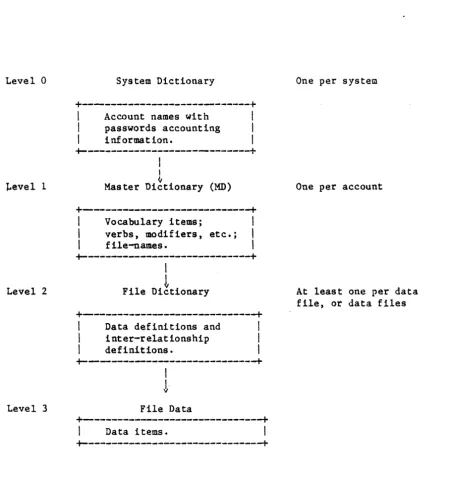
1. System Dictionary 2. User Haster Dictionary 3. File Level Dictionary-4. Data File
The hierarchial file structure is illustrated in Figure 3-1. The term "file" refers to a mechanism for maintaining a set of like items logically together. The data in a file may be accessed via the "dictionary" associated with it. A dictionary is like the "index" to a file. Since the dictionary itself is also a file, it contains items like a data file. The items in a dictionary serve to define lower level dictionaries or data files.
The system can contain any number of files. Files can contain any number of items and can automatically expand to any size. Items are variable length and can contain any number of fields and characters so long as the data in an item does not exceed a maximum of 32,267 bytes.
Level 0
~evel 1
Level 2
Level 3
System Dictionary
+---+
I
Account names withI
I
passwords accountingI
I
information.I
+---+
I
I~
Master Dictionary (MD)
+---+
I
Vocabulary items;I
I
verbs, modifiers, etc.;I
I
file-names.I
+---+
I
L
File Dictionary
+---+
I
Data definitions andI
I
inter-relationshipI
I
definitions.I
+---+
I
!
File Data
+---+
I
Data items.
I
+---+
One per system
One per account
At least one per data file, or data files
[image:42.618.57.510.76.556.2]3.1.2 USER MASTER DICTIONARIES (MDs)
The Master Dictionaries (MOs) comprise the next dictionary level. Each user's account ~iill normally have a unique MD associated with it. The MD contains items which store the definitions of all user vocabulary (verbs, PROCs, etc.) and items which function as pointers to accessible files.
When an account is created, a standard set of MD vocabulary items are stored in the account's MD. A user may, however, create synonyms to, and abbreviated forms of, these standard vocabulary elements (since they are merely items within his MD file) by creating copies of the elements. The user can also add statements called PROCs to the prestored vocabulary.
The file pointers can reference any file or dictionary in the system (i.e., they are not restricted to files defined within the user's account alone).
3.1.3 FILE LEVEL DICTIONARIES
The File Level Dictionaries describe the structure of the data within the
associated data files. They also contain pointers to the associated data level files. A file level dictionary may be shared by more than one data level file.
Some dictionaries do not have an associated data file; these are called "single level" files. Data in a single level file are stored within the dictionary itself.
3.1.4 DATA FILES
3.2 FILE ACCESS
A file is a logical structure which associates a set of items so that they can be accessed for both retrieval and update.
The file access system is designed to allow the access of a particular item (or a number of particular items) in a file, or to access consecutively all items in a file.
Items are individually variable in length. The maximun size of an item is 32,267 bytes. There is no limit to the number of items which may be contained in a file, nor any limit to the number of files in an account. Each item has a "name" which is called its item-ide An item-id is an item identifier (key or name) that must be unique tQ the file which contains it.
Items are stored in the file in a "pseudo-random" sequence; this sequence is determined by the result of a computational "hashing" (randomizing) technique employed by the system for storage and retrieval of data on disk. This
technique uses the item-id and other predefined parameters for the file to produce the disk-address (Frame-Identifier or FID), which identifies the location of the item.
Items that are stored in a file may be accessed directly, using the item-id as the key, or sequentially in the pseudo-random sequence. If items are to be accessed in any sorted sequence, a preliminary pass through the file to generate the sort sequence is needed (see SORT and SSELECT functions in the ACCESS Manual). The result of the preliminary pass is a "list" of item-ids; this list may be saved for future use or used immediately to access the items in the file in the required sorted sequence (see SAVE-LIST and GET-LIST
functions in the ACCESS Manual).
The direct file access technique, which uses the item-id to locate the item within the file, is an efficient method of locating data, and lends itself to
the on-line nature of the PICK system. The system overhead required to access an item using this technique is essentially independent of the actual size of the file.
Special reserved characters are used as delimiters for storing data within an item. Attributes are separated by "attribute marks" ("', hexadecimal value X'FE') which may be subdivided into values by "value marks" ( ' l ' , hexadecimal value X'FO'); the values may, in turn, be subdivided into subvalues by
3.3 FILE STRUCTURE: BASE, MODULO, AND SEPARATION
The physical boundaries of the random access file are defined by three parameters: the Base, t1odulo, and Separation. The physical boundaries are stored in the associated dictionary of the File Definition Item. The item-id of this item is the file-name.
Files are defined at the time of creation by these three parameters: Base
Modulo
Separation
Is the physical disk address (Frame-Identifier or FlO) of the start of a contiguous block of reserved disk space.
~ase is automatically selected by the system.
Is the number of groups that the file space is logically divided into (sometimes called "buckets"). 11odulo is selected by user.
Is the number of sequential frames per group. Separation is selected by user. Default separation is 1.
The numbers chosen for Modulo and Separation determine how efficient the file access method tlill be. An algorithm for optimum selection is presented in the next section.
The Base, Modulo, and Separation of the file are stored by the CREATE-FILE processor when the file is created. These parameters should never be altered in any way by the user!
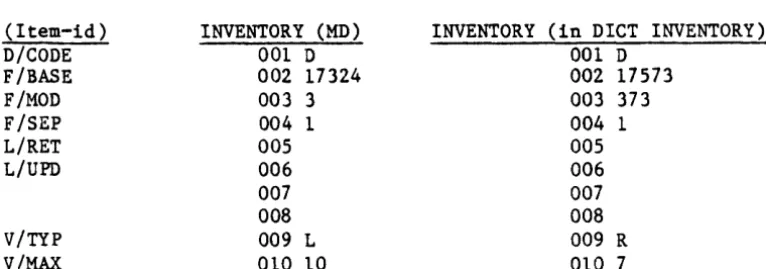
The following shows INVENTORY file's defined base, modulo and separation:
Item "INVENTORY" in the MD: (Dictionary level file)
INVENTORY
001 D
002 17324 <---(base) 003 3 <---(modulo) 004 1 <---(separation)
FID "Primary" space allocated to the INVENTORY dictionary file.
17324 1st group
17325 2nd group
17326 3rd group
Item "INVENTORY" in the dictionary INVENTORY: (Data level file) INVENTORY
001 D
002 17573 <---(base) 003 373 <---(modulo) 004 1 <---(separation)
FID "Primary" space allocated to the INVENTORY data file.
17573 1st group
17574 2nd group
3.3.1 ITEM STORAGE AND THE HASHING ALGORITHM
The system employs a computational group hashing technique which uses the item-id and the file parameters defined at the time of file creation.
This te~hnique generates the disk address (FID) of the group in which the item is stored.
The hashing formula used by the system to store or retrieve items is similar to the BASIC program shown below:
X • 0
FOR J = 1 TO LEN(ITEMID)
X • X*10 + SEQ(ITEMID[J,l]) NEXT J
GROUP • REM(X,MODULO)
FID = GROUP*SEPARATION + BASE where:
ITEMID contains the sequence of characters in the item-ide
The LEN function returns the number of characters in the item-ide The form lTEMID[J,l] extracts the j-th. character of the item-ide The SEQ function converts the above character to binary for addition. The REM function returns the remainder of the division of X by HODULO. And FID is the resulting disk address where the item may be found.
The item-id is treated as a variable length string of binary bytes; these bytes are accumulated sequentially with each partial sum being multiplied by 10. Dividing this value by the positive integer Modulo yields an unsigned integer remainder within the range:
o <-
Remainder<
MODULOThis is then the group number (i.e., 0, 1, 2, ••• , up to Modulo - 1) where the item is to be stored. Multiplying by the Separation and adding the Base yields the actual FID of the first frame in the group.
After computing a FID to locate the specific group in which the item resides, each item's item-id in the group must be compared for a "match." The frames comprising a group are linked both forward and backward. This system facility makes the group appear as a physically sequential string, where items are stored one immediately after another. In fact, any portion of an item may spill across a pQysical frame boundary.
3.4 SELECTING MODULO AND SEPARATION
Effective file accessing and efficient disk utilization depends on proper selection of modulo and separation.
"Modulo" is the number of groups in a file; "Separation" is the number of contiguous frames per group. When a file is created, the user specifies its Modulo and Separation. The frames allocated by the system (Modulo*Separation) are referred to as the "primary" file space. As data is placed into the file, any group may overflow by attaching frames from the available system space pool; this space is referred to as the "overflow" file space.
When an item is to be added to a file, its item-id is "hashed" or converted into a large number by a multiplication process. This number is then divided by the modulo of the file. The remainder of this division is the "group" into which the item will be placed. This method will produce an even distribution of items in each group.
A proper selection of the "modulo" parameter is essential to minimize this search time.
In the current file structure, a Separation parameter of more than 1 will be of use only if the average item size is greater than 1000 bytes, in which case, a few disk reads are avoided when searching for (reading) an item in the prime file space. In all other cases, particularly in a multi-user environment, the disk head will almost certainly have moved between the moment that a process requests one frame of a group and the next; therefore, whether the next linked frame of the group is contiguous (i:e., if the separation is greater than 1) or not makes a marginal difference.
The number of groups in a file directly affects the search and update time for an item in the group. The Modulo selection process will attempt to make the average GROUP length between 1 and 2 frames. However, if the item size is of
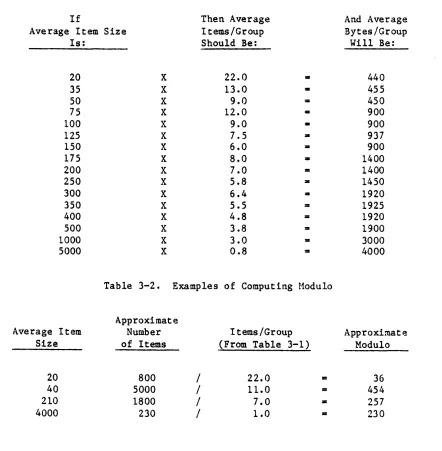
the order of 250 bytes or greater, this rule must be modified; you should then try to minimize as far as possible the average number of frames in a group. Therefore, the average number of items in a group should be selected with the average item size in mind; the larger the item size, the smaller the number of items in a group.
The discontinuities in the items/group columns are because the selection of the number is such that the bytes/group figures are close to integral multiples of frames (500, 1000, 1500, etc.). The last figure, 0.8 items/group, may be used for files with relatively f~w items that are very large, such as Assembly or BASIC program files. If the number of items in such a file is also very large, adjust the items/group figure upwards, since the lower figure will result in a lot of wasted disk space. Using the table, you can select an
appropriate items/group value; knowing the expected number of items in the file then gives you the approximate ~lodulo. Note that Modulo must not be a multiple of 2 or 5, and should preferably be a prime number.
Table 3-1. Selecting Items/Group
If Then Average
Average Item Size Items/Group
Is: Should Be:
20 X 22.0
..
35 X 13.0 •
50 X 9.0 =
75 X 12.0
..
100 X 9.0 •
125 X 7.5 •
150 X 6.0 : I
175 X 8.0 •
200 X 7.0
..
250 X 5.8 : I
300 X 6.4 : I
350 X 5.5 : I
400 X 4.8 : I
500 X 3.8 : I
1000 X 3.0
..
5000 X 0.8 : I
Table 3-2. Examples of Computing Modulo
Approximate
And Average Bytes/Group
Will Be:
[image:49.612.83.525.282.733.2]3.5 CREATING FILES: CREATE-FILE AND CREATE-PFlLE
The CREATE-FILE processor generates new files and dictionaries in the system. It creates file dictionaries by reserving disk space and inserting a "0" entry in the user's MD which points to the file-level dictionary, and creates data files by reserving disk space and placing a pointer to the space in the file level dictionary. CREATE-FILE will automatically locate and reserve a
contiguous block of disk frames from the available space pool. The user need only specify values for the Modulo and the Separation of both the file
dictionary and the data area. For a discussion of the values to use for Hodulo and Separation, refer to Section 3.4, SELECTING MODULO AND SEPARATION.
There may not be a data file without a file level dictionary pointing to it. Therefore, the file-level dictionary must be created prior to or concurrently with the data file. The latter is the preferred method for creating files and
t~1ds form of the CREATE-FILE command is shown below. This enables the creation
of both the dictionary and the data area with one command. The general forms are:
CREATE-FILE file-name m1{,sl}m2{,s2}
CREATE-FILE dict-name,data-name m1{,sl}m2{,s2}
'Jhere:
file-name till and s 1
m2 and s2 dict-name
data-name
is the name of the, file
are the Modulo and Separation values of the dictionary (DICT) portion
are the Modulo and Separation of the data portion
is the name of the dictionary. (To be used when dictionary is shared by multiple data files.)
is the data file name. (To be used if multiple data files will be pOinted to by the file dictionary.)
With either form, a pointer to the data file is placed in the file-level dictionary.
Note that if sl and s2 are not specified, separation will be 1. If m1 or m2 are even numbers, the system will make them odd by adding 1 to the module.
A file dictionary may be created without a data file by the command: CREATE-FILE DICT file-name m1{,s1}