Using 3174 in TCP/IP Networks
I~
Using 3174 in TCP/IP Networks
Document Number GG24-4172-00
June 1994
/
Take Note! ---~
Before using this information and the product it supports, be sure to read the general information under "Special Notices" on page xxiii.
First Edition (June 1994)
This edition applies to the 3174 Network Controller Configuration Support-C3 through C5 TCP/IP Support.
Order publications through your IBM representative or the IBM branch office serving your locality. Publications are not stocked at the address given below.
An ITSO Technical Bulletin Evaluation Form for reader's feedback appears facing Chapter 1. If the form has been removed, comments may be addressed to:
IBM Corporation, International Technical Support Organization Dept. 985, Building 657
P.O. Box 12195
Research Triangle Park, NC 27709-2195
~
Abstract
The 3174 Establishment Controller is a very important component in multi-protocol networks involving subarea SNA, Advanced Peer-to-Peer
Networking (APPN), Peer Communication, Token-Ring and Ethernet LANs, X.25, Integrated Services Digital Network (ISDN), asynchronous communication, frame relay, and Transmission Control Protocol/Internet Protocol (TCP/IP).
This document focuses on the roles of the 3174 in TCP/IP networks. It includes functions introduced by the 3174 TCP/IP TELNET RPQ 8Q0935, enhancements such as TN3270, TCP/IP host printer, and SNMP MIS-II support offered by 3174 TCP/IP Enhancements RPQ 8Q1041 and the recently available IP Forwarding RPQ 8Q1289.
This document is intended to help customers and systems engineers understand the functionality provided and how to customize the 3174 for participation in a TCP/IP network. It is organized to help the reader understand the basics of the TCP/IP Architecture in general and the 3174 implementation specifically. The scenarios include sample configuration files and panels for the 3174 and other TCP/IP hosts in the network. The reader is assumed to have a basic knowledge of TCP/IP as implemented by the other products used in the scenarios.
(373 pages)
Contents
Abstract . . . .
Special Notices
Preface
How This Document is Organized Related Publications . . . .
International Technical Support Organization Publications Acknowledgments . . . .
Chapter 1. An Introduction to 3174 TCP/IP Support
1.1 3174 Functional Overview ..
1.2 TCP/IP Overview . . . . 1.3 TCP/IP Architecture . . . . 1.3.1 Transmission Control Protocol (TCP) 1.3.2 Telnet . . . . 1.3.3 I nternet Protocol (I P) . . . . 1.3.4 Internet Control Messaging Protocol (ICMP) 1.3.5 User Datagram Protocol (UDP) . . . . 1.3.6 Address Resolution Protocol (ARP) . . . . . 1.3.7 Simple Network Management Protocol (SNMP) 1.3.S Domain Name System
1.3.9 Packet Internet Groper (PING) 1.3.10 TCP/IP Gateways
1.4 TCP/IP Protocols Supported
Chapter 2. 3174 TCP/IP Telnet Support
2.1 Support before 3174 TCP/IP Telnet RPQ SQ0935 2.2 Support with 3174 TCP/IP Telnet RPQ 8Q0935 .. 2.3 Support with Configuration Support-C Release 3 2.4 Support with 3174 TCP/IP Enhancements RPQ SQ1041 2.5 Support with Configuration Support-C Release 5 . . . 2.6 Support with 3174 IP Forwarding RPQ SQ12S9
2.7 TELNET Emulation and NLS Support 2.S 3174 Models Supported . . .
2.S.1 Gateway 3174 Configuration . 2.S.2 DSPU 3174 Configuration 2.9 Devices Supported
2.10 Hosts Supported . . . . 2.11 Storage Requirements
2.11.1 Sessions . . . . 2.11.2 TCP/I P Data Buffers 2.12 Microcode Packaging ..
Chapter 3. Adding 3174 to TCP/IP Network .
3.1 IP Addresses . . . . 3.2 Subnet Masks . . . . 3.3 Customizing IP Addresses 3.4 Names . . .
3.5 Name Servers . 3.6 3174 Nicknames
© Copyright I BM Corp. 1994
3.7 How the 3174 TCP/IP Telnet Support Looks at Names ., 3.8 Routes . . . .
3.9 Customizing 3174 TCP/IP Telnet Support 3.9.1 Example Scenario . . . . .
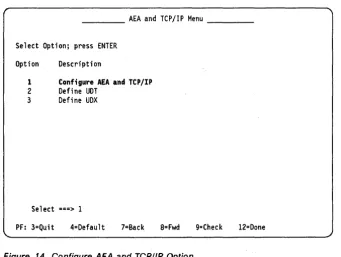
3.9.2 Panel Flow . . . . 3.9.3 Configure AEA and TCP/IP 3.9.4 Enabling AEA and TCP/IP 3.9.5 Defining Port Set . . . . 3.9.6 Mapping Port to Port Set ..
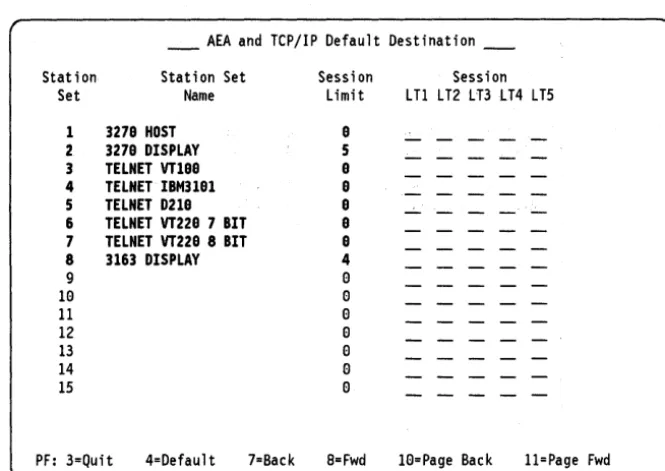
3.9.7 Defining 3270 Host and Display Station Sets . 3.9.8 Defining TCP/IP Station Sets . . . 3.9.9 Defining Default Destinations . . . . .
3.9.10 Defining TCP/IP Options . . . . . 3.9.11 Defining TCP/IP Routing Information 3.9.12 Defining Domain Name Services 3.9.13 Defining TCP/IP Nicknames 3.9.14 Configure Complete . . . 3.9.15 Token-Ring Considerations . 3.9.16 Ethernet Considerations
3.10 How to Use the 3174 TCP/IP Telnet Support
3.11 Terminal Operation with the 3174 TCP/IP Telnet Support 3.11.1 Opening a Connection . . . .
3.11.2 Escaping to Local Mode . . . . 3.11.3 Returning to The Connection Menu . 3.11.4 Returning to the Telnet Session . 3.11.5 TELNET Session Resources . . . 3.11.6 Operation: Telnet to RS/6000 Host 3.11.7 Operation: Telnet to MVS TCP/IP Host 3.11.8 Local Mode Commands . . . . 3.11.9 Special Considerations for ASCII Terminals 3.11.10 SpeCial Considerations for 3270 Terminals 3.11.11 Special Considerations for 3270 Emulation 3.12 If Things Go Wrong ...
3.13 Telnet Codes
3.14 Data Flows . . . .
Chapter 4. Scenario 1: TCP/IP Using 3174 Peer Communication Only
4.1 Scenario 1 Configuration Diagram .. .
4.2 Scenario 1 Configuration Description . . . . 4.3 Communications Manager/2 Definitions . . . . 4.4 TCP/IP V1.2.1 for OS/2 Installation/Configuration .
4.5 Installation: TCP/IP LAN Adapter and Protocol Support (TCPLAPS) 4.6 Personal Communications/3270 Definitions . . . .
4.6.1 Personal Communications/3270 Configuration Program 4.7 Installation: TCP/IP for DOS . . . .
4.7.1 System Files . . . . 4.8 USing TCP/IP Application for Windows
4.8.1 Overview of the TCP/IP for Windows 4.8.2 Windows Ping . . . .
4.8.3 Windows TELNET
4.9 RISC System/6000 Definitions 4.9.1 SMIT TCP/IP . . . .
4.9.2 Minimum Configuration and Setup 4.10 3174-11R Customization
4.10.2 Common SNA . . . . 4.10.3 Common Network
4.10.4 Ring Address Assignment
4.11 3174-Peer Definition . . . . . . . . 4.11.1 Question 650: 3174-Peer Support 4.11.2 Question 651: Bridge Support 4.11.3 Question 652: LAN Manager Support
4.11.4 Question 653: 3174-Peer Online Test Updates 4.11.5 Question 660: 3174-Peer Port Address Range 4.11.6 Question 661: Percentage of Discard Threshold 4.11.7 3174-Peer Bridge Profile
4.11.8 LAN Manager Profile 4.12 Display 3174-Peer Status ..
Chapter 5. Scenario 2: Concurrent Access to SNA and TCPIIP Hosts 5.1 Scenario 2 Configuration Diagram .. .
5.2 Scenario 2 Configuration Description . . . . 5.3 3174-12L Multi-Host Customization
5.3.1 Common Network (1B Host) . . . 5.3.2 Ring Address Assignment (1 B Host) 5.3.3 Ring Transmission Definition (1B Host) 5.3.4 Configure Complete . . . .
5.4 3174 TCP/IP Customizing 5.4.1 Enabling AEA And TCP/IP 5.4.2 Defining Port Set . . . 5.4.3 Mapping Port To Port Set
5.4.4 Defining 3270 Host and Display Station Sets 5.4.5 Defining TCP/IP Station Sets
5.4.6 Defining Default Destinations 5.4.7 Defining TCP/IP Options
5.4.8 Defining TCP/IP Routing Information 5.4.9 Defining Domain Name Services . 5.4.10 Defining TCP/IP Nicknames
5.4.11 Configure Complete . . . . 5.5 Operation: TELNET to RISC System/6000 5.6 RISC System/6000 Definitions
5.6.1 SNA Services . . . 5.6.2 Configure SNA Profiles . 5.6.3 Quick Configuration . . .
5.6.4 Quick Configuration for a 3270 Communication Connection: Information . . . .
5.6.5 Command Status . . . . 5.6.6 Advanced SNA Configuration 5.6.7 Physical Units . . . . 5.6.8 Token-Ring . . . .
5.6.9 SNA Token Ring Attachment Profile Name
5.6.10 Change/Show SNA Token Ring Attachment Profile 5.6.11 Manage SNA Services
5.6.12 Start SNA Resources 5.6.13 Start an SNA Link Station
5.6.14 Display SNA Resources. .. . . . . . . . 5.6.15 Command Status . . . . . . . . . . . 5.6.16 AIX 3270 Host Communication Program/6000 (HCON) .. 5.6.17 HCON User Functions
5.6.18 Add an HCON Session . . . .
5.6.19 Add SNA Display Session 5.6.20 Command Status
5.6.21 HCON Session . . . .
157 157 158
Chapter 6. Scenario 3: APPN and TCPIIP via 3174 to AS/400 and VTAM 159
6.1 Scenario 3 Configuration Diagram . . . 159
6.2 Scenario 3 Configuration Description . . . 160
6.3 3174-11R APPN, Peer Communication and TCP/IP Customization 161 6.3.1 Customize Control Disk Menu . . . 161
6.4 3174 as an APPN Network Node . . . 161
6.5 3174 APPN and Peer Communication Customization . . . 162
6.5.1 SDLC . . . 164
6.5.2 Common SNA . . . 164
6.5.3 Common Network . . . 168
6.5.4 Ring Address Assignment 168 6.5.5 APPN Node Definition 169 6.6 Network Resources Definition 170 6.6.1 Network Resources 171 6.6.2 Associated LUs 172 6.7 COS Definitions . . . 172
6.7.1 Mode/COS Correlation 173 6.8 3174-Peer Definitions . . . 175
6.8.1 3174-Peer Definition Panel 176 6.8.2 3174-Peer Bridge ~rofile 177 6.9 AS/400 Definitions 178 6.9.1 Network Attributes 178 6.9.2 Configuration Status 178 6.9.3 Controller Description Screens (C31742) . . . 179
6.9.4 Device Description Screens (PS2COAX) . . . 181
6.10 Communications Manager/2 Definitions for 5250 Emulation 182 6.10.1 Communications Manager/2 Installation and Setup 182 6.10.2 Communications Manager Setup . . . 183
6.10.3 Open Configuration . . . 183
6.10.4 Communications Manager Configuration Definition-PSEN3174 184 6.10.5 Communications Manager Profile List Sheet . . . 185
6.10.6 Token-Ring or Other LAN Types DLC Adapter Parameters . . 185
6.10.7 Local Node Characteristics . . . 186
6.10.8 SNA Features List . . . 186
6.10.9 5250 Emulation . . . 187
6.11 LAN Adapter and Protocol Support 188 6.11.1 LAN Adapter and Protocol Support 188 6.11.2 Configure LAN Transports . . . . . . 188
6.11.3 Configure Workstation . . . . . . .. 189
6.11.4 Parameters for 3270 Adapter for 3174 Peer Communications 189 6.11.5 LAN Adapter and Protocol Support . . . .. 190
6.11.6 3174-11R Online Display . . . .. 191
6.12 VTAM Definition List . . . 192
6.13 3174 TCP/IP Definitions . . . . . 198
6.13.1 AEA And TCP/IP Configure 198 6.13.2 Defining Port Set . . . 198
6.13.3 Mapping Port To Port Set . 200
6.13.4 Defining 3270 Host and Display Station Sets 200
6.13.5 Defining TCP/IP Station Sets 201
6.13.8 Defining TCP/IP Routing Information 6.13.9 Defining Domain Name Services 6.13.10 Defining TCP/IP Nicknames 6.13.11 Configure Complete
6.13.12 TELNET to AS/400
6.13.13 TELNET Prompt "
6.13.14 AS/400 Sign-On Screen
6.13.15 AS/400 Main Menu 6.14 Display 3174-Peer Status ..
Chapter 7. Scenario 4: TCP/IP via 3174 and RS/6000 Router to VAX
7.1 Scenario 4 Configuration . . . . 7.2 Scenario 4 Description . . . . 7.3 3174-11R TCP/IP and Peer Support Customization
7.3.1 Customize Control Disk Menu 7.4 3174-Peer Definition . . . .
7.4.1 3174-Peer Definition Panel 7.5 3174 TCP/IP Definitions
7.5.1 AEA and TCP/IP Configure 7.5.2 Defining Port Set . . . 7.5.3 Mapping Port to Port Set .
7.5.4 Defining 3270 Host and Display Station Sets 7.5.5 Defining TCP/IP Station Sets
7.5.6 Defining Default Destinations 7.5.7 Defining TCP/IP Options
7.5.8 Defining TCP/IP Routing Information 7.5.9 Defining Domain Name Services .. 7.5.10 Defining TCP/IP Nicknames . . . . .
7.6 RS/6000 Definitions . . . . 7.6.1 Router Definition on RISC System/6000
7.6.2 Command Status . . . . 7.6.3 Router Definition on DEC VAX 7.7 TELNET to VAX Host . . . .
Chapter 8. 3174 Ethernet Considerations
8.1 3174 Configuration Support C, Release 4 8.1.1 Configurations . . . .
8.1.2 Alternate Configurations 8.1.3 Storage Requirements 8.1.4 Configuration Examples 8.1.5 MAC Layer . . . . 8.1.6 LLC Layer . . . .
8.1.7 Frame Format Discovery Process 8.2 3174 Ethernet Adapter ..
8.2.1 Capacity ., . . . . 8.2.2 Configurations . . . .
8.2.3 CSMA/CD LAN Physical Interfaces 8.2.4 Hardware Group and Type Number
8.2.5 Field Replaceable Unit Identification (FRU ID) 8.2.6 Status Codes . . . .
8.3 3174 Ethernet Customization 8.4 Configuration Questions . . . .
8.4.1 Modell Attach Panel . . . . 8.4.2 Ethernet Description Panel 8.4.3 Local Area Network Panel
203 204 205 205 206 206 207 207 208 209 209 210 211 211 212 212 213 213 214 215 215 216 217 217 218 219 220 221 221 223 223 224 227 227 228 228 228 230 232 234 236 244 244 244 244 246 246 247 248 248 249 251 253
8.4.4 Common Network Panel (Gateway 900) 8.4.5 Gateway 940 Panel
8.4.6 Gateway 941 Panel . . . . 8.4.7 TCP/IP Options Menu . . . . . 8.4.8 End-User Productivity Panel . 8.5 Online Test ("/TEST") . . . . .
8.5.1 /1 -- Logs Display . . . . 8.5.2 /2 -- Display Customization 8.5.3 /9 -- LAN Tests . . . . 8.5.4 /15 - Host Status Summary 8.5.5 /17 - APPN Tests . . .
Chapter 9. 3174 TCP/IP Enhancements RPQ 8Q1041
9.1 Configurations
9.2 Devices . . . . 9.3 Hosts . . . . 9.4 3174 Microcode and Packaging 9.5 Storage Requirements
9.5.1 Sessions 9.5.2 Data Buffers 9.6 Protocols .. 9.7 TN3270 . . .
9.7.1 Function "
9.7.2 ASCII TELNET vs TN3270 9.8 Line Printer Daemon (LPD)
9.8.1 Printer Pooling . 9.8.2 LPD Data Stream 9.8.3 Banner Page " 9.8.4 Internal Queuing 9.8.5 Translation Support 9.9 MIB-II . . . .
9.10 TCP/IP Enhancements Customization 9.10.1 AEA and TCP/IP Configure . 9.10.2 Defining TN3270 Station Set 9.10.3 Defining Printer Station Set 9.10.4 Defining Default Destinations 9.10.5 Defining TCP/IP Options
9.11 Scenario 1 - 3174 Line Printer Daemon (LPD) 9.11.1 Scenario Description . . . . . . . 9.11.2 3174 Line Printer Daemon Customization 9.11.3 Defining 3270 Printer Station Set
9.11.4 Defining Default Destinations . . . .
9.11.5 Defining TCP/IP Options . . . . . . . . 9.11.6 3174 Line Printer Daemon Configuration for OS/2 . . . . 9.11.7 Printing with the 3174 Line Printer Daemon from TCP/IP for OS/2 9.11.8 3174 Line Printer Daemon Configuration for DOS . . . . 9.11.9 Printing with the 3174 Line Printer Daemon from TCP/IP for DOS 9.11.10 3174 Line Printer Daemon Configuration for AS/400
9.11.11 Printing with the 3174 Line Printer Daemon on AS/400
9.11.12 3174 Line Printer Daemon Configuration for RS/6000 . . . . 9.11.13 Manage Local Printer Subsystem . . . . 9.11.14 Manage Remote Printer Subsystem . . . .
9.11.15 Server Services . . . . 9.11.16 Printing with the 3174 Line Printer Daemon from RS/6000
9.11.18 3174 Line Printer Daemon Configuration for SunOS Workstation 328 331 332 332 333 333 334 334 335 340 340 340 341 342 342 343 343 344 344 345 345 346 348 349 9.12 Scenario 2 - TN3270 to MVS Host . . . .
9.12.1 Scenario Descri ption
9.12.2 TN3270 Customization . . . . 9.12.3 Defining Default Destinations 9.12.4 Defining TCP/IP Options
9.12.5 Defining TCP/IP Routing Information 9.12.6 Defining Domain Name Services 9.12.7 Connection Menu . . . . 9.13 Scenario 3 - TN3270 to CICS/6000
9.13.1 Scenario Descri ption
9.13.2 TN3270 Customization . . . . 9.13.3 Defining Default Destinations 9.13.4 Defining TCP/IP Options
9.13.5 Defining TCP/IP Routing Information 9.13.6 Defining Domain Name Services 9.13.7 Defining TCPIIP Nicknames
9.13·.8 CICS/6000 Overview . . . .
9.13.9 CICS/6000 Environment ..
9.13.10 CICS/6000 TELNET Server 9.13.11 TCP/IP Port Number
9.13.12 Connection Menu . . . . 9.13.13 CICS Signon Screen . . . .
9.13.14 Working with Your CICS/6000 Region . Chapter 10. 3174 Configuration Support C, Release 5 10.1 Multiprotocol Frame Relay
10.2 DLCI . . . .
10.3 IP Support . . . . 10.4 Interoperability . . . . . 10.5 Migration - Coexistence
10.6 Frame Relay Customization . . . . 10.6.1 Modell Attach Panel . . . . 10.6.2 Frame Relay Host Panel Layout for the 1A Host 10.6.3 Frame Relay Host Panel Layout for the 1 B-1 H Hosts 10.6.4 Frame Relay Description Panel Layout
10.6.5 Customization Error Messages . . . .
Appendix A. Address Bit Order for Ethernet Addresses
Appendix B. SNMP Variables
Abbreviations
Index . . .
351 352 352 352 352 352 353 353 354 354 355 357 359 363 371 373
Figures
1. 2. 3. 4. 5. 6. 7. 8. 9. 10. 11. 12. 13. 14. 15. 16. 17. 18. 19. 20. 21. 22. 23. 24. 25. 26. 27. 28. 29. 30. 31. 32. 33. 34. 35. 36. 37. 38. 39. 40. 41. 42. 43. 44. 45. 46. 47. 48. 49. 50. 51.© Copyright I BM Corp. 1994
TCP Logical Connections
TCP Connection Establishment . Using Ports to Direct Datagrams
Protocols Supported by the 3174 TCPJIP Telnet Support 3174 Gateway Configurations with 3174 TCP/IP Telnet Support 3174 DSPU Configuration with 3174 TCPJIP Telnet Support Classes of IP Addresses . . . . . . . . TCPJIP Resolving NameJDestination ..
TCPJIP Router Example . . . . TCP/IP Router Example Customization TCPJIP Example Scenario . . . . TCPJIP Customization Panel Flow Define AEA and TCPJIP Option Configure AEA and TCPJIP Option AEA and TCP/IP Configure Panel Port Set Panel . . . . Port to Port Set Map Panel (1 of 3) Port to Port Set Map Panel (2 of 3) Port to Port Set Map Panel (3 of 3)
AEA and TCPJIP Station Set Panel (1 of 4) AEA and TCP/IP Station Set Panel (2 of 4) AEA and TCP/IP Station Set Panel (3 of 4) AEA and TCPJIP Station Set Panel (4 of 4) AEA and TCP/IP Default Destination Panel TCP/IP Options Menu . . . . . . . . TCP/IP Routing Information
TCP/IP Domain Name Services . TCP/IP 3174 Defined Nicknames AEA and TCP/IP Configure Complete
Connection Menu Immediately after 3174 IMLed Connection Menu after 3174 Becomes Active
4 5 6 8 13 14 19 . . . . 22 23 24 25 26 27 27 28 29 30 31 32 32 34 37 37 38 39 40 41 43
Connection Menu after 3174 Becomes Active And Enter Pressed
. . . 44 45 45 46 48 49 49 50 50 TCPJIP Resources Not Available . . . .
Selecting Connection to RSJ6000 Host TELNET Local Mode . . . .
RS/6000 after Login . . .
RS/6000 after Invoking SMIT
Logging On to MVS TSO .. . . . . .
TCP/IP Using NAMES Command . . . . . . . TCP/IP Using PING Command - to Default Destination TCP/IP Using PING Command - with Parameters . TCP/IP Using PING Command - Help
TCP/IP Using PING Command - Messages . . . . . TCP/IP Using CLOSE Command . . . . TCP/IP Using STATUS Command
TCP/IP Using DISPLAY Command Online Test 13,3,26 . . . . TCP/IP Connection Establishment
TCP/IP Access through 3174 Peer Communication Communications Manager/2 Installation and Setup Communications Manager Setup . . . .
51
. . . . . 52
52. 53. 54. 55. 56. 57. 58. 59. 60. 61. 62. 63. 64. 65. 66. 67. 68. 69. 70. 71. 72. 73. 74. 75. 76. 77. 78. 79. 80. 81. 82. 83. 84. 85. 86. 87. 88. 89. 90. 91. 92. 93. 94. 95. 96. 97. 98. 99. 100. 101. 102. 103. 104. 105.
Open Configuration . . . . Communications Manager Configuration Definition for 3270 Emulation 3270 Emulation through Token-Ring . . . . Communications Manager Configuration Definition for 3270 Emulation TCP/IP V1.2.1 for OS/2 ICATlntroduction Panel . . . TCP/IP V1.2.1 for OS/2 ICAT Installation Panel
ICAT Configuration Menu . . . . ICAT Configure Network Interface Parameters IFCONFIG Statement in SETUP.CMD File TCPLAPS Introduction Panel
TCPLAPS Installation Panel .. TCPLAPS Reinstall Selection Target Drive . . . . TCPLAPS Configuration Panel TCPLAPS Configuration Selection CONFIG.SYS Update
Updated CONFIG.SYS . . . . PC/3270 Logo . . . . PC/3270 Create Configuration File PC/3270 Choose Configuration PC/3270 Attachment Types
PC/3270 Advanced Options for 3174 Peer Communication PC/3270 Advanced Options for 3174 Network Stations PC/3270 Screen Sizes . . . .
PC/3270 Keyboard and Code Pages PC/3270 Startup Options . . . . PC/3270 End of Link Option . . . . . PC/3270 End of Configuration (Before Save) PC/3270 End of Configuration (After Save)
PC/3270 Customize Communication (Windows Mode) Customize Communication - 3270 Host (Windows Mode) IEEE 802.2 (Windows Mode) . . . .
IEEE 802.2 Advanced (Windows Mode) IBM TCP/IP for DOS Installation Tool IBM TCP/IP for DOS CUSTOM
Read TCP/IP Configuration . . . .
NDIS Interface and Protocol Manager Configuration NDIS Interfaces . . . .
Read TCP/IP Configuration Write TCP/IP Configuration The TCP/IP Program Group PING .. .
HOST . . . .
Ping (OK) . . . . TELNET . . . . IBM TCP/IP TELNET Configure Define Session . . . . IBM TCP/IP TELNET Connection Open Session . . .
Session Establishment . . . . . SMIT TCP/IP . . . . Minimum Configuration and Startup . 3174-11R Customization . . . . Customizing the 3174-11R for an SDLC Link.
107. 108. 109. 110. 111. 112. 113. 114. 115. 116. 117. 118. 119. 120. 121. 122. 123. 124. 125. 126. 127. 128. 129. 130. 131. 132. 133. 134. 135. 136. 137. 138. 139. 140. 141. 142. 143. 144. 145. 146. 147. 148. 149. 150. 151. 152. 153. 154. 155. 156. 157. 158. 159. 160. 161.
Token-Ring Definition for the 3174-11 R . . . . Ring Address Assignment . . . . Enabling 3174 Peer Communication Functions . . . . Format of 3174-Peer Device Address . . . . 3174-Peer Bridge Parameters . . . . Display 3174-Peer Status . . . . 3174 MLT Access to SNA 3270 and TCP/IP Hosts . . . . 3174-11L Multi-Host Customization . . . . Multi-Host Defi n ition . . . . Customizing the 3174-12L for an ESCON Connection . . . . Names to Identify the 3174-12L Network Node . . . . Token-Ring Definition for the 3174-12L . . . . Ring Address Assignment . . . . Ring Transmission Definition . . . . Port Assignment . . . . Port Address . . . . Customizing the 3174-12L for an ESCON Connection (1B Host) . . . . . Token-Ring Definition for the 3174-12L . . . . Ring Address Assignment (1 B Host) . . . . Ring Transmission Definition (1 B Host) . . . . Port Assignment (1 B Host) . . . . Port Address (1B Host) . . . . Configure Complete . . . . AEA and TCP/IP Configure Panel . . . . Port Set Panel . . . . Port to Port Set Map Panel (1 of 3) . . . . AEA and TCP/IP Station Set Panel (1 of 3) . . . . AEA and TCP/IP Station Set Panel (2 of 3) . . . . AEA and TCP/IP Station Set Panel (3 of 3) . . . . AEA and TCP/IP Default Destination Panel . . . . TCP/IP Options Menu . . . . TCP/IP Domain Name Services . . . . TCP/IP 3174 Defined Nicknames . . . . AEA And TCP/IP Configure Complete . . . . Connection Menu Immediately after 3174 IMLed . . . . Connection Menu after 3174 Becomes Active . . . . Connection Menu after 3174 Becomes Active and Enter Pressed Selecting Connection to RS/6000 Host . . . . TELNET Local Mode . . . .
RS/6000 after Login . . . . RS/6000 after Invoking SMIT . . . . SNA Services . . . . Configure SNA Profiles . . . . Quick Configuration . . . . Quick Configuration for a 3270 Communication: Information . . . . Command Status . . . . . . . . . Advanced SNA Configuration . . . . . . . . . Physical Units . . . . Token Ring . . . . SNA Token Ring Attachment Profile Name . . . . Change/Show SNA Token Ring Attachment Profile . . . . Manage SNA Services . . . . Start SNA Resources . . . . . . Start SNA Link Station . . . .
Display SNA Resources
108 109 110 112 114 118 119 121 122 123 124 124 125 125 126 126 127 127 128 128 129 129 130 131 132 133 134 136 137 138 139 141 142 142 143 143 144 144 145 145 145 146 147 147 148 148 149 150 150 151 151 152 152 153 153
162. 163. 164. 165. 166. 167. 168. 169. 170. 171. 172. 173. 174. 175. 176. 177. 178. 179. 180. 181. 182. 183. 184. 185. 186. 187. 188. 189. 190. 191. 192. 193. 194. 195. 196. 197. 198. 199. 200. 201. 202. 203. 204. 205. 206. 207. 208. 209. 210. 211. 212. 213. 214.
COMMAND STATUS
AIX 3270 Host Communication Program/6000 (HCON) HCON User Functions
Add an HCON Session . . . Ad,d SNA Display Session COMMAND STATUS
Host . . . . . . . . 3174 in an APPN, TCP/IP and SNA Environment . Customize Control Disk Menu . . . . 3174 Customization Panel Flow Sequence Customizing the 3174-11 R for an SDLC Link . Names to Identify the 3174-11R Network Node Token-Ring Definition for the 3174-11 R
Ring Address Assignment . APPN Node Definition Network Resources Associated LUs
COS Defi n ition . . .
Correlating Mode Names with COS Table Names Enabling 3174 Peer Communication Functions Parameters for the Internal Bridge Function . Network Attributes of the AS/400 . . . . Configuration Status . . . . Controller Description (C31742) 1 of 4 . Controller Description (CP31742) 2 of 4 Controller Description (CP31742) 3 of 4 Controller Description (CP31742) 4 of 4 Device Description (PS2COAX) 1 of 2 Device Description (PS2COAXl2 of 2
Communications Manager/2 Installation and Setup Communications Manager Setup . . . . Open Configuration . . . .
Communications Manager/2 Configuration Definition for 5250 Emulation . . . . Communications Manager Profile List Sheet . . . . Token-Ring or Other LAN Types DLC Adapter Parameters Local Node Characteristics
SNA Features List . . . . 5250 Emulation . . . . LAN Adapter and Protocol Support . Configure LAN Transports
Configure Workstation . . . . Network Adapter Address . . . . LAN Adapter and Protocol Support Display of Nodes Adjacent to the 3174-11 R.
AEA and TCP/IP Configure Panel
Port Set Panel . . . . Port To Port Set Map Panel . . . . AEA and TCP/IP Station Set Panel (1 of 2) AEA and TCP/IP Station Set Panel (2 of 2) AEA and TCP/IP Default Destination Panel TCP/IP Options Menu . . .
TCP/IP Routing Information
TCP/IP Domain Name Services ..
216. 217. 218. 219. 220. 221. 222. 223. 224. 225. 226. 227. 228. 229. 230. 231. 232. 233. 234. 235. 236. 237. 238. 239. 240. 241. 242. 243. 244. 245. 246. 247. 248. 249. 250. 251. 252. 253. 254. 255. 256. 257. 258. 259. 260. 261. 262. 263. 264. 265. 266. 267. 268. 269. 270.
AEA and TCP/IP Configure Complete . . . . Selecting Emulation for AS/400 . . . . Command and Destination . . . . AS400 Sign On Screen . . . .
AS/400 Main Menu . . . .
Display 3174-Peer Status . . . . TCP/IP to DEC VAX and AS/400 Hosts . . . . Customize Control Disk Menu
Enabling 3174 Peer Communication Functions . . . . AEA and TCP/IP Configure Panel . . . . Port Set Panel . . . . Port to Port Set Map Panel . . . . AEA and TCP/IP Station Set Panel . . . . AEA and TCP/IP Station Set Panel . . . . AEA and TCP/IP Default Destination Panel . . . . TCP/IP Options Menu . . . . TCP/IP Routing Information . . . . TCP/IP Domain Name Services . . . . TCP/IP 3174 Defined Nicknames . . . . SMIT TCP/IP . . . . Further Configuration . . . . Static Routes . . . . Add Static Route . . . . Command Status . . . . Selecting Connection to VAX Host . . . . TELNET Connection to VAX host . . . . TELNET Cession to VAX host . . . . NCU Configuration . . . . Gateway Configuration . . . . APPN Configuration . . . . TCP/IP Configuration . . . . Frame Format . . . . Frame Format Discovery for TCP/I P . . . . Hardware Configuration Table . . . . Model I Attach . . . .
Model I Attach . . . .
Ethernet Description Panel . . . . Local Area Network Panel . . . . Common Network . . . . Common Network . . . . 3174 Test Menu . . . . LAN Test Menu . . . . LAN Test Menu
Monitor LAN Status . . . . Ethernet Adapter Status Summary . . . . Link Status Test . . . . 3270 Host Status Summary . . . . Link Status . . . . 3174 TCP/IP in a LAN . . . . TCP/IP Protocols Provided by the 3174 . . . . 3174 Processing for ASCII TELNET and TN3270 . . . . 3174 LPD Support . . . . Printer Queue Validation Flow . . . . AEA and TCP/IP Configure Panel . . . . AEA and TCP/I P Station Set Panel . . . .
205 206 206 207 207 208 209 211 212 213 214 215 215 216 217 217 218 219 220 221 221 222 222 223 224 224 225 230 230 231 232 233 237 246 249 249 251 253 254 254 256 257 257 258 259 260 261 261 264 269 272 273 275 291 292
271. 272. 273. 274. 275. 276. 277. 278. 279. 280. 281. 282. 283. 284. 285. 286. 287. 288. 289. 290. 291. 292. 293. 294. 295. 296. 297. 298. 299. 300. 301. 302. 303. 304. 305. 306. 307. 308. 309. 310. 311. 312. 313. 314. 315. 316. 317. 318. 319. 320. 321. 322. 323. 324.
AEA and TCP/I P Station Set Panel . . . AEA and TCP/IP Default Destination Panel TCP/IP Options Menu . . . .
3174 LPD Support . . . . AEA and TCP/IP Station Set Panel . . . . . AEA and TCP/IP Default Destination Panel TCP/IP Options Menu . . . . TCP/IP Configuration . . . .
TCP/IP Configuration Configure Services Page 1 of 3 TCP/IP Configuration Configure Services Page 2 of 3 TCP/IP Configuration Configure Services Page 3 of 3 Closing TCP/IP Configuration
Network Services Printer Services .. AS/400 Main Menu Communications Network Configuration
Configure Communications and Remote Hardware Configure TCP/IP
Work with TCP/IP Links Display TCP/IP Link .. Configure TCP/IP
Work with TCP/IP Host Table Entries Communications
Network Management TCP/IP Administration TCP/I P Administration TCP/IP Administration
Send TCP/IP Spooled File SNDTCPSPLF TCP/IP Administration . . . . RISC System/6000 . . . . System Management (SMIT Text Interface) Spooler Print Jobs . . . .
Manage Local Printer Subsystem Add a Local Queue . . . . Queue to Change / Show
Change / Show Characteristics of a Queue Local Printer Queues
QUEUE Name . . .
Start a Queue . . . . . . . . Command Status Panel . . . . . Spooler Print Jobs . . . . . . . . Manage Remote Printer Subsystem Client Services . . . . Queue to Change / Show . . . . Change / Show Characteristics of a Queue Manage Remote Printer Subsystem Server Services . . . . Ipd Remote Printer Subsystem Start Using the Ipd Subsystem Spooler Print Jobs
Start a Print Job . . . . Command Status Panel Login at HP Host
326. 327. 328. 329. 330. 331. 332. 333. 334. 335. 336. 337. 338. 339. 340. 341. 342. 343. 344. 345. 346. 347. 348. 349. 350. 351. 352. 353. 354. 355. 356. 357. 358. 359. 360. 361. 362. 363. 364. 365. 366. 367. 368. 369. 370. 371. 372. 373. 374. 375. 376. 377. 378. 379. 380.
Printer/Plotter Menu Bar Printer/Plotter Manager Add Remote Printer/Plotter Add Remote Printer/Plotter Enable Printer/Plotter Printer/Plotter Status . Start Up Print Spooler Print Spooler Running TELNET with HP Workstation Login at HP Host . . . . Ping Command to SunOS Host . TELNET with SunOS Host
Login to SunOS Host Ipc Program . . . . TN3270 to MVS Host
AEA and TCP/I P Station Set Panel .. AEA and TCP/IP Default Destination Panel TCP/IP Options Menu . . . . .
TCP/IP Routing Information . . . . TCP/IP Domain Name Services . . . . Connection Menu Immediately after 3174 IMLed
Connection Menu after 3174 Becomes Active and Enter Pressed TELNET Local Mode
NETVIEW ACCESS Application Selection TSO Logon . . . .
ISPF/PDF Primary Option Menu ISPF/PDF Primary Option Menu TSO Command Processor TSO Command Processor netstat devlinks . . . . TN3270 to RS/6000 Host
AEA and TCP/I P Station Set Panel
AEA and TCP/IP Default Destination Panel TCP/IP Options Menu . . .
TCP/IP Routing Information
TCP/IP Domain Name Services .. TCP/IP 3174 Defined Nicknames cicsteld Protocol . . . . TCP/IP Port Number . . . .
Connection Menu after 3174 Becomes Active and Enter pressed
TELNET Local Mode . . . . . . .
Checking User . . . . Searching Available Regions . Available CICS Regions
Connect to Region . . . CESN - CICS Signon Screen Inquire Task . . . .
3174 Frame Relay Communications Feature Model I Attach . . . . Frame Relay Connection Parameter . Frame Relay Connection Parameter . Frame Relay Description . . . . B-1. Ethernet Address . . . .
B-2. Example of Address with the Leftmost Bit Transmitted First
322 323 323 324 325 325 326 326 327 327 328 328 329 330 331 332 333 333 334 334 335 335 336 336 337 337 338 338 339 339 339 340 341 341 342 342 343 343 345 346 346 347 347 347 347 348 348 349 351 353 354 354 355 359 359
Tables
1. Function Availability Matrix . . . . 2. 3174 TCP/IP Telnet RPQ Storage Requirements 3. 3174-Peer Online Test Updates Allowed
4. Alternative Configurations . . . . 5. 3174 CS-C4 TCP/IP TELNET Storage Requirements 6. Transmission Table for SNA Frame Format Discovery 7. 10base-5 AUI Connector Pin Assignment . . . . 8. 10base-T RJ-45 Connector Pin Assignment
9. TCP/IP Enhancements RPQ Storage Requirements 10. ASCII Control Codes for 3270 Printers
11. LPD Commands . . . . 12. LPD Control File Commands 13. Customization Error Messages . 14. Address Conversion Table
© Copyright IBM Corp. 1994
2
15 111 228 228 239 245 246 267 274 277 278 357 360
Special Notices
This publication is intended to help IBM and customer system engineers, system planners, system programmers and network administrators implement the TCP/IP TELNET Support and Peer Support provided by the 3174 Network Controller Configuration Support-C Licensed Internal Code. The information in this publication is not intended as the specification of any programming
interfaces that are provided by 3174 Network Controller Configuration Support-C Licensed Internal Code. See the PUBLICATIONS section of the IBM Product Announcement (193-121) for the IBM 3174 Establishment Controller Networking Enhancements for more information about what publications are considered to be product documentation.
References in this publication to IBM products, programs or services do not imply that IBM intends to make these available in all countries in which IBM operates. Any reference to an IBM product, program, or service is not intended to state or imply that only IBM's product, program, or service may be used. Any functionally equivalent program that does not infringe any of IBM's intellectual property rights may be used instead of the IBM product, program or service.
Information in this book was developed in conjunction with use of the equipment specified, and is limited in application to those specific hardware and software products and levels.
IBM may have patents or pending patent applications covering subject matter in this document. The furnishing of this document does not give you any license to these patents. You can send license inquiries, in writing, to the IBM Director of
Licensing, IBM Corporation, 208 Harbor Drive, Stamford, CT USA 10577.
The information contained in this document has not been submitted to any formal IBM test and is distributed AS IS. The information about non-IBM (VENDOR) products in this manual has been supplied by the vendor and IBM assumes no responsibility for its accuracy or completeness. The use of this information or the implementation of any of these techniques is a customer responsibility and depends on the customer's ability to evaluate and integrate them into the customer's operational environment. While each item may have been reviewed by IBM for accuracy in a specific situation, there is no guarantee that the same or similar results will be obtained elsewhere. Customers
attempting to adapt these techniques to their own environments do so at their own risk.
The following terms, which are denoted by an asterisk (*) in this publication, are trademarks of the International Business Machines Corporation in the United States and/or other countries:
ACFIVTAM APPN CICS/SOOO OS/2 PS/2 RS/SOOO
AIX AS/400 IBM
Presentation Manager Rise System/SOOO VTAM
Other trademarks are trademarks of their respective companies.
Preface
The 3174 Establishment Controller is a very important component in multi-protocol networks involving subarea SNA, Advanced Peer-to-Peer
Networking (APPN), Peer Communication, Token-Ring and Ethernet LANs, X.25, Integrated Services Digital Network (ISDN), asynchronous communication, frame relay, and Transmission Control Protocol/Internet Protocol (TCP/IP).
This document focuses on the roles of the 3174 in TCP/IP networks. It includes functions introduced by the 3174 TCP/IP TELNET RPQ 8Q0935, enhancements such as TN3270, TCP/IP host printer, and SNMP MIB-II support offered by 3174 TCP/IP Enhancements RPQ 8Q1041 and the recently available IP Forwarding RPQ 8Q1289.
This document is intended to help customers and systems engineers understand the functionality provided and how to customize the 3174 for participation in a TCP/IP network. It is organized to help the reader understand the basics of the TCP/IP Architecture in general and the 3174 implementation specifically. The scenarios include sample configuration files and panels for the 3174 and other TCP/IP hosts in the network. The reader is assumed to have a basic knowledge of TCP/IP as implemented by the other products used in the scenarios.
How This Document is Organized
The document is organized as follows:
© Copyright IBM Corp. 1994
• Chapter 1, "An Introduction to 3174 TCP/IP Support" on page 1
- This chapter gives a functional overview of 3174 TCP/IP support. It also contains a description of the TCP/I P architecture.
• Chapter 2, "3174 TCP/IP Telnet Support" on page 9
- This chapter provides information on how to implement the 3174 to support TCP/IP.
• Chapter 3, "Adding 3174 to TCP/IP Network" on page 19
- This chapter describes the terminal operation with 3174 TCP/IP TELNET support what is required to add the 3174 to a TCP/IP network.
• Chapter 4, "Scenario 1: TCP/IP Using 3174 Peer Communication Only" on page 67
This scenario shows how a PS/2 workstation, coax-attached to a 3174 Establishment Controller, can communicate with other TCP/IP host on the LAN via the 3174 Peer Communications bridge.
• Chapter 5, "Scenario 2: Concurrent Access to SNAand TCP/IP Hosts" on page 119
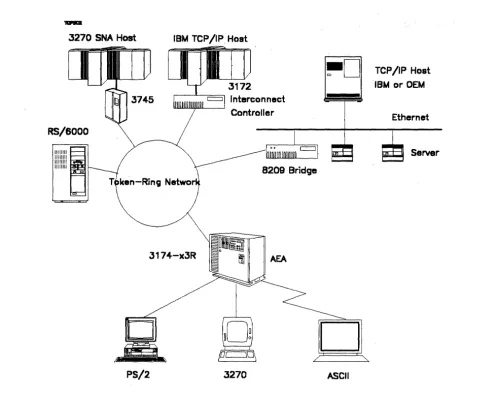
This scenario shows a RS/6000 workstation using the 3174 Gateway to access the 3270 SNA host while the 3270 coax-attached terminal use the 3174 TCP/IP TELNET client support to access the RS/6000 as a TCP/IP host.
• Chapter 6, "Scenario 3: APPN and TCP/IP via 3174 to AS/400 and VTAM" on page 159
This chapter (Scenario 3) shows the capability of a PS/2 EN utilizing an 3174 NN to communicate to an AS/400 NN and Subarea Node
simultaneously. An 3270 CUT terminal using the 3174 Gateway to establish TCP/IP session with the TCP/IP on the AS/400 and establish a session with the SNA host
• Chapter 7, "Scenario 4: TCP/IP via 3174 and RS/6000 Router to VAX" on page 209
This chapter (Scenario 4) shows the capability of a PS/2 and 3270 3270 CUT terminal using the 3174 Gateway to establish a TCP/IP session to the VAX host which is connected via Ethernet on the RS/6000 router. Simultaneously the PS/2 and the 3270 CUT terminal using the 3174 Gateway to establish a TCP/IP session to an AS/400 host.
• Chapter 8, "3174 Ethernet Considerations" on page 227
- This chapter discusses, in general, the 3174 Ethernet support. This include the microcode, adapter and customization.
• Chapter 9, "3174 TCPIIP Enhancements RPQ 8Q1041" on page 263 - This chapter discusses the enhancements made to the 3174 TCP/IP
support in the 3174 TCP/IP Enhancements RPQ 8Q1041.
• Chapter 10, "3174 Configuration Support C, Release 5" on page 351 This chapter discusses the ability to for the 3174 to communicate using TCP/IP protocol over a frame relay link, provided in Configuration Support-C Release 5
• Appendix A, "Address Bit Order for Ethernet Addresses" on page 359 - This Appendix discusses addressing issues when using 3174 Ethernet
support.
• Appendix B, "SNMP Variables" on page 363
Related Publications
This Appendix contains a table of the SNMP variables supported by the 3174.
The publications listed in this section are considered particularly suitable for a more detailed discussion of the topics covered in this document.
• 3174 Establishment Controller Functional Description, GA23-0218
• 3174 Establishment Controller Configuration Support';'C Release 3 Planning Guide, GA27-3918
• 3174 Establishment Controller Configuration Support-C Release 3 Utilities Guide, GA27-3920
• 3174 Establishment Controller Status Codes, GA27-3832
• 3174 Establishment Controller Supplemental Customer Information for Configuration Support-C Release 4 Ethernet Adapter, GA27-3994
• 3174 Establishment Controller Customer Problem Determination, GA23-0217
• IBM Transmission Control Protocol/Internet Protocol Version 2.0 for OS/2:
User's Guide, SC31-6076
• NTS/2 LAN Adapter and Protocol Support Configuration Guide, S96F8489 • IBM Transmission Control Protocolllnternet Protocol Version 2.1.1 for DOS:
Installation and Administration, SC31-7047
• IBM Transmission Control Protocolllnternet Protocol Version 2.1.1 for DOS:
User's Guide, SC31-7045
• AIX Version 3 RISC System/60D0, Communication Concepts and Procedure,
GC23-2203
• AIX System Management System/60D0, Communication Concepts and Procedure, GC23-2487
• Sun Microsystems System and Network Administration, 800-3805-10
• HP-UX System Administration Manual, Release 9.0, 800-3805-10
International Technical Support Organization Publications
• 3174 Establishment Controller, Installation Guide, GG24-3061
• 3174 Establishment Controller APPN Implementation Guide, GG24-3702 • IBM Personal Communicationl3270 Version 3.0 Implementation Guide,
GG24-3949
• IBM TCPIIP V2.1 for VM Installation and Interoperability, GG24-3624 • TCPIIP Tutorial and Technical Overview, GG24-3531
A complete list of International Technical Support Organization publications, with a brief description of each, may be found in:
Bibliography of International Technical Support Organization Technical Bulletins, GG24-3070.
To get listings of ITSO technical bulletins (redbooks) online, VNET users may type:
TOOLS SENDTO WTSCPOK TOOLS REDBOOKS GET REDBOOKS CATALOG
How to Order ITSO Technical Bulletins (Redbooks) - - - ,
IBM employees in the USA may order ITSO books and CD-ROMs using PUBOROER. Customers in the USA may order by calling 1-800-879-2755 or by faxing 1-800-284-4721. Visa and Master Cards are accepted. Outside the USA, customers should contact their local IBM office.
Customers may order hardcopy red books individually or in customized sets, called GBOFs, which relate to specific functions of interest. IBM employees and customers may also order redbooks in online format on CD-ROM collections, which contain the redbooks for multiple products.
Acknowledgments
The advisor for this project was:
Fran Collins
International Technical Support Organization, Raleigh
The author of this document is:
Josef Minderlein IBM Germany
This publication is the result of a residency conducted at the International Technical Support Organization, Raleigh.
Thanks to the following people for the invaluable advice and guidance provided in the production of this document:
Tony Tan IBM Australia
Cathy Cunningham David Clark David Galloway 3174 Development
Research Triangle Park, Raleigh
Rita Steffes-Hollaender Andrea Paravan IBM Germany
Thanks to the following people for the invaluable editorial advice and guidance provided in the production of this document:
Shawn Walsh Gail Wojton Janet Yoho
Chapter 1. An Introduction to 3174 TCP/IP Support
Transmission Control Protocolllnternet Protocol (TCP/IP) is a set of standards that have been widely accepted by the computer industry, both users and manufacturers, for communication between multivendor systems.
The 3174, traditionally a cluster controller for 3270 host devices, was enhanced with the TCP/IP Telnet client capability to allow 3270 displays operating in CUT mode, and ASCII displays attached to the Asynchronous Emulation Adapter (AEA), to access TCP/IP Telnet servers in TCP/IP networks. This capability was offered, in March 1992, as a no-charge 3174 TCP/IP Telnet RPQ 8Q0935, based on Configuration Support-C Release 2 LlC.
In May 1993, Configuration Support-C Release 3 was announced. Its base microcode includes the base functions of previous releases of 3174 Licensed Internal Code. In addition, the functions provided by the 3174 TCP/IP Telnet RPQ 8Q0935 are now integrated in the base functions of Configuration Support-C Release 3. This integrated capability is referred to as the 3174 TCPIIP Telnet
Support in this document. Configuration Support-C Release 3 became available in June 1993.
In May 1993, Configuration Support-C Release 4 was also announced. Included in this announcement was the 3174 TCP/IP Enhancements RPQ 8Q1041, which provides TN3270 support, TCPIIP-dependent host printer support, and SNMP MIB-II support. This RPQ, available as of April 1994, combines the token-ring support of Configuration Support-C Release 3 with the Ethernet support of Configuration Support-C Release 4.
Currently the 3174 performs the function of a bridge for TCPIIP hosts that are coax-attached using the 3174 Peer Communications support. In this case there is no routing of IP traffic being done by the 3174. RPQ 8Q1289, scheduled for July 1994, expands the 3174 services of programmable workstation running TCPIIP by providing IP forwarding, via static routing.
This document focuses on the TCP/IP functions provided by the Configuration Support-C Release 3 and Configuration Support-C Release 4 base microcode and the RPQ 8Q1041. A brief discussion on TCPIIP support in Configuration
Support-C Release 5 has been included to assist in doing some preliminary planning.
This chapter provides an overview of TCP/IP, and briefly describes the TCP/IP protocols supported by the 3174. This chapter uses material from the following document:
• TCPIIP Tutorial and Technical Overview, GG24-3531
1.1 3174 Functional Overview
The following table is an overview of the functionality available in the different 3174 Configuration Support C microcode releases and RPQs.
Table 1. Function Availability Matrix
Function T/R
C2 y
RPQ y
8Q0935
C3 Y
C4 N
RPQ y
8Q1041
C5 Y
RPQ y
8Q1289
Frame TN3270
APPN Peer ISDN Enet Telnet LPD Date
Relay
MIB·2
y y y N N N N now
y y y N N Y N now
y y y N N Y N now
Y Y Y Y N Y N 12/93
y y y y N Y Y 04/94
Y Y Y Y Y y N 06/94
y y y y y y y 07/94
Note: With Configuration Support-C Release 2 the End-User Productivity
[image:31.626.52.533.68.439.2]1.2 TCP/IP Overview
TCP/IP includes a set of network standards specifying the details for computer communication, as well as a set of conventions for interconnecting networks and routing traffic. Its primary use is for interconnection of networks providing universal communication services. The collection of these networks interconnected through TCP/IP is known as an internet.
Each network uses a gateway, a bridge or a router to connect into an internet. All nodes on all networks within an internet communicate with each other as if all other nodes were in the same network. TCP/IP connectivity includes routing capabilities for both local area and wide area networks.
When TCP/IP is used on a token-ring network, all the normal token-ring network management functions are available because token-ring network management is independent of the higher-level protocol. This applies as well to environments using an SNA network as the transport mechanism for TCP/IP.
In today's multivendor and multiprotocol world, SNA networks and TCP/IP
networks need to run side by side to allow users to access, from a single display station, any application in the network.
Together with the 3174 TCP/IP Telnet Support, the 3174 is now able to support TCP/IP environments via the token-ring network.
1.3 TCP/IP Architecture
This section briefly describes the TCP/IP architectural layers supported by the 3174 TCP/IP Telnet Support.
The internet protocols are modeled into four functional layers: • Application
This is a user process cooperating with another process on the same or different host.
• Transport
This layer provides the end-to-end data transfer. • Internetwork
This layer provides the "virtual network" image of internet and shields the higher levels from the network architecture below it. It is probably the most important protocol.
• Network Interface
This layer is the interface to the actual network hardware.
1.3.1 Transmission Control Protocol (Tep)
Most of the user application protocols, such as Telnet and FTP, use TCP as the underlying protocol. TCP is a connection-oriented, end-to-end reliable protocol providing logical connections between pairs of processes.
For applications making use of this protocol, TCP provides the following: • Stream data transfer
From the application's viewpoint, TCP transfers a contiguous stream of bytes through the internet. First it groups the data into TCP segments, before passing the segments to IP for transmission to its destination.
• Reliability
TCP assigns a sequence number to each transmitted byte and expects a positive acknowledgment (ACK) from the receiving TCP. If the ACK is not received within a timeout interval, the data is retransmitted.
• Flow control
The receiving TCP, when sending an ACK back to the sender, indicates to the sender the number of bytes it can receive beyond the last received TCP segment, without causing overruns or overflows.
• Multiplexing
With this technique datagrams are directed through the use of ports. • Logical connections
The reliability and flow control mechanism described above requires that TCPs initialize and maintain certain status information for each "data stream." The combination of this status, including sockets, sequence numbers and window sizes, is called a logical connection (or virtual circuit). Each connection is uniquely identified by the pair of sockets used by the sending and receiving process.
• Full-duplex
TCP provides for concurrent data streams in both directions.
connections
sockets
reliable
T C P + - - - ....
'---+---' TCP connect i on '---+---' T C P
IP addresses
unreliable
IP datagrams
host A host B
Figure 1.
rcp
Logical ConnectionsEstablishing a TCP Connection
1.3.2 Telnet
Process 1
Active OPEN
Process 2
passive OPEN, waits for an active response
Send SYN, seq=n ---~ Receive SYN
+ 4 1 - - - Send SYN, seq=m, ACK n+l Receive SYN+ACK
Send ACK m+l
The connection is now established and the two data streams (one in each direction) have been initialized (sequence numbers).
Figure 2.
rcp
Connection EstablishmentThis whole process is known as a three-way handshake. Note that the
exchanged TCP segments include the initial sequence numbers from both sides to be used on subsequent data transfers.
Closing the connection is done implicitly by sending a TCP segment with the FIN bit set (no more TCP data). As the connection is full-duplex (two independent data streams, one in each direction), the FIN segment only closes the data transfer in one direction. The other process will now send the remaining data it still has to transmit and also ends with the TCP segment where the FIN bit is set. The connection is deleted once the data stream is closed in both directions.
The Telnet protocol provides a standardized interface, which allows a program on one host (the Telnet client) to access the resources of another host (the Telnet server). One example of this would be an ASCII device on an ASCII host accessing an S/390 application with TCP/IP installed. Another example would be a 3270 CUT display attached to a 3174 with Configuration Support-C Release 3 installed and customized for TCP/IP Telnet support, accessing a RISC
System/6000· (or other TCP/IP Telnet server).
1.3.3 Internet Protocol (lP)
The Internet Protocol is the layer that hides the underlying physical network by creating a virtual network view. This is a connectionless protocol and hence offers no reliability, flow control or error recovery.
IP uses addresses to identify the source and target hosts on the internet. The internet (IP) address is 32 bits long and consists of two parts:
IP address
=
<
network address><
host address>The network part of the IP address identifies the network within the internet; the host part of the IP address identifies the individual host or gateway within that network. The division between the network and host parts of the IP address is determined by the first one to four bits of the IP address (see 3.1, HIP Addresses" on page 19).
The 32-bit IP address is usually represented in dotted decimal form w.x.y.z (for example, 9.67.38.87) for easy reference.
1.3.4 Internet Control Messaging Protocol (ICMP)
ICMP is a standard protocol. The IP is used for datagram services in an
interconnected set of networks (internets). The network connection devices are IP gateways that exchange routing information between themselves using special TCP/IP protocols. ICMP 'functions are characterized as:
• ICMP uses IP as if it were a higher-level protocol. It is also an integral part of IP and is implemented in every IP module.
• ICMP is used to report errors found during datagram processing, and is used by:
The gateway
- The destination host
1.3.5 User Datagram Protocol (UDP)
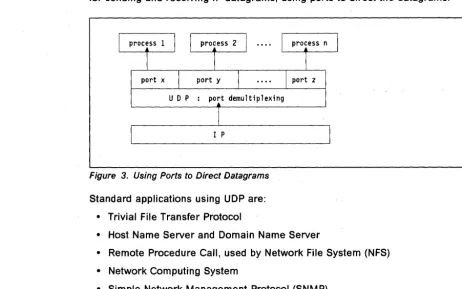
UDP is an application interface to IP. It serves as a "multiplexer/demultiplexer" for sending and receiving IP datagrams, using ports to direct the datagrams.
U D P : port demultiplexing
[image:35.627.74.536.276.565.2]I P
Figure 3. Using Ports to Direct Datagrams
Standard applications using UDP are: • Trivial File Transfer Protocol
• Host Name Server and Domain Name Server
• Remote Procedure Call, used by Network File System (NFS) • Network Computing System
• Simple Network Management Protocol (SNMP)
1.3.6 Address Resolution Protocol (ARP)
The ARP is responsible for converting the higher-level protocol addresses (IP addresses) to physical network addresses. On a single physical network, individual hosts are known on the network by their physical hardware address. Higher-level protocols address a destination host in the form of a symbolic address (IP address in the internet environment). When such a protocol wants to send a datagram to destination IP address w.x.y.z, the device driver does not understand this address.
address, an "ARP reply" is sent back to the requesting host with the physical hardware address of the host and source route information. This is then stored for future use.
1.3.7 Simple Network Management Protocol (SNMP)
SNMP is used to communicate management information between the network management stations and the agents in the network elements.
1.3.8 Domain Name System
The Domain Name System, through the use of a server application, provides the translation between high-level machine names and the IP addresses. The client function (called the resolver) is transparent to the user and is called by most of the other applications to resolve the symbolic high-level names into real IP addresses.
1.3.9 Packet Internet Groper (PING)
PING is an application that sends out an ICMP datagram to a specified
destination and waits for its return. The server counterpart merely echoes the frame it receives back to the originator. PING, therefore, can be used to determine if the destination host can be reached, that is, to check the connectivity path between two machines.
1.3.10 TCP/IP Gateways
Gateways interconnect multiple networks to form an internet. In the IBM* environment we use the following definitions for bridges, routers and gateways:
• Bridge
A bridge interconnects LAN segments at the data link layer and forwards frames between them. It performs the function of a MAC relay and is independent of any higher layer protocols.
• Router
A router interconnects networks at the network layer and route packets between them. Because it needs to understand the network addressing schemes used, a router is protocol-dependent. Routers are able to optimize packet sizes and transmission paths.
• Gateway
A gateway interconnects networks at higher layers than bridges or routers, ranging from the network layer to the application layer. It usually supports address mapping from one network to another~
In the TCP/IP environment, the terms "gateway" and "internet gateway" are used to qualify what is defined above as being a router.
1.4 TCP/IP Protocols Supported
The 3174 supports the following protocols: • Tel. (client only)
• TCP - Transmission Control Protocol • IP - Internet Protocol
• ICMP - Internet Control Messaging Protocol • UDP - User Datagram Protocol
• ARP - Address Resolution Protocol
• SNMP - Simple Network Management Protocol (MIB-I agent only) • DNS - Domain Name System (resolver client only)
• PING - Packet Internet Groper
Figure 4 shows the protocols, within the detailed TCP/IP architectural model, supported by the 3174 TCP/IP Telnet Support.
IKerbjxwinjRexeclsMTPI!!ln!!1 FTPIDNS:TFTPI RPC
NCS1~1
LL!
I
LL1i
I P and I C M P IARPIRARPI
Ethernet-IEEE aB2.2-X.25-Satellite-Radio-Async-SNA-HYPERchannel- •.•. I
Figure 4. Protocols Supported by the 3174 TCP/IP Telnet Support
The SNMP agent responds to requests for MIB variable information from an SNMP manager elsewhere in the network.
Chapter 2. 3174 TCP/IP Telnet Support
Existing IBM program products, TCPIIP for DOS and TCPIIP for OS/2*, provide TCP/IP support for intelligent workstations. These workstations may be attached using a Token-Ring, IBM PC Network, Ethernet, 3174 Peer (LAN over COAX), or Asynchronous Serial Line Internet Protocol (SLIP). 3174 TCP/IP Telnet support, provides TCP/IP host access to CUT and ASCII terminals directly attached.
This chapter describes the 3174 TCP/IP Telnet Support, including the 3174 models supported, the customization required, and operational aspects of this capability. This chapter uses material from the following document:
• 3174 TCP/IP Telnet RPQ Diskettes Installation Instruction (provided with the
RPQ 8Q0935 package).
The 3174 TCP/IP Enhancements RPQ 8Q1041 and Configuration Support-C Release 5 enhancements are described, in later chapters.
2.1 Support before 3174 TCP/IP Telnet RPQ 8Q0935
With the addition of the Peer Communication LlC feature or the Peer Communication RPQ 8Q0718 in a 3174 that is attached to a Token-Ring, the intelligent workstations can be coax-attached to the 3174 and participate in TCP/IP networking. For this configuration, the workstations require the appropriate LAN-Over-Coax device drivers provided by the following:
• For DOS, Workstation Peer Communication Support Program • For OS/2, Extended Services, OS/2 LAN Server or NTS/2
Note:
The DOS Workstation Peer Communications Support Program has been replaced with the NOIS compliant driver, IBMXLN.DOS.
The 3174, in this instance, provides nothing more than an internal ring and an internal bridge to allow the coax-attached workstations access to the
Token-Ring; it has no TCPIIP capability and dependent (CUT, DFT-E or ASCII) terminals attached to the 3174 cannot participate in TCP/IP networking.
The TCP/IP hosts to be accessed by the intelligent workstations may be attached directly to the same Token-Ring, or they may be accessible through the
Token-Ring via bridges or routers.
2.2 Support with 3174 TCP/IP Telnet RPQ 8Q0935
With the announcement of the 3174 TCP/IP Telnet RPQ 8Q0935 and Configuration Support-C Release 2 in March 1992, a new capability was added to a Token-Ring attached 3174: the 3174 could now be customized to provide TCPIIP Telnet client services to allow dependent (CUT, DFT-E or ASCII) terminals attached to the 3174 to communicate with TCP/IP Telnet servers.
With the 3174 TCPIIP Telnet RPQ 8Q0935, a dependent (CUT, DFT-E and ASCII) terminal attached to the 3174 can establish a TCP/IP Telnet connection with a TCP/IP hosVserver anywhere in the existing LAN/WAN network. The TCP/IP
hosts to be accessed by the dependent terminals may be attached directly to the same Token-Ring, or they may be accessible through the Token-Ring via bridges or routers.
Each terminal user can have up to five logical terminals (L Ts) if Multiple Logical Terminal(MLT) is customized. These five LTs can be used to access 3270, ASCII or TCP/IP host sessions; that is, all five LTs may be used to access five 3270 host sessions, or five ASCII host sessions, or five TCP/IP host sessions, or some combination of 3270, ASCII and TCP/IP host sessions. The desired host
connection can be selected by means of the Connection. Menu, or established by default. Any LT can be used to access the TCP/IP "pipe," very much the same way that a dial-out AEA port is accessed. For each TCP/IP LT, a simple set of commands allows the user to request and operate a session with any TCP/IP host in the network.
As seen above, the 3174 TCP/IP Telnet RPQ 8Q0935 works in conjunction with MLT and AEA functions. You can also use the 3174 TCP/IP Telnet RPQ 8Q0935 concurrently with all other functions that a given 3174 is capable of, such as Peer Communication and APPN*.
2.3 Support with Configuration Support-C Release 3
In May 1993, Configuration Support-C Release 3 was announced. Its base microcode includes the base functions of previous releases of 3174 Licensed Internal Code. In addition, the functions provided by the 3174 TCP/IP Telnet RPQ 8Q0935 are now integrated in the base functions of Configuration Support-C Release 3. This integrated capability is referred to as the 3174 TCP/IP Telnet
Support in this document.
In other words, the TCP/IP capabilities provided by the 3174 TCP/IP Telnet RPQ 8Q0935 are now provided by Configuration Support-C Release 3 base microcode.
2.4 Support with 3174 TCP/IP Enhancements RPQ 8Q1041
In May 1993, Configuration Support-C Release 4 was also announced. Included in this announcement was the 3174 TCP/IP Enhancements RPQ 8Q1041, which will provide TN3270 support, TCP/IP dependent host printer support, and SNMP MIB-II support. This RPQ, was made available April 1994, and is based on Configuration Support-C Release 4. With RPQ 8Q1041, therefore, the TCP/IP capabilities of the 3174 are extended even further.
2.5 Support with Configuration Support-C Release 5
. Configuration Support-C Release 5 and frame relay support expands the 3174 connectivity for 3174 TCP/IP support. Prior to Configuration Support-C Release 5 all TCP/IP access to and from the 3174 assumed LAN (token-ring or Ethernet). With Configuration Support-C Release 5, you are able to telnet to TCP/IP host in the network via frame wide area network links. As of the publication date of this document, 3174 TCP/IP Enhancements RPQ8Q1041 was not available for
2.6 Support with 3174 IP Forwarding RPQ 8Q1289
3174 IP Forwarding RPQ 8Q1289 enables intelligent workstation that are not directly attached to the 3174 using Peer Communications, access to TCP/IP hosts via the 3174 the frame relay link(s). The 3174 actually, provides static IP routing for LAN (token-ring or Ethernet) attached intelligent workstation running as TCP/I P hosts.
2.7 TELNET Emulation and NLS Support
The 3174 TCP/IP Telnet Support allows CUT terminals to have up to five TELNET sessions. The supported emulators for National Language Support (NLS) are:
• VT100 • VT220 7 -bit
Note: IBM3101, DG210 and VT220 8-bit emulation are not supported for NLS
In our scenario, we have tested NLS for the German and Canadian/Bilingual languages. In TELNET session with the RISC System/6000, we use the SMIT (Systems Management Interface Tool) facility.
German NLS experience: • VT100 emulation:
- All PF keys useable. - Use Alt instead of Esc key. • VT220 7-bit emulation:
SMIT panel displays OK. All PF keys usable.
Canadian/Bilingual NLS experience: • VT100 emulation:
All PF keys, except the PF8, PF9 and PF10 keys, are usable. PF8, PF9 and PF10 keys only capable in conjunction with Esc key. Use Alt instead of Esc key.
• VT220 7-bit emulation: SMIT panel displays OK. All PF keys usable.
Note: If you are using a PS/2· with a 3270 CUT mode emulation program, you have to respond to 3174 customization Question 168 with 1. This function allows you to define the Home key as hot key.
Using this emulation will require you to define some additional keys. For more information about the different keyboard maps, see Terminal User's Reference for
Expanded Functions, GA23-0332.