International Journal of Emerging Technology and Advanced Engineering
Website: www.ijetae.com (ISSN 2250-2459, ISO 9001:2008 Certified Journal, Volume 4, Issue 9, September 2014)
412
Interactive Multimedia Tool for Dynamic Generation of Web
Interfaces with HTML5/PHP/MySQL and JavaScript
Maya Stoeva
11
PhD Candidate and Assistant at Faculty of Mathematics, Informatics and Information Technology, Plovdiv University “Paisii Hilendarski”, 4003 Plovdiv, 236 “Bulgaria” blvd., Bulgaria
Abstract—The recent development of interfaces for web-oriented systems and for desktop applications is associated with the use of many different technologies. They focus on the selection, arrangement and presentation of the most appropriate design for the particular software application. In this article, particular attention is paid to one of the latest technologies, these are HTML5, in combination with CSS3, JavaScript and PHP5. They are used for the implementation of a simple, multifunctional interactive multimedia tool, which was developed using the generalized model [1]. Its main purpose is to allow clients create alone their preliminary rough interface design vision of the future software. After that they just have to present the final result to application developers, avoiding misunderstanding what exactly client wants. In that way, both participants in this process save their time.
Keywords—Interface generation, responsive design,
HTML5/ CSS3/ PHP5, JavaScript, PHP5, generalized model, interactive tool, multimedia, software interface, prototype, prototyping, wireframing, specific multimedia controls, usability, flat design
I. INTRODUCTION
Technologies increasingly become a part of an everyday life. They have returned to standing part of it. People use computers constantly, even replacing so famous before television, radio and other media. This becomes a necessity when creating web applications and software they can hold the attention of the user. One of the main things makes possible to achieve adequate impact on customer is the good design of their interfaces.
Some of the key principles [2], which help shaping traditional and interactive design philosophy, are to keep clear vision, separate program elements to stay accessible, but hidden partially and all important details to be carefully highlighted.
The described application follows all of them, plus additional one. Its development goes through two main steps:
1) Planning this web application, via applying the
generalized model for interactive multimedia tools development [1].
2) On the base of ready model - implementing the tool via
creating of its prototype with later real programing in Bulgarian language, because its target group with clients are in Bulgaria country.
To achieve these two objectives it was necessary to project the overall the following requirements:
1) Informativeness - the interface and structural design has to be implemented so that it is sufficiently significant to future users of the Web application, with accurate and concise information for a description of the main tool's options.
2) Contemporary decisions - database design and the web
application to be made by modern means, using the capabilities of the latest technology.
3) Design - Creation of pure, simple and attractive interface vision of the interactive tool like keeping all main principles for good design [2] and make it responsive [3]. The last point allows this web application to be good visible on different kind of devices, no matter desktop or mobile one. But ready vision hasn't to deviate from the basic purpose for which the web application is built - creating interactive tool, which helps to quickly and easily clarify the wishes and requirements of the users/clients.
4) Applicability - implemented project applies from its creation. It has many uses, both freelance programmers and for large companies already well-established for creating websites and web applications.
International Journal of Emerging Technology and Advanced Engineering
Website: www.ijetae.com (ISSN 2250-2459, ISO 9001:2008 Certified Journal, Volume 4, Issue 9, September 2014)
413
This paper emphasizes the design and creation of a simple web application multifunctional tool - a type of skechflow designer. It helps to reduce the time, to clarify the wishes and ideas of the clients and contribute to better communication between client/programmers.
Also the tool allows user to select the required components and build them in a rough vision of the final product. Thus in addition to saving time can avoid potential future misconceptions for future use.
II. PRELIMINARY NOTES
Nowadays the good interface and design is a very crucial prerequisite for successful software application. Until some years software specialists haven't really put much attention on the early steps from the visual design process. In order to make a nice and usable interface design, is very important for clients, designers and developers to have a tool to effectively explore, communicate, create and evaluate design ideas, in fast and efficiently way.
Wireframing at beginning stage of the design process and prototyping are great techniques to create and try a lot of ideas, no matter they are coming from clients or professional designer. In the last years, the level of dynamic interaction of most applications have grown up, demands of clients also and becoming more and more difficult to avoid wireframing this kind of software. So such kind of tools helps every time in that sketch process. They are implemented in different technologies. Here is a list with more famous from them [4]:
Pidoco is powerful prototyping software for rapidly creating clickable wireframes, mock-ups and interactive UX prototypes for web, mobile and enterprise applications. It’s easy to use with smart sharing and collaboration features, rich interactions, a smart template system, convenient specification generator, exports and much more. This tool supports iOS and Android platforms like native application and has also desktop version. But the reason is not so good decision for our purposes is that is not web-based (we have to install this software on some kind of device), it is commercial and not in Bulgarian language.
SketchFlow – Tools for Prototyping Interactive
Applications. It is again available like software, which have to be installed, but is not commercial, although again is in English.
SketchFlow Map and Expression Blend – both are one of the wireframing Microsoft products. Unfortunately they are commercial and only available like normal applications, which have to be installed and are not available for using online.
Balsamiq is a rapid wireframing tool that helps you Work Faster & Smarter. It reproduces the experience of sketching on a whiteboard. Available via browser only also, but not free.
MockFlow WireframePro is a web-based tool to
collaborate process of user interface blueprints design for websites and apps. Its helps to visualize the website's interface, navigation and structure in short time. Its advantages are that it is available in cloud, online. But is still commercial and not translated in desired language – Bulgarian.
The above list with available interactive tools, similar to the article target one is not full, but all of them have something, which is not enough for the targets of the article author’s web interactive main purposes:
Developed interactive multimedia tool for dynamic
generation of web interfaces have to be available online, without need to install on the PC or mobile device.
The interface design tool has to be unique and
responsive [3], to be available in desktop and mobile devices. Its vision and colour scheme have to follow principles of flat design [5]. Where is allowed use of 2 or 3 main colours with not more than 2-3 tints.
For good web application modelling and faster
implementation have to use interactive model – in our case have to use generalized model [1], created earlier also by the author of this article.
Interactive web tool have to be implemented using the best technologies for that: HTML5/CSS3/ JavaScript and PHP, according last research [6].
Ready interactive multimedia tool for dynamic
generation of web interfaces have to speed up, optimize and make easy sketching and design collaboration between client, designer and developer of implementing software products. Also it can be allow test on the fly for all their design ideas and export the rough preliminary vision in html format.
III. MODELLING OF THE INTERACTIVE MULTIMEDIA TOOL
International Journal of Emerging Technology and Advanced Engineering
Website: www.ijetae.com (ISSN 2250-2459, ISO 9001:2008 Certified Journal, Volume 4, Issue 9, September 2014)
414
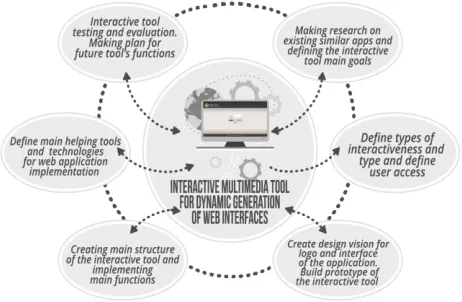
[image:3.612.54.285.202.353.2]In that way in every development step, at any time, can be made the necessary adjustments without affecting significantly the whole system. For the current interactive tool the author's generalized model is composed from these six processes, which can be seen down in Figure 1:
Fig. 1 – Scheme of the modeling process, using generalized model
A. Making research on existing similar applications and defining the interactive tool main goals
On that stage was made the preliminary research of the similar interactive tools, with their advantages and disadvantages, which are described in previous article part. Also were clarifying the main goals of the web multimedia application and bared as many design and functional ideas for new products itself. It was generated a list with all necessary concept like interface (showing how a particular product is designed, what is its design and how easy it is for us to find things that interest us), information interactive systems (in most cases this notation includes both web and desktop applications) and design (in general, for many people this is a term used to refer different things. Web developers understanding cannot be reduced to the existence of singular a peculiar scale. At one side - stands the guarantor of a standard web site or system. The client, which often has the information needs for the Web application in files generated by the general-oriented software. On the other side of the scale is the expert - this is a web developer who loves to use technology such as presenting information in a database, for example. And he can place texts in the whole space on the page, regardless of how it looks. In general, the more is written, is the better for him. And ... now appears a group of people who are interested in how these software products look like. These persons can be divided into two categories - "decorator" and "designers". The difference between them is that the set criteria.
While decorating designers use to make something visually appealing and functional to be – because the latter is one of the main preconditions for successful design.
But the functionality is no longer the sole and overriding priority. How convenient would be the interface for users is also important.
Mostly design is to make our product stand out. Making an impartial look at the project to analyse, explore. Finally come up with solutions that are as unique as are specific problems present. Precisely the latter types of designers are known like UX (User eXperience) designer [8].). In that step comes the need from the described interactive multimedia tool for helping in communication between all "sides" and to provide a quality vision of the particular application like generation and testing as many design sketching ideas as possible that takes in their minds.
B. Define types of interactivity and define user access
At this step was given type of tool's interactivity - with high dynamics, because relatively often is required changes in it, due to constant changes in design trends, font solutions and controls and technologies for interactivity implementation. The last itself is symmetrical, as gives real-time response. The participants in the interaction are of type one-to-one (human-to-machine and machine-to-human). So it can be used for measuring and evaluating the behaviour of the system's users. The latter is required to be able to use for testing users. There were defined people who will have access to the system (freelancers, designers, developers and their clients).
On that stage was specified where the application will be installed later – on a web server (for now is temporarily only locally accessible, because of system update) and how you will access it – from a server with remote access through various types of accounts – super administrator, administrators or ordinary users).
C. Create design vision for logo and interface of the application. Build prototype of the interactive tool
International Journal of Emerging Technology and Advanced Engineering
Website: www.ijetae.com (ISSN 2250-2459, ISO 9001:2008 Certified Journal, Volume 4, Issue 9, September 2014)
415
After answers were ready was starting the choosing of colour scheme. Because the tool follows flat design principles [5] were choose two main colours – dark brown (#3b3b3b) and orange (#e88d26). To make a balance between them was chosen light grey (#ebe7e3).
[image:4.612.324.565.129.297.2]When colours were chosen was created the unique logo design of the application (Fig. 2):
Fig. 2 – Logo design of the interactive tool also using the same color theme like application interface
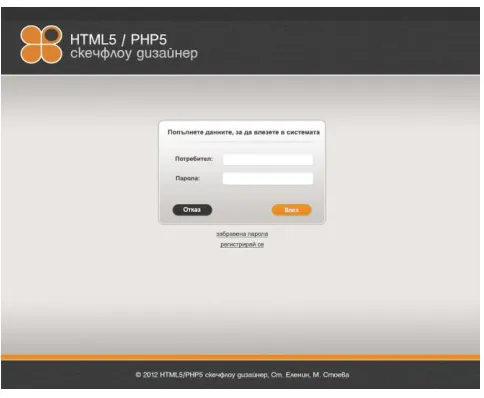
In figure 3 can be seen the main login screen of the interactive multimedia tool:
Fig. 3 –Main design for login screen of the interactive tool
Design vision of the web application was created with Adobe Photoshop and Adobe Illustrator software.
After design was ready and visual elements were clarify, comes the time for creating prototypes of the whole application. All of them were made in Balsamiq mock-up [4]. With idea that one time this tool will be ready, for future products author will using it, instead additional software like Balsamiq.
[image:4.612.48.290.324.523.2]Because in the real implementation of this interactive application was participated one more person-developer (Stanislav Elenin), prototyping process was multiply repeated for better usability and functional improvements. In figure 4 is displayed the last prototype of the main application screen with available functions.
Fig. 4 – Prototype of the main screen of the interactive tool
And something important – because design is responsive all sample prototypes were made one time for normal desktop devices and one time for mobiles.
D. Define main helping tools and technologies for web application implementation
To be a successful one web application, it has to be developed with the latest technology for that. Therefore for implementation of screens structure with all controls was chosen the new HTML standard mark-up language - HTML5 [10]. For making things responsive and simple, but beautiful, following the best design principle for building good interface designs are used CSS3 [11], together with JavaScript to make visuals interactive.
For export, open and saving ready final sketches are chosen server side language PHP, version 5.5, together with MySQL data base (to keep all in one place). For server side was decide to be Apache – as is free and collaborate very good with PHP and MySQL technologies. All three are gathers under the umbrella of Wamp. WampServer is a Windows web development environment, which allows its users to create web applications with Apache2, PHP and a MySQL database. Also it has inside PhpMyAdmin for helping easy management of databases. [9].
E. Creating main structure of the interactive tool and implementing main functions
International Journal of Emerging Technology and Advanced Engineering
Website: www.ijetae.com (ISSN 2250-2459, ISO 9001:2008 Certified Journal, Volume 4, Issue 9, September 2014)
416
F. Interactive tool testing and evaluation. Making plan forfuture tool’s features and functions
At this step was a time for clearing of web application bugs and testing of all functions. Because now the tool is on the stage in testing is not available online. But will become within a month. If someone has an interest can contact author on mail: [email protected].
More future improvements include:
Exporting the final sketch to xml and yaml files. Both of them are human-readable data file format. Until now draft created designs can be exported only in html format.
Development of more user controls, that can be used
for sketching
Uploaded interactive tool on a real server, after finishing testing
Attracting more users and investors.
Advertising web application via social Medias like Facebook and with use of landing pages.
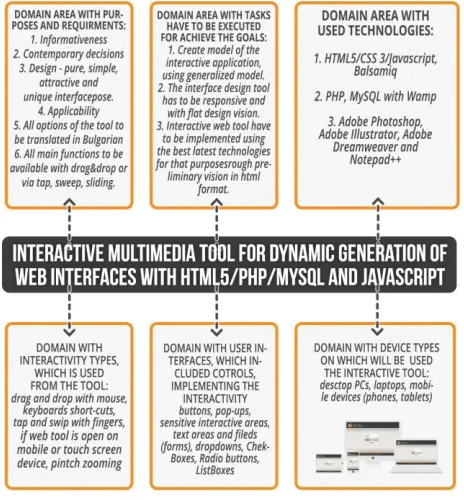
The graphic model of web-based interactive multimedia tool is adapted to its needs and contains six main parts:
Domain area with all tool's purposes and requirements.
Main purposes are:
1.Ready interactive multimedia tool to be available in Bulgarian language, on all different kind of devices and accessible online, without installing.
2.So interface design has to be responsive and follow principles of flat design.
3.Also it has to be implemented using the best technologies for that: HTML5/CSS3/ JavaScript and PHP.
4.One time ready this interactive multimedia tool for dynamic generation of web interfaces have to speed up process of design collaboration between client, designer and developer when implementing interface designs of other software products.
To achieve these goals, application development has to follow some important requirements like:
1.Informativeness – to give enough information to the user, what can be made with that tool.
2. Contemporary decisions – ready sketches to use latest design components fonts and design techniques at the moment.
3. Usability – all available functions of the application have to be easy readable and understanding, put on the right place in the interface.
Domain area with tasks has to be executed for achieve defined goals:
1. Create model of the interactive application, using generalized model.
2. Interactive web tool have to be implemented using the best latest technologies for that purposes to create rough preliminary vision, now exported in html format, but future also in xml or yaml.
Domain area with used technologies:
For design purposes are used Adobe Photoshop, Adobe Illustrator, Adobe Dreamweaver software programs, and for implementation – HTML5 / CSS3 / Javascript, Balsamiq, PHP/MySQL in the Wamp Server environment.
Domain with types of interactivity, which is used from interactive tool:
Drag and drop with mouse, keyboards short-cuts, scroll, when we are talking for desktop machines with mouse; and tap, sweep with fingers, pinch zoom, slide, if the web tool is opened on mobile device or touch screen display.
Domain with user interface components, which include controls, implementing the tools' interactivity.
In this tools these are web controls as buttons, pop-ups, sensitive interactive areas, text areas and text fields, web forms, drop downs, check boxes and groups, radio buttons and groups, List Boxes, labels, geometric shapes (circles, rectangles, etc.) for visual separation of the interface space, scroll bars (horizontal or vertical and other).
Domain with device types on which the interactive tool will be used:
In our case these available devices, on which web application can be used is a wide. We can start this tool in web browser, installed on desktop PCs, laptops or mobile devices like phones and tablets.
International Journal of Emerging Technology and Advanced Engineering
Website: www.ijetae.com (ISSN 2250-2459, ISO 9001:2008 Certified Journal, Volume 4, Issue 9, September 2014)
[image:6.612.54.286.141.391.2]417
Fig. 5 – Model of Interactive multimedia tool
IV. INTERACTIVE TOOL DEVELOPMENT
Once it is ensured the software and technical resources, and it is received the necessary materials for the structure and design vision of the interactive application, is time to begin real implementation of the project.
The main structure of the tool is builded with HTML5/CSS3 with PHP/MySQL technologies, using for implementation environment Adobe Dreamweaver. All main screens are implemented like PHP template files, in which are packed HTML and CSS3 code. All of them contain peculiar web forms, so here is used in full strength the new features in the HTML new standard. For example in all pages exists main menu options, for which now is used new semantic tag <nav>. To enable the user enter information in the forms elements like user name and password for login screen also are available new elements <fieldset>, <legend>, <label> and <input> for easily creation of beautiful and aesthetic, semantic form. Immediately noticeable improvements on HTML5 with new attributes autofocus, in required tag <input>. Also performs automatic field validation. Saving manually writing code for validating the values of the fields. But of course for better support under different browsers and their versions is developed additional form validation via JavaScript.
Main menu with available functions is visible after login in the interactive tool (fig. 3) via user name and password, (both saved in MySQL database). It contains options for create new sketch file, open the old one, export the current in html format or save it (again in MySQL database).
On the prototype screen, visible in figure 4 except main menu are shown four other areas, which are visual separated. In the centre of the screen is the sketch canvas, where users build their mock-ups. Under it are available button options to change target device for which user is designing, zoom in and out button, also options for show draft in real size or fit in the current display.
On left side of the sketch area are shown all available controls for building sketches like: buttons, labels, radio groups with buttons, etc. They all are accessible interactively via drag and drop or tap/slide/pinch, depending on displaying device.
On the right side of the canvas is situated ―Properties‖ part. So that means that, if user drag and drop input text box in the canvas, on the right panel will be displayed all available properties for that control – font family, font size and colour, effects like shadow is CSS3 available for chosen component.
Once example sketch is created, user can export it to html file or just like image (jpg or png) to the desired place on the user hard drive or online account. Or she/he can save the project in the data base with chosen name.
System database management is described and processed by MySQL version 5.1. The database is in third normal form, for optimal and fast data access. Also for some application screens is used a JavaScript library jQuery 1.9.1 for visual and interactive effects.
V. CONCLUSION
The purpose of this article was to describe the creation of a simple but multifunctional web application that takes care to clarify the client's wishes and good communication between the programmer and the user. The interactive tool must allow the user to build and present an interface vision for the final product of the programmers, thereby saving time and avoiding wrong ideas about the future application. It had to be fully translated in Bulgarian and accessible on different kind of devices via pure nice responsive flat interface design, followed last principles and technologies for building user interfaces of web applications [2].
International Journal of Emerging Technology and Advanced Engineering
Website: www.ijetae.com (ISSN 2250-2459, ISO 9001:2008 Certified Journal, Volume 4, Issue 9, September 2014)
418
REFERENCES
[1] Stoeva М. "Generalized model for Interactive multimedia tools development, used for software interface implementation", International Journal of Recent Development in Engineering and Technology, ISSN 2347-6435 (Online) Volume No. 2, Issue No. 5, 22-27 page, May 2014.
[2] Rahnev А., М. Stoeva, Principles and technologies for building user interfaces of web and desktop applications, ―Education in the information society‖ National conference, Plovdiv, Bulgaria, 27-28 of May 2010, p. 308-316.
[3] Benjamin L., HTML5 and CSS3 Responsive Web Design Cookbook, Packt Publishing, 2013, ISBN 978-1-84969-544-2. [4] Wireframing and prototyping tools, Pidoco (https://pidoco.com/en;
Sannella), SketchFlow (http://www.codeproject.com/script /Articles/ListVersions.aspx?aid=42444), SketchFlow Map and Expression Blend (http://www.microsoft.com), Balsamiq (http://balsamiq.com), Mockflow (www.mockflow.com).
[5] Grinshtein A., LayerVault, http://layervault.tumblr.com/post/ 32267022219/flat-interface-design material.
[6] Dzambazov V., Tendencies in user interfaces evolution, http://www.journal-informo.eu/content/012/003.pdf, 2012.
[7] Norman D., The Design of Everyday Things, 1990 г, Kindle Edition. [8] Unger R., Chandler C., A Project Guide to UX Design: For user experience designers in the field or in the making, New Riders, 2009, ISBN-13 978-0-321-60737-9.
[9] Wampserver, http://www.wampserver.com/en/
[10] Crowther R., Hello! HTML5 & CSS3. A user-friendly reference guide, Manning Publications Co, ISBN: 9781935182894, 2013. [11] Cederholm D., CSS3 FOR WEB DESIGNERS, New York,