Secure Email and Calculator Application using
Speech to Text and Text to Speech Conversion
on Android Platform
Tanvi Adwani
Computer Department, VESIT, Mumbai, India
Vanita Jeshnani
Computer Department, VESIT, Mumbai, India
Sakshi Goplani
Computer Department, VESIT, Mumbai, India
ABSTRACT
Speech has been processed for a wide variety of applications right from mobile communications to automatic reading machines. In this paper, we have developed an application for sending emails, bringing to use the conversion of speech to text and vice versa. The application also has a feature that enables simple calculation by the user through our talking calculator that takes speech as input to perform the operations. All the text instructions are given to the user by its conversion into speech. Speech is input at run time through a microphone and the sampled speech is processed and converted to text. Speech to text conversion is done via the Internet, connecting to Google's server. The application is adapted to input messages in English. In this paper we have also proposed an efficient means of login for users to provide increased security.
Keywords
DVM, Android OS, Speech Recognition, Intents
1. INTRODUCTION
Smart phones have now become part and parcel of our lives and we have innumerable applications available at our service just a click or rather tap away. They have simplified and made life so easy. Smart phones offer customer enhanced methods to interact with their phones but the most natural way of interaction remains speech. Our android application-Benison, would help the visually impaired send emails enabling them to communicate with ease and also make simple arithmetic calculations possible through the talking calculator module available in the application. Market for smart mobile phones has a number of applications to offer, viz Google's Voice Actions and recently Iphone's Siri are applications that enable control of a mobile phone using voice. However, there is an issue of availability. Voice Actions are available on all Android devices above Android 2.2, but Siri is available only for owners of the iPhone 4S. The Siri's advantage is that it can act on a wide variety of phrases and requests and can understand and learn from natural language, whereas Google's Voice Actions can be operated only by using very specific voice commands. In this work an application has been developed for sending email messages which uses Google's speech recognition engine. The main goal of the application Benison is to allow the user to input spoken information and send voice message as desired text message via email.
2. BACKGROUND
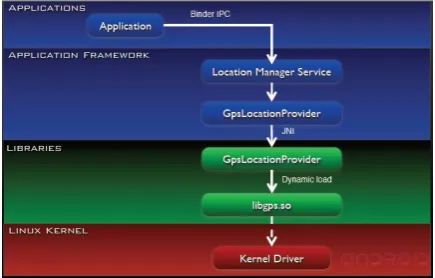
[image:1.595.320.538.444.583.2]Android is a software environment for mobile devices that includes an operating system, middleware and key applications [1].The Android operating system (OS) architecture is divided into 5 layers (figure 1.). The application layer of Android OS is visible to end user, and consists of user applications. The application layer includes basic applications which come with the operating system and applications which user subsequently takes. All applications are written in the Java programming language. Framework is extensible set of software components used by all applications in the operating system. The next layer represents the libraries, written in the C and C + + programming languages, and OS accesses them via framework. Dalvik Virtual Machine (DVM), forms the main part of the executive system environment. Virtual machine is used to start the core libraries written in the Java programming language.
Figure 1: Android Architecture
separate component is implemented with inheritance of Activity class. During the execution of applications, activities are added to the stack, currently running activity is on the top of the stack. Intent is a message used to run the activities, services, or recipient’s multicast. An intent can contain the name of the components you need to run, the action which is necessary to execute, the address of stored data needed to run the component, and component type. A service is a component that runs in the background to perform long running operations or to perform work for remote processes. One service can link multiple applications and service is executed until a connection with all applications is done. A content provider manages a shared set of application data. Data can be stored in the file system, a SQLite database, on the web, or any other persistent storage location which application can access [1]. Through the content provider, other applications can query or even modify the data (if the content provider allows it).
3. MAIN SECTIONS OF THE PAPER
3.1 Text to Speech
Text to Speech conversion becomes very easy using Android speech package. Android.speech.tts.TextToSpeech class provides necessary methods to perform the conversion. The initialization is done using TextToSpeech.OnInitListener ().
During initialization we can set the Locale, Audio pitch rate, audio speed. SetLanguage () method is used to set the language.
Example: setLanguage (Locale.US);
TextToSpeech.LANG_MISSING_DATA indicates
that language data is missing.
TextToSpeech.LANG_NOT_SUPPORTED indicates that
language is not supported.
[image:2.595.339.514.386.561.2]These conditions are checked during initialization.Speak () method in the TextToSpeech class is used to convert text to speech. Here a string which is to be converted to speech is passed and different types of Queue modes can be set. TextToSpeech.QUEUE_FLUSH will flush the playback queue by replacing the old entries with new entry. TextToSpech.QUEUE_ADD will add the new entry at the end of the playback queue. [5]
Figure 2: GUI for text to speech
3.2 Speech to Text
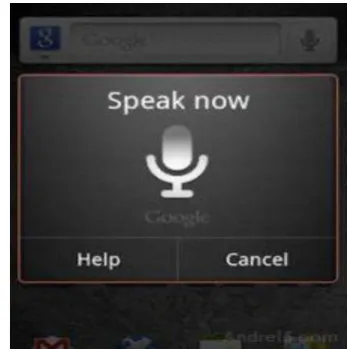
RESULT_SPEECH is a static integer variable declared at the beginning of the activity and used to confirm response when engine for speech recognition is started. RESULT_SPEECH has a positive value. Results of recognition are saved in a variable declared as TextView type. Method onCreate is called when activity is initiated. In this method, there is a check on the mobile phone for speech recognition possibility. If a mobile device doesn’t have one of the many Google applications which integrate speech recognition, further work of this application will be disabled and a message on the screen will be displayed,“Oops! Your device does not support speech to text”. Recognition process is done through one of Google’s speech recognition applications. [2] If recognition activity is present, the user can start speech recognition by pressing on the button and thus launching startActivityForResult (Intent intent, int requestCode). The application uses startActivityForResult () to broadcast an intent that requests voice recognition, including an extra parameter that specifies one of two language models. Intent is
defined with intent.putExtra
(RecognizerIntent.EXTRA_LANGUAGE_MODEL, RecognizerIntent.LANGUAGE_MODEL_FREE_FORM). The application that handles the intent, processes the voice input, then passes the recognized string back to theApplication by calling the onActivityResult () callback. In this method we manage the result of activity startActivityForResult. Received result Data is stored in Text View variable and is shown in the Figure 3. [2]
Figure 3: Enables search after clicking image button
3.3 Welcome Activity class
[image:2.595.100.235.514.691.2]Figure 4: Welcome page
3.4 Databases
All required Login and Registration user-data will be saved in the application’s own Android SQLite database. The database will be stored in the application’s context, so that no other android applications will access the data. In the class DBAdapter, the database name and database version are declared. Also the table is created where the user details are stored. A constructor is created for theDBAdapter class, and it is parameterized with an object ctx of type Context. We declare a non-inbuilt class ‘DatabaseHelper’ in this constructor and create the class DatabaseHelper. This class extends SQLiteOpenHelper class as it is the one in which we create and upgrade our database. The open and close methods are written to open and close the database. A fetchUser method is created for getting user from the database which is used in the Login class. An insertData () method is created for inserting user which is used once in the signup class for adding the user details into the database. The user can then login the next time by providing the username and contact details which are taken from the TextView and passed to the toString () method. The string thus obtained is compared with the string in the database and only on authentication, access is granted. [4]
Figure 5: Username and contact number is asked after clicking this image button and the input is displayed in the
text views at the bottom.
3.5 Calculator Activity class
[image:3.595.361.498.221.383.2]This activity is defined as launcher in AndroidManifest.xml file. Method onCreate () is called for the initialization of the activity. Since a single button is used for multiple functions, we make use of switch case in the onClick () method. Texttospeech and speechtotext methods are called in alternate cases of the switch to implement this we have made use of the count variable which is initialized to zero and is incremented in each case to switch to the next case. In the last case, to obtain the result, the first and the second number are type casted to ‘double’ since the input is accepted in the form of string and the operations are performed on them and the evaluated result is spoken using texttospeech() method.
Figure 6: After performing calculations
3.6 Send activity class
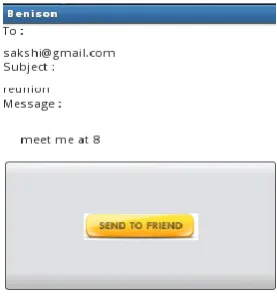
In onCreate method label setContentView (R.layout.send) opens new user interface. The recipient address is set by writing the following code emailActivity.putExtra (android.content.Intent.EXTRA_EMAIL, new String [] {tot}); The subject of the mail is set in the following manner:
emailActivity.putExtra
(android.content.Intent.EXTRA_SUBJECT, subject); And lastly the body is set by this code: emailActivity.putExtra(Intent.EXTRA_TEXT,message); emailActivity.setType("plain/text"); Finally the mail can be sent by choosing the default email application of the android. Send button application checks whether the message and the proper email address of the recipient is entered to perform sending of message. Intent emailActivity = new Intent (android.content.Intent.ACTION_SEND)
[image:3.595.93.242.512.631.2] [image:3.595.359.498.585.737.2]4. APPLICATION FUNCTIONALITY
PRINCIPLE
The application integrates direct speech input, enabling user to record spoken information as text message, and send it as Email message. After application has been started, the display on the mobile phone shows two buttons which are ‘Login’ and ‘Signup’.
On clicking Signup button there is a registration form asking for the username, contact number and country. There is a single button to access each of the fields to enable a visually impaired user to communicate with ease. Clicking the button first time initiates speech to text conversion process, that is, the application will ask for the username by speaking ‘say username’. Then clicking for the second time initiates voice recognition process. When speech has been detected, the application establishes connection with Google’s server and starts to communicate with it by sending blocks of speech signal. Simultaneously, the figure of a waveform is generated on the screen. Speech recognition of the received signal is performed on the server. Google has accumulated a very large database of words derived from daily entries in the Google search engines well as the digitalization of more than 10 million books in Google Book Search paper. The database contains more than 230 billion words. If we use this kind of speech recognizer it is very likely that our voice is stored on Google’s servers. This fact provides continuous increase of data used for training, thus improving accuracy of the system. When process of recognition is over, the text is displayed on the text view. Now again on clicking the button for the third time it will ask for the contact number and again on tapping the button it will accept the input. Similarly, it will accept the input for country also. All this information is stored in the android SQLite Database.
In the same manner, on clicking the login button, the user can log in with a single tap by providing the correct username and contact number which is authenticated from the database.
After logging in, there is a menu activity in which there is an option of choosing either calculator or Email which can be chosen by the user through speech.
The calculator activity class also has a single button which is used for asking the first number, operation and second number accepting them on alternate taps.
On speaking the Email it will go to the Email activity which will ask for the username and on the next tap it will accept it, on the consecutive tap it will ask for the Email service provider which is appended with the username and after the '@' symbol. Now on consecutive taps it will ask for the subject and message. This process can be repeated by clicking on the single Image Button. The result is then entered into the interface for writing Email messages. Interface for writing Email messages has all the standard features. User can correct text and input recipient Email address in the empty textbox. Now the message will be sent after pressing the send button. Customer receives response in a little cloud (toast) if message has been sent.
5. FUTURE SCOPE
The motivation of making life simpler and better has been the motivation to develop this application. The future intention is working towards enhancing the features of this application a step further by incorporating a secure means for logging in.
Authentication Process:
The sign up requires the user to enter a unique username and answer twenty questions.
The answer to these questions would be stored in the database to act as the password. (The user must use a headphone and microphone for security reasons.)
Each time the user logs in, the username has to be spoken and one random question from among the twenty would be asked (text from database converted to speech) and the answer spoken (speech to text conversion) will be verified from the database.
The password being different at all times and there being no sequence, this would prove to be a secure means for logging in for a person who is visually impaired.
Keeping in mind the security and login for a visually impaired user, this method proves to be an efficient solution to protect the email account of such a user from those having malicious intentions to access the same.
6. CONCLUSION
With the software and hardware capabilities of mobile devices booming, there is an increased need for device-specific content. Speech to text conversion technology is of cardinal interest due to the direct support of communications between human and computers.
The speech to text conversion works over the Internet, allowing data to be processed at staggering speeds. An added advantage is the much larger databases that are used. The accuracy of the system has significantly increased and become more accessible to everyone. Thus, we no longer need to install complex software for speech to text and text to speech conversion to manage mobile devices, which in turn results in memory savings.
Incorporating the authentication process and shortly introducing the application in the android market and making a daily activity of many, simpler and a lot more secure is what will lead to the accomplishment of this idea.
7. ACKNOWLEDGEMENTS
We are very grateful to Prof. Dashrath Mane-Department of MCA, V.E.S Institute of Technology, Mumbai, India, for his guidance and constant supervision that helped us successfully complete the paper.
We would like to express our gratitude towards our parents & V.E.S. Institute of Technology, Mumbai, India, for their kind co-operation and encouragement which helped us in completion of this paper.
8. REFERENCES
[1] Description about android and its architecture.
http://www.android-app-market.com/android-architecture.html
[2] Information regarding Speech to Text conversion and speech recognition. http://www.vocapia.com/speech-to-text.html
[3] Description about the Intents of an email app and how to handle them. http://www.tiemenschut.com/how-to-send-e-mail-directly-from-android-application/
[4] Detailed information on SQLite database and its classes. http://developer.android.com/reference/android/database/ sqlite/SQLiteDatabase.html