An Empirical Study of Different Modes of Wireless
Network Communication and Ways to Optimize its
Performance and Speed
Mohd. Ehmer Khan
Department of Computer Science, Singhania University, Jhunjhunu, Rajasthan, India
Farmeena Khan
Department of Computer Science, EIILM University, Jorethang, Sikkim, India
ABSTRACT
A wireless communication is a form of communication that does not require the transmitter and receiver to be in physical contact through guided media. It is a network which is set up by using radio signal frequency to communicate among computers and other network devices. Wireless communication has become quiet prevalent all around the world. Mobility and the elimination of a wired infrastructure, the key benefits of wireless operations, give users the flexibility to communicate from wherever they may be at any given time. In our paper we have explained different wireless network standards, different modes of wireless networking, ways to optimize performance and speed of wireless network and the future of wireless network.
General Terms
Modes of wireless network, Optimize performance and speed.
Keywords
Infrared, Microwave communication, Radio frequency communication
1.
INTRODUCTION
Wireless network is often referred to as unbounded media in which the network transmission is unrestricted. In wireless network the signals are transmitted through the atmosphere as electromagnetic waves. Wireless technology is a truly revolutionary paradigm shift, enabling communications between devices and people from any location. It also underpins exciting applications such as sensor network, automated highways, smart phones etc. Now a day’s wireless networks have been as essential part of communication. Society moves towards information centricity, the need to have information accessible at any time and any where takes on a new dimensions. Growth in commercial wireless networks occurred primarily in the late 1980’s and continues in 2000.
[image:1.595.126.471.474.735.2]Wireless communication is the fastest growing segment of the communication industry. Cellular phones, paging services, internet etc have experienced exponential growth over the last decades and it continues in the future also.
Fig 1: Represent growth of wireless network
361 1000 70
1967
42000
500 0
5000 10000 15000 20000 25000 30000 35000 40000 45000
Internet users Mobile Users Paging subs M
i l l i o n s
Amplitude
Time Electromagnetic
Wave
Phase
One Cycle
Frequency = 1/T
Reference Point
At present there are three main standards for wireless networks, they are as follows: [1]
1. IEEE 802.11 – it defines three interoperable techniques.
i. IEEE 802.11 FHFS (Frequency Hopping Spread Spectrum)
ii. IEEE 802.11 DSSS (Direct Sequence Spread Spectrum)
iii. IEEE 802.11 IR (Infra Red)
This specification has given birth to a family of other standard. [1]
i. IEEE 802.11 a – operates in 5 GHz U-NII (Unlicensed National Information Infra Structure) band using orthogonal frequency division multiplexing. Maximum data rate is 54 mbps
ii. IEEE 802.11 b – operates in 2.4 GHz ISM band. The data rate is 1, 2, 5 or 11 mbps. iii. IEEE 802.11 g – operates in 2.4 GHz
band. The data rate is upto 20 mbps. 2. Hiper LAN – it is standard issued by European
Telecommunication Standard Institute (ETSI). It defines two kinds of networks.
i. Hiper LAN 1 (High Performance Radio LAN 1) – it uses 5 GHz band and data rate is 10 – 20 mbps.
ii. Hiper LAN 2 – uses 5 GHz band and data rate is upto 54 mbps.
3. Consortium of private companies such as Agere, Ericsson, Intel, IBM, Nokia, Toshiba etc. has designed Bluetooth standard, it operates in 2.4 GHz band and has a short range of action of about 10 meters. [1]
[image:2.595.126.455.458.712.2]Now, we will compare the existing form of short range wireless communication
Table 1. Comparison between short range wireless communications
Wireless Technology
Frequency
Channel Range Speed
GPRS GSM Unrestricted High
Bluetooth 2.4GHz ≈10m 1 Mb/s
Wi-Fi 2.4GHz ≈100m 11 Mb/s
ZigBee
2.4GHz 868MHz 915MHz
≈100m 250 Kb/s
WiMedia 110.6GHz 310m 480 Mb/s
2.
DIFFERENT MODES OF WIRELESS
COMMUNICATION
Wireless communication can be via:1. Radio Frequency Communication 2. Microwave Communication
3. Infrared (IR) for short range communication
2.1
Radio Frequency Communication (RF)
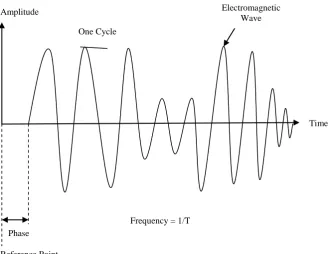
It is a rate of oscillation in the range of about 3 KHz to 300 GHz, which corresponds to the frequency of radio waves and alternating current which carry radio signals. Three basic elements of RF signals are amplitude, frequency and phase as shown in figure below:
Line of
Sight Transmitting
Station
Receiving Station Transmission Lines
Output Input
Amplitude indicates the strength of RF signals. If the range between the sender and receiver increases, the amplitude of signal decline exponentially. [2]
The frequency is how many cycles occur in one second for e.g. an 802.11 b wireless LAN operates at a frequency of 2.4 GHz this implies signal includes 2, 400, 000, 000 cycles per second.
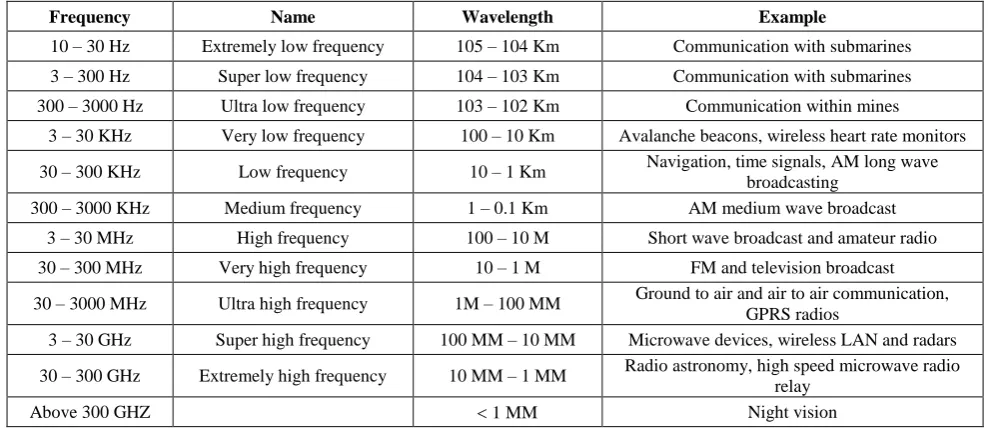
[image:3.595.50.545.173.387.2]The phase indicates to how far the signal is offset from the reference point. For e.g., a signal might have a phase shift of 30 degrees, which means that the offset amount is 30/360 = 1/12. The table below represents different frequencies of radio waves. [3]
Table 2. Represent different frequencies of radio waves
Frequency Name Wavelength Example
10 – 30 Hz Extremely low frequency 105 – 104 Km Communication with submarines
3 – 300 Hz Super low frequency 104 – 103 Km Communication with submarines
300 – 3000 Hz Ultra low frequency 103 – 102 Km Communication within mines
3 – 30 KHz Very low frequency 100 – 10 Km Avalanche beacons, wireless heart rate monitors
30 – 300 KHz Low frequency 10 – 1 Km Navigation, time signals, AM long wave
broadcasting
300 – 3000 KHz Medium frequency 1 – 0.1 Km AM medium wave broadcast
3 – 30 MHz High frequency 100 – 10 M Short wave broadcast and amateur radio
30 – 300 MHz Very high frequency 10 – 1 M FM and television broadcast
30 – 3000 MHz Ultra high frequency 1M – 100 MM Ground to air and air to air communication, GPRS radios
3 – 30 GHz Super high frequency 100 MM – 10 MM Microwave devices, wireless LAN and radars
30 – 300 GHz Extremely high frequency 10 MM – 1 MM Radio astronomy, high speed microwave radio relay
Above 300 GHZ 1 MM Night vision
RF system consists of:
1. A mobile RF terminal (interface between user and RF system)
2. A base station (it has system antenna)
3. Network controller (receive and processes information and passes it)
RF advantages-
1. RF signals can penetrate most solids and pass through walls.
2. RF has longer range. 3. RF is not sensitive to light.
4. Not as much sensitive to environmental condition.
5. RF communications include a significant improvement in order accuracy i.e. 99% 6. In RF accessibility is the key benefit.
RF disadvantages-
1. Communication devices using same frequency can interfere with transmission.
2. Data transmission rate is lower than wired networks.
3. FCC license required for some products.
2.2
Microwave Network Transmission
Microwave transmission uses a beam of radio waves in the microwave frequency range (1.0GHz – 30 GHz) to transmit information between two fixed location on the earth or via satellite. Both methods can transmit data in large quantities and at high speed.
[image:3.595.102.487.598.752.2]Down converter Demodulator Demultiplexer Voice Channel Voice
Channel
RF
IF Receiving antenna
Receiving station
Transmitter (a) Multiplexer
(produce BB
signals) Modulator
Up converter (heterodyned) IF
Transmitting antenna
RF
Transmitting station
[image:4.595.64.543.75.340.2]Receiver (b)
Fig 4: Represent block diagram for transmitting and receiving station of microwave transmission
Microwave radio transmission is commonly used in point – to – point communication on the surface of earth, in deep space radio communication and in satellite communication.
2.2.1
Microwave Frequency Bands
There are various microwave frequency bands which are described in a table below: [4]
Table 3. Represent microwave frequency bands
f (GHz) Later Band Designation
1 – 2 L – band
2 – 4 S- band
4 – 8 C – band
8 – 12.4 X – band
12.4 – 18 Ku – band
18 – 26.5 K – band
26.5 – 40 Ka – band
33 - 50 Q – band
40 – 60 U – band
50 – 75 V - band
60 -90 E – band
75- 110 W – band
90 – 140 F – band
110 – 170 D - band
Advantages of Microwave Transmission- 1. No cables are needed.
2. Multiple channels are available. 3. There is wide bandwidth.
4. Microwave transmission systems have the capacity to broadcast large quantities of information (about 16 Gigabits/second) because of their frequencies.
5. Portability and reconfiguration flexibility. Disadvantages-
1. Line – of – sight will be disrupted by obstacles such as buildings, towers, fog, lighting etc. (to overcome this problem microwave systems use repeaters at intervals of about 25 – 30 Km between transmitting and receiving stations) 2. Towers are expensive to build.
3. Microwave signals are affected by electromagnetic interference (EMI).
4. Signal absorption by the atmosphere. 5. Regulatory licensing requirement.
2.3
Infrared
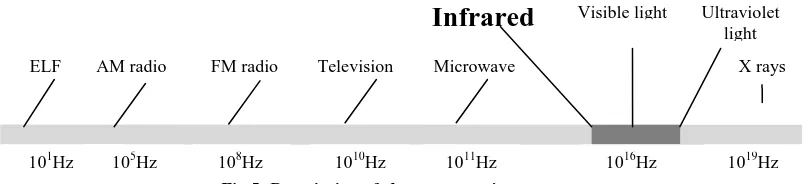
[image:4.595.80.252.476.681.2]Fig 5: Description of electromagnetic spectrum
Infra red technology used in local network exists in three different forms: [6] [7]
1. Slow speed – Irda – SIR – data rates upto 115 Kbps
2. Medium speed – Irda – MIR – data rate upto 1.15 Mbps
3. Fast speed – Irda – FIR – data rate upto 4 Mbps
Line – of – Sight Network
Scatter Infrared Network Infrared Network
Reflective Network
Broadband Optical Point
[image:5.595.54.278.436.595.2]Fig 6: Represent different types of infrared networks
Table 4. Telecommunication bands in Infra red
Band Description Wavelength Range
O – band Original 1260 – 1360 nm
E – band Extended 1360 – 1460 nm
S – band Short wavelength 1460 – 1530 nm
C – band Conventional 1530 – 1565 nm
L – band Long wavelength 1565 – 1625 nm
U – band Ultralong
wavelength 1625 – 1675 nm
Some key infra red points are as follows: [8]
1. It provide adequate speed upto 16 Mbps 2. Infrared removes the problem of signal
tempering as they are a direct line implementation in a short range.
3. It is typically used for PAN.
4. Infra red devices uses less power and therefore don’t drain batteries very often.
5. Transmission travels over short distance. 6. Not as likely to have interference for signals
form other devices.
7. Infrared replaces wires for many devices such as keyboards, mice, printers and peripherals.
8. Few international regulatory constraints are required.
9. In infrared no special hardware is required. Some of the limitations of infrared are as follows: [8]
1. Common materials such as people, walls, plants etc. can block transmission as the transmitter and receiver must be almost directly aligned.
2. Performance drops off with longer distances. 3. Data transmission rate is lower than typical
wired transmission.
3.
WAYS TO OPTIMIZE THE
PERFORMANCE AND SPEED OF
WIRELESS NETWORK TRANSMISSION
Signal interference is the number one enemy of wireless system designer and service provider. Interference hampers coverage and capacity, and limits the effectiveness and performances of both existing and new system. [9]There are some factors that cause interference such as: 1. Trees, buildings and other physical structures. 2. Devices that share the same channel can cause
noise and weaken the signals.
3. Various electrical interferences from refrigerator, fans, computers, microwaves etc. 4. Environmental factors such as lighting and fog
can make the signals weak.
As there are always a cure for interference, but we need to know what’s ailing us, for this reason we have described few ways to reduce the effect of interference and optimize the performance and speed of wireless network: [10][11][12]
1. Place wireless router, modem router or access point away from the flour and walls.
2. Aim for a central location in the building, so the signals strength and radiates equally. 3. Place routers in the attic.
4. Instead of standard antenna use high gain antenna.
5. Change wireless router channel to increase the strength of signals.
6. Upgrade 802.11 a, 802.11 b and 802.11 g devices to 802.11 n.
7. Reduce wireless interferences.
8. Update your firmware or your network adaptor driver.
9. Add a wireless repeater.
4.
CONCLUSIONS
Wireless networking refers to technology that enables two or more computers to communicate using standard network ELF AM radio FM radio Television Microwave
Infrared
Visible light Ultraviolet lightX rays
108Hz 1010Hz 1011Hz 1016Hz
105Hz
protocols, but without network cabling. The computers and other devices connect to the network using radio signals. In our paper we have described various standard of wireless network, various modes of wireless communication such as radio frequency communication, microwave communication and infrared. We have also described few steps to reduce the effect of interferences and improve the performance and speed of wireless network.
In nut shell wireless network will continue to play an important role in the future and stimulate the creation of many interesting mediums.
5.
THE FUTURE OF WIRELESS
NETWORK
Wireless network has profoundly evolved and substantially proliferated over the past 14 years, since its inception in 1997 as 802.11 or WIFI. The goal of future wireless networks is to provide ubiquitous connections and support high data rate demand. The WiMax, LTE and LTE – Advanced
standardization have already processed towards this direction but still require significant improvement.
There are multiple wireless futures which are listed below: 1. Future cellular network – alternative radio
technologies (WiMax, 4G, 5G), open interface for new network and transport protocols. 2. Next generation wireless LAN – hybrid
cellular/WLAN, security, emerging radio technologies (802.11 n, MIMO), improved MAC layer protocol.
3. RFID applications will increase in future. In the future the internet should be able to sustain a tripling of the number of people connected and the addition of billions. Communication data devices grow from 2.4 billion in 2004 to 1 trillion by 2012.
[image:6.595.123.461.290.518.2]According to one survey, the world wide market for wireless measurement devices and services are expected to reach about 1.8 billion by 2012.
Fig 7: Represent current and forecast world wide shipments of wireless products
6.
REFERENCES
[1] Daniele Raffo, 2005, Chapter 1 Introduction to wireless
networking, available at
http://perso.crans.org/raffo/papers/phdthesis/thesisch1.ht ml
[2] RF Signals, Understanding RF Signals, available at
http://www.wireless-center.net/WLANs-WPANs/2427.html
[3] National Instruments, Introduction to RF & Wireless Communications Systems, available at http://zone.ni.com/devzone/cda/tut/p/id/3541
[4] Wikipedia, Microwave, available at http://en.wikipedia.org/wiki/Microwave
[5] Brainbell, Infrared Wireless Networking, available at http://www.brainbell.com/tutorials/Networking/Infrared_ Wireless_Networking.html
[6] Bradley Mitchell, Infrared, available at http://compnetworking.about.com/od/homenetworking/g/ bldef_infrared.htm
[7] Wikipedia, Infrared, available at http://en.wikipedia.org/wiki/Infrared
[8] Maureen Kaine-Krolak, 1995, An Introduction to
Infrared Technology:
Applications in the Home, Classroom, Workplace, and
Beyond ..., available at
http://trace.wisc.edu/docs/ir_intro/ir_intro.htm
[9] Anritsu, 2003, Fundamentals of Interference in Wireless
Networks, available at
http://www.electrotest.co.nz/PDF/Fundamentals_of_Inter ference_in_Wireless_networks.pdf
210.5
23.7
340
41.6 536
171.7
634.9
119.2
0 100 200 300 400 500 600 700
802.11 Standards 802.15.4 Standards
Proprietary Other Standards
[10] Computer Tips, How to improve your Wireless internet and network connection, available at http://www.computerfreetips.com/internet_tips/Improve-Wireless-internet.html
[11] Sandeep Kumar, How to Increase Wireless Network Speed and Performance, available at
http://www.wrock.org/pc-world-menia/how-to-increase-wireless-network-speed-and-performance
[12] Tony Northrup, 10 tips to help improve your wireless
network, available at