I
I
m
m
p
p
l
l
e
e
m
m
e
e
n
n
t
t
a
a
t
t
i
i
o
o
n
n
o
o
f
f
H
H
i
i
g
g
h
h
I
I
n
n
t
t
e
e
r
r
a
a
c
c
t
t
i
i
o
o
n
n
H
H
o
o
n
n
e
e
y
y
p
p
o
o
t
t
t
t
o
o
A
A
n
n
a
a
l
l
y
y
z
z
e
e
t
t
h
h
e
e
N
N
e
e
t
t
w
w
o
o
r
r
k
k
T
T
r
r
a
a
f
f
f
f
i
i
c
c
a
a
n
n
d
d
P
P
r
r
e
e
v
v
e
e
n
n
t
t
i
i
o
o
n
n
o
o
f
f
A
A
t
t
t
t
a
a
c
c
k
k
s
s
o
o
n
n
P
P
r
r
o
o
t
t
o
o
c
c
o
o
l
l
/
/
P
P
o
o
r
r
t
t
B
B
a
a
s
s
i
i
s
s
Gurdip Kaur
Chitkara University Punjab
Jatinder Singh Saini
Baba Banda Singh Bahadur Engineering College Fatehgarh Sahib
ABSTRACT
Network security deals with two types of communities - black hats and white hats. The era of security has come when the white hats are not only interested in defending the networks but are keen to make fool of the black hats. Looking at the other side of the mirror, the black hats have also evolved new methods of breaching the security.
The work in this paper is based on implementation of low-interaction and high-low-interaction honeypots along with the deployment of honeywall gateway. Honeywall gateway acts as reverse firewall that allows all type of traffic (both good and bad) to enter the system to facilitate analysis and learning. Honeywall gateway is the heart of the work that is involved in capturing, controlling, and analysis of data. The captured data is further categorized on protocol and port basis. The methodology used can be summarized into three steps:
Monitoring the attack traffic
Analyzing the attack type and method Responding to the attacker to capture in depth
information.
The work is intended to analyze the attacker’s activities once it is logged and captured by honeywall and accessed through the walleye interface.
General Terms
Security, Protocol.Keywords
honeyd, attacks, honeypots, honeynet gateway, honeywall, sebek.
1. INTRODUCTION TO HONEYPOTS
Security of computing machines and networks are increasing in importance as more and more business is conducted via these systems. Despite decades of research, security in all aspects still cannot be provided to the computer systems in the network. One way to strengthen the defenses against vulnerability exploitations is to learn from the enemy by deploying and monitoring those machines in the network that the attacker would love to break into.Honeypot is a special machine that is intentionally placed in the network for the purpose of capturing any type of attack activity and logging it for analysis. The concept is entirely based to mimic the personality or behavior of a physical machine and making fool of the attackers by making it vulnerable. The definition of honeypot as per the members of Honeypot mailing list is:
“A honeypot is an information system resource whose value lies in unauthorized or illicit use of that resource.” [24, 26] From this definition it is clear that the value of honeypot increases when more number of attackers is lured. Unlike the traditional security measures such as firewalls and IDSs, honeypots are used for detection, prevention, and collection of information of attack.
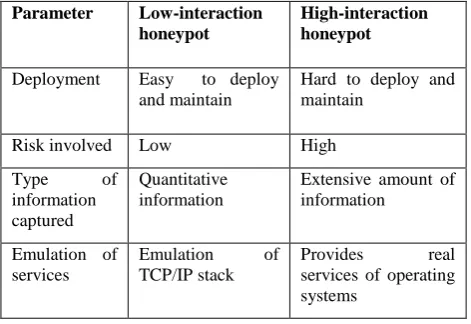
[image:1.595.305.541.374.536.2]The beauty of honeypots lies in the fact that it limits the intruder from having access to the entire network irrespective of luring him. Table 1 gives the comparison of low and high-interaction honeypots.
Table 1. Comparison of honeypots
Parameter Low-interaction
honeypot
High-interaction honeypot
Deployment Easy to deploy and maintain
Hard to deploy and maintain
Risk involved Low High
Type of
information captured
Quantitative information
Extensive amount of information
Emulation of services
Emulation of TCP/IP stack
Provides real services of operating systems
The research is undertaken to study the behavior of traffic coming from outside i.e. attacks encountered by the honeypot, protocols used for that attack, lookup for the logs generated for various attacks. The logs can be represented graphically to visualize the output and analyze the intrusions. The categorization can be done on the basis of port-wise, protocol-wise attacks, analysis of traffic on time-basis etc.
The detailed objectives of this research are:
Implementation of high and low-interaction honeypot. Analysis of TCP, UDP and ICMP traffic captured by
honeynet.
Detection of attacks and analysis of the activities generated by the attacker on honeypot.
Data Capture: Sebek is used as a data capturing tool. It works in client-server architecture. Sebek server is installed by default in the honeywall gateway while sebek client is installed on the honeypot. Sebek is used to monitor keystrokes, file reads, writes, socket calls and process creation calls even when session encryption is used.
Data Control: Snort and snort-inline is used as data control tool. Snort-Inline in combination with netfilter/iptables operates as a bridging firewall to send packets to user space for processing.
Data Analysis: Walleye is used as data analysis tool. The interesting thing to note is that walleye interface is remotely accessible from any machine. The only requirement is to access the desired port on honeywall from which data is to be transferred. [1]
The purpose of carrying out this work is to deploy honeynet to capture the keystrokes of the attacker’s activities and analyzing the captured data for the purpose of research. The primary goal is to learn the tools, tactics, methodologies, and techniques used by the hackers by which they exploit the systems. The key point of using honeywall in the topology is that encrypted traffic can also be captured and decoded with generation III of honeynet. It is worth mentioning here that the value of this research work depends on the type of honeypot deployed and the scenario i.e. the location of deployment which means whether the honeynet is deployed in front of the firewall or behind it. If the topology is deployed in front of the firewall, unfiltered traffic can be captured effectively. Otherwise the firewall with do filtration and only limited traffic will be captured.
2. IMPLEMENTATION OF HONEYPOTS
Honeyd is the tool used to implement a low-interaction honeypot. Honeyd is a small daemon that creates virtual hosts on a network. The hosts can be configured to run arbitrary services, and their TCP personality can be adapted so that they appear to be running certain versions of operating systems. Honeyd enables a single host to claim multiple addresses on a LAN for network simulation. It is possible to ping the virtual machines, or to traceroute them. Any type of service on the virtual machine can be simulated according to a simple configuration file. Instead of simulating a service, it is also possible to proxy it to another machine.2.1 Pre-requisites for installation of Honeyd
Installation of Honeyd requires some libraries and supportive tools to be installed. [16]2.1.1 Hardware used
CPU: x_86 Pentium IV Memory: 512 MB Hard Drive: 160 GB
2.1.2 Software used
Operating System: Ubuntu 11.04 Tools: Honeyd-1.5c, farpd-0.2 Libraries: libevent, libpcap, libdnet
There was a problem while installing farpd-0.2 due to its incompatibility with gcc, so it was installed from the software center. Once the libraries and farpd was installed it was a straight forward task to install Honeyd. [18]
2.2 Configuration of Honeyd
Once the installation part is over, the actual task of preparing
the configuration file of Honeyd begins. This is actually the most important step in running Honeyd. Honeyd is capable of creating 65535 such templates in a single configuration file and binds it to unallocated IP addresses for each template to act as a physical machine for the attacker. The template consists of basic details like the operating system that the template will mimic, ports open on that operating system, and the default scripts that will run if a specific port is attacked, in order to lure the attacker and keep him busy. The uptime of the virtual machine is also mentioned. At last, the template is bound to an unallocated IP address so that it looks as a physical machine in the network. [18]
2.3 Observations on Honeyd
Some of the observations while working on Honeyd are mentioned below: [18]
Farpd does ARP spoofing, since it shows the MAC address of honeypot with unused IP addresses in the network. Farpd checks for the MAC of each IP address in the network and if arpd_lookup finds no entry of MAC for any IP address, then arp reply binds the MAC address of the honeypot to that IP.
On running the command for Honeyd, the Ethernet card enters into promiscuous mode and internet stops working until the honeypot is restarted.
If multiple Honeyd commands are running from the terminal and multiple scripts are running, then on pinging the bound IP address would result into duplicate ICMP requests and will reflect the same in ping reply.
Even after closing the terminal, the farpd and Honeyd keep on running at the back end and are stopped when the machine is shut down. Even log off would not affect running of Honeyd at the back end. On pinging the bound IP addresses in honeyd.conf
after running Honeyd will response when observed through wireshark, the MAC address of ARP request/reply of those IP addresses is same as that of honeypot. Any internal attacker will come to know this but an attacker from outside (internet) will not be able to detect this thing.
When one IP is assigned manually to the honeypot through TCP/IP settings and second is bound to the same interface through ifconfig, then ping on second IP address will respond and first one shows unreachable host because the traffic is captured by Ethernet card first and MAC address is mapped to IP address. Since in is case second IP is bound to interface, so it is replying to ping.
Honeyd facilitates the concept of virtual and physical honeypots.
On scanning the ports through zenmap, it was observed that if honeyd.conf contains TCP port status open then only it shows the open ports and it does not show UDP port status.
Specific log file for Honeyd can be created with option -l followed by the path and filename while running Honeyd. The fields listed in log file are timestamp, protocol, source IP, source port, destination IP, and destination port. Flags in case of TCP protocol are ACK, RST, FIN, SYN, and prediction of operating system at source of the packet is also logged. But the entry corresponding to ICMP protocol logs source and destination IP, number of packets, and size of data respectively.
and on running Honeyd, “no route for <IP>” is displayed.
Once route entry is added at the end of honeyd.conf file, then “time to live exceeded” entry starts appearing on running Honeyd and we were not able to ping any IP address and network unreachable error is displayed. But on removing the route entry from the file, normal ping starts working and reply is received.
2.4
Implementation
of
high-interaction
honeypot
Since high-interaction honeypot provides real services of operating system, no tool is required to be installed on it. The attacker interacts with the actual operating system to provide full interaction. [1]
2.4.1 Hardware used
CPU: x_86 Pentium IV Memory: 512 MB Hard Drive: 160 GB
2.4.2 Software used
Operating System: Windows XP SP2 Data Capture Tool: Sebek-Win32-3.0.5
Installation of sebek was the major problem faced during the experimentation. At the beginning of the work it was decided to use ubuntu 11.04 to install sebek but there were a lot of problems related to creation of binaries due to incompatibility of sebek version with the linux kernel. The reason for incompatibility is that sebek code is not updated but the linux kernel is. All the online help options were accessed but in vain. Even the linux kernel was changed and kernel image 2.4.x was used to solve the problem. So finally it was decided to use windows based machine as high-interaction honeypot and sebek was installed on it.
Some important points to be taken into consideration regarding sebek are:
The destination IP in the configuration is the IP address of the interface on honeywall on which data from honeypots is captured.
Destination IP on honeywall configuration file and sebek configuration should be same.
There is no way to trace that sebek is installed on the honeypot because sebek drivers are hidden in location C:\WINDOWS\system32\drivers and even task manager does not show under system processes that sebek is running. The machine runs normally after installing sebek.
3. INSTALLATION AND
CONFIGURATION OF HONEYWALL
GATEWAY
Honeywall gateway is the most important component in a honeynet deployment. Through this system DCAP and DCON is exercised, and in GenIII Honeynets, Data analysis and Honeywall Management takes place here through the walleye web interface. Honeywall CDROM Roo-1.4 is the heart of this deployment. Roo CDROM is Cent operating system based and is the minimized version of the system. The CDROM also provides tools to easily configure, maintain, and analyze the solution after it has been deployed. Its purpose is to capture, control, and analyze all inbound and outbound Honeynet activity. [9] Honeywall gateway becomes a layer 2 bridging device that
captures, controls, and analyzes all inbound and outbound traffic to the honeypots. The configuration is very important since all the protocols, ports, capturing interface details, honeypot IPs, inbound and outbound connections with protocols, remote management etc. are specified here.
3.1
Requirements
for
installation
of
honeywall gateway
Installation of honeywall gateway has following key considerations:
3.1.1 Hardware requirements [13]
CPU: Intel x_86 Pentium class CPU (or better) - Also supports earlier CPUs (such as Pentium, Pentium Pro, Pentium II, Pentium III, and including AMD and VIA variants).
Memory: 512MB (bare minimum) 512MB (recommended) - More memory is usually better depending on how active the Honeywall is.
Hard Drive: Base install with Honeywall functionality is around 900MB. For testing purposes, minimum of 6GB hard drive is needed. For production purposes, minimum of 10GB hard drive is required. Support is available for most IDE hard disks as well many popular SCSI disks/controllers. NIC: Minimum of two Network Interface Cards (one
connected to the internal, honeynet network and one connected to the external network/Internet) is needed. Third card is needed if the ability for remote management or remote logging, including the use of the Walleye interface is to be availed. It is highly recommended to have a third NIC.
3.1.2 Software requirements
Honeywall CDROM: The honeywall CDROM roo-1.4 is Cent OS based customized version that installs honeywall gateway with all the utilities and tools required for its effective working.
3.2 Installation of honeywall gateway
The honeywall CD offers an automated process of installation once it is booted. Installation of Roo will overwrite the hard disk so all the data will be deleted. All the necessary packages will be installed automatically. [15]
Installation of honeywall is as simple as booting from the CDROM then hitting the Enter key, allowing the fully automated install process to begin. After installation, administrator will have to go through an initial Setup process to configure the honeywall gateway for the first time. Once configured and deployed, there are three options on how to administer the system, a command line utility called hwctl, a dialog menu, and the GUI based browser interface called Walleye. [13]
Once installed, honeywall will have default users. The password for all of these accounts is honey. It is highly recommended to change these passwords. The local operating system passwords can be changed during the initial configuration process; the Walleye password can be changed the first time administrator logs into the web interface.
Default local operating system user is roo.
Default local operating system privileged user is root. Default user for Walleye web interface is roo.
3.3 Deployed Topology
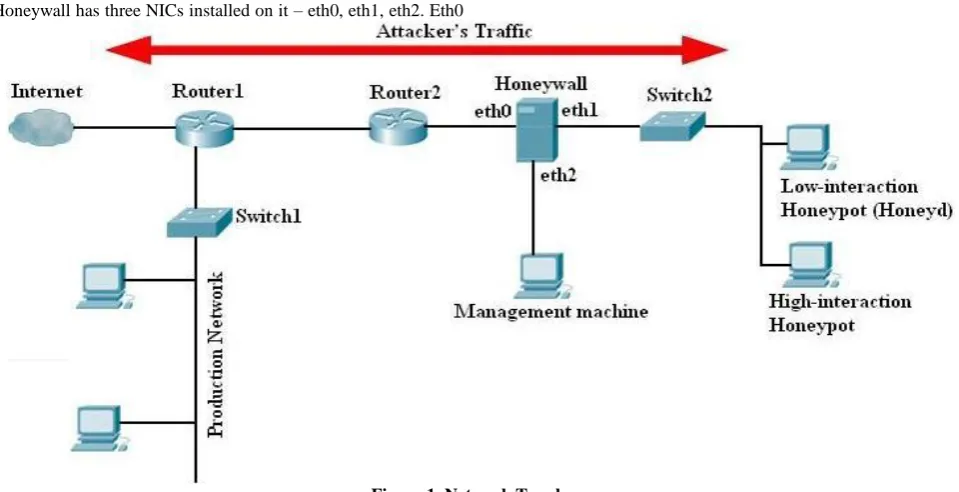
the honeypots are compromised by the attacker, it does not affect the production network.
The topology is divided into three parts for explanation. Part I focuses on honeypots (low and high-interaction) connected to Switch2. Part II consists of honeywall and the management machine connected to it. Part III covers production network and Router1.
3.3.1 Part I - Honeypots
Implementation of honeypots is already discussed in section II of this paper.
3.3.2 Part II - Honeywall
Honeywall has three NICs installed on it – eth0, eth1, eth2. Eth0
[image:4.595.58.538.186.432.2]is connected to Router2, eth1 to Switch2 to which honeypots are connected, and eth2 is connected to the management machine. The main advantage of the bridge mode is that it is harder to detect by the attackers. Since the Honeywall has no IP address (except for eth2), it does not affect the time to live values of the traffic entering/leaving the Honeynet. However, it can still transparently control and capture all the data passing through it. But honeywall captures all the malicious activities and forwards them to the honeypots.
Figure 1. Network Topology
3.3.3 Part III – Production Network and Router1
Production network is connected to Router1 which is the normal network of the organization. Production network works independently of the honeynet because malicious traffic is forwarded to the honeypots in the topology and does not affect the normal traffic.
3.4 Configuration of honeywall gateway
Once the installation is complete, two user accounts are created- roo and root. The details of configuration are available in [5, 13]. Whatever values the administrator fills during the automation process (configuration) are stored in honeywall.conf file which is stored at /etc directory. [20]3.5 Observations on honeywall gateway
Some of the observations while installing and configuring honeywall are: There was a problem faced sometimes that on entering menu command in the terminal, honeywall menu is not displayed and “command not found” error is displayed. In that case we can manually open the menu by using any one of the following locations:
/dlg/dialogmenu.sh
/sbin/etc/sbin/bin (directory path) /usr/sbin/menu
Boot loader password is set during the configuration of honeywall so that every activity does not go to the kernel.
Roo and root user passwords are required to be changed periodically. This is done for security reasons. The passwords are a combination of alphanumeric and special
characters.
Honeywall runs a customized operating system, so a lot of utilities are restricted on it. For example, one cannot ping to/from any machine.
Whatever changes the administrator wants to do in the configuration file later on, he is allowed to do so.
4. RESULTS AND ANALYSIS
The entire purpose of deploying a honeynet is to collect data. However, that data has no value if it cannot be analyzed. Walleye interface is the graphical tool available for analyzing the logged activities and alerts. Walleye also supports the integration and analysis of sebek data. The power of sebek data is that it captures all of the system activity and gives the ability to analyze what happened on the honeypot, even if the attacker went in encrypted.
On opening the management interface in the browser (https://ip-address-management-interface), administrator will be prompted to login. This is a SSL connection. The default user is roo and password is honey. Administrator will then be prompted to change the password. [20]
This section discusses the data captured and analyzed through the walleye interface. Walleye interface facilitates the analysis of data on the basis of source IP, destination IP, source port, destination port. The protocols used for analysis are TCP, UDP, and ICMP. However sebek data is also captured and analyzed.
4.1 Attack Profile
working of honeynet and how walleye displays the data from MySQL database.
As a beginner, the simplest attacks that can be launched are packet fabrication without SYN flag, DOS, smurf attack, flooding by using IP spoofing etc. The tool used to do so is hping3. [14]
The command used to launch the attack is hping3. One of the customized ways to do this is to use the option flood with the command to launch flooding on a target IP. Administrative rights are required to run the mentioned command from the attacker’s machine. The attacker’s machine is placed in the production network. [17]
#hping3 -V -c 1000000 -d 120 -S -w 64 -p 445 -s 445 flood --rand-source <Victim IP>
Source IP can also be spoofed with –a option in this command. The logged entries against spoofed attacker IP do not depict the actual IP of the attacker. [27]
There are some numeric options that represent UDP/ICMP protocol in the command i.e. flooding is done through which protocol. These options are -1 for ICMP, -2 for UDP protocol. For TCP protocol, different flags can be used as mentioned (S for SYN, R for RST, A for ACK etc.) in the sample command above.
Table 2. Meaning of parameters used in hping3
V Verbose-mode
c packet-count
d data-size
S SYN flag
w win size
p port
s base source port
4.2 Result
Flooding attack is launched in different scenarios with different protocols. There are four scenarios created to launch the attack and analyze the consequences on walleye interface. First three scenarios are based on TCP, UDP, and ICMP protocols
respectively. Fourth scenario is based on sebek connections and result of attacker’s keystrokes is logged by sebek.
4.2.1 Scenario 1 – Use of TCP SYN flag to flood the target machine (honeypot)
The command used for this scenario to launch flood attack on victim machine is:
hping3 -V -c 10000 -d 120 -S -w 64 -p 445 -s 445 flood --rand-source VICTIM_IP [23]
[image:5.595.53.289.347.469.2]As soon as the command is run from the attacker’s machine, the connection is created with the honeypot and it starts receiving the corresponding data through TCP protocol. SYN flag is used to create a TCP connection with the victim. Once the victim machine receives the SYN flag, it will acknowledge the connection request. Once the connection is established, the command floods the victim machine with number of such SYN packets to create connection from the attacker’s machine. The scenario is logged by the honeywall and can be viewed from the walleye interface.
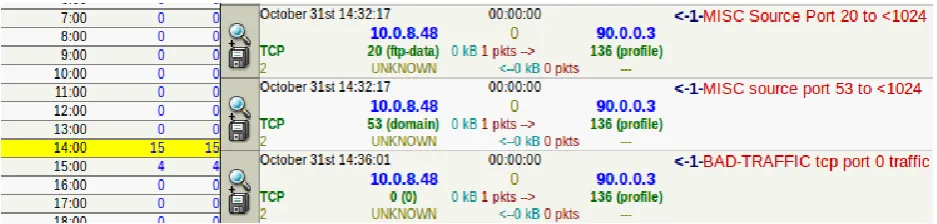
Figure 2 shows 15 connections are created in the first hour and 4 more are created in the second hour and all of them are reported as IDS (alerts) in the highlighted entry (in yellow) on the left side. The detailed view displays the source ports used repeatedly for flooding are 0, 20, 53 but the destination port is 136 against all the entries. It also shows the incoming and outgoing packets and bytes between the attacker and victim’s machine. The alert against the appropriate entries is shown on right side.
The aggregated data facility of walleye interface shows the aggregated total for number of flows, alerts, source ports, destination ports, source packets, source bytes, destination packets, and destination bytes; and individual flow for source packets, source ports, destination packets, and destination bytes. It is observed from figure 2 that total 19 alerts are registered in this scenario with all port numbers (0-65535) used as source port to flood the victim IP. The large value of flows verifies the flooded data from source to destination.
4.2.2 Scenario 2 – Use of UDP protocol to flood the target machine
The command used for this scenario to launch flood attack on victim machine is:
hping3 -V -c 10000 -d 120 -2 -w 64 -p 445 -s 445 flood
--rand-source VICTIM_IP
[image:5.595.71.540.547.659.2]Figure 3. Flooding the honeypot with UDP traffic
Figure 4. Flooding the honeypot with ICMP traffic
hping3 command can be used to send the UDP traffic by adding the -2 option with it. Since UDP is a connectionless protocol, the attacker’s machine directly starts sending the UDP packets.
Millions of connections are registered and a lot of alerts are also generated on hour basis. The destination port is 0 but all the port numbers (0-65535) are used as source port to launch the flooding attack.
On clicking the icon against any UDP entry, all the details for the flow like packet header information, alerts (IDS) can be viewed.
4.2.3 Scenario 3 – Use of ICMP protocol to flood the victim machine with IP spoofing
This scenario uses ICMP protocol to ping the victim machine repeatedly. It is observed that millions of IDS are logged against a single connection within a few minutes of launching the attack as shown in figure 4. The number of packets and bytes transferred from the attacker’s machine are quite large but the incoming packets and bytes in response are 0 because the command is run with two special things:
IP spoofing used by the attacker to launch the attack (option –a in command).
Use of broadcast address of the victim machine.
The command used to launch attack using ICMP protocol is:
hping3 -1 --flood -a VICTIM_IP
BROADCAST_ADDRESS
The victim IP used in this command is of the honeypot itself. Since the broadcast address of the victim machine’s network is used, the ping command is broadcast repeatedly leading to large value of flows in the output. The source port number used by the victim machine to send the ping request is 8. The attacker used the concept of spoofed IP to launch attack in this scenario. So how will the administrator come to know the actual attacker? The answer to this question is the “packet decode” option. On clicking the icon against the ICMP flow entry, the packet details can be seen. The option in packet decode that is of interest to the administrator is the MAC address. This is not the MAC address of the victim machine but of the actual machine of the attacker. Each time the ping request is broadcast from the victim machine, the MAC address of the actual machine of the attacker is sent in the packet.
The IDS details of the packet can also be seen on the same page. Moreover the analysis can be done on the basis of aggregated results of flow as well.
4.2.4 Scenario 4 – Keystroke capturing by Sebek
This scenario focuses on capturing the keystrokes of attacker by sebek. Whatever activity is performed on the honeypot is captured and logged by sebek and can be viewed on walleye interface. Four icons are displayed in sebek connections while other connections have only two icons. The reason for having two extra icons in sebek connections is that they provide the facility to draw the process tree and related flows.
In order to execute this task it is assumed that the high-interaction honeypot of the topology in figure 1 is compromised by the attacker. It is worth mentioning here that sebek client is installed on this machine. So whatever activity the attacker is going to perform will be logged and sent to the database.
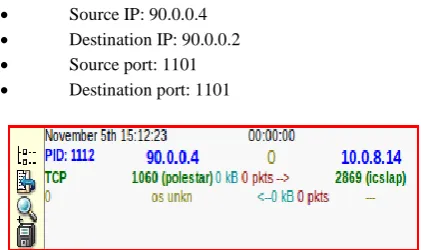
The attacker has tried to ping the loopback address (127.0.0.1) from the honeypot. Once it is done, the walleye interface can be refreshed to view the log. Figure 5 shows the sebek connections created against the ping (ICMP echo request) from the source IP 90.0.0.4 (IP address of high-interaction honeypot) to destination machine with IP address 10.0.8.14. On clicking the process tree icon (located first in icon box), the process tree created for this activity can be viewed. It is observed that each process is assigned a unique number called PID per sebek connection. That means if two sebek connections are created, then each connection will have its own unique PID. The detailed moves of the attacker from start to end are logged and can be viewed with the help of process tree.
The packet details for the mentioned process shows the source and destination details of the packet header are:
[image:6.595.344.555.607.732.2] Source IP: 90.0.0.4 Destination IP: 90.0.0.2 Source port: 1101 Destination port: 1101
Source IP is the obvious entry but the rest three entries mentioned in header need to be discussed. The destination IP is the IP of the honeywall interface (eth2) on which sebek data is to be forwarded. 1101 is the port number configured during sebek installation for capturing and forwarding the data to honeywall interface. That is why source and destination port number is same in the packet.
The next thing to observe from the packet details is the MAC address of the source machine and that of destination machine. At the last the activity performed in this packet detail is “Pinging 127.0.0.1 with 32 bytes of data” and same packet
detail shows the reply from 127.0.0.1. The second part of packet detail also gives a hint of operating system used by the source machine since it is pinging with 32 bytes of data. That means the operating system fingerprint supports 32 bytes of data and one guess for the operating system could be Windows.
5. CONCLUSION AND FUTURE SCOPE
During the experiments and scenarios it is observed that honeypots capture all type of data which shows what type of attacks are launched in the network. The data reveals which techniques are used and how they are used to gain access to the honeypot specially the one captured with the help of sebek.Implementing and running Honeyd resulted in gaining a lot of information about the network. The starting entries in the log file were on port number 137 and 138 (netbios). So there was the need to exploit the vulnerabilities intentionally to test the successful deployment of Honeyd. Keeping this in mind, nmap was done on the honeypot to check the vulnerabilities of a windows template and to do port scanning. It was done successfully and the related observations are mentioned in the relevant section.
The problem faced while running Honeyd was when farpd was run before running Honeyd, it binds all the unallocated IP addresses with the honeypot. Now if any of the machines is turned on, then IP conflict is shown on that machine. This is because farpd does MAC binding means it binds all the unassigned IP addresses with the MAC address of the honeypot to fool the attacker. The problem becomes more severe when the honeypot is left running overnight and in the morning, IP conflict is shown on every machine which is turned on. To overcome this problem, honeypot machine needs to be restarted.
There was also a problem while testing Honeyd with nmap. Nmap was not done successfully earlier. When scanning from within the network, nmap uses ARP for scanning the IP using the MAC address because it is fast. But Honeyd does not respond to MAC address. So ping was working but port scanning was not successful and even guesses of operating system was not appropriate. So the nmap command was used with arp option to fix the problem.
Honeynet is the technology that can be used to detect zero day attacks. Argos is an emulator that can be used to capture zero day attacks. IDS and firewall systems are not much reliable in detection of zero day attacks because they work on fingerprints i.e. they can detect only those attacks whose details are available in the database. But honeynet is that technology that can detect and block new worm attacks as well.
6. REFERENCES
[1] Alata, E., Nicomette, V., Kaâniche, M., Dacier, M., Herrb, M., 2006. “Lessons learned from the deployment of a high-interaction honeypot”, Proceedings of the Sixth
European Dependable Computing Conference (EDCC'06), 0-7695-2648-9/06.
[2] Alimerkaj, Gilmand, “Development of AIT’s HoneyNet”, Athens Information Technology, Center of excellence for Research and Graduate Education. [3] Chamotra, Saurabh, 2009. “Attack detection using
Honeynets”, Network Packet Capturing and Analysis, CDAC Mohali.
[4] Chamotra, Saurabh, Bhatia, J.S. , Kamal, Raj, Ramani, A. K., 2011. “Deployment of a Low Interaction Honeypot in an Organizational Private Network”, 978-1-4577-0240-2/11, Page 130-135.
[5] “Configuracion del Honeywall CDROM”, http://www.youtube.com/watch?v=HZiylQ_tdgo
[6] “Development of the Honeyd virtual Honeypot”, www.honeyd.org
[7] Döring, Christian, 2005. “Improving network security with Honeypots”, Master's thesis, University of Applied Sciences, Darmstadt.
[8] Gómez, Diego González, 2004. “Building a GenII Honeynet Gateway”, Spanish Honeynet Project http://www.honeynet.org.es
[9] Harper, Allen, Ballas, Edward, “GEN III Honeynets: The birth of roo”, The Honeynet Project.
[10] “Honeypot/honeyd tutorial part 1, getting started”, http://www.travisaltman.com/honeypot-honeyd-tutorial-part-1-getting-started
[11] “Honeypot/honeyd tutorial part 2, multiple honeypots”, http://www.travisaltman.com/honeypot-honeyd-tutorial-part-2-multiple-honeypots/
[12] “Honeypot/honeyd tutorial part 3, static IP’s”, http://www.travisaltman.com/honeypot-honeyd-tutorial-part-3-static-ips/
[ 1 3 “honeywall CDROM documentation”, The Honeynet Project.
[14] “Hping”, www.hping.org
[15] “Instalacion del Honeywall CDROM”, http://www.youtube.com/watch?v=sBLIHFc64jM. [16] “Installing Honeyd 1.5c And Arpd 0.2 Under CentOS 5
(With gcc 4.x)”, http://www.howtoforge.com/installing-honeyd-1.5c-and-arpd-0.2-under-centos-5-with-gcc-4.x [17] Johny, Awad, Andreas, Derdemezis, 2005.
“Implementation of a High Interaction Honeynet Testbed for Educational and Research Purposes”, MsITT Thesis, AIT.
[18] Kaur, Gurdip, Singh, Gurpal, Singh, Jatinder, 2012. “Implementation of low interaction honeypot to improve the network security”, proceedings of International conference on Advancements in Computing & Communication (ICACC 2012), Page .
[19] “Know Your Enemy: GenII Honeynets”, The Honeynet Project.
[21] “Know Your Enemy: Learning about Security Threats”, The Honeynet Project, 2nd Edition, Addison-Wesley 2004.
[22] “Know Your Enemy: Sebek A kernel based data capture
tool”, The Honeynet Project,
http://www.honeynet.org/tools/sebek/
[23] Moon, Silver, “TCP SYN flood operating system attack with hping”, http://www.binarytides.com/tcp-syn-flood-dos-attack-with-hping/.
[24] Provos Neils, Holz Thorsten, 2007. “Virtual Honeypots: From Botnet Tracking to Intrusion Detection”, Addison Wesley Professional.
[25] Singh, Abhay Nath, Joshi, R.C., 2011. “A Honeypot System for Efficient Capture and Analysis of Network Attack Traffic”, Proceedings of 2011 International Conference on Signal Processing, Communication, Computing and Networking Technologies (ICSCCN 2011), 978-1-61284-653-8/11, Page 514-519.
[26] Spitzner, L.,2003. “Honeypots: Tracking Hackers”, Addison-Wesley.