Ga
CONTKOL DATA
COR,!'OMTION
SORT/MERGE VERSIONS
4
AND
1
REFERENCE MANUAL
CDC@
OPERATING SYSTEMS:
Ga
CONTKOL DATA
COR,!'OMTION
SORT/MERGE VERSIONS
4
AND
1
REFERENCE MANUAL
CDC@
OPERATING SYSTEMS:
REVISION RECORD
REVISIONi
A
(11-01-75)
B
DESCRIPTION Manual released.
This revision documents version 4.4 of SortIMerge; changes include feature CP156, Performance
(03-01-76)
(1 1-15-76)
I
Common Memory ~ a n & e r for space allocation. This manual is at PSR level 439. IEnhancements.
C
D
I
This revision documents feature CP1731 at PSR level 446. Changes include key comparison II
This revision documents version 4.5 of SortIMerge. Changes include feature CP173, use of the
I
1
(04-1 5-78)1
162, interface with B A ~ 1 S.(03-01 -77)
E
technique for macro sorts.
This revision documents version 4.6 of SortIMerge at PSR level 472. Changes include feature
Publication No. 60497500
F !
REVISION LETTERS I, 0, Q AND X ARE NOT USED
This revision documents the Sort/Merge interface with FORTRAN 5 at PSR level 528.
@COPYRIGHT CONTROL D A T A CORPORATION 1975,1976,1977,1978,1980 Alt Rights Reserved
Printed in the United States of America
Address comments concerning this manual to:
CONTROL DATA CORPORATION
Publications and Graphics Division
2 1 5 MOFFETT PARK DRIVE SUNNYVALE, CALIFORNIA 94086
New features, as w e l l as changes, deletions, and additions t o information i n t h i s manual are i n d i c a t e d by bars i n the margins or by a dot near the page number i f the e n t i r e page i s affected. A bar by the page number i n d i c a t e s p a g ~ n a t l on r a t h e r than content has changed.
Page
Cover T i t l e Page
.
.
: l i i / i vv
v i
v 1 i
1-1 t h r u 1-3 2-1 2-2 2 -3 2 -4 2-5 2-6 3-1 3-2
3-3 t h r u 3-5
4-1 4-2 4 -3 4-4 4-5 4 -6 4-7 4-8 4-9 4-10 4-11 4-12 4-13 4-14 4-15 4-16
4-17 t h r u 4-23 4-24 t h r u 4-27 5-1 t h r u 5-3
5 -4 5-5 5 -6 5-7 5 -8 5 -9 5-10 5-11 5-12
5-13 t h r u 5-15 6 -1
6-2
6-3 t h r u 6-10 6-10.1
6-10.2 6-11
Revision Page
6-12 6-13 6-14 6-15 6-16
7-1 t h r u 7-15 A-3. t h r u A-4 B-1 t h r u 8-4 B-5 t h r u 8-7 B-8
B-9 B-10
B-11 t h r u €3-13 C-1
C-2 C-3
D-1 t h r u 0-11 D-12 t h r u D-15 E-1 t h r u E-15 F-1 t h r u F-3 G-1 t h r u 6-5
H-1
H-2
Index-1 t h r u -6
Comment Sheet
Mai 1 er Back Cover
PREFACE
SortIMerge high-speed record processing facilities are available through the use of control statements and directives. User programs can call Sort/Merge with the COMPASS assembly language macros, t h e
FORTRAN interface routine calls, or through the COBOL language.
The user is assumed to be familiar with the operating system on which Sort/Merge is to be run as well as with the calling language.
The Sort/Merge system is available under the following operating systems:
SortIMerge Version 4.6 operates under NOS 1 for the CONTROL DATA' C Y BER 170 Series;
CY
BER 70 Models 71, 72, 73, and 74 and 6000 Series Computer Systems.Sort/Merge Version 4.6 operates under NOS/BE for the CDC@CYBER 170 Series; CYBER 70 Models 71,
72, 73, and 74; and 6000 Series Computer Systems.
SortlMerge Version 1.0 operates under SCOPE 2.1 for the CONTROL DATA CYBER 170 Model 1 7 6 ,
CYBER 70 Model 76 and 7600 Computer Systems.
Documents of primary interest (in alphabetic order) to SortIMerge users include the following:
Publication
COBOL Version 5 Reference Manual
COMPASS V ersion 3 Reference Manual
CYBER Record Manager Basic Access Methods 1.5 Reference Manual
FORM
Version 1 Reference ManualFORTRAN Extended Version 4 Reference Manual
FORTRAN Version 5 Reference Manual
NOS Version 1 Reference Manual, Volume 1 of 2
NOS/BE Version 1 Reference Manual
SCOPE Version 2 Reference Manual
SCOPE Version 2 Record Manager Reference Manual
SortIMerge Version 4 and 1 Instant
Publication
Number
The following documents (in alphabetic order) are of secondary interest to users of SortIMerge:
Publication
Publication Number
CYBER Record Manager Basic Access Methods 1.5 Users Guide
NOS Version 1 Manual Abstracts 84000420
NOS/BE Version 1 Manual Abstracts 84000470
Software Publications Release History 6048 1000
The NOS manual abstracts and the NOSIBE manual abstracts are instant-sized manuals containing brief descriptions of the contents and intended audiences of all NOS and NOS product set manuals, and NOS/BE and NOS/BE product set manuals, respectively. The abstracts manuals can be useful in determining which manuals are of greatest interest to
a
particular user. The Software Publications Release History serves a s a guide in determining which revision level of software documentation corresponds to the Programming System Report (PSR) level of installed site software.CDC manuals can be ordered from Control Data Corporation Literature and Distribution Services, 308 North Dale Street, St. Paul, Minnesota 55103.
1. INTRODUCTION
Comparison of SortIMerge 1 and Sort/Merge 4
Sort/Merge 1 Sort/Merge 4
SortIMerge Capabilities Records and Files Checkpoint/Restart
Sort/Merge Dayf ile Messages
2. SORT KEYS
Sort Key Description Key Length and Position Key Type
Collating Sequence Sort Order
Signed Numeric Data Multiple Keys
Alternate Specification of Key Types
3. OWNCODE ROUTINES
Exit 1: Processing of Input Records Exit 2: Processing of Input Files Exit 3: Processing of Output Records Exit 4: Processing of Output Files Exit 5: Processing of Duplicate Keys Exit 6: Processing of Nonstandard Labels
Ineut Out put Owncode Summary
Job Example
4. DIRECTIVE SORTIMERGE PROCESSING
Control Statement Requirements SORTMRG Statement
Parameters
SortIMerge Directive Conventions SortIMerge Directives SORT MERGE BY TESIZE FILE FIELD KEY SEQUENCE EQUATE OPTIONS OWNCODE
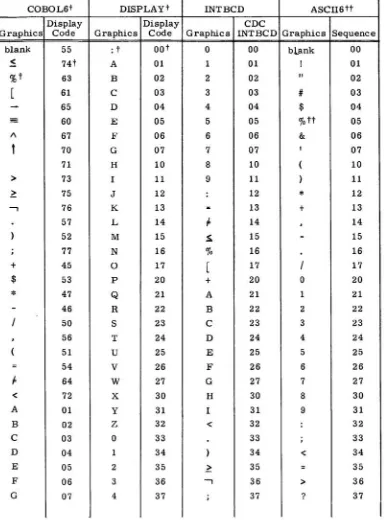
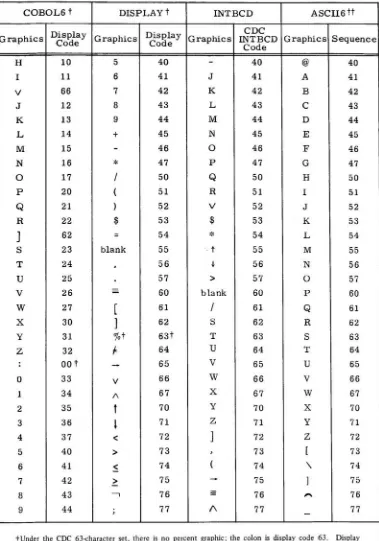
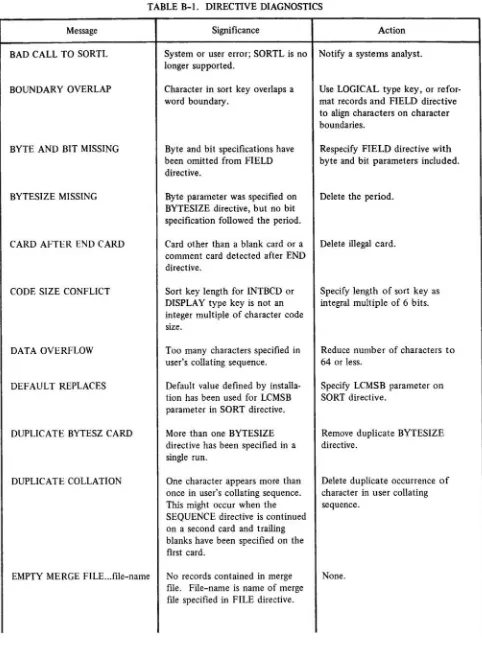
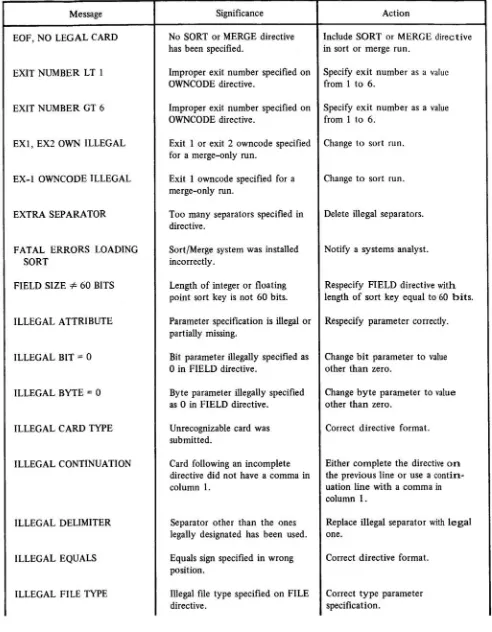
A Character Sets B SortIMerge Diagnostics C Incompatibilities
D SortIMergeandRecordManager
TAPE (Sort/Merge Version 4 Only) 4-17
END 4-18
Job Examples
Sample Deck Structures
Job Deck Containing a Single Sort/Merge R u n 4-26
J o b Deck Containing Two Sort/Merge Runs 4-27
5. MACRO CALLS 5-1
System File Macro Sort/Merge Macro Calls
SORT MERGE BY TESIZE FILES KEY SEQUENCE EQUATE OPTIONS OWNCODE TAPE POINTER SMLIST
6. FORTRAN EXTENDED CALLS 6-1
FORTRAN Extended Calls t o Sort/Merge
SMSORT, SMSORTB, SMSORTP, and SMMERGE SMFILE SMKEY SMSEQ SMEQU SMOPT SMTAPE SMEND
SMOWN and SMRTN SMABT
Sample Program
7. FORTRAN 5 CALLS
FORTRAN 5 Calls t o Sort/Merge
SMSORT,SMSORTB,SMSORTP, and SMMERGE SMFILE SMKEY SMSEQ SMEQU SMOPT SMTAPE SMEND
SMOWN and SMRTN SMABT
Sample Program
APPENDIXES
A-1 E Tape SortIMerge Processing Options B-1 P Merge Order
C-1 G Glossary
D-1 H Future System Migration Guidelines
INTRODUCTION
The primary function of Sort/Merge is the manipulation and rearrangement of records into a prescribed order, according to a user specification.
CDC offers guidelines for the use of the software described in this manual. These guidelines a p p e a r in appendix H. Before using t h e software described in this manual, t h e reader is strongly urged to review t h e content of this appendix. The guidelines recommend use of this software in a manner t h a t reduces the effort required to migrate application programs to future hardware or software systems.
COMPARISON OF SORT/MERGE
1
AND SORTMERGE
4
Some of t h e material in this manual applies only to Sort/Merge Version 1; other material applies only t o Sort/Merge Version 4. The difference is indicated as follows:
Material shaded in this mannw is applicable orily
to
-~ort!~erge V ersion 1, suppr tedunder
SCOPE
2.~ateriat
shaded in thismanner
is applicable only to Sort/Merge Version 4,-supported underNOS
h dHosisa.
SORT/MERGE CAPABILITIES
The modular construction of the Sort/Merge program enhances the record processing options by providing the following capabilities:
Sor t-only Sorts records from one or more input files into an order specified by the user. Merge-only Combines from 2 to 100 presorted input file
Sort and Merge Sorts from 1 to 100 input files into an order or sequence specified by the user and merges the output with from 1 to 100 presorted files.
No
more than 100 files canbe used in both phases combined.
RECORDS AND
FILES
An understanding of Record Manager requirements for records and files in terms of structure and format as presented in appendix D is essential for proper application of the Sort/Merge program. More detail may be
Upon successful completion of a Sort/Merge run, tallies are printed in the dayfile, providing stat istics for
that run. The following messages are output, indicating how many records were inserted, deleted, sorted, and output.
**
INSERTIONS DURING INPUT**********
n**
DELETIONS DURING INPUT**********
n**
TOTALRECORDS
SORTED
**********
n**
INSERTIONS DURING OUTPUT**********
n**
DELETIONS DURING OUTPUT**********
n**
TOTAL RECORDS OUTPUT**********n
e following message is printed if intermediate merge files ar e used:
**
MERGE
ORDER USED WAS**********
nThe following message is printed when records occur out of sequence on a merge run without the
VERIFY
option:
**
RECORDS OUT OF SEQUENCE**********n
After all tally messages, one of the following messages is printed, depending on t h e kind of run:
**
END
SORTRUN
SORT KEYS
A sort key is a field of information within each record in a sort or merge input file that is used by Sort/ Merge to determine the order in which records will be written to the output file.
An example of a record with sort keys is a typical record in a personnel file. Each such record might contain the name, age, department number, salary, and employment date of an individual employee.
This file could be sorted by any one of these fields or by a combination of fields. For example, the file could be sorted b y the name field, or it could be sorted by age (as the major key) and salary (as the minor key). In the latter case, if two or more employees were the same age, their records would appear on the output file in order by salary.
SORT KEY DESCRIPTION
Every field t o be used as a sort key must be described by the user.
The
user of the directive version describes fields with the FIELD directive and the KEY directive (section 4); the user of the macro version describes fields with theKEY
macro (section 5).Sort key descriptions include the following information:
Key length
Starting location of key within record
Type of data found in key field
Sort order
Collating sequence t o be used (for character keys only)
KEY LENGTH AND POSITION
Key field length is specified on the FIELD directive or
KEY
macro as the number of bytes and bits in the field; the default byte is a 6-bit character. The length of any single key must not exceed minimum record length for any file.KEY TYPE
Data in sort key fields can be of any of the following types:
LOGICAL Unsigned binary integers of any length (any number of bits); they are assumed to be non- negative, and are sorted by magnitude. Under certain conditions, described later in this section, data of other types can be sorted more efficiently when it is specified as logical type.
INTEGER 6Gbit integers; they can start anywhere within the record (not necessarily on a character or word boundary), and are sorted by numeric value. Integer data includes numbers of FORTRAN Extended INTEGER type when written by a binary write. Under certain con- ditions, described later in this section, data of other types can be sorted more efficiently when it is specified as type INTEGER.
The range of INTEGER keys must not exceed 259-1(259-1 = 576 460 752 303 423 487). If two sort keys differ by more than 259-1, improper sorting may take place with no diagnostic issued. -0 is considered equal to +O.
FLOAT 60-bit normalized or unnormalized floating point numbers; they can start at any bit position within the record, and are sorted by numeric value. When written by a binary write, ALGOL numbers of #REAL# or #INTEGER# type, FORTRAN Extended num- bers of REAL type, and COBOL COMPUTATIONAL-1 and COMPUTATIONAL-2 num- bers are all valid FLOAT keys.
The full range of floating point numbers is permitted in FLOAT keys. This range is:
Infinite numbers, positive or negative, and indefinite numbers are also allowed. A positive indefinite number is treated as though it had a value near 140 737 488 355 327.5, which cannot be represented exactly as a floating point number, and a negative indefinite number is treated as though it had a value near -140 737 488 355 327.5, which cannot be represented exactly as a floating point number.
INTBCD Key fields written in internal BCD character code (appendix A); they can be any integral number of characters in length (any integral multiple of 6 bits). Some tapes written b y CDC 3000 Series computers are internal BCD, but the code is not standard in the oper- ating systems which support Sort/Merge. INTBCD keys are sorted according t o the spec- ified collating sequence.
COLLATlNG SEQUENCE
Collating sequence applies only to character data, not to numeric data. Unless the key is specified as INTBCD or DISPLAY, a collating sequence is not needed. The collating sequence can be any of the following:
ASCII6 The American Standard Code for Information Interchange collating sequence (appendix A)
COBOL6 A
CDC
collating sequence (appendix A)DISPLAY The
CDC
display code collating sequence (appendix A)INTBCD Internal BCD collating sequence (appendix A)
In addition, the user can specify a collating sequence with the SEQUENCE and EQUATE directives or macros. The collating sequence chosen need not correspond to the character set used in coding the data; collating sequence is independent of character set. The character set determines the translation that will take place from a 6-bit binary value occupying a character position t o one of the letters, digits, and special characters available as graphics. The collating sequence, on the other hand, determines the precedence given to each character already translated, when the key is sorted.
For example, a file written using the internal
BCD
character set can be sorted by any of the collating sequences. Three-records in a file have key fields whose contents are as follows:Record 1 0707030303
Record 2 433 I626333
Record 3 1212121313
When
INTBCD
is specified as the character set andINTBCD
as the collating sequence, records are written to the output fde in the following order:Collating Position of
Record Key (octal) Key (INTBCD) Characters in Key (INTBCD)
Record 1 0707030303 77333 07,07,03 ,03 ,03
The same records sorted according to INTBCD character set and
DISPLAY
collating sequence would be written.in the following order:
Collating Position of
Record Key (octal) Key
@VTBCD)
Characters in Key (DISPLAY)Record 3 1212121313
...
.. .--
-
00,00,00,54,54 Record 2 433 1626333LIST.
14,11,23,24,57Record 1 0707030303 77333 42 ,42,36,36,36
If these records were sorted again according to the DISPLAY character set and the DISPLAY collating sequence, they would be written in the following order:
Collating Position of
Record Key (octal) Key
(DISPLAY)
Characters in Key (DISPLAY)Record 1 0707030303 GGCCC 07 ,07,03,03,03
Record 3 1212121313 JJJKK 12,12,12,13,13
Record 2 433 1626333
8Y]
O/oO 43,3 1,62,63,33SORT ORDER
The order for sorting keys can be specified as ascending or descending.
Ascending Numeric keys are sorted so that the record having the key with the highest value is written last on the output file. Character keys are sorted according t o the collating sequence specified.
Descending Numeric keys are sorted so that the record. having the key with the lowest value is written last on the output file. Character keys are sorted according t o the collating sequence specified, taken in reverse.
SIGNED NUMERIC DATA
Signed numeric data is integer data stored internally in display code, rather than in 6Cbbit integer for numeric data is specified either by the word SIGN on the sort or merge key descriptor or by #SIGN
M@ARATE#
on theSMKEY
call. Embedded blanks cannot appear within a signed numeric dataIn contrast to data specified as type DISPLAY that sorts according to display code values, signed numeric data sorts according to the magnitude and value of the integer the display code represents.
The sign of the integer can be specified as any of the following:
Sign overpunch representation of the first digit in the field. The display code value
of
the high order digit is equivalent t o the key punch code resulting when a digit is overstruck with a+
o r-
sign, as shown in the list below. The sign of the overpunch digit specifies the sign of the integer.SEPARATE
specifies that the positive and negative signs are the characters+
and-
respectively. IfSEPARATE is specified, the
+
or-
character can be the first or last character of the field.When the character is shown in printed output or is received in input as a card image, the signed digit appears as specified in the third column of the sign overpunch code list. When the item is to be received as input from a card, the signed digit must be punched as specified in the second column of the list. Positive or unsigned integers can be mixed with integers represented by a sign overpunch in an input file. The negative sign is represented by a
-
overpunch in row 1 1; the positive s i g n is represented by the absence of an overpunch or the presence of a+
overpunch in row 12.Sign overpunch codes are:
Sign and Digit Hollerith Punch Output Representation
Positive integers can be mixed with integers represented by a sign overpunch in an input file.
MULTIPLE KEYS
At least one sort key must be specified for each sort or merge run; as many as 100 keys can be specified. When multiple keys are specified, they can differ as t o type, collating sequence, and sort order.
If more than one key is specified, the order (left to right) in which they appear in the KEY directives or macros determines their precedence for sorting. The key fields on the first KEY directive or macro, from left to right, are compared first; then those on subsequent KEY directives or macros are compared until tt field is
ALTERNATE SPEC1 FlCATlON OF KEY TYPES
Because Sort/Merge processes integer and logical keys more quickly than floating point or character coded keys, it is advantageous for the user to specify key type as INTEGER or LOGICAL whenever such specification will result in a correct sorting order.
For example, floating point keys will sort properly as integers if either of the following two conditions is true:
1. All keys in the file are normalized.
FORTRAN
Extended numbers of REAL type, ALGOL numbers of #REAL# or #INTEGER# type, and COBOL COMPUTATIONAL-2 numbers a r e all normalized floating point numbers. In addition, all keys in the fde must lie within one of the following ranges:X=O or 4 X
<
(non-negative values) -1 0322 4 X<
-10-293 orX=O
(non-positive values)2. All keys in the file have the same exponent. This condition is true for
COBOL
COMPUTATIONAL-1 numbers, when they contain 14 or fewer decimal digits.Certain kinds of character keys can be sorted more efficiently as integers. The most common example is a key consisting of a COBOL item defined by the clause
PICTURE 9(n) SYNCHRONIZED RIGHT USAGE IS DISPLAY.
where 1
<
n<
9. Since an item of this description always occupies a full word, and the leftmost digit is always a display code0
(33 octal), sorting keys of this description as integers results in a proper sort by mag- nitude.For character keys, when the character set and the collating sequence have the same name (INTBCD character set and INTBCD collating sequence, or DISPLAY character set and DISPLAY collating sequence), SortIMerge sorts them as logical keys, since logical keys sort faster than character keys.
Alternate key type specification also can be used to sort fields that do not conform t o t h e characteristics of any data types recognized by SortIMerge. For example, if a field whose length is 64 bits contains positive aild negative integer values in ones complement form, it cannot be sorted as INTEGER type since fields of INTEGER type must be 60 bits long; nor does it sort properly as LOGICAL type, since fields of LOGICAL type are assumed to be unsigned. If the field is divided into two subfields, however, one consisting of the sign bit and the other of the magnitude of the integers, the field can be sorted by the following specifications:
FIELD,SIGN(. 1 ,. 1 ,LOGICAL)
FIELD,MAGNITUDE(.2 ,.63 ,LOGICAL) KEY ,SIGN(D),MAGNITUDE(A)
OWNCODE ROUTINES
Owncode routines represent closed subroutines written by the user as COMPASS language programs. Although owncode routines are not required for SortlMerge execution, they provide the capability for the user to insert, substitute, modify, or delete input and output records. Refer to appendix H for recommendations o n the use
of COMPASS owncode routines.
I
All owncode routines specified by the OWNCODE directive must be assembled previously in relocatable binary form and placed in the file "INPUT" or on an alternative source as specified on the SORTMRG control
statement (see section 4).
I
Owncode routines can be specified with the OWNCODE macro call. The routines are assembled in t h e program calling Sort/Merge or assembled and referenced in a program occupying memory at the same time a s the program
I
calling Sort /Merge.The following program exits can occur during SortIMerge processing.
Exit 1 After reading each record from any sort input file while the record is still in the intermediate input area, or during a search for a new record when no input file is specified. (This exit is
not allowed in a merge-only run.)
Exit 2 After reading the last record from each sort input file, but before file disposal action is initiated. (This exit is not allowed in a merge-only run.)
Exit 3 After each record is selected for output but before the record is moved into the f i n a l output area, or when no output file has been specified.
Exit 4 After the last record has been moved into the final output area, but before Ale disposal action is initiated.
Exit 5 When two records with identical sort keys are encountered.
Exit 6 Each time'a file with a .user spixified nonstandard Iabel is to be checked, while the label is being read during input or written during output.
Upon entry to all owncode exits, register A2 contains the address of the current data record and register XO contains the record length. In addition, during entry into owncode exit 5, registers A3 and X4 are used for the address and length of the second record of a comparison involving identical sort key data.
Exits 1 and 2 owncode routines are not allowed in a merge-only run. Their purpose can be fulfilled b y using Exits 3 and 4 owncode routines in a merge-only run, or by using Exits 1 and 2 owncode routines in a sort run with supplementary merge files. An Exit 1 or 2 owncode routine specified in a merge-only run is ignored except that a non-fatal diagnostic message is issued.
Example
Transfer to owncode routines is accomplished with a return jump
(RJ)
instruction which fills t h e entry point of the owncode routine with a return to the Sort/Merge program. To re-establish SortlMerge control, the user must jump t o the entry point of the owncode routine. The user can req,uest specific processing action by altering the return address in the entry point of the owncode routine.59 47 30 17 0
E X I T 1: PROCESSING OF INPUT RECORDS
XO
Exit 1 is taken after reading each record from the input file while the record is still in the intermediate input area, orrduring a search for a new record when no input file is specified. The user must specify processing action with a jump t o one of the following addresses. Exit 1 is not allowed in a merge-only run.
Normal return address
0
Normal return address+l.
Normal return address +2
Normal return address+3
characters
SortlMerge accepts the record whose address is in register A2 and whose length is in register XO. Before returning t o this address the user can :
Retain current record without modification; A2 and XO are unchanged.
0
Modify record in central memory without changing its address in A2.
XO
should contain the correct length of the modified record; the record length must not exceed the maximum for the run.words
Replace the current record by changing the contents of A2 and XO t o reflect the address and length of a replacement record.
Provide an input record when no input files have been specified. The address and length of the record are put in A2 and XO.
SortIMerge deletes current input record.
L
-SortlMerge inserts a user specified record after current record is read. Address and length of record t o be inserted are returned by the user in the A2 and XO registers. SortIMerge continues to return control t o the Exit 2 routine until a transfer is made by the user to a different return address. The address and length of the original input record are put in registers A2 and
XO
each time SortlMerge returns control.f
E X l T 2: PROCESSING OF INPUT FILES
Exit 2 is taken after the last record is read-from each file but before final file handling action is initiated. The user can specify a jump t o either of the following addresses. Exit 2 is not allowed in a merge-only run.
Normal return address SortlMerge continues normal record processing by proceeding to the n e x t input file or t o the next phase of SortlMerge.
Normal return address+l SortlMerge inserts a user specified record after the last record read. Address and length of record are put by the user in registers A2 and XO. Control returns to Exit 2 until a normal return is executed.
E X l T
3:
PROCESSING OF OUTPUT RECORDSExit 3 is taken before each record is moved into the final output area or when no output file has been speci- fied. The user can specify one of the following addresses:
Normal return address SortlMerge writes the record whose address is in register A2 and whose
length is in register XO. Before returning to this address the user may:
Retain current output record without modification; A2 and XO a r e unchanged.
Modify record in central memory without changing address in A2. XO should contain the correct length of the modified record; t h e record' length must not exceed the maximum for the run.
Replace the current record by changing the contents of A2 and XO
to reflect the address and length of a replacement record.
Normal return address+l SortlMerge deletes the output record. If no output file has been specified, all output records must be deleted.
Normal return addresst2 SortlMerge inserts a user specified record before current record is written. Address and length of record to be inserted are in A2 and XO registers. Sort/Merge continues t o return control to the Exit 3 routine until a return is made to a different address. The address and length of the original output record are put in registers A2 and XO each time SortlMerge returns control.
EXlT 4: PROCESSING OF OUTPUT FILES
Exit 4 is taken after the last record is moved into the final output area but before final file handling action is initiated. The user can specify either of the following addresses:
Normal return address Sortmerge continues normal record processing by proceeding t o the end-if- fde procedures for the output file.
' Normal return addresstl Sortmerge inserts a user specified record after the last record is written.
Address and length of record are in registers A2 and XO. Control returns t o Exit 4 until a normal return is executed.
EXlT 5: PROCESSING OF DUPLICATE KEYS ..
Exit 5 is taken when two records with identical sort keys are encountered, One of the following addresses must be specified if this exit is selected.
Normal return address Sort/Merge accepts two records: one with address in register A2 and length
in register XO, and the other with address in register A3 and length in
register X4. Before returning to this address the user may:
Retain both current records without modification; address and length registers of current records are unchanged.
Modify either record, or both records, in central memory without changing the addresses in A2 and A3. The corresponding
X
registers(XO and X4) should contain the correct lengths of the modified records; the record length must not exceed the maximum for the run.
Replace either record, or both records, by changing the contents of the address and length registers to reflect addresses and lengths o f replacement records.
Normal return address+l SortlMerge deletes one of two records with identical sort keys. The user provides address and length of the record to be retained in registers A2
OWNCODE SUMMARY
Processing Action
Substitute record
Insert record
Delete record
Verify label record during read
Verify last label record during read
Sapply a label record during write
Supply last label record during write
Terminate filettf'
Normal record processing
Exit 1 Exit 2
NR
NRt2 NR+ 1
NRt 1
Exit 3
NR
NR+2
NR+ 1
NR+3
NR
Exit 4
NR+
1NR
Exit 5
N R ~
N R + I ~ ~
NR
?Both records, designated by the A2 and XO and the A3 and X4 registers, can be substituted with n e w address and length specifications.
??Record designated by A3 and X4 registers is deleted.
JOB EXAMPLE
The following SortlMerge job example illustrates the use of an exit 1 owncode routine to supply input records from a multifile set to a directive sort. The example consists of a COMPASS subroutine, SortlMerge directives, and job control statements.
OWNCODE ROUTINE
Through the COMPASS subroutine shown below, records are retrieved from the input fde set SORTIN. When
a l l records have been obtained, the file set is closed and a branch is taken to normal return address
+
3. This branch indicates that SortIMerge is to terminate record input and proceed to the merge phase.LOCATION
MULTIFL
OPENED L SORTl N
BUF
R EC IDENT SST ENTRY BSS SA1NZ
MX6 SA6 OPENM GET CHECK FETCH LXO SA2 EQ BSS FETCH SX1 NZ CLOSEM CHECK SA1 LX1 SB7J P DATA EQU Fl LE BSS BSS END
V A R I A B L E SUBFIELDS
MU LTI F L
MULTIFL 1 OPENED X1,MULTlFLl 1 A1 SORTIN,INPUT,R R EC MULTIFL 1 SORTIN,FP,XI X~-EEEOIEE X I ,MULTI FL1 SORTIN SORTl N MULTIFL 30 X I B7+3 0 10026
BT=C,RT=Z,F L=QO,BFS= L, FWB=BUF,WSA=REC, DX=MULTI FL2 L 4 - -COMMENTS
DEFINE ENTRYIEXIT WORD CHECK AND SET OPEN FLAG
0
OPEN FlLE FOR INPUT WITH REWIND
READ RECORD
0
SET XO TO RECORD LENGTH SHIFT REC LENGTH TO UPPER
30 BITS SET A 2 TO WSA
EXIT, SUPPLYING RECORD DEFINE ENTRYIEXIT WORD
CHECK FOR END-OF-INFORMATIOP
CLOSE FlLE
BRANCH TO NHA
+
3OPEN FLAG
LENGTH OF BUFFER SORTIN F l LE DESCRIPTION
0
The SortIMerge directives used for this example include an OWNCODE that specifies the exit number 1 and the entry point name MULTIFL for the owncode routine. The maximum record length of the input records is defined in this directive as 40 characters. Because input records are being supplied by the exit 1 owncode routine, no input fde is specified in the FILE directive.
JOB CONTROL STATEMENTS
The COMPASS control statement causes the owncode routine to be assembled in relocatable binary form. A FILE statement is included to describe the output fde SORTOUT. A FILE statement for the input file s e t SORTIN is not needed because a FILE macro is specified within the owncode routine. The COPYBR state- ments copy three records from the system INPUT fde onto three separate fdes. The fdes are then copied onto one multifde set by the COPYBF statements. SortIMerge processing begins with the SORTMRG control state- ment. T h e OWN parameter indicates that the owncode binaries are located on the fde LGO.
COMPASS(S=IOTEXT, A)
FILE(SORTOUT,BT=C ,RT=Z,FL=40) COPYBR(INPUT,FILEl)
DIRECTIVE
S O R T / M E R G E
P R O C E S S I N G
4
CONTROL STATEMENT REQUIREMENTS
Processing of SortlMerge directives is accomplished through the SORTMRG control statement. The directives are assumed t o be the next unexecuted section on the INPUT file unless an alternative source is specified on the SORTMRG statement. Sample deck structures for various types of Sort/Merge runs are illustrated at the end of this section.
Because SortlMerge performs all input and output through Record Manager, a Record Manager FILE control statement must be provided for every input or output file to be processed by a directive sort or merge. This control statement specifies the record and block structure of the file as well as file handling options. T h e FILE control statement is described in appendix D.
In
Sort/Merge Version 1, if the file INPUT is used ad a sort input file, itsHI&
statement should specifyOF=N and CF=N (no rewind
on
open or close).Internally, SortlMerge requires a value for maximum record length, even for Record Manager record t y p e s that do not require this specification. This value can be specified by the
MRL
or FL parameters on t h e FILE control statement, or by the MRL parameter on the OWNCODE directive. The largest value provided is used by SortlMerge as the value for all files.SORTMRG STATEMENT
The SORTMRG statement calls for execution of a sort and/or merge based on specifications provided b y Sort/ Merge directives. This statement can take one of two forms:
SORTMRG.
SORTMRG (parameter list)
PARAMETERS
DIRECTIVE FORMAT PARAMETERS 6C AND 7C
The format of the SortlMerge directives is indicated by specification of 6C or
7C:
6C Indicates SortlMerge directives are in the formats that apply for SortlMerge Version 3.
7C Default; indicates SortIMerge directives are in Sort/Merge Version 4 format.
SOURCE INPUT PARAMETER I
This parameter specifies the file on which the Sort/Merge directives are located. The directives must be a separate section on this file, terminated by an end-of-section delimiter (71819 card equivalent). The format of this parameter is:
I=lfn/R or I=lfn/NR or I=lfn or I or omitted
I=lfn SortlMerge directives are on the file whose logical file name is lfn.
R File is rewound before opening.
NR Default; file is not rewound before opening.
I Sort/Merge directives are on the file COMPILE.
omitted Sort/Merge directives are on the file INPUT.
If the system INPUT file is indicated,
R
should not be specified.LIST FILE PARAMETER 0
This parameter identifies the file to which output by SortIMerge is written. The output includes directives and any diagnostics. The format of this parameter is:
O=lfn/R or O=lfn/NR or O=lfn or 0 or omitted
O=lfn
0 or
omitted
Listings are written to the file whose logical file name is lfn.
The format of the file is BT=C, RT=Z, and FL=140. Specification of different parameters can result in 110 errors.
The format of the file is
RT=W,
unblocked, and FL=137, unless a FILE control statement overrides this format. Specification of different parameters can result in 110 errors.R
File is rewound before opening.NR Default; file is not rewound before opening.
OWNCODE FILE PARAMETER OWN
This parameter indicates the name of the file on which the owncode binaries are located. It has the following format :
OWN=lfn/R or OWN=lfn/NR or OWN=lfn or OWN or omitted
OWN=lfn Owncode binaries are located on file whose logical file name is lfn.
R
File is rewound before opening.NR Default; file is not rewound before opening.
OWN Owncode binaries are on file
LGO.
omitted Owncode binaries are on the file
INPUT.
If the system INPUT file is indicated, R should not be specified.
EXAMPLES
Calls for execution of Sort/Merge based on directives located on the INPUT file, which is not rewound. These directives are in Sort/Merge Version 4 format. Any owncode binaries are on the INPUT file. Listings are written on LISFL, which is rewound before it is opened.
SORTMRG.
This call is equivalent to:
SORT/MERGE D l RECTlVE CONVENTIONS
SottlMerge directives can begin in column 1 but must not continue beyond column 72 on any one source line. Directives can be continued but must have a comma in column 1. The number of continuations for any one directive is limited only by the parameter specifications for the particular directive. As an alternative to con- tinuation, the same directive can be respecified with additional parameters. Blank source lines are allowed.
An asterisk in column 1 indicates the statement is used strictly for comments. The comment statement is ignored by the system during processing and can be placed anywhere in the SortIMerge input deck. Contents of comment statements are printed out where they occur in the deck.
The following characters are reserved by the program as field or parameter separators for directives. Restrictions placed on separators allowed for each directive type depend on the syntax rules for each directive.
To simplify presentation, only the comma is used as a separator in the directive description. Blanks occurring
. before and after separators are ignored by the system, except in the case of the SEQUENCE directive. The
comma is recommended, but any of the following separators can be used in directives.
( left parenthesis
-
minus sign) right parenthesis
/
slashblank
*
asterisk.
period+
plus sign= equals sign
SORTIMERGE DIRECTIVES
The Sort/Merge directives for execution are presented below. The order in which they are listed does not imply a standard input order. With the exception of the END directive, which must appear as the last statement of each section of SortlMerge directives, the directives specified for any single SortIMerge run can appear in any sequence.
SORT
MERGE
BYTESiZE
FILE
FIELD
KEY
SEQUENCE
EQUATE
OPTEONS
OWNCODE
END
SORT
The
SORT
directive is required to specify the kind of Sort Oaly or SortIMerge processing.FORMAT
tY Pe Processing indicators as listed below. If this parameter is omitted, the system assumes mass storage.
DISK Mass storage Sort /Merge processing.
TAPE
, Polyphase tapePOLYPHASE
Polyphase tapeor
POLY
BALANCED
Balanced tapeor BAL
ba Optional parameter specifies, in decimal, the total large core memory (LCM) buffer &ea for
SCOPE
2 Record Manager for all intermediate scratch files developed internally by SortIMerge, - Default value is an installatian parameter.EXAMPLES
Using a default value as follows, selects a mass storage sort:
MERGE
The MERGE directive specifies merge-only processing. The SORT directive is omitted when merge only is
I
selected. See example 5, under JOB EXAMPLES in this section.FORMAT
BYTESIZE
The BYTESIZE directive specifies the number of bits per byte. Defining the bytesize with this directive establishes a standard bytesize for subsequent parameter references t o bytes in the FIELD directive. If this directive is omitted, a default value of 6 bits per byte is assumed by the system.
FORMAT
nn Decimal number of bits per byte.
EXAMPLE
To specify 60 bits per byte:
A FILE directive is required to specify all the input and output files to be used during a SortlMerge run. For a merge run, only MERGE and OUTPUT fde types can be specified; for a sort run, SORT,
MERGE,
INPUT, andOUTPUT
file types can be specified.Each input file is opened with rewind unless the system
INPUT
file is specified; INPUT is opened w i t h no rewind.FORMAT
FILE,type=name(action),name(action), ...,typ e=...
Either FILE or
FILES
can be specified as the first word of the FILE directive.The = and ( ) symbols are required as shown in this directive; therefore they cannot be used as separators in other positions.
type File type identifier; dl files of a particular type must be specified in one group
INPUT or
SORT
Sort input file. If no input file is specified, the user must specify Exit 1 on the OWNCODE directive to read in the input records.MERGE Merge input file.
name Logical file name of a file to be processed by SortlMerge. The name must have been specified previously on a FILE control statement..
action Specifies system action to be performed after file processing is complete.
C Close the file
R
Rewind the fileU Close and unload the fde
N
No action is to be taken; however, if type=OUTPUT, an end-of-file is writtenCR
Close and rewind the fileRC Close and rewind the file; default CU Close and unload the file
EXAMPLE
The
FILE
directive example has the following parameter specifications.Two input files, WN02 and IN2, and one output file named RESULT.
The system is requested to close the two input files and unload the output file.
FIELD
The FIELD directive is required to specify the starting position, length, and data type of a sort or merge key field. These attributes of a key field are described in section 2. At least one
FIELD
directive must be included in a SortlMerge run; no more than 100 fields can be specified.Any sort key can be defined or referenced more than once during a single SortlMerge run providing a new keyname is specified.each time the sort key is defined.
The size of the bytes referenced in the FIELD directive for each job is predefined in the BYTESIZE directive. If BYTESIZE is omitted, the default value of 6 bits per byte is assumed.
OPERATING SYSTEM INCOMPATIBILITIES
The separate .sign feature for signed numeric data and the sign overpunch in the leading clraracter position are
FORMAT
FIELD,keyname(start ,length,type,SIGN J o c a t i o n S E P T ) , . .
.
,ke yname( ...)The left and right parentheses and the periods are required as shown for this directive; therefore, they cannot be used in other positions.
keyname Name assigned by user to sort key; keyname can be any number of letters and digits. The first seven characters must be unique and at least one must be alphabetic.
start Starting position of the sort key as follows:
byte Byte number in the record in which the sort key first appears. Bytes are numbered from 1.
.bit Bit number, numbered from 1, within the first byte in which the sort key first appears. The system assumes a value of one for an unspecified byte position. The bit number may exceed the number of b i t s per byte. byte.bit Combination of the byte number and the number of the first bit within
that byte in which the sort key first appears. length Length of the sort .key in one of the following formats:
nbytes
.nbits
nby tesmbits
Number of bytes in the key. A default value of 6 bits per b y t e is assumed unless specified differently by the BYTESIZE directive. Number of bits in key. The number of bits may exceed the number of
bits per byte.
Number of bits and bytes in key. A default of 6 bits per byte is assumed -unless specified differently by the BYTESIZE directive. The number of bits may exceed the number of bits per byte.
Sort key type identifier as follows:
DISPLAY Internal display code
FLOAT
Floating point dataINTBCD
InternalBCD
code INTEGER Signed integer dataLOGICAL Unsigned integer data (assumed by system if parameter is omitted)
SIGN Optional valid only for sort keys containing numeric data in display code. It indicates the sign is represented by an overpunch on the low order digit of the sort key.
Optional parameter, valid oflly for sort keys containing numeric data in display code. It indicates the sign is represented either by an overpunch digit or
a
separate+
or-
sign, as described by the two following parameters. If SEPARATE is not used, the sign character is an overpunch.location
Sign
position indicator, valid only if SIGN is used, as follows:LEADING Sign character or overpunch digit is at the beginning of the data field.
TRAILJNG Sign character or overpunch digit is at the end of the data field (assumed if parameter is omitted).
The sign character is an overpunch character unless SEPARATE appears.
EXAMPLE
The FIELD directive example has the following specifications.
Names assigned t o the two sort key fields are NAME and
JOB.
Starting positions for each sort key field are specified in terms of bytes and bits; the NAME sort key begins in the first byte and the first bit; JOB sort key field begins in byte eleven, bit one. (A BYTESIZE directive has defined bytes to be 12 bits long.)
Length of both sort key fields is specified in terms of bytes length of the NAME key is ten bytes; length of the
JOB
key is one byte.Both keys are written in DISPLAY code.
KEY
The KEY directive is required to specify the order and collating sequence of 1 to 100 sort keys for a Sort1 Merge run.
FORMAT
KEY ,keynarne(order,colseq),
...,
keyname( ...)The left and right parentheses are required as shown for this directive; therefore, they cannot be used in other positions.
keyname
order
colseq
Name assigned to sort key; it must be specified in the FIELD directive.
Specifies the order in which keys are to be sorted and merged.
A = ascending order (assumed if parameter is omitted) D = descending order
Name of user specified collating sequence defined in the SEQUENCE directive or one of the following standard collating sequence identifiers. These standard collating sequences are presented in appendix A. A collating sequence is not needed unless the sort key type has been defined to be INTBCD or DISPLAY on the FIELD directive.
ASCII6 &bit ASCII collating sequence; default for installations using the ASCII character set.
DISPLAY Internal display collating sequence
INTBCD Internal
BCD
collating sequenceThe default collating sequences can be replaced and respecified with an alternate collating sequence using the SEQUENCE directive.
EXAMPLE
This KEY directive example has the following parameter specifications:
Two sort keys are named ACCOUNTS and INVEST; both keys are to be sorted in ascending order.
The
ACCOUNTS
key is to be collated according to the 6-bit ASCII collating sequence. InternalBCD
is the collating sequence assigned to the INVEST sort key.SEQUENCE
The SEQUENCE directive provides the following capabilities:
Specification of user's own unique collating sequence.
Redefining a standard collating sequence or a user collating sequence to be the default collating sequence.
The collating sequence may be specified by means of characters, octal values, or both. Characters occurring in a user collating sequence are interpreted according t o the character set specified as the type parameter o f the FIELD directive. Octal values are interpreted as the contents of character positions in memory, regardless of the character set specified.
FORMAT
colseq Specifies collating sequence to be used:
Name of user's unique collating sequence.
One of the standard collating sequence identifiers for respecifying a default collating sequence (appendix A):
ASCII6 6-bit ASCII collating sequence; default for installations using the ASCII character set
COBOL6 &bit COBOL collating sequence; default for installation using the CDC character set
DISPLAY Internal display collating sequence
INTBCD Internal
BCD
collating sequenceOmitted; indicates the collating sequence in parentheses is to be the default collating sequence.
Each c is a character or octal value specified in the sequence in which it is t o appear in the user collating sequence. Characters or values not specified are considered equal and collated after the specified characters or values.
The system assumes a twodigit number is an octal value (the number must not be followed by a B). When this value occurs as the contents of a character position in a sort key, it is sorted according to the position the value occupies in the user collating sequence, regardless of what character it represents in the character code specified in the FIELD directive.
When a character is specified, the system translates it to a value according t o the character set (DISPLAY or INTBCD) specified in the FIELD directive. When this value occurs in a character position in a sort key, it is sorted according to the position the character c occupies in the user collating sequence. A single digit is assumed to be a character, not an octal value.
If colseq identifies a standard collating sequence, no list is provided by the user. If colseq is omitted, the list in parentheses redefines the default collating sequence.
If the following symbols are included in the user's collating sequence, they must be specified in the c parameter according to their octal equivalent.
Character
Display Code Octal Equivalent
The collating sequence may be continued if necessary. In this case, specification of the collating sequence should extend through column 72 of the first statement and recommence immediately with column 2 of the second statement. Extraneous blanks should not appear because they are not ignored by Sort/Merge. If consecutive blanks appear in the parameter list of the SEQUENCE directive, the system interprets the first blank as a sepa- rator, the second blank as the occurrence of the blank character in the collating sequence, the third blank a s a separator, and so on. To avoid ambiguity, blanks should not occur within the SEQUENCE directive except to indicate the collating position of the blank character,.
EXAMPLES
In this example the nonstandard collating sequence is named NEWSEQ and A, B, C,
D,
E,
F, G,
H, I, J,K comprise the collating sequence.
The default collating sequence is replaced in the following example:
N C B D F H
+
L N R Tv
,
I I I I IA continuation statement is used:
EQUATE
The
EQUATE
directive specifies two or more characters already in the collating sequence as equal for com- parison purposes.FORMAT
Parentheses and 'commas are required for this directive in the positions shown; therefore, they may not
colseq Collating sequence:
Name of a user collating sequence specified in the SEQUENCE directive.
One of the standard collating sequence identifiers:
ASCII6 &bit ASCII collating sequence; default for installations using the ASCII character set
COBOL6 &bit COBOL collating sequence; default for installations using the
CDC
character set
DISPLAY Internal display collating sequence
INTBCD Internal BCD collating sequence
Characters or values to be equated. The collating position of the list specified within the parentheses is equal to the position of the last character or value specified in the list. Mean- ing of specification of characters or values is explained under the SEQUENCE directive.
m e following symboIs, if included in the user's collating sequence, must be specified in the c parameter according to their octal equivalent.
Character
Display Code Internal BCD
Octal Equivalent Octal Equivalent
EXAMPLE
In this example, the collating sequence is named LIST.
The characters
L,
R, T, and 5 are to be equated or assigned a collating value equal t o B in the first character string.OPTIONS
The
OPTIONS
directive allows the user to specify special record handling options or operations for sort or merge processing.OPERATING SYSTEM INCOMPATI 61 LIT1ES
, ( . , - . . . . -;. ' * . ' .: ' * - ; < , y - , ' * -- ; ' <'
"The checkpoGtdump:featufes (voH~'MP;Du*, a h d : . ~ ~ ~ ~ ~ ~ ~ o f ~ $ b r f ~ e r ~ e are sufjported orily
&;
SartlMerge Version 4.The
ORDER
option is applicable only to SortlMerge'Version 4.The COMPARE and EXTRACT options are applicable only to
Sortrnerge
Version 4,FORMAT
option Record handling option identifiers:
VERIFY Output file is checked for correct sequencing. If the order of records on the output file is incorrect, the job terminates and the output file is lost. This option verifies that records from merge input files, or inserted through owncode Exits 3 , 4 , and 5, are in order; it need never be specified f o r a sort with no-owncodes.
If this parameter is omitted, a sequencing error during a merge r u n with no inserted records produces a non-fatal error message; all records a r e written to the output file, but they will not be in order. When records are inserted, no checking takes place; thus omission of this parameter allows t h e user to to deliberately insert records (such as page headers) out of sequence.
RETAIN Records with identical sort keys that are read from sort input files are written in the order they are read. That is, all the records from e a c h file are grouped together, and the groups occur in the order that the files are speci- fied in the FILE directive. Records from merge files are sequenced arbitrarily. When this parameter is omitted, records with identical sort keys a r e
OWNCODE
The
OWNCODE
directive is required t o specify legal entry point names t o a user's relocatable owncode exit routines.OPERATING SYSTEM I NCOMPATIBI LITIES
Owncode exit 6 for checking nonstandard labels dn input files is provided only under S o r t m r g e Version 4. Therefore,
exit 6 cannot be specified for the exitno parameter under SottflMerge Version 1.
FORMAT
The equals sign is required for this directive in the positions shown; therefore, it cannot be used otherwise.
11x1 Maximum decimal record length in 6-bit characters. This parameter is required if an input file has not been specified, and not required otherwise.
exitno Number of the owncode exit desired.
entry Corresponding entry point name of exit.
When using
OWNCODE
binaries, SortIMerge momentarily uses lOOOOB more words than when first called. The additional 1OOOOB
word requirement must be included in the maximum field length. The maximum field length is determined by the CM parameter on the JOB control statement. If CM is not specified, the maximum field length is the machine capacity.If the extra lOOOOB words required for loading OWNCODE binaries are not available, a diagnostic message is issued.
i
EXAMPLE
In this example, the maximum record length is forty 6-bit characters; exits 2 and 4 are specified with the
entry point names
INTRO
andOUTFROM.
END
The
END
directive is required to signify the end of each SortlMerge run deck.FORMAT
JOB
EXAMPLESThe following SortlMerge job examples provide direct applications of the SortlMerge directives.
The structure of the records used as input for .these examples is defined below. The record format dimensions are represented in 6-bit characters.
RECORD FORMAT
Name
Job
k p t
Salary
1 24 26 27 33 39 41 42
23-character ihternal
BCD
coded field2character internal
BCD
coded field containing a job grade identifier2 employee 4 foreman
6 supervisor
8 manager
10 general manager 12 director
Salary
Name
C
l-character display coded field containing a department identifier
A S M
e
e x s
Start Date D
0
A production department
B shipping department
C personnel department
D
accounting departmentE sales department
g
6-character display. coded field
Start Date G-character display coded field in the format mmddyy:
rnm month dd day
YY
yearSex
MS
1 character display coded field
1-character display coded field containing marital status
M married S single D divorced
EXAMPLE 1
Job Requirements:
1 . Sort the records located on the input file IN1 on the basis of:
Department in alphabetical order
Name in alphabetical order
Salary beginning with the highest paid
2. Return the output t o file
OUT1.
Job Code:
Code Interpretation:
73 1 74 175 1 7 6 1 77 178 1 79 1 80
L i e Si@~cance
I I I I I I I I I i
1 1 1 1 1 1 1 1 1 1 1 1 1 1 1 1 1 1 1 I 1 1
1 1 1 1 1 1 1 1 1 1 1 1 1 1 1 1 1 1 1 1 1 1 1 1 1 1 1 1 1 1 1 1 1 1 ! 1 1
1
SORT
directive specifies a mass storage sort.L I N E
2
-
1 1L I N E 1 , 1 I I !3
L I N E 4
-
L I N E 5-
L I N E 6-
L I N E 7Line
3 & 4
FIELD
directive defines:NAME
key, 23 bytes in length, beginning in byte 1, and coded in internalBCD.
DEPARTMENT key, 1 byte in length, beginning in byte 26, and coded in display.
SALARY key, 6 -bytes in length, beginning in byte 27, and coded in display.
KEY
directive specifies:DEPARTMENT key to be sorted in ascending order according t o the display collating sequence.
NAME key to be sorted in ascending order according to the display collating sequence.
SALARY key to be sorted in descending order according to the display collating sequence.
EXAMPLE 2
Job Requirements:
1 . Sort the records on the input file IN1 on the basis of:
Department, in the order: sales, personnel, accounting, shipping, and production
Salaries within these departments beginning with the highest salary
Ages, beginning with the oldest, of employees in each department and salary level
2. Return the output to file
OUT1.
Job Code
K,EIY ID,EIPIAIR~,MIEN T I ( [AII IOIWINI)
,
ISIAILIAIRIY ( D,, 1 ~ ~ , ~ , ~ 1 ~ , ~ ~ , )I I 1 1 1 1 1 1 1 1 1 1 1 1 1 1 1 1 1 1 1 I
I l l l l l l l l l l t l l l l ! l l I I I I I I l ~ I I l t
,LII,NIEl ,5
G E ( D , D I S P L A Y )