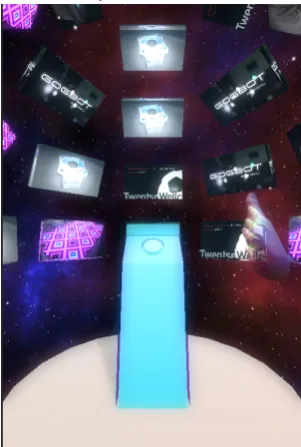
Bachelor Thesis
Graduation Project Report
Development of a 3D Navigable
Interface for a Touchless Showcase
Creative Technology B.Sc.Department of Electrical Engineering, Mathematics and Computer Science University of Twente
Hauke Gregor Wilhelm Sandhaus
Supervisor: Ir. Edwin Dertien Client:
1.
Front Matter
1.1.
Abstract
Due to widespread usage of touchscreens users have accepted interaction without haptic feedback. Commercial game consoles have introduced users to touchless input and natural user interfaces. Only recently it has become technical possible to track human hand skeleton in high detail, precision and low latency contactless. This report describes the design process for the user experience, user interface and interaction interface of a touchless showcase using skeletal hand tracking. The project extends on existing hardware, compares current approaches, researches on the user group and rebuilds the software, based on these findings, from scratch. To allow input, multiple interactions and 3D buttons were developed. In a user experiment these were tested. A final prototype was implemented on two showcases for a month and compared to the existing software. The findings suggest that users want more natural and direct interactions. Missing physical feedback, non-existent depth perception on traditional screens and unfamiliar gesture language are hindrances but can be overcome with the use of good visual cues. Future work on the software is solely on refinement. Some of the interactions investigated in this thesis will prevail, while some might appear in other contexts.
1.2.
Table of Contents
1. FRONT MATTER ... 2
1.1. Abstract ... 2
1.2.
Table of Contents ... 3
1.3. List of Figures ... 5
1.4. Glossary ... 7
1.5.
Acknowledgements ... 8
2. INTRODUCTION ... 9
2.1. Situation ... 9
2.2. Challenge ... 9
2.3. Questions ... 10
2.4. Practical Aspects ... 10
3.
IDEATION AND PRODUCT IDEA ... 113.1. Customer Requests ... 11
3.1.1.
Powered by Twente Innovation Events ... 11
3.1.2.
100%FAT ... 11
3.2.
Research ... 12
3.2.1. User Experience Evaluation ... 12
3.2.2. Literature Review ... 14
3.2.3.
State of the art ... 18
3.3. Analysis & Conception ... 22
3.3.1. Personas ... 22
3.3.2. Use Cases ... 25
3.4.
Summary & Problem Definition ... 27
4.
PRODUCT SPECIFICATION ... 284.1. Design Principles ... 28
4.2.
Developing an interaction toolbox for the vitrine 2.0 ... 28
4.2.1. Requirements ... 28
4.2.2. Input gestures ... 29
4.3. Design Iterations ... 29
4.3.2.
Selection ... 30
4.3.3. Hand movements in the virtual reality ... 31
4.3.4. Combined media gallery approach ... 32
4.3.5.
Object Explorer ... 34
4.4. Prototypes Interaction ... 35
4.5. Prototypes Content ... 36
4.6. Buttons ... 37
4.6.1. Direct buttons ... 37
4.6.2. Indirect selection ... 38
4.6.3. Test Game ... 39
4.6.4. Results ... 40
5.
PRODUCT REALISATION ... 475.1.
Final test prototypes ... 47
5.1.1. Highlight buttons ... 47
5.1.2. Activation ... 48
5.1.3. Virtual camera ... 48
5.1.4. Motor ... 48
5.1.5.
Virtual showcase ... 48
5.1.6. PIRATE showcase ... 48
5.1.7. Text & content ... 48
5.1.8.
Background ... 48
5.1.9. Object ... 49
5.1.10. Communication of the system ... 49
6. EVALUATION AND CONCLUSION ... 50
6.1.
Logs during test month ... 50
6.2. Feedback ... 52
6.2.1. Survey Results ... 52
6.2.2.
Observations and Interviews ... 53
6.3. Recommendations ... 55
6.3.1. Future work ... 55
6.3.2.
Refined prototype ... 57
6.4. Conclusion ... 58
7.
BIBLIOGRAPHY ... 601.3.
List of Figures
Figure a: Smartware exhibition with interactive 'vitrines' in the Gallery, University of Twente. Retrieved
from: 100FAT.nl ... 9
Figure b: Drop of users ... 12
Figure c: Infographic displaying the devices detection range. Retrieved from: 100FAT.nl ... 13
Figure d: Form & Function 3D, Brendan Polley. Retrieved from: brendanpolley.com ... 18
Figure e: HandWAVE tutorial. Retrieved from https://apps.leapmotion.com/apps/handwave ... 19
Figure f: VR hand menus Retrieved from: developer.leapmotion.com/gallery ... 19
Figure g: Clicking, scrolling and music controls with touchless pointer replacements Retrieved from: developer.leamotion.com/gallery ... 20
Figure h: No touchscreen Retrieved from: yourdesignonline.com/apple-ruined-world ... 21
Figure i: Material Design Buttons Retrieved from: google.com/design/ ... 21
Figure j: Ray selection ... 30
Figure k: Two hand object rotation ... 30
Figure l: Swipe selection (top view) ... 31
Figure m: Extended range hand mapping (top view) ... 32
Figure n: Combined approach ... 33
Figure o: Points of information browser ... 34
Figure p: Rotate selection with information browser ... 34
Figure q: Leap Motion, Inc (2015) tracking API structure retrieved from: https://developer.leapmotion.com/documentation/csharp/api/Leap.Controller.html ... 35
Figure r: Implemented interaction methods for testing ... 35
Figure s: 3D media content player with edge rotate ... 36
Figure t: Leap Example Button ... 37
Figure u: Push Button ... 38
Figure v: Squeeze Button ... 38
Figure w: Ray selection ... 39
Figure x: 3D ball selector ... 39
Figure y: Test Setup in the DesignLab ... 40
Figure z: Performance of direct activation methods (experienced users) ... 41
Figure aa: Wrongly activated buttons (all users) ... 41
Figure bb: Time to finish a level divided by the three required button activations (all users) ... 42
Figure cc: Demographics of button test game ... 42
Figure dd: Comprehension of buttons ... 43
Figure ee: Ranking of interactions on difficulty and enjoyment ... 43
Figure ff: How easily users understood the interaction method ... 44
Figure gg: Natural interaction ... 44
Figure hh: Final prototypes with no information activated ... 47
Figure ii: Component diagram of the showcase ... 49
Figure jj: Average daily activations during test period ... 50
Figure kk: Total activations of the PIRATE showcase vs. average daily activations per 2D showcase ... 51
Figure ll: Time till last recorded interaction in 2D and 3D Version ... 52
Figure mm: Subjects preferences for the two versions ... 52
Figure nn: Subjects ratings for individual traits ... 53
Figure oo: Side view showcase and LEAP field of view ... 55
Figure pp: Point of interest projection mapping projected on cube ... 56
Figure qq: Descriptive text with animated images and squeeze interaction preview ... 57
1.4.
Glossary
100%FAT – is a cross media development company and the creator of the Smartware exhibition
API - application program interface, a set of tools for building software applications. The API specifies how software components should interact. In a reference classes of this API are explained.
C# - C-sharp is an object-oriented programming language by Microsoft that aims to combine the computing power of C++ with the programming ease of Visual Basic. The Mono project provides an open source C# compiler and a complete open source implementation of the Common Language Infrastructure.
Gallery - The gallery is a shared room for several projects and small businesses, belonging to the Kennispark Twente and located on the territory of the University of Twente.
Kennispark -The Kennispark Twente is an incubation centre for small startups and innovative industrial projects in the region of Twente, located on and around the University of Twente campus and Industrial park of Enschede. It tries to bring entrepreneurship to Twente.
LEAP – The Leap Motion controller is a USB peripheral device equipped with two infrared cameras and three infrared LEDs. It uses complex mathematical calculations to identify hands and track the position of the skeletal hand bones.
PIRATE – Is a Pipe Inspection Robot, developed by University researchers to inspect low pressure gas networks with small diameters.
Showcase – is a two meter high display, built out of aluminium and glass. It has a screen in the back and a rotary plate in the centre to exhibit objects from multiple projects around Kennispark and University. It is an interactive experience for the user using a touchless sensor (the LEAP) to guide through displayed information
Smartware Exhibition – showcases flagship project of the Kennispark in the interactive showcases. Located at the entrance of the Gallery
Unity – is a multi-platform game engine and developer tool that is free to use in the personal edition. Raycast – a virtual ray in game engines for determining lines of sight or targets hit by gunfire
Vector3 -is a representation of points and vectors in Unity. It can contain directions and positions and allows vector transformations.
2.
Introduction
2.1.
Situation
For 'the Gallery', an incubation centre for business startups at the University of Twente, cross media development company 100% FAT has developed a number of 'vitrines' (Figure a); interactive displays to showcase technology developments by companies and University. The vitrine is a showcase, a canvas to exhibit objects in an innovative way. In the showcase physical objects are displayed on a rotary plate. The showcase is equipped with technology and sensors to connect the real object to accompanying digital on-screen information. The additional information is of two-dimensional content such as images, videos and text and three-dimensional models of the physical objects. The visitor is meant to feel and understand the shown objects without studying its background.
The interaction type is of point-and-click but uses instead of a computer mouse or trackpad a ‘Leap Motion Controller’ - hereinafter referred to as LEAP - to control the pointer contactless and go through a presentation. Each vitrine has one static presentation fit to the object. The software is written in MAX 6 by “cycling ’74” a visual programming language for music and multimedia. The vision of the vitrine is to express the significance of the objects with the visual metaphor of a showcase and give a futuristic and cool presentation so that more visitors catch interest in University Projects.
Figure a: Smartware exhibition with interactive 'vitrines' in the Gallery, University of Twente. Retrieved from: 100FAT.nl
2.2.
Challenge
how to interact with the showcase. Some user groups lose interest in the presentation after the first slides, which could be due to the conservative use of the innovative input device.
The showcase delivers information but is by itself not engaging enough and playful, it does not go beyond a slideshow presentation. The relationship between physical object and information is not obvious. The display gives information about the exhibit but does not extend the experience. The showcase should not require a tutorial for the interaction but make an experience out of it. The area in which the LEAP detects motion, hands and gestures is limited. The LEAP has to work within constraints without making the technical limitations a barrier.
The showcase should give much information in a glance without being overwhelming. The user himself needs to be able to decide what to focus on. The interaction should not feel like an unnecessary gimmick. The aesthetics of the information on the screen have to be eye catching.
2.3.
Questions
From user and client interviews as well as from observed data it is proved that there is room for improvement:
§ How can a user be best introduced to interact with the vitrine and to its interaction? § What interaction works best with the vitrine?
§ How can information be best presented in a virtual showcase?
2.4.
Practical Aspects
The company wants to keep the look of the vitrine in its current state, therefore changes on the hardware should be minimal. However the software can be rewritten completely to exploit the potential of the LEAP fully. The software will be designed with Unity as it has example code to operate the LEAP, to communicate with Arduino and display 3D models.
3.
Ideation and Product Idea
3.1.
Customer Requests
3.1.1.
Powered by Twente Innovation Events
They are the venture that commissioned the Smartware exhibition. It is meant as a showcase to excite people about projects from Kennispark Twente, University of Twente, Saxion BTC Twente and other high technology companies in Twente.
Highlighted was that people should get excited and secondly informed about projects. For further contact the people are meant to reach out to contact the real project, research groups and companies that worked on these project from the named stakeholders. 100%FAT came up with the current concept and realization of the Smartware exhibition.
3.1.2.
100%FAT
3.2.
Research
3.2.1.
User Experience Evaluation
Since the Smartware Exhibition is successfully running in the innovation centre the Gallery at Kennispark Twente in Enschede for more than a year (April 2014) the user group of the new showcases could be observed easily in the central hall. Besides that the showcaseswere enabled to log activity.
3.2.1.1.
Results of Data Logging
The activity logging of the showcases proves that the exhibition has frequent visitors with higher spikes during breaks and events. People stay on each showcase less than a minute and go on average 1.4 level deep into the slides.
Figure b: Drop of users
3.2.1.2.
Results of User Observations
To determine what people use the showcase for, how they interact with it, if it brings joy and whether a different design could improve certain aspects, user interaction was observed. For five weekdays spread across spring 2015 observation took place. After people interacted with one or multiple showcases they were approached and interviewed with less than 5 minute long, audiotaped, unstructured interviews[1]. It became evident that the recent version of the showcase fulfils most requirements made by the primary client, the University of Twente. Visitors, staff and students use the exhibition during waiting time to get informed about the showcase projects of the Twente Kennispark. Most of them understand how to retrieve information and wander from showcase to showcase. The raw unedited data of the interviews can be retrieved online [2]. Findings from the observations and interviews are summarized in this chapter.
3.2.1.2.1.
Activation
The start screen was getting mixed reviews. People liked the simple user friendly movie. The word “Start” aroused interest to engage with the screen. During the observations no users were unable to activate the showcase. However some users took longer than others to recognize how interaction takes place. A few users only looked at the infographic (Figure c) after they tried to use the LEAP as a touchpad. Other users were observed to first hover with the pointer over the infographic instead of the 'start' button placed next to it. Some tried to physically reach for the start button and touched the glass. After activation succeeded and the Showcase load up the first slide accompanied by start-up sound and the rotary plate turning the object users expressed feelings of joy and success (see: 3.2.2.9 Playful user interfaces).
100%
54%
35%
24%
17%
11% 7%
Users starts Second
Figure c: Infographic displaying the devices detection range. Retrieved from: 100FAT.nl
3.2.1.2.2.
Visual Style
Users preferred the showcases that had eye catching physical objects over the simpler ones. Moreover they preferred the showcases with rich media content such as videos over the ones with a lot of text. Additionally one showcase features an animated 3D mapping which a few people described as “eye catching”. To sum up: The quality and perceived interestingness of a project seem to be dependent on the quality and creativeness of its presentation in the showcase.
They liked the animations that load up the movies and pictures but described them as a bit too slow. The LED lights and futuristic colour choices were positively reviewed. Some people disliked the use of a button on the start screen and described this as an uninteresting presentation because it was static and the same on all showcases. “Without activating the 2D version feels a bit dead”. While a lot of people criticized the high amount of text “well not gonna read that” some users that had a lot of time liked to read it. People liked the clearness and sharpness of the display.
3.2.1.2.3.
Content
People do not go further than two screens down in the current version of the showcase. They return to the showcases at another time but are presented the same information, and again go no further than two screens. These screens have yet to reveal a lot of informative content which will never be seen. For example the video of the PIRATE robot was watched not a single time during the testing period as it appears on the third screen. Visitors would need three times more than they spend on average at the showcase to even reach this third screen. Besides other users one user reported the showcase and the projects as “a bit boring but due to the nature of university projects”. However the Smartware is meant to overcome this disinterestedness and excite people for projects in the Twente area. Employees, students and visitors should also get interested about less interesting projects and understand their importance. Too much of the content was displayed by using text and to long videos.
3.2.1.2.4.
Pointer
The mapping of the pointer is in two axes. Thus forward-backward moving as wells as up-down movements result in up-down movements of the pointer. This unnatural mapping helped that the pointer moved as soon as the hand moved in any direction and users could see that they are in control. In some of the showcases objects placed in front of it, hid the pointer and therefore users did not notice the presence of
3.2.2.
Literature Review
From literature related to touchless interfaces, design and human computer interaction, requirements for the new showcase can be derived.
3.2.2.1.
Practical advantages of touchless operation
As a lot of medical applications require sterile operations and navigations of computers a lot of research has been done in this area on touchless computer input [3], [4]. Touchless operation of electronic devices is more hygiene and does therefore require less cleaning of critical input devices, such as touchscreens, that could spread diseases or look dirty quickly. Moreover touchless operation is more secure to vandalism. However the requirements of medical applications are very different to those of the showcase naming: The users of the showcase should not require training on how to operate the device.
The showcase can be designed ground up and does not need to communicate with existing applications that require pointer input.
3.2.2.2.
Game immersion
For games the ultimate goal that developers often seem to reach for is immersion. Immersion is sometimes measured as reduction of self-awareness[5]. To stage to total immersion two other levels of immersion have to be reached first. These are engagement and engrossment[6]. According to [6] “Total immersion is presence”. Engrossment requires emotional investment. As seen from the user evaluations people prefer to spend little time at each showcase and use them during breaks to pass the time. Therefore neither total immersion nor engrossment are targeted by the improved showcase. The showcase should still keep the users engaged. To allow engagement the feedback and controls of games should enable easy access and make the player feel like an expert. Moreover the player needs to put time, effort and attention into playing. Most users were willing to do so. The environment in the Gallery draws attention to interact with the showcases. The visual style of the hardware and software create an atmosphere that further break barriers to immersion [6].
3.2.2.3.
Attractive design
For years research has tried to make design more usable and intuitive. Often beauty has been considered incompatible with usability, but: “Attractive things work better”[7]. Especially for this project the balance between usability and beauty has to be considered well as it has to be entertaining, usable, understandable, informative, and work well. Moreover the showcases have not just informative purpose but are essential to the atmosphere of the Gallery. Therefore it should be considered how the software can help to provide additional value and enhance the attractiveness of the showcases.
3.2.2.4.
Perceiving power
In museum installations, engagement with interactive games could be reinforced when visitors perceived to hold power that they do not possessin other contexts [5]. Visitors seemed to perceive bigger sense of power when they were able to forget that a computer was in between them and the interaction. Therefore a mouse, pointer, keyboard and the computer interface should ideally not be visible in the realization. Especially powerful might not just be virtual interactions, but interactions that results in change in the real world. Examples would be to give users power over cameras or the orientation of the exhibit.
3.2.2.5.
Technical limitations
Hardware to track freehand gestures still has its limitations in tracking performance. In research [8] high gesture recognition of American Sign Language gestures with the simultaneous, combined use of two tracking devices (Leap Motion and Microsoft Kinect) and reducing the number of gestures to distinguish was achieved.
progress in the camera systems to detect hand poses is rapid. Just a little more than a decade ago those infrared systems were in the size of meters [9, p. 373] and are now in the size of centimetres.
The development of these technologies is still far from finished and now there are still new competitors entering the market but also large companies such as Microsoft refocusing their attention to Hand tracking. A recent research by Microsoft [10] targets the limitations of current skeletal trackers. These are the limitation to front-facing close-range scenarios, robustness and recovering from failed detection. This is a particularly big problem of the Leap Motion controller used in the showcases. The detection starts from an initialized pose and cannot recover during the tracking. Other approaches [9, p. 289] describe how to calculate hand poses not from multiple frames but from a single image to avoid these current limitations. Compared to the leap motion they suffer from higher computational burden and are not market ready yet, which leaves the leap motion controller as state of the art due to its low price point, fairly good documentation [11] and examples [12]. Google's Advanced Technology and Projects group announced [13] that they built their own gesture sensing chip. Ituses instead of infrared cameras radar and could overcome limitations that current hardware has.
3.2.2.6.
Natural user interfaces
A natural user interface is in comparison to an intuitive interface an interface that allows people to learn the interaction while they use it, whereas the intuitive interface should be able to be used without previous learning [14]. Multiple efforts to mass market full blown NUIs seem to have failed [15]. Nevertheless more and more ideas from NUIs have made their way into interfaces and are combined by traditional GUIs. Smartphones take heavy use of gestures and offer less descriptions than GUIs do due to little screen space. Users adopt natural language interfaces such as Google Now or Apple Siri. Users’ intuition differs for all demographics groups. This is because cultural, social and professional background from users differs. The intuition of users stems from the applications and tools they are used to. Therefore instead of trying to make user interfaces intuitive they should be made so that the interaction is learned while using them. Natural user interfaces have to avoid feeling gimmicky. For games a lot of interactions that relate directly to real movements can enhance immersion. But for some other applications they can easily be too demanding in physical execution. For example flipping a page on a very large screen would require too much distance to be crossed. People do succeed in using gestures to control natural interfaces [16]. Unfortunately, as mentioned earlier, very few gestures have become common sense. For example an natural interface that uses body postures to control slideshows [16]might look good in theory but it will fail in professional environments as the users are not benefitting compared to buttons and will likely feel uncomfortable holding poses in front of audiences. Gestures will only be accepted if they fit into the body language of the users before they need to use them. Systems that use gestural interface need to be able to distinguish whether the user is making intentional control movements or movements unrelated to the system.
Another example with questionable usage is the gesture-controlled microwave [17]. People were able to learn how to use it but most likely even with perfected gesture recognition there is no need to control settings with gestures. Gestural attempts often lead to encrypting simple tasks in difficult body language. Yet it is very obvious that a lot of users prefer to use control options that are ‘natural’. Consider the example of zooming in and out on screens. The fewest casual users would use keyboard shortcuts to do so. For multiple years the default was to use GUI zoom buttons, but now the pinch to zoom gestures is most widespread. A natural interface would prefer this method while an intuitive interface in professional use might still rely on keyboard shortcuts just because for this user group it is the most intuitive one. Intuition is not innate but acquired to some degree.
3.2.2.7.
Human-centred design vs. Activity-centred design
Human-centred design (also called user-centred design) optimizes products how userscan, want, or need to use the product instead of making the user adjust to the products. This design approach relies heavily on user research and adjusting to usage scenarios. In technology firms it has become the first method to
such as apple do not carry out a lot of user research but instead focus on the vision of few designers, yet they are acclaimed for the usability of their products. This is because often users themselves do not really knowwhat they want until it is shown to them [19]. A lot of tasks such as writing texts or playing an instrument are not user friendly at all, but still kept their way of interaction manner over centuries. E.g. the QWERTY keyboard which was not developed to easy internalize the arrangement but to keep typewriters from interlocking the heads. This is because they fit perfectly for the activity they are used for. Therefore interactivity can better be designed around the actions needed to accomplish a task instead of the preferences of the user [18, p. 15]. Therefore instead of asking the users directly, it could be better to observe them and interview them later on [20].
3.2.2.8.
Science fiction movies
Researchers were always the first that try to change the human computer relationship. However the expectations users have about technology are not shaped by research but by the real products they encounter and also by the media they consume. Especially Science fiction predicts future devices and more than expected have come to the mass market. These differ from the actual technology that makes the metaphor work and from the application but influence on the aesthetics is undeniable. E.g. warp motors are not accessible yet but electrical cars already sound like them. If users see devices that work like the ones they were promised to work with in the future they are easily impressed. Uppermost user’s frustration throughout the use of interface should be kept minimal. To design interfaces that allow people to feel like superheroes or idols they know from movies could be a logical step. This might minimize the rejection of
new input devices, which are often not instantly recognizable to be superior over traditional devices.
Gestural interfaces that do not require touch complemented by flying holograms are a recurring theme in Science Fiction Movies. A quick comparison of high grossing movies shows [21] that the same gestures and interactions are used in widely different contexts for different applications. However some gestures are recurring in multiple movies. Such as: wave to activate, push to move, turn to rotate, swipe to dismiss, point or touch to select, extend the hand to shoot & pinch and spread to scale [21]. These are all direct manipulations and direct analogies from physical manipulations. A lot of tasks computers are able to perform are a lot more abstract which again require graphical interfaces or for very abstract tasks voice. To sum up, gestural interfaces should make use of language that is already spread by movies through to the end users.
3.2.2.9.
Playful user interfaces
As already concluded in the natural user interfaces and the science fiction movies section it has multiple positive effects to create interfaces that are visually pleasant and take metaphors from physical manipulation. Moreover the interface design for the showcase is developed to be frustration free. Therefore it might be a good option to create the interface playful. Playful interfaces (sometimes also ludic Interfaces) do not just focus on getting tasks done efficiently but to provide fun, excitement, challenges, and entertainment [22]. These playful user interfaces often have educational content, which proves that they are an appropriate use for the showcase. Playful interfaces are often simultaneously natural interfaces because fusing reality with virtual reality allows people to perceive powers and entertain (See 143.2.2.4 Perceiving power). Additionally the showcases try not to communicate in a formal manner but to enthuse people.
3.2.2.10.
Public Systems
Systems developed for public use in advertisement or culture settings using non-instrumented body-tracking
interaction mode the current showcases use (moving cursor with hand position and selecting by hovering over an interval) was successfully used by other systems such as the time viewer [23, p. 39]. The conclusion is that body motion used for input is, regardless of the content, perceived as more fun than static
interaction with desktop PCs.
3.2.2.11.
Gestures
Gestures are human movements that contain information. Gestures that are spontaneously generated from persons while telling a story, holding a conversation or while speaking in public are called natural gestures [9, p. 20]. In the field of gesture recognition a lot of effort has be put in analysing body language in dance and theatre, sign language for the disabled as well as recognition of drawn shapes with gestures [9]. These gestures cannot, even though they are detectable by the hardware of the showcase, be used for the Smartware exhibition because they require the users to be aware of these languages and tutorial instructions are undesirable. The amount of gestures that humans use during conversation is immense. It is not just emotions but also objective information. Fingers can be used to count, agree or disagree, give direction, point and a lot more. An extensive list is available on Wikipedia1. These gestures differ from culture to culture. In Indian classical dance a full gesture language matured to tell stories without tongue. This entertainment form however is dying out therefore less and less Indiansunderstand them2
.
3.2.3.
State of the art
In the literature review section scientific research on gesture control is discussed. In this section examples
that developers and game designers came up with are discussed.
3.2.3.1.
Leap Motion Examples
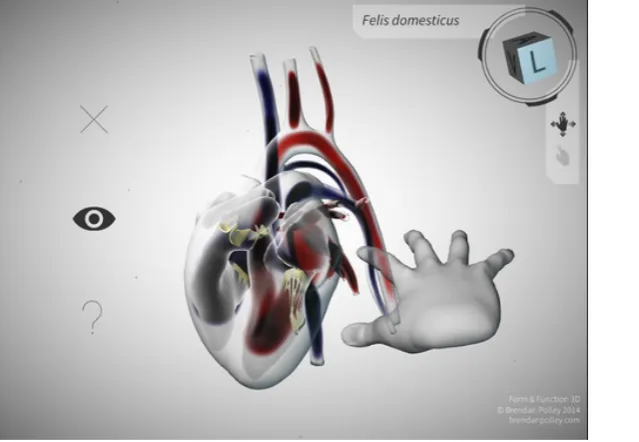
[image:18.595.61.381.246.467.2]A lot of projects using the LEAP for touchless controls can be seen online [12]. It is updating quickly and more and more interactions can be seen. Most of them require to be used with virtual reality glasses. The sensor is mounted to the glasses and has a field of view that matches the user’s vision more closely than in desktop orientation. Additionally the movement of the virtual hands and real hands feel more natural because they occur within eye vision. Most examples take heavy use of the physics engine because it is easy to implement with unity and more impressive than gesture interaction. Another interaction that can be seen often, is drawing in 3D space. During the writing of this thesis LEAP motion released their own widgets and buttonswhich are however also optimized for use with 3D virtual glasses. There were few examples that used interaction types that could work outside of game contexts. One very good application is the Form and Function 3D application [24] by Brendan Polley a Biomedical Communicator3. It uses swipe, rotation and selection gestures to explore3D models of human body’s organs(Figure d).
Figure d: Form & Function 3D, Brendan Polley. Retrieved from: brendanpolley.com
In these 3D models all parts are explorable. They can be touched with the 3D hand and information appears. The selection with the index finger and menu navigation needs some time to get used to but works fairly robust depending on the current tracking accuracy of the LEAP. It also implements the best swipe detection that could be found4
. The application makes heavy use of transparency otherwise the hand would obscure too much information.
HandWAVE is one of the many LEAP applications that try to make touchless control of desktop computers possible. It provides multiple gestures to scroll,start and stop music etc. These gestures do not work natural
3 http://brendanpolley.com/
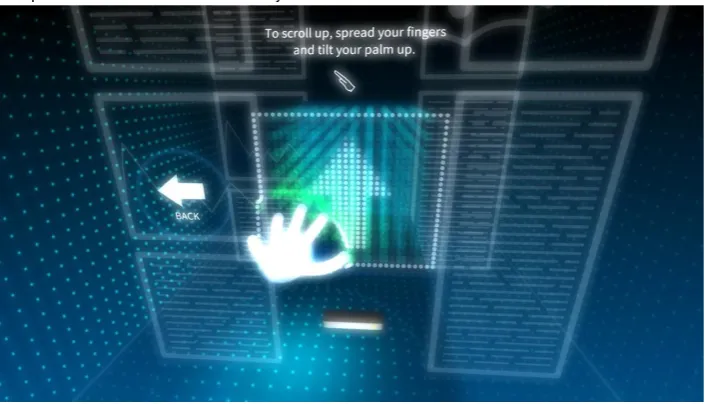
yet most of them are a translation of keyboard shortcuts or mouse controls. Therefore it is still preferred to use these input devices. However it comes with a good tutorial that explains to unexperienced users very cleverly the workarounds to the restrictions of the LEAP hardware (Figure e).The tutorial is playful, it uses good animations and might be the best experience of this app. To help users with depth perception the position of the hand is shown additionally at the faces of box. Again this application renders everything transparent to allow the users to constantly see where the hand is.
Figure e: HandWAVE tutorial. Retrieved from https://apps.leapmotion.com/apps/handwave
Other apps showed what gestures or interaction in general not to use. A robot chess game that comes with
the LEAP as an example was considered as unplayable because the 16 chess figures on the board are too close to each other to select easily.
3.2.3.2.
Other non-game examples
Hovercast5and Arm Hud6are virtual reality menus that use the position of hand and fingers to position buttons for interactions (Figure f). This is a traditional interface that can be seen in a lot of science fiction movies. It works relatively well (besides common tracking issues), because humans have a natural sense of where their hands are located. If this location is not aligned with the view, use it without virtual reality glasses, it gets very difficult to locate the buttons because the tendency is to look between screen and hands back and forth.
Figure f: VR hand menus Retrieved from: developer.leapmotion.com/gallery
[image:19.595.61.416.456.550.2]
Apps like Touchless7
and Shortcut8
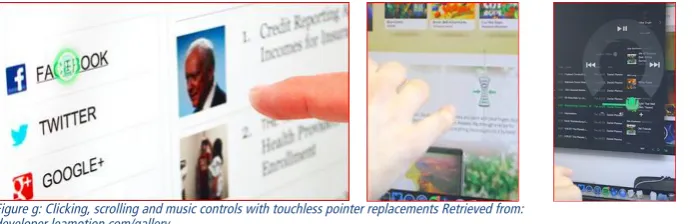
[image:20.595.61.410.111.223.2]try to replicate the mouse, touchpad or touchscreen. They place an artificial floating touchscreen in front of the screen. If the fingers pass beyond this threshold actions such as scroll and click are triggered. Because the interfaces are not adjusted for this imprecise input, scrolling is the only mouse interaction that can be used with little failure. For other controls there are some adjusted interfaces for music control or application switching (Figure g).
Figure g: Clicking, scrolling and music controls with touchless pointer replacements Retrieved from: developer.leamotion.com/gallery
Intel RealSense is a combined depth sensing camera, capable of tracking hand positions. Intel released it in mid-year 2015 with a lot of fuss, encouraging developers with cash prices to release apps into their app showcase. This camera is already embedded in consumer hardware but without any touchless applications9.
3.2.3.3.
Buttons
Buttons are the most common interaction method in human computer interaction. The concept of the button is very old and still very little has changed because it provides a simple switch mechanism to trigger events. From mechanical push buttons, mouse, keyboard, program icons in Graphical interfaces, links in the web, touchscreen icons, car controls buttons are everywhere. Usually they convey with graphical hints that they are interactive. The visual style of buttons differs widely. In GUIs Objects with 3D cues, with shadows and glossy effects, popping colours, rectangular shapes or underlined text are all expected to be buttons. Users like buttons. They give them the impression to be in control. Buttons that do not give back visual
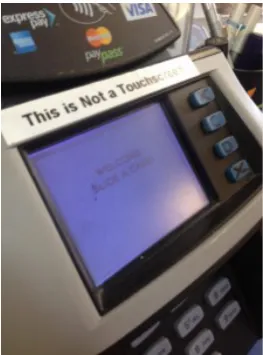
feedback are frustrating to users. Users started to get used to expect everything to be a clickable because these visual cues are not standardized (Figure h).
Figure h: No touchscreen Retrieved from:yourdesignonline.com/apple-ruined-world
This is comparable to the expectation of users that public screens are usually touchscreens. The supposed paradigm was for a long time that buttons are to be pressed inward. With its material design Google rethought this, because on touchscreens the button and fingertip are always separated by a pane. Instead activated buttons get lifted up to the finger [25]. Strangely Google calls these Buttons still pressed in their raised state (Figure i).
Figure i: Material Design Buttons Retrieved from: google.com/design/
This shows how different interaction methods behave depending on the input device. Therefore it was
[image:21.595.58.190.57.235.2]3.3.
Analysis & Conception
3.3.1.
Personas
From the analysis of the unstructured interviews seven personas that are all typical users of the interactive showcase are created.
Sjors van der Meer, Industrial Design Bachelor
Student
Sjors van der Meer is an Industrial Design Engineering student at the University of Twente. He is 20 years old and in the second year of his study. He feels home at the University and in Enschede, however he does not know a lot about other studies and research fields of the University Twente. He takes his study serious but also leaves time for his hobbies, which are wakeboarding, gaming and hanging out with friends with whom he especially likes to watch superhero action movies.
BecauseSjors likes to game and studies industrial engineering he is aware of very different interfacesand interaction types. He is very confident and interested in computers. His visual taste is strongly influenced by games and Hollywood movies. He knows exactly what he thinks is cool and what is not.
The current showcases in the gallery he would describe as boring and not even as progressive. However
during the awarding of his propedeuse (pass of first year courses) he proudly took around his parents over
the University Campus and also used the Smartware exhibition to impress them.
Joel Austin, Univers
ity Researcher
Joel Austin (42) is a proud employee of the University of Twente. He is part of the Robotics Research Group and frequently in the building of the Smartware exhibition to pick up colleagues, for meetings or to present the work of his group to external parties. He was very active and sportive during his younger years but now his biggest hobby is his job. He is married and has one child. He is a researcher and grown up with desktop PCs. However he was one of the first to own a smartphone and is very positive about technical progress even though he gets frustrated quickly
if a program is not responding as he wishes it to be. If clients are
visiting he brings them during lunch to the cafeteria in the gallery and shows them their flagship project on the showcase. Moreover during open days he was showing his family what he was working on.
Edward Carter, Investor
Edward Carter is 37 years old and a very successful venture capitalist from California, USA. On the behalf of his company he
cannot see his wife often. Sometimes his daily life is too strict and boring. Currently he was on a business trip travelling through the Netherlands. He stopped by in Enschede and was guided by Kennispark employees through the gallery. They used the showcases to show-off some bigger projects that he might be interested in. And indeed he is considering if one of the Twente startups fits to his company’s portfolio. He sees a lot of different projects in short time and often smaller projects do not catch his attention. However because of the showcases he pays some attention even to small side projects.
Anne
-
Marije Visser
, Employee Reception
Visser is 39 and married with one child. She works at the
university already for 6 years. She is not confident with technology. She feels emotionally attached to her smartphone but still fails to use some more hidden functions of it. She studied communication studies at a University of applied sciences and works now at the reception of the gallery. She likes her jobs even though it is sometimes a bit lacking in variety. A few weeks ago Visser got explained how the showcases work so that she can introduce visitors to them. It is a welcome change of routine when she can see people play with the showcases. On her own she does not interact with them because it seems
inappropriate to play at her workplace. Often she answers people’s questions for directions to projects and workgroups of the university. She still does not know what they are about.
Marc Doornbosch, Senior Staff
Marc Doornbosch is already 57 years and one of the most influential people at the university. He is married and his children are already studying. He comes from a generation that values hard work, productivity and reputation. He has worked hard to establish the university as a widely recognized research facility. Doornbosch has heard of the concept of the paperless office but still makes his secretary print out everything. He owns a Laptop with touchscreen and touchpad but still carries his bulky mouse everywhere. He often has to represent the University to the government or visitors fromabroad. He takes them atalmost each time to the gallery and explains projects. It is important for him that both the projects and he himself in front of the showcases are looking good.
Madelaine Kleine, Visiting Grandmother
Madaleine Kleine (69) is a retired housewife. The thing in her life she is most proud of are her two grandchildren. Both of them are
already studying. They study programs she already has
difficulties with remembering their names. During the open days the whole family makes a visit to the University. The
grandchildren walk her around and show the campus. She does
only dragged around. However with the showcases in the gallery the grandchildren are able to encourage her to get a bit more engaged herself.
Li Qin T'an, Chinese Visitor
Li Qin T'an, 37 is a computer scientist from South Korea. Currently she is running a project to increase cooperation between Korea and European countries. She used to work in one of the biggest Korean companies and led multiple successful projects. Before she comes to universities and research facilities she already researches online about projects and research groups
so that she can ask more detailed questions. However when she
arrives at the University she still gets first the standard walk across the campus. The showcases do not offer her much as she already saw the pictures and read the descriptive texts online. However Li Qin T’an still stops by to use them as a starting point to talk with the researchers.
3.3.2.
Use Cases
3.3.2.1.
Professional showcase tool
It was seen that researchers and employees like to guide distant colleagues or customers around and make use of the showcase to provide insight in own projects. Therefore often groups of people are arranged
around showcases with one person explaining their work to others. The showcases help to guide
conversation with the physicalobjects and media. Because one person knows already how to use the showcase, he animates his fellowship to do the activation step. The pointer can be used as an actual pointer to draw attention to e.g. pictures that the researcher wants to talk about.
3.3.2.2.
F
lagship projects of the region
The Smartware exhibition is meant as a flagship project of the region. The Kennispark Twente foundation established the Gallery as a centre to develop entrepreneur’s climatein the region of Twente10. Government and investors from abroad visit this complex because companies are concentrated on dense space. In the observations the showcases succeeded in drawing interest of investors to projects. Because each showcase
contains a different project from a different group it helps to get a quick overview about multiple developments in the Twente area. These visitors scan for the most interesting projects and have for each usually less than a minute of time.
3.3.2.3.
Reminder of success
People that work in the Gallery or on the University Campus are likely to have work presented in the showcases that belong to their team. When they have breaks or wait for somebody in the entrance hall they usually focus their attention on their own project first. It helps them to realize that their work is notfor nothing and is recognized by the real world. They might play around with the interface of the showcase a bit but will not read the details of it, as they already know about them.
3.3.2.4.
Waiting hall
The entrance of the Gallery, where the Smartware exhibition is located, functions as a waiting hall. People wait to get picked up by colleagues. They might take a smoke outside or are waiting in the hall to pick
someone else up. In the meantime people pay attention to the showcases and their contents. They
dominate the hall with the bright LED lights, big screens and futuristic appearance. If people have time they
tend to activate showcases that they did not look at before. People wait usually not longer than three
minutes in the central hall.
3.3.2.5.
Students
They have more time than the working people. In the observations they were less interested in text
information and the projects themselves. They can be categorized in two groups: Gamers and non-gamers. Non-gamersreported fun in using the showcases but gamers reported the experience as “boring”. They paid a little less attention to the projects and more to the technology itself. They were still successful in catching interest. The amount of information is a bit overwhelming at first but students return to the gallery as well and use the showcases multiple times.
3.3.2.6.
Family & Friends
If students, employees or researcher of the university have family or friends visiting them they walk them around. Some target the gallery and use the showcases to impress them. The showcases can bridge generations and help to carry enthusiasm over. Even grandparents were able to use the showcase on their own or after explanation from their grandchildren.
3.3.2.7.
Conferences
The gallery is used for organizing conferences and open days. During these days the activity on the showcases is a lot higher. In addition, the users are from outside and will not see the exhibition again. People gather around in the central hall have welcome drinks and talk. Some people that were not too interested in socialising could be observed to pay attention to the showcases instead. When they found something interesting they used this to re-establish conversation with other conference members.
3.3.2.8.
Visitors from different cultures
The showcases are in two languages but Dutch is enabled first. The language selection is not always visible
and when people missed this they stopped paying attention on one showcase and looked at another one.
3.4.
Summary & Problem Definition
The research phase lead to conclusions that are summarized here. The current version of the showcase is not taking full advantage of technology. Very different users with very little time use the showcases. The showcases have both one-time visitors and multiple time visitors. Very few users make it through to the end of the presentation. Users from university return to “their” showcase but see the same content. Users walk around and activate multiple showcases, they prefer diversity over profundity. Users dislike to read a lot of
text before they understand the purpose of an object. Users understand how to use the showcase. They might have minor problems with locating and navigating the cursor. It uses the most simplified interaction that was reported to work for users [26]. The identical idle screens, similar content between showcases and similar content from slide to slide keeps users from going deeper into the content and activating more showcases. Users have difficulties figuring out the relationship between the exhibited object and the content. The current interface design does not address different target users specifically. It has minor technical issues that could be resolved. Nevertheless the focus of this thesis is to think further than that and develop from the ground up.
The research questions to be answered are:
§ How can a user be best introduced to interact with the vitrine and to its interaction?
§ What interaction works best with the vitrine?
§ How can information be best presented in a virtual showcase?
4.
Product Specification
4.1.
Design Principles
To develop the prototype of the new Interface parts of Google's Android Design Principles[27], which are very broad and describe major keys to successful interaction design, can be applied.
§ Delight me in surprising ways
§ Real objects are more fun than buttons and menus § Keep it brief
§ Pictures are faster than words § Only show what I need when I need it § I should always know where I am § Sprinkle encouragement § Make important things fast
The state of the art in user interface design is Googles Material design announced in 2014. It unifies elements of interface design across multiple platforms, puts emphasize on the importance of animations, applies physics to them and thinks of interfaces not as flat but arranges the elements also on the virtual depth of the screen [25].
4.2.
Developing an interaction toolbox for the
vitrine 2.0
As the showcase is meant to display a variety of diverse objects having the most suitable controls for each one of them is important. In this context I examine several interaction possibilities that could be implemented with the current hardware of the showcase and study whether each of them fits to the required demands.
4.2.1.
Requirements
The interactions need to fulfill:
Label Requirement Description
SE self-explanatory Understand by seeing.
EX explainable If not SE quickly explained
EN entertaining The opposite of boring.
SA satisfying Not to be frustratingly difficult.
RE reusable Not to be limited to one exhibit
4.2.2.
Input gestures
Below a list of common interactions developer use the LEAP for derived from the State of the Art section or considered as useful for the design of the new showcase. These gestures are proven to work either in other computer interactions and users might expect them to work with touchless interaction, or were discovered
in the research phase.
Interaction Description
Rotation One of the most frequent uses is to rotate an object or to rotate the camera around.
Touch Buttons, sliders and checkboxes are well known from desktop computers and websites. It needs to be determined how these can be activated without physical feedback such as clicks from pointing devices or without touch as from touchscreens. The leap API distinguishes key taps that are aligned downward from screen taps that are aligned forward.
Grab Is one of the most common interactions humans use their hands for. The LEAP does report a grab strength in percentage which can vary by users hand sizes.
Accelerate Objects that are in grabbed state could be thrown. Also this interaction is implemented using the physic engine of game engines.
Pointer The LEAP Api is capable of tracking pointing tools of long cylindrical shape
such as pencils. As appearance and shape of these can differ this could broaden the interactions with tools that act similarly but convey a different mind-set. Pencils, brushes, flashlights, laser pointer, water hose or chisel are such tools with very different uses in real life.
Count The number of extended fingers can be seen by the LEAP this can be used to
count and might provide a more natural input than using buttons to enter
numbers.
Drawing Specific interactions could be enabled with drawing gestures such as circles, numbersetc.
Steering The rotation of one hand of two hands can be used to steer objects or steer through space. More advanced hand position such as from steering wheels could also be used for this interaction. Steering is one of the most frequently used gesture by games and known from Wii, Kinect and mobile handhelds. Scale The first use of multi-touch gestures which became common in the mainstream
was the two finger scale to shrink and enlarge content. The distance between two fingers could be measured to create something familiar.
Swipe Swipe gestures are commonly used on touchscreen interfaces to swipe to another navigation overlay.
4.3.
Design Iterations
In user interface design it is common to iterate through multiple prototypes, considerate their advantages and morph these into other prototypes [28, p. 168]. First designs were sketched with pen on paper. From over a dozen paper prototypes the best were selected and further refined.
4.3.1.
Media Galleries
model inside the interface, visualizing the real object that is on the rotary plate (Figure j). This could help to
relate the real exhibited object to the background information on the display. It was centred on a virtual plate to have it virtually centred and not floating in space.
Figure j: Ray selection Figure k: Two hand object rotation
The first prototypes concerned how users could get a better overview of the content available for exploration. Right now the users do not have choice other than to follow the rigid sequence of the presentation. One information comes after the other. From the Ideation phase it was concluded that people need to be able to choose the type of media they want to consume or look at on their own. Therefore a media gallery with floating 3D screens, each displaying different information, was created.
4.3.2.
Selection
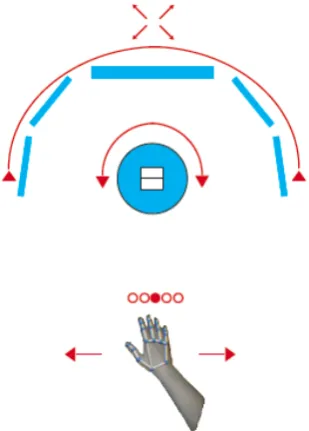
Because 3D space needs other selection methods than 2D space it was investigated whether pointing at content felt in the 3D showcase as natural as it is an interaction in the real world (Figure j). Another selection method that was considered to work with the showcase was “rotate and lock”. The user could
rotate the object and content with one or two hands and the centred media item gets activated. This is
Figure l: Swipe selection (top view)
4.3.3.
Ha
nd movements in the virtual reality
Video screens were meant to be touched directly to playback. However the space required for enough video players on the verticalscreen was too small. The placement far from the camera made them too far to reach with the virtual hands. It was explored with different mapping techniques to make the hands reach further
in virtual space. Coordinates have to be mapped from the Leap space to the Unity world space. If simply
scaling all vectors up the hand would be able to reachto objects further in the back. Thedisadvantages of
this method were that the control got very imprecise. Moreover because the camera projection is in perspective, while the hand projection is parallel, the hands get out of the camera view quickly. They do not
[image:31.595.64.219.62.278.2]Figure m: Extended range hand mapping (top view)
A different mapping scheme for the virtual hands was developed which puts the hands always within the screen space (Figure m).This scheme had the advantage that everything the camera renders can be touched
but still keeps the hands within view [29]. Additionally the hands movement have a higher sensitivity in the
front. Unfortunately this use together with the hand representation needs some time to get used to. In the showcase it did not serve its purpose but distract. The mapping of the coordinates might have use in games
and allow players to reach further than their actual hands allow, thus make players gain superpowers such
as the popular Rayman character has11
. In the user test this method was implemented with a 3D cursor instead of hands.
4.3.4.
Combined media gallery approach
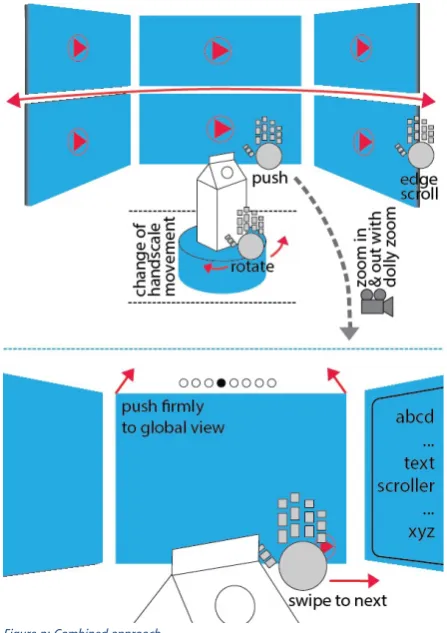
Elaborated from the content gallery approaches these concepts got refined (Figure n).The user would need to be able to watch video in full screen. Therefore the video players could be activated with virtually pressing them following a zoom to full screen. Multiple interaction methods such as edge scroll, hover to
rotate object, swipe to next video and press firmly to return to overview are combined.
Figure n: Combined approach
4.3.5.
Object Explorer
The media galleries revealed to be usable. However they do not help to relate the content to the object. The media galleries do not explain to the user what he is seeing and where it belongs. The content is displayed in a grid with everything equally important. It might overwhelm the user with information. The media gallery might have it advantages for scenarios where there is a lot of informative content that people want to process but the Smartware exhibitionshould tell people already a story without making them go through too much information. It was decided that the content has to relate to the virtual object, thus making advantage ofthe set up with the showcase which exhibits physical objects.
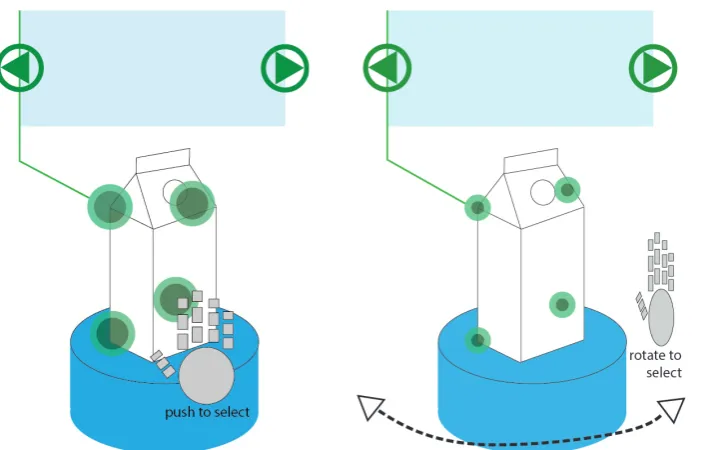
In these concepts the virtual objects get overlays with multiple highlighted information points. The focus here is on giving information about the object that actually is exhibited and help users understand the
details. It might also be used by researchers to explain their objects to other people. Because the information overlays are placed on a more dense space they can be touched directly. The other method of
interaction is similar to the rotation selection of the content browser. It enables only one information and
locks the view. The degrees of rotation around the object areobject information assigned. In this mode the
physical rotary plate and the virtual plate should be in sync.
[image:34.595.61.417.229.454.2]4.4.
Prototypes Interaction
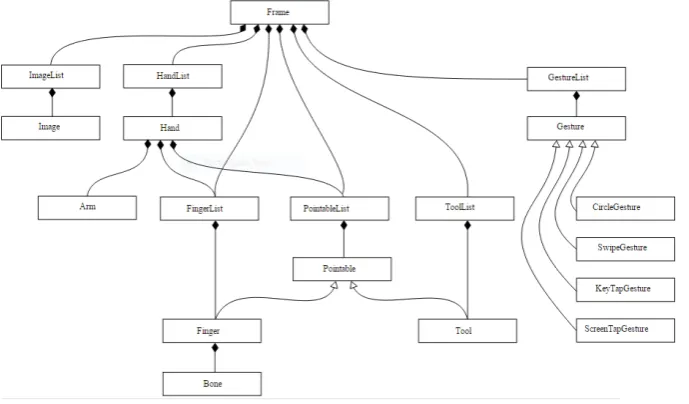
[image:35.595.67.412.191.393.2]During the development of the first media galleries multiple interaction methods were developed, tested and refined. The unity game engine allows easily to apply physics effects, checks on colliders or rigid bodies. To accessanyother data from the LEAP, its API must be well understood. Aligning 3D objects or positions to the deformed mesh of the virtual hand in the world space of the unity engine can become quite tricky because the raw coordinates that the LEAP reports are mapped from LEAPs coordinate system to local coordinates of the joints relative to the palm position, before they are mapped to world coordinates. Some designs require a swipe gesture of the hand. The LEAP API does not feature full hand swipe detection but reports swipes for each finger individually and stores the last registered swipes in a Gesture List (Figure q).
Figure q: Leap Motion, Inc (2015) tracking API structure retrieved from: https://developer.leapmotion.com/documentation/csharp/api/Leap.Controller.html
In the implementation a swipe is registered if swipes from multiple fingers are registered after a cool down. The ray or laser is using the raycast from unity which is commonly used for shooting guns in first person games. This cast has the advantage that it can send messages to hit objects. To visualize the ray a line renderer is drawn from the raycast origin till the vector where it hit something. Additionally if the ray hits a forward force is applied which makes the ray work with objects that use physic triggers to check states. The vertical hand could be implemented using the roll factor from the hand and its position converted into absolute floats to use it for rotation. For edge scroll rectangular areas in which this event is triggered were
defined. Grab for camera rotation checks if a threshold of grab strength is passed and compares the change of hand position between the current frame and its previous frame. Sphere uses the mapped hand position (Figure m) and updates the position of a collider object.
The current software of the showcase allows easy adjustments. Therefore a script was written that adjusts the spawn positions of the movie players to the amount of movies and content that is available.
All interaction methods can be used after training.
4.5.
Prototypes
Content
In the internal evaluations, the content gallery succeeded in navigation. It was an appropriate use to browse galleries with a lot of video content. Disadvantages were that it might fit better on horizontal instead of
vertical screens and arranged the videos in an unorganized unrelated presentation. One of the research questions was to analyse how informationcanbe best presented on a virtual showcase. It can be said that the media gallery approach is an appropriate use of touchless controls to navigate media content but does not fit to the concept of showcases. The interaction methods developed for the gallery browser were used
[image:36.595.58.209.211.435.2]for other concepts.
4.6.
Buttons
As concluded from the research section and design iterations own 3D Buttons needed to be developed. Because touchless buttons are fundamentally different from touchscreen buttons and normal GUI buttons different technical and conceptual implementations needed to get tested and compared. Because rounded objects are friendlier to look at, which is known as the contour bias [30, p. 62] the buttons here are spheres. These buttons are meant to be used for the Object Explorer design and represent information bubbles. Visitors of the Smartware exhibition have to succeed at navigating immediately. To avoid cluttering of too much screen space, still have the buttons big enough to activate them with the full hand and keep the virtual hand from being invisible because it is overlapped the buttons should be transparent. Big squared buttons might feel clunky in these sizes that’s why spheres were chosen instead [31]. Prior to the design of the buttons it was chosen that a button in 3D should not have a front side as this allows it to be activated only from one side. In internal tests this made the locations that buttons could be placed very restricted and difficult to use if the virtual hands are behind, above, below or next to it. The recommendation is to make buttons usable no matter from which side they are approached. The buttons from the Leap motion developers do not allow doingso (Figure t).
Figure t: Leap Example Button
4.6.1.
Direct buttons
Three designs for buttons that can be interacted directly with were chosen. They appear in the same space the virtual hand can appear. Therefore they should never be placed out of reach or at locations that can
become out of reach if the tracking quality of the LEAP is low. The range the buttons can be placed in is a bit larger if buttons can be activated from all sides.
4.6.1.1.
Push button
Figure u: Push Button
4.6.1.2.
Hover button
Hover buttons check for collision between the hand and the button and get triggered after a time threshold is passed. To visualise to users if they are hitting a button currently they grow in size if triggered.
4.6.1.3.
Squeeze button
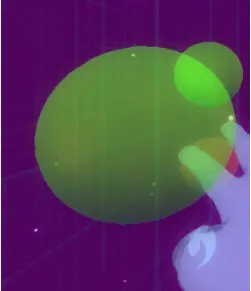
Because in the observations people tended to grab after the buttons, a squeeze button that resizes with grab strength were developed. They get triggered after a threshold of grab strength is passed.
Figure v: Squeeze Button