Android Memory Optimization
Kashif Tasneem
Department of Computer Scienceand Engineering University of Engineering and
Technology Lahore
Ayesha Siddiqui
Department of Computer Scienceand Engineering University of Engineering and
Technology Lahore
Anum Liaquat
Department of Computer Science Virtual University of Pakistan
ABSTRACT
Android is the most widely used smartphone OS, but it has always lacked behind iOS due to poor memory management. Many memory management techniques have been proposed until now such as Managing GPU Buffers, Detecting and Fixing Memory Duplications, Dynamic Caching etc. All of these techniques revolve around Android’s current memory structure which is Garbage Collector. In this paper, instead of improving the current structure, a different structure for memory management which is used in iOS known as Automatic Reference Counting (ARC) is proposed.
General Terms
Operating System, Memory Optimizations, Cache, Android, iOS.
Keywords
Main Memory, Operating System, OS, Android, iOS, Memory, Optimization, Cache, Pages, Paging, Garbage Collector, GC, ARC, Automatic Reference Counting
1.
INTRODUCTION
Now-a-days, smartphones have become a necessity for everyone. Most of us are too much dependent on smartphones to complete our daily tasks. In certain aspects, they have replaced our computers. With time, smartphones are evolving into much more powerful devices.
Android is the most commonly used Smartphone OS today because it’s Open Source and manufactures can easily integrate it into their hardware, making Android devices cheaper than their competitor iOS. Having the positives, it also has its negatives. One of the major problems faced by Android users are unexpected crashes and slowing down of devices with time. Such issues are mainly caused when your device runs out of memory. Phone makers keep on increasing the main memory to compensate but this is not the solution [12].
Currently, Android OS runs on memory structure known as Garbage Collector. Garbage Collector is a Java Memory Management tool as Android is built on Java Virtual Machine (JVM). Garbage Collector tracks and identifies dead objects and reclaims the space when they are no more needed. It can free the memory basically in two ways. First by periodically checking the dead objects and freeing their memory, second, immediately freeing the memory when it has some allocation to do which is greater than the free memory available. Let us suppose, we have an Android smartphone with a main memory of 1 GB. Now, there are three objects as a, b and c and when they are created, memory is allocated to each of these objects as per their requirement. When these objects are destroyed after serving their purpose, they are marked as dead but still memory is not freed completely. In this situation, if some new object is to be allocated some memory and its allocation size is greater than free memory available then a
crash will occur. This happens due the reason that Garbage Collector have not claimed the dead space through its periodic cycle until now. When it will claim the dead space immediately after receiving a new object of higher demands, it will cause a jerk and a poor user experience. Furthermore, JVM copies objects from one place to another during Garbage Collection and does not overwrite the old collected data. This can lead to privacy leaks and personal data to be compromised [11].
To solve such problems and improve memory management, various solutions have been proposed by keeping extra memory free by using GPU Buffers [1], Adaptive Background App Management [3], applying micro-optimisations [13], avoiding Memory Duplication [2][4], detecting bad programming practices and fixing those [14] etc. All of these techniques provide optimizations in current memory management system which is Garbage Collector. The main problem still remains that is how the Garbage Collector frees up memory of dead objects.
Purpose of the study is to propose a totally different approach to handle this problem. Use of Automatic Reference Counting (ARC) in Android devices instead of Garbage Collector can be a way towards improvement of memory issues.
2.
RELATED WORK
All proposed techniques until now, revolve around the same Garbage Collector. So, first, problems related to Android memory are discussed due to which Android shows poor performance. After that, suggested techniques of improving those problems will be discussed in detail.
2.1
Memory Leaks
Android runs on a Customized Linux Kernel which controls the hardware such as Memory and CPU and allows communication b/w hardware and user [1]. Two main components of Android application are Activities and Fragments [5]. Non-optimized code for these components which is most of the times mismanagement of resources [7], can lead to various memory leaks and hence memory issues. Details of these components are discussed below:
Activities are basic components of any Android OS. They basically represent a View Controller. A single view in an application is an Activity. Whenever, a new view is shown, it’s a new activity, when that view is dismissed, the activity is dismissed.
Fragments are pieces of UI. They are reusable components which can be used in various activities. Their life is dependent on the life of an activity. When an activity is created, fragments are created. When an activity is destroyed, fragments are also destroyed.
bitmap instances, unregister click handler events [5][6], closing cursor instances after accessing database and referencing objects from static classes or marking objects as static [5].
2.2
Controlling Memory Leaks
Various methods have been proposed to reduce and eliminate memory leaks such as use of LeakDAF [5], creating test cases to identify and fix memory leaks [6][7][8] by following certain programming guidelines.
LeakDAF uses UI test techniques to run the app and analyse memory dump files to identify leaked activities and fragments.
Test Cases technique to identify and fix memory leaks have been proposed by researchers in two separate ways which are as follows:
2.2.1
Prioritize Test Cases
Use an approach to prioritize test cases and run those cases in specific order instead of running all the test cases as they can be expensive and results in putting a lot of load on the CPU. The priority of the test cases is determined by implementing machine learning algorithms which predict accuracy of a test case to determine a memory leak [8].
2.2.2
Test Generation for Detection of Leaks
Proposes a technique which determines a natural sequence of GUI events such as app launch and close. Repetition of such events should not increase memory usage if there are no memory leaks. If there are leaks, memory will keep on increasing [7][8].2.3
Managing GPU Buffers
GPU is Graphical Processing Unit just like CPU but is used for the processing of graphics. With time, apps and games are evolving and becoming graphics intense, so need of a dedicated GPU is required. Smartphone devices are equipped with GPU just like desktop computers but there is a big difference between their GPUs. Desktop class GPUs have dedicated memory but due to the small size and portability of smartphone devices, smartphone GPUs don’t have dedicated memory but share memory with the main memory. This sharing decreases the available main memory [1].
Android caches the apps so that they are quickly launched the next time [1] they are called. When cached, GPU buffers are also cached because apps contain graphics. When app is terminated, its cached data still remains inside main memory, hence increasing memory usage and reducing available memory.
One of the current solutions is to compress the GPU buffers memory when app is sent to background and un-compress when it comes to foreground. Compressed memory will take a lot less space and will improve the overall performance of the device [1]. This compression and de-compression will increase access time which makes this solution less optimized.
2.4
Avoiding Memory Duplication
Memory Duplication is a process in which same memory pages are placed in the main memory more than once [2]. By using this duplication technique, when Garbage Collector frees up space, it takes a lot of CPU cycles which causes lags and even app crash sometimes. So, page duplication must be avoided so that Garbage Collector does not destroy the same content several times. To fix such problems, Android have introduced several mechanisms such as zRAM and Kernel
Same-Page Merging (KSM). KSM merges duplicated pages into one. zRAM uses a special allocated area in main memory known as the swap area, where it compresses the stored pages which need to be swapped out [2]. Both these mechanisms reduce memory usage but consume greater number of CPU cycles and power.
Memscope is a tool which can be used to avoid such problems. It takes memory snapshots at fixed time intervals. It identifies duplicate frames which may exist in a particular time and how will they change over the life cycle of the app. It analyses the snapshots and figures out the frames which have chances to duplicate and focuses on those frames to avoid duplication [2].
Another Method currently used to reduce and eliminate Memory Duplication is Selective Memory Duplication.
Instead of scanning the entire memory, it scans certain memory pages for duplications reducing CPU usage and power. This mechanism scans memory pages of the apps in background only once until they are brought in the foreground again because it’s highly unlikely that memory footprints will change for applications in background [4].
2.5
Adaptive Background App
Management
Tang Android OS keeps recently used applications in memory cache to reload them faster which decreases launch times and power consumption. When an app is launched and when it is stopped, both of these states are different. In Android OS, its built in Zygote process is responsible for launching apps, receiving and responding to user events. This process is also used for memory management in Android. When devices go to low memory stage, Low Memory Killer (LMK) starts to act and kills the least recent used (LRU) app. If the app to be killed is larger in size, it will take time to free the memory as well as when next time it is launched. Another technique is Out of Memory Killer (OOMK) which kills apps having low priority. It basically kills multiple apps at once to free the memory which will have bad consequences on these apps. In short, such mechanisms have these basic problems:
1. High Memory using apps have high priority to be killed.
2. Launch time of apps is not considered when victims are selected.
3. Reclamation of memory is on demand process and it has to make a decision quickly, so, an optimised algorithm can lead to wrong apps to be terminated [12].
Activity Manager Service (AMS) is responsible for handling user requests. It keeps the apps in cache using priority which is determined in the following order:
1. Application on the foreground.
2. A process bound to a foreground application. 3. A process bound to a background application. 4. Hidden process presents on device but not visible. 5. Content providing applications such as calendar,
email.
Current caching policies are somewhat static and do not change depending upon the user’s preference of using apps. Researchers have proposed a better solution which takes into account the reusability of apps to determine dynamic number of apps to be cached. This technique allows to effectively manage main memory for better caching and thus improving overall performance of the device [3][9].
One proposal suggested is to use a tool called SmartLMK. It is a dynamic process which is basically a low memory app running in background. It keeps track of app’s launch time, usage data and other characteristics. Using these statistics, it calculates a temporal penalty and used it to terminate an app [12].
2.6
Applying Micro-Optimizations
Micro optimisations must be applied on smartphone apps as they are more prone to performance issues. Micro optimisations should be applied at the start of life cycle of app as it’s easy to optimise when structure is being written as compared to when its completely written. According to the findings, removing unused variables and private methods improves performance as it reduces the memory footprint. Normally developers do not apply micro optimisations because:
1. Most of them do not know about this.
2. They think app is too small to apply any optimisation.
3. They don’t think spending time on micro optimisations is worthy.
4. They don’t believe that micro optimisations will help their apps.
The results are found using static analysis which is done by using tools such as FindBugs, PMD and LINT which provide warnings to improve code. One of the most useful optimizations found is the removal of unused code. But such tools and techniques are prone to faults and can’t be trusted completely [13].
2.7
Detecting Bad Programming Practices
Another solution proposed by researchers is CheckDroid tool which is used to identify bad programming practices. Fixing these can improve app performance and overall memory of Android OS. Such a tool is needed because bad practices are not normally identified and reported by the IDE. Most of the tools and techniques applied are to detect memory and performance leaks but bad practices have not been worked on. Some of the Performance recommendations after analysis are:
1. Verbose logging should not be left in live applications.
2. Long running tasks should be divided into sub threads.
3. These sub threads should have low priority than main thread.
Some of the main optimisations suggested are:
1. References to contexts should not be stored in static variables.
2. Threads created should be destroyed [14].
2.8
Partitioning Memory
Another proposal is to partition the main memory because Android uses LMK and OOMK to free up memory by killing victim processes which is not very efficient. So, a memory partitioning technique is proposed which divides memory in two virtual nodes.
1. Virtual Node 0 used for reliable applications. 2. Virtual Node 1 used for unreliable applications. If memory runs out of one node, memory of only that node will be freed up. Normally, unreliable apps take up a lot more memory than reliable apps. By following this methodology, memory can be saved somewhat from running out [15].
2.9
Handling Low Memory Using Logs
This technique proposes using the generated logs to determine user interactions and time spent on apps to dynamically change the priority of apps. This will allow to keep the high priority apps in cache and only kill low priority apps when low memory issue occurs [16].
2.10
Detecting Anti-Patterns
In trying to develop apps more quickly, developers nowadays tend to deviate from the programming patterns known as anti-patterns which result in poor designs and hence poor performance of apps. Paprika is a tool proposed which analyses code to identify anti-patterns and proposes the solutions to fix it. OOP is the basic building block of developing any kind of app, it provides reusability and other functionalities which were not possible before.
Android apks contain .dex file which contains compiled java classes. Android runs on Darvik Virtual Machine and its bytecode is different from Java. Numerous tools are available to reverse engineer .dex files.
Paprika first extracts metadata from the apk such as app name, bundle identifier and user reviews and then code entities such as classes, methods and variable names are also extracted. By using the extracted entities, a code model is computed as a graph with raw values. This model is stored in a graph database and then this database is queried to detect anti-patterns. These anti-patterns when fixed can lead to quite a bit of memory to be freed [17].
2.11
Limiting Software Aging
Software aging is a process in which performance of OS and apps degrade with time. Most of all the problem is memory leaking. With aging, free memory is reduced so less apps are cached and when new app is launched, memory needs to be freed up which will cost CPU cycles and battery. To detect and identify aging, resource utilization stats needs to be kept. To investigate memory leaks, device needs to be tested under severe conditions where it is prone to failure. For this, Exerciser Monkey was used by researchers which simulated touch events, mouse clicks and other common Android events. Tests were divided into sub tests with each test dependent on output of previous one. If aging was detected, next test was to be run for a longer time.
2.12
Non-Blocking Garbage Collector
Garbage Collector works on the principle of “stop the current execution, mark the objects to clear and sweep them out of memory” which can lead to unresponsive behaviours and even crashes. To fix these problems, a Real-Time Garbage collector is proposed by researchers which has the following two characteristics:
1. This GC will work incrementally with short blocking phase.
2. The speed of GC should be in accordance to the garbage created by the OS in order to avoid Out of Memory situations.
This will allow to free memory quickly as compared to a non-blocking Garbage Collector and will improve the overall performance of Android OS [19].
2.13
Use of Non-Volatile Memory
According to a study most of the users have app sessions less than 10 seconds and, in such case, shorter app loading time is necessary. Many solutions have been suggested for improving app launch times but most of the solutions are not hardware based. The solution suggested by researches is to use Non-Volatile Memory (NVM) or more specifically Phase Change Memory (PCM) as backup of main memory. NVM Memory is popular because it consumes less power. PCM is fast, very energy efficient for reading operations but consumes a lot of power in write operations and is very slow. Hence a DRAM-PCM hybrid solution is proposed to improve application launch times.
A study was conducted to analyse apps based on memory and it was found that apps fall in two types of categories:
1. Stable apps where memory increases up to first 10 seconds then gets stable.
2. Unstable apps where memory keeps on increasing with time and never stabilises.
Keeping both types of apps in mind the solution proposed is the use of NVM as backup of main memory. When GC kicks in and removes the data from main memory, the data is migrated to NVM. Special regions are assigned to NVM which store data of mostly used apps and common shared libraries. This will allow better launch times even when apps are not cached in main memory, but they will be present in backup memory [20].
All of these solutions are more or less about optimizing caching and memory management systems already present in Android but none of them truly handle these problems with a proper and well-defined solution.
3.
PROPOSED SOLUTION
An entirely different approach to replace Android’s Garbage Collector system with iOS’s Automatic Reference Counting (ARC) system is proposed.
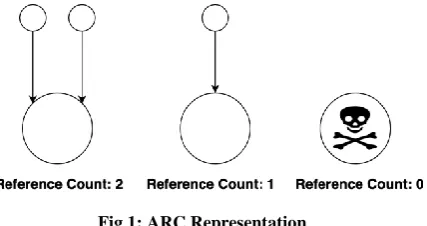
So, what is ARC? ARC is a system in which each created object is assigned an integer data member named “referenceCount”. This count is incremented by 1 when a reference to this object is made and is decremented by 1 when a reference to this object is destroyed. When referenceCount reaches zero, the object is destroyed, and its memory is freed. There is no need to recycle references and unregister events as in Garbage Collector. When object is destroyed, all things
[image:4.595.327.541.99.212.2]related to it are destroyed and hence freeing memory on its own. This mechanism of ARC is shown in figure 1.
Fig 1: ARC Representation
The biggest difference between ARC and Garbage Collector is that the ARC releases the memory instantly when object is freed. While Garbage Collector, marks the freed objects and cleans up memory after periodic intervals or when OS runs out of memory.
Fig 2: Android ImageView loading
Now let’s discuss some code examples of memory management in Garbage Collector and ARC to further clarify the difference between these two approaches. For the code examples, ARC is used in Swift Language on Xcode.
Fig 3: iOS ImageView loading
IDE and Garbage Collector is used in Java Language on Android Studio ODE. First, both in iOS (ARC) and Android (Garbage Collector), let us assign image references to ImageView objects created in their respective UI resource files in figures 2 and 3.
Collector. While iOS do not need to do anything like this. When parent class is destroyed, referenceCount of myImageView object is decreased and it reaches zero, hence it is destroyed, and memory is freed automatically. Here, another example is shown in figure 4.
Fig 4: Dynamic Creation of a reference Object in iOS
In Figure 4, a reference object (secondImageView of type UIImageView) is created dynamically and added to parent view. When parent view is destroyed, referenceCount of secondImageView become zero and is destroyed automatically. This shows that even for dynamically created objects, there is no need to assign null reference when parent view is deallocated. This is a huge performance gain as compared to Garbage Collector which requires that you assign null to references to mark them for Garbage Collection.
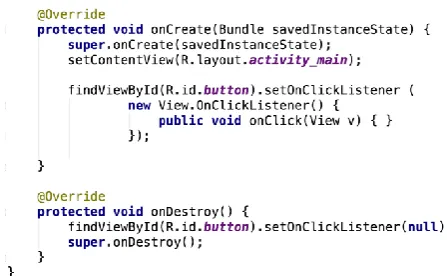
Fig 5: Android Button Registering and Unregistering event
Now let’s consider another common example of registering button event in both memory models as shown in figures 5 and 6.
Fig 6: iOS Button Registering event
In case of Android (figure 5), after registering for click event of a button, it is must to unregister it else it will cause memory leak. However, nothing like this is needed in iOS. In iOS (figure 6), when parent class is destroyed, referenceCount of myButton_ object is decreased and it reaches zero, hence it is destroyed, and memory is freed automatically.
After comparing both ARC and Garbage Collector, let us see ARC in bit of more detail.
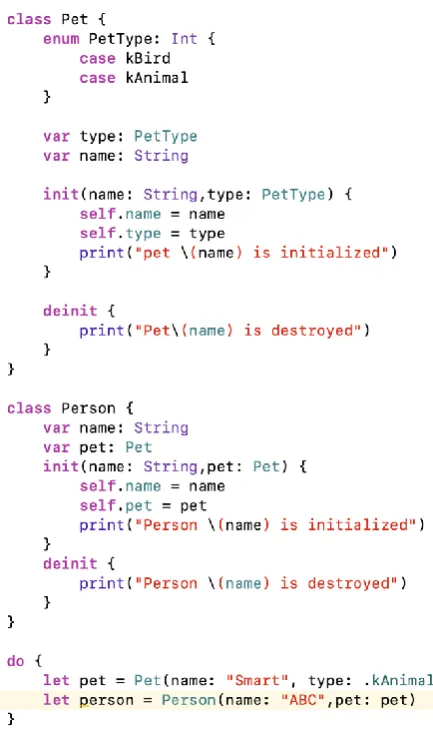
[image:5.595.53.277.424.562.2]In ARC, references are bound to scopes. Scopes can be global, they can also be local. For example, objects created with in a block are deallocated automatically when the block execution is complete. Such an example is shown in figure 7.
Fig 7: ARC Local Scope Example
Fig 8: ARC Global Scope Example
In the above-mentioned example, pet is data member of Person class, when Person class is destroyed, there is no need to assign null to its data member pet as pet is deallocated automatically.
After going through the examples, it is evident that Garbage Collector is more prone to memory leaks whereas ARC handles memory automatically in a more efficient way. Summary of main advantages of ARC over Garbage Collection is as follows:
1. ARC frees up memory instantly when object is destroyed unlike Garbage Collector’s sweep and mark approach.
2. Variables don’t need to be marked null or recycled
and click events don’t need to be removed to avoid memory leaks.
3. Objects are destroyed automatically when get out of scope.
It is due these facts that iOS devices perform much better than their Android counterparts and due to this reason iOS devices possess almost 1/3rd less memory as compared to a same performance Android device.
4.
CONCLUSION
After running same basic actions on both Android’s Garbage Collector and ARC of iOS, it is concluded that ARC model
adopted as the default memory system of Android. As most of the apps running on any smartphone are from 3rd party developers, the IDEs must also introduce a feature which shows all the references of a particular object so that it’s easy for developers to detect memory leaks. Furthermore, in the near future, a modern language such as Swift should be used in Android development as such a language can decrease chances of memory leaks, hence providing smooth app experience and low usage of main memory.
5.
FUTURE WORK
ARC is a very good approach to handle memory in a much efficient way and should be adopted by Google for Android. But one important thing still remains which is the language itself that is Java. Java has become quite an old language and is not keeping up with latest trends and features of modern development languages. Java was a very good choice of language when Android OS was launched but after all these years, it looks obsolete. There is need to adopt a modern language with advanced features which help in better code structure and contains micro-optimizations within itself. Modern languages now contain built-in memory optimization tips which are reported by the compiler at run time which can greatly optimise the code written and use less memory. For instance, let us see some features of the Swift language.
5.1
Mutable Vs Immutable Objects
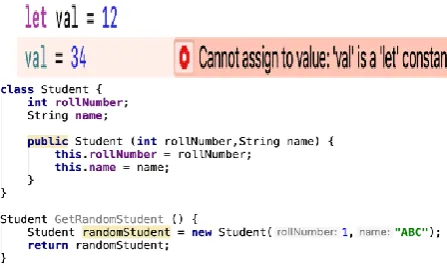
Immutable object is like a constant object whose value can be assigned only once. While mutable objects can be assigned values more than once. Swift uses this concept very powerfully and through warnings indicates to the programmer where to use immutable and where to use mutable objects. This can help a lot in decreasing memory usage as immutable objects take less memory than mutable objects. An example is shown in figures 9 and 10.
Fig 9: Error assigning to an immutable object
Fig 10: Warning when mutable object is not overwritten
5.2
Optimizing Loops
Loops are basic part of any programming language and are used quite frequently. In modern programming languages such as Swift, memory can be saved even from loops. Consider a for loop which iterates from start value to end value. A variable is assigned to it which increments it and then iterates as shown in figure 11.
Fig 11: For loop in java
Here even though the value of variable “i” is not needed with in the loop, it is still being manipulated. Swift proposes a better solution which is the removal of variable “i” when it’s not required to save memory as shown in Figures 12 and 13.
Fig 13: For Loop with no warning in Swift
5.3
Use of Tuples
[image:7.595.57.281.325.465.2]Swift has introduced another very important data type called Tuples which has allowed programmers to use objects having different data members without creating new class or structure. Tuple groups multiple values into one compound value instead of creating a new class or structure which saves memory. For example, multiple values are needed to return from a method. In traditional programming languages, a custom class is needed to create or structure or dictionary to return these values as shown in figure 14.
Fig 14: Traditional Language Complex Object Example
Now let’s see an example of tuple as shown in figure 15:
Fig 15: Tuple Example
As it can be seen from above figure, just creating a tuple with different data types and returning its object can make it accessible as shown in figure 16.
Fig 16: Tuple element access Example
With the above-mentioned examples, it can be deduced that a modern language can decrease memory consumption quite a bit. These are just few examples of memory management improvement. There are many other aspects which can be considered to uplift the smartphone OS development.
6.
ACKNOWLEDGMENTS
We are greatly thankful to the department of computer science and engineering, UET Lahore for giving us this opportunity to do research in different areas.
7.
REFERENCES
[1] Kwon, S., Kim, S. H., Kim, J. S., & Jeong, J. (2015, October). Managing GPU buffers for caching more apps in mobile systems. In Proceedings of the 12th International Conference on Embedded Software (pp. 207-216). IEEE Press.
[2] Lee, B., Kim, S. M., Park, E., & Han, D. (2015, July). Memscope: Analyzing memory duplication on android systems. In Proceedings of the 6th Asia-Pacific Workshop on Systems (p. 19). ACM.
[3] Baik, K., & Huh, J. (2014, June). Balanced memory management for smartphones based on adaptive background app management. In Consumer Electronics (ISCE 2014), The 18th IEEE International Symposium on (pp. 1-2). IEEE.
[4] Kim, S. H., Jeong, J., & Lee, J. (2014). Selective memory deduplication for cost efficiency in mobile smart devices. IEEE Transactions on Consumer Electronics, 60(2), 276-284.
[5] MA, J., LIU, S., YUE, S., TAO, X., & LU, J. LeakDAF: An Automated Tool for Detecting Leaked Activities and Fragments of Android Applications.
[6] Shahriar, H., North, S., & Mawangi, E. (2014, January). Testing of memory leak in Android applications. In High-Assurance Systems Engineering (HASE), 2014 IEEE 15th International Symposium on (pp. 176-183). IEEE.
[7] Zhang, H., Wu, H., & Rountev, A. (2016, May). Automated test generation for detection of leaks in Android applications. In Automation of Software Test (AST), 2016 IEEE/ACM 11th International Workshop in (pp. 64-70). IEEE.
[8] Qian, J., & Zhou, D. (2016). Prioritizing Test Cases for Memory Leaks in Android Applications. Journal of Computer Science and Technology, 31(5), 869-882. [9] Vimal, K., & Trivedi, A. (2015, December). A memory
management scheme for enhancing performance of applications on Android. In Intelligent Computational Systems (RAICS), 2015 IEEE Recent Advances in (pp. 162-166).
[10] Yan, D., Yang, S., & Rountev, A. (2013, November). Systematic testing for resource leaks in Android applications. In Software Reliability Engineering (ISSRE), 2013 IEEE 24th International Symposium on (pp. 411-420). IEEE.
[11] Pridgen, A., Garfinkel, S., & Wallach, D. S. (2017). Picking up the trash: Exploiting generational GC for memory analysis. Digital Investigation, 20, S20-S28. [12] Aponso, G. C. A. L. (2017). Effective Memory
Management for Mobile operating Systems. American Journal of Engineering Research (AJER), 246.
[14] Yovine, S., & Winniczuk, G. (2017, May). CheckDroid: a tool for automated detection of bad practices in Android applications using taint analysis. In Proceedings of the 4th International Conference on Mobile Software Engineering and Systems (pp. 175-176). IEEE Press. [15] Lim, G., Min, C., & Eom, Y. I. (2013, January).
Enhancing application performance by memory partitioning in Android platforms. In Consumer Electronics (ICCE), 2013 IEEE International Conference on (pp. 649-650). IEEE.
[16] Prodduturi, R., & Phatak, D. B. (2013). Effective handling of low memory scenarios in android using logs. Indian Institute of Technology.
[17] Hecht, G., Rouvoy, R., Moha, N., & Duchien, L. (2015, May). Detecting antipatterns in android apps. In Proceedings of the Second ACM International
Conference on Mobile Software Engineering and Systems (pp. 148-149). IEEE Press.
[18] Araujo, J., Alves, V., Oliveira, D., Dias, P., Silva, B., & Maciel, P. (2013, October). An investigative approach to software aging in android applications. In Systems, Man, and Cybernetics (SMC), 2013 IEEE International Conference on (pp. 1229-1234). IEEE.
[19] Gerlitz, T., Kalkov, I., Schommer, J. F., Franke, D., & Kowalewski, S. (2013, October). Non-blocking garbage collection for real-time android. In Proceedings of the 11th International Workshop on Java Technologies for Real-time and Embedded Systems (pp. 108-117). ACM. [20] Kim, H., Lim, H., Manatunga, D., Kim, H., & Park, G.