Design of the Model Predictive Control Education and
Application Interface
Eray Yilmazlar, Erkan Kaplanoğlu
Department of Mechatronics, Technical Education Faculty, Marmara University, Istanbul, Turkey. Email: [email protected], [email protected]
Received June 25th, 2012; revised July 30th, 2012; accepted August 15th, 2012
ABSTRACT
In this study, an education and application interface was designed for model predictive control (MPC). For this design, MPC Toolbox and MATLAB GUI in the MATLAB software were used. Developed interface includes model predictive control methods, such as single-input single-output, multi-input multi-output, constrained or unconstrained systems. The interface, developed for education of model predictive control methods, was tested in class by the students attend- ing to the Process Dynamic and Control course.
Keywords: Model Predictive Control; MATLAB MPC; MPC Toolbox; MPC Interface
1. Introduction
In the application of automatic controllers, it is important to realize that controller and process from a unit; credit or discredit for results obtained are attributable to one as much as the other. A poor controller is often able to per- form acceptably on a process which is easy controlled. The finest controller made, when applied to a miserably designed process, may not deliver the desired perform- ance. True, on badly designed process, advanced con- trollers are able to eke out better results than older mod- els, but on these processes, there is a definite end point which can be approached by instrumentation and it falls short of perfection [1].
Model predictive control (MPC) is an advanced control method that has an important place in industrial control [2]. While initially it was applied solely within the petro- chemistry industry, today its use in other system control sectors increases [3]. Considering the structure of MPC, the controllers that generate output from the system to be controlled on the basis of predicting and optimizing the future behaviors of the system through mathematical mod- els are generally called as model predictive controls [4-6]. MPC refers to a class of computer control algorithms that utilize an explicit process model to predict the future response of a plant. At each control interval an MPC al- gorithm attempts to optimize future plant behavior by computing a sequence of future manipulated variable adjustments [7].
Today, there are many studies and innovations being carried out in international terms concerning the applica- tion and way of functioning of the methods of MPC [8].
As for the case in Turkey, according to the data obtained from a TUBITAK (Scientific and Technical Research Authority of Turkey) supported project, it was determined that many people concerned with process control have lack of knowledge on this matter. With the purpose of determining the current situation of MPC education the courses given in universities were examined and it was found out that some MPC-related topics are included within the scope of some postgraduate courses [9].
The using an effective experiment set or education in- terface for showing subject will help to present of subjects understandably and in a short time [10]. Graphical User Interface (GUI) of a system identification device used with MATLAB [11]. MATLAB is a well-known software package that is widely used for control system design, signal processing, system identification, etc. We propose using a GUI, which is especially suitable for beginners, to MPC [12].
On the basis of this study, it was considered that an application and education interface providing information on the differences, advantages and disadvantages of the model predictive control algorithm in comparison with other control systems and information on how and to which systems it can be applied is needed and an interface that runs on MATLAB environment was designed in order to fulfill this need.
2. Place of Model Predictive Control
Education and Application Interface
within Education
vation through the course, helps them in developing in- terest and positive attitude towards the course, concen- trating their attention on the topic, transferring their knowledge into new implementations and is useful for increasing the permanence of information. By utilizing these benefits of using interfaces, within the process of lecturing MPC method, which is commonly, used in the industry, as part of the university courses of Process Dy- namic and Control Systems, improvement of education quality is targeted. Also, by means of this interface the students will acknowledge the advantages and disadvan- tages of MPC in comparison with other control methods through the applications they will carry out with com- puters, and will be able to access the educational materials providing information on the way how and the systems to which the method can be applied. In addition, with these applications they will be able to examine the processes of MPC in detail and carry out analyses and evaluations [13].
3. Design and Use of Model Predictive
Control Education and Application
Interface
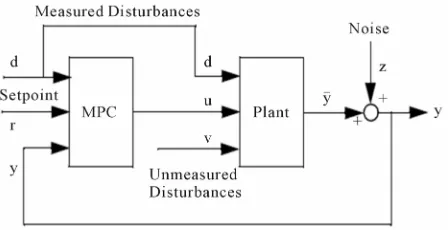
[image:2.595.58.287.588.721.2]Operation process of the MPC method is presented in Figure 1. The y output, which is defined as the target, aims at the optimal operation of the system according to the reference input. The effect of the variables affecting this operation process, or in other words the adjustable variables, is considerable on the output reaching the target [14].
By means of the model predictive control method used in controlling this effect, the variations of the adjustable variables are predicted through the prediction horizon and the problems these variations may cause in reaching the desired objective is removed in the shortest time possible. Prediction horizon indicates the process where the future output of the system is scanned [15].
3.1. Performance of Model Predictive Control on Matlab MPC Toolbox
[image:2.595.310.534.593.708.2]MPC function runs under the MPC Toolbox of MATLAB.
Figure 1. Operation process of model predictive control.
This control method can also be conducted on MATLAB m file or on Simulink. The study was carried out with a user interface that runs with the codes connected to MPC Toolbox on m file.
System block figure of the MPC process is shown in Figure 2. Definitions of this block are given in Table 1 before starting the MPC process, the variables given in Table 1 have to be determined [16]. The most important ones among these are the mathematical models of the system to be controlled and the measurable disturbances that affect this system. After the mathematical models of the system are developed, these models are converted into transfer functions and this conversion is defined on MATLAB m file [17]. Other factors that is necessary to be defined are related with the control system such as pre- diction horizon, control horizon, reference values and the running duration of the process. Output equation matrix of
an interaction system is 1 11 12 13 23 21 22
2
Y G G G
d G G G Y
as an example. Here, 11 12 21 22
11 12 21 22 stand for the mathematical models of the system to be controlled while
, , ,
G G G G
, , ,
G G G G
is the control signal to be applied on this system. includes reference value, control horizon, prediction horizon, feedback signal and disturbance value. 13 23 indicate the mathematical model of measurable disturbances and d indicates the numerical value of the disturbance. The data of this equation were entered through m file and commands and algorithms that work under MPC Toolbox were created. These algorithms vary by each control process. For in-stance the system being single-input single-output, multi- input multi-output, constrained MPC, unconstrained MPC or establishment of the modeling method as transfer function or state space matrix changes the commands and algorithms [18].
U
,
G G
3.2. Interface Design on MATLAB GUI
Interfaces were designed on MATLAB GUI in order to enable this study to be conveniently utilized in various applications and the monitoring of the cases in different
Table 1. Variables of model predictive control process.
v Immeasurable disturbance. These are the disturbances the effects on the field are not certain. MPC corrects this through feedback.
r Reference input signal.
u Adjustable variable signal. It is the signal received from the output of MPC control block.
d Measurable disturbance It is the signal included in the field and controller through feed forward in order to minimize the effect of received measurable disturbances via predictive control.
y Output signal.
y Adjustable output signal.
[image:3.595.310.537.560.710.2]z Immeasurable noise. Undesired factors such as electrical noises, sampling errors or calibration difference.
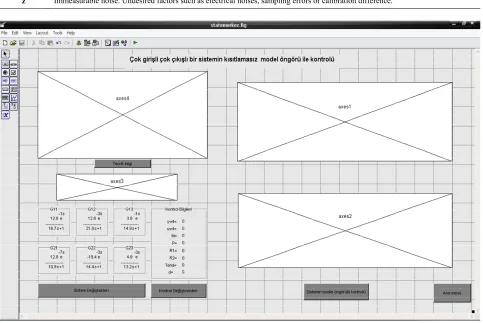
Figure 3. Interface designed for the unrestricted model predictive control of a multi-input and multi-output system.
processes for educational purpose. These designs were again carried out through the Tools menu on GUI. It is shown in Figure 3.
3.3. Operation of the Model Predictive Control Education and Application Interface
When the designed interface is started, at first the entry page is displayed as shown in Figure 4.
Five applications of the interface are presented in this page. These are:
Unconstrained model predictive control of a single- input single-output system.
Constrained model predictive control of a single-input
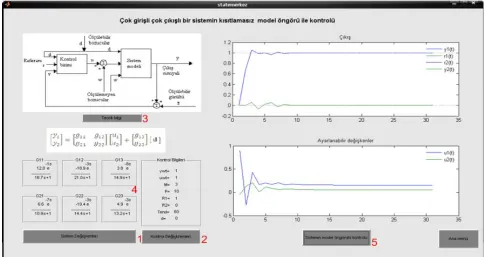
Figure 5. Active use of the interface window designed for the unrestricted model predictive control of a multi-input and multi-output system.
Unconstrained model predictive control of a multiple- input multiple-output system.
Constrained model predictive control of a multiple- input multiple-output system.
Model predictive control of a multiple-input multiple- output system constrained with state space matrixes. The operation of an active application is shown in Figure 5. The sections that constitute this interface and their tasks are as follows.
1) System Variables Button: The mathematical model of the system and the measurable disturbance is entered and saved into the GUI window that opens with this but-ton as a model transfer function.
2) Control Variables Button: The reference values, prediction and control horizon values and the values of input and output constraints of the system to be controlled are entered into the sub GUI window that opens by clicking on this button.
3) Theoretical Information Button: Clicking on this button opens the sub GUI window from where the in-formation on the system, the MPC process and control algorithms are displayed.
4) System and Control Information: The data saved with the system variables and control variables buttons are displayed separately on the interface window.
5) System Model Predictive Control Button: Clicking on this button directs data concerning the system and control variables to MPC Toolbox and calculation is made with the algorithms on m file. Calculated output signal
values are shown from the graphic windows titled as ad-justable variables and output.
4. Conclusion
In consequence of these works carried out, absorption of the MPC methods and kinds, monitoring of the control process and the results of the components affecting this process and convenient testing of the designed systems were enabled. The materials and applications to which the model predictive control can be applied and monitored from can be used particularly in courses concerning process control. The study was tested together with the students attending to the Process Dynamic and Control course in the Mechatronics department of the the Graduate School of Natural and Applied Sciences of Marmara University during the semester and a concrete design was set forth after correcting the deficiencies, from which both the teachers and the students can monitor the process. It is considered that the designed interface will have a sig- nificant role in spreading this control system, which is commonly used in the international industry, also in Turkey.
REFERENCES
[1] S. Skogestad and I. Postlethwaite, “Multivariable Feed- back Control Analysis and Design,” John Wiley & Sons, New York, 1996
Predictive Control,” Automatica, Vol. 29, No. 5, 1993, pp.
1251-1274. doi:10.1016/0005-1098(93)90049-Y
[3] J. B. Rawling, “Tutorial Overview of Model Predictive Control,” IEEE Control Systems Magazine, Vol. 20, No.
3, 2000, pp. 38-52. doi:10.1109/37.845037
[4] E. Kaplanoglu, “Predictive Control Applications of Multi Input Multi Output Constrained Systems,” Dissertation Thesis, The Graduate School of Natural and Applied Sciences of Marmara University, Istanbul, 2006
[5] D. W. Clarke, C. Mohtadi and P. S. Tuffs, “Generalized Predictive Control—Part I. The Basic Algorithm,” Auto- matica, Vol. 23, No. 2, 1987, pp. 137-148.
doi:10.1016/0005-1098(87)90087-2
[6] H. Demircioglu and P. J. Gawthrop, “Continuous-Time Generalized Predictive Control (CGPC),” Automatica,
Vol. 27, No. 1, 1991, pp. 55-74. doi:10.1016/0005-1098(91)90006-N
[7] S. J. Qina and T. A. Badgwellb, “A Survey of İndustrial Model Predictive Control Technology,” Control Engine- ering Practice, Vol. 11, No. 7, 2003, pp. 733-764.
doi:10.1016/S0967-0661(02)00186-7
[8] F. Temurtas, H. Temurtas, N. Yumusak and C. Oz, “Effects of Trajectory Planning on the Model Based Predictive Robotic Manipulator,” Control. ISCIS 2003, LNCS 2869, 2003, pp. 545-552.
[9] E. Kaplanoglu and E. Yilmazlar, “Industrial Adaptation for a Constrained Predictive Control Algorithm and In-dustry Status in Turkey in Terms of Expectations,” The Scientific and Technological Research Council of Turkey (TÜBİTAK) 1002 Fast Support, 2011.
[10] A. Karaarslan and I. Iskender, “PFC Control Techniques Education for Electrical and Electronics Engineering Students Using Computer Software and Experimental Application,” Energy Education Science and Technology Part A—Energy Science And Research, Vol. 29, No. 1,
2012, pp. 367-380.
[11] E. Kaplanoğlu and H. Topdal, “A Simulator For Educa- tion of Robotics,” International Journal of Electronics, Mechanical and Mechatronics Engineering, Vol. 1, No. 1, 2009, pp. 45-48.
[12] H. Takanashi and S. Adachi, “Graphical User Interface of System Identification Toolbox for MATLAB,” INTECH, Croatia, 2010, p. 270.
[13] D. C. Hillman, D. J. Willis and C. N. Gunawardena, “Learner-Interface Interaction in Distance Education: An Extension of Contemporary Models and Strategies for Practitioners,” The American Journal of Distance Educa- tion, Vol. 8, No. 2, 1994, pp. 30-42.
doi:10.1080/08923649409526853
[14] J. M. Maciejowiski, “Predictive Control with Constraints,” Prentice Hall, Upper Saddle River, 2002.
[15] N. Ricker and M. Morari, “Model Predictive Control Toolbox User’s Guide,” 1998.
[16] I. Yuksel, “Otomatik Kontrol,” Nobel, 2006
[17] E. F. Camacho and C. Bordons, “Model Predictive Con- trol,” 2nd Edition, Springer-Verlag, London, 2007. [18] D. W. Clarke and R. Scattolini, “Constrained Receding-
Horizon Predictive Control,” IEEE Proceedings, Vol. 138,