1 Available online at www.ijiere.com
International Journal of Innovative and Emerging
Research in Engineering
e-ISSN: 2394 - 3343 p-ISSN: 2394 - 5494
Ball bouncing game for Android using MIT App Inventor II
Sunil S. Shah
a, Kunal J. Pithadiya
baLecturer, Computer Engg. Dept.,BBIT College, V.V.Nagar, Gujarat, India, [email protected] bLecturer, EC Dept., BBIT College, V.V.Nagar, Gujarat, India, [email protected]
ABSTRACT:
We cannot imagine today’s life without Smartphone. Smartphone requires and OS to gets operated. There
are many types of OS normally available for a Smartphone 1. Android OS for Google 2. IOS for Apple. 3. MeeGo OS for Nokia. 4. Windows Mobile for Windows Phone 5. BlackBerry OS for Research in motion. In an android phone APK is very much necessary to get the thing done in an easy and efficient manner. In today’s era it is very much necessary to have an APK for android mobile to do the task. By using APK in android mobile phone it is possible to do almost infinite types of work related to medical field, industrial field, engineering field, administration field etc. in this paper we have explored MIT App Inventor II which is easiest tools for the APK development beginners. In this MIT Inventor II we have tried to develop a small game regarding ball bouncing. In this MIT App Inventor II we have coded in block programming and also used few features like vibrator, gyroscope sensor, different colors background, ball size etc. This is nothing but a simple balancing game in which one has to balance the ball with time decay if it gets miss balance then the game could be stopped and same time mobile phone gets vibrated for few second.
Keywords: Android OS, APK, Gyroscope Sensor, MIT App Inventor II, Smartphone
I. INTRODUCTION
Now days APK is very well known word. Every smart phone user knowingly and unknowingly, has to deal with APK installed in their device. Few years back, only professional android developer can develop an APK. MIT APP Inventor II, an android APK development tool which is really helpful for beginners. By using this tool a layman or beginner can develop a small APK for android easily. It works on Block programming. In [1] Dr.HuiRu et al., have used MIT APP inventor II and developed android APK based on Emergency Management course to promote computational thinking. Through this course, students have opportunities to explore the exciting world of computer science from the perspective of mobile computing.MIT App Inventor is a drag and drop or block programming tool that facilitate users to make applications for Android devices. MIT App Inventor can allow students without any background in information technology to see computing concepts in a context that is of great interest to them. In [2] Jerry Chin et al., introduces visual programming concept with MIT app inventor with different features. In this paper, Tersus is also discussed with graphical programming example. In this paper, he also worked on programming in MIT APP inventor which starts from scratch. The student has to take decision according to given problem and then he has to make flow diagram of a program. After few examples it is shown how an android APK is created. In [3] Huang Li-Jeng1 et al., have developed an APK based on House selling service using MIT APP inventor. System development procedures, layout design and program coding will be explained. Inspired from above work we have developed an APK for gyroscope sensor based android APK named as ball bouncing game.
II. DETAILS OF MITAPP INVENTOR II
App Inventor offers you development tools to create applications for Android phones either a connected phone or an on-screen phone emulator. The MIT App Inventor servers help you to save your work for future reference. You can build an application by working with, the App Inventor Designer, where you select the pallets with components for your APK.The App Inventor Blocks Editor, where you can place blocks and set the properties for the behaviour.This programming is like pieces of puzzle where you can fit your pieces as required. Your APK appears on the phone step-by-step as it is shown in below figure1, so you can test your work. If anyone does not have an Android phone then MIT provides an emulator on which one can run programs and test it.
Volume 4, Issue 2, 2017
2 still wants to check APK then emulator is available for the same. Emulator will shows simulator version of smart phone screen.
Figure 1. APK development process
Courtesy: http://mobiputing.com/tag/app-inventor/
By using MIT App Inventor II you need not to be a professional developer. In this no need to writing code but we can design by placing blocks according to APKs design.
Figure 2 shows the example of block programming concept. In this, blocks from the saved stack will be drawn and arranged as per programme. Block programming is preferred over syntax programming.
Figure 2. Block Programming Courtesy: http://ai2.appinventor.mit.edu/
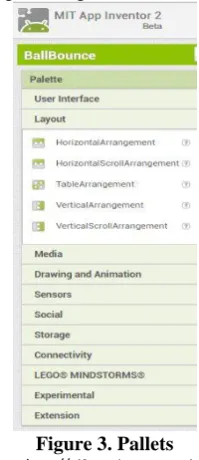
Figure 3. Pallets Courtesy: http://ai2.appinventor.mit.edu/
Figure 3 shows different types of pallets like User interface, Layout, Media etc. By using pallets shown above, one can enhance and innovate own APK version of their application. Suppose Button can be added on screen from user interface pallet and horizontal arrangement can be added from layout pallet.
III. WHAT IS AN APK?
3 installing an APK file on their device. A user or developer can also install an APK file directly to a device. Some APK files may contain malicious software which could compromise your phone's security. It is best not to downloading or installing any application from outside of the Play Store.
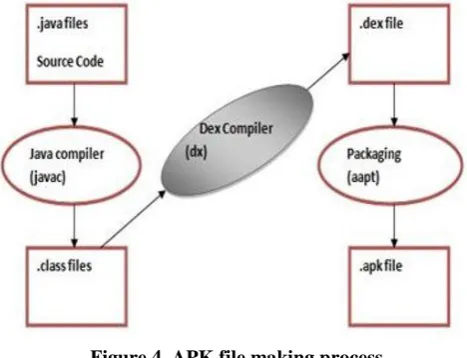
To making an APK file first of all source program is first compiled then all its parts are packaged into one file. The process of making APK file is as shown in below figure 4.
Figure 4. APK file making process
Courtesy: http://www.journaldev.com/9319/android-studio-project-structure-compiler-proguard
IV.SENSORS USED IN MIT APP INVENTOR II[4]
Now a day’s all the Android smart phones equipped with different types of sensors like accelerometers, gravity sensors, gyroscopes, rotational vector sensors, barometers, photometers, thermometersand magnetometers etc. These sensors are used to measure movement with velocity, their X-Y coordinates, temperature, humidity etc.By using above sensors our smart phones are now capable to analyse input data with precise measurements and accuracy. It can also measure device movement it’s positioning or change in natural circumstances.For example a ball bouncing game install in Smart phone depends on gyroscope sensors. It deals with gravity, motion, tilt, rotation etc. Likewise smart phone can measure temperature, humidity, and it can also generate its reports. Smart phone also has equipped with geomagnetic and accelerometer sensors used for travelling and compass respectively.
There are three types of sensors used in android phone in broad sense which are listed below
1. Motion sensors: These sensors deal with acceleration forces and rotational forces along three axes. For example, accelerometers, gravity sensors, gyroscopes, and rotational vector sensors
2. Environmental sensors: These sensors deals with various environmental parameters, like ambient air temperature and pressure, illumination, and humidity. For example, barometers, photometers, and thermometers
3. Position sensors: These sensors deal with the physical position of a device. For example orientation sensors and magnetometers
V. DETAILS OF BALL BOUNCE GAME
Volume 4, Issue 2, 2017
4
Figure 5. Viewer Panel Courtesy: http://ai2.appinventor.mit.edu/
It also measures tiltness of smart phone with respect to surface. We have developed an APK called Ball bouncing game (Ball game). Initially working with the MIT App Inventor, User has to set screen or front screen that appears on smart phone whenever APK is executed. That is shown in Figure 5 it is called viewer panel. There are two options available for programming in App inventor 1. Designer and 2. Blocks
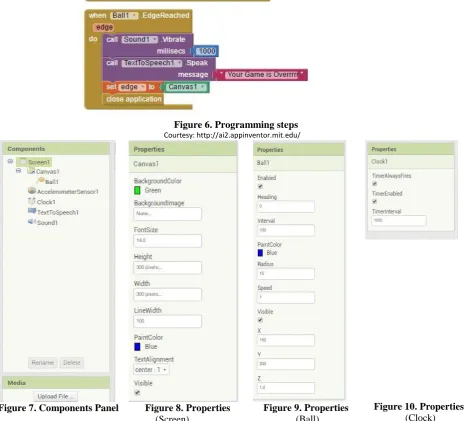
Now, user can add required features called components in App inventor, on front screen of APK to be developed in designer option. Now, whatever components are added in designer option that will be followed as blocks in Block option which is shown in Figure 6 as programming steps. Different types components used in this APK is shown in Figure 7. Every component used in App Inventor has certain properties attached with. It means one has to set the properties of all components used in APK. Here, Figure 8 shows the properties of Canvas1 which is nothing but the front screen of Ball Bouncing APK. Same way Figure 9 and Figure 10 shows the properties related to Ball and Clock respectively used in Ball Bouncing android APK.
Figure 6. Programming steps Courtesy: http://ai2.appinventor.mit.edu/
Figure 7. Components Panel Figure 8. Properties
(Screen)
Figure 9. Properties
(Ball)
Figure 10. Properties
5
Courtesy: http://ai2.appinventor.mit.edu/
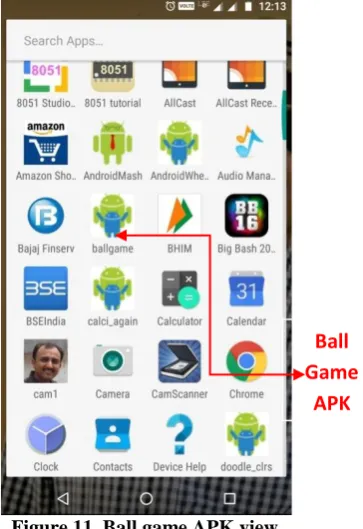
Figure 11 shows APK view installed in smart phone. In this APK we have made a front screen with the fluorescent green background initially. Then we have chosen small size circle with blue background and called it a Ball as shown in Figure 12. In our APK we have made a code of shaking of ball or movement of the ball with respect to parallel surface of ground. Because of the high sensitivity of the gyroscope sensor ball shakes in high speed on the screen. To play a ball game one has to balance the ball at the center of the screen of smart phone. If any imbalance occurs then ball will move to and fro on the screen. In the to and fro movement of the ball if it touches the border line of the screen either horizontally or vertically then the game is over with one second vibration. So it is basically a ball balancing game as much as you balance your time score rises. This game also helps to increase concentration.
Figure 11. Ball game APK view Figure 12. Ball game front screen
VI.CONCLUSIONS
After the development of this ball bouncing game APK on android we feel that it is very easy process. To develop an APK for android is a very difficult and cumbersome task. We are so thankful to MIT App Inventor II, through which it is found so easy. We are suggesting that by using MIT App Inventor II beginner can develop professional background APKs and compete with android APK developers.
REFERENCES
[1] Dr. HuiRu Shih P.E. et al., Jackson State University , “Using MIT App Inventor in an Emergency Management Course to Promote Computational Thinking”, Paper ID #8719,121st ASEE Annual Conference & Exposition,Indianapolis, IN, June 15-18,2014.
[2] Jerry Chin et al., “STRING SEARCH MARKETING APPLICATION USING MIT APP INVENTOR VISUAL
PROGRAMMING”, European Journal of Business and Social Sciences, Vol. 3, No.3 ,pp 178-188, June 2014. [3] Huang Li-Jeng1 et al., “ Android AppDesign ofStatic and Dynamic Visual-Aids forHouse SellingService Using
App Inventor2”,International Journal of Recent Development in Engineering and Technology, IJRDET Page 90-100, ISSN 2347-6435(Online) Volume 3, Issue 4, October 2014
[4] https://developer.android.com/guide/topics/sensors/sensors_overview.html