Part –II Development Processes
Introduction
•
Current users are not dedicated to technology,
their background is more tied to their work
needs.
•
Design should be based on careful observation
of current users, refined by thoughtful analysis
of task frequencies and sequences, and
validated through early usability and
acceptance tests.
Organizational Design to support Usability
• Many organizations have created usability laboratories to provide
expert reviews and to conduct usability tests of products during
development.
• Usability test subjects perform benchmark(target) task in carefully
supervised conditions.
• Companies may not yet have chief usability officers(CUOs) or vice presidents for usability, but they often have user-interface architects
Organizational Design to support Usability
• In most large and small organizations, each project should have its own user-interface architect who
• develops the necessary skills,
• manages the work of other people,
• prepares budgets and schedules,
• and coordinates with internal and external human-factors professional when further references or usability tests are required.
• This dual strategy balances the needs for centralized
Organizational Design to support Usability
• Individuals will become highly skilled in specific problems
such as user-interface building tools, graphic-display
strategies, voice and tones design and online tutorial writing.
• As design moves to implementation, the choice of
user-interface building tools is vital to success.
• It enables the designers to build novel systems quickly and support the iterative design/test/refine cycle.
• Usability engineers and user-interface architects who have a
Organizational Design to support Usability
• Design is inherently creative and predictable.
• Carroll and Rosson characterize design in this way :
❖ design is a process, it is not a state and it cannot be adequately represented statically.
❖ the design process is non-hierarchical, neither bottom-up nor top-down.
❖ The process is radically transformational, it involves the
development of partial and interim(temporary) solutions that may ultimately play no role in the final design.
Organizational Design to support Usability
•
Once the early data collection and preliminary
requirements are established, more detailed
design and early development can begin.
The Four Pillars of Design
1-Ethnographic(systematic study of people and
culture) Observation provides User-interface
Requirements.
2-Theories and Models provide a means of
developing Guidelines Documents & Process
3-Algorithms and Prototypes assist the development
of User-interface Software Tools which can be used
for Rapid-Prototyping.
The Four Pillars of Design
•
User Interface Requirements
– Clearly specifying user requirements is a major key to success in any development activity
– Laying out the user-interface requirements is part of the overall requirements development and management process
– User interface requirements describe system behavior
•
Ethnographic Observation
– Identifying and observing the user community in action
Examples of user-interface
requirements
• Performance requirements (The mobile device shall be able to
save draft messages when out of the service area)
• Functional Requirements(The system shall ensure that the PIN
entered matches the one on file)
• Interface Requirements(The website shall permit ordering
The Four Pillars Of Design
Guidelines Documents and Processes:
• Early in the design process, the user-interface architect should
generate, or require other people to generate, a set of working guidelines.
• Guidelines creation should be a social process within an
organization to gain visibility and build support.
• Guidelines documents are adapted to changing needs and
refined through experience.
• Controversial(arguable/hot) guidelines should be reviewed by
The Four Pillars Of Design
• When the guideline is adapted by the development team, the
implementation proceeds quickly and with few design changes.
eg : Microsoft Windows and Apple’s guidelines provide a good
starting point and an educational experience for many programmers.
• The four Es provide a basis for creating a living document and a lively process:
• Education, Enforcement, Exemption, Enhancement
• Education(how to get it.?): users need training and a chance to
The Four Pillars Of Design
• Enforcement (who reviews): A timely and a clear process is
necessary to verify that an interface adheres(stick) to the guidelines.
• Exemption (who decides.?)(omission/freedom/release): When
creative ideas or new technologies are used, a rapid process for gaining exemption is needed.
• Enhancement (how often.?) : A predictable process for review,
The Four Pillars Of Design
• Each project has different needs but guidelines should be
considered for :
• Words, icons and graphics(character set, fonts, font sizes, icons,
buttons, graphics, line thickness, backgrounds, abbreviations, etc..)
• Screen-layout issues(Menu selection, form filling, dialog box
formats, feedback, error messages, use of headers and footers, adapting to small and large displays).
• Input and Output devices(keyboard, display, cursor control,
The Four Pillars Of Design
• Action sequences( clicking, dragging, dropping and gestures,
command syntax, shortcut and programmed function keys, error handling and recovery procedures)
• Training(Online help and tutorials, training and reference
The Four Pillars Of Design
Recommendations for guidelines documents :
• Provides a social process for developers
• Records decisions for all parties to see.
• Promotes consistency and completeness.
• Facilitates automation of design.
• Allows multiple levels : Rigid standards, Accepted Practices, Flexible guidelines
The Four Pillars Of Design
User-interface software tools :
❖ One difficulty in designing interactive systems is that customers and users
may not have a clear idea of what the system will look like when it is done.
❖ It is difficult, costly and time consuming to make major changes to systems once those systems have been implemented.
❖ More serious difficulties can be avoided if at an early stage, the customers and users can be given a realistic impression of what the final system will
look like.
❖ Eg : A prototype of menu system have only one or two paths active , instead of thousands of paths envisioned for the final system.
The Four Pillars Of Design
❖ Prototypes have been developed with simple drawing or
word-processing tools, but graphical design environments such as
Macromedia’s Director and Flash are widely used.
❖ Development environments such as Microsoft’s Visual basic/C++ are easy to get started but have a rich set of powerful features.
❖ Sun’s java provide cross-platform development and a variety of
The Four Pillars Of Design
Expert Reviews and Usability testing
❖ Website designers recognize that they must carry out many small
and large tests of components before release to customers.
❖ In addition to a variety of expert review methods, tests with the
intended users , surveys and automated analysis tools are proving
to be valuable.
Development Methodologies
• Many software development projects fail to achieve their goals due to poor communication between developers and their
business clients or between developers and their users.
• Successful developers work carefully to understand the
business needs and refine their skills to obtain the accurate requirements from nontechnical business managers.
• Successful developers also know that careful attention to
Development Methodologies
•
Such systems have low maintenance cost but produce
faster performance and reduce user errors substantially.
•
Small consulting firms that specialize in user-centered
design have created innovative design methodologies such
as Contextual inquiry to guide developers.
• (Contextual inquiry is a semi-structured interview method to obtain information
about the context of use, where users are first asked a set of standard questions and then observed and questioned while they work in their own environments.)
•
Large corporations have integrated user-centered design
into their practice.
Developmental Methodologies
Rapid Contextual Design
From Holtzblatt, et al., Rapid Contextual Design:
Rapid Contextual Design
• The rapid contextual design method involves the following steps:
1. Contextual inquiry: plan for, prepare, and then conduct field interviews to observe and understand the work task being performed.
2. Interpretation sessions and work modeling: conduct team discussions to draw conclusions based on the contextual inquiry, including understanding of the workflow process, cultural and policy impacts on work performed.
3. Model consolidation and affinity diagram building: consolidate the work models to illustrate common work patterns and processes and create affinity
diagrams(hierarchical representations of the issues to address user needs).
Rapid Contextual Design
• 5. Visioning : review the consolidated data. The visioning session defines how the system will streamline and transform the work of the users. Capture key issues and ideas using flipcharts.(redesign of user tasks using pictures and graphs)
• 6. Storyboarding : defines and illustrates the “to be built” assumptions.
• 7. User Environment Design : the single, coherent representation of the users and the work to be performed is expressed in the user environment design. The UEDs are built from the story boards.
• 8. Interviews and evaluations with paper prototypes and mock-ups:
Development Methodologies
Cognetics Corporation’s well-tested and widely used method , ”The
Logical User-Centered Interactive Design Methodology (LUCID)”
identifies six stages :
Ethnographic Observation
• Ethnography The branch of anthropology(science that deals with physical and cultural development, biological characteristics,….) that deals with the scientific description of specific human cultures.
• Ethnographers join work or home environments to listen and observe carefully, ask questions and participate in activities.
• As ethnographers, user-interface designers should gain insight into individual behavior and the organizational context.
• UI designers differ from ethnographers in understanding their
Ethnographic Observation
• Traditional ethnographers immerse themselves in cultures for weeks or months. UI designers need to limit this process to a
period of days or even hours to obtain the relevant data needed to influence the redesign.
• Guidelines for preparing for the evaluation, performing the field study, analyzing the data, and reporting the findings might include the following :
• Preparation, Field Study, Analysis and Reporting
• Preparation
-- understand organization policies and work culture. -- Familiarize yourself with the system and its history -- set initial goals and prepare questions
Ethnographic Observation
• Field Study :
-- Establish rapport(relation) with managers and users.
-- Observe or interview users in their workplace, and collect subjective and objective quantitative and qualitative data.
-- Follow any leads that emerge from the visits. -- Record your visits.
• Analysis :
-- Compile the collected data in numerical, textual and multimedia databases.
-- Quantify(compute) data and compile statistics. -- Reduce and interpret the data.
Ethnographic Observation
• Reporting
-- Consider multiple audiences and goals. -- Prepare a report and present the findings.
• A thoughtful applied ethnographic process has proved to have
many benefits.
Increase trustworthiness and creditability, since designers learn about the complexities of an organization by visits to the
workplace.
Personal presence allows designers to develop working
relationships with several end users to discuss ideas and they will
Participatory Design
Participatory design is the direct involvement of people in
the collaborative design of the things and technologies
they use.
• More user involvement brings:
– more accurate information about tasks
– more opportunity for users to influence design decisions
On the negative side, extensive user involvement may: -be more costly
-lengthen the implementation period
-build opposition with people not involved or whose suggestions rejected
- force designers to compromise their design to satisfy incompetent(unskilled) participants
Participatory Design
• A multiple-case study called plastic interface for collaborative
technology initiatives through video exploration(PICTIVE) approach
exist.(users sketch interfaces, slips of paper, pieces of plastic to create prototypes).
• A scenario walkthrough is then recorded on video tape for presentation to managers, users or other designers.
• Many variations of participatory design have been proposed that
engage participants to create dynamic performances, photography exhibits, games or merely sketches or written scenarios.
• Careful selection of users helps to build a successful participatory
design experience. A competitive selection increases participants
Participatory Design
• The sensitive project leader must judge the right level of user involvement.
• The experienced user-interface architect knows that
organizational politics and the preferences of individuals may be
more important than technical issues in governing the success of
an interactive system.
• Many questions remain to be studied, such as whether
homogeneous or diverse groups are more successful, how to tailor processes for small and large groups, and how to balance
decision-making control between typical users and professional designers.
• Ideas about participatory design are being refined with diverse
Participatory Design (cont.)
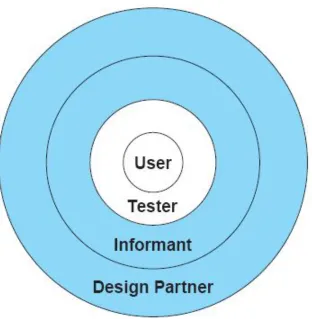
Fig 3.4 Druin’s model of the four levels of userParticipatory Design
• The levels of participation are becoming more clearer, one
taxonomy describes the roles of children in developing interfaces
for children, varying from testers to informants to partners.
• Testers are observed as they try out novel designs.
• Informants comment to designers through interviews and focus
groups.
Scenario Development(situation/picture)
❖ When a current interface is being redesigned, reliable data
about the distribution of task frequencies and sequences is an
enormous asset.
❖ A table with user communities listed across the top and task listed down the side indicates which user performs which task.
❖ Another representation tool is a table of task frequencies, indicating which task follow other tasks.
❖ A flowchart or a transition diagram helps the designers to
record and convey the sequences of possible actions. Line thickness
Scenario Development
• During the early design stages, data about current
performance should be collected to provide a baseline.
• An early way to describe a novel system is to write scenarios
of usage and to act them out as a form of
theater.(stage/show business)
• This technique is especially effective when multiple users
should cooperate(control rooms, financial trading rooms) or multiple physical devices are used(eg. Customer-service
desks, medical laboratories).
• Scenarios can represent common or emergency situations
with both novice and expert users. Personas can also be used
Scenario Development
• The design team of National Digital Library gives 81
scenarios that portrayed the typical needs of potential users.
• Eg : I would like to open a grocery store specializing in organic products in the grater Seattle metropolitan area. What are the trends in production and consumption of organic food products.?
• Some scenario writers produce a video tape to convey their
intentions.
• Apple’s Knowledge Navigator , Starfire scenario for Sun
Scenario Development
• Cell-phone developers were producing scenarios on how personal, family , and commercial relationships would change due to
mobile video communications.
• Eg : DoCoMO : it shows how a family can realize its goal of