Troubleshooting Overview
This chapter provides information for troubleshooting automated DNA sequencing
results from capillary electrophoresis runs.
Assumptions
Troubleshooting suggestions listed in this chapter assume the following:
• The instrument completed the run(s) and data are visible in Data Collection
Software
• Sample files were extracted successfully
• The run folder was created and saved on the instrument computer
• The correct number of *.ab1 sample files were created within the run folder
• *.ab1 sample files can be opened and viewed in an Applied Biosystems analysis
software program, such as Sequence Scanner or Sequencing Analysis Software
If these conditions are not met, you may have an instrument or Data Collection
Software problem. You may need to repeat data extraction and/or data analysis. Refer
to your instrument user guide to continue troubleshooting.
Using Controls
To simplify troubleshooting, Applied Biosystems recommends that you run controls
with every run for multicapillary instruments or each set of runs on 310 instruments:
•
DNA template control (pGEM
®-3Zf(+)
or M13mp18)
(
page 64
) – Results
can help you determine whether failed reactions are caused by poor template
quality or sequencing reaction failure.
•
Sequencing standards
(
page 129
) – Results can help you distinguish between
chemistry problems and instrument problems.
Troubleshooting Workflow
When troubleshooting, follow this workflow to identify the problem. In general,
check for the errors that can be resolved most easily. The figures in this section show
Sequencing Analysis Software examples, however you can use Sequence Scanner
Software. For more information, see
“Analyzing Data with Sequencing Analysis
Software” on page 170
.
1. Review the electropherogram (
page 195
).
2. Review data analysis settings (
page 195
).
3. Review run and data analysis information (
page 196
).
4. Review experimental setup (
page 199
).
5. Note any patterns in the occurrence of the problem. For example, does the
problem occur in specific capillaries, specific regions of the plate, an entire run,
or multiple runs?
6. If you have not resolved your problem, identify the symptom in
“Table of
Troubleshooting Symptoms” on page 201
. Then, determine the cause and
perform the actions to resolve the problem.
Reviewing the
Electrophero-gram
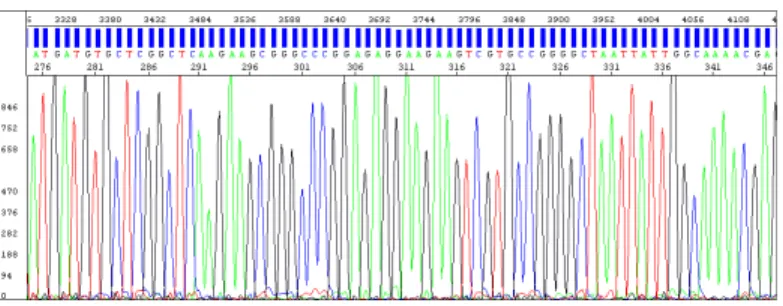
1. Open the sample file in Sequencing Analysis Software and select the
Electropherogram tab for the analyzed view. The analyzed view is rescaled.
Then go to the raw view.
2. Review the current, voltage, temperature, and power throughout the
electrophoresis run to determine whether an electrical problem occurred during
the run. Large fluctuations in the values can result in poor quality data.
Note:
Sequencing Analysis 5.X rescales the raw data to improve peak visibility
in the Electropherogram view. Peak height in the Electropherogram view should
not be used as the only indicator of data quality.
Figure 34 Example of electropherogram with high quality data
Reviewing Data
Analysis Settings
Review data analysis settings using Sequencing Analysis Software.
1. In the Sample Manager, verify that the appropriate basecaller, mobility file
(dyeset/primer), and matrix file (310 instruments only) are used:
2. A change in nomenclature occurred between software versions. If the analysis
file is in bold, italic text, verify that the analysis files are in the appropriate
location:
•
Basecaller file
– In the same folder as the Sequencing Analysis Software
(for example: X:\Applied Biosystems\SeqA5.X\AppSeqA\bin\Basecaller\
Params)
•
Mobility file
– In the Mobility folder (for example: X:\Applied
Biosystems\SeqA5.X\AppSeqA\bin\Basecaller\Mobility)
•
Matrix file
– In the Matrix folder (for analysis of 310 instrument data) (for
example: X:\Applied Biosystems\SeqA5.X\AppSeqA\bin\Basecaller\
Matrix)
Verify that the mobility file (DyeSet/Primer) is appropriate for the basecaller
Matrix files are required for 310 instruments only Bold, italic text indicates the file is
3. In the analysis protocol and settings, verify the basecaller settings.
Reviewing Run
and Analysis
Information
Review run and analysis information using Sequencing Analysis Software.
1. Click
Show
next to the sample you want to display.
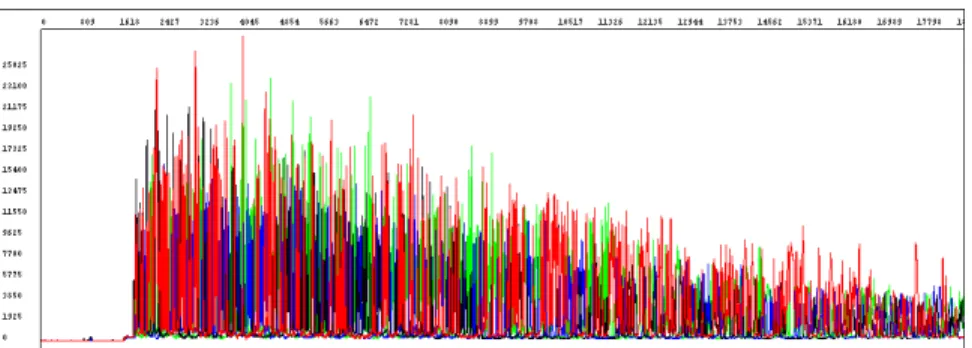
2. Select the Raw tab and review the raw, unprocessed fluorescence data for the
sample to assess the signal quality. Check for the following:
•
Artifacts
– Are there any artifacts, such as four-color spikes? For an
example of spikes, see
page 226
.
•
Peak heights
– Are peaks well-resolved, with reasonable heights
(
Figure 35
)? For examples of low or no signal, see
pages 207
through
211
;
for examples of top-heavy data, see
pages 222
through
225
.
•
Data start points
– Do any data start points deviate from others in the run?
For examples of start point deviation, see
pages 213
and
214
.
•
Length of read
– Was the expected length of read obtained? Does the
signal stop suddenly? For examples of sudden, premature drops in signal,
see
pages 219
through
221
.
•
Baseline
– Is there background noise for all the peaks? Zoom in
horizontally and vertically to verify the baseline noise.
Figure 35 Example of high quality raw data with tightly resolved peaks from the 3730 Genetic Analyzer
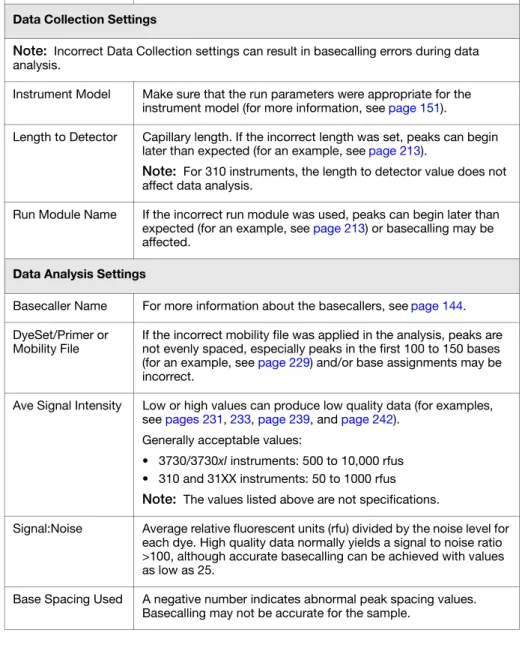
3. Select the Annotation tab and review the data collection and data analysis
settings and values for the sample file (
Table 34
).
Table 34 Annotation tab information
Setting Comments
Data Collection Settings
Note: Incorrect Data Collection settings can result in basecalling errors during data analysis.
Instrument Model Make sure that the run parameters were appropriate for the instrument model (for more information, see page 151).
Length to Detector Capillary length. If the incorrect length was set, peaks can begin later than expected (for an example, see page 213).
Note: For 310 instruments, the length to detector value does not affect data analysis.
Run Module Name If the incorrect run module was used, peaks can begin later than expected (for an example, see page 213) or basecalling may be affected.
Data Analysis Settings
Basecaller Name For more information about the basecallers, see page 144. DyeSet/Primer or
Mobility File If the incorrect mobility file was applied in the analysis, peaks are not evenly spaced, especially peaks in the first 100 to 150 bases (for an example, see page 229) and/or base assignments may be incorrect.
Ave Signal Intensity Low or high values can produce low quality data (for examples, see pages 231, 233, page 239, and page 242).
Generally acceptable values:
• 3730/3730xl instruments: 500 to 10,000 rfus • 310 and 31XX instruments: 50 to 1000 rfus Note: The values listed above are not specifications.
Signal:Noise Average relative fluorescent units (rfu) divided by the noise level for each dye. High quality data normally yields a signal to noise ratio >100, although accurate basecalling can be achieved with values as low as 25.
Base Spacing Used A negative number indicates abnormal peak spacing values. Basecalling may not be accurate for the sample.
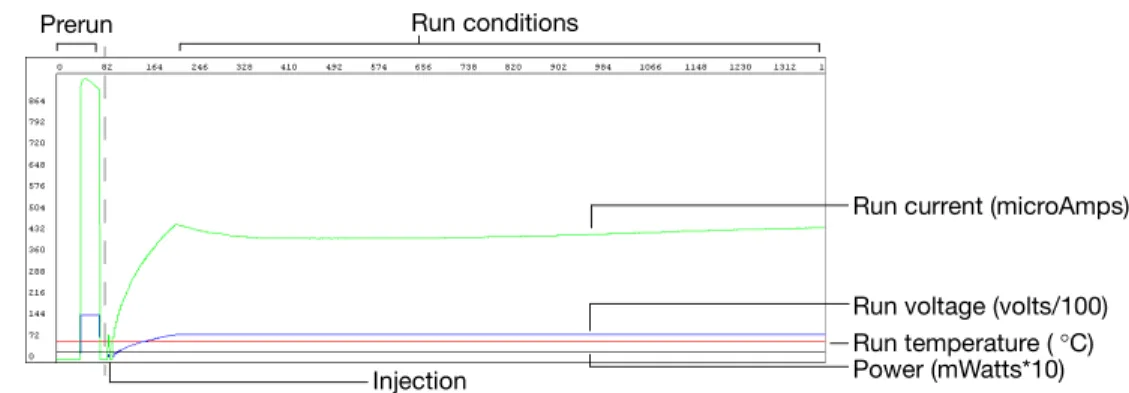
4. Select the EPT tab and review the current, voltage, temperature, and power
throughout the electrophoresis run to determine whether a gross electrical
problem occurred during the run. Large fluctuations in the values can result in
poor quality data.
Figure 8-36 Example of EPT tab information for high quality data Run voltage (volts/100) Run current (microAmps)
Run temperature (°C) Power (mWatts*10)
Prerun Run conditions
Reviewing
Experimental
Setup
1. Confirm that you used the optimal quality and quantity of DNA using
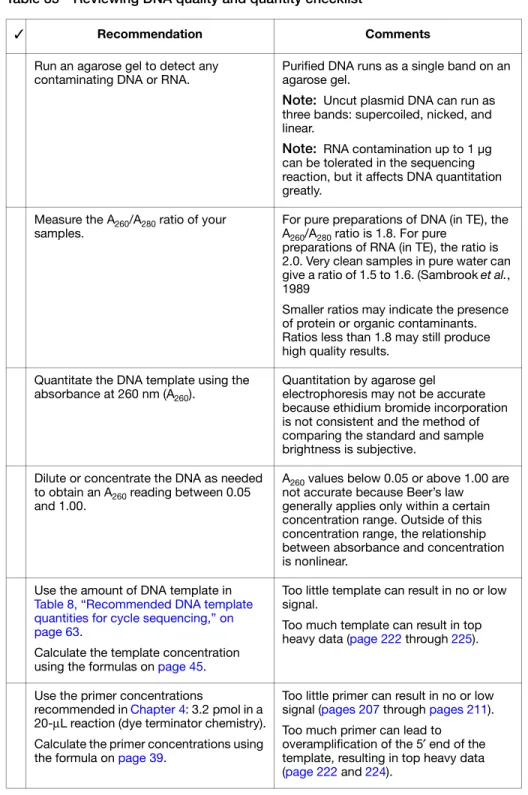
Table 35
.
Table 35 Reviewing DNA quality and quantity checklist✓ Recommendation Comments
Run an agarose gel to detect any
contaminating DNA or RNA. Purified DNA runs as a single band on an agarose gel. Note: Uncut plasmid DNA can run as three bands: supercoiled, nicked, and linear.
Note: RNA contamination up to 1 µg can be tolerated in the sequencing reaction, but it affects DNA quantitation greatly.
Measure the A260/A280 ratio of your
samples. For pure preparations of DNA (in TE), the A260/A280 ratio is 1.8. For pure preparations of RNA (in TE), the ratio is 2.0. Very clean samples in pure water can give a ratio of 1.5 to 1.6. (Sambrook et al., 1989
Smaller ratios may indicate the presence of protein or organic contaminants. Ratios less than 1.8 may still produce high quality results.
Quantitate the DNA template using the
absorbance at 260 nm (A260). Quantitation by agarose gel electrophoresis may not be accurate because ethidium bromide incorporation is not consistent and the method of comparing the standard and sample brightness is subjective.
Dilute or concentrate the DNA as needed to obtain an A260 reading between 0.05 and 1.00.
A260 values below 0.05 or above 1.00 are not accurate because Beer’s law generally applies only within a certain concentration range. Outside of this concentration range, the relationship between absorbance and concentration is nonlinear.
Use the amount of DNA template in Table 8, “Recommended DNA template quantities for cycle sequencing,” on page 63.
Calculate the template concentration using the formulas on page 45.
Too little template can result in no or low signal.
Too much template can result in top heavy data (page 222 through 225).
Use the primer concentrations
recommended in Chapter 4: 3.2 pmol in a 20-µL reaction (dye terminator chemistry). Calculate the primer concentrations using the formula on page 39.
Too little primer can result in no or low signal (pages 207 through pages 211). Too much primer can lead to overamplification of the 5′ end of the template, resulting in top heavy data (page 222 and 224).
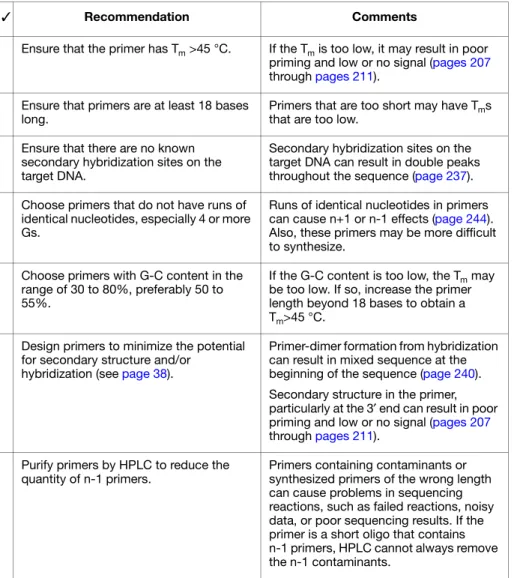
2. Confirm that the primer design and quality are optimal using
Table 36
.
Table 36 Reviewing primer design checklist✓ Recommendation Comments
Ensure that the primer has Tm >45 °C. If the Tm is too low, it may result in poor priming and low or no signal (pages 207 through pages 211).
Ensure that primers are at least 18 bases
long. Primers that are too short may have Tms that are too low. Ensure that there are no known
secondary hybridization sites on the target DNA.
Secondary hybridization sites on the target DNA can result in double peaks throughout the sequence (page 237). Choose primers that do not have runs of
identical nucleotides, especially 4 or more Gs.
Runs of identical nucleotides in primers can cause n+1 or n-1 effects (page 244). Also, these primers may be more difficult to synthesize.
Choose primers with G-C content in the range of 30 to 80%, preferably 50 to 55%.
If the G-C content is too low, the Tm may be too low. If so, increase the primer length beyond 18 bases to obtain a Tm>45 °C.
Design primers to minimize the potential for secondary structure and/or
hybridization (see page 38).
Primer-dimer formation from hybridization can result in mixed sequence at the beginning of the sequence (page 240). Secondary structure in the primer, particularly at the 3′ end can result in poor priming and low or no signal (pages 207 through pages 211).
Purify primers by HPLC to reduce the
quantity of n-1 primers. Primers containing contaminants or synthesized primers of the wrong length can cause problems in sequencing reactions, such as failed reactions, noisy data, or poor sequencing results. If the primer is a short oligo that contains n-1 primers, HPLC cannot always remove the n-1 contaminants.
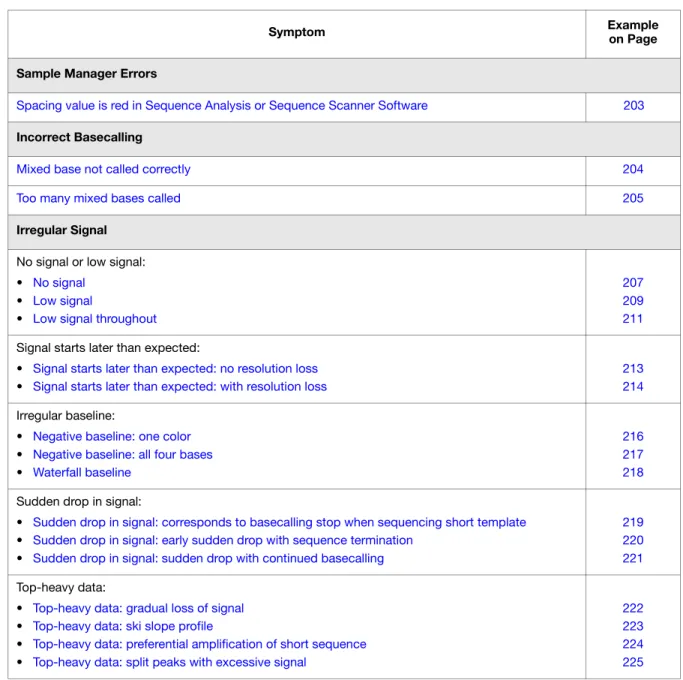
Table of Troubleshooting Symptoms
The table below lists troubleshooting symptoms and a page reference for an example
of the symptom and possible causes and actions to take to resolve the problem. If
there are two or more possible causes for the symptom, the causes are grouped and
listed in the following order: data analysis issues, electrophoresis issues, then
sequencing reaction issues.
Table 37 Table of troubleshooting symptoms
Symptom Exampleon Page
Sample Manager Errors
Spacing value is red in Sequence Analysis or Sequence Scanner Software 203 Incorrect Basecalling
Mixed base not called correctly 204
Too many mixed bases called 205
Irregular Signal No signal or low signal: • No signal
• Low signal
• Low signal throughout
207 209 211 Signal starts later than expected:
• Signal starts later than expected: no resolution loss • Signal starts later than expected: with resolution loss
213 214 Irregular baseline:
• Negative baseline: one color • Negative baseline: all four bases • Waterfall baseline
216 217 218 Sudden drop in signal:
• Sudden drop in signal: corresponds to basecalling stop when sequencing short template • Sudden drop in signal: early sudden drop with sequence termination
• Sudden drop in signal: sudden drop with continued basecalling
219 220 221 Top-heavy data:
• Top-heavy data: gradual loss of signal • Top-heavy data: ski slope profile
• Top-heavy data: preferential amplification of short sequence • Top-heavy data: split peaks with excessive signal
222 223 224 225
Abnormal Peak Shapes Spikes:
• Four-color spikes • One-color spikes
• Large spike at the end of the run
226 227 228 Improperly spaced peaks, especially peaks in the first 100 to 150 bases 229
Large peaks (blobs) in the first 120 bases 230
Irregular C peaks using BigDye® Terminators v3.1 231 Irregular G peaks using BigDye® Terminators v1.1 and 3.1 233
Shoulders on all peaks 234
Peak compressions 235
Broad peaks for bisulfite-converted sequences 236 Double peaks:
• Double peaks: peaks under peaks throughout
• Double peaks: with high average signal intensity values • Double peaks: at the beginning of the sequence
• Double peaks: at the beginning of the sequence (bisulfite conversion) • Double peaks: specific peaks under specific bases
• Double peaks: specific peaks under specific bases
• Double peaks: peaks under peaks throughout (bisulfite conversion) • Double peaks: after a homopolymer or repeated sequence
• Double peaks: after a homopolymer or repeated sequence (bisulfite sequencing) • Double peaks: double sequence after clean sequence
237 239 240 241 242 243 244 246 247 248 Low Resolution
Resolution loss: at beginning of run 249
Resolution loss: in the middle of the run 250
Resolution loss: gradual early loss 251
SeqScape Software Symptoms
High quality sequence in unassembled category in SeqScape Software 253
Table 37 Table of troubleshooting symptoms (continued)
Troubleshooting Examples
Spacing value is red in Sequence Analysis or Sequence Scanner Software
Red spacing value in Sample Manager
Possible Cause(s) Recommended Action
Data analysis issue: The red color indicates that the basecaller applied a default value for spacing. The basecaller determined that the sample cannot be analyzed because the spacing estimation algorithm failed. This error may occur if the data has been collected using modified run modules or if data are poor.
Verify that analysis settings are appropriate for the run setup.
Manually set a spacing value and reanalyze the data. To estimate a spacing value:
1. Refer to the raw data after 1000 scan points. 2. Measure the distance between the crests of two
adjacent peaks with the same color.
For more information, see the appropriate Sequencing Analysis Software user guide.
Mixed base not called correctly
Ns or low QVs for pure bases are assigned instead of mixed bases (analysis using the KB basecaller only)
Electropherogram
Possible Cause(s) Recommended Action
Data analysis issue: The quality threshold setting and the mixed bases settings are not correctly defined in the analysis protocol.
1. Review the quality threshold setting (page 149) and the mixed bases settings (page 149) in the analysis protocol that you used for the analysis.
2. Correct the settings if necessary, then reanalyze the data.
Note: Significant improvements in mixed basecalling have been made with later versions of Sequencing Analysis Software and the KB basecaller. Please check the Applied Biosystems web site for the latest updates.
Too many mixed bases called
Too many mixed bases are called (analysis using the KB basecaller only)
Electropherogram
Possible Cause(s) Recommended Action
Data analysis issues:
2nd highest peak threshold for mixed base identification
is set too low. The recommended range is 15 to 25%. Review the Mixed Bases settings in the analysis protocol that you used for the analysis (page 149). Change the settings if necessary, then reanalyze.
Electrophoresis issues (likely in multiple lanes and/or runs):
Carryover from contaminated septa. Replace septas and change buffer, water, and waste. Electrical noise. Check the uninterruptible power supply (UPS). Contaminated water or buffer because of dirty containers,
microbial growth, or use of tap water for cleaning. Clean all reservoirs, upper and lower polymer block, and septa with deionized water. Poor or incorrect spectral calibration (spectral pullup). Perform the spectral calibration again.
Shifted spatial calibration. Perform the spatial calibration again.
Poor CCD alignment. Contact Applied Biosystems to arrange a service engineer visit.
Sequencing reaction issues (in individual samples or multiple samples):
Secondary primer site in the template was sequenced. Design a new sequencing primer (page 38). Secondary amplification product in the PCR product used
as a sequencing template. Use gel purification to isolate the desired product. For more information, see “Purifying PCR Products for Sequencing” on page 41.
Design new PCR primers or optimize amplification parameters to obtain a single product. For more information, see “Preparing PCR DNA Templates” on page 37.
PCR primers were not completely removed from the PCR
product used as a sequencing template. Remove PCR primers completely before using PCR products as sequencing templates. For more information, see “Purifying PCR Products for Sequencing” on page 41.
Pull-up caused by overloading the capillaries with too
much product. Review DNA quantity.
Use standard run modules
Click the Annotation tab and examine the Ave Signal Intensity. Excessive signal:
• 3730/3730xl instruments: >10,000 rfus • 310 and 31XX instruments: >1000 rfus
Load less labeled sample by performing one of the following:
• Remove some of the sample and replace with Hi-Di™ Formamide
• Inject sample for less time
• Resequence the samples, using less template in the sequencing reaction, especially if you use the BigDye® XTerminator™ Purification Kit (see Table 8,
“Recommended DNA template quantities for cycle sequencing,” on page 63).
Stutter during either PCR amplification and/or cycle sequencing. Stutter is most common in any
homopolymeric region greater than 2 bases. It can also be seen with simple repeated DNA sequences. The results are worse when the stutter occurs during PCR amplification.
It is thought that stutter occurs when a partially extended primer and template dissociate, then reanneal improperly before extension continues. Partially extended primers and templates commonly dissociate during the reaction, but if they reanneal with complete fidelity, the reaction produces only one product. Improper annealing results in one or more products that are represented in the sequencing results.
If stutter occurs during PCR amplification, little can be done to correct the problem, except using anchored sequencing primers.
If stutter occurs during cycle sequencing:
• Try using dRhodamine terminators. They have been shown to be less prone to produce stutters, specifically with poly-T regions.
• Some customers have found that they can get past poly(A) regions using a mixture of oligo dT18 primers with either a C, A, or G as the 3′ terminal dinucleotide or 2-base anchors.
No signal
Flat signal profile Raw Data
KB basecaller generated 5 Ns to indicate a possible failed sequencing sample Electropherogram
Unincorporated dyes
Possible Cause(s) Recommended Action
Sequencing reaction issues (likely with multiple or all samples): Loss of labeled product during purification of extension
products. See product during purification.Chapter 5 for suggestions on retaining labeled Thermal cycler malfunction. Determine with the manufacturer how to test your thermal
cycler for proper performance. One of the components of the sequencing reaction
(template, primer, or Ready Reaction Mix) was either omitted, was the wrong material, or was of poor quality.
Review the entire experiment carefully.
1. Check the quantitation and quality of the sequencing reaction components.
2. For each component, replace the component, perform a sequencing run, then evaluate the results until you have identified the problem or replaced all of the reaction components.
3. Run a DNA template control to determine whether the sequencing reaction failed or the template quality is low (page 64).
Insufficient template added to sequencing reactions, leading to too few sequencing products generated during PCR.
Check DNA quantitation and quality (page 44 and 45).
Template contains sequencing inhibitors such as phenol
(page 44). Follow recommended procedures to prepare templates. Check DNA quality (page 44). If necessary, clean up dirty templates.
No enzyme activity because Ready Reaction Mix was
stored improperly or it separated upon storage. Check the color of the Ready Reaction Mix. If the color is not uniform, the Ready Reaction Mix separated upon storage. Mix the Ready Reaction Mix gently before using it.
Run a DNA template control to test enzyme function (page 64).
Weak priming because of poor primer design. Review primer design (page 38). Make new primers, then repeat the sequencing experiment.
Low signal
Possible Cause(s) Recommended Action
Electrophoresis issues:
One or more broken or blocked capillaries. Visually check the capillaries. If any are broken or blocked, replace the entire array. If subsequent runs show failure in the same capillary, replace the entire array. Check the results using the long read sequencing standard.
Optical path is obstructed (3100/3100-Avant instruments
only). Check the laser power, using the EPT in Data Collection Software. Perform the spatial calibration again. Check whether you can hear the shutter clicking during data collection. If you cannot hear it click, contact Applied Biosystems for a service engineer visit.
If all capillaries show no signal or low signal, contact Applied Biosystems for a service engineer visit.
Electropherogram shows Ns (with ABI or KB basecaller) or low quality bases (with KB basecaller) Electropherogram
Sample evaporated because water was used as the
injection solution. Use Hi-Di
™ Formamide to resuspend your samples (see page 122).
For future experiments, consider using the BigDye® XTerminator™ Purification Kit to purify samples (see page 88).
Use a heat sealer to seal the plates (3730/3730xl
instruments only).
Add more resuspension solution to the samples before loading them.
Sample volume is too low. Resuspend samples using sufficient volumes (at least 10µL) (see page 122).
Autosampler alignment is off and the tips did not enter the
sample. 1. Verify the correct run module was used.2. If you are using samples purified with BigDye® XTerminator™ Purification Kit and your autosampler was recently calibrated, run the BDX Update utility. Select Start!All Programs!Applied
Biosystems!BDX Updater. (The utility is installed with the BigDye XTerminator run modules.) 3. Contact Applied Biosystems to arrange a service
engineer visit. Slightly unstable current and voltage during
electrophoresis. Check the current and voltage.
Buffer is old. Replace the buffer according to the procedures in your instrument user guide.
Too much template or sample temporarily clogging the
capillary. Reinject the sample.
Injection failed. • Verify correct run module was used. • Verify correct volume in well.
• Verify capillaries are not broken or blocked.
Low signal throughout
Low signal throughout the entire sequence
Electropherogram Raw Data
Annotation tab shows low average signal intensity values for data from 3730 instrument
Possible Cause(s) Recommended Action
Sequencing reaction issues:
Sequencing reaction failed. Check the control template and primer. Partial loss of labeled products during purification of
extension products. See product during purification.Chapter 5 for suggestions on retaining labeled Sample contains salts from insufficient purification of
templates, PCR products, or sequencing reactions with ethanol precipitation. Salts in the sample interfere with proper electrokinetic injection.
Review DNA quality, PCR purification, and sequencing reaction purification steps.
The amount of Ready Reaction Mix in the reactions was insufficient, usually because the sequencing chemistry was diluted.
Follow recommended procedures to prepare sequencing reactions with Ready Reaction Mixes. See page 66 for recommended procedures. Applied Biosystems does not support diluted reactions or guarantee the performance of diluted BigDye chemistry.
Not enough primer or template in the cycle sequencing
reaction. Review DNA quantity (recommended on page 63page 199. Run a DNA template control ). Use the amounts to check sequencing reaction quality (page 64).
Poor template quality. Follow recommended procedures to prepare templates. Check DNA quality (page 44). If necessary, clean up dirty templates. Run a DNA template control to check sequencing reaction quality (page 64).
Failure caused by difficult template sequence. Use Table 7 on page 56 to select a chemistry kit for certain difficult templates.
Signal starts later than expected: no resolution loss
Data starts later than expected
Possible Cause(s) Recommended Action
Electrophoresis issues:
Incorrect capillary length (Length to Detector) or run
module was selected. 1. Review run information in the Annotation tab using Sequencing Analysis Software (see page 197): – Length to Detector
– Run module
2. If an incorrect selection was made, run the samples again using the correct settings.
Variation in lab temperature leads to faster or slower runs. Stabilize the lab temperature. Sample heated during vortexing step of BigDye®
XTerminator™ purification. 1. Repeat the sequencing reactions.
2. Perform BigDye XTerminator purification using recommended vortexer and plate adapter. 3. Run the samples again.
Signal starts later than expected: with resolution loss
Data starts later than expected Raw Data
Loss of resolution
Electropherogram
Peaks are broad in the region of resolution loss marked above
Possible Cause(s) Recommended Action
Electrophoresis issues:
Capillaries overloaded with sequencing product, possibly
unlabeled DNA or RNA. Click the Annotation tab and examine the Ave Signal Intensity. Excessive signal: • 3730/3730xl instruments: >10,000 rfus
• 310 and 31XX instruments: >1000 rfus
Re-inject the samples using decreased injection time and/or lower voltage.
Load less labeled sample by using less template in the sequencing reaction (see Table 8, “Recommended DNA template quantities for cycle sequencing,” on page 63). Temperature in room and/or oven fluctuating. Review the EPT tab using Sequencing Analysis Software
(see page 198). If the oven temperature is fluctuating, the oven may be leaking because of a poor seal. Contact Applied Biosystems to arrange a service engineer visit. Contaminant migrated through the capillary during
electrophoresis. Run the sample again.
Capillary not filling. Check the pin valve in the polymer block, amount of polymer in the bottle, leaks in the check valves, and polymer pump function. Contact Applied Biosystems to arrange a service engineer visit.
Temperature in the array heater fluctuating more than
±0.5 °C (3730/3730xl and 3130/3130xl instruments and POP-7 only).
Using Data Collection Software, check the array heater temperature. If it fluctuates more than ±0.5 °C, contact Applied Biosystems to arrange a service engineer visit.
Water in polymer system caused by insufficient flushing
after water wash maintenance. Flush the polymer, using the wizard if possible. Extension products purified using bead-based kits were
injected without removing the magnetic beads. The beads may interfere with the extension products during injection and cause overloading or other injection anomalies.
Remove magnetic beads before loading the sample.
Variables that affect current set incorrectly. • Replace buffer in system with fresh 1✕ running buffer. • Inspect system for leaks (wet or dry polymer around
fitting indicates a leak) and tighten fittings as needed. • Look for discoloration in the block channels or tubing.
If present, perform a water wash on the system using the wizard in Data Collection Software.
Negative baseline: one color
Baseline fluorescence for one color is below 0 rfus Raw Data
Software corrects the baseline fluorescence during data analysis
Electropherogram
Possible Cause(s) Recommended Action
You are using an early version of Sequencing Analysis Software. This error, found in versions earlier that v5.2, was corrected in Basecaller updater v2.0.
Upgrade Sequencing Analysis Software v5.2 or later. To obtain the latest software updates and patches, go to
www.appliedbiosystems.com, then click the link for Support.
Negative baseline: all four bases
Raw Data
Baseline fluorescence for all four colors is below 0 rfus
Possible Cause(s) Recommended Action
Electrophoresis issue: Excessive fluorescent contamination in the detection area that bleaches out over the duration of the run (3730/3730xl instruments only).
Use manual control to turn on the laser before starting the run to negate the effects of excessive fluorescent contaminant. Contact Applied Biosystems technical support or a field applications specialist.
Perform a water wash on all components of the system using the wizard in Data Collection Software, then replace the capillary array.
Waterfall baseline
Signal dropout at point of waterfall
Raised baseline in all colors
Baseline for all colors falls in a “waterfall” pattern
Raw Data
Possible Cause(s) Recommended Action
Residue from cleansers used on glassware.
Note: Primarily observed in syringe-based instruments.
Rinse all components with deionized water. Check gasket on syringe(s), replace if necessary. Replace syringe(s).
Sudden drop in signal: corresponds to basecalling stop when sequencing
short template
Sudden drop in signal Raw Data
Basecalling stops when the signal drops
Electropherogram
Possible Cause(s) Recommended Action
Data analysis issue: The drop in signal identifies a PCR stop point and the basecaller stops calling bases beyond this point. With the ABI basecaller, you observe Ns beyond the PCR stop. With the KB basecaller, the analyzed trace is displayed until the last basecall.
Select the At PCR Stop check box in the analysis protocol using Sequencing Analysis Software (see page 148).
Sudden drop in signal: early sudden drop with sequence termination
Early sudden drop in signal Raw Data
Early sudden termination of sequence
Electropherogram
Possible Cause(s) Recommended Action
Sequencing reaction issue:
DNA polymerase enzyme stopped at a region of the
template that was difficult to sequence. • Depending on sequence contexts, you can try sequencing some template with dGTP kits (if the problem sequence is G-rich), dRhodamine kits, or BigDye primer kits.
• If termination of sequencing was caused by hairpins or secondary structure, redesign primers around the problem region. Some customers report that certain additives can help, but Applied Biosystems cannot recommend any specific protocols.
Not enough Ready Reaction Mix was used in the
sequencing reaction. Follow recommended procedures to prepare sequencing reactions with Ready Reaction Mixes. See page 66 for recommended procedures. Applied Biosystems does not support diluted reactions or guarantee the performance of diluted BigDye chemistry.
Sudden drop in signal: sudden drop with continued basecalling
Sudden drop in signal Raw Data
Basecalling continues beyond the drop in signal Electropherogram
Possible Cause(s) Recommended Action
Sequencing reaction issues:
DNA polymerase had difficulty processing through a
particular sequence context. Depending on sequence contexts, you can try sequencing some template with dGTP kits, dRhodamine kits, or BigDye® primer kits.
Not enough Ready Reaction Mix was used in the
sequencing reaction. Follow recommended procedures to prepare sequencing reactions with Ready Reaction Mixes. See page 66 for recommended procedures. Applied Biosystems does not support diluted reactions or guarantee the performance of diluted BigDye chemistry.
If the problem persists, try sequencing using the dGTP kits.
Top-heavy data: gradual loss of signal
Early peaks are taller
Peak heights fall to zero before the end of the sequence
Peak height decreases
Large number of small molecular weight peaks in the sequencing reaction Raw Data
Possible Cause(s) Recommended Action
Sequencing reaction issues:
Improper cycling conditions for extension. The extension
time is too short or the extension temperature is too high. Increase the extension time or decrease the extension temperature. Improper ratio of primer to template in the sequencing
reaction. Set up a matrix of reactions with varying ratios of primer:template to determine which ratio produces the best peak profile.
Sequencing template contains a contaminant that inhibits
DNA polymerase activity. Review how templates are prepared. Try a different method or clean up dirty templates (page 44). Not enough Ready Reaction Mix was used in the
sequencing reaction. Follow recommended procedures to prepare sequencing reactions with Ready Reaction Mixes. See page 66 for recommended procedures. Applied Biosystems does not support diluted reactions or guarantee the performance of diluted BigDye chemistry.
Template or extension products are degraded. With degraded extension products, the data are noisy, with a higher baseline at the start of peaks.
Review how templates are prepared and stored. Try a different method (Chapter 3) and store at −20 °C.
Top-heavy data: ski slope profile
Peak profile is similar to a ski slope: peak heights decrease as the fragment lengths increase
Raw Data
Possible Cause(s) Recommended Action
Sequencing reaction issues:
Not enough or too much template was used in the
sequencing reaction. Review the DNA quantity (page 199). Not enough or too much primer was used in the
sequencing reaction.
Not enough Ready Reaction Mix was used in the
sequencing reaction. Follow recommended procedures to prepare sequencing reactions with Ready Reaction Mixes. See page 66 for recommended procedures. Applied Biosystems does not support diluted reactions or guarantee the performance of diluted BigDye chemistry.
Template is degraded. Review how templates are prepared and stored. Try a different method (Chapter 3) and store at −20 °C.
Top-heavy data: preferential amplification of short sequence
Short 5′ sequence, instead of the entire template, is amplified preferentially, (see also page 240)
Raw Data
Possible Cause(s) Recommended Action
Sequencing reaction issue: Primer-dimer formation
during the PCR reaction. Redesign the PCR primers to eliminate the sequences that allow primer-dimer formation. Use a “hot start” PCR enzyme to inhibit primer-dimer formation.
Top-heavy data: split peaks with excessive signal
Peaks with excessive signal
Split peaks and pullup at the beginning of the sequence in the region of peaks with excessive signal (circled above)
Electropherogram Raw Data
Possible Cause(s) Recommended Action
Sequencing reaction issues:
Signal is too high because too much template was used in the sequencing reaction and too much sequencing product was created.
You do not have to repeat the reaction.
Click the Annotation tab and check the Ave Signal Intensity. Excessive signal:
• 3730/3730xl instruments: >10,000 rfus • 310 and 31XX instruments: >1000 rfus Especially if your samples were purified using the BigDye® XTerminator™ Purification Kit, load less labeled sample by performing one of the following:
• Remove some of the sample and replace with Hi-Di™ Formamide
• Inject sample for less time
• Resequence the samples, using less template in the sequencing reaction, especially if you use the BigDye® XTerminator™ Purification Kit (see Table 8,
“Recommended DNA template quantities for cycle sequencing,” on page 63).
For future reactions, reduce the amount of template in the sequencing reaction.
Injection height incorrect due to incorrect run module. Use correct run module, especially for samples purified with the BigDye XTerminator Purification Kit (see
Four-color spikes
Four-color spikes Raw Data
Four-color spikes Electropherogram
Electropherogram (zoomed in)
Zoomed in electropherogram shows spikes contain all four colors
Possible Cause(s) Recommended Action
Electrophoresis issues:
Dust, bubbles, or crystals in polymer passed through the
path of the laser beam. 1. Eliminate large amounts of dust in the environment.2. Inspect the upper gel block for bubbles. If present, flush all bubbles out of the system and out of the array manually.
3. Check the polymer bottle for crystals. If present, warm the polymer gently to 30 °C with gentle mixing, then refill the syringes and array with the polymer. 4. Replace polymer if the condition persists. Polymer is expired or was stored at room temperature for
One-color spikes
One-color positive spikes
One-color negative spikes Raw Data
Possible Cause(s) Recommended Action
Electrical noise or power fluctuations. Verity the power source, use uninterruptible power supply.
Polymer temperature is too high. • Verify the shipping temperature of the polymer. • Verify lab temperature is below 26 °C.
Well volume is too low. • Verify volume is ≥10µL for 96-well plates and ≥15µL for 384-well plates.
• If using septa, verify septa are fresh to minimize evaporation.
Large spike at the end of the run
Large spike at end of run Raw Data
Possible Cause(s) Recommended Action
The large spike at the end of the run, called a reptation peak, occurs with almost all electrophoretic separations of DNA on capillary instruments. With typical run conditions, data collection stops well before the spike occurs. There is no useful sequencing information in the spike or just before the spike. Because some run modules are designed for the longest possible read lengths, data collection stops just before the spike occurs. Normal run variation within a lab may result in the spike appearing in some electropherograms.
None needed. Shorten the data collection time a few minutes to remove a persistent spike from your data.
Improperly spaced peaks, especially peaks in the first 100 to 150 bases
Peaks are improperly spaced, especially peaks in the first 100 to 150 bases Electropherogram
Possible Cause(s) Recommended Action
Data analysis issue: Wrong mobility file applied to the
sequence data. Reanalyze the data using the correct mobility file to observe proper spacing of all peaks. For more information about mobility files, see page 145.
Large peaks (blobs) in the first 120 bases
Blobs in the first 120 bases Precise location of the blobs varies according to the dye used and the specific configuration Electropherogram
Possible Cause(s) Recommended Action
Sequencing reaction issues:
Incomplete removal of dye-labeled terminators after the
cycle sequencing reaction. Review the methods described in of Extension Products.” If you are using a third-party Chapter 5, “Purification product for purifying extension products, contact the manufacturer for troubleshooting help.
For future experiments, consider using the BigDye® XTerminator™ Purification Kit to purify samples (see page 88).
Poor incorporation of terminators, leaving excess
unincorporated terminators. Review the entire experiment carefully. • Check the quantitation (page 45).
• Check the quality of the sequencing components. Replace each component, one at a time.
• Run a DNA template control to determine whether the sequencing reaction failed or the template quality is low (page 64).
• Check expiration dates on all reagents and replace any that have expired.
If using BigDye XTerminator Purification Kit, insufficient
mixing during vortexing step. • Verify plate is firmly attached to vortexer.• Follow protocol for vortexing. If using BigDye XTerminator Purification Kit, incorrect ratio
of BigDye XTerminator reagents. • Vortex the XTerminator Solution bulk container at maximum speed for at least 10 seconds before dispensing.
• Use wide-bore pipette tips to dispense the XTerminator Solution.
Irregular C peaks using BigDye
®Terminators v3.1
C peaks have shoulders Electropherogram
C peaks are small and rough
Electropherogram
No C peaks Electropherogram
Ave Signal Intensity for C is lower than for G, A, or T
Possible Cause(s) Recommended Action
Sequencing reaction issues:
The dye labels attached to the ddC terminators are degraded. Initial degradation results in shoulders on all C peaks. With further degradation, the C peaks appear very small or rough or disappear completely.
Protect the fluorescently labeled DNA from light, heat, acidic conditions, and oxygen (see “Storing Sequencing Reactions” on page 121).
If no C peaks are visible, repeat the sequencing reactions with fresh reagents.
The Hi-Di™ Formamide is degraded. Resuspend the samples using a newer lot of Hi-Di Formamide.
Sequencing reactions were exposed to light, heat, acidic conditions, and/or oxygen before they were loaded onto the instrument.
Use tube septa or a heat seal to prevent exposure to air and evaporation of samples, especially if you place the samples in the autosampler more than 6 hours before
Electrophoresis issue:
The buffer heater is powered on (3730/3730xl instruments
only). Verify that the buffer heater is not powered on.
Severe arcing events can mask the C signal. • Perform several water washes using the wizard in Data Collection Software.
• Disassemble the system and clean out all components with warm water (<42 °C).
Irregular G peaks using BigDye
®Terminators v1.1 and 3.1
Irregular G peaks Electropherogram
Possible Cause(s) Recommended Action
Electrophoresis issue: The buffer heater is powered on
(3730/3730xl instruments only). If you are using the 3730 instrument, confirm that the buffer heater is not powered on. Sequencing reaction issues:
The Hi-Di™ Formamide is degraded. Resuspend the samples using a newer lot of Hi-Di Formamide.
Sequencing reactions were exposed to light, heat, acidic conditions, and/or oxygen before they were loaded onto the instrument.
Use tube septa or a heat seal to prevent exposure to air and evaporation of samples, especially if you place the samples in the autosampler more than 6 hours before starting electrophoresis.
Verify that the primer pH and the template pH are not acidic.
The dye labels attached to the ddG terminators are degraded. As shown in the figure above, the pattern for degradation of dye labels on ddG terminators is different than for ddC terminators. The G peak patterns are very irregular, and the complexity increases as degradation progresses.
This problem can occur with BigDye Terminators v1.1 and less frequently with BigDye Terminators v3.1.
Protect the fluorescently labeled DNA from light, heat, acidic conditions, and oxygen (see “Storing Sequencing Reactions” on page 121).
Water used as Injection solution.
Note: Resuspending samples in water leads to breakdown of C and/or G-labeled fragments.
Degradation of the dye labels attached to the ddG terminators is less likely to occur in Hi-Di Formamide or 0.1 mM EDTA.
Shoulders on all peaks
All peaks show shoulders Electropherogram
Possible Cause(s) Recommended Action
Electrophoresis issues:
Capillary array needs to be replaced. Replace the capillary array.
Overloaded sample. Shorten the injection time.
Amplify less DNA. Sequencing reaction issues:
Contamination of the sequencing primer with n+1 or n-1
sequencing primer. Use the primers with a different template. If the problem persists, resynthesize the primers before repeating the experiment.
Stutter during either PCR amplification and/or cycle sequencing. Stutter is most common in any
homopolymeric region greater than 2 bases. It can also be seen with simple repeated DNA sequences. The results are worse when the stutter occurs during PCR amplification.
It is thought that stutter occurs when a partially extended primer and template dissociate, then reanneal improperly before extension continues. Partially extended primers and templates commonly dissociate during the reaction, but if they reanneal with complete fidelity, the reaction produces only one product. Improper annealing results in one or more products that are represented in the sequencing results.
If stutter occurs during PCR amplification, little can be done to correct the problem, except using anchored sequencing primers.
If stutter occurs during cycle sequencing:
• Try using dRhodamine terminators. They have been shown to be less prone to produce stutters, specifically with poly-T regions.
• Some customers have found that they can get past poly(A) regions using a mixture of oligo dT18 primers with either a C, A, or G as the 3′ terminal dinucleotide or 2-base anchors.
Blending Ready Reaction Mixes from dGTP BigDye
Peak compressions
Peak compressions Electropherogram
Possible Cause(s) Recommended Action
Sequencing reaction issue: Observed when sequencing GC-rich regions using dGTP sequencing chemistry. Thought to result from incomplete denaturation of the synthesized DNA.
No corrective action is known at this time. Some customers report that using BigDye primers corrects this problem.
Broad peaks for bisulfite-converted sequences
Broad peaks in sequence with partial bisulfite conversion
Same sequence before bisulfite conversion
Possible Cause(s) Recommended Action
Sequencing reaction issue: Mobility of fragments is uneven because the sample contains both Cs (from methylated samples) and no Cs (from unmethlyated samples).
• Repeat bisulfite conversion
• Ensure amplicon is 250 to 400 bp for cloning and 100 to 250 bp for direct sequencing.
• Include and extra incubation at the end of thermal cycling run for non-templated A addition.
Double peaks: peaks under peaks throughout
Peaks under peaks at every position
Peaks are uniform Electropherogram
Possible Cause(s) Recommended Action
Electrophoresis issues:
Carryover from contaminated septa. Replace septas, then change buffer, water, and waste. Electrical noise. Check the uninterruptible power supply (UPS). Dirty containers and/or tap water were used to clean
instrument components, resulting in contaminated water or buffer.
Clean the containers to be used for cleaning instrument components, then rinse the containers thoroughly with deionized water.
It is preferable to use deionized water to clean the instrument components.
Shifted spatial calibration. Redo the spatial calibration.
Poor CCD alignment. Contact Applied Biosystems to arrange a service engineer visit.
Poor or incorrect spectral calibration (spectral pull-up). Redo the spectral calibration. Sequencing reaction issues:
Secondary primer site in the template was sequenced. Design a new sequencing primer (page 38). Secondary amplification product in the PCR product used
as a sequencing template. Use gel purification to isolate the desired product or design new PCR primers to obtain a single product. For more information, see “Preparing PCR DNA Templates” on page 37.
PCR primers were not completely removed from the PCR
product used as a sequencing template. Remove PCR primers completely before using PCR products as sequencing templates. For more information, see “Preparing PCR DNA Templates” on page 37. Mixed or contaminated templates or primers. Review the DNA quality.
Stutter during either PCR amplification and/or cycle sequencing. Stutter is most common in any
homopolymeric region greater than 2 bases. It can also be seen with simple repeated DNA sequences. The results are worse when the stutter occurs during PCR amplification.
It is thought that stutter occurs when a partially extended primer and template dissociate, then reanneal improperly before extension continues. Partially extended primers and templates commonly dissociate during the reaction, but if they reanneal with complete fidelity, the reaction produces only one product. Improper annealing results in one or more products that are represented in the sequencing results.
If stutter occurs during PCR amplification, little can be done to correct the problem, except using anchored sequencing primers.
If stutter occurs during cycle sequencing:
• Try using dRhodamine terminators. They have been shown to be less prone to produce stutters, specifically with poly-T regions.
• Some customers have found that they can get past poly(A) regions using a mixture of oligo dT18 primers with either a C, A, or G as the 3′ terminal dinucleotide or 2-base anchors.
Very strong or offscale data Reduce the signal:
• Adjust the injection time and/or lower the voltage • Reduce the template concentration or use less sample
Double peaks: with high average signal intensity values
Secondary peaks under each peak
Electropherogram
Ave Signal Intensity values are too high for data from a 3100 instrument
Annotation
Possible Cause(s) Recommended Action
Sequencing reaction issue: Signal is too high for data
from the instrument. See page 197 for valid ranges. Click the Annotation tab and examine the Ave Signal Intensity. Excessive signal: • 3730/3730xl instruments: >10,000 rfus
• 310 and 31XX instruments: >1000 rfus
Load less labeled sample by performing one of the following:
• Dilute the resuspended product with Hi-Di™ Formamide before loading onto the instrument • Inject sample for less time
• Resequence the samples, using less template in the sequencing reaction, especially if you use the BigDye® XTerminator™ Purification Kit (see Table 8,
“Recommended DNA template quantities for cycle sequencing,” on page 63).
Electrophoresis issue: Modified run module with
Double peaks: at the beginning of the sequence
Double peaks at the beginning of the sequence Single peaks for the remaining sequence Electropherogram
See also page 224 for the raw data view
Possible Cause(s) Recommended Action
Sequencing reaction issue: Observed when a PCR product is used as a sequencing template. Caused by the formation of primer-dimers during the PCR reaction. The primer-dimers anneal and are filled in to create short, non-template PCR products.
If the sequence within the region affected by the primer-dimer sequence is important, either:
• Redesign the PCR primers to eliminate the sequences that allow primer-dimer formation
or
• Use a “hot start” PCR enzyme to inhibit primer-dimer formation
More than 1 PCR product is present in the PCR reaction. Re-examine the sequence for primer site homology. Redesign as necessary
More than 1 priming site (either upstream or downstream) on the sequencing template.
Double peaks: at the beginning of the sequence (bisulfite conversion)
Electropherogram
Possible Cause(s) Recommended Action
Sequencing reaction issue: Observed when a PCR product is used as a sequencing template. Caused by the formation of primer-dimers during the PCR reaction. The primer-dimers anneal and are filled in to create short, non-template PCR products.
If the sequence within the region affected by the primer-dimer sequence is important, use M13 tails with both forward and reverse primers and either:
• Redesign the PCR primers to eliminate the sequences that allow primer-dimer formation
or
• Use a “hot start” PCR enzyme to inhibit primer-dimer formation
Double peaks: specific peaks under specific bases
C peaks under every peak Electropherogram
Possible Cause(s) Recommended Action
Electrophoresis issues:
Poor or incorrect instrument spectral calibration. Inspection of the raw data shows all secondary peaks directly under primary peaks.
Perform a new spectral calibration run. Follow the procedures in your instrument user guide. Then run your samples again.
Poor quality matrix (310 instruments only). Create a new matrix file. Sequencing reaction issue: Signals of the sample
exceed the range used for spectral calibration because too much template was used.
Click the Annotation tab and examine the Ave Signal Intensity. Excessive signal:
• 3730/3730xl instruments: >10,000 rfus • 310 and 31XX instruments: >1000 rfus
Load less labeled sample by performing one of the following:
• Dilute the resuspended product with Hi-Di™ Formamide before loading onto the instrument • Inject sample for less time
• Resequence the samples, using less template in the sequencing reaction, especially if you use the BigDye® XTerminator™ Purification Kit (see Table 8,
“Recommended DNA template quantities for cycle sequencing,” on page 63).
Double peaks: specific peaks under specific bases
C peaks under many peaks using the ABI basecaller
Electropherogram
Electropherogram
Clean sequence using the KB basecaller
Possible Cause(s) Recommended Action
Data analysis issue: Using the ABI basecaller when analyzing sequences for bisulfite-treated DNA. Bisulfite treatment of DNA for methylation studies should convert all unmethylated Cs to uracil, so the sequence should contain very few C peaks. However, during sequence analysis, the analysis software overcalibrates for the absence of C peaks.
Use the KB basecaller to analyze sequences for bisulfite-treated DNA.
Double peaks: peaks under peaks throughout (bisulfite conversion)
Electropherogram
Possible Cause(s) Recommended Action
Sequencing reaction issue: Incomplete bisulfite conversion, indicated by thepresence of Cs (blue) not adjacent to Gs (black). A C at a non-CpG position serves as an internal control for complete bisulfite conversion. Incomplete bisulfite conversion may be due to: • Impure gDNA
• Too much gDNA
• Inadequate denaturation of gDNA prior to bisulfite conversion
1. Check DNA quantitation and quality (page 44 and 45). 2. Repeat the bisulfite conversion
Double peaks: double sequence (n+1 or n-1) throughout
n−1 sequence Electropherogram
Possible Cause(s) Recommended Action
Sequencing reaction issues:
Contamination of the PCR primer with n+1 or n-1 primer. Use the primers with a different template. If the problem persists, resynthesize the primers before repeating the experiment.
Contamination of the sequencing primer with n+1 or n-1 sequencing primer.
Sequencing primer contains a run of identical
nucleotides, especially 4 or more Gs. Design new sequencing primers, avoiding runs of identical nucleotides, especially 4 or more Gs. Homopolymer at the beginning of the sequence. See page 246.
Double peaks: after a homopolymer or repeated sequence
Double peaks after a homopolymeric region Electropherogram
Possible Cause(s) Recommended Action
Sequencing reaction issue: Stutter during either PCR amplification and/or cycle sequencing. Stutter is most common in any homopolymeric region greater than 2 bases. It can also be seen with simple repeated DNA sequences. The results are worse when the stutter occurs during PCR amplification.
It is thought that stutter occurs when a partially extended primer and template dissociate, then reanneal improperly before extension continues. Partially extended primers and templates commonly dissociate during the reaction, but if they reanneal with complete fidelity, the reaction produces only one product. Improper annealing results in one or more products that are represented in the sequencing results.
If stutter occurs during PCR amplification, little can be done to correct the problem, except using anchored sequencing primers.
If stutter occurs during cycle sequencing:
• Try using dRhodamine terminators. They have been shown to be less prone to produce stutters, specifically with poly-T regions.
• Some customers have found that they can get past poly(A) regions using a mixture of oligo dT18 primers with either a C, A, or G as the 3′ terminal dinucleotide or 2-base anchors.
Double peaks: after a homopolymer or repeated sequence (bisulfite
sequencing)
. Double sequence after a homopolymer region Electropherogram Region with repeating AsPossible Cause(s) Recommended Action
Sequencing reaction issue: Stutter during either PCR amplification and/or cycle sequencing. Stutter is most common in any homopolymeric region greater than 2 bases. It can also be seen with simple repeated DNA sequences. The results are worse when the stutter occurs during PCR amplification.
It is thought that stutter occurs when a partially extended primer and template dissociate, then reanneal improperly before extension continues. Partially extended primers and templates commonly dissociate during the reaction, but if they reanneal with complete fidelity, the reaction produces only one product. Improper annealing results in one or more products that are each represented in the sequencing results.
If stutter occurs during PCR amplification, little can be done to correct the problem, except using anchored sequencing primers.
If stutter occurs during cycle sequencing:
• Try using dRhodamine terminators. They have been shown to be less prone to produce stutters, specifically with poly(T) regions.
• Some customers have found that they can get past poly(A) regions using a mixture of oligo dT18 primers with either a C, A, or G as the 3′ terminal dinucleotide or 2-base anchors.
• Avoid stretches with > 8 As or Ts.
• Use BigDye® Terminator Ready Reaction Mix at full strength.
Double peaks: double sequence after clean sequence
SeqScape Software detects HIM in the forward and reverse strands
SeqScape Software Project View
Electropherogram
Double sequence after clean sequence
Possible Cause(s) Recommended Action
Heterozygous indel mutation (HIM). Obtain forward and reverse sequence data and assemble using SeqScape or Variant Reporter™ Software.
• SeqScape Software lists HIMs in the Mutations Report. Review the mutation by clicking the Base Change in the Mutations Report to view the mutation in the Project view.
• Variant Reporter Software lists HIMs in the Project Summary Report.
Resolution loss: at beginning of run
Possible Cause(s) Recommended Action
Sequencing reaction issues:
XTerminator™ Solution or premix exposed to temperature
over 25 °C. • Use appropriate adapter for vortexer• Make sure plate does not heat up during vortexing step
BigDye XTerminator Purification Kit reagents past their
expiration date. • Verify expiration dates on reagents and discard if expired • Store XTerminator Solution at 4 °C
Resolution loss: in the middle of the run
Loss of peak resolution in the middle of the run Electropherogram
Possible Cause(s) Recommended Action
Electrophoresis issues:
Migration of a contaminant or microbubbles through the
capillary during electrophoresis. Run the sample again. Syringes, polymer block, or septa contaminated with
chemicals during cleaning. 1. Perform a water wash through the polymer delivery system, using the Data Collection Software wizard. 2. Replace polymer, buffer, and water/waste with fresh
materials.
3. Run the sample again.
Incomplete replacement of polymer between runs. Check the polymer delivery system for leaks, looking for residue in and around the polymer block area; check the pin valve for signs of arcing on the tip; check for polymer in the anode buffer jar. If you see evidence of a leak, retighten, then run the sample again. If the leaking persists, contact Applied Biosystems to arrange a service engineer visit.
Resolution loss: gradual early loss
Raw Data
Electropherogram Raw Data (zoomed in)
Zooming in on raw data (circled above) shows broad peaks Resolution loss marked by broad peaks
Possible Cause(s) Recommended Action
Electrophoresis issues:
Capillary array degrading. 1. Perform a water wash through the polymer delivery system, using the Data Collection Software wizard. 2. Replace the capillary/array.
3. Run a sequencing standard.
4. If the problem persists, replace reagents, then run your samples again.
Samples degraded because they sat in the instrument too
long, >48 hours. Prepare additional sample for electrophoresis, referring to “Minimum Sample Volume” on page 122. Then, run the samples again.
Electrophoresis source is faulty, resulting in unstable
current. Contact Applied Biosystems to arrange a service engineer visit. Extension products purified using bead-based kits were
injected without removing the magnetic beads. The beads may interfere with the extension products during injection and cause overloading or other injection anomalies.
Remove magnetic beads before loading the sample.
Capillaries overloaded with sequencing product. Click the Annotation tab and examine the Ave Signal Intensity. Excessive signal:
• 3730/3730xl instruments: >10,000 rfus • 310 and 31XX instruments: >1000 rfus
Load less labeled sample by performing one of the following:
• Dilute the resuspended product with Hi-Di Formamide before loading onto the instrument
• Inject sample for less time
• Resequence the samples, using less template in the sequencing reaction (especially if you use the BigDye® XTerminator™ Purification Kit) (see Table 8,
“Recommended DNA template quantities for cycle sequencing,” on page 63).
Blending Ready Reaction Mixes from dGTP BigDye
terminator kits with BigDye terminator vx.1 kits. Do not use blended Ready Reaction Mixes of dGTP BigDye Terminator kits and BigDye Terminator vx.1 kits in these cases.
Use of non-Applied Biosystems reagents. 1. Perform a water wash on all components of the system using the wizard in Data Collection Software. 2. Replace reagents with Applied Biosystems products. Note: the performance of non-Applied Biosystems reagents cannot be guaranteed.
High quality sequence in unassembled category in SeqScape Software
Gray sequence is in the unassembled category
High quality data
Possible Cause(s) Recommended Action
SeqScape or Variant Reporter™ Software detects no similarity between the sample sequence and the reference sequence. The gray sequence indicates that the trimming of the data to the reference sequence failed.
Make sure that the sample is included in the right project.
Incorrect sample identification when a sample belonging to another project was imported.
A
annotation tab, reviewing 195
artifacts, reviewing for 194
average signal intensity
high values 204, 212, 223, 237, 240, 250
low value for C 229
reviewing 195
B
base spacing reviewing 195
basecaller
appropriate location for file 193
verifying correct one is used 193
basecalling
mixed bases not called correctly 202
stops 217
too many mixed bases called 203
baseline negative 214, 215 reviewing 194 waterfall symptom 216 BDX Update utility 208 BigDye® terminators
irregular C peaks symptom 229
irregular G peaks symptom 231
BigDye® XTerminator™ Purfication Kit BDX Update utility 208
symptom of incorrect run module 223
bisulfite sequencing broad peaks 234
double peaks after homopolymer 245
double peaks at the beginning 239
peaks under peaks throughout 242
blobs in electropherogram 228
C
C peaks, irregular 229 compressions, of peaks 233 controls troubleshooting using 192current during run, reviewing 196
D
data analysis
PCR stop point 217
reviewing information 194
reviewing settings 193
settings on annotation tab 195
when mobility file is incorrect 227
with incorrect mixed bases settings 202
with incorrect quality threshold setting 202
Data Collection Software
settings on Annotation tab 195
data start point, reviewing 194
dGTP BigDye® terminators
peak compression symptom 233
DNA quality troubleshooting 197 DNA quantity troubleshooting 197 DNA template difficult to sequence 218 double peaks
after homopolymer or repeated sequence 244, 245
double sequence after clean sequence 246
n+1 or n-1 sequence throughout 242
peaks under peaks throughout 235
specific peaks under specific bases 240, 241
with high average signal intensity values 237
dye degradation symptom of 229, 231, 232
E
electropherogram example 193 reviewing 193EPT tab, reviewing 196
examples electropherogram 193 EPT tab 196 raw data 194 troubleshooting symptoms 199
G