This manual and the equipment it describes are for use only by qualified medical professionals trained in the
particu-lar technique and surgical procedure to be performed. It is intended as a guide for using the Aaron 2250™ only.
Additional technical information is available in the Aaron 2250™ Service Guide.
Equipment Covered in this Manual
Aaron 2250™:
Reference No.: A2250
For Information Contact
Bovie Medical Corporation• 5115 Ulmerton Road, Clearwater, FL 33760 USA
U.S. Phone 1-800-537-2790 Fax 1-800-323-1640 • International Phone +1-727-384-2323 Fax +1-727-347-9144
www.boviemed.com • [email protected]
©2013 Bovie Medical Corporation. All rights reserved. Contents of this publication may not be reproduced without
the written permission of Bovie Medical Corporation.
Bovie Part Number, MC-55-077-001 Rev. 7
CONVENTIONS USED IN THIS GUIDE
WARNING:
Indicates a potentially hazardous situation which, if not avoided, could result in death or serious injury.
CAUTION:
Indicates a hazardous situation which, if not avoided, may result in minor or moderate injury.
NOTICE:
Indicates an operating tip, a maintenance suggestion, or a hazard that may result in product damage.
TABLE OF CONTENTS
Equipment Covered in this Manual ...iii
For Information Contact...iii
Conventions Used in this Guide ...iii
Introducing the Aaron 2250™...1-1
Key Features ...1-2
Components and Accessories...1-3
Safety ...1-3
Controls, Indicators, and Receptacles ...2-1
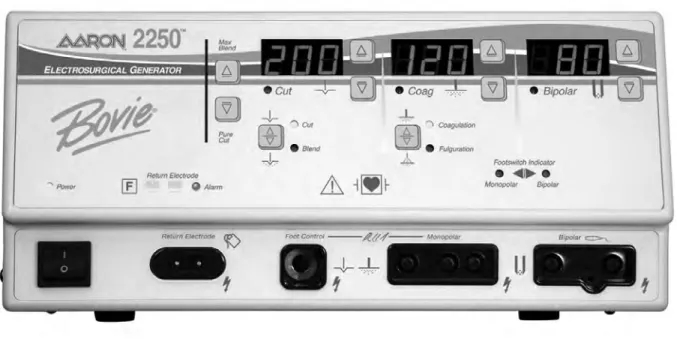
Front Panel ...2-2
Symbols on the Front Panel...2-3
Cut and Blend Controls ...2-4
Coag Controls...2-5
Bipolar Controls ...2-6
Indicators...2-7
Power Switch and Receptacles...2-8
Rear Panel ...2-9
Symbols on the Rear Panel...2-9
Getting Started ...3-1
Initial Inspection...3-2
Installation ...3-2
Function Checks...3-2
Setting Up the Unit ...3-2
Checking the Return Electrode Alarm...3-2
Confirming Modes ...3-3
Checking Bipolar Mode (with bipolar footswitch) ...3-3
Checking Monopolar Mode (with monopolar footswitch)...3-3
Checking Monopolar Mode (with handswitch) ...3-3
Performance Checks ...3-3
Using the Aaron 2250™...4-1
Inspecting the Generator and Accessories ...4-2
Setup Safety ...4-2
Setting Up ...4-3
Preparing for Monopolar Surgery ...4-4
Applying the Return Electrode ...4-4
Connecting Accessories ...4-4
Preparing for Bipolar Surgery ...4-4
Activating the Unit ...4-5
Activation Safety ...4-6
Maintaining the Aaron 2250™...5-1
Cleaning ...5-2
Periodic Inspection ...5-2
Fuse Replacement ...5-2
Troubleshooting ...6-1
Repair Policy and Procedures ...7-1
Responsibility of the Manufacturer ...7-2
Returning the Generator for Service ...7-2
Technical Specifications...A-1
Performance Characteristics ...A-2
Input Power ...A-2
Duty Cycle ...A-2
Dimensions and Weight ...A-2
Operating Parameters ...A-2
Transport and Storage...A-2
Audio Volume...A-3
Return Electrode Sensing ...A-3
Low Frequency (50-60 Hz) Leakage Current...A-3
High Frequency (RF) Leakage Current ...A-4
Standards and IEC Classifications...A-4
Class I Equipment (IEC 60601-1) ...A-4
Type CF Equipment (IEC 60601-1) / Defibrillator Proof...A-4
Drip Proof (IEC 60601-2-2)...A-4
Electromagnetic Interference...A-4
Electromagnetic Compatibility (IEC 60601-1-2 and IEC 60601-2-2)...A-4
Voltage Transients (Emergency Generator Mains Transfer)...A-4
EMC Compliance...A-4
Output Characteristics ...A-8
Maximum Output for Monopolar and Bipolar Modes...A-8
Output Power Curves...A-9
Warranty ...B-1
LIST OF FIGURES
Figure 2 – 1
Layout of controls, indicators, and receptacles on the front panel ...2-2
Figure 2 – 2
Controls for the Cut and Blend modes...2-4
Figure 2 – 3
Controls for the Coag mode...2-5
Figure 2 – 4
Controls for the Bipolar mode ...2-6
Figure 2 – 5
Indicators for power, return electrodes, and footswitch control ...2-7
Figure 2 – 6
Location of the unit power switch and front panel receptacles...2-8
Figure 2 – 7
Layout of connectors and controls on the rear panel...2-9
Figure 5 – 1
Fuse holder ...5-2
Figure A – 1
Output power vs impedance for Cut mode ...A-9
Figure A – 2
Output power versus impedance for Blend mode minimum ...A-9
Figure A – 3
Output power versus impedance for Blend mode maximum...A-10
Figure A – 4
Output power vs impedance for Coagulation mode...A-10
Figure A – 5
Output power vs impedance for Fulguration mode ...A-11
Figure A – 6
Output power vs impedance for Bipolar mode ...A-11
INTRODUCING THE AARON 2250™
This section includes the following information:
l
Key Features
l
Components and Accessories
l
Safety
CAUTIONS:
Read all warnings, cautions, and instructions provided with this generator before using.
Read the instructions, warnings, and cautions provided with electrosurgical accessories before using. Specific instruc-tions are not included in this manual.
KEY FEATURES
The Aaron 2250™ includes the latest technology. This unit offers unsurpassed performance, flexibility, reliability,
and convenience.
It includes the following features:
• Cut Mode
The Cut mode gives the surgeon flexibility to cut all types of tissue without losing performance.
The Cut mode generates constant output power over a wide range of impedances. Refer to the Technical
Specifications section of this guide.
• Blend with 10 Settings
The Blend mode is a combination of cutting and hemostasis. The Aaron 2250™ gives the surgeon freedom to
adjust the desired level of hemostasis. A setting of 1 is minimal blend with maximum cutting effect. A setting of 10
is maximum hemostasis (blend) with minimal cutting effect. This adjustment is easily achieved by an incremental
adjustment. Refer to Section 2, Controls, Indicators, and Receptacles, Cut and Blend Controls. The Blend mode
improves the rate of targeted tissue desiccation without increasing the power delivered by the generator.
• Two levels of coagulation: Coagulation and Fulguration
Coagulation provides precise control of bleeding in localized areas.
Fulguration provides greater control of bleeding in highly vascular tissue over broad surface areas.
• Return electrode sensing and contact quality monitoring
The Aaron 2250™ incorporates a return electrode contact quality monitoring system (Bovie NEM™). This system
detects the type of return electrode: solid or split. The system also continually monitors the contact quality
between the patient and the split return electrode. This feature is designed to minimize patient burns at the
return electrode site.
• FDFS™ (Fast Digital Feedback System)
The FDFS™ (Fast Digital Feedback System) measures voltage and current at 5,000 times a second and immediately
adjusts the power to varying impedance during the electrosurgical procedure. The unit’s digital technology senses
and responds to changes in tissue and density. Unlike analog, this feature reduces the need to adjust power
settings manually.
NOTICES:
The Bovie NEM™ system recommends that you use a split return electrode.
Before activation, pad placement and visual verification of the split return electrode (split pad) indi-cator on the front panel is recommended. After connecting the split pad to the generator and plac-ing the split pad securely to the patient, give the unit 5 to 10 seconds to recognize the split pad. The split pad indicator will illuminate green. If the split pad and cord are attached to the generator without secure contact to the patient, the alarm indicator will illuminate red.
• Isolated RF output
This minimizes the potential of alternate site burns.
• Standard connectors
These connectors accept the latest monopolar and bipolar instruments. Refer to Section 2, Controls, Indicators,
and Receptacles to learn more.
• Self diagnostics
COMPONENTS AND ACCESSORIES
You should receive the following components with your generator:
• Aaron 2250™
• Hospital-grade power cord (110 VAC and 220 VAC)
• User’s Guide
SAFETY
The safe and effective use of electrosurgery depends to a large degree on factors solely under the control of the
opera-tor. There is no substitute for a properly trained and vigilant medical staff. It is important that they read, understand,
and follow the operating instructions supplied with this electrosurgical equipment.
Physicians have used electrosurgical equipment safely in numerous procedures. Before starting any surgical procedure,
the surgeon should be familiar with the medical literature, complications, and hazards of using electrosurgery in that
procedure.
To promote the safe use of the Aaron 2250™, this section presents the warnings and cautions that appear throughout
this user’s guide. It is important that you read, understand, and follow the instructions in these warnings and
cau-tions so that you can operate this equipment with maximum safety. It is also important that you read, understand,
and follow the instructions for use in this user’s guide.
WARNINGS:
Hazardous Electrical Output- This equipment is for use only by trained, licensed physicians. Danger: Fire / Explosion Hazard- Do not use the Aaron 2250™ in the presence of flammable materials. Fire / Explosion Hazard- The following substances will contribute to increased fire and explosion hazards in the operating room:
• Flammable substances (such as alcohol based skin prepping agents and tinctures) • Naturally occurring flammable gases which may accumulate in body cavities such as
the bowel
• Oxygen enriched atmospheres
• Oxidizing agents (such as nitrous oxide [N20] atmospheres).
The sparking and heating associated with electrosurgery can provide an ignition source. Observe fire precautions at all times. When using electrosurgery in the same room with any
of these substances or gases, prevent their accumulation or pooling under surgical drapes, or within the area where electrosurgery is performed.
Connect the power cord to a properly polarized and grounded power source with the frequency and voltage charac-teristics that match those listed on the back of the unit.
Electric Shock Hazard- Connect the generator power cord to a properly grounded receptacle. Do not use power plug adapters.
Electric Shock Hazard- Always turn off and unplug the generator before cleaning. Fire Hazard- Do not use extension cords.
Patient Safety- Use the generator only if the self-test has been completed as described. Otherwise, inaccurate power outputs may result.
Use the lowest output setting necessary to achieve the desired surgical effect. Use the active electrode only for the minimum time necessary in order to lessen the possibility of unintended burn injury. Pediatric applications and/or procedures performed on small anatomic structures may require reduced power settings. The higher the current flow, and the longer the current is applied, the greater the possibility of unintended thermal damage to tissue, especially during use on small structures.
WARNINGS:
Use electrosurgery with caution in the presence of internal or external devices such as pacemakers or pulse genera-tors. Interference produced by the use of electrosurgical devices can cause devices such as pacemakers to enter an asynchronous mode or can block the pacemaker effect entirely. Consult the device manufacturer or hospital Cardiology Department for further information when use of electrosurgical appliances is planned for patients with cardiac pacemakers or other implantable devices.
If the patient has an Implantable Cardioverter Defibrillator (ICD), contact the ICD manufacturer for instructions before performing an electrosurgical procedure. Electrosurgery may cause multiple activation of ICDs.
Do not use electrosurgical equipment unless properly trained to use it in the specific procedure being undertaken. Use by physicians without such training has resulted in serious, unintended patient injury, including bowel perfora-tion and unintended, irreversible tissue necrosis.
For surgical procedures where the high frequency current could flow through parts of the body having a relatively small cross-sectional area, the use of bipolar techniques may be desirable to avoid unwanted coagulation. In some circumstances, potential exists for alternate site burns at points of skin contact (e.g., between the arm and the side of the body). This occurs when electrosurgical current seeks a path to the return electrode that includes the skin-to-skin contact point. Current passing through small skin-to-skin contact points is concentrated and may cause a burn. This is true for grounded, ground referenced, and isolated output generators.
To reduce the potential for alternate site burns, do one or more of the following:
• Avoid skin-to-skin contact points, such as fingers touching leg, when positioning the patient. • Place 5 to 8 cm (2 to 3 in.) of dry gauze between contact points to ensure that contact does
not occur.
• Position the return electrode to provide a direct current route between the surgical site and the return electrode which avoids skin-to-skin contact areas.
• In addition, place patient return electrodes according to the manufacturer’s instructions.
Potential for alternate site burns increases if the return electrode is compromised. Bovie Medical Corporation recom-mends the use of split return electrodes and Bovie® generators with a contact quality monitoring system. Do not wrap the accessory cords or return electrode cords around metal objects. This may induce currents that could lead to shocks, fires, or injury to the patient or surgical team.
CAUTIONS:
At no time should you touch the active electrode or bipolar forceps. A burn could result.
Do not stack equipment on top of the generator or place the generator on top of electrical equipment. These configurations are unstable and/or do not allow adequate cooling.
Provide as much distance as possible between the electrosurgical generator and other electronic equipment (such as monitors). An activated electrosurgical generator may cause interference with them.
Non-function of the generator may cause interruption of surgery. A backup generator should be available for use. Do not turn the activation tone down to an inaudible level. The activation tone alerts the surgical team when an accessory is active.
When using a smoke evacuator in conjunction with the electrosurgical generator, place the smoke evacuator a distance from the generator and set the generator volume control at a level that ensures that the activation tones can be heard.
The use of high frequency current can interfere with the function of other electromagnetic equipment.
When high frequency surgical equipment and physiological monitoring equipment are used simultaneously on the same patient, place any monitoring electrodes as far as possible from the surgical electrodes. Monitoring systems incorporating high frequency current-limiting devices are recommended.
Do not use needles as monitoring electrodes during electrosurgical procedures. Inadvertent electrosurgical burns may result.
To avoid the possibility of an electrosurgical burn to either the patient or the physicians, do not allow the patient to come in contact with a grounded metal object during activation. When activating the unit, do not allow direct skin contact between the patient and the physician.
To avoid the possibility of a burn to the patient, when using a split pad do not activate the unit if the solid pad indicator is illuminated green or the red alarm indicator remains illuminated red. This could indicate improper pad placement or a faulty NEM circuit.
Remove any loose fitting jewelry from the patient before activation.
Examine all accessories and connections to the electrosurgical generator before use. Ensure that the accessories function as intended. Improper connection may result in arcs, sparks, accessory malfunction, or unintended surgical effects.
When not using active accessories, place them in a holster or in a clean, dry, non-conductive, and highly visible area not in contact with the patient. Inadvertent contact with the patient may result
in burns.
Studies have shown that smoke generated during electrosurgical procedures can be potentially harmful to patients and the surgical team. These studies recommend adequately ventilating the smoke by using a surgical smoke evacua-tor or other means.1
1. U.S. Department of Health and Human Services. National Institute for Occupational Safety and Health (NIOSH). Control of Smoke from Laser / Electric Surgical Procedures. HAZARD CONTROLS, Publication No. 96-128, September, 1996.
NOTICES:
If required by local codes, connect the generator to the hospital equalization connector with an equipotential cable.
Do not clean the generator with abrasive cleaning or disinfectant compounds, solvents, or other materials that could scratch the panels or damage the generator.
CONTROLS, INDICATORS, AND RECEPTACLES
This section describes:
●
The Front and Rear Panels
FRONT PANEL
Symbols on the Front Panel
Refer to the following table for descriptions of symbols found on the front panel of the Aaron 2250™.
SYMBOLS
DESCRIPTION
Cut Controls
Cut Mode
Blend Mode
Coag Controls
Coagulation Mode
Fulguration Mode
Bipolar Controls
Bipolar Mode
Indicators
Split Return Electrode
Solid Return Electrode
Regulatory Symbology
Read instructions before use.
Defibrillator Proof Type CF Equipment
RF Isolated – patient connections are isolated from earth at high frequency.
Power Switch and Handpiece Connectors
Return Electrode Receptacle
Caution High Voltage
Cut Mode
Coag Mode
Monopolar Handpiece Receptacle
Bipolar Mode
CUT AND BLEND CONTROLS
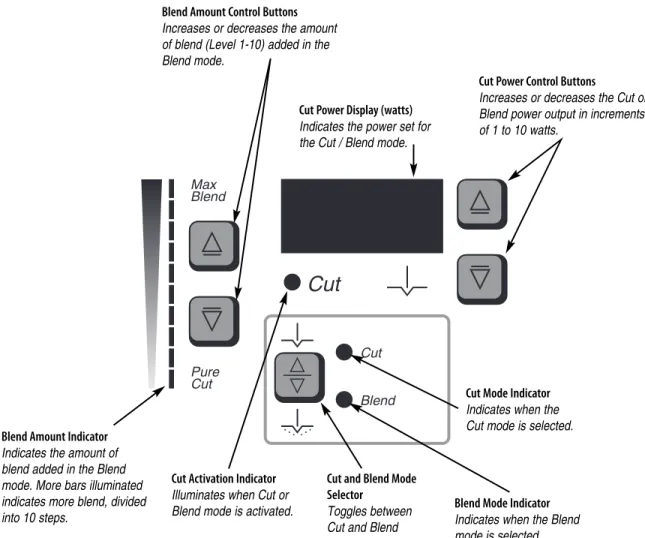
Figure 2 – 2 Controls for the Cut and Blend modes
Cut Power Control Buttons
Increases or decreases the Cut or Blend power output in increments of 1 to 10 watts.
Cut and Blend Mode Selector
Toggles between Cut and Blend modes. Blend Amount Indicator
Indicates the amount of blend added in the Blend mode. More bars illuminated indicates more blend, divided into 10 steps.
Blend Amount Control Buttons Increases or decreases the amount of blend (Level 1-10) added in the Blend mode.
Cut Mode Indicator Indicates when the Cut mode is selected.
Blend Mode Indicator Indicates when the Blend mode is selected.
NOTICE:
When selecting the Blend mode, the unit defaults to a setting of minimum blend (only the first bar is illuminated).
Cut Power Display (watts) Indicates the power set for the Cut / Blend mode.
Cut Activation Indicator Illuminates when Cut or Blend mode is activated.
COAG CONTROLS
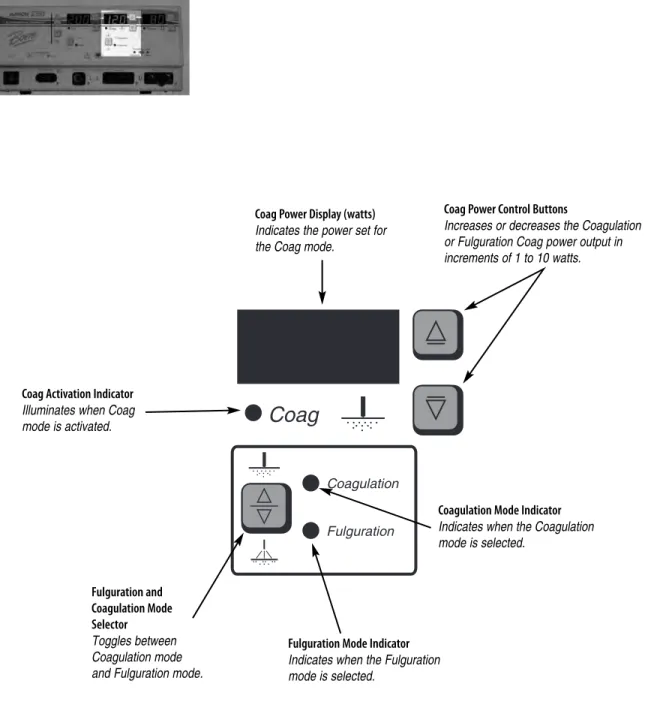
Figure 2 – 3 Controls for the Coag mode
Coag Power Display (watts) Indicates the power set for the Coag mode.
Coag Power Control Buttons
Increases or decreases the Coagulation or Fulguration Coag power output in increments of 1 to 10 watts.
Coag Activation Indicator Illuminates when Coag mode is activated. Fulguration and Coagulation Mode Selector Toggles between Coagulation mode and Fulguration mode.
Coagulation Mode Indicator Indicates when the Coagulation mode is selected.
Fulguration Mode Indicator Indicates when the Fulguration mode is selected.
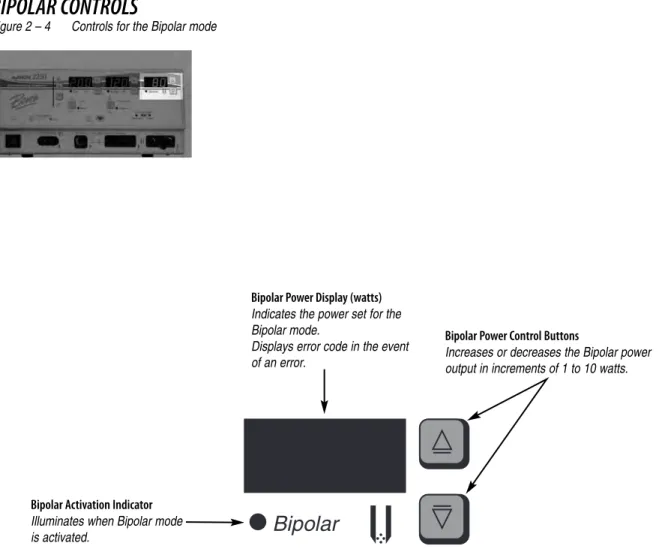
BIPOLAR CONTROLS
Figure 2 – 4 Controls for the Bipolar mode
Bipolar Power Display (watts) Indicates the power set for the Bipolar mode.
Displays error code in the event of an error.
Bipolar Power Control Buttons
Increases or decreases the Bipolar power output in increments of 1 to 10 watts.
Bipolar Activation Indicator Illuminates when Bipolar mode is activated.
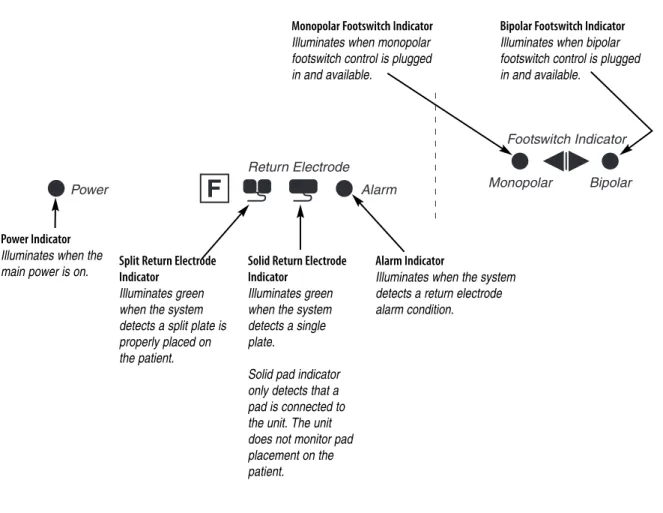
INDICATORS
Figure 2 – 5 Indicators for power, return electrodes, and footswitch control
Power Indicator Illuminates when the
main power is on. Alarm IndicatorIlluminates when the system detects a return electrode alarm condition. Solid Return Electrode
Indicator Illuminates green when the system detects a single plate.
Solid pad indicator only detects that a pad is connected to the unit. The unit does not monitor pad placement on the patient. Split Return Electrode
Indicator Illuminates green when the system detects a split plate is properly placed on the patient.
Monopolar Footswitch Indicator Illuminates when monopolar footswitch control is plugged in and available.
Bipolar Footswitch Indicator Illuminates when bipolar footswitch control is plugged in and available.
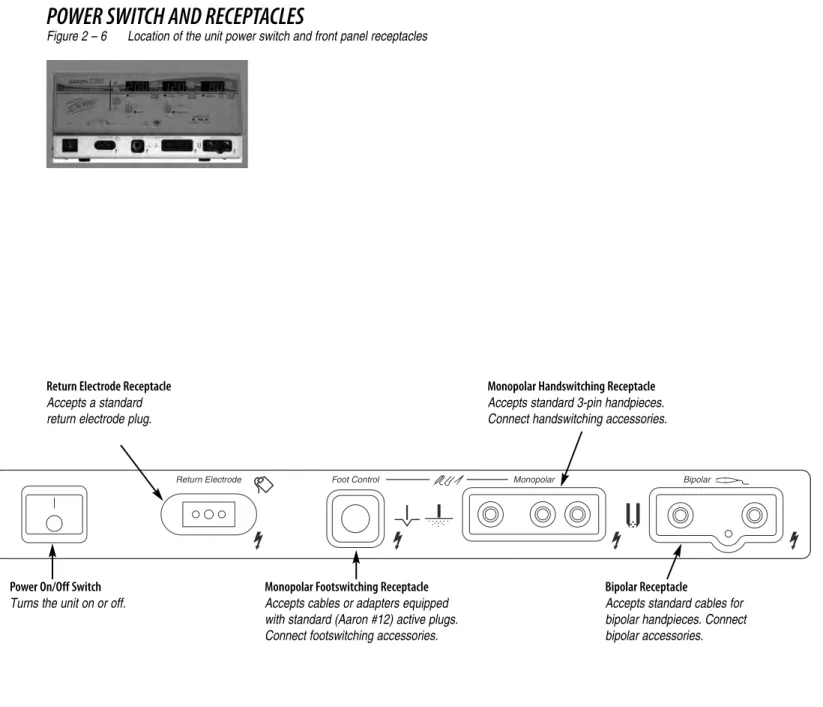
POWER SWITCH AND RECEPTACLES
Figure 2 – 6 Location of the unit power switch and front panel receptacles
Power On/Off Switch Turns the unit on or off.
Monopolar Footswitching Receptacle Accepts cables or adapters equipped with standard (Aaron #12) active plugs. Connect footswitching accessories.
Bipolar Receptacle
Accepts standard cables for bipolar handpieces. Connect bipolar accessories. Return Electrode Receptacle
Accepts a standard return electrode plug.
Monopolar Handswitching Receptacle Accepts standard 3-pin handpieces. Connect handswitching accessories.
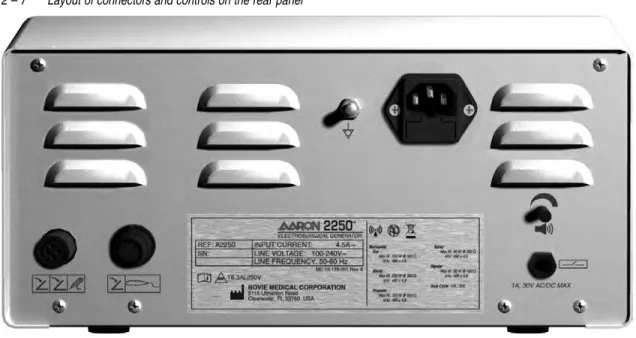
REAR PANEL
Figure 2 – 7 Layout of connectors and controls on the rear panel
Symbols on the Rear Panel
Refer to the following table for descriptions of symbols found on the rear panel of the Aaron 2250™.
SYMBOLS
DESCRIPTION
Equipotential Ground Stud
Non-ionizing Radiation
Volume Control
Danger
- Explosion Risk If Used With Flammable Anesthetics.
Fuse Enclosed
Relay Connector
Monopolar Footswitch Input Jack
Bipolar Footswitch Input Jack
Read Instructions Before Use
Do not dispose of this device in the unsorted municipal waste stream.
GETTING STARTED
This section includes the following information:
l
Initial Inspection
l
Installation
l
Function Checks
l
Performance Checks
INITIAL INSPECTION
When you first unpack your Aaron 2250™, inspect it visually:
• Look for any signs of damage.
• Verify that the shipping package contains all items listed on the packing list.
If the unit or any accessories are damaged, notify Bovie Medical Corporation’s Customer Service immediately.
Do not use any damaged equipment.
INSTALLATION
Place the Aaron 2250™ on any flat surface with a tilt angle not more than 10˚. The unit relies on natural convection
cooling. Do not block its bottom or rear vents. Ensure that air flows freely on all sides of the unit.
WARNING:
Connect the power cord to a properly polarized and grounded power source with the frequency and voltage charac-teristics that match those listed on the back of the unit.
FUNCTION CHECKS
Upon initial installation of the unit, perform the tests listed below. Refer to the figures in the previous chapter for the
location of connectors and controls.
WARNING:
At no time should you touch the active electrode or bipolar forceps. A burn could result.
Setting Up the Unit
1. Verify that the Power Switch is in the Off (O) position and that no accessories are connected to the unit.
2. Connect a hospital grade power cable to the AC power cable receptacle on the back of the unit, then to a properly
grounded wall outlet.
3. Connect a two-button monopolar pencil to the appropriate receptacle. The use of Aaron® pencils is
recommended.
4. Do not connect a patient return electrode at this time.
5. Turn the unit on by switching the power switch to the On (|)position.
Checking the Return Electrode Alarm
1. Adjust the power settings for each mode (Cut, Coag, Bipolar) to one watt.
2. Press the Coag button of the pencil. Verify that an alarm sounds for three seconds and the patient return electrode
sensing alarm indicator light illuminates, indicating that no return electrode is connected to the unit.
3. Verify that adjusting the volume control on the back of the unit while the alarm is sounding does not change the
alarm volume.
Confirming Modes
Confirm that you can select each mode and adjust the power up and down.
Checking Bipolar Mode (with bipolar footswitch)
1. Plug in the Bipolar footswitch. Verify that the Bipolar footswitch indicator illuminates.
2. Press the pedal on the Bipolar footswitch. Verify that the Bipolar mode activation indicator illuminates and that
the system generates the Bipolar activation tone.
3. While activating the Bipolar mode, rotate the volume control over the full range to verify that the sound is audible
throughout the range.
4. Confirm that releasing the pedal returns the unit to an idle state.
Checking Monopolar Mode (with monopolar footswitch)
1. Plug in the Monopolar footswitch. Verify that the monopolar footswitch indicator illuminates.
2. Connect a solid return electrode to the return electrode receptacle. Verify that the green solid return electrode
indicator illuminates.
3. Press the Cut pedal (yellow) on the footswitch. Verify that the Cut mode activation indicator illuminates and that
the system generates the Cut activation tone.
4. While activating the Cut mode, rotate the volume control over the full range to verify that the sound is audible
throughout the range.
5. Press the Coag pedal (blue) on the footswitch. Verify that the Coag mode activation indicator illuminates and that
the system generates the Coag activation tone.
6. While activating the Coag mode, rotate the volume control over the full range to verify that the sound is audible
throughout the range.
Checking Monopolar Mode (with handswitch)
1. Connect a handswitching handpiece to the Monopolar handpiece receptacle.
2. Connect a solid return electrode to the return electrode receptacle. Verify that the green solid return electrode
indicator illuminates.
3. Activate, one at a time, the Cut and Coag handswitching controls. Verify that each control causes the correct
indicator and tone to sound.
PERFORMANCE CHECKS
After the unit has passed the preliminary functional test, it is ready for performance testing. A qualified biomedical
engineer who is thoroughly familiar with electrosurgical devices should conduct this testing. The testing should
include checking all modes of operation for proper function and power output.
USING THE AARON 2250™
This section contains the following procedures:
l
Inspecting the Generator and Accessories
l
Setup Safety
l
Setting Up
l
Preparing for Monopolar Surgery
l
Preparing for Bipolar Surgery
l
Activating the Unit
l
Activation Safety
CAUTIONS:
Read all warnings, cautions, and instructions provided with this generator before use.
Read the instructions, warnings, and cautions provided with electrosurgical accessories before use. Specific instruc-tions are not included in this manual.
INSPECTING THE GENERATOR AND ACCESSORIES
Before each use of the Aaron 2250™, verify that the unit and all accessories are in good working order:
• Inspect for damage to the Electrosurgical Generator and all its connections.
• Verify that the appropriate accessories and adapters are present.
• Inspect all cords and connectors for signs of wear, damage, and abrasion.
• Verify that no errors occur when you turn on the unit.
SETUP SAFETY
WARNINGS:
Hazardous Electrical Output- This equipment is for use only by trained, licensed physicians.
Electric Shock Hazard- Connect the generator power cord to a properly grounded receptacle. Do not use power plug adapters.
Connect the power cord to a properly polarized and grounded power source with the frequency and voltage charac-teristics that match those listed on the back of the unit.
Fire Hazard- Do not use extension cords.
Patient Safety- Use the generator only if the self-test has been completed as described. Otherwise, inaccurate power outputs may result.
The instrument receptacles on this generator are designed to accept only one instrument at a time. Do not attempt to connect more than one instrument at a time into a given receptacle. Doing so will cause simultaneous activation of the instruments.
Failure of the high frequency electrosurgical equipment could result in an unintended increase of output power. Do not use electrosurgical equipment unless properly trained to use it in the specific procedure being undertaken. Use by physicians without such training has resulted in serious, unintended patient injury, including bowel perfora-tion and unintended, irreversible tissue necrosis.
For surgical procedures where the high frequency current could flow through parts of the body having a relatively small cross-sectional area, the use of bipolar techniques may be desirable to avoid unwanted coagulation. If the patient has an implantable cardioverter defibrillator (ICD), contact the ICD manufacturer for instructions before performing an electrosurgical procedure. Electrosurgery may cause multiple activation of ICDs.
In some circumstances, potential exists for alternate site burns at points of skin contact (e.g., between the arm and the side of the body). This occurs when electrosurgical current seeks a path to the patient return electrode that includes the skin-to-skin contact point. Current passing through small skin-to-skin contact points is concentrated and may cause a burn. This is true for grounded, ground referenced, and isolated output generators.
To reduce the potential for alternate site burns, do one or more of the following:
• Avoid skin-to-skin contact points, such as fingers touching leg, when positioning the patient. • Place 5 to 8 cm (2 to 3 in.) of dry gauze between contact points to ensure that contact does
not occur.
• Position the return electrode to provide a direct current route between the surgical site and the return electrode which avoids skin-to-skin contact areas.
• In addition, place return electrodes according to the manufacturer’s instructions.
Potential for alternate site burns increases if the return electrode is compromised. Bovie Medical recommends the use of split return electrodes and Bovie generators with a contact quality
CAUTIONS:
Do not stack equipment on top of the generator or place the generator on top of electrical equipment. These configurations are unstable and/or do not allow adequate cooling.
Provide as much distance as possible between the electrosurgical generator and other electronic equipment (such as monitors). An activated electrosurgical generator may cause interference with them.
Non-function of the generator may cause interruption of surgery. A backup generator should be available for use. Do not turn the activation tone down to an inaudible level. The activation tone alerts the surgical team when an accessory is active.
When using a smoke evacuator in conjunction with the electrosurgical generator, place the smoke evacuator a dis-tance from the generator and set the generator volume control at a level that ensures that the activation tones can be heard.
NOTICE:
If required by local codes, connect the generator to the hospital equalization connector with an equipotential cable.
SETTING UP
1. Verify that the generator is Off by pressing the power switch Off (O).
2. Place the generator on a stable flat surface, such as a table, platform, or medical cart. Carts with conductive wheels
are recommended. For details, refer to the procedures for your institution or to local codes. Provide at least 10 to
15 cm (4 to 6 in.) of space from the sides and top of the generator for cooling. Normally, the top, sides, and rear
panel are warm when you use the generator continuously for extended periods of time.
3. Plug the generator power cord into the AC Power Cable Receptacle on the rear panel.
4. Plug the generator power cord into a grounded receptacle.
5. Turn on the generator by pressing the power switch On (|). Verify the following:
• All visual indicators and displays on the front panel illuminate.
• Activation tones sound to verify that the speaker is working properly.
6. If the self-test is successful, a tone sounds. Verify the following:
• A Cut mode is selected; a Coag mode is selected.
• Each display shows a power setting. The unit automatically powers up to the last used power settings.
NOTICE:ALL modes (Cut, Coagulation, and Bipolar) must be set and activated individually before the unit is powered off. Only then will the unit power up to the last activated mode and setting.
• The Patient Return Electrode Alarm Indicator illuminates red.
If the self-test is not successful, an alarm tone sounds. An error code will appear in the Bipolar display, in most cases,
the generator is disabled. Note the error code and refer to Section 6, Troubleshooting.
PREPARING FOR MONOPOLAR SURGERY
Monopolar surgery requires a return electrode.
Applying the Return Electrode
To maximize patient safety, Bovie Medical Corporation recommends using a split return electrode and a Bovie®
generator with a contact quality monitoring system (Bovie NEM™).
NOTICES:
The Bovie NEM™ system recommends that you use a split return electrode.
Before activation, pad placement and visual verification of the split return electrode (split pad) indi-cator on the front panel is recommended. After connecting the split pad to the generator and plac-ing the split pad securely to the patient, give the unit 5 to 10 seconds to recognize the split pad. The split pad indicator will illuminate green. If the split pad and cord are attached to the generator without secure contact to the patient, the alarm indicator will illuminate red.
Refer to the manufacturer’s instructions for application site and placement procedures. When using metal plate
return electrodes, use a conductive gel specifically designed for electrosurgery. Select a return electrode site with good
blood flow. While a properly applied electrode results in minimal tissue heating beneath the electrode, a good blood
flow helps carry heat away from the site.
1. Connect the cable to the Return Electrode receptacle on the front of the unit.
The unit will automatically sense the presence of a split or solid return electrode and, if a split return electrode is
used, will constantly monitor the resistance at the contact between the electrode and the patient.
2. Adjust the Blend setting to the desired amount of hemostasis (Level 1 - 10). Adjustment is preformed by pressing
the up or down buttons next to the Blend setting indicator.
Select the desired power settings for Cutting. Adjustment is preformed by pressing the up or down buttons next to
the Cut display.
Select the mode of operation for Coagulation, either Coagulation or Fulguration.
Select the desired power setting for Coagulation. Adjustment is preformed by pressing the up or down buttons next
to the Coag display.
Connecting Accessories
1. Connect a 3-pin monopolar device into the monopolar receptacle on the front of the unit.
If footswitching control capabilities are preferred, connect the Bovie monopolar footswitch to the appropriate
footswitch connecting socket on the rear of the unit.
To activate the Monopolar mode, depress the cut or coag button on the monopolar handpiece or the cut or coag
pedal on the monopolar footswitch.
PREPARING FOR BIPOLAR SURGERY
If you are using…
Connect it to…
Standard 3-pin handswitching pencil
Monopolar handswitching receptacle
3. Connect the bipolar footswitch to the bipolar footswitch connecting socket located on the rear of the unit.
To activate the Bipolar mode, depress the pedal on the bipolar footswitch.
ACTIVATING THE UNIT
NOTICES:Review Activation Safetyon page 6 of this section before activating the unit. When you turn on your unit remember the following feature:
The Aaron 2250™ will power up to the settings displayed when the unit was last activated. For example, if you set the Cut mode at 50 watts and activate the unit, then turn the unit off, it will automatically return to Cut at 50 watts when you turn it on again. Similarly, if you set Coagulation mode at 40 watts and activate the unit before you turn it off, it will return to Coagulation mode at 40 watts when you turn it on again.
ALL modes (Cut, Coagulation, and Bipolar) must be set and activated individually before the unit is powered off. Only then will the unit power up to the last activated mode and setting.
During activation, the activated mode can be adjusted up and or down a maximum of four steps. Refer to the following table for power increments.
1. Monopolar Cut - select the mode of operation for Cut or Blend then select the desired Cut power settings by
pressing the up and down buttons next to the Cut power output display.
2. If using Blend, vary the blend setting by pressing the up and down buttons next to the blend amount
indicator graph.
3. Monopolar Coag - select the mode of operation for coagulation: Coagulation or Fulguration, then select the
coagu-lation power settings by pressing the up and down buttons next to the Coag power output display.
4. Bipolar - adjust the Bipolar power settings by pressing the up and down buttons next to the Bipolar power
output display.
5. Activate the generator by pressing the appropriate button on the handpiece or pedal on the footswitch.
NOTICE:Monopolar and bipolar footswitching operations are controlled by independent foot controls.
POWER SETTINGS
INCREMENTS
FOR INSTANCE...
1-50 Watts
1 Watts
While activated, the Cut power output of 30 watts can be adjusted 4 steps
down to 26 watts or 4 steps up to 34 watts.
50-100 Watts
2 Watts
ACTIVATION SAFETY
WARNINGS:Do not wrap the accessory cords or patient return electrode cords around metal objects. This may induce currents that could lead to shocks, fires, or injury to the patient or surgical team.
Danger: Fire / Explosion Hazard- Do not use the Aaron 2250™ in the presence of flammable anesthetics. Fire / Explosion Hazard- The following substances will contribute to increased fire and explosion hazards in the operating room:
• Flammable substances (such as alcohol based skin prepping agents and tinctures) • Naturally occurring flammable gases that may accumulate in body cavities such as the bowel • Oxygen enriched atmospheres
• Oxidizing agents (such as nitrous oxide [N2O] atmospheres).
The sparking and heating associated with electrosurgery can provide an ignition source. Observe fire precautions at all times. When using electrosurgery in the same room with any of these substances or gases, prevent their accumu-lation or pooling under surgical drapes, or within the area where electrosurgery is performed.
Use the lowest output setting necessary to achieve the desired surgical effect. Use the active electrode only for the minimum time necessary in order to lessen the possibility of unintended burn injury. Pediatric applications and/or procedures performed on small anatomic structures may require reduced power settings. The higher the current flow, and the longer the current is applied, the greater the possibility of unintended thermal damage to tissue, especially during use on small structures.
Use electrosurgery with caution in the presence of internal or external devices such as pacemakers or pulse genera-tors. Interference produced by the use of electrosurgical devices can cause devices such as pacemakers to enter an asynchronous mode or can block the pacemaker effect entirely. Consult the device manufacturer or hospital Cardiology Department for further information when use of electrosurgical appliances is planned for patients with cardiac pacemakers or other implantable devices.
CAUTIONS:
The use of high frequency current can interfere with the function of other electromagnetic equipment.
When high frequency surgical equipment and physiological monitoring equipment are used simultaneously on the same patient, place any monitoring electrodes as far as possible from the surgical electrodes.
Do not use needles as monitoring electrodes during electrosurgical procedures. Inadvertent electrosurgical burns may result.
To avoid the possibility of an electrosurgical burn to either the patient or the physicians, do not allow the patient to come in contact with a grounded metal object during activation. When activating the unit, do not allow direct skin contact between the patient and the physician.
To avoid the possibility of a burn to the patient, when using a split pad do not activate the unit if the solid pad indicator is illuminated green or the red alarm indicator remains illuminated red. This could indicate improper pad placement or a faulty NEM circuit.
Remove any jewelry from the patient before activation.
Studies have shown that smoke generated during electrosurgical procedures can be potentially harmful to patients and the surgical team. These studies recommend adequately ventilating the smoke by using a surgical smoke evacuator or other means.1
Examine all accessories and connections to the electrosurgical generator before use. Ensure that the accessories function as intended. Improper connection may result in arcs, sparks, accessory malfunction, or unintended surgical effects.
When not using active accessories, place them in a holster or in a clean, dry, non-conductive, and highly visible area not in contact with the patient. Inadvertent contact with the patient may result in burns.
1. U.S. Department of Health and Human Services. National Institute for Occupational Safety and Health (NIOSH). Control of Smoke from Laser / Electric Surgical Procedures. HAZARD
MAINTAINING THE AARON 2250™
This section covers the following topics:
l
Cleaning
l
Periodic Inspection
Bovie Medical Corporation recommends that you complete periodic inspection and performance testing. Perform
inspections and performance testing every six months. A qualified biomedical technician should conduct this testing
to ensure that the unit is operating effectively and safely.
CLEANING
After each use, clean the unit.
WARNING:
Electric Shock Hazard- Always turn off and unplug the generator before cleaning.
NOTICE:
Do not clean the generator with abrasive cleaning or disinfectant compounds, solvents, or other materials that could scratch the panels or damage the generator.
1. Turn off the generator, and unplug the power cord from the wall outlet.
2. Thoroughly wipe all surfaces of the generator and power cord with a mild cleaning solution or disinfectant and
a damp cloth. Follow the procedures approved by your institution or use a validated infection control procedure.
Do not allow fluids to enter the chassis. Do not sterilize the generator.
PERIODIC INSPECTION
Every six months, visually inspect the Aaron 2250™ for signs of wear or damage.
In particular, look for any of the following problems:
• Damage to the power cord
• Damage to the power cable receptacle
• Obvious damage to the unit
• Damage to any receptacle
• Accumulation of lint or debris in or around the unit
FUSE REPLACEMENT
Fuses for the unit reside directly below the Power Cable Receptacle on the rear of the unit.
To replace the fuses, follow this procedure:
1. Unplug the power cord from the wall outlet.
2. Remove the power cord from the Power Cable Receptacle on the rear panel.
3. To release the fuse drawer, insert a small flathead screwdriver into the slot
on the drawer below the power cord receptacle. Then, slide the drawer out.
4. Remove the two fuses (T6.3AL250V) and replace them with new fuses with
the same values.
5. Insert the fuse holder into the Power Cable Receptacle.
NOTICE:
If the unit does not display an error and does not power on, check fuses.
TROUBLESHOOTING
The Aaron 2250™ includes automatic self-diagnostics. If the diagnostics detect an error, the system displays an error
code, sounds an audible tone, and deactivates the unit output power.
Most error codes result from faults in accessories attached to the unit. The following table lists the error codes,
describes the errors, and recommends actions to take to resolve the errors.
All error codes are displayed in the Bipolar display.
If the unit displays any other error code, it requires service.
Error Code
Description
Recommended Action
F1
Cut handpiece button may be stuck
1. Turn off, then turn on the generator. Do not press buttons or activate
accessory devices during the self-test.
2. If the error code reappears, disconnect all accessories.
Turn off, then turn on the generator again.
3. If the problem persists, replace the handpiece or footswitch
and repeat the restart.
4. If the error code reappears, record the number and call
Bovie Medical Corporation customer service.
F2
Coag handpiece button
may be stuck
F3
Cut footswitch pedal may be stuck
F4
Coag footswitch pedal
may be stuck
F5
Bipolar footswitch pedal
may be stuck
F6
Simultaneous activation error
The unit does not allow simultaneous activation of the cut and
coagulation modes. The activation mode is “first come, first serve.”
This means that whichever mode is selected first will be the function
the unit is activated to dispense. An example of this functionality includes, when the
handpiece Cut button is pressed, the unit is activated for Cut. If a footswitch is
simulta-neously pressed for Coag, the unit will continue in the Cut mode as long as the
hand-piece Cut button is pressed. If the Cut button is released, the unit will sense an error
and both functions will be disabled.
1. Release either the cut or coag button on the handpiece,
or the cut or coag pedal on the footswitch.
2. If the error code reappears, record the number and contact
Bovie Medical Corporation customer service.
E1
Output current out of specification
1. Turn the unit off.
2. Turn the unit on.
3. If the error code reappears, record the number and contact
Bovie Medical Corporation customer service.
E2
Dosage voltage error
E3
Dosage current error
E4
DC power error
E5
Internal temperature of a section of the
unit exceeded the limit.
1. Turn the unit off.
2. Allow the unit to cool for 20 minutes.
3. Turn the unit on.
4. If the error code reappears, record the number and contact
Bovie Medical Corporation customer service.
E6
E7
E8
NEM circuit error
1. Turn the unit off.
2. Turn the unit on.
3. If the error code reappears, record the number and contact
Bovie Medical Corporation customer service.
REPAIR POLICY AND PROCEDURES
Refer to this section for information on:
●
Responsibility of the Manufacturer
RESPONSIBILITY OF THE MANUFACTURER
Bovie Medical Corporation is responsible for the safety, reliability, and performance of the generator only under the
following circumstances:
• The user has followed the Installation and Setup Procedures in this User’s Guide.
• Persons authorized by Bovie Medical Corporation performed assembly operation, readjustments, modifications,
or repairs.
• The electrical installation of the relevant room complies with local codes and regulatory requirements.
• Equipment use is in accordance with the Bovie Medical Corporation instructions for use.
For warranty information, refer to Appendix B - Warranty.
RETURNING THE GENERATOR FOR SERVICE
Before you return the generator, call your Bovie Medical representative for assistance. If instructed to send the
generator to Bovie Medical Corporation, first obtain a Returned Goods Authorization Number. Then, clean the
Generator and package securely to ensure proper protection of the unit. So as to aid in the processing of the unit,
please be sure to include a reference to the Bovie
®Return Goods Authorization Number on the outside of the box
and ship directly to Bovie Medical Corporation.
Step 1 – Obtain a Returned Goods Authorization Number
Call the Bovie Medical Corporation Customer Service Center to obtain a Returned Goods Authorization Number.
Have the following information ready when you call:
• Hospital / clinic name / customer number
• Description of the problem
• Telephone number/fax number
• Type of repair to be done
• Department / address, city, state, and zip code
• P.O. number
• Model number / Serial number
Step 2 – Clean the Generator
WARNING:Electric Shock Hazard- Always turn off and unplug the generator before cleaning. NOTICE:
Do not clean the generator with abrasive cleaning or disinfectant compounds, solvents, or other materials that could scratch the panels or damage the generator.
A. Turn off the generator, and unplug the power cord from the wall outlet.
B.Thoroughly wipe all surfaces of the generator and power cord with a mild cleaning solution or disinfectant and a
damp cloth. Follow the procedures approved by your institution or use a validated infection control procedure. Do
not allow fluids to enter the chassis. You cannot sterilize the generator.
Step 3 – Ship the Generator
A. Attach a tag to the generator that includes the Returned Goods Authorization Number and the information
(hos-pital, phone number, etc.) listed in Step 1 – Obtain a Returned Goods Authorization Number.
B.Be sure the generator is completely dry before you pack it for shipment. Although the preference is to have the
Generator repackaged using its original packaging, Bovie
®TECHNICAL SPECIFICATIONS
All specifications are nominal and subject to change without notice. A specification referred to as “typical” is
within ± 20% of a stated value at room temperature (25° C / 77° F) and a nominal input power voltage.
PERFORMANCE CHARACTERISTICS
Input Power
Duty Cycle
Under maximum power settings and rated load conditions (Pure Cut, 200 watt @ 300 ohm load), the generator is
suitable for activation times of 10 seconds ON followed by 30 seconds OFF for one hour.
The internal temperature of the unit is continuously monitored. If the temperature rises above 85
0C, the alarm will
sound and output power will be deactivated.
Dimensions and Weight
Operating Parameters
Transport and Storage
Generator should fit on all standard Carts for monopolar generators. The device should be stored and used in a
room temperature of approximately 77
0F/25
0C.
Ambient temperature range
-40˚ to +70˚ C
Relative humidity
10% to 100%, including condensation
Atmospheric pressure
50kPa to 106kPa
Input Voltage
100-240 VAC ± 10%
Mains line frequency range (nominal):
50 – 60 Hz
Power consumption:
500 VA
Fuses (two):
6.3 A (slow blow)
Width
31.1 cm (12.25 in.)
Depth
41.3 cm (16.25 in.)
Height
15.3 cm (6.00 in.)
Weight
< 8.75 kg (< 19 lbs)
Ambient temperature range
10° to 40° C
Relative humidity
30% to 75%, non-condensing
Atmospheric pressure
70kPa to 106kPa
Warm-up time
If transported or stored at temperatures outside the operating temperature range, allow one hour
for the generator to reach room temperature before use.
Audio Volume
The audio levels stated below are for activation tones (cut, coag, and bipolar) and alarm tones (return electrode and
system alarms) at a distance of one meter. Alarm tones meet the requirements for IEC 60601-2-2.
Activation Tone
Alarm Tone
Return Electrode Sensing
The system presents audible and visible alarms when it senses no return electrode.
Low Frequency (50-60 Hz) Leakage Current
Volume (adjustable)
40 to 65 dB
Frequency
Cut I: 610 Hz
Blend: 610 Hz
Pinpoint: 910 Hz
Spray: 910 Hz
Bipolar: 910 Hz
Duration
Continuous while the generator is activated
Volume (not adjustable)
70 dB ± 5 dB
Frequency
2 kHz
1⁄
2seconds / 1 kHz
1⁄
2seconds
Duration
2 seconds
Solid
Trip resistance: 0 Ω to 5 Ω ± 3 Ω
Continuous measurement:
Once the system establishes the solid return electrode resistance, an
increase of 20 Ω ± 5 Ω in resistance will cause an alarm. When the
alarm condition exists, the system deactivates output power.
Split
Trip resistance: 10 Ω ± 5 Ω to 135 Ω ± 10 Ω
Continuous measurement:
Once the system establishes the split return electrode resistance, an
increase of 40% in resistance will cause an alarm. When the alarm
condition exists, the system deactivates output power.
Enclosure source current, ground open
< 500 μA
Source current, patient leads, all outputs
Normal polarity, intact ground: < 10 μA
Normal polarity, ground open: < 10 μA
Reverse polarity, ground open: < 10 μA
High Frequency (RF) Leakage Current
STANDARDS AND IEC CLASSIFICATIONS
Class I Equipment (IEC 60601-1)
Accessible conductive parts cannot become live in the event of a basic insulation failure because of the way in which
they are connected to the protective earth conductor.
Type CF Equipment (IEC 60601-1) / Defibrillator Proof
The Aaron 2250™ provides a high degree of protection against electric shock, particularly regarding
allowable leakage currents. It is type CF equipment. Patient connections are isolated from earth and
resist the effects of defibrillator discharge.
Drip Proof (IEC 60601-2-2)
The generator enclosure is constructed so that liquid spillage in normal use does not wet electrical insulation or other
components which, when wet, are likely to affect adversely the safety of the generator.
Electromagnetic Interference
When other equipment is placed on or beneath a Aaron 2250™, the unit can be activated without interference.
The generator minimizes electromagnetic interference to video equipment used in the operating room.
Electromagnetic Compatibility (IEC 60601-1-2 and IEC 60601-2-2)
The Aaron 2250™ complies with the appropriate IEC 60601-1-2 and IEC 60601-2-2 specifications regarding
electromagnetic compatibility.
Voltage Transients (Emergency Generator Mains Transfer)
The Aaron 2250™ operates in a safe manner when the transfer is made between line AC and an emergency generator
voltage source.
EMC COMPLIANCE
Special precautions should be taken regarding the Aaron 2250™. Medical Electrical Equipment needs special
precau-tions regarding EMC and needs to be installed and put into service according to the EMC information provided in
this manual.
Understand that only the Accessories supplied with or ordered from Bovie® should be used with your device. The
use of accessories, transducers, and cables other than those specified, may result in increased Emissions or decreased
Immunity of the Aaron 2250™. The Aaron 2250™and its accessories are not suitable for interconnection with other
equipment.
Portable and mobile RF communications equipment can affect Medical Electrical Equipment. The Aaron 2250™
should not be used adjacent to or stacked with other equipment and that if adjacent or stacked use is necessary, the
Aaron 2250™ should be observed to verify normal operation in the configuration in which it will be used.
Bipolar RF leakage current
< 63 mA
rms at 80 wattsRecommended separation distances between portable and mobile RF
communications equipment and the Aaron 2250™
The Aaron 3250™ is intended for use in an electromagnetic environment in which radiated RF disturbances are controlled. The customer or the user of the Aaron 2250™ can help prevent electromagnetic interference by maintaining a minimum distance between portable and mobile RF communications equipment (transmitters) and the Aaron 2250™ as recommended below, according to the maximum output power of the communications equipment.
Rated maximum output power of transmitter W 0.01 0.1 1 10 100
separation distance according to frequency of transmitter 150 kHz to 80 MHz d =
[
3.5]
√
P V1 80 MHz to 800 MHz d =[
3.5]
√
P E1 800 MHz to 2.5 GHz d =[
7]
√
P E1 0.12 0.12 0.23 0.38 0.38 0.73 1.2 1.2 2.3 3.8 3.8 7.3 12 12 23For transmitters rated at a maximum output power not listed above, the recommended separation distance d in metres (m) can be estimated using the equation applicable to the frequency of the transmitter, where P is the maximum output power rating of the transmitter in watts (W) according to the transmitter manufacturer.
NOTE 1 At 80 MHz and 800 MHz, the separation distance for the higher frequency range applies. NOTE 2 These guidelines may not apply in all situations. Electromagnetic propagation is affected by absorption and reflection from structures, objects and people.
Guidance and manufacturer’ s declaration – electromagnetic emissions
The Aaron 2250™ is intended for use in the electromagnetic environment listed below. The customer or the user of the Aaron 2250™ should assure that is used in such an environment.
Emissions test Compliance Electromagnetic environment - guidance
RF Emissions CISPR 11 Group 2
The Aaron 2250™ must emit electromagnetic energy in order to perform its intended function. Nearby electronic equipment may be affected.
RF Emissions CISPR 11 Class A The Aaron 2250™ is suitable for use in all establishments other than domestic and those directly connected to the public low-voltage power supply net-work that supplies buildings used in domestic purposes.
Harmonic emissions
IEC 61000-3-2 Class A Voltage fluctuations/flicker
Guidance and manufacturer’ s declaration – electromagnetic immunity
The Aaron 2250™ is intended for use in the electromagnetic environment listed below. The customer or the user of the Aaron 2250™ should assure that is used in such an environment.
Immunity test IEC 60601
test level Compliance level Electromagnetic environment - guidance
Electrostatic discharge (ESD) IEC 61000-4-2 ±6 kV contact ±8 kV air ±6 kV contact ±8 kV air
Floors should be wood, concrete or ceramic tile. If floors are covered with synthetic material, the relative humidity should be at least 30%. Electrical fast transient/burst IEC 61000-4-4 ±2 kV for power supply lines ±1 kV for input/output lines ±2 kV for power supply lines ±1 kV for input/output lines
Mains power quality should be that of a typical commercial or hospital environment. Surge IEC 61000-4-5 ±1 kV differential mode ±2 kV common mode ±1 kV differential mode ±2 kV common
Mains power quality should be that of a typical commercial or hospital environment.
Voltage dips, short interruptions and voltage variations on power sup-ply input lines
IEC 61000-4-11 <5 % Ut (<95 % dip in Ut) for 0.5 cycle <40 % Ut (<60 % dip in Ut) for 5 cycles 70 % Ut (<30 % dip in Ut) for 25 cycles <5 % Ut (>95 % dip in Ut) for 5 sec <5 % Ut (<95 % dip in Ut) for 0.5 cycle <40 % Ut (<60 % dip in Ut) for 5 cycles 70 % Ut (<30 % dip in Ut) for 25 cycles <5 % Ut (>95 % dip in Ut) for 5 sec
Mains power quality should be that of a typical commercial or hospital environment. If the user of the Aaron 2250™ requires continued operation during power mains interruptions, it is recommended that the Aaron 2250™ be powered from an uninterruptible power supply or a battery.
Power frequency (50/60 Hz) magnetic field IEC 61000-4-8
3 A/m 3 A/m
Power frequency magnetic fields should be at levels characteristic of a typical location in a typical commercial or hospital environment.
Guidance and manufacturer’ s declaration – electromagnetic immunity continued...
Immunity test IEC 60601
test level Compliance level Electromagnetic environment - guidance
Conducted RF IEC 61000-4-6 3 Vrms 150 kHz to 80 MHz 3 Vrms
Portable and mobile RF communications equipment should be used no closer to any part of the Aaron 2250™ , including cables, than the recommended separation distance calculated from the equation applicable to the frequency of the transmitter.
Recommended separation distance
d =
[
3.5]
√
P V1 Radiated RF IEC 61000-4-3 3 V/m 80 MHz to 2.5 GHz 3 V/m d =[
3.5]
√
P E1 80 MHz to 800 MHz d =[
7]
√
P E1 800 MHz to 2.5 GHzwhere Pis the maximum output power rating of the transmitter in watts (W) according to the transmitter manufacturer and dis the recommended separation distance in metres (m)
Field strengths from fixed RF transmitters, as determined by an electromagnetic site survey,a
should be less than the compliance level in each frequency range.b
Interference may occur in the vicinity of equipment marked with the following symbol.
NOTE 1 At 80 MHz and 800 MHz, the separation distance for the higher frequency range applies. NOTE 2 These guidelines may not apply in all situations. Electromagnetic propagation is affected by absorption and reflection from structures, objects and people.
a Field strengths from fixed transmitters, such as base stations for radio (cellular/cordless) telephones
and land mobile radios, amateur radio, AM and FM radio broadcast and TV broadcast cannot be predicated theoretically with accuracy. To assess the electromagnetic environment due to fixed RF transmitters, an electromagnetic site survey should be considered. If the measured field strength in the location which the Aaron 2250™ is used exceeds the applicable RF compliance level above, the Aaron 2250™ should be observed to verify normal operation. If abnormal performance is observed, additional measures may be necessary, such as reorienting or relocating the Aaron 2250™ .
b Over the frequency range 150 kHz to 80 MHz, field strengths should be less than [V 1] V/m.
OUTPUT CHARACTERISTICS
Maximum Output for Monopolar and Bipolar Modes
Power readouts agree with actual power into rated load to within 20% or 5 watts, whichever is greater.
* an indication of a waveform’s ability to coagulate bleeders without a cutting effect.
Mode
Output Power
Output Frequency
Repetition Rate
Vpeak max
Crest Factor*
(Rated Load)
Cut
200 W @ 300 Ω
490 kHz ± 4.9 kHz
N / A
1000 V
1.6 ± 20%
Blend (Max)
200 W @ 300 Ω
490 kHz ± 4.9 kHz
30 kHz ± 5 kHz
2000 V
3.5 ± 20%
Coagulation
120 W @ 500 Ω
490 kHz ± 4.9 kHz
30 kHz ± 5 kHz
2400 V
4.5 ± 20%
Fulguration
80 W @ 500 Ω
490 kHz ± 4.9 kHz
30 kHz ± 5 kHz
3600 V
6.5 ± 20%
Bipolar
80 W @ 150 Ω
490 kHz ± 4.9 kHz
N / A
450 V
1.6 ± 20%
OUTPUT POWER CURVES
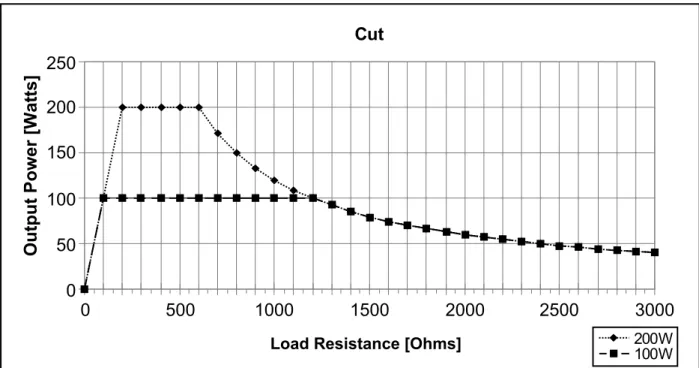
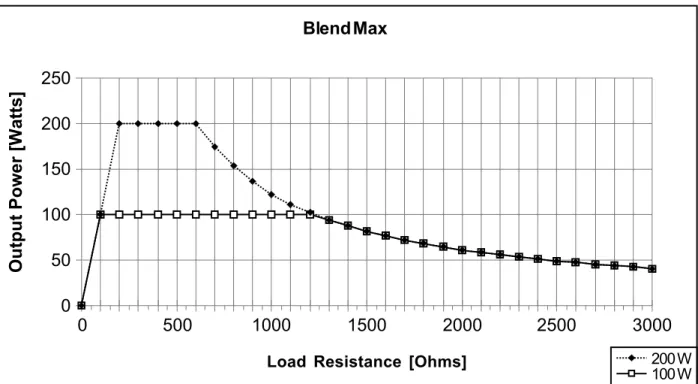
The curves that follow depict the changes for each mode at specific power settings.
Figure A – 1 Output power vs impedance for Cut mode
Figure A – 2 Output power versus impedance for Blend mode minimum
Load Resistance [Ohms]
Output Power [W
atts]
Load Resistance [Ohms]
Output Power [W
atts]
Coagulation
Coagulation
Figure A – 3 Output power versus impedance for Blend mode maximumLoad Resistance [ohms]
Output Power [W
atts]
Fulguration
Figure A – 5 Output power vs impedance for Fulguration mode
WARRANTY
Bovie Medical Corporation, warrants each product manufactured by it to be free from defects in material and
work-manship under normal use and service for the period(s) set forth below.
Bovie Medical Corporation’s obligation under this warranty is limited to the repair or replacement, at its sole option,
of any product, or part thereof, which has been returned to it or its Distributor within the applicable time period
shown below after delivery of the product to the original purchaser, and which examination discloses, to Bovie
Medical Corporation’s satisfaction, that the product is indeed, defective.
This warranty does not apply to any product, or part thereof, which has been repaired or altered outside Bovie
Medical Corporation’s factory in a way so as, in Bovie Medical Corporation’s judgment, to affect its stability or
reliability, or which has been subjected to misuse, neglect, or accident.
The warranty periods for Bovie Medical Corporation products are as follows:
• Electrosurgical Generators: Two years from date of shipment
• Mounting Fixtures (all models): Two years from date of shipment
• Footswitches (all models): Ninety days from date of shipment
• Patient Return Electrodes: Shelf life only as stated on packaging
This warranty is in lieu of all other warranties, express or implied, including without limitation, the warranties of
merchantability and fitness for a particular purpose, and of all other obligations or liabilities on the part of
Bovie Medical Corporation.
Bovie Medical Corporation neither assumes nor authorizes any other person to assume for it any other liability in
connection with the sale or use of any of Bovie Medical Corporation’s products.
Notwithstanding any other provision herein or in any other document or communication, Bovie Medical
Corporation’s liability with respect to this agreement and products sold hereunder shall be limited to the aggregate
purchase price for the goods sold by Bovie Medical Corporation to the customer.
Bovie Medical Corporation disclaims any liability hereunder or elsewhere in connection with the sale of this product,
for indirect or consequential damages.
This warranty and the rights and obligations hereunder shall be construed under and governed by the laws of the
State of Florida, USA.
The sole forum for resolving disputes arising under or relating in any way to this warranty is the District Court of the
County of Pinellas, State of Florida, USA.
Bovie Medical Corporation, its dealers, and representatives reserve the right to make changes in equipment built
and/or sold by them at any time without incurring any obligation to make the same or similar change