Review Article
An overview on current free and open source desktop GIS developments
STEFAN STEINIGER*{and ERWAN BOCHER{
{Department of Geography, University of Calgary, Calgary, AB, Canada {Ecole Central de Nantes, IRSTV, Nantes Cedex, France
(Received 23 April 2008; final version received 19 October 2008)
Over the past few years the world of free and open source geospatial software has experienced some major changes. For instance, the website FreeGIS.org currently lists 330 GIS-related projects. Besides the advent of new software projects and the growth of established projects, a new organisation known as the OSGeo Foundation has been established to offer a point of contact. This paper will give an overview on existing free and open source desktop GIS projects. To further the understanding of the open source software development, we give a brief explanation of associated terms and introduce the two most established software license types: the General Public License (GPL) and the Lesser General Public License (LGPL). After laying out the organisational structures, we describe the different desktop GIS software projects in terms of their main characteristics. Two main tables summarise information on the projects and functionality of the currently available software versions. Finally, the advantages and disadvantages of open source software, with an emphasis on research and teaching, are discussed.
Keywords: free software; open source; desktop GIS; software projects
1. Introduction
The development of free and open source software has experienced a boost over the past few years. The variety ofFree and Open Source Software(short: FOSS) that can be found on desktop computers ranges from word processors (e.g., OpenOffice.org), web browsers (e.g., Mozilla Firefox) to drawing (e.g., Inkscape) and scientific applications (e.g., R Project). In the GIS domain, the widespread use of FOSS is apparent as well. This rise in popularity of free GIS tools can be measured using four indicators. The first indicator is the number of projects started in the last couple of years. For instance, in the past two years 20 entries have been added to the list of software projects on the website FreeGIS.org (containing now 330 entries). As a second indicator, we see the increasing financial support by governmental organisations for the foundation of FOS GIS projects. Our listing of desktop GIS projects provided below shows that governmental funding supports at least 4 out of 10 projects. The third indicator is the download rates of free desktop GIS software. SAGA GIS, for instance, experienced an average increase of downloads in its documentation section between 2005 and 2008 from 700 to 1300 per month.1Finally, a fourth indicator is an increasing number of use cases of open source GIS software such as those documented by Ramsey (2007a) for the geospatial database PostGIS.
*Corresponding author. Email: [email protected] 1
Data derived from SourceForge.org download statistics, where the SAGA GIS project hosts its downloads.
International Journal of Geographical Information Science Vol. 23, No. 10, October 2009, 1345–1370
International Journal of Geographical Information Science
ISSN 1365-8816 print/ISSN 1362-3087 online#2009 Taylor & Francis http://www.tandf.co.uk/journals
DOI: 10.1080/13658810802634956
Along with this trend towards the application of open source software goes the number of research publications that mention the use of open source software tools and libraries (see, for instance, Mitasova and Neteler 2004). Furthermore, software and algorithms developed in research projects are increasingly being published under open source licenses (e.g., Badard and Braun 2003, Pebesma 2004, Burghardtet al. 2005, Buliung and Remmel 2008). As such, it is important to note that the free and open source software movement that postulates the freedoms of use and modification for software is not restricted to software only. Rather one regards free software as ‘the foundation of a learning society where we share our knowledge in a way that others can build upon’ (FSF 2008a). Hence, this movement also includes the free availability of data that forms a basis for our knowledge. Certain initiatives that focus especially on the free availability of geodata do exist (see FreeGIS.org).2 Probably the best known project is the OpenStreetMap Project (openstreetmap.org). This movement of free software and data is further facilitated by (online) platforms, such as Sourceforge.org, which provide an environment for software development, Eduforge.org, which aims to foster the sharing of ideas, research outcomes, and open content for education, as well as the Open Knowledge Foundation (okfn.org) and ScienceCommons.org, which both provide strategies and tools to develop, protect, and share ‘open’ (i.e., free) knowledge.
As previously mentioned, the amount of new GIS software projects being started is noticeably increasing. It is our aim with this article to provide an overview of 10 FOS GIS projects which develop and maintain different desktop GIS. However, we are not the first who touch the topic of an overview on GIS-related FOSS tools. For instance, Reid and Martin (2001) discussed the potential of open source software for implementing spatial data infrastructures (SDIs). They conclude that ‘open-source software provides great potential to make available components for SDI implementations that are affordable by resources poor organisations’ and add that ‘many building blocks for SDIs are already available’. Ramsey (2007b), who gives an annual overview on open source GIS projects, remarks that ‘existing [FOS GIS] products are now entering a phase of rapid refinement and enhancement’. He further emphasises that ‘open source [GIS] software can provide a feature-complete alternative to proprietary software in most system designs’. Also Jolma et al. (2006) discuss geospatial FOSS tools for environmental modelling and management. The authors outline in four case studies (workflows) how FOSS can help to accomplish tasks within these workflows. In their conclusions, they infer that the greatest barriers for an increased use of FOSS in the environmental modelling and management community ‘seem to be a perceived low importance of geospatial aspect, some technical obstacles, and low visibility’.
All three mentioned articles look on geospatial FOSS with slightly different aspects (i.e., SDIs, general GIS tools overview, and environmental modelling) and therefore emphasise different geospatial software components. We think that an introduction and a structured overview into the multitude of different FOS desktop GIS projects is missing, particularly one which additionally discusses issues of the application of FOSS in GIScience research and education. A necessary requirement for such a review will be to clarify the terms related to open source and free software first (Section 2). Therefore, we will outline what is meant by ‘free software’, briefly 2
We like to note that the aspect of free geodata is different between the USA and most other countries. Due to the presidential executive order 12906 is public access to geospatial data guaranteed (see section 3c in Clinton 1993). However, the notion of ‘public’ access may be different from the notion ‘free’ as defined in this article.
explain two common software licenses and address three common misconceptions. Afterwards, we introduce the world of FOS GIS in terms of organisations and software groups (Section 3). The following section then provides an overview of major free desktop GIS projects and will outline possible evaluation criteria (Section 4). We will subsequently in Section 5 discuss the benefits and shortcomings of FOS GIS for average users, research and education.
2. What does ‘free software’ and ‘open source software’ mean? 2.1Defining commonly used terms and domains
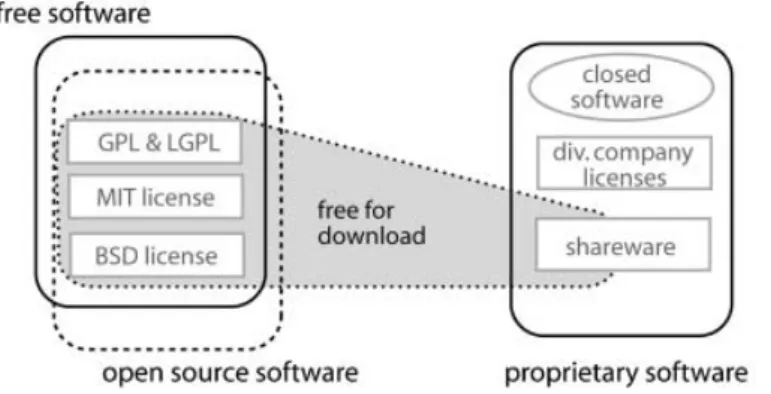
A couple of terms, such as ‘proprietary’, ‘free’ and ‘General Public License (GPL)’, are often used with respect to open source software. Figure 1, which has been adopted from Chao-Kuei, provides a structured overview on the commonly used terms. It is to see that the terms ‘free software’ and ‘open sources software’ seem to cover different domains despite their large overlap. The opposite domain of ‘free’ and ‘open source’ is the domain of ‘proprietary software’. The domain of the latter encloses terms such as ‘closed’ software and ‘shareware’. The existence of the three different domains of free, open source and proprietary software requires that at least two of these domains are clearly defined, while the third domain covers those software that is excluded from the others. Such a definition has been set up for ‘free software’ by the Free Software Foundation (FSF, www.fsf.org) and for ‘open source software’ by the Open Source Initiative (see below). According to the FSF, software can be labelled as free softwareif the associated license conditions fulfil the ‘Free Software Definition’, which grants four freedoms:
(1) The freedom to run the program for any purpose.3
(2) The freedom to study how the program works and adapt it to your needs. (3) The freedom to redistribute copies so you can help your neighbour. (4) The freedom to improve the program, and to release your improvements to
the public, so that the whole community benefits.
An essential prerequisite for the freedoms 2 and 4 is that the source code must be delivered with the software itself, that is, not only the binary, executable files, but also the program code written in the specific programming language. It is important
Figure 1. Terms used with respect to software licenses. Figure from Chao-Kuei, www.fsf. org/licensing/essays/categories.html).
3
No matter whether the purpose is commercial, educational or research.
An overview on free and open source GIS developments 1347
to be aware that these four freedoms do not place restrictions on whether the software has to be offered for free or can be sold. As Stallman (2007) notes:
When we call software ‘‘free’’, we mean that it respects the users’ essential freedoms: the freedom to run it, to study and change it, and to redistribute copies with or without changes. This is a matter of freedom, not price, so think of ‘‘free speech’’, not of ‘‘free beer’’ (see also GNU 2007).
For this reason the opposite domain to ‘free software’ is not ‘commercial software’, where ‘commercial’ indicates that the software is sold or used to make a living or benefit. The opposite of ‘free software’ is ‘proprietary software’, where ‘proprietary’ indicates ownership.
The use of the term ‘closed’ in Figure 1 should highlight the difference between software that can be modified without restrictions (freedom 2) and non-modifiable software. The software category ‘shareware’, encompassing software that is free for download and use (but often needs to be registered and paid after a certain time) has been assigned to the domain of proprietary software. This allocation is justified by the licence restrictions, which (usually) do not allow the study and modification of the program. Hence, the property of a software to be ‘free’ for download (confer: ‘free beer’) has no influence on its classification towards free or proprietary software. Often the terms ‘open source’ and ‘free’ software are used synonymously. So, one may ask for the difference between those terms, especially since we outlined a difference in Figure 1. The distinction between the terms (and domains) is done for several reasons. Among the most important, from our point of view, is the insufficiency of the term ‘open source’. The term ‘open source’ describes that on the one hand source code is accessible, and on the other hand the source code can be studied. However, it does not encompass the freedoms of modification and redistribution; therefore, the term ‘free’ is more appropriate to describe software that fulfils the above-mentioned four conditions.
Besides this distinction between ‘open source’ and ‘free’ software there also exists a further one – the term ‘open source’ has been introduced by the Open Source Initiative (OSI, www.opensource.org) as a kind of brand. Software can be certified by the OSI as being ‘open source’. To gain the certification, the software license has to conform to 10 properties/definitions set up by the OSI. In general, these 10 properties can be said to be a different realisation of the four freedoms established by the FSF. However, there have been a few incidences where licenses have been certified by the OSI and not by the FSF (e.g., the Apple Public Source License 1.0, note: version 2.0 is approved by both). Thus, for the general software user the difference does not matter that much, but a philosophical difference does exist (cf. Stallman 2007). For further explanations on commonly used terms with respect to free and open source software we refer to the webpage of the Free Software Foundation (FSF 2008b).
The abbreviationFOSSfor ‘Free and Open Source Software’, that we use in this article, will embrace both software that is released under an FSF approved license (is free), and software that uses an OSI certified license.
2.2Two FOSS licenses: GPL and LGPL
Several licenses exist that have been approved by the FSF and OSI. The best known licenses are probably the GNU4 GPL, the GNU LGPL, licenses of the Berkley 4GNU is a recursive acronym for ‘GNU is not Unix’. Often a caricature of the animal gnu (wildebeest) is used as
symbol to refer to free software.
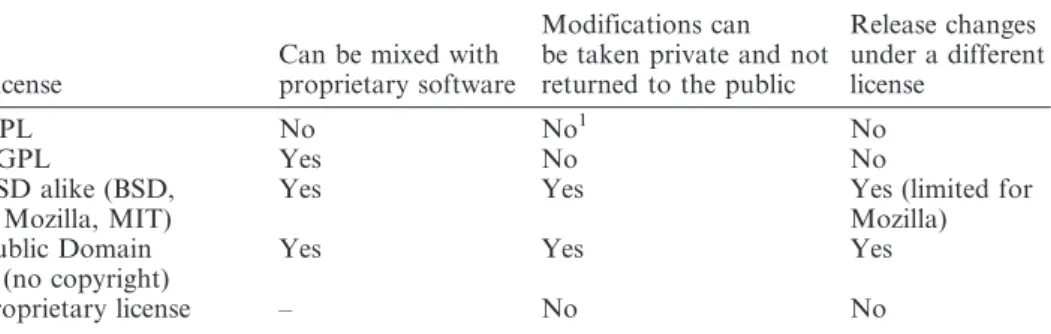
Software Distribution (BSD) license family (e.g., NetBSD, FreeBSD), and the MIT license. Often, larger software project organisations such as the Apache Software Foundation and the Mozilla Foundation have developed their own software license. The mentioned licenses can offer different degrees of protection of the four freedoms (Section 2.1). For a comparison, we refer to Table 1 and Perens (1999).
The license that is most protective in a positive sense, that is, guarantees all four freedoms, is the General Public License. GPL version 25contains among others the following regulations:
(1) It allows running the program for your own purpose (see license term 0), (2) It allows copying of and distribution the program – if the GPL copyright
notice is contained (see license term 1),
(3) It allows modification of the code and distribution of these versions – if the modifications are documented and the modified versions are also licensed under the GPL (see license term 2), and
(4) It allows the distribution of the program and modified versions only if source code is attached or available (written offer) for three years (see license term 3).
In the third clause it is specified that derived or modified software, as well as extracted code, must be covered by the same license (i.e., the GPL). Imposing such a requirement is called copyleft-ing6 (FSF 2008) and is the reason why the GPL is sometimes denoted positive as immune license, or negative as viral license. A copylefted license brings problems if free software should be coupled/linked with software that is covered by a proprietary license. For instance, it is not possible for ESRI to use a GPL licensed library that contains computational geometry algorithms linked together with the proprietary ESRI ArcGIS and to distribute both together. In such situations, the software with the stronger preservations of freedom (i.e., the GPL) would require the transfer of their license terms to the whole software. To avoid these complications, the LGPL has been introduced. Here the
5The Version 3 of the GPL has been officially released in 2007, but it is less used than version 2. 6
The term ‘‘copyleft’’ has been used already in 1976 by Li-Chen Wang and Roger Rauskolb (Rauskolb 1976). Table 1. Differences between FOSS licenses.
License
Can be mixed with proprietary software
Modifications can be taken private and not returned to the public
Release changes under a different license GPL No No1 No LGPL Yes No No BSD alike (BSD, Mozilla, MIT)
Yes Yes Yes (limited for
Mozilla) Public Domain
(no copyright)
Yes Yes Yes
proprietary license – No No
Source: Modified from Perens (1999).
1
Modifications can be taken private as long as there is no official release of the changed software, see Section 2.3–Misconception 1 and Smith (2008).
An overview on free and open source GIS developments 1349
above-mentioned license terms are placed only on the program itself but not to other software that merely links with the program (see license term 5 of LGPL).
Another strategy is to release the developments under an open source license while using at the same time the written code in proprietary products. This imposes no problems since the software developer keeps the author rights. He can apply a dual licensing strategy on his own work.
2.3Three GPL misconceptions
Most of the FOS desktop GIS that will be presented in Section 3 are licensed under the GPL. Unfortunately, when talking to persons that use or even develop FOS GIS software one can discover unfamiliarity with the license terms. We would like to clarify three common misconceptions that have been elaborated by Wikipedia contributors7:
Misconception 1:‘If one uses code that is licensed under the GPL, one has to release the program’s source code no matter what.’ In fact, source code must be released only if the software is distributed. Hence, changes made to the source code can be kept private as long as the software (or the software library) has not been distributed to the public. Offering the software for download or selling it to customers indicates a software release and subsequently requires publishing the source code.
Misconception 2: ‘Software licensed under the GPL must be given away for free, it cannot be sold.’ In fact, copies can be sold and download fees raised. The GPL explicitly states:
You may charge a fee for the physical act of transferring a copy, and you may at your option offer warranty protection in exchange for a fee.
What a user does usually pay for, for example, when ordering an installable (binary) version, is the printed documentation and packaging.
Misconception 3:‘Software created with GPL tools must be released under the GPL.’ In fact, programs created with software that is licensed under the GPL are not affected by the GPL. They are only affected if programs integrate code snippets from GPL’ed programs.
Several other questions on issues of software licensing with respect to the GPL and LGPL license are discussed on http://www.gnu.org/licenses/gpl-faq.html. A specific question on licensing that relates to research developments and publications is not answered above. That is, does a researcher need to make the source of an algorithm available, if the algorithm has been described in a research article (e.g., using pseudo code) and the algorithm is implemented using open source software? The answer on the question by the FSF has been as follows:
As long as the pseudo-code is not derived from the original GPLed code, then no, these activities alone do not compel the researchers to release any source. If you talk publicly about private modifications to GPLed software, you are still allowed to keep those changes private. (Smith 2008)
7
See: http://en.wikipedia.org/w/index.php?title5GNU_General_Public_License&oldid5182222978.
We hope that this answer clears up any confusion by researchers that intend to work with open source software. After this introduction to open source terms and licenses we will focus in the next section specifically on FOSS organisations and software categories for geospatial data.
3. Free GIS software: a shared and divided software world 3.1A shared world: open source GIS organisation
Since 2006, the open source GIS community has also been represented by the Open Source Geospatial Foundation (short: OSGeo, www.osgeo.org). Driven by the need for a public point of contact within and from outside the FOS GIS community, this organisation was founded out of several FOS GIS user communities and projects in Chicago (USA), in February 2006 (OSGeo 2006). Since then, the OSGeo hosts an increasing number of software projects (currently 16), publishes the OSGeo journal, has founded an education and curriculum committee, organises a yearly interna-tional conference (FOSS For Geospatial Conference: FOSS4G), and donates the Sol Katz award to individuals who have demonstrated leadership in the FOS GIS community. In 2007, the FOSS4G conference attracted approximately 750 participants from research, organisations and companies. Besides the presentations, which are comprised of a mixture of research talks, software development reports, and business case studies, focus is also given to user group meetings, developer workshops and software demonstrations. Finally, a third organisational column, besides the OSGeo and the conferences, is made up of existing internet portals such as www.FreeGIS.org and www.opensourcegis.org, two websites that list a diverse range of projects and software.
When talking about organisational issues of FOS GIS, it may be important to address another common misconception. A couple of people to which we spoke related the activities of the Open Geospatial Consortium (OGC, www.opengeospa-tial.org) to open source GIS software. This link is not entirely correct, since the OGC is an organisation that develops standards for the processing and exchange of geo-data between different GIS platforms. Furthermore, a large portion of the member organisations of the OGC, besides universities and authorities, are companies that develop proprietary GIS and databases. Hence, the objectives of OGC and OSGeo generally differ, but interoperability among GIS platforms is also an objective of OSGeo members; thus, some OSGeo members are also involved in the OGC. 3.2A divided world: categories of software and grouping of free geospatial projects
3.2.1 Categories of software. Different types of software are needed to build up SDIs.8Besides software to collect, prepare and analyse data, which can be done with a desktop GIS, are databases often used to store the large amounts of data that have been acquired. If other people and organisations, for purposes such as planning and analysis, should use the data, then a web server and client software may be useful to deliver the data online. An example of an SDI that includes all these components is shown in Figure 2. Additionally, we also display software libraries as a further component, which can provide specific functionality such as data format conversion, coordinate transformations, or algorithms for data analysis (e.g., watershed calculations). Third party plugins or software extensions can be considered as well 8
For a description of Spatial Data Infrastructures, see Nebert (2004).
An overview on free and open source GIS developments 1351
as libraries. To further the understanding of what is meant by ‘software library’, we refer to ESRIs Spatial Analyst or Safe’s Data Format Extensions as examples for non-free (proprietary) libraries.
For all of these different categories of geospatial software at least one open source project exists. Often several project teams work on different software of the same category. For instance, more than ten Desktop GIS projects exist that have a slightly different application focus; and at least four spatial web server projects can be identified (e.g., MapServer, Deegree, GeoServer, MapGuide OpenSource). However, despite that diversity of the projects an exchange in terms of source code and information among projects can be recognised. This holds true especially for the use of software libraries that enable data format conversions (e.g., GDAL, GeoTools), provide coordinate projections (Proj4) or offer basic geometric algorithms (e.g., GEOS, JTS).
3.2.2 Grouping of projects. Besides our classification of FOS GIS projects into software libraries, web servers, desktop GIS, spatial databases and GIS viewer, Ramsey (2007) uses another grouping for his annual project update. He separates the FOS GIS projects in projects that use the programming languages C and C+ +, and projects that are built upon Sun’s JAVA platform. Besides these two major branches, other platforms such as Microsoft. NET and Python are used by newer projects. It is useful to have a distinction and characterisation of the projects based on the development platform since projects that use the same programming language can use the same pool of source code (remember: all source code is accessible). The OSGeo especially stimulates the sharing of code through offering shared infrastructure for software development. Therefore, we will give information about the used development platform in the overview on the desktop GIS projects.
A further grouping of software projects can be made with respect to the foundation and maintenance of a project. For example, a couple of projects have been founded for commercial reasons by companies (e.g., the GIS uDig and KOSMO). Those companies may still host the project, i.e., the project infrastructure such as source
Figure 2. Types of geospatial software used in a spatial data infrastructure (SDI). NGO, nongovernmental organisation.
code repository, wiki, user-forum and website, and have the development lead. A second group of projects includes those that were started by enthusiasts (such as Quantum GIS). After an initial phase with usually few members, these projects either experience a halt in the development, or they are able to attract other people and companies to support them (Ramsey 2008). A third group of projects is born out of research projects at universities or other organisations, such as GRASS GIS and SAGA GIS. Note that for all kinds of community projects, the critical mass is needed to keep the project alive. Finally, a fourth group of projects has recently come forward that is supported by governmental agencies. The most popular of the latter is the gvSIG project. Besides the financial benefits, the aim is to disseminate best practices for the establishment and maintenance of SDIs to local municipalities with respect to the improvement and modernisation of public administration. In the next section, we will present the different desktop GIS projects including the origin of every project. 4. Major free and open source desktop GIS projects
4.1Defining ‘desktop GIS’
Before starting with the overview on the desktop GIS projects, we should define what GIS software we consider as ‘desktop GIS’. We will apply the following definition:
A desktop GIS is a mapping software that is installed onto and runs on a personal computer and allows users to display, query, update, and analyse data about geographic locations and the information linked to those locations. (ESRI 2008a)
That is, the software is not executed on a server and remotely accessed or controlled from or by a different computer. Other FOS GIS software developed strictly for viewing data, and not for analysis, is also not covered in our review. Two examples for GIS Viewer projects are Thuban and mezoGIS. They also provide functionality to query data, i.e., to perform simple GIS analysis, however, they are not considered here. Furthermore, GIS viewer applications such as MapBender and MapBuilder exist, which are used to browse data delivered from web map servers and that belong to the category ‘Thin Client’ shown in Figure 2.
4.2Evaluation criteria for software and projects
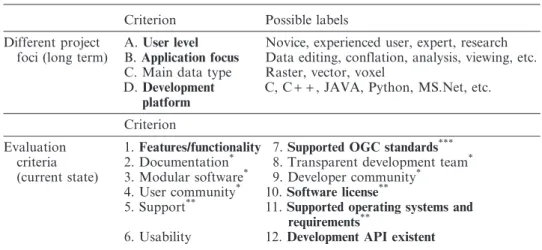
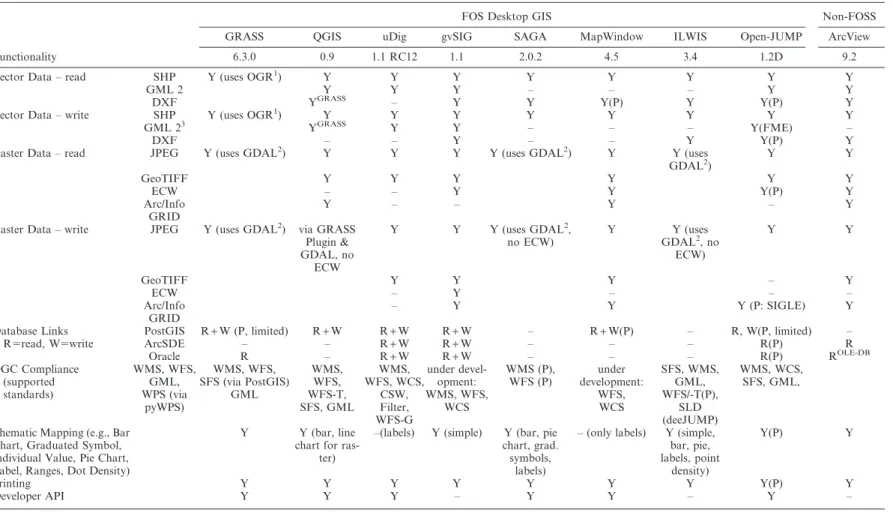
When presenting the different projects and their software it is valuable to characterise the projects according to some unified criteria. In the first part of Table 2, we list four properties that describe the long-term focus of the desktop GIS projects. Additionally, we give in the second part of Table 2 evaluation criteria that can be used to describe the current state of a project.
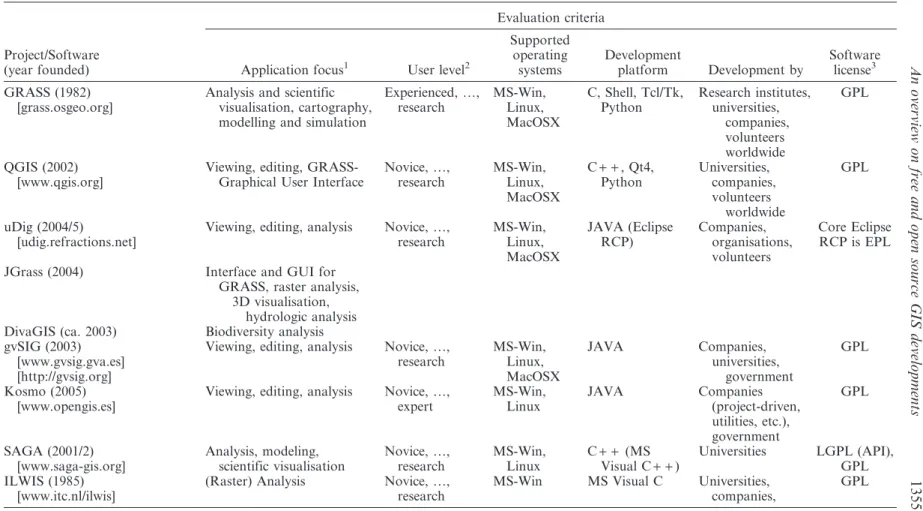
In consideration of available maximum table dimensions, and with respect to the difficulties and necessary effort to evaluate all listed criteria in Table 2, we decided to only focus on a subset of those criteria (marked bold). Hence, the review consists of a short description for every project and two tables for all projects that outline the major project and software characteristics. Table 3 focuses on the project details, such as the application focus, user focus, supported operating systems, programming language and used license. Table 4 compares the functionality of the software, which includes a listing of supported OGC standards. The properties used in the functionality table are based on the Cadcorp SIS functionality matrix.9To facilitate 9
http://www.cadcorp.com/pdf_downloads/BR-CadcorpSISDesktop.pdf.
An overview on free and open source GIS developments 1353
a comparison of the functionality between free and proprietary products, we also added a column for ESRI’s ArcView 9.2 product. Extended versions of both tables, which include some of the discarded criteria, are provided on the Internet (address: www.spatialserver.net/osgis/).
4.3Open source desktop GIS projects
In the following subsections, we describe every desktop GIS project in terms of its foundation, application focus, as well as its user and developer community – the detail of these descriptions is dependent on the availability of information. Critical points that are known and which are of interest from a (research) user perspective may also be mentioned.
The desktop GIS projects KOSMO and OrbisGIS are described below, but do not appear in Table 4. This is justified by the fact that KOSMO currently focuses on a Spanish end-user community, and the software development is driven by one company.10OrbisGIS is only briefly mentioned since it is the youngest project and its functionality limited to viewing data. We did not include the projects FMAPS and Kalypso as they have not had any new developments for some time.11 Finally, we want to note that software such as Spring GIS, Spatial Commander, Forestry GIS, Google Earth, Google Maps, ArcExplorer, TNTlite or TatukGIS Viewer are not part of that listing, since these software products are free, i.e., gratis, for download but not FOSS. That is, their licenses do not meet the requirements given in Section 2.1.
4.3.1 GRASS – Geographic Resources Analysis Support System. The roots of the GRASS GIS project first sprouted 30 years ago when the first libraries for the later 10Also the project gvSIG is lead by a company and has mainly Spanish developers. But the gvSIG user base is rather
multi-national and in opposite to KOSMO the gvSIG project focuses on a complete English documentation and offers tutorials in different languages.
11
During the revision of this article, a new Kalypso project was registered on Sourceforge.net and the business related webpage http://kalypso.bjoernsen.de shows some new activities. Kalypso is a simulation platform, developed for the analysis and modeling of water drainage and flood events.
Table 2. Possible evaluation criteria for free and open source software projects.
Criterion Possible labels
Different project foci (long term)
A.User level Novice, experienced user, expert, research B.Application focus Data editing, conflation, analysis, viewing, etc. C. Main data type Raster, vector, voxel
D.Development platform
C, C+ +, JAVA, Python, MS.Net, etc. Criterion
Evaluation criteria (current state)
1.Features/functionality 7.Supported OGC standards*** 2. Documentation* 8. Transparent development team* 3. Modular software* 9. Developer community*
4. User community* 10.
Software license**
5. Support** 11.
Supported operating systems and requirements**
6. Usability 12.Development API existent
Note: Criteria in boldface are used in Tables 3 and 4. Proposed by*Ramsey (2007b),**Wagner (2006), and***Reid and Martin (2001).
Table 3. A selection of major free and open source desktop GIS projects (for a detailed table see: www.spatialserver.net/osgis).
Project/Software (year founded)
Evaluation criteria
Application focus1 User level2
Supported operating systems Development platform Development by Software license3 GRASS (1982) [grass.osgeo.org]
Analysis and scientific visualisation, cartography, modelling and simulation
Experienced, …, research MS-Win, Linux, MacOSX C, Shell, Tcl/Tk, Python Research institutes, universities, companies, volunteers worldwide GPL QGIS (2002) [www.qgis.org]
Viewing, editing, GRASS-Graphical User Interface
Novice, …, research MS-Win, Linux, MacOSX C+ +, Qt4, Python Universities, companies, volunteers worldwide GPL uDig (2004/5) [udig.refractions.net]
Viewing, editing, analysis Novice, …, research MS-Win, Linux, MacOSX JAVA (Eclipse RCP) Companies, organisations, volunteers Core Eclipse RCP is EPL
JGrass (2004) Interface and GUI for
GRASS, raster analysis, 3D visualisation,
hydrologic analysis DivaGIS (ca. 2003) Biodiversity analysis gvSIG (2003)
[www.gvsig.gva.es] [http://gvsig.org]
Viewing, editing, analysis Novice, …, research MS-Win, Linux, MacOSX JAVA Companies, universities, government GPL Kosmo (2005) [www.opengis.es]
Viewing, editing, analysis Novice, …, expert MS-Win, Linux JAVA Companies (project-driven, utilities, etc.), government GPL SAGA (2001/2) [www.saga-gis.org] Analysis, modeling, scientific visualisation Novice, …, research MS-Win, Linux C+ + (MS Visual C+ +) Universities LGPL (API), GPL ILWIS (1985) [www.itc.nl/ilwis]
(Raster) Analysis Novice, …, research
MS-Win MS Visual C Universities, companies, GPL An overvi ew on free an d open source GIS development s 1355
Project/Software (year founded)
Evaluation criteria
Application focus1 User level2
Supported operating systems Development platform Development by Software license3 MapWindow (1998) [www.mapwindow.org]
Providing core GIS and GUI functions, developing decision support systems
Novice, …, research MS-Win MS Visual Studio.NET (C+ +, C#, VB.NET) Universities, companies, volunteers worldwide Mozilla Public Licence Version 1.1 JUMP/OpenJUMP (2002/3) [www.openjump.org]
Viewing, editing, analysis Novice, …, research MS-Win, Linux, (MacOSX) JAVA Volunteers worldwide GPL
JUMP (2002–20006) Focus on data conflation from different sources
(i.e., natural resources management)
Company, government
deeJUMP (2004) Focus on OGC standards Company
SkyJUMP (ca. 2004) Focus on military facility management
Company
Note: For all desktop GIS support exists via user email lists as well as professional support by companies. Therefore, we omit a characterisation with respect to user support.
1
Suggested application foci: viewing, data editing, conflation, analysis. 2
User levels: novice (viewing), experienced (editing, simple analysis), expert (analysis), research (scripting, programming). 3
Licenses: often software use different libraries resulting in a mix of different licenses; therefore only the software-core licenses are listed. Table 3. (Continued) S. Steini ger and E. Bocher
Table 4. Characterisation of selected free and open source desktop GIS with respect to frequently used desktop GIS functionality.
Functionality
FOS Desktop GIS Non-FOSS
GRASS QGIS uDig gvSIG SAGA MapWindow ILWIS Open-JUMP ArcView 6.3.0 0.9 1.1 RC12 1.1 2.0.2 4.5 3.4 1.2D 9.2 Vector Data – read SHP Y (uses OGR1
) Y Y Y Y Y Y Y Y
GML 2 Y Y Y – – – Y Y
DXF YGRASS – Y Y Y(P) Y Y(P) Y
Vector Data – write SHP Y (uses OGR1) Y Y Y Y Y Y Y Y
GML 23 YGRASS Y Y – – – Y(FME) –
DXF – – Y – – Y Y(P) Y
Raster Data – read JPEG Y (uses GDAL2) Y Y Y Y (uses GDAL2) Y Y (uses
GDAL2) Y Y GeoTIFF Y Y Y Y Y Y ECW – – Y Y Y(P) Y Arc/Info GRID Y – – Y – Y
Raster Data – write JPEG Y (uses GDAL2) via GRASS
Plugin & GDAL, no ECW Y Y Y (uses GDAL2, no ECW) Y Y (uses GDAL2, no ECW) Y Y GeoTIFF Y Y Y – Y ECW – Y – – – Arc/Info GRID – Y Y Y (P: SIGLE) Y Database Links R5read, W5write
PostGIS R+W (P, limited) R+W R+W R+W – R+W(P) – R, W(P, limited) –
ArcSDE – – R+W R+W – – – R(P) R Oracle R – R+W R+W – – – R(P) ROLE-DB OGC Compliance (supported standards) WMS, WFS, GML, WPS (via pyWPS) WMS, WFS, SFS (via PostGIS) GML WMS, WFS, WFS-T, SFS, GML WMS, WFS, WCS, CSW, Filter, WFS-G under devel-opment: WMS, WFS, WCS WMS (P), WFS (P) under development: WFS, WCS SFS, WMS, GML, WFS/-T(P), SLD (deeJUMP) WMS, WCS, SFS, GML,
Thematic Mapping (e.g., Bar Chart, Graduated Symbol, Individual Value, Pie Chart, Label, Ranges, Dot Density)
Y Y (bar, line chart for
ras-ter)
–(labels) Y (simple) Y (bar, pie chart, grad. symbols,
labels)
– (only labels) Y (simple, bar, pie, labels, point density) Y(P) Y Printing Y Y Y Y Y Y Y Y(P) Y Developer API Y Y Y – Y Y – Y – An overvi ew on free an d open source GIS development s 1357
Functionality
FOS Desktop GIS Non-FOSS
GRASS QGIS uDig gvSIG SAGA MapWindow ILWIS Open-JUMP ArcView 6.3.0 0.9 1.1 RC12 1.1 2.0.2 4.5 3.4 1.2D 9.2 Scripting Functionality Bash, Python,
Perl
Python (P) Groovy (P) Jython Python, console C#, VB.Net ILWIS Scripting Language Beanshell, Jython (P) VBA, Python, among others Coordinate Transformations/Projections Y Y Y Y(P) Y Y Y Y(P) Y
Data creation and editing (2D graphics including points, lines, area tools, also, snapping, and typed coordinate input)
Y Y Y Y Y Y Y Y Y
GPS support Y Y(P) Y(P) – Y Y Y Y(P) Y
Topology creation (creation of link, node, chain and polygon topology)
Y Via GRASS plugin
– – – (only TIN) – (TIN creation API only)
– Y (limited) –
Advanced data creation and editing (creating offsets, line generalisation, trimming, rotating, intersection, etc.)
Y (especially in new wxGRASS
digitiser)
Y Y Y(P) Y Y (except gener-alisation)
– Y (except offsets) Y (except off-set, line gener-alisation) Advanced thematic mapping
(including Thiessen polygon analysis, grid analysis, contour and flow-line generation) Y via GRASS plugin – Y(P: Sextante) Y Y (contour and flowline genera-tion) – – (only Thiessen polygons) –
Creation of 3D views & terrains (TIN, DTM, shading, surface draping)
Y Via GRASS plugin – Y (P: Sextante+ 3D driver) Y Y (3D plugin, TIN for API only, hillshade)
Y Y (P: SIGLE TIN generation)
– (only surface display) Viewshed and terrain
analysis (line-of-sight, slope, aspect, gradient) Y Via GRASS plugin – Y(P) Y Y (watershed analysis) Y – –
(P) indicates if functionality is provided by an additional plugin. For a more detailed table, see: www.spatialserver.net/osgis. 1
For supported OGR formats, see www.gdal.org/ogr/ including SHP, GML, GRASS, DGN, MapInfo, SDTS, TIGER, Arc/Info Bin, KML. 2
For supported GDAL formats, see www.gdal.org/ including Arc/Info GRID, ECW, GeoTIFF, JPEG, JPEG2000, IMG. 3GML created with one software may not be readable with another software due to the ambiguity of the OGC specification.
S. Steini ger and E. Bocher
GRASS software were developed (Westervelt 2004). As an alternative to ESRI’s ARCINFO, the US Army Construction Engineering Research Lab (CERL) started the development of GRASS in the early 1980s with its release of version 1.0 in 1985. The focus of GRASS at that time was primarily on raster analysis and the software was largely programmed using C. After a series of successful years for GRASS, which included the foundation of a user community, the use of GRASS GIS begun to decline in the mid-1990s when the CERL ceased its official sponsorship. A revival followed after the formation of a new development team in 1997 and the adoption of the GNU GPL in 1999 (Mitasova and Neteler 2004). Since that time, GRASS has formed a very active and large user and developer community. GRASS 6.3 supports 2D raster/voxel display and analysis, 2D/3D vector editing, vector network analysis and image processing functions, i.e., the functionality offered can be compared to that of ESRI’s ArcGIS on the ArcInfo level. Subsequently, GRASS is used for a variety of applications, such as environmental analysis, fire management, hydrological analysis, and geological mapping. But due to its deficits in GUI usability, for example, in terms of many free-floating program windows and Unix like look and feel (Figure 3), GRASS is used primarily by research institutes and universities. Until recently a second major drawback for the average user has been that no native version for the Microsoft Windows platform existed and it needed to be run on a Linux or Unix system or (the Cygwin) MS Windows emulator. However, with Version 6.3.0 a native Windows version has been published. This version will increase its usability for people more accustomed to the look and feel of MS Windows. Whether or not this development will translate to a shift from a community of GIS experts to users of all knowledge levels remains to be seen.
Figure 3. Screenshots from several FOS GIS. Image of GRASS taken from the GRASS website.
An overview on free and open source GIS developments 1359
4.3.2 QGIS – Quantum GIS. As a response to the expert oriented design of GRASS, a group of volunteers started to develop QGIS in 2002. The original aim was to provide an easy to use and fast geographic data viewer for Linux-based systems (Hugentobler 2008). However, as the QGIS project evolved the idea emerged to use QGIS as a simple Graphical User Interface (GUI) for GRASS itself (see Figure 3). The Quantum GIS development team reached its initial objectives and is now working to extend the functionality beyond data viewing. Quantum GIS is available for all commonly used platforms (MS-Windows, MacOSX, Linux, Unix) and integrates raster and vector data as well as data delivered from web services. The programming language is C+ + and GUI functionality is based on the Qt4 library. An attractive feature for other programmers is the option to write QGIS extensions in C+ + and Python to add custom functionality. Like GRASS, it owns one of the largest user communities.12 It has a growing developer base and the software itself and the development process are well documented.
4.3.3 uDig – user-friendly Desktop internet GIS. An important goal of the uDig team is to develop software that offers the capability of viewing and editing directly in databases and over the web. The development of uDig started between 2004 and 2005 and has been initiated by Refractions Research Inc. (Canada), which also develop the spatial extension PostGIS for the PostgreSQL database. uDig is developed in JAVA (using the Eclipse platform) and was initially focused on editing of vector data. However, since 2007 the uDig team (led by Refractions) has been joined by the JGrass13team, which works on raster analysis functionality (Antonello and Francheschi 2007). Besides JGrass, a third project is now involved in the development called DivaGIS. This project focuses on tools for biodiversity research. Due to the joint work of three projects and the possibility to use uDig as a front end for the PostGIS database (which already has a very wide user base), the user and developer community grows consistently. There are two perceived disadvantages that result from the use of the Eclipse platform as the core component. The first is the size of the application, and a second that the GUI is quite similar to the development environment for programming, and thus may be too complex for end users (Figure 3). On the positive side the user and developer documentation are very good, and similar to QGIS and GRASS the project management and software development processes are outlined and documented.
4.3.4 gvSIG – generalitat valenciana, Sistema d’Informacio´ Geogra`fica. Probably the largest project in terms of financial and development resources is currently the gvSIG project. It has been founded by the Regional Council for Infrastructures and Transportation (CIT) of Valencia (Spain) to replace software of similar functionality as ESRI’s ArcView in municipal authorities, since the regional government aims to switch all systems to a Linux-based computer infrastructure (gvSIG 2006, Alfaro and Rico 2005). The development of gvSIG had started at the end of 2003 and is led by the company IVER S.A. (Spain). Several universities and other companies are included in the project. Due to its audience, the GUI intends to be simple and user documentation for the software is very good. The software supports raster and 12See QGIS download statistics and user map, as well as services that provide web-metrics, such as Alexa.com and
Ohloh.net.
13
The JGrass team (www.jgrass.org) focuses on making GRASS functionality available to programs based on the JAVA platform and with it to bring GRASS to production, i.e. mass market, environments as opposed to the research environment.
vector data and provides, similar to uDig, several database connectors. Raster functionality is developed based on algorithms of the SAGA GIS project (see below). The programming language for the development of gvSIG is JAVA. The goal to provide software with the functionality of ESRI’s ArcView (3.X) has almost been reached, and, in some aspects, is exceeded by gvSIG. Although the project is under Spanish lead, the user community can be considered international. Limitations that may be of interest are a lack of documentation for developers and its massive dependency on more than 100 C+ + and JAVA libraries (e.g., GDAL/OGR and GeoTools). The latter is a drawback since library dependencies are difficult to assess and customised programming becomes more challenging.
4.3.5 SAGA – System for Automated Geo-Scientific Analysis. As the naming of software already suggests SAGA has a scientific background. First modules of SAGA, developed in 2001 at the Department of Geography at University of Go¨ttingen (Germany), were designed to work with raster data. With its background in physical geography the focus of the GIS functionality is on relief analysis and visualisation, but also on soil mapping (Conrad 2007). The software development takes place in C+ + and provides an application programming interface for customised developments. The lead programmer, and subsequently the project, recently moved to the University of Hamburg (Germany). Documentation for users is good and the international user community grows steadily, that is, the number of user documentation downloads went from 700 downloads per month to 1300 between 2005 and 2008.
4.3.6 ILWIS – Integrated Land and Water Information System. ILWIS, like GRASS, is a mature open source GIS. ILWIS development started at the ITC, Enschede (the Netherlands) in the 1980s as proprietary software, and combines GIS functionality with image processing functionality. Thus, reported examples of ILWIS applications range from image analysis to erosion modelling. The software documentation for version 3.0 (released in 2001) is very good as it has been also used for teaching purposes at ITC and elsewhere. But newer versions refer only to documentation for version 3.0. Just recently, in 2007, the source code, written in the language (MS Visual) C, has been released under an open source license (GPL). The project is currently maintained by 52uNorth GmbH (Germany). Within the year of 2008, the software should be made available to end users that use operating systems other than MS-Windows, such as Linux or MacOSX.
4.3.7 MapWindow GIS. Founded in 1998 by members of the Utah Water Research Lab at the Utah State University, the project’s main objective slightly differs to those previously mentioned. The initial idea was to develop a ‘GIS kernel’ that provides often needed GIS functionality for the development of customised GIS applications (Ameset al.2007). Hence, the MapWindow GIS ActiveX control was written in MS Visual C to deliver functionality for display, query and manipulation of spatial data. Later, a GUI was developed, called MapWindow GIS Desktop, to provide end users with a common and consistent user interface where functionality can be added with a plugin system (note that uDig, SAGA, QGIS, Kosmo, OrbisGIS and OpenJUMP also have an easy to use plugin system). Several plugins are available that offer functionality for raster and vector analysis and vector editing. The project is led by a team of the Idaho State University. Since the development is based on the Microsoft .NET Framework, the application is available only for the MS-Windows operating system. Despite this fact, the user and developer communities are very active and An overview on free and open source GIS developments 1361
large. Finally, it should be mentioned that online documentation for users and developers is good.
4.3.8 JUMP and OpenJUMP family – Open JAVA Unified Mapping Platform. The JUMP project was founded in 2002 by a consortium of two Canadian provincial ministries and two companies. The objective was to develop a GIS specifically for data editing and data conflation. A forerunner and part of that project was also the enhancement of the geometry library ‘JAVA Topology Suite’ (JTS). Soon after the release of JUMP 1.1.2 and the JUMP Conflation Suite in 2004, the development activities almost stopped due to the loss of financial support. After the first adoptions by AGILE (a Spanish Association) and the French project SIGLE,14 a group of volunteers founded in 2004 the JUMP-Pilot Project and continued the software development under the name OpenJUMP.
JUMP has a specific position in the community as several forks (i.e., child products) emerged when the initial development stopped. Known forks are for instance DeeJUMP, with a focus on OGC compliant services (e.g., WMS, WFS, WFS-T, SLD, GML 3), SkyJUMP with a focus on military facility management, and PirolJUMP, which provides tools for precision farming. The initial application focus of data conflation and editing are responsible for the fact that the JUMP GIS family has a strong focus on vector data creation and analysis, while it provides no raster analysis functionality (except for PirolJUMP). OpenJUMP has a small developer community that is supported by professional developers from those companies that can acquire software customisation projects. The JUMP Pilot Project team also focuses on a merger of different forks. As the project email list subscriptions illustrate, the user community is slowly growing. Applications besides data editing can be found in research and university teaching. Documentation for OpenJUMP is sometimes lacking with respect to new added functionality, but a tutorial used for teaching an introductory GIS course exists. Additional limitations that may be identified are sparse developer documentation and the development focus on plugins, resulting in a non-uniform look and feel and cluttered source code structure. Thus, for the end user it will be a bit difficult to find his pathway in the ‘jungle’ of JUMPs.
4.3.9 KOSMO. Kosmo is one of the original JUMP GIS forks. The software project was started in 2005 by the Spanish company SAIG and focuses on Spanish users that need functionality similar to that provided by ESRI’s ArcView (3.X). The original JUMP software has undergone a partial redesign to form what is now called Kosmo. Kosmo provides additional functionality that incorporates raster analysis functions and geo-processing tools. The participation on the development is open, but is mainly driven by the projects that are acquired by SAIG. The community consists mostly of Spanish speaking users from authorities, companies and universities. This has also influenced the documentation as it is only available in Spanish. Another noted problem is the software’s dependency on libraries from other projects. This complicates customised programming and maintaining a stable core.
4.3.10 OrbisGIS. In 2006, the IRSTV Nantes (France) started a project that intends to develop the components of a spatial data infrastructure to support the analysis and development of urban environment. The target user groups are GIS analysts and 14SIGLE (http://www.projet-sigle.org/): Syste`mes et Infrastructures Ge´ographiques LibrEs is an organisation that aims
to promote the use of geospatial FOSS within the French speaking GIS community.
researchers. An initial analysis of the different JAVA GIS projects mentioned above showed that none of those met the project requirements in terms of stability and extensibility. Thus, the IRSTV started a new desktop GIS project (Leducet al.2007). The project includes the development of an abstract data input/output library and a raster algebra library for the JAVA platform. The first public Version, OrbisGIS 1.0b, was released in January 2008 and provides basic viewing and querying (SQL) functionality for vector and raster data from files or databases. Due to its open software architecture, it is foreseeable that the project could easily attract more developers and users.
5. What makes the difference when using free and open source software? 5.1General advantages and disadvantages for users and developers
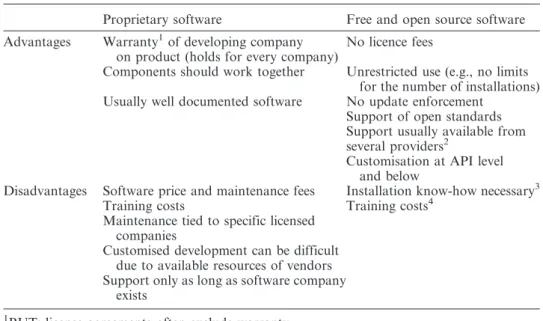
In the following, we aim to discuss the advantages and disadvantages of FOS GIS in comparison to proprietary products from a general perspective and then from a university perspective in the next subsection. Table 5 presents a variety of differences between FOS and proprietary software products (adopted from Weis 2006), that are not specifically related to geospatial software products. In addition to the obvious gains of not having to pay license fees, many more user benefits exist – particularly when there is a good support of open standards and unrestricted use of the software. The first issue, that is, the support of standards and commonly used formats, becomes important when SDIs should be tailored from diverse software components. The notion of ‘unrestricted use’ refers to the possibility of using the software on any computer one desires, for private or business purposes, but also without any restriction to the number of installations.
Table 5. Differences between proprietary and FOS software. Modified after Weis (2006).
Proprietary software Free and open source software
Advantages Warranty1of developing company on product (holds for every company)
No licence fees
Components should work together Unrestricted use (e.g., no limits for the number of installations) Usually well documented software No update enforcement
Support of open standards Support usually available from several providers2
Customisation at API level and below
Disadvantages Software price and maintenance fees Installation know-how necessary3
Training costs Training costs4
Maintenance tied to specific licensed companies
Customised development can be difficult due to available resources of vendors Support only as long as software company
exists
1BUT: license agreements often exclude warranty. 2
On FOS GIS support see: http://www.osgeo.org/search_profile.
3
BUT: most FOS desktop GIS provide installers (e.g., for MS-Windows a setup.exe).
4
BUT: user’s choice to invest in own resources or to buy external services.
An overview on free and open source GIS developments 1363
Problems that have been faced by users and developers due to strategic decisions of proprietary GIS manufacturers are known, but are difficult to prove. One problem that we identify is the loss of support for scripting possibilities for new components. For instance, users of ESRI AML, Avenue or ESRI-related VB6 scripts have been recommended to switch to more advanced scripting languages, if they want to use batch processing capabilities also with functionality added in newer ESRI ArcView (3.X) or ArcGIS versions (Butler 2005, Fee 2008, ESRI 2008b). This loss of support is unlikely to occur with FOSS as either a user with programming skills can make the adaptation itself, or a user can contract a company to do it for him/her, because the code sources are freely accessible. Other problems may occur due to vendor license changes or changes of license distribution rules. For example, the developers of Forestry GIS were hit by the first case; subsequently, as of November 2005 they were not allowed to freely distribute updates of their software because the license terms for the used proprietary GIS kernel were changed (ForestPal 2008). The second case happened to Oxford Archaeology, an educational charity, which faced problems when ESRI Inc. was announcing to change their criteria for the awarding of educational licenses (see Cook 2008). Such a change of license terms, which restricts use of a software, is not possible when software is covered under the General Public License.
However, GIS software users should not expect zero costs when switching from proprietary to FOS (GIS) software. For instance, training costs for users will emerge similar to proprietary products, and installation of the software may require specific know-how. But we would like to note that the latter point rather applies to web server-related applications or databases than to desktop GIS. A further drawback can be the limited availability and consistency of documentation. Especially if projects are young or few people show interest in offering help to the projects, then documentation for user and developer may be rare or delayed. It has also been shown in the past that volunteer-driven software projects suffer from problems in terms of continuity and long-term planning.
Often people wonder if professional support is available for open source products. The answer depends on the maturity of the product. If the software is mature and a well-sized user community has been established, then companies usually start to offer (hotline-) support and customised development for users that are willing to pay for it. Besides the support offered by companies, the user and developer community may answer support questions in a timely fashion when posted to the user email lists. With respect to this point we would like to emphasise that for all of the FOS desktop GIS mentioned in Table 3 commercial support is available from companies and consultants.
5.2Advantages and disadvantages from a university perspective
What are the specific advantages and disadvantages for research and teaching? Starting with the latter we think that it does not matter which software is used to teach GIS skills. If the students have been taught basic GIS concepts it will not play a role with what brand of software he/she will later work on. Of course, for some open source products, but also for some proprietary GIS software, there may be a lack of functionality to demonstrate all concepts. But open source software can also support the understanding of concepts as it enables direct access to the implementation of the concepts, that is, the source code for spatial algorithms and data structures. In this respect, using FOSS is significant due to its potential for
furthering the development of a critical perspective on GIS. Furthermore, teaching with open source products will allow the student to legally download and experiment with the software at home without paying a license fee. This is especially valuable in situations where the student faces financial barriers. Thus, FOSS supports equal opportunities in learning.
A disadvantage of using FOS GIS, besides a potential lack in functionality, is that its users could be biased against by those companies or organisations that search for people that know specific proprietary software, that is, know which buttons to press to get a specific result. Here the company could save training costs, but would also indirectly raise the costs (e.g., license and maintenance fees) for the educational institutions.
When looking on the research side, we experienced a major shift in software development in the last three decades. As Daues (2006) remarks, the 1960s and 1970s were dominated by a ‘free’ exchange of software – associating thereby the term ‘free’ with the terms ‘gratis’ and ‘without license’. With the beginning of the 1980s, a shift occurred towards the introduction of non-free software licenses and copyrights to protect developed software. Since that time, GIS research has also been influenced by software license practices that make it difficult to share ideas and to review developed algorithms and models due to closed software components and the availability of the GIS software itself. In this respect, the map generalisation research community was particularly hit by these drawbacks. Developments in this area took place on different GIS platforms (e.g., on ESRI, Intergraph and LaserScan/1Spatial products) and with different programming languages (i.e., the ones that could be used to customise the GIS software). This situation made it difficult to compare algorithms and unify the achievements to build upon for future research. Hence Edwardeset al.(2003) postulated the need for an open research platform to escape from the unsatisfying situation and they outlined a solution using open (-source) technologies.15
With examples that are taken from the map generalisation research community, but not exclusively with a focus on desktop GIS, we outline below several distinct advantages that we believe exist for research if the principles of free software are applied:
N
We argue that FOSS preserves the researcher from ‘re-inventing the wheel’. For the specific case of map generalisation research, one can avoid re-implementing generalisation algorithms previously developed by others on other platforms. However, this point can also be a plus for proprietary products, but here the gain depends on the ratio of provided and required GIS functionality.N
We argue that FOSS products intrinsically have the ‘best’ availabledocumentation, that is, one can study the source code to understand how things are done. The implementation of generalisation algorithms provides examples from which to draw upon. For instance, some of the algorithms are based on optimisation principles. Its implementation may be much more difficult than it is often outlined in a related research article, since an implementation often necessitates dealing with data insufficiencies or even numerical problems. An example of this is the implementation of a snakes-based road displacement method developed by Bader (2001).
15
For a solution based on web services, see Neun (2007).
An overview on free and open source GIS developments 1365
N
We argue that FOS software is adaptable to its own (research) needs without restrictions. For instance, Burghardt et al. (2005) used FOS libraries for the development of a generalisation web service architecture. Thereby certain existing FOS GIS modules, in particular components of the desktop GIS JUMP, have been used on server side as well as on client side and programmatically adopted to the specific tasks. It was important that the used libraries support open standards to ensure interoperability between the components of the web service architecture. New models for geo-data transfer and storage had to be developed and it would have been difficult to achieve this with closed software, as customisation on that level was not possible (Neunet al.2008).N
We argue that new developments will be available in-time if the researcher supports this. When newly developed data models are put under an open source license, it is easy for other researchers and industry to pick them up – this was the case for web generalisation services. Thus, it is not necessary for others that are interested in the technology to wait for new software releases that include the new models.N
We argue that one can take along and use the software at whatever place one conducts research. Here again we like to refer to the generalisation web service example. For test reasons, the developed platform has been set up at Ordnance Survey (GB) and adopted to their needs (Regnauld 2006). It was not necessary to purchase additional licenses to make and test the installation, and the researchers at Ordnance Survey were able to adapt the web service to their own software due to the open architecture. We would additionally like to point out that the issue of portability may also be of specific importance to research, since a researcher’s life sees many places in the world.Finally, some people may point to the drawback that everybody can commercially exploit the results of research work if it is not covered by patents or prohibitive licenses. We would argue here that most research is funded by public grants, and that the FOSS authors simply give back to the society what it has paid for in advance. 6. Conclusions
The FOS geospatial software world has recently seen a lot of activity. For instance, a formal organisation has been founded, a related conference series is on the way to establishing itself and new software projects have been started. One aim of this article was to present an overview on organisational structures in the open source community, and to closely examine those projects that develop desktop GIS software. To further the understanding of the open source software development we introduced important terms and discussed advantages and disadvantages of FOSS for the general user.
From the project review in the Section 4 it can be obtained that one major fraction (4/10) of software projects was started by companies with a commercial background, often together with authorities, and another major fraction (5/10) did evolve from research projects. Only one of the projects (that survived) was originally founded by enthusiasts. The second conclusion that can be drawn is that most of the projects have a slightly different application and platform focus. Furthermore, with the exception OrbisGIS, all presented projects have reached a mature stage and the software offers a multitude of functionalities (see Table 4). As the analysis of Table 4
reveals, some of the FOS software listed, such as GRASS GIS and gvSIG, can provide more functionality than proprietary low-end GIS products, such as ESRI’s ArcView.
In the discussion section we explicitly argued for the use of open source practices and software in research. We hope that we could highlight that the principles of free software conform to one fundamental research principle: ‘experiments must be reproducible’. That is, if the source code is given, then everybody is able to learn from the source code and directly improve upon the algorithms and models without running into the danger of misinterpretation. Additionally, we agree with Caˆmara et al. (2000) when they criticise proprietary software vendors in their slow implementation rate of new developed models and algorithms. Examples, already given by Caˆmaraet al.in the year 2000, for developments that have not made their way into proprietary GIS yet include techniques for dynamic modelling (such as cellular automata), spatio-temporal data models and methods for the assessment of global and local spatial statistics. In contrast, GIScientists have developed and implemented methods for the handling of spatio-temporal data types (see http:// www.terralib.org/, Caˆmara et al. 2000) and methods for 3D/4D geo-visualisation and analysis (see http://grass.osgeo.org/grid3d/, Mitasova and Neteler 2004) in free and open source software. Hence, if we aim to test and develop new models and the emerging theories in-time, we rely (more or less) on open principles and software that allows us to adapt the software to our research needs, and on software that is not focused on the end user. Thus, free software supports the scientific development by facilitating learning, testing of hypothesis, amelioration and comparing of models and algorithms, and the spreading of valuable or even ground breaking results. Ramsey (2008, Timmy’s Telethon#0) summarises these previous thoughts very well by saying:
Open source can’t strongly appeal (yet) to conservative late adopters, and ESRI is finding it hard (at the moment) to appeal to technically savvy early adopters.
As far as we can assess, GIScience research is and should be on the side of early adopters. User of GIS methods and technology from other sciences (e.g., ecology or soil science) may be rather found in the mid- or late adopter groups. Thus, FOSS may not be suited for everyone if the price tag argument is set aside. But it is, given the argumentation above, from our personal point of view the best choice for research.
Acknowledgements
Parts of this review have been accomplished by Stefan Steiniger during two research projects founded by the Swiss NSF: DEGEN (project no.: 200020-116302) and PAGEVIS-LD (PBZH2-1211004). We are grateful to the Swiss National Science Foundation for funding. Furthermore, we have to thank numerous people from the different projects for contributing information: GRASS and QGIS: Markus Neteler, Otto Dassau, Marco Hugentobler and Stephan Holl; KOSMO: Manuel Navarro; MapWindow: Daniel Ames, uDig: Jody Garnet and Jesse Eichar, SAGA: Olaf Conrad; ILWIS: Martin Schouwenburg; OpenJUMP: Michae¨l Michaud, DeeJUMP: Andreas Schmitz; PirolJUMP: Arnd Kielhorn; SkyJUMP: Larry Becker; and gvSIG: Mario Carrera. We would like to thank as well Ralf Tauscher and Jan-Oliver Wagner for comments and suggestions on foregoing presentation slides and first manuscript versions. Finally, we are grateful to the two anonymous reviewers whose An overview on free and open source GIS developments 1367
comments helped to improve the paper, and also to Ryan Powers for revising our English.
Notes
During the writing of the article, the publication of several books has been announced with a focus on geospatial FOS software and data that we would like to mention for completeness: (1) ‘Desktop GIS: Mapping the Planet with Open Source’ by G.E. Sherman, The Pragmatic Programmers LLC, (2) ‘Open Source Approaches in Spatial Data Handling’ by G.B. Hall and M.G. Leahy, Springer Verlag, (3) ‘Open Source GIS: A GRASS GIS Approach’ by M. Neteler and H. Mitasova, 3rd Ed., Springer Verlag, (4) ‘Web Mapping Illustrated: Using Open Source GIS Toolkits’ by T. Mitchell, A. Emde and A. Christl, revised German Ed, O’Reilly, and (5) ‘OpenStreetMap: Die freie Weltkarte nutzen und mitgestalten’ by F. Ramm and J. Topf, German Ed., Lehmanns Media (English Ed. in preparation).
References
ALFARO, A.A.A. and RICO, G.C., 2005, gvSIG: open source solutions in spatial technologies.
In Proceedings of GISPLANET 2005, Estoril, Portugal. Available from http://www.
gvsig.gva.es/fileadmin/conselleria/images/Documentacion/articulos/GIS_PLANET_2005_ gvSIG.pdf [Accessed 17 April 2008].
AMES, D.P., MICHAELIS, C. and DUNSFORD, T., 2007, Introducing the MapWindow GIS project.OSGeo Journal, 2. Available from http://www.osgeo.org/journal [Accessed 17 April 2008].
ANTONELLO, A. and FRANCHESCHI, S., 2007, JGrass and uDig, chronicles of a lovestory.In
Proceedings of FOSS4G 2007, Lausanne, Switzerland. Available from http://
www.foss4g2007.org/presentations/view.php?abstract_id5147 [Accessed 30 July 2008]. BADARD, T. and BRAUN, A., 2003, OXYGENE: an open framework for the deployment of
geographic web services. In Proceedings of the 21st international cartographic
conference, Durban, South Africa, CD-ROM.
BADER, M., 2001,Energy minimization methods for feature displacement in map generalization,
Thesis (PhD). University of Zurich.
BULIUNG, R.N. and REMMEL, T.K., 2008, , Open source, spatial analysis, and activity-travel behaviour research: capabilities of the aspace package. Journal of Geographical
Systems,10, pp. 191–216.
BURGHARDT, D., NEUN, M. and WEIBEL, R., 2005, Generalization services on the web –
classification and an initial prototype implementation.Cartography and Geographic
Information Science,32, pp. 257–268.
BUTLER, H., 2005, A guide to the python universe for ESRI users. ArcUser, 2,: 34–37. Available from: http://www.esri.com/news/arcuser/0405/files/python.pdf [Accessed 17 April 2008].
CAˆ MARA, G., et al. 2000, TerraLib: technology in support of GIS innovation.In Proceedings
of the II Brazilian symposium on GeoInformatics, GeoInfo 2000, Sa˜o Paulo, Brazil.
Available from http://www.terralib.org/docs/papers/TerraLib_Paper_GeoInfo2000. pdf [Accessed 17 April 2008].
CLINTON, B., 1993, Coordinating geographic data acquisition and access: the national spatial
data infrastructure. Executive Order 12906.Federal Register,59(71). Available from: http://www.archives.gov/federal-register/executive-orders/pdf/12906.pdf [Accessed 17 April 2008].
CONRAD, O., 2007, SAGA – Entwuf, Funktionsumfang and Anwendung eiries Systems fu¨r Automatisierte Geowissenschaftliche Analysen. Thesis (PhD), University of Go¨ttingen.
COOK, J., 2008,Dear ESRI, it’s not me, it’s you[online]. Computing, GIS and Archaeology in the UK. Available from: http://www.archaeogeek.com/blog/2008/03/12/dear-esri-its-not-me-its-you/ [Accessed 17 April 2008].