Performance Analysis of Network Subsystem on Virtual Desktop Infrastructure
System utilizing SR-IOV NIC
Soo-Cheol Oh and SeongWoon Kim
Software Research LaboratoryElectronics and Telecommunications Research Institute Daejeon, South Korea
e-mail: {ponylife, ksw}@etri.re.kr
Abstract—Virtual Desktop Infrastructure (VDI) is used to run
desktop operating systems and applications inside Virtual Machines (VM) that reside on servers. This paper proposes a solution for improving network performance of the VDI system. TCP/IP Offload Engine (TOE) and Single Root IO Virtualization Network Interface Card (SR-IOV NIC) for VDI protocol network and VM network were adopted respectively. According to experiments, our system saves up to 15.93% host CPU utilization.
Keywords-Virtual Desktop Intrastructure; Virtual Network; SR-IOV NIC; PCI Passthrough; TOE
I. INTRODUCTION
Virtual Desktop Infrastructure (VDI) [1] is used to run desktop operating systems and applications inside Virtual Machines (VM) that reside on servers. The desktop operating systems inside the virtual machines are referred as the virtual desktops. Users access the virtual desktops using VDI client through network. Users can use a thin client or a zero client or a PC client. The client receives screen data of VM and displays it to the client display. Keyboard and mouse input of the client are captured and transmitted to the VM.
VDI service has many advantages. The first advantage is centralized administration that reduces maintenance cost of user desktop. The second advantage is security issue. Because all data transmission between the VM and the VDI client are controlled by an administrator, data hacking by malicious users is prohibited. The last thing is fast data backup, restoration, and provision of the virtual desktop.
However, VDI server has some disadvantages. Much load could be imposed on network subsystem and server CPU because all services are performed through the network. The screen data of the VM is a component generating much load in the VDI system. Today, popular screen size of desktop is 1920x1080p (FULLHD) with 32bit color and 60Hz refresh rate. This screen generates 3.7Gbps data. When considering blu-ray having FULLHD resolution, the compressed blu-ray data has about 61Mbps stream rate.
There are two kinds of networks in the VDI system. The first one is a VDI protocol network. Screen data from the VM to the VDI client, and input data from the VDI client and the VM are transferred through this network. The second one is a VM network that is used for intranet or internet by the VM. The VDI protocol handling large screen data of the VM generates much load on server CPU and the VDI
protocol network. Also, emulation of the VM network by the server CPU generates heavy overhead on the server CPU.
The purpose of this paper is to reduce the overhead of the VDI protocol network and the VM network. For reduction of the VDI protocol network overhead, we adopt TOE [2]. Also, we reduced the VM network overhead by using SR-IOV NIC [3] and PCI passthrough technique [4].
This paper is organized as follows. Section II shows related works. Section III proposes a VDI system with improved network performance and section IV shows experimental results. Finally, section V presents our conclusions.
II. RELATED WORKS
There are several VDI systems supplied by VMware[5], Citrix[6], Microsoft[7], and KVM[8]. The VDI systems are combination of the hypervisor and the VDI protocol. The representative VDI protocols are PCoIP, ICA/HDX, and RDP/RemoteFX.
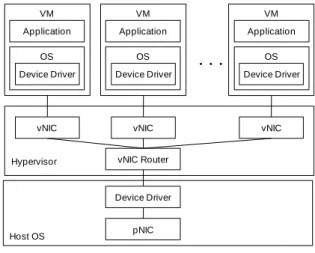
In the VDI system, Network Interface Card (NIC) for the virtual desktop is emulated by the hypervisor in software, and this emulated NIC is called as vNIC (Virtual NIC). Figure 1 shows the architecture of vNIC emulation. In this paper, we will call the NIC, physically installed on the server board, as pNIC (Physical NIC).
Hypervisor pNIC vNIC Device Driver VM Application OS vNIC Device Driver VM Application OS vNIC Device Driver VM Application OS
. . .
vNIC Router Device Driver Host OSFigure 1. Software Emulation of vNIC
The hypervisor generates the vNIC based on the pNIC and provides it to the VMs. When an application on the VM wants to send data, packets including TCP/IP header and the
data are made by the VM. Then, these packets are delivered to the vNIC through the device driver of the VM. The hypervisor emulating the vNIC sends this packet to network using the pNIC.
When the pNIC receives data, the hypervisor decides which vNIC handles the data. Then, the hypervisor delivers this data to the vNIC. When the vNIC receives the data, it is passed to an application or an OS kernel through the device driver of the VM. The representative methods for the vNIC emulation are Network Address Translation (NAT) and bridged mode [9].
The vNIC generated by the NAT mode has private IP address and any IP connection to the outside world will look like it came from the host (same MAC and IP as the host). The network packet sent out by the VM is received by the hypervisor, which extracts the TCP/IP data, change the IP address to the IP address of the host machine, and resends it using the host OS. The hypervisor listens for replies to the packets sent, and repacks and resends them to the VM on its private network. The bridged mode means that VM will have its own MAC address and separate IP on the network and can be seen as a unique machine.
VirtIO[10], which is based on para-virtualization[11], appeared to overcome this problem. VirtIO is a virtualization standard for network and disk device drivers where the VM's device driver knows it is running in a virtual environment, and cooperates with the hypervisor. This enables the VM to get high performance network and disk operations, and gives most of the performance benefits of para-virtualization.
III. VDI SYSTEM WITH IMPROVED NETWORK PERFORMANCE
This paper proposes the architecture of the VDI system with improved network performance as shown in Figure 2.
Device Driver VM Application OS
. . .
vNIC TOE Hypervisor Device Driver VM Application OS vNIC Device Driver VM Application OS vNIC pNIC VM Network VDI Protocol EngineVDI Protocol Network PCI Express
Figure 2. Architecture of the VDI System with Improved Network Performance
The VDI system is based on KVM, which is an open software. This system consists of the hypervisor, multiple VMs, and pNIC including the TOE and multiple vNICs. The hypervisor runs multiple VMs in the VDI system. The VDI protocol engine of the hypervisor sends screen data of the VM to client and receives keyboard/mouse input from the
client. The pNIC installed in PCI express slot of server mother board handles network functions that are the VM network and the VDI protocol network. The VM uses the vNIC generated by the pNIC for accessing internet or intranet. The vNIC uses the SR-IOV and the PCI passthrough for performance improvement of the VM network. The VDI protocol engine uses the TOE function of the pNIC for using the VDI protocol network.
A. VDI Protocol Network
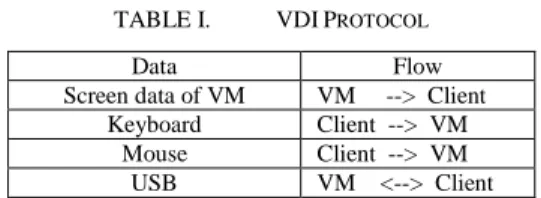
The VDI protocol network is used to deliver a virtual desktop on a server to a client. This network is managed by the hypervisor running on host OS. The data handled in the VDI protocol are summarized in Table I.
TABLE I. VDIPROTOCOL
Data Flow
Screen data of VM VM --> Client Keyboard Client --> VM
Mouse Client --> VM USB VM <--> Client
In the data, the screen data is the largest. When a VM plays a blu-ray video movie with FULLHD resolution, its average stream rate is 61Mbps. If a VDI server has 40 VMs and they play the blu-ray video movie concurrently, total network stream rate is 2.44Gbps. This high stream rate imposes high load on the host CPU for processing TCP/IP protocol. This paper adopts the TOE to solve this problem.
In the TOE, the TCP/IP protocol processing is handled in hardware NIC instead of the host CPU and this technology can reduce the load of the host CPU. Thus, we can remove the host CPU overhead for processing the VDI protocol by using the TOE.
B. VM Network
The VM network is used for accessing internet or intranet by the VM. In the previous work, the VM used the vNIC that is emulated in software by the hypervisor. This method generates heavy load on the host CPU for vNIC emulation. Also, software emulated vNIC can't fully utilize the physical performance of the pNIC because of the host CPU overhead. Although the VirtIO appeared to overcome this problem, it can't solve limitation of the software emulated NIC. This paper adopts the SR-IOV NIC and the PCI passthrough to solve this problem.
Multiple vNICs can be generated in single pNIC by utilizing the SR-IOV. Because the vNIC is emulated in hardware instead of software, it imposes no load on the host CPU.
The vNIC is attached directly to the VM using the PCI passthrough. Generally, the hypervisor manages all hardware resources and provides the virtual hardware to the VM. The PCI passthrough assigns the hardware resource to the VM directly without intervention of the host OS or the hypervisor. Thus, the VM can use the hardware resource directly without help of the hypervisor and it can reduce the overhead of the host CPU. Also, it can reduce time spent in accessing the hardware resource.
IV. PERFORMANCE EVALUATION
We measured performance of the network subsystem of the VDI system proposed in this paper. One server machine was connected to one client machine using 10Gigabit Ethernet Switch that is Cisco Catalyst 4900M. The specifications of the server, the client, and VM are shown in Table II.
TABLE II. CONFIGURATIONS OF SERVER,CLIENT AND VM (a) Server Configuration
Descriptions CPU - Two Intel Xeon E5-2560 2.0GHz
- Total 16 cores (Each CPU has 8 cores) Memory 128GB
Network Card Chelsio T440-CR Host OS Centos 6.3 64bit
(b) Client Configuration Descriptions CPU - One Intel i7 2.67GHz
- Total 4 cores Memory 4GB
Network Card Chelsio T440-CR Host OS Centos 6.3 64bit
(c) VM Configuration Descriptions CPU One virtual core
Memory 2GB
Host OS RedHat 6.2 64bit
The Chelsio T440-CR is a 10Gbps Ethernet NIC having the SR-IOV and the TOE functions. It has four physical 10Gbps Ethernet ports. It can generate 16 vNICs per physical port. Thus, total number of the vNIC is 64.
For performance comparison, we used general 1Gbps Ethernet NIC (GNIC) mounted on server main board. The experimental results are average of 10000 times.
A. The VDI Protocol Network
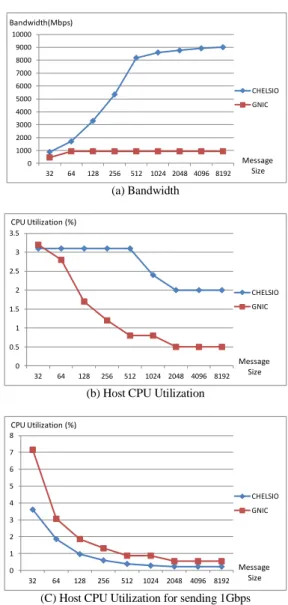
This section shows the performance comparison of the VDI protocol network. Figure 3-(a) and 3-(b) show the network bandwidth and the host CPU utilization. In this experiment, the TOE function of the CHELSIO is activated. The CHELSIO has the higher bandwidth than the GNIC. The bandwidth of the CHELSIO is 9Gbps and the GNIC is 0.93Gbps in the message size 8KB. The bandwidth of the CHELSIO increases continuously as the message size increases. However, the bandwidth of the GNIC saturates in the message size 64 bytes because the physical bandwidth of the GNIC is 1Gbps that is very lower than the CHELSIO having 10Gbps physical bandwidth.
In the host CPU utilization, the CHELSIO has the higher CPU utilization than the GNIC. The host CPU utilization of the CHELSIO with 9Gbps bandwidth is 2% in the message size 8KB. The GNIC with 0.93Gbps bandwidth consumes 0.5% CPU utilization.
The goal of this paper is not to increase the VDI network bandwidth, but to decrease the CPU utilization of the VDI network by replacing the GNIC with the CHELSIO. In the VDI system, total data size transmitted through the VDI
network is not changed although the CHELSIO sends more data than the GNIC. Thus, it is necessary to analyze the CPU utilization when sending a fixed data size. This paper used the fixed data size of 1Gbps for the analysis.
0 1000 2000 3000 4000 5000 6000 7000 8000 9000 10000 32 64 128 256 512 1024 2048 4096 8192 CHELSIO GNIC Message Size Bandwidth(Mbps) (a) Bandwidth 0 0.5 1 1.5 2 2.5 3 3.5 32 64 128 256 512 1024 2048 4096 8192 CHELSIO GNIC Message Size CPU Utilization (%)
(b) Host CPU Utilization
0 1 2 3 4 5 6 7 8 32 64 128 256 512 1024 2048 4096 8192 CHELSIO GNIC Message Size CPU Utilization (%)
(C) Host CPU Utilization for sending 1Gbps Figure 3. Performance of the VDI protocol Network
For this, we normalized the host CPU utilization and Figure 3-(c) shows the host CPU utilization spent in sending 1Gbps. To send 1Gbps, the CHELSIO consumes less CPU cycle than the GNIC. The CPU utilization of the CHELSIO is 0.22 % and the GNIC is 0.54% in the message size 8KB. Consequently, the CPU utilization of the CHELSIO is 60% less than that of the GNIC. Thus, the VDI system with the CHELSIO consumes less CPU utilization than the GNIC when sending the VDI protocol data. The saved CPU resource can be used to execute other VDI system components. The normalized CPU utilization will be used again in section IV-E.
B. The VM Network on One VM
In this section, the performance of the VM network on one VM is measured. In this experiment, only one VM is
used. For performance comparison, we used three cases. The first case, i.e., CHELSIO_SRIOV, is a combination of the CHELSIO, the SR-IOV NIC, and the PCI passthrough. The second case, i.e., CHELSIO_Bridge, is combination of the CHELSIO and the bridged mode. In this case, the SRIOV and the PCI passthrough of the CHELSIO are not used. Thus, the function of the CHELSIO is the same as a 10Gbps GNIC. The last case GNIC_Bridge is combination of GNIC, the bridged mode, and VirtIO.
0 1000 2000 3000 4000 5000 6000 32 64 128 256 512 1024 2048 4096 8192 CHELSIO_SRIOV CHELSIO_Bridge GNIC_Bridge Message Size Bandwidth(Mbps) (a) Bandwidth 0 1 2 3 4 5 6 32 64 128 256 512 1024 2048 4096 8192 CHELSIO_SRIOV CHELSIO_Bridge GNIC_Bridge Message Size CPU Utilization (%)
(b) Host CPU Utilization
0 2 4 6 8 10 12 32 64 128 256 512 1024 2048 4096 8192 CHELSIO_SRIOV CHELSIO_Bridge GNIC_Bridge Message Size CPU Utilization (%)
(C) Host CPU Utilization for sending 1Gbps Figure 4. Performance of the VM Network on One VM
As shown in Figure 4-(a), the bandwidth values are reached, in the descending order, for: the CHELSIO_SRIOV, the CHELSIO_Bridge, and the GNIC_Bridge, respectively. The bandwidths of the CHELSIO_SRIOV and the CHELSIO_Bridge are nearly same to the message size 512 bytes. However, as the message size increases, the bandwidth of the CHELSIO_SRIOV increases to 5.12Gbps although the bandwidth of the CHELSIO_Bridge saturates at 2Gbps. The VM network of the CHELSIO_Bridge, which is the software emulated NIC, has performance limit although the physical bandwidth of the CHELSIO is 10Gbps. The
GNIC_Bridge shows the 0.936Gbps that saturates for a message size of 64 bytes.
We normalized the host CPU utilization of this experiment. In all cases, the host CPU utilization decreases as the message size increases. In the message size 8KB, the host CPU utilizations of the CHELSIO_SRIOV, the CHELSIO_Bridge and the GNIC_Bridge are 0.56, 2.19 and 2.95, respectively. The CHELSIO_SRIOV has 391% and 526% less CPU utilization than the CHELSIO_Bridge and the GNIC_Bridge, respectively when sending 1Gbps.
0 1000 2000 3000 4000 5000 6000 7000 8000 9000 10000 32 64 128 256 512 1024 2048 4096 8192 CHELSIO_SRIOV CHELSIO_Bridge GNIC_Bridge Message Size Bandwidth(Mbps) (a) Bandwidth 0 10 20 30 40 50 60 70 80 32 64 128 256 512 1024 2048 4096 8192 CHELSIO_SRIOV CHELSIO_Bridge GNIC_Bridge Message Size CPU Utilization (%)
(b) Host CPU Utilization
0 2 4 6 8 10 12 14 16 18 32 64 128 256 512 1024 2048 4096 8192 CHELSIO_SRIOV CHELSIO_Bridge GNIC_Bridge Message Size CPU Utilization (%)
(C) Host CPU Utilization for sending 1Gbps Figure 5. Performance of the VM Network on 16 VMs
When comparing the CHELSIO_SRIOV and the CHELSIO_Bridge, two cases use same network card. The CHELSIO_Bridge consumes more CPU cycles to emulate the bridged NIC. However, the CHELSIO_SRIOV doesn’t use any CPU cycle because there is no NIC emulation. Thus, a value of 1.63% (=2.19 - 0.56) is obtained, which is the CPU utilization difference of two cases is the host CPU utilization needed to emulate the vNIC.
C. The VM Network on 16 VMs
The Chelsio network card generates 16 vNICs per pNIC. Thus, we measured the network performance of 16 VMs. 16 VMs are built on one server and they send data concurrently to the clients.
Figure 5-(a) shows that the CHELSIO_SRIOV has the highest bandwidth. In this experiment, the bandwidths saturate in smaller message size than section IV-B. The bandwidth saturation points of the CHELSIO_SRIOV, the CHELSIO_Bridge, and the GNIC_Bridge are obtained for 64 bytes, 256 bytes, and 32 bytes, respectively.
The normalized CPU utilizations of the CHELSIO_SRIOV, the CHELSIO_Bridge, and the GNIC_Bridge are 2.17, 3.54, and 6.01, respectively.
D. The Number VMs on one VDI Server
This section shows how many VMs are run on one VDI server. In this experiment, VMs play HD movie and the CPU utilization of each VM becomes 100%.
TABLE III. HOST CPUUTILIZATION TO 40VMS
The number of VM The host CPU utilization
10 43 - 46 %
20 70 - 74 %
30 91 - 92 %
40 95 - 98%
Table III shows the host CPU utilization as the number of VM increases. The host CPU utilization reaches almost 100% when the number of VM becomes 40. Thus, this VDI server can run maximum 40 VMs.
E. 100Mbps VM Network on 40 VMs
The experiments presented in sections IV-A to IV-C measured the maximum network performance of the VDI system. In this section, the network performance of the VDI system is measured in more real environment. In Korea, 100Mbps internet line to home is very popular. So, it is supposed that
- Each VM has 100Mbps VM network line. - One VDI server supports 40 VMs.
TABLE IV. HOST CPUUTILIZATION WITH 100MBPS VM NETWORK
CHELSIO_SRIOV GNIC_Bridge
CPU Utilization 8.68% 24.04%
Table IV shows the host CPU utilization when each VM sends 100Mbps data concurrently (40 VMs send total 4Gbps data). The CHELSIO_SRIOV saves the 15.36% (= 24.04 - 8.68) CPU utilization compared with the GNIC_Bridge. To run one VM, 2.5% (= 100% / 40VMs) host CPU utilization is needed. Thus, saved 15.35% host CPU utilization can be used to run 6 more VMs (= 15.35% / 2.5%).
F. The Movie Play
Let's consider that 40 VMs connect Youtube website and play FullHD movie (1920x1080p). We used Gangnam style
music video of PSY. The service scenario of this experiment is as follow:
1) Compressed FullHD movie of the Youtube site is streamed to VM using the VM network.
2) The VM decodes the compressed movie and shows decompressed movie on screen of the VM.
3) The VDI protocol engine shown in Figure 2 delivers this screen data to the client using the VDI protocol network.
This section analyzes the scenario by utilizing the experimental results of section IV-A to IV-D, and shows how much host CPU utilization is saved when using CHELSIO_SRIOV.
The specification of the PSY music video is as follow: - SVMNET : 1.6Gbit
o Size of compressed Youtube music video delivered through the VM network (unit : Gbit)
- SVDINET : 11.1Gbit
o Size of the VM screen data delivered through the VDI protocol network (unit : Gbit)
- Tplay : 4 minutes 13 seconds = 253 seconds
o Play time of the music video (unit : second) Equation (1) shows the host CPU utilization (Utotal)
consumed in the network subsystem of the VDI server.
Utotal = UVDINETi+ N i=1 UVMNETi N i=1 (1) - Utotal : host CPU utilization consumed in the network
subsystem of the VDI server - N : the number of VM
- UVDINETi : host CPU utilization consumed in the VDI
protocol network of VMi
- UVMNETi : host CPU utilization consumed in the VM
network of VMi
Because we assume that all VMs use same video, assumptions of equation (2) and (3) can be applied to (1), and Utotal is expressed in (4) and (5).
UVDINET = UVDINET1 = UVDINET2 = ⋯ = UVDINETN (2) UVMNET = UVMNET1 = UVMNET2= ⋯ = UVMNETN (3) Utotal = N × UVDINET + N × UVMNET (4) Utotal = N × UVDINET _1G× SVDINET Tplay + (5) N × UVMNET _1G× SVMNET Tbuffer
- UVDINET : average host CPU utilization consumed in the
VDI network per VM
- UVMNET : average host CPU utilization consumed in the
- UVDINET_1G : host CPU utilization consumed for
transferring 1Gbit data through the VDI protocol network
- UVMNET_1G : host CPU utilization consumed for
transferring 1Gbit data through the VM network - Tbuffer : time spent in buffering all music video through
the VM network per VM
According to sections IV-A to IV-C, the parameters of the CHELSIO_SRIOV and the GNIC are as follow:
- CHELSIO_SRIOV
o UVDINET_1G (0.22727), UVMNET_1G (2.176)
- GNIC
o UVDINET_1G (0.54701), UVMNET_1G (6.017)
When the VM receives the music video from the Youtube site, buffering is utilized. The size of the PSY music video is 1.6Gbit and the VM has 100Mbps VM network. The earliest time in that the buffering finishes is 16 seconds. If the internet has bad quality, the time could be extended to the movie play time that is 253 seconds.
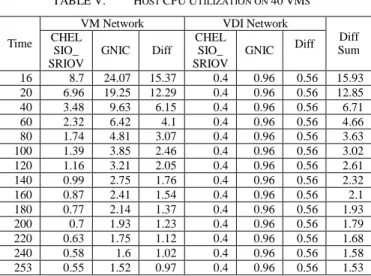
Table V shows the average host CPU utilization when buffering through the VM network finishes within a specified time. This table is derived from (5).
TABLE V. HOST CPUUTILIZATION ON 40VMS
Time
VM Network VDI Network
Diff Sum CHEL SIO_ SRIOV GNIC Diff CHEL SIO_ SRIOV GNIC Diff 16 8.7 24.07 15.37 0.4 0.96 0.56 15.93 20 6.96 19.25 12.29 0.4 0.96 0.56 12.85 40 3.48 9.63 6.15 0.4 0.96 0.56 6.71 60 2.32 6.42 4.1 0.4 0.96 0.56 4.66 80 1.74 4.81 3.07 0.4 0.96 0.56 3.63 100 1.39 3.85 2.46 0.4 0.96 0.56 3.02 120 1.16 3.21 2.05 0.4 0.96 0.56 2.61 140 0.99 2.75 1.76 0.4 0.96 0.56 2.32 160 0.87 2.41 1.54 0.4 0.96 0.56 2.1 180 0.77 2.14 1.37 0.4 0.96 0.56 1.93 200 0.7 1.93 1.23 0.4 0.96 0.56 1.79 220 0.63 1.75 1.12 0.4 0.96 0.56 1.68 240 0.58 1.6 1.02 0.4 0.96 0.56 1.58 253 0.55 1.52 0.97 0.4 0.96 0.56 1.53
Let us consider the case where the buffering finishes in 16 seconds. Average 8.7% host CPU utilization is consumed to use the VM network in the CHELSIO_SRIOV. However, the GNIC uses 24.07% host CPU utilization. Thus, the CHELSIO_SRIOV saves the 15.35% host CPU utilization for the VM network. In the VDI network, the CHELSIO_SRIOV saves the 0.56% host CPU utilization.
Consequently, in time zone 0 to 16 seconds, the CHELSIO_SRIOV save average 15.93% host CPU utilization than the GNIC.
After the buffering is finished, the VM network is used no more and the benefit of the CHELSIO_SRIOV for the VM network is 0. In time zone 17 to 253 seconds, the benefit of the CHELSIO_SRIOV is 0.56% host CPU utilization that is from the VDI network.
As the buffering finishes in longer time, the benefit of the CHELSIO_SRIOV decreases. If the buffering finish time becomes 253 seconds, the CHELSIO_SRIOV can save 1.53% host CPU utilization than the GNIC.
According to the experiment in Korean internet environment, buffering finishes in 60 seconds to 120 seconds. Thus, the CHELSIO_SRIOV saves 4.17% to 7.38% host CPU utilization.
V. CONCLUSIONS
This paper proposed a solution for improving network performance of the VDI system. The TOE and the SR-IOV for VDI protocol network and VM network were adopted respectively. This removed the host CPU overhead used to emulate the vNIC in software by the hypervisor. Also, we removed the host CPU overhead consumed to process the VDI protocol network by using TOE. According to experiments, our system saved up to 15.93% host CPU utilization.
VI. ACKNOWLEDGEMENT
This work was supported by the IT R&D program of MSIP/KEIT. [10035242, Development of Cloud DaaS (Desktop as a Service) System and Terminal Technology]
REFERENCES
[1] D.-A. Dasilva, L. Liu, N. Bessis, and Y. Zhan, "Enabling Green IT through Building a Virtual Desktop Infrastructure", 2012 Eighth International Conference on Knowledge and Grids (SKG), Beijing, Oct. 2012, pp. 32-38.
[2] S.-C. Oh and S. W. Kim, "An Efficient Linux Kernel Module supporting TCP/IP Offload Engine on Grid", Fifth International Conference on Grid and Cooperative Computing, Hunan, Oct. 2006, pp. 228-235.
[3] C.H. N. Reddy, "Hardware Based I/O Virtualization Technologies for Hypervisors, Configurations and Advantages - A Study", 2012 IEEE International Conference on Cloud Computing in Emerging Markets (CCEM), Bangalore, Oct. 2012, pp. 1-5.
[4] M. T. Jones, "Linux virtualization and PCI passthrough", IBM Developer Works Technical Library, Oct. 2009, htt p://www.ibm.com/developerworks/library/l-pci-passthrough, [retrieved: Oct. 2013].
[5] J. Langone and A. Leibovici, “Chapter5. The PCoIP Protocol”, VMware View 5 Desktop Virtualization Solutions, Jun. 2012, pp. 77-87.
[6] G. R. James, “Chapter 5. Desktop Delivery Controller”, Citrix XenDesktop Implementation, 2010, pp. 113-127.
[7] T. Cerling, J. Buller, C. Enstall, and R. Ruiz, “Chapter 15. Deploying Microsoft VDI”, Mastering Microsoft Virtualization, Nov. 2011, pp. 443-476.
[8] I. Habib, “Virtualization with KVM”, Linux Journal, Volume 2008, Issue 166, Feb. 2008. Article No. 8.
[9] Virtualbox, “Chapter 6. Virtual Networking", Oracle VM VirtualBox User Manual, http://www.virtualbox.org/manual/ ch06.html, [retrieved: Oct. 2013].
[10] R. Russell, "virtio: towards a de-facto standard for virtual I/O devices", ACM SIGOPS Operating Systems Review - Research and developments in the Linux kernel, Volume 42, Issue 5, Jul. 2008, pp. 95-103.
[11] VMware, “Understanding Full Virtualization, Paravirtualizat- ion, and Hardware Assist”, VMware Technical Resource Center Technical Papers, Nov. 2007.