By Joe Stuart
ACC 626
Introduction
With each passing year, businesses, and the public in general, are becoming more dependent upon electronic storage methods due to the greater efficiency with which data can be stored, analyzed and subsequently found. This has led to vast amounts of sensitive information being contained within company servers, hard-drives and other types of media. While paper shredders are a common place in offices today, and used extensively to destroy sensitive information contained in paper copy, the proper disposal of electronic data is still not considered to be a “main stream” concern at this time. For example, in July 2007, the National Audit Office in the UK released a study that found 70% of central government departments do not adequately check that data has been wiped from IT equipment before it is disposed of, despite the existence of the Data Protection Act which holds companies accountable for security breaches (Thomson, 2007). This paper addresses why secure data disposal is currently a major concern for everyone storing information electronically, the expectations gap that has largely created the problem, the various data disposal standards that can be followed, and finally how to create a plan to ensure data is safely destroyed.
Why Data Disposal is a Problem
While properly disposing of data, is a concern in of itself, the alarming issue currently is the apparent lack of awareness and education with the topic. For instance, Henrik Andersen, the worldwide erasure product line manager for Kroll Ontrack, estimates that 60% of people do not take the proper precautions to remove data from “waste” computers (Quicke, 2008). This estimation may seem questionable, but in a 2003 study, 158 hard drives were purchased from secondary markets and analyzed to search for recoverable data – most of these drives contained data that could be recovered by even the most basic data retrieval methods (Garfinkel and Shelat). When the previous owners were contacted, there were two prevalent reasons to explain the lack of proper data removal: some people did not think of the issue when disposing of their drives and many applications do not properly remove data as advertised (Bradner, 2005). These findings are alarming given that if a company breaches privacy or security legislation, “the responsibility rests squarely on the shoulders of the company’s IT department, CIO and CEO” (Mohamed, 2005), who, along with the company itself, could be liable to pay thousands, or
perhaps millions, of dollars in fines to the government and individuals who had their private information compromised.
The concerns surrounding inadequate data disposal techniques have not gone unnoticed by criminals either. Paul Larsson, the chief executive of the security firm PointSee Mobility Solutions, says “[t]here is evidence that criminals are buying hard discs in order to blackmail companies” (Goodwin, 2004). Acquiring hardware via Internet auction sites, such as eBay, has become a preferred method due to the provided anonymity and complexity involved in tracing the purchase to a potential fraudster, while other tactics include “dumpster diving” and social engineering schemes, such as posing as a charity collecting unwanted hardware (Thomas and Tryfonas, 2007).
Although there are many potential explanations for the overall poor data disposal techniques used currently, Henrik Andersen believes most of the problem can be traced back to the misconception that using the ‘Recycle Bin’ feature in Windows is sufficient to erase data from their systems (Quicke, 2008). Thus, we now move on to an analysis of why this expectations gap exists.
The ‘Recycle Bin’ Expectations Gap
When trying to delete a file, the most common method employed by the average user is to “send” the file to the ‘Recycle Bin’, which is either “emptied” immediately or at some later date. At this point, it is believed that the file has been destroyed or erased from the computer, but in reality, it has just been hidden from the operating system.
Permanently erasing data from an electronic hardware device is a more complicated process. The following explanation from an article titled “E-Disposal” provides a simplified version of what really occurs:
“When a file is saved on a PC, it is given a file allocation table (FAT) that indicates the name, size and location of the file. When a file is deleted, the FAT entry is removed, telling the computer the space is now available for something else. At this point, nothing has actually been deleted or overwritten, and it is possible to reconstruct FAT entries and recover files. Eventually the computer may reuse the space and overwrite parts of the data, but a perfect cover-up is rarely achieved. Fragments of overwritten data still lurking in the hard drive can
be reconstructed to varying degrees. Even erased and reformatted hard drives are littered with bits and pieces of information that can be recovered” (Anonymous, 2006).
Additionally, slack space, swap space and free disk space can all contain information that is potentially sensitive, so they need to be properly wiped as well to avoid unwanted recovery of data (Gittings, 2004). As well, deleted data can be found fairly easily when the deleted file is small and a portion of the file is known by searching the /dev interface; if the file is large with unknown data, it is required that either the file structure or the file system structure is known for the files to be recovered (Joukov and Zadok, 2005).
The majority of computer users would not be aware of these issues, which was been termed the “education problem” by Garfinkel (Bradner, 2005), as they are led to believe the using the ‘Recycle Bin’ and the ‘delete’ command are sufficient. Thus, it is fair to place some blame for the creation of this issue on the operating system vendors themselves.
With all the techniques that exist to recover data from electronic storage devices, the only sure fire way to guarantee electronic data is disposed of is to physically destroy the medium on which it is stored, thereby rendering it unreadable. The ways to physically destroy include
(Anonymous, 2006):
• Physically altering the device (i.e. smashing, sanding, or drilling holes in them) • Dissolving the device in acid
• Degaussing the device – this method, which should only be done by trained professionals due to the dangers involved in the process, uses magnetic fields to scramble and destroy the magnetic fields used by the storage devices so that the device can no longer be read These methods can be very expensive to employ, or bring about other potential issues to address, namely environmental concerns as computer devices can contain numerous toxic substances. As a result, the standards users can follow to properly dispose of their sensitive information, which will be discussed in detail below, usually consider drives overwritten with “junk data” to be sufficiently wiped.
Standards in Data Disposal
There are three main standards for secure data disposal that seem to be accepted by literature and the technology industry in general: the US Department of Defense (DoD) / National Industrial
Security Program Operating Manual (NISPOM) standard, the Gutmann Method, and the National Institute of Standards and Technology (NIST) standard. These are discussed in detail below:
• DoD/NISPOM Standard: This document, often referred to as DoD 5220.22-M, is
considered to be the ‘de facto’ compliance standard by the various manufacturers of erasure software, despite being fifteen years old (Valli, 2004). The highlights of this standard, mainly contained in Section 306 of Chapter 8 in the NISPOM, are (National Security Institute 1993):
o The base erasure standard is to have all addressable locations on the hard drive overwritten with a character, its compliment, and then a random character, followed by verification this process was successful
o The media types covered by this standard are magnetic tapes, magnetic disks, optical disks, memory, equipment (cathode ray tubes), and printers
o The standard provides a ‘Clearing and Sanitization Matrix’, which provides guidance for each of the various types of media above depending on whether the user is trying to clear the media type, or sanitize it completely
o If information is, or was in the past, deemed to be classified, the standard requires that the media be physically destroyed
As well, the standard stresses the importance of ensuring that all of the equipment/media requiring destruction is stored, transported, tracked, and processed using procedures to ensure that the data contained within is kept secure throughout the entire process (Bennison and Lasher, 2004).
• Gutmann Method: Originating in a paper written by (Gutmann, 1996), this method was
meant to replace government standards, which, in Gutmann’s opinion, generally have two major problems associated with them: they are slow to adapt to the new technologies available or become outdated quickly, and information contained within the documents may be intentionally inaccurate, at least partially, to try and fool opposing intelligence agencies and preserve their intelligence gathering capabilities. The paper suggests that overwriting a drive 35 times with patterns will effectively reduce the possibility of
recovering data using various microscope techniques; in an epilogue to the original paper, he states that 35 is not the perfect number of passes, but it does make recovery of data
using advanced methods difficult enough that it is unlikely anyone would spend the amount of time necessary to recover data. Additionally, with the density of hard disk devices increasingly significantly since 1996, “[t]ight packing of tracks and
contemporary methods of storing data on the disk surfaces are at a level of precision that many of the effects describe in Gutmann’s original paper would potentially cause disk corruption”, and thus the 35 “passes” is likely more than what is required to effectively wipe a drive (Valli, 2004).
• NIST Standard (Kissel, Scholl, Skolochenko, and Li, 2006): Issued in September 2006,
this document was released with the intention of helping organizations implement a sanitization program with proper techniques and controls for their sanitization and disposal decisions. Some of the areas discussed within this standard are:
o In the section outlining the various roles and responsibilities associated with a company’s sanitization and disposal policy, the Chief Information Officer (CIO) is specifically identified as the party “responsible for ensuring that organizational or local sanitization requirements follow the guidelines of this document.”
o Though no other “C-suite” executives are specifically listed, the section does state that “[u]ltimately, the head of the organization is responsible for ensuring that adequate resources are applied to the program and for ensuring program success. Senior management is responsible for ensuring that the resources are allocated to correctly identify types and locations of information and to ensure that resources are allocated to properly sanitize the information.”
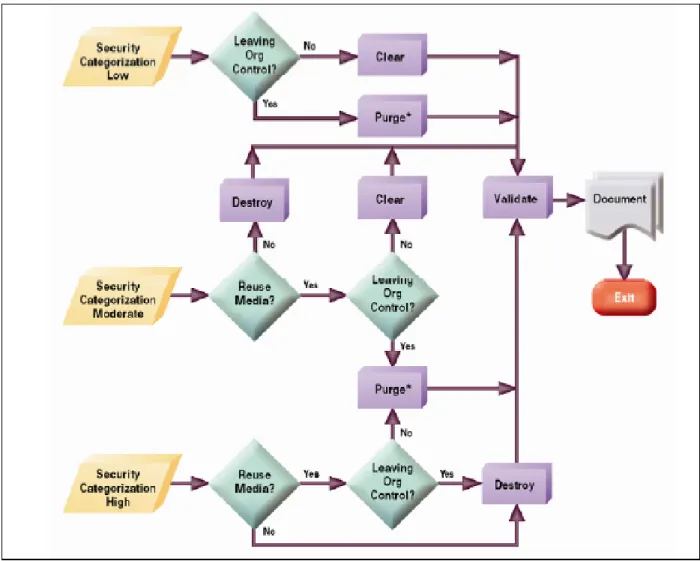
o The decision tree (see Figure 1) is to provide an easy to follow process to assist organizations in determining how to dispose of its various types of information. It is noted that the process flow is based on the confidentiality of the data of interest, not on the type of media upon which it is stored.
o The standard considers it critical that organizations maintain records detailing what media has been sanitized, when and how they were sanitized, and the final disposition of the media itself. It is noted that when an organization is suspected of losing control over its information, it is often during the sanitization process. o Appendix A of the standard essentially updates the guidelines for various types of
Decision Matrix’ for the following types of media: hard copy storages, hand-held devices, networking devices, equipment, magnetic disks, magnetic tapes, optical disks, memory, and magnetic cards.
It should also be noted that there is some movement towards developing a globalized standard, called The Universal Secure Overwrite. The intention of the standard would be to “determine the correct technique for overwriting hard disk drives with the intention that disk manufacturers would then implement the feature in hard disk controller firmware. The adoption of this standard would then provide an in-built [sic] standardized mechanism for the secure erasure of the hard drive” (Valli, 2004).
Creating a Data Disposal Plan
Considering whether a business is adequately prepared to dispose of its data is not just a concern from a data security control standpoint, there is a potential financial aspect to this area as well. If a company does not ensure its disposal of data is done properly, they are exposing themselves to financial injury, be it through fines for failure to comply with privacy/security regulations, accidentally placing trade secrets in third party hands, or lawsuits from customers/suppliers injured by having sensitive data fall into the wrong hands. As a result, implementing and executing a proper plan to dispose of data on all media types should be a major priority for all businesses today.
External auditors also have an inherent interest in how their clients dispose of their data. During the course of an audit, there is an expectation that auditors will perform a sufficient search for unrecorded liabilities – if their clients are at risk from their data disposal activities, it is the auditors responsibility to look into the matter and determine whether a liability exists and, if possible, the amount of exposure the client faces. As such, an evaluation of the data disposal policies and making recommendations to their clients on how to improve this process not only works to satisfy requirements for their audit work, but it also provides their clients with valuable information on how to correct a potentially devastating internal control weakness.
As with processes such as payroll, there are two main options in how to deal with the disposal of data: perform the job on-site or outsource it to a third party. Though this decision and the factors considered will vary substantially depending on the company, the following is a quick discussion of the merits and drawbacks to each:
• In-House:
Pros: ○ Ability to maintain complete control over the data and media types throughout the entire process
o If only disposing of a small quantity of items or low security level data, it can be much cheaper to buy off the shelf software that meets the DoD standard. Note, freeware software also exists, but their effectiveness is mixed
o Expertise required to perform off the shelf software is limited to non-existent o If items are still in good condition after process complete, can still resell them on
the secondary market
Cons: ○ Overwriting data can be a time consuming process – some off the shelf software can take anywhere from 45 to 60 minutes per machine (Goedert, 2004), to days if trying to meet the Gutmann Method recommendation of 35 passes with an 80 GB hard drive (Valli and Patak, 2005)
o If more complex methods are required, such as physical destruction or
degaussing, the cost of performing these activities and expertise required to do so may be excessive for most companies
o Inability to pass off the responsibility for meeting legislative privacy/security standards or for disposing of unusable items in an environmentally friendly way • Outsource:
Pros: ○ Most companies specialize in providing these services, and can perform the services more effectively and efficiently than possible in house
o Can negotiate an agreement so that the service provider will accept responsibility for any fines/punishment related to any privacy, security or environmental
concerns that may result from mistakes made during the disposal process
o Do not have to hire additional personnel to handle these responsibilities in-house o Most service providers will be flexible enough to easily adapt to the various
requirements associated with the types of media that businesses need to be dispose of
o Some providers will give a portion of any proceeds from reselling items on the secondary market to the original owners (Goedert, 2004)
o These type of service providers are not overly common currently, and transporting the hardware to the providers introduces another element of risk
o Separating the high quality service providers from low quality can be a difficult process, as obtaining audits of operations are not always common
In general, the more media types to sanitize and the more complex the methods required to adequately dispose of the data, the more likely it is that a company should outsource the process to a qualified service provider. See the checklist attached – use this as a guide to help assess the various service provider alternatives you may have.
Regardless of whether a company decides to perform the data disposal activities in house or outsource the work, there are some recommended best practices and safeguards to consider implementing. These include:
• Develop a program for the ongoing disposition of all equipment, as all equipment does not come out of service simultaneously or for the same reason(s) (Korona, 2007)
• Consider utilizing remote data deletion technology – this software allows for the remote deletion of sensitive data on target computers (Livingston, 2007)
• If data cannot be overwritten for any reason, physically destroy the media type – do not just move on to the next item
• Perform an audit, be it an internal audit if in-house or the service providers operations if outsourced, once a year to ensure processes are followed as specified (Korona, 2007) • Create a litigation response team so that destruction can cease immediately in the event of
pending or impending litigation or regulatory inquiry (Rosario, 2006)
Conclusion
Computers and the use of electronic data are obviously here to stay, and with each passing year companies are storing more and more information on various electronic media types. As such, implementing and employing controls around the disposal of electronically stored data will remain critical going forward. While a new topic to some individuals, the data disposal industry is growing rapidly due to concerns regarding privacy and security of electronic data and can meet the needs of any party, large or small. Thus, there is simply no excuse for information falling into the wrong hands.
Checklist – Outsourcing of Data Disposal Work1
Purpose: This checklist is a comprehensive list of questions to help evaluate all proposed data
destruction companies. A “no” answer indicates a potential concern in their process, and the potential impacts of the concern should be investigated.
Question Yes No
1) Does the service meet the necessary government guidelines or security
guidelines you are required to comply with? 2) Does the company perform data destruction as a primary business? 3) Do you need a certificate of destruction outlining how and when the
destruction took place?
a) If so, can the service provide that for you?
4) Can the company prove a strong chain of custody of your data once it leaves
your possession?
a) If applicable, does the company only outsource portions of its work to reputable subcontractors or third parties?
5) If required, can you observe the destruction of your data while it’s in the
service’s care?
6) Does the service adequately validate the success of its work before recycling
any of the final by-products? 7) Does the company perform background checks, provide training to their
employees and have a confidentiality agreement with its employees? 8) Is the facility and operations adequately secured from unauthorized access? 9) Can the service provide any references from past clients? 10) Does the company have independent audits or spot checks performed on its
operations?
11) Does the facility have a backup plan to protect your data in the event of an
emergency (i.e. if power goes out during destruction)? 12) Can the service provide logs or reports for your records about the destruction
process?
13) If required, can they track asset numbers, serial numbers or other media
information, and does it timestamp its associated destruction activities? 14) Have they developed a holistic data sanitization process that sanitizes all
types of media and can be verified using forensic tools? 15) If data cannot be erased, do they have adequate destruction capabilities? 16) Does the company offer risk protection to clients (i.e. indemnification, errors
and omissions insurance, or pollution insurance)?
If any of the above questions have been answered as “no”, what is the potential impact?
. . . .
Figure 1 – NIST Sanitization and Disposition Decision Flowchart
Legend:
Clear: Protects information from robust keyboard attack. Example – overwrite ALL storage locations with random data Purge: Protects information from a laboratory attack. Example – degaussing a hard drive
Destroy: Ultimate protection; media can no longer be used as originally intended. Examples – disintegration or incineration Validate: Completed to ensure that the sanitization method used was successful.
Works Cited
Anonymous. “E-Disposal.” Collector 72.3 (2006): 30-32. ABI Inform Trade & Industry. University of Waterloo Library, Waterloo, ON. 10 June 2008 <htttp://www.proquest.com>. Bennison, Peter F and Lasher, Philip J. “Data Security Issues Relating To End of Life
Equipment.” (2004) IEEE Database. University of Waterloo Library, Waterloo, ON. 7 June 2008 <http://ieeexplore.ieee.org.proxy.lib.uwaterloo.ca>.
Bradner, Scott. “Family Jewels To Go.” Network World 22.43 (2005): 36. ABI Inform Global. University of Waterloo Library, Waterloo, ON. 9 June 2008 <http://www.proquest.com>. Garfinkel, Simson L. and Shelat, Abhi. “Remembrance of Data Passed: A Study of Disk
Sanitization Practices.” IEEE Security and Privacy 1.1 (2003): 17-27. IEEE Database. University of Waterloo Library, Waterloo, ON. 10 June 2008 <htttp://www.proquest.com>.
Gittings, Keith R. “Where Data Hides and Resides.” GSEC Practical Assignment. 30 April 2004. 7 June 2008 < http://www.giac.org/certified_professionals/practicals/gsec/3839.php>.
Goedert, Joseph. “Are Providers Really Taking Care of the PC Trash?” Health Data
Management 12.9 (2004): 17. ABI Inform. University of Waterloo Library, Waterloo, ON. 7 June 2008 <http://www.proquest.com>.
Goodwin, Bill. “Firms Put Vital Data At Risk By Lax Disc Disposal.” Computer Weekly June 8 (2004): 4. ABI Inform Trade & Industry. University of Waterloo Library, Waterloo, ON. 7 June 2008 <http://www.proquest.com>.
Gutmann, Peter. “Secure Deletion of Data from Magnetic and Solid-State Memory.” Department of Computer Science – University of Auckland. 11 June 2008 <http://www.cs.auckland.ac.nz /~pgut001/pubs/secure_del.html>
Hope, Michele. “The Fine Art of Data Destruction.” Network World 24.15 (2007): 27, 30, 32, 35. ABI Inform. University of Waterloo Library, Waterloo, ON. 7 June 2008
<http://www.proquest.com>.
Joukov, Nikolai and Zadok, Erez. “Adding Secure Deletion to Your Favourite File System.” (2005) IEEE Database. University of Waterloo Library, Waterloo, ON. 7 June 2008
<http://ieeexplore.ieee.org.proxy.lib.uwaterloo.ca>.
Kissel, Richard, Scholl, Matthew, Skolochenko, Steven, and Li, Xing. “Guidelines for Media Sanitization: Recommendations of the National Institute of Standards and Technology.” National Institute of Standards and Technology. September 2006. 8 June 2008 <http://csrc.nist.gov
/publications/nistpubs/800-88/NISTSP800-88_rev1.pdf>.
Korona, Jeff. “Technology Retirement Requires Review of PC Disposal Best Practices.” Michigan Banker 19.4 (2007): 34-35. ABI Inform. University of Waterloo Library, Waterloo, ON. 7 June 2008 <http://www.proquest.com>.
Livingston, John. “When ‘Delete’ Is Not Enough.” Security Technology & Design 17.9 (2007): 64-64, 66. ABI Inform. University of Waterloo Library, Waterloo, ON. 7 June 2008
<http://www.proquest.com>.
Mohamed, Arif. “Warning on Waste PC Data Danger.” Computer Weekly February 22 (2005): 5. ABI Inform. University of Waterloo Library, Waterloo, ON. 7 June 2008
<http://www.proquest.com>.
“National Industrial Security Program Operating Manual – NISPOM.” National Security Institute. 1993. 9 June 2008 < http://nsi.org/Library/Govt/Nispom.html>.
Quicke, Simon. “PCs Dumped Without Wiping Sensitive Data.” MicroScope March 17 (2008): 16. ABI Inform Trade & Industry. University of Waterloo Library, Waterloo, ON. 7 June 2008 <http://www.proquest.com>.
Rosario, Ric. “Technology’s Impact on Professional Liability.” CPA Technology Advisor 16.3 (2006): 65-67. ABI Inform. University of Waterloo Library, Waterloo, ON. 8 June 2008 <http://www.proquest.com>.
Thomas, Paula and Tryfonas, Theodore. “Hard-drive Disposal and Identity Fraud.” IFIP International Federation for Information Processing 232 (2007): 461-466. SpringerLink – eBooks. University of Waterloo Library, Waterloo, ON. 7 June 2008
<http://www.proquest.com>.
Thomson, Rebecca. “Government IT Disposal Poses Security Breach Risk.” Computer Weekly July 31 (2007): 6. ABI Inform Trade & Security. University of Waterloo Library, Waterloo, ON. 7 June 2008 <http://www.proquest.com>.
Valli, Dr. Craig. “Throwing out the Enterprise with the Hard Disk.” School of Computer and Information Science – Edith Cowan University, Western Australia. 8 June 2008. <http://scissec .scis.ecu.edu.au/conference_proceedings/2004/forensics/Valli-2.pdf>.
Valli, Dr. Craig and Patak, Paul. “An Investigation into the Efficiency of Forensic Erasure Tools for Hard Disk Mechanisms.” School of Computer and Information Science – Edith Cowan University, Western Australia. 8 June 2008. <http://scissec.scis.ecu.edu.au/conference _proceedings/2005/forensics/valli3.pdf>.
Zeigler, Jeff. “Properly Handling End-of-Life IT Assets.” Network World 24.49 (2007): 16. ABI Inform Global. University of Waterloo Library, Waterloo, ON. 7 June 2008