RZ 100
For Parts or Installation Assistance Contact
INC.
phone: 1-866-266-1293
fax: 1-515-266-2122
2729 Delaware Ave, Des Moines, IA. 503171 2 3 Craftsman DeWalt DW 625 DeWalt DW 621 Hitachi M12V Hitachi TR12 Makita 3612 Porter Cable 6931 Porter Cable
7538 / 7539 Porter Cable 7529 / 8529 RyobiRE 600
© 2000-2005 Router Technologies All Rights Reserved
Installation Instructions:
Visit our Website @
www.routertechnologies.com
Craftsman 27505-27506-27510-27511 -- (
8-9-10 )
De Walt DW 625 & ELU 3337- 3338-3339 -- (
11-12-13 )
De Walt DW 621 -- (
14-15-16 )
Freud FT 2000 -- (
17-18-19 )
Hitachi M12V -- (
20-21-22 )
Hitachi TR12 -- (
23-24-25
)
Makita 3612 Series -- (
26-27-28-29 )
Porter Cable 6931 Plunge Base -- (
30-31-32-33-34-35 )
Porter Cable 7538 / 7539 -- (
36-37-38 )
Porter Cable 7529 / 8529 -- (
39-40-41 )
Ryobi RE 600 -- (
42-43-44 )
Ryobi RE 500 -- ( instructions available on our website )
TO AVOID CONFUSION DURING INSTALLATION
follow steps 1 through 5 listed below
Router Install Pages
Step 1. Remove pages 2 through 7 from book
Step 2. Remove your router install pages
Step 3. Return extra pages to box
Step 4. For smoothest plunging action purchase
STP® before installation. SEE PAGE 2
Step 5. See page 3 for parts diagram
Craftsman is a registered trademark of the Sears, Roebuck and Co. Corporation DeWalt is a registered trademark of the Black and Decker Corporation ELU is a registered trademark of the A.G. Corporation
Freud is a registered trademark of Freud USA Ltd Hitachi is a registered trademark of the Hitachi Ltd Corporation Makita is a registered trademark of the Makita Electric Works Corporation Porter Cable is a registered trademark of the Porter Cable Corporation Ryobi is a registered trademark of the Ryobi Ltd Corporation
Freud FT 2000
This instruction manual covers several different makes and models of plunge routers. The instructions are written for
a person with some mechanical ability. If you understand the parts and operation of a plunge router, installing the
Router Raizer is not difficult. Before beginning installation compare the illustrations and photos to your router, original
subbase or router table insert plate. Understand the location and function of both original and Router Raizer parts.
Keep all spare parts, instruction manual and templates for future reference.
Responsibility of the Owner
1. The responsibility of the owner is to follow the instructions, cautions, and warnings bellow and in the instructions
2. Know and understand the location of both original and Router Raizer parts.
3. Follow all the assembly instructions carefully.
4. Correctly adjust the components making sure the plunge action is smooth and plunge lock operates properly.
5. Carefully read and follow all notes, tips, cautions and warnings.
6. Make sure all operators of the Router Raizer know how to correctly use it.
Important:
Read, understand and follow instructions to avoid personal injury.Caution:
Before and during installation of Router Raizer make sure power switch is in the off position and tool isdisconnected from power source to avoid accidental starting of the tool which may result in personal injury.
Caution:
Always make sure router power switch is in the off position and disconnected from power sourcebefore and during any adjustments to the router or Router Raizer.
Warning:
Never remove or reinstall #31 dust cover or make any depth of cut adjustments from either end of#1 mainshaft until router power switch is off, cutting tool has completely stopped rotating and tool is disconnected from power source.
Caution:
Always secure plunge lock before and during routing operations.This warranty is your only remedy and parts are to be returned prepaid to our facility for inspection at Router Technologies, 2729 Delaware Ave, Des Moines, IA. 50317. This warranty gives you specific legal rights, and you may have other rights which may vary from state to state. Any legal actions must be brought in Polk County Iowa.
ROUTER TECHNOLOGIES
LIMITED TWO YEAR WARRANTY
Router Technologies warrants the Router Raizer to be free from defects in material and workmanship for a period of Two ( 2 ) Years from the original date of purchase to original owner. Our responsibility under this warranty is to replace, at no cost, any part which upon inspection at our facility is found to be defective in either material or workmanship. This warranty does not imply that the product is fit for a particular use or application, this warranty does not apply to parts which have been modified, altered, misused, damaged by improper storage. It also does not cover loss of parts during use, or mechanical adjustments which are covered in the instruction manual. In no event shall Router -Technologies be liable for any indirect, incidental or consequential damages from the sale or use of the product. This disclaimer applies both during and after the term of the warranty.
METRIC EQUIVILANTS FOR INTERNATIONAL CUSTOMERS
Note:
The following metric drill bit or wrench sizes may be substituted
for all operations other than drilling hole for #30 Dust Cover Insert.
1/8” = 0.125" 3.20mm = 0.126"
3/32" = 0.093 2.4mm = 0.094
5/32" = 0.156" no metric equivilant, this hole must be drilled to 5/32"
7/32" = 0.218" 5.5mm = 0.216"
5/16" = 0.312" 8.0mm = 0.315
21/64" = 0.328" 8.3mm = 0.326" or 8.5mm = 0.334"
1/2" = 0.500" 12.8mm = 0.503 or 13mm = 0.511
11/16"= 0.687" 17.5mm = 0.689" or 18mm = 0.708"
3/4" = 0.750" 19.0mm = 0.748
# 30 Dust Cover Insert must be 0.500" use a 12.5mm bit
and sand hole to fit cover. 12.5mm = 0.492"
© 2000-2005 Router Technologies All Rights Reserved
© 2000-2005 Router Technologies All Rights Reserved
Page 2
READ THIS PAGE BEFORE INSTALLATION
FULL SIZE PARTS DIAGRAM ON BACK OF THIS PAGE ( PAGE 3 )
3. Multiple Parts
The Router Raizer is a universal kit containing many parts you will not install into your router. Each instruction page lists the
parts required for installation into that router. We advise keeping and storing all the extra parts and instructions.
( After installation you will have extra parts )
4. STP® for Lubricating The Plunging Action
1. Remove Pages From Book
Before installation please remove the pages required for your router from this book.
Failure to due so can result in referring to the wrong page, confusion and damaged parts!
2. Installation
The Router Raizer is designed to make the plunge router easy and enjoyable to adjust . It may appear to be complex and
difficult to install, but the plunge router is an easy tool to disassemble and reassemble. Allow approximately 1 / hours for
installation. For technical assistance call toll free 1-866-266-1293
1 2( All Plunge Routers )
Before beginning the installation please purchase a bottle of STP®. Apply a light film
to the posts and inside the post bushings just before reassembling the router.
For maximum performance and smoothest plunging action all plunge posts require
a light film of lubrication. We only recommend using STP® MOTOR OIL TREATMENT.
1.
Install the Router Raizer components into the base and motor housing of the router.
Plunge Posts
Post Bushings
2.
Before reinstalling the motor housing onto the base, use a Q tip, brush or little finger
to apply a film of STP® to the inside of both post bushings and the outside of both
plunge posts.
NOTE: STP® on the posts can attract dust, but the lubricating properties are not affected.
periodically wiping the posts clean and reapplying STP® to the posts only will
keep the router operating smoothly.
Apply light film on the inside surface of both post bushings.
Apply light film to the outside surface of both plunge posts.
5. Plunge Post Boots
Some plunge routers use rubber boots to seal the posts
from dust and debris.
We recommend leaving these boots off when reassembling
the router, and using the above lubrication and maintenance
to keep the router operating smoothly.
RZ 100 Parts Diagram
Caution:
Befor
e and during installation of Router Raizer make sur
e power switch is in the off position and tool is
disconnected from power source to avoid accidental starting of t
he tool which may r
esult in personal injur
y.
© 2000-2005 Router Technologies All Rights Reserved
© 2002 Router T echnologies
#46
Allan Scr ew Locating Pin#32
Purple Nylon Bushing#33
Yellow Retainertwo included one r
equir ed one extra
#34
Orange Nylon Bushing#35
Plunge Lock Spring
Porter Cable Only
Note; Actual mainshaft length 12 1/4"
Parts Shown Full Size
Top View Side View
Page 3
#1
Mainshaft
#2
Long Gr
een Drive Pin
#3
Long Red Drive Pin
#4
Gr een Rollpins#5
Red Rollpins#6
Yellow Rollpins#7
Brass W asher#8
White Nylon Flanged Bushing#9
Red Nylon Bushing#10
Black Nylon Bushing#11
Blue Nylon Bushing#12
Gr een Nylon Bushing#13
Hollow Spring Guide
#14
Steel 3/16" W asher#15
Retainer six included thr ee r equir ed thr ee extra#16
Housing Bushing#18
Drive Nut W asher#19
Short Drive Nut#20
Long Drive Nut#21
Lead Scr ew #22 Rapid Collar#23
Rubber O-ring#24
Thumb Scr ew#25
Optional Black Set Scr ew ( 10 / 32 )#26
Top Drive#27
Yellow Set Scr ew ( 10 / 32 )#28
Allen W rench#29
Speed W rench Magnet#30
Dust Cover Insert#31
Dust Cover T wo Included#17
housing Bushing W asherPage 4
METHOD #1 ( Drilling 3/4" Pocket in Back of Insert Plate
requires min 3/8" thick plate
)
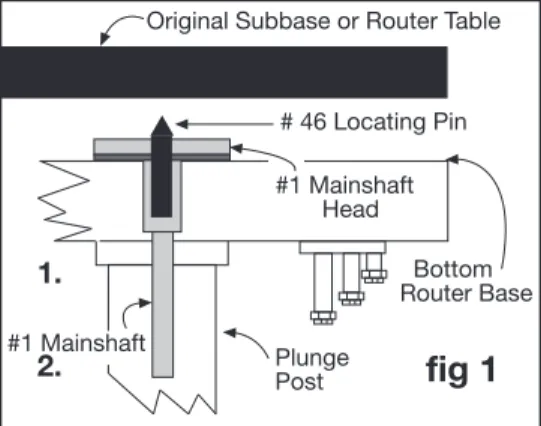
Using the #46 Locating Pin
Use this pin to simplify locating the Router Raizer access hole required through the original subbase or router table.
Using fig 1 support router upside down on bench and place locating pin into bottom of #1 mainshaft head. Secure subbase to router base gently tightening screws. Using a hammer gently tap the subbase over the pin. Remove subbase and drill hole on center punch mark using the Router Raizer template instructions.
Locating Hole in Original Subbase
Locating Hole in Router Table
If your router table is already drilled to mount the router, use above step using table or insert plate in place of original subbase.
If your router table or insert plate have not been drilled use the provided paper template or original subbase to first locate and drill the router mounting holes, then use #46 locating pin to drill Router Raizer access hole.
Plunge Post
fig 1
#1 Mainshaft #1 Mainshaft Head Bottom Router Base # 46 Locating Pin Original Subbase or Router TablePreparing and Drilling Router Table Top
fig 2
fig 3
© 2000-2005 Router Technologies All Rights Reserved
Side view of insert or table top
3/4" Pocket 3/32" Deep 1/2" Hole Through Insert Plate or Table Top #30 Dust Cover Insert Top Side Bottom Side Super Glue
1/2"
DIAMETER HOLEFROM TOP
3/4"
DIAMETER3/32"
DEEPPOCKET FROM BOTTOM
NOTE: For highest accuracy, the locating pins point should just project above the #1 mainshaft head. Shorten the pin to desired length by securing pointed end of locating pin in jaws of cord-less or electric drill. Grind but end of pin off and debur ground end.
Cool pin before removing from chuck jaws!
CUTAWAY ILLUSTRATION OF 3/4" POCKET
SHOWN FROM BOTTOM SIDE
BOTTOM SIDE OF INSERT PLATE
TOP SIDE OF INSERT PLATE
#30 Dust Cover Insert #31 Dust Cover
1.
2.
1.
Use the #46 locating pin to mark the back of the insert plate or table top.
2.
Center 1/8" drill bit on locating pin center mark and drill completely through plate or top.
3. CAUTION 3/4" pocket must be drilled on the bottom side of plate or table top. (fig’s 2 & 3 )
From bottom side, center 3/4" forstner bit on 1/8" pilot hole and drill pocket no deeper than 3/32"
4.
From top side,
center 1/2" drill bit on 1/8" pilot hole and drill through into 3/4" pocket.
5.
From top side, press #30 dust cover insert into 1/2" hole until flush with top surface. If insert is loose in 1/2" hole, place a
drop of super glue from bottom side around edge of the insert ring. ( fig’s 3 & 4 )
1.
Determine if the head of the #1 mainshaft protrudes above the base of your router ( shown Fig 1 above )
A. If the head of the #1 mainshaft does not protrude above the base of your router, use #46 locating pin then drill a 1/2" hole
throught table top or insert plate and install #30 dust cover insert as shown at bottom of page 5
B. If the head of the #1 mainshaft protrudes above the base of your router clearance is required for the head of #1 mainshaft to
rotate freely. Select either method #1 or #2 ( page 4 and 5 ) and follow instructions for selected method.
METHOD #1 Pocket
( requires min 3/8" plate )
This is the preferred method as it allows you to directly bolt the router to the plate eliminating the black rubber spacer or original sub base providing maximum collet height of your router when fully raised.
1/2" diameter hole drilled through the top of your router table
3/4" diameter pocket drilled from bottom of your router table
Page 5
Preparing and Drilling Router Table Top Method #2 (A ) and ( B )
METHOD #2 ( A ) Black Rubber spacer
METHOD #2 ( B ) Routers Original Sub Base
METHOD #2 ( A ) Black Rubber spacer
METHOD #2 ( B ) Routers Original Sub Base
© 2000-2005 Router Technologies All Rights Reserved
Installing #30 Dust Cover Insert and #31 Dust Cover
#31 Dust Cover #30 Dust Cover Insert
1. Using ( fig 7 ) select #30 dust cover insert ( 1/2" dia, X 3/16" tall, turned aluminum ring ) and #31 dust cover
( 3/8" dia. X 1/8 thick stamped steel plug ) From top of insert plate, press #30 cover insert into the1/2" Router Raizer access hole until flush.
Tip: If cover insert fits loosely, secure with drop of Super Glue® or Krazy Glue®.
Top
Install #30 dust cover insert Stop Ring Down
Stop Ring
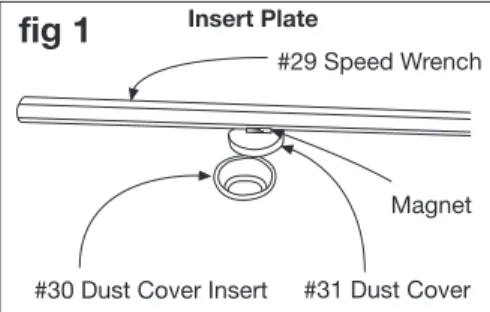
3. Place #31 dust cover into #30 dust cover insert. Using ( fig’s 1 & 2 ) remove #30 dust cover with magnet on
back of #29 speed wrench. With dust cover on speed wrench, insert wrench to make adjustments. To reinstall dust cover, place cover into insert and slide wrench away. Caution: Remove dust cover with speed wrenchbefore removing router from table or cleaning table with vacuum sweeper.
2. Mount router to insert plate and install into table
Mounting holes cut out either round or square
NOTE: All installations require a 1/2" diameter hole drilled through the top of your router table top or insert plate to
accept the #30 dust cover insert shown bottom of page.
Sometable tops and steel insert plates do not allow cutting the pocket from the back side. An 8" X 8" black rubber spacer is provided to cut out and place between the router and the table top or insert plate.
1. Place the rubber spacer onto base of your router with the pre-punched 3/4" hole centered on the #1 mainshaft head.
2. Use a utility knife or raiser blade to cut out the center hole and router mounting holes. Note: Mounting holes can be cut square and
rounding outside of spacer is optional. This method may require slightly longer mounting screws.Pre stamped 3/4" hole placed over #1 mainshaft head
Center hole cut out to match router
8" X 8" black rubber spacer
Preferred method for steel insert plates or installations where the router is secured to the plate using a pre designed clamping system. This method may also be used in place of method #2 ( A )
1. Use #46 locating pin, then drill 3/4" hole through original sub base and secure subbase to router with original screws.
3/4" hole through original sub base, using forstner or spade bit
#1 mainshaft head protruding above base of router
NOTE: DeWalt router shown for illustration purposes only
Mainshaft head can protrude on most installations.
fig 1
#29 Speed Wrench
Magnet Insert Plate
Install #30 dust cover insert Stop Ring Down
#30 dust cover insert
If metod #1 drilling pocket is not possible, a spacer must be placed between the router and table top providing space for
#1 mainshaft rotation.
Using Paper Drilling Template
Troubleshooting
© 2000-2005 Router Technologies All Rights Reserved
Page 6
Refer to pages 4,5,6 before using template
Additional Templates Available on Website
Router Raizer Access Hole 3/4" reference circle for drilling the routers original subbase only. Table mounted, drill 1/2" hole in table top.
.500" reference circle for drilling table top or insert plate.
1/2" = .500
Use this 6" scale to check accuracy when copied
Drill .500" hole through router table insert plate install #30 dust cover insert into .500" hole and press flush with top of insert plate
NOTE: This hole must be drilled 1/2" or .500" for #30 dust cover insert to fit properly.
Router table fence reference line
Router mounting holes
Router Raizer access hole
Router Raizer will not raise or lower the router
Router Raizer will not raise router high enough
Router becomes harder to raise and lower
Problem
Cause
Solution
Router Raizer Speed Wrench turns hard
#19 or #20 Drive nut loose
Pocket in table top or insert plate not counter sunk deep enough #21 lead screw has no lubrication
Router plunge posts dry
Turret stop on router improperly set
Reached maximum plunge depth of router
The drive nut cannot rotate, Retighten the drive nut on router.
Check pocket depth and deepen if necessary. #1 mainshaft head must rotate freely.
Re lubricate using supplied red grease or heavy wheel bearing grease. Clean posts and lubricate with STP® MOTOR OIL TREATMENT Locate rotating turret stop on base of router and adjustable stop directly above. Adjustable stop must be retracted as high as possible. Turret stop must be rotated so shortest post is under adjustable stop. All plunge routers have a predetermined plunge stroke, the Router-Raizer will not increase this stroke. With router fully compressed-check amount of plunge post still visible. 1/16" to 1/4" post should be visible.
If more than 1/16" to 1/4" of post is visible, Call 1-866-266-1293 Addition of a collet extension is required to safely run some bits. Router plunge posts dry
Clean posts and lubricate with STP® MOTOR OIL TREATMENT
2.
Router table fence reference line. Setting this line parallel with the back edge of the router table or insert plate positions the router so theRouter Raizer access hole will be drilled out in front of the fence.
3.
Center cross hairs. Accurately center this point in the hole of the router table or insert plate, using a pencil compass or tape measure. Tape in place and recheck before drilling holes.1.
Place paper template lettering up onto top side of router table or inset plate.4.
Router mounting holes. For highest accuracy place the routers original subbase over the templates router mounting holes and tape subbase down. Use a Vix bit, center punch or drill bit to transfer holes to the router table or insert.5.
Router Raizer access hole. Use page 4 and # 46 locating pin to accurately mark the access hole locationWARNING: IF 3/4" POCKET IS REQUIRED PAGES 4 & 5. DO NOT DRILL 3/4" HOLE COMPLETELY THROUGH THE TABLE TOP OR INSERT PLATE. A 1/2" HOLE IS REQUIRED IN THE TOP TO ACCEPT THE #30 DUST COVER INSERT.
IF ORIGINAL SUBBASE IS USED BETWEEN ROUTER AND TABLE PAGES 4 & 5. USE #46 LOCATING PIN THEN DRILL 3/4" HOLE THROUGH ORIGINAL SUBBASE.
6" Scale. If template is copied or downloaded from web site, use this
scale to accurately check template size.
Router Raizer Use Instructions
Page 7
Using Handheld
Using in a Router Table
Caution:
Always make sure router switch is in the off position, and tool is disconnected from power source when performing maintenanceor making any adjustments to either the router or height adjustments to avoid accidental starting of tool which may result in personal injury.
Dust Cover Insert and Dust Cover
The dust cover insert and dust cover allow easy adjustment access to the Router Raizer mainshaft and restricts dust and debris infiltration during use. A small magnet is recessed into speed wrench handle to remove and hold the dust cover during adjustments.
1. Removing dust cover: Using ( fig 1 ) place #29 speed wrench over #31 dust cover, lift
wrench to remove dust cover. Leave dust cover on wrench while making height adjustments.#31 Dust Cover #30 Dust Cover Insert
fig 1
#29 Speed Wrench Magnet Insert Platefig 3
fig 2
2. Replacing dust cover: Position speed wrench with dust cover over the insert, press cover
into insert and swipe wrench away leaving the dust cover in the insert.3. Always remove #31 dust cover before removing router and insert from table. Or cleaning table with vacuum sweeper
Warning: Never remove the dust cover while the router is running. Allways wait until the bit has stopped spinning.
Direction of Rotation for Adjustment
One complete rotation of the speedwrench, raises or lowers the bit 1/16"
Caution:
Always secure plunge lock during routing operations.1. Height adjustments can be made from either end of the router. To adjust from the base, engage
#29 speed wrench into the head of #1 mainshaft. To adjust from the top, engage #29 speed wrench into the top of #26 top drive. The knurled #26 top drive also allows adjustments by hand.The #24 thumb screw and #22 rapid collar allow positioning the cutter to height. bypassing multiple revolutions of the speed wrench
1. ( fig 2 ) Illustrates compressing the plunge router with rapid collar locked in the router table
position. Insert #29 speed wrench into #26 top drive, or lay router on its side and insert #29 speed wrench into bottom of #1 mainshaft. Rotating the speed wrench will thread #21 lead screw in or out of the drive nut, compressing and un compressing the router.4. Rapid collar positioning: The rapid collar is for hand held use only, for router table use
position collar against retainer clips and top drive ( fig 2 ). Secure with #24 thumb screw or optional #25 black set screw.When used hand-held the hex shaped #1 mainshaft provides a constant engagement of the Router Raizer mechanism, allowing easy height adjustments while retaining original plunge capabilities and all other original functions of the router.
1/2"
2. ( fig 3 ) Illustrates compressing the plunge router with the rapid collar. Thread #21 lead screw into
the drive nut leaving approx 1/2" exposed threads, the router will be un compressed. Secure desired router bit in collet, stand router upright hand plunge to approx desired depth lock plunge lock lever. Release #24 thumb screw and drop rapid collar into contact with #21 lead screw. secure thumb screw and release plunge lock lever. Insert #29 speed wrench into #26 top drive, or lay router on its side and insert #29 speed wrench into bottom of #1 mainshaft and adjust to required depth. Re lock plunge lock before routing. When done release thumb screw and router will quickly return to the un compressed position for easier bit removal.
4. If #24 thumb screw will not provide enough pressure to secure #22 rapid collar, replace thumb
screw with #25 optional black set screw and #28 allen wrench.Caution:
#22 rapid collar is not designed to maintain cutter height during routing operations.
Always secure plunge lock before and during all routing operations.
Adjustments from #26 top drive:
Clockwise rotation Decreases depth of cut. Counterclockwise rotation Increases depth of cut.
Adjustments from #1 Mainshaft Head :
Clockwise rotation Increases depth of cut. Counterclockwise rotation Decreases depth of cut.
Transporting or Storing Router
#24 Thumb Screw
#15 Retainers
To prevent damage to the #1 mainshaft and #21 lead screw, adjust the lead screw
leaving 1/2" threads exposed. Grasp router handles, release plunge lock, advance router up until lead screw rapid collar and retainers are all in contact, engage plunge lock.
#21 Lead Screw Drive Nut #22 Rapid Collar #26 Top Drive #21 Lead Screw Drive Nut #22 Rapid Collar #26 Top Drive #24 Thumb Screw #15 Retainers
Replace drive nut and #21 lead screw. Call 1-866-266-1293
© 2000-2005 Router Technologies All Rights Reserved
Page 11
DeWalt DW 625 & ELU
Tools Required: Two 11/16" wrench’s , phillips screwdriver, hammer, hacksaw,
Router Raizer Parts Required: ( see page 1) #1, #7, #9, #12, #13, #14, ( three #15 ) #16, #17, #18, #20, #21, #22, #23, #24, #26, #27, #28, #29, ( #30, #31, #46, for router table installation ).
fig 3
1. Using ( fig 1 ) engage plunge lock. Remove top nut, rapid nut,
and jam nut. Grasp router handles, release plunge lock, and lift motor housing free from base and plunge springs.Height Rod Jam Nut Rapid Nut Top Nut Sub-base
fig 1
Motor
Housing
Base
2. Using ( fig 2 ) Remove both plunge springs, and top hollow
brass spring guides.Preparing the Base
3.
The height rod is pinned and threaded into the base, Before removal the height rod roll pin must be driven out.Using ( fig’s 1 & 3 ) locate the height rod roll pin. Examine the exit of this hole on the inside of the base. To remove roll pin this hole must be drilled completely through. If not, lengthen hole with a rotary bur or 3/16" drill bit. Select #28 Allen wrench and hammer. Align Allen wrench with roll pin as shown and drive Roll pin out of base. Un-thread height rod from base. Remove subbase. Use thin blade or putty knife to remove glued on ELU subbase. Regluing ELU subbase covered on back of page.
Height Rod Roll pin
Hammer
#28 Allen Wrench
If rollpin hole is not drilled through, remove casting edge shown in black with a drill bit or burr.
fig 5
Preparing Motor Housing
1. Select: #16 housing bushing, #17 housing bushing washer,#18 drive nut washer, #20 long
drive nut. Using ( fig 5 ) #16 bushing and #20 nut, have small shoulders which center # 17 and #18 washers. These washers are not the same. Compare washers to box A and box B before installation. Place #17 housing bushing washer on #16 housing bushing. Place and hold these pieces in the U shaped height rod boss found on the side of the motor ( figs 1 & 5 ) Place #18 drive nut washer on #16 housing bushing, Thread #20 long drive nut onto #16 housing bushing until finger tight. These parts will be tightened securely later.Height Rod
fig 2
4. Select #1 mainshaft, #7 brass washer, #9 red nylon bushing, #13 hollow spring guide
#14 Steel 3/16" washer, one #15 retainer. Cut #1 mainshaft to 8 1/2" overall length, and debur cut end. Using ( fig 4 ) Grease both sides of #7 brass washer with included red grease. Slide #7 down #1 mainshaft. From bottom of base, press #9 red bushing into threaded height rod hole. Slide #1 mainshaft through #9 red bushing, place base upright. Drop ( #14 ) 3/16" washer down #1 mainshaft. Set #15 retainer, teeth up on top of #1 mainshaft. Use #13 hollow spring guide flange up to start and push#15 retainer down mainshaft, until #15 retainer is tight. Return # 13 hollow spring guide to box. Check end play of #1 mainshaft, re-tighten if necessary.Reassembling Router
(
Plunge Springs Must be Installed )
1. Stand base upright, using ( fig 2 & 6 ) replace both plunge springs. Place the original
hollow brass spring guides in the top of both springs Caution: Do not assemble router without plunge springs and brass guides.2. Make sure a brass plug is still in the end of the plunge lock bolt. Look for brass plug
inside the motor housing plunge lock bore. The brass plug should be visible in the end of the plunge lock bolt. If missing place grease on tip of brass plug and install.3. Unlock plunge lock. Grasp router handles and guide springs into motor housing.
Slowly lower the motor housing. Aligning #1 mainshaft through #20 long drive nut. Plunge the router and engage plunge lock. See other side to finish installation#13 Hollow Spring Guide Flange Up Installation tool only
remove & store #15 retainer clip install teeth up
#20 Long Drive Nut
#17 Housing Bushing Washer #16 Housing Bushing #16 Housing Bushing #9 Red Bushing #7 Brass Washer #1 Mainshaft #17 Housing Bushing Washer
A
fig 4
© 2000-2005 Router Technologies All Rights ReservedNOTE: Check Off Each Step When Done
# 15 Retainer #14 Steel
Washer
1. Cut #1 mainshaft to 8, 1/2" overall length and debur cut end. Set aside to install later.
Height Rod Boss #18 Drive Nut
Washer Small Shoulder #20 Long Drive Nut
B
All parts shown are installed into the threaded height rod hole, previously retaining removed height rod ( fig 3 )
Small Shoulder Original Spring Guides Plunge Springs Height Rod Roll pin #18 Drive Nut Washer
Page 12
© 2000-2005 Router Technologies All Rights Reserved
4. With router completely plunged and locked., center long drive nut and housing bushing assembly on #1 mainshaft. Secure
using two 11/16" wrenches.7. With plunge lock disengaged, make sure plunging action operates smoothly, If not, loosen drive nut re-center and retighten.
ELU Plunge Lock Spring For proper Router Raizer operation, the ELU plunge lock spring must be removed
only if your plunge lock automatically locks when released.
1. Release plunge lock allowing #21 lead screw to contact #22 rapid collar. Using 10 MM socket remove nut and lock washer
from end of plunge lock shaft. Pull lever and shaft out of housing. Remove and store spring. Slide shaft back into housing, align with lock cam. Seat lever against housing, replace and tighten washer and nut.fig 6
fig 8
Locate raizer access point on original subbase. Drill a 3/4" hole through subbase
Access hole Drill 3/4"
Caution: Before drilling any Router Raizer Access Hole through either the original subbase or router
table insert plate. Make sure Access Hole is located correctly.
De Walt Dw 625 & ELU
5. Select #12 green bushing ( Two #15 retainers ) #21 lead screw, #22 rapid collar, #23 O-ring, #24 thumb screw, #26 top drive,
#27 yellow set screw, #28 allen wrench, red grease. Using ( fig 6 ) place grease on threads of #21 lead screw, Place lead screw down #1 mainshaft and thread into #20 long drive nut leaving one inch of lead screw threads exposed . (refer to page 1a) Alignment of #1mainshaft and #21 screw hex is required ( fig 7 ). Tip: # 29 speed wrench can be used to speed threading.#26 Top Drive #27 Yellow Set Screw
#24 Thumb Screw #23 O-Ring #15 Two Retainers
#7 Brass Washer
1. DeWalt DW 625
2. ELU If used hand held, making a new subbase from thicker material is recommended. If used in router table use #46
locating pin to locate the Router Raizer access hole. For detailed instructions see page 4,5,6. Cut black rubber spacer as shown ( fig 8 ). Place spacer between router and insert plate.You may also counter bore a 3/4" dia. X 3/32" deep pocket under #30 dust cover insert, for the Router Raizer head see pages 4 & 5.3. See pages 4,5,6 for further instruction, #30 dust cover insert and #31 dust cover, are table insert only. Drill a
1/2" hole through insert plate at the Router Raizer access point and press #30 in from top until flush. # 31 sets in #30 and is removed during adjustments with magnet on back edge of # 29 speed handle. These components keep dust from entering the Router Raizer hex drive.4. Periodic inspection and re-greasing of
#21 lead screw is recommended.
Sub-base Plate or Router Table Insert Plate Installation
#22 Rapid Collar #21 Lead Screw
#20 Long Drive Nut
#1 Mainshaft
6. Press #23 O-ring onto #24 thumb screw shaft. Thread thumb screw into #22 rapid collar. Place rapid collar onto #1 mainshaft
1/2" from top of mainshaft to top of rapid collar and tighten. Release plunge lock and slowly raise the router until lead screw contacts the rapid collar. If the collar moves, reset to 1/2". Place one #15 retainer teeth up on top of #1 mainshaft, using #12 green bushing as installation tool, push retainer into contact with collar, repeat with second #15 retainer and pushflush with first retainer. Return #12 green bushing to box. Place #26 top drive onto #1 mainshaft until it contacts retainer clip, Thread #27 yellow set screw into #26 top drive using #28 allen wrench and tighten.fig 7
Top veiw of #21 lead screw and #1 main-shaft through center.
Use #46 locating pin to locate the Router Raizer access hole on the original subbase or router table.
For detailed instructions see page 4. Drill original subbase hole to 3/4" ( fig 8 ). Use the three optional router plate mounting holes for router table applications.#17 Housing Bushing Washer #16 Housing Bushing
#18 Drive Nut Washer
#15 One Retainer #14 Steel 3/16" Washer #9 Red Bushing #15 retainer clip install teeth up
fig 7
Top veiw of #21 lead screw and #1 main-shaft through center.
© 2000-2005 Router Technologies All Rights Reserved
Page 13
Router Raizer Access Hole
Note: Cross lines for locating and drilling holes are accurate. The illustration of subbase may vary
slightly in size and design, but is accurate enough for cutting the rubber spacer if required.
Refer to pages 4,5,6 before using template
Router Raizer Access Hole
3/4" reference circle for drilling the routers original subbase only. Table mounted, drill 1/2" hole in table top.
.500" reference circle for drilling table top or insert plate.
1/2" = .500
Additional Templates Available on Website
Use this 6" scale to check accuracy when copied
Sub-base mounting holes
Router table fence reference line
Drill .500" hole through router table insert plate
install #30 dust cover insert into .500" hole and press flush with top of insert plate
NOTE: This router requires a 3/4" pocket or a 3/4" hole through the
original subbase for router table installation. Pages 4 & 5
NOTE: This hole must be drilled 1/2" or .500"
for #30 dust cover insert to fit properly.
DeWalt 625 Elu
DeWalt 625 Elu