University of Eastern Finland
Faculty of Science and Forestry, School of Computing Department of Computer Science and Statistics
International Master's Degree Programme in Information Technology
Evgenia Litvinova
XIDE - a Visual Tool for End User Development
of Web Applications
Master’s Thesis Joensuu, Finland, 2010
Supervisors: Professor Petri Vuorimaa Professor Jussi Parkkinen Instructor: Mikko Pohja
!"#$%&'$(
Because of increasing popularity of Internet and Web 2.0, computer users become more familiar with the concepts and possibilities of the Web, such as markup languages and mashups. They become more and more involved in creating of Web application for solving their personal tasks. Modern end users often have wider development skills and experience then pure end users in traditional understanding; general level of users knowledge has increased and they perform some development activities. For the development, end users can choose either a tool created for professionals or special end user Web development tool, which allow to create simple applications using visual interface, but force users to use complex technologies if they want to achieve more complex task.
The aim of the Thesis is to create a tool that has a gentle slope of complexity. Using such a tool, each end user can choose the level of complexity that suits desired task and skills of concrete person. It also facilitates leaning, since the effort user needs to spend is in proportion to the complexity of task that needs to be solved.
The idea described in this Thesis is to combine component-based approach with XFormsDB Web application development framework. XFormsDB framework allows to create an interactive Web application using fully declarative approach and thus reduces the difficulties related to learning complicated technologies and concepts and combining them together. The requirements for the tool functionality are constructed based on analysis of end users challenges, tasks and experience related to Web development. A review of related scientific research and existing commercial tools are made to analyze common approaches used in end user Web development tools. During tool design process, successful approaches and user interface decisions are combined in order to employ gentle level of complexity and facilitate end users in Web development. The working tool prototype called XIDE is implemented and evaluated by means of usability testing, creating sample applications and expert evaluation.
Keywords
)
end user, end user development, end user programming, Web application, end user Web development, gentle slope of complexity, reuse, component-based approach, XFormsDB!'*+,-./012/+$#(
I would like to thank the following people:
- Professor Jussi Parkkinen for giving me a chance to participate in IMPIT program and do my studies in Finland, for being my supervisor and thus making this research possible
- Roman Bednarik for being the coordinator of IMPIT program and for opening my eyes to the world of usability
- Professor Petri Vuorimaa for offering me the opportunity to do this Thesis work in Aalto University, and for all his guidance, ideas and comments he gave me while being my supervisor
- Members of Web Services research group, and especially Pia Ojanen, for their feedback about the text and the whole theme of facilitating writing. Without them this Thesis would have never reached the level it has now
- Mikko Pohja for his comments and suggestions
- Markku Laine for all his advises and practical help and for being an example for me - My family and friends for their background support and continues questions regarding
the date when I finish the Thesis
- My husband Andrey Litvinov for his support and all-round help. I would never finish this Thesis without you!
This research was done in Aalto University as a part of TIVIT’s Flexible Services program and its Ecosystem Design and Evolution (EDEN) project, funded by National Technology Agency of Finland (Tekes) and Nokia Research Center (NRC).
Espoo, December 2010 Evgenia Litvinova
3&"./(,4(5,+$/+$#(
Abstract...ii!
Acknowledgments ... iii!
Table of Contents...iv!
Abbreviations and terms...vii!
List of figures...ix!
List of tables ...x!
1.! Introduction ...1!
1.1.! Introduction to a problem ...1!
1.2.! Research Objectives and Scope...4!
1.3.! Research questions ...5!
1.4.! Research methods ...6!
1.5.! Organization of the Thesis...7!
2.! End Users...8!
2.1.! End user developers...8!
2.2.! End user Web developers ...10!
2.3.! Development of interactive Web application ...11!
2.4.! End user development and end user software engineering...13!
2.5.! Challenges and expectations of end user Web developers ...15!
2.6.! Gentle slope of complexity...18!
3.! Related work...22!
3.1.! Review of related research ...22!
3.1.1.! Languages...22!
3.1.3.! Reuse practices and sharing...24!
3.1.4.! Visual approaches...29!
3.1.5.! Interaction styles...31!
3.2.! Review of existing tools ...34!
3.2.1.! Web based HTML editors ...34!
3.2.2.! Form builders...35!
3.2.3.! Web mashup editors ...35!
3.2.4.! Content management systems and modern blog management systems ...37!
3.3.! Conclusions ...38!
4.! XForms and XFormsDB...41!
4.1.! XForms ...41!
4.2.! XFormsDB...42!
4.2.1.! XFormsDB application...42!
4.3.! Challenges of development using XFormsDB framework...43!
5.! Requirements ...45!
5.1.! Personas ...45!
5.2.! XIDE workflow ...46!
5.3.! End users barriers ...47!
5.4.! Requirements ...49!
5.4.1.! Functional requirements ...50!
5.4.2.! Technical requirements...53!
6.! Design and Implementation...55!
6.1.! Development environment ...55!
6.2.! Component-based architecture ...58!
6.3.! User interface design decisions ...61!
6.5.! Resulting XIDE UI ...64!
6.6.! XIDE architecture...71!
6.6.1.! Uses view...73!
6.6.2.! Client-server view...76!
6.6.3.! Deployment view...78!
7.! Evaluation and discussion ...80!
7.1.! Sample Web application...80!
7.1.1.! Discussion...85! 7.2.! Usability testing...87! 7.2.1.! Discussion...88! 7.3.! Expert evaluation...89! 7.3.1.! Discussion...92! 8.! Conclusions ...93! 8.1.! Main contributions...94! 8.2.! Future research ...95! Bibliography ...97! Appendix A: Description of usability testing participants ... Appendix A (1)! Appendix B: Usability testing procedure ...Appendix B (1)! Appendix C: Usability testing observations ...Appendix C (1)!
(
!""%/67&$7,+#(&+0($/%2#(
AJAX Asynchronous JavaScript and XML
CSS Cascading Style Sheets
EU End User
EUD End User Development
HTML HyperText Markup Language
HTTP Hypertext Transfer Protocol
IDE Integrated Development Environment
IEEE Institute of Electrical and Electronics Engineers
IT Information Technology
Java An object-oriented programming language
JavaScript A scripting language
MVC Model-View-Controller architecture
TL Template Language
POST An HTTP request method, used by the client to send data to the server
RPC Remote Procedure Call
UI User Interface
URL Uniform Resource Locator
W3C World Wide Web Consortium
Web World Wide Web
WWW World Wide Web
WYSIWYG What You See Is What You Get user interface paradigm
XML Extensible Markup Language
XForms An XML application representing the next generation of forms for the Web
XFormsDB An XForms-based framework for simplifying Web application development
XIDE XFormsDB IDE
XPath XML Path Language
87#$(,4(4719%/#(
Figure 1 The spector of software-related activities ...10!
Figure 2 The spectrum of activities related to Web development...11!
Figure 3 Actual and desired slopes of complexity for end user ...19!
Figure 4 Slope of complexity for visual Web application development tool...20!
Figure 5 XFormsDB Web page components...43!
Figure 6 XIDE reusable components...58!
Figure 7: Customizable components in XIDE...59!
Figure 8 Concept of the Web Page...60!
Figure 9 XIDE initial design: Application view...63!
Figure 10 XIDE initial UI design: Page view...64!
Figure 11 XIDE final UI: Welcome Page view...65!
Figure 12 XIDE final UI: Application List view...66!
Figure 13 XIDE final UI: Application view...68!
Figure 14 XIDE final UI: Page view ...70!
Figure 15 Uses view of the client-side of XIDE ...73!
Figure 16 Uses view of the server-side of XIDE...75!
Figure 17 Client-server view of XIDE ...77!
Figure 18 Deployment view of XIDE ...78!
Figure 19 XIDE: Create new application wizard ...81!
Figure 20 XIDE: Adding new component to the page ...82!
Figure 21 XIDE: Preview of the page and hierarchy of the page...84!
Figure 22 XIDE: a sample application ...85!
87#$(,4($&"./#(
Table 1 End user barriers...47!
Table 2 Application management functional requirements...50!
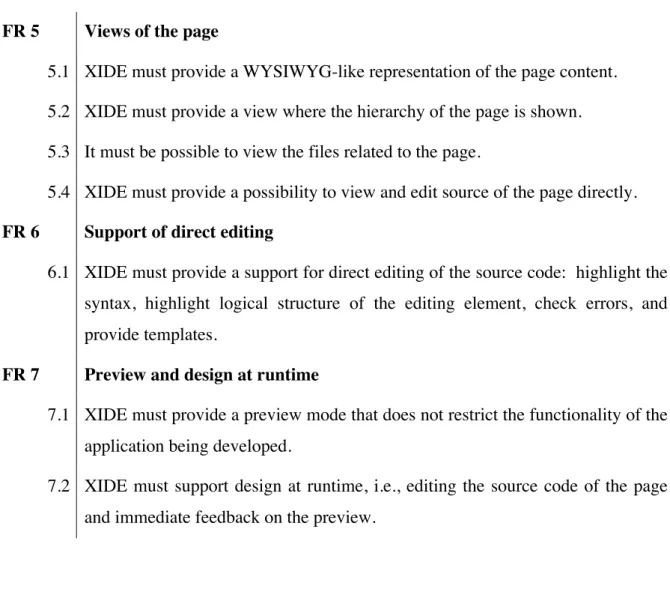
Table 3 Page management functional requirements...51!
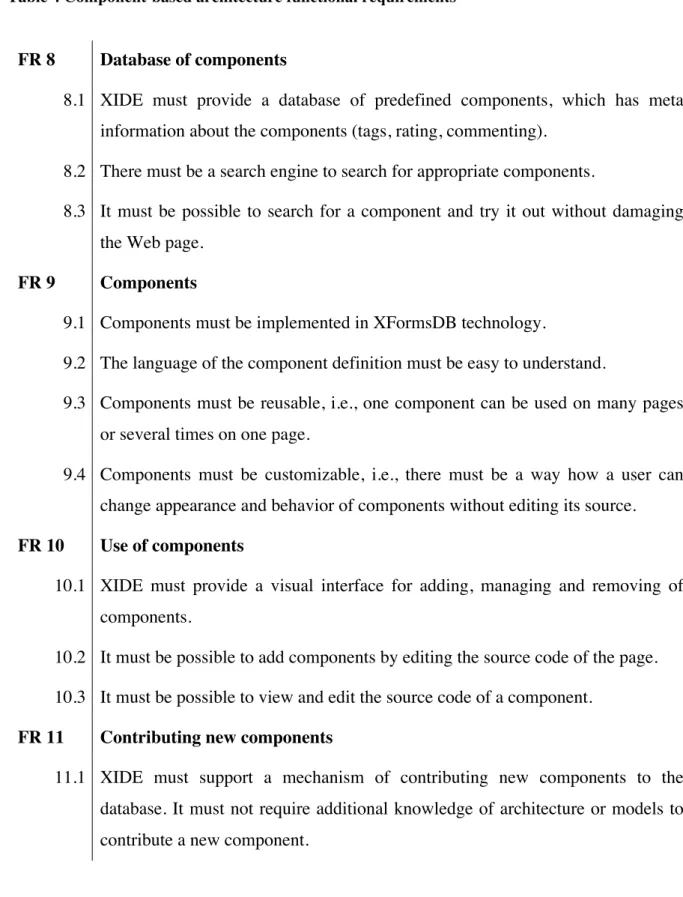
Table 4 Component-based architecture functional requirements ...52!
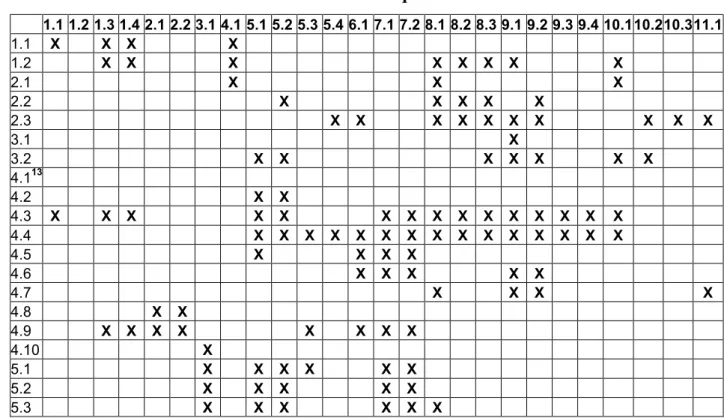
Table 5 Relation of end user barriers and XIDE functional requirements ...53!
Table 6 Technical requirements ...53!
Table 7 Application List view features...66!
Table 8 Application view features...67!
Table 9 Page view features...68!
Table 10 Relation of XIDE functional requirements and XIDE features...71!
Table 11 Uses view of the client-side of XIDE: modules description ...73!
Table 12 Uses view of the server-side of XIDE: modules description ...75!
Table 13 Client-server view of XIDE: elements description ...77!
:;
<+$%,09'$7,+(
:;:;
<+$%,09'$7,+($,(&(=%,"./2(
Nowadays, computers and Internet increasingly spread into lives of ordinary people. Specialists from different areas of research and industry, students, office staff and other non-professionals use computers to solve their daily problems and tasks. In addition to simply using a ready-made software and browsing the Internet, people have started to participate in development activities even without knowing that they are actually doing the development, e.g., writing macros, contributing to wikis using markup languages for text formatting, writing rich posts with media elements in their personal blogs. (Costabile, Mussio, Parasiliti Provenza, & Piccinno, 2008) General computer knowledge and some development skills are required at many working positions that are not linked to professional programming. (Ko, Myers, & Aung, 2004) According to predictions described in (Scaffidi, Shaw, & Myers, 2005), in 2012 in US there will be only 3 million professional programmers and more than 55 million people who do some development activities, including using spreadsheets and databases.
The majority of non-professional development activities are related to Internet and Web technologies. For instance, people create personal pages in WYSIWYG (What You See Is What You Get) editors, write search expressions, mash up services and data, create Web surveys in special tools, etc. Web development became so popular because Web provides a good ground for communication, collecting the information and sharing it with others. (Rosson, Ballin, & Rode, 2005) This motivates people to learn how to contribute to the Web by means of some software development technologies. Moreover, the general level of computer knowledge has increased, so people consider feasible some tasks and usage of technologies and tools they were previously confused about. (Cypher, Lau, Nichols, & Dontcheva, 2009)
The tendencies described above motivated non-professional computer users to shift from pure end users, people who only use the ready-made software, to end users or end user developers, people who do some programming activities to achieve their own goals. End user developers may occasionally have high degree of knowledge in some related field, but they are
apparently interested not in programming itself, but in creating software artifacts that help them in their daily life activities. (Costabile, Mussio, Parasiliti Provenza, & Piccinno, 2008) Even though end users cannot be considered as completely inexperienced users anymore, tools and technologies created for professional developers are often not suitable for them. Powerful professional tools are aimed at producing complex results with versatile functionality and thus have high threshold of necessary knowledge to start the development. (Myers, Hudson, & Pausch, 2000) (Costabile, Mussio, Parasiliti Provenza, & Piccinno, 2008) Often end user developers have relatively small tasks to solve and thus learning how to use and using a complex professional tool or technology requires too much effort.
Also, there is a huge gap between using markup language for inserting picture in a blog post and manually coding a full Web page using HTML. In last fifteen years, Web applications have evolved from static text to dynamic and highly interactive applications. (Jazayeri, 2007) However, several years ago end users mostly were able to create static pages only. (Rode, Rosson, & Quinones, 2006) Development of interactive applications is more complicated, because it involves using of several technologies and combining them together. As the result, today complex interactive Web applications are still mostly created by professional developers.
End user Web development research area, which is increasingly active in recent years (Cypher, Lau, Nichols, & Dontcheva, 2009), aims to allow end users to create interactive Web applications themselves. Two general approaches are used to overcome difficulties of Web programming: by making programming languages more transparent and understandable for end users or by providing tools that allow users to achieve the result without actual programming. (Kelleher & Pausch, 2005), (Cypher, Lau, Nichols, & Dontcheva, 2009)
One group of tools has a narrow focus on a special type of resulting applications, e.g., online survey, blog or mashup. The tool can provide workflow that guides end user through wizards, visual modifications, and keeps user on high abstraction level in order to eliminate programming details. (Grammel & Storey, 2008) Generally, the tool allows user to create working software artifact without any coding. However, if the demanded application functionality is beyond the predefined scope of the tool, it becomes hardly possible for the end user to complete the application development. The tool can support manual modification of the underlying source code, but that immediately requires from the end user advanced knowledge of specific concepts and complex technologies. (Zang, Rosson, & Nasser, 2008)
The problem of those tools is that they force user to overcome high barrier of complexity when direct edition of the application is required. Common trend in the end user development is providing tools with gentle slope of complexity (Lieberman, Paterno, Klann, & Wulf, 2006), so that the effort user needs to spend is in proportion to the complexity of task that needs to be solved. When using such tool, small increase in task complexity results in small effort to learn new functionality. This approach supports a range of tasks and skills of the user (MacLean, Carter, Lovstrand, & Moran, 1990) and assists in growing of their knowledge and needs. (Rode, Rosson, & Quinones, 2006)
The tools with wider scope often employ component-based approach in order to provide gentler slope of complexity as well as employ reuse strategy. (Rode, Bhardwaj, Perez-Quinones, Rosson, & Howarth, 2005) End users can add, customize and combine predefined components. Thus, they can create an application with higher functionality that they can attain by doing development from scratch. (Hartmann, Doorley, & Klemmer, 2008) However, if there is no appropriate component, an existing one needs to be modified or adjusted to the user’s task. Users have to lower the abstraction level they use and face the source code of the component, which requires from them knowledge of system architecture and the background technology of the component.
Besides visual tools that eliminate programming difficulties, another option can be engaging users in actual programming by lowering programming barriers and providing more appropriate technologies. (Kelleher & Pausch, 2005) Two most important difficulties of programming for Web for end users are unknown concepts and different technologies that have to be combined together. There are two directions in simplifying of programming: simplification of the language itself or reduce the amount of languages to integrate and the effort on combining them.
Since end users are becoming familiar with markup languages by contributing to wikis and personal blogs (Myers & Ko, 2009), HTML can be considered a good option for basic technology for the end user Web development. HTML belongs to the family of declarative languages that have higher level of abstraction and thus are claimed to be more convenient for non-professional users. (Honkala, 2006) However, single HTML only supports creation of static pages. In order to achieve interactive Web application, it should be combined with other scripting and server-side technologies. (Ramirez & Wroblewski, 2005) (Jazayeri, 2007)
In this Thesis, it is proposed to use XFormsDB (Laine, 2010) declarative framework developed at Aalto University. It is an extension of XForms, W3C standardized technology for creating interactive Web forms. With XFormsDB it is possible to create a Web application by writing only client-side code using declarative languages, which reduces the number and complexity of technologies to learn and combine. XFormsDB is claimed to be convenient for authoring highly interactive Web applications by non-professionals.
This Thesis addresses the problem of creating visual tool called XIDE for developing interactive Web applications by the end users. The tool aims to achieve a gentle level of complexity by extending visual component-based approach, described in (Ko, et al., 2009) (Won, Stiemerling, & Wulf, 2006), (Rode, Bhardwaj, Perez-Quinones, Rosson, & Howarth, 2005) and combining it with XFormsDB framework (Laine, 2010) as a background technology for components. The tool provides a wide range of levels of modification complexity in order to allow users to select the level that is appropriate to their tasks and level of knowledge.
:;>;
?/#/&%'@(A"B/'$76/#(&+0(C',=/((
The first objective of this Thesis is to design a way how to combine component-based approach and XFormsDB framework in order to create a visual tool that supports gentle level of complexity and facilitates end users in creating interactive Web applications. The tool should combine existing solutions from end user research and commercial sector in order to support end user developers with wide range of skills in creation of Web applications with different level of complexity. The second objective is to implement a working Web-based prototype tool called XIDE that employs the design and examine the tool by means of usability studies, expert evaluation and implementing test applications.
Because of limited resources of the project, some restrictions are imposed on the scope of this Thesis. No empirical study or survey is conducted to gain information about problems, barriers and expectations of end users, however this information is received from previous scientific publications and analyzed in the background part. Analysis of tasks of end users and designing a sufficient set of relevant components are also out of scope of this Thesis and considered as future work. Finally, evaluation of the developed prototype tool is limited to check the feasibility of approach and make a decision about continuation of the work.
:;D;
?/#/&%'@(E9/#$7,+#(
Since end user development is an active research and practical area, there are many tools and solutions that aim to help end users in development of Web applications. Visual component-based approach, which is actively used, supports manipulations on high abstraction level and allows users to create an application without actual coding. However, the user is required to overcome a difficulty of learning complex technology and the whole architecture of the system in order to be able to change a component or contribute a new one.
XFormsDB technology is promising in a context of simplifying Web application development; it was designed considering needs of non-programmer users. (Laine, 2010) It supports interactive Web application creating using only declarative languages and thus lowers the starting threshold and smoothes the learning curve.
The initial idea of this Thesis is to combine those two approaches to create a tool that facilitates end user development of Web applications and supports gentle slope of complexity.
Question 1: How to combine component-based approach with XFormsDB framework in order to design a tool that supports gentle slope of complexity?
Even though general approach is already defined in the scope of this Thesis, there are still many details to investigate. In (Won, Stiemerling, & Wulf, 2006) authors raise a question whether component-based approach should be combined with other interaction techniques in order to achieve gentle slope of complexity and how to design such a tool. The following questions form to the main research question:
What user interface approaches should be utilized to facilitate the development of Web applications? How to design component model? How to design the architecture of component reuse?
In order to answer to the main research question, the prototype tool called XIDE is designed, implemented and evaluated. Two additional research questions are investigated to support the main research question.
Question 2: What features should the tool provide to facilitate end users development?
This question contains the following questions:
What tasks and level of skills do end users have? What are technical problems end users faces during Web development? What are the expectations of end users about the tool that they use
for development of Web applications? What functionality should it provide? How do end users evaluate existing tools? What design solutions do they find useful?
Answers to those questions are gained from review of publications, which report results of user surveys and user experience in using of existing tools. The requirements for the tool are based on the answers to this research question.
Question 3: What are common user interface approaches used in end user development tools?
Review of existing approaches and solutions provides a background understanding of successful and failed approaches and common problems of those solutions, which is essential for creating a new solution. (Myers, Hudson, & Pausch, 2000) The following questions are raised in scope of this question:
What are the existing solutions for the problem of end user development for Web in research and commercial sector? What are advantages and drawbacks of those solutions? Do those solutions support gentle slope of complexity? What features from those solutions should be utilized in XIDE?
The answers to those questions are based on review of scientific publications about state of the art in end user development research area and review of existing commercial tools for end user Web development. Conceptual and user interface design of the tool are based on the answers to this research question.
:;F;
?/#/&%'@(2/$@,0#(
The main research method used in this Thesis is constructive research, also known as design science. (Järvinen, 2004) The constructive research method is natively used in the computer science domain to produce practical solution for relevant problems and theoretical contribution to the research domain, which owns the problem. According to Järvinen, this research method is used when a new innovative solution needs to be invented or built.
This research method is used to achieve the answer to the main research question, described in Section 1.3. The practical solution is the prototype tool for solving the problem of end user development of Web applications and support of gentle slope of complexity. As it is defined by constructive research, the work begins with deep study of the problem and the research domain. (Crnkovic, 2010) This research is described in Chapters 2 - 4. After that, the solution
is invented, designed and implemented (Chapters 5 and 6). Implementation of the solution is the practical contribution of this research. In Chapter 7, the developed prototype tool is evaluated and validated by means of experience, evaluation and example (Shaw, 2003): observing user experience using usability tests, expert evaluation and example use case. Theoretical contributions are analyzed in conclusions in Chapter 8.
:;G;
A%1&+7H&$7,+(,4($@/(3@/#7#(
This Thesis is organized as follows. First part of the work consists of literature review. The next Chapter introduces the concepts of end user and end user development and discusses what are the skills, needs and problems of modern end users. Chapter 3 presents review of state of the art in end user development of Web applications research area and explores related solutions. The second part of Chapter 3 presents an overview of existing commercial tools for end user development and discusses end user experience of those tools. Finally, in the conclusion of the Chapter 3 there is a summary of the analysis of different commercial tools. Chapter 4 briefly describes the XFormsDB technology and explains why it is appropriate selection for the work described in this Thesis. It also briefly discusses what challenges user face during development of XFormsDB-based applications from scratch. Together Chapters 2 - 4 form the background for the further work. Chapter 5 summarize the analysis of end user problems and presents the both functional and technical requirements for XIDE based on those problems.
Second part of the work describes design, implementation and evaluation of the tool. Design of component-based architecture and user interface is described in Chapter 6. It also presents implementation details. Chapter 7 starts with evaluation of XIDE using usability testing with real users that was performed to examine the approach in general and improve the design. It also discusses the evaluation of the XIDE tool by a mean of expert evaluation and by presenting the process of creating sample Web application. Finally, Chapter 8 presents conclusions, contributions of this Thesis and future work.
>;
I+0(J#/%#(
Background of the work described in this Thesis is related to several complementary domains of research and practice: Web engineering, end-user development, mashups, component-based development and XFormsDB framework. This Chapter introduces theoretical background about development of Web applications by end users. It gives definition of end users, discusses their tasks and level of knowledge, analyses problems and challenges they face during Web development and their expectations of using a Web development tool. Finally, this Chapter introduces the concept of gentle slope of complexity and explains why it is a promising approach to be used in end user development.
>;:;
I+0(9#/%(0/6/.,=/%#(
According to (Myers & Ko, 2009), end user development is called a promising area of research and practice. Concepts of end users, end user programming and end user Web engineering refined in (Ko, et al., 2009). According to that, end user is a simple computer user, who initially was supposed only to operate with software artifacts, not to contribute new functionality. However, nowadays popularity of programming increased and is almost the same as of simple usage of a computer. Most of users perform some customization or programming, however some of them are not aware of the fact that they are actually programming. (Costabile, Mussio, Parasiliti Provenza, & Piccinno, 2008) According to (Ko, et al., 2009), programming is a process of writing a set of specifications that can be executed or interpreted by computer. End user programming is a process of programming to achieve the result, which will be used mostly personally. Professional programming, in contrast, aims to develop artifacts to be used by other people. End users, same as professionals, meet the quality issues during development of software artifacts.
There is another modification of end user definition that can be found in papers, e.g. (Costabile, Mussio, Parasiliti Provenza, & Piccinno, 2008), (Myers, Ko, & Burnett, 2006), and that is going to be used in this Thesis. End user is a person who does programming not for work purpose, but to accomplish some personal goal. Because end users are not professionals, they are not interested in the technology and programming process as such. They are focused on achievement of concrete tasks, which appeared from their personal life,
and do programming only if they believe that can help them in their everyday activities. (Floyd, Jones, Rathi, & Twidale, 2007)
According to (Ko, et al., 2009), it is important to not confuse end user with inexperienced users, who does not have any knowledge of certain field or technology, or novice users, who have just started to learn how to use new technology or tool. However, novice or learning users are respectively close to the end users, because of self-learning nature of end users. (Myers, Ko, & Burnett, 2006)
End users cannot be considered as a uniform group of people; they have different goals, tasks and activities. (Costabile, Fogli, Fresta, Mussio, & Piccinno, 2004) People have different background and have different interaction habits of using a computer. As stated in (Ye & Fischer, 2007), traditionally end users and developers are considered as two mutually exclusive groups: user has a problem to solve, developer constructs software artifact to solve it. However, nowadays users are more and more involved into actual developing in order to solve their problem by themselves. In (Costabile, Mussio, Parasiliti Provenza, & Piccinno, 2008) this idea was refined in details (Figure 1). They classify users according to variety of programming activities they perform: pure end users, who do not do any programming; end users who perform customization activities to adopt the existing object to their preferences, such as changing colors and other parameters or managing toolbars; end users who write macros in order to automate some operation; end users who develop Web applications, who might have narrow skills of certain technology or in usage of certain tool, but have poor knowledge in computer science; developers who use domain-specific languages are professionals in some domain and are able to develop software artifacts to solve the problem of the domain; data-intensive researchers can be considered as almost professional programmers, however they do not have any software engineering background; finally,
professional programmers close the classification. The category to which a user is assigned at the moment depends on the task and user’s skills. For example, a user can choose lower category if it is enough to complete the task or upper category if user acquired new skills and can now accomplish more advanced tasks.
Figure 1 The specter of software-related activities, adapted from (Costabile, Mussio, Parasiliti Provenza, & Piccinno, 2008)
End users who are close to pure end users category often are not aware that they are really do some programming, however they do have certain skills and experience and thus are
unwitting developers. Going from pure end users to professional programmers, end users become more and more skilled and knowing what they are doing. (Costabile, Mussio, Parasiliti Provenza, & Piccinno, 2008)
>;>;
I+0(9#/%(K/"(0/6/.,=/%#(
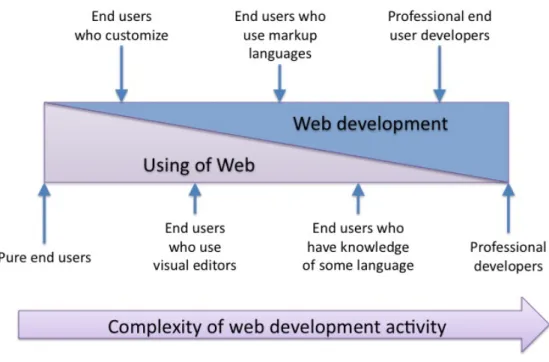
Summarizing publications about variety of end user Web development activities and tasks (Rosson, Ballin, & Rode, 2005) (Zang, Rosson, & Nasser, 2008) (Rosson, Ballin, & Nash, 2004), the idea of user classification can be employed to Web development domain individually (Figure 2). The following classes of end users can be identified: pure end users, who do only Web browsing; end users who customize their personal homepage or blog by
setting parameter values; end users who use visual editors to create custom information gathering application, such as survey (Rode & Rosson, 2003), static HTML page or a mashup without any actual programming (Zang, Rosson, & Nasser, 2008); end users who use markup languages, e.g., to contribute to wiki or write advanced post to their blog (Myers & Ko, 2009); end users who are familiar with some programming language and use it to achieve advanced task or modify existing functionality in the tool that provides visual environment and enables direct modification of the source code; professional end users or informal Web developers who are not professional programmers (Rode, Rosson, & Quinones, 2006), but
client-server Web application for personal usage; professionals who does Web development for work. The complexity of activities, which are performed by each group of users, increases from left to right.
Figure 2 The spectrum of activities related to Web development
Going over from left to right, user groups can be considered as evolution steps for the user who passes from pure end user to professional. In case if one technology is used through the whole evolution process, the upgrade on the next level is easier for the user because the knowledge gained on the previous one. Since many users can be referred as users who use markup languages, declarative languages, such as HTML and XML, are good option to consider as basic technology.
In end user development for the Web, the gap between professional end users and previous group is really difficult to overcome because of the nature of Web. Interactive Web applications usually consist of client and server parts, which require knowledge of different languages and paradigms and combining them together.
>;D;
L/6/.,=2/+$(,4(7+$/%&'$76/(K/"(&==.7'&$7,+(
(Myers, Hudson, & Pausch, 2000) claim that Web has become so popular because everybody can contribute own applications to it. In scope of this Thesis, Web application term means an application, which is accessed using Web browser program through the Internet. Web application utilizes client-server paradigm. Web browser acts as a client, which connects to
remote computer, where Web application is deployed (a server). Initially Web application term meant dynamic Web site, in contrast to static Web site. However, nowadays Web site and Web application terms are often used as synonyms.
In contrast to desktop applications, there are two main advantages of Web applications. First is the fact that a Web application can be accessed from any computer, which has a browser installed and working Internet connection. Generally, Web applications are cross platform, what means that one Web application can be accessed from different operating systems. Second advantage is that Web application can be updated only on the server, so all clients can access new version of the application or see new information instantly. Because of these advantages, Web applications are widely used for information sharing by everybody, including non-professional users.
Initially Web applications were static text pages for scientific purposes, written in HTML language. HTML is a markup language, which provides means for creating static structured Web page with paragraphs, headers and links. (HTML 4.01 Specification, 1999) It is also possible to include user interface controls, such as input fields and buttons to develop a Web form. Client-side interactivity can be achieved by having several pages showed to user in a sequence.
Most of current Web applications are highly interactive and provide functionality comparable to a desktop application. (Jazayeri, 2007) Notion of interactive Web application means the Web application, that does not consist only of static pages, but contains forms, animations, provides immediate feedback, interacts with user without reloading the Web page. Interactive applications are mostly created by professionals using professional languages, because of the complexity of Web development described below.
There are many different technologies appeared to support creation of interactive Web applications. (Fraternali, 1999) (Ramirez & Wroblewski, 2005)(Jazayeri, 2007) These technologies can be classified into client and server technologies. Client technology (e.g., CSS, JavaScript, XForms, Flash, Java Applets) assumes that the browser processes the application interactivity. Using server technology (e.g., PHP, ASP, JSP, etc.) the application is executed on the server and provides results to the client browser. On practice, client and server technologies are usually combined in order to create interactive user interface and implement application logic on a server. One traditional approach is to have HTML and
Thus, in order to create interactive Web application developer has to combine several client and server technologies. This makes development process complicated and requires more knowledge from the developer. However, using fewer technologies or even one programming language could ease the development and client-server communication. (Kuuskeri & Mikkonen, 2009)
Another approach to reduce complexity of Web development is simplifying the technologies or languages being used. Generally, languages can be separated into imperative, declarative and mixed. Imperative languages describe how the program should perform the task, while declarative languages specify what task the program should perform.
Although imperative languages are more powerful, declarative languages traditionally have higher level of abstraction and thus are claimed to be more useful in case of non-professional users. (Honkala, 2006) Available server technologies are mainly imperative, however there are several declarative client technologies that support development of highly interactive applications. (Laine, 2010) As it was discussed in previous Chapter, this Thesis proposes to use XFormsDB framework, which allows to create a Web application by writing only client-side code using declarative languages. XFormsDB is claimed to be useful for authoring highly interactive multi-user Web applications by non-professionals. More information about the framework can be found in Chapter 4.
>;F;
I+0(9#/%(0/6/.,=2/+$(&+0(/+0(9#/%(#,4$-&%/(/+17+//%7+1(
Two research domains were established to satisfy two initial polar groups, pure end users and professional developers. Software engineering research focuses on professional developers and covers process of development of software artifacts that will be later used by end users as a solution for their problem. End user development research focuses on techniques and tools that can help end users to solve their problem by themselves. (Ye & Fischer, 2007) End user programming domain focuses on needs and problems of the users who do actual programming, while end user development field is more wide and covers all activities that end user perform to solve their problem using a computer. (Repenning & Ioannidou, 2006) Traditionally, solutions developed by those research domains are either aimed at the pure end users or professional developers. For example, analysis of past user interface tools showed the gap between easy to learn tools and tools with wide set of possible tasks to achieve. (Myers, Hudson, & Pausch, 2000), According to the analysis, the threshold of the system is howdifficult is to learn how to use it and the ceiling is how much you can do with the system. Most of successful systems either have low threshold and low ceiling or high threshold and high ceiling. Problem to create the system with low threshold and high ceiling still remains unresolved.
End user software engineering is defined as systematic and disciplined activities that are aimed to construct a high quality software artifact. However, because the main focus of the end user is to achieve the goal, activities related to design, debugging, testing, verification and maintenance are secondary to the main goal of development the working program. (Ko, et al., 2009) Moreover, end users often do not have strong background in computer science. As a result, end user software engineering has opportunistic, ad hoc nature. (Hartmann, Doorley, & Klemmer, 2008)(Cao, Riche, Wiedenbeck, Burnett, & Grigoreanu, 2010)
While the problem of how to allow end users to create software artifact attracts much attention, there are other issues related to different stages of software life cycle, such as design, testing, debugging. (Ko, et al., 2009)
According to the review of end user software engineering activities made in (Ko, et al., 2009), requirements and design are rarely independent activities. End users often perform evolutionary prototyping as a design, which finally leads them to the ready artifact(Cao, Riche, Wiedenbeck, Burnett, & Grigoreanu, 2010). End users prefer opportunistic design approach and do development without a plan how exactly they are going to achieve their goal. Mashup development is a typical example of the approach end users utilize for the design. (Hartmann, Doorley, & Klemmer, 2008)
Testing is evaluation of the how correct does the program work based on the program outputs. End users rarely perform systematic testing because that require some additional time to spend when the resulting application is ready, however they generally would like the Web applications to work correctly.
A few en user developers perform organized testing activities for their Web applications, however they report that they have some personal quality standards of the result and they do some checks. (Rosson, Ballin, & Nash, 2004) Testing activities are complicated for the end users. (Cao, Riche, Wiedenbeck, Burnett, & Grigoreanu, 2010)
Support of testing activities should be integrated with the process of creating the program. An approach called WYSIWYT (What You See is What You Test) is successfully used in
suits end users who do not have any background knowledge in performing testing activities. (Rothermel, Cook, Burnett, Schonfeld, Green, & Rothermel, 2000) Using this approach, the code being tested is visible for the user and it is possible to incrementally check whether the part of the code works correctly. In spreadsheets user can see the immediate feedback from each cell and thus examine the correctness of the cell formula right away.
For end users debugging, the process of understanding how does the program behave, is also a challengeable task because of several reasons. End users have to understand the behavior of the program, which is written on the abstract level. Users do not see the link between the source code and the running application and thus it is difficult to them to find the place from where the error comes from. (Myers, Pane, & Ko, 2004)
In (Klann, Paterno, & Wulf, 2006) authors report that is very important to support the detecting and correcting accidental errors, which may be difficult to locate later and provide simulation environment, undo mechanism and history of changes.
>;G;
5@&../+1/#(&+0(/M=/'$&$7,+#(,4(/+0(9#/%(K/"(0/6/.,=/%#(
This Section presents first part of the review of end users needs and problems. It investigates barriers and expectations of end users based on end user studies. User experience of using of existing tools developed in research and commercial sectors, which is a second part of the review, is presented in the Chapter 3.There is a large body of research about needs and problems of professional Web developers as well as pure end users. However, there is no much analysis of middle category, end users who build Web applications and contribute different content. (Rosson, Ballin, & Rode, 2005) The complexity and scope of Web applications may vary from static page to complex interactive enterprise application. However, end users are hardly going to implement distributed authoring system or online marketplace themselves. In most cases user tasks are simpler, e.g., personal Web page.
The results of the survey of informal Web developers, people who do some Web programming but do not have appropriate educational background (Rode, Rosson, & Quinones, 2006), showed that 30% of end user needs could be achieved with the application that provides basic data management functionality: collection, storage and retrieval. Another 40% of requirements can be fulfilled with set of general applications, such as resource
calendar. According to another study (Rosson, Ballin, & Rode, 2005), end users create Web applications to support tasks achieved from their work, hobby, interest or community issues, school and family related occasions.
Ginige and Murugesan defined six categories of Web applications. (Ginige & Murugesan, 2002) Their work was refined and extended in (Ginige, De Silva, & Ginige, 2005), where authors specify the following categories: information; search, directory and dictionary lookup; e-commerce sites; entertainment, interaction and messaging; collaborative sites; Web development tools. In (Ginige, De Silva, & Ginige, 2005), the categories are analyzed against difficulties reported by informal Web developers.
In (Rosson, Ballin, & Nash, 2004) authors describe individual end user developers that represent the target group of end users with wide range of background tasks and skills. Later in their work they analyze how those end users develop Web applications and what problems do they face during the development. All interviewees used end user development tool to create their applications. They report that they faced the difficulty of converting the formats into each other, interacting and changing between different tools. End users also encounter problems while attempting to reuse poor code written by other people and integrate it into their application.
The study of typical high-level components, concepts and features of interactive Web application is described in (Rode & Rosson, 2003) based on the investigation of existing Web applications. Later, in (Rode, Rosson, & Perez-Quinones, 2004) those components are presented to end users, who have some knowledge of HTML and have used WYSIWUG editors, but have minimal or no background in programming. Authors analyze how end users think about the components and whether they utilize them in their applications. That reveals another barrier of end user Web development: how end users think about different issues typically addressed by programmers when developing Web application. It appeared that end users mental models are on a higher level of abstraction and they often do not have accurate understanding of technical implementation of typical functions, such as session management, authentication and authorization, database schemas, search process, etc.
The study about end users who use mashups is described in (Zang, Rosson, & Nasser, 2008). There are tools that aim to eliminate the difficulties of programming of Web mashups. However, users report that they face problems when they want to achieve more complex task
using the tool. Finally, less experienced users cannot create a mashup. They also complain about lack of the documentation and examples.
Users reported they would like to have ready-made templates, wizards, layout assistance, direct manipulation and drag-n-drop. In (Rode, Rosson, & Quinones, 2006), authors claim that the tool that supports implementation of typical functionality of Web application on high level of abstraction can facilitate end users in the process of Web development. However, end users highlighted the importance of having full control of the low-level details.
According to survey described in (Rosson, Ballin, & Rode, 2005), end users tend to implement the same features in the applications they build as professional programmers, but they have less success. As for their expectations from the tools that support their work, end users asked for easy-to-use tool with support of WYSIWYG interface development, which can be easily integrated with other tools. End users report they prefer to use visual user interfaces instead of code-oriented. In (Rode, Rosson, & Quinones, 2006) authors report that most of end users asked for “Word for Web applications”, a tool that would support WYSIWYG paradigm, drag-n-drop, wizards, examples and templates, but yet allow developers to control the source code.
There are sophisticated end users, who have the same level of knowledge of the certain technology as professionals. Those end users are forced to work with the tools designed for professionals, however they face the gap between mental models and approaches end users and professionals tend to use, that was mentioned above. (Costabile, Mussio, Parasiliti Provenza, & Piccinno, 2008)
There is also a possibility that end users become more skilled while they are using the tool or the technology. Users report some of their skills are self-taught. (Zang, Rosson, & Nasser, 2008) They use instructions, tutorials, and community-related sources, such as discussion forums, sharing and reusing of tips and examples. (Rosson, Ballin, & Rode, 2005) End users say they often use code of other people as an example to learn. (Rosson, Ballin, & Nash, 2004)
Wide spread of the Internet and computers motivate end users to learn new technologies. Users report they prefer a tool that is flexible enough to support growing of their knowledge and needs. (Rode, Rosson, & Quinones, 2006)
From this point of view it becomes important to consider learning barriers, described in (Ko, Myers, & Aung, 2004), while designing the tool.
>;N;
O/+$./(#.,=/(,4(',2=./M7$P(
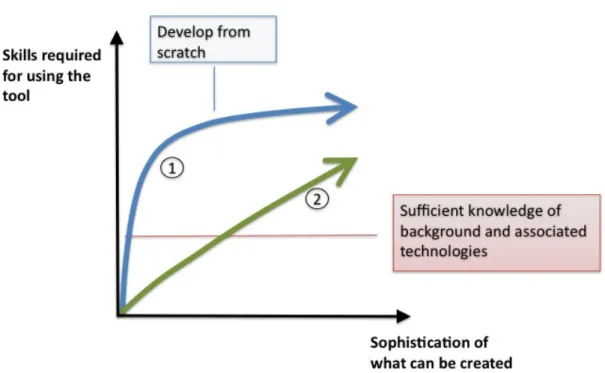
Even though there are end users, who are competent in the technology being used, lack of technological knowledge is native problem for end user development. Since research in Web engineering initially was more focused on professional programmers, the tools and technologies were designed for people with high knowledge of the area. (Rode & Rosson, 2003) Consider the situation, when unskilled end user attempts to develop a Web application from scratch. The user has to achieve sufficient level of knowledge of the whole set of underlying technologies, before the development can be started. Curve marked with ! at Figure 3 shows the steep incline that end user has to conquer, even if the functionality of the developing program is relatively simple. Moreover, user can make considerable effort to learn the technology, but still do not get any improvement in what he can achieve with the language. (MacLean, Carter, Lovstrand, & Moran, 1990) People, who only start programming, need to see that they really can do some progress and get valuable result. (Kelleher & Pausch, 2005)
End users often cannot overcome steep barrier of learning complicated technology that is used by professionals. If user meets insurmountable barrier, most probably it will stop the user from using the tool. (Ko, Myers, & Aung, 2004) Therefore, a tool for end users should keep the proportion between challenges caused by a development and knowledge required from a user and avoid high learning barriers. (Repenning & Ioannidou, 2006)
One solution to this problem can be a tool or technology with gentle slope of complexity, which is marked with 2 at Figure 3. This conceptemerged twenty years ago as a solution for problem of creating a system that can be successfully tailored by non-professional users with different level of skills. (MacLean, Carter, Lovstrand, & Moran, 1990) The idea behind the concept is to reduce the slope of the incline. So, the progress, which user makes, becomes more consistent with the effort spent. Users can increase the level of complexity from the one they are already familiar with to yet another one, which is more challengeable. Because of the gentle slope of the complexity curve, the upgrade requires relatively small increment in skill.
Figure 3 Actual and desired slopes of complexity for end user who develops a Web application from scratch
Support of the gentle curve is critical for the end user development. (Ko, et al., 2009) Nowadays, the approach is increasingly popular in end user development domain. Special tools aim to achieve gentle slope of complexity rise for different activities performed by end users. (Morch, Stevens, Won, Klann, Dittrich, & Wulf, 2004) (Rode, Bhardwaj, Perez-Quinones, Rosson, & Howarth, 2005) (Lieberman, Paterno, Klann, & Wulf, 2006)
In (Lieberman, Paterno, Klann, & Wulf, 2006), authors identify two levels of activities in end user development. First class contains activities that allow users to customize existing tools to their personal needs by selecting one of the available options. User can tailor the system by manual customization or use adaptive system that manages customization automatically depending on user’s activities in the system. By definition, end user tailoring happens after initial design of the system made by professional programmers. (Won, Stiemerling, & Wulf, 2006)On this level users often get a predefined set of parameters they can change.
Second level contains activities of more advanced users that are creation and/or modification of the software artifact. Users can create programs from scratch or modify existing ones. End user development research domain offers several techniques that are often used to help end
users to perform the activities, such as programming by example, visual languages, direct manipulation, design at runtime, that will be reviewed in detail in the Chapter 3.
The tool can support both types of activities and provide gentle rise of complexity level when moving from lower to higher stage. (Lieberman, Paterno, Klann, & Wulf, 2006) To achieve such flexibility the tool should provide a range of modification activities with different complexity levels, which are more powerful then simple parameterization but less complicated then programming.
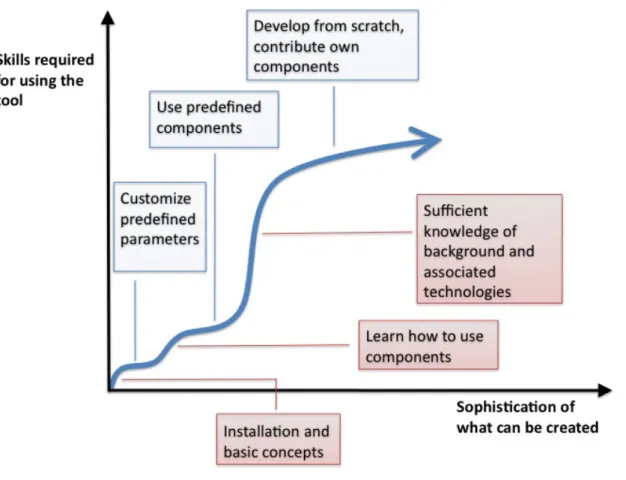
Figure 4 Slope of complexity for visual Web application development tool that allows customization and using of components
As an example, authors suggest to have a component-based system with 3 levels: on the first level user can set parameters; on the second level user is allowed to build the resulting application by combining existing components; on the last level user can program from scratch and contribute new components to the system. Possible complexity rise for this approach is displayed on the Figure 4.
In comparison to Figure 3 it has more gentle slope of complexity. Initial single cliff is now divided into several smaller cliffs. On the other hand, a user still has to overcome considerable barrier when learning how to contribute new components. In (Won, Stiemerling, & Wulf, 2006) authors propose that having additional intermediate levels of modification, such as possibility to view and modify source code of component, can help to achieve more gentle slope of complexity.
Each terrace on the depicted slope represents a group of people with some level of knowledge, habits in tool usage and tasks they achieve. If terraces are separated with steep inclines, it is relatively difficult for a person not only to upgrade to the next level but also to communicate with people from higher group. (MacLean, Carter, Lovstrand, & Moran, 1990)
D;
?/.&$/0(-,%*((
This Chapter contains the review of existing solutions to the problems of end user development. It describes different approaches both from research domain and commercial sector and discusses their advantages and disadvantages. It also presents available Web development tools and describes user experience of using those.
D;:;
?/67/-(,4(%/.&$/0(%/#/&%'@(
The main goal of end user development is to allow end users to create software artifacts. Generally, the problem of programming is in translation thoughts of the users into programming language or any other form, which is interpreted by computer. According to extensive review of different tools and languages that attempt to make programming more accessible (Kelleher & Pausch, 2005), the main goal is to eliminate complicated mechanics of programming. Systems and languages that empower people to program aim to give end users the possibility to build as much as possible.
Two different approaches are used to overcome mechanical difficulties. First approach focuses on making programming languages more transparent and understandable for end users. Even though users are supported by programming environment, this approach assumes that the users write the code themselves. Second approach is to provide a tool, where end users can achieve the result without actual coding, e.g., by using visual programming, direct manipulation, and programming by example.
D;:;:;
8&+19&1/#(
A lot of users are engaged in programming by providing more simple and understandable languages. (Scaffidi, Shaw, & Myers, 2005) In order to make the transition from ideas to programming language more smooth and less challengeable for end users, there are studies that aimed to construct more natural programming language. (Myers, Pane, & Ko, 2004) Using those languages, end users do not have to utilize complex mental models of professional languages, but rather express their ideas in the same way as they think about them. Using of natural languages has positive effect on debugging activities. There are studies
about mental models of end users and how do they think about programming. (Rode, Rosson, & Perez-Quinones, 2004) (Myers, Pane, & Ko, 2004)
There are studies about creating the programming language that is similar to the English language. Users are allowed to write textual specifications; the development environment interprets and executes those specifications.
Another close branch is providing domain specific or task-specific languages, which terms and paradigms are familiar for concrete target user group or concrete task and thus are more understandable for end users. (Lieberman, Paterno, Klann, & Wulf, 2006) In 1993 Nardi described the advantages and disadvantages of utilizing task-specific language approach and those disadvantages are still relevant now. (Nardi, 1993) First, users have to learn new language to start the programming and they have to switch to a new system when they have a task from another domain. Second, each task domain should have its own tool.
Nardi claims that interaction techniques along cannot provide end users with an ability to create applications by themselves; he argues that interaction techniques should be combined with task-specific languages. (Nardi, 1993) This approach is employed in different tools and researches.
Repenning and Ioannidou define the notion of meta-domain oriented language, which does not use so specific terms as as a domain-specific language, but still less general than programming language. (Repenning & Ioannidou, 2006) According to authors, spreadsheets, which are used by people from different domains for different tasks, are an example of meta-domain oriented language.
Another example is a Curl language, described in (Hostetter, Kranz, Seed, Terman, & Ward, 1997). It addresses the problem of combining different technologies in order to create an interactive Web application. The language syntax supports smooth move from writing simple formatted text, based on HTML tags, to powerful object-oriented programming by combining those. Users can select the complexity level that is appropriate to their tasks and knowledge, and that makes the language accessible to authors with different skill level, ranging from novices to professional programmers.
D;:;>;
Q%,1%&227+1(/+67%,+2/+$#(
On the border between visual tools and simplified languages there is a group of programming environments for end users, which are widely reviewed in (Kelleher & Pausch, 2005) A
special programming environment addressed to end users can facilitate the development and hide programming difficulties. (Pane & Myers, 1996)
Programming environments aim to help users in learning of the programming language and eliminate programming difficulties. (Myers, Ko, & Burnett, 2006) A major task for programming environment is to reduce the number of syntax errors. (Repenning & Ioannidou, 2006) For example, a syntax-directed tool called Alice forces users to program using syntax templates and allows them only to fill the gaps with necessary information. (Myers, Pane, & Ko, 2004) This helps to avoid errors and introduce the language to the user. Other typical features that are provided are context error correction suggestions, templates, integrated help, etc. (Kelleher & Pausch, 2005) Inherited from professional development environments, highlighting of reserved words and symbols helps to notice syntax errors. (Repenning & Ioannidou, 2006) This technique can be expanded to highlight the structure of the program using different color schemes.
D;:;D;
?/9#/(=%&'$7'/#(&+0(#@&%7+1(
As it was discussed in Section 2.5, end users often utilize reuse practices when performing development activities. In (Ko, et al., 2009) authors define two types of reuse: composition,
that is combining and gluing predefined components (Hartmann, Doorley, & Klemmer, 2008), and modification, that is using and modifying existing code in order to adapt it to the new context.
Reuse is a known and popular practice in professional programming. It reduces the time spent on the development and number of errors by using the code that is already developed and tested. Composition increases maintainability and improves the readability of the program because becomes more structured. Reuse practices bring the same advantages to end user development. However, searching, actual reusing and sharing the code in end user development are more focused on rapid achievement of the resulting application. (Ko, et al., 2009)
On the other hand, in end user development, reuse often makes the goal of creating the application feasible, because users are not able to implement the desired functionality manually. (Ko, et al., 2009) End users effort is shifted from actual programming to searching for appropriate reuse abstractions and using them in their program. (Hartmann, Doorley, & Klemmer, 2008)
Facilitating activities of searching, reusing and sharing abstractions is the main goal of the environment that supports reuse in end user development. First activity is to find the code or component to reuse. (Gaedke & Rehse, 2000) From end user point of view, this process starts with general understanding that there can be a code for reuse that can help to implement the program. After that end user has to imagine what functionality is needed, look for appropriate candidate, decide whether this candidate suits the task and finally use it in the program. An effective search engine provides a possibility to search using different options, including rating and tags (Grammel & Storey, 2008); each reusable element has extensive description; it is relatively easy to try the component or code and see how it works to make the decision. There are search tools that advise or filter reusable abstractions based on monitoring users activity or analyzing users code. (Ko, et al., 2009) The compatibility of the component can be also analyzed by the system in order to prevent user from errors. (Won, Stiemerling, & Wulf, 2006)
When the component or code example is found, it should be reused in the program. According to (Ko, Myers, & Aung, 2004), the problem may occur if the procedure of using the component or code is not obvious for the users and there is lack of documentation about the procedure. Another challenge for a user, which appears when a component is built into the program, is to understand the link between the reusable abstraction and the final output. (Ko, et al., 2009)
The last aspect of reuse is sharing of the reusable code. Cooperation is becoming highly important issue of end user development. With increasing popularity of social communication, a successful tool should provide possibility to share and reuse solutions and discuss problems (Klann, Paterno, & Wulf, 2006) End users often reuse their own solutions. (Rode, Rosson, & Quinones, 2006) A lot of environments allow end user to contribute reusable abstractions. (Hartmann, Wu, Collins, & Klemmer, 2007)(Grammel & Storey, 2008) In order to support end user sharing activities, the procedure of creating the abstraction should be relatively simple. However, the difficulty and the cost of maintaining the database of reusable artifacts increase if end users are allowed to contribute content there. The environment should provide advanced search, filter and Web 2.0 features such as commenting and rating. (Ko, et al., 2009)
!"#$"%&%'()*+&,-*$$."*/0-The idea of composite reuse for end user Web development has evolved from component-based development. Component-oriented method, inherited from software engineering, is utilized in professional Web development as a Component-Based Web Engineering. (Gaedke & Graef, 2001) For example, WebComposition Process Model and WebComposition Markup Language (WCML) aim to bridge the gap between coarse-grain design concepts and fine-grained implementation details and also help to handle variety of technologies used for Web development. (Gaedke, Segor, & Gellersen, 2000)(Gaedke & Rehse, 2000) The approach allows defining components and creating Web applications as a composition of these components. Component is a module that encapsulates some functionality; it is independent and substitutable. The functionality that is represented by component may vary from atomic interface block to complex navigation feature; it can be composed from other previously created components. The WCML language, which is an extension of XML, allows to define abstract design concepts and low level implementation details of the component and also allows to store meta information used for search purpose. Authors also investigate how to facilitate compositional reuse by providing a repository for shared components and improving searching activities. The proposed repository provides meta-information about the components, representations of the component and support different classification methods in order to facilitate developer to find the component that suits the problem.
Another application of compositional reuse is creation of composite Web services. In (Yang & Papazoglou, 2006) authors propose to employ reuse by combining existing services to create a new valuable service. They investigate different types of composition logic, describe the XML-based language that is used to define Web component and to specify how those components are combined and executed, and finally propose a framework that supports entire life cycle of the service composition. Same approach is employed in end user mashup editors that are focused on mashing up data. (Grammel & Storey, 2008) (Yu, Benatallah, Casati, & Daniel, 2008)
Composite reuse is widely applied in end user development. It allows end users, who apply the component in their program on a high level, not to look into technical details. (Won, Stiemerling, & Wulf, 2006) (Ko, et al., 2009)