VICTORIA
~
UNIVERSITY
DEPARTMENT
OF
COMPUTER AND MATHEMATICAL
SCIENCES
Image Processing
in Smalltalk
Fei Liu
(20 COMP 2)
June, 1992
TECHNICAL REPORT
VICTORIA UNIVERSITY OF TECHNOLOGY
BALLARAT ROAD (P 0 BOX 64) FOOTSCRA Y
VICTORIA, AUSTRALIA 3011
TELEPHONE (03) 688-4249/4492
FACSIMILE (03) 687-7632
Campuses at
...
"' n % z 0,..
Footscray Campus
IMAGE PROCESSrNG IN SMALL TALK
By
FEI LIU
Department of Computer and Mathematical Sciences
CONTENTS
Part
0
Introduction
1Part
1
Image Processing in Smaltalk
21. Smalltalk V286 2
2. The fundamental operation of binary image
algebra 2
3. Translation of general BIA formulas into
Smalltalk methods 6
4
.
Examples: Filters 135. Examples: Shape recognition 15
Part
2
Image Processing Environments
161. The Small-image data-base 16
2. The Image-processing Environment 17
Part
3
Conclusion and further work
19Part
4
Acknowledgments
19Part
5
References
19IMAGE PROCESSING IN SMALLTALK
By
FEI LIU
[Abstract] This article describes the implementation of a
binary-image algebra in Smalltalk V286 . Further, to facilitate use of the
algebra, an image-processing environment has been created, together
with a small-image data-base.
Part 0.
Introduction
1llis report describes the author's first step towards developing within Smalltalk N286 an environment suitable for image-processing. The requirements at the outset
were:-l.The environment would include an expandable suite of readily invokable image-processing operations.
2. There would be a ready means of storing and accessing the images.
3.The environment would be ~raphic. We wished to work at the level of actual images rather than numerical arrays representing their bitmaps.
In mainstream image-processing the basic operation is convolution of an image with a point-spread function (or its equivalent in the frequency domain). However, Smalltalk's basic operation for working with binary bitmaps is the bit-block transfer (BitBlt) which appeared to the author as lending itself more readily to implementation of the operations
of mathematical morphology.
In mathematical morphology we use a structuring-element to study an image by applying various binary operations to the image and the structuring-element. The first
systematic treatment of mathematical morphology was the two-volume work by J. Serra
[Serra 82]. However, a visit to Serra's work could well be prefaced by the reading of two relevant chapters of a recent book by R.M. Haralick and L. Shapiro [Haralick 92].
In the course of developing his Digital Optical Cellular Image Processor (DOCIP), K-S
Huang [Huang 89] devised a Binary-Image Algebra (BIA) which allowed him to express
The main part of the work reported here implements Huang's BIA in Smalltalk/V286. In
order to advance the work more rapidly the author developed an small image data-base and a windowing system for accessing and processing the images retrieved from the data-base.
Part 1. Image processing in smalltalk
1. Smalltalk V286
SmallTalk V286 is a pure object-oriented programming language. Its advantages over other languages have been succinctly highlighted by Wilf R. LaLonde and John R. Pugh in their book Inside
Smalltalk:-Programming in Smalltalk V286 is different from programming in traditional languages such as Pascal, Fortran , or Basic. A major difference is that the language is object-oriented rather than procedure-oriented and is based on concepts such as objects and messages rather than records (structures) and
junctions. Although these concepts are new to many programmers, they are often overshadowed by a more visible difference. Smalltalk V286 is much more than a programming language -- it is a complete program development environment. It integrates in a consistent manner such features as an editor, a debugger, print utilities, a window system , and a source code manager. Such features are traditionally associated with an operating system rather than a programming language. Smalltalk eliminates the sharp boundary between application and operating system by modelling everything as an object.
2. The fundamental operations of binary-image algebra (BIA)
Huang's binary-image algebra (BIA) expresses general operations on binary-images in
tenns of three fundamental
operations:-a). Complement of an image . b).
Union
of two images .c ).
Dilation
of an original image with a reference image.Our first step below will be to implement Huang's fundamental operations as methods in a class Image which we shall create as a subclass of the class Form. We shall then translate Huang's formulas for more general operations into Smalltalk methods. We shall retain Huang's numbering of formulas.
Huang's expression for the complement of an image X is given in his Fonnula 3.2
:-X = {(z,v)
I
(z,v)e
WA (z,v) f. X}We may implement the operation in Smaltalk by means of the following instance
method:-complement
"Answer the complement of an image. F. L. 30 April 1992 "
"self reverse
We may test the method in the following way:-X:= lmageDataBase idbFromDisk:'image.dbs'.
Z:= X at:'complement'.
Z display At: 0@50.
Z complement
Z display At: 50@50
II
El
Fig. 1.1 Original Fig. 1.2 Result
Union
Huang's expression for the union of an image X by an image R is given in his Fonnula 3.3
:-Xu R
=
f(z, v)I
(z, v) e Xv (z, v) e R}We may implement the operation in Smaltalk by means of the following instance
method:-union: imageR
"Answer an image containing the image of the union of imageR and the receiver imageX.
F. L. 30
April 1992"self copy: (O@O extent:(imageR extent)) from:imageR to:O@O rule:7 .
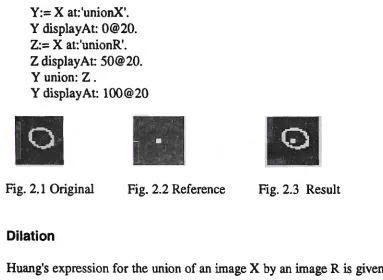
Y:= X at:'unionX'. Y displayAt: 0@20. Z:= X at:'unionR'. Z display At: 50@20. Yunion: Z.
Y displayAt: 100@20
•
II
Fig. 2.1 Original Fig. 2.2 Reference Fig. 2.3 Result
Dilation
Huang's expression for the union of an image X by an image R is given in his Formula 3.4
XEDR=
{
~(•1
+ .,,,, +
p,)e
w
I
(•i.11)e
X,(z,,p,)e
R)otherwi1e
The methods getPointsFrom and centre are pre-defined in the class Image (see the
Appendix). We may implement the operation in Smaltalk by means of the following instance
method.:-dilationBy:imageR
"Dilation an image (imageX) by a reference image (imageR) F. L. 30 April 1992"
I ab cl
b:= (Image width: (self width) height: (self height)) black. c:= (Image width: (self width) height: (self height)) black. a:= OrderedCollection new.
a:= imageR getPointsFrom:imageR 1 to: a size do:[:il
b copy: (0@0 extent:(self extent)) from:self to:((a at:i)- (imageR centre)) rule:3. c union:b
1 .
self copy: (O@O extent:(self extent)) from:c to:O@O rule:3
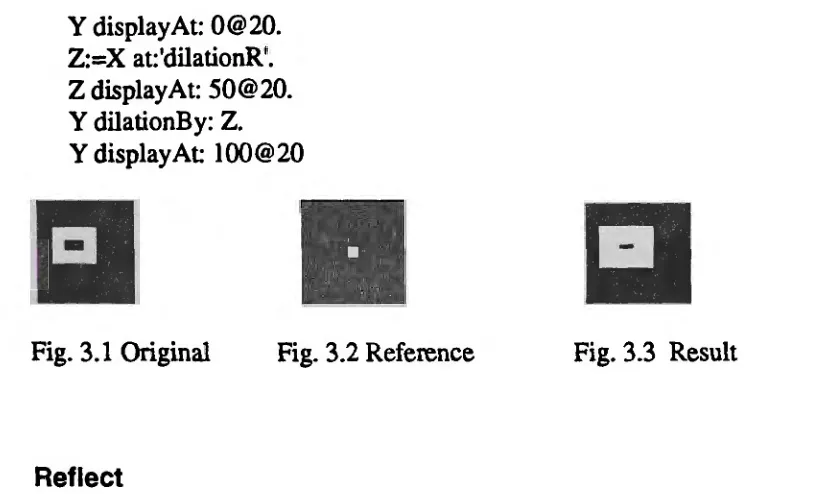
Y display At: 0@20. Z:=X at:'dilationR'. Z display At: 50@20.
Y dilationBy: Z.
Y displayAt: 100@20
Fig. 3.1 Original Fig. 3.2 Reference
Reflect
Fig. 3.3 Result
Huang's expression for the reflection, through the origin, of an image X is given in his
Formula 3.5:
-il.
= {(-z, -r)I
(z, r) e R}.We may implement the operation in Smaltalk by means of the following instance
method.:-reflect
"Answer an image which containing the Reflected Reference Image. F. L. 30 April
1992"
I ab I
a:= OrderedCollection new. b:= OrderedCollection new. a:= self getPointsFrom: self.
1 to: a size do: [:ii b add:(self centre- (a at:i)+self centre ). self at:(a at:i) put:O].
1 to: b size do:[:il self at:(b at:i) put: 1] .
We may test the method in the following way:-X:= lmageData.Base idbFromDisk: 'image.dbs '. Z:=X at:'reflect'.
Z display At: 50@20. Zreflect
•
Fig. 4.1 Original
Fig. 4.2 Result
3. Translation of general BIA formulas into Smalltalk methods
Difference
Huang's expression for the difference of an image X by an image R is given in
hisFonnula
4.1
:-X/ R
=
{(z, r) e XI
(z, r) ~ R}=
X n R=
Xu RWe may implement the operation in Smaltalk by means of the following instance
method.:-ditTerence:imageR
"Answer an image that containing the difference between original image (imageX) and
reference image (imageR)
F. L. 30 April
1992 "((self complement) union: imageR) complement
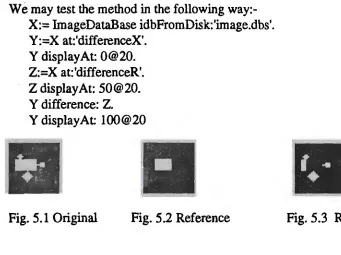
We may test the method in the following
way:-X:= ImageDataBase idbFromDisk:'image.dbs'.
Y :=X at:'differenceX'.
Y displayAt: 0@20.
Z:=X at:'differenceR'.
Z display At:
50@20.Y difference: Z.
Y displayAt:
100@20Intersection
Huang's expression for the intersection of an image X by an image R is given in his Formula 4.2
:-X
nR
= {(z, r)I
(z, r) EX
A (z, r) E R} =XuR
We may implement the operation in Smaltalk by means of the following instance
method:-intersection:imageR
"Answer an image that contains the intersection of original image (imageX) and reference image (imageR) F. L. 30 April 1992"
((self complement) union:(imageR complement)) complement
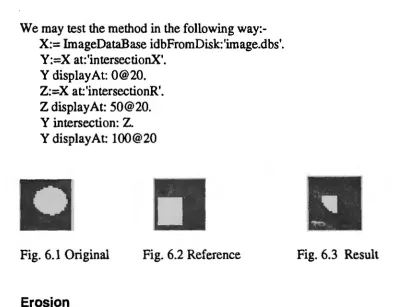
We may test the method in the following way:-X:= lmageDataBase idbFromDisk:'image.dbs'.
Y:=X at:'intersectionX'. Y displayAt: 0@20. Z:=X at'intersectionR'. Z display At: 50@20. Y intersection: Z. Y displayAt: 100@20
Fig. 6.1 Original Fig. 6.2 Reference
Erosion
a
Fig. 6.3 Result
Huang's expression for the erosion of an image X by an image R is given in his Formula 4.3
W,e may implement the operation in Smaltalk by means of the following instance
method.:-erosionBy:imageR
''Answer an image that containing the erosion of original image (imageX) by reference image (imageR) F. L. 30 April 1992"
((self complement) dilationBy:(imageR reflect)) complement
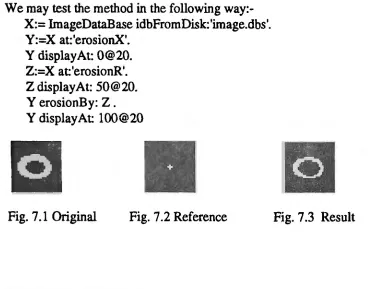
We may test the method in the following way:-X:= ImageDataBase idbFromDisk:'image.dbs'.
Y:=X at:'erosionX'. Y displayAt: 0@20. Z:=X at'erosionR'. Z display At: 50@20. Y erosionB y: Z . Y displayAt: 100@20
Fig. 7 .1 Original Fig. 7 .2 Reference
Symmetric Difference
Fig. 7 .3 Result
Huang's expression for the symmetric difference of an image X by an image R is given in
his Formula 4.4
:-X 6 R= (X/R)u(R/X) =XU RU RUX
We may implement the operation in Smaltalk by means of the following instance
method.:-symmetricDiiT:imageR
"Answer an image that containing the symmetric difference between original image (imageX) and reference image (imageR) F. L. 30 April 1992"
I ab I
b:= (hnage width: (self width) height: (self height)) black. b copy: (O@O extent:(self extent)) from:self to:O@O rule:3. imageR difference:b.
a union:imageR.
self copy: (0@0 extent:( self extent)) from:a to:O@O rule:3
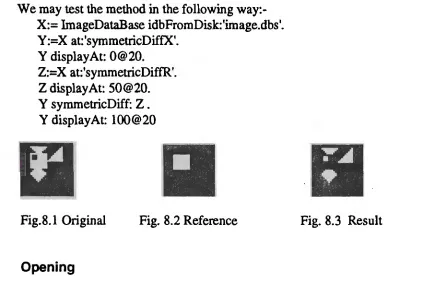
We may test the method in the following way:-X:= hnageDataBase idbFromDisk:'image.dbs'. Y:=X at:'symmetricDiffX'.
Y displayAt: 0@20. Z:=X at:'symmetricDiffR'. Z display At: 50@20. Y symmetricDiff: Z . Y displayAt: 100@20
Fig.8.1 Original Fig. 8.2 Reference
Opening
Fig. 8.3 Result
Huang's expression for the opening of an image X by an image R is given in his Formula 4.5
:-X oR= (X eR)eR= XeileR
We may implement the operation in Smaltalk by means of the following instance
method.:-openingBy:imageR
"The opening operation is an erosion followed by a dilation with the same
reference imageR. F. L. 30 April 1992"
(self erosionBy:imageR) dilationB y:imageR
We may test the method in the following way:-X:= lmageDataBase idbFromDisk:'image.dbs'. Y:=X at:'openOrcloseX'.
Y displayAt 100@20
Fig. 9 .1 Original Fig. 9 .2 Reference Fig. 9.3 Result
Closing
Huang's expression for the closing of an image X by an image R is given in his Fonnula
4.6
:-X • R
=
(X EB R)e
R=
(X EB R) EBA
We may implement the operation in Smaltalk by means of the following instance
method.:-closingBy:imageR
"The closing operation is an dilation followed by an erosion with the same reference imageR. F. L. 30 April 1992 11
(self dilationBy:imageR) erosionBy:imageR
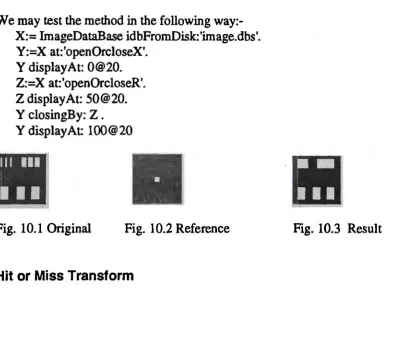
We may test the method in the following way:-X:= ImageDataBase idbFromDisk:'image.dbs'. Y:=X at:'openOrcloseX'.
Y displayAt: 0@20. Z:=X at:'openOrcloseR'. Z display At: 50@20. Y closingB y: Z . Y displayAt: 100@20
Fig. 10.1 Original Fig. 10.2 Reference
Hit or Miss Transform
Huang's expression for the hit or miss transform of an image X by an image pair (Rl,R2) is given in his Formula 4.7
:-X®R =(Xe R1)n(X e R,) = (X eli1)u(X e.R,)
We may implement the operation in Smaltalk by means of the following instance
method.:-hitMissTransBy:imageRl and:imageR2
"The hit or miss transform of an image pair R=(R1,R2) is used to match the shape (or template) defined by the reference image pair R where Rl defines the foreground of the shape and R2 defines the background of the shape. F. L. 30 April 1992"
I ab I
a:= (Image width: (self width) height: (self height)) black. a copy: (0@0 extent:(self extent)) from:self to:O@O rule:3. a erosionBy:imageRl.
1 b:= (Image width: (self width) height: (self height)) black. · b copy: (0@0 extent:(self extent)) from:self to:O@O rule:3.
(b complement) erosionBy:imageR2. a intersection:b.
self copy: (0@0 extent:(self extent)) from:a to:O@O rule:3
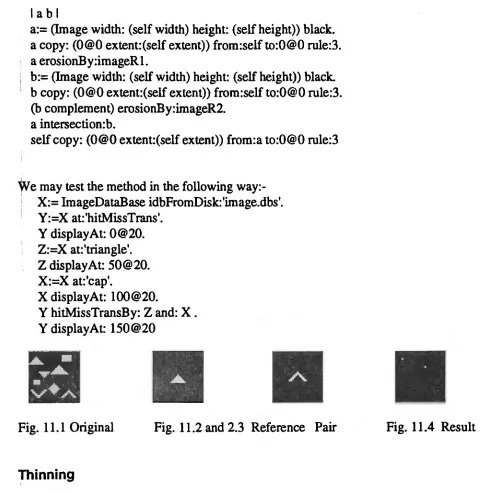
We may test the method in the following way:-'
1 X:= lmageDataBase idbFromDisk:'image.dbs'.
I Y:=X at:'hitMissTrans'. Y displayAt: 0@20. Z:=X at:'triangle'. Z display At: 50@20. X:=X at:'cap'.
X displayAt: 100@20.
Y hitMissTransBy: Z and: X . Y displayAt 150@20
Fig. 11.1 Original Fig. 11.2 and 2.3 Reference Pair
Thinning
Huang's expression for the thinning of an image X by an image pair (Rl ,R2) is given in his
Fonnula
4.8
:-We may implement the operation in Smaltalk by means of the following instance
method.:-thinningBy:imageRl and:imageR2
"The thinning operation is anti extensive and decreases the size by removing the central points of the regions which match the reference image pair R = (R1,R2). F. L. 30 April 1992"
I al
a:= (Image width: (self width) height: (self height)) black. a copy: (O@O extent:(self extent)) from:self to:O@O rule:3. a hitMissTransBy:imageRl and:imageR2.
self difference: a
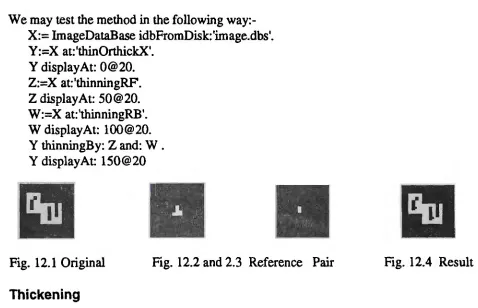
We may test the method in the following way:-X:= ImageDataBase idbFromDisk:'image.dbs'. Y:=X at:'thinOrthickX'.
Y displayAt: 0@20. Z:=X at: 'thinningRF. Z display At: 50@20. W:=X at:'thinningRB'. W displayAt: 100@20. Y thinningBy: Z and: W . Y displayAt: 150@20
Fig. 12.1 Original Fig. 12.2 and 2.3 Reference Pair
Thickening
Fig. 12.4 Result
Huang's expression for the thickening of an image X by an image pair (Rl,R2) is given
in
his Fonnula 4.9:-x 0 R = x u (X®R) = x u
ex
e R1) u (Xe.R
2)method.:-thickeningBy:imageRl and:imageR2
"The thinning operation is extensive and increases the size by filling the image points where the regions match the reference image pair R
=
(Rl,R2). F. L. 30 April1992"
I a I
a:= (Image width: (self width) height: (self height)) black. a copy: (O@O extent:(self extent)) from:self to:O@O rule:3. a hitMissTransBy:imageR 1 and:imageR2.
self union: a
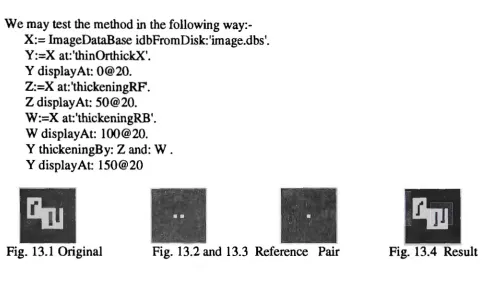
We may test the method in the following way:-X:= lmageDataBase idbFromDisk:'image.dbs'. Y:=X at:'thinOrthickX'.
Y displayAt: 0@20. Z:=X at:'thickeningRF. Z display At: 50@20. W :=X at: 'thickeningRB'. W displayAt: 100@20. Y thickeningBy: Zand: W. Y displayAt: 150@20
a
Fig. 13.1 Original Fig. 13.2 and 13.3 Reference Pair
4. Examples: filters
Fig. 13.4 Result
One kind of morphological low pass filter, to remove high frequencies in the foreground of
an
image, can be achieved byopening:-X:= ImageDataBase idbFromDisk:'image.dbs'. Y:=X at:'openOrcloseX'.
Fig. 14.1 Original Fig. 14.2 Reference Fig. 14.3 Result
A second kind of morphological low pass filter, to remove high frequencies in the foreground of an image, can be achieved by
closing:-X:= ImageDataBase idbFromDisk:'image.dbs'. Y :=X at: 'openOrcloseX'.
Y displayAt: 0@20. Z:=X at:'openOrcloseR'. Z display At: 50@20. Y closingBy: Z. Y displayAt: 100@20
•
Fig. 15.1 Original Fig. 15.2 Reference Fig. 15.3 Result
A morphological high pass filter which removes low frequencies in the foreground of an image X can be achieved by the difference of X and its
opening:-X:= ImageDataBase idbFromDisk:'image.dbs'. Y :=X at:'openOrcloseX'.
Y displayAt: 0@20. Z:=X at:'openOrcloseR'. Z display At: 50@20. Y openingBy: Z .
X:= ImageDataBase idbFromDisk:'image.dbs'. W:=X at:'openOrcloseX'.
W difference: Y.
W displayAt: 100@20
A morphological band pass filter which removes low frequencies and high frequencies in the foreground of an image X can be achieved by the difference of its opening with a smaller reference image R, and its opening with a larger reference image Q, where R belong to
Q:-X:= ImageDataBase idbFromDisk:'image.dbs'. Y:=X at:'openOrcloseX'.
Y displayAt: 0@20. Z:=X at:'openOrcloseR'. Z display At: 50@20. Y openingBy: Z .
X:= lmageDataBase idbFromDisk: 'image.dbs'. Z:=X at:'openOrcloseX'.
Q:=X at:'openOrcloseQ'. Q displayAt: 100@20. Z openingBy: Q. Y difference: Z. Y displayAt:150@20
•
•
Fig 17 .1 Original Fig. 17 .2 Filter 1 Fig. 17 .3 Filter 2
S. Examples: shape recognition (template matching)
Fig. 17.4 Result
In one form of shape recognition we may use the hit-or-miss transform to recognise locations of foreground points given by Rl, and locations of background points given
byR2.:-X:= lmageDataBase idbFromDisk:'image.dbs'. Y:=X at:'hitMissTrans'.
Y displayAt: 0@20. Z:=X at:'triangle'. Z display At: 50@20. X:=X at:'cap'.
X display At: 100@20.
•
Fig. 18.1 Original Fig. 18.2 and 18.3 Reference Pair Fig. 18.4 Result
Part 2. Image Processing Environment
1. The small -image data-base
Small Image Database
!
Left Pane Right Pane
Fig. 19 The window of small image data base
Access to the small-image data-base is via a window with two panes. The left-pane shows a list of the names of images. The right-pane displays the selected image.
A menu for the left-pane offers the following
options:-• add from disk --- Add new image from disk file .
• bit editor --- Get into Bit Editor environment .
• free drawing --- Get into Free Hand Drawing environment.
• inspect --- To inspect the structure of the selected image.
• remove --- To remove the selected image.
• save IDB --- To save whole small image data base as a disk file.
The menu for the right-pane offers the following
options:-• clear --- To clear the displayed image in the pane .
• print --- To print out the selected image on a pin printer.
In the first stage of the small-image data-base the image was stored as a file on disk containing a header followed by the (uncompressed) bitmap. The header had the following
format:-'Image type' space 'Image name' space 'Width (two bytes) Height (two bytes)'
2. The image-processing environment
Demo Image Processing Environment
Left Pane Middle Pane Right Pane
I
Bottom Pane
Fig. 20 The window of image processing environment
The window for the image processing environment has four panes. The left upper
pane displays a selected original image; the middle upper pane displays the first
selected reference image; and the right upper pane selects the second selected
reference image. The bottom pane displays the image resulting from a selected
operation with the images in the upper panes.
The menu for the left upper pane
is:-• get it ---To get the image from selected image in small image data base as original
image.
• load IDB --- To load the small image data base from disk and open the data base
environment
• from result---To get the image from the result image. Then We can perform a
sequence of image operation.
• from disk --- To get the image from disk file.
is:-• get it --- To get the image from selected image in small image data base as first reference image.
• from result --- To get the image from the result image.
• from disk --- To get the reference image from disk file.
The menu for the right upper pane
is;-• get it---To get the image from selected image in small image data base second reference image.
• from result --- To get the image from the result image.
• from disk --- To get the reference image from disk file.
The menu for the lower pane
is;-• complement --- To reverse the original image.
• union --- To union two images in upper left pane and upper middle pane. • dilation --- To dilate white part in original image by a reference image which
displayed in upper middle pane.
• erosion --- To erosion white parts in original image by a reference image which displayed in upper middle pane.
• difference --- Get the difference between two images in upper left pane and upper middle pane.
• reflect --- Get a reflection of the original image .
• closing --- To close two images in upper left pane and upper middle pane. • opening --- To open two images in upper left pane and upper middle pane. • intersection --- Get the intersection between two images in upper left pane and
upper middle pane.
• symmetricDiff --- Get the symmetric difference between two images in upper left pane and upper middle pane.
• hitMissTrans --- To get the hit and missing transform of original image in upper left pane and the reference image pair in upper middle pane and upper right pane.
• thicken --- To get the thicken of original image in upper left pane and the reference image pair in upper middle pane and upper right pane.
• thin --- To get the thinning of original image in upper left pane and the reference image pair in upper middle pane and upper right pane.
Part 3.
Conclusion and
further
work
The aim of the present work was to produce an environment that would not only increase the author's understanding of morphological processes with images but would also facilitate exploratory research in the area. Further uses are now seen: as an expository tool, either directly via overhead projection of the monitor's display, or via hard-copy of images; and as a hands-on introduction to image-processing.
Future work will include:
• transferring the present work to the Windows version of Smalltalk V;
• extending the work from binary images to grey-scale images;
• introducing data compression;
• producing a stand-alone version accessible by people not familiar with Smalltalk.
Part 4.
Acknowledgments
I would like to thank the many people who helped me in this work. I would especially like to thank Dr. Don Watson and Tom Peachey , the supervisors who encouraged me to go ahead with the original idea, guided my reading and assisted me in many ways. Robert
Hinterding helped me with Smalltalk. P. Rajendran and Damon Burgess helped me
accessing the facilities in our department.
Part 5.
References:
• [Haralick 92] Haralick R.M., Shapiro L. G: Computer and Robot Vision. Addison-W esley, 1992.
• [Huang 89] Huang K-S: A Digital Optical Cellular Image Processor. World Scientific, 1989.
Appendix:
The Classes and Methods
We have following classes and methods to suppon the small image data base and demo image processing
environment:
lmageDataBase - Subclass of class Dictionary. F. L. 30 April 1992
Dictionary subclass: #ImageDataBase iMtaDceVariableNames:"
classVariableNames:" poolDict.ionaries: • !
!ImageDataBase class methods !
idbFromDisk:fileName
" Oass method to retrieve a image dictionary on disk . ---Fred Apr 20, 1992." linFile head aBitmap aBiunapl aBitmap2 aBitmap3 a8itmap4
anArray wTeq> w h anlmage aDictn aKey lengthl anlmage:= Image new.
aDictn:=ImageDataBase new. inFtle := Disk file: fileName. inFile reset.
[inFile atEnd] whileFalse:[ head:= inFile nextWord. inFile next.
aKey:= inFile nextWord. inFile next.
(head='ColorFonn') ifFalse:[ "black and white" h := inFile next asciiValue.
wTemp := inFile next asciiValue.
wTemp := (wTemp bitShift: 8) bitAnd:65280. w := wTemp bitOr: h.
h := inFile next ascii Value. wTemp := inFile next asciiValue.
wTemp := (wTemp bitShift: 8) bitAnd:65280 deepCopy.
h := wTemp bitOr: h.
anlmage := Image new width: w height: h . ((w\\16)=0) ifFalse:[
w:=w+(16 - (w\\16)) deepCopy]. aBiunap := Bitmap new: w*h/8. (1 to: w*h/8) do:
[ :i I aBitmap at: We put: inFile next asciiValue). anlmage bitmap: aBitmap .
I
iffrue:[
h := inFile next asciiValue. wTemp := inFile next asciiValue.
wTemp := (wTemp bitShift: 8) bitAnd:65280. w := wTemp bitOr: h.
h := inFile next asciiValue. wTemp := inFile next asciiValue.
wTemp := (wTemp bitShift: 8) bitAnd:65280 deepCopy. h := wTemp bitOr: h.
anlmage := (ColorForm new width: w height: h). ((w\\16)=0) ifFalse:[
w:=w+(l6 - (w\\16)) deepCopy]. length:=w*h/8 deepCopy. aBitmapl:;::: Bitmap new:length. aBitmapl::::: Bitmap new:length. a8itmap3:= Bitmap new:length. a8itmap4:= Bitmap new:length.
(1 to: length) do:[ :i I aBitmap3 at: We put: (inFile next asciiValue)).
(1 to: length) do:( :i I aBitmap4 at: We put: (inFile next asciiValue)).
aoAnay:= Array with:aBitmapl
with:aBiunap2
with:aB itmap3 with:aBitmap4.
anlmage bitmap:anArray).
aDictn at: aKey put: anlmage deepCopy ). inFile close .
Aal>ictn! !
!lmageDataBase methods !
idbStoreOnDisk:tileName
"Instance method to store a image dictionary on disk as a file. ---Fred Apr 20, 1992." I a outFile aWidth length!
a:=OrderedCollection new.
a:= self keys asOroeredCollection.
outFile := Disk newFile: fileName.
1 to: a siu do:[:il
outFile nextPutAJl: (self at:(a at:i)) class name.
ootFile nextPut: $ . outF'tle nextPutAll: (a at:i).
ootFile nextPut: $ .
((self at:(a at:i)) class name )='Image' iffrue:[ outFile nextTwoBytesPut: ((self at:( a at:i)) width) . outFile nextTwoBytesPut: ((self at:(a at:i )) height) . (self at:(a at:i )) bitmap do:
[:e.a I outFile nextPut: e.a asCha.racw) )
ifFalse:[
outFile nextTwoBytesPut: ((self at:(a at:i)) width) .
outFile nextTwoBytesPut: ((self at:(a at:i)) height).
aWidlh:=(self at:( a at:i)) width.
((aWidth\\16):::0) ifFalse:[
aWidth:=aWidth+(16 -(aWidth\\16)) deepCopy). length:=a Width*((self at:( a at:i)) height)/8.
1 to: 4 do:[:aBitmapl (((self at:( a at:i )) bitmap) at: aBitmap) do: [:e.a I ootFile nextPut: ea asCharacterJI
) ).
outFile close!
open
"Open an lmageDataBase inspector window on the receiver. F. L. 30 April 1992" lmageDataBaselnspector new openOn: self! !
ldbFreeDraw --- For
free
hand drawing in the environment.
FreeDrawing subclass: #ldbFreeDraw
instance V ariableNames:
'anlmage fileName '
classVariableNames:"
poolDictionaries: " !
!IdbFreeDraw class methods ! !
loadFromFile
" To get image from a disk file."
I aPrompter head inFile w h wTemp I
fileName:= String new.
aPrompter:=Prompter prompt:'file name? default:fileName .
fileName:= aPrompter. (fileName--nil) iffrue:[ "nil).
(fileName size=O) iffrue:["Dil]. inFile := Disk file: fileName. inFile reset.
bead:= inFile nextWord.
inFile next.
(head='color') ifPalse:[inFile reset). h := inFile next a.sciiValue. wTemp := inFile next asciiValue.
wTemp := (wTemp bitSbift: 8) bitAnd:65280. w := wTemp bitOr: h.
h := inFile next asciiValue. wTemp := inFile next asciiValue.
wTemp := (wTemp bitShift: 8) bitAod:65280 deepCopy.
h := wTemp bitOr: h. ((w\\16)=0) itFalse:(
w:=w+(16 - (w\\16)) deepCopy). ioFJ.le close.
(bead='color') ifPalse:[ "black an white" anlmage:=lmage new width:w height:h. CursorManager execute change. anlmage:=lmage idbFromFile:fileName. CW'sorManager normal change. self clear.
anlmage displayAt:pane frame origin. "anlmage].
anlmage:::ColorForm new width:w height:h. CursorMaoager execute change.
anlmage:::ColorForm idbFromFile:fileName. CW'sorManager normal change.
self clear.
anlmage displayAt:pane frame origin. "anlmage!
loadlmage
" Answer a menu , give the selectors of add an image to the IDB."
laMenu I
aMenu:= (Menu
labels: 'from Disk\from IDB' withCrs lines: #(1)
selectors: #(loadFromFile loadFromldb ) ) popUpAt: Cursor position.
aMenuisNil
i!False: (self perform: aMeou] !
open
"Open a free drawing window." ltopPane I
menu :=Menu
labels:' clear\ change size\ change color\ change halftone\ change rule\ change foot\ draw \erase\ line\ rectangle\ circle\ ellipse \curve \
fill\ copy\ paste\ bit edit\ save whole\ save selected\ load image' withCrs lines: #(1 5 7 13)
selectors: #(clear changeSize changeColor changeMask changeRule changeFont draw erase line rectangle circle ellipse curve fill
copyGraph pasteGraph bitEdit saveWhole saveSelected loadlmage). topPane := TopPane new
model: self; label: 'Form Editor';
topPane addSubpane:
(pane:=
PreeDrawPane new model: self; name: #initialize:;
menu: #menu;
change: #change).
topPane dispatcher open schedule Window!
saveSelected
" To save selected image on a dis It file."
I aPrompter aMenu I fileName:= String new.
aPrompter:=Prompter prompt:'file namer default:'image.drw' .
fileName:= aPrompter.
(fileName=nil) ifTrue:["nil].
(fileName size=O) iffrue:["nil].
anlmage:=Display rompalibleForm from User de,epeopy. aMenu:= (Menu
labels: 'as color\ as black & white' withCrs lines: #(1)
selectors:#(storeAsColor storeAsB lkAndWit))
popUpAt: Cursor position.
aMenu isNil
ifFalse: [self perform: aMenu]!
save Whole
" To save selected whole pane on a disk file." I aPrompter aMenul
fileName:= String new.
anlmage:= Display compatibleForm
fromDisplay:(pane frame) deepCopy.
aPrompter:=Prompter prompt:'file name?' default:'image.drw' .
fileName:= aPrompter.
(fileName=nil) iffrue:["nil).
(fileName size=O) iffrue:["nil]. aMenu:= (Menu
labels: 'as color\ as black & white' withCrs lines: #(I)
selectors:#(storeAsColor storeAsBlkAndWit)) popUpAt: Cursor position.
aMenu isNil
ifFalse: [self perform: aMenu).!
storeAsBlkAndWit
UmorManager execute change.
anlmage moreAsBkAndWt:fileName.
CursorManager normal change.!
storeAsColor
UmorManager execute change.
anlmage storeColorOnFile:fileName.
CursorManager normal change.!!
ldbBtEdt ---- For Bit Editor in the environment.
BitEditor subclass: #ldbBtEdt
instance V ariableNames: "
poolDictionaries: " !
!IdbBtEdt class methods ! !
!IdbBtEdt methods !
storeOnFile
"To save selected image on a disk file."
I aProqiter fileName I
aPrompter:=Prompter prou.,t'file namer
default:'image.img'.
fileName:= aProu.,ter.
(fileName=nil) iffrue:["nil].
(fileName size::{)) iffrue:[Anil].
(imageForm class name)='lmage' iffrue:[
UusorManager execute change.
imageForm storeOnFile:fileName.
CUrsorManager normal change.]
ifFalse:[
UusorManager execute change.
imageForm storeColorOnFile:fileName.
CursorManager normal change.]!
window Menu
"Amwer the window menu for the bit editor."
A Menu
labels: 'cycle\close\save as' withQs
line3: #0
sele-ctors: #(cycle closelt storeOnFile ).! !
ldbTopDispatcher ---- To reinitialize the window size.
TopDispatcher subclass: #ldbTopDlspatcher instance V ariableNames: "
classVariableNames: " poolDictionaries: " !
!IdbTopDispatcher class methods ! !
!IdbTopDispatcher methods!
initWindowSize
"Private -Amwer default initial window extent"
ADisplay extent*ll/2! !
lmageDataBaselnspector ---- The main class for the environment
Dictionary Inspector subclass: #ImageDataBaselnspector
classVariableNames: ti poolDictionaries: ti !
!ImageDataBaselnspector class methods ! !
llmageDataBaselnspector methods !
bitEdt
I aPromp1er anlmage width height key size indexl (instlndex=nil) iffrue:[instlndex:=l).
aPrornpter:=Prompter prOIJlll:'Graph object name?' default: (instList at: instlndex) key.
fileName:= aPrompter. (fileName =nil) iffrue:[AniJ]. fileName isEmpty iffrue:[
width:=(Prornpter prompt:'Width = T
default: '47') ll$lnteger. (width= 0) iffrue:["nil].
height:=(Prompter prompt:'Height = T default: '47') aslnteger.
anlmage:=lmage new width:width height:height . ldbBt.Edt new openOn: anlmage ].
anlmage:=obje.ct at: (instList at: instlndex) key. ldbBtEdt new openOn: anlmage .!
clear
" To clear the instance pane" "(Image new width:instPane frame
width height:instJ>ane frame height; white) displayAt: instPane frame origin.!
freDrw ldbFreeDraw new!
fromDisk
" To get image from disk file, insert into the data base" I anlmage aPrompter key size index I
aPrompter:=Prompter prompt:'file name?' default: fileName.
fileName:= aPrompter. (fileName--nil) iffrue:["nil]. fileName isEmpty iffrue:["nil). CursorManager execute change. anlmage:=lmage idbFromFile:fileName. CursorManager normal change.
key := Prompter
prompt: 'new key expression' defaultExpression: String new. key isNil
ifTrue: ["self). (obje.ct includesKey: key)
ifTrue: [
Menu message: 'key already in dictionary'. "self].
object at: key put: anlmage. instList add:
(Association key: key value: key printString). size := instList size.
index:= 1. [index> size
or: [(instList at: index) key =key]) whileFalse: [index:= index+ 1). instlndex := index.
self
with: #restoreSelected:
with: iostlndex;
changed: #instance:!
idblnsPaneMenu
" Answer instance pane menu"
I menu I
menu :=Menu
. labels: 'clear'\print\save as' withQs
lines: #(1)
selectors: #(clear printlmage storeOnFile).
"menu!
idbListMenu
"Private - Answer the dictionary inspector list pane menu."
"Menu
labels: 'add from disk\bit editor\free drawing\inspect\rernove\save IDB' withQs
lines: #(1 3 5)
selectors: #( fromDisk bitEdt freDrw inspect.Selection remove storDic) !
instance:
anhnage
Q:=instlndex.
instlndex isN ii
iffrue: ["(instPane clear)].
instPane clear.
"(object at: (instList at: instlndex) key)
load Die
display At: instPane frame origin
clippingBox: ((instPane frame origin) extent:( instPane frame extent))!
"To load all the images in data base onto disk"
I aPrompter fileName I
aPrompter:=Prompter prompt:'file name?
default:'image.dic'.
fileName:= aPrompter.
(fileName=nil) iffrue:["nil].
(fileName size=O) iffrue:["nil].
CursorManager execute change.
object:=lmageDataBase idbFromDisk:fileName deepCopy.
CursorManagernormalchange.
anldbTopPane dispatcher close scheduleWindow.
"self openOn:object!
openOn: anObject
"Open an inspector window on anObject Define the pane sizes and behavior, and shedule the window."
object := anObject
instPane := GraptiPane new
menu: #idblnsPaneMenu; model: self;
name: #instance:;
framingRatio: (1/3 @ 0
extent: 2/3 @ 1).
anldbTopPane:=ldbTopPanenew. anldbTopPane
label:' Small Image Data Base ';
model: anldbTopPane dispatcher; menu: #workSpaceMenu; minimum.5ize: 80@80; yourself.
anldbTopPane addSubpane: (ListPane new
menu: #idbListMenu;
model: self;
returnlndex: true;
framingRatio: (
O@O extent: 1/3 @ 1)). anldbTopPane addSubpane: instPane.
CursorManager normal change.
self setlnstList.
anldbTopPane dispatcher open scheduleWindow!
printlmage
"To print out the selected image on pin-printer" A( object at: (instList at: instlndex) key)
outputToPrinterUpright!
remove
"Private - Remove the selocted Irey from the dictionary."
l~ocl
instlndex isN ii
itFalse: [
assoc := instList at: instlndex. instList remove: assoc.
object removeKey: assoc key.
instlndex := nil.
self
changed: #instVarList with: #restore;
changed: #instance:]!
selectlnstance: anlnteger
"Private - Select the instance variable at index position anlnteger in the list"
I lastlndex I
lastlndex := instlndex. instlndex := anlnteger.
self changed: #instance:.
instlndex = lastlndex
iffrue: [self inspectSelection] !
storDic
"To store all the image data base on disk"
I aPrompter I
aPrompter:=Prompter prompt:'file name? default: fileName . fileName:= aPrompter.
(fileName=nil) iffrue:[AniJ]. (fileName size=O) iffrue:[Anil].
CursorManager execute change. object idbStoreOnDisk:fileName. CursorManager normal change!
storeOnFile
" To save selected image on a disk file." I aPrompter anlmage I
instlndex isNil iffrue: [ Aself].
aPrompter:=Prompter prompt:'file namer default:fileName .
fileName:= aPrompter.
(fileName=nil) ifl'rue:[ AniJ].
(fileName size=O) iffrue:[AniJ].
anlmage:= (object at: (instList at: instlndex) key).
(anlmage class name)='lmage' ifTrue:{ QusorManager execute change.
anlmage storeOnFile:fileName.
CursorManager normal change.) itFalse:[ QusorManager execute change.
ldbTopPane --- Subclass of TopPane
TopPane subclass: #ldbTopPane
instance V ariableNames: " classVariableNames:" poolDictionaries: " !
!IdbTopPane class methods ! !
!IdbTopPane methods !
defaultDispatcherClass
"Answer the default dispatcher." "ldbTopDispatcher! !
Image---- The class for image processing
Form subclass: #Image
instanceVariableNames:" classVariableNames:" poolDictionaries: " !
!Image class methods ! idbFromFile: tileName
"To retrieve the stored image from disk-- both colour image and black and white image. FL Apr 19, 1992." I inFile aBitmap aBitmapl aBitmap2 aBitmap3 aBitmap4
anArray w h anlmage wTemp head leogthl inFile := Disk file: fileName.
inFile reset.
head:= inFile oextWord.
(head='color') itFalse:[ "black an white" inFile reset.
h := inFile next asciiValue. wTemp := inFile next asciiValue.
wTemp := (wTemp bitShift: 8) bitAod:65280.
w := wTemp bitOr: h. h := inFile next asciiValue. wTemp := inFile next asciiValue.
wTemp := (wTemp bitShift: 8) bitAnd:65280 deepCopy. h := wTemp bitOr: h.
anlmage := Image new width: w height: h . ((w\\16)=0) itFalse:[
w:=w+(16 -(w\\16)) deepCopy]. aBitmap := Bitmap new: w*h/8. (1 to: w*h/8) do:
[ :i I aBitmap at: We put: inFile next asciiValue]. anlmage bitmap: aBitmap .
"anlmage ]. inFile next.
h := inFile next asciiValue. wTemp := inFile next asciiValue.
wTemp := (wTemp bitShift: 8) bitAod:65280. w := wTemp bitOr: h.
wTerq> := (wTemp bitShift: 8) bitAnd:65280 deepCopy.
h := wTemp bitOr: h.
anlmage := (ColorFonn new width: w height: h). ((w\\16)=0) i1False:[
w:=w+(l6 - (w\\16)) deepCopy). length:=w*h/8 deepCopy. aBitmapl:= Bitmap new:length. aBitmap2:= Bitmap new:length. aBitmap3:= Bitmap new:length. aBitmap4:= Bitmap new:length.
(1 to: length) do:[ :i I aBitmapl at: We put: (ioFile next asciiValue)].
(1 to: length) do:[ :i I aBitmap2 at: We put: (inFile next asciiValue)].
(1 to: length) do:[ :i I aBitmap3 at: We put: (inFile next asciiValue)].
(1 to: length) do:[ :i I aBitmap4 at: We put: (inFile next asciiValue)]. anArray:= Array with:aBitmapl
with:aBitmap2 with:aBitmap3 with:aBitmap4. anlmage bitmap:anArray. "anlmage! !
!Image methods !
center
"Answer a Point, the center of the receiver." "((self width-l}@(selfheight- 1)112)!
closingBy:imageR
"The opening operation is an dilation followed by an erosion with the same reference imageR . " (self dilatiooBy:imageR) erosiooBy:imageR!
complement
"Answer the corq>lement of an image." "self reverse!
difference:imageR
"Answer an image that containing the difference between original image (imageX) and referrence image (imageR)" ((self complement) union: imageR) complement!
dilationBy:imageR
"Dilation an image (imageX) by a reference image (imageR)" labd
b:= (Image width: (self width) height: (self height}) black. c:= (Image width: (self width) height: (self height)) black. a:= OrderedCollection new.
a:= imageR gelPointsFrom:imageR.
1 to: a size do:[:il
b copy: (O@O extent:(self extent)) from:selfto:((a at:i)- (imageR center)) rule:3. c uoion:b
1 .
self copy: (O@O extent:(self extent)) from:c to:O@O rule:3!
erosionBy:imageR
"Answer an image that containing the erosion of original image (imageX) by referrence image (imageR)" ((self complement) dilationBy:(imageR reflect)) complement!
getPointsFrom:imageR
"Method to get the position c1 each white pixel (forgrouod) c1 the reference image , answer a ordered collection containing white points."
!al
a:=OrderedCollection new. Oto: (imageR width- I) do:[:il
Oto: (imageR height-1) do:[:jl
"al
hitMissTransBy:imageRl and:imageR2
''The hit or miss transfonn of an image pair R=(Rl ,R2) is used to match the shape (or template) defined by the reference image pair R where Rt defines the forground of the shape and R2 defines the background of the shape."
lab I
a:= (Image width: (self width) height: (self height)) black. a copy: (O@O extent:(self extent)) from:self to:O@O rule:3. a erosionBy:irnageRt.
b:= (Image width: (self width) height: (self height)) black. b copy: (O@O extent:(self extent)) from:self to:O@O rule:3. (b cornplement) erosionBy:imageR2.
a intersection:b.
self copy: (O@O extent:(self extent)) from:a to:O@O rule:3!
intersection:imageR
"Amwer an image that containing the intersection of original image (imageX) and referrence image (imageR)" ((self complement) union:(irnageR complement)) cornplement!
openingBy:imageR
"The opening operation is an erosion followed by a dilation with the same reference imageR . " (self erosionBy:imageR) dilationBy:imageR!
reflect
"Amwer an image which containing the Reflected Reference Image . " lab I
a:= OrderedCollection new. b:= OrderedCollection new. a:= self getPointsFrom: self.
I to: a size do: [:ii b add:(self center- (a at:i)+self center). self at:(a at:i) put:O).
1 to: b size do:( :ii self at:(b at:i) put: I I . !
storeOnFile: tileName
"DW 23 Mar., 1992 "
I outFile I
outFile := Disk newFile: fileNarne. "Delete existing contents"
outFile nextTwoBytesPut: (self width) . outFile nextTwoBytesPut: (self height). self bitmap do:
[:ea I outFile nextPut: ea asCliaracter). outFile close.!
symmetricDifT:imageR
"Amwer an image that containing the symmetric difference between original image (imageX) and referrence image (irnageR)" lab I
a:= (Image width: (self width) height: (self height)) black. a copy: (O@O extent:(self extent)) from:self to:O@O rule:3. a difference:irnageR.
b:= (Image width: (self width) height: (self height)) black. b copy: (O@O extent:( self extent)) from:self to:O@O rule:3. imageR difference:b.
a union:imageR.
self copy: (O@O extent:( self extent)) from:a to:O@O rule:3 !
thickeningBy:imageRl and:imageR2
"The thinning operation is extensive and increases the size by filling the image points where the regions match the reference image pair R = (Rl,R2)."
lal
a:= (Image width: (self width) height: (self height)) black. a copy: (O@O extent:( self extent)) from:self to:O@O rule:3. a hitMissTransB y:imageR 1 and:imageR2.
self union: a!
"1be thinning operation is antiextensive and d~ the si:ze by removeing the central points of the regions which match the reference image pair R
=
(Rl,R2)."lal
a:= (Image width: (self width) height: (self height)) black. a copy: (O@O extent:(self extent)) from:self to:O@O rule:3. a hitMissTransBy:imageR 1 aod:imageR2.
self difference: a!
union: imageR
"Answer an image containing the image of the union of imageR and the receiver imageX. F. L. 30 April 1992" "self copy: (O@O extent:(imageR extent)) from:imageR to:O@O rule:7 .! !
lmageProcessing -
The main class to perform demo image
processing environment.
Object subclass: #ImageProcesslng instance V ariableNames:
'object leftPane midlePane rightPane bottomPane fileName instList instlndex indexSet resultlmage resultlmageA resultlmageB resultlmageC '
classVariableNames: " poolDictionaries: " !
!ImageProcessing class methods ! !
!ImageProcessing methods !
bottomPaneMenu
A Menu
labels: 'complement\union\dilation\reflect\erosion'difference\closing'qlening \intersection\symmetricDifNlitMissTraos\lhicken'{hin\print\save as' withQ-s
lines: #(1 5 9 13)
selectors: #(complement union dilation reflect erosion difference closing opening intersection symmetricDiff hitMissTraos thicken thin printResult storeOoFile)!
closing
lab I
bottomPane clear.
a:=resultlmageA deepCopy. b:=resultlmageB deepCopy. CursorMaoager exe.cute change.
a closingBy: b.
CursorManager normal change. resultlmage:=a deepCopy.
"resultlmage display At: bottomPaoe frame origin clippingBox: ((bottomPaoe frame origin) extent:( bottomPaoe frame extent))!
complement
lal
bottomPaoe clear.
a:=resultlmageA deepCopy. CursorMaoager exe.cute change.
a complemenL
CursorManager normal change. resultlmage:=a deepCopy.
extent:( bottomPane frame extent))!
difference
lab I
bottomPane clear.
a:=re.sultlmageA deepCopy.
b:=resultlmageB deepCopy. CUrsorManager exe.cute change.
a difference: b.
CursorManager normal change. resultlmage:=a deepCopy.
AresuJtlmage display At: bottomPane frame origin clippingBox: ((bottomPane frame origin) extent:( bottomPane frame extent))!
dilation
lab I
bottomPane clear.
a:=re.sultlmageA deepCopy.
b:=resultlmageB deepCopy. CUrsorManager exe.cute change. a dilationBy: b.·
CursorManager normal change.
resultlmage:=a deepCopy.
AresuJtlmage display At: bottomPane frame origin clippingBox: ((bottomPane frame origin) extent:( bottomPane frame extent))!
erosion
lab I
bottomPane clear.
a:=re.sultlmageA deepCopy. b:=resultlmageB deepCopy. CUrsorManager exe.cute change.
a erosionBy: b.
CursorManager normal change.
resultlmage:=a deepCopy.
AresuJtlmage display At: bottomPane frame origin clippingBox: ((bottomPane frame origin) extent:( bottomPane frame extent))!
fromDisk
" To get image from disk file, insert into the
data base"
I aPrOIJ1ller key size index I
aProqJter:=Prompter prompt:'file name? default: fileName.
fileName:= aPrompter. (fileName=nil) iffrue:[Anil].
fileName isEmpty iffrue:( ... nil). CUrsorManager exe.cute change.
resultlmage:=lmage idbFromFile:fileName.
CursorManager normal change. leftPane hasCursor iffrue:[
resultlmageA:=resultlmage deepCopy. AresuJtlmageA
display At: leftPane frame origin clippingBox: ((leftPane frame origin) extent:( leftPane frame extent))].
midlePane hasCursor iffrue:[ resultlmageB :=resultlmage deepCopy. "resultlmageB
di,,play At: rightPane frame origin clippingBox: ((rightPane frame origin) extent:( rightPane frame extent))]!
from Result
"To get the image from the result image for anodter operation. Fred Liu May 11, 1992" leftPane huCursor iffrue:[
resultlmageA:=resultlrnage deepCopy. "resultlrnageA
displayAt: leftPane frame origin clippingBox: ((leftPane frame origin) extent:( leftPane frame extent))]. rnidlePane hasCursor iffrue:[ reaultlrnageB :=resultlrnage deepCopy. "resultlrnageB
display At: rnidlePane frame origin clippingBox: ((rnidlePane frame origin) extent:( rnidlePane frame extent))]. rightPane hasCursor iffrue:[ resultlrnageC:=resultlrnage deepCopy. "resultlrnageC
dWplayAt: rightPane frame origin clippingBox: ((rightPane frame origin) extent:( rightPane frame extent))]!
getlt
''To get the image from the Image Data Base." instlndex:=Q.
leftPane huCursor iffrue:[ indexSet at:l put: instlndex. " (self changed: #instanceLft:)]. rnidlePane hasCursor iffrue:[
indexSet at:2 put: instlndex. "(self changed: #instanceMid:)]. rightPane hasCursor iffrue:[
indexSet at:3 put: instlndex. "(self changed: #instanceRit:)]!
hitMissTrans
labc I
bottornPane clear.
a:=resultlrnageA deepCopy. b:=resultlrnageB deepCopy. c:=resultlrnageC deepCopy. CUrsorManager execute change. a hitMissTransBy: b and: c. CursorManager normal change. resultlrnage:=a deepCopy.
"resultlrnage display At: bottornPane frame origin clippingBox: ((bottornPane frame origin) extent:( bottornPane frame extent))!
instanceBtm: anlmage
instlndex isN ii
iffrue: ["( bottornPane clear)]. bottornPane clear.
"resultlmage
display At: bottornPane frame origin clippingBox: ((bottornPane frame origin) extent:( bottornPane frame extent))!
instanceLft: anlmage
instlndex isNil
iffrue: ["leftPane clear]. leftPane clear.
display At: leftPaoe frame origin clippingBox: ((leftPane frame origin) extent:( leftPaoe frame extent))!
instanceMid: anlmage
instlndex isNil
iffrue: ("midlePane clear). midlePane clear.
resultlmageB :=(object at: (instList at: instlndex) key) deepCopy. "resultlrnageB
display At: midlePaoe frame origin clippingBox: ((midlePane frame origin) extent:( midlePane frame extent))!
instanceRit: anlmage
instlndex isNil
iffrue: ("(rightPane clear)]. rightPane clear.
resultlmageC:=( object at: (instList at: instlndex) key) deepCopy. "resultlrnageC
display At: rightPane frame origin clippingBox: ((rightPane frame origin) extent:( rightPane frame extent))!
intersection
I ab I
bottomPane clear.
a:::JesultlmageA deepCopy. b:::JesultlmageB deepCopy. CursorManager execute change. a intersection: b.
CursorManager normal change. resultlmage:=a deepCopy.
"resultlmage display At: bottomPane frame origin clippingBox: ((bottomPane frame origin) extent:( bottomPane frame extent))!
leftPaneMenu
"Menu
labels: 'get it\load IDB\from result\from disk' withCrs lines: #(0)
selectors: #( getlt openldb fromResult fromDisk) I
openldb
(lmageDataBaselnspe.ctor alllnstances size)=O ifFalse:( "nil].
object open!
opening
lab I
bottomPane clear.
a:::JesultlmageA deepCopy. b:::resultlmageB deepCopy. CursorManager execute change. a openingBy: b.
CursorManager normal change. resultlmage:=a deepCopy.
"resultlmage display At: bottomPane frame origin clippingBox: ((bottomPane frame origin) extent:( bottomPane frame extent))!
openOn:anObject
"To open an image processing envirorunent" I anldbTopPane I
indexSet:=Array new:4.
anldbTopPane := !db Top Pane new. anldbTopPane
label: 'Demo Image Processing'; model: anldbTopPane dispatcher; menu: #workSpaceMenu;
minimumSize: 80@80; yourself.
anldbTopPane addSubpane: (leftPane:=GraphPane new
menu: #leftPaneMenu; model: self;
name: #instanceLtl:; framingRatio: (0 @ 0
extent: 3n @ (1/2))). anldbTopPane addSubpane:
(midlePane:=GraphPane new menu: #rightPaneMenu; model: self;
name: #instanceMid:; framingRatio: (3n @ O
extent: 2n @ (112))).
anldbTopPane addSubpane: (rightPane:=GraphPane new
menu: #rightPaneMenu; model: self;
name: #instanceRit:; framingRatio: (517 @ 0
extent: 2n @ (112))). anldbTopPane addSubpane:
(bottomPane:=GraphPane new menu: #bottomPaneMenu; model: self;
name: #instanceBtm:; framingRatio: (0 @ (1/2)
extent: 1 @ (1/2))). CursorManager normal change. self setlnstList
anldbTopPane dispatcher open schedule Window!
printResult
"To print out the result image on pin-printer" "resultlmage outputToPrinterUpright!
reflect
la I
bottomPane clear.
a:=resultlmageA deepCopy. CursorManager execute change.
a reflect.
CursorManager normal change. resultlmage:=a deepCopy.
clippingBox: ((bottomPane frame origin) extent:( bottomPane frame extent))!
rightPaneMenu "Menu
labels: 'get it\from disk\from result' withCrs
lines: #(0)
selectors:#( getlt fromDisk fromResult)!
setlnstList
"Private -Compute instList, an OrderedCollection of key strings
for the list pane."
laSetl
aSet := Set new: object size. object keysDo: [:aKey I
aSetadd:
(A.vociation key: aKey value: aKey printString)]. iostlndex := nil.
(instl..ist := Sone.dCollectioo new) sortBlock: [:a :bl a value< b value); addAll: aSet!
storeOnFile
" To save selected image on a disk file." I i!Prolqlter I
instlndex isNil iffrue: ["self].
aProlqlter:=Prompter proqit:'file name?' default:fileName •
fileName:= aPrompter. (fileName=nil) iffrue:["nil]. (fileName si7.e=O) iffrue:["nil].
(resultlmage class name)='lmage' iffrue:[ CursorManager execute change. resultlmage storeOnFile:fileName. CursorManager normal change.]
ifFalse:[ CursocManager exe.cute change. resultlmage storeColo.OnFile:fileName. CursorManager normal change.]!
symmetricDitT lab I
bottomPane clear.
a:=resultlmageA deepCopy. b:=resultlmageB deepCopy. CursocManager exe.cute change.
a symmetricDiff: b.
CursorManager normal change. resultlmage:=a deepCopy.
"resultlmage display At: bottomPane frame origin clippingBox: ((bottomPane frame origin) extent:( bottomPane frame extent))!
thicken I abc I bottomPane clear.
a:=resultlmageA deepCopy. b:=resultimageB deepCopy. c:=resultlmageC deepCopy. CursocManager exe.cute change. a thickeningBy: b and: c. CursorManager normal change. resultlmage:=a deepCopy.
extent:( bottomPane frame extent))!
thin label
bottomPane dear.
a:=1"e3UltlmageA deepCopy. b:=1"e3UltlmageB deepCopy. c:=l'e3UltlmageC deepCopy. OU'sorManager execute change.
a thinningBy: b and: c. CursorManager normal change. resultlmage:=a deepCopy.
"rewltlmage display At: bottomPane frame origin clippingBox: ((bottomPane frame origin) extent:( bottomPane frame extent))!
union lab I
bottomPane clear.
a:=l'e3UltlmageA deepCopy. b:=l'e3UldmageB deepCopy. OU'sorManager execute change. a union: b.
CursorManager normal change. resultlmage:=a deepCopy.
"resultlmage display At: bottomPane frame origin clippingBox: ((bottomPane frame origin) extent:( bottomPane frame extent))! !
There are some methods which We wrote is in the system classes:
clear
" lustance method of class OraphPane -- To clear the instance pane" "'(Image new width:self frame
width height:self frame height; white) display At: self frame origin.
storeAsBkAndWt: fileName
"Instance method of ColoIForm . To store an Colorfonn as a black and white form "
I anlrna.ge length aBitmap a Width! a Width :=self width.
((aWidth\\16):::0) ifFalse:(
aWidth:=aWidth+(16 - (aWidth\\16)) deepCopy). length:=aWidth*(self height)/8.
aBitmap:= Bitmap new:length.
1 to: length do:[:ilaBitmap at:i put:((( ((bits at: 1 ) at: We) bitAnd: ((bits at: 2) at: i)) bitAnd: ((bits at: 3) at: i)) bitAnd: ((bits at: 4) at: i))). anhnage:= Image new width:self width height:self height anlmage bitmap: aBiunap.
anlmage storeOnFile:fileName
storeColorOnFile: tileName
"Instance method ofColorForm .FL Apr 14, 1992., 1992"
I outFile length a Width!
outFile := Disk newFile: fileName. outFile nextPutAll: 'color'. outFile nextPut:$ .
outFile nextTwoBytesPut: (self width) . outFile nextTwoBytesPut: (self height) . aWidth:=self width.
((aWidth\\16):::0) ifFalse:[
[:ea I outFile nextPut: ea asOlaracter].] .
outFtle cl~.
changeToBkAndWt
"lmtaoce method of ColorFonn .Answer an image which is a change from a color fonn."
I anlmage length aBitmap anArray I
length:=(self width)*(self height) deepQ>py.
length impect.
(Oength\\16)=0) i1False:[
length:=length+(16 -(lenglh\\16)) deepCopy).
anArray:= self getBits:length.
aBitmap:= Bitmap new:length.
1 to: length do:[:ilaBitmap at:i put:((( ((anArray at: 1) at: We) bitOr: ((anArray at: 2) at: i)) bitOr: ((aoArray at: 3) at: i)) bitOr: ((aoArray at: 4) at: i))].
aolmage:= Image new width:self width height:self heighL
anlmage bitmap: aBitmap.
"anlmage
colorFromFile: fileN ame
"Class method of class ColorForm. FL 23 Mar., 1992"
I ioFile aBitmapl aBitmap2 aBitmap3 a8itmap4 anArray w h anlmage wTemp head length!
ioFile := Disk file: fileName. ioFile reseL
head:= ioFile next Word.
(head='color') ifFalse:["nil]. ioFilenexL
h := ioFile next asciiValue.
wTemp := ioFile next asciiValue.
wT~ := (wTemp bitShift: 8) bitAnd:65280.
w := wTemp bitOr: h.
h := ioFile next asciiValue.
wTemp := ioFile next asciiValue.
wTe1J1> := (wTemp bitShift: 8) bitAnd:65280 deepCopy.
b := wTemp bitOr: h.
anlmage := (ColorFonn new width: w height: h).
((w\\16)=0) i1False:[
w:=w+(16 - (w\\16)) deepCopy].
length:=w*h/8 deepCopy.
aBitmapl:= Bitmap new:lenglh.
aBitmap2:= Bitmap new:lenglh.
a8itmap3:= Bitmap new:length.
a8itmap4:= Bitmap new:lenglh.
(1 to: length) do:[ :i I aBitmapl at: We put: (ioFile next asciiValue)].
(1 to: length) do:[ :i I aBitmap2 at: We put: (ioFile next asciiValue)]. (1 to: length) do:[ :i I aBitmap3 at: We put: (ioFile next asciiValue)). (1 to: length) do:[ :i I aBitmap4 at: We put: (ioFile next asciiValue)].
aoArray:= Array wilh:aBitmapl
with:a8itmap2
wilh:a8itmap3
wilh:a8itmap4.
aolmage bitmap:aoArray.