University of South Carolina
Scholar Commons
Theses and Dissertations
2018
The Design, Development, And Evaluation Of A
Usable And Privacy-Enhanced Telepresence
Interface For Older Adults
Xian Wu
University of South Carolina
Follow this and additional works at:https://scholarcommons.sc.edu/etd
Part of theComputer Engineering Commons
This Open Access Dissertation is brought to you by Scholar Commons. It has been accepted for inclusion in Theses and Dissertations by an authorized administrator of Scholar Commons. For more information, please [email protected].
Recommended Citation
Wu, X.(2018).The Design, Development, And Evaluation Of A Usable And Privacy-Enhanced Telepresence Interface For Older Adults.
THE
DESIGN,
DEVELOPMENT,
AND
EVALUATION
OF
A
USABLE
AND
PRIVACY-ENHANCED
TELEPRESENCE
INTERFACE
FOR
OLDER
ADULTS
by
Xian Wu
Bachelor of Science, Sichuan Normal University, 2012
Submitted in Partial Fulfillment of the Requirements
For the Degree of Doctor of Philosophy in
Computer Science
College of Engineering and Computing
University of South Carolina
2018
Accepted by:
Jenay Beer, Major Professor
Duncan Buell, Committee Member
Csilla Farkas, Committee Member
Shaun Owens, Committee Member
Carol Page, Committee Member
DEDICATION
For my family and friends, Dad (Shijun), Mom (Li), Daniel, Dunpei, Shirong,
ACKNOWLEDGEMENTS
I would like to acknowledge my advisor, Dr. Jenay Beer for her endless support and
help. Her wisdom and passion on research has encouraged me to develop my potential for
academia and research. Thank you, my committee members, Dr. Duncan Buell, Csilla
Farkas, Shaun Owens, Carol Page, for your support and guidance.
I would also like to thank my dad, mom, my husband Daniel and all my family members
for your love and support. To the members of ArtLab, especially Amanda Brummett and
Lauren Nix, thank you for your support throughout this process.
I would also like to acknowledge TechSage Grant for funding my education and research.
This research was supported in part by a grant from the National Institute on Disability,
Independent Living, and Rehabilitation Research (Department of Health & Human
Services, Administration for Community Living) Grant 90RE5016-01-00 under the
auspices of the Rehabilitation and Engineering Research Center on Technologies to
Support Successful Aging with Disability (TechSAge; www.techsage.gatech.edu). The
contents of this dissertation were developed under a grant from the Department of Health
& Human Services, Administration for Community Living. However, those contents do
not necessarily represent the policy of the Department of Health & Human Services,
Administration for Community Living, and you should not assume endorsement by the
ABSTRACT
Maintaining health and wellness while aging-in-place independently is crucial for older
adults. Telepresence technology can be potentially beneficial for this target population to
stay socially connected. However, this technology is not specifically designed for older
adults. For this target population to adopt such technology successfully, it is important to
ensure that they do not experience usability barriers. This research uses HCI/HRI concepts
and technology design principles for older adults to design, develop and test telepresence
user interfaces (UI). This addresses the following research questions: 1): What are the
essential usability and privacy-enhanced features needed to inform the design and
development of a new telepresence UI for aging population? 2): Is the new telepresence UI
perceived as more usable and private by older users compared to traditional telepresence
UI design?
Thirty older adults aged above 60 in South Carolina and Georgia participated in a
within-subjects user-testing with two UIs: 1) a generic UI called Presence designed based
on currently available telepresence robots; and 2) a privacy-enhanced usable telepresence
UI named InTouch. Participants tested both UIs in a virtual home environment developed
in Unity.
Results of this study suggest that older adults perceived InTouch to be more usable and
private. This study provides insight on what usability and privacy features are critical for
telepresence robots for older users, and applying those findings to design
recommendations, the final goal is to improve the ease of use and privacy level of
telepresence robots – not only for our target users, but for all users who wish to enhance
TABLE OF CONTENTS
DEDICATION ... iii
ACKKNOWLEDGEMENTS ... iv
ABSTRACT ...v
LISTOFTABLES ... ix
LISTOFFIGURES ...x
LISTOFABBREVIATIONS ... xiii
CHAPTER1:INTRODUCTION ...1
1.1DEFINING OLDER ADULTS ...3
1.2TELEPRESENCE FOR OLDER ADULTS: ATTITUDIONAL ACCEPTANCE ...4
1.3USABILITY OF TELEPRESENCE ...7
1.4PRIVACY AND TECHNOLOGY DESIGN ...9
1.5 CATEGORIZATION OF USABILITY AND PRIVACY ISSUES ...12
CHAPTER2RESEARCHGOALS ...14
CHAPTER3METHODOLOGY ...16
3.1 USERINTERFACEDEVELOPMENT ...16
3.2SIMULATION DEVELOPMENT ...27
3.3HCI EVALUATION ...29
4.1 RESULTSFROMQUESTIONNAIRES ...36
4.2RESULTSFROMINTERVIEW ...45
CHAPTER5GENERALDISCUSSIONS ...67
5.1 SUMMARY OF FINDINGS ...67
5.2 DISCUSSIONS ...72
5.3 SCOPE, LIMITATIONS AND FUTURE DIRECTIONS ...76
REFERENCES ...81
APPENDIXA–DEMOGRAPHICANDHEALTHQUESTIONNAIRE ...88
APPENDIXB–VIDEOCONFERENCETECHNOLOGYUSAGE QUESTIONNAIRE ...102
APPENDIXC–PERCEIVEDUSEFULNESSQUESTIONNAIRE ...103
APPENDIXD–PERCEIVEDEASEOFUSEQUESTIONNAIRE ...104
APPENDIXE–SYSTEMUSABILITYSCALE ...105
APPENDIXF–NASATLX ...106
APPENDIXG–PRIVACYATTITUDESQUESTIONNAIRE ...107
APPENDIXH–TELEPRESENCEFEAUTURESQUESTIONNAIRE ...109
LIST OF TABLES
Table 1.1 List of usability problems ...12
Table 1.2 List of missing privacy settings ...13
Table 3.1 Specifications of 5 tested telepresence systems ...17
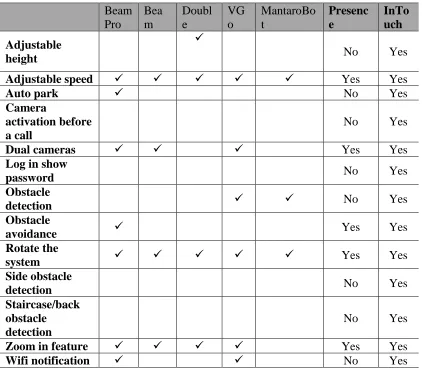
Table 3.2 Features that were included in Presence and InTouch ...18
Table 3.3 General design guidelines ...21
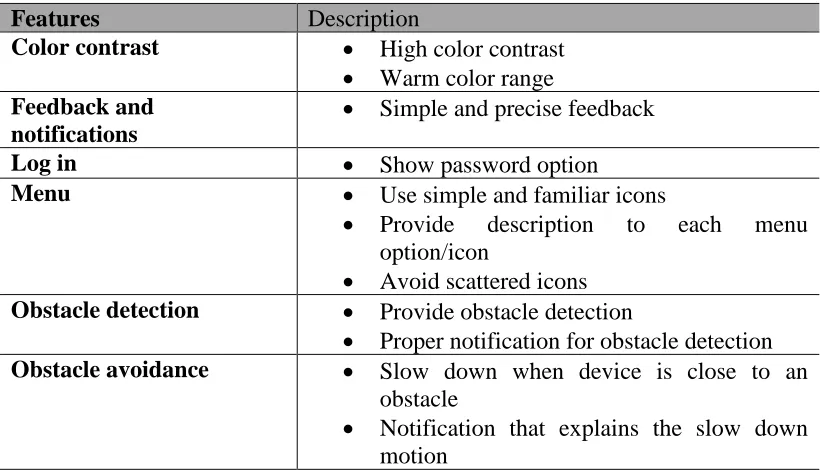
Table 3.4 Summary of usability enhanced features ...25
Table 3.5 Summary of privacy-enhanced features ...27
Table 3.6 Participants highest education level ...30
Table 3.7 Participants household income ...30
Table 3.8 User testing tasks ...33
Table 4.1 List of PEU items that InTouch yielded statistically significant higher ratings 40 Table 4.2 Additional items in STAM ...41
Table 4.3 STAM items that InTouch yielded a statistically significant higher rating ...42
Table 5.1 Recommended design features that enhances usability ...73
Table 5.2 Features that enhance privacy level ...74
LIST OF FIGURES
Figure 1.1 Depiction of telepresence ...2
Figure 1.2 Examples of televideo ...6
Figure 1.3 Examples of visual cues illustrating privacy ...11
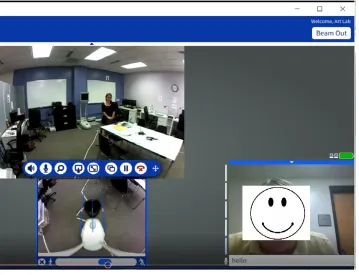
Figure 3.1 A screen shot of BeamPro UI ...22
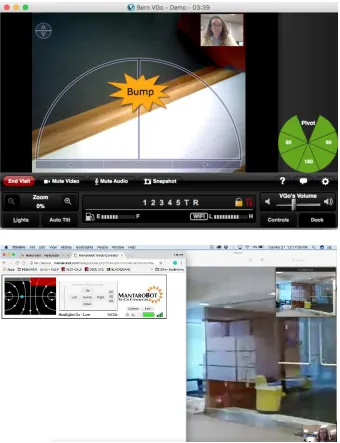
Figure 3.2 Examples of obstacle detection of VGo and MantanRobot ...24
Figure 3.3 Examples of obstacle detection and notification of InTouch ...25
Figure 3.4 Examples of room accessible control of InTouch ...26
Figure 3.5 Example of the virtual driving environment ...28
Figure 3.6 Participants video conferencing usage ...31
Figure 4.1 Mean SUS score ...37
Figure 4.2 Mean ratings of PU of Presence and InTouch ...38
Figure 4.3 Mean ratings of PEU of Presence and InTouch ...39
Figure 4.4 Senior technology acceptance model ...40
Figure 4.5 NASA TLX result...43
Figure 4.6 Privacy attitudes results ...44
Figure 4.7 Telepresence features questionnaire results ...44
Figure 4.8 First impression of Telepresence robot ...47
Figure 4.10 First Impression of Presence and InTouch ...48
Figure 4.11 Usefulness of Presence and InTouch ...50
Figure 4.12 Mean rating of perceived usefulness ...50
Figure 4.13 Why Presence/InTouch was not as useful ...51
Figure 4.14 Would Presence/InTouch help with social connectedness ...52
Figure 4.15 Additional questions regarding usefulness ...53
Figure 4.16 Mean Rating of Ease of Use ...54
Figure 4.17 Items identified as easy to use ...55
Figure 4.18 Items identified as difficult to use ...56
Figure 4.19 Mean Rating of perceived privacy: pilot user ...57
Figure 4.20 Privacy concerns as pilot user ...58
Figure 4.21 Mean Rating of perceived privacy: local user ...59
Figure 4.22 Privacy concerns as local user ...60
Figure 4.23 Preference on Presence and InTouch ...61
Figure 4.24 Why prefer InTouch ...62
Figure 4.25 Perceived easier to use...62
Figure 4.26 Screenshot of Presence UI ...63
Figure 4.27 Screenshot of InTouch UI ...63
Figure 4.28 Why InTouch was easier to use ...64
Figure 4.29 Perceived privacy level ...64
Figure 4.30 Perceived privacy enhanced feature in InTouch ...65
Figure 4.31 Responses to which system to choose in their house ...65
Figure 5.1 Grade ranking of SUS scores ...68
Figure 5.2 Zoom feature in Presence ...71
Figure 5.3 Zoom feature in InTouch ...71
LIST OF ABBREVIATIONS
HCI ... Human-Computer Interaction
HRI ... Human-Robot Interaction
CHAPTER
1
INTRODUCTION
Older adults prefer to age in place [1]. Technology has much promise to aid the aging
population meet this goal. In particular, one such technology, called telepresence, has the
tremendous potential to support older adults aging in place by facilitating engagement in
social activities and promoting communication with others.
Telepresence can be defined as robotic technology that allows a person to feel or appear
to be present in a location, typically through an interactive two-way video and audio on a
mobile base. The word telepresence emphasizes the idea of an individual remotely being
in a location in a high-fidelity manner such that the individual will feel physically present
or appear. The idea of telepresence was proposed in 1980. Marvin Minksy painted a picture
of people suiting up in sensor-motor jackets to work at their jobs thousands of miles away
[2]. He then named this tool telepresence.
Telepresence enables interactive face-to-face communications for people located at
different locations via the Internet. In addition, the system can be remotely operated, so
that the user can explore the local environment while having a conversation. Figure 1.1
illustrates the mechanism of telepresence: the pilot user is defined as a user remotely logged
user is co-located with the system in the local environment to receive a call (in Figure 1.1
b).
(a) (b)
Figure 1.1 Depiction of telepresence: (a) pilot user and (b) local user.
Telepresence may be beneficial to aging population by allowing them stay socially
connected with their family, friends or even caregivers while still aging in place
independently. However, the capabilities, limitations as well as the needs of older adults,
are quite diverse. As people age, many of the older adults may experience increase in
limitations and or impairments [3]: gradually decline in cognitive, hearing, vision and
mobility [4]. Thus, designing such technology requires considerations of factors related to
the target user group. Even if the telepresence technology meets their needs, older adults’
adoption of the technology may be hindered because the technology is not easy to use, or
the older adults feel that their privacy may be compromised by using the technology [26].
The purpose of this research proposal was to encourage older adults to adopt
telepresence successfully through a user-centered design system by doing following: 1)
design and develop a usable and privacy-enhanced telepresence user interface (UI)
InTouch; 2) evaluate if older adults perceived InTouch to be usable and private and 3)
investigate what aspects of the technology can be enhanced/modified to provide a better
development, and evaluation of a usable and privacy-enhanced telepresence system for
aging population.
1.1DEFINING OLDER ADULTS
Older adults are typically defined as people aged 65 years or above [5]. The population
of older adults is growing rapidly worldwide, as more people are living longer [6]. In the
United States, this population was 46.2 million in 2014, representing 14.5% of the U.S
population [7]. This number will more than double by 2060 [7], with an estimated 92
million older adults (20% of the population). America is aging [8].
The capabilities and limitations of the growing older adult population are diverse. As
previously noted, many older adults experience sensory, cognitive, and physical challenges
that may negatively affect their everyday activities. In addition, some individuals are aging
with lifelong impairments (e.g., visual, auditory, mobility). When individuals’ support
needs are not adequately met due to impairments, we often refer those individuals as “aging
with a disability”. A World Health Survey was administered to provide statistical
information about global disability prevalence [9]. In the survey, disability levels range
from 0 (no disability) to 100 (complete disability); a threshold of 40 was set to indicate
significant difficulties in daily life. An average disability prevalence rate for the threshold
of 40 and above among people aged 60+ was 38.1%; [9]. According to the U.S. Census
Bureau, among older adults 15.7 million have reported having one or more disability,
which comprised 38.7% of the older population [10].
For older adults, the need to sustain health and wellness while simultaneously
impairment; decline of vision/hearing) sometimes prevent older adults from participating
in social events, doing physical activities, and using facilities in the community - all of
which promote healthy aging [11] and being more socially active. Social connectedness
“occurs when a person is actively involved with another person, object, group or
environment, and that involvement promotes a sense of comfort, well-being, and anxiety
reduction” [12]. According to this definition, being socially connected is an important
component for older adults’ well-being. However, aging related physical changes might
prevent this population to be involved in social activities. Thus, the need for
socially-enhancing technology interventions, such as telepresence, to support this population are
greatly needed [13].
1.2TELEPRESENCE FOR OLDER ADULTS: ATTITUDIONAL ACCEPTANCE
Assistive technology available for the home setting is dramatically increasing [11], and
as discussed above, assistive technology, such as telepresence, that enhances social
connectivity has great potential to aid persons aging independently while maintaining their
well-being.
According to [15], the definition of physical presence was “the sense of being
physically located somewhere” while social presence was defined as feeling of being
together and communicating with someone. Thus, telepresence has the potential to
facilitate communication both physically and socially. However, whether this technology
meets the intended population’s (older adults) needs is a first logical step of the
A range of previous studies have explored the attitudinal acceptance of telepresence by
older adults and participants’ overall reaction towards telepresence technology was
positive. Beer and Takayama conducted a user needs assessment study on a telepresence
robot (n = 12; ages 63-88) [16]. In their study, each participant served as: (1) the pilot user
who operated the telepresence robot and (2) the local user who interacted with a visitor
operating the telepresence robot. Data showed that 66% of the mentioned opinions towards
the robot were positive, 28% were mixed and only 6% were negative [16], which indicated
that overall, the older adults’ attitudes on telepresence were positive.
Seelye et al. [17] interviewed older adults (N=8) and their family and friends’ attitudes
and preferences towards the robot VGo, which was placed in the homes of the 8
participants. The results of the study showed that overall, older adults and their
family/friends had positive attitudes toward the robot.
In [18, 19], caregivers/healthcare workers and older adults evaluated telepresence robots
via tutorials, focus group, and interviews, designed to assess the participants perceived
advantages and disadvantages of the robot. The results from both healthcare workers as
well as older adults showed that both user groups had positive reactions toward the robot.
Similarly, Mitzner and colleagues [20] conducted a study with 14 older adults aging
with mobility impairments (50-70 years of age). This study aimed at investigating
participants’ attitudes towards televideo technology. Overall the participants were open to
accepting the technology for social engagement, healthcare provider access, and physical
activities colleagues [20]. Benefits such as feeling being present and being able to view
facial expression were expressed colleagues [20]. Privacy/security, and difficulty to learn
In 2014, I conducted a needs assessment of telepresence for older adults with disability
(n = 9; ages 54 - 78) [21]. In this study, I investigated three televideo systems: Skype, Kubi,
and Beam (Figure 1.2). Results of this study showed that participants overall had positive
reactions towards televideo technology, indicating they could imagine using the
technology to contact family, friends and healthcare providers. Benefits such as
visualization, a “sense of presence” were identified by participants. However, concerns
towards the technology were also stated by the participants. The most mentioned concern
was perceived difficulty of use, indicating that participants would like a system that is easy
to operate. Specifically, participants were concerned with the complexity and learnability
of each technology’s hardware and software. Concerns about security and privacy were
also discussed, particularly misuse of technology to gain sensitive information, cause
embarrassing exposure, or incur harm.
Skype Kubi Beam
Figure 1.2: Examples of televideo used Wu et al. 2014
These needs assessments identified potential benefits of telepresence, which included
visualization, remote monitoring, time efficiency, reducing isolation, mobility, feeling of
studies also revealed trends in older adults’ concerns about using this technology.
Importantly, participants repeatedly expressed concern about (1) usability [16, 17, 21] and
(2) privacy issues [11, 16, 17, 18, 21]. In the following sections, I will discuss each of
these concerns in detail.
1.3USABILITY OF TELEPRESENCE
As discussed above, studies have investigated the potentially beneficial aspects of
telepresence; however, such benefits can only be met if the target population is willing and
able to actually use the technology. Although telepresence is traditionally designed for
individuals who are not older adults and do not experience disability (i.e., telepresence was
originally designed for office use [52]), some more recent HRI/HCI studies have
investigated telepresence usability with a variety of user groups. First, Boissy and
colleagues evaluated the learnability and controls of telepresence with rehabilitation
professionals (n = 10, ages 23-52). The participants of this study were trained in a
laboratory environment and the evaluation was conducted in a home setting. The result of
this study indicated that the professionals were able to operate the robot after 4 training
sessions (4 hours in total). However, navigation task in this study was simple with no
interactions with the simulated patient. The time taken to complete the tasks in this study
suggest that teleoperate a telepresence system in an unknown home environment is much
more complex for novice users. Thus, efficiency and memorability of the robot should be
improved by providing the users a better-designed user interface [22].
Another study investigated the use case with older adults that have mobility or
user-centered approach to design an augmented reality user interface to understand how people
with cognitive and/or motor impairments operate a customized interface VGo to explore
an art gallery with 5 exhibits [23]. In the case study, 4 people (from a participant base of
ages raging widely from 7 to 75) with cognitive or/and mobility impairments were
recruited. All 4 participants succeeded in operating the VGo to explore the gallery: when
participants came back for a second study session 7-10 days later, two participants needed
little to no training while the other two required only marginally more time to practice.
Participants’ ease of learning of the interface indicated that, by utilizing the design heuristic
principles, the system successfully provided its status, simple control, and feedback. This
study was conducted in a gallery that the researchers built, an environment that is static,
the authors stressed that the interface needs to be able to scale to homes, schools, or
museums and the users should be able to customize the interface [23], thus, taking into
consideration the users’ special needs and capabilities [23].
I investigated the usability of telepresence by conducting a heuristic evaluation with an
emphasis on identifying design issues for older adults aging with a mobility impairment
[24]. Heuristic evaluation is one of the most efficient usability/-engineering methodologies
for finding usability problems in an interface design [14, 57]. Conducting a heuristic
evaluation requires a small set of research evaluators to judge the interface using a standard
set of usability heuristics. Three different telepresence systems were evaluated (Double,
Vgo and BeamPro) by 3 trained researchers. Some general themes from heuristic
evaluation related to usability issues with the systems’ hardware and software were
revealed. Specifically, hardware limitations related to the size of telepresence systems and
in home settings, where homes may not be particularly accessible; clutter is often a
challenge in older adult homes [25]. Also, adjustable height was recommended,
particularly for users with mobility impairment, who may be using the telepresence systems
in seated positions (i.e., in a wheelchair). Furthermore, issues regarding the UI, ease of
system navigation were found, as well as privacy and network concerns.
This heuristic evaluation provided insight on the usability of telepresence systems for
older adults with mobility impairment; however, further user testing will provide insight
of the systems from our target users’ perspective. Thus, following the heuristic evaluation,
I conducted a user testing on telepresence systems. Five participants (N = 5) with mobility
impairment were recruited and each of them tested telepresence systems individually in a
home-like lab setting (ages 50-70). Based on participant comments, as well as observations
of their operating performance, there was a learning curve to become comfortable with the
telepresence controls. Participants commented “getting used to operate would be a little
difficult,” or that the system’s ease of use increased only after practice. Participants liked
the mobile capability of the robot, but the high mobility also caused concerns, such as
compromising privacy. Participants commented “it can follow me around the house, it’s a
little creepy”. Overall, results of the user testing suggested that participants prefer an
intuitive user interface with an emphasize of maintaining privacy.
1.4PRIVACY AND TECHNOLOGY DESIGN
Besides difficulty of use [16, 21], privacy was one other most mentioned concern users
expressed about telepresence technology [16, 21]. The ability for telepresence systems to
environment [16, 20, 21]. However, privacy concerns caused by telepresence mobility were
also mentioned by participants [16, 20, 21]. Privacy and security are considered major
barriers for the continued growth of adopting technologies [36] and “central to the concerns
of HCI” [37]. As such, for older adults to fully accept and adopt telepresence technology,
privacy preserving designs were greatly needed and should be taken into account at the
beginning of the design process.
Previous research typically categorized information into different “privateness” levels,
ranging from “not very private” to “very private” [36]. For example, location of an
individual [38], personal information (e.g., phone number, salary) [39] are considered very
private information. Information such as gender, first name and education level are
considered less private [36].
In addition to the privateness level of information, perceived privacy also depends on
the relationship between the receiver and discloser [40, 41]. For example, a spouse was
associated with the least number of privacy concerns, while a supervisor was associated
with the most [41]. Furthermore, location is also an important consideration in users’
perceptions of privacy. For instance, bathroom might be an intimate area that normally
people do not want cameras or sensing devices [53] – thus this could be an area of the home
where telepresence is restricted. However, the bathroom is identified as the most common
location for fall injuries in the home [42]. If an emergency occurs, certain users (e.g.,
caregivers, first responders) should ideally be able to override restrictions on remotely
accessing cameras or telepresence in this room. This example can be referred as access
It is also important to provide the users: what data is collected, how the data is
transmitted, and who the data will be shared with [43]. Information should be displayed in
an intuitive way by using words that are simple for older adults to understand. Providing
visual cues can help with privacy challenges [44]. Visual vocabulary for privacy includes
text, images, icons, or a combination of them [45]. For example, icons that illustrate video
and audio data will be collected during a telepresence session should be displayed; the
location of the data will be processed or stored can also be illustrated by certain visual cues.
Figure 1.3 below demonstrates examples of icons illustrating privacy.
Data collection
Data transmission
Data sharing
Data collection on/off
Figure 1.3. Examples of visual cues illustrating privacy
Telepresence has much potential to help people that have special capabilities and needs.
However, currently telepresence is typically not designed for use by aging population.
Usability issues caused by the interface or lack of privacy preserve features can create
barriers for older adults to adopt telepresence technology successfully. When designing
physical/cognitive changes as well as their perceived privacy related concerns (as older
adults might perceive privacy different from younger generation). Designing the
technology with older adults’ capabilities, limitations and needs in mind and applying
privacy preserving design considerations may ease users’ concerns of adopting and using
telepresence technology.
1.5CATEGORIZATION OF USABILITY AND PRIVACY ISSUES
In summary, the use of telepresence technology to facilitate social connectedness
among the aging population holds much potential. However, a list of design issues was
identified via previous research – particularly related to usability and privacy. Based on
previous heuristic evaluation [24] and user testing on telepresence for older adults [47], I
categorized and described common telepresence usability problems and missing privacy
settings in Table 1.4 and Table 1.5 below.
The identified usability problems and privacy issues served as a framework for this
dissertation. These two tables facilitated the user-centered design process as the
information in these tables guided the research goals and purpose.
Table 1.1 List of usability problems
Problems Description
Color contrast Low color contrast
Feedback and notification of
the system
Font size Small font size
Log in Lack of “Show password” option
Obstacle detection Lack of obstacle detection feature
Obstacle avoidance Lack of obstacle avoidance feature
Settings of the system Locations of settings are not consistent
Table 1.2 List of missing privacy settings
Problems Description
Accept/decline calls Some system does not provide decline call option
Accessible control User can initiate a call and drive to any area in the
local environment once permission is granted
Notification of screen shots Some systems provide pilot user the ability to take
screenshot, however, no notification is provided to
the local user
Visual vocabulary for privacy No visual cues to inform the user that telepresence is
CHAPTER
2
RESEARCH GOALS
The goal of this research was to design, develop, and evaluate a usable and
privacy-enhanced telepresence system for aging population on a virtual reality environment. The
scope of this project considered the user experience from both the telepresence pilot and
local operator perspective. When designing the interface, this research focused the scenario
in which older adult takes the active role of operating the telepresence system. Previous
studies suggested that older adults prefer to operate the system (as pilot user) rather than to
be visited by someone else operating the system [16]. The active role (pilot user) and
passive role (local user) are depicted in Figure 1.1.
To date, most telepresence systems are designed for office settings instead of utilized
by older adults in a home setting. This research used HCI/HRI concepts and focused on
addressing the following research questions:
RQ1: What are the essential usability and privacy-enhanced features needed to
inform the design and development of a new telepresence UI for aging population?
Most commercial telepresence systems are being sold for office environment as mobile
video conferencing tool [52]. When telepresence is applied in a home-setting for use by
older adults, some features of the system may not be suitable for target population.
and special needs. In this study, I identified and evaluated the essential design features that
a telepresence system requires to be considered user-friendly and private by older adults.
RQ2: Is the new telepresence UI perceived as more usable and private by older users
compared to traditional telepresence UI design?
The usability of InTouch (the new UI) remains unknown without user testing. User
testing of InTouch and Presence was conducted with 30 older adults. I evaluated older
adults’ accuracy in operating the telepresence UI (usability). Their perceptions of each UI
(emphasized on privacy, usability of each UI) were assessed via questionnaires and
CHAPTER 3
METHODOLOGY
3.1 USER INTERFACE DEVELOPMENT
My previous usability evaluations (heuristic evaluation and user testing) revealed
usability issues and privacy concerns [47]. Thus, in this study, the development of the UI
(InTouch) focused on usability and privacy enhancement. Instead of choosing one specific
telepresence system, implementing modifications on that system and conducting user
testing in real a home-environment, in this study, I developed a simulated virtual driving
environment via Unity. Two UIs were developed: Presence (control condition) and
InTouch (the customized UI). Both UIs were intergraded in the simulation individually
and a usability evaluation was conducted to compare each UI with 30 older adults. Using
a simulation was beneficial for a number of methodological reasons: (1) the testing
environment was strictly controlled for each individual participant; (2) proposed a privacy
and usability enhanced design framework for all telepresence system.
3.1.1 Development of the Generic UI: Presence
The purpose of the interface Presence was to represent design features commonly
found in commercially available telepresence systems and to expose users to telepresence
drove 5 different popular telepresence systems on the market (Beam, BeamPro, Double,
VGo, and MantaroBot (Table 3.1)). Among all the tested systems, the BeamPro had the
most features and functionalities, and the usable design (thus, considered to be the
state-of-the-art). Thus, the Presence interface's design was primarily based on the BeamPro.
Table 3.1. Specifications of 5 tested telepresence systems
Beam Beam Pro
Double MantaroBot VGo
Battery life Up to 8 hours
Up to 8 hours
Up to 8 hours
Up to 8 hours
Up to 6 hours
Cameras 2 2 1 via iPad 1 via tablet 1
Camera tilt No No No +85/-45
degrees
180 degrees
Charging Dock; cord
Dock Dock; cord Dock; cord Dock; cord
Height 52.9’’ 62’’ 67’’ to 60’’ 67’’ to 60’’ 48’’
Local volume control
No No Yes Yes Yes
Microphone 4 6 iPad iPad 4
Screen size 10’’ LCD 17’’ LCD iPad Tablet size 6’’
Speakers 1 front 1 front 1 via iPad 1 via iPad 2
Weight 39 lbs 120 lbs 15 lbs 15 lbs 19 lbs
3.1.2 Development of the custom UI: InTouch
Table 3.2 specified features I included in InTouch. In the following sections, I will
discuss my design choices in more detail, particularly as it relates to design for older adults.
3.1.2.1 Aging and technology design considerations
Table 3.2. Features that were included in Presence and InTouch
Beam Pro Bea m Doubl e VG o MantaroBo t Presenc e InTo uch Adjustable
height
✓
No Yes
Adjustable speed ✓ ✓ ✓ ✓ ✓ Yes Yes
Auto park ✓ No Yes
Camera
activation before a call
No Yes
Dual cameras ✓ ✓ ✓ Yes Yes
Log in show
password No Yes
Obstacle
detection ✓ ✓ No Yes
Obstacle
avoidance ✓
Yes Yes
Rotate the
system ✓ ✓ ✓ ✓ ✓ Yes Yes
Side obstacle
detection No Yes
Staircase/back obstacle detection
No Yes
Zoom in feature ✓ ✓ ✓ ✓ Yes Yes
Wifi notification ✓ ✓ No Yes
The assumption that aging population wishes to avoid adopting new technology is a
fallacy [26]. Older adults do use technology on a daily basis [54]. However, a new
technology must be carefully designed to be usable by older adults. As people age,
functional changes are normal and expected [27]. When interacting with a new technology,
tasks. Thus, technology interventions for older adults must be designed with older adults’
functional changes in mind.
Perceptual - Vision impairment among the older population is a major functional change [29] – there were a number of design recommendations I took into account when
designing InTouch. As people age, the size of the pupil becomes smaller and less light can
enter the eyes [27, 30]. Increasing screen illumination can help older adults read
comfortably. Further, increasing color contrast and size of vision details will result in
improved performance [31]. Warm colors were chosen over cool tone as the color
perception of older adults diminishes [27]. Lastly, the ability to discriminate between
colors decreases with age, particularly for colors in the blue-green range [32]. Thus, using
colors within that range was avoided.
Cognitive – Cognitive changes are a normal process of aging [34]. Age-related cognition decline includes changes in memory, attention, and language comprehension [27,
34, 35]. Memory loss is a common complaint among aging population. Memory can be
categorized into various forms. Working memory (short-term memory) is defined as active
memory of the information just been perceived [35]. The capacity of working memory
decrease as people aging: fewer pieces of information can be processed in a given time.
Procedural memory is one aspect of long-term memory: knowledge of how to perform
certain tasks. Older adults can learn new skills, but it may require more time [35 p18]. To
accommodate memory changes, recognizable and simple icons were utilized in InTouch.
Memory-support features such as Show Password were added to minimize working
The capacity of focusing and processing information is referred as attention. As the
results of changes in attention, older adults generally perform multi-task less-well than
younger adults [35 p23]. Thus, InTouch was designed to avoid complex displays, visual
clutter and concurrent actions (e.g., pressing multiple keys to perform one command).
Lastly, older adults may experience more difficulty when comprehending language
when inferences are required [35, p23]. To compensate this change, familiar terms, labels
and icons were used when designing InTouch.
Physical/Ergonomic – Physical and motoric changes can reflect on changes of body size (e.g., height and weight loss), strength, mobility and balance [28]. Adjustable height
was included as some older adults experienced mobility impairment and use a wheelchair
or feel more comfortable while seating [24].
Comprehensive design guidelines for older adults are applicable [26, 27, 28, 35].
Principles used in this study are summarized in Table 3.3, Table 3.4, Table 3.5, Table 3.6.
3.1.2.2 Usability enhanced design
Log in- A log in feature was included in all tested systems. However, none of the
commercial systems provided the user a “show password” option. According to
participants in previous user studies [47], this feature was desired. Older adults’ working
memory decline with age [35]. Thus, the show password feature can inform the users what
they typed (i.e., opposed to viewing dots) instead of requiring them to recall the
Table 3.3. General design guidelines
Menu options – The menu of the UI should be self-explanatory and easy to find. Using
simple and familiar icons will help participants understand the interface [47]. One older
adult stated, “it is easy to understand the icons because they are [icons] somewhat familiar
to me”. When testing BeamPro, participants had difficulty adjusting driving speed: the
adjustable speed slide bar was not located with other icons (Figure 3.1). The icons locations
should follow the principle of grouping, also known as Gestalt laws of grouping: the
Category Variable Design choices
Vision presentation guidelines
Color Warm color is preferred
Color contrast High color contrast Color
discrimination
Avoid using colors in blue-green or colors of the same hue
Font size Minimum acceptable font size is 12; adjustable font and graphic size
Font case Avoid using uppercase for long text; only use uppercase on short text that draws user’s attention
Illumination Increase the level of illumination Simple visual
presentation
Avoid visual clutter
Auditory presentation guideline
Volume Adjustable volume: e.g., user can increase the volume of warning signals
Design guidelines for cognitive decline
Icons Use icons that are easy to recognize; provide description to each icon
Instructions Use simple and short instructions System feedback Simple, short and clear feedback
Design guidelines for physical/motoric decline
tendency of grouping things if they are nearby (the Gestalt law of proximity); if they share
similar features (the law of similarity), or they are smooth and continuous (the law of good
continuation) [56].
Figure 3.1 A screen shot of BeamPro UI
Font size – Small font size was mentioned as an issue in previous user testing [47].
A minimum of font size 14 was applied in InTouch based on findings from [65].
Color contrast – Low color contrast can cause difficulty for older adults to use the
system [47]. Thus, a high color contrast, warm color theme was applied to InTouch.
Feedback and notifications – One major complaint in previous user testing [47]
connection is not ideal, proper notification should be provided to the users [47]. In
InTouch, notifications/feedbacks were provided (e.g., the user changed a setting or
encountered an obstacle while driving).
Obstacle detection – Obstacle detection was perceived to be beneficial by older
participants [16, 24, 47]. Some telepresence systems have an obstacle detection feature
(e.g., MantanroBot, VGo), however, when an obstacle was detected, the systems either
did not provide proper notification, or provided no notification at all. For examples,
MantanroBot had a red block to represent an object without informing users the red
blocks represent obstacles. VGo simply displayed the word “Bump” on the screen
when the system detected an obstacle (Figure 3.2), but did not specify what the
telepresence actually ran into.
To improve this feature, InTouch highlighted nearby obstacles, and provided a
notification box (Figure 3.3) to inform the user the current state of the system.
According to previous study [47], lack of notification and feedbacks were identified as
usability problems.
Obstacle avoidance – BeamPro provided obstacle avoidance: when an object was
detected, the system slowed down automatically to avoid hitting the obstacle. This
feature was identified as useful in our previous user testing [47]. Thus, obstacle
avoidance was included in InTouch. To inform the user when obstacle avoidance was
activated, a notification that explains why the robot was slowing down was also
obstacle avoidance feature should be desigend to provide proper feedback to ensure
that the users recognize the current status of the system and what to do next [64].
Figure 3.3. Examples of obstacle detection and notification of InTouch
Table 3.4 Summary of usability enhanced features
Features Description
Color contrast • High color contrast
• Warm color range
Feedback and notifications
• Simple and precise feedback
Log in • Show password option
Menu • Use simple and familiar icons
• Provide description to each menu
option/icon
• Avoid scattered icons
Obstacle detection • Provide obstacle detection
• Proper notification for obstacle detection
Obstacle avoidance • Slow down when device is close to an obstacle
3.1.2.3 Privacy enhanced design
Accessible control – As discussed in Chapter 1, under different scenarios, people’s
reactions or attitudes towards privacy disclosure might be different. Normally an older
adult might not want other people drive telepresence system to bathroom or bedroom area
[47]. Thus, constrains for pilot users to explore those areas (e.g., bedroom) was included
in InTouch (Figure 3.4). The screenshot displayed that the user was blocked from entering
the bedroom area, with a notification box indicated the user that the bedroom was a
restricted area.
Figure 3.4. Examples of room accessible control of InTouch
Camera activation before call - Before a call was initiated, the local user would see
Table 3.5 Summary of proposed privacy-enhanced features
Features Description
Accessible control • Set constrains to certain area (e.g., bathroom, bedroom)
• Caregiver or close family members can override the system
Camera activation before call
• Activate camera for local user to see themselves and their environment before a call is initiated
3.2SIMULATION DEVELOPMENT
Unity was utilized to develop the virtual driving simulation for user testing. Unity is a
game engine and integrated development environment (IDE) for developing interactive
settings and media [58]. Unity was used along with graphics and drawings created with
asset-creation tools, such as SketchUp, a development tool used for 3-dimensional
modeling. I used Unity Personal, which is considered the best in terms of affordability and
flexibility to design 3-dimensional environments to conduct studies.
Unity was chosen for this project due to the ease of use and the object-oriented
programming capabilities. Because Unity was created for game design, the manipulation
of objects, seen as potential obstacles for our purposes, was simple and straightforward.
The ability to design the interaction between the user driving the robot remotely and the
robot's environment through hierarchy and the physics engine, OpenGL, was useful [59].
of simple obstacle detection in order to simulate the real-world experience of moving
through an environment.
The design of the environment in the simulation was similar to that of my previous
studies [21], which took place in real-world environments, in that there will be several
desks and tables enclosed in four walls, Figure 3.3 show an example of the simulated virtual
environment. This simulated environment was specifically designed to closely mimic a real
home environment that included a bedroom (private room), open living spaces, and a
staircase.
Figure 3.5 Example of the virtual driving environment
Unity Technologies requires specifications for both the development and running of
desktop with Intel Core i7-4790 3.6 GHz and an x64-based processor and a Mac OS X
Sierra 10.12.3 MacBook Pro with Intel Core i5 2.9 GHz with 8 GB of memory and Intel
Iris Graphics 6100 1536 MB. The running of a Unity project is possible on a larger variety
of platforms. For the purpose of this project, I only implemented the application on a laptop
computer. The simulation represented a home-like scenario, each participant experienced
the same driving environment.
3.3HCI ELAVUATION
To evaluate the usability of InTouch, a within-subjects study was conducted, with two
conditions integrated into the virtual driving environment: 1) Presence and 2) InTouch.
Users tested each UI by performing a list of tasks. Interviews were conducted during the
test session and questionnaires were administrated pre and post each study.
3.3.1 Participants
Thirty older adults, aged from 61 to 84 (M = 71.00, SD = 5.50), were recruited to
participate in this study. Gender was not split evenly, with 9 males and 22 females;
however, this distribution is representative of the population, with more women living into
older age. The older adults were compensated with a $30 gift card for their participation in
the 2-hour study. All participants were recruited from Columbia, SC and Athens, GA, via
Assistive Robotics Technology Laboratory participant database, local senior centers, and
retirement communities. Flyers and emails of this study were distributed to senior
communities in Columbia, SC and Athens, GA. All participants volunteered to participate
Participant demographic and health information was obtained from the Demographic
and Health Questionnaire [46] (see appendix A). Participants varied in their education
background, as depicted in Table 3.6. One participant was multi-racial, 1 was black/African
American, 28 were white. Participants were widowed (16.7%), married (60%), single
(13.4%), divorced (6.7%) or living with partner (3.4%). Twenty-three (76.7%) participants
reported that they lived in a single-family home while the rest (23.4%) lived in an apartment
or condominium. One participant reported that his/her community was specifically
designed for seniors. Most participants (96.7%) reported that they could drive themselves
as the primary mode of transportation while 1 older adult (3.3%) used public transportation.
Household income of participants also varied. (Table 3.7)
Table 3.6 Participants highest education level
Highest Education Level High school
graduate/GED
Some or in-progress college/Associate’s degree
Bachelor’s degree
Master's degree
Doctoral degree
6.7% 10%)) 23.4%) 36.7% 23.4%
Table 3.7 Participants household income
Household Income < $25,000 $25,000 -
$49,999
$50,000 - $74,999
> $75,000 Do not wish to answer
The older adults were satisfied with their health (M = 4.3, SD = 1.04; where 1 = not at
all satisfied, 3 = neither satisfied nor unsatisfied, 5 = extremely satisfied). Two older adults
(6.7%) were not able to walk without a walking aid.
To assess older adults’ familiarity level of video conferencing technology, I
administered Video Conference Technology Usage Questionnaire, which included 30
different types of video conferencing systems. For each video conference technology,
participants checked if they have used those technologies in the last 12 months (see
appendix C). One older adult (3.4%) reported did not use any video conferencing
technology within the last 12 months while 29 (96.6%) reported used the such technology
at least one. The top 3 mentioned video conferencing systems were Google Hangouts,
Facebook video and Facetime. Overall, participants in this study were familiar with video
conferencing technology. Detailed video conferencing usage is depicted in Figure 3.6.
Figure 3.6 Participants video conferencing usage 26%
13%
31% 7%
12% 11%
Video conferencing usage
3.3.2 User Testing Procedure
On arrival to the user testing session, participants were informed that the user testing
session will be audio and video recorded and audio data will be transcribed for analysis.
The Demographic & Health Questionnaire and Video Conferencing Usage Questionnaire
were administered at the beginning of each study session to obtain participants’
demographic, health, and video conference usage information. Participants were instructed
to complete the materials prior to the user testing session.
The user testing followed a specific order, starting with an introduction of telepresence
technology, and its capabilities. After demonstrating telepresence technology to the
participant via a short video, following questions regarding usefulness of telepresence
technology were discussed: 1) What are your first impressions about Telepresence robot?
2) Do you think telepresence robot can be useful? Why? and (3) briefly describe how might
you use telepresence technology.
To begin with the user testing, half the participants tested Presence first, followed by
InTouch. The other half drove InTouch first, followed by Presence. This counter-balance
of order was to reduce the skewing of results due to practice effects. Each participant then
was asked to perform a list of tasks (Table 3.9). During testing, the participant was
reminded to think-out-loud [48]. This is a usability method where participants use the
system while continuously verbalizing their thoughts as they move through the user
interface [49]. This method enables researchers to discover what users really think about a
design of a system. During the user testing, hints were provided if the participant could not
regarding the tested UI were administered and the older adults were interviewed about their
opinions of the UI. After a short break, half the participants who tested Presence were then
presented with the InTouch, or via versa. Each participant performed the same list of tasks
with the same testing protocol. After this test session, the same questionnaires and
interview questions were administered.
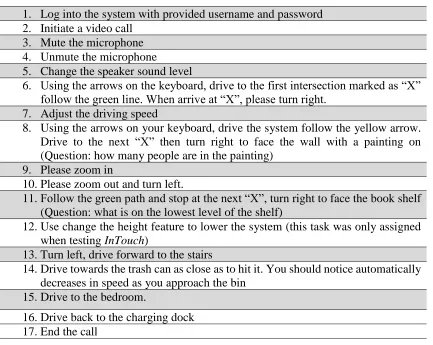
Table 3.8 User testing tasks
1. Log into the system with provided username and password 2. Initiate a video call
3. Mute the microphone 4. Unmute the microphone 5. Change the speaker sound level
6. Using the arrows on the keyboard, drive to the first intersection marked as “X” follow the green line. When arrive at “X”, please turn right.
7. Adjust the driving speed
8. Using the arrows on your keyboard, drive the system follow the yellow arrow. Drive to the next “X” then turn right to face the wall with a painting on (Question: how many people are in the painting)
9. Please zoom in
10.Please zoom out and turn left.
11.Follow the green path and stop at the next “X”, turn right to face the book shelf (Question: what is on the lowest level of the shelf)
12.Use change the height feature to lower the system (this task was only assigned when testing InTouch)
13.Turn left, drive forward to the stairs
14.Drive towards the trash can as close as to hit it. You should notice automatically decreases in speed as you approach the bin
15.Drive to the bedroom.
3.3.3 Usability Measurements
3.3.3.1Navigation Measures
Tracking each participant’s driving path in the virtual environment was vital to this
project. Similar to a case study conducted by Tsui et al. in 2015 in which they had
participants remotely visit an art gallery, allowing participants to "form and execute
movement strategies for viewing the exhibits," my plan was to have an outline of the
preferred path but allow users to navigate the virtual environment freely [23]. Unity has
extensions available for path finding, which tracked the accuracy of remote driver's
navigation. The path finding system generates a NavMesh, which displays the constraints
for an object's movement in the environment. The NavMesh also calculates the path of the
game objects at run-time [62]. I incorporated path finding into the simulation to measure
the system’s movement trajectories [23]. This granted us the ability to use the exact course
of the user and measure the differences and deviations among the varying routes [62]. This
quantified the participant’s success in driving the system, in terms of efficiency and
accuracy. The time each participant spends on finishing tasks on each interface was also
measured.
3.3.3.2Error Analysis
Errors happen and they are common during a user testing session [50]. It is important
to measure what mistakes users made during testing, how often each mistake happened,
and why each mistake happened. During each testing session, I observed each participant’s
driving performance and took note. Each session was also video recorded. Errors made by
that errors can cause by slips, mistakes, interface problems and scenario errors [50]. In this
study I mainly focused on analyzing errors caused by user interface issues. Participants’
think-out-loud data provided insight into why mistakes happened.
3.3.3.3Questionnaires
Usability questionnaires were administered with a variety of goals. Participants
completed a Perceived Usefulness Questionnaire (Appendix C), an Ease of Use
Questionnaire (Appendix D), System Usability Scale Questionnaire (Appendix E) and
NASA Task Load Index (Appendix F) after testing each UI. The Perceived Usefulness
Questionnaire measured the degree that the participants perceived that the UI would meet
their needs [51], whereas the Ease of Use Questionnaire refers to the degree to participants
that using a system would be free of effort [51]. System Usability Scale (SUS) was used
for measuring the usability of a system (e.g., software, hardware). NASA-TLX [66] was
used to evaluate participants’ perceived workload on 6 subscales.
After participants completed both testing sessions, Privacy Attitudes Questionnaire
(Appendix G) and Telepresence Features Questionnaire (Appendix H) were administered.
These questionnaires were custom made, and the purpose of Privacy Attitudes
Questionnaire was to understand participants’ privacy attitude. The Telepresence Features
Questionnaire included 6 design features, participants checked if each feature was
important to them on a 7 point Likert scale (Appendix H).
3.3.3.4Interviews
Open-ended questions were discussed at the end of each testing session to assess the
CHAPTER 4
RESULTS
4.1RESULTS FROM QUESTIONNAIRES
4.1.1 System Usability Scale (SUS) Results
SUS was originally created in 1986 by John Brooke [67]. This questionnaire is widely
used for measuring the usability of a vast variety of products (e.g., software, hardware),
and has become an industry standard. The original SUS is a 10-statement Likert scale –
half worded positively and the other half worded negatively. Each question uses a 5-point
scale of strength of agreement (with anchors for strongly agree and strongly disagree). To
interpret the data, the participants’ score for each question was converted into a new
number by implementing the following: (1) for odd number questions, I subtracted 1 from
the users’ response; for even number statements, subtracted the users’ response from 5; (2)
I summed the converted responses for each participant and (3) multiplied the total by 2.5
to convert the response from each user to 0-100.
A paired samples t-test was conducted to compare the System Usability Scale (SUS)
scores between conditions. The InTouch condition yielded a significantly (t(29)= 2.87,
p<.05) higher SUS score (M = 82.08, SD = 12.21), compared to the control Presence
condition (M = 76.33, SD = 14.79). Presence and InTouch conditions (Figure 4.1) yielded
the significant higher InTouch SUS score suggests that it was perceived by participants to
be more user friendly than Presence.
Figure 4.1 Mean SUS score
4.1.2 Technology Acceptance Model (TAM) Questionnaire Results
The TAM questionnaire was administered to assess the user’s perceived usefulness
and ease of use toward the tested interfaces. The TAM questionnaire is split into two
parts: 6 questions pertain to Perceived Usefulness (PU, Appendix C) and 6 questions
pertain to Perceived Ease of Use (PEU, Appendix D).
Paired samples t-tests were conducted to compare the average PU and PEU between
conditions. The average perceived usefulness score did not yield a significant
difference between conditions. As shown in Figure 4.2, both user interfaces were
perceived as useful by the participants.
76.33
82.08
68.00 70.00 72.00 74.00 76.00 78.00 80.00 82.00 84.00 86.00
Mean SUS Score
There was a marginally significant difference in the perceived ease of use scores
(t(29)=1.89, p=.07), with InTouch having a higher average score than Presence. This
finding supports the SUS scores (section 4.1.1). Specifically, InTouch yielded higher
scores for 4/6 of the perceived ease of use questionnaire items. These questionnaire
items are depicted in Figure 4.3 and Table 4.1.
Figure 4.2 Mean ratings of PU of Presence and InTouch
4.1.3 Senior Technology Acceptance Model (STAM) Questionnaire Result
The Senior Technology Acceptance Model (STAM) adopted from [69] was
administered to further measure the participant’s acceptance of Presence and InTouch.
4.07 4.07 3.90 4.33
3.70
5.03
4.13 4.30 4.17 4.37
3.87 5.57 0.00 1.00 2.00 3.00 4.00 5.00 6.00 7.00 Using __ would enable me to accomplish tasks more quickly. Using __ would improve my performance. Using __ would increase my productivity. Using __ would enhance my effectiveness. Using __ would make my daily life
easier.
I would find __ useful.
Mean Ratings of PU
STAM (Figure 4.4) was an extension of TAM but for older adults [69]. Compared with
TAM, the STAM questionnaire assessed 8 more dimensions (Table 4.2). Paired sample
t-tests indicated that InTouch and Presence statistically differed on 3 questionnaire items
[Table 4.3]. These 3 items belong to 3 measure dimensions: perceived ease of use,
gerontechnology self-efficacy and facilitating conditions. Based on the theoretical model
showed in Figure 4.4, all 3 dimensions relate to perceived usefulness, usage behavior and
attitudes towards use.
Figure 4.3 Mean ratings of PEU of Presence and InTouch. * Indicates statistically significant difference.
6.13 5.93 6.00
5.70
6.33 6.10
6.40 6.23 6.07 6.17 6.33 6.47
0.00 1.00 2.00 3.00 4.00 5.00 6.00 7.00 Learning to operate __ would be easy
for me.
I would find it easy to get __ to do what I want it
to do.
My interaction with __ would be clear and understandable.
I would find __ flexible to interact with.
It would be easy for me to become skillful
at using __.
I would find __ easy to use.
Mean Rating of PEU
Table 4.1 List of PEU items that InTouch yielded statistically significant higher ratings
Questionnaire Item
InTouch M
InTouch SD
Presence M
Presence SD
t-valu e
p
Learning to operate ____ would be easy for me
6.40 .86 6.13 .90 2.11 .043
I would find it easy to get ____ to do what I want it to do
6.23 .90 5.93 .98 2.19 .037
I would find ____ flexible to interact with
6.17 .65 5.79 1.12 2.09 .046
I would find ____ easy to use
6.47 .68 6.10 .96 2.63 .014
Table 4.2 Additional items in STAM
Gerontechnology self-efficacy
You could complete a task using technology if there is someone to demonstrate how
You could complete a task using technology if you have just the instruction manual for assistance
Gerontechnology anxiety
You feel apprehensive about using the technology You hesitate to use the technology for fear of making mistakes you cannot correct
Facilitating conditions
You have the knowledge necessary to use the system A specific person (or group) is available for assistance with technology difficulties
Your financial status does not limit your activities in using technology
When you want or need to use technologies, they are accessible for you
Your family and friends think/support that you should use technology
Self-reported health conditions
How are your general health conditions
How are your health conditions compared with the same-age groups?
How good is your hearing How well can you see
How well are you able to move around
Cognitive ability
How would you rate your memory
How satisfied are you with your ability to learn new information
How well are you able to concentrate
How satisfied are you with your ability to make decisions
Social relationships
How satisfied are you with your personal relationships How satisfied are you with the support you get from your friends and family
Do you participate in social or community activities
Psychological function Do you feel that as you get older you are less useful How satisfied are you with your quality of life
Physical function
Ability to use telephone Grocery shopping Food preparation
Doing housework or handyman work Laundry
Getting to places beyond walking distance Taking medications