1
ECE-320 Lab 8: Utilizing a dsPIC to control the speed of a wheel
Overview: In this lab we will utilize the dsPIC30F6015 to implement a PID controller to control the speed of a wheel. Most of the initial code will be given to you (see the class website), and you will have to modify the code as you go on. One of the things you will discover is that you often need to be aware of limitations of both hardware and software when you try to implement a controller. The dsPIC30F6015 has been mounted on a carrier board that allows us to
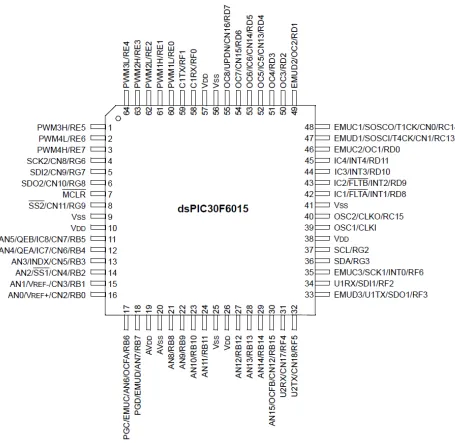
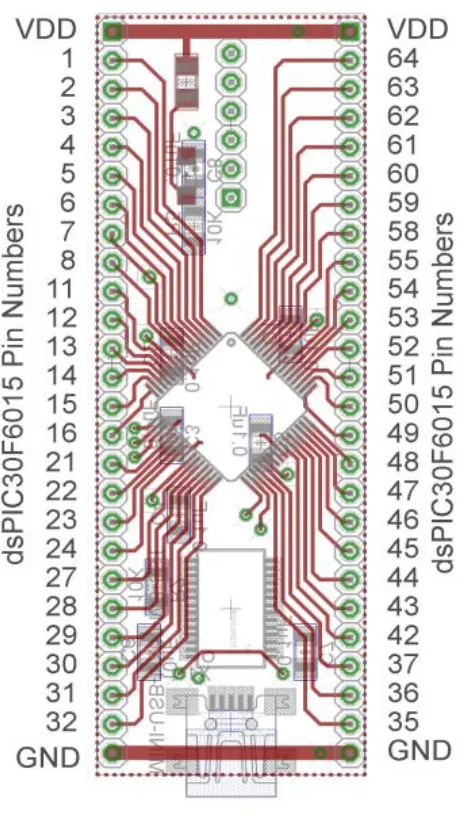
[image:1.612.80.535.242.685.2]communicate with a terminal (your laptop) via a USB cable. In what follows you will need to make reference to the pin out of the dsPIC30F6015 (shown in Figure 1) and the corresponding pins on the carrier (shown in Figure 2).
2
3
Part A: Reading in an A/D value fro the pot
[image:3.612.212.434.164.363.2]We want to be able to connect a potentiometer so we can have a variable reference. The software is currently set up for A/D input on AN3/RB3. You did this last week so it may still be set up. See Figure 3 below.
Figure 3. Potentiometer input.
Part B: Reading in the sensor transducer
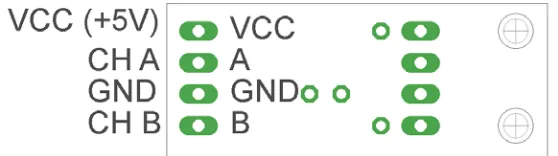
In order to determine how fast the motor is spinning, we will need to use the QEI interface. The sensor is connected to the center of the wheel, and the other end of the sensor plugs into the breadboard. The pins for the interface are shown in Figure 4. You need to connect this interface to +5 volts (red ), ground (blue), and the QEA Channel A input (pin 12), and the QEA Channel B input (pin 11).
[image:3.612.166.445.531.609.2]4
Part C: Connecting the power entry
[image:4.612.133.481.142.312.2]Plug in both the 5 volt (green) and 12 volt (red) power supplies, as shown in Figure 5. Do not turn on the supplies yet (the LEDs should be off) .
Figure 5. Power entry module
Part D: Connecting the H Bridge
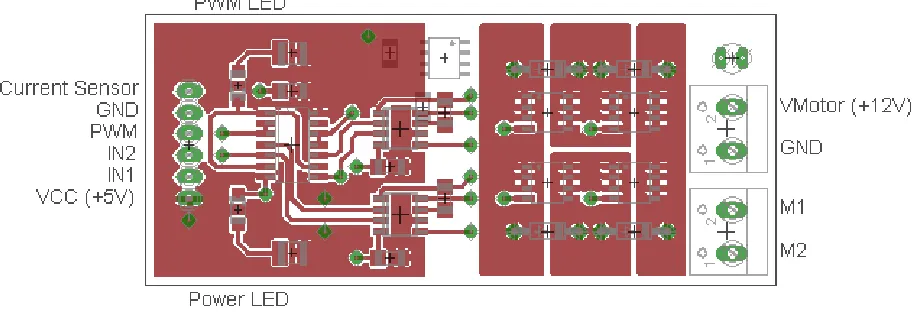
Plug in the H-bridge, shown in Figure 6. You are going to need access to the different pins, so be sure it is located in a place you can easily get wires to.
Figure 6. H Bridge connections
Starting on the left, connect the ground and +5 volt supplies. Next, connect IN1 to E6 (pin 2) and IN2 to E7 (pin 3). (Note that if the motor speed is negative you may want to reverse these
[image:4.612.76.535.427.584.2]5
Starting on the right, connect (with the twisted wires) the 12 volt power from the power entry module to the 12 volt input. Be sure to connect ground to ground and +12 to +12. Next, connect M1 and M2 (using the twisted wires) to the motor input.
At this point all of your wiring should be done. You should check it over before you go on.
Part E: Connecting to SecureCRT
• We again will be using SecureCRT for debugging and storing data. You may have to review the last lab, but most likely you will just start SecureCRT and click on the session name you made last week.
• Select Edit and then Clear Screen and rollback
• Select File and then Log Session
• Enter a file name. (You may have to select Log Session twice to save the last session)
PART F: Information before you go on
Two important things to keep in mind as you do the remainder of this lab:
• Use the red switch to shut off power to the motor. Sometimes stopping the dsPIC does not stop the motor, in which case you will need to use the switch.
• Unless you are told otherwise (and later in the lab you will be), turn the pot fairly slowly.
PART G: Determining Initial Scaling
Now we will start to determine some of our parameters. With the system at rest start the program and slowly turn the pot so the motor is spinning (less than 30 rad/sec). Let the motor come to a reasonably steady value (it will likely keep getting faster). Do this for three different positions of the pot where the steady state speed is less than 100 rad/sec. Finally turn the pot as far as it can go and let the system reach steady state.
We now want to determine the proportionality constant between the A/D value read from the pot and the motor speed in rad/sec. You should look at your recorded data and choose three steady state values below 100 rad/sec. Compute the three scaling factors and average them (mine was approximately 0.25). Finally compare this scaling with the scaling your obtained for the pot turned all the way. Clearly there is some nonlinear motor behavior here!
Change the parameter AD_scale (in your code) to this value. Modify the printf statement at the end of the code to print out the predicted wheel speed and the actual motor speed. They should be fairly close for speeds below 100 rad/sec, but they will not be exact.
PART H: Proportional Control
6
loop set kp = 1.0, and inside the main loop, after both the speed and reference input are
determined, compute the error as error = R-speed. The control effort is then proportional to this error, so u = kp *error.
Now start the system again. Move the pot to a number of different set points, and wait until the system comes to steady state. Most likely the steady state value will be approximately one half of the set point.
Stop the system and change the value of kp to 5, and then to 10. (Be sure to recompile and download after each time). Run the system again for each value of kp. You should notice that the steady state error gets smaller each time.
PART I: Limiting the slope of the control effort
One of the first limitations we will have to deal with is the fact that if you try and draw too much power all at once, the power supply assumes you have screwed up. This leads to some strange behavior.
Starring with kp = 10.0, start the system and turn the pot (setting the reference input) as quickly as you can (but don’t worry about turning it all the way). Mostly likely you hear strange sounds from the motor like it is starting and stopping (or worse).
What we need to do in this case is limit the rate at which we allow the control signal to change. At the top of the code there is a constant MAX_DELTA_U which indicates the maximum change in control effort u from one time step to the next. This constant is going to need to be changed (but we will get to that). Declare a new (double) variable last_u, and set this variable equal to zero outside the main loop. Inside the main loop, add statements to the code that do not allow the control effort to increase by more than its current value + the maximum allowed
increment. Be sure to put these statements before we check that the control effort is not too large. Also be sure to update the value of last_u. However, do not update this value until the other statements in the code that insure that the value of u is within acceptable limits. Finally, you will need to set the value for MAX_DELTA_U. I would start at around 200, and change this as necessary. Run your code and try to change the pot (the reference input) as quickly as possible. Once you think your values are ok, set kp=100.0 and be sure your system runs acceptably (the motor does not shut off and on).
PART J: Proportional controllers with large gains
7
larger part is due to the fact that small errors are amplified (by 100) and this causes the motor to continually oscillate.
PART K: Setting the prefilter gains
Set the value of kp to 10.0. Recompile and download the code. Open a new log file in
SecureCRT to save your data to. Vary the reference signal to a few set points (such as 30 rad/sec, 60 rad/sec, and 90 rad/sec). Let the system come to steady state at each point (or close to it). Stop the system and look at your data. Estimate the prefilter gain by finding the ratio of the input reference, R, to the steady state speed. Declare a new (double) variable Gpf. Outside of the main loop set the value of Gpf to the value you computed. In order to keep our printf statement the way it is, redefine error = Gpf*R-speed. Recompile and download the code. Vary the reference signal to a few set points again, and see how well the motor speed matches the reference speed. Finally, be sure to set the reference speed to something fairly fast, such as 120 rad/sec. Does the prefilter seem to work? (write something in your memo)
Set Gpf to a value of 1.0 for the remainder of this lab.
PART L: Integral control
Recall that using a prefilter to control steady state error can sometimes be problematic since the prefilter is outside the feedback loop. An alternative, and generally better, solution is to include some form of integral control. Recall that an integral controller has the form
1 = ) ( ) ) ( 1 ( i c
k U z
z z z G E − = −
Rearranging this we get
1
U(z)
( ) ( )
iE z U z
k = −z−
In the time-domain this becomes
( ) ( ) ( 1)
ie n u n u
k = − n−
Since we want the control effort as our output, we will write this as
( ) (n 1) i ( )n u n =u − +k e
8
1
(1) (0) (1)
(2) (2) (1) [ (2) (1)]
(3) (3) (
(1
2) [ (3) (2) e(1)]
( ) ) ( ) i i i i i i n i k
e u k e
u k
u
e u k e e
u k e u k e e
u n k e k
k = + = = + = + = + = = = + +
∑
Hence to implement the integral control, we need to sum the error terms and then scale them by
i
k .
Declare two new (double) variables Isum and ki. Set the initial value of Isum to zero outside the main loop. Within the main loop update the error summation using something like Isum = Isum + error. Within the main loop implement a PI controller as follows:
u = kp*error + ki*Isum;
Set kp = 0.0 and ki = 0.5. Modify the print statement at the end of your code so the value of
Isum is also printed out. Recompile and download your code. Start the system and set the reference signal to a few reference points (30, 60, 90 rad/sec, for example), and let the system run for a while. Your system will probably exhibit some pretty strange behavior on its way to the correct steady state value (it will bounce around the steady state value due to sampling). Look at what is happening to the value of Isum during this strange behavior.
PART M: Integrator problems
The first problem we need to fix is that our motor is only spinning in one direction. When Isum
becomes large and negative, we would expect the motor to spin in the other direction, but it can’t. One way to minimize this effect is to check to be sure that the value of Isum is greater than or equal to zero. Modify your code to do this, recompile, and run it again.
The second problem we have is called integrator windup. Basically, the accumulated error is becoming too large and causes the system to overshoot, and then undershoot. One way to fix this is to limit the value of Isum to a maximum value. There is a defined variable at the beginning of the code MAX_ISUM. You need to set a reasonable value for this variable and limit the value of
9
Note that you will still have some oscillations, and that to get to a large steady state value
MAX_ISUM will need to be fairly large.
PART N: Including a derivative term
Finally we need to include a derivative term to implement a full PID controller. You will need to define three new (double) variables, kd, Derror, and last_error. Outside of the main loop set
Derror and last_error equal to zero and set kd equal to 0.01.
Inside the main loop include the lines
Derror = error-last-error;
Last_error = error;
Finally, to implement the full PID controller define the control error u to be
u = kp*error+ki*Isum+kd*Derror;
Compile and download your code, and try a few reference points. Your system may still oscillate, but we can work on that soon.
PART O: Designing a PID controller
At this point, we want to hardcode the value of the reference signal so the step response will start as soon as we turn on the system. Just after the statement where we assign R based on the A/D value, insert the statement
R = 90.0; // set for 90 rad/sec
A general plan for designing a PID controller using a trial and error method (we have no model for the plant) is the following:
• First, set ki = kd = 0, and try to get a good response for a step input using only kp.
• Next, adjust ki to get a good steady state error. Since the integral control tends to slow the system down, don’t make this any larger than you need to. However, you may need to also change MAX_ISUM to get a good response.
• Finally, adjust kd to speed up the response.
Once you have a good design, you need to log your data so you can make a Matlab plot. If you have saved your data in a file named (for example) play3.log, then in Matlab type
data = load(‘play3.log’);
t = data(:,1);
10
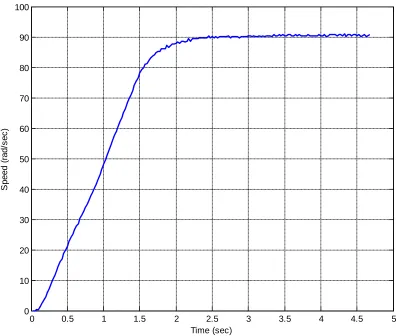
The plot I have for one of my results is shown in Figure 7.
Design PID controllers to meet the specifications shown below.Include a Matlab generated figure of your step response results in your memo, and be sure to include both the sampling interval and the values of kp, ki, and kd.
(i) For a sampling interval of T = 0.025 sec (the default) our design criteria is a settling time of less than or equal to 2.5 seconds, and a percent overshoot less than 10%. (ii) For a sampling time of 0.1 sec, our design criteria is a settling time of less than or
equal to 3.5 seconds, and a percent overshoot less than 10%.
[image:10.612.83.480.268.604.2](iii) For a sampling time of 0.1 sec, design a PID controller so there is at least a 10% overshoot and the settling time is less than 10 seconds.
Figure 7: Step response for system with T = 0.025 seconds. I am not telling you my parameter values.
Finally, I would appreciate any comments you may have on this lab, and how to improve it. Also, do you think it was useful and we should do more labs like this in the future or not?
0 0.5 1 1.5 2 2.5 3 3.5 4 4.5 5 0
10 20 30 40 50 60 70 80 90 100
S
peed (
rad/
s
ec
)