University of Warwick institutional repository: http://go.warwick.ac.uk/wrap
A Thesis Submitted for the Degree of PhD at the University of Warwick
http://go.warwick.ac.uk/wrap/36230
This thesis is made available online and is protected by original copyright. Please scroll down to view the document itself.
Using and Evaluating CASE Tools:
From Software Engineering
to Phenomenology
Stephen F. King
A Thesis submitted for the degree of
Doctor of Philosophy
at the University of Warwick
January 1995
Warwick Business School
University of Warwick
Summary
CASE (Computer-Aided Systems Engineering) is a recent addition to the long line of "silver bullets" that promise to transform information systems development, delivering new levels of quality and productivity. CASE is particularly intriguing because information systems (IS) practitioners spend their working lives applying information technology (IT) to other people's work, and now they are applying it to themselves. CASE research to date has been dominated by accounts of tool development, normative writings (for example practitioner success stories) and surveys recording IT specialists' perceptions. There have been very few in-depth studies of tool use, and very few attempts to quantify benefits, therefore the essence of the CASE process remains largely unexplored, and the views of stakeholders other than the IT specialists have yet to be heard.
The research presented here addresses these concerns by adopting a hybrid research
approach combining action research, grounded theory and phenoinenology and using
both qualitative and quantitative data in order to tell the story of a system developer's experience in using CASE tools in three information systems projects for a major UK car manufacturer over a four year period. The author was the lead developer on all three projects. Action research is a learning process, the researcher is an explorer. At the start of this project it was assumed that the tools would be the focus of the work. As the research progressed it became evident that the tools were but part of a richer organisational context in which culture, politics, history, external initiatives and cognitive limitations played important roles. The author continued to record experiences and impressions of tool use in the project diary together with quality and productivity metrics. But the diary also became home to a story of organisational developments that had not originally been foreseen.
The principal contribution made by the work is to identity the narrow positivistic nature of CASE knowledge, and to show via the research stories the overwhelming importance of organisational context to systems development success and how the exploration of context is poorly supported by the tools. Sixteen further contributions are listed in the Conclusions to the thesis, including a major extension to Wynekoop and Conger's CASE research taxonomy, an identification of the potentially misleading nature of quantitative IS assessment and further evidence of the limitations of the "scientific" approach to systems development.
Table of Contents
Part 1 - Introduction
Chapter 1. Introduction 2
1.1 CASE Zeitgeist 2
1.2 What is CASE? 4
1.3 Why is CASE Important? -7
1.4 Summary of Terminology 11
1.5 Genesis of the Research 12
1.6 Research Details 14
1.7 Thesis Structure and Evolution 16
Part 2 - CarMaker Research
Introduction to Part 2 19
Chapter 2. Study 1 - The New Model Project: The "Technical" Project 21
2.1 Introduction 21
2.2 The Stakeholders 22
2.3 The Story 24
2.4 Metrics and Stakeholder Views 54
2.4.1 Productivity Assessment 54
Chapter 3. Study 2 - The Warranty Project: The "Marginalised" Project 62
3. 1 Introduction 62
3.2 The Stakeholders 63
3.3 The Story 66
3.4 Metrics and Stakeholder Views 82
3.4.1 Productivity Assessment 82
3.4.2 Quality Assessment 83
Chapter 4. Study 3 - The Recycling Project: The 'Political" Project 90
4.1 Introduction 90
4.2 The Stakeholders 92
4.3 The Story 95
4.4 Metrics and Stakeholder Views 178
4.4.1 Productivity Assessment 178
4.4.2 Quality Assessment 179
Chapter 5. Lessons Learned 185
5. 1 Introduction 185
5.2 Lessons Learned 186
5.2. 1 Category 1: Politics 187
5.2.2 Category 2: History 191
5.2.3 Category 3: Technology 193
5.2.4 Category 4: Cognitive Limitations 203
5.2.5 Category 5: Professionalism I 210
5.2.6 Category 6: Culture / Commitment 217
5.2.7 Category 7: IS Assessment 219
5.2.8 Category 8: Noise 222
5.2.9 Category 9: Emotion 224
5.2.10 Category 10: Research Approach 227
Summary of Part 2 233
Part 3 - Contribution
Introduction to Part 3 234
Chapter 6. Literature Review 235
6.1 Introduction 235
6.2 The CASE Literature 241
6.2.1 CASE Survey Research 241
6.2.2 CASE Case Study / Action Research 243
6.2.3 CASE Laboratory Experiments 245
6.2.4 CASE Normative Writings 247
6.3 The IS Development Literature 249
6.3.1 IS Development Survey Research 249
6.3.2 IS Development Case Study / Action Research 251
6.4 The IS Assessment Literature 259
6.4.1 Productivity 259
6.4.2 Quality 266
6.5 The IS Research Methodology Literature 270
6.5.1 Dominant Paradigm 270
6.5.2 Pluralism 272
6.5.3 Choice of Research Approach for 278
CarMaker CASE Studies
Chapter 7. Grounding the CarMaker Research 282
7.1 Introduction 282
7.2 Grounding the Research Approach 284
7.3 Grounding the Research Results 287
7.3.1 Grounding the Productivity and Quality Results 287
7.3.2 Quality Systems Quickly? 295
7.3.3 Grounding the Lessons Learned 298
7.3.4 Summary of Contribution 307
7.4 Limitations 310
Chapter 8. Conclusions and Further Work 316
8.1 Introduction 316
8.2 Conclusions 317
8.2.1 Overview 317
8.3 Further Work 330
8.3.1 Grounding IS Process Theory 330
8.3.2 CASE Tools and Organisational Context 334
Bibliography 338
1. Full Bibliography in Author Name Order 338
2. CASE Bibliography in Reference Number Order 357
Appendices
Appendix 1 Publications Arising from the Research 365
1.1 The Quality Gap: A Case Study in Information Systems Development Quality and Productivity using CASE Tools 365
1.2 Modelling the CASE Process:
Empirical Issues and Future Directions 366
Appendix 2 New Model Project Data 367
2. 1 New Model Effort, Participation and Tool Usage 368
2.2 New Model Defect and Change Analysis 375
2.3 New Model Stakeholder Views: Interview Transcripts 381
Appendix 3 Warranty Project Data 389
3.1 Warranty Effort, Participation and Tool Usage 390
Appendix 4 Recycling Project Data 405
4.1 Recycling Project Effort, Participation and Tool Usage 406
4.2 Recycling Project Defect and Change Analysis 414
To Helen
and Bet/ian
Acknowledgements
The story told in this thesis represents four years of intensive learning by the author.
An action research approach was adopted, which meant that the author had the
opportunity to assume the dual role of researcher and practitioner in order to evaluate
the new technology of Computer-Aided Systems Engineering (CASE). Other research
approaches allow the researcher to observe from a distance, and not to become
involved in the messy reality of organisations. Action research forces the researcher
to confront the reality of technology, people and organisations in the pursuit of
knowledge. Over the four years the author worked alongside many people, building
computer-based information systems for a major UK car manufacturer, and evaluating
the CASE tools in the process. What started out as a technology study soon became
a socio-political study as well, as the limitations of the technology in the face of the
complex organisational environment became evident. The research topic expanded
rapidly and became far more demanding as the need to understand culture, politics
and cognitive limitations overtook the need to understand the tools.
The final story is far richer for this change of emphasis, but in order to tell the whole
story I have had to change the names of the people, the organisations and the tools
with which I have worked. The unfortunate consequence of this is that I cannot
acknowledge by name the many individuals who helped me in this work. They will
remain anonymous, but my thanks goes to them for the unique opportunity that I have
One person that I can name is my supervisor, Professor Bob Galliers of the Warwick
Business School. Bob's enthusiasm for information systems research is infectious,
he somehow finds time in a breath-taking international schedule to encourage tentative
Declaration
The work described herein is entirely the original work of the author. Two
publications have arisen from this work to date, abstracts of the publications are
List of Figures
1 . 1 Process Map of the Thesis 18
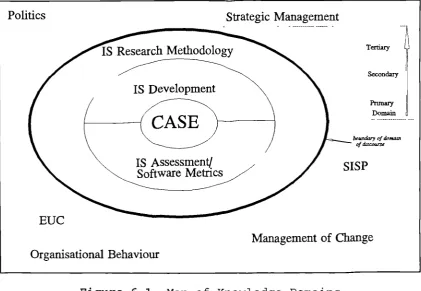
6.1 Map of Knowledge Domains 236
List
of
Tables
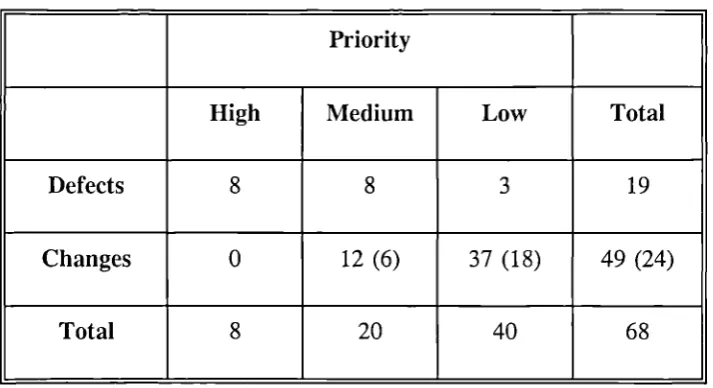
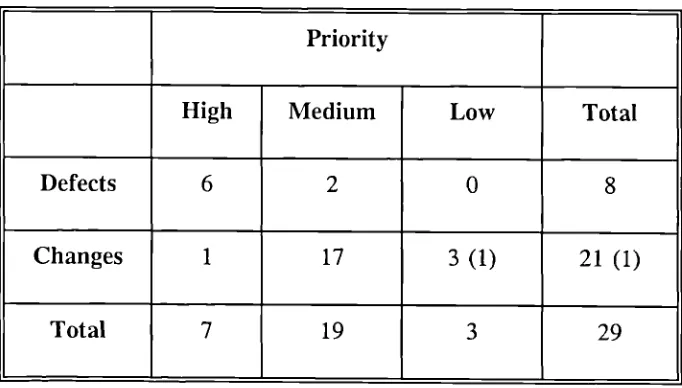
2.1 Summary of Defects and Changes: New Model Project 56
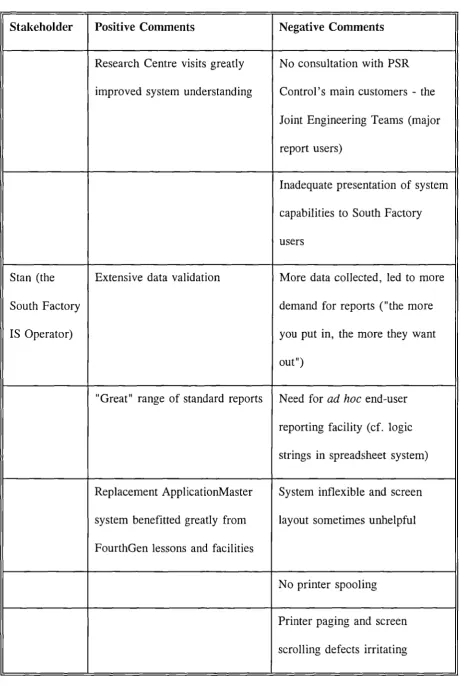
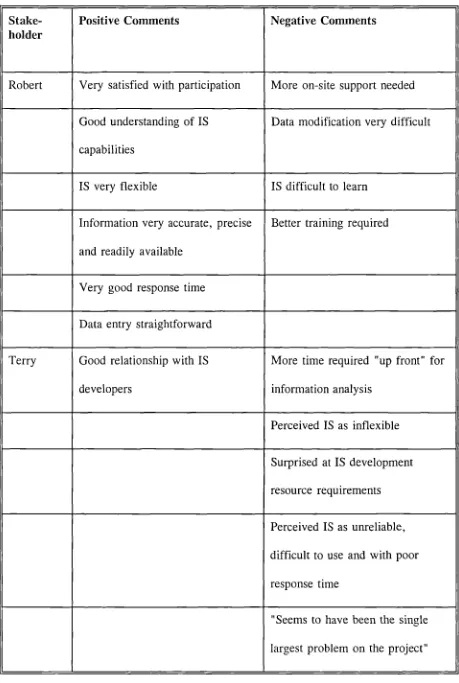
2.2 Summary of Stakeholder Interviews: New Model Project 61
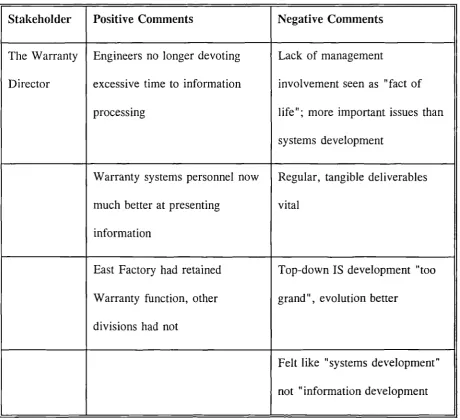
3. 1 Summary of Stakeholder Interviews: Warranty Project 89
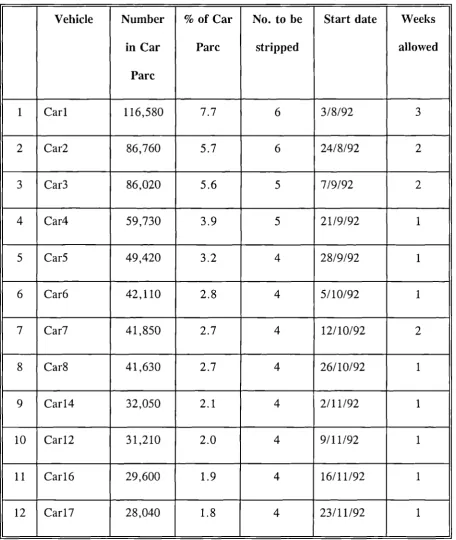
4. 1 Initial Vehicle Strip Schedule 103
4.2 Summary of Defects and Changes: Recycling Project 180
4.3 Summary of Stakeholder Interviews: Recycling Project 184
5.1 Comparison of CarMaker Research Approach with Standard Approaches 232
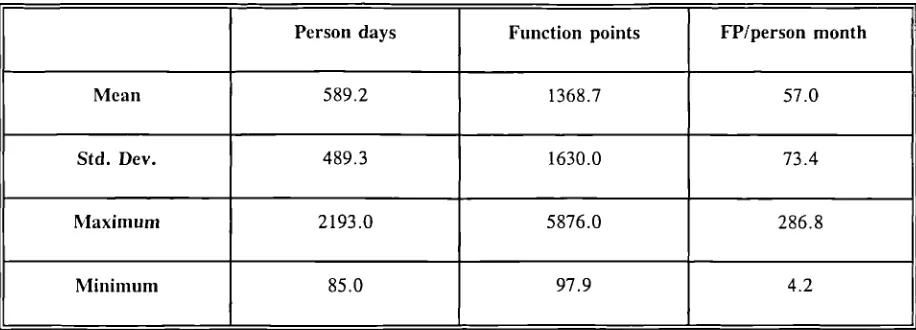
6.1 Productivity: Banker and Kauffman (1991) 260
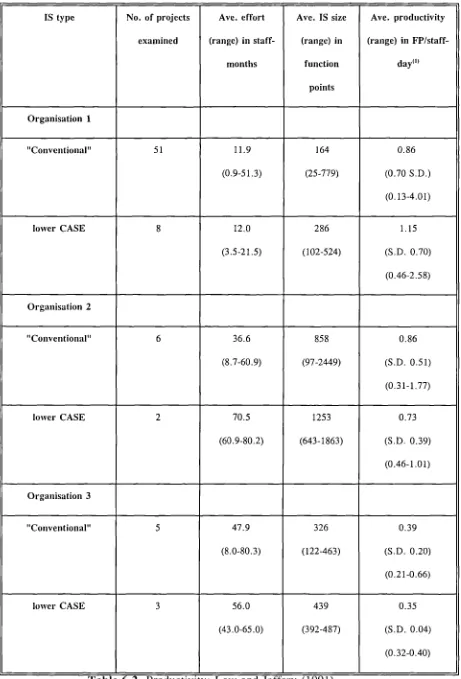
6.2 Productivity: Low and Jeffery (1991) 261
6.3 Productivity: Swanson et al. (1991) 262
6.4 Productivity: Boehm (1981) 263
6.5 Productivity: Cusumano and Kemerer (1990) 264
6.6 Productivity: Dreger (1989) 264
6.7 Quality: Fenton (1991) 269
6.8 Comparison of Positivistic Science and Action Research 270
6.9 Articles Classified by Research Design 271
6.10 A Summary of the Key Features, Strengths and Weaknesses 276
of Alternative Information Systems Research Approaches
6.11 Comparison of IS Research Taxonomies 277
7.1 Updated Classification of CASE Literature 286
7.2 Productivity Comparison 288
7.4 Defect Comparison 291
7.5
Recycling Project Defect Summary 2937.6 The Contribution Matrix 306
7.7 Summary of Contribution 307
List
of
Abbreviations
3GL Third Generation Language
4GL Fourth Generation Language
AMI Application of Metrics in Industry
BCS British Computer Society
BoM Bill of Material
CAD/CAM Computer Aided Design / Computer Aided Manufacturing
CASE Computer Aided Systems Engineering
CBIS Computer-Based Information System
CSF Critical Success Factor
DD Data Dictionary
DFD Data Flow Diagram
DPM Data Processing Manager
DOS Disk Operating System
ERM Entity-Relationship Model
EUC End-User Computing
FP Function Point
ICASE Integrated CASE
IFIP International Federation of Information Processing
ISO International Standards Organisation
IPSE Integrated Project / Programming Support Environment
ISD Information Systems Development
LOC
MIS
MRP
PCA
PSG
PSR
SDV
SISP
SLOC
SQL
SSADM
UDI
U'S
VPG
Line of Code
Management Information Systems
Manufacturing Requirements Planning
Product Change Authorization
Product Support Group
Problem Status Report
Special Development Vehicle
Strategic Information Systems Planning
Source Line of Code
Structured Query Language
Structured Systems Analysis and Design Methodology
Unilateral Declaration of Independence
User Information Satisfaction
Prologue
"Assessment is not a simple task because the relationship between
technical solutions and organizational consequences is not well
understood. Successes are frequently sheer luck, and failures are often
due to our lack of ability to foresee the organizational consequences of
technical solutions and/or because the chosen technical solutions do not
have the anticipated results." (Bjorn-Andersen and Davis, 1988, p. v)
"The acceptance of 'academic' [IS development] methods in practice is
low and, in general, the rate of transfer of research results and
'know-how' from scientific research to industry is embarrassingly slow.
Part 1
Chapter 1
Introduction
1.1 CASE Zeitgeist
Software is big business. The demand for software-based products and systems is
increasing inexorably as the microprocessor colonises everything: domestic
appliances, entertainment systems, telephones, motor cars, aeroplanes, offices,
factories and schools. As the demand for flexible and high-functionality systems
increases so does the demand for the software that controls these systems.
"Demands for greater functionality and integration of applications call for larger and larger programs" (Swanson et al., 1991, p. 566).
Swanson et al. go on to report that the average size of software systems has risen
from 23,000 lines of code in 1980 to 1,246,000 lines of code in 1990. As the
demand for software increases, so does the pressure on software and system
developers. The information technology community is notorious for reaching for
Silver Bullets (Brooks, 1987), miracle cures that will dramatically transform software
development providing orders of magnitude improvements in cost, quality and
the profession's imagination: CASE (Price Waterhouse, 1989, Holloway and
Bidgood, 1991).
"CASE is the latest in a long line of techniques to solve the timescale, quality and staff shortage problems of computer systems development." (Price
Waterhouse, 1989, P. 17)
"Unlike other panaceas, CASE will not go away, since it provides the framework that embraces them all." (Price Waterhouse, 1989, p. 21)
Expectations of CASE ran high in 1989, CASE dominated the pages of the computing
press and was the subject of numerous marketing campaigns as CASE tool vendors
scrambled to exploit the new panacea. The CASE zeitgeist was one of excitement at
the possibility of doing to systems development what systems developers had been
doing to everyone else for years: automating the work. Since there were staff
shortages, there was little fear of job losses, instead there was excitement at the
opportunity to use advanced IT to develop IT and, in doing so, increase the skill
levels of the profession so that everyone could become analysts.
The British Computer Society CASE Conferences
The mood of the time was summarised by the type of paper presented at two British
Computer Society CASE conferences in the early 1990s (Spurr and Layzell, 1990 and
1992), where the majority of papers presented either new tool developments, such as
stories. The occasional doubting paper usually concluded that better technology or
better methods would resolve the problems encountered.
The research programme described in this thesis investigates the reality of using
state-of-the-art CASE tools, to see if the claimed improvements in system development
performance and the unquestioning faith in technology are justified.
1.2 What is CASE?
There is no agreed definition of CASE, although most subscribe to a small group of
concepts. Firstly, the acronym CASE has two common interpretations. CASE is
Computer-Aided Software Engineering if your focus is software engineering, or
Computer-Aided Systems Engineering if your focus is information systems (IS)
development. This distinction is helpful, in that it highlights the centrality of the
purpose for which the tools are used. Software engineering has the objective of
creating software for embedding in a deterministic system, such as a washing
machine, or a motor car engine, or a telephone exchange. The environment in which
the software is to function can be defined, and the range of inputs and outputs
prescribed. In contrast, information systems development attempts to embed software
in a human activity system (Checkland, 1981), which is a combination of software,
hardware, and human beings - who are non-deterministic! The challenge of software
engineering is to produce a highly-reliable product that performs as expected in
potentially hostile environments, and fails safe if the unexpected occurs. The
challenge of information systems development is to develop a reliable software
expectations of many customers. Furthermore, these expectations change over time
and often cannot be predicted. Usability, flexibility and maintainability therefore join
reliability as critical success factors. As this study explores information system
development, CASE will be interpreted as "Systems Engineering".
Although there is no single definition of the components of CASE, the Price
Waterhouse (1989) definition is representative of the majority:
"For this year's answer to life, the universe and everything, as far as DPMs are concerned, is CASE ... CASE, we are told, will do for computing what CAD/CAM did for manufacturing. It will automate much of the task of production, (the programmer's job), and add tremendous power to the
designer's elbow (that of the systems analyst). " ( p. 17)
The report goes on to define three CASE components:
1. Upper CASE: tools for automating systems analysis.
Upper CASE tools are often called Analyst Workbenches. They
typically comprise of a graphical user interface that supports the
creation and maintenance of logical models of the information system
being developed (typically data flow diagrams and entity-relationship
models). In addition to the diagrams further data is stored including
narrative descriptions of processes and data, data element definition,
screen designs and report layouts. Both the diagrams and the
upper CASE tools provide interfaces to other software products, such
as lower CASE tools and word processors.
2. Lower CASE: tools for automating programming.
The term Lower CASE tool typically encompasses fourth-generation
languages (4GLs), relational database systems with query languages
and application/code generators. The tools accept input in a higher
level "language" than third generation programming languages and
either execute the instructions internally, or generate third generation
code for subsequent execution. Input may be in the form of high-level
program statements or by the user responding to prompts or filling in
pre-defined fields presented by the 4GL.
3. IPSE (Integrated Programming/Project Support Environment): tools for
automating management of systems development.
This study focuses on upper CASE tools, lower CASE tools and integrated tools
(ICASE), which comprise of upper and lower CASE tools which can share data.
IPSEs will not be discussed further, apart from a brief review of the insightful study
1.3 Why is CASE Important?
Thompson (1990, p. 18) identifies four categories of problems evident in software and
systems development that result in an often poor productivity and quality record.
'1. A failure to understand requirements.
From various viewpoints
Business: the system does not address the business problem.
Service: system performance, reliability or availability is poor.
User: the system is difficult to learn and use.
Software: contains bugs.
Package: key parts of the documentation are poor or missing.
2. An under-estimation of effort required for development.
(or productivity over-estimation) resulting in
Cost overrun: the system costs more than forecast.
3. An inadequate quality control mechanism.
resulting in
Variability: in the standard of deliverables.
4. An inadequate consideration of the impact of change.
causing difficulties in
Support: difficult to know what parts of the system actually do.
Enhancement: too much effort to add new features.
Correction: of requirements analysis and design errors.
Adaption: hard to "port" to new hardware and software platforms.
Documentation: analysis and design documentation not maintainable."
CASE tools aim to address many of these problems, for example by facilitating the
use of more intuitive and comprehensive analysis techniques (e.g. data flow diagrams
(DFD5) and entity-relationship models (ERMs)); checking the consistency and
completeness of the data stored in the repository; co-ordinating the work of multiple
developers; automating part, if not all, of the programming activity; enabling the
impact of changes to be assessed prior to the change and automatically propagating
Productivity and Quality
If CASE has many interpretations, productivity and quality are equally elusive.
Improvements in system development productivity and quality are the most frequently
cited objectives for CASE introduction. By addressing the kinds of problem
identified above, the hope is that system development costs will fall, systems will be
delivered on time and within budget, and that the delivered systems will satisfy
customer requirements.
A widely used definition of productivity is the amount of system developed per unit
of development effort (Boehm, 1981, Fenton, 1991 and Symons, 1991) i.e.
productivity = system size / development effort.
Quality is more problematical, although an International Standards Organisation (ISO)
definition exists for the term (ISO, 1986):
"Quality: The totality of features and characteristics of a product or service that bear on its ability to satisfy stated or implied needs ".
Gilb (1988) defines system quality in terms of quality attributes, which are
quantifiable measures defined by the user. A high quality system is one that meets
• workability
(process capacity, storage capacity, responsiveness and other related
measures)
• availability
(reliability, maintainability and integrity)
• adaptability
(improvability, extendability and portability)
• usability
(entry requirement, learning requirement, handling ability and
likability).
Fenton (1991) supports Gilb's comprehensive approach, but observes that software
quality data is often difficult to collect. He proposes a pragmatic subset of
readily-collectable metrics embracing reliability, usability and maintainability, foremost of
which is reliability. Fenton proposes the following single, simple measure of system
quality:
quality = number of defects / system size.
Complimenting these "hard" quality metrics, attempts have been made to measure the
softer concept of user satisfaction, which accords with the ISO definition of quality.
and Peai-son 1983, Ives
eta!.,
1983, Baroudi and Orlikowski, 1988, QA Forum 1989 and Barki and Hartwick 1993). Holistic assessment was taken a stage further at theIFIP 8.2 conference on IS assessment in 1986 (Bjorn-Andersen and Davis, 1988)
where the participants recognised the essentially subjective nature of IS assessment
and the importance of stakeholder perspective.
1.4 Summary of Terminology
To summarise, for the purposes of this study CASE is defined as Computer-Aided
Systems Engineering, the tools of interest being upper, lower and integrated CASE
tools and the objective of CASE is to improve information systems development
quality and productivity. Productivity will be measured in terms of system size
delivered per work-month; quality will be measured both quantitatively and
qualitatively: the former by dividing defects by system size, the latter by conducting
post-project stakeholder interviews'. The origins of the CASE research programme
described in this thesis are described next.
1.5 Genesis of the Research2
The author was interviewed for a research post at the Research Centre, University of
Hilitown in October 1989. The Research Centre was funded by the CarMaker car
manufacturing group, and was a high-profile organisation at the forefront of
industry-academic collaboration. The major area of research was in advanced engineering
technology. The Research Centre also provided a home for the CarMaker IT Strategy
team, who were tasked with developing and implementing a company-wide IT
strategy in conjunction with the business units. To complement the work of the IT
Strategy team, two new IT research fellows were recruited to bring the IT research
fellow compliment up to four. The author was one of the new recruits.
There was no formal job description, only a vague notion of supporting the IT
Strategy team as required. The author was excited by the prospect of working on
significant IT projects for a major UK company and having the opportunity to learn
how high-level IT issues were addressed in practice. The research fellowship also
offered the opportunity to study for a PhD. This would enable the author to continue
his academic career (he was previously a lecturer in computer science at another UK
university and had bachelors and masters degrees in computer science), whilst gaining
valuable industrial experience.
The author joined the Research Centre in February 1990. A few weeks earlier a
consultant from a CASE tool vendor, ToolVendor, had approached the Director of
the Research Centre with a proposal for a programme of collaborative research
between ToolVendor, the Research Centre, and CarMaker. The aim of the
programme was to evaluate the impact of the vendor's integrated CASE toolset,
consisting of the upper CASE tool Analyser, and the lower CASE tool FourthGen,
on system development quality and productivity. Clearly Tool Vendor was motivated
by the opportunity to gain a marketing edge over its competitors by showing that the
claimed benefits of its tools were supported by objective university research, and by
the expectation that the research collaboration with CarMaker would eventually lead
to sales of the tools to the car manufacturer. In return, the Research Centre was
willing to provide staff resources to support the project in the expectation that the
work would benefit CarMaker and add another well-known industrial company to its
list of collaborators, and CarMaker was happy to accept the offer of free consultancy
from ToolVendor and the prospect of some low-cost systems development for the
business units. If the tools delivered business benefits so much the better.
During February the CarMaker IT Strategy Director spoke to the business units and
identified two potential systems development projects: the New Model project and the
Warranty project. In the meantime the author was sent on CASE tool training
courses. On 19 March 1990 the author and the ToolVendor consultant had their first
meeting with a manager from the Interior Trim department at CarMaker's Design
Centre. The first of the three CASE projects had begun3.
1.6 Research Details
Research Question
The aim of the work was to evaluate CASE benefits, particularly impact on quality
and productivity. Although not formally stated, the research question became:
"Do CASE tools enable quality systems to be developed quickly?"
Research Approach
The research was motivated by the Consultant's concern to counter the backlash
forming against CASE "hype" by providing objective evidence of benefits. The
Consultant's initial proposal to the Research Centre represented a timely window of
opportunity, enabling academics and practitioners to work together to address these
issues. In this respect the work benefitted greatly from being motivated by a genuine
research problem that was of concern to both practitioner and academic communities.
There was no theory to guide data collection, instead a hybrid research approach
evolved as the research progressed. We were guided by a shared belief that data on
effort, stakeholder participation, activity descriptions and problems/thoughts would
form a rich resource for subsequent analysis. In this sense, the research approach
was grounded theory (Eisenhardt, 1989 and Strauss and Corbin, 1990), the intention
experience, to allow important issues to emerge. Secondly, the research approach
was action research (Checkland, 1981 and Avison and Wood-Harper, 1990), in that
the author and the Consultant were acting as both researchers and practitioners, using
the tools themselves in order to study tool usage in a real organisational setting.
Thirdly, the work represented a phenomenological study (Boland, 1987 and Boland
and Day, 1989) in that the researchers kept a diary into which were written thoughts,
problems and issues as the research progressed. The diary provided the major source
of material for subsequent analysis and was supplemented by other project
documentation, including minutes of meetings, progress reports, defect reports,
change requests, data flow diagrams, data models and the output from the computer
systems developed as a result of the work. The analysis of the documents has been
undertaken by the author as a hermeneutic study (Boland and Day, 1989) in chapter
5; major events and their consequences were identified and classified then revisited
later and refined until the essence of the author's experience of being an analyst and
using the tools was uncovered. The essence of experience has been presented as a
set of lessons in chapter 5.
CASE Tools Used
Upper CASE
The Tool Vendor upper CASE tool Analyser was used for analysis and design.
The tool supported the structured techniques of data flow diagramming,
entity-relationship modelling and enabled prototype systems consisting of menus,
screens and report samples to be developed for demonstration purposes. The
and report layouts which could be read into the Tool Vendor lower CASE tool,
FourthGen. The tools therefore constituted an integrated toolset.
Lower CASE
FourthGen was a fourth generation environment, as opposed to a 4GL. The
user created an application by "filling in the boxes", but had to add 3GL-like
logic strings for any special-purpose processing.
Analyser and FourthGen were used on the first project, only Analyser was
used on the second (a system was not developed), whilst FourthGen was
replaced by the relational database, QuickStore for the third project. Analyser
was used for analysis on project three, whilst the NumberCrunch spreadsheet
was used to generate graphical output from QuickStore data. None of the
tools used on the third project were integrated, although NumberCrunch could
read QuickStore export files.
1.7 Thesis Structure and Evolution
The thesis is divided into three parts. The first part is the introduction (Chapter 1).
The second part describes the three CarMaker research projects and the quality and
productivity data collected (Chapters 2,3 and 4 respectively) and concludes with a
number of lessons learned from the projects (Chapter 5). The third part identifies the
development, IS assessment and IS research methodology literatures (Chapter 6) and
then grounding the results of the action research in the literature (Chapter 7). The
final chapter (Chapter 8) reflects on the grounded practice and concludes with a
summary of the contributions made by the work and presents two proposals for
further work. Figure 1. 1 shows the thesis structure as a process map, with the
"products" of each chapter (process) shown as outputs and, where appropriate, source
material from preceding chapters shown as inputs.
The structure of the thesis is somewhat unusual in that the literature survey (Chapter
6) follows the empirical research rather than providing the foundation for the
empirical research. This is because the research programme was instigated by
practitioners (the ToolVendor consultant and the CarMaker IT Strategy Director)
interested in seeing CASE hype replaced by objective research. The research
represented a window of opportunity for the author to become involved in a relevant
piece of work at a time when CASE was a high-profile topic. As Keen (1991) states,
relevance should come before rigour, rigour without relevance is irrelevant. The
rigour has been added subsequently, by grounding the CarMaker results in the
U a) a) a)
1-4
.-. a) U -.r, 0 60 a) 0 U +
Cl
+
I
0
0
I
CI) 0 -H C!) j) a)WU) 0-H >i4 4i4) -I -H U) ci)-H r-1 4-) >iO
-H U)
o(a) -1 4J lliOCI)
II II II
Cl) (I) -H C') C') 0 c4 Cl) C!) a) 0 0 -1 r-1 a) -r-1 [i 1-4 0 1
!FI
0 I) I) 1-4 L) -4 0.) a)
iH
L) —>-4
• 0 • a)
bOO • 'd ' . U
0'
l
a) U-4
U a)
1t
__
00
'i r' '-'
-4 U a) ci: — +
UU
:OZ
0 a)ObO r,5
- .0
04 _
0 bO
L\ \//LJ
.uI
'
IH4- - II_
a u 0
-I-.
c. C/) U
-0 41
Part 2
CarMaker Research
I: th* *E f
DE.E4
1b* H* M*&S N*3I Th. W P,4.** 1E. R.qdE1 l.S L 1*.d
(Th. — (t. — (d..E. - CASE fr..A a. —
V////////A CASE - CASE p* p.S) CASE *
__________ • Q* 3 3 0*3 21 L.
FSEE W
C Ii 0*3 IS P*o**..
CASE
2. CASE d EA*E31
i
.IS: -_-- *s.
LE.*. a.*A. 0.g E. C3W Wt
Introduction to Part 2
In Part 2 the three CASE research studies are presented. The first study, the New
Model project, ran from February 1990 to May 1991. The second study, the
Warranty project ran from May 1990 to January 1991, therefore running in parallel
with the first project. The two projects represented a collaboration between the
Research Centre, ToolVendor and CarMaker, and used the two ToolVendor CASE
tools: Analyser (upper CASE) and FourthGen (lower CASE). After the end of the
two projects, the author and the ToolVendor consultant attempted to expand their
work to form a Club of UK CASE using organisations. Funding for the research was
sought from the UK government but the bid was not successful. This ended
ToolVendor's involvement in the research programme. In the meantime, CarMaker
had secured funding from the government for an investigation into vehicle recycling
aimed to develop a cost-effective recycling process and to identify improvements
required in the UK vehicle recycling industry as well as to advise on appropriate
government legislation to promote recycling. The project was to create a prototype
recycling factory at the Recyclate Ltd. site. The author was assigned the task of
developing an information system for the project which would advise on the most
cost-effective method for dismantling cars given the current market price of recycled
materials. The project started in November 1991, with the author's involvement
commencing in earnest in May 1992. The author chose to use the recycling project
to continue his investigation into CASE tool effectiveness, using the ToolVendor
upper CASE tool, but replacing the Tool Vendor lower CASE tool with a relational
database product, QuickStore, in use at Recyclate Ltd.
The following three chapters describe the three CASE projects in the form of a story.
The stakeholders (or actors) are introduced at the start of each story, and the story
unfolds by way of a series of events as experienced by the author. The aim is to
explain what happened and why it happened in the author's own words. The stories
combine detail of use of the technology with an appreciation of the personalities and
organisational context of action. This is, therefore, a phenomenological account
(Boland and Day, 1989), the subjective nature of the writing contributing to the
realism of the work; the author is not attempting to interpret someone else's
experience. To counterbalance the stories, productivity and quality metrics are
presented where available. Finally, each project description is concluded with a
Chapter 2
Study 1 — The New Model Project:
The "Technical" Project
p
1 I:—
13 4.
-''44444z WA m. 'y P lb. yth P3 I (*. .d (4..th. th4 CA5 th. thY..
c — — CAlb )
p-i
PQ•I S Q3 21L
p-I.
a__S -, - a_rns.
'-I o. .
-2.1
Introduction
The aim of this project was to improve the New Model Centre problem management
process at the South Factory and West Factory manufacturing plants. The project
entailed the development of a Design Problem Tracking System for the pre-production
build phases of CarMaker new model development. The system was intended to
replace an existing spreadsheet-based system which was seen as very difficult to use,
slow and storing minimal data. The new system was to improve the tracking of
problems from identification to resolution and to provide various problem status
analyses. Problems were entered into the system from Problem Status Report (PSR)
forms raised by engineers. The system was developed on a PC at the University and
1990 and finished in May 1991. The information system was developed by the author
and the consultant from Tool Vendor using Analyser and FourthGen.
2.2 The Stakeholders
The Author: Research Centre Research Fellow
Initially highly committed and enthusiastic about the project. Subsequently frustrated
by FourthGen inflexibility and complexity and confused by CarMaker IT Strategy
team apathy. Proud of technical skills; overwhelmed by New Model system
maintenance workload.
The Consultant: ToolVendor Consultant
A proactive salesman and strong personality. Driven by a professional vision of tool
possibilities, technically capable but eventually lost interest in project as prospect of
sales to CarMaker lessened. Diverted onto another project by ToolVendor.
The Research Manager: Research Centre Research Manager
An individual who liked to dabble in new technology. He was involved in setting up
the Tool Vendor collaboration but played little further part in the projects. Later left
The Sponsor: CarMaker New Model Centre Manager and Project Sponsor
Experienced manufacturing manager, low level of IT understanding. Over-busy
elsewhere with the imminent launch of the new Executive Car. Trusting in IT
possibilities and Research Centre reputation; not closely involved.
Tom: West Factory New Model Manager
Gentle, pleasant, technically and politically cautious. Kept his distance after initial
meetings. Co-operative when asked.
David: West Factory Spreadsheet New Model System Developer
Ex-YTS trainee, technically competent and self-taught in IT. Trusted by West
Factory colleagues, aware of political developments and frustrated by SystemsHouse
costs and poor service. Co-operative when asked but kept his distance.
Andrew: South Factory New Model Engineer
Trusting in IT and Research Centre reputation. Polite, honest and friendly. Bright
but new to IT projects. Eventually let-down after championing the Research Centre's
cause.
Stuart: South Factory New Model Manager
Forceful, energetic young manager. Busy elsewhere, disappointed and frustrated by
2.3 The Story
Note: CASE issues are highlighted using a small font in the Story text.
The Honeymoon Period
January 1990. The Research Manager raises project proposal to investigate CASE
tools with Tool Vendor.
1/2/90. The author joins the Research Centre.
5/2/90. The Consultant presents his "Collaboration Proposal" to Research Centre and
CarMaker staff.
19 to 22/2/90. The author attends Analyser training course.
2/3/90. The Consultant writes to the Research Manager with initial timescales for the
first project.
12 to 14/3/90. The author attends FourthGen training course.
19/3/90. First meeting with CarMaker "customers".
The author and the Consultant meet Bill Green, Chief Engineer, Interior Trim
Family Cars, based at CarMaker's Design Centre. Bill sees a need for an
improved IS to support problem tracking. There is a need to speed up
problem analysis, share data, reduce anomalies and provide statistical and
exception reports. The manual New Model forms would be retained to
provide sketches of problems, with a computer-based problem index for
reporting. Bill suggests we talk to the Sponsor at West Factory as a potential
CarMaker project owner, and also that we view the computerised Warranty
problem register as well. Bill introduces many engineering terms new to the
author. The author relies on the Consultant, who has an extensive
manufacturing background, for interpretation.
20/3/90. The author attempts to follow ToolVendor MiniMethod methodology.
26/3/90. Second interview with Bill Green at CarMaker's Design Centre.
Review diagrams with Bill Green who agrees that they are a correct picture
of current processes and data. Bill's objectives are rather vague and are not
quantified. Agree that the new computer system will address a subset of the
processes - namely those that are easy to computerise! No attempt is made
to change existing processes substantially.
28/3/90. First meeting with West Factory staff and project sponsor.
The Sponsor, David, Tom and some others are present. David demonstrates
his spreadsheet-based New Model register. The author and the Consultant
present work to date and table the DFD and ERM agreed by Bill Green. The
West Factory staff agree that the diagrams accurately represent their system,
even though the ERM proves to be inaccurate subsequently. The Sponsor
states his objectives, which again are somewhat vague and not quantified. He
notes that other areas may wish to add to the requirements at a later date but
thinks this is not important at present. The author and the Consultant collect
examples of system outputs and New Model forms from David and Tom for
further analysis.
Three further meetings take place at West Factory over the next week in order
to better define the data model and data definitions. The focus is very much
attempting to improve working practices. The assumption being that a
properly structured database will automatically deliver the expected system
benefits.
Diagrams are printed from Analyser prior to each meeting; tabled at the meeting; manually corrected; and updated in Analyser on return to the Research Centre.
30/3/90. The author and the Consultant validate data model with CarMaker
Corporate Data Modelling Staff.
6/4 to 22/4/90. The author goes on holiday.
23/4/90. The Consultant issues the Project Determination Report.
Having recorded all of the process and data definitions in the Analyser repository, the Consultant is forced to retype the data into an Apple Macintosh in order to produce the Project Determination Report because of the poor word processing and reporting facilities in Analyser.
26/4/90. Evaluate the Analyser/FourthGen interface to identify what data can be
transferred between the tools.
The author and the Consultant attempt to build some simple screen-based 'test' functions in FourthOen in order to gain some experience with the tool. The FourthGen user interface is text-based and rather old-fashioned (e.g. there is no mouse support). On many data entry screens it is impossible to go back to correct mistakes, instead the whole screen has to be filled and then exited and re-entered in order to return to the point of error. This slows development considerably. The documentation is voluminous and written for technicians with few examples of how the myriad of features could be used in practice. In particular, the FourthGen Timing Cycle flowcharts are impenetrable, forcing the author and the Consultant to proceed by trial and error. The flowcharts show at what stage in data processing FourthGen reads or writes to file. Unlike a 3GL, the user cannot simply issue a 'read command at will, but must predict what FourthGen is doing and place the appropriate code in the right 'slot in the cycle.
Screen handling is similarly governed by undisclosed rules which are counter-intuitive. In particular, the paging screens that enable many records to be viewed in a scrolling window require careful programming in order to read from file.
A further limitation of the Analyser diagram editor is discovered in that data store contents cannot he copied into data flow contents and vice versa. The user must therefore sometimes retype long lists of attributes, with the associated danger of mistyping attribute names thereby inadvertently creating new attributes!
9/5/90. Rough sketching of screens and reports at West Factory.
Screen and report "images" are attached to the appropriate data flows using the Analyser Image Painter. On selecting a data flow, all of the attributes are automatically posted to the image painter's scratchpad. The attributes can then be added to the screen or report as desired. This is a useful facility but is undermined by the eccentric use of function keys to operate the image painter. It is quite easy to lose work by accidentally hitting the wrong key. Furthermore, new fields added via the image painter are not automatically added to the data flow, therefore the data flow and the screen image can easily become unsynchronised.
Enter the South Factory Staff
15 5/90. Demonstration of Analyser-based New Model system prototype at the
Research Centre.
By this time the Sponsor had relocated to South Factory to set up the New
Model Centre for the new Executive Car launch. I-Ic brought with him a
member of the South Factory staff, Andrew, who had not been involved in the
New Model project previously. The prototype demonstration was very
successful; the users made a number of valuable suggestions for enhancements
22/5/90. The Consultant issues the Requirements Specification Report.
23/5/90. Implementing the Analyser prototype in FourthGen.
The author and the Consultant started with a very simple process: Maintain Launch Team. This process was shown on the DFD for the proposed system and added/changed/deleted and displayed data from the Launch Team data store. The aim was to show a screen-full of records at a time, therefore a FourthGen paging screen" was required. The screen image and data store contents were exported easily from Analyser; but considerable work had to be done in FourthGen to get the paging screen to show more than one record at a time. Progress was hampered by the lack of a screen painter in FourthGen, which meant that x,y co-ordinates for every new or changed piece of text or data field on the screen had to be calculated manually and typed in. Furthermore the 'one way cycle through the FourthGen function screens described earlier made the correction of mistakes a time consuming process.
The One-Way, One-Time Inteiface
25/5/90. Starting work on the most complicated function: Maintain PSR.
The central process in the system was Maintain PSR. Each PSR contained a wealth of problem information and had to be validated against the master tables to ensure data integrity (this was a feature" of the FourthGen New Model system that had not be available in the spreadsheet system). The screen contained a number of scrolling windows where multiple data items could he entered. Unfortunately the Analyser prototype screen for this function had been designed hefore FourthGen's processing cycle had been fully understood. The result was that the scrolling windows were scattered across the screen in the order shown on the original PSR form. FourtliGen required that scrolling windows appear at the end of a screen, after all of the "single" fields had been placed. This required a major trial-and-error redesign of the screen in FourthGen. Since changes in FourthGen could not be reflected back into Analyser (there was no shared repository), the changes had to be rekeyed into Analyser. The interface was therefore a "One Way" interface; from Analyser to FourthGen. Furthermore, the transfer of design units from Analyser to FourthGen overwrote any corresponding functions in FourthGen. Since considerable further work had to be undertaken in FourthGen to get even the simple functions to work, it was easier to key changes directly into FourthGen than to import the updated design units from Analyser. The interface therefore became both "One Way" and "One Time'. Once a design unit had been exported into a FourthGen function all further development was undertaken in FourthGen. The result was that the Analyser repository gradually became out of date.
3 1/5/90. Sinking deeper into the technical mire of FourthGen.
once a screen-full of data had been entered the screen was automatically blanked and the cursor returned to the first field to await entry of the next record. It is often useful to see the last record prior to entering the next, for example, to visually check that the data is correct. Despite tortuous coding efft)rts and calls to the ToolVendor help-desk we were unable to devise a mechanism for delaying screen blanking.
A further usability problem arose because the contents of a paging screen (scrolling window) were not retrieved until the cursor entered the paging screen. The Maintain FSR function had seven paging screens, which contained about half of the fields on the PSR screen. Viewing all of the data relating to a PSR therefore required several keystrokes instead of one. Unlike more modern database tools, a separate function had to be written to allow more than one PSR to be viewed on the screen (table view in database parlance). And since FourthGen had no query language, a separate function had to be written for each query requested. Nor were wildcards accepted; for example, to select all PSRs that related to build phase QP" (Quality Proving) would normally be handled by an SQL statement such as:
select * frotn PSR where build-phase =
In FourthGen this required string processing commands to isolate the substring. The logic then had to he added to the appropriate point in the processing cycle (not at all obvious). Finally, the string "QP had to be hard-coded into the logic which meant that a user wanting to see problems relating to a different build phase would have to call the programmer to recode the logic!
and introduced tremendous opportunity for error. Some errors were simple, such as getting the text and fields out of place so that the screen looked messy. Others were more insidious, such as adding a new field in the middle of the screen, which entailed shuffling' all subsequent fields down one in the field list. Since the scrolling windows were defined by stating the start field number and the end field number, the addition of a new field would destroy the boundaries on all subsequent scrolling windows. FourthGen issues no warnings when this happens and the symptoms are hard to debug: the cursor moves erratically about the screen and unexpected records are displayed in the windows.
At this point, the Consultant and the author started working in parallel to speed up development. A second copy of Analyser and FourthGen was loaded onto another PC at the Research Centre and the repository data from the first PC exported to the second. Analyser is a single-user PC tool that uses an import/export tile transfer facility to exchange data between workstations. Every workstation has a user ID and every object has an owner ID that must match the user ID if the object is to be updated. Otherwise objects can only be viewed on "non-owner" workstations. Synchronising the two repositories was a further tedious and time-consuming activity that could have been eliminated by provision of a shared, networked repository. In contrast, FourthGen could run across a network and share files. Unfortunately our PCs were not networked therefore the FourthGen work also had to be synchronised from time to time.
7/6/90. Writing reports in FourthGen.
teams involved in diagnosis. Furthermore, report functions could not accept parameters e.g. to select a subset of records to print; instead a separate "parameter' screen function had to be written and parameters passed as global variables to the report function. Finally, all of this tedious detailed coding was carried out against a backcloth of logic tile 'corruption errors" that intermittently corrupted sections of FourthGen logic! FourthGen bugs were to appear again later and led to considerable user unrest.
The central role of the entity-relationship model in the FourthOen processing cycle was gradually becoming clear. Most report functions, and several screen functions, processed data from several related entities. Typically these were one-to-many relationships, with data from the "one" entity appearing in the top area of the screen and data from the 'many" entities appearing in scrolling windows in the bottom area of the screen. Reports worked in a similar manner, with the "one' data appearing at the start of a row and 'many" data appearing further down the row, after the one data, and taking up one report line per "many" record. Generally, a FourthOen logical screen processed one entity. Therefore a screen that accessed several entities had to be written using several logical screens. The entity-relationship model was not mentioned in the FourthGen documentation, nor in the training course, and the Consultant agreed that ToolVendor staff did not appreciate the importance of the ERM in understanding the FourthGen processing cycle.
The rest of June was spent coding the remaining functions in FourthGen. Simp)e functions could be copied, which speeded up development, but even copied functions required variable name changes and other minor edits that were time-consuming using the primitive logic editor.
I Spy another "South Factory" in the Gallery
3/7/90. Demonstration of working FourthGen New Model system at Research
Centre.
Six weeks had passed since the last meeting with the "customers". During
this time the author and the Consultant had considerably furthered
ToolVendor's understanding of the Analyser/FourthGen interface and the
theory behind the FourthGen processing cycle. FourthGen had proven to be
a complicated and old-fashioned tool and was far from bug-free. Despite this,
the author and the Consultant were pleased with their achievements to date
and looked forward to the demonstration. The author believed that the
FourthGen problems were conquered and that the system could be handed
over to the users with little further alteration, apart from occasional
maintenance! The Consultant was working on a different project for
ToolVendor, so the author demonstrated the system alone. The Sponsor was
not available, but there was a good turn out of the remaining staff, including
David, Tom, Andrew (from South Factory) and Andrew's boss, Stuart, also
from South Factory. After a brief introduction, the author let David operate
the system.
complete the screen and re-enter the function again from the start. David seemed to tolerate these eccentricities, but Tom was clearly a little confused. Certainly the spreadsheet-based New Model system that David had developed and Tom was using happily was a lot simpler to use! Nonetheless, the working system provided a valuable basis for discussion and stimulated a number of thoughts and ideas for improvement, including:
1. The need for two classes of operator: those who could change data, and those who could only view data.
2. The need to be able to enter 'ALL" against SDV number on data entry, and "ALL" as default value for VPG number, Cell and Launch Team in report starter screens.
3. The need to allow the user to direct reports to screen, printer or file as required.
4. The need to speed up calculation of PSR totals against each launch team. This report took a long time to run. The author's solution was to introduce a new data entity to store the totals, thus avoiding the need to calculate the totals on each run of the report. This decision was to have significant repercussions later in the project.
Spreading the Word
17/7/90. Demonstration of Analyser and working FourthGen New Model system to
Research Centre managers and CarMaker IT Strategy team at Research Centre.
The Consultant was keen to sell the project to the Research Centre and
CarMaker management in order to maintain support for our work and to
maximise the opportunity of sales of the software to CarMaker. To this end
he arranged a demonstration to the senior managers based at the Research
Centre, including the CarMaker IT Strategy Director. The meeting was
cordial and friendly, with few difficult questions asked. The author was
pleased to show off his work. But the meeting proved no more than a public
relations exercise; it did not lead to greater openness from the IT Strategy
team regarding their strategic plans, or their views on the project and the
Tool Vendor collaboration.
20/7/90. "Sales" demonstration to another client of ToolVendor: FreightWay Ltd.
3/8/90. Staff from AgriCo Ltd. view the system.
The Consultant persuaded two former colleagues from his days at AgriCo Ltd.
to analyse the New Model system and estimate how long it would take AgriCo
IT staff to code an equivalent system. Subsequently they returned an estimate
of six times the effort expended by the author and the Consultant. They based
their estimate on an IBM mainframe teleprocessing environment and included
full testing and error-recovery procedures. Clearly the two implementations
were very dissimilar, and the AgriCo time-recording practices were unknown,
therefore the comparison was poorly grounded. Despite this, both the author
and the Consultant were pleased with the results and included the six-to-one
productivity improvement in their project report which was subsequently used
by the Tool Vendor CASE salesforce.
Waiting for Funding
August/September 1990. The author and the Consultant prepare the "Detailed Project
Report".
In the first draft of the report the author expressed several serious criticisms
of FourthGen. To his credit, the Consultant let most of these go through to
the final report with only slight rewording to make the criticisms sound more
constructive. However, the author's final sentence was omitted from the final
"Fourth Gen is NOT a tool for the inexperienced user."
These words were to haunt the author after system implementation. The
report signalled the end of the Consultant's day-to-day involvement in the
New Model project. From here he concentrated solely on sales and public
relations issues leaving the author to continue with coding, repository
maintenance and user support.
The Soft Sell
2/10/90. Demonstration of updated New Model system and agreeing of sale at
Research Centre.
Three months after the last demonstration to CarMaker "customers" the time
had come to give a final demonstration in order to secure funding for
implementation from the Sponsor. During this time the author had
implemented the updates requested at the July meeting and the Sponsor had
been busy preparing for the launch of the new Executive Car. The work to
date had been funded by the Research Centre (the author's time) and
ToolVendor (the Consultant's time and free CASE software and training).
Now it was CarMaker's turn to fund the work by purchasing a FourthGen
licence for the Manufacturing Division VAX at West Factory. The FourthGen
New Model system could then be made available at West Factory, CarMaker's
Consultant, the Sponsor, David and Andrew were joined by a ToolVendor
CASE salesman, the CarMaker Manufacturing Systems Operations Manager
and yet another new South Factory man - the Chief Engineer, Executive Car.
David and Andrew were clearly keen to obtain the new system. The Sponsor
regarded David highly and was happy to follow his advice. The decision to
purchase was made, despite a last minute criticism from the Chief Engineer
who stated that he was disappointed that the system was so old-fashioned and
had expected to see pictures of problem sketches and graphs showing problem
resolution rates, not just plain old text and numbers. He was right, of course,
but the Consultant persuaded him that such technology was still expensive and
slow. Further concerns were raised with the author by the Systems Manager
some weeks later regarding the wisdom of CarMaker buying yet another 4GL
on top of several incumbent products.
The demonstration led to nine further alterations in particular to cater for the
Chief Engineer's wish to track problem resolution and to know if any
problems were not being resolved quickly. The author listed the nine items
on a memo sent to the Sponsor and the Chief Engineer shortly after the
meeting. Four of the items were to be addressed by the author prior to
installation, two to be addressed by Tool Vendor at installation and three to be
addressed by CarMaker post-implementation. The assumption being that
David would take over system maintenance after implementation with only
occasional help from the author and the Consultant. The problem of
familiarity with the system was to arise again and again during the coming
months.
11/10/90. Essential improvements to FourthGen.
During the final round of enhancements, the author compiled the following list of essential improvements to FourthGen:
1. Provision of a screen painter to replace the x,y co-ordinate specification method.
2. Relative field numbers to be used to associate screen/report fields with logical screens/reports and with files. Absolute numbering means that whenever a screen or report field sequence is changed the developer must painstakingly review all the sections of FourthGen that might be impacted.
3. Provision of a full-screen logic editor with search/replace and cut/paste facilities to enable copying of common code between functions.
Time and again the lack of these facilities resulted in errors and delays to progress.
12/11/90 to 5/12/90. FourthGen and the New Model system installed on the
CarMaker network.
support staff, the CarMaker Systems Manager and the author several days to complete the installation. The Tool Vendor staff were clearly "learning on the job", which may be typical of an under-resourced organisation that relies on a few key staff to support the product. In the UK one senior member of the Tool Vendor support staff had worked with FourthGen for several years, the rest had only recently joined the company and were learning as fast as they could.
The FourthGen security facilities are extensive but unfathomable to the novice. Security can be applied at operator, function or file level, but it is very difficult to obtain a report showing the current level of security across the whole system. The result is that security set-up is very much a trial-and error process and often omissions are only found when a user tries to add records to a file in a paging window somewhere deep in the system and finds himself thrown out of FourthGen and back to the system prompt! This problem was to manifest itself often over the coming months and proved particularly frustrating because once thrown out the user would often he timed out of the CarMaker network connection and have to wait ten or twenty minutes before the network responded to a new login request.
The Hard Sell
28/11/90. Joint Research Centre/Tool Vendor CASE Seminar at the Research Centre.
29/11/90 to 6/12/90. The author writes the user manual.
In comparison to the spreadsheet-based New Model system in use at West Factory, the FourthGen system required the user to master many function keys and screen concepts for effective operation. On the PC at the Research Centre changes in screen mode (add, change, delete and lookup) were accomplished by hitting function keys F5, F6, F7 and F8 respectively. It was not until implementation that the author realised that the VT terminals used by CarMaker forced the user to use an even more obscure set of keys located on the numeric keypad. For example, to change to add mode to add new data the user would have to hit keypad 4. For lookup mode, keypad ',". The author found this sequence difficult to master; pity the operator working under pressure at West Factory or South Factory.
D-Day! The System goes Live at South Factoiy
7/12/90. The author and ToolVendor support engineer hand-over system to South
Factory users.
Despite the many FourthGen usability problems the author was optimistic that
the system would prove beneficial to the CarMaker users. West Factory staff
were between model projects and therefore not using the New Model system
actively at the time. Instead, South Factory was chosen for the "launch"
because they were just starting to record problems on the new Executive Car
and needed improved IS support. To introduce an supported,
under-tested IS in the middle of a critical project was, with hindsight, a risky thing
to do. Nonetheless everyone involved was optimistic and Andrew greeted the
author warmly and said he was keen to start using the new system. The
colleague who was to help Andrew operate the system. Several points were
raised at the demonstration:
1. Some of the fields in the PSR entry screen should be carried over from one PSR to the next to avoid rekeying information common to a batch of PSR forms.
2. Stop the system automatically logging the user out if they hit Escape at the main menu. This sometimes resulted in a twenty minute delay until the user could log back on but was not easy to fix.
3. Stop the system logging the user out of the current screen if a low-security user (read only access) accidentally attempts to switch to add, change or delete modes. A mistake easily made given the obscure keypad keys which FourthGen used to control mode changes on the VT terminals.
4. Changes to the PSR signal colour, denoting the status of problem resolution, in screen function DU2 caused a system error message to appear:
"018 - ERROR IN WRITING TO FILE - DB9 (99484)"