WebNLP – An Integrated Web-Interface
for Python NLTK and Voyant
Manuel Burghardt, Julian P¨orsch, Bianca Tirlea, & Christian Wolff Media Informatics Group, University of Regensburg
{manuel.burghardt,christian.wolff}@ur.de
{julian.poersch,bianca.tirlea}@stud.uni-regensburg.de
Abstract
We present WebNLP, a web-based tool that combines natural language process-ing (NLP) functionality fromPython NLTK
and text visualizations from Voyant in an integrated interface. Language data can be uploaded via the website. The results of the processed data are displayed as plain text, XML markup, or Voyant visualiza-tions in the same website. WebNLP aims at facilitating the usage of NLP tools for users without technical skills and experi-ence with command line interfaces. It also makes up for the shortcomings of the pop-ular text analysis tool Voyant, which, up to this point, is lacking basic NLP features such as lemmatization or POS tagging.
1 Introduction
Modern corpus linguistics has been on the rise since the late 1980s (Hardie, 2012), largely be-cause of the availability of vast amounts of dig-ital texts and computer tools for processing this kind of data. Since then, corpus linguistics has produced a number of important subfields, such as web as a corpus (cf. Kilgarriff and Grefen-stette, 2003; Baroni et al., 2009),language in the social media (cf. Beißwenger and Storrer, 2009) or using language data forsentiment and opinion mining (cf. Pak and Paroubek, 2010). More re-cently it has been claimed that the mass of dig-This work is licensed under a Creative Commons At-tribution 4.0 International License (CC BY 4.0). Page numbers and proceedings footer are added by the orga-nizers. License details: http://creativecommons. org/licenses/by/4.0/
ital text available for automatic analysis consti-tutes a new research paradigm calledculturomics (Michel et al., 2010) and that the recent arrival of the digital humanitiesopens up additional fields of application for corpus linguistics and text min-ing. Taking the increased amount of digital text data which is readily available into consideration, Gregory Crane has asked the well justified ques-tion “what to do with a million books” (Crane, 2006). The question is partially answered by Moretti (2013), who introduces the idea of dis-tant readingof texts, as opposed to the more tradi-tional, hermeneuticclose reading, which is partic-ularly popular in the field of literary studies. The idea ofdistant readingsuggests to interpret liter-ary texts on a more generic level by aggregating and analyzing vast amounts of literary data.
All these novel types of applications require ba-sic NLP analysis such as tokenization, lemmatiza-tion, POS tagging, etc. Currently, there is no lack of adequate tools than can be used to process large amounts of text in different languages. Promi-nent examples are GATE (General Architecture for Text Engineering)1 or the UIMA framework (Unstructured Information Management Infras-tructure)2. However, most of these tools can be characterized as having a fairly high entry bar-rier3, confronting non-linguists or non-computer scientists with a steep learning curve, due to the
1
Available at https://gate.ac.uk; all web re-sources described in this article were last accessed on May 4, 2014.
2
Available athttp://uima.apache.org
3
Hardie (2012) gives a short overview of the develop-ment of corpus analysis tools while at the same time dis-cussing their usability requirements.
fact that available tools are far from offering a smoothuser experience(UX). This may possibly be caused by complex interaction styles typically encountered in command line interfaces, by sub-optimal interface design forgraphical user inter-faces (GUIs) or by the necessity of bringing to-gether disparate tools for a specific task.
Nowadays, a decent UX is a basic requirement for the approval of any application such as of-fice tools or smartphone apps (Nielsen and Budiu, 2013). At the same time, a large and well ac-cepted body of knowledge onusability anduser centered design(cf. Shneiderman, 2014) is at our disposal. However, tools developed for scientific purposes like corpus linguistics or text mining do not seem to take advantage of these knowledge sets: It appears that many tools are designed by scientists who may have acquired the necessary programming and software engineering skills, but who are lacking experience and training in user interface design and usability engineering. As a result, many tools are functionally perfect, but an obvious mess as far as usability aspects are con-cerned.
In the following, we will not introduce yet an-other tool, but we rather try to provide an inte-grated, easy-to-use interface to existing NLP and text analysis tools.
2 Tools for NLP and text analysis
There are a number of available tools that can be used for NLP tasks and quantitative text analy-sis (cf. the notion of distant reading). This sec-tion introduces some of the most prominent tools, and also makes the case for the newly created WebNLPprototype.
2.1 Python NLTK
Python NLTK4 (Bird, 2006) is a widely used toolkit that allows the user to perform sophisti-cated NLP tasks on textual data and to visual-ize the results. One drawback of NLTK, how-ever, is its command line interface. Also, a ba-sic understanding of the programming language Python is necessary for using it. Depending on the target platform, setting up the NLTK environ-ment can be rather cumbersome. For these
rea-4Available athttp://www.nltk.org/
sons, many humanities scholars who are lacking technical skills in Python and command line in-terfaces may refrain from using NLTK as a means for NLP.
2.2 TreeTagger
TreeTagger5(Schmid, 1994), another widely used NLP tool, tries to address this issue by providing a GUI (only available for Microsoft Windows)6. The output of the tool can however not be visual-ized in the same GUI.
2.3 Voyant Tools
Voyant7(cf. Ruecker et al., 2011) is a web-based tool that is very popular in the digital humanities community. It allows the user to import text doc-uments and performs basic quantitative analysis of the data (word count, term frequency, concor-dances, etc.). The results of this analysis are vi-sualized in the browser, e.g. as KWIC lists, word clouds or collocation graphs. While the tool is easy to use via a modern web browser, Voyant is lacking a feature to perform basic NLP operations (e.g. lemmatization) on the data before it is ana-lyzed.
2.4 The case for WebNLP
It shows that many of the existing tools are ei-ther not accessible to non-technical users due to their technical complexity, or that they are lack-ing important functionality. The goal of this work is to provide an easy-to-use interface for the im-port and processing of natural language data that, at the same time, allows the user to visualize the results in different ways. We suggest that NLP and data analysis should be combined in a sin-gle interface, as this enables the user to experi-ment with different NLP parameters while being able to preview the outcome directly in the visu-alization component of the tool. We believe that the immediate visualization of the results of NLP operations makes the procedure more transparent for non-technical users, and will encourage them to utilize NLP methods for their research.
5 Available at http://www.cis.uni-muenchen. de/˜schmid/tools/TreeTagger/ 6 Available at http://www.smo.uhi.ac. uk/˜oduibhin/oideasra/interfaces/ winttinterface.htm 7Available athttp://voyant-tools.org/
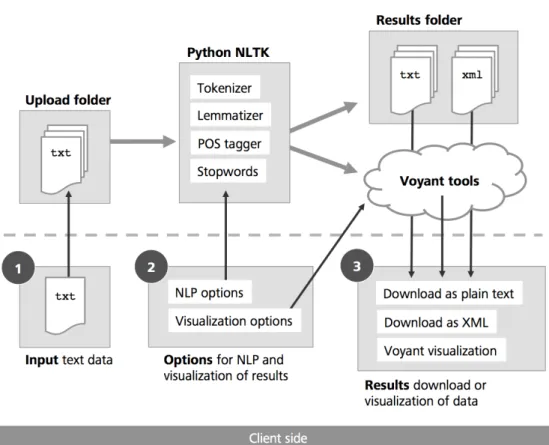
Figure 1: WebNLP architecture and main components.
In order to achieve this goal, we integrate two existing tools (Python NLTK and Voyant) in a combined user interface namedWebNLP8.
3 WebNLP
In this section we describe the basic architecture of WebNLP and explain the main functions and interface components of the tool.
3.1 Tool architecture
We decided to implement the interface as a web service for several reasons:
• No installation or setup of Python NLTK and related Python modules by the user is re-quired.
• Previous experience and familiarity of non-technical users with web services and inter-active elements such as form fields, radio buttons, etc.
8
WebNLP is currently available as a prototype at
http://dh.mi.ur.de/
• Seamless integration of the existing web tool Voyant, which allows the user to quickly analyze and visualize language data in the browser.
• Opportunities for future enhancements of the tool, e.g. collaboration with other users, sharing of data and results, etc.
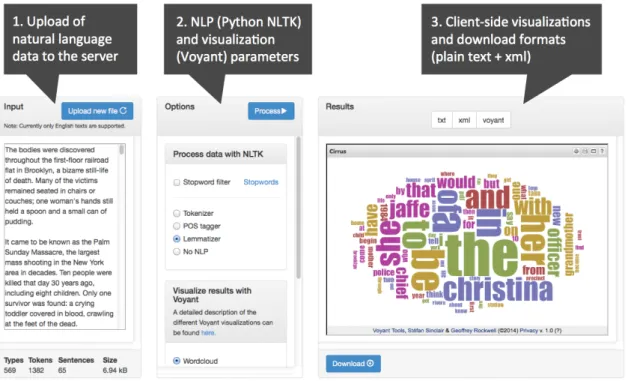
WebNLP uses a client-server architecture to pro-vide an easy-to-use interface via modern web browsers, while the NLP functions are executed on our server (cf. Figure 1). The interface on the client side is structured in three main areas (cf. Figure 2) which will be explained in more detail in the next section. All interface logic is implemented by means of JavaScript, the page layout utilizes a template from the popular front-end framework Bootstrap9. The communication between client and server is realized by means of PHPandAJAX.
9
Bootstrap is available athttp://getbootstrap. com/.
Figure 2: WebNLP interface with three main areas: input, options, results.
A number of Python NLTK scripts (e.g. for tokenization, lemmatization, etc.) can be called from the client interface and are then executed on the server. The results are displayed on the client side by calling different visualization forms of the web service Voyant, which is embedded in the WebNLP interface as an HTML iframe. At the same time, the NLTK processed data is stored on the server as plain text or as text with XML markup, which are both available for download on the client side.
3.2 Input: Upload of natural language data The input field allows the user to upload text doc-uments to the NLP application on the server. Data may either be entered directly in the text area form field, or by making use of the file upload dialog. Currently, only files in plain text format (.txt) can be processed by the NLTK tools on our server. Another restriction for the current implementa-tion of the tool is concerned with the language of the text documents: At the moment, only NLTK scripts for processing English language data have been integrated into the tool. However, the sys-tem architecture is designed in a modular fash-ion that allows the administrators to add more NLTK scripts for other languages at a later point
in time. Once the data has been uploaded to the server, a first NLTK pre-processing of the data is executed, analyzing the overall number of tokens, types and sentences in the file. This information is displayed at the bottom of the input area after the upload of the file has been completed. 3.3 Options: NLP and visualization
parameters
The second area in the interface contains options for the NLP and visualization of the uploaded data. The first set of options selects Python NLTK scripts on the server, that are then executed on the data. In the current tool version, the following main functions are available:
• Stop word filter; can be combined with any other parameter (a list of all stop words may be looked up in the interface)
• Tokenizer (words and punctuation marks)
• Part of speech tagger (tokenization implied)
• Lemmatizer (tokenization implied)
• No NLP (used if no additional NLP process-ing is needed)
The second group of options allows the user to select a visualization style for the processed data from Voyant. The following visualization10 op-tions are available in the current WebNLP proto-type:
• Wordcloud
• Bubblelines
• Type frequency list
• Collocation clusters
• Terms radio
• Scatter plot
• Type frequency chart
• Relationships
• No visualization
Due to the internal NLP workflow on the server, currently only one NLP and one visualization op-tion can be selected at a time. We are planning to implement a more flexible solution in the next version of WebNLP.
A short evaluation with a sample of five text documents with different file sizes indicates an al-most linear increase of processing time related to text size. The smallest of the test documents had a size of 50 kB (approx. 11.000 tokens), the largest document had a size of 4230 kB (approx. 920.000 tokens). POS tagging for the smallest document took 18 seconds, lemmatization took 20 seconds. For the largest document, POS tagging took ap-prox. 24 minutes, lemmatization took apap-prox. 25 minutes. These results indicate that WebNLP in its current implementation is well-suited for small to medium sized corpora, but may be too slow for larger text collections.
3.4 Results: Client-side visualizations and download formats
The third interface area displays the results of the chosen NLP options in the selected Voyant visual-ization (e.g. word cloud view). The user may also
10
A detailed description of the different Voyant visualiza-tion types can be found at http://hermeneuti.ca/ voyeur/tools.
switch to plain text or XML markup view of the results (these formats are also available for down-load).
Plain text view (original NLTK output):
( VBN , come ) ...
XML view (custom WebNLP format):
<root> <token> <pos>VBN</pos> <word>come</word> </token> ... </root> 4 Conclusions
Our tool provides access to existing NLP and vi-sualization tools via a combined interface, thus acting as a GUI wrapper for these applications. While a thorough usability evaluation is still missing, we are confident that NLP functionality from the Python NLTK becomes more accessible through WebNLP, and that the combination with visualizations from the Voyant set of tools will be attractive for many applications of text tech-nology. In its current implementation, WebNLP should be treated as a prototype that illustrates how a web-based interface to basic NLP and text visualization functions can be realized by means of standard web technologies. We are, however, planning to implement more NLTK functions, and to improve the performance as well as the in-terface of the service in the future.
References
Marco Baroni, Silvia Bernardini, Adriano Fer-raresi, and Eros Zanchetta. The wacky wide web: a collection of very large linguistically processed web-crawled corpora. Language re-sources and evaluation, 43(3):209–226, 2009. Michael Beißwenger and Angelika Storrer.
Cor-pora of Computer-Mediated Communication. In Anke L¨udeling and Kyt¨o Merja, editors, Corpus Linguistics. An International Hand-book, pages 292–308. Mouton de Gruyter, Berlin, New York, 2009.
Steven Bird. Nltk: the natural language toolkit. InProceedings of the COLING/ACL on Inter-active presentation sessions, pages 69–72. As-sociation for Computational Linguistics, 2006. Gregory Crane. What do you do with a million
books? D-Lib Magazine, 12(3), 2006.
Andrew Hardie. Cqpweb – combining power, flexibility and usability in a corpus analysis tool. International Journal of Corpus Linguis-tics, 17(3):380–409, 2012.
Adam Kilgarriff and Gregory Grefenstette. In-troduction to the special issue on the web as corpus. Computational linguistics, 29(3):333– 347, 2003.
Jean-Baptiste Michel, Yuan Kui Shen, Aviva P. Aiden, Adrian Veres, Matthew K. Gray, The Google Books Team, Joseph P. Pickett, Dale Hoiberg, Dan Clancy, Peter Norvig, Jon Or-want, Steven Pinker, Martin A. Nowak, and Erez Lieberman Aiden. Quantitative analysis of culture using millions of digitized books. Science, 331(6014):176–182, 2010.
Franco Moretti. Distant reading. London: Verso, 2013.
Jakob Nielsen and Raluca Budiu. Mobile usabil-ity. New Riders, Berkeley, CA, 2013.
Alexander Pak and Patrick Paroubek. Twitter as a Corpus for Sentiment Analysis and Opinion Mining. In Proceedings of the LREC, pages 1320–1326, 2010.
Stan Ruecker, Milena Radzikowska, and St´efan Sinclair.Visual interface design for digital cul-tural heritage: A guide to rich-prospect brows-ing. Ashgate Publishing, Ltd., 2011.
Helmut Schmid. Probabilistic part-of-speech tag-ging using decision trees. InProceedings of in-ternational conference on new methods in lan-guage processing, pages 44–49. Manchester, UK, 1994.
Ben Shneiderman. Designing the user interface: strategies for effective human-computer inter-action. Pearson, 5th edition, 2014.