Inauguraldissertation
zur Erlangung des akademischen Grades
eines Doktors der Naturwissenschaften
der Universit€t Mannheim
Vorgelegt von
M. Sc. Diplom-Inform. (FH)
Fleming Helge Lampi
aus
Heidelberg
Korreferent: Professor Dr. Ralf Steinmetz, Technische Universit€t Darmstadt
Acknowledgments
I would like to thank a number of people who have supported me during my years of study and promotion.
At first, I would like to thank my professors at the University of Applied Sciences in Karlsruhe for their work during my diploma and master studies, emphasizing Prof. Dr. Peter A. Henning for having been the advisor of my two theses and for having me introduced to Professor Effelsberg. I would like to thank Professor Dr. Wolfgang Ef-felsberg for being my doctoral advisor, and inspiring me by many good and fruitful conversations with him and my colleagues. Thanks to all of them for their collabora-tion.
Out of my colleagues, I especially like to thank Dr. Nicolai Scheele, Dr. Stephan Kopf, Dr. Thomas King, Hendrik Lemelson, and Dr. Tanja Mangold for their support and all the publications written jointly. In addition, I want to thank Manuel Benz and Patric Herweh for their really good work and Eva Haas for proofreading my disserta-tion.
Furthermore, I would like to thank Jochen Braitinger for supporting me in getting detailed information about the work-flows in broadcast stations, perfecting my educa-tion concerning media produceduca-tion.
I would like to thank my family, in particular my aunt Alma Lampi and my mother Helga Lampi, for supporting me during all the years. Finally, I like to thank my girl friend Marion Wehde for her support, her patience and her love during all our years and my studies. Even more, I thank her very much for proofreading my diploma the-sis, my master thesis and my dissertation and her reliable strong support even in diffi-cult situations.
Abstract
Lecture recording has become a very common tool to provide students with additional media for their examination preparations. While its effort has to stay reasonable, only a very basic way of recording is done in many cases. Therefore, watching the result-ing videos can get very borresult-ing completely independent of how interestresult-ing the original topic or session was.
This thesis proposes a new approach to lecture recordings by letting distributed com-puters emulate the work of a human camera team, which is the natural way of creating attractive recordings.
This thesis is structured in six chapters, starting with the examination of the current situation, and taking its constraints into account. The first chapter concludes with a reflection on related work.
Chapter two is about the design of our prototype system. It is deduced from a human camera team in the real world which gets transferred into the virtual world. Finally, a detailed overview about all parts necessary for our prototype and their planned func-tionality is given. In chapter three, the implementation of all parts and tasks and the incidents occurring during implementation are described in detail.
Chapter four describes the technical experiences made with the different parts during development, testing and evaluation with a view to functionality, performance, and an proposal towards future work. The evaluation of the whole system with students is presented and discussed in the fifth chapter.
Chapter six concludes this thesis by summing up the facts and gives an outlook on future work.
Zusammenfassung
Vorlesungsaufzeichnungen sind mittlerweile ein h€ufig verwendetes Mittel, um Stu-dierende mit zus€tzlichem Material f•r ihre Pr•fungsvorbereitungen auszustatten. Dabei muss der ben‚tigte Aufwand im Verh€ltnis bleiben, so dass oft nur eine sehr grundlegende und einfache Art der Aufzeichnung realisiert wird. Die daraus entste-henden Resultate zu betrachten kann sehr langweilig werden, unabh€ngig davon wie interessant das urspr•ngliche Thema oder die Vorlesung war.
Die vorliegende Dissertation schl€gt einen neuen Ansatz f•r Vorlesungsaufzeichnun-gen vor, in dem ein verteiltes Computersystem die Arbeit und Vorgehensweise eines menschlichen Kamerateams nachahmt, um auf diese Weise attraktive Aufzeichnungen herzustellen.
Diese Arbeit ist in sechs Kapitel gegliedert und beginnt mit der Betrachtung der aktu-ellen Situation und der gegebenen Vorgaben. Das erste Kapitel schliesst mit einer Betrachtung von verwandten Arbeiten.
Kapitel zwei beschreibt das Design des Prototyp-Systems, das von einem menschli-chen Kamerateam in der realen Welt abgeleitet und in die virtuelle Welt transferiert wird. Es endet mit einer detaillierten ƒbersicht •ber die f•r den Prototyp notwendigen Teile und ihrer geplanten Funktionalit€t. Kapitel drei beschreibt im Detail die Imple-mentierung aller Teile und Ihrer Aufgaben, sowie die Besonderheiten, die w€hrend der Implementierung aufgetreten sind.
Kapitel vier beinhaltet die technischen Erfahrungen die mit den einzelnen Teilen des Systems w€hrend ihrer Entwicklung, ihrer Testphasen und der Beurteilung ihrer F€-higkeiten gemacht wurden, insbesondere mit einem Fokus auf deren Funktionalit€t und Performanz sowie einem Vorschlag f•r zuk•nftige Implementierungen. Die Eva-luierung des gesamten Systems mit Studierenden wird in Kapitel f•nf detailliert be-schrieben und diskutiert.
Kapitel sechs beschliesst diese Arbeit indem es die Fakten zusammenfasst und einen Ausblick auf zuk•nftige Arbeiten gibt.
Content
1. Introduction...1
1.1. Basic Idea...1
1.2. Starting Point ...2
1.2.1. Traditional Lectures Today...3
1.2.2. Room for Improvement...4
1.3. Constraints ...5 1.3.1. Types of Recording...6 1.3.2. Aesthetic Considerations ...8 1.3.3. Financial Constraints ...9 1.4. Related Work ...10 1.4.1. Surveillance Recording ...11 1.4.2. Meeting Recording...12 1.4.3. Documentary Recording ...13 1.4.4. Presentation Recording ...14 1.4.5. Lecture Recording...17
1.4.6. Additional Related Work ...21
2. Design of the Distributed System ...25
2.1. Analyzing the Real World ...25
2.1.1. Determining the „Ingredients… ...25
2.1.2. Details of a Real Camera Team ...28
2.1.3. Important Constraints...35
2.2. Determining the Parts of our System ...37
2.2.1. The Director ...38
2.2.2. The Cameraman ...39
2.2.3. Sensor Tools...41
2.2.4. The Sound Engineer...46
2.2.5. The Lighting Technician...48
2.2.6. The Audio/Video Mixing Console...48
2.3. System Overview ...49
2.3.1. Virtual Director†s Main Ideas ...51
2.3.2. Virtual Cameraman†s Main Ideas ...53
2.3.4. Virtual Sound Engineer†s Main Ideas...54
2.3.5. AV Mixing Console†s Main Ideas ...55
3. System Implementation ...57 3.1. Director Module...57 3.1.1. Tasks to Fulfill ...60 3.1.2. Implementation Details ...63 3.2. Cameraman Module...74 3.2.1. Tasks to Fulfill ...74 3.2.2. Implementation Details ...76
3.3. Sensor Tools Module ...87
3.3.1. WLAN Indoor Positioning System ...88
3.3.2. Question Management Software...91
3.4. Sound Engineer ...98 3.4.1. Tasks to fulfill ...98 3.4.2. Implementation Details ...101 3.5. Audio-Video Mixer/Recorder ...105 3.5.1. Tasks to Fulfill ...107 3.5.2. Implementation Details ...110 4. Technical Experience...117
4.1. Experience with the director module ...117
4.1.1. Evaluation of the Virtual Director ...117
4.1.2. Testing Setup ...119
4.1.3. Simulation Results ...121
4.1.4. Overall Performance ...122
4.2. Experience with the cameraman module ...126
4.2.1. Performance of the image processing algorithms ...126
4.2.2. Performance of the camera controlling algorithms...129
4.2.3. Overall Performance ...132
4.3. Experience with the Sensor Tools module...133
4.3.1. Experience with the Question ‡ Answer Interaction Control ...133
4.3.2. Experiences with the Event Reporting...135
4.3.3. Experiences with the Audio Streaming...136
4.4. Experiences with the AV Mixer/Recorder...138
4.4.1. Experience with the AV Decoding ...138
4.4.2. Experiences with the Output Trigger ...139
4.4.3. Experiences with the Video Processing...140
4.4.4. Experience with the AV Output...141
4.4.5. Overall Performance ...142
4.5. Experience with the Sound Engineer module ...142
4.5.1. Audio Mixing and Mastering...142
4.5.2. Overall Performance ...146
4.5.3. Improving the AV Mixer/Recorder ...146
5. Evaluation with Students ...149
5.1. Evaluation Description...149
5.1.1. Evaluation Design ...149
5.1.2. Description of the sample and its participants ...154
5.1.3. Operationalization of the constructs ...154
5.1.4. Presentation of the evaluation method ...159
5.2. Evaluation Results ...159
5.3. Discussion of the evaluation ...165
6. Summary ...167
6.1. The Virtual Camera Team ...167
6.2. Implementation Experiences...168
6.3. Evaluation Experience ...169
6.4. Rating the Prototype ...170
6.4.1. Aesthetic Approach...170
6.4.2. Affordable Approach ...171
6.4.3. Space- and Time-Saving Approach ...171
6.4.4. Successful Prototype ...172
6.5. Outlook ...173
6.5.1. Improving the Current Prototype ...173
6.5.2. Extending the Current Prototype ...173
6.5.3. Transferring Automatic Lecture Recording to other environments...173
7. Appendix...173
7.1.1. XML file of the FSM used in our prototype ...173
7.1.2. Example Configuration File of the Cameraman ...173
7.2. Sourcecode Snippets ...173 7.2.1. Function „FSM.GetTimerInterval…...173 7.2.2. Procedure „AVMixer.startgettingFrames… ...173 7.2.3. Function „DefineCompressionLine… ...173 7.2.4. Function „Sample2DB… ...173 7.2.5. Function „DB2SampleValue…...173 7.2.6. Function „WaveExtrema… ...173 7.2.7. Function „getFactor…...173
7.3. Original Evaluation Papers ...173
7.3.1. German Pre-Test Form ...173
7.3.2. German Questionnaire ...173
7.3.3. German Post-Test Form ...173
List of Figures
Figure 1: Invoice snippet of a live production ...10
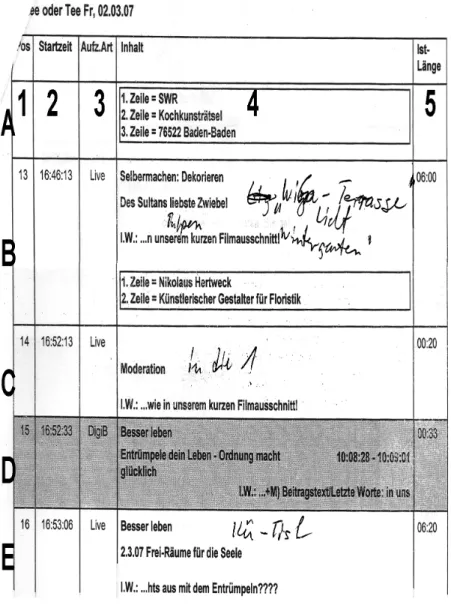
Figure 2: Part of a Storyboard of "Kaffee oder Tee" of the SWR ...29
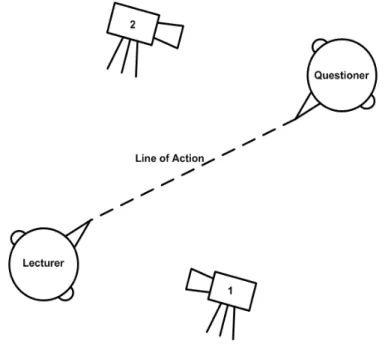
Figure 3: Example of wrong recording positions according to the "Line of Action" ..30
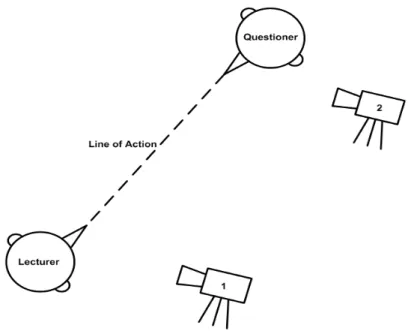
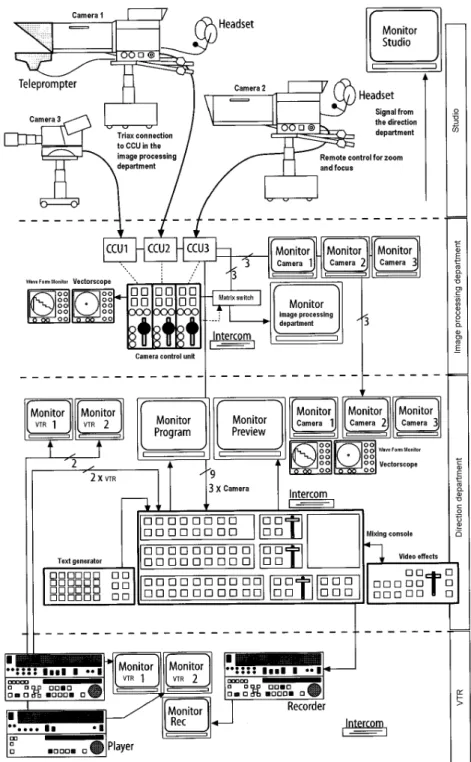
Figure 4: Example of correct recording positions according to the "Line of Action" .31 Figure 5: Schematic view of equipment for studio production (based on Schmidt, 2005) ...33
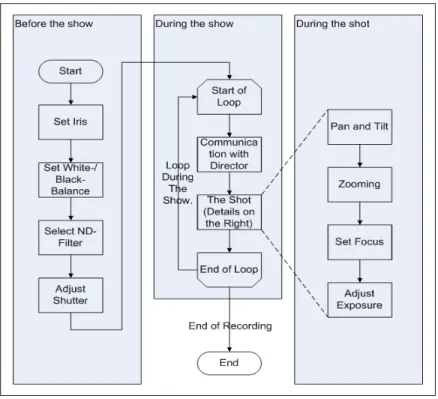
Figure 6: The job of a cameraman as a work-flow ...41
Figure 7: Interaction Diagram of Lecturer and Questioner ...44
Figure 8: Systems and Communications Channels Overview ...49
Figure 9: Draft of the Prototype System ...50
Figure 10: Graph of an Exemplary FSM for Standard Lectures...52
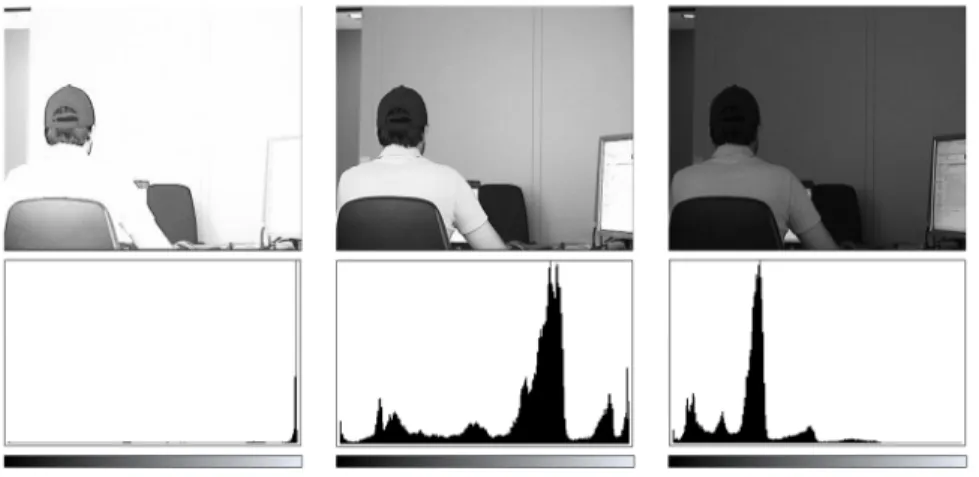
Figure 11: Three exemplary exposures (Benz, 2007). ...77
Figure 12: Skin color detection example (Benz, 2007). ...78
Figure 13: Images of the steps in background subtraction (Benz, 2007)...78
Figure 14: Skin detection and region joining example (Benz, 2007). ...79
Figure 15: Results of two backlight compensation algorithms (Benz, 2007)...79
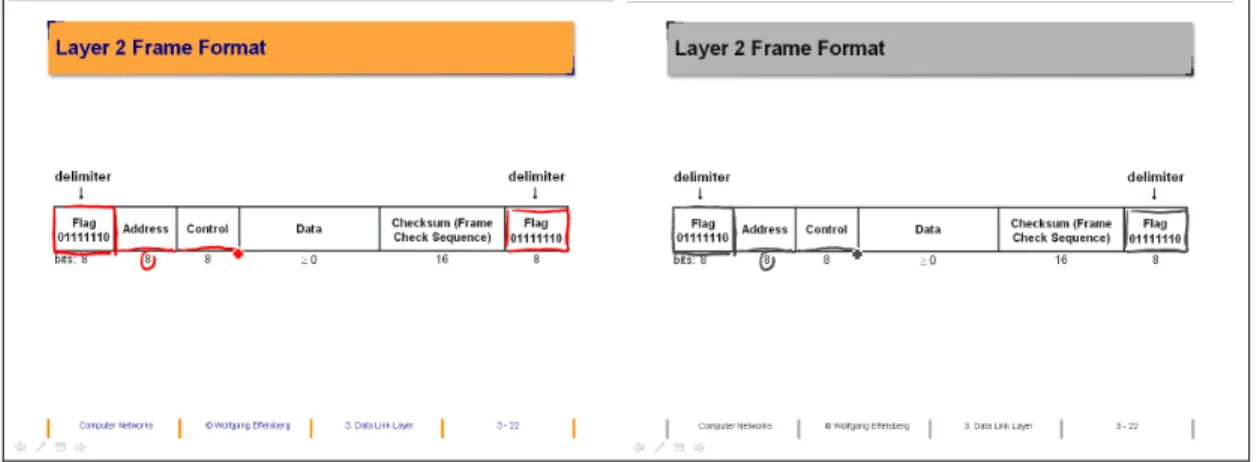
Figure 16: Comparing annotation visibility of color and gray scale images. ...80
Figure 17: Distance of two points in the RGB color space...81
Figure 18: Frame arrangement tests of abstracted protagonist (Benz, 2007). ...83
Figure 19: Lecturer and Questioner aligned in a shot - counter-shot scenario. ...83
Figure 20: Motion-triggered automatic zoom-out followed by automatic zoom-in (Benz, 2007)...84
Figure 21: Information exchange from director to camera via the cameraman and back (based on Benz, 2007)...84
Figure 22: Estimated area marked and seat of student confirmed. ...90
Figure 23: Standard interface of the questioners' client...92
Figure 24: Popup on the Lecturer†s computer showing announced questions. ...94
Figure 25: Basic question - answer interaction, amended with client screen shots...95
Figure 26: GUI of the QM server, client on seat 77 asking. ...98
Figure 27: Ideal silence (top), minimal noise as silence (middle), and this minimal noise after normalization (bottom)...100
Figure 29: Screen shot of the status display of the AV Mixer/Recorder. ...109
Figure 30: Overview of the AV Mixer/Recorder...110
Figure 31: Percentage of fulfilled requested shots after n seconds...122
Figure 32: Explanation of an EDL entry...124
Figure 33: Exemplary status message displays of three virtual cameramen. ...132
Figure 34: Screen shot of an exemplary curve of a combined noise-gate, compressor, and limiter. Input-dB on the x-axis, output-dB on the y-axis. ...144
Figure 35: A 440 Hz sine curve with different amplification factors in adjacent audio frames...145
Figure 36: Translated knowledge pre-test...151
Figure 37: Pages 1 and 2 of the translated questionnaire...153
Figure 38: Pages 3 and 4 of the translated questionnaire...153
Figure 39: Average values of attentiveness and interest in the video compared. ...161
Figure 40: Average values of three QCM aspects compared. ...162
List of Tables
Table 1: Calculation spreadsheet ...36
Table 2: Aggregated Actions Controlling the Interaction...45
Table 3: Resulting weights of the positions inside the states' history buffer. ...71
Table 4: Mapping of camera status messages to factors...72
Table 5: Iris control: f values, ratio of light and camera parameters; part 1...76
Table 6: Iris control: f values, ratio of light and camera parameters; part 2...76
Table 7: Exemplary stage directions from the director module to the cameraman module...85
Table 8: Parameters and possible values of the camera interface...86
Table 9: Exemplary sensor inputs with timestamps of the „average lecture…. ...119
Table 10: Simulation results of both finite state machines. ...121
Table 11: Differences between the tested two types of lecture recording. ...152
Table 12: Items of the construct "attentiveness" (T. Mangold). ...156
Table 13: Items of the construct "interest in the video" (T. Mangold). ...157
Table 14: Items of the construct "motivation" (T. Mangold based on Rheinberg, Vollmeyer & Burns, 2001). ...158
Table 15: t-test results for the construct "attentiveness"...160
Table 16: t-test results for the construct "interest in the video"...160
Table 17: t-test results for the construct "QCM interest"...161
Table 18: t-test results for the construct "QCM probability of success". ...161
Table 19: t-test results for the construct "QCM anxiety"...162
Table 20: t-test results for the construct "learning gain". ...163
Table 21: Statistic results of the items concerning the motivation. ...164
Table 22: Assumed number of repetitions of lecture recordings. ...165
List of Definitions and Formulas
Definition/Formula 1: Definition of a Finite State Machine. ...60
Definition/Formula 2: Definition of an Extended Finite State Machine. ...61
Definition/Formula 3: Definition of the Transition - Tuple...63
Definition/Formula 4: Formula to calculate weights of the history buffer. ...70
Definition/Formula 5: CameraParameter based on f-number of the iris. ...76
Definition/Formula 6: Length of a 3D vector; here the distance between the two points named p and q. ...81
Definition/Formula 7: Calculation of the audio break duration in case of a UDP packet loss. ...102
Definition/Formula 8: Calculating the amplifying factor including 3 dB headroom.103 Definition/Formula 9: Translation and Scaling by homogeneous matrices...115
Definition/Formula 10: ColorMatrix for changing the transparency of an image...115
Definition/Formula 11: Running Gaussian Average formula to update the background model...128
Definition/Formula 12: Normalizing red and green values for skin color detection. 128 Definition/Formula 13: Calculating the zoom factor to frame a questioner. ...130
List of Abbreviations
€ ‡ Degree
3D ‡ Three dimensions / Three dimensional
802.11 ‡ Number of the IEEE norm of wireless local area networks, synonym for WLAN
ALR ‡ Automatic Lecture Recording AP ‡ Access Point
API ‡ Application Programming Interface AV ‡ Audio / Video
AVI ‡ Audio Video Interleaved
BBC ‡ British Broadcasting Corporation BMP ‡ File-extension of a saved bitmap object BR ‡ Bayerischer Rundfunk
CF ‡ Compact Flash CODEC ‡ Coder / Decoder
CPU ‡ Central Processing Unit
dB ‡ Decibel
DI ‡ Direct Input
DLL ‡ Dynamic Link Library DoS ‡ Denial of Service DV ‡ Digital Video EDL ‡ Edit Decision List
EFSM ‡ Extended Finite State Machine FIFO ‡ First In ‡ First Out
fps ‡ frames per second FSM ‡ Finite State Machine
GB ‡ Giga byte = 1024*1024*1024 bytes GHz ‡ Giga Hertz = 1000 * 1000 * 1000 Hertz GOP ‡ Group of Pictures
GPS ‡ Global Positioning System GUI ‡ Graphical User Interface HCI ‡ Human-Computer Interface
HD ‡ High Definition (either 1080x720 pixel or 1920x1080 pixel) HiFi ‡ High Fidelity
HR ‡ Hessischer Rundfunk
HTTP ‡ HyperText Transfer Protocol
Hz ‡ Hertz ‡ the unit to measure frequencies ICMP ‡ Internet Control Message Protocol IP ‡ Internet Protocol
JFIF ‡ JPEG File Interchange Format JPEG ‡ Joint Photographic Experts Group kHz ‡ kilo Hertz = 1,000 Hertz
LAN ‡ Local Area Network
LMS ‡ Learning Management System MB ‡ Mega byte = 1024 * 1024 byte MJPEG ‡ Motion JPEG
MPEG ‡ Motion Picture Experts Group ms ‡ Millisecond ‡ 1/1000 of a second MSDN ‡ Microsoft Developer Network MTU ‡ Maximum Transmission Unit
NTSC ‡ National Television System Committee (also used as abbreviation of SD TV norm, used e.g., in the United States of America)
PAL ‡ Phase Alternating Line (SD TV norm, used e.g., in Germany) PCM ‡ Pulse Code Modulation
PDA ‡ Personal Digital Assistant PTZ ‡ Pan - Tilt - Zoom
QA ‡ Question-Answer
QBIC ‡ Q-Belt Integrated Computer
QCM ‡ Questionnaire to assess Current Motivation QM ‡ Question Management
PiP ‡ Picture-in-Picture
RAID ‡ Redundant Array of Independent Disks RAM ‡ Random Access Memory
RGB ‡ Red Green Blue
RTP ‡ Real Time Transport Protocol RTSP ‡ Real Time Streaming Protocol
SD ‡ Standard Definition (720x576 pixel for PAL/SECAM, 720x480 pixel for NTSC)
SDI ‡ Serial Digital Interface
SECAM ‡ Sˆquentiel couleur ‰ mˆmoire (SD TV norm, used e.g., in France) SMPTE ‡ Society of Motion Picture and Television Engineers
SWR ‡ S•dwest Rundfunk
SRT ‡ Schule f•r Rundfunktechnik, Nuremberg, Germany; meanwhile ARD.ZDF medienakademie
TCP ‡ Transmission Control Protocol TV ‡ Television
UDP ‡ User Datagram Protocol UK ‡ United Kingdom
URL ‡ Uniform Resource Locator VGA ‡ Video Graphics Array VNC ‡ Virtual Network Computing WDM ‡ Windows Driver Model
WIL/MA ‡ Wireless Interactive Lectures / Mannheim WLAN ‡ Wireless Local Area Network
XML ‡ Extensible Markup Language
1. Introduction
Lectures nowadays deal with complex topics which students have to learn. As there are different ways of learning, e.g., taking notes, repeating, etc., it is worth supporting the learner in as many ways as possible. Students† common strategies in lectures are to take notes or to write down the complete lecture making use of shorthand notation. As there are more and more electronic media in lectures, it is increasingly hard to keep up with the proceeding speed of the lecturer in handwriting. Especially when a student tries to follow an intricate piece of thought, it is possible that he or she misses the next point. Thus a lot of students wish to have a recording in order to be able to only re-play the crucial parts.
Meanwhile many Learning Management Systems (LMS) are available which enable students to use electronic media independent of location and time. Nevertheless, lec-tures are one of the most common ways to teach groups. In order to integrate the con-tent of lectures into an LMS, the most evident way is to record them. Therefore, it is no big surprise that lecture recordings are often used for repetition and exam prepara-tion.
1.1.
Basic Idea
Lecture recordings have become rather popular in recent years because they are easy to achieve (Lauer & Ottmann., 2002). They stay easily achievable as long as certain constraints are taken into account, such as the availability of specially equipped lec-ture halls, recording equipment, additional manpower, and additional financial means.
Such restraints being quite common, there are different approaches to realize lecture recordings, e.g., completely software-based systems like the screen recording software „Camtasia… (Camtasia, 2009) or mixed hardware and software systems (Ma et al., 2003). Both systems are limited concerning the different media used in a lecture. The current basic-level software records the lecturer†s slides and the spoken audio. There are two reasons for this: first, it is relatively easy to record exactly these two parts which typically contain the most important information of the lecture. Second, an ex-tra effort would be needed to record a video of the lecturer, to record audio and video of questioners, and other details which are part of the experience of a real lecture: this additional effort should not have to lead to an extra cognitive load for the lecturer.
It is important to reach a certain level of recording quality to ensure that the recording is understandable. This is mainly true for the audio track but also for the visual track. The minimum quality generally accepted by an audience can be described as tele-phone quality for audio and as surveillance quality for video. Nevertheless, today†s TV quality has raised our expectations: it sets the standard to a HiFi sound experience and to the typical Standard Definition (SD) TV resolution as a minimum. From the cinematographic point of view, events have to stay interesting even if the spectator is at a remote location and/or if the transmission is broadcasted later. One can think of TV as the form of producing video with the best possible quality.
At the other end of the scale, there are recordings of events taken by inexperienced people or by a surveillance video system. The quality achieved by a recording is in direct proportion to the effort put into it. Of course, it is usually impossible to hire a complete camera team, well-trained and experienced, for every single lecture. Even renting professional equipment to ensure a good technical quality is expensive. The benefit of having perfectly recorded lectures often does not justify this effort. Conse-quently, lecture recordings are typically done by teaching assistants, which is not their main job. Their goal is to generate a „standard… recording as fast as possible and with a minimum amount of work. A specific training in composing or editing the scenes of the video can not be expected.
As a result, we often experience that these lecture recordings do not meet the level of quality one is accustomed to. While investing money into professional equipment is one part, there remains the problem of recording a lecture like a professional camera team without spending money continuously. Typically, the recording systems used in practice produce very static and hard-to-follow recordings, completely independent of how exciting the original lecture was. This is a serious deficit for e-learning today.
As a consequence, in this dissertation, we propose a lecture recording system that is able to control several cameras and audio streams automatically, imitating a profes-sional camera team.
1.2.
Starting Point
In the following sub-chapter, we will take a short glimpse at the current situation of lectures, e.g., types of media and equipment used by the lecturer and the students. In
addition, we ask which materials are used by students for exam preparation. From there we proceed to possible improvements.
1.2.1. Traditional Lectures Today
In today†s lectures, a large number of lecturers do not use transparencies or slides any longer but their electronic equivalents, e.g., PowerPoint slides directly out of a com-puter using a projector. In fact, many students have also modernized their tools. Print-outs disappear gradually and are replaced by notebooks or netbooks. Some students even use Tablet-PCs, supporting their habit of taking notes directly on the printouts or on their electronic equivalents. This fact favors the typical „lean back… situation of students in lectures: they simply want to consume the lecturer†s input while participat-ing actively and askparticipat-ing questions is unusual. However, these modern techniques have many advantages: it is very easy for students to download the material of the course and exercises are sent back via e-mail or by uploading them into an LMS, for exam-ple.
In order to break up the lean back situation in lectures, Scheele (Scheele et al., 2003) developed the „Wireless Interactive Lectures / Mannheim… (WIL/MA) toolkit ena-bling students to ask questions using a built-in chat software to give feedback to the lecturer whether to speed up or to slow down the lecture, and which is most important, an online quiz tool allows to run interactive quiz rounds during a lecture. This is made possible by adapting the software to mobile devices (see Scheele et al., 2004). The lecturer takes a set of questions out from the question pool of WIL/MA and starts the quiz round. Typically, two to four questions have to be answered in one round and in a limited time, e.g., five minutes. The questions are displayed on the lecturer†s ma-chine, therefore also on the projector, and in addition they are transmitted to the Per-sonal Digital Assistants (PDAs) handed out to the students at the beginning of each lecture. Every single student is able to answer the quiz questions personally and send his or her answers back. The answers can be received in an anonymized or a personal-ized version, depending on the lecturer†s and student†s preferences and on their agree-ment. In case that the answers are personalized, each student can overlook his or her own development over time. When a quiz round is finished, the cumulated results are displayed on the lecturer†s computer and on the projector while the individual results are sent back to each student†s PDA. This provides two direct advantages: the lecturer
gets a feedback from all the students and knows whether to elaborate a topic and each student is able to compare his or her answers during the lecturer†s discussion and ex-planation of the solutions. It is obvious that using this tool does really break up the lean back attitude of students.
The next important step of a student†s participation in a lecture is his or her prepara-tion for the exams at the end of a term. Again, it is well appreciated by students to have easy access to all the provided materials of a lecture and the associated exercises by simply downloading them from the Web or out of a Learning Management Sys-tem. But, do they really have all materials accessible for download? Most of the lec-turer†s explanations given during the lecture have been taken down only in the form of notes, and it is very likely that some facts or at least some essential details will be missing. Furthermore, in case of a student†s absence from one or several lectures, for example due to health reasons, part time work, or remote studying facilities, this addi-tional information is missing. This includes not only the lecturer†s explanations but also all questions asked during the lecture by fellow students.
It is well known that there are different ways of learning. Some people learn by just listening to explanations, others have to read critical parts to remember them, the next group memorizes facts by writing them down, even repeatedly, and some can keep things in their mind best when reproducing and practicing them. The typical lecture supports those learning best from reading materials and by reproducing exercises. Others, learning best by re-writing, may start to copy books or other written materials manually but the lecturer†s explanations are lost for them at least partially. Those pferring spoken words to get the real message must attend a lecture. As lecture re-cordings by students are forbidden in many countries, the students do not have the possibility to produce a recording and replay certain parts of a lecture in their pre-ferred medium.
1.2.2. Room for Improvement
Lecture recordings have filled the space to provide another medium for learners. It developed over time from simply putting a camera in front of the lecturer, adding mi-crophones, employing staff for recording, and finally building fully-equipped multi-media lecture halls while constantly improving the achievable technical quality. As one consequence, it became much easier to produce lecture recordings. First, the
re-cordings were taken on video tapes which over time yielded to digital storage on com-puters. Thus, the ground was prepared to integrate lecture recordings into an LMS. The next step took pedagogical considerations into account to break up recordings into units, e.g., based on sub-chapters. This led to a natural index with smaller pieces of recording which are easier to remember: smaller units can also be re-used more easily. The re-use of learning units is an important topic nowadays (Rensing et al., 2008).
Generally spoken, the focus in current research leads away from producing lecture recordings towards their immediate usage. In the next chapter, we will have a closer look at boundaries which still give room for improvement in producing lecture re-cordings.
1.3.
Constraints
Producing lecture recordings in a well-equipped environment normally involves quite some staff to operate the electronic equipment. As it is normally not feasible to em-ploy a large number of new people to record lectures for financial reasons, staff on hand in the department should be able to run the recording. In most cases, these per-sons are not skilled to fulfill this task. This often leads to failures during recordings, e.g., a missing audio track, at least at the beginning of a recording. There are two ways to handle this problem. It is possible to either accept those failures or to try avoiding them. Avoiding means that staff has to be trained to the equipment used. Doing so gets more complex the more different and complex equipment is employed. Therefore the answer to this challenge varies from recording the slides and the lec-turer†s audio over an additional talking-head video of the lecturer to really important lessons where a professional camera team is hired, always depending on the local cir-cumstances.
The typical constraints of the different ways to record a lecture are discussed in detail in the following subsections.
1.3.1. Types of Recording
There are different types of recordings that have been used for lectures. The best way to differentiate is to name them according to their origins:
- surveillance recording - meeting recording - documentary recording - presentation recording
While surveillance video recording gives the best overview of the whole scene, it often lacks details. On one hand it is important to provide an overview in order to en-able the audience to be oriented; on the other hand, details are necessary to follow a lecture or to read the slides. Therefore, a lecture recording system should include both: the possibility to get an overview of the classroom and detailed shots as well.
Meeting recordingsare often made by using multiple cameras or using a 360-degree camera. A computer-based screen, e.g., an electronic white-board, may also be avail-able as an additional video stream. In this scenario, the visible camera is often di-rected at the speaking person or at a person determined by the moderator of the meet-ing. The captured computer screen is manually switched on when necessary.
In case that a 360-degree camera is used, the recorded video shows all participants sitting at a table in one video but it delivers a distorted image at a very low resolution which has to be deskewed first. Out of this processed image, the speaking person can be shown in detail, similar to the multiple-camera setup but with a much smaller reso-lution and therefore with fewer details. All in all, a meeting recording is an opposite of a surveillance recording. It delivers many details, for example the mimic of a par-ticipant or a clearly captured computer screen, but does not give a good overview of the entire scene.
Documentary recording is normally used for feature films or documentaries. After recording all parts scene by scene the material is edited in a post-production. It is not intended for live recordings but gives the best trade-off between giving an overview and presenting the important details. In addition, cinematographic rules are taken into account which makes the result much more interesting. It is the most complex and most expensive way of recording, and has been done successfully for years for the „Telekolleg… by the Bavarian Television in Germany (Telekolleg, 2009), for example.
At first glance, presentation recording comes really close to lecture recording but there still is a difference. In a presentation, it is only important to get the message out of the slides and out of the audio of the presenter. An overview of the whole scene or a shot of the live audience is therefore not necessary. Everything is recorded live and without any disturbance of the presenter. In the best case, no post-production is neces-sary, and all the important contents have been recorded at once. There have been some approaches to record presentations using a high-definition overview camera, either by steering a Pan-Tilt-Zoom (PTZ) camera following the presenter or by cutting out a pixel set in standard definition showing the presenter. Another way of following him or her is to evaluate the image of a PTZ camera, trying to determine where the presenter is and following her or him by steering the camera according to the detected motion direction. Even arrays of microphones have been used to determine the pre-senter†s exact position and to steer a camera accordingly.
Finally, let us focus on the parts of the considered types of recording should be sup-ported by lecture recording. At first, the recording should be as unintrusive as possible for the lecturer and the students. Second, it should be recorded live in order to ensure a quick availability for remote students and/or to make live streaming possible. Third, the minimum to get recorded are the lecturerŠs slides and the audio. Fourth, a camera recording of the talking head is desirable in order to record gestures, corroborating the lecturer†s explanations. Fifth, as lecture halls and fellow students vary from lecture to lecture, an overview shot as well as a shot of the live audience helps the remote audi-ence to get oriented. Sixth, details should be shown when necessary, and the live au-dience or the overview of the classroom can be shown if there is space. Seventh, in case of questions being asked, the question and if possible the questioner should be recorded as well. Last but not least, cinematographic rules such as the maximum dura-tion of each shot should be taken into account in order to provide a non-boring version of the lecture.
In short, as many advantages of the earlier types of recordings should be combined and used for lecture recordings. It is a real challenge to consider all these features.
1.3.2. Aesthetic Considerations
The main difference between attending the live audience of a television production and watching it on television consists of two points: first, the atmosphere of the live audience, and second, the personal point of view. On the one hand, the spectator is fixed to his or her chair and is only able to turn his or her head to follow the action, but is fascinated by the created atmosphere. On the other hand, there is a lack of the live atmosphere at home. However, in order to compensate for this, the remote specta-tor gets new visual stimuli again and again from the different points of view of the cameras. Important details are focused and turns are taken with long shots, providing a good overview of the whole scene.
Let us solely think of a television production in which a camera is mounted on a chair with a perfect view of the set. Maybe the camera is able to pan and tilt but cannot zoom in. Watching this production on television will be boring after a short time, completely independent of how fascinating the original event is.
The usage of multiple cameras for professional productions leads to a more complex scenario. All cameras have to be coordinated, and the director decides which of them is to be on air. It is important which shots are shown in what sequence. If a wrong combination is chosen, the spectator in front of his or her TV set gets confused. There are several mistakes likely, e.g., the audio track differs significantly from the camera aperture in the video track: two people in a dialog and shown alternately seem to look in the same direction; a shot containing many details is shown for a very short time, etc. These are only two examples of mistakes which should be avoided by well-defined rules developed from cinematographers, cameramen, and directors over years. These cinematographic rules are an important basis which every cameraman and di-rector has to rely on from the beginning and which has to be improved over and over again.
If these rules are neglected, the spectator gets confused, irritated, maybe disappointed, but at least distracted from the message of the production. For „light programs…, this is bad enough, but for lecture recordings which shall provide students with another learning medium, it is quite inadequate. Therefore, cinematographic rules should be taken into account for lecture recordings just as they are for live television produc-tions.
1.3.3. Financial Constraints
A well-equipped large lecture hall normally has a sound system for local amplifica-tion and for recording in parallel, a video recording system, lighting equipment as well as a central processing and controlling unit. Depending on the number of people operating the equipment, an additional intercom system is necessary for communica-tion during the recording. Purchasing all this equipment requires an investment of at least 20,000.00 ‹. This sum is easily reached by a video mixing console, including control video monitors, intercom and tally connectors, i.e. the red light showing which camera is on air, (e.g., about 11,500.00 ‹ net price), a digital audio mixing console (e.g., about 2,100.00 ‹ net price), and a broadcast camera set including camera, tripod, camera plate, battery pack, bag, and remote unit (e.g., about 10,300.00 ‹ net price each). Traditionally, a larger amount is needed in the course of time for recurring ex-penses, e.g., the labor costs of employees necessary for operation and maintenance of the equipment.
In order to get an idea of the number of people involved in such a scenario, one must have a closer look at the details of the different systems. For video recording and processing, there is one cameraman per camera, e.g., one for the slides, one for the talking head, and a director. For audio recording, there is one audio engineer needed, and for the lighting equipment another one. In case of an important session, an addi-tional expert is needed to supervise the recording at the central processing unit. Thus, even for this small setup, up to six people are needed. This number can increase easily as the number of cameras increases, assistants for the audio recording may be neces-sary, and additional lighting operators may be added.
In order to specify the cost in more detail, a snippet of an invoice for a live production is shown in Figure 1. This snippet is based on real prices, but has been anonymized; its items were split up between staff costs and equipment rental costs. This invoice gives a solid base to extrapolate potential costs for our scenario.
Figure 1: Invoice snippet of a live production
It includes four cameramen, a director, a sound engineer, a stream operator, and two assistants. This is almost the team size we will refer to later on.
1.4.
Related Work
Many projects on the video recording of lectures have been carried out over the years which come more or less close to our system. During our research, we have found many examples in which a project borrowed an idea of a neighboring area and put it into a new context. It is therefore necessary to take even those areas of video re-cording into account which do not have an obvious connection to our purpose. Over-all, we give a short overview over work on video recording done by researchers.
We present related work in six categories:
- Surveillance recording, - Meeting recording, - Documentary recording, - Presentation recording, - Lecture recording, and - Additional related work.
All these works are in more or less close relation to our work as they focus, e.g., on tracking people using PTZ cameras, following a person using multiple cameras, try to react in a way on events of the environment, like speaking participants, provide video based learning materials employing a human camera team, describe details which are of use in presentation or lecture recording, how cinematographic rules can be ana-lyzed, implemented and applied, etc. Finally, the additional related work sub-chapter presents work, which is related to our system but can not be categorized into one of the above. Occasionally during all these sub-chapters we mention details to present the relation or the difference between their work and ours.
1.4.1. Surveillance Recording
Surveillance recording is used for the conservation of evidences although it is neces-sary that all detected events can be evaluated retrospectively at least in the context of unattended surveillance. Of course, the major advantage of unattended surveillance is the reduction of salaries. Instead of observers surveilling the monitors, an automated system checks for suspicious events and informs a human supervisor who may be at a remote place. By doing this, a smaller number of employees have to be paid, and many different locations can be combined at one supervising station. Modern surveil-lance recording systems are not only able to detect suspicious events but they are also able to trace persons even across multiple cameras. The human supervisor sees the traced track marked with a certain color when investigating the recordings.
Some of the surveillance recording projects are related to our work, e.g., in case of PTZ-cameras and automatic person tracking system to steer them. A good example for this type of work is (Hampapur et al., 2005) which uses multiple cameras, includ-ing PTZ-cameras, to track objects in a 3D-virtual world.
At Cornell University (Mukhopadhyay & Smith, 1999) use a two-camera system to index recordings by recognizing the transitions from slide to slide. There is an over-view camera showing the lecture hall and providing the signals for synchronizing the slide transitions for the post-production. The second camera uses its hardware built-in person tracking algorithm to follow the speaker. Both camera types and perspectives come directly from surveillance video recording. Even if the system is used for pres-entation or lecture recording in the end, the look-and-feel of the videos is strictly that of a surveillance video. Therefore, we put it into this category.
Already here the combination of multiple cameras and an overview shot is given, but as we want to record lectures including as many details as possible but do not only want to record overview shots or persons being tracked, it is obvious that this type of recording differs significantly from our approach and task.
1.4.2. Meeting Recording
Compared to surveillance videos, meeting recordings are much closer to our main focus of lecture recording. Nevertheless, some basic ideas can be transferred: Track-ing a person in a meetTrack-ing room is the most obvious commonality, and it is followed by the idea of detecting events and/or faces to trigger certain behaviors of the system. If a participant of the meeting has to look after the recording, he or she may get dis-tracted from the meeting topics. If another person has to provide this additional ser-vice, he or she has to be employed.
The usage of multiple cameras can be found very often, but even in this case a reduc-tion to the necessary minimum can be observed. While a room can be equipped with several cameras just for the overview and some for more detailed shots, the use of PTZ cameras and/or 360Œ cameras can reduce this „battle of material…. As a meeting†s number of participants can widely vary from only two people up to a large group, different approaches have been considered.
(Rui, Gupta & Cadiz, 2001) used a 360Πcamera to capture all participants and provide the overview shot showing all participants as well as cut out images showing one sin-gle person at one time. They compared different recording modes, with and without the overview shot, let a computer or the user decide which person to show, e.g., to show the speaking person. This approach was an important contribution to improve the way meetings are recorded as it provides a reaction on the environment.
(Cutler et al., 2002) amended the meeting recording with additional cameras for dif-ferent views. Besides the 360Πcamera, they use a white-board camera and an over-view camera for the meeting room. To track the speaker they use a microphone array. They have implemented a simple version of a virtual director module deciding which view or part of view will be shown. It directly depends on the result of the sound source localization routine of the microphone array and on the amount of motion in the different video sources. In order to not switch too often between two shots in a
discussion, the director tries to choose a large shot showing both speakers side by side which may be possible with a 360Πcamera. While this approach already employs multiple camera views to give the spectator a more global impression of the scene, it is not yet coordinated by cinematographic rules.
Earlier, Siemens Corporate Research employed a 360Πcamera approach in larger rooms as described by (Huang, Cui & Samarasekera, 1998). They put considerable effort into tracking multiple people in a room by multiple sensors and cut the corre-sponding parts out of the 360Πimage. Nevertheless, the resulting video is something in between a surveillance video and a meeting recording. Here, the idea of showing the relevant person most of the time is coming up and presenting a global view is im-plemented.
1.4.3. Documentary Recording
Documentary Recording is normally done by human camera teams; it does not have much to do with our approach. Nevertheless, as even documentary recording is used in distance learning scenarios, it is worth having a short glimpse at this type of video.
In order to employ good learning materials for lecture topics, those institutions having access to professional camera teams are able to produce documentary recordings comparable to a real movie which is really expensive. While human camera teams perfectly know how to produce the video, the dramaturgy must be appropriate to transport the content to learn without distracting the learners. Good examples are the (Telekolleg, 2009) from the Bayerischer Rundfunk (BR) in television, the (Funkkol-leg, 2009) from the second radio program of the Hessischer Rundfunk (HR), and the videos shown on the open2.net-portal (Open2.net, 2009) providing the students of the United Kingdom Open University with video learning materials produced by the Brit-ish Broadcasting Corporation (BBC) in the Internet. These works make obvious that producing learning materials out of video presentations and their recordings is not an easy job and even true professionals need time to achieve the renowned quality.
For purely academic purposes, (R‚•ling & Ackermann, 2007) presented a framework for generating AV content out of formulas and/or algorithms. Thus, pre-produced clips dealing with topic details are available and can be presented live as well as get cut into the recording. It is a typical way in TV documentary recording to use such clips either pre-produced or generated on the fly to explain complex facts. It is a good
way of making complex conjunctions visible, which is necessary for the recording of learning materials.
1.4.4. Presentation Recording
Presentation Recording comes very close to the target we are aiming at. The main difference is its purpose: While lecture recording aims at transferring knowledge to the audience and enables people to recapitulate and to prepare for examinations, pres-entation recording main purpose is to promote something, e.g., current research re-sults, new prototypes, how to apply new products correctly. Therefore, a special di-dactic preparation of the recorded content is not compulsory but can be helpful. We differentiate these two types of recordings by looking at their context. If they explic-itly focus on lectures, they will be discussed in the lecture recording section, other-wise, they are discussed here.
Early approaches of presentation recording mainly focused on the technical part of the job. (Cruz & Hill, 1994) recorded the presenter, as well as his or her audio and the slides. After synchronization the media sources are presented together on one screen, switching the slides at the recorded points in time. In contrast, (Bianchi, 1998) mainly tracked the presenter automatically and switched between multiple cameras based on the action shown in the images. As many presenters visually refer to their slides dur-ing their presentation, the main points are shown in most cases. Bianchi also men-tioned that implementing cinematographic rules in his system may be a useful future work. Nevertheless, in (Bianchi, 2004), he re-presents his system together with some of his experiences: while cinematographic rules do not seem to have been imple-mented. Amongst other reasons, these papers encouraged us trying to implement cinematographic rules in automated presentation or lecture recording systems.
(He, Grudin & Gupta, 2000) asked whether presentations should be designed in a spe-cial way for on-demand viewing. They conclude that, as presentations are already well structured, it is not necessary to prepare them for later on-demand viewing but it can help to optimize the presentation. For presentations as well as for recordings done by professionals the base is the idea of a storyboard, which is also the base for cine-matographic rules.
The development of presentation recordings continued for example with (Baecker, 2003). He intended to provide a local audience as well as a remote one with the re-cording, and his main focus was set on scalable video streams in order to enable a large variety of remote audience. As the camera and directing work was done by a human camera team, cinematographic rules have been used but it was clearly an ex-pensive project. So, they tinkered with the idea of automating the recording, which gave us another good reason for starting our work.
Interestingly, Rowe and Casalaina stated in their paper (Rowe & Casalaina, 2006) that it is possible to capture conference and workshop presentations for $3,000 to $5,000 per day employing a real crew and standard equipment. They use a so-called straight-to-disk strategy in which most of the post-production and its costs are eliminated. They state that recording a session at this price is feasible even for the limited budgets of conferences and therefore automatic recording would not be necessary. This con-clusion is curious as they describe the equipment and the techniques in every detail but admit that at the same time some details of the recording have to be improved in the future. These details are, e.g., that they want to use more than one wireless micro-phone for the different speakers, an additional camera for the audience if no one ob-jects, and pan-tilt-zoom cameras to give the director more control. All these details would have been taken into account beforehand by a professional human camera team which is of course more expensive. This paper makes obvious that a trade-off between complexity of the system and the costs for it and its operating staff is necessary. Thus, our system focuses on feasible costs while having a complex distributed system which tries to minimize the user†s interaction.
Rowe also did research on automatic presentation recording, for example, in (Mach-nicki & Rowe, 2002) in which basic cinematographic rules have been realized by hard-coded nested if-then clauses and the detection of questions out of the audience was done by room microphones. Here we found the complexity of reactions on the environment and the need for good sensors and a high audio quality.
A similar approach was chosen by (Rui, Gupta & Grudin, 2003). They determined and described useful cinematographic rules and checked which of them are feasible. In the first version of their system they determined basic cinematographic rules and implemented them. Finally its results were compared to the results of professional
videographers by representative viewers as well as by the videographers in order to get it statistically evaluated. It turned out that the representative viewers judged both results overall nearly equal, while the automatic system got slightly lower values in detailed issues resulting in an overall quality value slightly below the professionals video. One disadvantage stays, i.e., the predictable behavior how the virtual director does a sequence of shots. This results from the hard-coded rules with fixed weights used for the director†s Finite State Machine. This project and its results are therefore closely related to our work, even if we do not use hard-coded rules in our virtual di-rector.
In 2002, the FX Palo Alto Labs of Xerox developed the FLYSPEC system described in detail in (Liu et al., 2002a) as a remote inspection system. While a computer pro-poses one shot multiple users can simultaneous request different shots. Its improve-ment concerning different simultaneous video requests was presented in (Liu et al., 2002b). As the resulting videos are still recordings of a presentation, even in case that there are many different videos of one presentation, we listed this work in this cate-gory. The system consists of a high-resolution camera used for an overview shot, for the tracking of the presenter, and for cutting out of images in standard definition (SD). The second camera is a PTZ camera. It is controlled by the routines having the input from the high-resolution camera as well as by the commands of multiple users de-manding a certain view. Depending on these requests, the system chooses whether the demand can be fulfilled by the PTZ camera or by a cutout of the high-resolution cam-era. Thus, virtual cameras can be interpolated out of this system. The algorithms, how to react to the demands and how to blend and generate virtual cameras are improved in the second paper. Proposing one computer†s cut and enabling live spectators to create their own director†s cut is an interesting approach. But as we want to steer the cameras and do the director†s work based only on cinematographic rules, we do not provide such possibilities.
The areas of application are manifold. The multimedia live webcast of the Open Uni-versity†s worldwide virtual degree ceremony (Scott & Mason, 2001) is a perfect ex-ample case for automatic presentation recording.
1.4.5. Lecture Recording
(Truong, Abowd & Brotherton, 2001) present an overview of the different devices and applications for the automatic recording of live experiences developed at Georgia Institute of Technology. They sum up their experience in order to achieve a reference point for future developers. However, they focus on the technical part of the job and do not consider the way how cinematographic rules could improve the recorded vid-eos. Even more they tried to use statistics to discover design rules for lecture re-cording which leads into the danger of uniform approaches.
The basic version of lecture recording consists of a recording of the slides, the lectur-ers† audio, the audio of simulations and animations, and the synchronization of the recorded streams. In many cases, the recording gets manually indexed in order to find a specific part of the content more easily. Sometimes, a video of the lecturer is re-corded additionally, a so-called „talking-head… video. All these approaches use either a browser or incorporate a browser-component in their software to show the different recorded streams arranged on one display. Even if every researcher focuses on differ-ent sub-tasks, at a first glance it seems like much of the work has been done more than once.
A typical example of the standard recording is found in (Brotherton, 2001). He takes the slides from capturing white-board software, records a talking-head video, includes audio and syncs, and manually indexes them in a post-production step. Similar to this is the system of (Dal Lago et al., 2002). The main difference is that they use two ana-log videos, one for the talking head and one for the slides. Both videos get converted into audio-video files and again get synced and indexed in manual post-production. These manual post-production steps are a key cost factor which we try to avoid.
A little simpler is the recording system of (He & Zhang, 2007). They record only the white-board and the lecturer in front of it using one video camera as they have remote collaboration in mind. It is obvious that the origin of their lecture recording lies in the appearance of specially equipped multimedia lecture halls. The advantage of present-ing multiple media integrated into one lecture hall awoke the desire of recordpresent-ing them. Anyhow, in most descriptions of multimedia lecture halls, recording only plays an inferior role and is therefore only mentioned on the brink, like in (M•hlh€user, 2005) and (R‚•ling et al., 2006). Depending on the recording setup it is possible to
get into trouble with the lighting conditions which are different for the white-board and the lecturer in front of it. By using different video sources our system avoids such problems. A typical representative for the first step in lecture recording is described in (Rowe et al., 2003). Here, expensive staff remains necessary, it should be reduced over time by implementing more intelligent software. It already uses separate streams but instead of automating the final cut by employing a virtual director still a lot of manual work is necessary.
At the University of Freiburg under the direction of Professor Ottmann, a lecture au-thoring tool was developed, beginning in 1996. It is meanwhile shipped as a product by the spin-off company „imc AG…. During the initial research and implementation phase, the working title was „Authoring on the Fly…; the product is now called „Lec-turnity…. The two programs share the same basic approach but Lecturnity was im-proved over the years and amended with many details, simplifying access and usage of the recorded material. The progress of the development is presented in the papers of (Datta & Ottmann, 2001) which handle the use, the possibilities, and the implica-tions of multimedia enhancements in offline and classroom lectures. (H•rst et al., 2001) focuses on the human computer interfaces for the lecturer at recording time and for the user for replaying, (H•rst, M•ller & Ottmann, 2004) address the automatic production of multimedia material for teaching purposes, for example. It was soon clear that this type of creating learning materials provides many advantages, e.g., it is relatively cheap to produce, it is fast to achieve, it is easy to automatically structure the content, and it features the universities† professors and their specialties which was presented in detail by (Lauer & Ottmann, 2002) and by (M•ller, Ottmann & Zhang, 2002). While this project focuses on the production of learning materials for LMS which leads to a certain amount of complexity, we focus on lecture recording includ-ing an easy access to the content for the students.
Indexing during post-production makes the recordings easier to access but, as long as a computer is not able to fully understand the semantic content of a scene, much work has to be done manually, as (Liu & Kender, 2004) stated. (M•ller & Ottmann, 2000) proposed a way of preparing and doing recordings robustly for indexing, and (Wang, Ngo & Pong, 2003) focused on a two step approach for syncing video frames to elec-tronic slides. At first they use text recognition in videos based on multi-frame integra-tion in order to achieve the binarized text and in the second step they separately
com-pare the detected titles and the detected content with their pendants written on the slides. In this paper, they achieve an accuracy of matched slides from 82.4 % to 92 %. As our entire lecture recordings are separated by the sub-chapters of the lecture, we decided to keep this simple but very effective way of indexing.
Another important task is to keep the recording easy. (Mertens & Rolf, 2003) tried to extract characteristic parameters and features in order to find the ideal lecture re-cording tool and set up their „Flying Classroom…. Their work is very similar to the „teleTASK… system built under the supervision of Professor Meinel at the University of Potsdam, described e.g., in (Ma et al., 2003). The third representative of this type is described by (Shi et al., 2003) in their „SmartClassroom… project. However, those systems tend to hold the lecturer captive in a virtual cage formed by the section the image of the lecturer camera shows. We decided that such limitations are not wanted for our system. The use of multiple and/or PTZ cameras can damp this effect but will not remove it completely, as done by (Gleicher, Heck & Wallick, 2002). This team modified their system in order to by now crop an SD image out of a high resolution image in post-production then applying cinematographic rules in order to generate new image arrangements and video transition effects between shots, as described in (Heck, Wallick & Gleicher, 2007). Trying to compensate different camera positions by zooming is a very unnatural way as a human being is not able to zoom in or out of his or her view. Therefore, we decided to keep our approach of different camera posi-tions and a virtual director.
Another demand is to focus on the lecturer†s workload and therefore to record „lec-turer oriented… as (H€ussge et al., 2008) state. Typical examples for approaches focus-ing on simple usage are the followfocus-ing two papers. (Ziewer, 2007) does only record the content and the lecturers† audio using Virtual Network Computing (VNC), based on the recording features of software like UltraVNC and TightVNC normally used for remote desktop access scenarios. (Yokoi & Fujiyoshi, 2005) use the idea of cropping a standard definition image out of a high-resolution one in order to be able to compen-sate the lecturers† movement. (Zhang et al., 2005) amend the virtual tracking inside a high resolution image by using a PTZ camera, leading to smoother camera move-ments. These papers showed us the importance of taking care of the lecturers† work-load.
Another important project bridging the gap between multimedia lecture halls and automatic lecture recording is the E-Chalk project of the Technical University Berlin, well described in (Friedland & Pauls, 2005) and (Friedland, 2006). It focuses on high-quality recordings of the electronic board and of the audio. Playback is possible on many different devices, including mobile phones. Its focus is on high quality re-cordings of the different AV sources, but does not use any cinematographic rules.
However, in most cases, researchers do still focus more on technical details than on how to improve the impression the recording has on its spectators. At first, multiple cameras are necessary in order to have some recording options and then the choice of the camera must be done carefully. We claim that cinematographic rules are necessary in order to create a lively and vivid experience for the learner, even if they are hard to describe to computers and hard to implement. Any such rule implemented is a benefit for the spectator.
(Onishi & Fukunaga, 2004) use three cameras showing the same scene, mainly the chalkboard, out of different angles, to optimize the framing of the image, i.e., select-ing the angle in which the lecturer does hide the fewest amount of information on the board, based on the lecturer†s motion but without the use of cinematographic rules. (Hartle et al., 2005) use multiple perspectives but takes advantage of basic cinemato-graphic rules for the arrangement of shots only and does not use a virtual director.
Microsoft Research runs a project called iCam/iCam2 which uses a virtual director based on a Finite State Machine. It partly uses cinematographic rules as all commands are written in pseudo code including if-then clauses. The commands itself are brief tokens describing literally the basic actions to perform. The development started with some prerequisites concerning the camera management in (Liu et al., 2001), leading to their first version presented in (Rui et al., 2001). In 2004, they presented the im-proved version (Rui et al., 2004), followed by a portable version presented in (Wal-lick, Rui & He, 2004). The newest version called iCam2 was presented by (Zhang et al., 2008). The system was improved in capturing computer-based visuals (anima-tions, simulations) using a capture card, employing a microphone array for questions from the audience, reducing the amount of cameras to track the speaker, and finally developing a scripting language to replace the note form of cinematographic rules. As these rules are nevertheless hard-coded they lead to a predictable behavior of the
vir-tual director and might distract spectators from the content. As we do not use hard-coded rules for our FSM-based virtual director, this point is the main difference to our system. While at a first glance this project seems to be similar to ours, it focuses mainly on the development of the technical solutions for recording and transmitting while we focus on the implementation of more and more complex cinematographic rules.
1.4.6. Additional Related Work
Besides the related work concerning the major goal of recording live events, there are some other topics worth having a closer look at as they provide important details. Some of them deal with background information gathering and some of them deal with basic research e.g., on cinematographic rules and their different implementation approaches; on interactive lectures setting the base for our system; on improving the sound quality of audio recordings in lecture halls; on positioning techniques for peo-ple inside lecture halls; on additional sensor equipment providing more intuitive hu-man-computer interfaces (HCI).
The use of cinematographic rules in automatic lecture recording is a typical differ-ence between a professional video production and a home video production. For ex-ample, these rules determine how long a certain shot should last, how to frame a per-son in an image, and many details more. A more detailed introduction and explanation of cinematographic rules is given in chapter two.
Cinematographic rules have been used in many different scenarios: in a virtual 3D-environment, e.g., in the camera control for camera motions (Christianson et al., 1996) which focuses more on image arrangement or in virtual story telling (Courty et al., 2003) where more weight is put on shots and their transitions. (Gleicher & Ma-sanz, 2000) wanted to generate new shots, views and perspectives out of a given video image based on cinematographic rules concerning image arrangement. These papers assured us in using such rules in order to achieve an improved result as it is also an issue in virtual 3D environments and storytelling and may be helpful even in post-production.
(He, Cohen & Salesin, 1996) set up an efficient system to use cinematographic rules in a virtual world. They define very fine granular sets of camera modules and idioms describing scenes or shots and the cameras used for them. As all rules have been