UNIVERSITY OF TARTU
Institute of Computer Science
Computer Science Curriculum
Suela Kodra
Smart Home Hacking
Master’s Thesis (30 ECTS)
Supervisor: Danilo Gligoroski, NTNU Supervisor: Marie Moe, SINTEF Supervisor: Dominique Unruh, UT
Nutimaja häkkimine
Lühikokkuvõte: Nutimaja on intelligentne kodu, mis on varustatud erinevate seadmete ja infosüsteemidega ning lubab maja elanikel neid süsteeme juhtida. See tehnoloogia on muutnud mugavamaks viisi, kuidas tarbija suhtleb oma koduga, andes talle paremat kontrolli seadmete üle. Samuti on sellel tehnoloogial posi-tiivne mõju maja energiasäästlikusele. Tarbijate suurest huvist hoolimata on selle tehnoloogia kasutuselevõttu takistanud kasutajate ebakindlus nende süsteemide turvalisuses.
Antud magistritöö uurib nutimaja platvormidega seotud turva- ja privaatsus-probleeme. Konkreetsemalt uuritakse platvormi nimega CoSSmic. Samuti antakse hinnang targa kodu ja HomeMatic tarkade pistikute vahelise suhtluse turvalisuse-le. Uuritakse ka CoSSMic platvormi turvalisust veebis laialt levinud ohtude vastu. Leitud probleemidele esitatakse soovitused ja vastuemeetmed, et parandusi saaks rakendada vaatlusalustel platvormildel. Demonstreeritakse ka kahte rünnakut ees-märgiga võtta üle HomeMatic targa pistiku juhtimine.
Võtmesõnad:Nutimaja, CoSSMic, Asjade Internet, micro-grid, smart plug, kor-dusrünnak, HomeMatic
Smart Home Hacking
Abstract: Smart Home is an intelligent home equipped with devices and com-munications systems that enables the residents to connect and control their home appliances and systems. This technology has changed the way a consumer inter-acts with his home, enabling more control and convenience. Another advantage of this technology is the positive impact it has on savings on energy and other re-sources. However, despite the consumer’s excitement about smart home, security and privacy have shown to be the strongest obstacles to the adaption with this technology.
This work investigates the security and privacy issues found at an emerging smart home technology such as the CoSSMic platform. The security of the com-munication between the smart home and the connected devices through Home-Matic smart plugs is assessed. CoSSMic platform is also investigated for common web vulnerabilities. Finally, recommendations and countermeasures are given to deploy the fixes on CoSSMic platform before the product release. Moreover, two attacks are performed in order to take the control of HomeMatic smart plug.
Keywords: Smart Home, CoSSMic, Internet of Things, micro-grid, smart plug, replay attack, HomeMatic
Contents
1 Introduction 6
1.1 Background . . . 6
1.1.1 Smart Home . . . 6
1.1.2 The CoSSMic project description . . . 7
1.2 Motivation . . . 7
1.3 Problem statement . . . 8
1.4 Methodology . . . 8
1.5 Delimitations . . . 8
1.6 Outline . . . 9
2 Background and related work 11 2.1 Technologies in the smart home environment . . . 11
2.1.1 Communication protocols . . . 11
2.1.2 BidCos . . . 12
2.1.3 Home Energy Management System . . . 12
2.2 Smart Home micro-computers . . . 12
2.3 Threats on the web area . . . 14
2.4 Security requirements . . . 14
2.4.1 User and device authentication . . . 14
2.4.2 Secure key management . . . 15
2.4.3 Hardware protection . . . 15
2.4.4 Device security certification . . . 15
2.5 Privacy requirements . . . 15
2.6 Related work . . . 15
3 The CoSSMic platform 17 3.1 CoSSMic architecture . . . 17
3.2 The selected technologies used for the trials . . . 20
3.3 The Mediator . . . 20
3.3.1 The Multi Agent System . . . 21
3.3.2 Home gateway . . . 21
3.3.3 Messaging technology /protocol . . . 22
3.3.4 Wireless smart plug . . . 22
3.3.5 Devices . . . 25
3.3.6 HomeMatic protocol . . . 25
4 Setting up a CoSSMic virtual environment 26 4.1 The setup of the virtual lab . . . 26
4.2 Software . . . 26
4.3 Hardware setup . . . 27
4.4 Smart Home configuration . . . 27
4.5 Security testing . . . 28
4.6 Technical documentation . . . 28
4.6.1 Attack vectors . . . 28
4.6.2 Tools used . . . 29
5 The security analysis of CoSSMic 31 5.1 Web application security . . . 31
5.1.1 Credentials leakage . . . 31
5.1.2 Clickjacking attack . . . 31
5.1.3 Remotely control the devices without being authorized . . . 32
5.1.4 Denial of Service . . . 32
5.1.5 Other vulnerabilities found . . . 33
5.2 HomeMatic device security . . . 34
5.2.1 Attacks setup . . . 34
5.2.2 Attacks . . . 34
5.3 Authentication mechanism . . . 36
5.4 Packet frame . . . 37
6 Results and discussion 40 6.1 Insecurity of the CoSSMic system . . . 40
6.1.1 Countermeasures . . . 40 6.1.2 Anti-clickjacking attack . . . 40 6.1.3 HTTPS . . . 41 6.1.4 VPN . . . 41 6.1.5 API key . . . 41 6.1.6 HomeMatic . . . 41
7 Conclusion and future work 42 7.1 Future work . . . 42
1
Introduction
This section provides a short introduction to the thesis topic and the motivation behind this research work. In addition, it gives a brief overview of the CoSSMic project which defines the scope of our study. Finally, it presents the outline of the thesis.
1.1
Background
1.1.1 Smart Home
With the rapid evolution of IOT, the consumer’s experience with the home ap-pliances and the concept of “home” itself has been redefined. Smart home is no longer a futuristic reality. It represents the most compelling application domain of IOT [1, 2].
The smart home is an intelligent home equipped with devices and commu-nications systems that enables the residents to connect and control their home appliances and systems [3]. Smart home definition has evolved and changed with the involvement of new technologies since 1990s. According to a recent definition given by [4], “a home which is smart enough to assist the inhabitants to live inde-pendently and comfortably with the help of technology is termed as smart home. In a smart home, all the mechanical and digital devices are interconnected to form a network, which can communicate with each other and with the user to create an interactive space”. A smart home is described by [5] as the house with the smart home technology installed on it. According to [6] “smart home technology” implies “a collective term for Information and Communication Technology (ICT) as used in houses, where the various components are communicating via a local network ”, which can later be used to “monitor, warn and carry out functions ac-cording to selected criteria”. In [7, 8] the smart home technology is defined as “the integration of technology and services through home networking for a better quality of living”.
These definitions indicate that the primary objective of a smart home is to ease the experience of the inhabitants with their home and appliances. However, the concept of smart home does not simply refers to the remote monitoring and controlling of the connected devices. With the use of embedded computing and residential smart metering, smart homes also are transformed into energy-aware environments, giving the user the ability to manage and optimize the energy con-sumption and energy costs in their homes [5]. According to Schwarz [1], the smart home is a network of connected components in the living area communi-cating with each other in order to increase the residents comfort level and the efficiency of their energy consumption. Having an overview of the energy usage
and production in a smart home in the real-time, the consumers will improve the energy savings up to 30% as well as reducing the power bills [9, 10]. Such smart homes will communicate with the smart grid to automatically adjust their energy profile, while remotely monitoring their home appliances [11]. Thus, smart home is the main component in a smart grid. Consequently, security and privacy issues faced by the smart home technology have a strong impact on the overall security and the function of the smart grid.
1.1.2 The CoSSMic project description
This Master’s thesis is part of CoSSMic project, which is an EU funded project. The thesis presents the first in-depth security analysis of the CoSSMic project. It addresses the security and privacy issues of this platform.
CoSSMic1(Collaborating Smart Solar-powered Microgrids, FP7- SMART CITIES, 2013) is an EU-project that aims at fostering higher rate of self-consumption of de-centralised renewable energy production, by coordinating the energy production, consumption, and use of energy storage units of the micro-grids in a neighbour-hood [12, 13]. The project develops an intelligent ICT platform that would allow the house inhabitants to exchange and negotiate energy within their neighborhood. In addition, it will bring them two benefits: reducing consumer’s power bills and the optimization of green energy in the households and neighborhoods.
In the CoSSMic context, a micro-grid refers to a smart home or an office build-ing equipped with electrical devices, PV panels and energy storages [12].
The CoSSMicplatform is deployed in an embedded hardware, which is offered to the user as a packaged hardware and installed in every household. Each plat-form instance communicates over a peer-to-peer overlay with other households in order to negotiate energy within the neighborhood based on user’s constraints and preferences [14, 15].
1.2
Motivation
Regardless of the convenience that brings to the consumer’s daily life, SHT might also expose them to a wide range of threats, putting at risk their own privacy and safety. Actually, concerns about security and privacy of IoT environments have been identified as one of the top barriers to wider adoption of smart home tech-nology [2]. Considering that the CoSSMic is under development phase, addressing the vulnerabilities found in the system, will prevent any potential data breaches or security threats in the future product release. Having a clear picture about the security status of a system prior to product releases, does not only increase secu-rity awareness, but it can also reduce the costs for fixing discovered vulnerabilities.
The thesis goal is to contribute to the existing literature by giving a more practical approach
1.3
Problem statement
This thesis presents the first in-depth security analysis of the CoSSMic platform. The main purpose of this research is to address the security and privacy issues of the platform:
• To do a literature study of security and privacy of smart home technology
• To set up a CoSSMic virtual environment
• To test with automated tools and/or provide a Proof-of-Concept exploit code In the problem description there is an additional task: To produce a security patch. During the intensive work on this thesis for more than 7 months, I came to a conclusion that producing a security patch is out of the range of capability of any single master student. It is a serious task with a work volume of at least 4 man-years and should be done by a team of researchers and developers.
1.4
Methodology
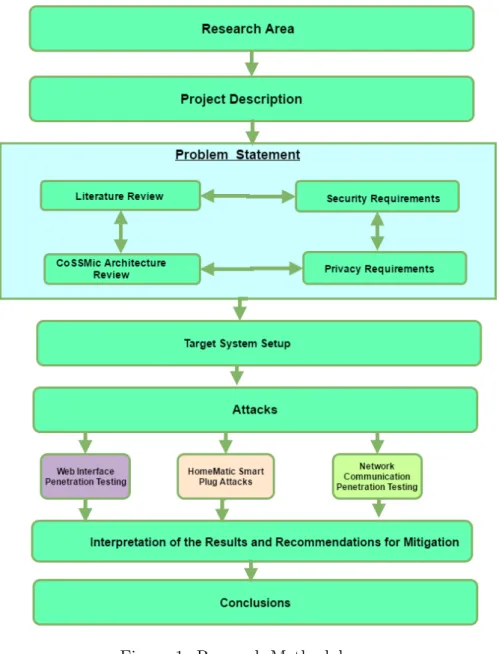
This section describes the methodology that has been used to carry out this the-sis work. The methodology is illustrated in figure 1. The thethe-sis starts with a definition of the research area. It follows with the CoSSMic project description. Within the scope of this research work, the technologies used in a smart home and the security and privacy requirements are presented. The setup of the target system is described and a guideline on the possible attacks in the system is given. Furthermore, the technical security evaluation of the HomeMatic smart plug and the target system is presented.
1.5
Delimitations
The scope of this research will be focused only on the security of the web appli-cation and the communiappli-cation between the HomeMatic smart plug and the home gateway. Since CoSSMic platform is still under the development phase and it is not stable, it was not possible to deploy a part of the system (MAS) which consists on the communication between smart homes for energy negotiation. However, during the development and testing phase when the system was stable, we were able to get some security analysis results. They will be described as vulnerabilities that may lead to potential security attacks.
Figure 1: Research Methodology
1.6
Outline
The thesis is structured as follows:
• Section 1: This section defines the smart home and it includes the intro-duction, project description, problem statement and the delimitations of the research work.
In the section, security and privacy requirements on smart home technology are presented. It also gives a background of the related on the security and privacy challenges of the smart home technology.
• Section 3: This section describes the CoSSMic and the technologies imple-mented in the prototype.
• Section 4 : This section describes the setting up of the CoSSMic virtual lab and the testing environment for the security assessment. Furthermore, this section describes the guidelines on how to evaluate the security of the current deployed CoSSMic.
• Section 5: This section describes the vulnerabilities found in the target sys-tem.
• Section 6: This section discusses the outcomes of the security analysis and gives recommendations on how to mitigate the vulnerabilities found in the system.
2
Background and related work
The section presents an overview of the technologies implemented in a smart home, highlighting those related to the CoSSMic project. Furthermore, it briefly ad-dresses the current security status of these technologies. The following section defines the security objectives of a smart home technology. Additionally, potential attacks against these objectives are presented. Finally, we discuss on the previ-ous work done regarding the security and privacy challenges of the smart home technology.
2.1
Technologies in the smart home environment
2.1.1 Communication protocols
The electrical devices in a smart home are monitored and controlled through a Home Area Network (HAN). A HAN enables the communication of the in-house devices with the smart meter. On the other side, smart homes are connected to the Internet through a Wireless Local Area Network (WLAN)or a wired Local Area Network (LAN). In a HAN, the following protocols are used to provide the communication with the connected devices:
• WIFI WIFI is a popular wireless networking technology. This protocol uses radio waves to provide wireless high-speed Internet and network connections. WiFi operates on the 2.4, 3.6 and 5 GHz frequency bands.
• ZigBee It is a low-rate, short range, an open wireless IEEE communication standard protocol, developed by the ZigBee Alliance. ZigBee operates on 2.4 GHz frequency band.
• Z-Wave It is a low-power wireless protocol which transmits data between 868.4 MHz and 926.3 MHz frequency band for in-home communication and remote applications control.
• EnOcean EnOcean 2 is a radio based communication protocol developed by the EnOcean GmbH. It is optimized for very low power consumption and energy harvesting. This allows the devices to not use any external power supply or batteries.
2
2.1.2 BidCos
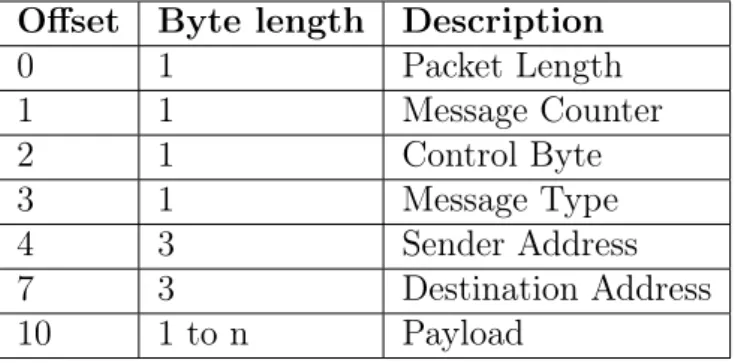
HomeMatic devices use a proprietary radio based communication protocol (Bidi-rectional Communication Standard,BidCoS), which works on a frequency of 868 MHz . It is a bidirectional protocol, in which commands get acknowledged with the state of the device. Bidcos does not provide encryption. An AES authentica-tion handshake is used for the authenticaauthentica-tion of the sending device. The BidCos [16] packet structure is shown in Table 1.
Offset Byte length Description
0 1 Packet Length 1 1 Message Counter 2 1 Control Byte 3 1 Message Type 4 3 Sender Address 7 3 Destination Address 10 1 to n Payload
Table 1: BidCoS packet structure
2.1.3 Home Energy Management System
Home Energy Management System (HEMS) is a service or utility that enables users to automatically control the energy usage of their home appliances, col-lect and generate a dashboard with real-time data about the energy consumption fromdifferent home appliances and reduce the user’s electricity bills [17]. Emon-CMS3 is one of the leading technologies within this category. It is an open-source web-app for processing, logging and visualising energy, temperature and other en-vironmental data. EmonCMS is part of OpenEnergyMonitor project. The project develops open-source hardware and software platform for energy monitoring.
2.2
Smart Home micro-computers
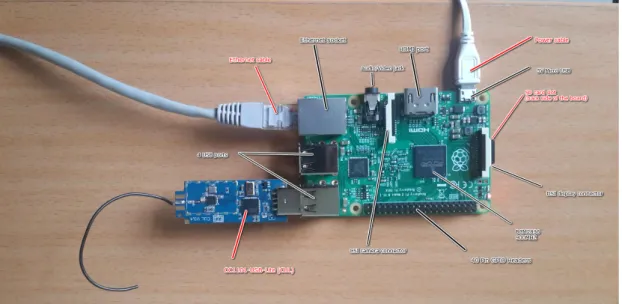
Smart home micro-computers are small sized computers that are used to control the operations of smart home system. Raspberry Pi is one of the technologies used as a smart home computer. Raspberry Pi is a small credit-card sized micro-computer that plugs into a monitor or TV using HDMI, together with a keyboard and a mouse. It can be used as an educational environment to learn programming and computing at an affordable price. In this research, it is selected Raspberry Pi
Figure 2: Frontside of circuit board of RPi 2 model B with plugged CUL 2 model B (see figure 2. This version is the second generation of RPis, released in February 2015. Raspberry Pi 2 model B, has the following specifications [18]:
• A quad-core ARM Cortex-A7 CPU processor running at 900MHz
• 1 GB RAM
• Four USB-ports
• One 10/100 Megabit/s Ethernet-port
• One micro-SD card slot
• One full HDMI port
• 40 GPIO pins
• Camera interface (CSI)
• Display interface (DSI)
• Combined 3.5mm audio jack and composite video
2.3
Threats on the web area
The CoSSMic architecture and its web area is analyzed and based on the testing of potential security issues, a list of potential web threats is created:
• Insecure remote access system Providing a secure way to remotely control the system over the internet. The method that is going to be elacted depends on the security features that each of them provides. SEC consult lists four ways which are proposed by different vendors to connect over the internet:
– Port forwarding: the router webinterface is configured to forward public traffic on a public port to the internal port of the central base station. Port forwarding although is easy to configure, it poses serious issues when it comes to the security (as it is also shown in the later section). The data that are transmitted over the network can be captured and analyzed by an attacker. Also, in this access mechanism, hackers can easily perform port scanning and find out the open ports.
– VPN: A VPN allows the remote control user to access the VPN-server of private local-area network (LAN) as if the user is physically connected at the site. This method requires moderately easy configuration compared to Port Forwarding. This method provides multiple level of security such as encryption of all data transmitted to and from connected devices and limiting the lines of source code exposed to the Internet making it secure against attacks from the internet. Thus, Raspberry Pi will be secure (behind firewalls) and only accessible over the Internet when the user is first logged in the VPN connection and then to web interface login form. However, the port forwarding will still need to be set up since it will need some predictions from a cloud server (internet). We suggest to use the open-source VPN service, OpenVPN, in order to establish a secure remote access with the system. CoSSMic requires the use of open-source systems. SEC Consult [1] recommends this method for remote access.
2.4
Security requirements
This section summarizes several security requirements related to the smart home ecosystem.
2.4.1 User and device authentication
This requirement applies to both the users and devices in a smart home environ-ment. Users and devices might perform several activities in a smart home that
require access to sensitive information. This means that, a strong authentica-tion mechanism should be provided in order to protect smart home home against unauthorized users or compromised devices attacks [19]. The in-house devices should not be remotely accessed by unauthorized users. Therefore, Public Key In-frastructure (PKI) and certificates can be implemented to support strong mutual authentication with the servers by enabling secure channels in the smart home ecosystem [20].
2.4.2 Secure key management
Some of the smart home devices have pre-installed security keys, which can be exploited by the malicious attackers. Thus, a user-friendly and transparent key management should be provided to the users [20]. This requirements ensures authentication and it also protects against compromised firmware installations.
2.4.3 Hardware protection
Smart home devices are often vulnerable to tampering attacks. Thus, it is rec-ommended to include measures such as tamper resistance, tamper evidence or anti-reverse engineering schemes against these type of physical attacks [19, 20].
2.4.4 Device security certification
Each device in the smart home should be certified by a recognized authority which claims its security [17]. In this way, it will ensure that some vendors are trusted.
2.5
Privacy requirements
ENISA [20] gives a list of guidelines about the privacy requirements of a smart home system:
1. identify personal data in a smart home 2. implement transparency measures 3. perform a privacy assessment
2.6
Related work
This section gives a short overview of the related work on the security and privacy challenges of the smart home technology.
Providing security in the smart home is a very challenging task due to the heterogeneous nature of these ecosystems. Previous research on the security of the smart home has been focused only on the security issues of the connected devices and the related protocols.
Denning et.al [21] survey the security and privacy of smart home technologies and provided a strategy for thinking about the security needs in the home.
Jacobsson et.al [22] revealed that the highest risks concerning the information within a smart home relates to inadequate access-control configuration at the in-house gateway. They also highlight the risks of weak password deployment and inadequate authentication. According to them, these risks can pose a serious threat to the security especially for the single user account used within the in-house gateway. They use a common risk analysis method based on Information Security Risk Analysis (ISRA) in order to investigate the risk exposure of smart home systems.
Symantec [23] performed a security analysis of 50 smart home devices and found that most of them are prone to weak authentication (basic security issues) and well-known web vulnerabilities. Furthermore, these devices used unencrypted communications. SEC Consult [24, 25] showed in their advisories that it is possible to exploit common web vulnerabilities in order to take control of a smart home.
A survey [11] has investigated the main security issues of smart homes with an emphasis on its interaction with the smart grid. The survey proposes possible countermeasures against identified threats that could prevent the smart home-/smart grid environment from achieving the given security objectives. Sathya Laufer and Christian Malles [26]demonstrated at the 30th Chaos Communication Congress how three different attacks were performed to gain unauthorized access at a smart home that uses a HomeMatic device which was still configured with the same default AES key. This HomeMatic device, allow the user to unlock doors or receive commands from a motion detector. In their tests, they used a Raspberry Pi which runs Homegear and a wireless transceiver. The default key and the anal-ysis of one of handshake algorithms used by HomeMatic devices could be found at pastebin.com [27] . According to Laufer and Malles, some device use AES handshake authentication mechanism but that it is not true for all HomeMatic devices.
Fernandes et.al [28] implemented several proof-of-concept exploits which an attacker could use to unlock doors, monitor the battery level of devices, set off fake alarms in the Samsung SmartThings platform.
There are several papers showing that is possible to extract personal infor-mation about inhabitants by analysing smart meter data [29].The consumers are mostly concerned with the risk of suffering privacy invasion in case that their home energy usage patterns become available to an attacker.
3
The CoSSMic platform
In this section, an overview of the CoSSMic architecture and the technologies used in this system is provided. In the following sections, the main components of CoSSMic system are described. Furthermore, the current technologies that have been chosen for the deployment of the prototype are introduced.
3.1
CoSSMic architecture
The overall architecture of CoSSMic platform is shown in 3. This platform cur-rently adopts All in Home configuration. In the current deployment, all the main components of the system reside on the home gateway and the cloud server is used only for negotiating energy among different smart homes. The home gateway hosts the main components which are responsible for the management of the smart home such as: the device integration and Multi Agent System (MAS). Electric devices are connected with the home gateway via special drivers which are developed from the project.
• GUI. The GUI(see figure 4 ) enables the user to interact with the platform by providing: real time monitoring data about the energy consumption of the appliances, scheduled tasks, predictions and statistics on historical data. The user can set the rules and preferences that agents must follow later to negotiate energy.
• The Device Integration component. It provides a device management interface for accessing and collecting data from devices. This component also use the interface to send commands to the devices such as: switch on or off. The Device integration implements the so-called mediator services. Media-torprovides APIs for device data access and device control. These APIs are accessed by the device drivers to store measurements and energy negotiation results and by the agents to get the energy profiles of the connected devices.
• Multi Agent System. It is one of the five pillars of CoSSMic platform. The blue boundary defines this component in the 3. MAS is a system com-posed of interactive intelligent agents and applications collaborating together for realizing the management and exchange of green energy while using ne-gotiation algorithm and optimization techniques. It uses the cloud services
to build a peer to peer overlay network for energy exchange in the neighbor-hood. Energy scheduling is implemented a as a distributed MAS, where a MAS instance is installed on each household, ready to collaborate with other instances in the neighborhood for energy exchange. Agents are software pro-grams that act on behalf of user to negotiate energy. They represent the
Figure 4: The web GUI of CoSSMic
devices in the smart home. In the CoSSMic context, the agents are capable of:
– monitor the device energy consumption in real time
– invoking the mediator services to obtain information about the energy profile of the devices
– use the mediator to store the results of energy negotiation within the CoSSMic neighborhood
– sending commands such as switching on/off the power switches.
– Each household has a MAS instance that enables distributed comput-ing and local autonomy. Within the neighborhood, the MAS instances collaborate with each other enabling a decentralized planning and op-timization.
The agents are classified into two categories [30, 31]:
– Consumers. These agents can only buy energy for passive devices such as: electric car, computers, washing machine, etc.
– Producers. These agents can produce energy, therefore they can sell it later. We will consider solar panels as an example of this category.
The agents or the device that they represent, are able to both produce and consume energy will be defined as Prosumers. It includes storage which are represented by a couple of agents. In addition, a single smart house will have many agents. MAS functionality is implemented by using the following agents:
– Task manager: It acts as the master agent of the MAS, converts planned tasks defined by the user into loads and sends them to the
consumer agent.
– Prediction handler: This agent computes predicted PV production based on weather forecasts updates.
– Weather watcher: It gets the latest updates for weather forecast and sent them to Prediction handler.
– Actor manager: manages producer and consumer agents.
– Device controller: It is responsible of the execution of scheduled loads by the devices via the device manager module.
• The Prediction component. It uses the weather forecast data generated by a third party, in order to compute predictions about the energy produced by PV panels and the prices about energy exchange with the public grid. Prediction updates happen once in every six hours. Therefore for each up-date, the schedule will be re-planned.
3.2
The selected technologies used for the trials
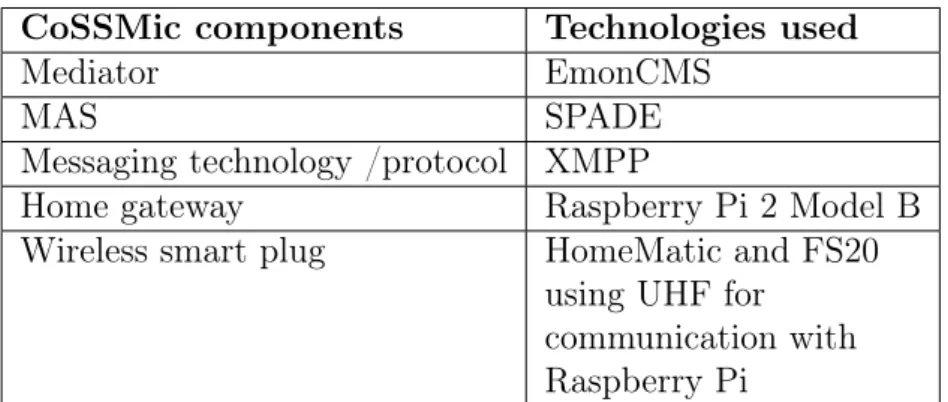
Table 3 summarizes the technology used in the current trial implementation.
3.3
The Mediator
TheMediator is implemented by EmonCMS (see section 2). The EmonCMS frame-work originally consists of five core modules, written in PHP with some Javascript functionality provided:
• input - this module pre-processes input data before inserting it in the database.
• feed -provides functionality for inserting, storing and retrieving time stamped data in the database.
• vis - the visualizations module can analyze large data sets and generate graphics in different formats.
• user -handles user actions and data, including authentication and sessions. It enables the developers to add new modules. CoSSMic is currently using EmonCMS version 8.0 , which is extended with new modules in order to implement the GUI and Device integration components:
• devices module - provides functionalities to install, instantiate and use dif-ferent drivers to control and manage real and virtual devices supported by CoSSMic. It consists of a set of device templates and a device manager. A device template includes data about: the device status, device type, machine programmes and their load profiles.
• driver module - ensures the communication between the devices and the EmonCMS. CoSSMic has developed the following drivers:
– Serial driver: integrating ModBus, MBus and IEC62056.
– CUL driver: for VHF-controlled smart plugs.
– Virtual driver: for testing and simulation.
• MAS module - provides Web and REST interface between the EmoncCMS and the MAS.
3.3.1 The Multi Agent System
The SPADE2 framework is used to implement the MAS framework. SPADE 4 is an open source agent framework that is fully compliant with the FIPA speci-fications. The framework uses its Python library to develop SPADE agents that will participate in the energy negotiation in the neighborhood. It uses XMPP as the transport protocol. A light embedded XMPP server is used as communication layer that allows agents to communicate with each other within the smart home.
3.3.2 Home gateway
Raspberry Pi 2 Model B, is the chosen microcomputer which acts as a home gateway from the CoSSMic. This microcomputer is cheap and easy to use. Other microcomputers or existing home gateways with the right software and hardware environment are also good candidates to deploy CoSSMicplatform.
The CoSSMic platform will be installed in every household by plugging the Raspberry Pi into the power network and connecting to the internet through a Wireless Local Area Network or wired Local Area Network connection. In our
4
deployment, a wired LAN is used. In this way, the platform also joins the other instances in the neighborhood.
3.3.3 Messaging technology /protocol
XMPP (Extensible Messaging and Presence Protocol) is an XML-based open stan-dard protocol for real time interaction(messaging) and presence. It provides a way to exchange XML data almost in real time. The XMPP protocol uses a decen-tralised client-server architecture, where the server acts as an intermediary for the message exchange. The XMPP servers provides security features such as: authen-tication, channel encryption, prevention of address spoofing. It is also used for user account registration, message relaying.
In the CoSSMic platform, there is a light XMPP server deployed in each Raspberry Pi, that enables peer to peer communication between agents within smart home. It also sustains server-to-server communication deployed in differ-ent gateways (RPis). Another instance of XMPP server is deployed in the cloud (cloud.cossmic.com). This one is responsible for collecting weather forecast up-dates and notifying about the new upup-dates to smart homes.
Agents communicate with each other over a peer to peer overlay. They use an XMPP account to join the overlay, with a contact ID (username@domainname) and password. Different agents can connect while sharing the same XMPP account, with a different resource such as: username@domainname/resource. An XMPP account represent an agent role. As a result, there are three types of accounts of XMPP: task manager, actor manager and controller. The XMPP hosts a chatroom for each neighborhood and it uses the chatroom mechanism to detect the presence of agents in the neighborhood.
3.3.4 Wireless smart plug
The wireless smart plugs are used to remotely monitor and control the ih-house appliances. A wireless smart plug is an easy-to-use controller that allows one to remotely switch on and off the attached devices. Once tis controller is plugged into the power outlet, the plugged in home appliances are controlled and scheduled via a web GUI. Some of the smart plugs allow also measuring the energy consumption of the connected devices. In the current trials of CoSSMic, a HomeMatic switch actuator (Product ID:HM-ES-PMSw1-Pl ) with power metering capability is the selected smart plug.
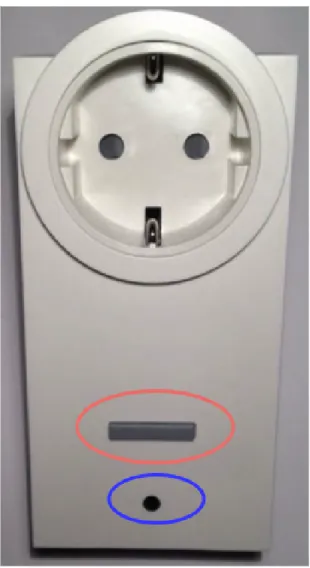
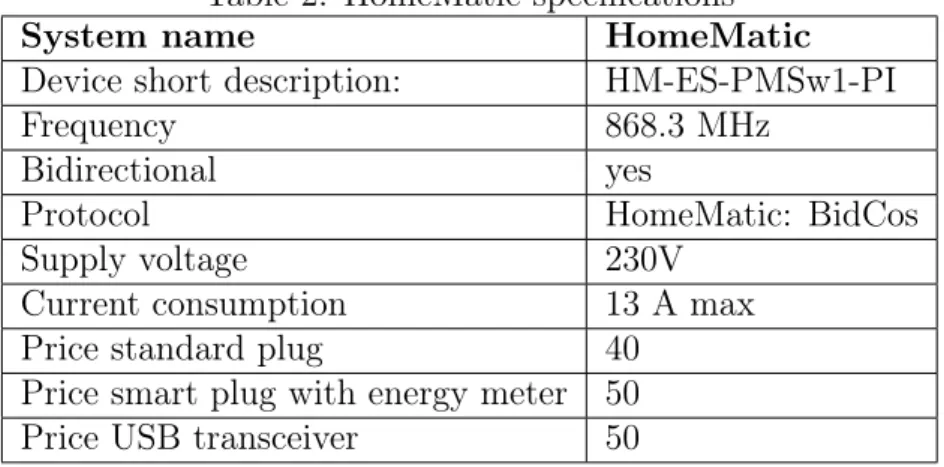
HomeMatic 5 is a line of home automation devices manufactured by eQ-3. figure 5 shows the wireless smart plug HM-ES-PMSw1-Pl. Table 2 lists the
5
Figure 5: HM-ES-PMSw1-PI wireless smart plug
specifications of this device. HM-ES-PMSw1-Plhas a channel button(red circle) and a device status LED(blue circle).
Before embarking on using the HomeMatic device, it must be configured. The device configuration is done automatically when the device is paired by pressing and holding the channel button of the device for 5 seconds, until the LED starts blinking. The LED will firstly blink slowly during acknowledging and rapidly afterwards. The pairing functionality is not be always successful and it might need to be repeated several times. The XML structure of the device configuration file where the pink color means variable, is shown in figure 6.
Figure 6: HM-ES-PMSw1-PI XML configuration file
Table 2: HomeMatic specifications
System name HomeMatic
Device short description: HM-ES-PMSw1-PI
Frequency 868.3 MHz
Bidirectional yes
Protocol HomeMatic: BidCos Supply voltage 230V
Current consumption 13 A max Price standard plug 40
Price smart plug with energy meter 50 Price USB transceiver 50
CoSSMic components Technologies used
Mediator EmonCMS
MAS SPADE
Messaging technology /protocol XMPP
Home gateway Raspberry Pi 2 Model B Wireless smart plug HomeMatic and FS20
using UHF for communication with Raspberry Pi
Table 3: Technologies used in the current CoSSMic trials
3.3.5 Devices
The smart home is equipped with various electrical devices, which are classified as energy consuming, energy producing or energy storing. The device categories used for the trials include: PV panels, refrigerator, washing machine and others. Nodes, i.e., smart meters, sensors and smart plugs can be used to monitor devices and to control them. Nodes and devices are identified by a node ID and device ID in the EmonCMS. Drivers for real and virtual devices enable the communication between the devices and the EmonCMS. The drivers help to assign a new node to the newly connected devices in the system. Based on the type of the devices used, there are two-ways to connect with the nodes:
• Virtual devices:
Virtual devices are used in the current trials to simulate real world devices. They are implemented as a PHP web application with a REST interface accepting and returning JSON data. In order to enable connection with the nodes, the user browses through a list of templates in the GUI and assigns a new virtual meter or controller.
• Physical devices:
CoSSMic uses smarts meters and wireless smart plugs to monitor and con-trol real world appliances.Technologies such as UHF, ZigBee or WIFI and protocols such as modbus are used by these controllers to enable connection with the home gateway.
3.3.6 HomeMatic protocol
HomeMatic devices use a proprietary radio based communication protocol (Bidi-rectional Communication Standard,BidCoS). This protocol is described in details in section 2.
4
Setting up a CoSSMic virtual environment
In this section, we will shortly provide the instructions on how to setup a basic CoSSMic virtual environment for our testing purposes and elaborate on it further in the CoSSMic installation . In our installation, the smart home is represented by the Raspberry Pi with all its connected home appliances.
4.1
The setup of the virtual lab
4.1.1 Hardware
For our testing environment, it will be used a Raspberry Pi 2 Model B. Apart from Raspberry Pi, the following equipments are also needed:
• Raspberry Pi accessories: power supply, HDMI cable, SD card(16 GB), Eth-ernet cable.
• Monitor or TV
• Keyboard
• HomeMatic wireless smart plug: HM-ES-PMSw1-Pl
• USB CC1101 - Lite module - V3 (busware)
• A lamp for testing purposes
• PC or a smart phone or tablet with a browser enabled
4.2
Software
• A prepared Raspbian Jessie image containing the majority of changes done to the OS • PuTTY 6 • Win32DiskWriter 7 • Software components: – EmonCMS – CUL driver. 6http://www.chiark.greenend.org.uk/~sgtatham/putty/download.html 7https://sourceforge.net/projects/win32diskimager/
4.3
Hardware setup
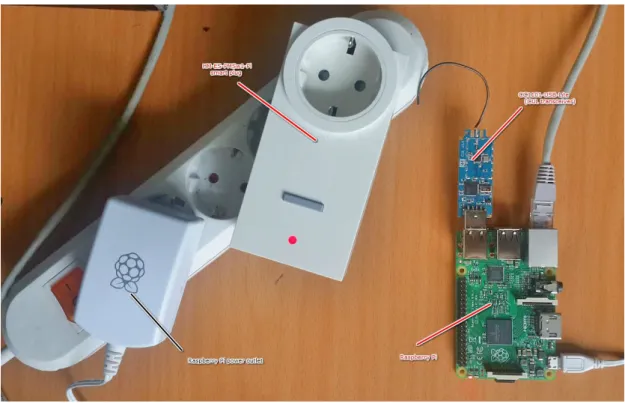
figure 7 depicts how the all above components are going to be connected to each other in order to simulate a CoSSMic environment.
Figure 7: CoSSMic hardware setup
Before plugging the above components in the Raspberry Pi , the prepared image is written in the SD card and further configurations are done. You can find a guide on how to do this procedure in the CoSSMic installation. After the configurations, the Raspberry Pi will be ready for use.
We use a European extension cable to power on: HomeMatic and Pi. These equipments can be also plugged directly into the wall power socket. The lamp is plugged into the HomeMatic smart plug and the USB CC1101 into the Raspberry Pi via its USB port.
4.4
Smart Home configuration
Now, one can access the web application from a browser in his PC or smart phone by typing the following URL in the address bar: http://129.241.208.197/emoncms
Log in with the username tr02 and the password trondheim25 which are set during the EmonCMS installation (see CoSSMic installation). Navigate to the
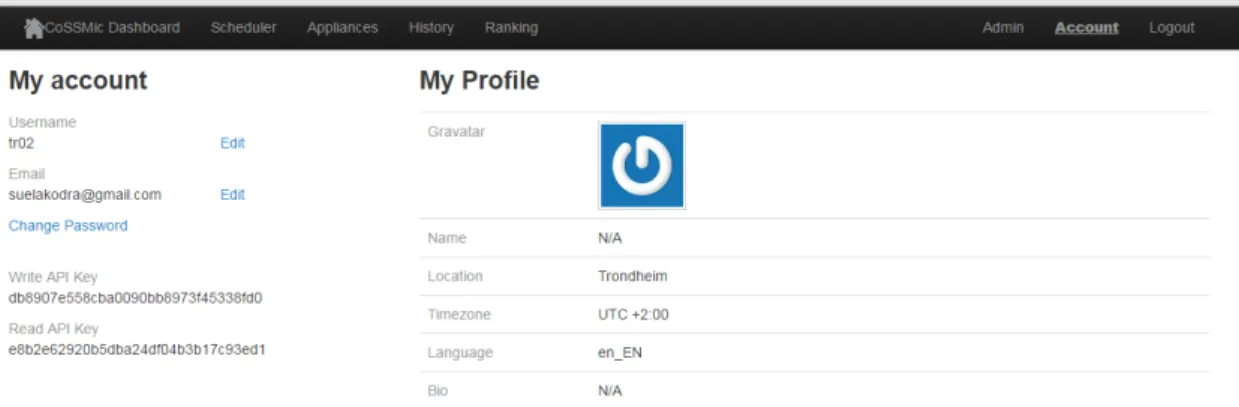
Figure 8: The profile page of the CoSSMic user
Account tab and edit the location and timezone field in âĂIJMy ProfileâĂİ. In our prototype settings, we used Trondheim as location and its timezone, as it is shown in figure 8 .
4.5
Security testing
This section provides a guideline on how to evaluate the security of the current deployed CoSSMic. It also provides a brief description of the automated tools used for security testing purposes.
4.6
Technical documentation
Before analyzing the security of a smart device, it will be helpful to consult its documentation. The documentation helps to understand how the device works, its capabilities, whether the device has any default username and password or any security related specification. In the case of the HomeMatic (product ID: HM-ES-PMSw1-PI) smart plug, little is known about its technical specifications. The technical documentation [32] did not provide any details regarding the security mechanisms of the device.
4.6.1 Attack vectors
1. Web application security - The users interact with the smart home via web interfaces using common web technologies, e.g. HTTP, Web services (REST),etc. This makes smart home vulnerable to the traditional web vul-nerabilities. Thus, the Web area can be assessed using popular resources such as OWASP IOT Top 10 Project 8. These type of vulnerabilities can
8
seriously result in dangerous attacks against the security and the privacy of the user in the CoSSMic. Mostly, because there is only one user account for CoSSMic, since the Multi Agent System supports one API key only. All the other residents in a home should login with the same credentials. In this way, having only one user with the admin rights in the system, allows the attacker to completely take over the smart home in the case of a malicious attack.
2. Sniffing attack - It is a passive attack where the attacker monitors the com-munication in the smart home environment through a sniffer or networking tool. This type of attack compromises the confidentiality of the transmitted data in the smart home environment. Basically, every communication chan-nel that does not enable encryption is vulnerable to a sniffing attack. The following tools can be used to perform a sniffing attack:
3. Replay attack - In a replay attack in the smart home, the attacker first captures the packet send from the home gateway to the home appliances through a sniffer. Then he retransmits it later to the devices and taking in this way the control of the home appliances.
4. Denial of Service attack - In a smart home environment, a Denial of Service (DoS) attack intents to prevent legitimate users from using a network or accessing network services. The attacker floods messages to smart devices and/or servers connected to Internet in order to disrupt the network traffic inside a smart home. Moreover, an attacker can send huge amount of mes-sages in the internal network of the smart home in order to consume system resources.
4.6.2 Tools used
• Kali Linux:
Kali Linux is a Debian-based Linux penetration testing platform used for security and vulnerability assessment. It is the successor of BackTrack 5 R3 operating system. Kali Linux offers a wide range of pre-installed tools that can be used for penetration testing, forensics and reverse engineering.
• The 868 MHz transceiver hardware:
The CC1101 USB Lite (CUL) stick is a transceiver that operates at frequency band 868 MHz.The CUL used in this thesis is CUL v3.4 with a frequency 868 MHz. This transceiver uses a open source firmware (culfw) that supports several wireless protocol including also BidCos. This hardware is used to analyze the communication protocol between home gateway and the home
appliances plugged into the HomeMatic wireless smart plug. Another goal, is sending commands to the home appliances in the CoSSMic system.
• OWASP ZAP:
OWASP ZAP is an open source web application security scanner written in Java. It integrates penetration testing tools for finding web application vulnerabilities.
• TCPDump:
TCPDump was used to capture our main data in order to implement various attacks against the system. It is a packet sniffer program that captures the network traffic sent and received on a specific port. The captured traffic can be stored in a file using the pcap format.
• Wireshark:
Another traffic analyzing tool we used, was Wireshark program. It is a popular protocol analyzer. This tool was running on a Kali Linux machine.
5
The security analysis of CoSSMic
Note: The CUL driver code analyzed for the authentication mechanism is provided by the CoSSMic project.
The following chapter introduces the results from the security analysis of the CoSSMic conducted according to the methodology presented in Section 1. Finally, a technical evaluation of the security of the communication protocol between the system and the HomeMatic device is provided.
5.1
Web application security
The user access CoSSMic through a web interface. The web interface of this smart home system consists of one section: login. The user needs to authenticate in order to access the CoSSMic. RESTful web services are used for user authentication and authorization. The data are transmitted over plain HTTP, without TLS encryption enabled.
5.1.1 Credentials leakage
Sensitive information such as the credentials are sent in plain text over the network. This allows an attacker to easily intercept and steal these data by sniffing the network traffic and performing an eavesdropping attack. As it is shown in Figure 9 , an attacker can uses a network sniffer such as Wireshark to reveal the username (tr02) and the password (trondheim25).
Using another sniffing tool such as TCPdump, the API keys are also eaves-dropped (see Figure 10). Now that the attacker has gained useful knowledge about the system, it would be easy to bypass the authentication mechanism and enter the system. The API keys should remain confidential. The impact of this vulnerability is very serious considering the fact that there is only one account for the users at a smart home.
5.1.2 Clickjacking attack
The parameter X-FRAME-OPTIONS Header is not set in some of the web pages, based on an analysis from ZAP (Figure 11). The impact of this vulnerability in the ZAP test is rated as medium, since it can cause a possible clickjacking attack. The clickjacking attack is tested by running the script in 12. As you can see in Figure 13, the content of the CoSSMic web interface can be embedded into another site, making it vulnerable to clickjacking attacks.
Figure 9: Sniffing user credentials with Wireshark
5.1.3 Remotely control the devices without being authorized
An attacker can easily control the devices connected to the HomeMatic smartplug without being unauthorized in the system. As it was pointed out in 5.1.1, the API key can be sniffed. In addition all the appliances plugged into the smartplug can be controlled by a HTTP GET request. An attacker can simply type the following URL in the browser: In this way, the attacker can switch on and off the smart plug.
5.1.4 Denial of Service
A remote attacker can cause a Denial of Service attack by sending the URL in 15 with the HomeMatic device id, its status which is manipulated with a character in the status parameter, instead of a number and the write API key. When the attacker enter this URL, it will make the system unavailable. The status parameter in the URL takes as a value a character, which is not a legit input value. The status can only take numbers as values. We observe that the smart plug switches off when the status was set to 0 and it switches on when the status was set to other numbers (not only 1). An authorized user does not need to toggle a device through URL, since there he can use a button in the web interface for that reason.
It is not difficult for a attacker to find the idof the connected devices, since each of them is assigned a number which increases each time a new one is added in the system. There is not any URL input validation. The attacker does not need to login in the system, since he can use the API keys from a sniffing attack. The
Figure 10: API keys sniffed with TCPdump
Figure 11: The X-FRAME-OPTIONS vulnerability shown in ZAP
system will not respond to the requests of the users at home. The home gateway needs to be rebooted in order to function again.
5.1.5 Other vulnerabilities found
This section focuses on vulnerabilities found during a penetration testing but which might have a low impact in the security of the system.
• Cookie HTTP only flag not set
The cookies do not have a HttpOnly flag enabled. The cookie can be acces-sible from JavaScript.The impact of this vulnerability may be serious when this cookie is a session one.
Figure 12: Script for testing clickjacking attack
Figure 13: The login paged framed by a clickjacking attack
• Error Handling
An attacker gathers useful information after an unsuccessful login with the wrong password. Figure 16 shows the error message after this attack. Hav-ing information about the correct username but not the password, it might probably reduce the attacker’s attempt to find the correct credentials.
5.2
HomeMatic device security
5.2.1 Attacks setup
Figure 17 illustrates the developed attack scenarios against the security of the HomeMatic device described in the following sections. Two CUL transceivers (same versions) are used in order to simulate the following attack scenarios. Transceiver 1 is connected to the USB serial port of the home gateway.Transceiver 2 is con-nected to the USB serial port of a Linux machine. Once the transceiver is plugged in, it should appear as /dev/ttyACM0 in the attacker’s Linux terminal. To start using Transceiver 2 for network sniffing, a serial terminal on the Linux machine is open by typing the shell command: sudo screen /dev/ttyACM0.
5.2.2 Attacks
Sniffing/Eavesdropping attack As it was expected from section , an attacker can easily sniff and eavesdrops the traffic between the home gateway (Raspberry Pi) and the HomeMatic HM-ES-PMSw1-PI smart plug. As it is shown in the previous section, the communication between HomeMatic smart plug and smart home is unencrypted.
Figure 14: API key added in the URL
Figure 15: The URL sending from the attacker performing a DoS attack 2. Type "Ar" command in the Linux terminal to start BidCos packet
intercep-tion.A stands for AskSin, that is what the BidCos implementation in the CUL firmware is called and r is to enable BidCos reception.
3. Turn ON the smart plug via the web GUI. Transceiver 1 sends the command to the HomeMatic device.
4. The LED blinks red in the smart plug and the lamp is switched on. The following BidCos packets each prefixed with "A", are received in the terminal: The following sections describes how the authentication mechanism works on this HomeMatic device.
The same testing configuration is setup for sending a turn OFF command to the HomeMatic HM-ES-PMSw1-PI. The received frames by sniffing the commu-nication are:
Replay attackUsing the available tools, a replay attack is successfully mounted. The message counter in the packet frame is incremented once per each data trans-mission. But that is not enough to prevent a replay attack, since there was no need to increment the counter byte in the packet used for retransmission. This sort of attack is easy to perform and does not any require expensive tools. A replay attack can disrupt the functioning of the whole smart home system. The majority of the devices in the current smart home system are controlled via smart plugs. Therefore, the impact of this attack may be severe for the smart home. An attacker could instantly perform a replay attack at a specific device attached to a smart plug, overriding in this way the planned schedule without giving any notice to the user.
1. Using the culfw command As , the attacker will resend the first captured packet in an attempt to turn ON the lamp:
As 0E3BA011F1103424A4800201C80000
2. The LED blinks red in the smart plug and the lamp is switched on. The following frames are received, where the last one is the acknowledgement
Figure 16: Information leakage during a login with wrong password one:
As it can be observed, the acknowledgement received in the replay attack is the same as in the proper data transmission.
The same experiments are carried out for a replay attack of the turn OFF command. After sending out the following command:
As 0E3DA011F1103424A4800201000000
3. The LED stops blinking and the lamp is switched off. The following frames are received, where the last one is the acknowledgement one:
5.3
Authentication mechanism
The authentication mechanism used between the HomeMatic HM-ES-PMSw1-PI device and the home gateway presented here is based on the code analysis of the CUL driver. It includes four messages. The first message is the initial message sent from the initiator to the HomeMatic device (Figure 22 ). In this case, it is a turn ON command (see 18). The second message is the acknowledgment command sent from the HomeMatic device to the home gateway. The third message contains information about the energy load of a connected device with the smart plug such as: energy, current, frequency and voltage. The HomeMatic devices sends these data to the home gateway. These data will be later represented graphically in the web interface of the system.
The fourth message sends a received acknowledgment message to the Home-Matic device from the home gateway. The authentication mechanism ends here. After 3 minutes, the third message is sent again with a different payload. Due to the limit time, it was not possible to decipher the payload. Based on the authen-tication mechanism described in this section, the third frame sent contains the updated energy parameters.
Figure 17: An attack against the devices connected with HomeMatic
Figure 18: Packet frames received after a turn ON command
5.4
Packet frame
The structure of a packet frame captured in the above sections is described in Figure 26. The given packet represents the turn ON command. Also, the structure of the payload for the HomeMatic HM-ES-PMSw1-PI device is described in this picture.
Figure 19: Packet frames received after a turn OFF command
Figure 20: Packet frames received after a turn ON replay attack
Figure 21: Packet frames received after a turn OFF replay attack
Figure 22: Code snippet for the first frame sent
Figure 24: Code snippet for the third frame sent
Figure 25: Code snippet for the fourth frame sent
6
Results and discussion
The security analysis conducted in section 5 showed that CoSSMic smart home technology is not a secure system. In this chapter, we discuss about the insecurity implications on the CoSSMic. Furthermore, it also describes some existing security countermeasures to mitigate the associated vulnerabilities.
6.1
Insecurity of the CoSSMic system
CoSSMic is a complex system consisting of multiple technologies and devices. The system demonstrated to be prone of several vulnerabilities that require urgent mitigation. CoSSMic is still under the development phase. Thus, security and privacy concerns should be evaluated and mitigated in the early phases of the product lifecycle [20]. More sophisticated attacks can be implemented against this smart home technology [20]. HomeMatic smart plug demonstrated to posses serious vulnerabilities, due to the lack of a strong authentication mechanism, that can affect the well-function of the whole CoSSMic system. Ensuring strong mutual authentication and encryption is fundamental for the smart devices [23]. Replacing the current version of the HomeMatic smart plug with a new one will not be costly, but it will have a great impact on the whole system since the majority of the devices in the home are connected with it.
6.1.1 Countermeasures
The proposed countermeasures are based on our security analysis and the limi-tations that comes from the CoSSMic project such as only open-source software, specific hardware (Raspberry Pi and HomeMatic).
6.1.2 Anti-clickjacking attack
X-Frame-Options HTTP response header can be used to avoid clickjacking attacks in a website. There are three possible settings for the X-Frame options[33]:
• DENY: This value will prevent a web page from being framed.
• SAMEORIGIN:This value will allow a page only to be displayed in a frame on the same origin as the page itself.
• ALLOW-FROM uri: This value will allow a page to be displayed in a frame on the specifieduri.
6.1.3 HTTPS
The security analysis of the CoSSMic in section 5 showed the use of HTTP pro-tocol. When HTTP protocol is used, the traffic is sent in plaintext. It allows the attacker to see/modify the traffic (man-in-the-middle attack). HTTPS is a secure version of HTTP âĂŞ it uses SSL/TLS to protect the data of the application layer. When HTTPS is used, the following properties are achieved: authentication, data integrity, confidentiality.
6.1.4 VPN
A VPN connection gives the user the capability to have a remote and private connection with the CoSSMic system. VPN provides end-to-end encryption. Based on the requirements of the CoSSMic, it is recommended to use the OpenVPN9. OpenVPN supports the use of strong security protocol Secure Socket Layer (SSL) on the Lighttpd webserver of the CoSSMic.
6.1.5 API key
API keys are used for authentication and authorization in the target system. They should not be passed explicitely in the URL.
6.1.6 HomeMatic
It would be better to change the HomeMatic device with another device of the same company. KeyMatic is another device developed by the same company as HomeMatic but it claims to be secure thanks to AES encryption.
7
Conclusion and future work
This Master’s thesis covers the security and privacy challenges of a smart home technology such as CoSSMic. The thesis provides a theoretical background on the security and privacy issues found in the smart home system. The main contribu-tions of the thesis are:
1. Provide a literature study of security and privacy of smart home technology. 2. Security analysis of the CoSSMic system.
3. Security analysis of the HomeMatic smart plug
4. Proposed countermeasures for the vulnerabilities found.
7.1
Future work
For further studies, a technical security analysis of the Multi Agent System com-ponent should be included once it is working in the CoSSMic trials. Furthermore, different technologies used for the energy negotiation should be described and compared regarding security challenges. Also, a mitigation should be provided for every vulnerability found in the system.
Another direction for future work could be the impact that an insecure CoSS-Mic system would have in the public grid.
References
[1] Daniel Schwarz and SEC Consult Vulnerability Lab Vienna. The Current State of Security in Smart Home Systems. URLhttps://www.sec-consult. com/fxdata/seccons/prod/media/SEC_Consult_Whitepaper_The_
Current_State_of_Security_in_Smart_Home_Syste....pdf.
[Ac-cessed:15/02/2016].
[2] Greg Lindsay, Beau Woods, and Joshua Corman. Smart Homes and the Internet of Things. URLhttps://otalliance.org/system/files/files/ initiative/documents/smart_homes_0317_web.pdf, March 2016. [Ac-cessed:15/02/2016].
[3] Kara Saul-Rinald, Robin LeBaron, and Julie Caracino. Mak-ing sense of the smart home. Applications of Smart Grid and Smart Home Technologies for the Home Performance Industry. URLhttp://www.homeperformance.org/sites/default/files/nhpc_ white-paper-making-sense-of-smart-home-final_20140425.pdf, May 2014. [Accessed: 15/02/2016].
[4] Lalatendu Satpathy. Smart housing: Technology to aid aging in place. new op-portunities and challenges. Master thesis, Mississippi State University, 2006. [5] Andreas Kamilaris, Yiannis Tofis, Chakib Bekara, Andreas Pitsillides, and Elias Kyriakides. Integrating Web-Enabled Energy-Aware Smart Homes to the Smart Grid. http://citeseerx.ist.psu.edu/viewdoc/download?doi= 10.1.1.718.5857&rep=rep1&type=pdf.
[6] Toril Laberg, Haakon Aspelund, and Hilde Thygesen. SMART HOME TECHNOLOGY,Planning and management in municipal services. URL http://design.ils.org.tw/index.files/%E7%A0%94%E7%A9%B6%E8% AA%B2%E7%A8%8B/IS-1216E_Smart_home_t_4103a%5B1%5D.pdf, July 2005. [Accessed: 15/02/2016].
[7] Ilse Bierhoff, Ad van Berlo, Julio Abascal, Bob Allen, Anton Civit, Erkki Kemppainen Klaus Fellbaum, Noemi Bitterman, Diamantino Fre-itas, and Kristian Kristiansson. Smart home environment. http: //www.cardiac-eu.org/cost219ter/inclusive_future/(14).pdf. [Ac-cessed: 1/03/2016].
[8] Rosslin John Robles and Tai hoon Kim. Applications, Systems and Meth-ods in Smart Home Technology: A Review. URL http://www.sersc.org/ journals/IJAST/vol15/4.pdf, February 2010. [Accessed: 1/03/2016].
[9] Gabriele Lobaccaro, Salvatore Carlucci, and Erica LÃűfstrÃűm. A Review of Systemsand Technologies for Smart Homes and Smart Grids, May 2016. [Accessed: 15/02/2016].
[10] Sarah Darby. The Effectiveness of Feedbackon a Review for Defra of the Lit-erature onMetering, Billingand DirectDisplays, 2006. [Accessed: 15/02/2016]. [11] Nikos Komninos, Eleni Philippou, and Andreas Pitsillides. Computer security and the modern home. IEEE Communications Surveys Tutorials, 16:1933– 1954, November 2014.
[12] Alba Amato, Beniamino Di Martino, Marco Scialdone, and Salvatore Ven-ticinque. Design and evaluation of P2P overlays for energy negotiation in smart micro-grid. Computer Standards & Interfaces, 570(2016):59–67, Febru-ary 2016.
[13] Luca Tasquier, Marco Scialdone, Rocco Aversa, and Salvatore Venticinque. Agent Based Negotiation of Decentralized Energy Production. Intelligent Distributed Computing VIII, 44(2016):159–168, 2016.
[14] Alba Amato, Rocco Aversa, Massimo Ficco, and Salvatore Venticinque. Coss-mic smart grid migration in federated clouds. Computer Standards & Inter-faces, 44(2016):159–168, February 2016.
[15] Alba Amato, Beniamino Di Martino, Marco Scialdone, Salvatore Venticinque, Svein Hallsteinsen, and Shanshan Jiang. A distributed system for smart en-ergy negotiation.Computer Standards & Interfaces, 44(2016):159–168, Febru-ary 2016.
[16] Homegear. Bidcos packet - general information. https://homegear.
eu/index.php/BidCoS_Packet_-_General_Information. [Accessed:
17/03/2016].
[17] Tiago D. P. Mendes, Radu Godina, Eduardo M. G. Rodrigues, JoÃčo C. O. Matias, and JoÃčo P. S. CatalÃčo. Smart home communication technolo-gies and applications: Wireless protocol assessment for home area network resources. pages 7279–7311.
[18] Raspberry Pi. Raspberry pi 2 model b, 2016.
[19] Changmin Lee, Luca Zappaterra, Kwanghee Choi, and Hyeong-Ah Choi. Se-curing smart home: Technologies, security challenges, and security require-ments. InProc. of the IEEE Conf. on Communications and Network Security, pages 67–72. IEEE.
[20] CÃľdric LÃĽVY-BENCHETON, Eleni DARRA, Guillaume TÃĽTU, Guil-laume DUFAY, and Mouhannad ALATTAR. Security and resilience of smart home environments. good practices and recommendation. Technical report, ENISA, December 2015. [Accessed: 17/03/2016].
[21] Tamara Denning, Tadayoshi Kohno, and Henry M. Levy. Computer security and the modern home. Communications of the ACM, 56(1):94–103, January 2013.
[22] Andreas Jacobsson, Martin Boldt, and Bengt Carlsson. Computer security and the modern home. In 2014 International Conference on Future Internet of Things and Cloud, pages 183–190, Barcelona, Aug 2014. IEEE.
[23] Mario Ballano Barcena and Candid Wueest. Insecurity in the inter-net of things. https://www.symantec.com/content/dam/symantec/ docs/white-papers/insecurity-in-the-internet-of-things-en.pdf, November 2014.
[24] SEC Consult. https://www.sec-consult.com/fxdata/seccons/prod/ temedia/advisories_txt/20150227-0_Loxone_Smart_Home_Multiple_ Vulnerabilities_v10.txt. Accessed 21 June 2016.
[25] SEC Consult. https://www.sec-consult.com/fxdata/seccons/prod/ temedia/advisories_txt/20150514-0_Loxone_Smart_Home_Multiple_ Vulnerabilities_part2_v10.txt. [Accessed: 17/03/2016].
[26] Sathya Laufer and Christian Mallas. Attacking homematic. http: //pastebin.com/bas7Lrk7http://media.ccc.de/browse/congress/ 2013/30C3_-_5444_-_en_-_saal_g_-_201312301600_-_attacking_ homematic_-_sathya_-_malli.html, 2013. Accessed 21 June 2016.
[27] pastebin. homematic bidcos default aes key. http://pastebin.com/ bas7Lrk7. Accessed 21 June 2016.
[28] Earlence Fernandes, Jaeyeon Jung, and Atul Prakash. Security analysis of emerging smart home applications. https://iotsecurity.eecs.umich. edu/img/Paper27_CameraReady_SmartThings_Revised_IEEEGen.pdf, 2016.
[29] Ross Anderson and Shailendra Fuloria. Smart meter security: a survey.
https://www.cl.cam.ac.uk/~rja14/Papers/JSAC-draft.pdf. Accessed 21 June 2016.
[30] Alba Amato, Beniamino Di Martino, Marco Scialdone, and Salvatore Ven-ticinque. Distributed architecture for agents-based energy negotiation in solar powered micro-grids. Concurrency and Computation: Practice and Experi-ence, 28:1275–1290, 28 JAN 2016.
[31] A Negotiation Solution for Smart Grid using a fully decentralized, P2P ap-proach, 2015.
[32] Qivicon. Wireless switch actuator 1-channel with power meter-ing, plug adapter: Hm-es-pmsw1-pl. https://www.qivicon.com/ assets/Products/eQ-3/Zwischenstecker-mit-Leistungsmessung/
130254-HM-ES-PMSw1-Pl-eQ-3-GE-20131113-web.pdf. [Accessed:
17/03/2016].
[33] OWASP. Clickjacking defense cheat sheet. https://www.owasp.org/index. php/Clickjacking_Defense_Cheat_Sheet. [Accessed: 7/06/2016].
A
CoSSMic installation
CoSSMic installation
1. Preparing the SD card:
Firstly, the image is prepared to be written in the SD card :
(a) Insert the SD card into the slot for SD cards of your PC (if the PC has one), otherwise into a card reader. Then connect the card reader with the PC and check which drive letter it has been assigned
(b) run Win32DiskWriter
(c) click the folder icon and choose the prepared Raspbian Jessie lite image file
(d) under Device,choose the drive letter of the SD card (e) click write
(f) Once writing has finished, close Win32DiskWriter program and eject the SD card from the reader.
With the prepared image in the SD card, the next preparations on the SD card are done as follows:
(g) insert the SD card into the Raspberry Pi
(h) connect the monitor with the Pi via HDMI cable
(i) connect to the internet via ethernet cable and then plug the keyboard, power supply into the Raspberry Pi Once the Raspberry Pi is turned on, it will take approximately one minute to boot it. The Raspberry Pi is automatically assigned an IP via DHCP. It can be accessed via its IP, which would be found by:
(j) login in the Raspberry Pi with usernamepi and password CoSSMic
(k) type sudo ifconfig in the command line and next to the eth0 entry, it will show inet addr: 129.241.208.197 which is the IP address of the Raspberry Pi Now, you can connect to the raspberry via SSH using PuTTY. You can finish the SD card preparation by manually resizing the variable partition to fit within the card and to provide some unused space for future data.
(l) Therefore, we type the following commands in the command line:
• sudo service cron stop && sudo service mysql stop && sudo service redis-server stop && sudo service lighttpd stop && sudo service supervisor stop && sudo service ufw stop
(m) Next, resize the partition to fit the SD card:
• sudo fdisk /dev/mmcblk0
• Enter p, to show the list of partitions
• Enter d , to create a new partition
• Enter 3, which is the partition number that would be deleted
• Enter p again, to show the list of partitions with the new modifi-cations
• Enter n, to create a new partition from the same starting sector
• Enter p, for primary partition
• Enter 3, the partition number
• Enter 6422528 , as the first sector number
• Press "Enter" to automatically select the last sector
• Enter "p" to get the following result of partitions. (n) Write the changes to SD card:
• Enter w
• sudo reboot
(o) Expand the filesystem to the new partition by checking the file system and then resizing it:
• sudo e2fsck -f /dev/mmcblk0p3
• sudo resize2fs /dev/mmcblk0p3 (p) Mount all the partitions:
sudo mount -a
2. Personalization of the Raspberry Pi
The configurations of the Raspberry Pi are modified with the following com-mands:
• sudo raspi-config
• Go to: internationalisation options > Change locale settings in order to select the desired locales.
• Go to: internationalisation options > Change the timezone to choose the correct timezone. We choose:Europe/Oslo
• Uncomment and edit the date.timezone variable to add “Europe/Oslo” in /etc/php5/cgi/php.ini file.
3. Authentication:
password authentication with a RSA generated SSH-key. The key-pair is creating on Windows using PuTTYgen10. Using the default settings (SSH-2 RSA and 2048 bit encryption), a private and a public key are generated.
• Save the private key to a secure location
• Copy the public key for the user pi at the file: /home/pi/.ssh/authorized_keys file .
• If the file does not exist, then create one: mkdir /.ssh
touch /.ssh/authorized_keys
• Next, modify the file /etc/ssh/sshd_config with the following lines: PermitRootLogin no AllowUsers pi RSAAuthentication yes PubkeyAuthentication yes AuthorizedKeysFile PasswordAuthentication no • Restart SSH service: sudo service ssh restart 4. Installation of EmonCMS:
• hg clone https://bitbucket.org/cossmic/emoncms /var/www/emoncms
• hg pull -u -R /var/www/emoncms
• Create a MySQL database:
– mysql -u root -p
– the required password is CoSSMic – Type:
SET PASSWORD FOR ’tr01’@’localhost’ = PASSWORD(’trondheim25’);
– CREATE DATABASE emoncms;
CREATE USER ’tr01’@’localhost’ IDENTIFIED BY ’trondheim25’;
– Give permisions on the new database: GRANT ALL ON emoncms.* TO ’tr01’@’localhost’;
10
flush privileges; exit
• The database settings need to be updated after the new password is enabled. Thus, To do this, make a copy of the default settings and call it settings.php.
cp /var/www/emoncms/default.settings.php /var/www/emoncms/set-tings.php
• Update the file: /var/www/emoncms/settings.php with the following lines:
$server = "localhost"; $database = "emoncms"; $username = "tr01";
$password = "trondheim25";
• To provide access with the CoSSMic cloud server, change the YOUR_NBH_API_KEY with 5544b076ff0c3eb0fc9fbe0aa39e6acf in the
/var/www/emon-cms/settings.php file. // $cossmic[’host’] = ’http://cloud.cossmic.eu/emoncms/’; $cossmic[’apikey’] = ’YOUR_NBH_API_KEY’;
$cossmic[’node’] = 0;
• EmonCMS can now be accessed in the browser: http://129.241.208.197/emoncms
• When the EmonCMS is accessed for the first time, the user will be directed to a register screen. We create a new user by entering the username tr02 and password trondheim25 and clicking register to finish.
• Now, we can disable EmonCMS’ database test and initiation by modi-fying the file /var/www/emoncms/settings.php with the following lines: $allowusersregister = FALSE;
$dbtest = FALSE;
• The EmonCMS is ready to use. 5. CUL driver installation:
The installation of the CUL driver is documented in the CoSSMic repository which is not public yet.
![Figure 3: CoSSMic platform adopted from [30]](https://thumb-us.123doks.com/thumbv2/123dok_us/9020397.2799888/18.892.136.758.350.774/figure-cossmic-platform-adopted-from.webp)