Open Research Online
The Open University’s repository of research publications
and other research outputs
Forensically-Sound Analysis of Security Risks of using
Local Password Managers
Conference or Workshop Item
How to cite:
Gray, Joshua; Franqueira, Virginia N. L. and Yu, Yijun (2016).
Forensically-Sound Analysis of Security Risks
of using Local Password Managers.
In: Proceedings: 2016 IEEE 24th International Requirements Engineering
Conference Workshops (REW), IEEE, pp. 114–121.
For guidance on citations see FAQs.
c
2016 IEEE
Version: Accepted Manuscript
Link(s) to article on publisher’s website:
http://dx.doi.org/doi:10.1109/REW.2016.034
Copyright and Moral Rights for the articles on this site are retained by the individual authors and/or other copyright
owners. For more information on Open Research Online’s data policy on reuse of materials please consult the policies
page.
Forensically-Sound Analysis of Security Risks of
using Local Password Managers
Joshua Gray
∗, Virginia N. L. Franqueira
∗and Yijun Yu
†∗ College of Engineering and Technology, University of Derby, UK †School of Computing and Communications, The Open University, UK
Abstract—Password managers address the usability challenge of authentication, i.e., to manage the effort in creating, memoris-ing, and entering complex passwords for an end-user. Offering features such as creating strong passwords, managing increasing number of complex passwords, and auto-filling of passwords for variable contexts, their security is as critical as the assets being protected by the passwords. Previous security risk analyses have focused primarily on cloud- and browser-based password managers, whilst the security risks of local password managers were left under-explored. Taking a systematic forensic analysis approach, this paper reports on a case study of three popu-lar local password managers: KeePass (v2.28), Password Safe (v3.35.1) and RoboForm (v7.9.12). It revealed risks that either the master password or the content of the password database could be found unencrypted in Temp folders, Page files or Recycle bin, even after applications had been closed. As a consequence, an attacker or a malware with access to the computer on which the password managers were running may be able to steal sensitive information, even though these password managers are meant to keep the databases encrypted and protected at all times. These findings point to directions to mitigate the identified risks.
Index Terms—Password Managers; Authentication; Security Risk; Digital Forensics.
I. INTRODUCTION
Passwords are essential for those with an online presence. They remain the most common form of authentication for proving identity and are required to permit users’ legitimate access to accounts, services, devices, data and networks while preventing unauthorised access from anybody else.
Typically, each user has an average of 25 online accounts requiring passwords, and types on average 8 passwords per day, according to a large-scale study from 2007 [1]. Since technology growth and innovation is increasing exponen-tially [2], these numbers are probably already conservative. Remembering those passwords is affected by many factors, such as: (i)password complexity– stronger passwords require high entropy [3], i.e., a certain length, a mixture of characters and cases, no dictionary words, (ii) password matching – users need to know which password belongs to which account, service or device [1], (iii)frequency of use– passwords seldom used are harder to remember [4], and (iv)frequency of change
– best practices recommend the enforcement of periodic pass-word changes and check of passpass-word history [3]. To cope with the task of remembering and matching many passwords, users have to use a variety of strategies. For example, they reuse passwords whenever possible across different accounts, which
Corresponding authors: [email protected], [email protected]
has a domino side-effect on security [5]; they write them down or recycle old passwords with small changes [4]; or they use highly guessable passwords [6]. All these strategies undermine security in favour of usability.
Thus, password managers have been introduced as “one of the best ways” to accommodate the trade-off between security and usability raised by password-based authentication [7]. Users only need to remember one, hopefully strong, master password or passphrase to access their database of passwords and corresponding user names, account numbers, credit card numbers or similar information needed for authentication [3]. Therefore, it is no surprise that the password managers are becoming one of the best practices among individuals and Small and Medium Enterprises (SMEs) [8]. However, pass-word managers only fulfil their purpose if they are secure; otherwise, they represent a single point of failure [9], exposing users to security vulnerabilities.
Most existing studies of security risks have focused on cloud- and browser-based password managers, with only a few focused on local or desktop password managers [10]. Such studies did not approach password managers’ security risks from a digital forensics perspective.
Using a systematic analysis approach using context dia-grams [11], we elicit potential risks from the phenomena ex-posed between the contextual domains involving desktop pass-word managers and their interfaces to the operating systems through residual data left on the computer when or after the user exercises some features of the software machine. Then, (i) we conduct a series of forensic investigative experiments to test whether these candidate risks can materialised into realist impact; (ii) we mimicked ordinary users for the design of scenarios using a Black-box testing approach, without touching the internal implementation of the software, such that the risks have a higher likelihood of occurrence. After the forensically-sound investigations, the paper reports on vulnerabilities detected simply from the use of three popular local-based password managers. We selected three popular and widely used local password managers, namely, KeePass version 2.28 [12], Password Safe v.3.35.1 [12] and RoboForm 7.9.12 [13].
The remainder of the paper is organised as follows. Sec-tion II provides background informaSec-tion on different types of password managers, and on the local password managers selected for the study. Section III presents related work in terms of reported security issues for password managers.
Section IV describes the design of this study. Section V discusses results, while Section VI draws conclusions and provides some recommendations.
Note that this work assumes legitimate use of the studied password managers. The analysis of encryption algorithms used by the studied password managers is out of scope for this study.
II. BACKGROUND
A. Password Managers
As mentioned in Section I, password managers are designed to reduce the likelihood of compromise derived from reused and weak passwords that create a domino effect. There are three types of password managers available for users, each type has its own advantages and disadvantages, and its own method of storing, managing and protecting the data they are entrusted with.
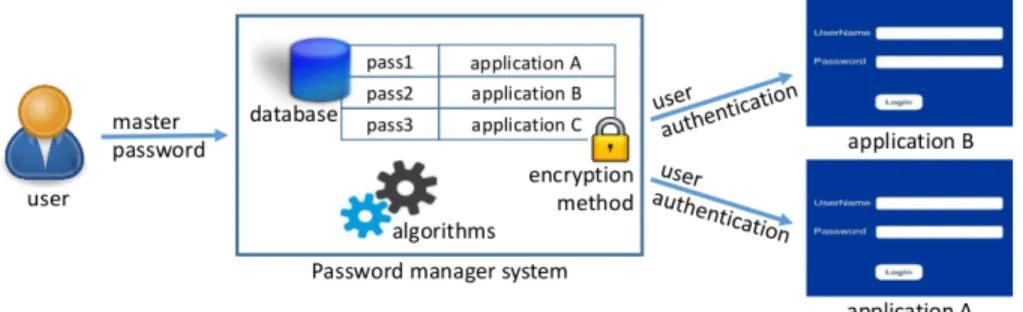
Figure 1 illustrates the basic context of use and typical components of password managers. Users have to remember a master password to authenticate to different applications or services. The password manager’s engine (algorithms) uses a specific encryption method to store passwords and correspond-ing authentication details on a database.
1) Cloud-based Password Managers: Password managers such as LastPass and 1Password are cloud-based. Although installed locally, they have the ability to synchronise to the cloud, i.e., they store saved passwords on a cloud storage server. Storing data this way enables users to have access to their data wherever and whenever they wish [14]. Due to this ubiquitous characteristic, cloud-based password managers are the most commonly used [14]. Similar to other password managers, they have the ability to generate passwords. By doing so, the manager can provide complex and unique passwords for different services and websites.
Cloud-based password managers use extensions to work alongside users’ browsers. These extensions allow the pass-word manager to auto login and auto-populate authentication details to reduce the chances of attacks that involve user participation [9].
2) Browser-based Password Managers: Google Chrome, Firefox, Internet Explorer (IE), Safari and Opera – all of these browsers offer their own built-in password managers. Each browser has a method of storing and securing data, and works differently depending on the Operating System that is being used. Browser managers offer a limited number of features when compared to other types. They do not offer a complex password generator or secure login capabilities [15].
On a Windows-based machine, Chrome, IE and Safari use Windows Data Protection API (DPAPI) to encrypt all passwords stored in their password databases. The encryption used by DPAPI is linked with the users’ Microsoft Windows account password which acts as the user master password [15]. Using this method of encryption, Chrome, IE and Safari ensure that the password database is secure from being viewed in plain text, without the need for the user to set their own master password.
On a MacOSX machine, however, these browsers rely upon Apple’s Keychain service to encrypt the contents of the databases. Similar to the DPAPI, the user login password is used as the default master password, and to change it, the user must do so manually and thus is unlikely to be done by the average user [15].
On a device with a Linux-based OS, Chrome automati-cally chooses whether it will encrypt the databases contents either with GNOME Keyring or KWallet. If neither is avail-able, Chrome stores the passwords unencrypted and in plain text [15].
3) Local-based Password Managers: Local password man-agers are a combination of browser- and cloud-based password managers. The features they offer share similarities with the former, and the storage method is the same as the latter [10]. Several local password managers are open source, meaning that they are free to use although they tend to have a reduced amount of features when compared to cloud password man-agers. However, open source offers a unique possibility for user input and code scrutiny by the community. This means that the development of the manager is constantly growing and adapting to the needs of its users [16].
Besides the additional custom tools available, local pass-word managers also have the additional benefit of allowing their users the options of exporting their database of passwords to other devices (e.g., another desktop), or simply onto a mem-ory stick. However, this feature does not make their databases as ubiquitous as a cloud password manager. The option of exporting databases may be seen as either a security feature or vulnerability, depending on how they are transported [16]. Nevertheless, local password managers may be viewed as less exposed than the cloud and browser types and preferred by security-conscious users and SMEs.
B. Selected Local Password Managers
This section provides a brief overview of the selected password managers.
1) KeePass: KeePass 2.x is a multi-award winning [17] locally stored password manager, released in November 2003; it is hosted on sourceforge.net [18]. Unlike other password managers, KeePass openly encourages downloading multiple plugins developed by other users to allow a larger set of fea-tures [19]. Unlike KeePass 1.x which used the Twofish encryp-tion algorithm, KeePass 2.x protects data with a AES/Rijndael 128 bit encryption [20]. The version of KeePass used for our experiments was version 2.28.
2) RoboForm: RoboForm is a multiplatform password manager that operated both on a cloud and local modes. Robo-Form was first released in 1999 and has been continuously improved since then [21]. This study focused on the local-based, free RoboForm option – version 7.9.12.
RoboForm allows the selection of encryption algorithm among the following: AES (128-256 bit), BlowFish (256 bit), RC6 (256 bit) or 3-DES (64 bit) [22]. Note that RoboForm is both an online and offline password manager, but the aim of this study was to examine features available locally, offline.
Fig. 1. Context of use and typical components of password managers.
3) Password Safe: Password Safe is a locally stored open source password manager; it was first released in 2002. Pass-word Safe was designed and tested by Bruce Schneier [23]. Password Safe uses the Twofish algorithm to protect the contents of its database. It uses a limited number of features to effectively allow users to manage their passwords while minimising risks [24]. The version tested was 3.35.1.
III. RELATEDWORK
Previous work on the security of password managers un-covered security vulnerabilities by studying the susceptibility of password managers to theoretically or simulated attacks. However, none used forensic investigation techniques to draw conclusions about security, as we did. Most papers focused on cloud-based or browser-based password managers, although some papers covered specific features of mobile local-based password managers as well.
Li et al. [9] analysed the security of five cloud-based pass-word managers focusing on protocols used for authentication to a Web application, sharing of passwords with collaborators, encryption and login bookmarklets. They found vulnerabilities related to authorisation, user interface, bookmarklets, and sus-ceptibility to cross-site request forgery and cross-site scripting (XSS) attacks.
Zhao, Yue and Sun [14] concentrated on two popular cloud-based password managers: LastPass and RoboForm1. The
authors revealed several security vulnerabilities in both that could be targeted by an attacker. This study largely focused on three types of attacks: brute forcing, local decryption attacks and request monitoring attacks.
The auto-fill policies of browser-based (built-in) password managers was assessed by many authors, such as [25]–[27]. They found that password leakage is possible via a number of attacks exploiting this feature; e.g., via XSS attack [25], [26], phishing [27], and others such as stealth exfiltration, clickjack-ing, SSLstrip, and redirect sweep [25]. The analysis performed by Siver et al. [25] covered desktop and mobile browsers, and five other third party password managers including local-based KeePass v2.24.
Belenko and Sklyarov [28] analysed the security of 17 local-based password managers in smartphones. Their analysis
1As mentioned in Section II-B, RoboForm can operate in cloud and local
modes, online and offline.
focused on the possibility to launch password recovery attacks using different techniques (e.g., brute-force, rainbow tables and GPU crackers) to compromise the master password or user passwords. They also discussed password recovery speed since most password managers either adopted a short master password (e.g., 4-digits) or used a low complexity mechanism to derive the encryption key, which protects the databases, from a master password.
Gasti and Rasmussen [10] performed formal analysis of the security of 9 browser- or local-based password managers subjecting their password databases to both passive and active attacks. The studied password managers including the ones we selected as well, i.e., KeePass 2.x, Password Safe v3 and RoboForm2. This study showed how the vulnerabilities
iden-tified could compromise the security of almost all databases, and what they mean in terms of practical attacks.
IV. STUDYDESIGN ANDMETHOD
In this section we first explain how forensic soundness requirements are important in eliciting and identifying the risks associated with the local password managers, then we use a three phased approach to design test cases to expose such risks.
A. Risk Elicitation and Forensic Soundness
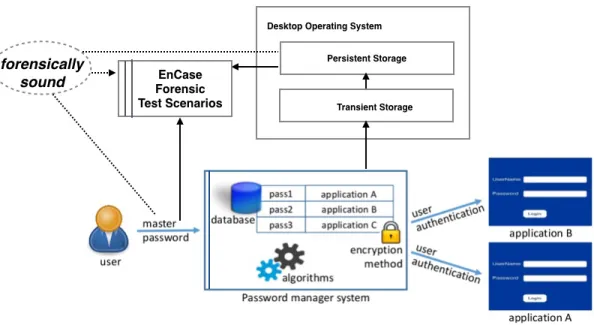
The problem diagram in Figure 2 puts forensic requirement of analysing the security risks of password managers into the context of desktop uses. Since the password managers are used inside a desktop computer, their operations may result in changes of memory in transient storage, which subsequently could result in changes in persistent storage when the operating system is swapping the internal memory with the external storage. This happens because the memory footprint may be swapped into the persistent storage when the system is under heavy load, for example, and in this process the password may be decrypted.
The forensic test scenarios thus need to be constructed to analyse these storage through forensic investigations. There are many machineries for such tasks, e.g., EnCase3was used.
To confirm these risks, the master password used in the test scenarios needs to be shown in plain text or recoverable
2However, they used the browser integrated RoboForm. 3https://www.guidancesoftware.com/encase-forensic
Fig. 2. Problem diagram of the forensic soundness requirement in testing candidate risks of local password managers.
to the investigator. Note here we have forensically sound requirements as follows.
Forensically sound requirement: the evidence derived from the digital source shall not be tampered by activities of the investigators. Hence, evidence revealed from the exper-iments is truly positive. Additionally, the evidence must be repeatedly reproduced.
The solid arrows in Figure 2 indicate the information flow amongst the domains, which cannot be modified by the forensic investigative mechanism, highlighting the importance of the forensic soundness requirements. In what follows, we construct a number of forensically sound scenarios to test whether the master password in plain text or encrypted form could be revealed from the persistent storage.
B. Phased Testing Approach
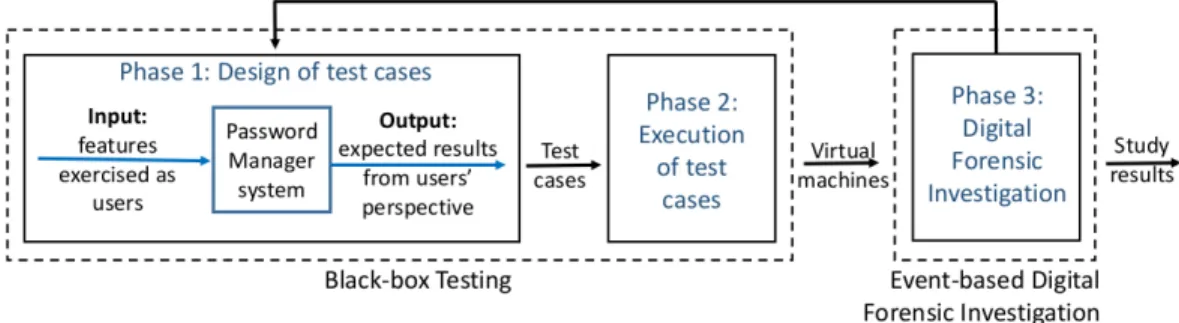
We adopted a three phases approach for the study, as illustrated in Figure 3. Phases 1 and 2 followed a Black-box testing methodology [29], and phase 3 followed the Event-based Digital Forensic Investigative Framework by Carrier and Spafford [30].
The black-box approach, often used for software function-ality testing, allowed us to create test case scenarios which exercised features of the password managers from an users’ perspective, without knowledge of their code.
The event-based investigation approach allowed us to un-derstand the effect of test cases via analysis of residual data. The methodology was adapted to the purpose of security vulnerability detection rather than reconstruction of a crime; this aspect is further elaborated in Section IV-B3. This method-ology is useful when the investigator knows what to look for.
1) Phase 1: A total of 19 test cases were designed across all three password managers. The features exercised were some
which could potentially represent security risks outside the protection of the password managers themselves, but which were derived from their normal use (sometimes under typical stressed conditions). Therefore, features like user authenti-cation, export, print, copy/paste, auto-complete and uninstall were deemed relevant.
In fact, initially in phase 1, 17 test cases were designed. However, when a test case revealed an interesting development in phase 3, if required, other test cases were developed to further investigate an issue. This happened with test cases K7 (KeePass) and P3 (Password Safe). In Figure 3, this is illustrated by the arrow from phase 3 to phase 1.
In summary, the test cases covered the following.
• KeePass
– Test cases K1-K4: These test cases aimed to exercise different methods for user authentication. Access to the database of passwords can happen via a master password, an encryption key file, a jpeg image file, and/or the Windows account user password.
– Test cases K5 & K6: These test cases aimed to exercise the export feature. Such feature allows a complete database to be moved into a different password manager or another device. The database of passwords can be exported in different formats, e.g., HTML and XSL.
– Test case K7: This test case aimed to exercise the print feature. Such feature allows an user to print the database of passwords in plain text. The test case tested a successful and unsuccessful database printout. Test case 7.1 was later created to test an unsuccessful followed by a successful printout.
– Test case K8: This test case aimed to exercise the password manager uninstall feature to check whether
Fig. 3. Three phases approach adopted for the study.
its traces were totally removed.
• Password Safe
– Test case P1: This test case aimed to exercise dif-ferent methods for user authentication. Access to the database of passwords can only happen via a master password.
– Test case P2: These test cases aimed to exercise the export feature. Such feature allows a com-plete database to be exported to PSX format, or users/groups/folders to be exported to CSV or XML formats.
– Test case P3: This test case aimed to exercise the clipboard feature. Such feature allows the user to momentarily copy password or username which can then be pasted elsewhere. The test case forces a hard shutdown. Test case P3.1 was later created to test a soft (graceful) shutdown.
– Test case P4: This test case aimed to exercise the password manager uninstall feature to check whether its traces were totally removed.
• RoboForm
– Test case R1: This test case aimed to exercise dif-ferent methods for user authentication. Access to the database of passwords can only happen via a master password.
– Test case R2: This test case aimed to exercise the print feature. Such feature allows each sub-feature to be printed individually; e.g., a user can print any or all of their “safe notes” or individual identities.
– Test case R3: This test case aimed to exercise the auto-complete feature. Such feature allows conve-nient login to applications and services using cre-dentials stored in the database of passwords.
– Test case R4: This test case aimed to exercise the clipboard feature. Such feature allows easy copy/paste of sensitive data. The test case explored this feature for users’ “safe notes”.
– Test case R5: This test case aimed to exercise the password manager uninstall feature to check whether its traces were totally removed.
2) Phase 2: Phase 2 involved two steps: (1) the creation of virtual machines and (2) the execution of test cases.
One baseline virtual machine was generated for each pass-word manager using VMWare Wokstation 9. All these base-lines were configured with 1 processor, 60GB hard disk, 1GB RAM, and Windows 7 Operating System. Each baseline was then cloned to create a controlled (i.e., isolated and tamper-free), identical environment for the execution of each test case for a specific password manager. Once each of the virtual machines were created, they were saved in separate folders to reduce the risk of any virtual machine having its data altered accidentally. This ensured compliance to best practices of digital evidence handling (i.e, the ACPO principles [31] adopted in the UK) and sustained forensic soundness of the study.
Each test case was then executed on a separate virtual machine using fictitious data. Those virtual machines became input for phase 3.
3) Phase 3: We used EnCase v7.10.00.103 tool for the forensic examination performed in phase 3, according to the Event-based Investigative Framework [30].
In theSystem Preservation and Documentationphase, hash-ing allowed validation of whether the evidence had not been tampered with, and was error free. Each virtual machine was separately added as an evidence file to EnCase, which automatically checked its integrity (acquisition hash vs. ver-ification hash). Contemporaneous notes were kept along the investigation of each virtual machine.
The System Evidence Searching and Documentation phase followed a four steps approach according to the methodology: (1) target identification, (2) data extraction & interpretation, (3) data comparison, and (4) knowledge update. Step 1 identified target objects by searching for fictitious data created during the execution of test cases (e.g., a specific master password). Step 2 examined the evidence to understand events related to targets: causes, effects and/or sequencing of events that led to a specific stage after the execution of a test case. Step 3 compared test case actual results and expected results, identifying security vulnerabilities. Step (4) built hypotheses about those vulnerabilities, i.e., what happened and how they happened.
The Digital Evidence Reconstruction and Documentation
phase was used to test hypotheses created on the previous phase, and ensure the reliability of results. Once a security vulnerability was identified and understood in the previous
phase, the specific test case was re-executed and re-examined using a clean virtual machine cloned from the password manager’s baseline to check whether results were reproducible.
V. RESULTS ANDDISCUSSION
This section presents and discusses results from the elic-itation of risks (elaborated in Section IV-A), and from the forensic analysis of the test cases executed (elaborated in Section IV-B). The potential risks identified from the context diagram analysis are presented in Table I.
TABLE I
RISKS OF EXPOSING MASTER PASSWORD TO POTENTIAL ATTACKS
Risk Phenomena Description Impact Likelihood r1 Read master password
from the persistent stor-age created by using the local password manager
master password stored in plain text
High High
r2 Read master password from the persistent stor-age created by using the local password manager
master password in encrypted form Low High
r3 Read master password from the transient stor-age created by using the local password manager
master password stored in plain text
High Low
r4 Read master password from the transient stor-age created by using the local password manager
master password in encrypted form Low Low
r5 Read master password after modifying the local password manager master password in plain text High Extremely Low
r6 Read master password after modifying the local password manager master password in encrypted form Low Extremely Low
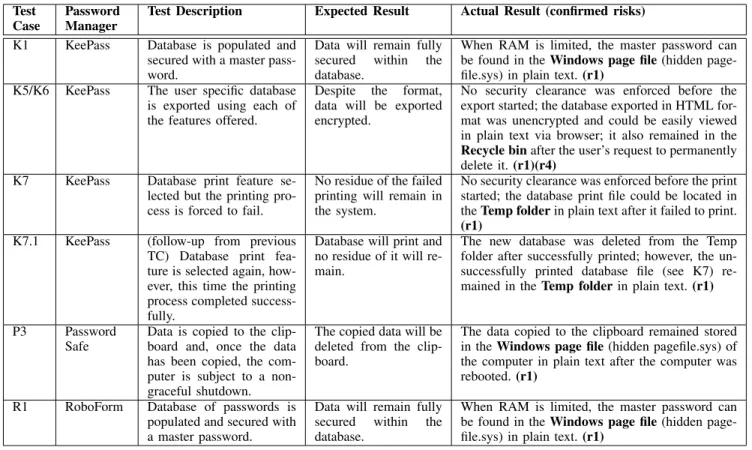
The test cases shown in Table II are the ones revealing unexpected results uncovering security vulnerabilities in the selected password managers, which actually confirm the risks identified in Table I.
A. KeePass vulnerabilities
K1 test case (Table II) revealed that, when the computer’s memory capacity is low, KeePass’ master password gets stored within pagefiles in the hard drive. Pagefiles are used as an extension of the computer’s RAM when a software requires more memory than the computer can provide. Via keyword search in EnCase, it was possible to identify the master password within the pagefile (C\pagefile.sys) in plain text. After an investigation into this problem it became clear that this vulnerability had already been raised for KeePass v2.13 in a discussion forum [32].
As mentioned in Section IV-B2, the tests were carried out in a virtual machine with 1GB of RAM, which is indeed
very limited for current configurations of standard desktops and laptops. By default the size of a pagefile in Windows 7 is identical to the RAM size, and can grow up to 3 times the RAM size or 4GB, whichever is larger [33]. More extended tests are required to establish whether there is a RAM size threshold in which the issue stops occurring. Windows
pagefile.sys can be reconstructed with tools like the Pagefile Collection Tool (PCT), proposed by Lee et al. [34]. PCT can parse a live NTFS system and reconstruct a pagefile, potentially allowing a hacker access to the user’s Keepass database.
Test cases K5, K6 and K7 revealed that, unlike Password Safe or RoboForm, KeePass does not require the user to re-enter the master key for security clearance before an export or print request is processed.
According to test cases K5 & K6, the exported HTML file contained the database in plain text, and could be viewed in a browser (Google Chrome and Internet Explorer were used for testing). A natural follow-up action by the user, once the HTML file exported is copied somewhere else (e.g., to a USB), would be to delete it from the machine. However, analysis in EnCase showed that the HTML file can be located in the Recycle Bin (C\$Recycle.Bin\S-1-5-21...), and remains readable even after it was supposedly emptied, i.e., after the user confirmed the message “Are you sure you want to permanently delete this file?”.
Test case K7 revealed that KeePass database print feature creates a temporary HTML file with the unencrypted database content; this temporary file is stored within a Temp folder (e.g,
C\Users\100209537\AppData\Local\Temp\YX63N TC.htm). The problem arises when the printing does not complete, even due to trivial reasons such as lack of paper or the print job is cancelled. This causes the HTML file, supposedly temporary, to remain stored in the Temp folder. Follow-up test case K7.1 confirmed that, upon successful completion of database print, the temporary HTML file is deleted. However, upon unsuccessful print, it remains in the Temp folder even after KeePass is closed. KeePass FAQ page [35] documents that the temporary file gets erased when “closing the database”, i.e., closing KeePass (no version is mentioned). The behaviour observed in our tests is different but raises the same kind of opportunities for an attacker.
B. Password Safe vulnerability
Test case P3 revealed that a hard (improper) shutdown pro-cedure may expose sensitive data saved to the clipboard. The shutdown was simulated by suspending the virtual machine running Password Safe after the user copied a database entry to the clipboard, before pasting it somewhere else. Keyword search in EnCase showed that the copied entry (in this case, a password) could be found saved unencrypted in the page file (C\pagefile.sys).
One way in which Password Safe could solve this vul-nerability is by following RoboForm’s example and use a “safe folder” to temporarily store the copied-to-clipboard data encrypted.
TABLE II
TEST CASES WHICH UNCOVERED SECURITY VULNERABILITIES REPRESENTING RISKS(TEST CASES– K: KEEPASS, P: PASSWORDSAFE; R: ROBOFORM)
Test Case
Password Manager
Test Description Expected Result Actual Result (confirmed risks) K1 KeePass Database is populated and
secured with a master pass-word.
Data will remain fully secured within the database.
When RAM is limited, the master password can be found in theWindows page file(hidden page-file.sys) in plain text.(r1)
K5/K6 KeePass The user specific database is exported using each of the features offered.
Despite the format, data will be exported encrypted.
No security clearance was enforced before the export started; the database exported in HTML for-mat was unencrypted and could be easily viewed in plain text via browser; it also remained in the Recycle binafter the user’s request to permanently delete it.(r1)(r4)
K7 KeePass Database print feature se-lected but the printing pro-cess is forced to fail.
No residue of the failed printing will remain in the system.
No security clearance was enforced before the print started; the database print file could be located in theTemp folderin plain text after it failed to print. (r1)
K7.1 KeePass (follow-up from previous TC) Database print fea-ture is selected again, how-ever, this time the printing process completed success-fully.
Database will print and no residue of it will re-main.
The new database was deleted from the Temp folder after successfully printed; however, the un-successfully printed database file (see K7) re-mained in theTemp folderin plain text.(r1)
P3 Password Safe
Data is copied to the clip-board and, once the data has been copied, the com-puter is subject to a non-graceful shutdown.
The copied data will be deleted from the clip-board.
The data copied to the clipboard remained stored in theWindows page file(hidden pagefile.sys) of the computer in plain text after the computer was rebooted.(r1)
R1 RoboForm Database of passwords is populated and secured with a master password.
Data will remain fully secured within the database.
When RAM is limited, the master password can be found in theWindows page file(hidden page-file.sys) in plain text.(r1)
C. RoboForm vulnerability
As it happened with KeePass, test case R1 revealed that, if RoboForm is running on a machine with a limited amount of RAM, it stores sensitive data to the page file (C\pagefile.sys). RoboForm uses the concept of “iden-tity”’ to hold authentication and payment details. The data stored within the page file of the computer included several pieces of sensitive information for the test identity created, i.e., name, address, credit card number, pin number and email. The page file size, as mentioned in relation to KeePass, was 1GB. Further tests are required to evaluate whether there is a threshold size attached to this issue.
VI. CONCLUSION ANDRECOMMENDATIONS
This paper reported on the use of digital forensic investi-gation as an instrument for security risk assessment of local password managers KeePass, Password Safe and RoboForm (offline version), upon testing features and conditions which represented potential risks. The study revealed the following risks that are confirmed to be vulnerabilities:
• With a RAM of 1GB, the master password for KeePass and identity details for payment using RoboForm can be found unencrypted in the page file.
• The exported database in KeePass remains in the recycle bin even when users confirm its permanent deletion.
• Upon unsuccessful printout of KeePass database due to trivial reasons, the unencrypted database remains in the
Temp folder even after closing the application, which does not happen upon successful printout.
• Unencrypted sensitive data copied to clipboard using Password Safe can be found in the page file after re-booting from a hard (non-graceful) shut down.
Although some vulnerabilities are bound to special condi-tions, they still put users at risk since malware already started to exploit password managers. E.g., the version of Citadel malware identified by IBM in 2014 was able to recognise the use of password managers KeePass and Password Safe, and trigger a keylogger [36]. The hacking tool KeeFarce [37] is able to dump KeePass database to a file accessible to a hacker, when a user is logged-in. Tools like PCT [34] can parse a live NTFS system and reconstruct a page file. Such malware and tools demonstrate that the risk posed by vulnerabilities, such as the ones uncovered by this study, is real.
The study also allowed us to compare and contrast the behaviour of these three password managers. This lead us to the following recommendations: (i) KeePass should adopt the practice by Password Safe and RoboForm, and require security clearance in the format of authentication before processing database export and print, and (ii) Password Safe should adopt the practice by RoboForm and encrypt content copied to the clipboard. Adopting a forensic approach to security evaluation, our perspective can expand beyond OS attacks, which was the focus of previous password manager security studies.
happen, e.g., users often shut machine down before closing password managers. To mitigate these risks, we suggest the developers of these tools to learn from each other to prevent similar test scenarios from leaking the master passwords. Packaged as virtual machines, such test scenarios described in this work could allow regression for the improved password managers.
There are many interesting possibilities for future work. Since the test cases were not exhaustive and not many features were tested, the study scope in terms of test case coverage could be extended or other systems could be examined.
VII. ACKNOWLEDGEMENTS
The full description of this study, in-cluding screenshots, can be found at: http: //computing.derby.ac.uk/c/wp-content/uploads/2016/05/ Digital-Security-Analysis-of-Local-Password-Managers.pdf. Customer Service support of the password managers in question have been contacted about the vulnerabilities found on 09/05/2016. The work is in part supported by the Centre for Policing Research and Learning, with funding from the Police Knowledge Fund and ERC Adv. Grant on Adaptive Security And Privacy.
REFERENCES
[1] D. Florencio and C. Herley, “A Large-Scale Study of Web Password Habits,” inIn Proceedings of the 16th International Conference on World Wide Web. ACM Press, 2007, pp. 657–666.
[2] M. Goodman,Future Crimes: A Journey to the Dark Side of Technology – and How to Survive It. Bantam Press, 2015.
[3] K. Scarfone and M. Souppaya, “SP 800-118: Guide to Enter-prise Password Management (Draft),” National Institute of Standards and Technology, 2009, http://csrc.nist.gov/publications/drafts/800-118/ draft-sp800-118.pdf, last visited 10/2014.
[4] P. Inglesant and M. A. Sasse, “The True Cost of Unusable Password Policies: Password Use in the Wild,” inCHI’10: In Proceedings of the SIGCHI Conference on Human Factors in Computing Systems. ACM Press, 2010, pp. 383–392.
[5] B. Ives, K. R. Walsh, and H. Schneider, “The Domino Effect of Password Reuse,”Communications of ACM, vol. 47, no. 4, pp. 75–78, 2004. [6] J. Bonneau, “The Science of Guessing: Analyzing an Anonymized
Corpus of 70 Million Passwords,” inSP’12: In Proceedings of the 2012 IEEE Symposium on Security and Privacy. IEEE Press, 2012, pp. 538–552.
[7] A. Huth, M. Orlando, and L. Pesante, “Password Security, Pro-tection, and Management,” United States Computer Emergency Readiness Team, 2012, https://www.us-cert.gov/security-publications/ password-security-protection-and-management, last visited 10/2014. [8] J. Bedell-Pearce, “Password security for SMEs,” http:
//www.theguardian.com/small-business-network/2014/jan/21/
password-security-small-business. Last accessed on 03/06/2015., January 2014.
[9] Z. Li, W. He, D. Akhawe, and D. Song, “The Emperor’s New Password Manager: Security Analysis of Web-based Password Managers,” inIn Proceedings of the 23rd USENIX Security Symposium. USENIX Association, 2014, pp. 465–479.
[10] P. Gasti and K. B. Rasmussen, “On the security of password manager database formats,” inIn the Proceedings of the 17th European Sympo-sium on Research in Computer Security (ESORICS). Springer Press, 2012, pp. 770–787.
[11] V. N. L. Franqueira, T. T. Tun, Y. Yu, R. Wieringa, and B. Nuseibeh, “Risk and argument: A risk-based argumentation method for practical security,” in2011 IEEE 19th International Requirements Engineering Conference, Aug 2011, pp. 239–248.
[12] SourceForge, “Password safe,” visited 09/2015. [Online]. Available: https://sourceforge.net/projects/passwordsafe/files/passwordsafe/3.35/ [13] RoboForm, “Roboform for windows v7.9.12,” visited 09/2015. [Online].
Available: http://www.roboform.com/download
[14] R. Zhao, C. Yue, and K. Sun, “A security analysis of two commer-cial browser and cloud based password managers,” in Proceedings of the 2013 International Conference on Social Computing (SocialCom). IEEE Press, 2013, pp. 448–453.
[15] D. McCarney, “Password managers: Comparative evaluation, design, implementation and empirical analysis,” Ph.D. dissertation, Carleton University, 2013.
[16] KeePass, “News: Keepass 2.28 available! - keepass,” visited 05/09/2015. [Online]. Available: http://keepass.info/news/n141008 2.28.html [17] “Awards/ratings - keepass,” visited 09/2015. [Online]. Available:
http://keepass.info/ratings.html
[18] “Downloads - keepass,” last visited 09/2015. [Online]. Available: http://keepass.info/download.html
[19] “Plugins - keepass,” visited 09/2015. [Online]. Available: http: //keepass.info/plugins.html
[20] “Security - keepass,” visited 09/2015. [Online]. Available: http: //keepass.info/help/base/security.html
[21] S. Systems, “About siber systems,” visited 09/2015. [Online]. Available: http://www.roboform.com/about
[22] “Roboform manual,” visited 09/2015. [Online]. Available: http: //www.roboform.com/manual#security
[23] K.Gucht, “’password safe - history’,” visited 09/2015. [Online]. Available: http://passwordsafe.sourceforge.net/history.shtml
[24] B. Schneier, “Schneier on security: Password safe,” visited 09/2015. [Online]. Available: http://www.schneier.com/passsafe.html
[25] D. Silver, S. Jana, D. Boneh, E. Chen, and C. Jackson, “Password Managers: Attacks and Defenses,” inIn Proceedings of the 23rd USENIX Security Symposium. USENIX Association, 2014, pp. 449–464. [26] B. Stock and M. Johns, “Protecting Users Against XSS-based Password
Manager Abuse,” in In Proceedings of the 9th ACM Symposium on Information, Computer and Communications Security. ACM Press, 2014, pp. 183–194.
[27] M. Blanchou and P. Youn, “Browser Extension Password Managers,” https://www.nccgroup.trust/us/our-research/ browser-extension-password-managers/, December 2013.
[28] A. Belenko and D. Sklyarov, “”Secure Password Managers” and ”Military-Grade Encryption” on Smartphones: Oh, Really?” https: //www.elcomsoft.com/WP/BH-EU-2012-WP.pdf, 2012, presented at BlackHat Europe 2012.
[29] B. Beizer, Black-box Testing: Techniques for Functional Testing of Software and Systems. John Wiley & Sons, Inc., 1995.
[30] B. D. Carrier and E. H. Spafford, “An Event-Based Digital Forensic Investigation Framework,” in In Proceedings of the Fourth Digital Forensics Research Workshop, 2004, pp. 1–12.
[31] Association of Chief Police Officers (ACPO), “Good Practice Guide for Computer-Based Electronic Evidence,” http://www.digital-detective.net/digital-forensics-documents/ACPO Good Practice Guide for Digital Evidence v5.pdf, 2012.
[32] “Passwords in hiberfile.sys and pagefile.sys,” Sourceforge.net – KeePass, Discussion. Visited 11/04/2015, 2010. [Online]. Available: http://sourceforge.net/p/keepass/discussion/329221/thread/648b9b5a11 [33] “How to determine the appropriate page file for 64-bit versions of
Windows,” Microsoft Support; Article ID: 2860880. Visited 11/04/2015. [Online]. Available: https://support.microsoft.com/en-gb/kb/2860880 [34] S. Lee, A. Savoldi, S. Lee, and J. Lim, “Windows Pagefile Collection and
Analysis for a Live Forensics Context,” inIn the Proceedings of Future Generation Communication and Networking (FGCN 2007). IEEE Press, 2007, pp. 97–101.
[35] “Printing creates a temporary file. Will it be erased securely?” KeePass Technical FAQ. Visited 15/04/2015. [Online]. Available: http://keepass.info/help/base/faq tech.html#printtempfile
[36] R. Lemos, “Malware’s new target: your pass-word manager’s password,” November 2014, visited 09/2015. [Online]. Available: http://arstechnica.com/security/2014/11/ citadel-attackers-aim-to-steal-victims-master-passwords/
[37] D. Goodin, “Hacking tool swipes encrypted creden-tials from password manager,” November 2015, visited 01/2016. [Online]. Available: http://arstechnica.com/security/2015/11/ hacking-tool-swipes-encrypted-credentials-from-password-manager/