Iris: A Solution for Executing Handwritten Code
Brian M. Gonzalez [email protected] [email protected]
Supervisors Ole Christoffer Granmo
Master’s Thesis, Spring 2012
Faculty of Science and Technology University of Agder, Grimstad, Norway
June 1, 2012
Key Words: OCR, Tesseract, handwriting recognition, classifiers, smart phones
Abstract
This paper presents a novel approach to executing handwritten code, the solution coined Iris. My research falls within the field of mobile app development, handwriting recognition, optical and intelligent char-acter recognition (OCR & ICR), machine learning, as well as various Computer Science-related fields such as domain specific languages, or DSLs. The solution outlined in this paper details a system where one can author code using only a writing utensil (such as a pen), scratch paper (such as a napkin), and a smart phone. Iris leverages the power of the cloud to process an image of handwritten code and return the result to the user. Ultimately, my results show that Iris was able to accurately execute handwritten scripts with various levels of observed accuracy. Future work includes adding more layers of machine learning as well as further pre-processing images prior to OCR.
Contents
1 Introduction 1 1.1 Motivation . . . 3 1.2 Problem Statement . . . 9 1.3 Report Outline . . . 11 2 Technological Overview 122.1 Survey of Handwriting Recognition . . . 12 2.2 Tesseract . . . 18
3 Solution 28
3.1 Optical Character Recognition . . . 29 3.1.1 Sanity Checking Tesseract . . . 30 3.1.2 Training the Tesseract OCR engine . . . 34 3.1.3 Generating Large Amounts of Handwritten Text
for Training . . . 42 3.1.4 Bootstrapping a Character Set Using Tesseract . 46 3.2 Programming Language . . . 47 3.3 Client-Side Application . . . 50
4 Results 55
4.0.1 Accuracies for a Given Handwriting Style . . . . 62 4.0.2 Commonly Misrecognized Characters . . . 62
5 Discussion 64
6 Conclusion 67
List of Figures
2.1 Offline (a) vs. Online (b) handwriting . . . 13
2.2 Line finding is difficult for handwritten text . . . 16
2.3 Examples of segmented characters [1] . . . 17
2.4 Typical components of an OCR engine . . . 18
2.5 Components of Tesseract . . . 20
2.6 An example of line finding (3 distinct lines) . . . 21
2.7 An example of baseline fitting . . . 22
2.8 An example of fixed pitch detection, with pitch=n . . 23
2.9 An example of difficult word spacing . . . 24
2.10 Candidate chop points [5] . . . 25
2.11 Static character classifier: features matched to prototypes 26 3.1 Excerpt from Eileen Robertson’s Ordinary Families . . 31
3.2 eng.brian.exp0a . . . 35
3.3 Box drawn around ‘T’ . . . 38
3.4 Template used by the Scanahand software to build a font out of handwriting . . . 43
3.5 3 various “handwriting” fonts; (a.) neatest, (b.) neat, and (c.) sloppy . . . 45
3.6 Summing 2 and 2 . . . 49
3.7 Iris Flow: Home page . . . 51
3.8 Iris Flow: Selecting a character set . . . 51
3.10 Iris Flow: Result . . . 53
3.11 Iris Flow: Result . . . 54
4.1 Adding 2 and 2 . . . 56
4.2 Subtracting 50 from 100 . . . 57
4.3 Summing Algorithm . . . 58
4.4 mult() function . . . 59
4.5 Printing 1 through 10 . . . 60
4.6 Unnormalized image, multiplying 4 and 4 . . . 61
4.7 Tesseract accuracies from three different handwriting vari-ations . . . 62
List of Tables
Chapter 1
Introduction
The idea that a computer programmer, mathematician, or other type of programming professional need to be stationed in front of a static desktop computer with a full-fledged editor or integrated development environment to get their work done one might argue is slowly becoming an outdated paradigm 1. With the advent of mobile devices such as
the iPhone, iPad, various Android devices, and other smartphones and tablets, most of us today are walking around with powerful computing devices right within our pocket as nearly 87/100 people in the world own a smartphone2. Throughout this paper, we’ll refer to these devices collectively as “smart devices”.
Power-users are finding new ways to leverage the capabilities of these very devices. For instance, there are over 75 apps in the iOS App Store which allow one tossh, or secure shell, into a remote machine and run various tasks. Furthermore, there are more than 40 apps in the iOS App Store which allow one to program directly on their iOS devices. Still, writing “code” on a smart-device is reserved for long-form scripts
1http://smokingapples.com/opinion/web-development-ipad/
and programs, and although on a smart device, the task can be quite involved. The user must boot up their code-editing app and program directly on the screen of their smart device. Many issues arise when programming on such screens with little real-estate: first, working with large amounts of text can be quite cumbersome on small screens with a touch keyboard and second, the on-screen keyboard on smart devices can be obtrusive to text viewing; this is such a problem for some de-velopers that some have devoted hours of research into new methods of interacting with text on touch devices. 3
Let’s consider the following situation: you’re sitting at the coffee shop with your smart device, as well as a pen and a napkin in-hand. You’re looking to buy six items of varying values. You have $25.00, and you want to know whether you have enough money to purchase the six items in question. You grab the napkin and write a small script (pseudo-code) which does the calculation for you:
a = [ 3,1,4,9,2,7 ] sum = a.sum
print sum <= 25
This 3-line script takes the value of the six items in question, puts them into an array, sums the array, compares the sum to the amount you have, and prints a boolean value indicating whether or not you have enough money to purchase the items. In this scenario, the sum would equal $26.00 and since you only have $25.00, the algorithm would printfalse, indicating that you do not in fact have enough money to purchase all six items.
3http://en.wikipedia.org/wiki/Hooper
Because the algorithm is written on a napkin, it cannot be easily ex-ecuted. However, typing the entire algorithm into your smart device would be inefficient and cumbersome. What if you could take a photo of your algorithm written on the napkin using your smart device, and have the result dynamically generated from the photo taken and re-turned to you.
In this paper, we’ll outline a novel solution, coined Iris, for writing small scripts which can be interpreted and executed using a similar method outlined in the scenario above: handwritten code executed via an app on a smart device.
1.1
Motivation
Many of us grew up in the 70s, 80s, 90s, and into the early 2000s, an era where the paradigm personal computing was not shifting, but technology was advancing in terms of speed and software. Companies like Apple and Microsoft, during this time period, were not competing over the devices we carry in our pockets, but the devices we set on top of our desktop, hence the term desktop computer. Looking at Microsoft’s original mission only furthers this point:
In 1975, Gates and Allen form a partnership called Mi-crosoft. Like most startups, Microsoft begins small, but has a huge vision – a computer on every desktop and in every home. 4
But even as far back as 1996, Apple CEO Steve Jobs (who wasn’t the CEO of Apple at the time) saw that the paradigm of immobile PCs as
our only computing device would quickly die:
The desktop computer industry is dead. Innovation has vir-tually ceased. Microsoft dominates with very little inno-vation. That’s over. Apple lost. The desktop market has entered the dark ages, and it’s going to be in the dark ages for the next 10 years, or certainly for the rest of this decade. If I were running Apple, I would milk the Macintosh for all it’s worth – and get busy on the next great thing. The PC wars are over. Done. Microsoft won a long time ago.1
Motivating the use of smart devices & the dawn of the Post-PC era
Because Iris is inspired by various apps on the market today, it is key to show why they’re important and influential to programmers, developers, and mathematicians alike. Motivating the importance of smart devices is easier today than ever due to the shear amount of users that carry smart devices with them all of the time. In fact, smart phones are set to overtake older, slower feature phones in Q4 2011 5.
On the same note, Apple’s iOS platform reached 316 millions units at the end of 2011. The iOS platform overtook the Apple desktop solution, OSX, in under four years and more iOS devices were sold in 2011 (156 million) than all Mac desktops ever sold (122 million).6 Furthermore, when Steve Jobs said that the “PC wars” were over, he couldn’t have been more correct. In 2007, Apple released the original
5
tinyurl.com/3u7arfn
6
http://www.asymco.com/2012/02/16/ios-devices-in-2011-vs-macs-sold-it-in-28-years/
iPhone, which in essence marked the beginning of the end of the PC era, and thus marked the transition into what we know today as the
Post-PC era.
The Post-PC era is characterized by less of a reliance on desktop and laptop computers which are stationary and more of a reliance on net-books, tablets, and smart phones. Secondly, the Post-PC era is char-acterized by a new way of distributing processing power across smart devices and remote servers, known as the “cloud”. An example of this
smart device to cloud communication is Apple’s Siri, which is a per-sonal assistant integrated directly into your smart phone. The user speaks commands into their iPhone, it sends an audio file over to Ap-ple’s server (ApAp-ple’s own Cloud inftrastructue), and some meaningful result is returned to the user. For instance, if a user tells Siri, “Set an alarm for 6PM”, the iPhone, seemingly with a bit of magic, parses the user’s speech and sets their alarm for 6PM.
Apple’s engineers had to ask themselves architectural design questions when building Siri: can we detect what the user is saying directly on the phone, or should we send audio to servers to be further processed? They chose the latter, which gave them certain benefits over the former:
- greater processing power, as smart devices lag behind desktops when it comes to processing power by about 5 years
- access to greater amounts of data (the most storage on a smart device is approximately 64GB)
- shared data across all devices using the cloud (usera, userb store
their data in a central location which can be data-mined, pro-cessed, etc.)
Of course, there are some pitfalls to this solution as well:
- privacy concerns, as data is sent often times unencrypted to the cloud7
- apps that rely on the cloud inherently rely on an internet connec-tion; therefore, no connection equates to a loss of functionality for the app
- the cloud is susceptible to slow-downs when many users are ac-cessing it, which can make cloud-reliant apps feel unresponsive
The solution outlined in this paper,Iris, is architected in a very similar manner, which we’ll outline in Section 3. Many of the pitfalls of a smart device-to-cloud solution will have no effect, however, on our implemen-tation. This is due to the fact that only a handful of researchers will be using Iris, which will not adversely affect the servers. Furthermore, since Iris is a closed application, privacy concerns can be ignored. It’s imperative that issues such as these be accounted for in production, and these issues will be discussed later in the paper.
Do we really need a new way to write code?
Since the conception of modern programming languages like C, C++, and Fortran, the way in which programmers write code has not evolved. If a programmer wanted to write some code or a small script, they opened up their integrated development environment (IDE) or text editor and authored some code. Upon completion, a result would be output to the user. If errors were present, the user could debug the code. The process of writing code was and is still a very formal process.
Over the past couple of years, new, interactive ways of writing code have emerged. Ways which not only improve the code authoring expe-rience, but also improve the way computer science is taught.
Victor outlines one of these new interactive ways of programming, the basis of which is called “manipulation software”. 8 9 Victor describes it as follows:
Manipulation software generally displays a representation of an object—the model—which the user directly manipulates with pseudo-mechanical affordances. Because manipulation is the domain of industrial design, manipulation software emphasizes industrial design aspects.
The Light Table IDE is a conceptual IDE which utilizes Victor’s idea of manipulation software to assist programmers in becoming more pro-ficient at authoring code. Light Table is a new project on Kickstarter
10 which has raised over $140,000/$200,000. 11 Most of its investors
are, of course, programmers, who are looking for a new way to write code – which proves that programmers desire a new method to writing software.
Esponda et al researched various methods involving handwriting and teaching. They found that tactile techniques, such as handwriting, re-inforce in the viewer the illusion of reality of the virtual objects because they behave like we would expect in reality [2]. Esponda et al expanded their research to the classroom, where they studied how a teacher or professor would be able to author code on an E-Chalk board at the
8
http://vimeo.com/36579366
9
http://worrydream.com/#!/MagicInk
10
A funding platform for creative projects.
11
front of the class, and execute a small algorithm in front of the entire class.
Quick, iterative solutions to programming still do not exist and because of this, the overhead of starting to program is still, I would argue, too great. J.C.R. Licklider, an American computer science pioneer, described it as so:
In the spring and summer of 1957. . . I tried to keep track of what one moderately technical person [myself] actually did during the hours he regarded as devoted to work. . . About 85 per cent of my “thinking” time was spent getting into a position to think, to make a decision, to learn something I needed to know. Much more time went into finding or obtaining information than into digesting it. Hours went into the plotting of graphs, and other hours into instruct-ing an assistant how to plot. When the graphs were fin-ished, the relations were obvious at once, but the plotting had to be done in order to make them so. . . Throughout the period I examined, in short, my “thinking” time was de-voted mainly to activities that were essentially clerical or mechanical: searching, calculating, plotting, transforming, determining the logical or dynamic consequences of a set of assumptions or hypotheses, preparing the way for a decision or an insight. [3]
Iris aims to solve a portion of the dilemma Licklider describes. Instead of spending 85% of their time setting up their computer, integrated development environment, and everything other task involved in au-thoring simple algorithms, a programmer could write a simple script in
Iris without the setup overhead. They could do all of this using only a pencil, paper, and a smart device.
Twitter, a 140-character micro posting service, was born out of the desire for bloggers to post quick, short messages online because tradi-tional blogging required too much overhead. In a similar light, Iris is advantageous to traditional programming styles because of how simple and quick it allows one to write code.
The utility of performing OCR on handwritten text
Though much of our life is becoming digitized, there are still many areas in which an analog approach is still more practical and desired. One of those areas is printing.
1.2
Problem Statement
Different approaches to digitizing handwritten text and performing something useful exist throughout our world today. For example, the United States Post Office (USPS) was able to save billions of dollars over the span of several years by radically changing the way it processed mail–a paradigm shift that was questionable at the time, but ended up revolutionizing the process of sorting mail. By the mid 1970’s, the USPS realized that in order to offer a cheap solution to mail delivery while dealing with the growing volume of mail being sent daily, a solu-tion that didn’t involve immense amount of manpower for sorting and relied heavily on automation was needed. Earlier the next decade, the first computer-driven single-line optical character reader was installed in Los Angeles. The equipment required that the letter be read once
then a bar code was printed on the envelope and read during each subsequent stage of the mailing process [4].
In a very similar fashion, I posit thatusing optical character recog-nition, a capable programming language, along with smart devices, the task of quickly authoring small algorithms writ-ten by hand can be had. I posit this can be done with consistency and accuracy. Any amateur or professional desires new, unique, niche ways of making their hobby and job easier and more efficient—as a professional developer, I would argue that programming is no different.
Are today’s most capable OCR engines able to recognize handwritten text accurately enough to be executed by an interpreter? I posit that the answer to this question is no and that another layer of machine learn-ing must be added post-OCR to fix the noise introduced by the OCR engine. Even today’s most capable OCR engines do not achieve 100% accuracy. Tesseract, an OCR engine developed by Hewlett-Packard between 1984-1994 [5] and improved since achieves approximately a 98% accuracy on semi-noisy printed text—since handwritten text is inevitably noisier and more variant than some of the worst printer text, one would expect an OCR-engine to achieve a lower accuracy when recognizing handwritten text.
Furthermore, one of the best manners in which to improve OCR ac-curacy is to define a set of constraints for the user to abide by while writing their code by hand. The best OCR engines, like Tesseract, use a two-pass mechanism where the first pass does a dirty recogni-tion of the characters on the page, and the second pass attempts to correct mistakes by using context, that is, use machine learning tech-niques and various other algorithms to deduce what a word might be and ultimately correct it (e.g. coffea would be corrected to coffee).
Requiring the user to author code using a domain specific language based on simple English, I posit, will have a positive impact on OCR accuracy–e.g. 4.multiply 2 instead of 4*4.
Will adding multiple layers of machine learning on top of the OCR pro-cess coupled with a simplified programming language (DSL) be enough to accurately recognize and ultimately execute handwritten text? I posit that the answer to this research question isyes, but I feel that still fur-ther steps must be taken before executing handwritten code becomes a viable option.
1.3
Report Outline
In this paper, I’ll begin by giving a technological overview, including a small survey of handwriting recognition techniques as well as detailing Tesseract, the OCR engine used in my experiments. Next, I’ll present my solution: the Iris app, training with Tesseract, and the domain specific language. I’ll then present and discuss my results. Lastly, I’ll present my conclusion and areas of future research.
Chapter 2
Technological Overview
2.1
Survey of Handwriting Recognition
Handwriting is a skill that is unique to each individual, and it is a skill which has survived throughout the ages. The reason that handwrit-ing persists in the era of personal computers and smartphones is the convenience of paper and pen as compared to keyboards for numerous day-to-day tasks [1].
However, widespread acceptance of PCs and smart devices seemingly threaten the future of handwriting - but still, in a vast amount of situations, a pen together with a small notepad or napkin is much more convenient as compared to a keyboard and screen. For example, the modern student still prefers handwritten notes to store equations, algorithms, and diagrams.
Handwriting recognition is the task of transforming a language repre-sented in its spatial form of graphical marks into its symbolic, digital representation. For English, this is usually an 8-bit ASCII represen-tation [1]. Handwriting interpretation is the technique of determining
the meaning of a body of handwriting, e.g. a handwritten amount on a check or a handwritten address. In essence, the main goal of recogni-tion and interpretation is to filter out the variations in handwriting as to determine the message. We as humans are ourselves a device which can perform handwriting recognition and interpretation, and we excel when the handwriting is written within a domain we have knowledge about—e.g. a pharmacist whose job it is to read a physician’s notes can easily decipher the meaning of the notes because he is familiar with the language within that domain.
Input
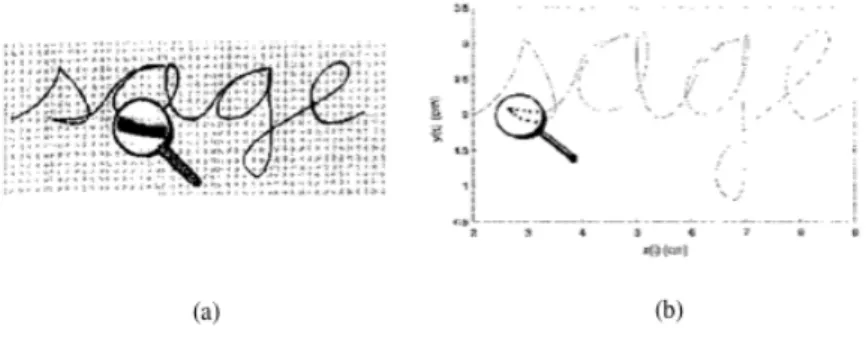
Two methods exist for converting handwritten data into digital form. One form is done by scanning the writing on paper and the other form is done by writing with a pen or finger on a special electronic surface, such as a tablet or digitizer. The two form are known asoff-lineand on-line handwriting, respectively. The recognition rates are much higher for the on-line case as compared to the off-line case [1]. Figure 2.1 shows the difference between the two methods.
Figure 2.1: Offline (a) vs. Online (b) handwriting
are now accurate enough that they have a grave economic impact on specialized fields like postal service, bank checks, and executing hand-written code.
Moreover, the solution in this paper only focuses on theoff-line version of handwriting recognition and interpretation. For this reason, we’ll only refer to the off-line version from this point on.
Off-line Handwriting Recognition & Interpretation
Recognition
The two most crucial tasks of off-line handwriting are character recog-nition and word recogrecog-nition. Character recogrecog-nition tries to answer the question ofwhat are the meaningful symbols, or characters on the page? Word recognition, on the other hand, tries to answer the questionwhat are the meaningful words on the page? [1] A preliminiary step to both character and word recognition isdocument analysis, i.e. locating and registering the appropriate text in a complex, two-dimensional spatial layout. This preprocessing is comprised of several sub-steps, some of the most common being: thresholding, noise removal, line segmenta-tion, and word and character segmentation. [1]
Thresholding
The task of thresholding is to separate the foreground from the back-ground, or the ink from the paper. The grayscale histogram extracted from a scanned image typically consists of two peaks: one high and one low corresponding to the white background and black foreground
respectively. The crucial task of thresholding is to find the “optimal” threshold gray-scale value between valley between the two peaks. [1]
Noise-Removal
Noise-removal is an area of document analysis that has been dealt with extensively in for typed or machine-printed documents, but in-frequently for handwritten documents.
Noise can be introduced onto the medium prior to scanning– an errant ink splotch or lines on the paper. Noise can also be introduced during the scanning phase–a dirty lense on a camera or a dusty glass plate on a scanner often introduce dark spots in the resulting image. Various algorithms exist to remove noise from the medium before recognition. [1]
Line Finding
Line finding, sometimes referred to as line segmentation, is the delin-eation of each line of text in a document or page. For machine-printed documents, line finding is somewhat trivial, as each line is spaced evenly throughout the document (typically 12 pt. line spacing). The same, however, cannot be said for handwritten documents.
Oftentimes when we write, our characters tend to undulate up and down and ascenders and descenders tend to intersect (Figure 2.2). This makes line finding a difficult task for handwriting.
Figure 2.2: Line finding is difficult for handwritten text
One solution is based on the principal that people tend to follow an imaginary line when they write a sentence, which forms the core upon which each of the words within the sentence rests. This imaginary baseline is then guessed by the local minimum points from each char-acter.
Word & Character Segmentation
Line finding is often followed by a routine that separates the blobs
found within a line into words. Segmenting characters relies upon the fact that there exists a uniform physical spacing between char-acters. For machine-printed text, this is almost always the case, and for monospaced type, thisis always the case. Conversely, exceptions in spacing are commonplace in handwritten texts because of the plethora of writing styles that exist with leading and trailing ligatures. Fig-ure 2.3 shows how an OCR engine segments characters on a page.
Figure 2.3: Examples of segmented characters [1]
Optical Character Recognition (OCR) vs. Intelligent Character Recognition (ICR)
Intelligent Character Recognition is a (in relation to OCR) more ad-vanced, more focused means of extracting, digitizing, and recognizing printed text. With any sort of character recognition, the main task is to assign a digitized character to a symbolic class – that is, is that B-like character on the paper really aB, or is it a8 or a poorly scribed 3? With how much certainty can we make a prediction, or, what is the
confidence value?
Most often, optical character recognition is a blanket term used to de-scribe the the process of converting printed text into a digitized form, and because of its generality, we’ll use the term OCR over ICR through-out this paper. Note that oftentimes, in the case of handprint, the term ICR is used.
2.2
Tesseract
The Tesseract OCR engine, or simply Tesseract, is an open-source OCR engine which was developed at Hewlett-Packard between 1984-94 [5]. Tesseract shares many similar components with other OCR engines, so in this section, I’ll outline its novel aspects: its line finding algorithm, features/classification methods, and its adaptive classifier. Much of this section, 2.2, relies on knowledge outlined in [5].
Image Acquisition
Image Manipulation
Layout Analysis
OCR
Parsing & Data Extraction
Application Specific Logic
Typical
OCR Engine
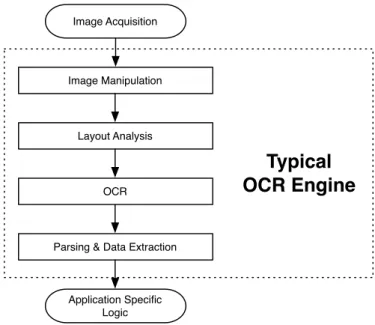
Figure 2.4: Typical components of an OCR engine
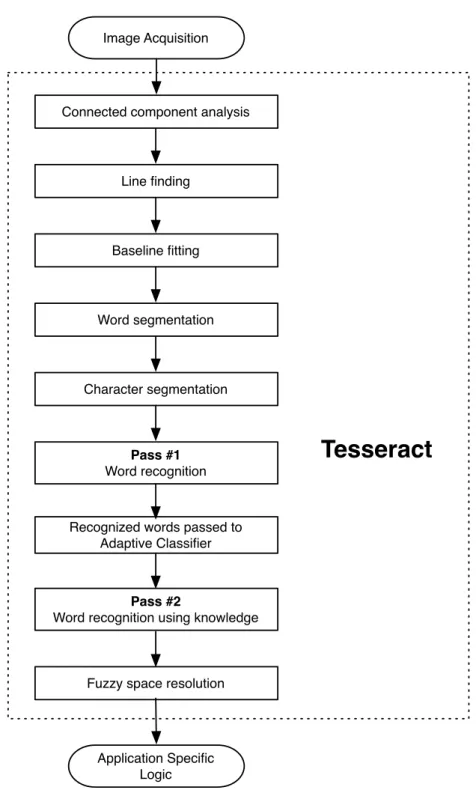
After going untouched for more than 10 years, Tesseract is now chal-lenging the leading commercial engines in terms of its accuracy. Its key strength is most certainly its unique choice of features, and according to Smith, Tesseract current maintainer, its key weakness is probably its use of polygonal approximation as input to the classifier instead of raw outlines [5]. Let’s examine what’s going on inside of the Tesseract OCR engine. Figure 2.4 shows a typical OCR flow diagram, which
we can use as a reference to compare and contrast Tesseract’s unique aspects.
Tesseract – Architecture
Tesseract is, in a sense, a Frankenstein of technologies–built with vari-ous parts other similar OCR engines have and missing some parts that other OCR engines have. Since it was originally an integral part of Hewlett Packard’s commercial image recognition software, Tesseract is missing some key components that other OCR engines have built in. For instance, most OCR solutions contain a preprocessing phase, where the page in question is laid out, de-skewed, etc. Tesseract, on the other hand, never needed this feature because HP’s proprietary (and subse-quently, not open source) page layout analysis was bundled together with Tesseract. For this reason, Tesseract assumes that its input is a binary image (black and white) with optional polygonal text regions defined [5].
Image Acquisition
Connected component analysis
Line finding Baseline fitting Word segmentation Application Specific Logic
Tesseract
Character segmentation Pass #1 Word recognition Pass #2Word recognition using knowledge Recognized words passed to
Adaptive Classifier
Fuzzy space resolution
Tesseract – Line Finding & Word Finding
Line Finding
Tesseract’s line finding algorithm is designed so that a skewed page can be recognized without the need to be de-skewed. Unlike Tesseract, most OCR engines de-skew the page in order to ease the process line finding. This can, however, lead to a loss of image-quality as text is stretched and pulled, which introduces a substantial amount of noise. The key aspects of the line finding algorithm is blob filtering and line construction. In this step, the engine’s simple percentile height filter remove drop-caps and vertically touching characters. The mean height approximates the text size in the area, which makes it safe to filter out blobs which are too small as compared to the mean height – typically indicating punctuation, diacritical marks, and noise.
Figure 2.6: An example of line finding (3 distinct lines)
These blobs are likely to fit a model of non-overlapping, parallel, slop-ing lines. To fit the blobs to a unique text line, the blobs are sorted and processed by x-coordinate. This greatly reduces the ill-effects of assigning an incorrect text line when skew is present. Once the blobs have been assigned to a specific line, a least median of squares fit is used to approximate the baselines, and the separated-out blobs are
fitted back to their appropriate lines [5].
Finally, the line finding process merges blobs that overlap by at least half horizontally, replacing diacritical marks together with the corre-sponding base and correctly associating parts of some broken char-acters. Figure 2.6 shows an example of how Tesseract performs line finding.
Baseline Fitting
After capturing the text lines in the forms of blobs, Tesseract examines the blobs on a more granular level. In this step, the baselines are fit more precisely using a quadratic spline, or essentially 4 parallel lines that quadrisect the blog: a fitted baseline, descender line, meanline, and ascender line.
Figure 2.7 shows an example of baseline fitting, where the bottom line (green) corresponds to the ascender line, the blue line corresponds to the baseline, the gray line corresponds to the meanline, and the red line corresponds to the ascender line. This step is novel to Tesseract, which helps it handle pages with curved baselines, such as those caused by scanning artifacts and book splines [5].
Fixed Pitch Detection and Chopping
Words which contain characters all with equal widths are treated as a special case in Tesseract. Tesseract tests text lines to figure out whether or not they are of equal width, orfixed pitch. When it finds fixed pitch text, Tesseract splices the word equally based on the pitch, and the word is marked ready for word recognition. In the next section, we’ll expand as to why this is necessary. Figure 2.8 shows and example of fixed pitch (pitch of n) text and how Tesseract might chop it.
Figure 2.8: An example of fixed pitch detection, withpitch=n
Proportional Word Finding
Word with non-fixed-pitch or proportional text spacing are difficult to parse and therefore the task is non-trivial. Figure 2.9 illustrates some examples of difficult word spacing. Take, for instance, the spacing between they inby and the g ingoogle. The bounding boxes around those two letters offers little vertical spacing, although by and google are actually separate words. In fact, the spacing between theyand the g is very similar to the spacing between the b and the y of the actual word by. Tesseract deals with issues like this by measuring gaps in a limited vertical range between the baseline and mean line [5], meaning ascenders and desenders are not accounted for.
When Tesseract finds spaces that are too close to the threshold at this stage, it marks the space as “fuzzy” and passes the it off for a decision to be made at a later phase.
Figure 2.9: An example of difficult word spacing
Tesseract – Word Recognition
A main task of any optical character recognition engine is to iden-tify how words should be segmented into their individual characters. In the previous step, the line finding step, Tesseract segmented only fixed pitch words. The remaining words are sent down the pipe, where Tesseract determines how non-fixed-pitch text should be chopped.
Chopping Joined Characters
Because the result from a classifiying a word alone is insufficient, Tesser-act tries to improve the result by splitting (or chopping) the blob with the worst confidence from the character classifier. Potential chop points are found based on the concavity of the outline of the blob, as can be seen in Figure 2.10. Concave points without a concave opposite or a opposing line segment are ignored. According to Smith, it may take up to three pairs of chop points to accurately separate joined characters [5].
Figure 2.10: Candidate chop points [5]
Figure 2.10 shows potential chop points for the word arm. Chops are performed in ascending order based on priority, and any chop that doesn’t increase the confidence of the result is undone, and saved for potential later use.
Associating Broken Charaters
Once all chops have been made, if the word still lacks valuable in-formation, it is given to what’s called the associator. At this phase, disconnected blobs are grouped into candidate characters using an A*
search algorithm. Tesseract’s implementation of the A* algorithm in this step gives it a noticably higher accuracy score compared to other OCR engines [5].
Static Character Classifier
Features
During the training phase, segments of a polygonal approximation are used as features, but during recognition, small fixed-length features are extracted from the outline and matched many-to-one with the clustered prototype features of the training data. The features extracted from the unknown character are 3-dimensional: x position, y position, and
angle; those from the prototype are 4-dimensional: x position, y posi-tion, angle, and length.
Figure 2.11: Static character classifier: features matched to prototypes
Training Data
Because Tesseract’s classifier can accurately recognize broken and dis-joint characters, the classifier was not trained on broken characters; but on 20 samples of 94 characters from 8 fonts [5]. This is a small fraction of the training data required by other OCR engines.
Linguistic Analysis
Tesseract’s reliance on linguistics is actually quite minimal as compared to other OCR engines. Tesseract utilizes linguistics only when consid-ering a new segmentation. That is, Tesseract will choose one chop over another in favor of creating an actual word.
Adaptive Classifier
Because Tesseract’s static classifer (discussed earlier) must be good at generalizing various character sets, it performs poorly at discriminating between different characters or between characters and non-characters.
For more granular classification, a more font-sensitive adaptive clas-sifier is trained by the output of the static clasclas-sifier. This results in higher discrimination within a page, where the amount of font-specific data is limited.
Chapter 3
Solution
As outlined, there are many technologies and moving parts that go into the making of a full-scale solution for executing and compiling handwritten code. Iris, the system outlined in this paper, makes use of many technologies–the two most critical being (1) the server-side component and (2) the client-side component.
The server-side component is comprised of various other intertwined technologies:
- a handwriting recognition engine, known as an OCR engine
- a subset of a capable and concise programming language—this subset is known as a domain specific language, or DSL
In addition, the client-side component is a means of communicating with the server-side component, which does all of the processing of the handwritten text, evaluating the recognized text, and returning a result to the user. The client-side component is a thin but crucial layer that allows the user to communicate with the backend. The communication
between the client-side and the backend should remain transparent to the user.
The main aspects of the client-side component, often referred to as the “app”, include:
- a smart device with:
- a camera
- internet connection
- an app which presents a user interface to the user
In the following sections, 3.1, 3.2, and 3.3, I’ll outline how I solved my
research questions as well as the architecture of Iris.
3.1
Optical Character Recognition
Many optical character recognition engines come pre-trained to accu-rately recognize an array of fonts. This is advantageous because it makes performing OCR on a new font easy, but it lacks in the sense that the OCR engine never is able to learn the intricacies of a character set, or font, prior to recognition.
Tesseract, on the otherhand, provides a rich application programming interface, or API, to train itself based on new languages and character sets that it has no knowledge of. Whereas other OCR engines have been trained prior to the recognition of text and rely heavily upon previous knowledge extracted from character sets, Tesseract’s initial training was performed on a very small set of characters. The Tesseract API exposes these initial training sets to get one started training a new character set. In fact, Tesseract was trained on a mere 20 samples of
94 characters from 8 fonts in a single size. This is a major contrast from other published OCR engines, such as Calera, which was trained using over a million samples, and Baird’s classifier, which was trained using 100 fonts with over 1 million training samples [5].
3.1.1 Sanity Checking Tesseract
After configuring, making, and installing the Tesseract *NIX utility, the Tesseract (tessdata) data directory is placed on the users system with a various language traineddata files in the form
tessdata/[language].traineddata. Thetessdatadirectory is where Tesseract stores files called traineddata files. For instance, if a user wanted to classify a chunk of English text, Tesseract would utilize the tessdata/eng.traineddata that was pre-built by Tesseract.
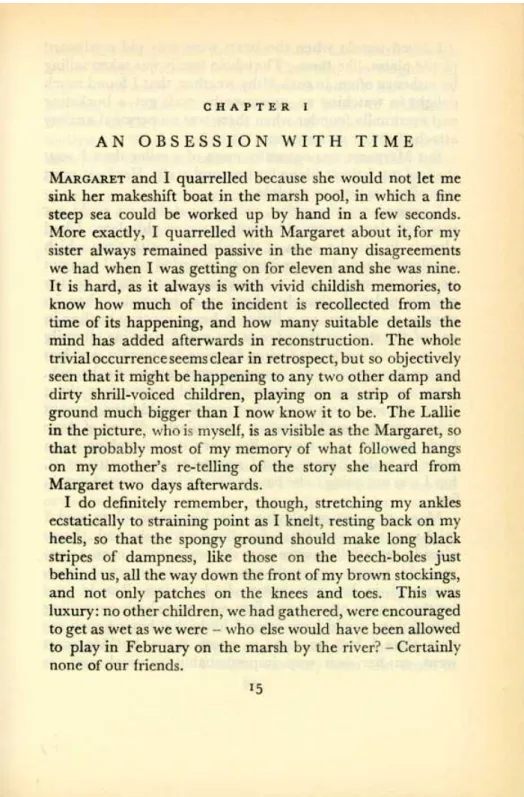
In order to verify that Tesseract was actually working regardless of ac-curacy, I classified an old page taken from Eileen Robertson’sOrdinary Families (Figure 3.1). As seen in Figure 3.1, the page shows wear, the line-spacing of the text is small, the background is a discolored and faded yellow, and text from the reverse side of the paper is showing through. This sort of noise is not limited to old printed texts, but might also occur when taking a picture of handwritten text.
Classifying this images using Tesseract is done by issuing the command tesseract ocr_sanity.jpg ocr_sanity.txt -l eng. The command reads as follows: “Use Tesseract to train the file ocr_sanity.jpg us-ing the English language and output the results to a text file called ocr_sanity.txt”
Using only the trained data filetessdata/eng.traineddata provided by Tesseract, the output of the command is:
CHAPTER]
AN OESESSION WITH TIME
MARGARET and I quarrelled because she would not let me sink ha makeshift boat in the marsh pool, in whieh a ne steep sea could he worked up by hand in a few seconds. More exactly, I quarrelled wilh Mai-gam about il,for my sister always remained passive in the many disagreements we had when I was getting on for eleven and she was nine It is hard, as it always is with vivid childish memories, ta know haw much of the incident is recolleeted from the Lime ofiu
happening, and how many suitable details the mind has added aftervmrds in recanstrucon.
The whole lrivialuccurrenceseems clearin retrospect, hm so objectively seen that it might be
happening Kn any two other damp and dirty shrill-voiced children, playing en a snip of marsh ground much bigger than I now know it to be. The Lallic in the pieuire. who is n-lyscll, is as visihlr: as the Maxgarel, so dim probably most of my memory of what {allowed hangs on my
1-nod-ier’s rc-telling of the story she heard rrnrn Margaret two days afterwards.
I do denitely remember, though, suelehing my anklu ccstatically to straining point as I knelt,
ruling back on my heels, so that the spongy ground shnnhl make long black stripes of dampness, like those on the beech-bales just behind us, all the way dawn the from nrrny brown stockings, and not only patches on the knees and toes. This was luxury:
no other children, we had gathered, were encouraged to get as wet as we were — who else wnnhi have heen
allowed to play in February on Ll-le marrh hy Ihe river? rCenainly none of our (riends.
I5
The output text from Tesseract verified the sanity check that Tesseract is capable of detecting printed text. However, the real research to be done lies within the question: Can Tesseract, or any OCR engine, accurately detect handwriting in an offline fashion? This question can be answered by testing Tesseract’s accuracy on handwritten text, a type of input Tesseract was not inherently designed to handle.
The remaining subsections of mySolutionwill outline the process taken to investigate this research question.
3.1.2 Training the Tesseract OCR engine
Training Tesseract follows a process that requires multiple automated and multiple manual processes. The entire process is outlined here 1, but since the process to train a handwritten language and character set is nuanced, I’ll outline the process in this section.
Tesseract reuires that any language a user wants to use for classification with Tesseract to be included in the tessdata directory. By default and as noted earlier, Tesseract comes preloaded with a small number of languages and fonts one can use for classification, and for each language only a small amount of data was used to train it.
Generating Training Images
The first step to training Tesseract is to find or make an image that contains the full character set of the language in question. For the experiments outlined in this paper, I used a handwritten character set based off of the English language. Multiple experiments, or passes, we made during the training of the new handwritten character set.
The language was named as so: [language].[person].[experiment]. Tesseract requires a strict naming convention because, during the pro-cess of training a new character set, various files are combined based on their file name, excluding the extension.
The first pass on training, considering the naming convention just dis-cussed, was named eng.brian.exp0a. The ‘brian’ in the file name indicates that I, the author of the report, was training Tesseract on my own handwriting.
1
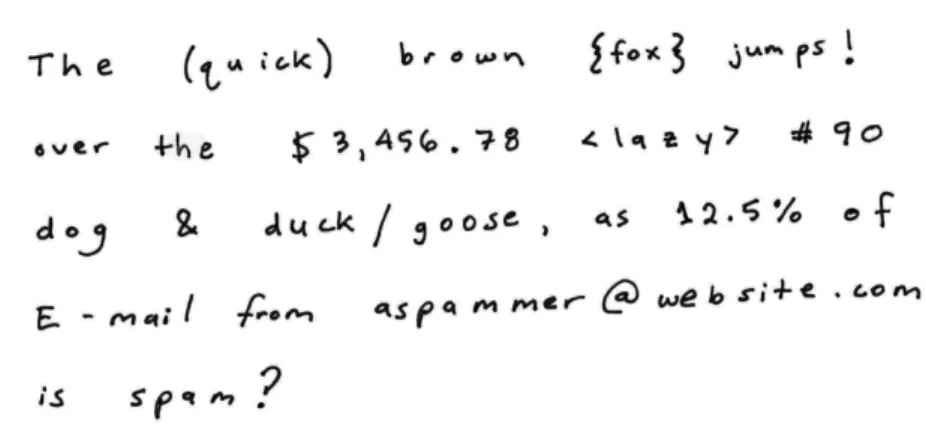
When generating the training images, the creators of Tesseract recom-mend using what I’ll refer to as the “quick brown fox” snippet that contains essentially the entire set of characters within the target lan-guage. Figure 3.2 shows the initial training image used to train the eng.brian character set.
Figure 3.2: eng.brian.exp0a
For training, the Tesseract processing tools recommend that the train-ing image contains a fair amount of each character, that more frequent characters occur more, that non-letter digits aren’t grouped together, and that there’s adequate spacing horizontally between the characters (kerning) and vertically between the lines (line-height).
After the training image is made by hand, it is scanned in to be dig-itized. Tesseract’s accuracy increases when its input images are pre-processed, that is, when noise is removed from the image in question by, for instance, increasing the contrast between text and its back-ground. Utilities such as Adobe Photoshop or the command-line tool, ImageMagick, can perform noise removal on images. Fixing effects due
to noise, however, is outside the scope of this paper.
Making & Correcting the Box Files
For each training image, Tesseract requires what is called a “box file”, which is essentially a text file that lists the characters in the training images in order, one per line, with the coordinates of that character’s bounding box. Since a training pass can contain multiple training images, each image will need its own box file.
During the first pass, there is only one image to be trained oneng.brian.exp0a.tiff. To create a box file for this image, I issued the following UNIX
com-mand:
tesseract eng.brian.exp0a.tiff eng.brian.exp0a \ batch.nochop makebox
At this point, Tesseract returns the box file, eng.brian.exp0a.box. Inspecting the box file, it is obvious just where Tesseract has trouble classifying the image during this stage. Below is sample of the Tesser-act’s generated box file from the “quick brown fox” snippet.
T 979 1487 1039 1541 0 h 1059 1487 1103 1539 0 e 1139 1488 1175 1527 0 ( 1341 1470 1366 1558 0 t 1377 1453 1424 1521 0 u 1441 1498 1476 1526 0 z 1519 1501 1534 1543 0 o 1552 1501 1585 1531 0 k 1594 1503 1635 1546 0
) 1648 1482 1682 1575 0 b 1840 1511 1872 1566 0 r 1896 1515 1922 1543 0 o 1959 1518 1986 1545 0 w 2017 1514 2065 1542 0 n 2083 1509 2128 1542 0 f 2281 1492 2315 1588 0 F 2329 1514 2365 1572 0 o 2367 1522 2398 1550 0 * 2411 1524 2444 1556 0 3 2471 1492 2501 1587 0
Here, Tesseract fails exactly where one might expect: on similar looking characters. For example, the second-to-last line is interpreted as a * when it’s an x in actuality. From here, one must manually edit the box file with the correct values. Figure 3.3 shows how Tesseract chops the ‘T’ in the word ‘The’. The coordinates (979,1487) denote the bottom-left corner of the box and the coordinates (1039,1541) denote the upper-right coordinates of the box.
Figure 3.3: Box drawn around ‘T’
If characters on the page are poorly spaced, some may have been placed into the same box, in which case further corrections to the box file need to be made. The final number on each line of the box file indicates which page in the file that the character appeared on
Running Tesseract for Training
Once the box files and training images are had, Tesseract needs to be run in “Training Mode” by running at the command line:
tesseract eng.brian.exp0a.tiff eng.brian.exp0a \ nobatch box.train
This command outputs aeng.brian.exp0a.trfile, which will be used later in the training process.
Clustering
After the character features of all of the training pages have been ob-tained, the next step is to cluster them to create the prototypes. The character shape features need to be clustered using the mftraining and cntraining commands.
mftraining -F font_properties -U unicharset -O \ eng.unicharset eng.brian.exp0a.tr
At this step, two files are outputted: inttempwhich contains the shape prototypes andpffmtablewhich contains the number of expected fea-tures for each character. Finally, we issue the following command to get the character normalization sensitivity prototypes:
cntraining eng.brian.exp0a.tr
This will output the normproto data file.
Dictionary Data
As explained in Section 2.2, Tesseract uses a dictionary to classify biguous words. During classification, if Tesseract encounters an am-biguous string of characters that can be made into an actual word, Tesseract will attempt to switch low confidence characters with those characters that will complete the word. For instance, (ollege might be corrected by Tesseract as college, because switching the ( to a c transformed the block of characters into a word found in the dictionary. During training, Tesseract requires two word lists for the language in question, formatted as a UTF-8 text file with one word per line. The first word list, as mentioned, contains all of the words in the language.
The second list, called the “frequent words” list, is a subset of the main word list that contains the words most frequently used in the target language. Our target language is English, but even more specifically, our target langauge is a programming language, Ruby. The most oft used keywords are undoubtedly the keywords of the programming lan-guage. I constructed a file, frequent_words_list, which contained the following Ruby keywords:
BEGIN if END in ENCODING module END next FILE nil LINE not alias or and redo begin rescue break retry case return class self def super defined? then do true else undef elsif unless end until ensure when false while
for yield
This file coupled with the entire word list file,words_list, gives Tesser-act insight into a language, and are critical for TesserTesser-act to be trained properly.
The following two commands tie these two word lists into the training process:
wordlist2dawg frequent_words_list eng.freq-dawg eng.unicharset wordlist2dawg words_list eng.word-dawg eng.unicharset
Combining It All
The last step in the training process is to combine each of the files output during the previous stages of training into a single tessdata file which can be used for either classifying or bootstrapping (iterative training) the same language. This is done via the command:
combine_tessdata eng.brian.exp0a.
which outputs the file eng.brian.exp0a.traineddata. After placing this file into the Tesseract data directory (tessdata/), the new lan-guage can now be used to classify a file of that lanlan-guage/character set:
tesseract some_image.tif some_image_output.txt \ -l eng.brian.exp0a
With one traineddata file created, the next step is to reinforce (i.e. train again) the given language using a new training image or images, which is called bootstrapping.
3.1.3 Generating Large Amounts of Handwritten Text for Training
Tesseract classifies with the highest accuracy when it is trained with a substantial amount of data, that is, the more training images with more variation lead to a higher classifier accuracy. The “Quick brown fox” snippet alone is not rich enough in variation of handwriting styles to give Tesseract enough information about a certain character set. There is of course a threshold where training Tesseract with too much data leads to the ‘Law of Diminishing Returns’, where Tesseract simply can’t extract any more data, but more data was still necessary.
In order to automate the process of creating large amounts of text, I created 3 fonts out of variations of my own handwriting using a tool called Scanahand, which allowed me to fill in a template on paper, digitally scan the template, and input the template into Scanahand. I was then able to extract a true-type font of my own handwriting which I was able to use to produce large amounts of text with.
Figure 3.4: Template used by the Scanahand software to build a font out of handwriting
Figure 3.4 shows the template used by Scanhand to create a custom handwritten font.
I created 3 fonts out of my own handwriting: a sloppy version, a neat version, and the neatest version. Figure 3.5 shows these 3 examples of
Figure 3.5: 3 various “handwriting” fonts; (a.) neatest, (b.) neat, and (c.) sloppy
3.1.4 Bootstrapping a Character Set Using Tesseract
The termbootstrapping is used to describe a process where a character set (i.e., a font) is used to train itself. 2 In Tesseract, bootstrapping
is useful during the training process of new fonts because it further reinforces what the OCR engine already knows about a given font, using information it extracted from previous passes of training.
On the first pass on training Tesseract on theeng.brian language/char-acter set, called Experiment 0 (exp0a), Tesseract returned atraineddata file called eng.brian.expo0a.traineddata. During the second pass (exp1a,exp1b, exp1c), instead of using the Tesseract-included default eng.traineddata to obtain the box files, the traineddata file from the previous training pass was used. This is done via:
tesseract eng.brian.exp1a.tiff \
eng.brian.exp1a -l eng.brian.exp0a \ batch.nochop makebox
This command was also used foreng.brian.exp1b.tiffandeng.brian.exp1c.tiff. Note that whereexp0 only utilized a single tiff image, exp1 utilized 3
various images, increasing the amount of data Tesseract had for train-ing substantially.
For each subsequent pass on training the handwritten character set, the traineddata from the previous pass was used in a bootstrapping
manner. The manual for training Tesseract iterates that each phase of
bootstrapping a character set increases Tesseract’s accuracy and knowl-edge about a character set. In total, my solution ran three passes to train the eng.brian character set.
3.2
Programming Language
In order for one to write simple algorithms using Iris, it’s essential for Iris to be user-friendly and concise, which I’ll exmaine further in the Results section. If one is expected to author small algorithms quickly and repeatedly, requiring documentation just to use the language seems disadvantageous. Because of this, Iris is architected in a manner re-quiring one to write scripts in the Ruby programming language. Ruby is described by its creators as:
... a dynamic, open source programming language with a focus on simplicity and productivity with an elegant syntax that is natural to read and easy to write. 3
Ruby reads like the English language, which makes it a good candidate for programmers who don’t have time to fumble through documenta-tion or the patience to remember a certain syntax. Furthermore, the closer the written text is to English, the more we can utilize Tesseract’s knowledge of the English language [5]. In fact, much of Ruby’s syntax is optional.
For instance, to printHello, World! in Ruby, one can write:
puts(’Hello, World!’) # ...or puts ’Hello, World!’ # ...or even p ’Hello World!’
To define a hash in Ruby, a programmer can write:
3
{ name => ’Brian’, age => 28, hair_color => ’red’} # ...or name => ’Brian’, age => 28, hair_color => ’red’ # ...or even name : ’Brian’, age : 28, hair_color : ’red’
To do an action 10 times, one can write
10.times do { |i| puts i }
To capitalize or uppercase a string, one could write"hello".capitalize or "hello".upcase, respectively. Considering these examples, it easy to see that Ruby is intuitive and easy for one to write code quickly, which makes Ruby the ideal programming language for writing code by hand.
Because Ruby is a terse programming language it has two very distinct advantages. First, the easier the language to write, the more accurate a programmer writing code by hand will be. Second, and arguably more important, is the fact that simpler handwritten texts equate to greater accuracies from an OCR engine. Handwritten text that is difficult for an OCR engine to recognize will inevitably cause errors when the text from the OCR engine is later evaluated (or executed). Errors introduced from the OCR process are known asnoise, and the noisy the text the more manual or machine corrections will need to be applied. Esponda et al built a proof of concept for a system very similar to Iris. In their experiments, they utilized E-Chalk technology–an elec-tronic chalkboard which allows an instructor to perform digital tasks by drawing on the chalkboard. Part of Esponada et al’s idea was to allow an instructor to write a script on the E-chalk board and have the E-Chalk board execute the result as a teaching aide for students. To accomplish this, they built a domain specific language (DSL) for
teachers and professors to use on the E-Chalk board. The DSL they used, in essence, was their own subset of the BASIC programming lan-guage which consisted of only two interpreter commands and six types of instructions. [2]
For executing handwritten code, it makes sense to require the user to write their code in a specific way using a DSL. Users won’t need access to low-level functions of a programming language (like file utilities, threads, etc.) for handwritten code.
Creating a Domain Specific Language
I began creating adomain specific language using Ruby’salias_method, which allows one to alias any method or function to something else. Since Tesseract performs poorly when trying to recognize symbols like + or%, we can aide Tesseract by requiring the user to user a more ver-bose, alphanumeric subset of given programming language that more closely resembles English.
Figure 3.6: Summing 2 and 2
For instance, allowing one to:
class Fixnum
alias_method ‘plus’, ’+’ end
2.plus 2
In the solution presented in this paper, a DSL is a crucial element which aides Tesseract with Roman symbols in which it has difficulty recognizing.
3.3
Client-Side Application
In order for one to interface withIris, a client-side app was built which provided a thin interface toIris’s backend, where OCR was performed. In order to build a prototype of Iris’s client-side, a web application was built in HTML5/CSS/Javascript. The flow for interacting with
Iris (http://iris.briangonzalez.org) was designed as follows:
1. Click ‘[create] upload’ near the bottom, left corner of the pagesee
Figure 3.7
2. Click ‘Choose File’ and point Iris to the image to be OCR’d and evaluatedsee Figure 3.9
- Click checkbox to evaluate textsee Figure 3.8
- Select the character set in the dropdown (either eng for Tesseract’s preloaded English character set, or eng.brian, the handwritten character set used built during training)see
Figure 3.8
- Click ‘Create Upload’ see Figure 3.9
3. Examine result from OCR result and Evaluated Result see Fig-ure 3.10
- If the OCR output from Tesseract is incorrect, go to ’replace rules’ in the lower navigation
- Add rule to replace textreplace_this with textwith_this, which
will perform an in-place swap whenevertextreplace_thisis found
in the OCR output. Note: this replacement occurs beofre the ‘eval’ stage see Figure 3.11
- Go back to result and click ’Retry’
Figure 3.7: Iris Flow: Home page
Chapter 4
Results
In this section, results are shown from various scripts designed to test the capabilities and accuracies of Iris. Much of the accuracy of Iris is hard to quantify, therefore, the majority of the information presented in this section holds observational value.
Figure 4.1 shows the image of a script that simply adds 2 and 2. The handwriting is clear, and the kerning is sufficient, i.e. no adjacent characters are touching. The OCR and evaluated results are flawless.
Figure 4.1: Adding 2 and 2
OCR Result: puts 2 + 2
Evaluated Result: 4
Figure 4.2 shows an image subtracting 50 from 100. The zeros are written with strike-throughs and the 1 is serifed to avoid confusion with an O and l, respectively. Iris, however, has difficulty parsing the space between the s and the 1, which leads to a syntax error when executed.
Figure 4.2: Subtracting 50 from 100
OCR Result: putsz00-50
Evaluated Result:
undefined local variable or method ‘putsz00’ for <Up-loadsController:0x0000000aea3d50>
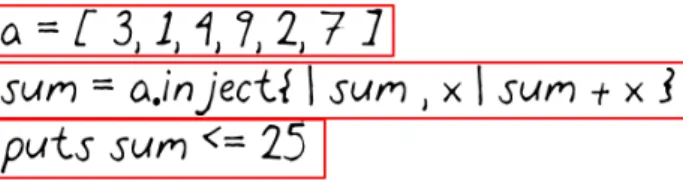
Figure 4.3 shows the algorithm outlined in the introduction (coffee shop with napkin, pen, smart phone). Iris handles the handwritten algorithm quite well, and outputs the expected result.
Figure 4.3: Summing Algorithm
OCR Result: a=[3,1,4,9,2,7]
sum = a.inject{ |sum,x|sum + x } puts sum <= 25
Evaluated Result: false
Figure 4.4 shows a handwritten algorithm with a defined function, mult(), which is passed two arguments. Again, Iris does well pars-ing the text, and outputs the correct result.
Figure 4.4: mult() function OCR Result: def mult(x,y) x*y end puts mult(2,2) Evaluated Result: 4
Figure 4.5 shows a script that loops 10 times and print the current index of the loop. Again, the outcome is flawless.
Figure 4.5: Printing 1 through 10
OCR Result:
10.times { |num |puts num }
Evaluated Result: 0 1 2 3 4 5 6 7 8 9
Figure 4.6 shows a handwritten script, however, the background is not normalized as in the previous examples. This is more akin to what might be found in a real-world scenario. Tesseract, however, was unable to find any text in the image, most likely due to the lack of contrast between the dark text and the light background.
Figure 4.6: Unnormalized image, multiplying 4 and 4
OCR Result: n/a
Evaluated Result: n/a
4.0.1 Accuracies for a Given Handwriting Style
As described in my solution, three various handwriting styles were used during the training of Tesseract. After the final traineddata file was built, I reclassified the training images (using Tesseract) containing the three various handwriting styles. Figure 4.7 shows that the two neatest handwriting styles are correctly classified by Tesseract about 93-95% of the time, while the sloppy handwriting style drops off dramatically down to around 77%.
4 0 Style #1 Style #2 Style #3
100 0 10 20 30 40 50 60 70 80 90 Handwriting Style Accuracy (% ) Sloppy Neat Neatest
Figure 4.7: Tesseract accuracies from three different handwriting variations
4.0.2 Commonly Misrecognized Characters
Since the process of correcting the box files during training is mual, I catalogued the characters most frequently misrecognized as
an-other character. Table 4.1 shows small subset of some of the characters Tesseract has the most difficulty recognizing, prior to training.
Table 4.1: Commonly misrecognized characters
Written as OCR Output
l \ g j d j C c k K 3 8 B P D % x
Chapter 5
Discussion
The handwritten form of the small script discussed in Section 1 (Intro-duction) might look something like Figure 5.1.
Figure 5.1: Pseudo code for summing algorithm
Figure 5.1 sheds some light on the process of converting analog text written on, for instance, a napkin, to a digital form to be executed. We can see that an algorithm to parse the analog text may produce poor results due to the fact that some characters are very similar. On the first line, the 1 and the ] have inherently similar features. The 1 is constructed with an “ear” at the top which continues downward and to the left which resembles a serif and it also has an actual serif
at its base; conversely, the ] contains two horizontal lines at the top and base. The ear and the bottom serif of the 1 closely resembles the horizontal top and bottom lines of the ]. This, therefore, begs the question: can we extract enough useful features from handwritten text in order to correctly and accurately classify it?
For reasons outlined in Section 4 (Results), the answer to this question is eitherno or it remains to be seen.
This process of automatically deducing what a character is (e.g., is that 1 on the napkin actually a 1 or is that ] actually a]?), is known asOptical Character Recognition, or OCR. Because my research con-siders handwritten text in the context of computer programming, a mistake from the OCR engine is far from trivial. One of the most, if not the most common use of OCR engines is to convert old documents into digital form for digital acrhival. In this case, it is not a problem if
George Washington was the first president of the USA.
is recognized by an OCR engine as
Ge0rge Washmgton was the {irst presiden+ of the U5A
because the output is still readable by humans, although perhaps the output would be rather useless for an information retrieval (IR) system. On the other hand, programmers and mathematiciansrely on the fact that the code they write is interpreted with 100% accuracy. Accuracy is one of theunderpinnings of computer science. 3*3has a completely different meaning than}"3when executed by an interpreter. Errors in the output from an OCR engine, introduced as noise, are intolerable when one expects to execute that output as if it were valid code.
All of this considered, many questions arise about the process of and ability to executing handwritten code. The territory of executing hand-written code, I’ve found, is largely uncharted territory in terms of aca-demic research. Can handwritten code be accurately parsed by an OCR engine and executed? What modifications, if any, would need to be made to the modern programming language paradigm to allow for such a system? Since handwriting varies from person to person, can we devise ade facto OCR system capable of recognizing all types of hand-writing?
My results show that a system can be built to solve the problem of executing handwritten text with varying levels of accuracy. What my results don’t show, though, is just how much a programmer using Iris
would tolerate when using a system of this nature. Is 95% accuracy enough to make coding by hand a feasible option. I would argue that the basis for a complete working solution, however, is outlined in this paper.
Chapter 6
Conclusion
The problem I set out to solve in this paper was this: by using opti-cal character recognition, a capable programming language, along with smart devices, can the task of quickly authoring small algo-rithms written by hand can be had?
Through my results, I found the answer to this question to be incon-clusive. Iris achieved varying levels of consistency and accuracy, but enough to makeIris a viable solution to my problem statement? That remains to be seen.
Are today’s most capable OCR engines able to recognize handwritten text accurately enough to be executed by an interpreter? Most of today’s
offline OCR engines, like Tesseract, are designed to achieve approxi-mately 80-95% accuracy. To execute code, 80-95% accurate maybe be too low and even today’s most capable OCR engines do not achieve 100% accuracy.
Will adding multiple layers of machine learning on top of the OCR pro-cess coupled with a simplified programming language (DSL) be enough to accurately recognize and ultimately execute handwritten text?
An-swering this research question fell outside of the scope of this paper, however, I feel as if adding another layer of machine learning would bolster the accuracy of Iris.
For future work, I would focus on adding an extra layer of machine learning. I would also explore other OCR engines, both commerical and open-source. Furthermore, I would look in to supplementing an extra layer of machine learning to correct the OCR output with a layer of
crowd-sourcing, such as integratingIris with a service such as Amazon’s
Bibliography
[1] R. Plamondon and S. Srihari, “Online and off-line handwriting recognition: a comprehensive survey,” Pattern Analysis and Ma-chine Intelligence, IEEE Transactions on, vol. 22, pp. 63 –84, jan 2000.
[2] M. E. Argüero and R. Rojas, “Learning algorithms with an elec-tronic chalkboard over the web.”
[3] J. C. R. Licklider, “Man-computer symbiosis,” IEEE Ann. Hist. Comput., vol. 14, pp. 24–, Jan. 1992.
[4] P. Reebel,United States Post Office: Current Issues and Historical Background. Nova Science Publications, 2003.
[5] R. Smith, “An overview of the tesseract ocr engine,” inProceedings of the Ninth International Conference on Document Analysis and Recognition - Volume 02, ICDAR ’07, (Washington, DC, USA), pp. 629–633, IEEE Computer Society, 2007.
![Figure 2.3: Examples of segmented characters [1]](https://thumb-us.123doks.com/thumbv2/123dok_us/9058046.2803912/24.892.273.617.195.456/figure-examples-of-segmented-characters.webp)

![Figure 2.10: Candidate chop points [5]](https://thumb-us.123doks.com/thumbv2/123dok_us/9058046.2803912/32.892.321.570.192.282/figure-candidate-chop-points.webp)