WIFI-DIRECT
Pawan Shrikondawar1,Hatim Bharmal2 and Abhishek Kommera3
1,2,3
Dept of Computer Science & Engineering Ballarpur Institute of Technology, Bamni, Ballarpur, India
Abstract- In this project, our main aim is to provide a free way access to communication using the power of Android smart phones. In this modern world, everyone wants a leisure lifestyle. Nowadays, every phone has embedded communication technologies like Wi-Fi. Wi-Fi provide many rich features like faster transmission, better communications. So in this world full of connectedness, we are providing an android application which lets user communicate free of cost using WiFi-Direct. Wi-Fi direct is new technology defined by the Wi-Fi alliance to enhance direct device to device communication without the need of a wireless access point. Our application runs on Android operating system and we’ve chosen Android because nowadays most of smart phones runs on Android platform.
Keywords- Android,WiFi-Direct,WiFi alliance,WiFi,Wireless access point.
I. INTRODUCTION
The Chat and File Transfer Android Application is aimed for communicating and connecting to each other in areas where we cannot have the reach of old method of communication or without the Internet.Being a WiFi based system,it offers the faster communication without any delay in sending data and messages.We have built this application on Android which provide access to some pre-defined packages and methods which is helpful for user to access our application smoothly.Android also provide some permission in the user devices to access the resources and enchancing the performance of the applications.We have used WiFi-Direct,which is a new technology for communication of peer to peer devices without any wireless access point.In a typical WiFi,the client device searches for available WiFi network and associates with it which are created by Access points but in WiFi-Direct these role are dynamic which means it has to implement both the role of client and access points.These roles could even be executed simultaneously by the same device, this type of operation is called Concurrent mode.WiFi-Direct establishes communication by using P2P group where the server is P2P group owner and the clients are P2P client.
II. IMPLEMENTATION
Two types of classes are being used in the application:
Built-in Packages- Packages which are available to developers by the sdk and the environment. User created classes- Classes which are created by developers for certain special requirements in the working of application.
2.1. Built-in Packages:-
android.content -Contains classes for accessing and publishing data on a device.
android.net.wifi.p2p -Provides classes to create peer-to-peer (P2P) connections with Wi-Fi Direct.
Bluetooth connection. The primary class you need to work with is WifiP2pManager, which you can acquire by calling getSystemService(WIFI_P2P_SERVICE). The WifiP2pManager includes APIs that allow you to:
Initialize your application for P2P connections by calling initialize()
Discover nearby devices by calling discoverPeers()
Start a P2P connection by calling connect()
android.os:- Provides basic operating system services, message passing, and inter-process communication on the devices
java.io:- Provides for system input and output through data streams, serialization and the file system. Unless otherwise noted, passing a null argument to a constructor or method in any class or interface in this package will cause a NullPointerException to be thrown.
2.2. User-defined Classes:- 2.2.1
ChatActivity.java:- onCreate() – Called when activity is created.
onClick() – Handles the control of buttons for launching activities like review and submit attendance.
onResume() – Called when activity is resumed.
onBackPressed() – Called when back button is pressed.
onActivityResult(int, int, Intent) – Called when Intent is received back to an activity for result.
sendMessage(int) – Called to send a message of specific type.
refreshList(Message, boolean) – Called to refresh the chat screen after receiving an Image Message.
copyTextToClipboard(long ) – Called to copy text to clipboard.
shareMedia(long , int) – Called to share Media to various applications.
2.2.2
FilePickerActivity.java:- onCreate(Bundle) – Called when activity is created.
onCreateOptionsMenu(Menu) – Called to create Options Menu.
goToChat() – Called to go to Chat Screen.
saveChatName(Context, String) – Called to save the chat name of User.
loadChatName(Context context) – Called to load the chat name of User.
2.2.3
MessageService.java:- onStartCommand(Intent intent, int flags, int startId)– This is used when a message activity is started.
.
2.2.4
RecordActivity.java:- startRecording() – This is called when a recording of audio is started.
stopRecording() – This is called when a recording of audio is stopped.
2.2.5 ViewImage.java:-
Used to present and open a image which is received from user within the application.
2.2.6
RecieveMessageClient.java:- Void doInBackground(Void... params) – Used to read data from inputstream.
2.2.7
2.2.8
SendMessageClient.java:- Void doInBackground(Void... params) – Used to send data to outputstream.
2.2.9
RecieveMessageClient.java:- Void doInBackground(Void... params) – Prepares data to be send to outputstream.
2.2.10
Image.java:- public Bitmap getBitmapFromUri()-retrieve bitmap from its uri.
public Bitmap decodeSampleBitmapFromUrl(int width,int height)- loads bitmap in size calculated.
2.2.11
MediaFile.java:- public byte[ ] fileToByteArray()- converts media file to byte array.
public String getRealPathFromURI(Context context,Uri contentUri)- Returns path of file from uri.
2.2.12
Message.java:- public void saveByteArrayToFile(Context context)- saves the received message bytes to a path according to the type of message.
2.2.13
WifiBroadcastReciever:- public void activateGoToChat(String role)- Starts the chat according to role(server or client).
public int isGroupOwner()- returns true if device is group owner.
III. WORKING
3.1Startup screen:- The start screen is the connection establishment page where a user will be ask to join a Wi-Fi Direct network .
Figure 1. Startup screen
Figure 2. Connection establishment
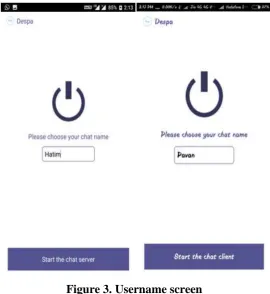
3.3Username screen:- User sets a new name giving his/her details for first time. Application will automatically set the name if previously set by user. User can change the user name on setup phase.
Figure 3. Username screen
3.4Chatroom screen:-
Figure 4. Text, file and video transmission
3.4.1 Record voice message:- Same icons of different colour are used to depict whether it is recording or not. Blue Icon shows that it is recording. Red Icon shows that it stops recording.
Figure 5. Record voice screen
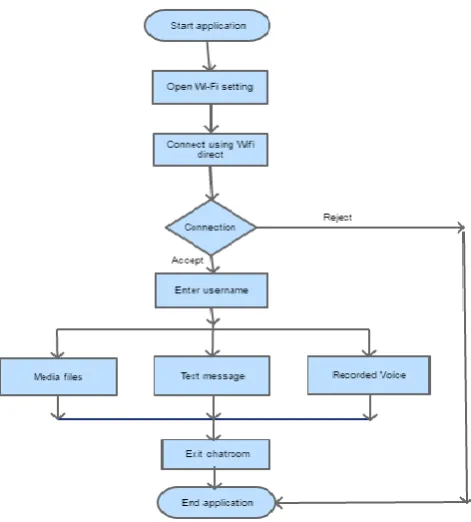
3.5 Block diagram:-
IV. CONCLUSION
Our built application is for android devices compatible with Wi-Fi direct. This application doesn’t need central server /database, the only requirement is that the mobile devices should be Wi-Fi enabled(with Wi-Wi-Fi direct). Wi-Wi-Fi direct is made for temporarily connecting a few devices in an easy-to-use and secure way, but it does not work well for larger network topologies. The major problem users may confront while using the built application is that the devices are not compatible with each other. The devices may crash or gets stuck while transmission of multimedia files. This Application would work in a better way if there is device compatibility and Wi-Fi direct is extended to all the android devices.
REFERENCES
[1] Prof. Anil Hingmire, Ms. Mrunal Tipari, Mr. Rohit Gopalan, Mr. Sanman Chavan “Implementation of Voice, Video and Text Data over Wi-Fi”, in International Journal of Engineering Research and General Science (IJERGS) vol. 3, Issue 2, pg no. 1467-1473, March-April 2015.
[2] Saurabh Mangar, Abhishek Kommera and Rushabh Kale, “A review on voice, text and data transmission on Wi-fi based android system”,in International Journal of Modern Trends in Engineering and Research(IJMTER)vol. 5, Issue 1, pg no. 27-29, January 2018.
[3] Web link: https://developer.android.com/training/connect-devices-wirelessly/wifi-direct [4] Book: “Learning Android” by Marko Gargenta, O’REILLY Publication.