Exploring Cloud Computing
Selected by Michael Wittig and Andreas Wittig
Manning Author Picks
Copyright 2017 Manning Publications
For more information, please contact
Special Sales Department Manning Publications Co. 20 Baldwin Road
PO Box 761
Shelter Island, NY 11964 Email: [email protected]
©2017 by Manning Publications Co. All rights reserved.
No part of this publication may be reproduced, stored in a retrieval system, or transmitted, in any form or by means electronic, mechanical, photocopying, or otherwise, without prior written permission of the publisher.
Many of the designations used by manufacturers and sellers to distinguish their products are claimed as trademarks. Where those designations appear in the book, and Manning
Publications was aware of a trademark claim, the designations have been printed in initial caps or all caps.
Recognizing the importance of preserving what has been written, it is Manning’s policy to have the books we publish printed on acid-free paper, and we exert our best efforts to that end. Recognizing also our responsibility to conserve the resources of our planet, Manning books are printed on paper that is at least 15 percent recycled and processed without the use of elemental chlorine.
Manning Publications Co. 20 Baldwin Road Technical PO Box 761
Shelter Island, NY 11964
Cover designer: Leslie Haimes
ISBN 9781617294877
contents
Introduction iv
T
HE
C
LOUD
AT
Y
OUR
S
ERVICE
1
What is cloud computing?
Chapter 1
from The Cloud at Your Service by Jothy Rosenberg
and Arthur Mateos 2
A
MAZON
W
EB
S
ERVICES
IN
A
CTION
20
What is Amazon Web Services?
Chapter 1
from Amazon Web Services in Action by Michael Wittig
and Andreas Wittig. 21
G
OOGLE
C
LOUD
P
LATFORM
IN
A
CTION
53
Trying it out: Deploying Wordpress on Google Cloud
Chapter 2
from Google Cloud Platform in Action by JJ Geewax 54
S
ERVERLESS
A
RCHITECTURES
ON
AWS 71
Going serverless
Chapter 1
from Serverless Architectures on AWS by Peter Sbarski
with Sam Kroonenburg 72
AWS L
AMBDA
IN
A
CTION
87
Running functions in the cloud
Chapter 1
from AWS Lambda in Action by Danilo Poccia 88
iv
Cloud Computing is enabling many trends in IT today: microservices, pay-as-you-go pricing, and serverless architectures, to name three. The biggest player in the mar-ket’s Amazon, who offers the most mature cloud systems through their Amazon Web Services (AWS). Other companies are gaining traction as well: Google invests into their Google Cloud Platform, and Microsoft entered the game with Azure.
One key tenet of microservices is the ability to replace them easily with other implementations, but that ability also requires that your infrastructure isn’t fixed. If you add and remove microservices every few weeks, you need a dynamic infrastruc-ture, and that dynamic infrastructure’s exactly what you get in the cloud.
Using the cloud is like consuming power. At the end of the month you get a bill for the resources you’ve consumed. You don’t need to buy resources upfront, and you can stop using them whenever you want. There’s no capacity planning and no procure-ment process anymore, which enables you to create SaaS offerings for your customers with the same pricing model.
C
loud Computing is a business changer. Today you can start a new busi-ness that’s able to grow with minimal capital. The cloud provides shared and vir-tualized resources to use the hardware better than you could personally. Therefore, prices go down. Cloud environments can be fully automated because you can programmatically talk to your infrastructure using APIs. Chapter 1 ofThe Cloud at Your Services explains what Cloud Computing is about.
2
What is
cloud computing?
Cloud computing is the hottest buzzword in the IT world right now. Let’s understand why this is and what this cloud computing hype is all about. A growing consensus among cloud vendors, analysts, and users defines cloud computing at the highest level as computing services offered by a third party, available for use when needed, that can be scaled dynamically in response to changing needs. Cloud computing represents a departure from the norm of developing, operating, and managing IT systems. From the economic perspective, not only does adoption of cloud comput-ing have the potential of providcomput-ing enormous economic benefit, but it also pro-vides much greater flexibility and agility. We’ll continue to refine and expand our
This chapter covers
Defining the five main principles of cloud computing
Benefiting from moving to the cloud
How evolving IT led to cloud computing
3
definition of cloud computing as well as your understanding of its costs and benefits throughout this book.
Not only are IT journals and IT conferences writing and talking about cloud com-puting, but even mainstream business magazines and the mass media are caught up in its storm. It may win the prize for the most over-hyped concept IT has ever had. Other terms in this over-hyped category include Service-Oriented Architectures (SOA), application service providers, and artificial intelligence, to name a few. Because this book is about cloud computing, we need to define it at a much more detailed level. You need to fully understand its pros and cons, and when it makes sense to adopt it, all of which we’ll explain in this chapter. We hope to cut through the hype; and to do that we won’t merely repeat what you’ve been hearing but will instead give you a framework to understand what the concept is all about and why it really is important.
You may wonder what is driving this cloud hype. And it would be easy to blame analysts and other prognosticators trying to promote their services, or vendors trying to play up their capabilities to demonstrate their thought leadership in the market, or authors trying to sell new books. But that would ignore a good deal of what is legiti-mately fueling the cloud mania. All of the great expectations for it are based on the facts on the ground.
Software developers around the world are beginning to use cloud services. In the first 18 months that it was open for use, the first public cloud offering from Amazon attracted over 500,000 customers. This isn’t hype; these are facts. As figure 1.1 from Amazon’s website shows, the bandwidth consumed by the company’s cloud has quickly eclipsed that used by their online store. As the old adage goes, “where there’s smoke, there must be a fire,” and clearly something is driving the rapid uptake in usage from a cold start in mid-2006.
Similar to the previous technology shifts—such as the move from mainframes to cli-ent-server, and then from client-server to the internet—cloud computing will have major implications on the business of IT. We hope to provide you with the back-ground and perspective to understand how it can be effectively used as a component of your overall IT portfolio.
We’ll begin by expanding on our earlier definition of cloud computing in terms of its five main principles.
1.1
Five main principles that define cloud computing
We can summarize the five main principles of cloud computing as follows: Pooled computing resources available to any subscribing users Virtualized computing resources to maximize hardware utilization Elastic scaling up or down according to need
Automated creation of new virtual machines or deletion of existing ones Resource usage billed only as used
We assert, with very few notable exceptions called out later, that these five main princi-ples are necessary components to call something cloud computing. They’re summarized in table 1.1 with a brief explanation of each one for quick reference.
We’ll now discuss these principles in concrete terms, making sure you understand what each one means and why it’s a pillar of cloud computing.
1.1.1 Pooled computing resources
The first characteristic of cloud computing is that it utilizes pooled computing assets that may be externally purchased and controlled or may instead be internal resources that are pooled and not dedicated. We further qualify these pooled computing resources as contributing to a cloud if these resources are available to any subscribing users. This means that anyone with a credit card can subscribe.
If we consider a corporate website example, three basic operational deployment options are commonly employed today. The first option is the self-hosting option. Here,
Table 1.1 The five main principles of cloud computing
Resource Explanation
Pooled resources Available to any subscribing users
Virtualization High utilization of hardware assets
Elasticity Dynamic scale without CAPEX
Automation Build, deploy, configure, provision, and move, all without manual intervention
5
Five main principles that define cloud computing
companies choose not to run their own data center and instead have a third party lease them a server that the third party manages. Usually, managed hosting services lease cor-porate clients a dedicated server that isn’t shared (but shared hosting is common as well). On this single principle, cloud computing acts like a shared managed hosting service
because the cloud provider is a third party that owns and manages the physical comput-ing resources which are shared with other users, but there the similarity ends.
Independent of cloud computing, a shift from self-hosted IT to outsourced IT resources has been underway for years. This has important economic implications. The two primary implications are a shift of capital expenses (CAPEX) to operational expenses (OPEX), and the potential reduction in OPEX associated with operating the infrastructure. The shift from CAPEX to OPEX means a lowering of the financial bar-rier for the initiation of a new project. (See the definition in section 3.1.)
In the self-hosted model, companies have to allocate a budget to be spent up front for the purchase of hardware and software licenses. This is a fixed cost regardless of whether the project is successful. In an outsourced model (managed hosting), the startup fees are typically equivalent to one month’s operational cost, and you must commit to one year of costs up front. Typically, the one-year cost is roughly the same or slightly lower than the CAPEX cost for an equivalent project, but this is offset by the reduced OPEX required to operate the infrastructure. In sharp contrast, in a cloud model, there are typically no initial startup fees. In fact, you can sign up, authorize a credit card, and start using cloud services literally in less time than it would take to read this chapter. Figure 1.2 showcases side by side the various application deploy-ment models with their respective CAPEX and OPEX sizes.
The drastic difference in economics that you see between the hosting models and the cloud is due to the fact that the cost structures for cloud infrastructures are vastly better than those found in other models. The reasons for the economies of scale are severalfold, but the primary drivers are related to the simple economics of volume. Walmart and Costco can buy consumer goods at a price point much lower than you or I could because of their bulk purchases. In the world of computing, the “goods” are computing, storage, power, and network capacity.
1.1.2 Virtualization of compute resources
The second of the five main principles of cloud computing has to do with virtualization of compute resources. Virtualiza-tion is nothing new. Most enter-prises have been shifting much of their physical compute infra-structure to virtualized for the past 5 to 10 years. Virtualization
scale of cloud infrastructures has to be enormous, based on thousands of servers. Each server takes up physical space and uses significant power and cooling. Getting high utilization out of each and every server is vital to be cost effective.
The recent technological breakthrough that enabled high utilization on commod-ity hardware—and which is the single biggest factor behind the cloud being a recent IT phenomenon—is virtualization where each physical server is partitioned into many virtual servers. Each one acts like a real server that can run an operating system and a full complement of applications.1 Virtualized servers are the primary units that can be
consumed as needed in the cloud. These virtualized servers constitute a large pool of resources available when required. But having such a large pool will work only if appli-cations can use more or less of the pool as demands placed on the appliappli-cations grow and shrink. As you’ll see in chapter 4, the notion of a private cloud softens this first principal but keeps all the others.
1.1.3 Elasticity as resource demands grow and shrink
The fact that this large pool of resources exists enables a concept known as elasticity— the third of our five main principles. Elasticity is such a key concept in cloud comput-ing that Amazon decided to name its cloud Amazon Elastic Compute Cloud.
Elasticity—a synonym for dynamic scaling—refers to the ability to dynamically change how much resource is consumed in response to how much is needed. Typical applications require a base level of resources under normal, steady-state conditions, but need more resource under peak load conditions.
In a non-cloud world, you would have to build sufficient capacity to not only per-form adequately under baseline load conditions, but also handle peak load scenarios with sufficiently good performance. In the case of a self-hosted model, this means over-provisioning the amount of hardware for a given allocation. In the case of a man-aged hosting deployment, you can start with a small set of resources and grow as the requirements of the application grow. But provisioning for a new set of dedicated hardware resources takes weeks or, in many larger organizations, months. Having thousands of virtualized resources that can be harnessed and released in correlation to application demand would be useless if such allocation and freeing required man-ual intervention.
1.1.4 Automation of new resource deployment
The ability to automatically (via an API) provision and deploy a new virtual instance of a machine, and, equivalently, to be able to free or de-provision an instance, is our fourth principle of cloud computing. A cloud-deployed application can provision new instances on an as-needed basis, and these resources are brought online within min-utes. After the peak demand ebbs, and you don’t need the additional resources, these
7
Benefits that can be garnered from moving to the cloud
virtual instances can be taken offline and de-provisioned, and you will no longer be billed. Your incremental cost is only for the hours that those additional instances were in use and active.
1.1.5 Metered billing that charges only for what you use
The fifth distinguishing characteristic of cloud computing is a metered billing model. In the case of managed hosting, as we mentioned before, there typically is an initial startup fee and an annual contract fee. The cloud model breaks that economic barrier because it’s a pay-as-you-go model. There is no annual contract and no commitment for a specific level of consumption.
Typically, you can allocate resources as needed and pay for them on an hourly basis. This economic advantage benefits not only projects being run by IT organiza-tions, but also innumerable entrepreneurs starting new businesses. Instead of needing to raise capital as they might have in the past, they can utilize vast quantities of com-pute resources for pennies per hour. For them, the cloud has drastically changed the playing field and allowed the little guy to be on equal footing with the largest corpora-tions.
1.2
Benefits that can be garnered from moving to the cloud
“I’ll never buy another server again,” said the Director of IT for a medium-sized Software-as-a-Service (SaaS) company, only partially in jest, after recently completing the deployment of a new corporate website for his organization. This website (a PHP-based application with a MySQL backend) showcased the corporate brand and the primary online lead-generation capability for the company’s business.
Before the overhaul, it was run from a redundant pair of web servers hosted by one of the leading managed-hosting service providers at a total cost of roughly
$2,200/month. The company replaced the infrastructure for the original website with a cloud implementation consisting of a pair of virtual server instances running for roughly $250/month—almost a 90 percent savings! Its quality of service (QoS) team monitored the performance and availability of the website before and after the change and saw no measureable difference in the service quality delivered to end users. Buoyed by the success with this initial project, this organization is looking at all future initiatives for the possibility of deployment within the cloud, including a soft-ware-build system and offsite backup.
1.2.1 Economic benefits of the change from capital to operational expenses
The good news is that this isn’t the only cost advantage. By harnessing the cloud, you can also take advantage of cloud providers’ economic leverage because of the vol-ume at which they can purchase hardware, power, and bandwidth resources.
In many cases, the economic benefits discussed here will pan out—but as you’ll see later, there are always exceptions. For some situations and applications, it makes bet-ter economic sense not to use cloud computing. It isn’t a panacea.
1.2.2 Agility benefits from not having to procure and provision servers
In addition to lowering the financial barrier to initiating new projects, the cloud approach improves an organization’s agility. It comprehensively reduces the months of planning, purchasing, provisioning, and configuring.
Let’s take as an example a performance-testing project launching a new consumer-facing website. In the old world, there were two ways to solve this problem, depending on your timeframes and budget. The first involved purchasing a software license for a load-testing tool like HP Mercury LoadRunner and purchasing the requisite servers to run the load-testing software. At that point, you were ready to script your tests and run your test plan. Alternatively, you could hire an outside consulting company that spe-cialized in performance testing and have it run the tests for you. Both were time-con-suming exercises, depending on how long it took to negotiate either the licensing agreement for the software or the consulting agreement with the outside firm.
Fast-forward to the new world of cloud computing. You have two new faster and more flexible ways of accomplishing the same task: use an open-source load-testing application installed on cloud instances, and use the cloud’s virtual machines to perform the load test (on as many servers as you need). The time required to set up and begin applying load to a system is under half an hour. This includes signing up for an account, as the Python open source load-testing tool called Pylot demonstrates (see http://coreygold-berg.blogspot.com/2009/02/pylot-web-load-testing-from-amazon.html).
If you’re looking for a more packaged approach, you can use one of the SaaS offer-ings that uses the cloud to generate traffic. They can automatically run tests in a coor-dinated fashion across multiple instances running from multiple cloud operators, all in an on-demand fashion. In either of these scenarios, the time to result is a matter of hours or days, generating time, not to mention cost efficiencies. We’ll explore more about cloud-based testing in chapter 7.
1.2.3 Efficiency benefits that may lead to competitive advantages
9
Evolution of IT leading to cloud computing
1.2.4 Security stronger and better in the cloud
Surprised by the heading? Don’t be: it’s true. As you’re aware, corporate buildings no longer have electrical generators (which they used to) because we leave electricity generation to the experts. If corporations have their own data centers, they have to develop standard security operating procedures. But it’s not their core business to run a secure data center. They can and will make mistakes. A lot of mistakes. The total annual fraud and security breach tab is $1 trillion, according to cybersecurity research firm Poneman (www.nationalcybersecurity.com).
But first, as always, you must weigh the potential benefits against the potential costs. You must take into account other factors, such as reliability and performance, before making the leap into the clouds. In future chapters, we’ll address these issues; but suffice it to say we believe that after you understand them and take the proper measures, they can be managed. This done, you’ll be able to realize the full benefits of moving to the cloud.
In the next section, we’ll look at the evolution of technology that enabled cloud computing. This short detour into history is important because you can learn from previous platform shifts to understand what is similar and what is different this time. That in turn can help you make informed decisions about your shift to this new evolu-tion of IT—the cloud.
1.3
Evolution of IT leading to cloud computing
Cloud computing didn’t sprout fully formed from the technology ether in 2005. Its technological underpinnings developed over the course of the last 40 or so years. The technological process was evolutionary, across several disparate areas. But these advances, aggregated into a bundle, represent a revolutionary change in the way IT will be conducted in the future.
Gillett and Kapor made the first known reference to cloud computing in 1996 in an MIT paper (http://ccs.mit.edu/papers/CCSWP197/CCSWP197.html). Today’s common understanding of cloud computing retains the original intent. It was a mere decade later when a real-world instantiation of the cloud came into existence as Ama-zon repurposed its latent e-commerce resources and went into the business of provid-ing cloud services. From there, it was only a matter of a few months until the term became commonplace in our collective consciousness and, as figure 1.3 shows, in our Google search requests (they’re the same thing in today’s world, right?).
1.3.1 Origin of the “cloud” metaphor
Figure 1.3 Cloud computing as a concept entered our collective consciousness in mid-2007. This figure shows the rapid rise in popularity of the search term cloud computing as measured by Google. The labels correspond to major cloud announcements. A: Microsoft announces it will rent cloud computing space; B: Philadelphia Inquirer reports, “Microsoft’s cloud computing system grow is growing up”; C: Winnipeg Free Press reports, “Google looks to be cloud-computing rainmaker.” Source: Google Trends (www.google.com/trends), on the term cloud computing.
Figure 1.4 A picture of a cloud is a ubiquitous representation of the internet and is used almost universally in discussions or drawings of computer architecture.
11
Evolution of IT leading to cloud computing
control. The image of a cloud is merely a way to represent this vast potential base of anonymous users coming from the internet.
Those users must log in from a PC to access the internet. Technically, each one needs an Internet Service Provider (ISP) that may be a telecom company, their employer, or a dedicated internet access company (such as AOL). Each ISP needs a bank of machines that people can access and that in turn has access to the internet.
Simply put, the earliest concept of the cloud consisted of large aggregations of computers with access to the internet, accessed by people through their browsers. The concept has remained surprisingly true to that early vision but has evolved and matured in important ways. We’ll explore those ways in detail in this book.
1.3.2 Major computing paradigm shifts: mainframes to client-server to web
In the 1960s, we saw the development of the first commercial mainframes. In the beginning, these were single-user systems, but they evolved in the 1970s to systems that were time-shared. In this model, the large computing resource was virtualized, and a virtual machine was allocated to individual users who were sharing the system (but to each, it seemed that they had an entire dedicated machine).
Virtual instances were accessed in a thin-client model by green-screen terminals. This mode of access can be seen as a direct analog of the concept of virtualized instances in the cloud, although then a single machine was divided among users. In the cloud, it’s potentially many thousands of machines. The scarcity of the computing resource in the past drove the virtualization of that resource so that it could be shared, whereas now, the desire to fully utilize physical compute resources is driving cloud vir-tualization.
As we evolved and entered the client-server era, the primacy of the mainframe as the computing center of the universe dissolved. As computing power increased, work gradually shifted away from centralized computing resources toward increasingly pow-erful distributed systems. In the era of the PC-based desktop applications, this shift was nearly complete: computing resources for many everyday computing tasks moved to the desktop and became thick client applications (such as Microsoft Office). The mainframe retained its primacy only for corporate or department-wide applications, relegating it to this role alone.
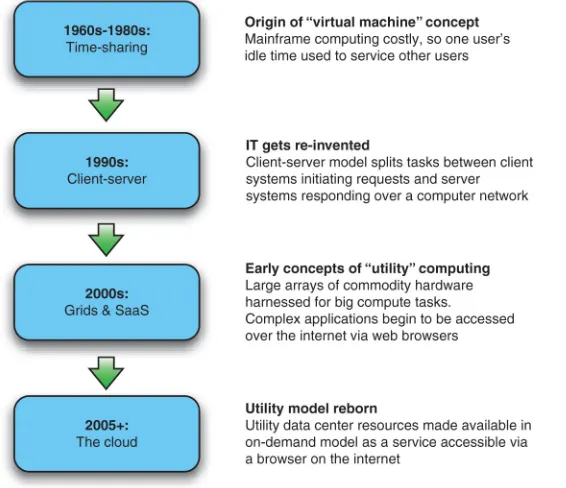
The standardization of networking technology simplified the ability to connect sys-tems as TCP/IP became the protocol of the burgeoning internet in the 1980s. The ascendancy of the web and HTTP in the late 1990s swung the pendulum back to a world where the thin-client model reigned supreme. The world was now positioned to move into the era of cloud computing . The biggest stages of the evolution of IT are dia-grammed vertically in a timeline in figure 1.5.
impact is the evolution of the data center and how physical computing resources are housed, powered, maintained, and upgraded.
Figure 1.5 Cloud computing is best understood as an evolutionary change. The key elements and concepts of cloud computing emerged gradually over several decades through the various predominant computing paradigms.
1.3.3 Housing of physical computing resources: data center evolution
Over the past four decades, there have been tremendous changes in hardware capa-bilities, specifically in computing power and storage. The ability to quickly process prodigious amounts of data on inexpensive and mass-produced commodity servers means that a few inexpensive racks of servers can handle problems that were tackled on NSA-sized budgets as recently as the early 1990s.
13
Evolution of IT leading to cloud computing
Similarly, the cost of storage has decreased dramatically over the last few decades as the capacity to store data has kept pace with the ability to produce terabytes of digi-tal content in the form of high-definition HD video and high-resolution imagery. In the early 1980s, disk space costs exceeded $200/MB; today, this cost has come down to under $0.01/MB.
Network technologies have advanced as well, with modern bandwidth rates in the 100–1000 Gbps range commonplace in data centers today. As for WAN, the turn of the millennium saw a massive build-out of dark fiber, bringing high-speed broadband to most urban areas. More rural areas have satellite coverage, and on-the-go, high-speed wireless networks mean almost ubiquitous broadband connectivity to the grid.
To support the cloud, a huge data-center build-out is now underway. Google, Microsoft, Yahoo!, Expedia, Amazon, and others are deploying massive data centers. These are the engine rooms that power the cloud, and they now account for more than 1.2 percent of the U.S.’s total electricity usage (including cooling and auxilia-ries),1 which doubled over the period from 2000 to 2005. We’ll present the economies
of scale and much more detail about how these mega data centers are shaping up in chapter 2.
1.3.4 Software componentization and remote access: SOA, virtualization, and SaaS
On the software side of the cloud evolution are three important threads of develop-ment: virtualization, SOA, and SaaS. Two of these are technological, and the third relates to the business model.
The first important thread is virtualization. As discussed previously, virtualization isn’t a new concept, and it existed in mainframe environments. The new innovation that took place in the late 1990s was the extension of this idea to commodity hard-ware. Virtualization as pioneered by VMware and others took advantage of the capac-ity of modern multicore CPUs and made it possible to partition and time-slice the operation of commodity servers. Large server farms based on these commodity servers were partitioned for use across large populations of users.
SOA is the second software concept necessary for cloud computing. We see SOA as the logical extension of browser-based standardization applied to machine-to-machine communication. Things that humans did through browsers that interacted with a web server are now done machine-to-machine using the same web-based standard proto-cols and are called SOA. SOA makes practical the componentization and composition of services into applications, and hence it can serve as the architectural model for building composite applications running on multiple virtualized instances.
The final software evolution we consider most pertinent to the cloud is SaaS. Instead of being a technological innovation, this is a business model innovation. His-torically, enterprise software was sold predominantly in a perpetual license model. In this model, a customer purchased the right to use a certain software application in
perpetuity for a fixed, and in many cases high, price. In subsequent years, they paid for support and maintenance at typically around 18 percent of the original price. This entitled the customer to upgrades of the software and help when they ran into diffi-culty. In the SaaS model, you don’t purchase the software—you rent it. Typically, the fee scales with the amount of use, so the value derived from the software is propor-tional to the amount spent on it. The customer buys access to the software for a speci-fied term, which may be days, weeks, months, or years, and can elect to stop paying when they no longer need the SaaS offering. Cloud computing service providers have adopted this pay-as-you-go or on-demand model.
This brings up an important point we need to consider next. SaaS is one flavor or layer in a stack of cloud types. A common mistake people make in these early days of the cloud is to make an apples-to-oranges comparison of one type of cloud to another. To avoid that, the next section will classify the different layers in the cloud stack and how they compare and contrast.
1.4
Classifying cloud layers: different types for different uses
First, let’s learn a little more about how SaaS evolved and established itself, to set the context for discussing the other classes of clouds.
In the earliest days of commercially practicable computing, computer resources were scarce, and the primary model for their use was much like a utility. But this was different from the sense of utility that cloud computing offers today; it was more akin to the community well in a village during a drought. Members of the community had access to and were allocated a fixed amount of water. In the case of cloud computing today, we’ve returned to the notion of computing being available as a utility, but with-out the scarcity.
The cloud movement was presaged by the shift in business model toward SaaS that took over the software industry at the turn of the century. Before it was called SaaS, it was an application rented from an Application Service Provider (ASP); here, the tradi-tional enterprise license model was turned on its head, and you purchased in a pay-as-you-go manner, with costs scaling with usage instead of having a large up-front capital investment. You didn’t need to provision hardware and software; instead, the services were turned on when needed. After this approach was renamed SaaS, it evolved into several new kinds of offerings that we’ll explore next.
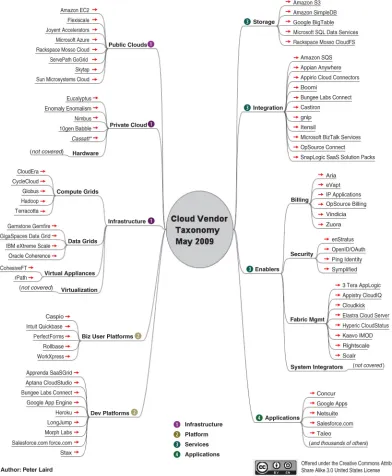
Figure 1.6 Cloud technologies are evolving as various vendors attempt to provide services populating the cloud ecosystem. These services run the gamut from the hardware systems used to build cloud infrastructure to integration services and cloud-based applications. Source: Peter Laird, http://peterlaird.blogspot.com.
15
A more simplified representation of the cloud types shown in figure 1.7 highlights important aspects and key characteristics of different kinds of cloud offerings.
Figure 1.7 In the X-as-a-Service taxonomy, cloud services are classified by the level of prepackaging offered to the consumer of the specific service. An IaaS provides computing capabilities in the rawest form and hence offers the greatest flexibility. At the highest layers, there is less flexibility but also less complexity to be managed.
What does XaaS mean generically? It means on demand, requiring little or no capital expenditure. It means consumable remotely and across any mode of access over the internet, and in a metered billing model. Let’s now go through the boxes represent-ing the different classes of clouds in figure 1.7. First up is IaaS.
1.4.1 Infrastructure as a Service (IaaS)
The lowest level of XaaS is known as IaaS, or sometimes as Hardware as a Service (HaaS). A good example of IaaS is the Amazon Elastic Compute Cloud (EC2).
A user of IaaS is operating at the lowest level of granularity available and with the least amount of prepackaged functionality. An IaaS provider supplies virtual machine images of different operating system flavors. These images can be tailored by the developer to run any custom or packaged application. These applications can run natively on the chosen OS and can be saved for a particular purpose. The user can bring online and use instances of these virtual machine images when needed. Use of these images is typically metered and charged in hour-long increments.
17
Classifying cloud layers: different types for different uses
IaaS provides great flexibility and control over the cloud resources being consumed, but typically more work is required of the developer to operate effectively in the envi-ronment. In chapter 2, we’ll delve into IaaS and see how it works in greater detail.
1.4.2 Platform as a Service (PaaS)
PaaS’s fundamental billing quantities are somewhat similar to those of IaaS: consump-tion of CPU, bandwidth, and storage operates under similar models. Examples of PaaS include Google AppEngine and Microsoft Azure. The main difference is that PaaS requires less interaction with the bare metal of the system. You don’t need to directly interact with or administer the virtual OSs. Instead, you can let the platform abstract away that interaction and concentrate specifically on writing the application. This simplification generally comes at the cost of less flexibility and the requirement to code in the specific languages supported by the particular PaaS provider.
1.4.3 Software as a Service (SaaS) and Framework as a Service (FaaS)
SaaS, as described earlier in the chapter, refers to services and applications that are available on an on-demand basis. Salesforce.com is an example. FaaS is an environ-ment adjunct to a SaaS offering and allows developers to extend the prebuilt function-ality of the SaaS applications. Force.com is an example of a FaaS that extends the Salesforce.com SaaS offering.
FaaS offerings are useful specifically for augmenting and enhancing the capabili-ties of the base SaaS system. You can use FaaS for creating either custom, specialized applications for a specific organization, or general-purpose applications that can be made available to any customer of the SaaS offering. Like a PaaS environment, a developer in a FaaS environment can only use the specific languages and APIs pro-vided by the FaaS.
1.4.4 Private clouds as precursors of public clouds
In addition to the classifications we discussed earlier, we should introduce some important concepts relative to the different classifications of clouds. Private clouds are a variant of generic cloud computing where internal data-center resources of an enterprise or organization aren’t made available to the general public—that is, these pooled computing resources are actually not available to any subscribing users but are instead controlled by an organization for the benefit of other members of that organi-zation. The public clouds of providers such as Amazon and Google were originally used as private clouds by those companies for other lines of business (book retailing and internet search, respectively).
Hybrid clouds combine private and public clouds. You can use them in cases where the capacity of a private cloud is exhausted and excess capacity needs to be provi-sioned elsewhere.
1.5
Summary
The cloud offers the illusion of infinite resources, available on demand. You no longer need to play the guessing game of how many users need to be supported and how scal-able the application is. The cloud takes care of the peaks and troughs of utilization times. In the world of the cloud, you pay for only the resources you use, when you use them. This is the revolutionary change: the ability to handle scale without paying a premium. In this realm of true utility computing, resource utilization mirrors the way we consume electricity or water.
In this chapter, we defined the cloud as computing services that are offered by a third party, are available for use when needed, and can be scaled dynamically in response to changing need. We then touched briefly on the evolution of computing and the developments that led to where we are today. Finally, we looked at a simple cloud classification that should help you understand the various flavors of cloud offer-ings that are available in the market today and should prevent you from making apples-and-oranges comparisons between incompatible classes of clouds.
19
Summary
Practically unlimited storage, instant scalability, zero-downtime upgrades, low start-up costs, plus pay-only-for-what-you-use without sacrificing security or perfor-mance are all benefits of cloud computing. How do you make it work in your enterprise? What should you move to the cloud? How? And when?
The Cloud at Your Service answers these questions and more. Written for IT pros at all levels, this book finds the sweet spot between rapidly changing details and hand-waving hype. It shows you practical ways to work with current services like Amazon's EC2 and S3. You'll also learn the pros and cons of private clouds, the truth about cloud data security, and how to use the cloud for high scale applications.
What's inside
How to build scalable and reliable applications The state of the art in technology, vendors, practices What to keep in-house and what to offload
How to migrate existing IT to the cloud
W
hat’s the biggest advantage of using Amazon Web Services (AWS)? For us it’s being able to automate every part of your cloud infrastructure. AWS offers an API, and lots of tools to launch, configure, modify, and delete computing, storage, and networking infrastructure. Our book, Amazon Web Services in Action,provides a deep introduction into the most important services and architecture principles. Chapter 1 answers the question: What is Amazon Web Services? You’ll learn about the concepts behind AWS and gain a brief overview of what you can do with AWS.
Chapter 1 from
Amazon Web Services in Action
by
Michael Wittig and Andreas Wittig.
What is
Amazon Web Services?
Amazon Web Services (AWS) is a platform of web services offering solutions for computing, storing, and networking, at different layers of abstraction. You can use these services to host web sites, run enterprise applications, and mine tremendous amounts of data. The term web service means services can be controlled via a web interface. The web interface can be used by machines or by humans via a graphical user interface. The most prominent services are EC2, which offers virtual servers, and S3, which offers storage capacity. Services on AWS work well together; you can
This chapter covers
Overview of Amazon Web Services
Benefits of using Amazon Web Services
Examples of what you can do with Amazon Web Services
use them to replicate your existing on-premises setup or design a new setup from scratch. Services are charged for on a pay-per-use pricing model.
As an AWS customer, you can choose among different data centers. AWS data cen-ters are distributed in the United States, Europe, Asia, and South America. For exam-ple, you can start a virtual server in Japan in the same way you can start a virtual server in Ireland. This enables you to serve customers worldwide with a global infrastructure.
The map in figure 1.1 shows the data centers available to all customers.
In more general terms, AWS is known as a cloud computing platform.1
Germany Ireland
Japan
Brazil
Australia Singapore
U.S. East U.S. West 1
U.S. West 2
Figure 1.1 AWS data center locations
1.1
What is cloud computing?
Almost every IT solution is labeled with the term cloud computing or just cloud nowa-days. A buzzword may help to sell, but it’s hard to work with in a book.
Cloud computing, or the cloud, is a metaphor for supply and consumption of IT
resources. The IT resources in the cloud aren’t directly visible to the user; there are layers of abstraction in between. The level of abstraction offered by the cloud may vary
Which hardware powers AWS?
AWS keeps secret the hardware used in its data centers. The scale at which AWS operates computing, networking, and storage hardware is tremendous. It probably uses commodity components to save money compared to hardware that charges extra for a brand name. Handling of hardware failure is built into real-world processes and software.1
AWS also uses hardware especially developed for its use cases. A good example is the Xeon E5-2666 v3 CPU from Intel. This CPU is optimized to power virtual servers from the c4 family.
23
What can you do with AWS?
from virtual hardware to complex distributed systems. Resources are available on demand in enormous quantities and paid for per use.
Here's a more official definition from the National Institute of Standards and Technology:
Cloud computing is a model for enabling ubiquitous, convenient, on-demand network access to a shared pool of configurable computing resources (e.g., networks, servers, storage, applications, and services) that can be rapidly provisioned and released with minimal management effort or service provider interaction.
—The NIST Definition of Cloud Computing, National Institute of Standards and Technology
Clouds are often divided into the following types:
Public —A cloud managed by an organization and open to use by the general public
Private —A cloud that virtualizes and shares the IT infrastructure within a single organization
Hybrid —A mixture of a public and a private cloud
AWS is a public cloud. Cloud computing services also have several classifications:
Infrastructure as a service (IaaS) —Offers fundamental resources like computing, storage, and networking capabilities, using virtual servers such as Amazon EC2, Google Compute Engine, and Microsoft Azure virtual machines
Platform as a service (PaaS) —Provides platforms to deploy custom applications to the cloud, such as AWS Elastic Beanstalk, Google App Engine, and Heroku Software as a service (SaaS) —Combines infrastructure and software running in
the cloud, including office applications like Amazon WorkSpaces, Google Apps for Work, and Microsoft Office 365
The AWS product portfolio contains IaaS, PaaS, and SaaS. Let’s take a more concrete look at what you can do with AWS.
1.2
What can you do with AWS?
You can run any application on AWS by using one or a combination of services. The examples in this section will give you an idea of what you can do with AWS.
1.2.1 Hosting a web shop
Database Web server
Maintenance free On-premises server
Database Web
server
Managed by you with updates, monitoring, and so on
Internet User
Figure 1.2 Running a web shop on-premises vs. on AWS
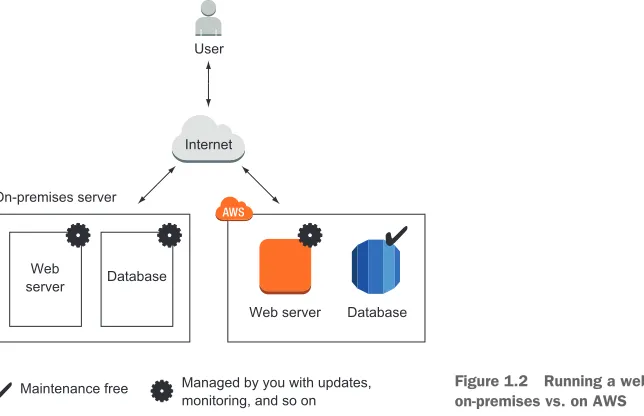
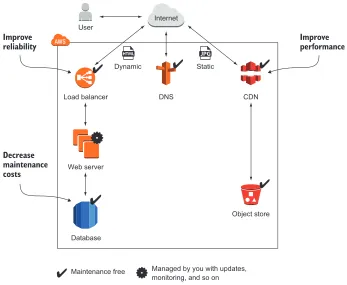
John realized that other options are available to improve his setup on AWS with addi-tional services:
The web shop consists of dynamic content (such as products and their prices) and static content (such as the company logo). By splitting dynamic and static content, John reduced the load for his web servers and improved performance by delivering the static content over a content delivery network (CDN).
John uses maintenance-free services including a database, an object store, and a
DNS system on AWS. This frees him from managing these parts of the system, decreases operational costs, and improves quality.
The application running the web shop can be installed on virtual servers. John split the capacity of the old on-premises server into multiple smaller virtual serv-ers at no extra cost. If one of these virtual servserv-ers fails, the load balancer will send customer requests to the other virtual servers. This setup improves the web shop’s reliability.
Figure 1.3 shows how John enhanced the web shop setup with AWS.
John started a proof-of-concept project and found that his web application can be transferred to AWS and that services are available to help improve his setup.
1.2.2 Running a Java EE application in your private network
Database
Internet User
Load balancer DNS CDN
Object store Dynamic
Web server
Static
Maintenance free Managed by you with updates, monitoring, and so on
Improve reliability
Improve performance
Decrease maintenance costs
Figure 1.3 Running a web shop on AWS with CDN for better performance, a load balancer for high availability, and a managed database to decrease maintenance costs
25
What can you do with AWS?
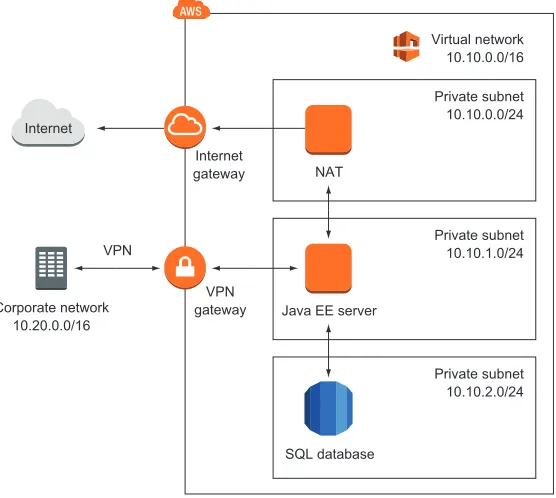
To do so, she defines a virtual network in the cloud and connects it to the corpo-rate network through a virtual private network (VPN) connection. The company can control access and protect mission-critical data by using subnets and control traffic between them with access-control lists. Maureen controls traffic to the internet using Network Address Translation (NAT) and firewalls. She installs application servers on virtual machines (VMs) to run the Java EE application. Mau-reen is also thinking about storing data in a SQL database service (such as Oracle Database Enterprise Edition or Microsoft SQL Server EE). Figure 1.4 illustrates Mau-reen’s architecture.
Maureen has managed to connect the on-premises data center with a private net-work on AWS. Her team has already started to move the first enterprise application to the cloud.
1.2.3 Meeting legal and business data archival requirements
SQL database
Private subnet 10.10.2.0/24 Internet
Private subnet 10.10.1.0/24 Private subnet 10.10.0.0/24 Virtual network 10.10.0.0/16
Java EE server NAT Internet
gateway
VPN gateway Corporate network
10.20.0.0/16 VPN
Figure 1.4 Running a Java EE application with enterprise networking on AWS
offer the possibility of sharing documents within the office. Storing all the data is a challenge for him:
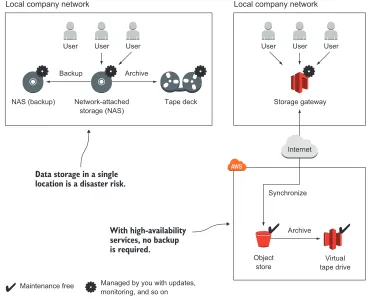
He needs to back up all files to prevent the loss of critical data. To do so, Greg copies the data from the file server to another network-attached storage, so he had to buy the hardware for the file server twice. The file server and the backup server are located close together, so he is failing to meet disaster-recovery requirements to recover from a fire or a break-in.
To meet legal and business data archival requirements, Greg needs to store data for a long time. Storing data for 10 years or longer is tricky. Greg uses an expen-sive archive solution to do so.
To save money and increase data security, Greg decided to use AWS. He transferred data to a highly available object store. A storage gateway makes it unnecessary to buy and operate network-attached storage and a backup on-premises. A virtual tape deck takes over the task of archiving data for the required length of time. Figure 1.5 shows how Greg implemented this use case on AWS and compares it to the on-premises solution.
User User User
Network-attached storage (NAS)
Tape deck
Backup Archive
Archive Synchronize Local company network
Virtual tape drive Object
store NAS (backup)
Data storage in a single location is a disaster risk.
With high-availability services, no backup is required.
User User User
Storage gateway Local company network
Internet
Maintenance free Managed by you with updates, monitoring, and so on
Figure 1.5 Backing up and archiving data on-premises and on AWS
27
What can you do with AWS?
1.2.4 Implementing a fault-tolerant system architecture
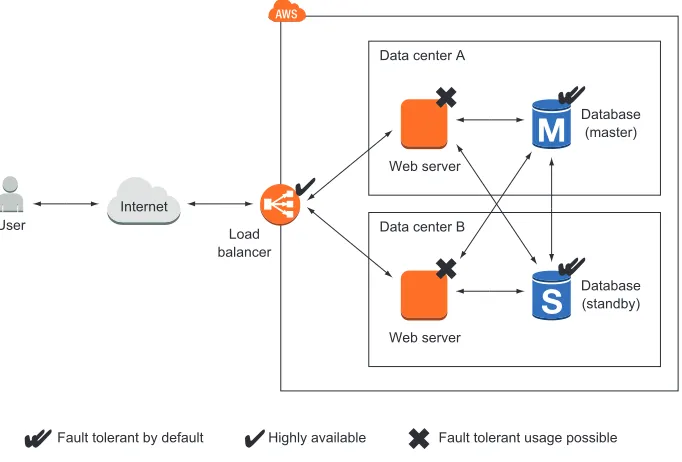
Alexa is a software engineer working for a fast-growing startup. She knows that Mur-phy’s Law applies to IT infrastructure: anything that can go wrong, will go wrong. Alexa is working hard to build a fault-tolerant system to prevent outages from ruining the business. She knows that there are two type of services on AWS: fault-tolerant services and services that can be used in a fault-tolerant way. Alexa builds a system like the one shown in figure 1.6 with a fault-tolerant architecture. The database service is offered with replication and failover handling. Alexa uses virtual servers acting as web servers. These virtual servers aren’t fault tolerant by default. But Alexa uses a load balancer and can launch multiple servers in different data centers to achieve fault tolerance.
So far, Alexa has protected the startup from major outages. Nevertheless, she and her team are always planning for failure.
Data center A
Web server
Database (master)
Load balancer Internet
User Data center B
Web server
Database (standby)
Fault tolerant by default Highly available Fault tolerant usage possible
Figure 1.6 Building a fault-tolerant system on AWS
1.3
How you can benefit from using AWS
What’s the most important advantage of using AWS? Cost savings, you might say. But saving money isn’t the only advantage. Let’s look at other ways you can benefit from using AWS.
1.3.1 Innovative and fast-growing platform
In 2014, AWS announced more than 500 new services and features during its yearly conference, re:Invent at Las Vegas. On top of that, new features and improvements are released every week. You can transform these new services and features into inno-vative solutions for your customers and thus achieve a competitive advantage.
The number of attendees to the re:Invent conference grew from 9,000 in 2013 to 13,500 in 2014.1AWS counts more than 1 million businesses and government
agen-cies among its customers, and in its Q1 2014 results discussion, the company said it will continue to hire more talent to grow even further.2 You can expect even more new
features and services in the coming years.
1 Greg Bensinger, “Amazon Conference Showcases Another Side of the Retailer’s Business,” Digits, Nov. 12, 2014,
http://mng.bz/hTBo.
2 “Amazon.com’s Management Discusses Q1 2014 Results - Earnings Call Transcript,” Seeking Alpha, April 24, 2014,
29
How you can benefit from using AWS
1.3.2 Services solve common problems
As you’ve learned, AWS is a platform of services. Common problems such as load bal-ancing, queuing, sending email, and storing files are solved for you by services. You don’t need to reinvent the wheel. It’s your job to pick the right services to build complex sys-tems. Then you can let AWS manage those services while you focus on your customers.
1.3.3 Enabling automation
Because AWS has an API, you can automate everything: you can write code to create networks, start virtual server clusters, or deploy a relational database. Automation increases reliability and improves efficiency.
The more dependencies your system has, the more complex it gets. A human can quickly lose perspective, whereas a computer can cope with graphs of any size. You should concentrate on tasks a human is good at—describing a system—while the com-puter figures out how to resolve all those dependencies to create the system. Setting up an environment in the cloud based on your blueprints can be automated with the help of infrastructure as code, covered in chapter 4.
1.3.4 Flexible capacity (scalability)
Flexible capacity frees you from planning. You can scale from one server to thousands of servers. Your storage can grow from gigabytes to petabytes. You no longer need to predict your future capacity needs for the coming months and years.
If you run a web shop, you have seasonal traffic patterns, as shown in figure 1.7. Think about day versus night, and weekday versus weekend or holiday. Wouldn’t it be nice if you could add capacity when traffic grows and remove capacity when traffic shrinks? That’s exactly what flexible capacity is about. You can start new servers within minutes and throw them away a few hours after that.
12am 6pm 6am
System load System load
Thursday Sunday Monday
System load
December January
Figure 1.7 Seasonal traffic patterns for a web shop
Flexible capacity also means you can shut down unused systems. In one of our last proj-ects, the test environment only ran from 7:00 a.m. to 8:00 p.m. on weekdays, allowing us to save 60%.
1.3.5 Built for failure (reliability)
Most AWS services are fault-tolerant or highly available. If you use those services, you get reliability for free. AWS supports you as you build systems in a reliable way. It pro-vides everything you need to create your own fault-tolerant systems.
1.3.6 Reducing time to market
In AWS, you request a new virtual server, and a few minutes later that virtual server is booted and ready to use. The same is true with any other AWS service available. You can use them all on demand. This allows you to adapt your infrastructure to new requirements very quickly.
Your development process will be faster because of the shorter feedback loops. You can eliminate constraints such as the number of test environments available; if you need one more test environment, you can create it for a few hours.
1.3.7 Benefiting from economies of scale
At the time of writing, the charges for using AWS have been reduced 42 times since 2008:
In December 2014, charges for outbound data transfer were lowered by up to 43%. In November 2014, charges for using the search service were lowered by 50%. In March 2014, charges for using a virtual server were lowered by up to 40%.
As of December 2014, AWS operated 1.4 million servers. All processes related to oper-ations must be optimized to operate at that scale. The bigger AWS gets, the lower the prices will be.
1.3.8 Worldwide
You can deploy your applications as close to your customers as possible. AWS has data centers in the following locations:
United States (northern Virginia, northern California, Oregon) Europe (Germany, Ireland)
Asia (Japan, Singapore) Australia
South America (Brazil)
With AWS, you can run your business all over the world.
1.3.9 Professional partner
AWS is compliant with the following:
31
How much does it cost?
FedRAMP & DoD CSM—Ensures secure cloud computing for the U.S. Federal Government and the U.S. Department of Defense
PCIDSS Level 1 —A data security standard (DSS) for the payment card industry (PCI ) to protect cardholders data
ISO 9001 —A standardized quality management approach used worldwide and certified by an independent and accredited certification body
If you’re still not convinced that AWS is a professional partner, you should know that Airbnb, Amazon, Intuit, NASA, Nasdaq, Netflix, SoundCloud, and many more are run-ning serious workloads on AWS.
The cost benefit is elaborated in more detail in the next section.
1.4
How much does it cost?
A bill from AWS is similar to an electric bill. Services are billed based on usage. You pay for the hours a virtual server was running, the used storage from the object store (in gigabytes), or the number of running load balancers. Services are invoiced on a monthly basis. The pricing for each service is publicly available; if you want to calcu-late the monthly cost of a planned setup, you can use the AWS Simple Monthly Calcu-lator (http://aws.amazon.com/calculator).
1.4.1 Free Tier
You can use some AWS services for free during the first 12 months after you sign up. The idea behind the Free Tier is to enable you to experiment with AWS and get some experience. Here is what’s included in the Free Tier:
750 hours (roughly a month) of a small virtual server running Linux or Win-dows. This means you can run one virtual server the whole month or you can run 750 virtual servers for one hour.
750 hours (or roughly a month) of a load balancer. Object store with 5 GB of storage.
Small database with 20 GB of storage, including backup.
If you exceed the limits of the Free Tier, you start paying for the resources you con-sume without further notice. You’ll receive a bill at the end of the month. We’ll show you how to monitor your costs before you begin using AWS. If your Free Tier ends after one year, you pay for all resources you use.
You get some additional benefits, as detailed at http://aws.amazon.com/free. This book will use the Free Tier as much as possible and will clearly state when additional resources are required that aren’t covered by the Free Tier.
1.4.2 Billing example
As mentioned earlier, you can be billed in several ways:
Based on traffic —Traffic can be measured in gigabytes or in number of requests. Based on storage usage —Usage can be either provisioned capacity (for example, 50 GB
volume no matter how much you use) or real usage (such as 2.3 GB used).
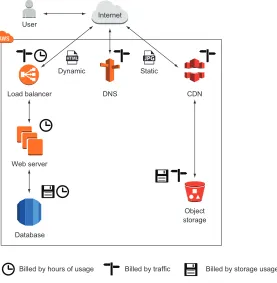
Remember the web shop example from section 1.2? Figure 1.8 shows the web shop and adds information about how each part is billed.
Database
Internet User
Load balancer DNS CDN
Object storage Web server
Billed by storage usage Billed by hours of usage Billed by traffic
Dynamic Static
Figure 1.8 Web shop billing example
Let’s assume your web shop started successfully in January, and you decided to run a marketing campaign to increase sales for the next month. Lucky you: you were able to increase the number of visitors of your web shop fivefold in February. As you already know, you have to pay for AWS based on usage. Table 1.1 shows your bills for January and February. The number of visitors increased from 100,000 to 500,000, and your monthly bill increased from 142.37 USD to 538.09 USD, which is a 3.7-fold increase. Because your web shop had to handle more traffic, you had to pay more for services, such as the CDN, the web servers, and the database. Other services, like the storage of static files, didn’t experience more usage, so the price stayed the same.
33
Comparing alternatives
1.4.3 Pay-per-use opportunities
The AWS pay-per-use pricing model creates new opportunities. You no longer need to make upfront investments in infrastructure. You can start servers on demand and only pay per hour of usage; and you can stop using those servers whenever you like and no longer have to pay for them. You don’t need to make an upfront commitment regard-ing how much storage you’ll use.
A big server costs exactly as much as two smaller ones with the same capacity. Thus you can divide your systems into smaller parts, because the cost is the same. This makes fault tolerance affordable not only for big companies but also for smaller budgets.
1.5
Comparing alternatives
AWS isn’t the only cloud computing provider. Microsoft and Google have cloud offer-ings as well.
OpenStack is different because it’s open source and developed by more than 200 companies including IBM, HP, and Rackspace. Each of these companies uses Open-Stack to operate its own cloud offerings, sometimes with closed source add-ons. You could run your own cloud based on OpenStack, but you would lose most of the bene-fits outlined in section 1.3.
Comparing cloud providers isn’t easy, because open standards are mostly missing. Functionality like virtual networks and message queuing are realized differently. If you know what features you need, you can compare the details and make your decision.
Table 1.1 How an AWS bill changes if the number of web shop visitors increases
Service January usage February usage February charge Increase
Visits to website 100,000 500,000
CDN 26 M requests +
25 GB traffic
131 M requests + 125 GB traffic
113.31 USD 90.64 USD
Static files 50 GB used storage
50 GB used storage
1.50 USD 0.00 USD
Load balancer 748 hours + 50 GB traffic
748 hours + 250 GB traffic
20.30 USD 1.60 USD
Web servers 1 server = 748 hours
4 servers = 2,992 hours
204.96 USD 153.72 USD
Database (748 hours)
Small server + 20 GB storage
Large server + 20 GB storage
170.66 USD 128.10 USD
Traffic (outgoing traffic to internet)
51 GB 255 GB 22.86 USD 18.46 USD
DNS 2 M requests 10 M requests 4.50 USD 3.20 USD
Otherwise, AWS is your best bet because the chances are highest that you’ll find a solu-tion for your problem.
Following are some common features of cloud providers:
Virtual servers (Linux and Windows) Object store
Load balancer Message queuing Graphical user interface Command-line interface
The more interesting question is, how do cloud providers differ? Table 1.2 compares
AWS, Azure, Google Cloud Platform, and OpenStack.
Table 1.2 Differences between AWS, Microsoft Azure, Google Cloud Platform, and OpenStack
AWS Azure Google Cloud
Platform OpenStack
Number of services Most Many Enough Few
Number of locations (multiple data cen-ters per location)
9 13 3 Yes (depends on the
OpenStack provider)
Compliance Common standards (ISO 27001, HIPAA, FedRAMP, SOC), IT Grundschutz (Ger-many), G-Cloud (UK)
Common standards (ISO 27001, HIPAA, FedRAMP, SOC), ISO 27018 (cloud pri-vacy), G-Cloud (UK)
Common standards (ISO 27001, HIPAA, FedRAMP, SOC)
Yes (depends on the OpenStack provider)
SDK languages Android, Browsers (JavaScript), iOS, Java, .NET, Node.js (JavaScript), PHP, Python, Ruby, Go
Android, iOS, Java, .NET, Node.js (JavaS-cript), PHP, Python, Ruby Java, Browsers (JavaScript), .NET, PHP, Python -Integration into development process
Medium, not linked to specific ecosys-tems
High, linked to the Microsoft ecosys-tem (for example, .NET development)
High, linked to the Google ecosystem (for example, Android)
-Block-level storage (attached via net-work)
Yes Yes (can be used by
multiple virtual serv-ers simultaneously)
No Yes (can be used by
multiple virtual serv-ers simultaneously)
Relational database
Yes (MySQL, Post-greSQL, Oracle Data-base, Microsoft SQL Server)
Yes (Azure SQL Data-base, Microsoft SQL Server)
Yes (MySQL) Yes (depends on the OpenStack provider)
NoSQL database Yes (proprietary) Yes (proprietary) Yes (proprietary) No
35
Exploring AWS services
In our opinion, AWS is the most mature cloud platform available at the moment.
1.6
Exploring AWS services
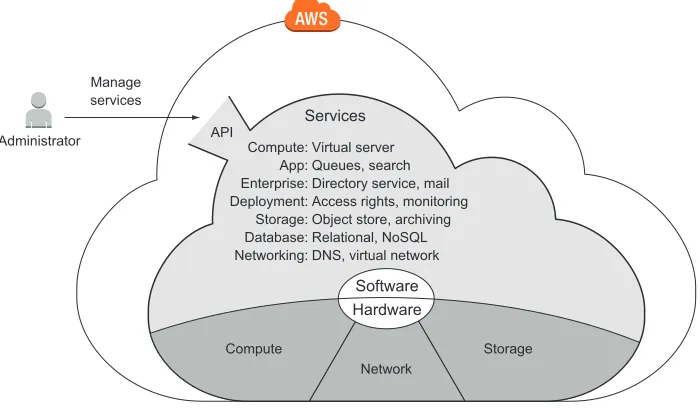
Hardware for computing, storing, and networking is the foundation of the AWS cloud.
AWS runs software services on top of the hardware to provide the cloud, as shown in figure 1.9. A web interface, the API, acts as an interface between AWS services and your applications. Administrator Manage services Compute: App: Enterprise: Deployment: Storage: Database: Networking: Virtual server Queues, search Directory service, mail Access rights, monitoring Object store, archiving Relational, NoSQL DNS, virtual network Services Compute Software Hardware Storage Network API
You can manage services by sending requests to the API manually via a GUI or pro-grammatically via a SDK. To do so, you can use a tool like the Management Console, a web-based user interface, or a command-line tool. Virtual servers have a peculiarity: you can connect to virtual servers through SSH, for example, and gain administrator
Virtual network Yes Yes No Yes
Pub/sub messag-ing
Yes (proprietary, JMS library available)
Yes (proprietary) Yes (proprietary) No
Machine-learning tools
Yes Yes Yes No
Deployment tools Yes Yes Yes No
On-premises data-center integration
Yes Yes Yes No
Table 1.2 Differences between AWS, Microsoft Azure, Google Cloud Platform, and OpenStack (continued)
AWS Azure Google Cloud
access. This means you can install any software you like on a virtual server. Other ser-vices, like the NoSQL database service, offer their features through an API and hide everything that’s going on behind the scenes. Figure 1.10 shows an administrator installing a custom PHP web application on a virtual server and managing dependent services such as a NoSQL database used by the PHP web application.
Administrator
Manage services Install and configure
software remotely
API Services
Static file storage NoSQL
database
Sending email Virtual
server
Figure 1.10 Managing a custom application running on a virtual server and dependent services
Users send HTTP requests to a virtual server. A web server is installed on this virtual server along with a custom PHP web application. The web application needs to talk to
AWS services in order to answer HTTP requests from users. For example, the web application needs to query data from a NoSQL database, store static files, and send email. Communication between the web application and AWS services is handled by the API, as figure 1.11 shows.
The number of different services available can be scary at the outset. The following categorization of AWS services will help you to find your way through the jungle:
Compute services offer computing power and memory. You can start virtual serv-ers and use them to run your applications.
Users
HTTP request
Virtual server
API Services
Static file storage NoSQL
database
Sending email
Figure 1.11 Handling an HTTP request with a custom web application using additional AWS services
37
Exploring AWS services
Enterprise services offer independent solutions such as mail servers and directory services.
Deployment and administration services work on top of the services mentioned so far. They help you grant and revoke access to cloud resources, monitor your vir-tual servers, and deploy applications.
Storage is needed to collect, persist, and archive data. AWS offers different stor-age options: an object store or a network-attached storstor-age solution for use with virtual servers.
Database storage has some advantages over simple storage solutions when you need to manage structured data. AWS offers solutions for relational and NoSQL
databases.
Networking services are an elementary part of AWS. You can define private net-works and use a well-integrated DNS.
Be aware that we cover only the most important categories and services here. Other services are available, and you can also run your own applications on AWS.