E-Learning and Personal Preferences
Introduction
The aim of this article is to explore further the idea that E-learning should
cater to the learning needsof the individual – as expressed by Claudine McClean in her feature article “E-Learning Styles” (18 October 2004).
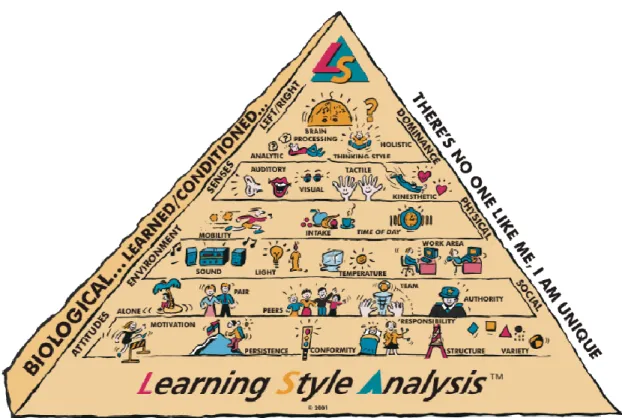
Building on the learning styles already discussed (namely: Activists, Reflectors, Pragmatists and Theorists), we’d like to introduce theLearning Styles
Analysis (LSA) Pyramid(see Figure 1).
What is E-learning?
Derek Stockley’s definition of E-learning is “The delivery of a learning, training or education program by electronic means”, such as the computer. The Internet, CD-ROM and DVD can all be utilised to provide learning materials.
The beauty of the technology available behind E-learning is that the method of teaching can be customised (even automated) to the need of the individual. E-learning has the potential to allow learning at a pace, time of day and in the surroundings that best accommodate the student’s optimal.
The LSA Pyramid
The core elements of LSA (found in the top two layers of the LSA Pyramid) are:
the area ofprocessing(Brain Dominance); and
The remaining levels of the LSA Pyramid define the following learning styles:
physicalneeds;
environmentconditions;
socialpreferences;
personalattitudes.
We will discuss each element in the context of E-learning.
Brain Dominance
When it comes to internal information processing, learners will always use either sequential/analytic or impulsive/holistic brain processingand will either need to reflect or think simultaneously about the learning content. Therefore, E-learning situations and course organisation need to take these style differences into account.
Generally speaking, people with asequential/analyticdominance
(corresponding to Theorists in Kolb’s model) are sequential thinkers who like facts, details and logic. They want their learning materials neat and organised, and they will read them from the beginning to the end, without skipping around. They learn step-by-step, prefer logical and analytic arguments and focus on details and facts.
To cater to their needs, the e-learning package should: 1. Make frequent use of keywords.
2. Explain all procedures to be used. 3. List all the assignments and objectives.
4. Underline important facts and arrange them in sequence. 5. Proceed step-by-step through detailed information.
6. Test frequently.
7. Provide instant and regular feedback.
Impulsive/holisticprocessors, in contrast, aren’t interested in the nitty-gritty of issues. Instead, they need to know the overall picture and the reasons behind a project. They tend to use their intuition or feelings rather than rationalise about a problem.
The software should:
1. Relate the lesson to the students’ experience, use practical examples. 2. Provide an overview of the concepts using mind-maps or summaries. 3. Allow the students to discover the facts by themselves.
4. Allow the students to map, graph or illustrate the material. 5. Give positive feedback even for small achievements.
Sensory Modalities
All learners can be classified into a single but more often into combination of the following four sensory types:
Visual;
Auditory;
Tactile;
Kinesthetic.
By its very nature, E-learning is best suited to highlyvisualpeople, because of the wealth of imagery offered by the computer: text, pictures and diagrams, graphs, photos, videos.
Auditorylearners can be accommodated with background music, recorded speech and sound-effects (such as pings).
Tactilelearners are disadvantaged, although their need can be partially
satisfied by touch-pads, mice and/or touch-screens. For thetactilelearners, E-learning can be further enhanced by having to match pieces of a puzzle on the screen or match questions and answers using the drag-and-drop technique. Such students can also be encouraged to make their own memory aids offline, such as sculptures of molecules or board games depicting new topics.
The real challenge, however, comes with thekinestheticlearners who need to move around and learn with their whole bodies. Because they rely on real experiences as the most effective way of assimilating information, E-learning is not ideally suited to this type of learner. To enhance their retention and enjoyment of information intake, the e-learning course should offer off-line projects to enhance the online sessions. These learners need to get away from the computer, move their body and DO something with the information they have just received via the screen. Learning sessions for these students will only be successful (and hopefully lead to
understanding, skills, competencies, and knowledge) when they have physically experienced and/or actively ‘done’ something during the learning process.
Physical Needs
Mobilityis an important aspect of physical needs, one that cannot always be met by E-learning. E-learning is ideal for people who cansit stillfor long periods and rarely fidget. But some learnersneed to pace or move aboutwhen concentrating. Having chairs on wheels or even a treadmill or exercise bike in front of their station may help them cope with the stress and repetitiveness of learning while stationary.
Others might find high tables and standing while they are typing as a good solution for their need for mobility.
Intakeis a physical need that can be accommodated by E-learning. Some learners prefer to eat, drink, chew or nibblewhen concentrating. When discouraged, they resort to chewing pencils, fingernails or collars. Although eating and drinking in front of the computer is usually frowned upon (have you ever tried to wash Coca Cola off a computer keyboard?), it is a good idea for such people to have sippy-bottles, chewing gum and bite-size non-sticky snacks handy. They could also combine short movement breaks with eating a healthy snack.
Time of dayis a physical need very compatible with E-learning. In fact, it is one of the main advantages E-learning holds over conventional learning. Every individual knows when they prefer to absorb new information: early or late morning, afternoon, evening, or in the middle of the night. Whatever their preference, the computer is there for them to use, 24/7.
Environment Conditions
These conditions are also ideally suited to be customised by the nature of E-learning. Whatever the individual’s preferences forlight(a brightly lit or dim room),
sound(presence or absence thereof),temperature (a cool or warm room) and
working area(formal design with chairs or informal design with cushions and beanbags), they can all be met; provided, of course, that the learner is aware of their own needs and goes into a little trouble to prepare the study accordingly.
Social Preferences
Social preferences comprise workingalone, in apair, with severalpeers, as part of ateam, or with a figure ofauthority.
Of those, only workingaloneis truly satisfied by E-learning. Nevertheless, on-line discussions and exchanging MSN or e-mail messages with a study buddy might help those who need others to learn with. Some E-learning can be performed in
pairsor groupsorteams(either physical presence or on line), so learners with a preference for not learning alone should strive to find like-minded colleagues.
Because the computer may be afigure of authorityto some learners, every opportunity should be taken to represent it as such to learners with that particular preference.
Personal Attitudes
Here we can discuss individual manifestations ofmotivation,persistence,
conformity,responsibility,structureandvariety.
Motivationcan be self-starting or external. Self-startingE-learners don’t need any specific incentive. In contrast, those seekingexternal motivationmay struggle to find it in the impersonal face of a computer, no matter how user-friendly and motivational the software. Such people would probably benefit from human coaches (albeit online ones) to encourage them, reward progress and provide clear-cut objectives.
Persistencecan be classified intohigh, fluctuatingandlow. Again, individuals with a high persistence will have no trouble with E-learning. For those with fluctuating or low persistence, a form of keeping them on track is recommended to remind them about their tasks and to encourage their efforts. Their tasks may have to be broken down into small, manageable bits with small rewards and fun activities.
The same can be said ofhighandlow responsibility.
The question ofconformityto the rules is more pertinent to the classroom setup, so it will not be discussed here, except to highlight the fact that problems conforming may be one of the reasons an individual may embark on a course of E-learning but never follow through.
When setting up an E-learning course, it is worthwhile to remember that some students preferstructureor guidance to come from theoutside(i.e., the course, the software, the coach), while others prefer todefine their own structure. The course should be flexible enough to make the structure available, but equally to allow students to find their own way while still making the deadlines and meeting all the objectives.
Some learners thrive onroutinewhile others need variety. The E-learning course should be constructed in a way that provides stability while offering
opportunities for change to those who need them.
Conclusion
This excerpt is taken from the British Government's e-learning strategy website at dfes.gov.uk:
“The advent of e-learning has meant that learning providers have had to think aboutchange, change to the way they deliver, track and most importantly support learners. If ane-learning culturedoes not already exist, then it will be necessary to create one. Learners can access learning 'anywhere, any place, any time'. The
learning is provided in small chunks, just as they are needed - building skills block by block.”
An individual’s learning potential is vastly enhanced when they can absorb information in their favoured conditions. To be truly successful and recognised as a valid way of learning, E-learning should always take the students’ learning needs into account.
For more information, visithttp://www.clc.co.nz/or email the author at [email protected].