This publication is also available electronically on the World
Wide Web at the following address
http://www.multiverse.co.uk/whitepaper.pdf
For additional copies of this document please contact:
MultiVerse Publications
MultiVerse Solutions Ltd
Willow House
Strathclyde Business Park
Bellshill
ML4 3PB
Tel. +44 (0) 1698 646225
Fax. +44 (0) 1698 464226
Acknowledgments
Thanks to John Liddle, Bill Austin and Colin Milligan for their
constructive criticism of the document and to Colin Milligan
for drawing the figures.
Synopsis
1
1 Background
2
2 The Importance of Interactivity
2
2:1 What is Interactivity?
2
2.2 Interactive Simulations
3
2.3 Teaching and Learning Styles
3
2.3.1 Learning Styles
3
2.3.2 Teaching Styles
3
2.4 Collaborative Interactivity
4
2.4.1 Importance of Communication in E-Learning
4
2.4.2 Communication and Simulations
4
3 Key Issues
4
3.1 Improving the Cost of Production
4
3.1.1 Improving the Production Process
4
3.1.2 Re-using Interactive Simulations.
5
3.2 Improving the Quality
5
3.2.1 Customising Interactive Simulations
6
3.3 Summary
6
4 The Future of Interactivity and Simulations
6
4.1 Collaborative Use of Simulations
6
4.1.1 Communication Between Tutor and Learners
7
4.1.2 Communication Between Learners
7
4.1.3 Asynchronous Communication
7
4.1.4 Synchronous Sharing of Simulations
8
4.2 Integrating Simulations with E-Learning Tools
9
4.2.1 Learning Management System
9
4.2.2 Assessment Tools
9
5 The MultiVerse Vision
10
5.1 MultiVerse Interactive Simulations - The eSim
10
5.2 The eSim Development Process
11
5.3 The Basic Toolset
12
5.3.1 Model Construction Tools
12
5.3.2 Interface Construction Tools
12
5.3.3 Web Deployment Tools
13
5.4 Community of Users
13
6 The Future
13
6.1 Empowering Expertise
13
6.1.1 Model Building Tools for the Non-Programmer
13
6.1.2 The Collaboration in the Development Team
14
6.2 Improving the Educational Experience
14
6.2.1 Collaborative Learning
14
6.2.2 Integration with Other E-Learning Tools
14
6.2.3 Interface Overlays
14
6.2.4 Event Triggers
14
7 Summary
15
8 References
16
Synopsis
A major challenge facing providers of e-Learning is the provision of
meaningful interactive courseware that is responsive to learners,
allowing them to actively participate in the learning process. This
white paper looks at the nature and desirability of such content,
examining key issues in its effective production.
Looking to the future, the benefits of: sharing interactive content
such as simulations in collaborative learning;fully integrating such
content into managed learning systems and assessment engines are
also discussed.
Finally the MultiVerse vision of making simulations as ubiquitous
and easy to produce and manipulate as graphics or images is
outlined and the novel concept of the e-Sim, an online shareable,
customisable, re-usable, interactive simulation that encapsulates the
ideas in this White Paper is introduced.
2 *The equivalent of K-12 in the US
1 Background
The market for online educational products and e-Learning has been increasing rapidly, a trend that is predicted to continue (Merrill Lynch 1999) “Learning for Life” initiatives being promoted by many governments and requirements for continuing professional development are greatly increasing the demand for post secondary education. The average student is no longer a full-time 18-22 year-old but a part-time continuing education student who already has regular employment. The needs of these learners are being met not only by the traditional universities and colleges, but also by educational publishers, corporate universities, “for profit universities” and training companies. Increasingly e-Learning is being used to allow learning to take place at the learner’s convenience - any place, anytime.
Within the primary and secondary education sectors of many countries, increasing use of IT in many subjects together with the networking of schools is increasing demand for the provision of online resources. There is a huge and burgeoning market for e-Learning. The pressure to meet the demand for online courses quickly and inexpensively has led to a state where:
“ We have used the Internet in a narrow fashion, like vast text books or lectures on-line, instead of exploring its interactive potential.” (WBEC 2000)
This White Paper looks at ways in which the interactive potential of the Internet can be realised and examines the issues involved in effectively producing and integrating meaningful interactivity into online learning.
2 The Importance of Interactivity
2.1 What is Interactivity?
It is believed by many educationalists that interactive courseware which allows “learning by doing” arouses interest and generates motivation providing a more engaging experience for the learner (e.g. Lewin 1951, Brookfield 1986). The much-used quote from Lao-Tse written in the 5th century BC sums this up:
“If you tell me, I will listen If you show me, I will see If you let me experience, I will learn.”
To those who hold this view, interactivity is seen as part of a system where learners are not passive recipients of information, but engage with material that is responsive to their actions. Interactivity results in deeper learning because learners can hypothesise to test their understanding, learn by mistakes and make sense of the unexpected (Kolb 1984) .
*
Interactivity results
in deeper learning
because learners
can hypothesise
to test their
understanding,
learn by mistakes
and make sense
of the unexpected.
”
“
If you tell me,
I will listen.
If you show me,
I will see. If you
let me experience,
I will learn.
”
Interactivity is important and there been a tendency to abuse the term especially when marketing computer-based learning. E-Learning that merely allows the learner to navigate content or take an online test is often labelled as interactive. This does not meet the criteria for meaningful interactivity outlined above, unlike, for example, that provided by a simulation where a learner can actively explore a simulated system or process.
2.2 Interactive Simulations
Simulations and modelling tools are the best examples of complex, meaningful interactivity. Such applications model a real or theoretical system, allowing users to manipulate input variables to change the system behaviour and view the results. With such applications, learners can construct and test hypotheses and receive feedback as a result of their actions. There are great benefits to the learner if a static image such as a diagram in a text book is replaced with a simulation:
“Simulations and visualization tools make it possible for students to bridge experience and abstraction helping to deepen understanding
of ambiguous or challenging content.” (WBEC 2000)
Inclusion of interactive simulations in online courses will improve the quality and outcomes of e-Learning.
2.3 Teaching and Learning Styles
The presentation of interactivity depends very much on the teaching style adopted by the course designer who will take account of the needs of the learner.
2.3.1 Learning Styles
Learners do not all learn in the same way. Honey and Mumford (1992) suggest there are four stages in learning and that a learner will have a preference for one of the four stages.
This leads them to group learners as:
• Pragmatists who link what they learn to real life
• Reflectors who need time to reflect on what they are learning • Theorists who want to think ideas through logically
• Activists who like a hands-on approach to learning,
These different types of learners would clearly benefit from the provision of different types of interactive content and associated resources.
2.3.2 Teaching Styles
The teaching style adopted by an e-Learning course designer or a tutor running the course may fall anywhere between that of pedagogue who sees the learning process as something to be controlled by the teacher, to facilitator who helps the learner construct their own understanding of a subject. The style adopted will depend on the expertise of the learner and the desired learning outcomes. In terms of simulations, this might be reflected in the way in which tasks are set, the guidance provided and the “openness” of the resources.
Simulations and
Visualization tools
make it possible for
students to bridge
experience and
abstraction helping
to deepen
understanding of
ambiguous or
challenging content.
”
“
If interactive
simulations are to
become the norm
rather than the
exception in
e-Learning, they
should be as easy to
produce, manipulate,
share and deliver as
other media.
”
“
2.4 Collaborative Interactivity
2.4.1 Importance of Communication in E-Learning
The e-Learning experience should be as rich as, if not richer than, the traditional educational experience. Online learning allows learners to access content at their own convenience, but they learn alone, separated from one another by distance and time. Such students can lack the sense of community that interaction with other learners and tutors can bring. Learner-learner communication is often neglected, but is critically important in collaborative tasks requiring team-working skills where dialogue and social negotiation must take place. Indeed, it is this social dimension that is the primary motivation for some types of learner (Houle 1996).
Increasingly though, these problems are being addressed as online courses run with dedicated instructors and tutors who, depending on their teaching style will provide instruction, information, expertise, guidance or facilitate dialogue. E-Learning, online communities are developed through use of asynchronous techniques such as bulletin boards and chat rooms, and synchronous solutions such as video conferencing.
2.4.2 Communication and Simulations
When a simulation is added to an online course, learners and tutors need to communicate with more than words and images. Learners and tutors must share the simulation if they are to communicate effectively about it. Sharing simulations can take on-line learning far beyond the on-campus experience as it provides opportunities for:
• group experiential learning,
• exploring multiple perspectives and
• using collaborative learning to develop and share alternative views.
3 Key Issues
If interactive simulations are to become the norm rather than the exception in e-Learning, they should be as easy to produce, manipulate, share and deliver as other media.
Key issues in the inclusion of simulations in courseware are the: • cost of production ;
• quality of the end product.
3.1 Improving the Cost of Production
Two ways in which the effective cost of production can be reduced are: 1. Faster, more efficient production processes;
2. Increased reusability.
3.1.1 Improving the Production Process
The most time-consuming component of online content to produce is complex, meaningful interactivity, which usually requires programming expertise. Programming resources are an expensive and often
scarce commodity.
4
The e-Learning
experience should be
as rich as, if not richer
than, the traditional
educational experience.
”
Two ways of reducing programmer effort are:
1. Provision of appropriate programming tools to streamline production;
2. Ensuring the development process allows appropriate experts to contribute to the design thus reducing the burden on the programmer.
3.1.2 Re-using Interactive Simulations.
For maximum reusability, content should be in a standard compliant format that can be exchanged and re-used, cross platform and in different delivery environments.
The idea of chunking learning as re-usable objects has been around for some time now and has been adopted by a number of e-Learning producers and vendors. For example CISCO define RLOs (Re-usable Learning Objects) the equivalent of a lesson and RIOs (Re-usable
Information Objects) the equivalent of a page within that lesson (CISCO). Compliance with developing standards that allow the content developer to mark up and categorise learning content is important to ensure interoperability, reusability and portability.
Currently there are three standards, hopefully moving towards convergence, which provide specifications for tagging and categorising content:
• Learning object metadata from the IEEE Learning Technology Standard Committee (LTSC) - a specification for tagging courseware components.
• IMS, (Instructional Management System) - specifications for locating and using courseware components.
• SCORM (Shareable Courseware Object Reference Model) - allowing exchange and re-use of courseware components.
3.2 Improving the Quality
The e-Learning production process usually involves a team of specialists containing some combination of the following:
• education/training specialists • subject specialists
• graphic designers • software engineers • multimedia specialists • testers and QA specialists
The software engineer usually undertakes development of any complex interactive simulations required in courseware. This effectively prevents non-programming specialists becoming deeply involved in a production process that should involve the whole team. The quality of production can be greatly improved by allowing the appropriate experts to contribute to the design and production process.
Compliance with
developing standards
that allow the content
developer to mark
up and categorise
learning content is
important to ensure
interoperability,
reusability and
portability.
”
“
The quality of
production can be
greatly improved
by allowing the
appropriate experts
to contribute to
the design and
production process.
”
Ideally interactive
simulations should
be capable of being
easily tailored and
customised to suit
different courses
and types of learners.
”
“
There are essentially two phases in the production process of a simulation: • The coding of the model defining its behaviour;
• The development of a visualisation of that model’s behaviour. Improved tool sets that allow multimedia, subject and graphic design specialists to construct visualisations in a graphical editing environment whilst allowing software engineers to concentrate on developing the model are highly desirable.
3.2.1 Customising Interactive Simulations
Ideally interactive simulations should be capable of being easily tailored and customised to suit different courses and types of learners.
Section 3.1.2 outlined the importance of re-using learning objects,
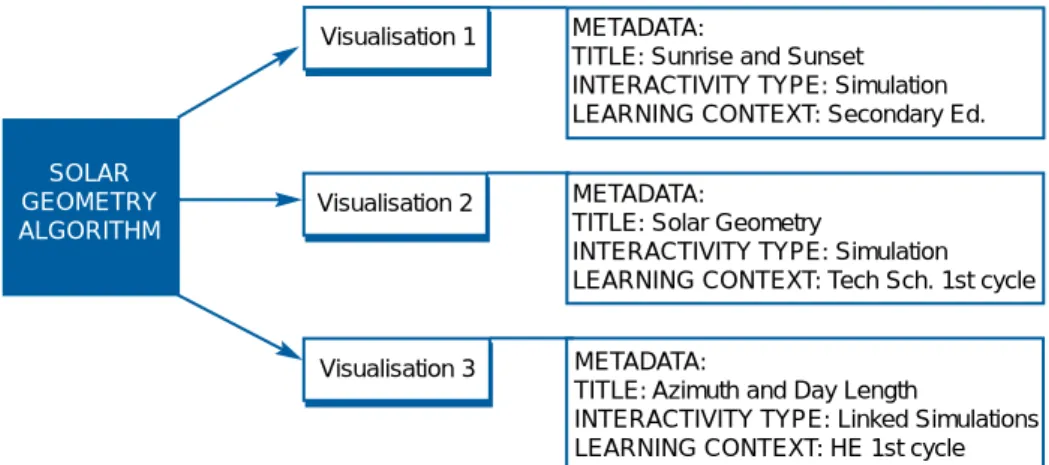
which have been tagged (with some of a large number of possible criteria) to indicate their area of use e.g. subject area, level of learner, language etc. Once created, such a learning object has fixed functionality, it is not easy to tailor it to suit different learning and teaching styles. Re-usability can be taken one stage further if, as suggested above, the user interface is developed separately from the model. A single model could then be associated with any number of visualisations, each visualisation customised according to the requirements of different curricula, courses, teaching style, or learner expertise to produce a new learning object. (See example in Figure 1)
3.3 Summary
Two themes have been identified as important in improving both cost and quality of simulations. These are:
1. Making development of simulations a team process where all courseware development specialists can contribute.
2. The importance of reusability and customisability.
4 The Future of Interactivity and Simulations
We have discussed current key issues in use of simulations in online courses. In the future there are two key areas where the role of simulations can be greatly enhanced:
• Collaborative working;
• Interoperability with e-Learning management systems and assessment tools.
4.1 Collaborative Use of Simulations
In a traditional educational setting, learners and teachers are face to face, and communication between learners or learners and tutors takes place as a matter of course. In e-Learning, groups of learners can be online at the same time in timetabled sessions i.e. synchronously or at different times to suit their own convenience i.e. asynchronously. Collaborative access to simulations should be provided to suit both modes of use.
SOLAR GEOMETRY ALGORITHM Visualisation 1 Visualisation 2 Visualisation 3 METADATA:
TITLE: Sunrise and Sunset INTERACTIVITY TYPE: Simulation LEARNING CONTEXT: Secondary Ed.
METADATA:
TITLE: Solar Geometry
INTERACTIVITY TYPE: Simulation LEARNING CONTEXT: Tech Sch. 1st cycle
METADATA:
TITLE: Azimuth and Day Length
INTERACTIVITY TYPE: Linked Simulations LEARNING CONTEXT: HE 1st cycle
Figure 1 Example of enhanced reusability
4.1.1 Communication Between Tutor and Learners
In e-Learning, depending on the type of course, the role of any tutor can vary from that of instructor, guide, expert or facilitator. Tutors may intervene to correct misconceptions, answer questions, challenge the learners’ understanding or promote dialogue. Shared access to simulations is important for communication in all these scenarios.
4.1.2 Communication Between Learners
Equally important in learning theories such as constructivism, is the role of dialogue between learners whom it is believed construct their own understanding and validate it by discussion with their peers.
Collaborative access to simulations facilitates: • learning through construction and • learning through dialogue.
It provides a powerful learning experience in which learners share much more than words and images.
4.1.3 Asynchronous Communication
Learners who are not online together who wish to communicate about a simulation must be able to:
• Save and restore state: i.e. Refer to a common visualisation of a simulation and its state (the values of parameters in the system being simulated)
• Record and replay: i.e. demonstrate a sequence of actions leading to a given state
• Annotate: so as to highlight a point or focus attention.
So, for example, a learner using a simulation might be puzzled as to why it behaves in a certain way. Learners should be able to save the state of
Tutors may intervene to
correct misconceptions,
answer questions,
challenge the learner’s
understanding or
promote dialogue.
Shared access to
simulations is
important for
communication in
all these scenarios.
”
“
Collaborative access
to simulations provides
a powerful learning
experience in which
learners share much
more than words
and images.
”
Unlike the traditional
lecture theatre, all
users have access to
the simulation and
the lecturer can cede
control to learners
to allow them to ask
or answer questions.
”
“
the simulation and post it to a bulletin board or email it to their tutors with the appropriate question. The tutor can load the simulation, see the actions the learner has taken and then reply to the question, including an amended simulation state as part of the answer.
Questions and answers can be stored as FAQs providing additional resources for future students, easing the burden on the tutor.
4.1.4 Synchronous Sharing of Simulations
Shared networked access to simulations allows a range of educational scenarios to be implemented. These not only duplicate the “face to face” experience (classrooms, tutorials and practical sessions), but can go a stage further by enabling simulated team role play. Here, learners take on different roles and interact with a simulation in a way that reflects their responsibilities and place in the team hierarchy.
To provide flexible collaborative access to a simulation the following functionality must be provided:
• Concurrent access to the same running simulation model
• Different visualisations to suit the varying roles and preferences of users
• Access control to allow each user appropriate access to the model variables
With this flexibility, a range of learning scenarios suited to different styles is possible:
• Online lectures and virtual classrooms : Here, a teacher controls the flow of information to the learners. The traditional media (audio, video and text) can be augmented by use of simulations. Unlike the traditional lecture theatre, all users have access to the simulation and the lecturer can cede control to learners to allow them to ask or answer questions. Record and replay functionality allows the learners to view these interactive demonstrations as well as the lecture itself.
• Online laboratory sessions: Here as in traditional laboratory exercises or practical sessions, remote learners work in pairs or small groups sharing a networked simulation to design and control experiments and discuss the results. Tutors can look at what each group is doing and may:
• intervene with a group if they feel help is necessary • answer questions and provide help when asked
• intervene with the whole class if a question of general interest arises
• introduce subtle variations according to student performance. • Team role playing: Here each team member can view or change
variables appropriate to their role. Tutors have access to all model variables and could perturb a smoothly working system to see how a team cope. This opens the door to team building activities such as just-in-time crisis management.
8
Remote learners work
in pairs or small groups
sharing a networked
simulation to design
and control experiments
and discuss the results.
”
4.2 Integrating Simulations with E-Learning Tools
Increasingly, online courses are being delivered through a Learning Management System (LMS), a computer-based system that provides a suite of tools to manage and deliver course materials and assessment. Facilitating interoperability and integration of simulations with these tools can deliver substantial benefits to the quality of e-Learning.
4.2.1 Learning Management System
In an LMS, individual learner profiles are interfaced to appropriate back office systems tracking learner progress. It should be as easy to report student progress and activity in a simulation to any LMS, as it is to report on use of any other course components. Compliance with standards such as IEEE LTSC, IMS, SCORM and AICC (The Aviation Industry CBT Committee) are important if this goal is to be achieved
4.2.2 Assessment Tools
Computer Assisted Assessment (CAA) has great potential : it can stimulate, motivate, be diagnostic and reinforce learning by providing directed feedback (Freeman et al 1998). Nonetheless CAA has many detractors who criticise the approach as being a poor test of a student’s deeper knowledge. The Web-based Education Commission to Congress recognise the potential of extending assessment:
“Possibilities for new kinds of questions using multimedia, simulations and other resources to assess sophisticated learning goals (e.g., problem
solving, visualisation, and modelling)” (WBEC)
Combining the interactive, exploratory nature of simulations with the diagnostic opportunities of assessment has great potential to enrich the learning experience. Currently assessment engines are limited in the types of questions that can be handled (multiple choice, ranking, matching, drag and drop). Integrating simulations with assessment allows the student to explore and experiment before submitting a far more complex answer (the simulation state) than a single value or choice from a list.
New types of question testing all levels of learning can be developed. For example:
1. Place a simulation in a state to demonstrate a named behaviour. 2. Given a set of system variables, sketch the predicted behaviour. 3. Map a real world scenario into a simulation state.
4. Fix a simulation system containing a malfunctioning component. 5. Define the interrelationship of parameters within a simulated
system. i.e. work out the governing equation. 6. Optimise system performance.
Full integration with an assessment engine would also allow the tutor to help the learner develop understanding by providing appropriate feedback (e.g. an ideal simulation state) if the answer were incorrect.
Combining the interactive,
exploratory nature of
simulations with the
diagnostic opportunities
of assessment has great
potential to enrich the
learning experience.
”
The MultiVerse vision
is to unlock the full
potential of interactive
simulations within
e-Learning courseware.
”
“
5 The MultiVerse Vision
The MultiVerse vision is to unlock the full potential of interactive simulations within e-Learning courseware. We develop and supply tools and utilities to content producers who share our vision for e-Learning. Our aim is to simplify the production of simulations so that their inclusion in online courses becomes the norm rather than the exception.
Four themes underlie the MultiVerse product strategy: 1. Improving reusability.
2. Streamlining (shortening and improving) the production process. 3. Empowering experts to participate to an ever greater extent in
the development process.
4. Building a community of users who contribute to and share interactive components.
MultiVerse tools are designed for all stages in the production of interactive simulations from design and development, to deployment. A hallmark of the company’s approach is the provision of maximum flexibility at all these stages. The tools are flexible enough to suit developers whatever teaching style they adopt.
5.1 MultiVerse Interactive Simulations - The eSim
In a nutshell, MultiVerse provides a flexible design environment facilitating the cost effective creation and deployment of educational simulations. One of the key differences between using MultiVerse tools and the production of hand-crafted bespoke simulations is the independent development of:
1. The model controlling the behaviour of simulation and the 2. The visualisation of that model.
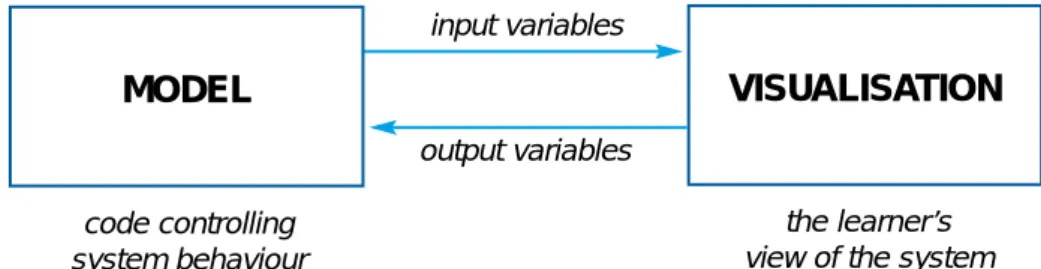
One model can be associated with many different visualisations to suit different teaching styles, levels of expertise and courses. We term the combination of a model and a single visualisation (user interface) an eSim (See Figure 2).
Figure 2 The structure of an eSim
10
VISUALISATION
MODEL
input variables output variables code controlling system behaviour the learner’s view of the systemOur aim is to simplify
the production of
simulations so that
their inclusion in
online courses becomes
the norm rather than
the exception.
”
5.2 The eSim Development Process
When a topic requires a simulation, the entire development team can be involved in its design and production.
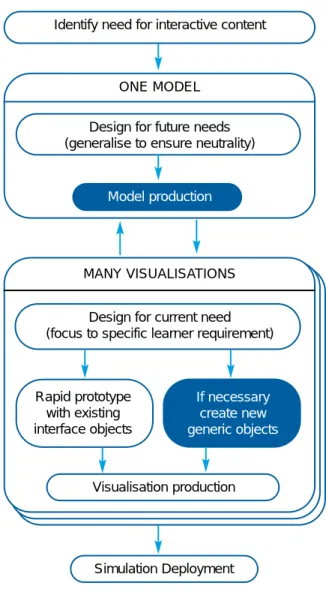
There is no limit to the number of visualisations that can be built from one model. The eSim development process reflects this. Interfaces to suit different curricula, courses, learner levels and learning styles can be constructed from the same model. The team, in particular subject specialists, consider all potential eSims that may be produced from a model. The model is then designed generically to encompass this and is developed using the MultiVerse model building tools.
Identify need for interactive content
ONE MODEL Design for future needs (generalise to ensure neutrality)
Model production
MANY VISUALISATIONS
Design for current need (focus to specific learner requirement)
Rapid prototype with existing interface objects If necessary create new generic objects Visualisation production Simulation Deployment
tasks undertaken by:
ANY TEAM MEMBER SOFTWARE ENGINEER
Figure 3 The eSim development process
All members of the
team can contribute
to the design and
production of the
user interface using
the MultiVerse
eSim Builder.
”
All members of the team can contribute to the design and production of the visualisation using the MultiVerse eSim Builder; it is effectively a collaborative process. New objects may be required to build a visualisation. These new objects can be used in visualisations for other models and are designed to be as generic as possible. Any member of the team can carry out design and deployment of the visualisation to the web.
5.3 The Basic Toolset
The basic toolset written entirely in Java consists of three groups of tools: 1. Model construction tools
2. Interface construction tools 3. Deployment tools
The entire team is empowered to take part in the design process.
5.3.1 Model Construction Tools
The model construction toolset is currently designed for use by software engineers and consists of tools aiding the rapid production of code defining model behaviour:
The suite of tools includes the following
Programmer’s API
This provides the appropriate Java methods to:
• make model variables accessible in the visualisation so they can be displayed using interface components
• specify code, which runs when a user undertakes a specific action • save and restore model state.
Wizard
This simplifies the programmers’ task by producing Java code stubs for methods defined in the API.
The visualisation is constructed separately to the model and the software engineer can ignore issues such as the layout of the interface. Communication between model and interface is handled by the
MultiVerse API. Software engineers are free to concentrate effort in an area where their skills are most needed.
5.3.2 Interface Construction Tools
The eSim Builder allows the designer to build up a visualisation by placing and tailoring visualisation objects such as sliders, digitals, gauges and graphs on an interface canvas. In the initial stages of design these objects can be used to prototype a layout before the model is created. Once the model is available, the visualisation objects can be easily linked to
variables in the model. Changes to the visualisation can be made to rapidly try out new interface designs. As it is possible to switch between edit and simulation mode within the MultiVerse Interface Builder, it is also easy to test out the functionality of new interfaces.
12
The visualisation is
constructed separately
to the model and the
software engineer
can ignore issues
such as the layout
of the interface.
”
If new display objects are required the software engineer can: • enhance existing display objects
• add external display objects • create new display objects
• create a new object from a group of existing objects.
All members of the team can contribute to the design of the visualisation. The construction of an interface is as easy as constructing an image in a standard graphical editor.
5.3.3 Web Deployment Tools
The deployment tools allow the course designer to publish an eSim to the web. The tools automatically package all necessary files to allow the eSim to be slotted easily into any web browser delivered courseware.
5.4 Community of Users
Re-usability and customisability are extremely important to the MultiVerse ethos. Reusability is built into the system at every level, from the models to the visualisation components.
To ensure the benefits of re-usability are maximized, the Company is building an online market of re-usable MultiVerse components: models, interface objects and eSims. The Company will seed the repository and continually contribute to it. Other producers of MultiVerse eSims will be encouraged to upload components, which they can choose to sell or make freely available to the community of users.
6 The Future
Two themes run through the future MultiVerse tool development: 1. Empowering experts to participate to an ever greater extent in
the development process
2. Improving the educational flexibility and viability of simulations and other interactive content.
The following tools, designed to take our vision forwards, are in development.
6.1 Empowering Expertise
6.1.1 Model Building Tools for the Non-Programmer
One of the areas where the programmer is still required in eSim production is the construction of the model. A toolkit is being developed which makes the model building process more accessible to the non-programmer by allowing drag and drop construction of model behaviour.
A series of toolkits related to different subject areas is planned.
The construction of
an interface is as easy
as constructing an
image in a standard
graphical editor.
”
“
14 6.1.2 The Collaboration in the Development Team
The Company plans the introduction of a collaborative tool with the functionality outlined in section (4.1.4) allowing multiple users to design eSims. Developers or developers and clients remote from one another will be able to synchronously design and implement interface changes and discuss and review them immediately. This will provide greatly enhanced productivity.
6.2 Improving the Educational Experience 6.2.1 Collaborative Learning
The collaborative toolset will be extremely valuable in an educational environment allowing access to a range of teaching scenarios. The tools are not prescriptive as to the learning models they adopt and can be of use in the wide range of scenarios outlined in section 4.1.4.
6.2.2 Integration with other E-Learning Tools
Future tools will be interoperable with assessment engines and LMSs and will implement the functionality described in section 4.2. Designers will be able to specify the type of information they wish collected by an assessment engine or LMS as the learner uses an eSim.
It will be possible to collect information about:
• when a student began and finished using an eSim • what variables they changed and when.
As well as improving online assessment, such functionality will provide an extremely useful monitor of how students use simulations and aid in the identification of students having difficulties.
6.2.3 Interface Overlays
An interface overlay is essentially a portion of the interface that can be hidden until required. It’s useful for designers who want to provide additional information to users such as
• explaining how to undertake a task • showing a correct answer
• providing annotations or hints • focussing attention.
Use of an interface overlay provides another level of customisability for the designer who wishes to tailor an eSim to more closely match the level and learning style of a learner.
6.2.4 Event Triggers
The event trigger can provide an important addition for the designer who wants to provide feedback to the learner.
A trigger condition might be set: • to help learners in difficulties • if they answer a question incorrectly
• if the simulation is in a state which requires explanation • as part of a predetermined sequence.
Developers or developers
and clients remote from
one another will be able
to synchronously
design and implement
interface changes and
discuss and review
them immediately.
”
“
Future tools will be
interoperable with
assessment engines
and Learning
management Systems.
”
The designer will be able to specify a system condition under which an “event” will be triggered.
Typical events include:
• display of an informative message • playing a video or audio sequence • providing links to external information • making an interface overlay visible.
Again, this functionality will enable the content designer to further customise content to meet their learners’ disparate needs.
7 Summary
There is unrealised potential in the use of interactive simulations in e-Learning. The MultiVerse vision is to realise this potential. Our aim is to ensure that course designers have a flexible non-prescriptive tool that allows them to use simulations in the way that best suits their end users whatever their individual needs, situation, language or learning styles. Cost effective production of interactive simulations though streamlining development processes, ensuring maximum re-usability and expanding the pool of specialists able to undertake production, is the way ahead.
Cost effective production
of interactive simulations
through streamlining
development processes,
ensuring maximum
re-usability and
expanding the pool
of specialists able to
undertake production
is the way ahead.
”
8 References
• Stephen D. Brookfield (1986) Understanding and facilitating adult learning. San Francisco: Jossey-Bass. ISBN 1-55542-355-8.
• CISCO. Reusable Learning Object Strategy. Definition, Creation Process and Guidelines for Building CISCO Systems Inc.
http://www.cisco.com/warp/public/10/wwtraining/elearning/ whitepaper_docs/rlo_strategy_v3-1.pdf
• Freeman, R., and Lewis, R., (1998) Planning and Implementing Assessment, Kogan Page.
• Honey P and Mumford A (1992) The Manual of Learning Styles, Maidenhead, Peter Honey
• Houle, Cyril.O (1996) The Design of Education, Jossey Bass Wiley; ISBN: 0787902098
• Kolb, David (1984) Experiential learning: Experience as the source of learning and development. Englewood Cliffs, NJ: Prentice-Hall, ISBN 0-13295-261-0
• Lewin, K. (1951) Field theory in social science: selected theoretical papers. D. Cartwright (Ed.). New York: Harper & Row
• Merrill Lynch, 1999. The Book of Knowledge: Investing in the Growing Education and Training Industry.
• WBEC The Power of the Internet for Learning. Report of the Web-Based Education Commission to the President and Congress of the United States. (19.12.00)