Compression and Encryption Services
Introduction ... 25-2 Data Compression ... 25-2 Data Encryption ... 25-5 Symmetrical Encryption ... 25-5 Asymmetrical (Public Key) Encryption ... 25-7 Network Encryption ... 25-7 Authentication ... 25-8 Key Exchange Algorithms ... 25-9 Hardware Support ... 25-10 Mini Accelerator Cards (MACs) ... 25-10 Hardware Control and Monitoring ... 25-11 ENCO Services ... 25-11 Compression ... 25-12 Encryption ... 25-13 Authentication ... 25-13 Diffie-Hellman Key Exchange Algorithm ... 25-13 Key Creation and Storage ... 25-14 Access Control ... 25-16 User Modules ... 25-17 IP Payload Encryption and Virtual Private Networks ... 25-17 Secure Shell ... 25-17 PPP ... 25-17 Frame Relay ... 25-18 X.25 Link Compression ... 25-18 Command Reference ... 25-19 create enco key ... 25-20 destroy enco key ... 25-22 disable enco compstatistics ... 25-23 disable enco debugging ... 25-23 enable enco compstatistics ... 25-23 enable enco debugging ... 25-24 reset enco counters ... 25-24 set enco dhpadding ... 25-25 set enco dhpriority ... 25-26 set enco key ... 25-26 set enco sw ... 25-27 show enco ... 25-28 show enco channel ... 25-30 show enco counters ... 25-35 show enco key ... 25-54
Introduction
This chapter describes the data compression and data security services available on the router, how the services are provided, the router network functions use these services, and how to monitor the services.
The ENCO module provides the following data compression and data security services to other router software modules (referred to as user modules):
■ data compression
■ data encryption
■ data authentication
■ Diffie-Hellman key exchange
■ key creation and storage
See “Data Compression” on page 25-2, “Data Encryption” on page 25-5,
“Authentication” on page 25-8 and “Key Exchange Algorithms” on page 25-9
for an overview of these services. See “ENCO Services” on page 25-11 for a description of how these services are provided by the ENCO module.
Encryption on AR440S, AR441S, and AR450S routers is carried out in built-in hardware. Information about MAC hardware in this chapter is applicable to AR410 routers only.
The ENCO module can use a Mini Accelerator Card (MAC) to enhance the performance of some encryption and compression services on AR410 routers. See “Hardware Support” on page 25-10 for information about how the ENCO module uses hardware resources. See the Hardware Reference for more information about MAC hardware.
Data Compression
Data compression is driven by the cost of wide area network (WAN) access and user demands for increased bandwidth. The cost of WAN access is a significant part of the cost of providing a data network and the use of data compression on networks can result in significant savings. Compression increases the effective throughput of data across a network link by reducing the size of packets. This lets more packets be transmitted over links in the same time interval, or the same number of packets can be transmitted over a slower (and cheaper) link in the same time interval.
Data compression identifies redundancy in the data and produces an encoded form that is smaller, yet contains all the information required to recreate the original data. This is called lossless data compression, as opposed to voice and video compression which, due to their analog nature, normally use lossy data compression algorithms. Most modern high performance data compression techniques use variations of the Lempel-Ziv algorithm. This algorithm compresses data by maintaining data histories at the compression and decompression ends of the link. These histories contain the most recent data transmitted on a data link.
The data to be compressed is compared against the history to find any common sequences. When a match is found, a reference to the position of the matching sequence in the history is sent instead of the data sequence itself. Compression is achieved because the reference is smaller than the sequence it represents. The algorithm is adaptive, adjusting automatically to produce the best compression ratio for the content of the data being compressed. A checksum is typically added to the data before compression to allow the validity of the data to be checked on decompression.
It is impossible to compress all possible data streams. A stream of totally random data has no redundancy and therefore cannot be compressed. Similarly, data that has already been compressed is unlikely to be further compressed. Some compression algorithms such as the STAC LZS algorithm expand incompressible data during the compression process.
Network data compression can be organised into the following categories:
• Link
• Payload
• Header
Link Compression
Link compression has traditionally been provided by an external device connected between a router port and the WAN access device. The main disadvantages of external compression devices are that they require a separate connection to each router port requiring compression and to each WAN access device, and they cannot be managed from within the router’s management structure.
Link compression operates by compressing the whole data stream, including the network layer packet headers used for routing. This means that the packet header is no longer accessible by intermediate routers that do not support the particular compression algorithm. Even if an intermediate router does support the particular compression algorithm, packets must be decompressed and re-compressed at each router so that the packet headers can be read. This places an additional load on the router and results in high latency. Consequently, external link compression is normally only used in point-to-point
configurations where the local and remote routers are directly connected, without any intermediate routers.
Integrating the compression function into the router enables a single
compression resource to support the compression of multiple links over any router interface, replacing multiple external compression devices. Integration also allows the router to support protocols such as PPP multilink, which can spread data from one compression channel across multiple physical links. The compression process can be configured and monitored using the router’s own management interface, instead of a separate management system used only for the external compression device.
See Chapter 44, Link Compression and Encryption for more information about configuring link compression on the router.
Payload Compression
Payload compression is used to compress packet data at the network layer, without changing the packet header. Since the routing information remains unchanged the packet can be carried across a routed network, such as the Internet, without requiring the intermediate routers to support the compression algorithm or have any knowledge about how to access the compressed data.
Payload compression is usually not as efficient as link compression due to the fact that each packet must be compressed with no reference to any other packet—as packets may be lost or re-ordered while traversing the network. This means that the compression history must be cleared before compressing a packet, losing any advantage gained from compressing the previous packets. Only large packets or packets containing highly compressible data benefit greatly from payload compression.
The main benefit of payload compression over link-layer compression is in combination with payload encryption. Compressing data after it has been encrypted is a pointless exercise, as encrypted data is not compressible. When payload encryption is being used, payload compression can be performed before encryption, giving useful compression in some cases. Such functionality is difficult for an external device to achieve, since the device needs to
understand the network layer protocol to determine which part of the packet to compress or decompress.
See Chapter 45, IP Security (IPsec) for more information about configuring payload compression on the router.
Header Compression
Van Jacobson’s header compression algorithm (defined in RFC 144) can be used in TCP/IP networks to compress the standard 40-byte TCP/IP header of TCP packets down to 5 bytes (sometimes even down to 3 bytes). This produces a significant performance improvement when the majority of traffic consists of small packets. Because the router processor must perform the compression calculations this method is normally recommended for lower speed (less than 64 kbps) links. Van Jacobson’s header compression applies only to TCP packets carried over Point-to-Point Protocol (PPP) links and cannot be used with other encapsulations (such as Frame Relay) or with other routing protocols such as Novell IPX and DECnet. The ENCO module is not required for header compression.
See Chapter 14, Internet Protocol (IP) for more information about configuring Van Jacobson’s header compression.
Data Encryption
Data encryption for routers is driven by the need for organisations to keep sensitive data private and secure. Encrypting network data before it is passed to the wide area network (WAN) ensures that the data cannot be read or modified as it traverses the WAN. Since all wide area traffic passes through the router, the router is the ideal place to locate the complex hardware required to provide secure data encryption. Locating the encryption function in the network router and integrating the complex encryption key management procedures into the router’s management system minimises the cost of supporting an encrypted network.
Data encryption operates by applying an encryption algorithm and key to the original data (the plaintext) to convert it into an encrypted form (the
ciphertext). The ciphertext produced by encryption is a function of the
algorithm used and the key. Since it is easy to discover what type of algorithm is being used the security of an encryption system relies on the secrecy of its key information. When the ciphertext is received by the remote router the decryption algorithm and key are used to recover the original plaintext. Often a checksum is also added to the data before encryption to allow the validity of the data to be checked on decryption.
There are two main classes of encryption algorithm in use—symmetrical encryption and asymmetrical encryption.
Symmetrical Encryption
Symmetrical encryption refers to algorithms where a single key is used for both the encryption and decryption processes. Anyone who has access to the key used to encrypt the plaintext can decrypt the ciphertext. Because the
encryption key must be kept secret to protect the data, these algorithms are also called private, or secret key algorithms. The key can be any value of the appropriate length.
DES Encryption Algorithms
The most common symmetrical encryption system is the Data Encryption
Standard (DES) algorithm (FIPS PUB 46). The DES algorithm has withstood the test of time and proved itself to be a highly secure encryption algorithm. To fully conform to the DES standard the actual data encryption operations must be carried out in hardware. Software implementations can only be DES-compatible, not DES-compliant. The DES algorithm has a key length of 56 bits and operates on 64-bit blocks of data. DES can be used in a number of modes:
■ Electronic Code Book (ECB) is the fundamental DES function. Plaintext is divided into 64-bit blocks that are encrypted with the DES algorithm and key. For a given input block of plaintext, ECB always produces the same block of ciphertext.
■ Cipher Block Chaining (CBC) is the most popular form of DES encryption. CBC also operates on 64-bit blocks of data, but includes a feedback step that chains consecutive blocks so that repetitive plaintext data (such as ASCII blanks) does not yield identical ciphertext. CBC also introduces a dependency between data blocks that protects against fraudulent data insertion and replay attacks. The feedback for the first block of data is provided by a 64-bit Initialisation Vector (IV). This is the DES mode used for the router’s data encryption process.
■ Cipher FeedBack (CFB) is an additive stream cipher method that uses DES to generate a pseudo-random binary stream that combines with the plaintext to produce the ciphertext. The ciphertext is then fed back to form a portion of the next DES input block.
■ Output FeedBack (OFB) combines the first IV with the plaintext to form ciphertext. The ciphertext is then used as the next IV.
The DES algorithm has been optimised to produce very high speed hardware implementations, making it ideal for networks where high throughput and low latency are essential.
Triple DES Encryption Algorithms
The Triple DES (3DES) encryption algorithm is a simple variant on the DES CBC algorithm. The DES function is replaced by three rounds of that function, an encryption followed by a decryption followed by an encryption. This can be done by using either two DES keys (112-bit key) or three DES keys (168-bit key).
The two-key algorithm encrypts the data with the first key, decrypts it with the second key and then encrypts the data again with the first key. The three-key algorithm uses a different key for each step. The three-key algorithm is the most secure algorithm due to the longer key length.
There are several modes in which Triple DES encryption can be performed. The two most common modes are:
■ Inner CBC mode encrypts the entire packet in CBC mode three times, and requires three different initialisation vectors (IV’s).
■ Outer CBC mode triple encrypts each 8-byte block of a packet in CBC mode three times and requires one IV.
A feature licence is required to use Triple DES encryption. For details contact your authorised distributor or reseller.
AES Encryption Algorithm
On AR440S, AR441S, and AR450S routers, the Advanced Encryption Standard
(AES) is supported. AES is a FIPS approved symmetric block cipher that is documented in FIPS PUB 197. AES supports variable key lengths that can be longer than DES (and Triple DES) keys and this makes it a good alternative for encrypting confidential data.
With AES you specify a 128, 192 or 256 bit key that is used to generate sub-keys. These sub-keys and 128 bit blocks of data are then subjected to the encryption and decryption routines.
AES operates in the Electronic Code Block (ECB), Cipher Block Chaining (CBC), Cipher Feedback (CFB) and Output Feedback (OFB) modes.
A feature licence is required to use AES encryption. For details contact your authorised distributor or reseller.
Asymmetrical (Public Key) Encryption
Asymmetrical encryption algorithms use two keys – one for encryption and one for decryption. The encryption key is called the public key because it cannot be used to decrypt a message and therefore does not have to be kept secret. Only the decryption, or private key must be kept secret. Another name for this type of algorithm is public key encryption. The public and private key pair cannot be randomly assigned but must be generated together. In a typical scenario, a decryption station generates a key pair and then distributes the public key to encrypting stations. This distribution need not be kept secret, but must be protected against the substitution of the public key by a malicious third party. Another use for asymmetrical encryption is as a digital signature. The signature station publishes its public key, and then signs its messages by encrypting them with its private key. To verify the source of a message, the receiver decrypts messages with the published public key. If the resulting message is valid, then the signing station is authenticated as the source. RSA is the most commonly used asymmetrical encryption and authentication algorithm. RSA uses mathematical operations that are relatively easy to calculate in one direction but which have no known reverse solution. The security of RSA relies on the difficulty of factoring the modulus of the RSA key. Because typical key lengths of 512 bits or greater are used in public key encryption systems, decrypting RSA encrypted messages is almost impossible with current technology.
Asymmetrical encryption algorithms require enormous computational
resources, making them very slow when compared to symmetrical algorithms. For this reason they are normally used only on small blocks of data (e.g. exchanging symmetrical algorithm keys), and not for entire data streams.
Network Encryption
Network data encryption can be divided into two categories – link encryption and payload encryption.
Link Encryption
Link encryption has traditionally been provided by an external device connected between a router port and the WAN access device. The main disadvantages of external encryption devices are that they require a separate connection to each router port requiring encryption and to each WAN access device, they cannot be managed from within the router’s management structure, and they do not normally support dial-up interfaces such as ISDN. Link encryption operates by encrypting the whole data stream, including the network layer packet headers used for routing. This means that the packet header is no longer accessible by intermediate routers that do not support the particular encryption algorithm. Even if an intermediate router does support the particular encryption algorithm, packets must be decrypted and re-encrypted at each router so that the header can be read. This places an additional load on the router and results in high latency. Consequently, external link encryption is normally only used in point-to- point configurations where the local and remote routers are directly connected without any
intermediate routers.
Integrating the encryption function into the router lets a single encryption resource support the encryption of multiple links over any router interface, replacing multiple external encryption devices. Integration also allows the router to support protocols such as PPP multilink, which can spread data from
one encryption channel across multiple physical links. The encryption process can be configured and monitored using the router’s own management
interface, instead of a separate management system used only for the external encryption device.
See Chapter 44, Link Compression and Encryption for more information about configuring link compression on the router.
Payload Encryption
Payload encryption is used to encrypt packet data at the network layer, without changing the packet header. Since the routing information remains unchanged the packet can be carried across a routed network, such as an internet, without requiring the intermediate routers to support the encryption algorithm or have any knowledge about how to access the secure data. This allows insecure internets to be used to form a highly secure network for the transport of sensitive information. As well as preventing unauthorised viewing and modification of the data, payload encryption can be used to prevent unauthorised access into the network. Only a router that knows the secret encryption keys can access the network. All other access attempts decrypt incorrectly and are discarded. Such functionality is very difficult for an external device to achieve since the device would need to understand the network layer protocol before it could tell which part of the packet to encrypt or decrypt. See Chapter 45, IP Security (IPsec) for more information about configuring payload encryption on the router.
Authentication
Data authentication for routers is driven by the need for organisations to verify that sensitive data has not been altered. Authenticating network data before it is passed to the wide area network (WAN) ensures that the data cannot be altered as it traverses the WAN. Since all wide area traffic passes through the router, the router is the ideal place to locate the complex processing required to provide secure data authentication. Locating the authentication function in the network router and integrating the complex authentication key management procedures into the router’s management system minimises the cost of supporting an authenticated network.
Data authentication operates by calculating a Message Authentication Code (MAC), commonly referred to as a hash, of the original data and appending it to the message. The MAC produced is a function of the algorithm used and the key. Since it is easy to discover what type of algorithm is being used the security of an authentication system relies on the secrecy of its key information. When the message is received by the remote router another MAC is calculated and checked against the MAC appended to the message. If the two MACs are identical the message is authentic.
Typically a MAC is calculated using a keyed one-way hash algorithm. A keyed one-way hash function operates on an arbitrary-length message and a key and returns a fixed length hash. The properties that make the hash function one-way are:
■ it is easy to calculate the hash from the message and the key
■ it is very hard to compute the message and the key from the hash
■ it is very hard to find another message and key that give the same hash
The two most commonly used one-way hash algorithms are MD5 (Message Digest 5, defined in RFC 1321) and SHA-1 (Secure Hash Algorithm, defined in FIPS-180-1). MD5 returns a 128-bit hash and SHA-1 returns a 160-bit hash. MD5 is faster in software than SHA-1, but SHA-1 is generally regarded to be slightly more secure.
HMAC is a mechanism for calculating a keyed Message Authentication Code that can use any one-way hash function. It allows keys to be handled the same way for all hash functions and it allows different sized hashes to be returned. Another method of calculating a MAC is to use a symmetric block cypher such as DES in CBC mode. This is done by encrypting the message and using the last encrypted block as the MAC and appending this to the original message (plain-text). Using CBC mode ensures that the whole message affects the
resulting MAC. See “DES Encryption Algorithms” on page 25-5 for more
information about DES in CBC mode.
See Chapter 45, IP Security (IPsec) for more information about configuring authentication on the router.
Key Exchange Algorithms
Key exchange algorithms are used by routers to securely generate and exchange encryption and authentication keys with other routers. Without key exchange algorithms, encryption and authentication session keys must be manually changed by the system administrator. If it is not possible to gain physical access to all routers in the secure network, it is virtually impossible to do this securely. Key exchange algorithms enable routers to re-generate session keys automatically and on a frequent basis.
The most important property of any key exchange algorithm is that only the negotiating parties are able to decode or generate the shared secret. Because of this requirement, public key cryptography plays an important role in key exchange algorithms. Public key cryptography encrypts a message that can be decrypted by only one party. A router can generate a session key, encrypt the key using public key cryptography, transmit the key over an insecure channel, and be certain that the key can only be decrypted by the intended recipient. Symmetrical encryption algorithms can also be used for key exchange but commonly require an initial shared secret to be manually entered into all routers in the secure network.
The Diffie-Hellman algorithm is one of the more commonly used key exchange algorithms. It is not an encryption algorithm because messages cannot be encrypted using Diffie-Hellman. Instead it provides a method for two parties to generate the same shared secret with the knowledge that no other party can generate that same value. It uses public key cryptography and is commonly
known as the first public key algorithm. Its security is based on the difficulty of solving the “discrete logarithm problem”, which can be compared to the difficulty of factoring very large integers.
A Diffie-Hellman algorithm requires more processing overhead than RSA-based key exchange schemes, but does not need the initial exchange of public keys. Instead, it uses published and well tested public key values. The security of the Diffie-Hellman algorithm depends on these values. Public key values less than 768 bits long are considered to be insecure.
A Diffie-Hellman exchange starts with both parties each generating a large random number. These values are kept secret, while the result of a public key operation on the random number is transmitted to the other party. A second public key operation, this time using the random number and the exchanged value, results in the shared secret. As long as no other party knows either of the random values, the secret is safe.
See Chapter 45, IP Security (IPsec) for more information about configuring key exchange on the router.
Hardware Support
A Mini Accelerator Card (MAC) is not available on AR440S, AR441S or AR450S routers because all encryption is carried out in built-in hardware. Encryption and compression services on AR410 routers that are supported by both hardware and software resources use installed hardware resources, in preference to software resources, to maximise performance.
Mini Accelerator Cards (MACs)
Mini Accelerator Cards (MACs) provide hardware data compression and encryption. A MAC is a hardware processing unit controlled by the router’s CPU. The following MACs are available: The following PAC is available:
■ CMAC (Compression only) provides STAC hardware compression using a high performance lossless, adaptive data compression technique based on the Lempel-Ziv algorithm.
■ EMAC (Encryption only) provides multi-channel encryption using dedicated high performance DES/3DES hardware in the CBC mode. The DES/3DES hardware performs DES, 112-bit Outer CBC Mode (2-key) Triple DES and 168-bit Inner CBC Mode Triple DES encryption compliant with FIPS PUB 46, ISO DEA 1 and ANSI X3.92 standards.
■ ECMAC (Encryption and Compression) combines the CMAC and EMAC cards into a single card providing both high performance lossless, adaptive data compression based on the Lempel-Ziv algorithm and multi-channel encryption using dedicated high performance DES/3DES hardware.
■ ECMACV2 (Encryption, Compression and Authentication) performs all the functions of the ECMAC, and in addition performs 168-bit Outer CBC Mode Triple DES encryption, and authentication using HMAC MD5-96, HMAC SHA-1-96 and DES-MAC.
Hardware Control and Monitoring
The ENCO module controls and monitors hardware processing resources and performs the following:
■ The ENCO module monitors any installed MAC. If the device stops
operating, the ENCO module logs the event.
■ The ENCO module writes a history of the most recent hardware events to
the router’s system log.
ENCO Services
The ENCO module provides services to user modules via channel pairs. A user module requests a service, specifying any configuration needed for the service, and is attached to an ENCO channel pair if the service and free channels are available. A channel pair consists of an encoding channel and a decoding channel. An encoding channel is used for compression, encryption, Diffie-Hellman key exchange or authentication. A decoding channel is used for decompression, decryption, or authentication.
The following services are provided by the ENCO module:
■ Encryption
• AES encryption on AR440S, AR441S, AR450S routers only
• DES encryption
• 112-bit 2-key Outer mode Triple DES encryption
• 168-bit Inner mode Triple DES encryption
• 168-bit Outer mode Triple DES encryption on AR440S, AR441S, AR450S
routers and Version 2 MAC cards only
• RSA encryption, and RSA key generation
■ Authentication – HMAC MD5-96, HMAC SHA-1-96 and DES-MAC
■ Compression – STAC LZS and Predictor compression
■ Diffie-Hellman key exchange
■ Key storage
Some of the services on AR410 routers may be provided in hardware. Some of the services provided in software require a feature licence before they can be used. See “Special Feature Licences” on page 1-59 of Chapter 1, Operation for more information about feature licences.
The number of channels available depends on the amount of RAM on the router. Routers with up to 8 MBytes of RAM can have up to 512 encryption and compression channels. Routers with 16 MBytes can have up to 1024 channels, and routers with 32 Mbytes up to 2048 channels. To check the amount of RAM on a router, use the command:
show system
To display the identification number of the lowest and highest channels available, use the command:
This command also displays general information about the ENCO module and the services that are available.
Version 1 MAC cards have a limit of 128 channels. If compression is performed by the router’s CPU, because a MAC card is not installed, the number of compression channels is further limited (see “Compression” on page 25-12). Version 2 MAC cards do not have this limitation. To see whether the MAC card installed in the router is version 1 or version 2, use the show system command on page 1-171 of Chapter 1, Operation.
A user module that requests the retention of process histories between packets for an encryption or compression service (see “User Modules” on page 25-17) may also request that the history of one of its channels be reset. Whenever a decoding channel gets out of step with its associated encoding channel the encoding channel’s history must be reset.
Compression
The ENCO module provides two compression algorithms—STAC LZS and Predictor.
STAC LZS compression is provided either in software or in hardware (if a compression-capable MAC is installed). The STAC LZS compression algorithm provided in the router software can only be used when hardware compression resources are not available. Predictor compression is provided in software. A version 1 compression-capable MAC can support up to 128 concurrent compression channels.
To use software compression, the number of channels required must be configured by using the command:
set enco sw predchannels=0..4 stacchannels=0..4
This command must be run from the boot configuration script because the memory required by the software compression algorithms must be contiguous and the most efficient way to acquire contiguous memory is just after the router has rebooted.
The maximum number of software compression channels is limited due to the large amount of memory required by the software compression algorithms; STAC LZS requires 13 KBytes per channel and Predictor requires 128 KBytes per channel. The limit on AT-9800 Series switches and AR400 Series routers is two Predictor channels and four STAC LZS channels. By default, no
compression channels are configured.
STAC LZS Compression
The hardware and software compression processes are interoperable, enabling compression performance requirements to be evaluated on a per-site basis. Sites that have high speed compressed links, or a large number of slower links (since it is the aggregate link speed, which is important) can make use of the high throughput provided by hardware compression. Smaller sites with lower aggregate requirements, and often a higher cost sensitivity are best served by software compression. The interoperability of the two processes is particularly relevant for a network with a single central site and multiple remote sites. The central site can use hardware compression to support the high aggregate link speed, while the remote sites can use software compression for the most
cost-Predictor
Predictor compression is the default compression algorithm for PPP link compression. Predictor compression requires a lot of memory for its compression history and is not recommended for routers with less than 4 MBytes of RAM.
Encryption
The ENCO module provides four variants of DES encryption (Single DES, 112-bit 2-key Outer CBC Mode Triple DES, 168-bit Outer CBC Mode Triple DES and 168-bit Inner CBC Mode Triple DES) and RSA encryption. The Triple DES encryption variants require a special feature licence. Single DES encryption is available for the Secure Shell and Secure Sockets Layer protocols.
RSA encryption is provided in software on AR410 routers, To use RSA, the
router must have an ISAKMP feature licence enabled. See “Special Feature
Licences” on page 1-59 of Chapter 1, Operation for a description of feature licences. See Chapter 45, IP Security (IPsec) for more information about ISAKMP.
RSA encryption is provided in built-in hardware on AR440S, AR441S and AR450S routers. To use RSA, the router must have an ISAKMP feature licence enabled. See “Special Feature Licences” on page 1-59 of Chapter 1, Operation
for a description of feature licences. See Chapter 45, IP Security (IPsec) for more information about ISAKMP.
Authentication
The ENCO module provides three authentication algorithms – HMAC MD5-96, HMAC SHA-1-96 and DES-MAC. The HMAC hash algorithms are provided in software. The DES-MAC hash algorithm is provided in hardware and requires the presence of an encryption-capable MAC.
Diffie-Hellman Key Exchange Algorithm
The ENCO module provides the Diffie-Hellman key exchange algorithm. To use the Diffie-Hellman key exchange service, the router must have an ISAKMP feature licence. See “Special Feature Licences” on page 1-59 of Chapter 1, Operation for a description of feature licences. See Chapter 45, IP Security (IPsec) for more information about ISAKMP.
The Diffie-Hellman exchange takes place in two phases. In the first phase the local random number is generated, combined with a Diffie-Hellman public key value and transmitted to the other party in the key exchange. In the second phase the shared secret is generated from the exchanged and local random number values. Each phase is broken into small pieces of processing because of the processor-intensive public key calculations. As a result the key exchange takes longer, but ensures the general operation of the router is not halted during this process.
The Diffie-Hellman key exchange has a high priority by default. If the speed of the key exchange is not critical, the priority can be set to a lower value to leave more CPU time available for routing processes. To change the Diffie-Hellman key exchange priority, use the command:
The ENCO module supports published public key values “MODP Group 1”
and “MODP Group 2” as defined in RFC 2412, The OAKLEY Key Determination
Protocol. These public key values are 768 and 1024 bits long, respectively.
Key Creation and Storage
Keys required by the router for encryption and authentication services are created and stored by the ENCO module. Keys are stored in the flash memory. The router uses the following types of keys:
■ DES, used for DES encryption
■ 3DES2KEY, used for 112-bit 2-key Outer CBC Mode Triple DES encryption
■ 3DESINNER, used for 168-bit Inner CBC Mode Triple DES encryption
■ RSA, used for RSA encryption
■ GENERAL, used for HMAC authentication and ISAKMP pre-shared keys
■ On AR440S, AR441S and AR450S routers only – AES128, AES192, and
AES256 for AES encryption
Each key that is created and stored in the router has a unique identification number. Each key has a set of attributes, including the user module associated with the key. Each user module specifies whether these key attributes must be set. For example, ISAKMP and SSH uses the IP address attribute of RSA keys to find the public key of the remote peer.
Key Formats
Keys can be stored in the router and displayed in several formats.
DES, 3DES2KEY, and 3DESINNER keys can be entered in a proprietary short/ checked ASCII format or in hexadecimal format. The short/checked ASCII format represents each 5 bits of the key by an ASCII character. The legal characters are lowercase letters (a–z) and digits (2–9). The digits 0 and 1 are not used, to prevent confusion with the letters O and I. A checksum field is added to ensure the key has been entered correctly. DES, 3DES2KEY and 3DESINNER keys are displayed in both hexadecimal and the short/checked ASCII format. RSA keys cannot be entered via the command line. They can be generated on the router or imported from a text file. See “RSA Keys” on page 25-15 and the
create enco key command on page 25-20 for more information about importing RSA keys.
GENERAL keys can be entered in hexadecimal format or as an easy to
remember pass phrase. The pass phrase must contain only printable characters and if spaces are included, the pass phrase must be in double quotes.
GENERAL keys are displayed in hexadecimal format and also in string format if the key data contains all printable characters.
AES keys can be entered in hexadecimal format only on AR440S, AR441S and AR450S routers.
See the create enco key command on page 25-20 for more information about
generating and entering keys into the router. See the show enco key command
RSA Keys
RSA keys can be generated using the create enco key command on page 25-20.
RSA public keys generated on an external device (such as a PC) can be imported as a text file. RSA public keys on the router can be exported to a text file for transfer to an external device.
The generation of RSA keys is a time-consuming and processor-intensive operation. Two very large random prime numbers must be created and then combined to form the RSA key. The fastest method for generating large prime numbers is to create a large random number and then test to see if it is prime. If is not, then the number is modified and tested again. Because this is a very random procedure, it can take anywhere between 3 seconds and 30 minutes, depending on the size of the key and the CPU. To ensure the normal operation of the router is not effected, RSA key generation is performed as a background task.
RSA public keys can be imported from and exported to text files. RSA public keys generated by an external device can be loaded on to the router in text file
format (.KEY files) and ENCO RSA public keys are generated from these text
files. When an RSA key generated by the router is exported to a text file, only the public portion of the key is written to the file.
The following file formats are recognised by the router:
• SSH (Figure 25-1 on page 25-15)
• NIQ (Figure 25-2 on page 25-15)
• HEX (Figure 25-3 on page 25-16) – default format
The first number in the key file is the length of the RSA public key in bits, the second number is the exponent field of the key and the last number is the modulus field of the key. In SSH format files the length, exponent and modulus fields are all in one long line. In Figure 25-1 on page 25-15 the “\” character shows where the line has been wrapped. In NIQ and HEX format files the length, exponent and modulus fields are on separate lines.
Figure 25-1: An RSA public key file in SSH format.
Figure 25-2: An RSA public key file in NIQ format.
512 65537 58271454040942172675574803018707732886250732940593381153466514993637269\ 2554308139731130814782897798791374252039162251634873178364999125511405069275595877
-NiQ Router RSA Public Key 512
65537
5827145404094217267557480301870773288625 0732940593381153466514993637206925543081 3973113081478289779879137425203916225163 4873178364999125511405069275595877
Figure 25-3: An RSA public key file in HEX format.
See the create enco key command on page 25-20 for more information about
generating and entering keys into the router.
Access Control
When encryption is configured and enabled, place the router in security mode, by using the command:
enable system security_mode
See the enable system security_mode command on page 1-93 of Chapter 1,
Operation for more information about enabling security mode.
Keys created on a router that is not in security mode is destroyed when the router is restarted. Enable security mode before creating encryption keys.
When the router is in security mode, only users with Security Officer privilege can execute commands that could impact the security of the router and its keys.
Table 1-1 on page 1-7 of Chapter 1, Operation lists the commands that require Security Officer privilege when the router is in security mode.
A user must log in from a local port, a Secure Shell session or a Telnet session from a Remote Security Officer address (if the Remote Security Officer function is enabled) to gain Security Officer privilege.
See Chapter 1, Operation for more information about creating users with Security Officer privilege, configuring Remote Security Officers and logging in to a user account with Security Officer privilege. See Chapter 43, Secure Shell
for more information about Secure Shell.
When an encrypting router is removed from service its sensitive encryption keys should be cleared before it is transported in an unprotected manner. To clear all encryption keys on a router by disabling security mode, use the command:
disable system security_mode
The encryption technology in the router is a government controlled product. The encryption hardware must never be disposed of by the user., but should be returned to the authorised distributor or reseller for deregistration and
disposal.
512 0x010001
0x6f427e5112e1389e2af1c4df09545fa88f90b093aabbdebb5778ef5ed1d39fe9 248602ef11e399216b52adae2f5fd1ae8b7ca5c19b3c27a3ec5179966cb58465
User Modules
IP Payload Encryption and Virtual Private Networks
AT-VPNet combines the hardware processing resources, payload encryption technology, and security associations to create secure virtual private networks
(VPNs) across the Internet.
The router supports two methods of encrypting IP packet payloads. The first method is an RFC compliant implementation of IPsec and ISAKMP/IKE. IPsec, as defined in RFCs 2401–2406, provides encryption and authentication of IP packets. ISAKMP/IKE, as defined in RFCs 2407–2409, provides key exchange and negotiation of attributes for IPsec. The router also supports IP compression using LZS compression as defined in RFC 2393 and RFC 2395. The second method is a proprietary Security Association implementation that is supported for backward compatibility with Software Release 7.7.
For more information about configuring IP payload encryption and compression see Chapter 45, IP Security (IPsec).
Secure Shell
Secure Shell (SSH) requires the DES and RSA encryption algorithms. Once a SSH feature licence has been entered, these algorithms are made available to the SSH module by the ENCO module. If a MAC is installed, DES encryption for SSH is performed in hardware for enhanced performance.
See “Special Feature Licences” on page 1-59 of Chapter 1, Operation for more information about feature licences. For more information about configuring Secure Shell see Chapter 43, Secure Shell.
PPP
The PPP module can use the services of the ENCO module to provide link compression and/or link encryption.
The router implements the Compression Control Protocol (CCP) as defined by RFC 1962 to provide compression on PPP. CCP provides a method for
negotiating the compression algorithm to use and algorithm-specific parameters such as the check mode. It also provides a mechanism for
synchronising the compression histories at each end of the link if they become unsynchronised. The use of STAC LZS and Predictor compression with PPP is defined in RFCs 1962 and 1978, respectively.
The router implements the Encryption Control Protocol (ECP) as defined by RFC 1968 to provide encryption on PPP links. ECP provides a method for negotiating the encryption algorithm to use and algorithm-specific parameters. It also provides a mechanism for synchronising the encryption and decryption processes at each end of the link. The router uses a proprietary algorithm number with ECP to provide star key management and DES encryption. If a PPP interface is configured for compression and encryption, the data is compressed first to give the compression phase the best opportunity of finding non-random sequences, and then the data is encrypted. PPP fully supports the
negotiation and link management required to provide both compression and encryption on links. Configuring PPP for dual mode operation requires that both encryption and compression be enabled on the PPP interface. The
compression option is negotiated by the routers at each end of the link so that if one is configured for dual mode and the other is configured for encryption, then compression is not used. Encryption on a link is not negotiable – both ends must be configured for encryption for the link to be established. For more information about configuring PPP link compression and/or
encryption see Chapter 44, Link Compression and Encryption.
Frame Relay
The Frame Relay module can use the services of the ENCO module to provide link compression and/or link encryption.
The router uses the mechanism described in the Frame Relay Forum’s “Implementation Agreement 9 – Data Compression Over Frame Relay” standard to provide STAC LZS compression on Frame Relay circuits. The router adds an 8-bit Longitudinal Check Byte (LCB) to the data, enabling the packet to be validated on decompression. The negotiation process and compression reset process are based on the PPP CCP mechanism.
The router extends the mechanism described in the Frame Relay Forum’s “Implementation Agreement 9 – Data Compression Over Frame Relay” standard to provide STAR key management and DES encryption on Frame Relay circuits. The router adds an 8-bit Longitudinal Check Byte (LCB) to the data, enabling the packet to be validated on decompression. The negotiation process and compression reset process are based on the PPP ECP mechanism.
If a Frame Relay circuit is configured for compression and encryption, the data is compressed first to give the compression phase the best opportunity of finding non-random sequences, and then the data is encrypted. Frame Relay fully supports the negotiation and link management required to provide both compression and encryption on links. Configuring Frame Relay for dual mode operation requires that both encryption and compression be enabled on the Frame Relay circuit. The compression option is negotiated by the routers at each end of the link so that if one is configured for dual mode and the other is configured for encryption, then compression is not used. Encryption on a link is not negotiable – both ends must be configured for encryption for the link to be established.
For more information about configuring Frame Relay link compression and/or
encryption see Chapter 44, Link Compression and Encryption.
X.25 Link Compression
The router uses a simple static configuration process to provide STAC LZS compression for X.25. X.25 does not reset compression links as it is a reliable transmission protocol.
For more information about configuring X.25 compression see Chapter 44, Link
Command Reference
This section describes the commands available on the router to configure and monitor the compression and encryption processes on the router.
A user must be logged in with Security Officer privilege to configure encryption services. See Chapter 1, Operation for more information about creating users with Security Officer privilege, configuring Remote Security Officers, and logging in with Security Officer privilege.
For each interface over which compression or encryption is to be used, a higher layer module must be configured to use compression or encryption. Currently, compression and encryption are supported on Point-to-Point Protocol (PPP), Frame Relay and X.25 interfaces, and Security Associations. See Chapter 9, Point-to-Point Protocol (PPP) for details of the commands required to enable compression and encryption on a PPP interface. See Chapter 14, Internet Protocol (IP) for details of the commands required to enable IP payload
compression and encryption with Security Associations. See Chapter 44, Link
Compression and Encryption for more information about configuring link compression and encryption. See Chapter 43, Secure Shell for more information about configuring and using Secure Shell.
The shortest valid command is denoted by capital letters in the Syntax section. See “Conventions” on page xcv of Preface in the front of this manual for details
of the conventions used to describe command syntax. See Appendix A,
create enco key
Syntax CREate ENCo KEY=key-id TYPe={AES128|AES192|AES256|DES| 3DES2key|3DESInner|GENeral|RSA}
[DESCription=description] [FILe=filename] [FORmat={HEX| NIQ|SSH}] [IPaddress=ipadd] [LENgth=length]
[MODule=module-id] [{RANDom|VALue=value}]
where:
■ key-id is a number from 0 to 65535.
■ description is a character string 1 to 25 characters long. Valid characters are any printable character. If description contains spaces it must be in double quotes.
■ filename is a valid router filename with a .KEY extension.
■ ipadd is an IP address in dotted decimal notation.
■ length is a number from 0 to 65535.
■ module-id is the name or number of a router module (see “Module
Identifiers and Names” on page C-2 of Appendix C, Reference Tables for a complete list).
■ value is a character string, of variable length depending on the key type. For ASCII formatted keys, valid characters are lowercase letters (a–z) and digits (2–9). The digits 0 and 1 are illegal, to prevent confusion with the letters O and l. Hexadecimal keys must start with “0x” and must contain an even number of characters using the digits (0-9) and lettersn (a-f). Passphrase keys may contain any printable character. If value contains spaces, it must be in double quotes.
Description This command creates a encryption or authentication key of the specified type and stores the key information in the router’s flash memory. This command can also be used to import or export RSA keys.
Keys created on a router that is not in security mode are destroyed when the router is restarted. Enable security mode before creating encryption keys. Before creating keys, you must first define a user with Security Officer
privilege if you have not already. Defining a security officer allows that user to enable security mode when logging in. The security officer definition process must be carried out on all routers that use the keys (i.e., on the head office router and the remote office router). See Chapter 45, IP Security (IPsec) for more information.
The key parameter specifies the identification number for the key.
The type parameter specifies the type of key to be created. AES keys can be created on AR440S, AR441S and AR450S routers only. If AES 128 is specified, a 128-bit AES key is created. If AES192 is specified, a 192-bit AES key is created. If AES256 is specified, a 256-bit AES key is created. If a DES or 3DES key is being created, then the random or value parameters must be specified. If des is specified, a 56-bit DES key is created. If 3des2key is specified, a 112-bit DES key is created. If 3desinner is specified, a 168-bit DES key is created. If an RSA key is being generated, then the length or file parameters must be specified. If the
file parameter is specified, the RSA key is imported from or exported to the specified file. If the file parameter is not specified, then a random RSA key is generated. If a general key is being created, then the length or value
parameters must be specified. GENERAL keys can be used for authentication algorithms or as shared secrets.
The description parameter specifies a user-defined description for the key, to make it easier to keep track of different keys.
The file parameter specifies name of a router file. RSA public keys may be imported from or exported to a file in either Secure Shell format, the router's own format or in hexadecimal format. If the file exists but the specified RSA key does not exist, then the RSA key is imported from the file. If the RSA key does exist but the file does not exist, the RSA key is exported to the file. The
format parameter must be specified when importing or exporting keys. The format parameter specifies the format of the.key file when importing or exporting an RSA key. Secure Shell users should use SSH. NIQ is the router’s own format, which can be used for transferring RSA keys between routers. The HEX format should be used when transferring keys between other devices. The default is HEX. If format is specified, the file parameter must also be present. The ipaddress parameter specifies an IP address to associate with the key. The ISAKMP and SSH modules use this value to find the RSA public key of a remote peer. Documentation for particular modules specify whether this parameter is required.
The length parameter specifies the length of the key to be created. An RSA key length is specified in bits and must be a multiple of 32. Valid RSA keys are from 256 to 2048 bits. When creating a MD5 key, you must specify a length of 16. When creating a SHA key you must specify a length of 20. A GENERAL key can have any length from 2 to 64 bytes.
The module parameter can be used to link a key to a specific module. Documentation for particular modules specify whether this parameter is required.
The random parameter creates a random key. The key can entered into another router using the create enco key command and specifying the value parameter. The value parameter creates a key with the supplied value. DES and 3DES keys require a key in 5-bit ASCII format or hexadecimal format. This ASCII
representation includes a check value of the key to ensure it has been typed in correctly. A hexadecimal key always starts with “0x”. The value of a key can be
displayed using the show enco key command. GENERAL keys can be entered
as a string or in hexadecimal format. AES keys should always be in hexadecimal format starting with “0x”.
Examples To create a random DES encryption key with the identification number 1 and then display the key, use the commands:
cre enc key=1 typ=des rand show enc key=1
To add this DES key to another router, use the command:
cre enc key=1 typ=des val=value
on the other router, where value is the value of the key displayed in the output
To create a random 512-bit RSA private key with the key identification number 2, use the command:
cre enc key=2 typ=RSA len=512 desc="Router A private key"
To create an uploadable file for the public component of the same RSA key in the format used by Secure Shell, use the command:
cre enc key=2 typ=rsa fil=routerA.key for=ssh
To import an RSA key from the file RSA.KEY, which is in HEX format, as
encryption key 3, use the command:
cre enc key=3 typ=rsa fil=rsa.key for=hex
To create a random AES encryption key 128 bits long with the identification number 1, use the command:
cre enc key=1 typ=aes128
Related Commands destroy enco key set enco key show enco key
destroy enco key
Syntax DESTroy ENCo KEY=key-id LOCation=FLAsh
where key-id is a number from 0 to 65535
Description This command destroys the specified encryption key. The memory the key occupied is overwritten to ensure the key is irretrievable. This command can be issued only by a user with Security Officer privilege.
The key parameter specifies the identification number for the key. A key with the specified identification number must exist.
The location parameter specifies the location of the key.
Examples To destroy the encryption key in flash with the key identification number 4, use the command:
dest enc key=4 loc=fla
Related Commands create enco key set enco key show enco key
disable enco compstatistics
Syntax DISable ENCo COMPSTatisticsDescription This command disables the calculation and storage of compression ratio statistics for any compression-only ENCO channels.
Related Commands enable enco compstatistics show enco channel
disable enco debugging
Syntax DISable ENCo DEBugging=PAcketDescription This command disables the specified debugging option for the ENCO module. The specified debugging option must currently be enabled. Debugging information is sent to the terminal from which the command was entered. Any combination of options can be disabled using successive commands.
The debug parameter specifies which debugging option is to be disabled. The
packet parameter displays the contents of packets processed by the ENCO module.
Examples To disable the debugging of the contents of packets processed by the ENCO module, use the command:
dis enc deb=pa
Related Commands enable enco debugging
enable enco compstatistics
Syntax ENAble ENCo COMPSTatisticsDescription This command enables the calculation and storage of compression ratio statistics for any compression-only ENCO channels. The collected statistics are
displayed in the output of the show enco channel command on page 25-30.
enable enco debugging
Syntax ENAble ENCo DEBugging=PAcketDescription This command enables the specified debugging option for the ENCO module. The specified debugging option must currently be disabled. Debugging information is sent to the terminal from which the command was entered. Any combination of options can be enabled using successive commands.
The debug parameter specifies which debugging option is to be enabled. The
packet parameter displays the contents of packets processed by the ENCO module.
Examples To enable the debugging of the contents of packets processed by the ENCO module, use the command:
ena enc deb=pa
Related Commands disable enco debugging
reset enco counters
Syntax RRESET ENCo COUnters={AES|DEs|DH|HARdware|HMac|IPSec|MAC| PRed|QUeues|RSa|SSl|STac|USer|UTil}
Description This command clears general and process-specific counters for the ENCO module.
The counters parameter specifies the category of counters to be cleared. If a category is not specified, all ENCO counters are cleared. The user, util, and
queues counters resets information about the general operation of the ENCO module, while the other parameters reset information for particular processes. If aes is specified on AR440S, AR441S and AR450S routers, counters for the AES encryption process are reset.
If des is specified, counters for the DES encryption process are reset. If dh is specified, counters for the Diffie-Hellman key exchange process are reset.
If hardware is specified on AR440S, AR441S and AR450S routers, counters for the built-in hardware process are reset.
If ipsec is specified, counters for the IPSec process are reset. Not available on AR410 series routers.
If mac or pac is specified, counters for the Mini Accelerator Card (MAC) process are reset.
If pred is specified, counters for the Predictor compression process are reset. If queues is specified, counters for the internal queues of the ENCO module are reset.
If rsa is specified, counters for the RSA encryption process are reset. If ssl is specified, counters for the SSL process are reset.
If stac is specified, counters for the STAC compression process are reset. If user is specified, counters for the interface between the ENCO module and other user modules who use ENCO channels are reset.
If util is specified, counters for the interface between the ENCO module and other user modules who use the ENCO module for one-off jobs are reset.
Examples To reset all the ENCO counters, use the command:
reset enc cou
To reset all the counters for the Predictor compression process, use the command:
reset enc cou=pr
Related Commands show enco counters
set enco dhpadding
Syntax SET ENCo DHPAdding={ON|OFf}Description This command is used to control the padding process for Diffie-Hellman generated values. This may be required when interoperability is required with other vendor’s equipment that uses the Diffie-Hellman algorithm.
The dhpadding parameter specifies whether values generated by the
Diffie-Hellman process should be padded. If on, leading zeroes are inserted; if off, they are not. The default is on.
Examples To turn off Diffie-Hellman padding, use the command:
set enco dhpa=of
set enco dhpriority
Syntax SET ENCo DHPRiority={High|Medium|Low}
Description This command is used to change the priority of the Diffie-Hellman key exchange on the router. The higher the priority, the more CPU time the algorithm uses and the faster the key exchange is completed. If the speed of the Diffie-Hellman key exchange is not critical, the DHPRIORITY can be set lower so that the routing process is given more CPU time.
The dhpriority parameter specifies the priority of the Diffie-Hellman key exchange. Valid values are high, medium, and low and the default is high.
Examples To set the Diffie-Hellman priority to low, use the command:
set enc dhpr=l
Related Commands show enco key
set enco key
Syntax SET ENCo KEY=key-id [DESCription=description] [IPaddress=ipadd] [MODule=module-id]
where:
■ key-id is a number from 0 to 65535.
■ description is a character string 1 to 25 characters long. Valid characters are any printable character. If description contains spaces, it must be in double quotes.
■ ipadd is an IP address in dotted decimal notation.
■ module-id is the name or number of a router module (see “Module
Identifiers and Names” on page C-2 of Appendix C, Reference Tables for a complete list).
Description This command changes the user-defined description, IP address or module for a specified key. This command can be issued only by a user with Security Officer privilege.
The key parameter specifies the identification number for the key. The specified encryption key must already exist.
The description parameter specifies a user-defined description for the key, to make it easier to keep track of different keys.
The ipaddress parameter specifies an IP address to associate with the key. The ISAKMP and SSH modules uses this value to find the RSA public key of a remote peer. Documentation for particular modules specify whether this parameter is required.
The module parameter can be used to link a key to a specific module. Documentation for particular modules specify whether this parameter is required.
Examples To change the description for key 1, use the command:
set enc key=1 desc="Router Z key"
Related Commands create enco key destroy enco key show enco key
set enco sw
Syntax SET ENCo SW [PREDChannels=0..4] [STACChannels=0..4] Description This command changes the configuration parameters for software
compression.
The predchannels parameter specifies the number of Predictor compression channels to allocate. Each Predictor compression channel requires 128 KBytes of contiguous memory. On a router with 4MB of memory or less the number of Predictor channels is limited to 2.
The stacchannels parameter specifies the number of STAC LZS compression channels to allocate. Each STAC LZS compression channel requires 13 KBytes of contiguous memory.
Examples To configure three STAC LZS software compression channels, use the command:
set enc sw stacc=3
show enco
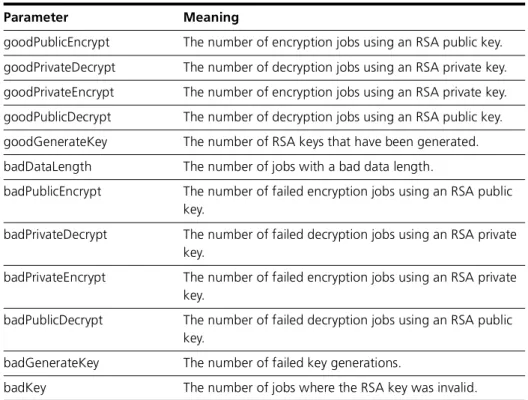
Syntax SHow ENCoDescription This command displays information about the ENCO module. The output of this command varies depending on feature licences and whether a MAC or PAC is installed (Figure 25-4 on page 25-28, Figure 25-5 on page 25-28,
Table 25-1 on page 25-29).
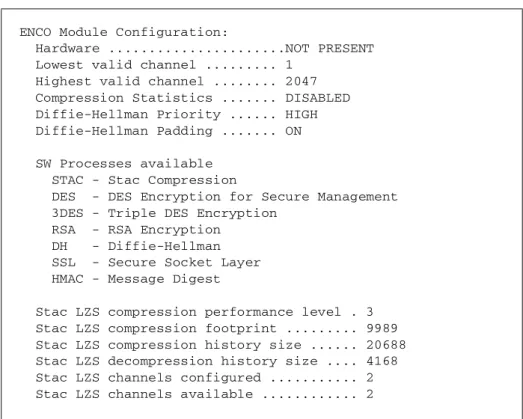
Figure 25-4: Example output from the show enco command for a router with a MAC card installed.
Figure 25-5: Example output from the show enco command for a router without an encryption card installed.
ENCO Module Configuration
Hardware ... MAC PRESENT Lowest valid channel ... 1
Highest valid channel ... 511 Compression Statistics Enabled .... FALSE Diffie-Hellman Priority ... HIGH SW Processes available
RSA - RSA Encryption DH - Diffie-Hellman HW Processes available DES - DES Encryption
3DES - Triple DES Encryption AES - AES Encryption
STAC - Stac Compression HMAC - Message Digest
ENCO Module Configuration:
Hardware ...NOT PRESENT Lowest valid channel ... 1
Highest valid channel ... 2047 Compression Statistics ... DISABLED Diffie-Hellman Priority ... HIGH Diffie-Hellman Padding ... ON SW Processes available
STAC - Stac Compression
DES - DES Encryption for Secure Management 3DES - Triple DES Encryption
RSA - RSA Encryption DH - Diffie-Hellman SSL - Secure Socket Layer HMAC - Message Digest
Stac LZS compression performance level . 3 Stac LZS compression footprint ... 9989 Stac LZS compression history size ... 20688 Stac LZS decompression history size .... 4168 Stac LZS channels configured ... 2 Stac LZS channels available ... 2
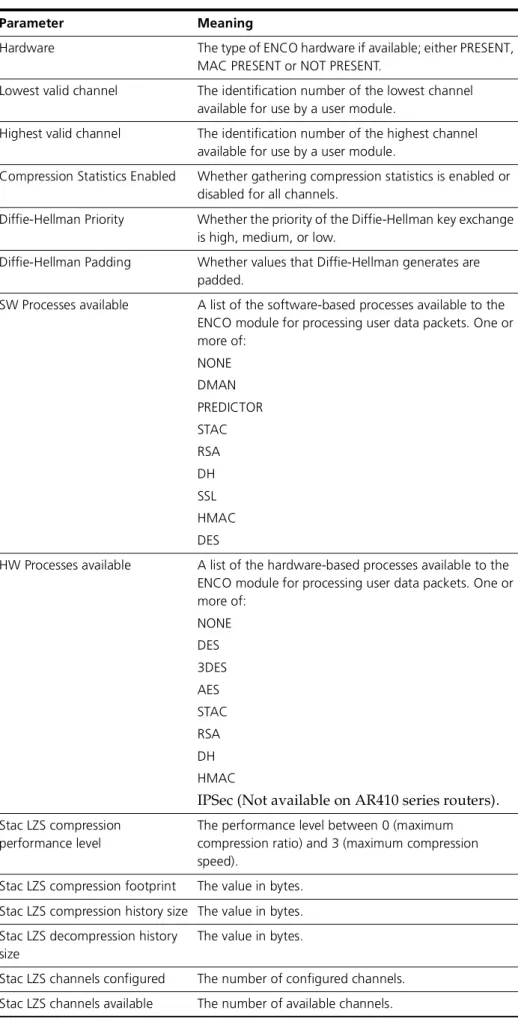
Table 25-1: Parameters in the output of the show enco command.
Parameter Meaning
Hardware The type of ENCO hardware if available; either PRESENT, MAC PRESENT or NOT PRESENT.
Lowest valid channel The identification number of the lowest channel available for use by a user module.
Highest valid channel The identification number of the highest channel available for use by a user module.
Compression Statistics Enabled Whether gathering compression statistics is enabled or disabled for all channels.
Diffie-Hellman Priority Whether the priority of the Diffie-Hellman key exchange is high, medium, or low.
Diffie-Hellman Padding Whether values that Diffie-Hellman generates are padded.
SW Processes available A list of the software-based processes available to the ENCO module for processing user data packets. One or more of:
NONE DMAN PREDICTOR STAC RSA DH SSL HMAC DES
HW Processes available A list of the hardware-based processes available to the ENCO module for processing user data packets. One or more of:
NONE DES 3DES AES STAC RSA DH HMAC
IPSec (Not available on AR410 series routers).
Stac LZS compression performance level
The performance level between 0 (maximum compression ratio) and 3 (maximum compression speed).
Stac LZS compression footprint The value in bytes. Stac LZS compression history size The value in bytes. Stac LZS decompression history
size
The value in bytes.
Stac LZS channels configured The number of configured channels. Stac LZS channels available The number of available channels.
Related Commands set enco dhpriority show enco channel show enco counters
show enco channel
Syntax SHow ENCo CHannel[=channel [COUnters]]
where channel is a number from 0 to 512 if the router has up to 8 Mbytes of RAM; 0 to 1024 if the router has 16 Mbytes of RAM; or 0 to 2048 if the router has 32 Mbytes of RAM.
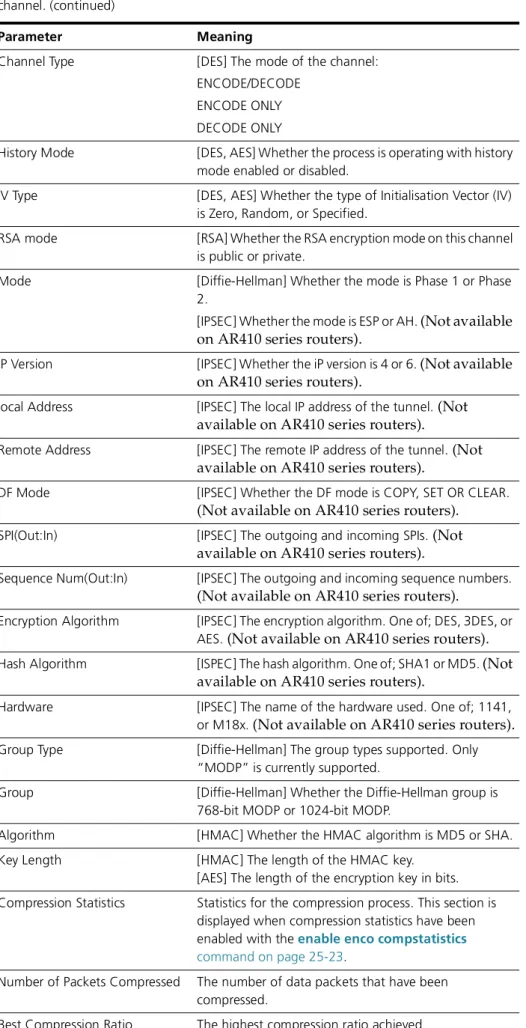
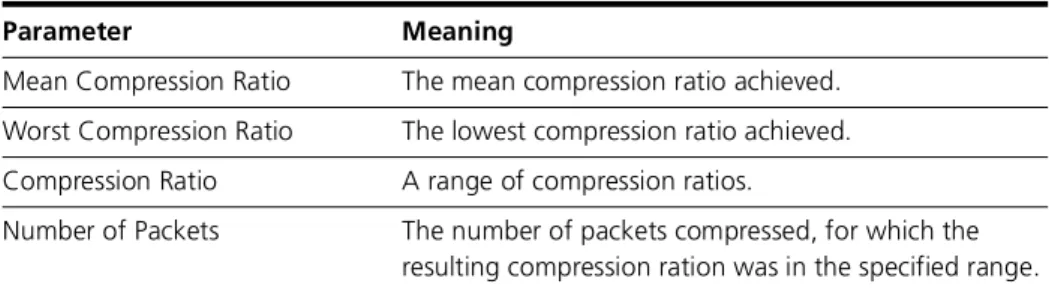
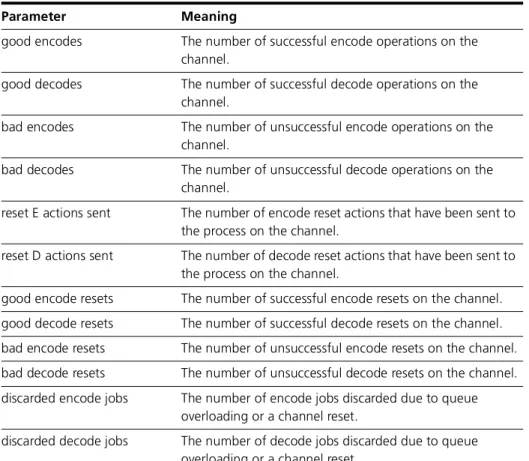
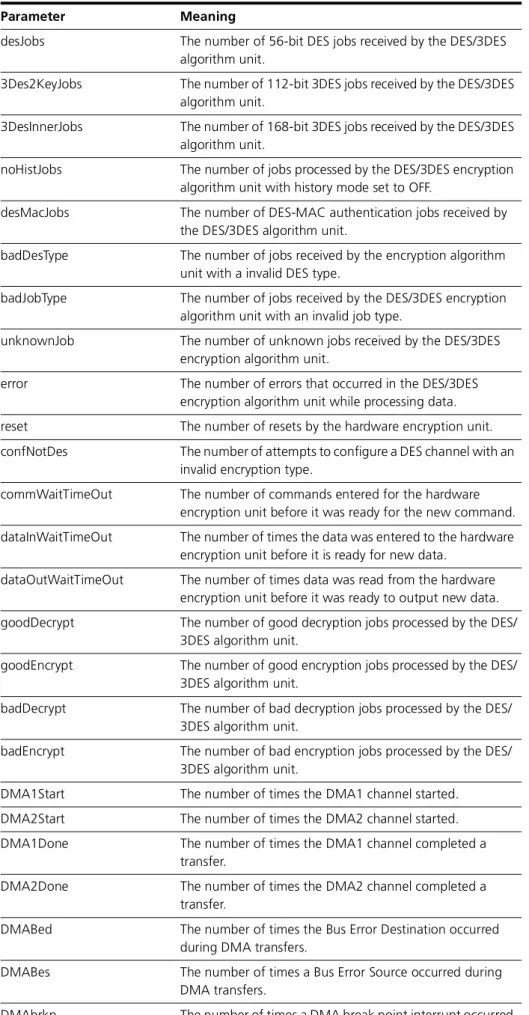
Description This command displays information about active ENCO module channels. If an ENCO channel is not specified, a summary of all currently active channels is displayed (Figure 25-6 on page 25-30, Table 25-2 on page 25-30). If an ENCO channel is specified, detailed configuration and status information are displayed about it (Figure 25-7 on page 25-31, Table 25-3 on page 25-31). If compression statistics are enabled, the display includes compression statistics. If the counters parameter is specified, information counters for the specified channel are displayed (Figure 25-8 on page 25-34, Table 25-4 on page 25-34).
Figure 25-6: Example output from the show enco channel command.
Channel State User UserID MDL pktOverhead Process 1 UP SA f0000001 1528 72 DES
2 UP PPP 00000001 1500 64 DES 3 UP SSH 00000001 1584 16 DES
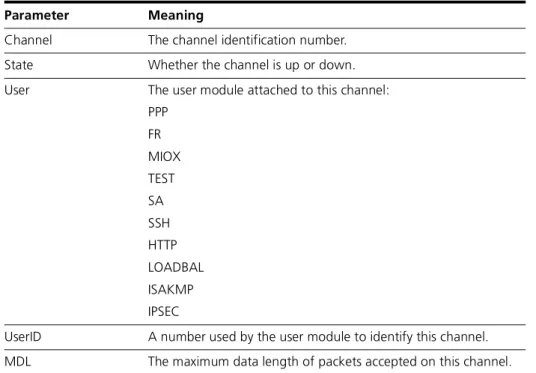
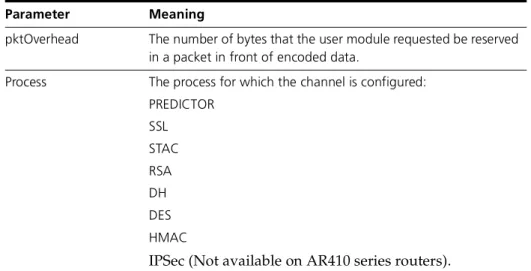
---Table 25-2: Parameters in the output of the show enco channel command.
Parameter Meaning
Channel The channel identification number. State Whether the channel is up or down. User The user module attached to this channel:
PPP FR MIOX TEST SA SSH HTTP LOADBAL ISAKMP IPSEC
Figure 25-7: Example output from the show enco channel command for a specific channel.
pktOverhead The number of bytes that the user module requested be reserved in a packet in front of encoded data.
Process The process for which the channel is configured: PREDICTOR
SSL STAC RSA DH DES HMAC
IPSec (Not available on AR410 series routers).
Channel ... 1
Type ... ENCODE/DECODE State ... UP
User ... SSH User ID ... 00000001 Maximum Data Length ... 1584 Packet Overhead ... 16 Process ... DES Process Configuration:
Des Type...DES - 56 bit Check Type ...NONE
Channel Type...ENCODE/DECODE History Mode...Off
IV Type...Random
Table 25-3: Parameters in the output of the show enco channel command for a specific channel.
Parameter Meaning
Channel The identification number of the channel. Type The mode of the channel:
ENCODE/DECODE ENCODE ONLY DECODE ONLY
State Whether the channel is up or down.
Table 25-2: Parameters in the output of the show enco channel command. (continued)
User The user module attached to this channel: PPP
FR MIOX TEST SA SSH HTTP LOADBAL ISAKMP IPSEC
User ID A number used by the user module to identify this channel.
Maximum Data Length The maximum data length of packets accepted on this channel.
Packet Overhead The number of bytes reserved at the head of data packets in front of the encoded data, for lower layer packet headers.
Process The process for which the channel is configured: RSA
DH DES AES PREDICTOR SSL STAC
IPSec (Not available on AR410 series routers).
Process Configuration Details about a particular process. The fields displayed vary depending on the process.
Max Data Length The maximum allowed length of data packets on the channel.
Check Type The type of checksum to be used: XOR8
NONE (STAC compression) CRCCCITT
CRC16(Predictor compression)
DES Type [DES] The DES encryption/decryption algorithm used to process packets on the channel:
DES–56 bit
3DES–112 bit–outer CBC 3DES–168 bit–inner CBC 3DES–168 bit–outer CBC DES–MAC
Table 25-3: Parameters in the output of the show enco channel command for a specific channel. (continued)