BSM Interoperability 8.0.00
Installation and
Configuration Guide
If you have comments or suggestions about this documentation, contact Information Development by email at [email protected].
You can access the BMC Software website at http://www.bmc.com. From this website, you can obtain information about the company, its products, corporate offices, special events, and career opportunities.
United States and Canada
Address BMC SOFTWARE INC
2101 CITYWEST BLVD HOUSTON TX 77042-2827 USA
Telephone 713 918 8800 or 800 841 2031
Fax 713 918 8000
Outside United States and Canada
Telephone (01) 713 918 8800 Fax (01) 713 918 8000
© Copyright 2005-2009 BMC Software, Inc.
BMC, BMC Software, and the BMC Software logo are the exclusive properties of BMC Software, Inc., are registered with the U.S. Patent and Trademark Office, and may be registered or pending registration in other countries. All other BMC trademarks, service marks, and logos may be registered or pending registration in the U.S. or in other countries. All other trademarks or registered trademarks are the property of their respective owners.
IBM is a registered trademark of International Business Machines Corporation. UNIX is a registered trademark of The Open Group.
Oracle is a registered trademark, and the Oracle product names are registered trademarks or trademarks of Oracle Corporation.
SAP is a trademark or registered trademark of SAP AG in Germany and in several other countries.
Sun Solaris, Java, Java runtime environment, and JRE are trademarks or registered trademarks of Sun Microsystems, Inc. in the U.S. or other countries.
BMC Software considers information included in this documentation to be proprietary and confidential. Your use of this information is subject to the terms and conditions of the applicable End User License Agreement for the product and the proprietary and restricted rights notices included in this documentation.
Restricted Rights Legend
U.S. Government Restricted Rights to Computer Software. UNPUBLISHED -- RIGHTS RESERVED UNDER THE
COPYRIGHT LAWS OF THE UNITED STATES. Use, duplication, or disclosure of any data and computer software by the U.S. Government is subject to restrictions, as applicable, set forth in FAR Section 52.227-14, DFARS 252.227-7013, DFARS 252.227-7014, DFARS 252.227-7015, and DFARS 252.227-7025, as amended from time to time. Contractor/Manufacturer is BMC Software, Inc., 2101 CityWest Blvd., Houston, TX 77042-2827, USA. Any contract notices should be sent to this address.
Customer Support
You can obtain technical support by using the Support page on the BMC Software website or by contacting Customer Support by telephone or email. To expedite your inquiry, please see “Before Contacting BMC Software.”
Support Website
You can obtain technical support from BMC Software 24 hours a day, 7 days a week at http://www.bmc.com/support_home. From this website, you can:
■ Read overviews about support services and programs that BMC Software offers.
■ Find the most current information about BMC Software products. ■ Search a database for problems similar to yours and possible solutions. ■ Order or download product documentation.
■ Report a problem or ask a question.
■ Subscribe to receive email notices when new product versions are released.
■ Find worldwide BMC Software support center locations and contact information, including email addresses, fax numbers, and telephone numbers.
Support by telephone or email
In the United States and Canada, if you need technical support and do not have access to the Web, call 800 537 1813 or send an email message to [email protected]. (In the Subject line, enter
SupID:<yourSupportContractID>, such as SupID:12345.) Outside the United States and Canada, contact your local support center for assistance.
Before Contacting BMC Software
Have the following information available so that Customer Support can begin working on your issue immediately:
■ Product information
— Product name
— Product version (release number)
— License number and password (trial or permanent)
■ Operating system and environment information
— Machine type
— Operating system type, version, and service pack — System hardware configuration
— Serial numbers
— Related software (database, application, and communication) including type, version, and service pack or maintenance level
■ Sequence of events leading to the problem
■ Commands and options that you used
■ Messages received (and the time and date that you received them)
— Product error messages
— Messages from the operating system, such as file system full
Contents
Preface 7
Products and applications in BSM Interoperability 8.0.00. . . 8
Related documentation. . . 14
Document organization. . . 15
Audience . . . 15
Chapter 1 About BSM Interoperability 17 BSM Interoperability 8.0.00 data flow. . . 18
Prerequisites . . . 20
Operating system and database requirements . . . 20
Other requirements . . . 21
Backwards compatibility testing . . . 22
Installation overview . . . 26
Chapter 2 Installing BSM Interoperability components 31 Installing BMC Atrium and BMC IT Service Management applications . . . 32
Installation paths for AR System. . . 32
Related documentation. . . 33
Recommended order of installation . . . 34
Installing and configuring BMC Remedy Knowledge Management . . . 37
Installing BMC Identity Management . . . 38
Installing BMC Impact Solutions and BMC Portal, integrating with BMC Remedy Service Desk . . . . 38
Related documentation. . . 39
Installing BMC Impact Solutions . . . 39
Installing Integration for BMC Remedy Service Desk . . . 41
Installing BMC ProactiveNet . . . 41
Installing BMC Atrium Discovery and Dependency Mapping . . . 41
Installing transaction management applications. . . 43
Related documentation. . . 43
Installing BMC Transaction Management Application Response Time . . . 43
Installing reporting and monitoring applications. . . 44
Related documentation. . . 44
Installing BMC BladeLogic Decision Support for Server Automation . . . 47
Installing BMC BladeLogic configuration automation applications. . . 48
Related documentation . . . 48
Installing BMC BladeLogic Network Automation . . . 49
Installing and configuring BMC BladeLogic Client Automation . . . 49
Installing BMC BladeLogic Client Automation Configuration Discovery Integration . . . 51
Providing access to ITSM from BMC BladeLogic Client Automation user accounts . . . 52
Providing access to BMC BladeLogic Client Automation from ITSM user accounts . . . 53
Installing BMC Capacity Management Essentials . . . 54
Installing mainframe applications . . . 55
Chapter 3 BSM Interoperability workflows 57 BSM Interoperability use cases . . . 58
Use case: Reconciliation of multiple data sources. . . 59
Use case: End to end service level management . . . 63
Use case: Holistic compliance . . . 66
Use case: Intelligent incident . . . 69
Use case: Problem management . . . 72
Use case: Virtualization. . . 74
Use case: Web self-service. . . 77
Use case: Continuous compliance—servers. . . 80
Use case: Continuous compliance—networks. . . 80
Use case: Decision Support. . . 80
Preface
The purpose of BSM Interoperability 8.0.00 is to provide a validated workflow based on use cases that span multiple BMC products. The products considered in this document are listed in “Products and applications in BSM Interoperability 8.0.00” on page 8. These products are current releases and have been validated at the solution level.
NOTE
The purpose of this guide is to help customers, BMC Partners, and BMC Professional Services successfully install the solution offerings by providing a certified path that has been tested and validated. Only the environment tested and certified by BMC Software is documented. For information about known issues, see the BSM Interoperability 8.0.00 Release Notes.
This guide does not encompass specific installation, administration, configuration, or user information at the product level. See the appropriate product
documentation for that type of information.
For the version of BSM Interoperability documentation that applies to your environment, see the BMC Customer Support website.
Depending on your product versions, the most recent BSM Interoperability documentation might include newer versions of products which might not exist in your environment. Check the products and applications version list in the BSM Interoperability Installation and Configuration Guide or the BSM Interoperability Release Notes before using BSM Interoperability documentation.
Products and applications in BSM
Interoperability 8.0.00
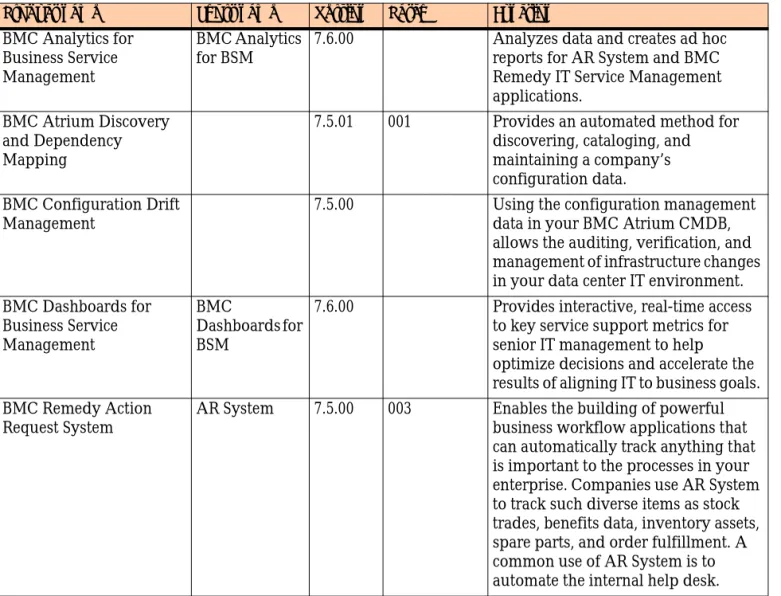
The following products and applications have been validated for BSM Interoperability 8.0.00:
Table 2-1: Atrium products
Product name Short name Version Patch Function
BMC Analytics for Business Service Management
BMC Analytics for BSM
7.6.00 Analyzes data and creates ad hoc reports for AR System and BMC Remedy IT Service Management applications.
BMC Atrium Discovery and Dependency Mapping
7.5.01 001 Provides an automated method for discovering, cataloging, and maintaining a company’s configuration data. BMC Configuration Drift
Management
7.5.00 Using the configuration management data in your BMC Atrium CMDB, allows the auditing, verification, and management of infrastructure changes in your data center IT environment. BMC Dashboards for
Business Service Management
BMC
Dashboards for BSM
7.6.00 Provides interactive, real-time access to key service support metrics for senior IT management to help optimize decisions and accelerate the results of aligning IT to business goals. BMC Remedy Action
Request System
AR System 7.5.00 003 Enables the building of powerful business workflow applications that can automatically track anything that is important to the processes in your enterprise. Companies use AR System to track such diverse items as stock trades, benefits data, inventory assets, spare parts, and order fulfillment. A common use of AR System is to automate the internal help desk.
Products and applications in BSM Interoperability 8.0.00
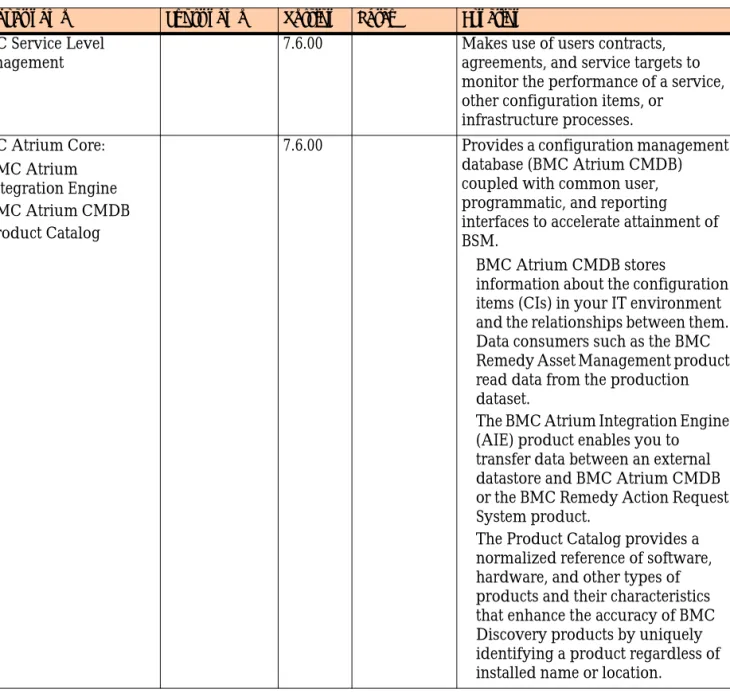
BMC Service Level Management
7.6.00 Makes use of users contracts, agreements, and service targets to monitor the performance of a service, other configuration items, or
infrastructure processes. BMC Atrium Core:
!BMC Atrium Integration Engine
!BMC Atrium CMDB
!Product Catalog
7.6.00 Provides a configuration management database (BMC Atrium CMDB) coupled with common user, programmatic, and reporting interfaces to accelerate attainment of BSM.
! BMC Atrium CMDB stores
information about the configuration items (CIs) in your IT environment and the relationships between them. Data consumers such as the BMC Remedy Asset Management product read data from the production dataset.
! The BMC Atrium Integration Engine (AIE) product enables you to transfer data between an external datastore and BMC Atrium CMDB or the BMC Remedy Action Request System product.
! The Product Catalog provides a normalized reference of software, hardware, and other types of products and their characteristics that enhance the accuracy of BMC Discovery products by uniquely identifying a product regardless of installed name or location.
Table 2-1: Atrium products
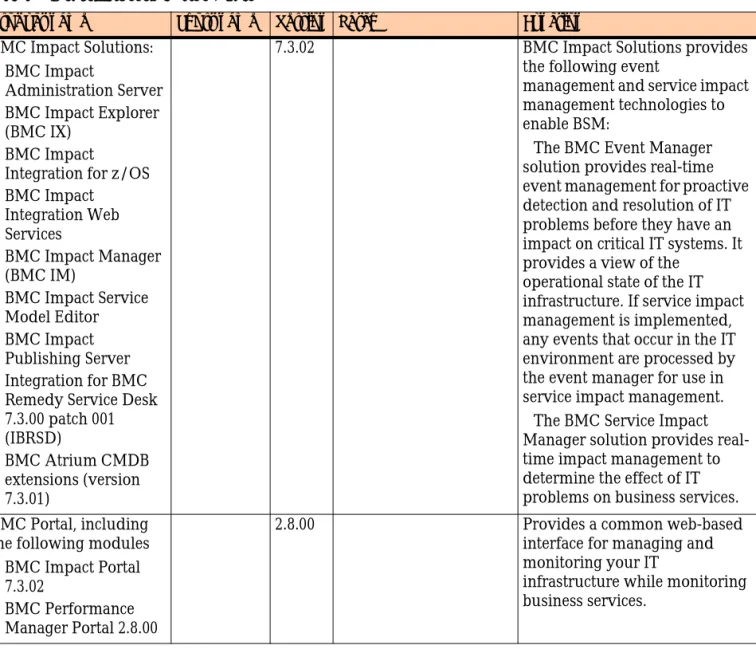
Table 2-2: Service Assurance products
Product name Short name Version Patch Function
BMC Impact Solutions:
!BMC Impact
Administration Server
!BMC Impact Explorer (BMC IX)
!BMC Impact Integration for z/OS
!BMC Impact Integration Web Services
!BMC Impact Manager (BMC IM)
!BMC Impact Service Model Editor
!BMC Impact Publishing Server
!Integration for BMC Remedy Service Desk 7.3.00 patch 001 (IBRSD)
!BMC Atrium CMDB extensions (version 7.3.01)
7.3.02 BMC Impact Solutions provides the following event
management and service impact management technologies to enable BSM:
"The BMC Event Manager solution provides real-time event management for proactive detection and resolution of IT problems before they have an impact on critical IT systems. It provides a view of the
operational state of the IT infrastructure. If service impact management is implemented, any events that occur in the IT environment are processed by the event manager for use in service impact management. "The BMC Service Impact Manager solution provides real-time impact management to determine the effect of IT problems on business services. BMC Portal, including
the following modules
!BMC Impact Portal 7.3.02
!BMC Performance Manager Portal 2.8.00
2.8.00 Provides a common web-based interface for managing and monitoring your IT
infrastructure while monitoring business services.
Products and applications in BSM Interoperability 8.0.00
BMC ProactiveNet 8.0.00 A real-time analytics solution that detects performance abnormalities in the IT environment, delivers early warning of degrading
performance, and reduces time from issue detection to
resolution. This early warning is delivered by Intelligent Events that result from analyzing and correlating data across the monitored IT infrastructure, speeding the ability to detect abnormal trends before end users and mission critical applications are impacted. It also provides the users with views, detailed graph displays, reports and other tools for diagnosing performance issues.
BMC Transaction Management
Application Response Time, either
Infrastructure Edition or Service Level Edition
BMC TM ART
3.7.00 Enables you to manage the performance and reliability of your worldwide applications to measure site health based on end-user experience metrics, such as availability, accuracy, and performance.
Table 2-2: Service Assurance products
Product name Short name Version Patch Function
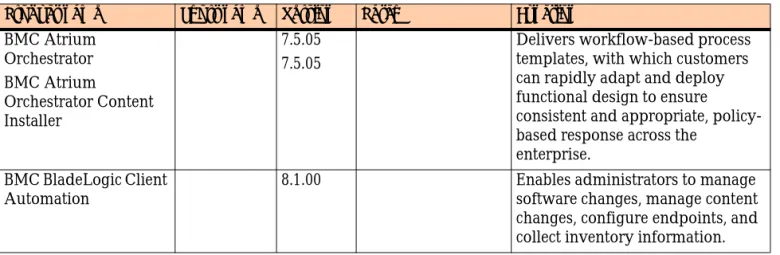
Table 2-3: Service Automation products
Product name Short name Version Patch Function
BMC Atrium Orchestrator BMC Atrium Orchestrator Content Installer 7.5.05 7.5.05
Delivers workflow-based process templates, with which customers can rapidly adapt and deploy functional design to ensure consistent and appropriate, policy-based response across the
enterprise. BMC BladeLogic Client
Automation
8.1.00 Enables administrators to manage software changes, manage content changes, configure endpoints, and collect inventory information.
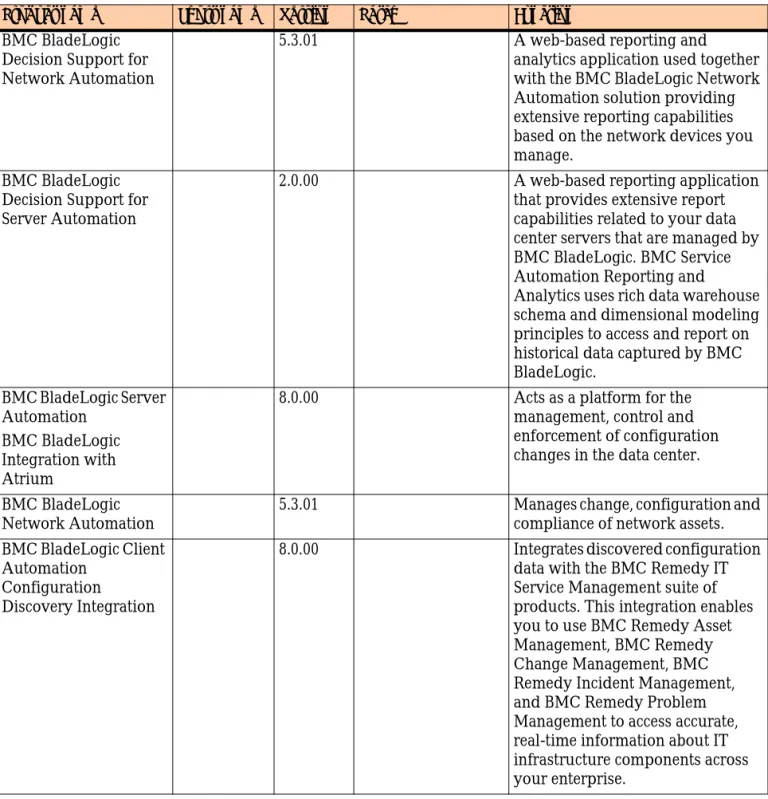
BMC BladeLogic Decision Support for Network Automation
5.3.01 A web-based reporting and analytics application used together with the BMC BladeLogic Network Automation solution providing extensive reporting capabilities based on the network devices you manage.
BMC BladeLogic Decision Support for Server Automation
2.0.00 A web-based reporting application that provides extensive report capabilities related to your data center servers that are managed by BMC BladeLogic. BMC Service Automation Reporting and
Analytics uses rich data warehouse schema and dimensional modeling principles to access and report on historical data captured by BMC BladeLogic.
BMC BladeLogic Server Automation
BMC BladeLogic Integration with Atrium
8.0.00 Acts as a platform for the management, control and enforcement of configuration changes in the data center. BMC BladeLogic
Network Automation
5.3.01 Manages change, configuration and compliance of network assets. BMC BladeLogic Client
Automation Configuration Discovery Integration
8.0.00 Integrates discovered configuration data with the BMC Remedy IT Service Management suite of products. This integration enables you to use BMC Remedy Asset Management, BMC Remedy Change Management, BMC Remedy Incident Management, and BMC Remedy Problem Management to access accurate, real-time information about IT infrastructure components across your enterprise.
Table 2-3: Service Automation products
Products and applications in BSM Interoperability 8.0.00
Table 2-4: Service support products
Product name Short name Version Patch Function
BMC Remedy IT Service Management:
!BMC Remedy Asset Management
!BMC Remedy Change Management
!BMC Remedy Service Desk, including:
! BMC Remedy Incident Management
! BMC Remedy Problem Management
BMC Remedy ITSM
7.6.00 see KB 20020198
! The BMC Remedy Asset Management application lets IT professionals track and manage enterprise CIs—and their changing relationships—throughout the entire CI lifecycle.
! BMC Remedy Change Management provides IT organizations with the ability to manage changes by enabling them to assess impact, risk, and resource requirements, and then create plans and automate approval functions for implementing changes.
! BMC Remedy Service Desk allows IT professionals to manage incidents, problem investigations, known errors, and solution database entries. BMC Remedy Knowledge
Management
7.5.00.001 Allows users to author and search for solutions in a knowledge base. It includes a comprehensive editor with extensive editing tools and a robust search engine that allows users to search for solutions using natural language or Boolean searches. BMC Service Request
Management
7.6.00 001 Allows IT to define offered services, publish those services in a service catalog, and automate the fulfillment of those services for their users.
Table 2-5: Complementary products
Product name Short name Version Patch Function
BMC Identity Management BRIM 7.5.01 A suite of integrated solutions for handling the problems
Required patches are available on the BMC Customer Support website at
http://www.bmc.com/support.
Related documentation
BMC product documentation is available from the BMC Customer Support website at http://www.bmc.com/support.
NOTE
This document does not cover the specific procedures and detailed information that are provided in the product documentation. See the documents listed here and the product release notes for information related to procedures in this guide, and see the BMC Customer Support website for complete product documentation. The following table lists the BSM Interoperability 8.0.00 documentation set.
Table 2-6: BSM Interoperability 8.0.00 documentation.
Related product documentation
Relevant related documentation for individual product and component installations procedures is included as a section immediately before each installation procedure in the BSM Interoperability Installation and Configuration Guide. Review these documents, release notes, and appropriate bulletins and white papers before installing and configuring products and components described in this publication.
Manual name Description
BSM Interoperability Installation and Configuration Guide
Information designed to help customers, BMC Partners, and BMC Professional Services successfully install the solution offerings by providing a certified path that has been tested and validated.
BSM Interoperability Release Notes Information about known issues,
workarounds, and resolved issues related to multiple products in BSM Interoperability 8.0.00.
Document organization
Document organization
This document is organized as follows:
! Chapter 1, “About BSM Interoperability”—Covers architecture, common configurations, system and other prerequisites, and high-level overview information about installing BSM Interoperability 8.0.00 on Microsoft Windows and UNIX®.
! Chapter 2, “Installing BSM Interoperability components”—Covers procedures for installing BSM Interoperability 8.0.00 on Windows and UNIX.
! Chapter 3, “BSM Interoperability workflows”—Covers use cases tested by BSM Interoperability.
Audience
This document is intended for system integrators in several organizations: customers, BMC Professional Services, and BMC Partners.
Chapter
1
About BSM Interoperability
This chapter describes the data flow, prerequisites, installation overview, and the high-level steps for installing BSM Interoperability 8.0.00 on Windows and UNIX®. The following topics are provided:
! BSM Interoperability 8.0.00 data flow (page 18) ! Prerequisites (page 20)
! Backwards compatibility testing (page 22) ! Installation overview (page 26)
BSM Interoperability 8.0.00 data flow
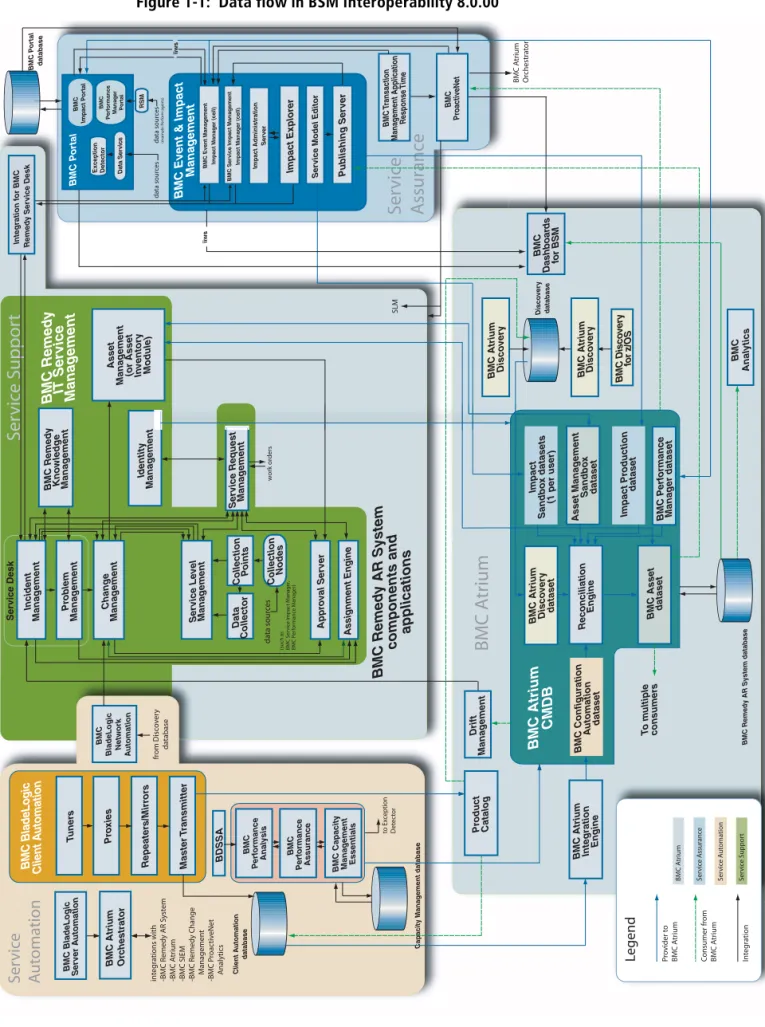
BSM Interoperability allows data to flow between multiple BMC Software
products, often bidirectionally. Figure 1-1 on page 19 illustrates the logical flow of data for components in an implementation of BSM Interoperability 8.0.00.
Most components and applications shown within the BMC Remedy AR System boundary are not included in the base BMC Remedy AR System product.
For a computer-by-computer illustration of the physical implementation of BSM Interoperability 8.0.00, see Figure 1-2 on page 27.
BSM Interoperability 8.0.00 data flow
Figure 1-1: Data flow in BSM Interoperability 8.0.00
Identity Mana g ement
BMC A
trium
Se
rvic
e
Assur
anc
e
rvic e tomationSe
rvic
e Suppor
t
Ser vice Desk y st em trium roac tiv e Net Impact Administration Ser ver BMC Remedy AR System
components and applications A p p rova l S e rv e r Assignment Engine BMC Remed y IT Ser vice Mana g e ment
BMC Event & Impact
Mana
g
e
ment
BMC BladeLogic Client A
utomation u tomation BMC P o rt al database
BMC Atrium Disco
ver y BMC P o rt al BMC Dashboar ds fo r B S M Repeater s/Mirr or s Pr o xies T uner s Asset Mana g ement
(or Asset Inventor
y Module) Integration f o r BMC Remed y Ser v ice Desk Ser vice Le vel Mana g ement Pub lishing Ser ver Pr ob lem Mana g ement Incident Mana g ement Chang e Mana g ement Master T ransmitter Impact Explorer BMC P e rf ormance Mana g e r Po rt a l
Exception Detector Data Ser
v
ice
BMC Ser
v
ice Impact Mana
g e ment Impact Mana g e r (cell) Disco v er y database BMC Disco ver y fo r z/OS Asset Mana g ement Sandbo x dataset Impact Sandbo x datasets
(1 per user)
BMC Atrium Disco
ver y dataset Reconciliation Engine Impact Pr oduction dataset BMC P erf ormance Mana g er dataset BMC Remed
y AR System database
BMC Anal ytics BMC T ransaction Mana g ement Application Response Time
BMC Atrium Disco
ver y RSM Drift Mana g ement
BMC Event Mana
g ement Impact Mana g e r (cell) (example: P e rf orm agents) data sour ce s data sour ce s Data Collector Collection P o ints Collection Nodes data sour ces
(such as BMC S
e rvic e Impac t M anager , BMC P e rf ormanc e M anager) BMC Impact P o rt al iiws BMC P erf ormance Anal ysis
BMC Capacity Mana
g ement Essentials BMC P erf ormance Assurance Capacity Mana g ement database to Ex ception De te c to r Ser
vice Model Editor
w o rk or ders Ser vice Request Mana g e ment Pr oduct Catalog BMC Atrium CMDB
BMC Asset dataset
BMC Configuration A u tomation dataset T o m ultiple consumer s
BMC Atrium Integration
Engine iiws BMC Remed y Kno wledg e Mana g ement BMC BladeLogic Netw o rk A u tomation BMC Pr oactiveNet c hestrator fr om Disc o v er y database BDSSA BMC A trium Or chestr a to r SLM u tomation
Legend onsumer fr
om trium te g ra ti o n ro vider t o trium BMC A trium S e rvic e A ssuranc e S e rvic e A u to mation S e rvic e Suppor t
Prerequisites
BMC Software recommends these system prerequisites and suggested
considerations based on end-to-end testing of the BSM Interoperability 8.0.00 offering.
Operating system and database requirements
This section describes overall operating systems and database requirements for both Windows and UNIX implementations of the solution.
BSM Interoperability compatibility is provided in compatibility matrices for individual components. These compatibility matrices can be found at
http://www.bmc.com/support/bmcremedycomp/index.htm.
Windows
During testing, BSM Interoperability 8.0.00 was tested on Windows 2003 Server Enterprise Edition with Service Pack 2 and SQL Server 2005 Enterprise Edition with Service Pack 2. The examples in the documentation reference this
configuration, although any supported combination listed in the compatibility matrix can be used.
NOTE
Many BMC Software products that use SQL Server require that the SQL Server Agent is running so that the server can connect to remote databases.
BMC Portal requires an Oracle® database. You can use an existing Oracle 10g database or the BMC Datastore (included on the BMC Portal DVD).
UNIX
During testing, BSM Interoperability 8.0.00 was tested on Sun™ Solaris™ 10 and Oracle 11g with the latest patches installed. The examples in the documentation reference this configuration, although any supported combination listed in the compatibility matrix can be used.
For UNIX installations, all servers must be server-class computers, preferably with multiple processors. Because some BSM Interoperability 8.0.00 products do not have UNIX versions
,
some servers in the environment must be Windows computers.Prerequisites
Other requirements
Individual products in the BSM Interoperability 8.0.00 offering have their own installation prerequisites. Some of these prerequisites are satisfied by steps you take when installing other products using the procedures in this section. Any other prerequisites are shown in Figure 1-2 on page 27.
Backwards compatibility testing
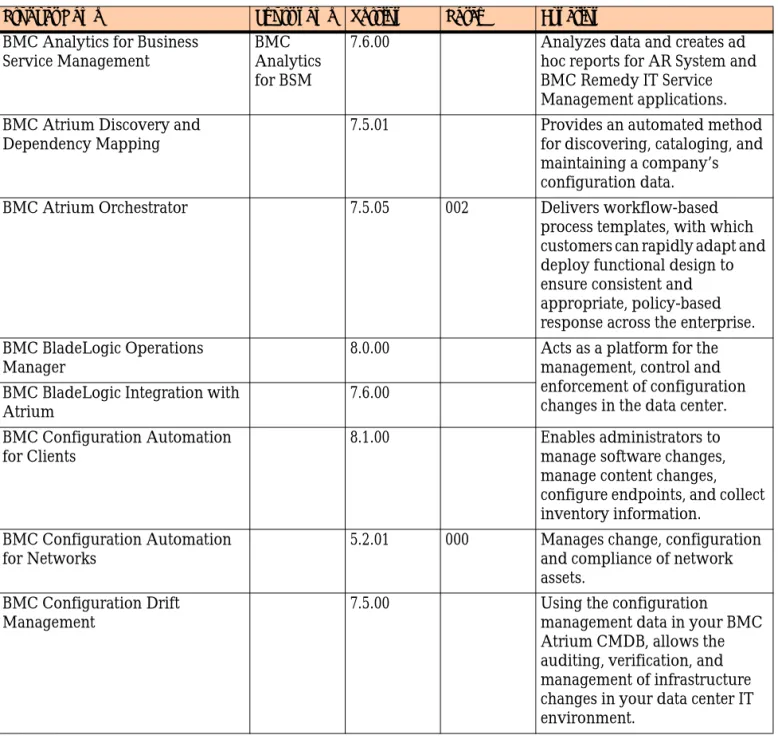
BSM Interoperability tested the BSM Interoperability 7.6 stack with the following platform products:
! BMC Remedy AR System 7.5 patch 003 ! BMC Atrium Core 7.5 patch 003
The following products and applications were tested as part of BSM
Interoperability 7.6 and have been validated against those platform versions:
Table 1-1: Products and applications in backwards compatibility testing (Sheet 1 of 4) Product Name Short name Version Patch Function
BMC Analytics for Business Service Management
BMC Analytics for BSM
7.6.00 Analyzes data and creates ad hoc reports for AR System and BMC Remedy IT Service Management applications. BMC Atrium Discovery and
Dependency Mapping
7.5.01 Provides an automated method for discovering, cataloging, and maintaining a company’s configuration data. BMC Atrium Orchestrator 7.5.05 002 Delivers workflow-based
process templates, with which customers can rapidly adapt and deploy functional design to ensure consistent and appropriate, policy-based response across the enterprise. BMC BladeLogic Operations
Manager
8.0.00 Acts as a platform for the management, control and enforcement of configuration changes in the data center. BMC BladeLogic Integration with
Atrium
7.6.00 BMC Configuration Automation
for Clients
8.1.00 Enables administrators to manage software changes, manage content changes, configure endpoints, and collect inventory information.
BMC Configuration Automation for Networks
5.2.01 000 Manages change, configuration and compliance of network assets.
BMC Configuration Drift Management
7.5.00 Using the configuration
management data in your BMC Atrium CMDB, allows the auditing, verification, and management of infrastructure changes in your data center IT environment.
Backwards compatibility testing
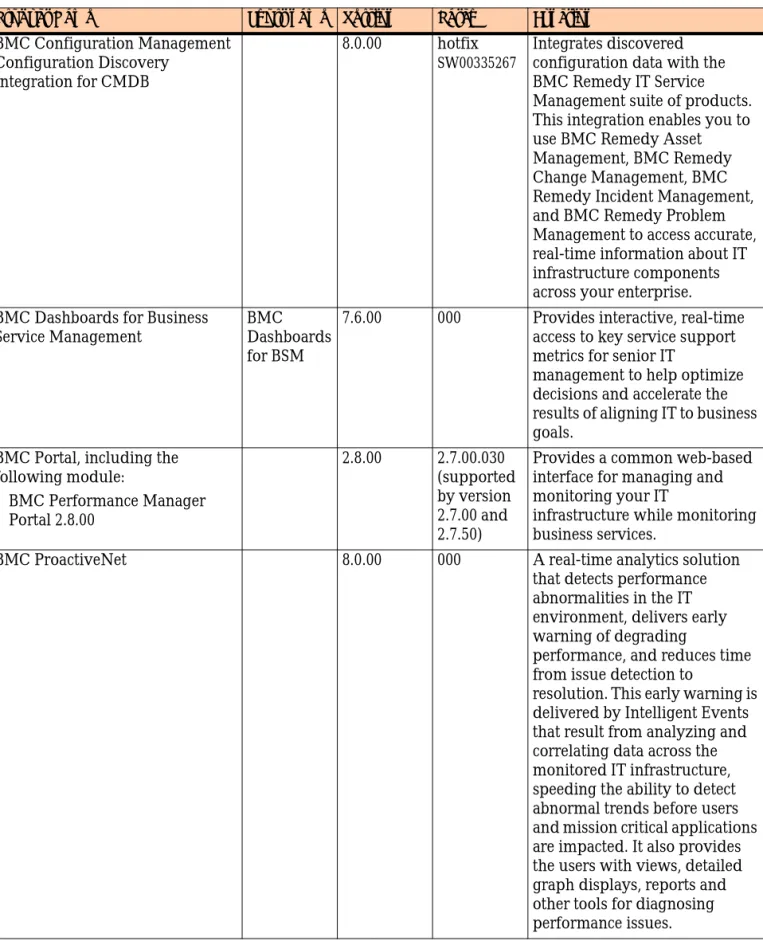
BMC Configuration Management Configuration Discovery
Integration for CMDB
8.0.00 hotfix
SW00335267
Integrates discovered configuration data with the BMC Remedy IT Service Management suite of products. This integration enables you to use BMC Remedy Asset Management, BMC Remedy Change Management, BMC Remedy Incident Management, and BMC Remedy Problem Management to access accurate, real-time information about IT infrastructure components across your enterprise. BMC Dashboards for Business
Service Management
BMC Dashboards for BSM
7.6.00 000 Provides interactive, real-time access to key service support metrics for senior IT
management to help optimize decisions and accelerate the results of aligning IT to business goals.
BMC Portal, including the following module:
!BMC Performance Manager Portal 2.8.00 2.8.00 2.7.00.030 (supported by version 2.7.00 and 2.7.50)
Provides a common web-based interface for managing and monitoring your IT
infrastructure while monitoring business services.
BMC ProactiveNet 8.0.00 000 A real-time analytics solution that detects performance abnormalities in the IT environment, delivers early warning of degrading
performance, and reduces time from issue detection to
resolution. This early warning is delivered by Intelligent Events that result from analyzing and correlating data across the monitored IT infrastructure, speeding the ability to detect abnormal trends before users and mission critical applications are impacted. It also provides the users with views, detailed graph displays, reports and other tools for diagnosing performance issues.
Table 1-1: Products and applications in backwards compatibility testing (Sheet 2 of 4) Product Name Short name Version Patch Function
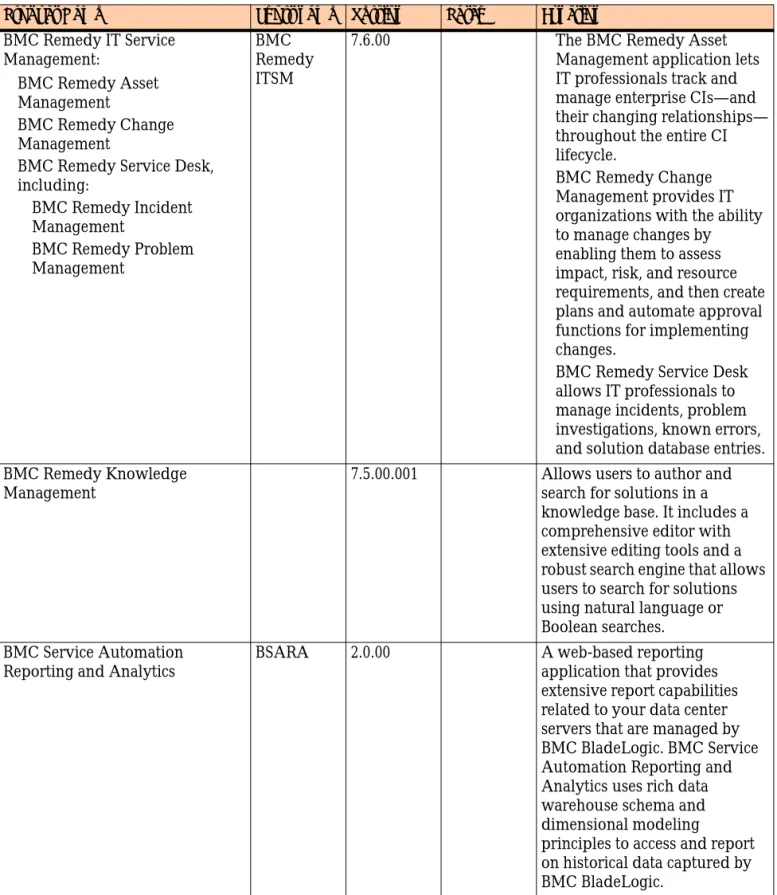
BMC Remedy IT Service Management:
!BMC Remedy Asset Management
!BMC Remedy Change Management
!BMC Remedy Service Desk, including:
! BMC Remedy Incident Management
! BMC Remedy Problem Management
BMC Remedy ITSM
7.6.00 ! The BMC Remedy Asset Management application lets IT professionals track and manage enterprise CIs—and their changing relationships— throughout the entire CI lifecycle.
! BMC Remedy Change Management provides IT organizations with the ability to manage changes by enabling them to assess impact, risk, and resource requirements, and then create plans and automate approval functions for implementing changes.
! BMC Remedy Service Desk allows IT professionals to manage incidents, problem investigations, known errors, and solution database entries. BMC Remedy Knowledge
Management
7.5.00.001 Allows users to author and search for solutions in a knowledge base. It includes a comprehensive editor with extensive editing tools and a robust search engine that allows users to search for solutions using natural language or Boolean searches.
BMC Service Automation Reporting and Analytics
BSARA 2.0.00 A web-based reporting application that provides extensive report capabilities related to your data center servers that are managed by BMC BladeLogic. BMC Service Automation Reporting and Analytics uses rich data warehouse schema and dimensional modeling
principles to access and report on historical data captured by BMC BladeLogic.
Table 1-1: Products and applications in backwards compatibility testing (Sheet 3 of 4) Product Name Short name Version Patch Function
Backwards compatibility testing
Required patches are available on the BMC Customer Support website at
http://www.bmc.com/support.
BMC Service Level Management 7.6.00 000 hotfix
SLM_SIM_II WS-7-3-01-HOTFIX
Makes use of users contracts, agreements, and service targets to monitor the performance of a service, other configuration items, or infrastructure processes.
BMC Service Request Management
7.6.00 Allows IT to define offered services, publish those services in a service catalog, and
automate the fulfillment of those services for their users.
BMC Transaction Management Application Response Time, either Infrastructure Edition or Service Level Edition
BMC TM ART
3.7.00 Enables you to manage the performance and reliability of your worldwide applications to measure site health based on user experience metrics, such as availability, accuracy, and performance.
Table 1-1: Products and applications in backwards compatibility testing (Sheet 4 of 4) Product Name Short name Version Patch Function
Installation overview
This section contains information about the method and sequence used by BMC Software to perform a new installation of the solution and test it.
The procedure is not the only possible way to set up a successful environment. For more information about implementing different use cases based on the amount of data present in your environment, see the documentation set for your products, as well as other documentation available on the BMC Customer Support website.
NOTE
For interoperability testing, computers running VMware images were used to minimize the need for pre-existing web or application servers.
Figure 1-2 on page 27 illustrates the BSM Interoperability 8.0.00 installation order on Windows and UNIX.
Installation overview
Figure 1-2: Installation order (page 1 of 2)
[go to Step 3 on Server B] SERVER A
BMC Remedy ITSM
Prerequisites
BMC Atrium Core, including
BMC Remedy Change Management BMC Remedy Service Desk
BMC Service Level Management
BMC Remedy Asset Management
BMC Service Request Management 1 2 4 5 6
7 BMC Configuration
Drift Management Integration for BMC Remedy Service Desk
SERVER B
Web Server
Prerequisites
- Java SDK 1.6
BMC Remedy Mid Tier
[go to Step 4 on Server A] 3
Prerequisites
- Dual 2.1 GHz processors, or four in
large production environments
- Minimum of 4 GB of memory
- Minimum of 6 GB of permanent storage (10 GB recommended) plus 2 GB of temporary
storage for the installation
- Administrator privileges - MS SQL Server 2005 database
BMC Atrium Discovery and Dependency Mapping
15 SERVER G
BMC Atrium Discovery
Prerequisites
- Administrator privileges -own SQL server
Prerequisites
- Minimum of 1 GB of memory
17 SERVER I
BMC TM ART
BMC Transaction Management Application Response Time Alerting Server
SERVER J
Reporting
Prerequisites
- Minimum of 2 GB of memory - BusinessObjects
BMC Dashboards for BSM
18
19
BMC Analytics for BSM
Prerequisites
- SQL Server 2005 database - Minimum of 1 GB of memory
BMC Transaction Management Application Response Time
16 SERVER H
BMC TM ART
BMC Remedy Knowledge Management
SERVER C BMC Remedy Knowledge Management SERVER K Prerequisites
- Minimum of 8 GB of memory - Java SDK 1.6, 64-bit version
-Processor: 2 @ 2.8GHz ( physical machine ), 1 @ 2.8 GHz ( VM ) -20 GB free disk space
-64 bit OS preferred
BMC Atrium Orchestrator CDP
20
BMC Atrium Orchestrator CDP
Prerequisites
- 2 GB temp space
9 SERVER D
BMC Identity Management
BMC Remedy Identity Management Suite; BMC Identity Management
BMC Remedy AR System server BMC Remedy Approval Server BMC Remedy Assignment Engine BMC Remedy Flashboards
BMC Remedy IT Service Management Suite, including BMC Remedy
AR System Suite, including
BMC Atrium CMDB BMC Atrium Integration Engine Product Catalog 8 13 Prerequisites SERVER L Prerequisites
- Minimum of 6 GB of memory -64-bit OS
14 BMC ProactiveNet
SERVER F
BMC ProactiveNet
Prerequisites
- Minimum of 2 GB of memory - 1 MB of disk space for each cell or console you intend to use
- Administrator privileges - Java SDK 1.6.0_11 -BMC Datastore on separate server
BMC Impact Solutions
SERVER E
BMC Impact Solutions
12
BMC Portal, including
BMC Performance Manager Portal
10
11
Remote Service Monitor
[on separate server or RSM farm] [go to Step 13 on Server A]
Prerequisites
- JBoss Application Server 4.0.2 (for SLM data collector) - Java SDK 1.6
- Database client connectivity tools Access to the same LDAP directory server
Server C uses
- SQL Server 2005 SP 2 (Windows) or Oracle 10g release 2 (UNIX) for
BMC Remedy AR System data store, including BMC Atrium CMDB data. - Increase log file size to 300MB - 3 GB temp space on Solaris
- Minimum of 4 GB of memory - Java SDK 1.6, 64-bit version
-Processor: 2 @ 2.8GHz ( physical machine ), 1 @ 2.8 GHz ( VM )
BMC Atrium Web Services on its own computer BMC Atrium Web Services
Figure 1-2: Installation order (page 2 of 2)
SERVER Q
Capacity Management
Prerequisites
- Minimum of 2 GB of memory - Administrator privileges - Java SDK 1.6
BMC Capacity Management Essentials
28
- Microsoft .NET framework Prerequisites
- Minimum of 512 MB of memory - Same database vendor as AR System
22
SERVER M
BladeLogic BMC BladeLogic Server Automation, BMC BladeLogic Integration with Atrium
SERVER N Prerequisites
- Minimum of 4 GB of memory - Same database vendor as AR System
24
BladeLogic
BMC BladeLogic Decision Support
Prerequisites
- Minimum of 1 GB of memory
25
SERVER O
BNA
BMC BladeLogic Network Automation
BladeLogic Decision Support for Network Automation Data Warehouse
BMC Atrium Orchestrator LAP
23 SERVER I Mainframe impact & Discovery SERVER R Prerequisites
- z/OS 1.4 through 1.7 or later
29 BMC Impact Integration for z/OS
122230
Prerequisites
BMC BladeLogic Client Automation
26
SERVER P
BladeLogic Client Automation
- SQL Server 2005 database with Mixed Mode authentication for BMC CM data store - Administrator privileges
- Database client connectivity tools - Access to the same LDAP directory server that Server A uses
BMC Configuration Automation for Clients CDI
Chapter
2
Installing BSM
Interoperability components
This chapter presents procedures for installing BSM Interoperability 8.0.00 components on Windows and UNIX® environments. Any specific configuration required for either of these installations is explained in separate sections within the procedure.
The following topics are provided:
! Installing BMC Atrium and BMC IT Service Management applications (page 32) ! Installing BMC Identity Management (page 38)
! Installing BMC Impact Solutions and BMC Portal, integrating with BMC Remedy Service Desk (page 38)
! Installing BMC ProactiveNet (page 41)
! Installing BMC Atrium Discovery and Dependency Mapping (page 41) ! Installing transaction management applications (page 43)
! Installing reporting and monitoring applications (page 44) ! Installing BMC Atrium Orchestrator (page 45)
! Installing BMC BladeLogic Server Automation and integrating with BMC Atrium (page 47)
! Installing BMC BladeLogic Decision Support for Server Automation (page 47) ! Installing BMC BladeLogic configuration automation applications (page 48) ! Installing BMC Capacity Management Essentials (page 54)
Installing BMC Atrium and BMC IT Service
Management applications
This section explains how to install
! BMC Remedy AR System and AR System applications, including BMC Remedy AR System server, BMC Remedy Mid Tier, BMC Remedy Approval Server, BMC Remedy Assignment Engine, BMC Remedy Email Engine
! BMC Atrium Core applications, including BMC Atrium CMDB and BMC Atrium Integration Engine
! BMC ITSM applications, including BMC Remedy Asset Management, BMC Remedy Change Management, BMC Remedy Service Desk (includes BMC Remedy Incident Management and BMC Remedy Problem Management)
Installation paths for AR System
Default installation paths for AR System are:
! Windows—C:\Program Files\BMC Software\ARSystem
! UNIX—/opt/bmc/ARSystem
Each feature has its own subdirectory within these directories, such as: ! approval
! Arserver
! AREmail
! arsystem (for utilities)
! assignmentengine
! dataimporttool
! DevStudio
! flashboards
! midtier
Installing BMC Atrium and BMC IT Service Management applications
Related documentation
See the following documentation, as well as applicable patch technical bulletins and release notes, for detailed instructions on installing and configuring the products in this section.
AR System
! BMC Remedy Action Request System Installation Guide ! installation directories
! installation instructions ! silent installation information ! fast and list thread settings
! BMC Remedy Action Request System Configuration Guide ! license keys
BMC Atrium Core
! BMC Atrium Core Installation Guide ! installation instructions
! installation directories
! silent installation information ! importing product catalog data
! BMC Atrium Core Product Catalog and DML Guide
BMC Remedy IT Service Management
! BMC Remedy IT Service Management Installation Guide ! installation instructions
BMC Service Level Management
! BMC Service Level Management Installation Guide
! installation instructions, including Collection Point instructions
BMC Service Request Management
! BMC Service Request Management Installation Guide ! installation instructions
BMC Configuration Drift Management
! BMC Configuration Drift Management Installation Guide ! installation instructions
BMC Remedy Knowledge Management
! BMC Remedy Knowledge Management Installation Guide ! installation instructions
! instructions to integrate with AR System
Recommended order of installation
The following high-level steps provide the recommended order for installing the AR System and AR System applications.
1 Install the following BMC Remedy AR System server 7.5.00 patch 003 features: ! AR System server with
! AREA LDAP Directory Service Authentication ! ARDBC LDAP Directory Service Data Access ! Web Services Plugin
! BMC Remedy Approval Server ! BMC Remedy Assignment Engine ! BMC Remedy Flashboards
! other appropriate BMC clients
BMC Remedy AR System patches are cumulative. A BMC Remedy AR System patch contains the installer for the full version of BMC Remedy AR System, so when installing for first time, you can run the patch installer to install the full BMC Remedy AR System 7.5.00 product with patch updates.
NOTE
Depending on the amount of data you store in your BMC Atrium CMDB, your database size might need to be increased. The minimum size used in
interoperability testing was 8000 MB.
! For Windows installations, make sure you:
! In the MS SQL Information panel of the installer, increase the Database Initial Size from 300 MB to at least 8000 MB if you are installing the entire BMC Remedy IT Service Management suite of applications.
! For UNIX installations, make sure you:
Installing BMC Atrium and BMC IT Service Management applications
! Increase the default data tablespace from 300 to at least 8000 megabytes at the AR System server Database Settings prompt if you are installing the entire BMC Remedy IT Service Management suite of applications.
IMPORTANT
To avoid BMC Atrium Discovery and Dependency Mapping and BMC Atrium CMDB export failures, you must select the Unicode option when installing the AR System server on both UNIX and Windows.
2 In AR System Administration Console, apply the appropriate licenses.
AR System applications do not require license keys. AR System requires license keys only for AR System servers.
NOTE
For Windows 2008 servers, you cannot use the BMC Remedy User Tool for licensing as it will return an invalid Host ID. You must use ipconfig /all on the local machine to determine the physical address of the computer. This physical address acts as your Host ID for licensing purposes.
3 In AR System Administration Console, increase the maximum number of threads for the Fast and List queues to improve performance. Fast queues should have five times as many threads as the number of processors in your server, while List queues should have three times as many threads as the number of processors.
4 Install BMC Atrium Core 7.6.00, including these features: ! BMC Atrium CMDB
! BMC Atrium Impact Simulator ! Product Catalog
! BMC Atrium Integration Engine ! Web services (on its own computer)
NOTE
Install BMC Atrium Web Services on its own computer to avoid resource contention and port conflicts.
5 If applicable, choose to import your data during the installation. 6 Install BMC Remedy Mid Tier on its own computer.
7 Install the following BMC Remedy IT Service Management applications in any order:
! BMC Remedy Asset Management ! BMC Remedy Change Management
! BMC Remedy Service Desk (includes BMC Remedy Incident Management and BMC Remedy Problem Management)
IMPORTANT
You must start BMC Remedy Assignment Engine before you install any BMC Remedy IT Service Management application.
Before installing BMC Remedy Asset Management and BMC Remedy Change Management, you must start BMC Remedy Approval Server and BMC Remedy Assignment Engine.
8 Optionally, install BSM Enablement data. BSM Interoperability testing used BSM Enablement data in their testing. Register with the BMC Developer Network to obtain the data files and instructions for installing the data.
9 Install BMC Service Level Management and the Collector.
NOTE
On UNIX, the installer must be launched in graphical mode from
bmcslm-solaris.bin.
10 Install BMC Service Level Management Collection Point.
11 Install BMC Service Request Management.
IMPORTANT
The server name on the CAI Registry form must be the same name as the server that is registered on the mid tier, which is the value of $SERVER$ that you get on the web.
12 Install BMC Service Request Management integrations. 13 Install BMC Configuration Drift Management.
Installing BMC Atrium and BMC IT Service Management applications
Installing and configuring BMC Remedy Knowledge
Management
Perform the following steps to install and configure BMC Remedy Knowledge Management. BMC Remedy Knowledge Management is available only on Windows computers.
1 Install BMC Remedy Knowledge Management.
NOTE
The installer asks to install Hummingbird and Tomcat along with BMC Remedy Knowledge Management. Install both if not already present on the computer.
2 Complete the special instructions that begin “When integrating with BMC Remedy AR System” in the installation steps of BMC Remedy Knowledge Management Installation Guide.
NOTE
If your system includes BMC Remedy ITSM 7.5 or later, integration with BMC Remedy Knowledge Management 7.5 automatically becomes available. This integration enables users to create, search, and associate knowledge articles from within the BMC Remedy Incident Management forms, the BMC Remedy Problem Management forms, and Requester Console.
Installing BMC Identity Management
Install BMC Identity Management, which consists of BMC Identity Management Suite and BMC Remedy Identity Management according to the information contained in the product documentation. For more information, see BMC Remedy Identity Management Installation Guide.
Note that BMC Remedy Identity Management is for Windows only this release. Integrating BMC Remedy Identity Management requires that you have a Windows implementation of AR System.
Installing BMC Impact Solutions and BMC
Portal, integrating with BMC Remedy Service
Desk
Use the following high-level steps to install BMC Impact Solutions and integrate it with BMC Remedy Service Desk:
Step 1 Install BMC Impact Solutions (page 39). BMC Performance Manager Portal and BMC Performance Exception Detector are installed in this step, during the installation of BMC Portal.
Installing BMC Impact Solutions and BMC Portal, integrating with BMC Remedy Service Desk
Related documentation
See the following documentation, as well as applicable patch technical bulletins and release notes, for detailed instructions on installing and configuring the products in this section.
BMC Impact Solutions
! BMC Service Impact Solutions Installation Guide ! installation instructions
! CMDB extension installation instructions ! updating SIM KB component classes
! installation instructions for Remote Service Module
! installation instructions for the integration with BMC Remedy Service Desk
BMC Datastore
! BMC Datastore Installation Guide ! installation instructions
BMC Portal
! BMC Portal Installation Guide
! installation instructions for BMC Portal
! installation instructions for the BMC Performance Manager Portal and BMC Impact Portal modules
Installing BMC Impact Solutions
Perform the following steps to install BMC Impact Solutions.
1 Install the BMC Atrium CMDB SIM extensions.
IMPORTANT
This step can fail if performed over a network. Copy the extensions to a local drive on the BMC Atrium CMDB system and run the extensions installer there.
On UNIX, this step must be performed as the root user.
2 Optionally, install a database for BMC Portal. If you install a database for BMC Portal, install it on a separate server.
BMC Portal requires an Oracle database. You can use an existing Oracle 10g database or the BMC Datastore (on BMC Portal Infrastructure and Datastore DVD or BMC Datastore CD – Windows Disk 1).
3 Execute the BMC Impact Solutions installer and perform a full installation.
4 Install BMC Portal. During the installation, install the following BMC Portal modules:
! BMC Impact Portal
! BMC Performance Manager Portal
5 When prompted by the installation program, insert the BMC Performance Manager Solutions CD and select Performance Managers. Use the appropriate PAR files for your environment.
6 Update the SIM KB component classes for 7.3.02.
If you have installed BMC Performance Manager Express for SAP®, you must re-synchronize the cell KB with the new classes in the BMC Atrium CMDB. See “Updating the SIM KB component classes” in BMC Service Impact Solutions Installation Guide.
If you are installing BMC TM ART in your environment, return to this step and update SIM KB component classes after all extensions are loaded.
7 Install Remote Service Monitor on a separate computer or as part of a Remote Service Monitor farm.
8 Install the BMC Atrium CMDB BPM extensions for SAP (on the same computer as Remote Service Monitor).
Installing BMC ProactiveNet
Installing Integration for BMC Remedy Service Desk
Perform the following steps to integrate BMC Impact Solutions with BMC Remedy Service Desk.
1 On the server hosting AR System, install the Integration for BMC Remedy Service Desk.
2 Restart the BMC Remedy AR System server and plug-in server.
3 Set Incident Management rules for Require Service CI Related on Submit on Global and Calbro Services to No.
Installing BMC ProactiveNet
Install the following components as described in “Installing the ProactiveNet product” in BMC ProactiveNet Installation Guide:
! BMC ProactiveNet server ! BMC ProactiveNet agent(s)
Configure the components as described in BMC ProactiveNet Installation Guide.
NOTE
Disable Data Execution Prevention (DEP) on the target computer before installing.
Installing BMC Atrium Discovery and
Dependency Mapping
Perform the following steps to install and configure BMC Atrium Discovery and Dependency Mapping.
NOTE
This procedure includes instructions for only Windows because there are no UNIX versions of BMC Atrium Discovery and Dependency Mapping.
1 Make sure that:
! The database agent service is active. ! The Windows Service Manager is closed. ! The TCP/IP network protocol is enabled.
3 Install and start the BMC Atrium Discovery and Dependency Mapping server by running the BMC Atrium Discovery and Dependency Mapping installer.
For instructions about installing the discovery applications on the discovery server, see the “Installing and starting the discovery server” section of BMC Atrium Discovery and Dependency Mapping: Planning and Installation.
4 Log in to the BMC Atrium Discovery and Dependency Mapping client at
http://<discovery_server>:8080/discovery/index.jsp using a web client with Java Webstart 1.4.2_13 installed.
The default user name and password are both admin.
5 Schedule and configure CMDB synchronization.
Select both the Activate CMDB Synchronization and Synchronize Impact
Relationships options, and select the types of discovered CIs and relationships you want to export to BMC Atrium CMDB.
For instructions about scheduling and configuring CMDB Synchronization, see BMC Atrium Discovery and Dependency Mapping: Populating BMC Atrium CMDB.
Installing transaction management applications
Installing transaction management
applications
This section explains how to install BMC Transaction Management Application Response Time.
Related documentation
See the following documentation, as well as applicable patch technical bulletins and release notes, for detailed instructions on installing and configuring the products in this section.
BMC Transaction Management Application Response
Time
! BMC Transaction Management Application Response Time Central Installation and Setup Guide
! installation of the execution server
! setting up an execution server as the action server
! BMC Transaction Management Application Response Time—Infrastructure Edition Getting Started and Integration Guide
! instructions on configuring the integration with BMC Impact Manager ! instructions on configuring the integration with BMC Atrium CMDB
Installing BMC Transaction Management Application
Response Time
Perform the following steps to install BMC Transaction Management Application Response Time.
1 On a Microsoft Windows 2003 computer with a Microsoft SQL Server database, install BMC TM ART Central Execution Server.
2 On a separate Microsoft Windows 2003 server, a Install BMC TM ART Central Execution Server.
b Configure this Execution Server as an Alerting server.
3 Set up BMC Transaction Management Application Response Time 3.7.00 Integrations.
Installing reporting and monitoring
applications
This section explains how to install BMC Dashboards for BSM and BMC Analytics for Business Service Management.
Related documentation
See the following documentation, as well as applicable patch technical bulletins and release notes, for detailed instructions on installing and configuring the products in this section.
BMC Dashboards for BSM
! BMC Dashboards for Business Service Management Installation Guide ! installation instructions and prerequisites
BMC Analytics for Business Service Management
! BMC Analytics for Business Service Management Installation Guide ! installation instructions and prerequisites
Installing BMC Dashboards for Business Service Management
Perform the following steps to install BMC Dashboards for Business Service Management.
1 Make sure iiws is running:
a For Unix, start iiws with the following command
/data1/bmc/BMCPortalKit/Impact/iiws/bin//IIWSServer start
b For Windows, verify that the iiws is running (through Services).
2 Edit the file mcell.dir in your BMC Impact Integration Web Services directory. The default directory path for this file is <BMC Impact Solutions directory>\iiws.
3 Add the name of the default cell you specified during BMC Impact Manager
installation, then save and close the file.
BMC Dashboards for BSM can now integrate with BMC Impact Integration Web Services.
Installing BMC Atrium Orchestrator
Installing BMC Analytics for Business Service Management
To integrate BMC Analytics for Business Service Management with BSM Interoperability 8.0.00, you are not required to perform any special tasks.
Installing BMC Atrium Orchestrator
Perform the following steps to install BMC Atrium Orchestrator.
The installation of BMC Atrium Orchestrator requires two servers, one for BMC Atrium Orchestrator Server and Portal and a second one for the Development Studio.
Related documentation
See the following documentation, as well as applicable patch technical bulletins and release notes, for detailed instructions on installing and configuring the products in this section.
BMC Atrium Orchestrator
! BMC Atrium Orchestrator Platform Installation Guide
! installation instructions for BMC Atrium Orchestrator Configuration
Distribution Peer, BMC Atrium Orchestrator Development Studio, and BMC Atrium Orchestrator Lightweight Activity Peer
BMC Atrium Orchestrator workflows
! Continuous compliance for network automation
! BMC Continuous Compliance for Network Automation solution Getting Started Guide
! Continuous compliance for server automation
! BMC Continuous Compliance for Server Automation solution Getting Started Guide ! Triage and remediation
! BMC ProactiveNet Performance Management and BMC Event and Impact Management Triage and Remediation Solution Getting Started Guide
Installing BMC Atrium Orchestrator Configuration
Distribution Peer
Installing BMC Atrium Orchestrator Development Studio
1 On a different computer than the one running BMC Atrium Orchestrator CDP, install the BMC Atrium Orchestrator Development Studio.
2 Configure Development Studio to communicate with the BMC Atrium
Orchestrator CDP. For more information, see the BMC Atrium Orchestrator Platform Installation Guide.
Installing BMC Atrium Orchestrator Lightweight Activity
Peer
On a different computer than the ones running other BMC Atrium Orchestrator applications, install BMC Atrium Orchestrator Lightweight Activity Peer (LAP). In the BSM Interoperability configuration, the LAP was installed on the computer running BMC BladeLogic Server Automation.
Installing BMC Atrium Orchestrator workflows from the
content installer
Depending on your environment and goals, you can install one or more workflows from the BMC Atrium Orchestrator content installer.
NOTE
Each workflow must be installed by a unique user and all templates, filters, and other configuration settings associated with each user must be unique to that user (and re-set to each new user before every workflow installation, if installing multiple workflows from the same computer). In summary, you must have: --a unique user to own the actor and monitor adapters
--the same unique user acts as the Assignee on the template --the same unique user is assigned to the filters
! Continuous Compliance - Networks—see BMC Continuous Compliance for Network Automation solution Getting Started Guide
! Continuous Compliance - Servers—see BMC Continuous Compliance for Server Automation solution Getting Started Guide
! Triage and Remediation—see BMC ProactiveNet Performance Management and BMC Event and Impact Management Triage and Remediation Solution Getting Started Guide.
Installing BMC BladeLogic Server Automation and integrating with BMC Atrium
Installing BMC BladeLogic Server Automation
and integrating with BMC Atrium
Install BMC BladeLogic Server Automation and BMC BladeLogic Integration with Atrium according to the information contained in the product documentation. For more information, see BMC BladeLogic Installation Guide and BMC BladeLogic Integration with Atrium: Implementation Guide.
Note that the database vendor used by BMC BladeLogic Server Automation must be the same vendor as the one used by AR System and BMC BladeLogic Decision Support for Network Automation.
Installing BMC BladeLogic Decision Support for
Server Automation
Install the authentication server with BMC BladeLogic Decision Support for Server Automation on their own computer according to the information contained in the product documentation. For more information, see the BMC BladeLogic Decision Support for Server Automation Installation Guide.
Note that the database vendor used by BMC BladeLogic Decision Support for Server Automation must be the same vendor as the one used by AR System and BMC BladeLogic.
NOTE
The authentication server and reports server can be installed on two different computers, but interoperability tested the configuration given in this section.
Installing BMC BladeLogic configuration
automation applications
This section explains how to install BMC BladeLogic Network Automation and BMC BladeLogic Client Automation.
Related documentation
See the following documentation, as well as applicable patch technical bulletins and release notes, for detailed instructions on installing and configuring the products in this section.
BMC BladeLogic Network Automation
! BMC BladeLogic Network Automation Installation Guide ! installation instructions
! BMC BladeLogic Network Automation Remedy Integration Guide
! instructions for integrating with BMC Remedy AR System and BMC Atrium CMDB
BMC BladeLogic Client Automation
! BMC BladeLogic Client Automation Installation Guide
! installation instructions for master transmitter and console ! instructions for setting up the inventory database
! BMC Atrium Core Product Catalog and DML Guide ! setting up database links
! downloading and running AR System security scripts ! configuring parameters for the database
! establishing a connection to the AR System
! BMC BladeLogic Client Automation Report Center Guide
! running predefined queries to verify connectivity to AR System ! configuring the inventory plug-in