NETWORK INTRUSION PREVENTION SYSTEM
PRODUCT ANALYSIS
McAfee Network Security Platform (NSP) M-8000
Version 6.1
METHODOLOGY VERSION: 6.2
Independent & unsponsored test report.
This and other related documents available at:
https://www.nsslabs.com/ips
To receive a licensed copy or report misuse,
© 2012 NSS Labs, Inc. All rights reserved. No part of this publication may be reproduced,
photocopied, stored on a retrieval system, or transmitted without the express written consent of the
authors.
Please note that access to or use of this report is conditioned on the following:
1.
The information in this report is subject to change by NSS Labs without notice.
2.
The information in this report is believed by NSS Labs to be accurate and reliable at the time of
publication, but is not guaranteed. All use of and reliance on this report are at the reader’s sole
risk. NSS Labs is not liable or responsible for any damages, losses, or expenses arising from any
error or omission in this report.
3.
NO WARRANTIES, EXPRESS OR IMPLIED ARE GIVEN BY NSS LABS. ALL IMPLIED WARRANTIES,
INCLUDING IMPLIED WARRANTIES OF MERCHANTABILITY, FITNESS FOR A PARTICULAR
PURPOSE, AND NON-INFRINGEMENT ARE DISCLAIMED AND EXCLUDED BY NSS LABS. IN NO
EVENT SHALL NSS LABS BE LIABLE FOR ANY CONSEQUENTIAL, INCIDENTAL OR INDIRECT
DAMAGES, OR FOR ANY LOSS OF PROFIT, REVENUE, DATA, COMPUTER PROGRAMS, OR OTHER
ASSETS, EVEN IF ADVISED OF THE POSSIBILITY THEREOF.
4.
This report does not constitute an endorsement, recommendation, or guarantee of any of the
products (hardware or software) tested or the hardware and software used in testing the products.
The testing does not guarantee that there are no errors or defects in the products or that the
products will meet the reader’s expectations, requirements, needs, or specifications, or that they
will operate without interruption.
5.
This report does not imply any endorsement, sponsorship, affiliation, or verification by or with any
organizations mentioned in this report.
6.
All trademarks, service marks, and trade names used in this report are the trademarks, service
marks, and trade names of their respective owners.
CONTACT INFORMATION
NSS Labs, Inc.
6207 Bee Caves Road, Suite 350
Austin, TX 78746 USA
+1 (512) 961-5300
[email protected]
www.nsslabs.com
TABLE OF CONTENTS
1
Summary Results ... 1
2
Exploit Block Rate ... 2
2.1
Coverage by Attack Vector ... 2
2.2
Coverage by Impact Type ... 3
2.3
Coverage by Date ... 3
2.4
Coverage by Target Vendor ... 4
2.5
Coverage by Result ... 4
2.6
Coverage by Target Type ... 5
3
Evasions and Attack Leakage ... 6
3.1
Resistance to Evasion ... 6
3.13
Attack Leakage ... 7
4
Performance ... 8
4.1
Connection Dynamics – Concurrency and Connection Rates ... 8
4.2
HTTP Connections per Second and Capacity ... 9
4.3
Application Average Response Time - HTTP (at 90% Max Load) ... 9
4.4
HTTP Connections per Second and Capacity (With Delays) ... 10
4.5
UDP Throughput ... 10
4.6
Latency – UDP ... 11
4.7
Real-World Traffic Mixes ... 12
5
Stability & Reliability ... 13
5.1
Attack Detection/Blocking - Normal Load ... 13
5.2
Pass Legitimate Traffic - Normal Load ... 13
5.3
Blocking Under Extended Attack ... 13
5.4
Passing Legitimate Traffic Under Extended Attack ... 13
5.5
Protocol Fuzzing & Mutation ... 13
5.6
Power Fail ... 13
5.7
Redundancy ... 13
5.8
Persistence of Data ... 13
6
Management & Configuration ... 14
6.1
General ... 14
6.2
Policy ... 15
6.3
Alert Handling ... 16
6.4
Reporting ... 17
7
Total Cost of Ownership (TCO) ... 19
7.1
Labor per Product (in Hours) ... 19
7.2
Purchase Price and Total Cost of Ownership ... 19
7.3
Value: Cost per Mbps and Exploit Blocked ... 20
8
Detailed Product Scorecard ... 21
Appendix A: Test Methodology ... 29
TABLE OF FIGURES
Figure 1: Coverage by Attack Vector ... 2
Figure 2: Product Coverage by Impact ... 3
Figure 3: Product Coverage by Date ... 4
Figure 4: Product Coverage by Target Vendor ... 4
Figure 5: Concurrency and Connection Rates ... 8
Figure 6: HTTP Connections per Second and Capacity ... 9
Figure 7: HTTP Connections per Second and Capacity (With Delays) ... 10
Figure 8: UDP Throughput ... 11
1
S
UMMARY
R
ESULTS
NSS Labs performed an independent test of the McAfee Network Security Platform (NSP) M-8000 v6.1.
The product was subjected to thorough testing at the NSS Labs facility in Austin, Texas, based on the
Network Intrusion Prevention methodology v6.2 available on
www.nsslabs.com
. This test was
conducted free of charge and NSS Labs did not receive any compensation in return for McAfee’s
participation.
While the upcoming Network Intrusion Prevention Group Test Reports on Security, Performance,
Management, TCO, and Value will provide comparative information about all tested products, this
in-depth Product Analysis provides detailed information not available elsewhere.
NSS research indicates that the majority of enterprises tune their Intrusion Prevention Systems.
Therefore, NSS Labs’ evaluation of IPS products are configured as optimally tuned by the vendor prior
to testing, in order to provide readers with the most useful information on key IPS security
effectiveness and performance capabilities based upon their expected usage.
As part of this test,
McAfee
submitted the
Network Security Platform (NSP) M-8000 v6.1.
Product
Overall Protection
Evasion
Throughput
McAfee Network Security
Platform (NSP) M-8000 v6.1
95%
100%
12,300 Mbps
Stability & Reliability Client Protection Server Protection
1.1
Excellent 99% 91%
1.2
The McAfee Network Security Platform (NSP) M-8000 blocked 99% of attacks against client
applications, 91% of attacks against servers, and 95% overall. It also correctly identified 100% of our
evasion attempts without error.
The product successfully passed 12,300Gbps of inspected traffic, and in a typical network this could be
considered an accurate rating given the headroom available. NSS Labs rates throughput based upon
an average of the results from tests: “Real World” Protocol Mix (Perimeter), “Real World” Protocol Mix
(Core), and 21 KB HTTP Response respectively.
The McAfee Network Security Platform (NSP) M-8000 uses the same Network Security Manager as the
current generation of NSP products, and as such, current customers of the McAfee NSP series of
products should find the 8000 fits in well with their existing environment. Overall tuning of the
M-8000 was straightforward and intuitive, and upkeep of the M-M-8000 was relatively simple.
For multi-gigabit environments looking to upgrade defenses from their current version of McAfee IPS,
the McAfee Network Security Platform (NSP) M-8000 v6.1 provides good overall protection.
2
E
XPLOIT
B
LOCK
R
ATE
To show the range of expectations a user should have, NSS Labs evaluated the products configured
with the predefined recommended settings, then again as optimally tuned by the vendor prior to
testing.
Live Exploit Testing:
NSS Labs’ security effectiveness testing leverages deep expertise of our
engineers utilizing multiple commercial, open source and proprietary tools as appropriate. With 1,486
live exploits, this is the industry’s most comprehensive test to date. Most notable, all of the live
exploits and payloads in our test have been validated in our lab such that:
•
a reverse shell is returned
•
a bind shell is opened on the target allowing the attacker to execute arbitrary commands
•
a malicious payload installed
•
a system is rendered unresponsive
•
etc.
Product
Total Number of
Exploits Run
Total Number
Blocked
Block Percentage
McAfee Network Security Platform
(NSP) M-8000 6.1
1,486
1412
95%
2.1
COVERAGE BY ATTACK VECTOR
Because a failure to block attacks could result in significant compromise and impact to critical business
systems, Network Intrusion Prevention Systems should be evaluated against a broad set of exploits.
Exploits can be categorized into two groups:
attacker-initiated
and
target initiated
. Attacker-initiated
exploits are threats executed remotely against a vulnerable application and/or operating system by an
individual while target-initiatied exploits are initiated by the vulnerable target. In target-initatied
exploits, the attacker has little or no control as to when the threat is executed.
Figure 1: Coverage by Attack Vector
Attacker Initiated Target Initiated
Attempted 700 786
Caught 635 777
Coverage 91% 99%
0% 10% 20% 30% 40% 50% 60% 70% 80% 90% 100%
0 100 200 300 400 500 600 700 800 900
Coverage %
Exploits
2.2
COVERAGE BY IMPACT TYPE
The most serious exploits are those that result in a remote system compromise, providing the attacker
with the ability to execute arbitrary system-level commands. Most exploits in this class are
“weaponized” and offer the attacker a fully interactive remote shell on the target client or server.
Slightly less serious are attacks that result in an individual service compromise, but not arbitrary
system-level command execution. Typical attacks in this category include service-specific attacks—
such as SQL injection—that enable an attacker to execute arbitrary SQL commands within the
database service. These attacks are somewhat isolated to the service and do not immediately result in
full system-level access to the operating system and all services. However, using additional localized
system attacks, it may be possible for the attacker to escalate from the service level to the system
level.
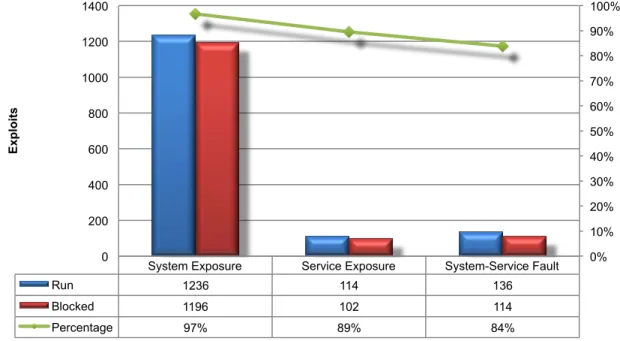
Finally, there are the attacks (often target initiated) which result in a system or service-level fault that
crashes the targeted service or application and requires administrative action to restart the service or
reboot the system. These attacks do not enable the attacker to execute arbitrary commands. Still, the
resulting impact to the business could be severe, as the attacker could crash a protected system or
service.
Figure 2: Product Coverage by Impact
2.3
COVERAGE BY DATE
This graph provides insight into whether a vendor ages out protection signatures aggressively in order
to preserve performance levels. It also reveals where a product lags behind in protection for the most
recent vulnerabilities. Further details are available in the NSS Labs
Exposure Report
for this product.
System Exposure Service Exposure System-Service Fault
Run 1236 114 136
Blocked 1196 102 114
Percentage 97% 89% 84%
0% 10% 20% 30% 40% 50% 60% 70% 80% 90% 100%
0 200 400 600 800 1000 1200 1400
Figure 3: Product Coverage by Date
2.4
COVERAGE BY TARGET VENDOR
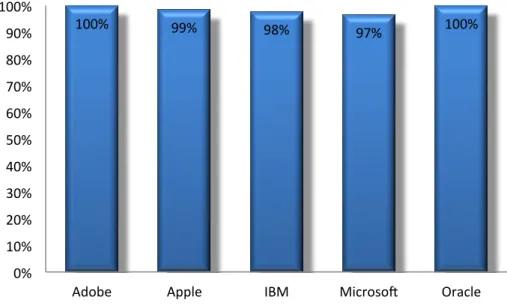
The NSS Labs exploit library covers a wide range of protocols and applications representing a wide
range of software vendors. This graph highlights the coverage offered by the McAfee Network Security
Platform (NSP) M-8000 for the top 5 vendor targets (out of more than 70) represented in this round of
testing. Further details are available in the NSS Labs
Exposure Report
for this product.
Figure 4: Product Coverage by Target Vendor
2.5
COVERAGE BY RESULT
These tests determine the protection provided against different types of exploits based on the
intended action of those exploits, e.g. arbitrary execution, buffer overflow, code injection, cross-site
scripting, directory traversal, privilege escalation, etc. Further details are available in the NSS Labs
Exposure Report
for this product.
93% 96% 94% 97% 94% 92% 96% 94%
0% 10% 20% 30% 40% 50% 60% 70% 80% 90% 100%
2004 2005 2006 2007 2008 2009 2010 2011
Vulnerability Disclosure by CVE (Year)
Caught % Missed %
100%
99%
98%
97%
100%
0%
10%
20%
30%
40%
50%
60%
70%
80%
90%
100%
2.6
COVERAGE BY TARGET TYPE
These tests determine the protection provided against different types of exploits based on the target
environment, e.g. Web server, Web browser, database, ActiveX, Java, browser plugins, etc. Further
details are available in the NSS Labs
Exposure Report
for this product.
3
E
VASIONS AND
A
TTACK
L
EAKAGE
3.1
RESISTANCE TO EVASION
Evasion techniques are means of disguising and modifying attacks at the point of delivery in order to
avoid detection and blocking by security products. Missing a particular type of evasion means an
attacker can use an entire class of exploits for which the device is supposed to have protection,
rendering it virtually useless. Many of the techniques used in this test have been widely known for
years and should be considered minimum requirements for the IPS product category.
Providing exploit protection results without fully factoring in evasion can be misleading since the more
different
types of evasion that are missed—IP Fragmentation, TCP Segmentation, RPC Fragmentation,
URL Obfuscation, and FTP Evasion—the worse the situation. For example, it is better to miss all
techniques in one evasion category (say, FTP evasion) than one technique in each category.
Furthermore, evasions operating at the lower layers of the network stack, such as IP Fragmentation or
TCP Segmentation, will have more of a negative impact on security effectiveness than those operating
at the upper layers (HTTP or FTP obfuscation), since lower-level evasions will impact potentially a
wider number of exploits. Thus, missing TCP segmentation is a much more serious issue than missing
FTP obfuscation.
T
EST
P
ROCEDURE
R
ESULT
3.1.1
IP PACKET FRAGMENTATION
100%
3.1.2
TCP STREAM SEGMENTATION
100%
3.1.3
RPC FRAGMENTATION
100%
3.1.4
SMB & NETBIOS EVASIONS
100%
3.1.5
URL OBFUSCATION
100%
3.1.6
HTML OBFUSCATION
100%
3.1.7
PAYLOAD ENCODING
100%
3.1.8
FTP EVASION
100%
3.1.9
IP FRAGMENTATION + TCP SEGMENTATION
100%
3.1.10
IP FRAGMENTATION + MSRPC FRAGMENTATION
100%
3.1.11
IP FRAGMENTATION + SMB EVASIONS
100%
3.1.12
TCP SEGMENTATION + SMB / NETBIOS EVASIONS
100%
Resistance to known evasion techniques was perfect, with the McAfee Network Security Platform
(NSP) M-8000 6.1 achieving a 100% score across the board in all related tests.
IP fragmentation,
TCP
stream segmentation, RPC fragmentation, URL obfuscation, HTML Evasion
and
FTP evasion
all failed to
trick the product into ignoring valid attacks. Not only were the fragmented and obfuscated attacks
blocked successfully, but all of them were also decoded accurately.
3.2
ATTACK LEAKAGE
This test determines the behavior of the state engine under load. All NIPS devices have to make the
choice whether to risk denying legitimate traffic or allowing malicious traffic once they run low on
resources. Dropping new connections when resources (such as state table memory) are low, or when
traffic loads exceed the device capacity will theoretically block legitimate traffic, but maintain state on
existing connections (preventing attack leakage).
By default, the McAfee Network Security Platform (NSP) M-8000 6.1 claims to allow new connections
when resources are low, or when traffic loads exceed the device capacity. NSS Labs engineers will
ensure that all devices are configured to fail closed (i.e. to drop/block traffic when resources are
exhausted) regardless of the vendor’s default configuration.
T
EST
P
ROCEDURE
R
ESULTS
3.2.1
STATE PRESERVATION/ATTACK LEAKAGE - NORMAL LOAD
PASS
3.2.2
STATE PRESERVATION/ATTACK LEAKAGE - MAXIMUM LOAD
PASS
3.2.3
DROP TRAFFIC - MAXIMUM EXCEEDED
PASS
4
P
ERFORMANCE
There is frequently a off between security effectiveness and performance. Because of this
trade-off, it is important to judge a product’s security effectiveness within the context of its performance
(and
vice versa
). This ensures that new security protections do not adversely impact performance and
security shortcuts are not taken to maintain or improve performance.
Product
TCP
Connections
per Second
Concurrent TCP
Connections
Vendor
Claimed
Throughput
Rated
Throughput
McAfee Network Security
Platform (NSP) M-8000 6.1
271,000
5,167,000
10,000 Mbps
12,300 Mbps
4.1
CONNECTION DYNAMICS – CONCURRENCY AND CONNECTION RATES
The aim of these tests is to stress the detection engine and determine how the sensor copes with large
numbers of TCP connections per second, application layer transactions per second, and concurrent
open connections. All packets contain valid payload and address data and these tests provide an
excellent representation of a live network at various connection/transaction rates.
Note that in all tests, the following critical “breaking points”—where the final measurements are
taken—are used:
Excessive concurrent TCP connections -
latency within the NIPS is causing unacceptable increase
in open connections on the server-side.
Excessive response time for HTTP transactions/SMTP sessions -
latency within the NIPS is
causing excessive delays and increased response time to the client.
Unsuccessful HTTP transactions/SMTP sessions –
normally, there should be zero unsuccessful
transactions. Once these appear, it is an indication that excessive latency within the NIPS is causing
connections to time out.
Figure 5: Concurrency and Connection Rates
without data with data
TCP Connections/Sec 271,000
HTTP Connections/Sec 214,000
HTTP Transactions/Sec 396,000
Concurrent TCP Conns 5,167,000 5,167,000
271,000
214,000
396,000
5,167,000 5,167,000
0 50,000 100,000 150,000 200,000 250,000 300,000 350,000 400,000 450,000 0 1,000,000 2,000,000 3,000,000 4,000,000 5,000,000 6,000,000 Con n e ction s / S e con d Con cu rr e n t Con n e ction s
4.2
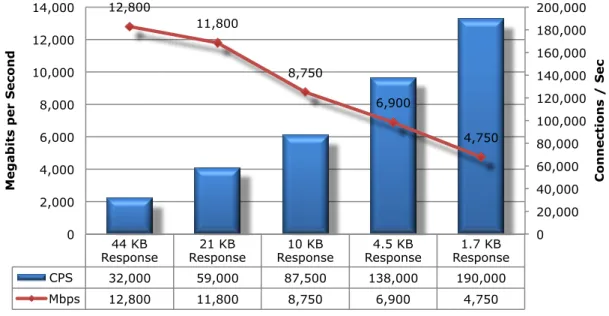
HTTP CONNECTIONS PER SECOND AND CAPACITY
These tests aim to stress the HTTP detection engine in order to determine how the sensor copes with
detecting and blocking exploits under network loads of varying average packet size and varying
connections per second. By creating genuine session-based traffic with varying session lengths, the
sensor is forced to track valid TCP sessions, thus ensuring a higher workload than for simple
packet-based background traffic.
Each transaction consists of a single HTTP GET request and there are no transaction delays (i.e. the
web server responds immediately to all requests). All packets contain valid payload (a mix of binary
and ASCII objects) and address data. This test provides an excellent representation of a live network
(albeit one biased towards HTTP traffic) at various network loads.
Figure 6: HTTP Connections per Second and Capacity
There is frequently a off between security effectiveness and performance. Because of this
trade-off, it is important to judge a product’s security effectiveness within the context of its performance
(and
vice versa
). This ensures that new security protections do not adversely impact performance and
security shortcuts are not taken to maintain or improve performance.
4.3
APPLICATION AVERAGE RESPONSE TIME - HTTP (AT 90% MAX LOAD)
TEST ID
MILLISECONDS
4.3.1
2.500 CONNECTIONS PER SECOND – 44KBYTE RESPONSE
4.2
4.3.2
5,000 CONNECTIONS PER SECOND – 21KBYTE RESPONSE
3.2
4.3.3
10,000 CONNECTIONS PER SECOND – 10KBYTE RESPONSE
3.5
4.3.4
20,000 CONNECTIONS PER SECOND – 4.5KBYTE RESPONSE
4.0
4.3.5
40,000 CONNECTIONS PER SECOND – 1.7KBYTE RESPONSE
5.2
44 KB
Response Response 21 KB Response 10 KB Response 4.5 KB Response 1.7 KB
CPS 32,000 59,000 87,500 138,000 190,000
Mbps 12,800 11,800 8,750 6,900 4,750
12,800
11,800
8,750
6,900
4,750
0 20,000 40,000 60,000 80,000 100,000 120,000 140,000 160,000 180,000 200,000
0 2,000 4,000 6,000 8,000 10,000 12,000 14,000
Con
n
e
ction
s /
S
e
c
Megabits per Seco
4.4
HTTP CONNECTIONS PER SECOND AND CAPACITY (WITH DELAYS)
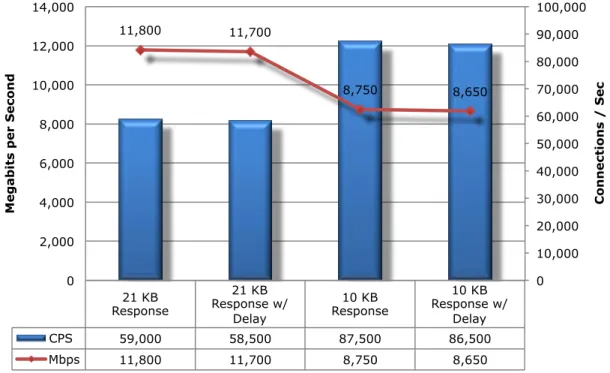
Typical user behavior introduces delays between requests and reponses, e.g. “think time”, as users
read web pages and decide which links to click next. This group of tests is identical to the previous
group except that these include a 10 second delay in the server response for each transaction. This
has the effect of maintaining a high number of open connections throughout the test, thus forcing the
sensor to utilize additional resources to track those connections.
Figure 7: HTTP Connections per Second and Capacity (With Delays)
4.5
UDP THROUGHPUT
The aim of this test is to determine the raw packet processing capability of each in-line port pair of the
device only. It is not real world, and can be misleading. It is included here primarily for legacy
purposes.
This traffic does not attempt to simulate any form of “real-world” network condition. No TCP sessions
are created during this test, and there is very little for the detection engine to do in the way of
protocol analysis (although each vendor will be required to write a signature to detect the test packets
to ensure that they are being passed through the detection engine and not “fast-tracked” from the
inbound to outbound port).
21 KB Response
21 KB Response w/
Delay
10 KB Response
10 KB Response w/
Delay
CPS 59,000 58,500 87,500 86,500
Mbps 11,800 11,700 8,750 8,650
11,800 11,700
8,750 8,650
0 10,000 20,000 30,000 40,000 50,000 60,000 70,000 80,000 90,000 100,000
0 2,000 4,000 6,000 8,000 10,000 12,000 14,000
Con
n
e
ction
s /
S
e
c
Megabits per Seco
Figure 8: UDP Throughput
4.6
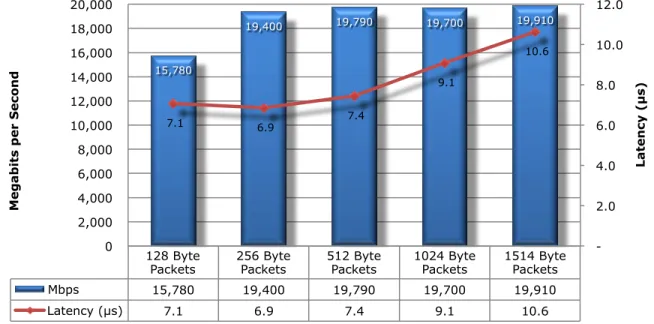
LATENCY – UDP
Network Intrusion Prevention Systems that introduce high levels of latency lead to unacceptable
response times for users, especially where multiple security devices are placed in the data path. These
results show the latency (in microseconds) as recorded during the UDP throughput tests at 90% of
maximum load.
TEST ID
MICROSECONDS
4.6.1
128 BYTE PACKETS
7.1
4.6.2
256 BYTE PACKETS
6.9
4.6.3
512 BYTE PACKETS
7.4
4.6.4
1024 BYTE PACKETS
9.1
4.6.5
1514 BYTE PACKETS
10.6
128 Byte
Packets 256 Byte Packets 512 Byte Packets 1024 Byte Packets 1514 Byte Packets
Mbps 15,780 19,400 19,790 19,700 19,910
Latency (µs) 7.1 6.9 7.4 9.1 10.6
15,780
19,400 19,790 19,700 19,910
7.1 6.9 7.4
9.1
10.6
- 2.0 4.0 6.0 8.0 10.0 12.0
0 2,000 4,000 6,000 8,000 10,000 12,000 14,000 16,000 18,000 20,000
Latency (µs)
Megabits per Seco
4.7
REAL-WORLD TRAFFIC MIXES
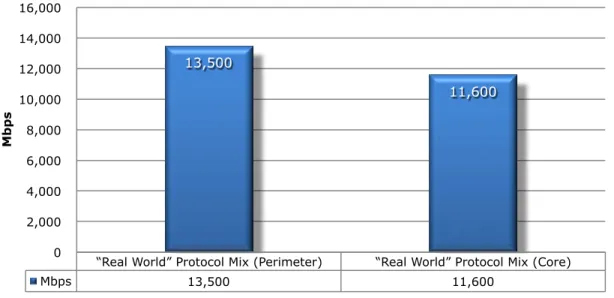
The aim of this test is to measure the performance of the device under test in a “real world”
environment by introducing additional protocols and real content, while still maintaining a precisely
repeatable and consistent background traffic load. Different protocol mixes are utilized based on the
location of the device under test to reflect real use cases. For details about real world traffic protocol
types and percentages, see the NSS Labs IPS Test Methodology, available at www.nsslabs.com.
Figure 9: Real-World Traffic Mixes
“Real World” Protocol Mix (Perimeter) “Real World” Protocol Mix (Core)
Mbps 13,500 11,600
13,500
11,600
0 2,000 4,000 6,000 8,000 10,000 12,000 14,000 16,000
5
S
TABILITY
&
R
ELIABILITY
Long-term stability is particularly important for an in-line device, where failure can produce network
outages. These tests verify the stability of the DUT along with its ability to maintain security
effectiveness while under normal load and while passing malicious traffic. Products that are not able to
sustain legitimate traffic (or crash) while under hostile attack will not pass.
The DUT is required to remain operational and stable throughout these tests, and to block 100 per
cent of previously blocked traffic, raising an alert for each. If any non-allowed traffic passes
successfully - caused by either the volume of traffic or the DUT failing open for any reason - this will
result in a FAIL.
TEST PROCEDURE
RESULT
5.1
ATTACK DETECTION/BLOCKING - NORMAL LOAD
P
ASS5.2
PASS LEGITIMATE TRAFFIC - NORMAL LOAD
P
ASS5.3
BLOCKING UNDER EXTENDED ATTACK
P
ASS5.4
PASSING LEGITIMATE TRAFFIC UNDER EXTENDED ATTACK
P
ASS5.5
PROTOCOL FUZZING & MUTATION
P
ASS5.6
POWER FAIL
P
ASS5.7
REDUNDANCY
O
PTIONAL6
M
ANAGEMENT
&
C
ONFIGURATION
6.1
GENERAL
In addition to the specific tests noted below, NSS has executed an in-depth technical evaluation of all
the main features and capabilities of the enterprise management system offered by the vendor. This
will typically be offered as an extra-cost option.
Question Answer
Transparent Mode - Is DUT capable of running in transparent bridge mode, with no IP address assigned to detection ports. Detection ports should ignore all direct connection attempts.
Yes
Routed Mode - Is DUT capable of running in full routed mode, with IP address assigned to detection ports.
Yes Management Port - Does DUT feature a dedicated management port, separate from detection ports. Although this is the preferred configuration, lack of a management port (requiring DUT to be managed via one of the detection ports) will not be an issue providing management connection and communication is securely encrypted.
User name/password are used and all communications are securely encrypted.
Management Protocol – Is connection from management console to DUT protected by a minimum of a user name/password combination or multi-factor authentication system, and are all communications securely encrypted. Where a three-tier management architecture is employed, all communication between console and management server(s), and between management server(s) and sensor(s) should be securely encrypted.
Yes, Role-based Access Control (RBAC) is supported
Authentication – Is access to management console protected by a granular user authentication system which allows for separation of read only and read-write access, preventing users who require reporting access only from modifying device parameters, etc. No access to administrative functions should be permitted (using either direct or centralized administration capabilities) without proper authentication.
Yes, RBAC is supported as above
Enterprise Authentication – Is access to management console protected by a granular user authentication system that allows for restriction of individual users to specific devices, ports, reports, and security policies. Authenticated users should be unable to access devices/ports/policies/alerts/reports/etc. restricted to other users of the system.
SSH and CLI are provided
Direct Device Management – Is direct access to the DUT provided (either via command line or Web interface) for single-device management.
Yes
Centralized Device Management – Is a centralized management system provided to manage one or more sensors from a single point, including centralized device configuration, policy definition, alert handling and reporting for all sensors under the control of the management system. This should be scalable to large numbers of sensors.
Pass-Through Mode – Is it possible to place the DUT into a mode whereby all traffic is allowed to pass through the device, but data will be logged according to the policy in place at the time (thus, the DUT will log alerts and state whether the packets would have been dropped, session terminated, etc., but without enforcing those actions on the traffic processed). This should be via a single system-wide operation via the management console or DUT command line (i.e. it is not permitted to achieve this by requiring that all BLOCK signatures be amended to LOG ONLY, or by switching policies - it must be achieved without affecting the current policy in force).
Yes
IPS Signature Update - Can vendor demonstrate access to a vulnerability research capability (either in-house or via a recognized third-party) that is able to provide timely and accurate signature updates at regular intervals.
Yes
Secure Device Registration – Is initial registration of DUT to central management console performed in a fully secure manner (it is permitted to offer a less secure/rapid option, but this should not be the default).
Yes, completely using secure channel
6.2
POLICY
Question Answer
Device Configuration - Does management system provide the means to configure one or more sensors from a central location, assigning signatures, sensor settings, etc.
Yes
Policy Definition - Does management system provide the means to define and save multiple security policies, consisting of: general sensor configuration, system-wide parameters, signatures enabled/disabled, actions to take when malicious traffic discovered.
Yes, user can define multiple policies on the McAfee Network Security Manager (NSM)
Recommended Settings - Does vendor provide a default policy or suite of recommended IPS settings which comprises the optimum configuration for a typical network (including which signatures are enabled/disabled, which are enabled in blocking mode, required actions, etc.)
Yes, NSM provides default policies that an administrator can use
Custom Attack Signatures – Is it possible for the administrator to define custom IPS signatures for use in standard policies? If so, what for do these take (Snort compatible, etc.)
Yes, an administrator can define User-defined Signatures (UDS) and can also import certain SNORT signatures. Bulk Operations – Is it possible to search quickly and easily for
individual signatures or groups/classes of signatures, and subsequently to apply one or more operations to an entire group in a single operation (for example, to enable or disable a group of signatures, or to switch a group from block mode to log mode, etc.)
Yes, bulk edits are supported
Granularity – Is the DUT capable of blocking or creating exceptions based on IP address, application, user/group ID, protocol, VLAN tag, etc. (i.e. never block HTTP traffic between two specific IP addresses, always block FTP traffic to one specific IP address, etc.).
Yes, using Layer 2 forwarding, IPS Bypass ACL’s attack filters
Policy Association - Once policies have been defined, is it possible to associate them with specific devices or groups of devices.
Yes, via NSM Inheritance – Is it possible to create groups and sub-groups of
devices such that sub-groups can inherit certain aspects of configuration and policy definition from parent groups.
Yes, via NSM
Virtualization - Once policies have been defined, is it possible to associate them with specific “virtual” devices or groups of devices, comprising an entire DUT, individual ports, port groups, IP address range, subnet or VLAN.
Policy Deployment - Once policies have been defined, is it possible to distribute them to the appropriate device(s), virtual device(s), or groups of devices in a single operation.
Yes, via NSM
Policy Auditing - Are changes to policies logged centrally. Log data should include at a minimum the date/time the changes were made, and the identity of the user who made them. If possible the system should record the actual changes.
Yes, NSM provides differences between two versions of the same policy and also allows users to rollback to previous versions of policy
Policy Version Control - Are changes to policies recorded by saving a version of the policy before each change. Is it possible to roll back to a previous version of any policy via a single operation.
Yes, NSM provides differences between two versions of the same policy and also allows users to rollback to previous versions of policy
6.3
ALERT HANDLING
Question Answer
Generic Log Events - Does DUT record log entries for the following events: detection of malicious traffic, termination of a session, successful authentication by administrator, unsuccessful authentication by administrator, policy changed, policy deployed, hardware failure, power cycle
Yes, the sensor supports these generic log events.
Log Location - Are log events logged on the DUT initially, in a secure manner, and subsequently transmitted to a central console/management server for permanent storage.
Yes
Communication Interruption - Where communications between sensor and console/management server are interrupted, how much storage capacity is available on the DUT to store log data (in days/weeks). If it is not possible to restore communication in a timely manner, once the local logs are full, the DUT should either (1) continue passing traffic and overwrite oldest log entries, or (2) stop passing traffic. Which option is employed, and is it configurable by the administrator.
By default sensor ignores the newer log entries and continues to pass traffic. There is no option to stop passing of traffic.
Log Flooding – Are mechanisms in place (aggregation) to prevent the DUT from flooding the management server/console with too many events of the same type in a short interval. Is it possible to disable aggregation/flood protection completely for testing purposes to ensure NSS can see every individual alert.
Yes, McAfee uses aggregation in such scenarios. Aggregation can be disabled.
Alerts - Does DUT record log entries each time it detects malicious traffic. What information is recorded?
Yes. Alert Accuracy - Does DUT record log entries that are accurate and
human readable without having to use additional reference material. The DUT should attempt to minimize the number of alerts raised for a single event wherever possible.
Yes, log entries are accurate and human readable. NSP minimizes alerts raised
Centralized Alerts – Are all alerts delivered to, and handled by, a single, central, management console. Is it possible to view all alerts globally, or select alerts from individual devices (logical or physical).
Yes, alerts are handled by the central manager. Alerts can be viewed globally Alert Delivery Mechanism - Does the DUT deliver alerts in a timely
manner to a central database for permanent storage, central console for a real-time display, and SMTP server for e-mail alerts.
Yes. NSP offers real-time alert mechanisms, as opposed to polling for alerts.
Alert Actions - On detecting malicious traffic, what actions can the DUT perform e.g. Ignore, Log only, Allow, Block, Drop packet (no reset), Drop session (no reset), E-mail administrator, send TCP reset (or ICMP redirect) to source only, Send TCP reset (or ICMP redirect) to destination only, Send TCP reset (or ICMP redirect) to both source and destination, Reconfigure firewall, Reconfigure switch to isolate/quarantine offending port, Page administrator
NSP offers all of the outlined alert actions. Reconfiguration of external firewall and Reconfigure of switch is possible as well. NSP can quarantine a host using the McAfee NAC agent.
Forensic Analysis - Can DUT capture individual packets, a range of packets, or an entire session where required (globally, or on a rule-by-rule basis)
Yes. NSP provide full forensic analysis including packet level.
Summarize Alerts – Can the central console provide the ability to select a particular piece of data from an alert and summarize on that data field (i.e. select a source IP address and view all alerts for that source IP). Alternatively, it should be possible to construct data filters manually in a search form and summarize on the specified search criteria. The preferred scenario is to offer both of these options.
Yes, NSM provides both. It offers dashboards, dynamic drill down
functionality as well as ability to filter on a particular data field in addition to manual filters.
View Alert Detail – Does the central console provide the ability to select an individual alert and view the following information at a minimum: Detailed alert data, Detailed exploit data (description of the exploit research), Signature/rule, Remediation data/preventative action
Yes. NSM offers detailed alert data, signature and remediation actions.
View Policy - Having selected an alert, does the system provide the ability to access directly the policy and rule that triggered the event in order to view and/or modify the policy for further fine-tuning.
Yes. Use can view triggering events and fine-tuning.
View Packet Contents – Does the central console provide the ability to select an individual alert and view the contents of the trigger packet or context data for the exploit.
Yes, packets contents can be viewed for an individual alert
Alert Suppression - The central console should provide the ability to create exception filters based on alert data to eliminate further alerts which match the specified criteria (i.e. same alert ID from same source IP). This does not disable detection, logging or blocking, but merely excludes alerts from the console display.
Yes, the ability to create exception filters is supported
Correlation (Automatic) – Does the system provide the means to infer connections between multiple alerts and group them together as incidents automatically.
Yes, the Incident Generator offers this
Correlation (Manual) – Does the system provide the means for the administrator to infer connections between multiple alerts and group them together as incidents manually.
Yes, Incident Generator allows manual correlation.
Incident Workflow – Does the system provide the ability to annotate and track incidents to resolution.
Yes
6.4
REPORTING
Question Answer
Centralized Reports – Is the system capable of reporting on all alerts from a single, central, management console. From that console, is it possible to report all alerts globally, or to report on alerts from individual devices (logical or physical).
Yes, NSM provides reporting on all alerts from single console. NSM provide reporting on alerts globally as well as individual devices.
Built In Reports - Does system provide built in reports covering typical requirements such as list of top attacks, top source/destination IP addresses, top targets, etc.
NSM provide multiple reports from high level executive summaries to detailed including top attacks, top
Source/Destination IP, targets. Custom Reports – Does the system offer a report generator
providing the ability to construct complex data filters in a search form and summarize alerts on the specified search criteria.
Yes, NSM provides granular reports as well as ability to create complex data filters in a search form with a summary of alerts on each search criteria Saved Reports - Having defined a custom report filter, is it possible
to save it for subsequent recall.
Yes, NSM reports can be saved and retrieved at a later time.
Scheduled Reports – Is it possible to schedule saved reports for regular unattended runs. If so, how is the output saved (as HTML or PDF, for example). Is it possible to publish reports to a central FTP/Web server, and/or e-mail reports to specified recipients.
Yes, reports can be scheduled. They can be saved in a variety of formats including HTML, PDF). Reports can be generated in real time or according to a pre-determined schedule, in HTML and/or PDF format. Scheduled reports can be saved locally on the Manager or distributed automatically via email. Each report can be distributed to a
customized group of users. The McAfee Network Security Solution database can be integrated with external reporting tools like Crystal Reports as well. Log File Maintenance - Does system provide for automatic rotation
of log files, archiving, restoring from archive, and reporting from archived logs.
Yes, alert data, including packet logs, can be retained by the McAfee Network Security Solution Manager for a customizable period. The Manager can be configured to purge the old data automatically at pre-scheduled intervals. McAfee Network Security Solution Manager’s database schema is open and published. SQL queries can be used to extract data from the database for off-line archival. The offoff-line data can also be restored, as necessary, in order to analyze it or report on it. Data from the Manager can be exported in several different formats, including CSV, or it can be accessed using ODBC.
7
T
OTAL
C
OST OF
O
WNERSHIP
(TCO)
IPS solutions can be complex projects with several factors affecting the overall cost of deployment,
maintenance and upkeep. All of these should be considered over the course of the useful life of the
solution.
•
Product Purchase
– the cost of acquisition.
•
Product Maintenance
– the fees paid to the vendor (including software and hardware
support, maintenance and signature updates.)
•
Installation
– the time required to take the device out of the box, configure it, put it into the
network, apply updates and patches, initial tuning, and set up desired logging and reporting.
•
Upkeep
– the time required to apply periodic updates and patches from vendors, including
hardware, software, and protection (signature/filter/rules) updates.
•
Tuning
– the time required to configure the policy such that the best possible protection is
applied while reducing or eliminating false alarms and false positives.
7.1
LABOR PER PRODUCT (IN HOURS)
This table estimates the annual labor required to maintain each device. NSS Labs’ assumptions are
based upon the time required by an experienced security engineer ($75 per hour fully loaded,)
allowing is to hold constant the talent cost, and measure only the difference in time required to tune.
Readers should substitute their own costs to obtain accurate TCO figures.
Product
Installation (Hrs) Upkeep / Year (Hrs)
Tuning / Year (Hrs)
McAfee Network Security Platform
(NSP) M-8000 v6.1
8
24
12
7.2
PURCHASE PRICE AND TOTAL COST OF OWNERSHIP
Calculations are based on vendor-provided pricing information. Where possible, the 24/7 maintenance
and support option with 24-hour replacement is utilized since this is the option typically selected by
enterprise customers. Prices are for single device management and maintenance only; costs for
enterprise management solutions will be extra.
Product
Purchase
Maintenance /
year
1 Year
TCO
2 Year
TCO
3 Year
TCO
McAfee Network Security
Platform (NSP) M-8000 v6.1
$229,995 $41,399 $274,694 $318,793 $362,892•
Year One TCO was determined by multiplying the Labor Rate ($75 per hour fully loaded) x
(Installation + Upkeep + Tuning) and then adding the Purchase Price + Maintenance.
•
Year Two TCO was determined by multiplying the Labor Rate ($75 per hour fully loaded) x
(Upkeep + Tuning) and then adding Year One TCO.
•
Year Three TCO was determined by multiplying the Labor Rate ($75per hour fully loaded x
(Upkeep + Tuning) and then adding Year Two TCO.
7.3
VALUE: COST PER MBPS AND EXPLOIT BLOCKED
There is a clear difference between price and value. The least expensive product does not necessarily
offer the greatest value if it blocks fewer exploits than competitors. The best value is a product with a
low TCO and high level of secure throughput (security effectiveness x performance).
The following table illustrates the relative cost per unit of work performed: Mbps-Protected
Product
Protection
Throughput
3 Year TCO
Price / Mbps-Protected
McAfee Network Security
Platform (NSP) M-8000 v6.1
95.0% 12,300 $362,892 $31Price per Protected Mbps was calculated by taking the Three-Year TCO and dividing it by the product
of Protection x Throughput. Three-Year TCO/(Protection x Throughput) = Price/Mbps-Protected.
8
D
ETAILED
P
RODUCT
S
CORECARD
The following chart depicts the status of each test with quantitative results where applicable. A
separate product Exposure Report details specific vulnerabilities that are not protected.
Test ID Description Result
2 Exploit Block Rate
2.1 Coverage by Attack Vector
2.1.1 Attacker Initiated 91%
2.1.2 Target Initiated 99%
2.1.3 Combined Total 95.0%
2.2 Coverage by Impact Type
2.2.1 System Exposure 97%
2.2.2 Service Exposure 89%
2.2.3 System or Service Fault 84%
2.3 Coverage by Date
2.3.1 2004 93%
2.3.2 2005 96%
2.3.3 2006 94%
2.3.4 2007 97%
2.3.5 2008 94%
2.3.6 2009 92%
2.3.7 2010 96%
2.3.8 2011 94%
2.4 Coverage by Target Vendor Contact NSS
2.5 Coverage by Result Contact NSS
2.6 Coverage by Target Type Contact NSS
3 Evasions and Attack Leakage
3.1 Resistance to Evasion 100%
3.1.1 IP Packet Fragmentation 100%
3.1.1.1 Ordered 8 byte fragments 100%
3.1.1.2 Ordered 16 byte fragments 100%
3.1.1.3 Ordered 24 byte fragments 100%
3.1.1.4 Ordered 32 byte fragments 100%
3.1.1.5 Out of order 8 byte fragments 100% 3.1.1.6 Ordered 8 byte fragments, duplicate last packet 100% 3.1.1.7 Out of order 8 byte fragments, duplicate last packet 100% 3.1.1.8 Ordered 8 byte fragments, reorder fragments in reverse 100% 3.1.1.9 Ordered 16 byte fragments, fragment overlap (favor new) 100% 3.1.1.10 Ordered 16 byte fragments, fragment overlap (favor old) 100% 3.1.1.11 Out of order 8 byte fragments, interleaved duplicate packets scheduled
for later delivery 100%
3.1.1.12 Ordered 8 byte fragments, duplicate packet with an incrementing
DWORD in the options field. The duplicate packet has random payload. 100% 3.1.1.13 Ordered 16 byte fragments, duplicate packet with an incrementing
DWORD in the options field. The duplicate packet has random payload. 100% 3.1.1.14 Ordered 24 byte fragments, duplicate packet with an incrementing
DWORD in the options field. The duplicate packet has random payload. 100% 3.1.1.15 Ordered 32 byte fragments, duplicate packet with an incrementing
DWORD in the options field. The duplicate packet has random payload. 100%
3.1.2 TCP Stream Segmentation 100%
3.1.2.1 Ordered 1 byte segments, interleaved duplicate segments with invalid
TCP checksums 100%
3.1.2.2 Ordered 1 byte segments, interleaved duplicate segments with null TCP
Test ID Description Result
3.1.2.3 Ordered 1 byte segments, interleaved duplicate segments with requests
to resync sequence numbers mid-stream 100% 3.1.2.4 Ordered 1 byte segments, duplicate last packet 100% 3.1.2.5 Ordered 2 byte segments, segment overlap (favor new) 100% 3.1.2.6 Ordered 1 byte segments, interleaved duplicate segments with
out-of-window sequence numbers 100%
3.1.2.7 Out of order 1 byte segments 100%
3.1.2.8 Out of order 1 byte segments, interleaved duplicate segments with
faked retransmits 100%
3.1.2.9 Ordered 1 byte segments, segment overlap (favor new) 100% 3.1.2.10 Out of order 1 byte segments, PAWS elimination (interleaved duplicate
segments with older TCP timestamp options) 100% 3.1.2.11 Ordered 16 byte segments, segment overlap (favor new (Unix)) 100%
3.1.2.12 Ordered 32 byte segments 100%
3.1.2.13 Ordered 64 byte segments 100%
3.1.2.14 Ordered 128 byte segments 100%
3.1.2.15 Ordered 256 byte segments 100%
3.1.2.16 Ordered 512 byte segments 100%
3.1.2.17 Ordered 1024 byte segments 100%
3.1.2.18 Ordered 2048 byte segments (sending MSRPC request with exploit) 100% 3.1.2.19 Reverse Ordered 256 byte segments, segment overlap (favor new) with
random data 100%
3.1.2.20 Reverse Ordered 512 byte segments, segment overlap (favor new) with
random data 100%
3.1.2.21 Reverse Ordered 1024 byte segments, segment overlap (favor new)
with random data 100%
3.1.2.22 Reverse Ordered 2048 byte segments, segment overlap (favor new)
with random data 100%
3.1.2.23
Reverse Ordered 1024 byte segments, segment overlap (favor new) with random data + 256 decoy TCP connections are opened from the same TCP port as the exploit connection will use. Each connection will send 32-544 random bytes + TCP timestamps echo reply value is sent in the wrong endianness (i.e. Big Endian instead of Little Endian)
N/A
3.1.2.24
Out of order 1024 byte segments, segment overlap (favor new) with random data, Initial TCP sequence number is set to 0xffffffff - 4294967295
100% 3.1.2.25
Out of order 2048 byte segments, segment overlap (favor new) with random data, Initial TCP sequence number is set to 0xffffffff -
4294967295 100%
3.1.3 RPC Fragmentation 100%
3.1.3.1 One-byte fragmentation (ONC) 100%
3.1.3.2 Two-byte fragmentation (ONC) 100%
3.1.3.3 All fragments, including Last Fragment (LF) will be sent in one TCP
segment (ONC) 100%
3.1.3.4 All frags except Last Fragment (LF) will be sent in one TCP segment. LF
will be sent in separate TCP seg (ONC) 100% 3.1.3.5 One RPC fragment will be sent per TCP segment (ONC) 100% 3.1.3.6 One LF split over more than one TCP segment. In this case no RPC
fragmentation is performed (ONC) 100% 3.1.3.7 Canvas Reference Implementation Level 1 (MS) 100% 3.1.3.8 Canvas Reference Implementation Level 2 (MS) 100% 3.1.3.9 Canvas Reference Implementation Level 3 (MS) 100% 3.1.3.10 Canvas Reference Implementation Level 4 (MS) 100% 3.1.3.11 Canvas Reference Implementation Level 5 (MS) 100% 3.1.3.12 Canvas Reference Implementation Level 6 (MS) 100% 3.1.3.13 Canvas Reference Implementation Level 7 (MS) 100%
Test ID Description Result
3.1.3.14 Canvas Reference Implementation Level 8 (MS) 100% 3.1.3.15 Canvas Reference Implementation Level 9 (MS) 100% 3.1.3.16 Canvas Reference Implementation Level 10 (MS) 100% 3.1.3.17 MSRPC messages are sent in the big endian byte order, 16 MSRPC fragments are sent in the same lower layer message, MSRPC requests
are fragmented to contain at most 2048 bytes of payload
100%
3.1.3.18 MSRPC messages are sent in the big endian byte order, 32 MSRPC fragments are sent in the same lower layer message, MSRPC requests are fragmented to contain at most 2048 bytes of payload
100%
3.1.3.19 MSRPC messages are sent in the big endian byte order, 64 MSRPC fragments are sent in the same lower layer message, MSRPC requests are fragmented to contain at most 2048 bytes of payload
100%
3.1.3.20 MSRPC messages are sent in the big endian byte order, 128 MSRPC fragments are sent in the same lower layer message, MSRPC requests are fragmented to contain at most 2048 bytes of payload
100%
3.1.3.21 MSRPC messages are sent in the big endian byte order, 256 MSRPC fragments are sent in the same lower layer message, MSRPC requests are fragmented to contain at most 2048 bytes of payload
100%
3.1.3.22 MSRPC messages are sent in the big endian byte order, 512 MSRPC fragments are sent in the same lower layer message, MSRPC requests are fragmented to contain at most 2048 bytes of payload
100%
3.1.3.23 MSRPC messages are sent in the big endian byte order, 1024 MSRPC fragments are sent in the same lower layer message, MSRPC requests are fragmented to contain at most 2048 bytes of payload
100%
3.1.4 SMB & NetBIOS Evasions 100%
3.1.4.1 A chaffed NetBIOS message is sent before the first actual NetBIOS message. The chaff message is an unspecified NetBIOS message with HTTP GET request like payload
100%
3.1.4.2 A chaffed NetBIOS message is sent before the first actual NetBIOS message. The chaff message is an unspecified NetBIOS message with HTTP POST request like payload
100%
3.1.4.3 A chaffed NetBIOS message is sent before the first actual NetBIOS message. The chaff message is an unspecified NetBIOS message with MSRPC request like payload
100%
3.1.5 URL Obfuscation 100%
3.1.5.1 URL encoding - Level 1 (minimal) 100%
3.1.5.2 URL encoding - Level 2 100%
3.1.5.3 URL encoding - Level 3 100%
3.1.5.4 URL encoding - Level 4 100%
3.1.5.5 URL encoding - Level 5 100%
3.1.5.6 URL encoding - Level 6 100%
3.1.5.7 URL encoding - Level 7 100%
3.1.5.8 URL encoding - Level 8 (extreme) 100%
3.1.5.9 Directory Insertion 100%
3.1.5.10 Premature URL ending 100%
3.1.5.11 Long URL 100%
3.1.5.12 Fake parameter 100%
3.1.5.13 TAB separation 100%
3.1.5.14 Case sensitivity 100%
3.1.5.15 Windows \ delimiter 100%
3.1.5.16 Session splicing 100%
3.1.6 HTML Obfuscation 100%
3.1.6.1 UTF-16 character set encoding (big-endian) 100% 3.1.6.2 UTF-16 character set encoding (little-endian) 100% 3.1.6.3 UTF-32 character set encoding (big-endian) 100%
Test ID Description Result
3.1.6.4 UTF-32 character set encoding (little-endian) 100% 3.1.6.5 UTF-7 character set encoding 100% 3.1.6.6 Chunked encoding (random chunk size) 100% 3.1.6.7 Chunked encoding (fixed chunk size) 100%
3.1.6.8 Chunked encoding (chaffing) 100%
3.1.6.9 Compression (Deflate) 100%
3.1.6.10 Compression (Gzip) 100%
3.1.6.11 Base-64 Encoding 100%
3.1.6.12 Base-64 Encoding (shifting 1 bit) 100% 3.1.6.13 Base-64 Encoding (shifting 2 bits) 100%
3.1.6.14 Base-64 Encoding (chaffing) 100%
3.1.6.15 Combination UTF-7 + Gzip 100%
3.1.7 Payload Encoding 100%
3.1.7.1 x86/call4_dword_xor 100%
3.1.7.2 x86/fnstenv_mov 100%
3.1.7.3 x86/jmp_call_additive 100%
3.1.7.4 x86/shikata_ga_nai 100%
3.1.8 FTP Evasion 100%
3.1.8.1 Inserting spaces in FTP command lines 100% 3.1.8.2 Inserting non-text Telnet opcodes - Level 1 (minimal) 100% 3.1.8.3 Inserting non-text Telnet opcodes - Level 2 100% 3.1.8.4 Inserting non-text Telnet opcodes - Level 3 100% 3.1.8.5 Inserting non-text Telnet opcodes - Level 4 100% 3.1.8.6 Inserting non-text Telnet opcodes - Level 5 100% 3.1.8.7 Inserting non-text Telnet opcodes - Level 6 100% 3.1.8.8 Inserting non-text Telnet opcodes - Level 7 100% 3.1.8.9 Inserting non-text Telnet opcodes - Level 8 (extreme) 100% 3.1.9 IP Fragmentation + TCP Segmentation 100% 3.1.9.1 Ordered 8 byte fragments + Ordered TCP segments except that the last
segment comes first 100%
3.1.9.3 Ordered 24 byte fragments + Ordered TCP segments except that the
last segment comes first 100%
3.1.9.4 Ordered 32 byte fragments + Ordered TCP segments except that the
last segment comes first 100%
3.1.9.5
Ordered 8 byte fragments, duplicate packet with an incrementing DWORD in the options field. The duplicate packet has random payload + Reverse order TCP segments, segment overlap (favor new), Overlapping data is set to zero bytes
100%
3.1.9.6
Ordered 16 byte fragments, duplicate packet with an incrementing DWORD in the options field. The duplicate packet has random payload + Out of order TCP segments, segment overlap (favor new), Overlapping data is set to zero bytes
100%
3.1.9.7
Ordered 24 byte fragments, duplicate packet with an incrementing DWORD in the options field. The duplicate packet has random payload + Out of order TCP segments, segment overlap (favor new), Overlapping data is set to zero bytes
100%
3.1.9.8
Ordered 32 byte fragments, duplicate packet with an incrementing DWORD in the options field. The duplicate packet has random payload + Out of order TCP segments, segment overlap (favor new), Overlapping data is set to zero bytes
100%
3.1.9.9
Ordered 8 byte fragments, duplicate packet with an incrementing DWORD in the options field. The duplicate packet has random payload + Out of order TCP segments, segment overlap (favor new), Overlapping data is set to random alphanumeric
Test ID Description Result
3.1.9.10
Ordered 16 byte fragments, duplicate packet with an incrementing DWORD in the options field. The duplicate packet has random payload + Out of order TCP segments, segment overlap (favor new), Overlapping data is set to random alphanumeric
100%
3.1.9.12
Ordered 32 byte fragments, duplicate packet with an incrementing DWORD in the options field. The duplicate packet has random payload + Out of order TCP segments, segment overlap (favor new), Overlapping data is set to random alphanumeric
100%
3.1.9.13
Ordered 8 byte fragments, duplicate packet with an incrementing DWORD in the options field. The duplicate packet has random payload + Out of order TCP segments, segment overlap (favor new), Overlapping data is set to random bytes
100%
3.1.9.14
Ordered 16 byte fragments, duplicate packet with an incrementing DWORD in the options field. The duplicate packet has random payload + Out of order TCP segments, segment overlap (favor new), Overlapping data is set to random bytes
100%
3.1.9.15
Ordered 24 byte fragments, duplicate packet with an incrementing DWORD in the options field. The duplicate packet has random payload + Out of order TCP segments, segment overlap (favor new), Overlapping data is set to random bytes
100%
3.1.9.16
Ordered 32 byte fragments, duplicate packet with an incrementing DWORD in the options field. The duplicate packet has random payload + Out of order TCP segments, segment overlap (favor new), Overlapping data is set to random bytes
100% 3.1.10 IP Fragmentation + MSRPC Fragmentation 100%
3.1.10.1
Ordered 8 byte fragments, duplicate packet with an incrementing DWORD in the options field. The duplicate packet has a shuffled payload + MSRPC messages are sent in the big endian byte order with 8 MSRPC fragments sent in the same lower layer message. MSRPC requests are fragmented to contain at most 2048 bytes of payload.
100%
3.1.10.2
Ordered 16 byte fragments, duplicate packet with an incrementing DWORD in the options field. The duplicate packet has a shuffled payload + MSRPC messages are sent in the big endian byte order with 16 MSRPC fragments sent in the same lower layer message. MSRPC requests are fragmented to contain at most 2048 bytes of payload.
100%
3.1.10.3
Ordered 32 byte fragments, duplicate packet with an incrementing DWORD in the options field. The duplicate packet has a shuffled payload + MSRPC messages are sent in the big endian byte order with 32 MSRPC fragments sent in the same lower layer message. MSRPC requests are fragmented to contain at most 64 bytes of payload.
100%
3.1.10.4
Ordered 64 byte fragments, duplicate packet with an incrementing DWORD in the options field. The duplicate packet has a shuffled payload + MSRPC messages are sent in the big endian byte order with 64 MSRPC fragments sent in the same lower layer message. MSRPC requests are fragmented to contain at most 64 bytes of payload.
100%
3.1.10.5
Ordered 128 byte fragments, duplicate packet with an incrementing DWORD in the options field. The duplicate packet has a random payload + MSRPC messages are sent in the big endian byte order with 1024 MSRPC fragments sent in the same lower layer message. MSRPC requests are fragmented to contain at most 128 bytes of payload.
100%
3.1.10.6
Ordered 256 byte fragments, duplicate packet with an incrementing DWORD in the options field. The duplicate packet has a random payload + MSRPC messages are sent in the big endian byte order with 1024 MSRPC fragments sent in the same lower layer message. MSRPC requests are fragmented to contain at most 256 bytes of payload.