Issues on Applying Continuous
Integration in Mobile Application
Development: A Case Study
Nghia Nguyen Trong
University of Tampere
School of Information Sciences M.Sc. Thesis
Supervisors: Zheying Zhang March 2015
University of Tampere
Computer Science / Interactive Technology Forename Surname: Nghia Nguyen Trong M.Sc. thesis, 56 pages
March 2015
Abstract
In recent years, the mobile application market has challenged developers to develop and release quality applications rapidly. This fierce competition requires application development to be conducted in an efficient way. Continuous integration (CI) is a software development practice which focuses on automation. Applying CI practice into the mobile application development properly helps developers have an effective application development.
By conducting case study on the project Seutuhaku at Observis Oy, the author shows how CI is applied to mobile application development. The case study design and the steps of applying are discussed in this thesis.
The results of the case study highlight the advantages of the new development practice when compared with the previous development practice. Moreover, issues of applying the new development practice such as the vision of project leaders and the commitments of developers are listed and discussed.
It is to be hoped that the results of the case study are able to help other mobile application developers pay attention to CI and apply it appropriately.
Keywords and terms: mobile application development, CI, modular applications, build automation.
Acknowledgments
First, I would like to thank all the people at Observis Oy who helped me transform my thesis idea into a practical and concrete work. I appreciate all the opportunities and pleasure you brought to me during the time of my thesis work.
I would also like to thank Prof. Zheying Zhang for kindly supervising the thesis and all the untiring and determined efforts to provide me helpful guidance. Without help, my thesis idea as well as the thesis work would have never been in shape.
Lastly, I wish to thank my wife for always supporting me.
Helsinki, March 2015 Nghia Nguyen Trong
Contents
1. Introduction ...1
2. Background ...4
2.1 Software integration ...4
2.2 Software integration in software development models ...6
2.2.1 The position of Software integration... 6
2.2.2 Activities of Software integration ... 8
2.2.3 Issues of Software integration ... 8
2.3 Modular applications ...9
2.3.1 Versioning ... 10
2.3.2 Dependency management systems ... 10
2.4 Summary ... 11
3. Continuous integration ... 12
3.1 Components of a continuous integration system ... 12
3.1.1 Software developer ... 13
3.1.2 Version control repository ... 14
3.1.3 CI Server ... 14
3.1.4 Build scripts ... 15
3.1.5 Feedback mechanism ... 15
3.1.6 General workflow ... 16
3.2 Benefits of continuous integration ... 16
3.3 Continuous integration with Jenkins ... 17
4. Mobile application development... 19
4.1 Mobile applications ... 19
4.1.1 Native applications ... 20
4.1.2 Web-based applications ... 20
4.1.3 Hybrid applications ... 20
4.2 Mobile application development process ... 21
4.3 Challenges for mobile application development ... 22
4.3.1 Fragmentation rather than unification - multiple mobile platforms challenge ... 22
4.3.2 Challenges in monitoring, analysis and testing support ... 23
5. Case study ... 26
5.1 Introduction to the case ... 26
5.2 Case study design ... 28
5.3 Implementing Process ... 29
5.3.1 Setting up a continuous integration environment ... 29
5.3.2 Setting up an integration server ... 31
5.4 Results of the continuous integration application ... 38
5.4.1 The continuous integration practice in the case study ... 38
5.4.2 The CI practice in the mobile application development ... 46
5.5 Issues in applying continuous integration ... 47
6. Conclusion ... 49
6.1 Project retrospect ... 49
6.2 Future work ... 50
1. Introduction
At present, we are entering the mobile era with the booming of the popularity of mobile computing. According to a comScore report [COMSCORE, 2013], more than half of all U.S. mobile subscribers owned smartphones at the end of 2012. The data indicates the number of smartphones subscriber increased 29 percent from 2011, to more than 125 million smartphone subscribers. At the same time, there were more than 1 billion smartphone users globally. The report forecast the number would jump to 1.75 billion in 2014 [COMSCORE, 2013]. A new era in which consumers are always connected has dawned [Adrian Holzer et al., 2011]. Boosted by the boom in smartphones and tablet PCs, the market for mobile device applications is set to explode. In 2013, Portio Research published a report called “Mobile Applications Futures 2013-2017” [Portio Research, 2013]. The report data showed that mobile applications were being used by 1.2 billion people worldwide at the end of 2012. This report forecasts the number of mobile application users will have around 30 percent growth annually and will reach 4.4 billion users by the end of 2017. This tremendous number of application users with their demands has created a huge mobile application market globally which has been growing and changing incredibly fast. In 2012, the mobile application market generated 12 billion dollars. In the same year, 46 billion applications were downloaded, more than the numbers of the previous five years added together. Cumulatively, the total download number of over this period reached 83 billion. The number of mobile applications currently available on application stores is vast with over 145,000 applications in the Windows Phone store and 120,000 BB10 applications in the BlackBerry store. Furthermore, the Apple App Store and the Google Play each contains more than 800,000 applications [Portio Research, 2013].
The large mobile application market brings with it opportunities to create new businesses. However, this competitive market also brings new challenges for software development. This fast changing market challenges developers to develop and release applications in short a time before their competitors release similar products. This fierce competition in mobile application market requires application development to be conducted in an efficient way and to be powerful enough to cope and succeed with challenges in developing such applications. The current challenges in mobile application development are listed by Ali Mesbah [2013] as including multiple mobile
platforms, support in analyzing and testing applications, frequent updates of platforms, open-source or closed-open-source platforms, and handling the high intensity of transferring data.
In traditional software development models, software integration is the practice of combining individual software components or subsystems into a single whole. Software integration starts at the end of the development life cycle between component development and integration testing. Traditionally, software integration has waited for the completion of the development of all components before being initiated. However, this approach takes up large portion of the scheduled development timeline and accounts for 40% of development expenditures [Royce, 1999]. Issues in software integration results in extending development time and extra expenditures.
Continuous integration (CI) is one of the common practices in agile software development [InfoQ, 2012 and focuses on automation. Instead of starting as a large step as in the traditional software integration, CI happens more frequently. Using this practice, software is integrated whenever any subcomponents or subsystems have changes. Although, it is fairly standard in server-side software development, it has not been yet adopted widely in mobile application developments.
This thesis aims to show how to apply CI into a mobile application development in an appropriate manner as well as to present the issues when applying the practice. Thus, the questions that the author want to tackle in this thesis include:
Which issues arise when applying CI in mobile application development?
How to apply CI effectively in mobile application development?
Answers to these questions will provide guideline for applying continuous integration practice to Observis Oy1. Observis Oy namely needs more efficient mobile application development practice
in order to be able to develop and succeed in the mobile application of its main product, Seutuhaku. Moreover, the guidelines produced are intended to be capable of being applied to other mobile application development projects.
The thesis is composed of five chapters. Chapter 2 presents background knowledge about a software development lifecycle which contains more development activities and development models. In addition, concepts such as modular programming and software integration, which are
essential parts of this thesis are introduced and discussed. Chapter 3 presents the concept and benefits of the continuous integration practice as well as highlight information about the CI tool Jenkins2 and the mobile development framework PhoneGap3. Chapter 4 provides essential
information about mobile application developments and development challenges. In Chapter 5, the case study at Observis Oy is described, containing a detailed process of applying new practice in their mobile application development. Chapter 6 sets out the conclusion and further researches which are needed to do.
2 Jenkins: http://jenkins-ci.org 3 PhoneGap: http://phonegap.com
2. Background
2.1 Software integration
In general, integration means the process of combining different elements to a single larger unit or system. It is often considered an ambiguous term which causes confusion [Kronlöf, 1993]. In the context of software development, integration indicates three different processes, i.e., systems integration, software integration, and tool integration [Stavridou, 1999, 2–3].
Systems integration is the practice of combining the functions of a set of subsystems, including software, hardware or both, to produce a single and unified system that satisfies the need of an organization. [Kuhn, 1990]
Tool integration is the practice of combining a set of software development tools to produce a single and unified software development environment. [Stavridou, 1999]
Software integration refers to an integrated whole software in which components that have been combined together. When components or subsystems of a software are fully combined, the software is integrated. Components may be integrated when they are implemented and tested. Software integration is in progress at the time point between the component development phase and the integration testing phase in a classical waterfall model. However in an incremental model, the components and subsystems are integrated as they are developed into multiple mini-versions of the working system. In this model, software integration appears as a repeated step after each completion of development and testing of the mini-version of the working system.
In this thesis, we discuss integration from the software perspective. In a conventional software project, the activities of a project progress is in a sequential fashion with steps such as: requirements, design, coding, integration and testing, as shown in Figure 1.
Figure 1. Conventional Development Process [ROYCE, 1999]
Figure 1 illustrates time versus the progress of a software development process in the waterfall model. The process consists of typical sequential activities such as acquiring requirements, design, coding, integration and testing. The curve indicates that before the integration activity starts, the whole project is on the right schedule. When the integration starts, the development starts to show a breakage. The development progress rate fluctuates. After repetitions, the progress is accumulates, however the original target date has been crossed and the schedule delayed. The process of fixing the design breakage begin. The target release date is moved to another day in the future when the design breakage will have been solved. In this figure, Royce [1999] indicates that protracted software integration and testing is one of the frequent issues for software projects developed using the conventional waterfall model. Integration takes a significant portion of the scheduled timeline.
Figure 2 presents the cost in a conventional process. The cost is the consumption of lifecycle resources such as time and money. The table shows the cost for integration and testing is the highest. It costs even more than the coding and unit testing. Software integration and testing accounts for 40% of development expenditures and is mentioned as a “recurring theme” [ROYCE, 1999].
Figure 2.Expenditures in Conventional Process [ROYCE, 1999]
2.2 Software integration in software development models
2.2.1 The position of Software integrationThere are many various software development process models, such as the waterfall model, the spiral model and the incremental models. They have different development lifecycles. In the waterfall model, a software product is developed through one big linear development process. As shown in Figure 3, this process starts from planning and ends with the final product. In the spiral model,
there are many steps of risk evaluating and product prototyping. After these steps are done, the final product is completed after a development process which is similar to the waterfall model as shown in Figure 4.
Figure 4. Spiral Model [BOEHM, 1988]
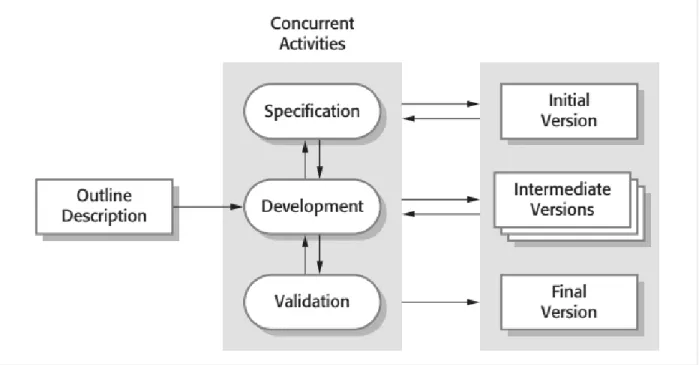
In an incremental model or an agile model, the development process consists of multiple small development lifecycles. In each of these lifecycles, an intermediate version of the software is developed, as shown in Figure 5. The software is step-by-step added with new features via these intermediate versions. The final product is completed when its features are fully added and validated.
As described, these development process models are different and have different number of total development lifecycles. The waterfall model and the spiral model have only one big development lifecycle but the incremental model has consists of multiple small development lifecycles. The position of the software integration is the same in each lifecycle in every development models. After the source code is developed and unit-tested, the next target is to integrate the compiled
source code with other related components with proper configurations. At this step, all components or subsystems will be configured to work together properly in order to create an operational system.
Figure 5. Incremental Model
2.2.2 Activities of Software integration
Software integration is the practice of combining individually tested software components into an integrated whole. There are serial activities in this process. First, software components are compiled and configured in order to be able to be combined to a designed sub-systems. This phase results in an integrated workable software subsystems. Insoftware developments with the waterfall model or the spiral model, the subsystems are configured properly to be integrated into the final product for further testing. With incremental models, the result of subsystems’ integration is the mini version of the product. This integrated product or the intermediate version is passed to the next step of the development life cycle, i.e. testing step.
The first issue is how the development process is planned for software integration. If the integration process in the development process is planned in details with instructions, the integration of software subsystems would be more efficient [RAMAMOORTHY ET AL,1992]. Decisions made in
the early stages of software development will have a tremendous impact throughout the development process as well as on the final product [RAMAMOORTHY ET AL,1992]. Therefore, we
must anticipate and take into account problems in the integration of software products.
Consistency management is another important issue in systems integration. Frequently, the main factor which influences the cost of integration is inconsistencies between different software modules. When utilizing reusable components, different design conventions may cause conflicting object representation. Many different forms of inconsistency may occur. The most common form is the inconsistency between modules or functional interfaces. For example, the module A uses wrong a wrong version of their dependent module B. The wrong version and the correct version of the module B have only different in the implementation logic which have different results. In this case, the module A is able to still integrate with the module B but the operating result of the integrated system will be wrong. Moreover, it is hard as well as time-wasted to find this kind of issue in the integration.
2.3 Modular applications
A modular software application, in contrast to one monolithic chunk of tightly-coupled code in which every unit may interface directly with any other, is composed of smaller, separated chunks of code that are well isolated. [BOUDREAU, 2007] showed that those chunks can then be developed by separated teams with their own life cycles and their own schedules. This is the key solution to develop and manage complexity of large software.
Modularity is a mechanism to coordinate the work of many people around the world, the manage interdependencies between their parts of the project, and to assemble very complex systems in a reasonably reliable way [BOUDREAU, 2007]. Since applications are growing in size and functionality, it is necessary to separate them into individual pieces (whether as “components,” “modules,” or “plugins”). Each separated piece becomes one element of the modular architecture. Each piece should be isolated and should be exported and imported through a well-defined interface.
However, decomposing an application into distinct dependent libraries creates a new challenge for software integration. It requires software integration to be performed in the right way in order to ensure independent parts really work together. Versioning, secondary versioning information, dependency management are commonly used to solve this challenge [BOUDREAU, 2007]. 2.3.1 Versioning
Each piece of a modular application has a version number—usually a set of numbers in Dewey decimal format, such as 1.34.8. When a new version is released, it has an increased version number, for example the version of a modular application released after the version 1.34.8 could be 1.34.10, 1.35.1, or 2.0. The other parts of a modular system can then declare their dependencies with a specific version. Most components will have some external requirements which are needed in order to compile and execute properly. For example, in Java programming, even if the dependencies on external libraries are minimized, every program depends on a version of Java framework in order to be able to be compiled and executed, i.e. JDK 1.5, JDK 1.6, and JDK 1.7. Using such dependency schemas to maintain external dependencies between components in a modular system can work only if certain rules are obeyed. The first rule is that if a new version is released, all contracts that worked in the previous version will work with the new one as well. This is backward compatibility. The second rule is that components need to accurately acquire all dependencies need from the underlying systems. For example, when a component change the version of one of its dependent module from 1.0 to 2.0, the 2.0 version should be provided and loaded when the component is compiled and executed. If the 2.0 version does not exist, the compilation and execution should be leaded to show error and to stop.
2.3.2 Dependency management systems
Although Versioning and Secondary Versioning Information are the best methods to use with modular applications, managing manually versions of thousands of dependent libraries would be a nightmare. This is where Dependency Management System comes to help. Dependency Management System makes sure all requirements of every piece in the system are satisfied. It can check at each piece’s install time that everything in the system remains consistent. Metadata about such dependencies is also useful at runtime. Such metadata makes it possible for an application to dynamically update its libraries without shutting down. It can also determine if the dependencies
of a module it is asked to dynamically load can be satisfied—and if not, it can describe the problem to the user.
However, even using a dependency management system, this is not enough in a large scale software development process [BABINET, 2008]. In a large scale process, many teams working together on the same release or shared features which usually is the reason causes problems with the wrong versioning. High-level of system complexity is another factor brings in in consistent versioning. In addition, development conflicts between teams and short, overlapped release cycles are also the sources leading to mistakes, issues in managing versioning.
In this case, CI is one of the key practices used additionally to manage dependencies and address the above challenges [BABINET, 2008].
2.4 Summary
In this chapter, the background knowledge of software integration was introduced, with a focus on its role in software development models. In the last part, the concept of modular applications is also mentioned. Properly understanding software integration and the concept of modular application is critical for developing successfully a software product in general. However, all the issues which we discussed in this chapter such as high-cost, error-prone software integration and accurate versioning management, require novel solutions. In the next chapter, the concept of CI would be introduced. CI brings us a new way to get rid of problems of software integration and module application concepts.
3. Continuous integration
3.1 Components of a continuous integration system
According to the background introduction to software integration, the integration phase is comprised of activities assembling a set of software components/subsystems to produce a single and unified software system. In general, this phase comprises 40% of development expenditures and is considered as an “integration nightmare” because of its error-prone and risks [ROYCE, 1999]. At this point, CI steps in as a practice to help to manage and solve these issues.
“CI is a software development practice where members of a team integrate their work frequently, usually each person integrates at least daily - leading to multiple integrations per day. Each integration is verified by an automated build (including test) to detect integration errors as quickly as possible. Many teams find that this approach leads to significantly reduced integration problems and allows a team to develop cohesive software more rapidly.” [MARTIN FOWLER, 2006]
Instead of having an “integration nightmare” when every software sub-component is implemented and integrated in one phase, the principle of CI practice is to have the software built whenever there are any changes against the software in order to verify and detect integration errors as quickly as possible. Software building is a process of compiling, testing, inspecting and deploying the integrated segments of source code in order to verify that the software works as a cohesive unit [STEVE MATYAS, 2007]. It is an important phase in the continuous software integration. Steve Matyas [2007] depicted a typical work flow in a CI system, as shown in Figure 6.
Figure 6.Typical workflow of CI system [STEVE MATYAS, 2007]
The essential components belonging to a CI system include:
Developers
Version control repository
CI Server
Build Scripts
Feedback Mechanism
These components would be introduced in the following text. 3.1.1 Software developer
A software developer has responsibility for developing software products. He takes a role in researching, designing, implementing and testing a software in different phases of a software development process. After researching and designing the target software, a developer would write code or in collaboration with other developers in his team to implement and testing his designed software. The source code comprises a collection files. New source code would be added or the old source code would be updated when the software developer tries to add new features or fixing
bugs in the software. The role of a software developer in a CI practice is to commit changes to source code as well as receiving feedback from CI system.
3.1.2 Version control repository
Any changes to the source code and other documents such as configuration files, images, etc, which are documented in the software development process are committed to the version control repository. Version control, also known as revision control or source control, is a system that records changes to a file or set of files over time so that a developer can recall specific versions later [GIT-SCM-2014]. Each change is identified by a unique number or code, named revision number.
In practice, a revision is stored and tracked by using a version control system (VCS). The core of a VCS is repository which stores information in the form of a file system tree—a hierarchy of files and directories [BEN COLLINS-SUSSMAN ET AL., 2014]. Every developer i.e. a source code client, connects to the repository and read or write changes to files in the repository, as shown in Figure 7.
Figure 7. A typical client/server system [BEN COLLINS-SUSSMAN ET AL., 2014]
A version control system forms a prerequisite for the practice of CI [STEVE MATYAS, 2007]. There are many quality version control systems such as Concurrent Versions System (CVS) [GREGOR N. PURDY, 2003], Subversion (SVN) [BEN COLLINS-SUSSMAN ET AL., 2014] and Git [TRAVIS SWICEGOOD, 2009], etc. In general, most popular CI systems support all these quality version control systems.
A CI server acts as a monitor to the repository. It periodically (usually few minutes) polls the repository for recent commits. If a change is detected, the CI server retrieves files of the latest revision from the repository and trigger a build. When a build is triggered, the build script which configured for that build is run on the CI server. After the build script execution completes, the build results are published on the dashboard of the CI server. A CI server is not a prerequisite for CI practice because we can write our own scripts to make a build manually whenever changes occur in the repository [STEVE MATYAS, 2007]. However it provides us benefits of reducing number of scripts that a development team need to write. There are many options of choosing a CI server on the CI server market, ranging from commercial products to open-source products. They are TeamCity4, Bamboo5, Jenkins6, Hudson7, CruiseControl8, etc.
3.1.4 Build scripts
The build script is a single script, or a set of scripts, that compile, test, inspect, and deploy software [STEVE MATYAS, 2007]. It is independent from CI and run by dedicated build tools. Some examples of such tools are Apache Ant9, GNU Make10, MSBuild11, etc. In addition, some building
tools also provide features like dependency management, and support multiple build script formats such as Apache Maven, Gradle.
3.1.5 Feedback mechanism
When an integration cycle is trigged by a change to the repository, the software is built. There is a need to deliver the result of this build to developers. The result of the feedback consists of the status of the reported build. When the build fails, debugging and logging information are included into the feedback. A feedback mechanism provides a way to deliver the result or feedback of the integration as soon as possible to developers in order to notify the developer to fix the problem as soon as it happens with the build.When many changes are submitted to the code repository, there 4 TeamCity: https://www.jetbrains.com/teamcity 5 Bamboo: https://www.atlassian.com/software/bamboo 6 Jenkins: https://jenkins-ci.org 7 Hudson: http://hudson-ci.org 8 CruiseControl: http://cruisecontrol.sourceforge.net 9 Apache Ant: http://ant.apache.org
10 GNU Make: http://www.gnu.org/software/make
would be many builds as well as many rounds of feedback to be delivered to developers. Therefore, feedback mechanism have must be chosen carefully to avoid spams. Commonly used feedback mechanisms include: Email, RSS, SMS, displays, etc.
3.1.6 General workflow
With all essential components of CI system to be explained above, the typical work flow of the CI is explained as below:
1. First, a developer commits code to the version control repository. Meanwhile, the CI server on the integration build machine is polling this repository for changes (e.g., every few minutes).
2. Soon after a commit occurs, the CI server detects that changes have occurred in the version control repository. The CI server retrieves the latest copy of the code from the repository and executes a build script, which integrates the software.
3. The CI server generates feedback by e-mailing build results to specified project members. 4. The CI server continues to poll for changes in the version control repository.
3.2 Benefits of continuous integration
Due to the key principle of CI is “build software at every change”, this practice brings the development teams values [STEVE MATYAS, 2007]. First of all, it reduces risks due to the continuous feedback from CI make problems be fixed sooner, the status of software is always visible. The automation of the CI system provides big values in reducing repetitive manual processes as well as generating deployable software at any time. It provides another benefit: enabling better project visibility. Because of the health of the software is always visible, the development trends can be predicted in order to make effective decisions in the development. All the described benefits would make development teams have greater confidence in the software product.
3.3 Continuous integration with Jenkins
Jenkins12 is an open source CI server written in Java. It was forked from Sun Microsystems project
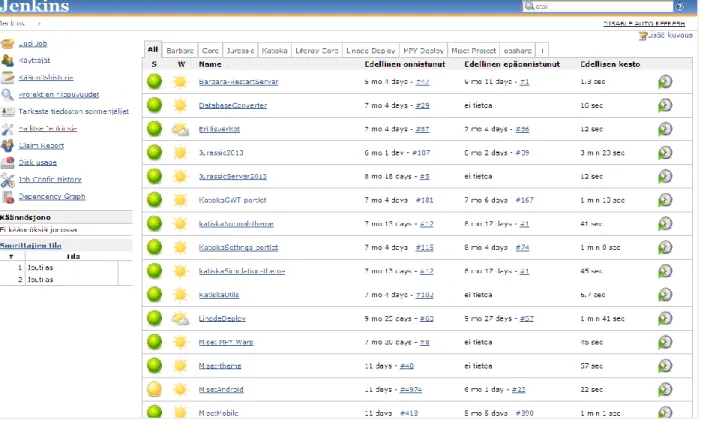
called "Hudson" in 2011 [BAYER ET AL., 2011]. Like the other CI servers, it supports all basic features such as VCS monitoring, running build scripts, etc. However, its ease of use and the plugin system make it stand out of its competitor. Jenkins has over 800 plugins [APPLE, 2008], and provides a variety of features such as the additional feedback mechanism, SSH connection supports, etc. It supports various version control systems, authentication methods, notification, workflow building, and many more features can be added. Recently, the community support of Jenkins is really strong and Jenkins has the fast development pace with the rapid release cycles. Build jobs are at the heart of the Jenkins build process. In general, Jenkins build job can be considered as a particular task or step in Jenkins build process. A build job may involve simply compiling source code and running unit tests. Or build job can be configured to do other related tasks, such as running integration tests, measuring code coverage or code quality metrics, generating technical documentation, or even deploying an application to a web server. A real project usually requires many separate but related build jobs. Build jobs are managed and shown in the Jenkins dashboard, as shown in Figure 8.
Figure 8. Jenkins Dashboard Example
In Figure 8, build jobs are listed in the center of the dashboard. On the left side of the dashboard is the menu which is used to create new build job, change general settings, checking reports, etc. In the build job list, each build job’s status is indicated by the icon on the left side of its name. Jenkins supports four build statuses, i.e. Stable, Unstable, Successful, Broken. The green ball icon show a successful build status, the yellow ball icon shows an unstable status (which means that the build job has done successfully, but having unstable build reports). The red ball icon shows a failed status.
A stable build is a build which was built successfully and no publisher reports it as unstable. An unstable build is a build which was built successfully and one or more publishers report it unstable. For example, if the JUnit publisher is configured and a test fails then the build will be marked unstable. A successful build is a build which is successful when the compilation reported no errors. A broken build or failed Build, is a build which failed during building.
4. Mobile application development
4.1 Mobile applications
A mobile application (app), is an application software running on smartphones, tablet computers and other mobile devices. Applications are usually downloaded from application distribution platforms. The first application appeared in 2008 when Apple’s App Store was opened [APPLE, 2008]. Some applications can be downloaded for free, while others must be paid for. Usually, they are downloaded from the platform to a target device, such as an iPhone, a BlackBerry, an Android phone or a Windows Phone, but sometimes they can be downloaded to laptops or desktop computers. With the booming of smartphones and tablets, mobile applications have been gaining more popularity in the consumer market with an incredible fast pace. Portio Research [2013] showed there were 1.2 billion people worldwide using mobile applications at the end of 2012. The growth rate is forecasted at 29.8 percent each year, and reaches 4.4 billions users by the end of 2017 [Portio Research, 2013]. Applications generated an impressive 12 billion dollar in full-year 2012, and in total 46 billion applications were downloaded in the year, taking the cumulative all-time total downloads since the application game began, to 83 billion.
Mobile application development is a process to develop application software for low-power handheld devices, such as personal digital assistants, enterprise digital assistants or mobile phones. On one hand, a mobile application is a software and mobile application development proceeds in the same way as other software development processes. On the another hand, because handheld devices has specific limitations and diversity on aspects such as limited battery life and processors, screen sizes, operating system, etc. mobile application development has specific challenges. In addition, the mobile market grows in a fast speed which also create new big challenges for mobile application development.
There are 3 types of mobile applications. The following sub-sections will describe these mobile application types in detail.
4.1.1 Native applications
A native application (native app) is an application program that has been developed for use on a particular platform or device. Each mobile platform has its own native programming language. The Android platform uses Java. The iOS platform uses Objective-C. The Windows Phone platform use, etc, Native applications requires its own development process and its own development languages and tools. The most advantages of native applications are performance and ability to access device’s hardwares such as the camera, accelerometer, GPS, etc. However, supporting multiple platforms requires maintaining multiple code bases and can result in higher costs in development, maintenance, pushing out updates, etc. Native applications are needed to published and downloaded from platform application stores, such as AppStore13, Play Store14, etc.
4.1.2
Web-based applications
Web-based applications or mobile web applications are referred to Internet-enabled applications that have specific functionality for mobile devices. They’re accessed through the mobile device’s web browser (i.e. on the iPhone, this is Safari by default) and they don’t need to be downloaded and installed on the device. Web-based applications are developed in a similar way as the traditional web pages development. They use HTML5, CSS3, JavaScript and server-side languages or web application frameworks of the developer’s choice. This is the reason why web-based applications are easy to develop and to support multiple platforms. However, accessing device’s hardware are limited due to the usage of mobile device’s web browser. In addition, when the mobile device is offline, web-based applications are inaccessible.
4.1.3
Hybrid applications
Hybrid apps, like native apps, run on the device, but are written using web development technologies (HTML5, CSS and JavaScript). Hybrid applications run inside a native container, and leverage the device’s browser engine to render the HTML and process the JavaScript locally. A web-to-native abstraction layer enables access to device capabilities that are not accessible in Mobile Web applications, such as the accelerometer, camera and local storage. This capability
13 Apple App Store: http://store.apple.com/us 14 Play Store: https://play.google.com/store?hl=en
allows hybrid applications to be able to work as a native application with full access to the device’s hardwares. Supporting multiplatform is easier than native applications. There is only one code base for each a hybrid application. The source code is written only with HTML5, CSS and JavaScript will be compiled and executable in all platforms. However, the development is required to use the 3rd party library like PhoneGap15, Titanium16, etc. Another disadvantage is the
performance of hybrid applications is not as good as native apps. The reason is hybrid applications uses javascript and native code are executed much faster than javascript code.
4.2 Mobile application development process
An application is simply a tool standing between a business and its clients. In one hand, it helps clients reach and interact with the business easily. In another hand, it helps business to satisfy its clients effectively. This is the reason why discovering and understand the target business is required before proceeding to development process. When we look at the end-to-end process of developing a mobile app, it comes down to a number of major things – from business discovery and development to deployment.
A mobile application starts by understanding business requirements. It is also considered as the idea generation and evaluation step [Zeidler, C. Et Al, 2007]. In order to gain a better perspective for the app, application initiatives, target users, and goals are questioned. A research need to be done to validate used technologies or concepts before committing to the next phase.
When requirements are collected and verified by the target business, making a mocking concept is the next step. Smartphones and tablets now have their own user experience guidelines and rules, i.e. same experience on different display sizes, quality touch interaction, etc. To align them with requirements, a proof of concept or an interactive visualization of the application is developed to demonstrate the major scenarios, and users interaction with the app. Feedbacks are then collected from customers after reviewing. Market research [Zeidler, C. Et Al, 2007] are also included in this step in order to gain practical usage experience of potential users of the application.
15 PhoneGap: http://www.phonegap.com
In this step, the implementation and testing process is proceeded. User interface design is developed to get a good idea of what clients need from the ‘look and feel’ point of view. Mocking concept is transformed to real user interface design which designed for many screen sizes with many different resolutions. The design is then being reviews by clients. As soon as the design starts, mobile developers set their works on building the app. Feedback gained from previous phases are used by mobile developers. The number of development iterations depends on how big the project is. The release of each iteration is reviewed by clients. Any additional features or functionality are needed to review and plan to develop.
Testers work with checklists, specifications and wireframes created at the earlier stages. The applications are tested on many different devices on target mobile platforms such as iOS, Android, Blackberry and Windows to ensure user experience, features, and look-and-feel are maintained and performed correctly. Once the application is ready and results are approved by clients, the application will be finally released it to application stores or application marketplaces.
4.3 Challenges for mobile application development
ALI MESBAH ET AL [2013] conducted broad interviews and a survey about mobile application development challenges from the perspective of mobile application experts and mobile development groups. The goal of the study is to gain an understanding of the practices and challenges in mobile application development. In this study, 12 experts from 9 different were interviewed and the survey was fully completed by 188 respondents companies from 23 countries. The study result showed the list of challenges for mobile development.
4.3.1 Fragmentation rather than unification - multiple mobile platforms challenge As it stands, there are four major development targets. They are iOS, Windows Phone, Android and Blackberry. Each of the native frameworks comes with certain expectations and a user base. BlackBerry is often used in government, whereas the iOS and Android user base is far more widespread. Windows Phone hasn’t necessarily hit its stride yet [JETT McWHETHER, SCOTT GOWELL, 2012]. iOS, the technology that is running on Apple mobile devices, uses Objective-C as the base programming language. The Android framework, on the other hand, is written in Java, and can be developed using any Java tool. Like Android, the BlackBerry device framework is also written in Java. Windows Phone and its framework sits on top of the Microsoft’s .NET Framework.
The language of choice is C#. It also has the limitation that the Microsoft Windows Phone tools run only on Windows [JETT McWHETHER, SCOTT GOWELL, 2012.
The result from [ALI MESBAH ET AL., 2013] showed that 76% of their survey participants agree the existence of multiple mobile platforms as a challenge for developing mobile applications and more than half of the participants mentioned that mobile platforms are moving toward fragmentation rather than unification:
o Fragmentation across platforms: Each mobile platform has differences with the user interface, user experience, Human Computer Interaction (HCI) standards, user expectations, user interaction metaphors, programming languages, API/SDK, and supported tools.
o Fragmentation within the same platform: devices on the same platform exist with different properties such as memory, CPU speed, and graphical resolutions, operating system level. Android devices is the clear example for this kind of fragmentation. The diverse versions is the cause of Android fragmentation. Frequent upgrades or enhancements in Android operation system makes the problem much more serious. OS fragmentation problem has been resolved as a result of reduction of old version devices, updated Android adjustment and ensured goggle’s update as well [Hyung Kil Ham et. Al., 2011]
The device fragmentation causes challenge for not only development but also for testing [ALI MESBAH ET AL., 2013] because developers need to test their applications against different OS versions and screen sizes to ensure that their application works.
4.3.2 Challenges in monitoring, analysis and testing support
When testing a standard PC application, a test engineer does not have to test it to make sure it runs as well on a Dell as an HP as a Lenovo. The PC industry has standardized the hardware to an extent that there isn’t a concern. Similarly, there used to be dramatic differences across Internet browsers so testers had to code in a certain way and customize for different platforms. With mobile, however, there is a much broader variety of mobile devices. While there may be two dominant operating systems – iOS and Android™ –there are far more device types and form factors on which mobile applications must run. For testers, there isn’t an assurance that an application that runs as
intended on an iPad® will run the same way as on a Samsung Galaxy S III. An application running perfectly on iOS 6 cannot promise to will also run flawlessly on iOS 7. The application must be tested in each instance [Mobile Labs, 2013].
One of main challenges is native mobile applications is lacking automated testing support tools. Also, current tools and emulators do not support important features for mobile testing such as mobility, location services, sensors, or different gestures and input [ALI MESBAH ET AL., 2013]. Mobile web applications are particularly challenging to test. Not only do they have many of the same issues found in testing web applications, but they have the added issues associated with transmission through gateways and the telephone network [ANTHONY I. WASSERMAN, 2010]. 4.3.3 Challenges in designing and implementing
The interviews and survey of the study also showed mobile application developing experts have been struggling with the challenge in designing and implementing [ALI MESBAH ET AL., 2013]:
• Open/Closed Development Platforms
The closed source platforms such as iOS and Windows, do not have enough API but developers can not add them by their own. When a developer has a problem with the API, she cannot do anything but reporting the bug and waiting for companies to fix that bug in the API. A developer will have to find ways to work around the project or needs to wait until new API is released. However, Android is an open source platform, developers can change the code but sometimes API does not stick to standards. When problem occurs in the API, a developer does not need to wait for next API release. She just need to download the source code of the platform and fix the API or add new API herself. At this point, the API does not stick to any predefined standards if that developer does not want to follow in her modified code.
• Data Intensive App
Mobile applications are different to traditional application due to they are designed to be used intensively when people moves. They have the need to use applications to update
information anywhere they go. However, there are variety of network connection type supported in mobile devices, i.e. 3G, WIFI, and Bluetooth, etc. They are used and switched regularly when a user moves. Applications are needed to design to handle this issue carefully. In addition, the storage of mobile phone has limitation comparing to PCs or Laptops, operations such as saving or caching data on the mobile application need to be performed effectively. Therefore, too much data relied on network connection or offline caching is challenging when developing apps.
• Keeping Up with Frequent Changes
One type of challenge mentioned by many developers is there are more and more languages and APIs for the various platforms. Remaining up to date with highly frequent changes within each software development kit (SDK) is hard. It requires developers to change their code-base faster in order to provide their user quality apps.
In this chapter, the mobile application development was described in order to understand the general view of types of mobile applications as well as the current development challenges. This understanding along with the knowledge of CI process gained in Chapter 3 would be together applied in the case study in the next chapter. Chapter 5 would content the detail about how concepts and knowledge are combined in a real-life project in order to make better mobile application development process.
5. Case study
In this chapter, the case study is introduced in detail in order to show the way to improve mobile application development process by applying concepts and knowledge if the CI practice.
5.1 Introduction to the case
Observis Oy is a company specialized in developing solutions for smart application services. The company provides software solutions targeting for web applications and mobile applications. Most of the applications were developed by using Java. For mobile application development, the company uses PhoneGap framework17 as a cross-platform mobile solution for releasing application
for three main platforms: IOS, Android and Windows. Because of the desire to provide quality applications for customers and to get better revenue, Observis Oy has always been looking for new ways of improving their software development practice to develop quality applications in shorter time and with less working resources.
After 4 months working as summer trainee in Observis Oy in 2012, the author had chances to experience with the company’s software development practice. The author participated in developing a multi-platform mobile application for the Jurassic Rock18 event in Mikkeli. This
application is a map-based application which has the client-server architecture. The team developed this application from the scratch.
The product was delivered successfully to the client. The project and the development practice was reviewed by the author. The following issues were identified for discussion.
Issues in integrating dependent modules
A mobile application consists of many smaller modules. The way to develop and manage these modules affects the overall performance of the project development. In the Jurassic Rock project, Apache Maven19 was used as the dependency management tool and build
tool to let developers share dependent modules. Although every module was applied to use Apache Maven, the development process was not effective. Modules were developed
17 Phonegap: http://www.phonegap.com 18 Jurassic Rock: http://www.jurassicrock.fi/site/
separately by developers. Steps such as compiling code, running tests, and deploying workable artifacts to Maven repository are handled manually by every developer. Another big issue was, in order to have the latest artifact of module being developed by other developers, a developer had to download source code, compile and build the artifact himself. Alternatively, he can ask other developers to do for him. Module versioning results in inconsistent which caused difficulty in module integration. These issues caused wasting a lot of development time and high error-prone for integrating dependent modules.
Issues in integrating mobile applications and server systems
The project used PhoneGap as the cross-platform mobile development framework. The application is designed with client-server architecture. However, the application on each platform requires to be built separately. The build was performed manually. The configuration for the application to run against the production server or the development server was also changed frequently and manually for each request from the project client. The ask-for-new-build issue happened regularly throughout the project. When new build is asked, developers manually compile, change proper configurations and build the application. This manual process not only takes long time to complete but also is error-prone. Meanwhile, the status of the application is not always visible to developers and project managers. The server modules were also handled manually.
Issues in testing and previewing app
The application server is required to enable the application to run properly. However, the application server is located at developer machines which were not always on and not able to be reached from outside the office. There was no development server so that in this case production server was the only option for testing the application which was so risky. The issues in building the application also raised the difficulty to test and preview the application by clients. There was not used to have a daily-build version in the project but a weekly build version.
After identifying the issues the company had in the Jurassic Rock project, the author proposed to apply CI practice to improve the efficiency in mobile application development practice. The target of the CI application is firstly to provide software build automation to remove the issues in
integration. Better version management is added and guaranteed. Automated testing, such as unit tests and acceptance tests, is provided for mobile application’s service and client side. Integration application server is supported for better acceptance tests and application preview. Finally, automated deployment makes the release process easy.
5.2 Case study design
The case study was approved by Observis Oy to be applied in the company’s next project, i.e. Mappini. Mappini is the product designed to help citizens and travelers to find area services conveniently from one location via web interface or mobile application. All services of an area are gathered into the Mappini service, especially the groups of travel service. Mappini obtains user feedback and reports from user data, which allows for the area to develop its services according to citizens’ and travelers’ needs. The Mappini project has much bigger workload than the Jurassic Rock Application project due to many features, complicated application user experience and intensive server communication. However it has the same project developing time which is 4 months.
The whole development process was systematically reviewed and analyzed. For each development process task in the last project, the author counted the number of steps needed to be performed in order to have the task completed. These statistic data was then recorded. For example: the task “Deploying artifact to Maven repository” required 4 steps, i.e. compile code, run test, deploy artifact to Maven repository and commit code to SVN
The similar statistic data would be recorded for the new development process where CI is applied. Eventually, these statistic data would be compared together in order to achieve the quantitative information about how these development processes are different.
The plan for applying CI practice into the Mappini project wat set. It comprises three phases, as below.
Setting up a CI environment
In this step, the author collaborated with other developers to transform the old code base to the new architecture using the CI practice. In the new code base, all hard-coded configurations are removed and separated to external files. The new code modules are
designed to followed the new architecture which helps developers to add new modules and to run unit tests. A testing server is also added.
Setting up an integration server
After all code modules were migrated to use new architecture, the author setups the Jenkins integration server. After this step, all code modules are step-by-step configured to integrate with Jenkins. During integrating time, other developers would be received help from the author to get knowledge to work properly with Jenkins. The completion of this step also means CI is fully applied.
Finalizing case study
The new statistic data would be collected and the result of the case study is analyzed.
5.3 Implementing Process
5.3.1 Setting up a continuous integration environment
Apache Maven (Maven) is a project management tool which encompasses a project object model, a set of standards, a project lifecycle, a dependency management system, and logic for executing plugin goals at defined phases in a lifecycle. Maven is a popular open source build tool for enterprise Java projects, designed to take much of the hard work out of the build process. Maven uses a declarative approach, where the project structure and contents are described, rather than the task-based approach used in traditional make files. In addition to providing build capabilities, Maven can also run reports, generate a web site, and facilitate communication among members of a working team. Because Java is the main programming language used across projects in the company, Maven is used intensively to gain convenience and productivity in building and managing project modules.
Figure 9 Architecture of Seutuhaku App
In this phase, the old code modules were migrated with the new architecture. The new modules are initially designed to use the new architecture. Figure 9 presents the architecture of the Seutuhaku App. At the client side, the mobile application was developed with Java language using Google Web Toolkit20 (GWT) framework. The Gwt project is compiled to Html and JavaScript
files which are the input for PhoneGap framework to build a mobile application package for mobile platforms such as Windows Phone, Android, and Apple IOS. These multi-platform mobile applications shared the same compiled code to communicate to the server side which was developed by using Liferay’s Java -Portal. Both the client side and the server side were developed using Java language, and they share common dependent modules for communication. Client side modules and server side modules need to be mavenized in order to make modules to be easily built and shared across the project. This setup was also the foundation to apply CI into the project’s development practice in next step.
Also, the test server was setup. The environment where the test server was configured to use, was almost identical to the production. The database was installed and populated with all data except sensitive data from the production server. All server side modules were installed and deployed to the test server. The target of the test server is to act as test object of the integration test and acceptant test performed by testing engineers.
5.3.2 Setting up an integration server
At this point, the CI environment was setup successfully. Project modules was configured to work with Maven and their source code was committed and stored remotely on the company’s version control system: Apache Subversion. The integration server was then installed and planned to be configured. The integration server that the company uses is Jenkins. For each project module, the following 2 steps were performed to create a complete build job. They are creating a build job and configuring a build job.
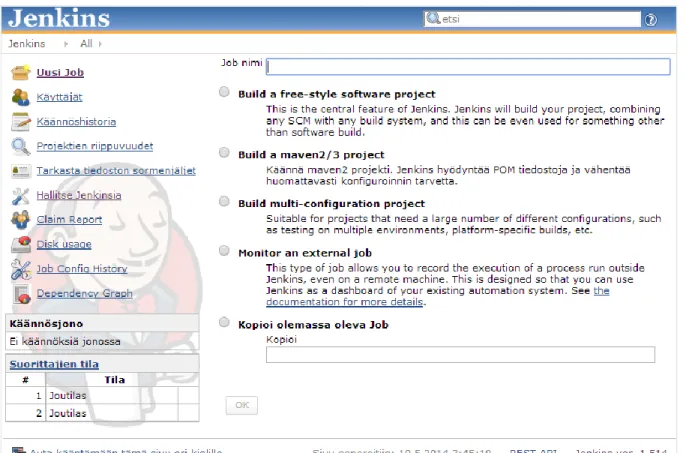
A new build is created by selecting the “New Job’ link on the Jenkins dashboard. Figure 5 shows in details all options Jenkins offers to create a new build job. There is an option for creating a build job for Maven project or multi-configuration project. In Observis Oy, a build job is usually created with a free-style-project option which offers the most flexibility in configuration or copy-from-exist-job option which is really fast to create a new job for modules being similar to each other.
After the build job is created, configurations should be done for the build job in order to make it workable such as VCS configurations, build trigger configuration, configuring build environment, build script configuration, configuring post build.
VCS Configurations
Because each build job is dedicated for a single project module, the module VCS should be specified in order to know where to download the latest source code of a module. Figure 11 shows the build-job repository URL was configured to use the relating SVN repository. The Check-out strategy was set to “Always check out a fresh copy”, which means to delete everything used previously before retrieve code. This action ensures the code is always be the latest code from the repository.
Figure 11. VCS Configurations
Build trigger configuration
Specifying the way to trigger a new build for the job. There are options such as building after other projects are built, building periodically or poll the VCS with interval time to detect change then triggering a build, as shown in Figure 12. In Observis Oy, a polling-every-5-minutes method is chosen for every build job. It helps to regularly short-time check and trigger build whenever having new changes to the source code.
Figure 12. Build trigger configuration
Configuring build environment
Each project module has its own predefined configurations such as database connection string, remote server link, etc. These files are created and stored in Jenkins. And these configurations change for different working environment such as a test environment or a production environment, etc. Figure 13 shows the setup for the server endpoint configuration in the MisetMobile module. The author created serverConfig.js configuration file which contains predefined hosts for the mobile application to communicate. When the build run, this configuration file would copy to or replace the configured target file path. Eventually, when the build is successful, the artifact of the build would contains the correct host configurations. In future, the host of the test environment or production environment are changed, we just need to use Jenkins update serverConfig.js configuration file. This action is easier and more secure than to store and update every sensitive server information directly in the code repository.
Figure 13. Configuring build environment
Build script configuration
Specifying scripts to be executed whenever a build is triggered. Because almost every module was mavenized, build scripts are quite simple. Addition scripts can be added here for actions doing after the previous scripts succeeded, such as copy and deploy artifacts to test web server, etc (Figure 14).
Configuring post build
This is an important configuration because whenever a build succeeds, there is a need to gather build artifacts, or trigger other build jobs belonging to a build chain. For example, Figure 4 shows the PhoneGap module is depend on the Mobile Gwt Module in order to create mobile application packages for different platform. Therefore, developers in Observis Oy created a build job for Mobile Gwt Module and another build job for Android PhoneGap module (Figure 15). The one of post build actions of the Mobile Gwt Module is that whenever the build is successful, it would trigger to build the Android PhoneGap module. In this case, Android PhoneGap module is triggered and already configured to retrieved compiled Html and Javascript files from the latest successful Mobile Gwt Module build to create an Android Application package to deploy it to Test Server for testing and reviewing. This is one of many build chains the company configured in their Jenkins. Another configuration in this session is to specify the feedback method whenever a build fails.
Figure 15. Configuring post build
After all the modules have their build jobs created and configured properly in Jenkins, the CI workflow of the Seutuhaku Application development is depicted in Figure 16. The company’s
developers write and commit their source code to the center Subversion server. Jenkins build jobs were configured to poll the Subversion server to check changes for every 5 minutes. If a build job detects a change occurring against their SVN repository then a build is triggered. If the build fails, an email notification would be sent to the one who made the changes as well as other registered developers who has responsible to fix or manage the issue. If the build is successful, post actions would be executed right after. The build job which was created for a mavenized project module would deploy new version of a snapshot library (Jar file) to Maven Repository for other build jobs in the current build chain referring to or developers to download and use in their development. A build chain would be triggered if it was defined. If build job is for another module type, it would be depend on the configuration to do further. For example, a build job for Android PhoneGap module would create an Android package (apk) and then deploy it to Test Server so everyone in the company or registered clients can download and use for testing and previewing the latest version. A build job for a web module would create an Web Package (War File). The package is then automatically deployed to the Test Server. This automation makes testers always have the latest version of web application to test and mobile applications have the latest version of web application APIs to communicate to. These continuous updates make the mobile application and web application have their status be always visible for the developers, tests, project managers and clients. Eventually, when build jobs are stable and ready for releasing to production environment, a release-to-production build job would be triggered manually by the project manager to copy and deploy all stable configured packages to production server.
5.4 Results of the continuous integration application
5.4.1 The continuous integration practice in the case studyThe application of CI practice into the development of the Seutuhaku Application pivoted the manual development process to the automated development process. The new development practice cut off significant steps in most common development tasks. A comparison of the development practice before and after applying CI is given in the tables below.
Before After Process
Improvement
Compiling code, running tests, and deploying workable artifacts to Maven repository are handled manually by developers.
4 Steps:
1. Compile code
2. Running test
3. Build and deploying artifact to maven
4. Committing code to SVN
SVN repository is automatically checked frequently to trigger related build job to do compiling, running tests and deploying workable artifacts to Maven repository. Only 1 Step:
1. Commit code to SVN
Remove 3 steps
Review
The automation process removes all the previous manual steps such as compiling, testing, building and deploying. Therefore, developers are more productive and more focus on developing code and teamwork.
Before After Process
Improvement
Latest artifact of modules being developed by other developers, developers had to download source code then compiling and building artifact themselves or to ask other developers to do for them
3 Steps:
1. Checkout or update latest code
2. Compile code
3. Build the artifact to use
Latest artifacts are now automatically deployed to Maven repository so developers can download and use in their development whenever they need.
1 Step:
1. Download latest artifacts from maven repository to use
Remove 2 steps
Review
New module artifacts are automatically deployed and are available for all developers after each successful build. The new process enable developers to have a better teamwork and to save developing time.
Before After Process
Improvement
PhoneGap modules needed to be built manually whenever occurring changes in their dependent modules.
4 Steps:
1. Update changed code of dependent module to SVN
2. Build artifact to maven repo
3. Rebuild PhoneGap module
4. Achieve PhoneGap artifact
The automated build chain designed for PhoneGap modules enabling PhoneGap modules built whenever occurring changes in their dependent modules.
2 Steps:
1. Update changed code of dependent module to svn
2. archieve PhoneGap artifact from Jenkins
Remove 2 steps
Review
Manual building steps for PhoneGap modules are removed. Instead, the new fully automation process help developers to not spend any affords on doing these things.
![Figure 1. Conventional Development Process [ROYCE, 1999]](https://thumb-us.123doks.com/thumbv2/123dok_us/9096896.2402606/10.918.111.816.105.462/figure-conventional-development-process-royce.webp)
![Figure 3. Waterfall Model [ROYCE, 1999]](https://thumb-us.123doks.com/thumbv2/123dok_us/9096896.2402606/11.918.265.653.724.1034/figure-waterfall-model-royce.webp)
![Figure 4. Spiral Model [BOEHM, 1988]](https://thumb-us.123doks.com/thumbv2/123dok_us/9096896.2402606/12.918.176.745.213.700/figure-spiral-model-boehm.webp)
![Figure 6.Typical workflow of CI system [STEVE MATYAS, 2007]](https://thumb-us.123doks.com/thumbv2/123dok_us/9096896.2402606/18.918.112.818.107.498/figure-typical-workflow-ci-steve-matyas.webp)
![Figure 7. A typical client/server system [BEN COLLINS-SUSSMAN ET AL., 2014]](https://thumb-us.123doks.com/thumbv2/123dok_us/9096896.2402606/19.918.372.544.598.793/figure-typical-client-server-system-ben-collins-sussman.webp)